-- -- -- --
-
- - - -
-
----
-
---- ----
-
---- ---- ---- ---- ----
- - _
.
-(
SC21-7804-1 S5280-28
IBM 5280
Distributed Data
System
,
•
•
=== -:-:.
==
=-
SC21-7S04-1..
= ::-:. :::
~ - - 55 280-28---
-~-.-IBM 5280
Distributed Data
System
DEI RPG User's Guide
Preface
This manual is intended as a guide to programming techniques that facilitate your use of DE/RPG. The IBM
5280 Introduction to Df/RPG should be read first. For details about the syntax of the language and specific details about its functions, see the IBM 5280 Df/RPG
Reference Manual.
This manual has seven parts. Chapters form specific descriptions within each part. It is recommended that the first time you use this manual, you read it from front to back. Thereafter, you may want to use the index or table of contents to locate a specific subject.
Second Edition (June 1981)
Program listings have been included to illustrate various functions. Symbolic displays and diskettes have been provided to demonstrate what appears on the displays and what appears on the diskette data set.
Note: This manual follows the convention that he
means he or she.
This is a major revision and obsoletes SC21-7804-O and incorporates SN21-8195. Because the changes and additions are extensive, this manual should be reviewed in its entirety.
Changes are periodically made to the information herein; these changes will be reported in technical newsletters or in new editions of this publication.
This publication is for planning purposes only. The information herein is subject to change before the products described become available. Also, this publication contains examples of data and reports used in daily business operations. To illustrate them as completely as possible, the examples include the names of individuals, companies, brands, and products. All of these names are fictitious and any similarity to the names and addresses used by an actual business enterprise is entirely coincidental.
Use this publication only for the purposes stated in the Preface. It is possible that this material might contain reference to, or information about, I BM products (machines and programs), programming or services that are not announced in your country. Such references or information must not be construed to mean that I BM intends to announce such I BM products, programming, or services in your country.
Publications are not stocked at the address below. Requests for copies of IBM
publications and for technical information about the system should be made to
your IBM representative or to the branch office serving your locality.
•
INTRODUCTION • . . . • . . How to Use the IBM 5280 DE/RPG Manuals How to Read the Listings in this Manual
PART 1. CREATING DATA SETS .
CHAPTER 1. CHARACTERISTICS OF DATA-ENTRY PROGRAMS THAT USE TRANSACTION FILES . . . Modes of Operation Available for Programs Using
Transaction Files . . . . Manual Selection of an Operating Mode. . . . . Automatic Selection of the Correct Format for the
Manually Selected Mode . • • • • • • • • Key-Initiated Modes. . . . Program Functions Used with Transaction Files . . . Special Job Functions for Use with Transaction Files
Manually Copying Records for Programs Using Transaction Files. . . . How the Usage Column Entries Affect Programs Using
Transaction Files . . . .
CHAPTER 2. CHARACTERISTICS OF APPLICATION PROGRAMS THAT USE SUBROUTINES ON THE
C-SPECI FICA TI ONS •• • • . • • . • . . . • .
Execute Mode-The Only Mode Available For Use With Application Programs . . . . Organizing Data in Data Sets Using a Background
Program . . . .
Controlling Data Set Update Through Subroutines Controlling the Input/ Output Devices
Controlling the Display
Controlling the Diskette . . . . . Accessing Communications
Combining Data-Entry and Background Programs
PART 2. FORMATTING DATA FOR DISPLAYS AND DISKETTES . . . .
CHAPTER 3. CONTROLLING DISPLAY AND DISKETTE FORMATS VIA THE Z-SPECIFICATIONS • . • . . . • Samples Showing Various Types of Entry Format
Specifications . . . . Samples Showing Various Types of Review Format
Specifications . . . . Using the Z-Specification to Control Diskette Formats
For a Transaction File . . . .
CHAPTER 4. CONTROLLING DISPLAY AND DISKETTE FORMATS VIA THE C-SPECIFICATIONS •
Calling Subroutines From the Z-Specification . Calling a Subroutine From the A-Specification
• v
· v · vi
1 13 16 16 18 20 22 22 22 25 27 31 32 35 37 37 40 42 43 47 49 50 54 61 65 67 70
Contents
CHAPTER 5. FORMATTING TECHNIQUES FOR THE
DISPLAYS. 73
Using Different Display Formats For Entry and Review
Modes 77
Using the Position Columns to Create Prompting
Text 79
Using the Display Attributes to Facilitate Entry 82
Using EDTCDE With Display Formats 86
Using CLRL and SLNO to Display Multiple Records 88
CHAPTER 6. FORMATTING TECHNIQUES FOR THE
DISKETTE DATA SET 91
Merging Fields From Multiple Records 92
Positioning Fields Within a Data Set . 95
Converting Numeric Data 97
PART 3. USING INDICATORS 99
CHAPTER 7. USING INDICATORS FOR DATA-ENTRY
PROGRAMS. 101
CHAPTER 8. USING INDICATORS FOR APPLICATION
PROGRAMS. 105
Operations that Set Indicators and Operations
Conditioned by Indicators 106
A Sample of Using Indicators With I/O Operations 107
A Sample of Using Indicators with Arithmetic Operations . 110 A Sample of Using Indicators with Branching Operations . 113
Complex Use of I ndicators on the C-Specifications . .114
PART 4. ACCESS METHODS . 117
CHAPTER 9. SEQUENTIAL ACCESS METHODS 123
Sequential Access of Nonkeyed and Nonindexed
Data Sets. 124
Sequential Access of Keyed and Nonindexed Data Sets 126
Sequential Access of Indexed Data Sets 127
CHAPTER 10. DIRECT ACCESS METHODS . 129
Direct Access for Nonkeyed and Nonindexed Data Sets 129
Direct Access For Keyed and Indexed Data Sets 130
PART 5. DATA TABLES 135
CHAPTER 11. USING DATA TABLES IN DATA-ENTRY
PROGRAMS. 137
Considerations About Declaring Indexes 137
Arranging Data in Tables . 139
Arranging Tables in Data Sets 141
CHAPTER 12. USING ARRAYS IN APPLICATION
PROGRAMS. 143
Using LOKUP on the C-Specifications . 143
Using ARRAYNAME,INDEX as Fields. 144
Using the MOVEA Operation. 145
PART 6. PRINTING . . . . 147
CHAPTER 13. UNFORMATTED PRINTING FOR
DATA-ENTRY PROGRAMS . . . . . . . 149
CHAPTER 14. FORMATTED PRINTING FOR
APPLICATION PROGRAMS . . . . 151 Designing a Print Data Set to be Used with an
Existing Form . . . 154
Designing a Print Data Set That Designs the Form
to be Used . . . 162
PART 7. USING CALCULATIONS . . . . . 167
Using Named Fields in Calculations 168
Using Counters in Calculations . . . . . 170
PART 8. CHAINING FROM JOB TO JOB . . . . . 173
Using EOJ on the Z-Specification . . . 173
Using a Constant Name to Select the Next Program 174
Using a Variable Name to Select the Next Program 175
GLOSSARY. . . . . 177
APPENDIX A. A-, Z-, AND C-SPECIFICATION FORMS. . 179
Before beginning this manual you should have an understanding of the following:
• The relationship of the various DE/RPG manuals
• The listings used as samples in this manual
Each of these topics is described in the following text.
HOW TO USE THE IBM 5280 DE/RPG MANUALS
Three manuals have been provided to describe the DE/RPG (data entry with RPG subroutines) program product. The following list indicates the audience for which each manual was written, an overview of the manual contents, and a set of objectives for each manual. Review this list before beginning to use this manual to determine which manual provides background necessary for your understanding of the subject.
IBM 5280 Introduction to DEjRPG, SC21-7803. The audience for this manual is anyone who is either unfamiliar with data entry or with this program product and who needs to understand the data-entry functions of the program product. The manual takes the reader through the entire process of creating a simple data-entry program (beginning with designing the displays to be used and concluding with using the program to enter data). A second data-entry program is included to help the reader understand some of the more advanced data-entry functions provided. The most complex subject that is included in the manual is the use of tables. The objective of the manual is to familiarize an inexperienced user with some basic data-entry functions and operations provided by DE/RPG and to provide the user with enough information to allow him to create a basic DE/RPG program. The manual does not contain any information about the calculation specification operations available with DE/RPG.
IBM 5280 DEjRPG User's Guide, SC21-7804. The audience for this manual is a person who has some knowledge of either DE/RPG or of programming concepts (preferably one who has used another program language). The manual describes characteristics of the language and illustrates how its functions can be applied to typical business applications. The topics progress from the simple to the complex. The objective of the manual is to provide the user with an understanding of how DE/RPG can be used to solve
business-related problems. Since some of the more powerful functions provided with DE/RPG are the result of combining operations, another objective of the manual is to describe some of these combined operations and to show how they can be used.
Introduction
The User's Guide has been organized to allow you to find the specific topic you need. There are seven parts within the manual; each part is marked by a title page. When you read the manual for the first time, read through all the parts to understand the organization of the program product and of the manual. Once you are familiar with the product, you can refer directly to the specific descriptions you need. The User's Guide is written to present topics related to the DE/RPG program product; therefore, it does not include information about operating the system. For this type of information, see the IBM 5280 DE/RPG Reference Manual, SC21-7787, the IBM 5280 Operator's Guide, GA21-9364, and the IBM 5280 System Concepts manual, GA21-9352.
IBM DE/RPG Reference Manual, SC21-7787. The audience for this manual is all users of the DE/RPG program product. The content of the manual includes detailed descriptions of the characteristics, functions, and operations provided by the program product. The objective of the manual is to provide all the information required for the user of the program product to code and debug programs.
HOW TO READ THE LISTINGS IN THIS MANUAL
To help you learn how to effectively use DE/RPG, this manual includes actual program listings. These listings merge statements from the Z-, A-, and
C-specifications. They do not include column numbers or column heading information. If you need to determine the location of a specific entry on the listings, use the back of the Z- and A- specifications included in Appendix A to locate the column number and then match that column number on the listing with the appropriate description on the back of the specifications. The top markings on the backs of the specifications match the characters on the listings. The bottom markings on the backs of the specifications should not be used for reading the listings in this manual.
The following example illustrates how to use the listings and specifications in the manner described:
1. Place the top of the Z-specification (back side) under the Z-specification line in question. Align the leftmost side of the listing with the leftmost character mark on the specification.
2. Locate the column number that identifies the character(s) you want to identify (in this example, the characters are H2)
II.
3. Match the column number with a column number heading on the back side of the specification
II.
The description explains the entr{.Note; The C-specification does not have descriptive information. To determine the meaning for a particular column entry, find the column number in the manner previously described and use the DE/RPG Reference Manual to locate the column number heading and its description.
•
0000lZ*********************************************************.*********~
00002Z* PROGRAM 77.
00003Z*****************************************.*·*·*.******.***.********~
00004ZJ COUNTEX TFILEcDISKEll
00005Z
H2EXMPLE iE00006Z R H2
I'
I I I I I I I III I I I I I I I IIII I I I I I I I II I I I I I I I I II I I I I I I I I II I I I I I I I I II I I I I I I I I II I I I I I I I I1·10 11·20 21·30 31·40 1141.50 51·60 61·70 71·80
1-5 Identifies the source statement order. 31-32 Reserved. 6
7
8-9
10-17
Identifies the type of source statement. Names the type of source statement:
--User comment
J-Job specification blank-Format specification
The identification associated with this format: 1 through 9-A single numeric character 10. AO through Z9-A two-character 10 consisting of an alphabetic character followed by a numeric character.
The narne used to:
- identify the job (J in column 7).
- identify the format or subroutine (blank in column
7).
Th .... columns are not used if column 21 contains an
R.
18-19 Reserved.
Not.: Columns 20-54 are not used if column 7 contains a J. 20 Specifies the number of times the format is repeated
before the next format is used:
1 through 9-Repeat the format for the specified number of times unless the SEL FMT or NEXT FMT key is pressed.
blank or N-Repeat the format until the SEL FMT or NEXT FMT key is pressed.
21 Specifies how the format is used: E-(Entry) used to enter and display data.
R-(Review) used to select a format for scan, update, or verify of existing records.
22-37 Used for logical selection of a format. Multiple tests are allowed. In enter mode, the format selected is used to format the next record entered. In review
mode, the format selected ia used to display the
current record.
22 In review mode (column 21 contains an R), an A specifies the lllHiing of two characters in the data
record to create a unique record identifier.
23-30 -POSnnnn identifies the position in the data record to be tested, where nnnn is a numeric value from 1
to 1024.
33-34 The characters EQ or blank when a character to test for is specified in position 35-37.
35-37 Specifies the character that controls format selection if it matches the character in the data record.
38-44 Reserved.
fJ
45-46 Specifies the identification of the format used for the entry or display of the next record. If columns 22-37are specified, the format is selected when a match occurs. If columns 22-37 are not specified in enter mode (E in column 211. the format is selected when the repeat count (column 21) is met or the NEXT FMT key is pressed. If columns 22-37 are not specified in review mode (R in column 211. the format is selected if no previous match occurs.
47-54 Reserved.
55-80 Keywords that specify information used for jobs or formats:
JOB sPIICificBtions (J in column 7):
CFILE (data setHncludes the COpy function in the job. The parameter data set is the data set name from which records will be copied.
OATE(-OMY/-YMO)-The format of the date available in UOATE. The default is -MOY. where M =
month, 0 OK day, and Y = year.
EOITC(cuptd)-Five characters that define the editing control for output fields, where'
- cu is a two-character currency symbol (default
= "$)
- p is the decimal point character (default = .1.
- t is the thousand separator character (default = ,I.
- d is the date separator character (default = I).
The system default for this option is "$ . .1 if EOITC is not specified.
ENTRATR (attr ... )-Specifies the attributes that are applied to all input/both fields only when the fields are being entered, where attr is:
BL (blink)
CS (column separators) HI (high intensity) NO (nondisplay) RI (reverse image) UL (underline)
A combination of attributes can also be used. EXITATR (attr ... )-Specifies the attributes that are &pplied to all input/both fields after the fields have been entered. See the ENTRATR for a description of the attr parameter.
•
•
Part 1. Creating Data Sets
This part of the manual contains general information about creating diskette data sets using DE/RPG; it consists of two chapters:
• Chapter 1. Characteristics of Data Entry Programs That Use Transaction Files
• Chapter 2. Characteristics of Application Programs That Use Subroutines on the C-Specifications
DE/RPG uses two basic kinds of programs to create data sets: (1) data-entry programs and (2) application programs. Application programs can further be subdivided into interactive and non interactive programs .
Data-entry programs are primarily for transcribing data from an existing source into data sets on the diskette; they normally have limited preprocessing requirements. This type of program allows interactive entry and provides data checks and edits required for accurate entry. Data-entry programs also provide operator-controlled keyboard functions that enhance the entry process.
Application programs are primarily for processing data. This type of program does not generally require extensive operator entry. It often uses existing data as input and performs automatic operations against the data with limited or no operator interaction. Application programs normally process data rather than create it. Interactive application programs can be used when a combination of data-entry and processing functions is required.
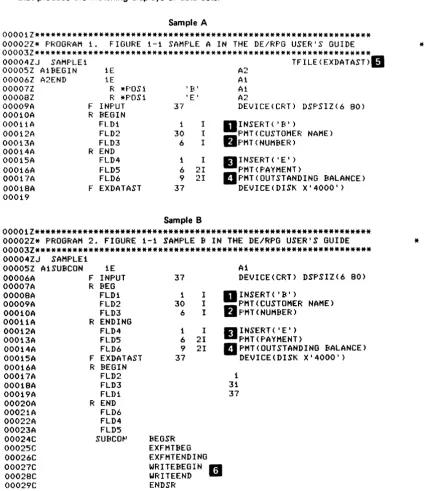
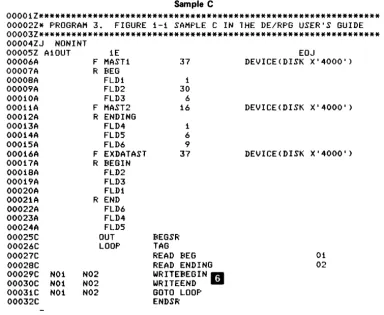
The samples in Figure 1 -1 illustrate the two basic program types. Sample A is a data-entry program, Sample B is an interactive application program, and Sample C is a noninteractive application program.
The displays and diskette data sets that result from using the programs are also illustrated in the figure. Numeric keys" indicate the parts of the program that produce the matching displays or data sets.
Sample A
00001Z*************************************************************** 00002Z* PROGRAM 1. FIGURE 1-1 SAMPLE A IN THE DE/RPG USER'S GUIDE 00003Z***************************************************************
00004lJ SAMPLE1 TFILE(EXDATAST)II
00005Z A1BEGIN 1E A2
00006Z A2END 1 E Ai
00007Z R *POSi 'B' Ai
00008Z R *POSi 'E' A2
00009A F INPUT 37 DEVICE(CRT) DSPSIZ(6 80) 00010A R BEGIN
OOOilA FLDi
000i2A FLD2
OOOi3A FLD3
OOOi4A REND
00015A FLD4
000i6A FLD5
OOOi7A FLD6
00018A F EXDATAST 00019 1 30 6 1 6 9 37 I I I I 21 21
Sample B
DINSERT( 'B')
O
PMT(CUSTOMER NAME) F'MT(NUMBER)II
INSERT ( 'E ' ) F'MT(PAYMENT)II
F'MT ( OUT STAND I NG BALANCE) DEVICE(DISK X'4000')00001Z*************************************************************** 00002Z* PROGRAM 2. FIGURE 1-1 SAMPLE
B
IN THE DE/RPG USER'S GUIDE 00003Z*************************************************************** 00004ZJ SAMPLE100005Z A1SUBCON 00006A 00007A 00008A 00009A 00010A 00011A 00012A 00013A 00014A 00015A 00016A 00017A 00018A 00019A 00020A 00021A 00022A 00023A 00024C 00025C 00026C 00027C 00028C 00029C 1E F INPUT R BEG
FLD1 FLD2 FLD3 RENDING FLD4 FLD5 FLD6 F EXDATAST R BEGIN
FLD2 FLD3 FLD1 REND FLD6 FLD4 FLD5 SUBCOt-'
Figure 1·1 (Part 1 of 4). Program Types
37 1 30 6 1 6 9 37 BEGSR I I I I 21 21 EXFMTBEG EXFMTENDING WRITEBEGIN • WRITEEND .:. ENDSR
A1
DEVICE(CRT) DSPSIZ(6 80)
D INSERT ( , B' )
fJ
PMT (CUSTOMER NAME) F'MT(NUMBER)II
INSERT ( 'E' ) PMT(PAYMENT)II
PMT (OUT STAND I NG BALANCE) DEVICE(DISK X'4000')1
31 37
*
[image:11.615.72.515.141.632.2]•
Sample C
00001Z*************************************************************** 00002Z* PROGRAM 3. FIGURE 1-1 SAMPLE C IN THE DE/RPG USER'S GUIDE * 00003Z*************************************************************** 00004ZJ NONINT
00005Z A10UT 00006A 00007A 00008A 00009A 00010A 00011A 00012A 00013A 00014A 000i5A 00016A 00017A 00018A 00019A 00020A 0002iA 00022A 00023A 00024A 00025C 00026C 00027C 00028C 00029C 00030C 00031C 00032C N01 N01 N01 1E F MAST1 R BEG
FLD1 FLD2 FLD3 F MAST2 RENDING
FLD4 FLD5 FLD6 F EXDATAST R BEGIN
FLD2 FLD3 FLD1 REND FLD6 FLD4 FLD5 N02 N02 N02 OUT LOOP
Figure 1-1 (Part 2 of 4). Program Types
BEGSR TAG 37 1 30 6 16 i 6 9 37
READ BEG READ ENDING WRITEIcEGIN ... WRITEEND U
GOTO LOOP ENDSR
EOJ
DEVICE(DISK X'4000')
DEVICE(DISK X'4000')
DEVICE(DISK X'4000')
01 02
[image:12.623.122.506.66.381.2]II
o
0001 A 40CUSTOMER NAME
B •••••••••••••••••••••••••••••
fJ
o
0001A
40NUMBER
B***************************** ... .
l~
________________
J
II
o
0001 A 40PAYMENT
E ••••••
l~
_________________
J
II
o
0001 A 40OUTANDiNG pALANCE
Data Set Resulting from the Program in Sample A
.
•
I _ • .
_ _ _ _ _ _ _ _ _~
FLD6S
ES
FLD5 \ Data Set Resulting from the Programs in Sample B and Sample CFigure 1-1 (Part 4 of 41. Program Types
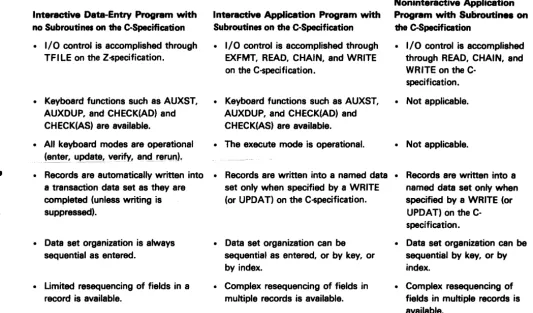
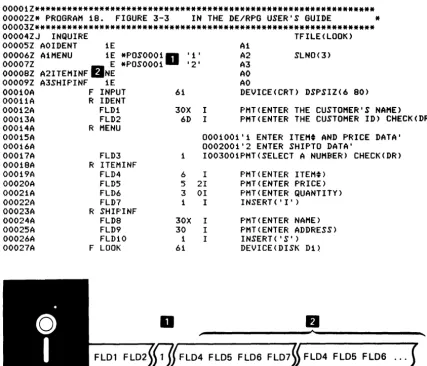
The data sets that result from the programs in Figure 1-1 contain the same fields but in a different sequence. The sequence of the fields in the data sets is not an important difference in the programs. It is possible for the program in Sample A to produce a data set exactly like that produced by the program in Sample B or Sample C. The important difference in the programs is the way that they are executed by the operator. Although the programs produce the same displays (except for Sample C which has no display) and similar data sets, their execution is different.
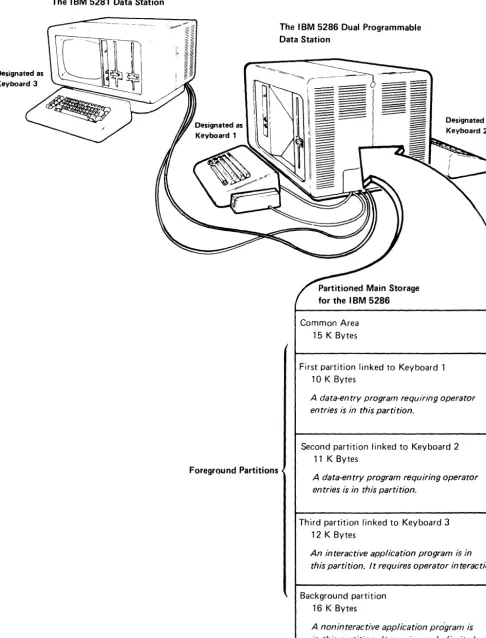
This part of the manual describes the differences in program types offered by DE/RPG. To understand these differences, you must first understand some basic information about the way the IBM 5280 system works.
..
Designated as Keyboard 3
The IBM 5281 Data Station
Foreground Partitions
Figure 1-2. A Sample Partition Division of Main Storage
The IBM 5286 Dual Programmable Data Station
Partitioned Main Storage for the IBM 5286
Common Area 15 K Bytes
First partition linked to Keyboard 1 10K Bytes
Designated as Keyboard 2
A data-entry program requiring operator entries is in this partition.
Second partition linked to Keyboard 2 11 K Bytes
A data-entry program requiring operator entries is in this partition.
Third partition linked to Keyboard 3 12 K Bytes
An interactive application program is in this partition. It requires operator interaction.
Background partition 16 K Bytes
A noninteractive application program is in this partition. It requires only limited operator interaction.
[image:16.629.83.569.63.700.2]There are two kinds of partitions: foreground and background. Each data station has its own foreground partition. The background partitions are not associated with a particular data station; they can be used by any operator using any data station in the system.
All programs that require extensive operator interaction should be used in a foreground partition. The foreground partition has control of the keyboard and display until it temporarily relinquishes its control to a background partition upon request from a program in the background partition. Control returns to the foreground partition once the requirements of the background partition have been met.
Programs that can execute without keyboard input can be loaded into a background partition and can be executed concurrently with a program in a foreground partition. A background partition is an area of user storage that is attached to the keyboard / display only when keyboard input is needed by the program and only as allowed by the operator of the data station. Application programs may be executed in either foreground or background partitions depending on whether or not they will require operator attention during the execution of the program.
•
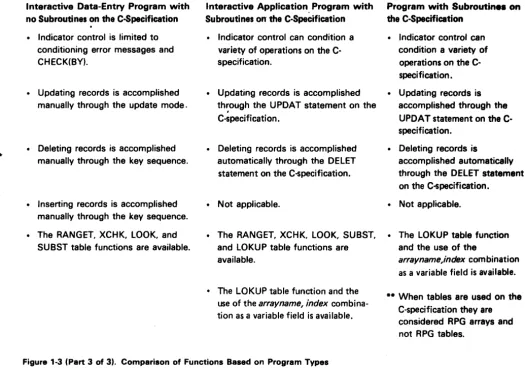
Interactive Data-Entry Program with no Subroutines on the C-Specification
• I/O control is accomplished through TFILE on the Z-$pecification.
• Keyboard functions such as AUXST, AUXDUP, and CHECK(AD) and CHECK(AS) are available.
• All keyboard modes are operational
(~nt~~, update! vEtrify, an~t rfitn.lrl).
• Records are automatically written into a transaction data set as they are completed (unless writing is suppressed).
• Data set organization is always sequential as entered.
• Limited resequencing of fields in a record is available.
Interactive Application Program with Subroutines on the C-Specification
• I/O control is accomplished through EXFMT, READ, CHAIN, and WRITE on the C-specification.
• Keyboard functions such as AUXST, AUXDUP, and CHECK(AD) and CHECK(AS) are available. • The execute mode is operational.
Noninteractive Application Program with Subroutine. on the C-Specification
• I/O control is accomplished through READ, CHAIN, and WR ITE on the
C-specification.
• Not applicable.
• Not applicable.
• Records are written into a named data • Records are written into a set only when specified by a WRITE named data set only when (or UPDAT) on the C-$pecification. specified by a WRITE (or
UPDAT) on the C-specification. • Data set organization can be
sequential as entered, or by key, or by index.
• Complex resequencing of fields in multiple records is available.
• Data set organization can be sequential by key, or by index.
• Complex resequencing of fields in multiple records is available.
Figure 1-3 (Part 1 of 3). Comparison of Functions Based on Program Type
[image:18.623.45.579.60.373.2]Interactive Data-Entry Program with no Subroutines on the C-Specification
• Program termination is through the use of the End of Job key or by EOJ on the entry format line.
• Display format control is
accomplished by testing and the next format ID on the Z-specification.
Interactive Application Program with Subroutines on the C-Specification
• Program termination is conditioned in the subroutine and controlled by EOJ on the entry format line.
• Display format control is accomplished by EXFMT and conditioning indicators on the C-specification.
Noninteractive Application Program with Subroutines on the C-Specification
• Program termination is conditioned in the subroutine and controlled by EOJ on the entry format line.
• Not applicable.
• CLRL is allowed to retain data from a • CLRL is not allowed. • Not applicable. previous record on the display.
• EDTCDE for the display is not allowed.
• CFILE for manual copying of records is available.
• PRTFI LE for manual unformatted printing of records is available.
• No formatted printing is allowed. • No communications support is
provided.
• EDTCDE for the display is allowed to provide punctuation editing (output fields only).
• CFI LE is not available.
• PRTFI LE is not available.
• Not applicable.
• Not applicable.
• PRTFILE is not available.
• Formatted printing is allowed. • Formatted printing is allowed. • Communications is provided for • Communications is provided
remote sending and receiving of data. for remote sending and receiving of data.
..
Interactive Data-Entry Program with no Subroutines on the C-Specification
• Indicator control is limited to conditioning error messages and CHECK(BY).
• Updating records is accomplished manually through the update mode.
• Deleting records is accomplished manually through the key sequence.
• Inserting records is accomplished manually through the key sequence. • The RANGET, XCHK, LOOK, and
SUBST table functions are available.
Interactive Application. Program with Subroutines on the C-Specification
• Indicator control can condition a variety of operations on the C-specification.
• Updating records is accomplished
th~ough the UPDAT statement on the C-specification.
• Deleting records is accomplished automatically through the DELET statement on the C-specification.
Noninteractive Application Program with Subroutine. on the C-Specification
• Indicator control can condition a variety of operations on the C-specification. • Updating records is
accomplished through the UPDAT statement on the C-specification.
• Deleting records is
accomplished automatically through the DELET statement on the C-specification .
• Not applicable. • Not applicable.
• The RANGET, XCHK, LOOK, SUBST, • The LOKUP table function and LOKUP table functions are and the use of the available.
• The LOKUP table function and the use of the
arrayname, index
combina-tion as a variable field is available.arrayname,index
combination as a variable field is available.**
When tables are used on the C-specification they are considered RPG arrays and not RPG tables.Figure 1-3 (Part 3 of 3). Comparison of Functions Based on Program Types
[image:20.621.46.571.77.445.2]•
•
Chapter 1. Characteristics of Data-Entry Programs that Use Transaction Files
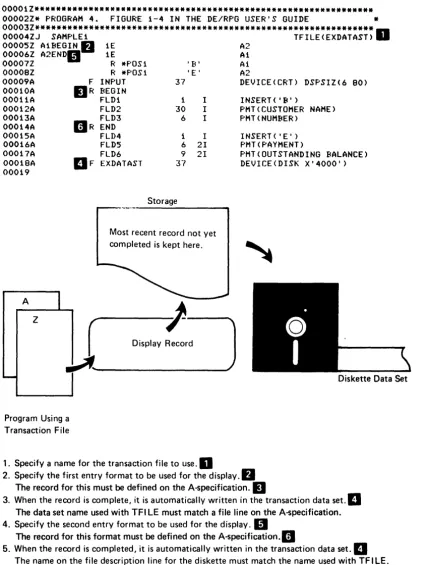
Programs that are created exclusively for data-entry purposes are created by using transaction files. Transaction files include the use of a special keyword (TFILE) on the Z-specification; the TFILE keyword evokes data~ntry functions not otherwise available to the operator. The sample in Figure 1-4 illustrates the steps involved in a program that uses a transaction file .
00001Z*************************************************************** 00002Z* PROGRAM 4. FIGURE 1-4 IN THE DE/RPG USER'S GUIDE * 00003Z***************************************************************D
00004ZJ SAMPLE1 TFILE(EXDATAST)
00005Z A1BEGIN
fJ
1E A200006Z A2ENDII 1E A1
00007Z R *POS1 'B' Al
00008Z R *POS 1 ' E I A2
00009A F INPUT 37 DEVICE(CRT) DSPSIZ(6 80)
00010A
DR
BEGIN00011A FLD1
00012A FLD2
00013A
DR
FLD300014A END
00015A FU)4
00016A FLD5
1
30 6
I I I
INSERT ( , (c' )
PMT(CUSTOMER NAME) PMT(NUMBER)
INSERT ( 'E ' ) PHT(PAYMENT)
00017A FLD6
00018A DF EXDATAST
1 I 6 21 9 21
37
PMT(QUTSTANDING BALANCE) DEVICE(DISK X'4000') 00019
Storage
Most recent record not yet completed is kept here.
A
J---D-iS-p-lay-~rd
z
Program Using a Transaction File
1. Specify a name for the transaction fi Ie to use.
II
Diskette Data Set
2. Specify the first entry format to be used for the display.
fJ
The record for this must be defined on the A-specification.II
3. When the record is complete, it is automatically written in the transaction data set.
II
The data set name used with TFI LE must match a file line on the A-specification. 4. Specify the second entry format to be used for the display.II
The record for this format must be defined on the A-specificatlon.1I
5. When the record is completed, it is automatically written in the transaction data set.
II
The name on the fi Ie descri ption line for the diskette must match the name used with TF I LE. 6. The program is complete. The operator can choose either format by a key sequence (FMT SEL andID number). The program can be terminated if the operator uses the End of Job key.
Note: If the operator wants to verify or update a record or add to the data set, the correct format is automatically selected.
[image:23.618.91.520.60.625.2]..
•
Programs using transaction files have the following characteristics:
• The enter, verify, update, and rerun modes and numerous key-initiated functions such as auto record advance are valid.
• All programmed functions which are related to the keyboard are valid (this includes keywords such as AUXDUP and AUXST and keyboard functions such as auto dup, and auto skip).
• Writing records in the diskette data set is automatically accomplished at the completion of each entry format unless the writing of the record is
suppressed. Part 2 describes this topic in detail.
• Special job functions such as manually copying records from other data sets (CFILE) and unformatted printing (PRTFILE) are available. Part 6 provides detailed information about unformatted printing .
• Limited record reformatting is available. You can only reformat fields within a single record, and you must use all fields in the original record. Part 2 describes this topic in detail.
• Automatic format chaining and operator-controlled format selection is available. Part 2 describes this topic in detail.
• All input/output control for the transaction data set is automatic (in other words, the operator cannot control the input/output devices through the transaction file).
Whenever a transaction file is used to create a data set, the result is a data set that contains sequentially written records. Updating the data set is
accomplished when the operator initiates the update mode through the keyboard. The status line on row 1 of the display informs the operator of the current mode.
MODES OF OPERATION AVAILABLE FOR PROGRAMS USING TRANSACTION FILES
The basic modes that are available for data-entry programs are enter, update, verify, and rerun. Within the data-entry program, the entry format statement and the review format statement on the Z-specification specify the record arrangement to use for the modes. The entry format determines the record arrangement to use during the enter mode. The review format determines the record arrangement to use during the update, verify, and rerun modes.
The enter mode of operation allows an operator to provide initial data entries into the record or to add new records to the data set using the entry format display as a guide. The update mode allows the operator to change data in a record. The verify mode helps the operator check the accuracy of the initial entry by allowing him to reenter the data without seeing the initial entry; upon the completion of the verified entry, the. initial entry is displayed and an error is flagged if the entries do not match. The operator is given the choice of actions to take: either to correct the initial entry or to accept it .. The rerun mode automatically cycles the program through its automatic functions and calculations. One use for this mode is to update all references to a field that has been duplicated and now needs to be corrected. By correcting the initial entry of the field and then using the rerun motte, all fields in which the initial entry had been duplicated now contain the corrected value.
Manual Selection of an Operating Mode
The operator selects the initial operating mode through a keyboard entry in response to the mode selection menu. The format to be used for the modes can be selected either automatically through the next-format sequence defined on the Z-specification or by manual operator selection.
The following text illustrates how an operator selects a mode for a data-entry program and how the appropriate format is then selected either by the program or by the operator.
Once a data-entry program has been written, compiled, and brought into a foreground partition, the following display appears.
l
«l
Name of DE/RPG Object Program
:r::::m naMe
~
::s;:p
7
Device address: 4400
Par tit i on number:
""-Press ENTER
When the Enter key is pressed, the mode selection menu appears.
o
0001 D 01 40Select Initial Data Entry Mode
Options are:
L Enter-New/ErKJi.!(1. 3. Ver i fy 5. Rerun
2. Upda te 4. Entel--ADD
Select Option: 1 Press ENTER
Once the mode has been selected, the display advances to the data set open prompt.
o
0030 N 01 F0 EEnter data for data set open
Data set name: MASTER
Dev i ce addr"ess: 4400
Press ENTER
When the values for the display fields have been accepted or supplied and the Enter key has been pressed, the file is automatically opened. The operation of the program named in the first display takes control.
05-00 ]
Automatic Selection of the Correct Format for the Manually Selected Mode
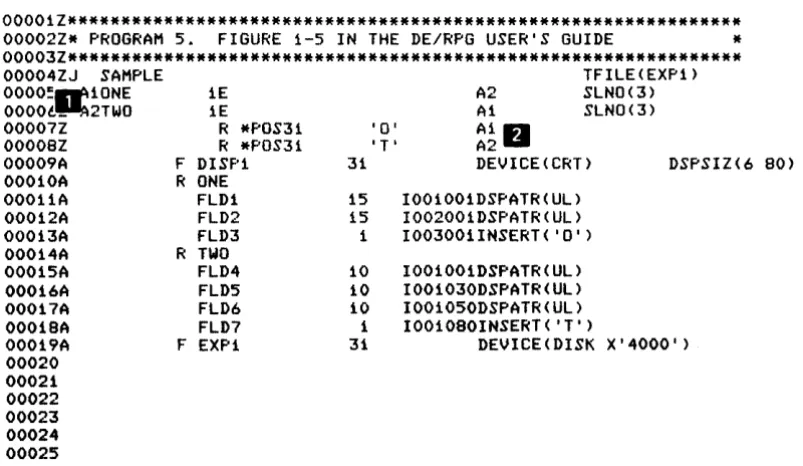
The entry and review statements on the Z-specification determine the format. The sample in Figure 1-5 illustrates the coding required for the entry and review modes.
00001Z*************************************************************** 00002Z* PROGRAM 5. FIGURE 1-5 IN THE DE/RPG USER'S GUIDE * 00003Z*************************************************************** 00004ZJ SAMPLE
OOOO~1IrI10NE
OOOOt~2TWO
TFILE(EXP1)
00007Z 00008Z
00009A F
00010A R
00011A 00012A 00013A
00014A R
00015A 00016A 00017A 00018A
1E 1E
R *POS31 R *POS31 DISP1 ONE FLD1 FLD2 FLD3 TWO FLD4 FLD5 FLD6 FLD7
A2 SLNO(3)
A1 SLNO(3)
'0' A1
fJ
'T' A2
31 DEVICE(CRT) DSPSIZ(6 80)
15 I001001DSPATR(UL) 15 I002001DSPATR(UL) 1 I003001INSERT('O') 10 I001001DSPATR(UL) 10 I001030DSPATR(UL) 10 I001050DSPATR(UL) 1 I001080INSERT('T')
00019A F EXP1 31 DEVICE(DISK X'4000')
[image:27.615.136.538.116.349.2]00020 00021 00022 00023 00024 00025
Figure 1-6. A Program Illustrating the Specification of the Entry and Review Modes
•
•
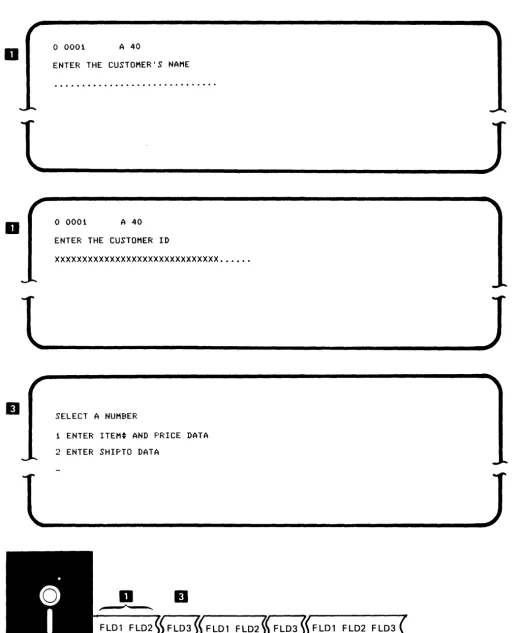
The following display illustrates the entry format named ONE.
o
0001 A 40oD
l~
__________
~J
Format ONE is displayed once, then the next entry format (TWO) is displayed .
o
0001 A 40When the data for format TWO has been entered, format ONE is redisplayed. This process of displaying format ONE and then format TWO continues until the operator stops the job by using the End of Job key.
Whenever the operator selects one of the review mode options, format ONE or TWO is automatically selected for the display based on the entry in the test position of the current diskette record. If an 0 . . is in the test position, format ONE is displayed for the rerun, update, or verify modes. If a T
II
is in the test position, format TWO is displayed for the rerun, update, or verify modes.When this is the current record, the format for ONE is used.
When this is the current record, the format for TWO is used.
FLO! FL02 FL03 0
~fL04
FL05 FL06 FL07
1J
Note: The review format and the entry in the usage column on the A-specification for the field determine whether the fields in the record are displayed. The operator manually selects the mode in which to operate, and the program automatically selects the appropriate format for the mode.
KEY-INITIATED MODES
In addition to the basic data-entry modes (enter, update, verify, and rerun), several key-initiated modes are available for programs using transaction files. The IBM 5280 DE/RPG Reference Manual contains detailed descriptions of all keys and modes. Briefly, the key-initiated modes offered by DE/RPG are:
• Update search (U-S)
• Update insert (U-I) •
• Verify correct (V-C)
• Verify insert (V-I)
• Verify search (V-S)
• Verify display (V-D)
• Copy (C)
• Copy search (C-S)
• Copy transfer (C-T)
• Rerun display (R-D)
• Print (P)
..
,
The following list names the keys that are active during data-entry programs and indicates in which modes they can be used:
Modes
Function E C C-S C-T P R R-O U U-I U-S V V-C V-O V-I V-S
Attention
Auto Duplicate/Skip Auto Enter
Cancel
Character Advanc.e Character Backspace Character Delete
Character Insert Clear Screen Cursor Down Cursor Left
Cursor Up Cursor Right Duplicate Edit Release
End of Job Erase Input Field Advance Field Backspace
Field Correct Field Exit Field Exit Minus Help
Hexadecimal
Home (Record Backspace)
Mark Field
New Line Next Format Page Forward Print
Record Advance
Record Backspace (Home) Record Correct
Record Delete Record Display
Record Insert Record Transfer Reset
Review File
Search Content Search End-of-Data Search Relative Record Search Sequential Content
Select Format Skip
System Request
x
XX X
X X
X X
X X
X X
X X
X X
X X
X X
X X
X X
X X
X X
X X
X X
X X
X X
X X
X X
X X
X X
X X
X X
X X
X X
X
X X
X X
X X
X
X
X X
X X X X X
X
X
X X
X X
X X X X X X X X X X X
X X
X
X X X X
X
X
X X
X
X X
X X X X X X X X X X X X X X X X X X X X X X X X X X X X X X X X X X X X
X X
X X
X X
X X
X X
X X
X X
X X X X X X X X X X X X X X X X X X X X X X X
X X X
X
X
X
X X
X X
X X
X X
X
X X
X
X
X X X X
X X X
X X
X X
X X
X
X X
X X
X
X X
X X X
X X
X
X X
X
X X
X X X
X X X
X
X
X X
X X
X X X X
X
X
X X
X X X
X X X X X X X X X X X X X X X X X X X X X X X X X X X X X X X X X
x
X X X X X X XE C C-S C-T P R R-O U U-I U-S V V-C V-O V-I V-S
To compare the keys that are active during the execution of a data-entry program with keys that are active during the execution of an application program, see the topic Execute Mode- The Only Mode Available for Use with Application Programs in Chapter 2.
PROGRAM FUNCTIONS USED WITH TRANSACTION FilES
Program functions that facilitate entry are available to transaction files. These functions use keywords such as AUXDUP, AUXST, CHECK(AD), and
CHECK(AS). These functions rely upon operator controlled switches. For example, when the current field statement contains AUXDUP(named field)' the named field is automatically duplicated into the current field when the Auto Dup function is active. These program functions provide additional keyboard control for the data-entry operator.
SPECIAL JOB FUNCTIONS FOR USE WITH TRANSACTION FilES
Two job functions can be specified for programs using transaction files by including the CFILE and PRTFILE keywords. Each of these functions must be
used in conjunction with the TFI LE keyword in the job specification statement.
Manually Copying Records for Programs Using Transaction Files
CFILE allows the operator to manually perform copy functions using the search and copy keys. The function provided by CFILE is not to be confused with the copy utility. The sample in Figure 1-6 illustrates a program that uses the CFILE function. CFILE" names the data set that is to be copied. When CFILE is used, the data set must be named in a file description statement
II
for the diskette. Both data sets (the one being copied from and the one being copied to) must have the same record length.00001Z*************************************************************** 00002Z* PROGRAM 6. FIGURE 1-6 IN THE DE/RPG USER'S GUIDE *
D
00003Z*************************************************************** 00004ZJ INVOICE00004Z
00005Z A1INSTRUC 00006Z A2PURHCAS 00007Z 00008A 00009A 00010A 00010A OOOiOA OOOiiA OOOiiA 000i2A OOOi3A 000i4A OOOi5A OOOi6A 00017A 00018A 00019A 1E NE R
F EXMP R INSTRUC
R PURHCAS
00020A 00021A 00022 00023
F INTERBIL
tJ
F CUSTMAST80 1 :\. A2 Ai A2
TFILE(INTERBIL) CFILE(CUS+ TMAST)
WRITE(*NO) SLNO(3)
DEVICE(CRT) DSPSIZ(6 80)
0002001 'FIND THE CUSTMAST RECORD THAT HATC+ HES THE ORDER. USE CUSTHAS DATA SE+
T. '
I001001CHECK(FE) PMT(USE THE FIELD EXIT KE+ Y TO CONTINUE)
I001001INSERT( 'T') 000200i'ITEM' 0003001'PRICE'
000400i'QUANT'
6 1002010
5 2100301.0
4 010040iO
8~ DEVICE(DISK X'4000') 80 DEVICE(DISK X'4000')
•
o
0001In order to use the copy-related keys, the program must be in the enter mode; that is, the operator must have selected option 1 Enter-NEW/REPLACE or 5 Enter-ADD from the mode selection menu. Copy-related keys are keys that are operational when the copy function is in effect. The copy-related keys are Review Second Data Set, Transfer Record, and Return to Transaction Data Set.
Once in an enter mode, the operator initiates the manual copy function by using the Review Second Data Set key. The process involved in manually copying records using the copy keys is given in the following list.
Note: The search keys can also be used to identify the desired record to be copied. The IBM 5280 Operator's Guide contains a detailed description of the available operations for the copy mode .
1. After the operator has pressed the Review Second Data Set key, a display appears requesting the name of the data set from which to copy records. Using the sample in Figure 1-6 as an example, the operator enters CUSTMAST.
2. The records (starting with the first one in the named data set) are shown using display format O. For example, the first record in the CUSTMAST data set might appear as follows:
A 40
MR. D.B. MACRATH1355 NORTHEMBASSY ROW,WILHELM,MASS889010
If this is the record the operator wants to copy, he can change any data on the record before copying it. When changes are made, the updates and changes do not appear on the original record (in the data set being copied from); the updated data only appears in the copied record.
3. By pressing the Transfer Record key, the record is copied into the receiving data set. The data set is extended to accept the copied record.
4. The next sequentially encountered record in the data set being copied from is displayed. If the operator does not want the record copied, he presses the Enter key to display the next record in the data set. When the operator wants to terminate the manual copy operation, he presses the Return to Transaction Data Set key and the program returns to the enter mode.
The normal operation of the program resumes. The next format is
automatically displayed and processing continues. The sample in Figure 1 - 7 illustrates the data set that might result from using the sample in Figure 1-6.
CUSTMAST PURHCAS CUSTMAST PURHCAS CUSTMAST PURHCAS
Figure 1-7. Data Set Resulting from Using the Program in Figure 1-6.
•
•
HOW THE USAGE COLUMN ENTRIES AFFECT PROGRAMS USING TRANSACTION FILES
The usage entry is in column 38 on the A-specification. Its purpose is to specify how fields are to be processed. Four entries are possible in this column for programs using transaction files: I for input, 0 for output, 8 for both input and output, and W for work space.
Fields designated as I in the enter mode initially display as blanks until the operator enters data. In the update mode. the existing data is displayed and the operator is allowed to alter the data. In the verify mode. the field is initially blank until the operator enters the verify data; then. the characters are
displayed and any errors (mismatches) are indicated. All input fields are included in records written to the diskette data set .
Fields designated as 0 can be used for literal messages and are to be excluded from the diskette data set. Literals are displayed immediately in all modes. All output fields are excluded from records that are written in the diskette data set.
Fields designated as 8 are treated as input fields except during execute mode. During execute mode, the initial valve of the field is displayed at the start of the format. The operator may change the data in a key-entered field or accept the data as displayed. All fields described as input and output (8 in the Usage column) must be named.
Fields designated as Ware neither displayed nor included in the diskette data set. This type of field is normally used to hold intermediate calculation results or to declare a variable to be used in another operation.
It
Chapter 2. Characteristics of Application Programs that Use Subroutines on the
C-Specifications
In general, application programs that use subroutines on the C-specifications do not use transaction files. The path this type of program takes is much different from that taken by programs that use transaction files. All input/o~tput operations are controlled by the programmer; no default display or diskette operations are available. The sample in Figure 2-1 indicates the steps involved in using a simple application program.
00001.1**~************************************************************
000021* PROGRAM 7. FIGURE 2-1 IN THE DE/RPG USER'S GUIDE * 00003Z*************************************************************** OOO(DJ SAMPLE 1
000(1 ___ A1SUBCON
00006A F
00007A
Dr.;
OOOOBA 00009A 00010A 00011A 00012A OOOi3A 00014A 00015A 00016A 00017A 00018A OOOi9A 00020A 00021A 00022A 00023A 00024C 00025C 00026C 00027C 0002BC ()0029CfJ
l __ ___
iE INPUT BEG FLD1 FLD2 FLD3 ENDING FLD4 FLD5 FLD6 EXDATAST BEGIN FLD2 FLD3 FLD1 END FLD6 FLD4 FLD5 SUBCON 37 i 30 6 1 6 9 37 I 1 I I 21 2I
BEGSR EW EXFMTBEG Ell ~
EXFMTENDINGU WRITEBEGIN
IJ
WRITEENDII ENDSRStorage
Records that are generated while the program is used are kept here.
Display Record
Program Using a Subroutine
1
31
37
Ai
DEVICE(CRT) DSPSIZ(6 BO)
INSERT( 'B')
PMT(CUSTOMER NAME) PMT(NUMBER)
INSERT ( 'E' ) F'MT(PAYMENT)
PMT(OUTSTANDING BALANCE) DEVICE(DISK X'4000')
Diskette Data Set
•
1. Call the subroutine . •
2. Define the subroutine . •
3. Execute the format for the display to the first record . • This record must be defined on the A-specification.1I
4. EKecute the format for the display of the next record . • This record must be defined on the A-specification . •
5. Write the first record in the diskette data set . • The data set name is defined by the name on the file description line for the diskette on the A-specification.1I The description of the record follows the data set name.
6. Write the next record in the diskette data set.1I The description of the record follows the data set.1I
7. The program is complete. The preceding cycle is continued until the operator uses the End of Job key.
Note: The operator cannot use the verify or update mode with this program. If the operator wants to update a record, more code must be added to this program or another program must be used.
Figure 2-1 (Part 2 of 2). Characteristics of an Application Program
The characteristics of an application program controlled through subroutines are:
• Display sequence and diskette data set formatting is totally controlled by the subroutines. Part 2 contains detailed information about this topic.
• Data-entry functions, including key-initiated modes (such as search) are not available. The only available mode of operation is the execute mode.
• A variety of methods for accessing existing data sets is available. Part 4 contains detailed information about this topic.
• Formatted printing is available. Chapter 14 contains detailed information about this topic.
• A variety of ways of arranging data on diskette is available. Records can be organized by key fields, and data sets can be indexed or sequential.
• Data set update must be controlled from the subroutine.
• All input/output control for the display, diskette, printer, and communications is controlled by subroutines on the C-specifications. '
•
EXECUTE MODE-THE ONLY MODE AVAILABLE FOR USE WITH APPLICATION PROGRAMS
Execute mode is automatically selected whenever the program calls a subroutine that includes an EXFMT statement on the C-specification. This mode inhibits automatic functions provided by the data-entry operating modes and programmed keyboard functions.
During execute mode and whenever an EXFMT is performed from the subroutine to a format described on the A-specification, the following function keys are active in the application program:
·
Attention·
Auto Enter·
Character Advance·
Character Backspace·
Character Delete·
Character Insert·
Duplicate·
Edit Release (Works only with AUXDUP)·
Erase Input·
Field Advance·
Field Correct·
Field Exit·
Field Exit Minus·
Help·
Hexadecimal·
Record Advance·
System Request·
SkipORGANIZING DATA IN DATA SETS USING A BACKGROUND PROGRAM
The formatting characteristics of data sets that use subroutines on the C-specifications are described in detail in Part 2. Specifically, the two subjects described in Part 2 are: (1) using application programs to create data sets containing key fields and (2) using 'application programs to create indexed data sets.
A key field is a specially designated field that can be used to organize data on the diskette in sequence according to the value of the key field or to
automatically identify the correct record (by key field) in a data set during a read operation from a subroutine. Part 4 contains information about using key fields. Any field that satisfies the following requirements can be a key field:
1. The field must exist in a data set on the diskette.
2. The values of the fields designated as keys must be in an ascending order within the data set unless an index data set is used.
,
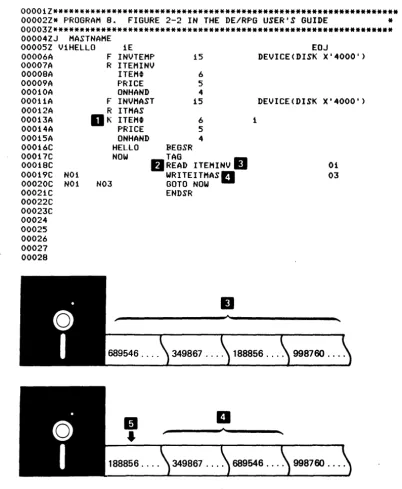
00001Z**************************************************************** 00002Z* PROGRAM 8. FIGURE 2-2 IN THE DE/RPG USER'S GUIDE * 00003Z*************************************************************** 00004ZJ MASTNAME
00005Z V1HELLO 00006A
1E
F INVTEMP 15 00007A 00008A 00009A 00010A 00011A 00012A 00013A 00014A 00015A 00016C 00017C 00018C 00019C NO! 00020C N01 0002!C 00022C 00023C 00024 00025 00026 00027 00028
.
R ITEMINV
ITEM~
PRICE ON HAND F INVMAST R ITMAS
D
K ITEM~PRICE ONHAND HELLO 6 5 4 15 6 5 4 NOW N03 BEGSR TAG
fJ
READ ITEMINVII
WRITEITMASa GOTO NOW ENDSRII
1
EOJ
DEVICE(DISK X'4000')
DEVICE(DISK X'4000')
01 03
•
,_
349867 . . .. 188856.... 998760 ....II
..
a
[image:42.620.113.516.61.551.2]188856. . .. 349867.. .. 689546.... 998760 ....
Figure 2·2. A Program that Creates a Data Set with Key Fields
Notice that the key field has a K in the name type column
D
The program in Figure 2- 2 makes each item number field in the data set a key field. The program reads each recordII
from the original data setII
and determines where to place it in the new data set • according to its key value. Each time the program reads a new key field, the records (following the new record) must be rewritten to reorder the records according to their key values. The result is a data set that contains records ordered by their key fieldsII
This process takes time, however, because records must be rewritten with the entry of each new key field. By using an index file along with the key field, you can avoid rewriting all the records after each entry. The sample in Figure 2-3 illustrates a program that uses an index.
00001Z*******************************~**************** ***************
00002Z* PROGRAM 9. FIGURE 2-3 IN THE DE/RPG USER'S GUIDE * 00003Z*************************************************************** 00004ZJ MAST MAKE
00005Z ViHELL.O 1E F INV 00006A
00007A 00008A 00009A 00010A 00011A 00012A 00013A 00014A 00015A 00016C 00017C 00018C 00019C 00020C 00021C 00022C 00023C 00024C 00025C
R ITEMINV
ITEM~
PRICE ONHAND F INVMAST R ITMAST
K ITEM~
N01 N01N02N03
PRICE ONHAND HELLO NOW
689546 ....
689546 .... BEGSR TAG
16
6
5 5
16
6 5 5
READ ITEMINV WRITEITMAST GOTO NOW ENDSR
349867 ....
II
EOJ DEVICE(DISK D1)
DEVICE(DISK D1) INDEX(HOLD)IDI
01 0203
188856 . . . . 998760 ....
349867 . . . . 188856 . . . . 998760 ....
•
•
Notice that a new piece of code is required: the INDEX keyword and its parameter
II.
When you use the index function with a key field, records are written in the data set exactly as they are entered, but they can be accessed as if they were entered in key sequence. This is accomplished by the index fileII
which holds the key fields (in sequence) and their relative record location in the resulting data setDKey fields and indexed data sets are only available for programs that use subroutines to create data sets or for the Sort/Merge Program Product.
CONTROLLING DATA SET UPDATE THROUGH SUBROUTINES
The UPDAT statement in a subroutine is the only way a data set can be updated as it is created by an application program. The sample in Figure 2-4 illustrates an update operation .
00001Z************************************************************* 00002Z* PROGRAM 10. FIGURE 2-4 IN THE DE/RPG USER"S GUIDE
00003Z************************************************************* 00004ZJ UPDATHAS
00005Z Y1GOFIRS 00006A 00007A 00008A 00009A 00010A 00011A 00012A 00013A 00014A 00015A 00016A 00017A 00018A 00019C 00020C 00021C 00022C 00023C 00024C 00025C N05 NOS NOS lE F INPUT R CHANGE
CUSTNA ADDR CUSNUM F CUSMAST R HEAD
CUSTNA ADDR CUSNUM GOFIRS LOOP BEGSR 65 30 30 5 65 30 30 5
o
o
o
B B B EOJDEVICE(CRT) DSPSIZ(6 80)
1 1"CUSTOHER NAME I
2 1IADDRESS"
3 1'CUSTOMERt'
1 20
2 20
3 20
DEVICE(DISK D1)
TAG
D
READ HEAD
EXFMTCHANGE
fJ
UF'DATHEADII
GOTO LOOP ENDSR05
D
M. R. DE HAN ...
P.D
BOX 150, NY, NY, ... X178Ao
0001 A 40 CUSTOMER NAMEADDRESS
CUSTOMER~
M. R. DEHAN
5592 SO. FERRY, GRAND RAPIDS, MICH
X178A
1
l~
_____________
J
II
M. R. DEHAN ... 5592 SO. FERRY ... X178A
•
II
Notice that the record that is to be updated must first be read from its data set
II.
Next, the record must be written to the displayII
so the operator can see its contoots. All fields that are to be changed in the record must be fields that are described with either a B (both) or I (input) usage entry. The update operation. must be described in the subroutine to cause the operator's changesa.
Programs that use subroutines do not have automatic verify or rerun capabilities. These capabilities can be provided by program operations that compare entries and set indicators. See Part 3 for a description of using indicators .
CONTROLLING THE INPUT/OUTPUT DEVICES
All input/output devices (display, diskette, printer, and communications) must be specifically controlled from the subroutine. Control for the printer is described in Chapter 14.
Controlling the Display
There are two ways to display data: (1) reference it through an entry format on the Z-specification and (2) specify it through an EXFMT or WRITE 'operation in the subroutine. If the program is exclusively a background program (does not require any interaction), the first method is not available.
The EXFMT operation in an interactive application program allows you to display fields and allows the operator to change the fields. All usage entries (I, 0, W, and B) are valid. The WRITE operation allows you only to display the fields; it does not allow the operator to change them. Only the output (0) usage entry is allowed.
The samples in Figure 2-5 illustrate these techniques.
Sample A
00001Z*************************************************************** 00002Z* PROGRAM 11. FIGURE 2-5 IN THE DE/RPG USER'S GUIDE * 00003Z*************************************************************** 00004ZJ EMPBACK
00005Z A2AT 00006A 00007A 00008A 00009A 00010A 00011A 00012A 00013A 00014A 00015A 00016A 00017A 00018A 00019A 00020C 00021.C 00022C 00023C 00024C 00025C 00026C 00027 N05 N05 1E FLOOK
II
R DISPF TEMf'ITM R ITTRANS
ITEMt DESC COST F MASTITEM R ITMMAS K ITEMt
DESC COST AT
BRANCH TAG BEGSR 95 1 95 6 80 9 95 6 80 9
o
I NOt 05II
. WRITEITMMAS READ ITTRANSfJ
GOTO BRANCHD
EXFMTDISP ENDSRSample B j,
EOJ
DEVICE(CRT) DSPSIZ(6 80)
'THE PROGRAM IS DONE' CHECK(FE)
DEVICE(DISK X'4000')
DEVICE(DISK X'4000')
0511 01
00001Z*************************************************************** 00002Z* PROGRAM 12. FIGURE 2-5 IN THE DE/RPG USER'S GUIDE
00003Z*************************************************************** 00004ZJ PUTTOGET
00005Z L1MIX 00006A 00007A 00008A 00009A 00010A 00011A 00012A 00013A 00014A 00015A 00016A 00017A 00018A 00019A 00020A 00021A 00022A 00023A 00024A 1E F TEMP R ITEMINV K CUSTN
ITEM. PRICE AMT F MERGE R CUSTMAS
CUSNAM ADDR CUST. F BILLTOT R BILL
CUSNAM ADDR CUST. ITEM. PRICE AMT F INPUT R MSG
22 4 6 5 6 65 30 30 4 82 30 30 4 6 5 6 1 1 EOJ
DEVICE(DISK Dl) INDEX(KEEP)
DEVICE(DISK D1)
DEVICE(DISK D1>
DEVICE(CRT) DSPSIZ(6 80)
*
00025A 00026A 00027A
00028C MIX
0
BRANCH
o
'BE PATIENT. I AM READING RECORDS.' 00029C 00030C 00031C 00032C 00033C 00034C 00035C 00036C N03 00037C 01 02 00038C CUSTt END BEGSR WRITEMSG TAGREAD CUSTMAS GOTO END CHAINITEMINV GOTO BRANCH WRITEBILL GOTO BRANCH TAG
ENDSR
Figure 2-5. Programs that Control the Display
01
02
•
"
In Sample A, the program executes the format named DISP . . on the display when all records have been read from the data set. The content of this record cannot be altered by the operator. When the last record is read
D
an indicator is turned onB.
The last record is written in the new data setB
and the DISP format is displayedII.
In Sample
a,
the program writes a message on the display while the program is being executed.Part 3 contains detailed information about using indicators .