OAI VOICEMAIL DISCONNECT
Installation & Operation Manual
NEC America, Inc.
LIABILITY DISCLAIMER
NEC America reserves the right to change the specifications, functions, or features in this document at any time without notice. NEC America has prepared this document for use by its employees and customers. The information contained herein is the property of NEC America and shall not be reproduced without prior written approval from NEC America.
Voicemail Disconnect Installation & Operation Manual CONTENTS
TABLE OF CONTENTS
Page
Chapter 1 - INSTALLATION & SET-UP . . . 1
Introduction . . . 1
Voicemail Disconnect Installation . . . 1
Software Installation. . . 1
Voicemail Disconnect Set-Up . . . 2
Application Configuration . . . 2
Database Support . . . 2
Phone Line Database . . . 2
Configuring the Phone Line Database . . . 3
Tenant Number Database. . . 4
Configuring the Tenant Number Database . . . 5
Database Administration . . . 5
MAT Assignments . . . 6
AOKC Command: (Assignment of OAI Key Codes) . . . 7
AKYD Command: (Assignment of Dterm Function Key). . . 7
Example MAT Configuration . . . 8
Chapter 2 - OPERATION . . . 9
CONTENTS Voicemail Disconnect Installation & Operation Manual
Voicemail Disconnect Installation & Operation Manual FIGURES
LIST OF FIGURES
Figure Title Page
FIGURES Voicemail Disconnect Installation & Operation Manual
Voicemail Disconnect Installation & Operation Manual INSTALLATION & SET-UP
Chapter 1
INSTALLATION & SET-UP
Introduction
Voicemail Disconnect is an OAI software application that is used to disconnect a phone connection to a specific phone set (Dterm or Analog phone). This function is typically used to disconnect a phone set from a Voice mail port or conference bridge.
Voicemail Disconnect Installation
Software
Installation
This procedure will load the Voicemail Disconnect software. Follow the steps below:
Step 1: Log in to the APM Platform Administration Main Menu.
Step 2: Select the Installation of Applications/Packages option, and follow the instructions provided in the APM Operations Manual to complete this part of the installation.
Step 3: When prompted, load the Voicemail Disconnect media diskette(s).
Step 4: Follow the screen prompts to complete the installation.
Note: Should any part of the installation not proceed and indicated, or an error is en-countered, contact your NEC representative for assistance.
INSTALLATION & SET-UP Voicemail Disconnect Installation & Operation Manual
Voicemail Disconnect Set-Up
Application
Configuration
Voicemail Disconnect is supported internally by the APM, and must be configured in the APM environment. The Software Installation procedure configures the application using default values and creates the databases needed.
Database Support
Voicemail Disconnect requires two APM databases: the Phone line database and the Tenant Number Database. Empty databases are created during initial software installation, but specific records must be added before Voicemail Disconnect is enabled.Note: If Second Party Alert Ver1.7 or higher has been previously installed, then these databases have already been created.
Phone Line Database
The Phone Line database consists of a Master Database file component and an Application Database file component.
Master Database File filename - ’phone_m’.
The phone_m master database structure and example entries are shown in the table below.
Field Definitions
- Phone Line 1 field is the primary extension number (five-digits max.). The number that is displayed with the caller’s name when this phone is used to place the call.
- Phone Line 2 - 6 fields are the secondary, or virtual, lines that are associated with the primary extension that was entered in the first field. These virtual lines must be assigned to this primary line through the NEAX Maintenance Administration Terminal (see NEAX2400 System Manuals).
Field Name Type Size Min.
Value
Max. Value
Example Entry
Phone Line 1 N 5 0 99999 4290
Phone Line 2 N 5 0 99999 4291
Phone Line 3 N 5 0 99999 4292
Phone Line 4 N 5 0 99999 4293
Phone Line 5 N 5 0 99999 4294
Voicemail Disconnect Installation & Operation Manual INSTALLATION & SET-UP
Phone Line Database (cont)
Application Database File filename - ’Phonline’.
The Phonline application database structure is shown in the table below:
Configuring the Phone Line Database
The database is initially blank. It must be configured before the Voicemail Disconnect application can operate. The database values are set using the APM Applications Manager Main Menu-- Selecting the Database Administration option. The general sequence is the following:
1. Build a Master Database File
Enter data into the master database fields to add the necessary phone line numbers for Voicemail Disconnect.
2. Process the Application Database
Use the Process Application Database option on the APM Database Administration menu to create the application database file.
(When the Process option is activated, data is drawn from the master database and converted to the formats specified in the application definition file.)
3. Install the Application Database
Use the Install Application Database option on the APM Database Administration menu to enable Voicemail Disconnect to copy its database.
Note: Refer to the APM Operations Manual for more detailed instructions on adding a database.
Field Description Data Type
Phone Line 1 Long Integer
Phone Line 2 Long Integer
Phone Line 3 Long Integer
Phone Line 4 Long Integer
Phone Line 5 Long Integer
INSTALLATION & SET-UP Voicemail Disconnect Installation & Operation Manual
Tenant Number Database
The Tenant Number Database is an APM database used by the Voicemail Disconnect application and other OAI applications. It provides a mechanism for retrieving the tenant number of an extension. Since the Tenant Number Database may be used by other OAI applications installed under the APM, it is configured using the APM.
The Tenant Number database consists of a Master Database file component and an Application Database file component.
Master Database File filename - ’tenant_m’.
The tenant_m master database structure and example entries are shown in the table below:
Field Definitions
- First Extension field contains the first extension number in the range of extensions.
- Last Extension field contains the last extension number in the range of extensions.
- Tenant Number field contains the associated tenant number.
(A tenant number can be associated with an individual numeric extension or a range of numeric extensions. A given tenant number can have more than one record if all of the extensions associated with it are not consecutive.)
Application Database File filename - ’tenants’.
The tenants application database structure is shown in the table below:
Field Name Type Size Min.
Value
Max. Value
Example Entry
First Extension ASCII 10 1000
Last Extension ASCII 10 1099
Tenant Number Numeric 3 1 255 1
Field Description Data Type
First Extension ASCII
Last Extension ASCII
Voicemail Disconnect Installation & Operation Manual INSTALLATION & SET-UP
Configuring the Tenant Number Database
This database must be configured before the Voicemail Disconnect application can operate. The database values are set using the APM Applications Manager Main Menu-- Selecting the Database Administration option. The general sequence is the following:
1. Build a Master Database File
Enter data into the master database fields to add the necessary phone line numbers.
2. Process the Application Database
Use the Process Application Database option on the APM Database Administration menu to create the application database file.
(When the Process option is activated, data is drawn from the master database and converted to the formats specified in the application definition file.)
3. Install the Application Database
Use the Install Application Database option on the APM Database Administration menu to enable Voicemail Disconnect to copy its database.
Note: Refer to the APM Operations Manual for more detailed instructions on adding a database.
Database
Administration
Any future administrative changes to the Voicemail Disconnect databases are made through the APM Database Administration option. Refer to the instructions provided in the APM System Administration Manual to make changes to these databases.
INSTALLATION & SET-UP Voicemail Disconnect Installation & Operation Manual
MAT Assignments
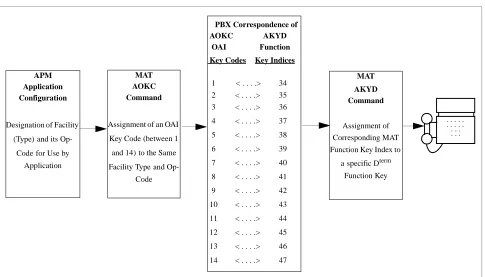
This manual assumes that data settings that affect the operation of all OAI software on a system-wide basis have already been assigned on the NEAX Maintenance Administration Terminal (MAT). Such settings include system index values and assignment of Interface I/O Port Data in the Interface Processor (IP). For more information about these system data settings and the MAT commands described below for Voicemail Disconnect, refer to the OAI Module Installation Manual for the NEAX2400 IMS, the NEAX2400 IMS Command Manual, the NEAX2400 IMS Job Specification Manual, and the NEAX2400 IMS Programming Manual.Using the AOKC command, assign the MSF facility and its Op-Code to one of the 14 OAI Key Codes in the MAT. Each of these OAI Key Codes corresponds to an AKYD Function Key Index (FKI) value that is then assigned to the specific Dterm
function key. This process is illustrated below.
Figure 1-1 OAI Function Key Assignments
A knowledge of the Dterm stations in the NEAX system and which ones will be set
up to access Voicemail Disconnect is needed to use the necessary MAT commands. APM
Application Configuration
Designation ofFacility
(Type)and its
Op-Codefor Use by
Application
MAT AOKC Command
Assignment ofan OAI
Key Code(between 1
and 14)to the Same
Facility Typeand Op-Code MAT AKYD Command Assignment of Corresponding MAT Function Key Index to
aspecific Dterm Function Key
. . . . . . . . . . . . . . . . PBX Correspondence of
AOKC AKYD
OAI Function Key Codes Key Indices
1 < . . . .> 34 2 < . . . .> 35 3 < . . . .> 36
4 < . . . .> 37
5 < . . . .> 38
6 < . . . .> 39
7 < . . . .> 40
8 < . . . .> 41
9 < . . . .> 42
10 < . . . .> 43
11 < . . . .> 44
12 < . . . .> 45
13 < . . . .> 46
Voicemail Disconnect Installation & Operation Manual INSTALLATION & SET-UP
Mat Assignments
(cont)
AOKC Command: (Assignment of OAI Key Codes)
This command is used to associate the MSF facility and its Op-Code that was configured in the APM for the application to one of the OAI Key Codes in the MAT.
Step 1: Select an unused OAI Key Code, from 1 to 14. To determine what Key Codes are available for assignment, use the LOKC command to list the AOKC Key Codes that are already assigned.
Step 2: Enter the type of facility using the value that designates the MSF.
Step 3: Enter the same MSF Op-Code that was configured for Voicemail Disconnect in the APM. Retrieve it using the Providers command on the APM Applications Configuration Entry screen.
AKYD Command: (Assignment of D
termFunction Key)
MAT Function Key Indexes #34 to #47 have been designated for use in the OAI system and correspond to the 14 OAI Key Codes as illustrated in Figure 1-1 on page 6. The AKYD command is used to assign a Dterm function key to the specific
MAT Function Key Index that, in turn, corresponds to the previously assigned OAI Key Code. This command must be used to assign the function key on each Dterm
that is to be set up with access to Voicemail Disconnect.
Step 1: Determine the specific Dterm function key designated in the application
configuration as the key that is to be pressed to activate Voicemail Disconnect from the Dterm.
Step 2: Enter the same tenant number that is configured for the application in the APM Application Configuration option (default is 1).
Step 3: Enter the station number of the Dterm on which the function key is being
assigned.
Step 4: Enter the Dterm function key to the MAT Function Key Index that in turn
corresponds to the previously assigned OAI Key Code.
INSTALLATION & SET-UP Voicemail Disconnect Installation & Operation Manual
Mat Assignments
(cont)
Example MAT Configuration
In the example illustrated below, MSF was selected in the APM Application Configuration, and its Op-Code was determined to be #129. MSF #129 is then assigned through the AOKC command to an OAI Key Code.
For this example, the OAI Key Code is #3. The Dterm function key that is to be used
to access Voicemail Disconnect in this example is function key #8. Since OAI Key Code #3 corresponds in the PBX to MAT Function Key Index #36, Dterm function
key #8 is assigned to Function Key Index #36 using the AKYD command.
Now whenever a phone user presses function key #8 on any assigned Dterm, MSF 129 initiates communication with Voicemail Disconnect.
Figure 1-2 Example OAI Function Key Assignment
This completes the installation and set-up of the Voicemail Disconnect
APM Application Configuration Directory Dialer configured for MSF #129 MAT AOKC Command OAI Key Code #3 given MSF facility type
and Op-Code #129 MAT AKYD Command Function Key Index #36 assigned to
Dterm Function Key #8
. . . . . . . . . . . . . . . . PBX Correspondence of
AOKC AKYD
OAI Function Key Codes Key Indices
1 < . . . .> 34 2 < . . . .> 35 3 < . . . .> 36
4 < . . . .> 37
5 < . . . .> 38
6 < . . . .> 39
7 < . . . .> 40
8 < . . . .> 41
9 < . . . .> 42
10 < . . . .> 43
11 < . . . .> 44
12 < . . . .> 45
13 < . . . .> 46
Voicemail Disconnect Installation & Operation Manual OPERATION
Chapter 2
OPERATION
Using Voicemail Disconnect
Voicemail Disconnect is used by pressing the Dterm OAI key assigned to the Voicemail Disconnect function. If the assigned key for this function is unknown, see your system administrator.
One of four status messages may be displayed on your phone when Voicemail Disconnect is invoked:
• RELEASED - The request is successful, call has been disconnected. • FAILED - The request failed. This means either your phone/subline
(is not connected) to any device, or the disconnect process failed.
• DB ERROR - The request can not be processed because your phone does not exist in the database, or your phone does not have a subline in the database.
OPERATION Voicemail Disconnect Installation & Operation Manual