Live Migration of Workloads on 10GbE vs. 1GbE Networks June 2011
Evaluating Microsoft Hyper-V
Live Migration Performance
Using IBM System x3650 M3
and IBM N series N5600
Kent R. Swalin
IBM Systems and Technology Group
Wei Liu
NetApp
Brian Johnson
Intel Datacenter Group
Executive Overview
This paper compares the performance of Microsoft® Hyper-V™ Live Migration over 1 Gigabit Ethernet (1GbE) and 10 Gigabit Ethernet (10GbE) networks for virtual machines (VMs) running in a Microsoft Windows Server® 2008 R2 Service Pack 1 (SP1) environment. Four different virtual machines were compared while they were idle, with little or no CPU activity, and while the virtual machines were under a heavy load. Following are the four VM configurations used (all x64 editions):
• Windows Server 2008 SP2 (4GB memory) • Windows Server 2008 R2 SP1 (8GB memory) • Windows Server 2008 SP2 (16GB memory) • Windows Server 2008 R2 SP1 (32GB memory) The test results show that:
• Live migration times for a 10GbE network were up to 82% shorter than for a 1GbE network. • The length of the live migration time for a VM depends primarily on the VM’s memory size
and secondarily on how much load is placed on the VM.
Introduction
Windows Server R2 has a feature that facilitates the live migration of a VM between Hyper-V server nodes within a Windows failover cluster. Users connected to the VM that is being migrated may notice a slight decrease in performance for a brief period, but the users’ connection to the VM’s applications and/or data should not be interrupted. As a result, Hyper-V Live Migration allows 384 virtual machines supported by Hyper-V to be migrated (one at a time) from one physical server node to another without the users’ awareness. Live Migration allows IT administrators to balance the workloads or bring physical server nodes down for maintenance without affecting the 1,000 virtual machines per cluster that Hyper-V supports.
Microsoft recommends a dedicated 1Gb or 10Gb network connection for live migration, because the contents of the memory of the VM running on the source node needs to be transferred to the destination node over a LAN connection. For best performance, use a dedicated or teamed 10Gb Ethernet connection. This significantly reduces the time required to evacuate the VMs off a host with zero downtime during maintenance or Windows updates.
The following configuration and test compares the performance of Microsoft Hyper-V Live Migration over 1 Gigabit Ethernet (1GbE) and 10 Gigabit Ethernet (10GbE) networks for virtual machines (VMs) running in a Microsoft Windows Server® 2008 R2 Service Pack 1 (SP1) environment.
IBM System x3650 M3 Server
IBM System x® servers can deliver the performance and reliability required for virtualizing mission-critical applications on Hyper-V. To provide the required performance in a virtualized environment, IBM System x3650 M3 servers, as tested in this configuration, were equipped with two 3.6 GHz four-core processors from the Intel® Xeon® Processor 5600 series. With Intel Hyper-Threading enabled, the System x3650 M3 servers each offer 16 logical processors and are capable of being equipped with up to 192GB of memory.
By virtualizing with Microsoft Hyper-V technology on IBM System x3650 M3 servers, businesses can make the best use of server hardware investments by consolidating multiple server roles as separate virtual machines running on a single physical machine. This results in fewer physical
servers to manage. Running the same hypervisor allows IT administrators to manage more servers than without virtualization. Since applications are managed within virtual machines and isolated from the actual hardware, this again simplifies the physical server, maximizing uptime. Greater IT flexibility is also realized by the ability of virtualization to streamline the deployment and upgrade processes in both physical and virtual machines.
In addition, clients can see a lower total cost of ownership (TCO) from reduced hardware requirements by maximizing the resource utilization of each server purchased. This usually results in a substantial reduction in the number of physical servers required to support operations, thereby lowering capital acquisition, power consumption, and cooling costs. Businesses also benefit from infrastructure optimization that simplifies and standardizes IT administration, thus helping to control labor costs. Reduced downtime costs can be achieved by the ability to easily move and balance workloads across different resources, improve operational agility, and provide flexibility in managing maintenance schedules and responding to today’s dynamic IT demands.
Intel Ethernet Networking
The dual-port 10 Gigabit Intel Ethernet Server Adapter X520 provides virtualization, storage and teaming functions with Intel Virtualization Technologies for connectivity, Intel Advanced Network Services, intelligent offloads for iSCSI and MultiPath I/O (MPIO) support in Microsoft Windows Server 2008 R2.
The Intel Ethernet Server Adapter X520 includes Intel Virtualization Technologies for connectivity (Intel VT-c) to deliver virtualized I/O performance optimizations and Quality of Service (QoS) features designed directly in to the controller’s silicon. Virtual Machine Device Queues (VMDq) is one of the core optimization technologies that help reduce I/O bottlenecks and improve the overall server performance. VMDq reduces the data processing overhead associated with virtualization by working conjunction with Microsoft Virtual Machine Queues (VMQ) Hyper-V to move network traffic sorting and queuing functionality to the Ethernet controller. Additionally, VMDq provides other functions, such as on-controller QoS features like Rx/Tx round-robin scheduling to balance bandwidth allocation across multiple queues to improve I/O scalability. Using VMDq and VMQ allows the virtual machine network traffic processing to happen
concurrently in multiple queues that are aligned with the different processors that are servicing the VMs. VMQ uses the embedded switch on the adapter, where receive queues and transmit queues are paired, as a switch port. The embedded switch inspects all transmit packets for destination MAC address + VLAN ID to determine if the destination is part of one of its receive queues. If it is, the switch will DMA (Direct Memory Access) to that queue; otherwise, they are sent on the wire. This is a huge advantage in VM-to-VM communication, because it avoids route lookup in the software, avoids packet copies, and takes advantage of offload support in the hardware. Route lookup is avoided for VM-to-physical communication providing additional performance benefits. Overall VMQ improves network throughput by distributing network traffic for multiple VMs across multiple processors, while reducing processor utilization by offloading packet classification to the hardware and avoiding both network data copy and route lookup on transmit paths. VMQ supports live migration in R2 and it can coexist with large send offload and jumbo frames. VMQ is only supported only with specific adapters in Windows Sever 2008 R2; therefore, VMQ is disabled by default; it should be enabled when using the Intel Ethernet Server Adapter X520.
Intel Advanced Networking Services (ANS) extends functionality to provide additional reliability and Quality of Service features. Use ANS to enable and configure VMDq, adapter teaming including Virtual Machine Load-Balancing (VMLB), Data Center Bridging and QoS features, Jumbo frames, and stateless offloads, such as Large send offload (LSO) and checksum offload (CSO).
These features and others can be configured using DMIX directly in Windows Device Manager or via command line interface using ProSetCL.
Intel Ethernet supports Microsoft's MPIO for Ethernet ports transferring iSCSI traffic to provide load balancing and failover in Microsoft Windows operating systems. As with VMDq and VMQ, Intel has worked with Microsoft to ensure that Intel Ethernet adapters work in conjunction with the native iSCSI initiator to provide iSCSI acceleration with lower processor utilization using TCP checksum offloading, increased throughput through TCP Segmentation Offload, and TCP
Receive-Side Coalescing. The Microsoft Initiator User Guide provides details for iSCSI and MPIO configuration and setup.
Microsoft Initiator User Guide - http://technet.microsoft.com/en-us/library/ee344838(WS.10).aspx To maximize the available throughput, ensure that dual-port 10Gb Ethernet adapters are installed in a PCI Express 2.0 X8 or better slot on the server. Note that some PCI Express slots use an X8 physical connector but only provide X4 connectivity to the adapter. Installing a dual-port 10Gb adapter in in a slower or low-bandwidth slot will impact the overall throughput of the adapter.
IBM N series Storage
IBM System Storage N series systems provide a flexible storage foundation for Microsoft Hyper-V environments. In this project, four IBM N series N5600 storage systems were used to provide storage for the four Hyper-V virtual machines.
The N5600 storage controllers were upgraded to the latest Data ONTAP 8.0.1 7-Mode operating system. Data ONTAP 8.0 7-Mode provides:
• More efficient storage • High availability • Business continuance • Quality of service
The N56001 provides native support for FCoE, FC, iSCSI, and NAS storage with scalability to more than 500 disk drives. It supports FC, SAS, and SATA disk drives for tiered storage. N series hardware design and the Data ONTAP operating system are tightly integrated to provide resilient system operation and high data availability. N series systems incorporate redundant and hot-swappable components and patented double-parity RAID-DP®. N series RAID-DP, a high-performance implementation of RAID-6, provides superior data protection with negligible impact on performance. N series Snapshot technology provides up to 255 data-in-place, point-in-time images per LUN or file system, available for near-instantaneous file-level or full data set recovery. The minimal performance overhead of N series Snapshot technology makes it well-suited for protecting production data. Host-based SnapManager® software integrates Snapshot
management with applications, providing consistent backup images and application-level recovery in minutes. SnapMirror® uses Snapshot copies to provide incremental block-level
1
As of December 31, 2008, IBM has replaced IBM System Storage N5000 (including N5600) series with IBM System Storage N6000 series. With IBM® System Storage® N6000 series systems, meet NAS storage needs and provide high levels of application availability for critical business operations to technical applications. Address NAS and SAN, primary and secondary storage requirements plus get outstanding value— these flexible systems offer excellent performance and impressive scalability at a low total cost of ownership.
The IBM N6000 series systems offer a versatile storage platform for handling the large amounts of diverse data moving through your business. With an N6000 series system, consolidate varied data sets simultaneously—block or file based— onto a single storage platform.
synchronous and asynchronous replication; SnapVault® uses it for block-level incremental backups to another system. Together, these SnapSuite™ products help deliver the high application-level availability that enterprises require for 24/7 operation.
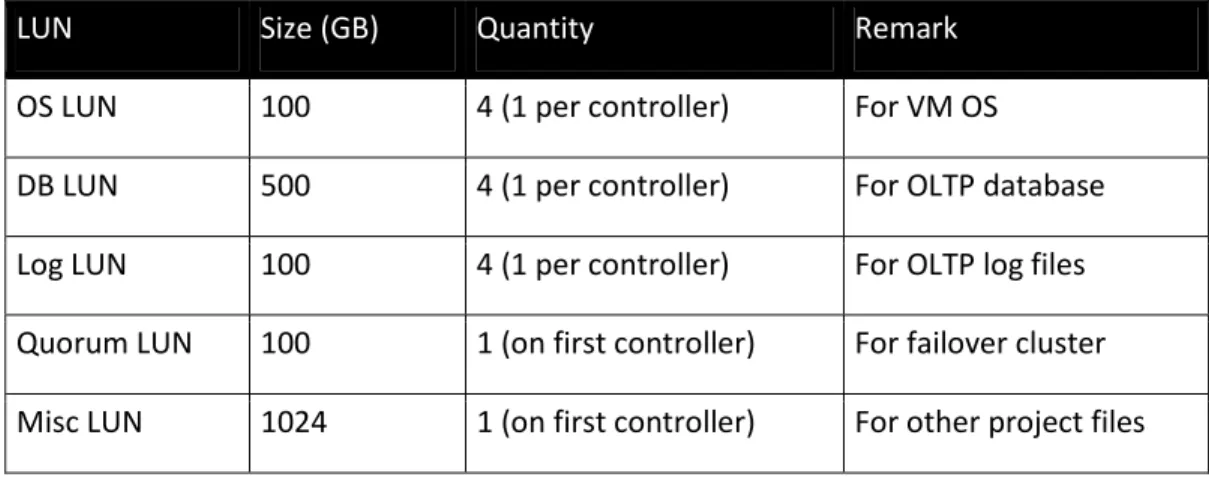
The following shows the LUN provision for the four Hyper-V VMs.
Table 1. LUN configuration for Hyper-V live migration.
Hyper-V and Failover Clustering
Microsoft Hyper-V is a 64-bit technology that runs as a role in Windows Server 2008 R2 or as a stand-alone, console-based hypervisor in the Hyper-V Server 2008 R2 product2. Virtual machines can support up to four virtual processors and 64GB of memory, depending on the operating system loaded. Each virtual machine will have its own operating system instance and is
completely isolated from the host operating system as well as from other virtual machines. High availability is an option when running the Enterprise or Datacenter Edition of Windows Server 2008 R2 with Microsoft Failover Clustering installed.
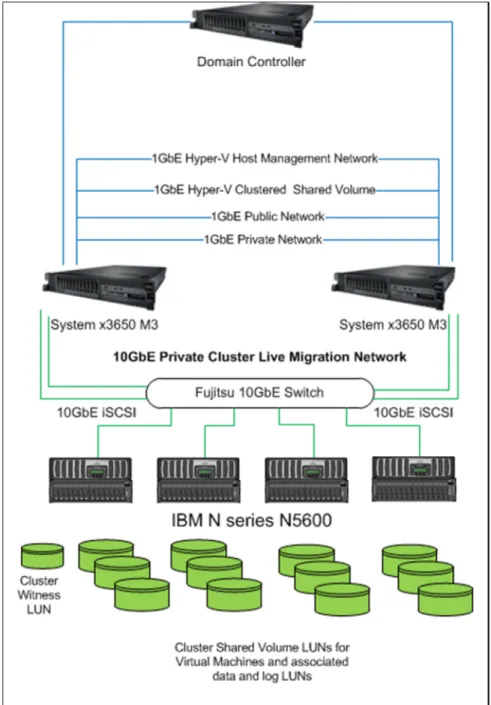
As Figure 1 shows, each Hyper-V node in the two-node cluster in these tests used four network ports to handle Hyper-V management, virtual machine connectivity, Windows failover heartbeat communication, live migration communication, and CSV communication. The live migration network was used exclusively for live-migration traffic only. In this example, the 10GbE connection was shown for the live-migration network.
In this test environment, cluster-shared volumes (CSVs) were used. CSVs are not a requirement to support live migration in a Windows Server 2008 R2 Hyper-V cluster. Live migration is possible with standard cluster volumes. There is, however, an advantage to deploying CSVs in the Hyper-V environment when it comes to live migration, especially over the use of standard cluster
volumes. When live-migrating VMs that reside on a CSV, the “brown-out” period, at the end of the live-migration process is reduced. The reason is that a standard cluster volume would have to be un-mounted and re-mounted as part of the live-migration process, introducing additional delay that could affect the availability of the VMs, but this is not the case with CSVs because they are seen from all Hyper-V cluster nodes.
2
Available for download from microsoft.com/hvs
LUN
Size (GB)
Quantity
Remark
OS LUN
100
4 (1 per controller)
For VM OS
DB LUN
500
4 (1 per controller)
For OLTP database
Log LUN
100
4 (1 per controller)
For OLTP log files
Quorum LUN
100
1 (on first controller)
For failover cluster
Both servers of the two-node cluster were connected to a 10GbE switch. Four IBM N series N5600s were connected to the same switch. A 10GbE iSCSI SAN was created for the servers to access storage. Microsoft iSCSI initiator was used to establish the 10GbE iSCSI sessions. Live migrations of VMs occur serially over the network. It is possible using SCCVM R2 to schedule multiple live migrations but they will still wait for one migration to finish before starting the next live migration.
Figure 1. Cluster Configuration – server and storage controllers are connected via the Intel Ethernet Server Adapter X520 and a Fujitsu 10GbE switch.
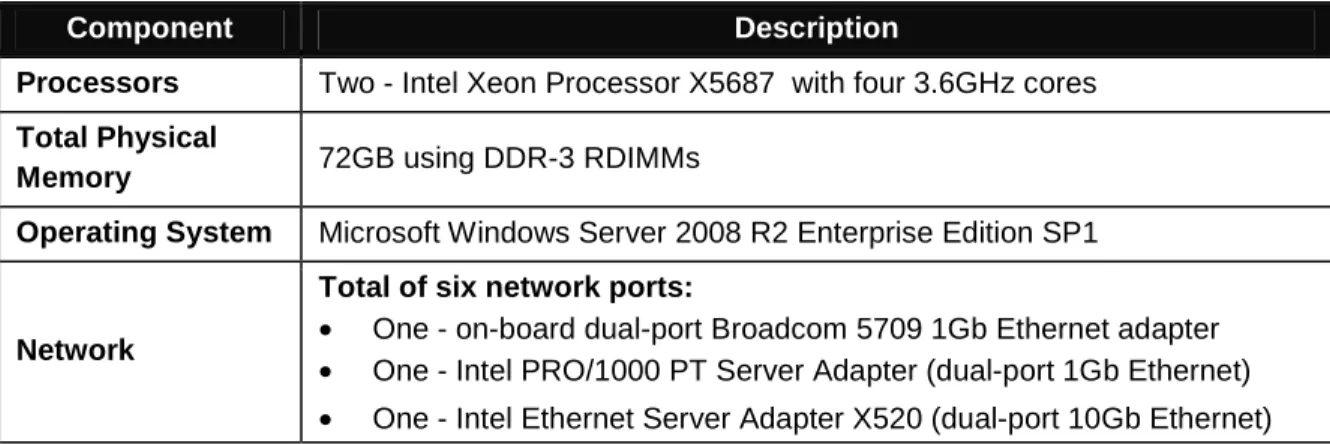
Table 2 summarizes each of the IBM System x3650 M3 system configurations.
Component Description
Processors Two - Intel Xeon Processor X5687 with four 3.6GHz cores
Total Physical
Memory 72GB using DDR-3 RDIMMs
Operating System Microsoft Windows Server 2008 R2 Enterprise Edition SP1
Network
Total of six network ports:
• One - on-board dual-port Broadcom 5709 1Gb Ethernet adapter • One - Intel PRO/1000 PT Server Adapter (dual-port 1Gb Ethernet) • One - Intel Ethernet Server Adapter X520 (dual-port 10Gb Ethernet)
Table 2. IBM System x3650 M3 server configuration.
Windows Server 2008 R2 SP1 Dynamic Memory
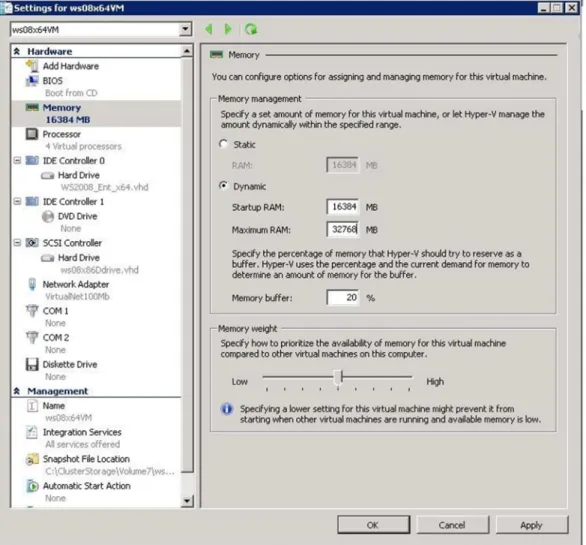
A new feature for Hyper-V, Dynamic Memory, is introduced in Service Pack 1 for Windows Server 2008 R2. Dynamic Memory enables Hyper-V hosts to dynamically adjust the amount of memory available to virtual machines in response to changing workloads.This feature enables
organizations to make the most efficient use of available physical memory by pooling memory on a host machine and dynamically distributing it to virtual machines as needed, as shown in Figure 2. The benefits of Dynamic Memory include higher virtual machine consolidation ratios and increased flexibility for managing virtualized workloads.
Figure 2. Dynamic Memory
Results and Analysis
The Hyper-V event logs contain the details about the live migration process. For each live migration, there are three events reported in the event logs:
• Brownout event #22508
• Blackout and dirty pages event #22509 • Live-migration summary event #22507
The live-migration brown-out event is the first event in the log for a live migration. The brown-out event is defined as the time it takes to complete the memory transfer portion of a Hyper-V live migration. The VM is not completely affected; that is, the VM is still responsive, but configuration changes or other administrative functions cannot be performed during this stage of the live migration.
The second event in the log for a live migration is the blackout and dirty-pages event. The blackout is the final stage when a VM fully migrates to the destination node of the cluster. During a live migration process, the host attempts to move all active memory to the destination node, but some memory pages get "dirtied" due to ongoing operations during migration. This blackout phase is the final memory transfer and causes a brief pause in service. A last snapshot, which
provides a file representation of the remaining dirty memory pages, is created, the VM is momentarily quiesced, and the memory copy completed.
The final live-migration event contains the total time for the live-migration process.
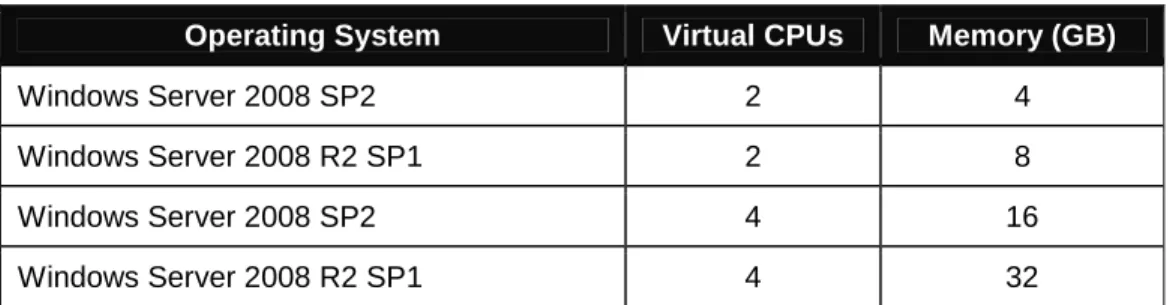
In the tested cluster configuration, four different VMs were migrated. The VMs were configured as shown in Table 3. For the purposes of this test, the VMs were configured with static memory.
Operating System Virtual CPUs Memory (GB)
Windows Server 2008 SP2 2 4
Windows Server 2008 R2 SP1 2 8
Windows Server 2008 SP2 4 16
Windows Server 2008 R2 SP1 4 32
Table 3. VM Configuration
In the first test scenario, these VMs were live-migrated just after the VMs had been started. CPU consumption was minimal, as was memory activity. In the second test scenario, VMs were live-migrated while running a substantial load on the VM in terms of CPU usage and memory usage. To generate the load, these VMs ran a simulated OLTP workload against a Microsoft SQL Server® 2008 R2 server running in the VM. The live-migration measurements were taken after all of the VMs’ available memory had been allocated.
During the live migration tests, the network utilization rates were fairly consistent. For example, a typical pattern for the network utilization for 1GbE is shown in Figure 3 for one live migration of a VM with 8GB of memory. Figure 4 shows the utilization for a 10GbE network for two migrations of a VM with 8GB of memory. While there was fluctuation while migrating VMs, these utilization rates were generally consistent no matter the size of the VM’s memory footprint.
Figure 3. One 8GB VM live migration at 1Gb/s.
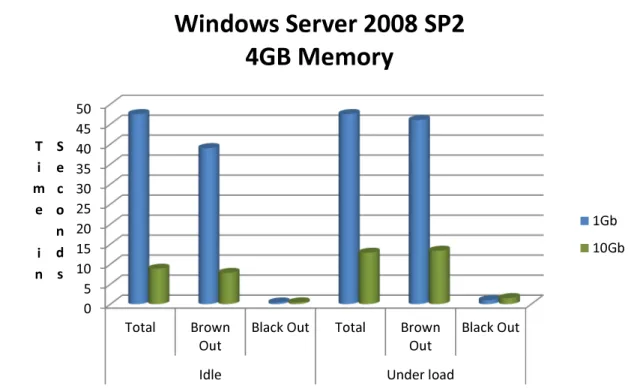
Figure 5 shows the total live-migration time, brown-out time, and blackout time for both idle and active VMs running Windows Server 2008 on a 1GbE network versus a 10GbE network. The total live-migration time dropped from 40 seconds on the 1GbE network to 8.8 seconds on the 10GbE network while the VM was idle, a 78% reduction. The total live-migration time dropped from 47.5 seconds on the 1GbE network to 15.6 seconds on the 10GbE network while the VM was loaded, a 67% reduction.
Figure 5. Windows Server 2008 (4GB).
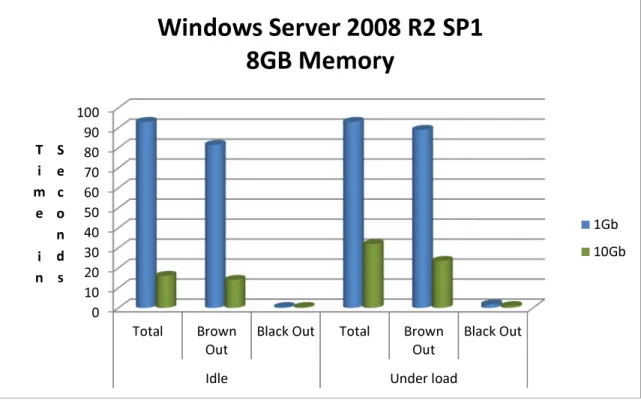
Figure 6 shows the total live-migration time, brown-out time, and blackout time for both idle and active VM running Windows Server 2008 R2 Enterprise that was allocated 8GB of memory on a 1GbE network versus a 10GbE network. The total live-migration time dropped from 84 seconds on the 1GbE network to 16 seconds on the 10GbE network while the VM was idle, an 81% reduction. The total live-migration time dropped from 93 seconds on the 1GbE network to 25 seconds on the 10GbE network while the VM was loaded, a 73% reduction.
0 5 10 15 20 25 30 35 40 45 50 Total Brown Out
Black Out Total Brown
Out
Black Out
Idle Under load
T i m e i n S e c o n d s
Windows Server 2008 SP2
4GB Memory
1Gb 10GbFigure 6. Windows Server 2008 R2 (8GB).
Figure 7 shows the total live-migration time, brown-out time and blackout time for both idle and active VM running Windows Server 2008 Enterprise that was allocated 16GB of memory on a 1GbE network versus a 10GbE network. The total live-migration time dropped from 171 seconds on the 1GbE network to 35 seconds on the 10GbE network while the VM was idle, an 80% reduction. The total live-migration time dropped from 182 seconds on the 1GbE network to 54 seconds on the 10GbE network while the VM was loaded, a 70% reduction.
0 10 20 30 40 50 60 70 80 90 100 Total Brown Out
Black Out Total Brown
Out
Black Out
Idle Under load
T i m e i n S e c o n d s
Windows Server 2008 R2 SP1
8GB Memory
1Gb 10Gb 0 20 40 60 80 100 120 140 160 180 200 Total Brown OutBlack Out Total Brown
Out
Black Out
Idle Under load
T i m e i n S e c o n d s
Windows Server 2008 SP2
16GB Memory
1Gb 10GbFigure 7. Windows Server 2008 SP2 (16GB).
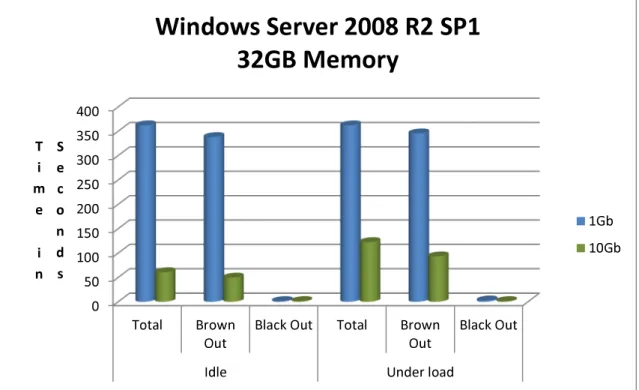
Figure 8 shows the total live-migration time, brown-out time and blackout time for both idle and active VM running Windows Server 2008 R2 that was allocated 32GB of memory on a 1GbE network versus a 10GbE network. The total live-migration time dropped from 351 seconds on the 1GbE network to 61 seconds on the 10GbE network while the VM was idle, an 82.6% reduction. The total live-migration time dropped from 362 seconds on the 1GbE network to 107 seconds on the 10GbE network while the VM was loaded, a 70% reduction.
Figure 8. Windows Server 2008 R2 SP1 (32GB).
Conclusion
Although Hyper-V and Windows Server 2008 R2 may not use the entire bandwidth of a 10GbE network for live migration, the transfer times were substantially faster than using a 1GbE network. On average, the transfer times were approximately 75% faster using the 10GbE network. The 10GbE bandwidth was approximately 45-55% used while the migration was taking place. Server virtualization with Hyper-V can help make the most of the available computing power within a data center. By increasing server utilization rates, virtualization can reduce the number of servers required and improve workload manageability.
The IBM System x3650 M3 server is a high-performance, highly reliable server that continues to set the pace in the x86-64 market. IBM System x3650 M3 servers configured with Intel Ethernet 10 Gigabit Server Adapters can:
• Maximize memory, minimize cost, and simplify development
• Offer new levels of virtualization densities, availability, flexible scalability, and transaction performance
• Deliver the latest Intel Xeon processor and 10Gb Intel Ethernet technologies as well as affordable pricing and leadership performance, without compromising high availability or rack density 0 50 100 150 200 250 300 350 400 Total Brown Out
Black Out Total Brown
Out
Black Out
Idle Under load
T i m e i n S e c o n d s
Windows Server 2008 R2 SP1
32GB Memory
1Gb 10GbThe IBM N series N5600 storage system simplifies the storage management for Hyper-V environment.
Acknowledgement
The authors would like to thank Richard Preston of NetApp for providing the Fujitsu 10GbE switch and John Parker of NetApp for helpful discussion.
For More Information
IBM System x Servers http://ibm.com/systems/x
IBM System x and BladeCenter Power Configurator http://ibm.com/systems/bladecenter/resources/powerconfig.html IBM System Storage N6000 series http://ibm.com/systems/storage/network/n6000/appliance IBM Configuration and Options Guide http://ibm.com/systems/x/hardware/configtools.html IBM ServerProven Program http://ibm.com/systems/info/x86servers/serverproven/compat/us Technical Support http://ibm.com/server/support
Other Technical Support Resources
http://ibm.com/systems/support
Legal Information
© IBM Corporation 2011
IBM Systems and Technology Group Dept. U2SA
3039 Cornwallis Road
Research Triangle Park, NC 27709 Produced in the USA
June 2011 All rights reserved.
For a copy of applicable product warranties, write to: Warranty Information, P.O. Box 12195, RTP, NC 27709, Attn: Dept. JDJA/B203. IBM makes no representation or warranty regarding third-party products or services including those designated as ServerProven® or ClusterProven®. Telephone support may be subject to additional charges. For onsite labor, IBM will attempt to diagnose and resolve the problem remotely before sending a technician.
IBM, the IBM logo, ibm.com, System Storage, and System x are trademarks of IBM Corporation in the United States and/or other countries. If these and other IBM trademarked terms are marked on their first occurrence in this information with a trademark symbol (® or ™), these symbols indicate U.S. registered or common law trademarks owned by IBM at the time this information was published. Such trademarks may also be registered or common law trademarks in other countries. For a list of additional IBM trademarks, please see
http://ibm.com/legal/copytrade.shtml.
Intel, the Intel logo, and Xeon are trademarks or registered trademarks of Intel Corporation or its subsidiaries in the United States and other countries.
Microsoft, Windows, Windows Server, the Windows logo, Hyper-V, and SQL Server are trademarks or registered trademarks of Microsoft Corporation.
Other company, product and service names may be trademarks or service marks of others.
IBM reserves the right to change specifications or other product information without notice. References in this publication to IBM products or services do not imply that IBM intends to make them available in all countries in which IBM operates. IBM PROVIDES THIS PUBLICATION “AS IS” WITHOUT WARRANTY OF ANY KIND, EITHER EXPRESS
OR IMPLIED, INCLUDING THE IMPLIED WARRANTIES OF MERCHANTABILITY AND FITNESS FOR A PARTICULAR PURPOSE. Some jurisdictions do not allow disclaimer of express or implied warranties in certain transactions; therefore, this statement may not apply to you.
This publication may contain links to third party sites that are not under the control of or maintained by IBM. Access to any such third party site is at the user's own risk and IBM is not responsible for the accuracy or reliability of any information, data, opinions, advice or statements made on these sites. IBM provides these links merely as a convenience and the inclusion of such links does not imply an endorsement. Information in this presentation concerning non-IBM products was obtained from the suppliers of these products, published announcement material or other publicly available sources. IBM has not tested these products and cannot confirm the accuracy of performance, compatibility or any other claims related to non-IBM products. Questions on the capabilities of non-IBM products should be addressed to the suppliers of those products.
MB, GB and TB = 1,000,000, 1,000,000,000 and 1,000,000,000,000 bytes, respectively, when referring to storage capacity. Accessible capacity is less; up to 3GB is used in service partition. Actual storage capacity will vary based upon many factors and may be less than stated. Performance is in Internal Throughput Rate (ITR) ratio based on measurements and projections using standard IBM benchmarks in a controlled environment. The actual throughput that any user will experience will depend on considerations such as the amount of multiprogramming in the user’s job stream, the I/O configuration, the storage
configuration and the workload processed. Therefore, no assurance can be given that an individual user will achieve throughput improvements equivalent to the performance ratios stated here.
Maximum internal hard disk and memory capacities may require the replacement of any standard hard drives and/or memory and the population of all hard disk bays and memory slots with the largest currently supported drives available. When referring to variable speed CD-ROMs, CD-Rs, CD-RWs and DVDs, actual playback speed will vary and is often less than the maximum possible.
Intel® Virtualization Technology may require a computer system with an enabled Intel® processor, BIOS, virtual machine monitor (VMM). Functionality, performance or other benefits will vary depending on hardware and software configurations. Software applications may not be compatible with all operating systems. For more information, visit http://www.intel.com/go/virtualization