• No results found

How To Solve The Fmfontham Equation In A Two Level Iterative Computer Science Project

N/A
N/A
Protected

Academic year: 2021

Share "How To Solve The Fmfontham Equation In A Two Level Iterative Computer Science Project"

Copied!
138
0
0

Loading.... (view fulltext now)

Full text

(1)

Computer Science Master's Project Report

Rensselaer Polytechnic Institute

Troy, NY 12180

Development of A Two-Level Iterative Computational Method for Solution of the

Franklin Approximation Algorithm for the Interpolation of Large Contour Line Data

Sets

Submitted by

John Childs

In partial fulfillment of the requirements for the degree of Master of Science in Computer

Science

May, 2003

Approved by:

Project Advisor

__________________________ Date: _________________________

(2)

1

Table of Contents

Abstract...2

Acknowledgements...3

1.0 Introduction...4

2.0

Theoretical and Mathematical Background of the Problem... 7

3.0 Preliminary Investigations...11

4.0 MATLAB Sparse Matrix Reordering Experiments...13

5.0 METIS Reordering Experiments...20

6.0 Saunders-Paige LSQR Experiments using Well-Behaved Experimental

InputFiles...26

7.0 Saunders-Paige LSQR Experiments using Input Files Selected to Exercise

MATLAB more fully...31

8.0 Interpolating Difficult Input Terrains using LSQR...39

9.0 Comparison of the Quality of Solutions and Convergence Rates of the

Multi-Level Laplacian/LSQR Solver and the MATLAB Direct

Solver...44

10.0 Comparison of the Solution Vector produced by the MATLAB Direct

Solver with the LSQR Solution for a Large InputFile...48

11.0 Comparison of the Franklin Algorithm with the Able Software R2V

Native Interpolation Algorithm...53

12.0 Examination of the CatchmentSIM-GIS 8-32 Ray Interpolation

Algorithm...57

13.0 Analysis of Results...60

14.0 Conclusions...64

15.0 Future Work...65

16.0 References...66

Appendix 1. MATLAB CodeModules...67

Appendix 2 Java Code Modules...77

(3)

2

Abstract

A method was developed to solve the over determined Laplacian approximation

algorithm (Franklin algorithm) for the interpolation of contour lines to terrain surfaces

using desktop type computers. The method is based on the Saunders-Paige LSQR

iterative Conjugate Gradient solver provided with a very good initial estimate. The initial

estimate is computed from the input elevation grid using a fast solver producing a lower

quality interpolation of the input grid. The fast solver uses a four-nearest-neighbor

second order central difference approximation of the Laplacian heat equation. The

solution vector produced by the fast interpolation is used as the initial estimate for the

LSQR solver. LSQR is then used to solve a sparse matrix representation of the over

determined system of equations resulting from the Franklin formulation of the Laplacian

heat equation interpolation. The result is a high quality interpolation characteristic of the

Franklin approximation in less time and requiring much less storage than either a direct

solution (using factorization or row reduction) or a solution computed by the LSQR

solver without a good initial estimate.

This is useful because solution of the over determined system of linear equations

associated with the Franklin algorithm by direct means is computationally expensive

from both a time and space complexity perspective. The method developed as part of this

project significantly reduces the in-process storage requirements to compute the solution

vector for large systems of equations, for example one million equations with one million

unknowns. The method accomplishes this by use of an iterative least squares solver, the

well known LSQR program developed by Saunders and Paige.

The iterative LSQR solver makes more effective use of limited RAM resources as

compared to the MATLAB direct solver for example, allowing larger problems to be

solved than with previous methods. In addition, solution times were reduced by

supplying LSQR with a high quality initial estimate. The fast central difference

Laplacian algorithm exploits the problem structure to supply this estimate cheaply. The

fast solver produces a solution of unacceptable quality as a final interpolation but

produces an excellent initial estimate for LSQR.

(4)

3

Acknowledgements

I would like to thank my project advisor, Dr. William Randolph Franklin, RPI Troy, for

generating the idea for this project and for his help, advice and support. I feel extremely

grateful for the opportunity to spend a semester working on a project in a field of great

personal interest under his direction. Dr. Franklin is a true expert in the field of

computational cartography, applied mathematics, computational geometry as well as

being a devoted teacher to his students.

I would also like to thank Dr. M. A. Saunders of Stanford University for his key advice

concerning application of his iterative Conjugate Gradient solver. He took time from his

busy academic schedule to respond to my enquiry in a very helpful and detailed fashion.

This advice proved essential to whatever small success this project may have achieved.

Dr. Gilbert Strang’s Online Linear Algebra lectures at the MIT web site were very useful

in getting me up to speed with the mathematics required for this project.

I would also like to thank Jackie Bassett for proofreading this document and for offering

editorial advice.

(5)

4

1.0 Introduction.

Background

Interpolating information from known data to unknown data points is one of the classical

problems of computational cartography. This technique is used widely in many diverse

GIS (Geographical Information Systems) applications. One example is the derivation of

DEMs from topographical contour maps for areas where DEMs are not available. In

order to do this, DEMs are often reverse-engineered from contour map data. In this multi

step process, contour maps are scanned into digital format (if they are not already

archived that way). Then the contour line elevation data layer is separated from the other

information on the map. The contour line data is then conditioned (to the highest degree

possible) to correct bleeding, breaks, spurs bridges and other anomalies

[1]

.

The contours must then be tagged with their elevation values in a machine-readable

format. This is typically done by vectorizing the contour lines using a line following

method

[2]

and tagging the vectors with their elevations either automatically, or more

commonly using a semi-automated labor-intensive process. The tagged vector data is

then rasterized and transferred to a grid using an interpolation algorithm. Finally, the

gridded elevation values are written to some type of GIS format that can be used by other

applications, such as the USGS ASCII DEM format. The interpolative step in the

process is the focus of this proposal. Often, the interpolation algorithms used to produce

terrain surfaces from the gridded elevation values are somewhat primitive, for example

the four-nearest neighbor algorithm derived from the Laplacian Heat Equation PDE.

This often results in markedly inferior terrain surfaces that exhibit a variety of unnatural

features, for example terracing.

One algorithm known to be an improvement over commonly used algorithms for the

interpolation (or rather the approximation) of known elevations to a regular grid is

described by Dr. William Randolph Franklin paper entitled

Applications of Analytical

Cartography

[3]

.

The algorithm is based on a novel application of the Laplacian PDE (partial differential

equation) whereby a system of over determined linear equations is formulated and

solved by performing a linear least squares fit to the known data and unknown grid

nodes.

The algorithm has several advantages as compared to previous algorithms:

1) It doesn't require continuous contours; i.e. it can deal with breaks, such as those

that commonly occur when contours are too closely spaced.

2) It can use isolated point elevations if known, such as mountain tops.

3) If continuous contours with many points are available, it can use all the points

(without needing to sub sample them).

4) Information flows across the contours, causing the slope to be continuous and the

contours not to be visible in the generated surface.

(6)

5

5) If local maxima, such as mountain tops, are not given, it interpolates a reasonable

bulge. It does not just put a plateau at the highest contour.

6) Unlike some other methods, it works even near kidney-shaped contours, where

the closest contour in all four cardinal directions might be the same contour.

7) It has the advantage of producing a surface virtually free of the negative artifacts

associated with other interpolation algorithms, for example terracing and ringing.

8) It also offers the advantage of allowing the surface smoothness and fit to be

adjusted by selective weighting of the equations corresponding to the known

elevations, thereby allowing grid adjustments to be made on a node-by-node

basis if desired.

Although the algorithm presents advantages, it also presents computational challenges. If

the input elevation grid is of size N by N, the solution is formulated in terms of a N

2

by

N

2

coefficient matrix. Since the number of flops for row reduction for an N by N matrix

is approximately 2N

3

/3 flops, the time complexity for solving an N

2

by N

2

matrix by row

reduction is (N

2

)

3

= N

6

. Even more significantly, the initial storage requirements are

large for large input files and these can become even larger during processing due to

fill-in durfill-ing computation.

The Franklin algorithm was previously demonstrated on data sets as big as 257 X 257

nodes using sparse matrix techniques. Although this was sufficient to demonstrate the

advantages of the algorithm, real data sets are larger. Unfortunately, it has not been

possible previously to apply this beneficial algorithm to realistic data sets using desktop

computers because of the large computational complexity of solving the linear least

squares system of equations by row reduction.

The goal of this project is to develop a computational technique that would allow the

algorithm to be used for realistic data sets using small computers. The target size is 1201

by 1201 grid postings, the size of a USGS 30 minute Level 2 Digital Elevation Model.

The task is made difficult by the rapid increase in problem size as a function of the

number of input elevation nodes. For example, the full matrix for the Franklin

formulation of a 1201 by 1201 elevation node input file contains approximately 2e+12

data elements!

A further goal was to compare the quality of the grids produced by the algorithm (once a

computational technique was developed) with a commercially implemented algorithm.

The hope is thus to apply Dr. Franklin’s algorithm to large data sets using a standard

desktop computer and to further demonstrate its utility to the cartographic community.

Objectives

The objective of this research project are as follows:

Develop a computational method for solution of the algorithm described in the

Dr. William Randolph Franklin paper cited above.

(7)

6

Demonstrate the computational method using a desktop-type computer solving

datasets of sizes associated with commonly used digital elevation model (DEM)

formats (for example input files of 1201X1201 elevation grid nodes). The

developmental hardware platform is a desktop computer running the Windows XP

OS with 256MB of memory. (An HP 1.1GHz laptop was used for some tests.)

Compare the results of the algorithm and computational method with a

commercial contour-to-grid interpolator: R2V from Able Software, Inc. and with

a research grade hydrologic application: CachmentSIM-GIS.

Although a fair amount of code was written during the course of this project, the

objective was not to produce a production grade software application. Rather, the goal

was to develop a computational method that was capable of solving this problem for large

input data sets through the use of code modules using several developmental

environments, including the research environment MATLAB. The integration of these

experimental modules into a robust application provides an interesting opportunity for

future work. The main tasks required for achieving this future goal are discussed in

Section 14 of this report.

Development Environments Used

Several development environments were used during the course of this work. The first

was the well-known scientific math package MATLAB. MATLAB is an interactive

developmental and research programming platform designed specifically for matrix

processing that offers a FORTRAN-like procedural programming language, a library of

matrix functions, and a wide variety of graphical visualization tools. Although

MATLAB is not a general-purpose development environment, demonstrating the

algorithm using MATLAB modules immediately suggests corresponding

implementations using production-grade software tools such as C++, FORTRAN or

Java.

Although MATLAB is a wonderfully convenient development environment because of

its rich library of specialized matrix processing, matrix solving and display methods, it is

definitely not an all-purpose tool. Its main disadvantage is that user-defined code

modules are interpreted rather than compiled, and typically run several orders of

magnitude more slowly than identical algorithms implemented in C++ or Java, for

example. This required the use of alternative development environments for some of the

fast pre-processing tasks required for this project, particularly for the module used to

prepare the initial estimate for the iterative solver used in this project and for the module

that prepared the sparse index file from the raw elevation matrix.

(8)

7

2.0 Theoretical and Mathematical Background of the Problem

A brief discussion of the theoretical basis for the Franklin approximation algorithm and

the method of problem formulation and solution is presented in this section. The Laplace

heat equation:

δ

2

u/

δ

x

2

+

δ

2

u/

δ

y

2

= 0

describes many time-independent physical phenomenon including the steady state

distribution of temperature in two dimensions. This equation can be solved in closed

form for simple systems subject to boundary conditions consisting of for example initial

temperatures at the edges of a rectangular plate.

The Laplace equation has also been used to model equilibrium displacements in a

membrane, gravitational and electrostatic potentials and certain fluid flows. It is not

surprising therefore that it is also applied to topographical systems. In this case elevation

is considered a potential analogous to temperature. The boundary conditions consist of

the known elevations at the elevation contours (not necessarily at the edges as is common

in a heat conduction model) and the equation models the “flow” of elevations from the

fixed contours to the rest of the system in the same way that heat flows in the plate

example

[7]

.

Central Difference Approximation of the Laplace Equation

Numerical solution methods are often used in systems where closed form solutions of

differential equations are difficult or impractical. The central difference formulas can be

used to approximate the second derivative of a function f(x)

[4]

as follows. Consider the

second order Taylor series approximation of a function f(x) around the point ‘a’:

T(x) = f(a) + f’(a)(x-a) + ½ f’’(a)(x-a)

2

+ O(n

3

)

Where O(n

3

) is an error term resulting from the truncation of the series. Consider a point

slightly greater than x so that x-a=

x or a=x-

x. Substituting into the Taylor expansion

around this point yields:

T(x) = f(x-

x) + f’(x-

x)(x-( x-

x)) + ½ f’’(x-

x)(x-( x-

x))

2

+ O(x

3

)

= f(x-

x) + f’(x-

x)(

x) + ½ f’’(x-

x)(

x)

2

+ O(x

3

)

T(x+

x) = f(x+

x -

x) + f’(x+

x -

x)(

x) + ½ f’’(x+

x -

x)(

x)

2

+ O(x

3

)

= f(x) + f’(x)(

x) + ½ f’’(x)(

x)

2

+ O(x

3

)

A similar substitution for a Taylor approximation around a point a little less than x where

x-a = -

x or

x = x+a yields:

(9)

8

T(x-

x) = f(x) - f’(

x)

x + ½ f’’(x)(

x)

2

+ O(x

3

)

Adding the two equations together gives:

T(x+

x) + T(x-

x) = 2f(x) + (

x)

2

f””(x)+ O(x

3

)

If

x is small the O(x

3

) error term can be ignored, and T(x) is very close to f(x).

Substituting T(x)

f(x) and Solving for f”(x):

f”(x) = f(x+

x) + f(x-

x) – 2f(x)/ (

x)

2

If f is a continuously differentiable function mapping two dimensional coordinates x,y to

elevation f(x,y)=z then

δ

f(x,y)/

δ

x

2

f(x+

x,y) + f(x-

x,y) – 2f(x,y)/ (

x)

2

A similar expansion in the y direction yields:

δ

f(x,y)/

δ

y

2

f(x, y+

y) + f(x, y-

y) – 2f(x,y)/ (

y)

2

If

x =

y then both of these terms can be replaced with

. Substituting these two

equations into the Laplace equation yields:

f(x+

,y) + f(x-

,y) – 2f(x,y)/ (

)

2

+ f(x, y+

) + f(x, y-

) – 2f(x,y)/ (

)

2

= 0

Multiplying by

2

and collecting terms yields the central difference equation:

f(x+

,y) + f(x-

,y) + f(x, y+

) + f(x, y-

) – 4f(x,y) = 0

The continuous function f is often approximated by a set of points on a grid or mesh. In

this case the central difference equation is defined at the grid points. The discrete central

difference equation can be written:

f(i+1,j) + f(i-1, j) + f(i, j+1) + f(i, j-1) – 4f(i,j) = 0

If f(i,j) maps grid points to an elevation z then the discrete central difference equation can

be written in the more concise notation:

z

l

+ z

r

+ z

u

+ z

ld

-4 z

ij

= 0

Where the indices refer to the grid nodes to the immediate left, right, up and down grid

positions relative to the central node.

Applications to Contour Interpolation

Franklin

[1]

uses the central difference approximation to formulate this problem by

constructing a system of linear equations:

(10)

9

for each node in the input elevation grid. (This is sometimes referred to as the stencil

equation). Since there are N

2

grid points this yields an equal number of equations, each

with N

2

(mostly zero) coefficients. This in turn yields a coefficient matrix with N

4

total

coefficients. Since each row is characterized by an equation with exactly five non zero

coefficients as in the equation above, each row of this sparse matrix has N

2

entries, of

which (N

2

–5) are zeros. The application of a linear equation solving algorithm yields the

elevations directly, as long as N is not too large.

However, solving this system produces terrain surfaces exhibiting excessive terracing

between the known contours in areas where the lower contour lines are longer than the

higher ones, because the lower elevation contour lines will contribute more toward the

new center node elevation than the higher elevations. Also, many of the grid points

corresponding to contours have known elevations. If the solution vector is constrained to

maintain these fixed elevations, the surface will not be continuous across the contours

and considerable terracing will result. If the solution vector is not so constrained,

inaccurate elevations can occur.

The central difference approximation of the Laplace equation as formulated above can

also be solved by iterative methods. For example the central difference approximation

can be applied to each unknown node in the elevation grid in successive computational

passes using Jacobi or Gauss-Seidel iterative solvers. At each iteration a new elevation is

computed for the central node. The greater the number of iterations, the closer the

approximation becomes to the exact solution (if the method converges). Although fast,

efficient and compact, the result is no better than that produced by direct solution as the

underlying formulation of the problem is the same. However, this technique

subsequently proved valuable in the multi-level solution approach that was used to solve

the system.

A Better Formulation of the Problem

Franklin suggests a different formulation of the system of equations, as follows:

1) Pretend that all the N

2

=M points have unknown elevations z

ij

.

2) Create an equation for each z

ij

setting it to the average of its neighbors as in the

equation above.

3) For each of the K points whose elevation e

i

are known create an additional

equation z

i

= e

i

.

This results in the system of equations:

Az=b

where A is an (M+K) by M coefficient matrix, z is an M by 1 vector, and b is a (M+K)

by 1 vector of zeros or known elevation values.

This system is over determined, so a solution exists only when b happens to be in the

column space of A, which is obviously unlikely.

(11)

10

So rather than attempting to solve the system exactly (and unsuccessfully) a linear least

squares solution can be applied instead. This technique minimizes the vector:

(b-A

z

)

T

(b-A

z

)

Where A

z

is the (projection of b) = b

proj

on the column space of the coefficient matrix A

and (b-A

z

)

T

is the transpose of the vector quantity (b-A

z

). The solution

z

to the matrix

equation A

z

= b

proj

is the vector in the column space of A that is closest to b, and is the

“best” solution to the (probably unsolvable) system Az=b. Since (b-A

z

) = b- b

proj

= e is

minimized precisely when e is orthogonal to A, then, in matrix terms:

A

T

(b-A

z

)

z

=0.

minimizes e, which is equivalent to:

A

T

A

z

=A

T

b

where A

T

A is a square, symmetric (M

2

+K by M

2

+K) matrix

[5]

. This is called the linear

least squares solution of the problem because it minimizes the sum of the squares of the

error vector e. This system has been solved by Franklin for data sets of up to 257 by 257

nodes using MATLAB sparse matrix utilities and solvers. However, this problem is

considerably larger than the direct solution described above by row reduction because of

the additional matrix multiplications required. More importantly, the increase in space

complexity due to the need to store more large data arrays leads to significant

computational difficulties.

Franklin’s work demonstrated that this formulation can virtually eliminate the

disadvantages associated with a direct application of the central difference equation. The

Franklin formulation does not constrain the solution vector to maintain the known

elevations but does in fact constrain the grid points corresponding to the known

elevations to be the average of their four neighbors. In addition, since the method

minimizes the squares of the error components, scaling the coefficient and the known

elevation results in a weighting of that elevation. This aspect, considered a problem in

statistical regression application is an advantage here as it allows the user to constrain or

relax the solution vector’s conformance to the known elevations, thereby balancing

surface accuracy and smoothness.

The main problem with this approach is the time and space complexity for computation

of the solution vector

z

, particularly on desktop (vector) systems. Successfully

overcoming the computational obstacles was the main focus of this project.

(12)

11

3.0 Preliminary Investigations

MATLAB Code Modules and their Limitations

A series of MATLAB code modules was written and used throughout this study to

investigate various solution options. The MATLAB function sparseA( ) was written to

formulate the sparse coefficient matrix ‘A’ from the input elevation node matrix using the

Franklin formulation described above. The function makeB( ) formulated the right hand

side (RHS) vector ‘b’ from the same input elevation node matrix. The function repack( )

converted the N

2

by 1 solution vector

z

into a N by N output elevation grid. Once

formulated, the system could be solved using the MATLAB native direct solver by

invoking z=A\b. An over determined case like the Franklin formulation is detected

automatically by MATLAB and a least squares solution is formulated and computed.

Code listings for these routines are attached in Appendix 1.

Experiments with these utilities and the native MATLAB least squares solver indicated

that the largest problem that could be solved on an eMachines T4200 2.0GHz processor

with 256MB RAM running the Microsoft XP operating system was about 400 by 400

elevation nodes. This yielded a system of 165685 equations and unknowns. An input

elevation matrix of 500 by 500 nodes caused an out of memory processor error.

Experiments with Alternative MATLAB Solvers

The first tests associated with this project examined some alternative MATLAB tools for

solving systems of linear equations to see of they offered any computational efficiencies.

Straightforward solution of the linear least squares equation solve the equation:

A

T

A

z

=A

T

b

by computing A

T

A, then A

T

b, and then solving for

z

using elimination. Alternatively, the

system can be solved by first performing a QR factorization of A. The classical solution

approach

[6]

uses the following steps:

1) Compute Q

2) Compute R using R=Q

T

A

3) Solve for

z

using R

z

= Q

T

b

The MATLAB documentation states that for sparse matrices, Q is mostly full. Since Q is

an m by n matrix, this would be unfavorable from a computational perspective. The

MATLAB documentation suggests computing

[C,R] = qr(A,B)

for sparse matrices, applying the orthogonal transformations to B, producing C = Q

-1

*B

without computing Q. For sparse matrices, the Q-less QR factorization allows the

solution of sparse least squares problems with two steps:

(13)

12

[C,R] = qr(A,b)

x = R\c

This method was used to solve an experimental system of equations. The tests indicated

that the computational time and complexity was identical to that produced by applying

the MATLAB command z=A\b. It is considered likely that the above step wise method

is used by MATLAB when A\b is invoked.

(14)

13

4.0 MATLAB Sparse Matrix Reordering Experiments

When certain operations such as matrix multiplication and particularly the factorizations

used to solve linear systems are conducted on sparse matrices the density of the matrices

and thus the storage requirements can increase dramatically. This is called fill-in. It has

been known for some time that the row and column order of a sparse matrix can have a

large effect on fill-in during these computations. It has been proven that the computation

of optimal ordering is NP-hard. However, there are several heuristics commonly used to

improve ordering for this purpose.

[7]

An investigation was conducted to determine if the computation of the over determined

Laplacian approximation algorithm (Franklin algorithm) could be improved by using

alternative row or column orderings of the large sparse coefficient matrix. The hope was

that the improvement would be enough to allow processing of files of the target size. A

small test system was built and experiments with the reordering schemes provided by

MATLAB were conducted and noted.

Permutation Vectors

Consider an n by n square matrix A and a 1 by n permutation vector p such that

p=[i

1

, i

2

, ...i

n

] , i

Ι

The MATLAB matrix permutation operator can produce a row or column permuted

matrix P:

P

row

=A(p,

:

)

and

P

col

= A(

:

,p)

where P

row

is the matrix with rows permuted according to the encoding in the permutation

vector p, i.e.

P

row

= [

row

i1

row

i2

.

.

.

row

in

]

and

P

col

=[

col

i1

col

i2

. . .

col

in

]

The inverse operation can be performed with the vector q computed from the MATLAB

command:

q(p) = 1:n

The inverse operation is then:

(15)

14

A = P

row

(q,

:

)

for the row permutation or

A=P

col

(

:

, q)

for the column permutation.

It is also possible to permute the linear system

Az = b

as long as the permutations are consistent. That is, it is possible to perform row or

column permutations on an n by m matrix A as long as the corresponding permutation is

performed on either vector z or vector b. For example, to perform a column permutation

defined by 1 by n permutation vector p on matrix A, first permute the matrix:

P

col

=A(

:

, p)

Then solve the linear system:

P

col

z

= b

Then compute the inverse permutation vector q:

q(p) = 1:n

and then compute z by re-applying the permutation vector:

z =

z

(q,

:

)

This technique is valid for an over determined system as well.

Test System

Various reordering schemes were applied to a 200 by 200 node input elevation grid

consisting of straight rows of contour lines running the width of the map. A small Java

utility called InputMatrix.java was used to build this and similar input files. The grid

was imported into MATLAB as elevation matrix ‘A’.

Test 1 – Baseline

The first test established the processing time for an unordered MATLAB sparse elevation

matrix. Actually, as a result of the way that sparseA.m builds the input matrix and due

to the structure inherent in the problem, the unordered sparse matrix has a very high

degree of structure. This structure tends to place the non zero elements on the diagonal,

which in fact is one of the heuristics used for certain reordering schemes (see below). As

(16)

15

a result, it is expected that the unordered sparse matrix may actually be closer

to optimal than to extremely sub-optimal.

The utilities sparseA.m, makeB.m, and repack.m were used to prepare the input

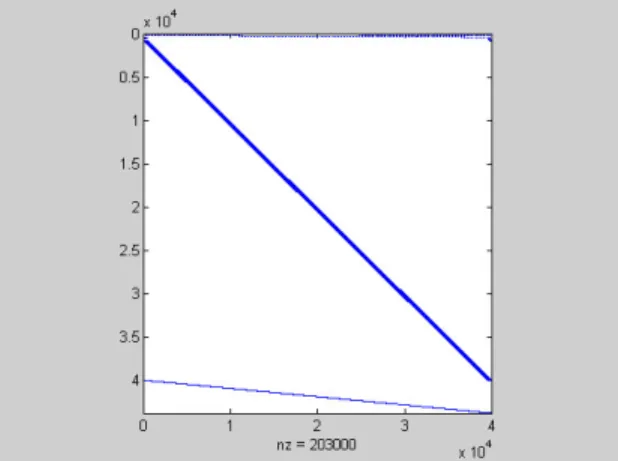
matrices. The program sparseA.m computed a 43,800 by 40,000 sparse coefficient

matrix. The characteristics of the computed sparseMatrix can be seen from the

MATLAB spy plot in Figure 1. below.

The program makeB.m computed a 40,000 by 1 right hand side (RHS) vector. The

system was then solved using the MATLAB command:

t1=clock; z=sparseMatrix\b; t2=clock; e=etime(t2, t1)

The elapsed time e was 197.86s on a Hewlett Packard 1.1MHz laptop.

Test 2 – colmmd

colmmd is a MATLAB column reordering function returning a permutation vector

p = colmmd(S)

such that p is a minimum degree permutation vector for S.

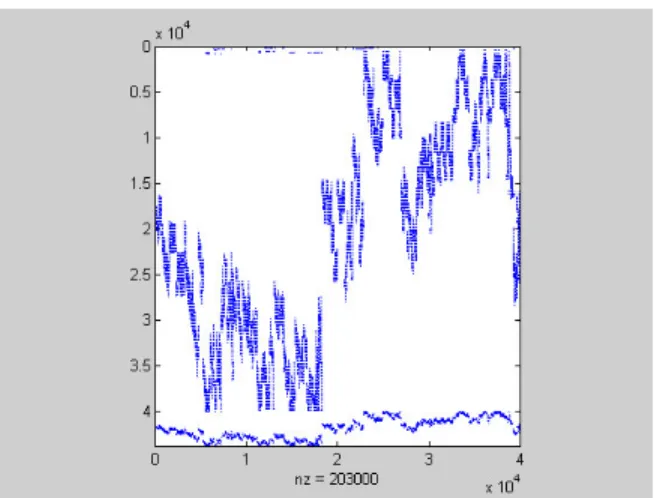
The permutation vector ‘p’ was calculated for sparseMatrix and then used to permute

sparseMatrix to colmmdMatrix. The MATLAB spy plot for colmmdMatrix is shown in

Figure 2.

(17)

16

The MATLAB colmmdMatrix\b command was then used to solve

z

. The elapsed time

was 221.87s, definitely not an improvement.

Test 3 - Non Zero Vector Sort

The next test was a column sort by number of non zero elements. The permutation vector

was computed by:

p = colperm(sparseMatrix)

Then sparseMatrix was permuted as before. The MATLAB spy for the matrix

colpermMatrix is shown in Figure 3 below.

The computation elapsed time in this case was 174.27s, a slight improvement.

Figure 2. colmmd Reordered Sparse Matrix

(18)

17

Test 4 – colamd

The MATLAB function colamd returns a permutation based on an alternative minimum

degree ordering algorithm. As before, a permutation vector was computed by:

p = colamd(sparseMatrix)

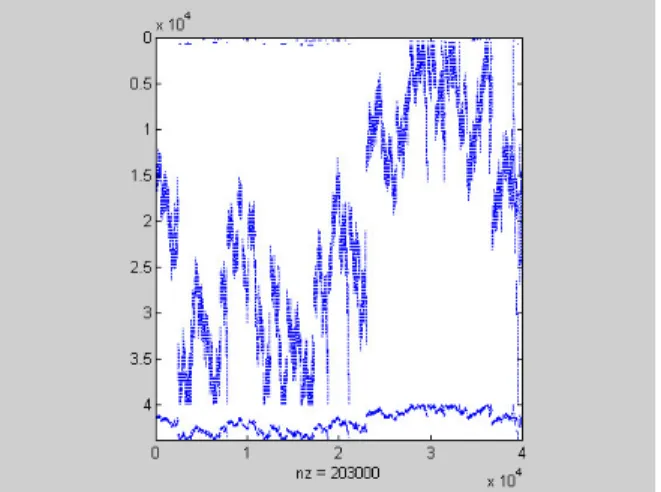
and as before a matrix colamdMatrix was computed by permuting sparseMatrix with p.

The MATLAB spy for this reordering is shown in Figure 4.

The elapsed time for the computation of the solution vector showed a significant

improvement this time, dropping to 136.12s.

Test 5 – colamd with spparms Parameter Adjustment

MATLAB provides the function spparms( ) that allows ten minimum degree ordering

algorithm parameters to be adjusted. There is a recommended grouping that can be

invoked using the command:

spaarms(‘tight’)

that optimizes the algorithm to provide less fill-in at the expense of increased

computational time for the reordering. The colamd experiment was rerun after setting the

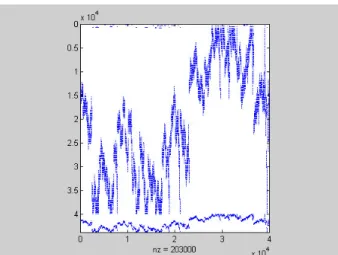
parameters ‘tight’. The MATLAB spy for the matrix spaarmsTightMatrix is shown in

Figure 5.

(19)

18

This yielded the best processing time of all, 128.735s. However, inspection of the spys

for the two colamd matrices shows that they appear to be identical, so any difference in

processing time might be hardware related. A replicate run of the ‘tight’ configuration

showed a processing time of 132.06s, possibly confirming this analysis.

Test 6. – Verification of Solution Recovery using Inverse Permutation.

A test was conducted to determine if the solution vector z could be recovered from the

permuted solution vector

z

according to the formula specified above. This was done for

the colamd permutation vector p. The inverse vector q was computed and applied to

z

.

The solution vector z was repacked. The expected contour plot, shown below in Figure

6, was produced.

The colamd permutation took only 66% of the run time as compared to the unordered

matrix, indicating that some improvement as a result of column reordering may be

possible for larger non-artificial input matrices

Unfortunately, while significant, the improvements demonstrated in this test were judged

Figure 5. spaarms TightMatrix Reordered Sparse Matrix

(20)

19

not enough of an improvement to approach the goal of processing a 1201 by 1201 node

elevation grid.

(21)

20

5.0 METIS Reordering Experiments

The search for productive matrix reordering algorithms was next extended beyond

MABLAB. This search indicated that the developmental and research software package

METIS might be a good candidate for producing useful reordering schemes.

METIS

was

obtained

by

downloading

from

the

site

http://www-users.cs.umn.edu/~karypis/metis/. METIS is a family of multilevel partitioning

algorithms developed at the University of Minnesota. The package contains several

utilities for graph partitioning, mesh conversion and, of particular interest: sparse matrix

ordering. The accompanying documentation was clear and well-written but lacked

theoretical depth.

The first problem to be solved was understanding how the program worked. The METIS

input file format is called a graph file and is composed of connectivity and edge and

vertex weight information such that each line of the graph file corresponds to one graph

node. It was apparent that this program was aimed at graph applications primarily. The

seven node graph example included in the documentation was used to help generate the

correct graph file format from the node and edge information provided in the example.

The adjacency matrix corresponding to the example graph was then generated and

represented in MATLAB sparse matrix format. The MATLAB function called

makeGraph.m was written to convert the MATLAB sparse representation of the

adjacency matrix to METIS graph file format. This utility produced a graph file called

outfile.graph. The METIS utility graphchk was then run on outfile.graph to check the

correctness of the generated file. This worked satisfactorily. The reordering programs

oemetis.exe and onmetis.exe were run on outfile.graph. This produced two versions of

outfile.graph.iperm, the permutation vectors. These vectors were of the correct

dimension and contained no obvious mistakes.

A problem arose when running graphchk.exe on a METIS graph file generated from a

MATLAB sparse matrix generated from a small (4 by 4) test elevation contour file.

Apparently, METIS can only process symmetric matrices, i.e. only valid adjacency

matrices where if coefficient c

1

indicating an edge between node i and node j is present, a

corresponding coefficient c

2

= c

1

exists indicating that the same edge between node j and i

is also present. Unfortunately, this is not the case for sparse matrices derived from

elevation contours which are generally asymmetric. METIS also does not accept edges

that start and end at the same node, meaning that no non zero diagonal matrix entries are

permitted.

The MATLAB minimum degree ordering utilities are able to somehow handle

unsymmetrical matrices. Lacking any information from the MATLAB documentation as

to exactly how this was done, it was therefore decided to try to force METIS to suggest a

permutation vector by direct means. The strategy was to modify the input sparse matrix

so that METIS would accept it. METIS was then asked to compute a permutation vector.

This permutation vector was itself used to reorder the columns or the rows or both for the

(22)

21

original (unmodified) sparse matrix. (Since the permutation vector is 1 by n the columns

can be permuted directly. The permutation vector must be augmented in order to perform

the corresponding permutation on the rows. See below.)

In order to accomplish this, the sparse input matrix needed the following:

1) It must be converted to a square matrix;

2) it must not have any non-zeros on the diagonal;

3) it must be symmetric.

Condition (1) was accomplished by removing the code from sparseA.m that concatenated

the equations resulting from the known elevations onto the square sparse Matrix from

containing the unknown equation coefficients. Condition (2) was accomplished by

extracting the diagonal matrix, multiplying it by (-1) and then adding it to the sparse

matrix to zero out any non zero coefficients on the diagonal. Then (3) was accomplished

by converting all non zero elements to ones and then reflecting every non-zero element

across the diagonal. These were all accomplished in makeGraph.m.

After debugging, the permutation vector for a 50 by 50 elevation contour test file was

computed using METIS utilities oemetis.exe and onmetis.exe. Both the columns and the

rows were permuted using these vectors. The column permutation was straightforward

because the dimensions matched. In order to permute the rows, extra permutation indices

were concatenated to just copy the rows corresponding to the known elevation equations

to the permuted matrix unchanged.

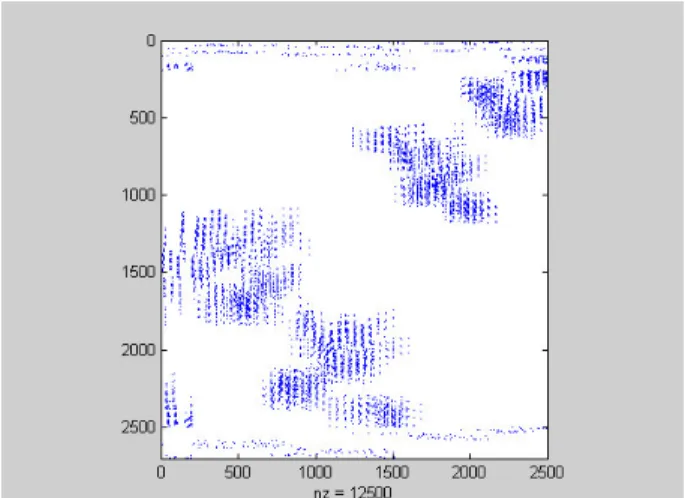
The MATLAB spy plot for the column permutation is shown below in Figure 7 .

The plot is interesting in that the algorithm seems to “clump” the coefficients into regions

of high density and low density, the column permutation matrix seemingly blocked along

the anti-diagonal. The MATLAB solver was run on the column permuted matrix and

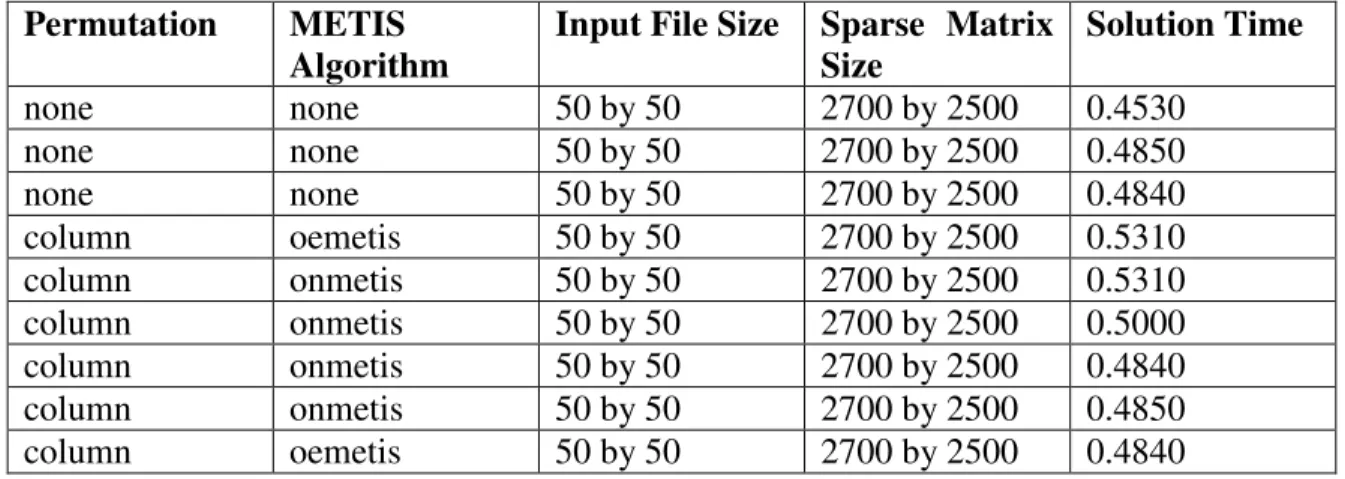
also the unpermuted sparseMatrix as the control. The results are in Table 1.

(23)

22

Table 1 Column Permutations

Permutation

METIS

Algorithm

Input File Size Sparse Matrix

Size

Solution Time

none

none

50 by 50

2700 by 2500

0.4530

none

none

50 by 50

2700 by 2500

0.4850

none

none

50 by 50

2700 by 2500

0.4840

column

oemetis

50 by 50

2700 by 2500

0.5310

column

onmetis

50 by 50

2700 by 2500

0.5310

column

onmetis

50 by 50

2700 by 2500

0.5000

column

onmetis

50 by 50

2700 by 2500

0.4840

column

onmetis

50 by 50

2700 by 2500

0.4850

column

oemetis

50 by 50

2700 by 2500

0.4840

The first round of testing showed that the column permutations did not outperform the

unpermuted sparse matrix. A second round of tests was run for a row permuted matrix

permuted with the augmented permutation vector. These results are shown in Table 2.

Table 2 . Row Permutations.

Permutation

METIS

Algorithm

Input File Size Sparse Matrix

Size

Solution Time

none

none

50 by 50

2700 by 2500

0.5470

none

none

50 by 50

2700 by 2500

0.5620

row

onmetis

50 by 50

2700 by 2500

0.5160

row

onmetis

50 by 50

2700 by 2500

0.5150

(Note: the run times for both the control and the test cases were slower . However, the

test case ran faster than the control in the row permutation test and slower or equal to the

control for the column permutation test.)

The tests on the 50 by 50 elevation grid were not encouraging but not entirely conclusive

either. The problem was that the total run time for the MATLAB solution was less than a

second, typically less than half a second. Small hardware variations unrelated to the

problem introduced a standard error that was significant when compared to the measured

elapsed time. As a result a larger problem was run that was known to have a longer

computational time.

Larger Elevation Grid Input File

The procedure was the same as used for the 50 by 50 node test: a square sparseMatrix

was computed, and then the METIS graph file was computed from it using

makeGraph.m. The METIS utility onmetis.exe was then used to compute

outfile.graph.iperm, the permutation vector.

(24)

23

After incrementing each element of the permutation vector by one, the rectangular

sparseMatrix was recomputed. The column reordered permutationMatrix was computed

from it using the permutation vector q. The system was then solved using MATLAB:

permutationMatrix\b.

The elapsed time for this computation was 125.3120s. The corresponding time for the

control calculation was 120.030s, indicating no improvement as a result of the

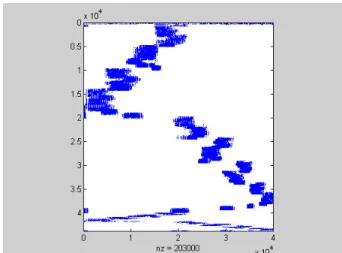
permutation. The spy plot for the permutationMatrix is shown below in Figure 8.

Next a row permutation was attempted using the same technique as for the 50 by 50 node

test. A new permutation vector was constructed by augmenting the old permutation

vector so that its row dimension matched sparseMatrix. It was then used to compute a

row permuted permutationMatrix and solved the system

permutationMatrix\b.

The solution time was 103.5320s, an improvement of about 16%. As a final check, the

control was rerun. Virtually the same computation time of 120.4370s was observed.

The data is summarized in Table 3. The spy plot for the row permutation is shown below.

(25)

24

Table 3 . Column and Row Permutations: 200 by 200 Node Input File.

Permutation

METIS

Algorithm

Input File Size Sparse Matrix Size Solution

Time

none

none

200 by 200

43800 by 40000

120.0310

column

onmetis

200 by 200

43800 by 40000

125.3120

none

none

200 by 200

43800 by 40000

120.4370

row

onmetis

200 by 200

43800 by 40000

103.5320

Although the METIS onmetis.exe row permutations consistently produced faster

computation times than the unordered MATALB control, the improvement was not

better than the best MATLAB permutation.

Although it is possible that an ordering scheme that outperforms the MATLAB

unsymmetrical minimum degree ordering algorithm exists, it was considered more likely

that a point of diminishing returns was realized for this approach and that the limited time

could be better spent working on alternative strategies to reduce computational time.

This part of the study was concluded with an understanding of row reduction techniques

that can reduce the computational time for the over determined Laplacian system by 15 to

33 percent through use of the reordering algorithms described in this section. While this

improvement is considered quite substantial, it was not considered of sufficient

magnitude to warrant further investigation.

It must be remembered that the reason for this study was to find computational methods

that would allow the solution of larger systems of over determined linear equations

formulated by the Franklin algorithm. The main reason for the failure to compute such

systems was not excessive computational time, but was in fact excessive in-process

memory requirements.

It might seem prudent at this point to determine if the best reordering scheme, as applied

to solution of systems generated by the Franklin Algorithm, would significantly reduce

memory requirements commensurate or in excess of the reduction in computational time.

(26)

25

This was not done because the size of the reduction in computational time (used as a

screening method) was not sufficient to justify further study. It is expected that the

problem size grows at least as a polynomial function of the number of input nodes.

Therefore, reduction in the solution times better than those observed in this study are

required if the target problem (1201 by 1201 elevation nodes) is to be successfully

solved.

As a result further study was not conducted and a new approach to the general problem

was started.

(27)

26

6.0 Saunders-Paige LSQR Experiments using Well-Behaved Experimental Input

Files

After achieving only limited success toward the goal of solving large input data sets

using the MATLAB linear least squares solver, a search was conduced for alternative

solvers. One of the most interesting candidates was the LSQR package offered by the

Software Optimization Library of the department of MS and E at Stanford University.

The software was written by Dr. C.C. Paige and Dr. M.R. Saunders. The software is

implemented in C, Fortran77 and MATLAB. It solves Ax=b for consistent systems or

minimizes:

|| Ax - b || or

sqrt( || Ax - b ||

2

+ d||x||

2

)

for over determined systems, where d is a damping parameter. The solver uses a method

based on Golub-Kahan bidiagonalization. It is algebraically equivalent to applying the

symmetric conjugate gradient (iterative) method to the normal equations:

(A'A + d

2

I) x = A'b

but according to the authors

[8]

has better numerical properties, especially if A is

ill-conditioned.

This package was interesting for two reasons. Experiments with iterative solvers during

the proposal stage of this project indicated that this type was very efficient both from a

computational and memory use standpoint for the solution of consistent systems using the

Laplacian PDE formulation. Iterative solvers also allow a certain degree of flexibility

because solution accuracy may be traded off for decreased run time if necessary. The

LSQR solver also met another criterion: it was ported to non MATLAB platforms,

allowing a migration path from the developmental environment if the subsequent tests

proved successful.

Initial Tests

The first approach was to use the MATLAB lsqr.m and other files offered on Dr.

Saunder’s download page to solve a small problem. It was then intended to investigate

the C implementation once the MATLAB implementation was understood adequately.

Two files are required: lsqr.m and aprob.m, where lsqr.m is the solver and aprob.m

defines the matrix A through its multiplication algorithm. (The iterative technique is

based on a recursive application of multiplication of a matrix Nx

(k-1)

where x

(k-1)

is the

(k-1)

th

iterative approximation of the solution vector. Therefore, efficient matrix

multiplication algorithms are essential for the rapid solution of large problems. (It is

common to define the matrix multiplication algorithm, rather than the matrix itself in the

case of large sparse matrices, where the latter would be cumbersome or impossible to

(28)

27

handle explicitly.)

After some initial problems understanding the modules, Dr. Saunders was contacted at

Stanford by email with some questions. Dr. Saunders graciously provided a detailed

reply with much of helpful advice. The most helpful piece of information was that LSQR

was implemented in MATLAB as a native routine, obviating the need for the functions

provided on the website, at least for research purposes.

The subsequent LSQR tests described in this report were all run on the native MATLAB

implementation. InputMatrix.java, included in the Java Code Appendix 2 was used to

prepare many of the test input files used for this section.

Native MATLAB LSQR( ) Implementation Tests: 50 by 50 Node Input Elevation Grid

A first test was conducted on a 50 by 50 node input elevation matrix to ensure that the

function call syntax was understood. Input was of the form:

input5;

sparseMatrix=sparseA(A);

b=makeB(A);

z = LSQR(sparseMatrix, b, 10e-06, 100)

Where input5 is the InputMatrix.java generated 50 by 50 input grid; sparseMatrix =

sparseA(A) is the MATLAB sparse representation of the Laplacian PDE matrix; b is the

over determined Laplacian RHS vector; z is the solution vector; 1-e-06 is the

convergence tolerance and 100 is the maximum number of iterations.

The method computed the solution to a relative residual of 0.051 using 0.7110 seconds.

Computing 200 iterations returned a relative residual of 0.0072 in a time of 1.3520

seconds, indicating that solution time was linear with the number of iterations specified,

as expected.

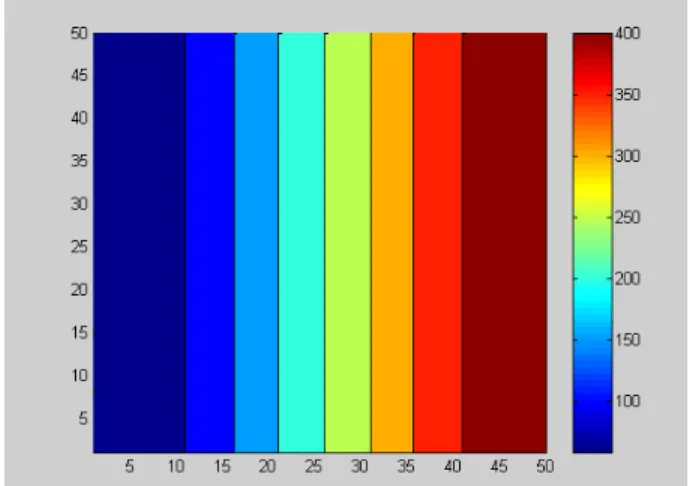
Repacking z using repack( ) and viewing using contourf( ) produced the Figure 10 plot.

(29)

28

This plot is indistinguishable from the corresponding plot produced by the MATLAB

direct solver.

Native MATLAB LSQR Implementation Tests: 200 by 200 Node Input Elevation Grid

Next, the solution of a 200 by 200 elevation node input file was attempted using

operations similar to those described above. The MATLAB command:

z = LSQR(sparseMatrix, b, 10e-06, 50)

where sparseMatrix is the MATLAB sparse representation of the Laplacian PDE matrix

derived from the 200 by 200 input file solved the system in 6.669s to a relative residual

of 0.048s.

Repeating the test with 200 iterations LSQR solved the system in an elapsed time of

25.937s to a relative residual of 0.0064.

The MATLAB direct solver processing files generated by sparseMatrix and b as a control

required an elapsed time of 224.3s.

Native MATLAB LSQR( ) Implementation Tests: 500 by 500 Node Input Elevation Grid

The next test was on a 500 by 500 node input grid. This was not solvable using the

MATLAB direct solver on the test hardware platform. The MATLAB input command:

z = LSQR(sparseMatrix, b, 10e-06, 200)

where sparseMatrix is the MATLAB sparse representation of the Laplacian PDE matrix

derived from the 500 by 500 node input file solved the system in an elapsed time of

108.07s to a relative residual of 0.004.

Repeating the test for 400 iterations solved the system in 216.1720s to a relative residual

of 0.0002.

This result was encouraging in two respects. Firstly, LSQR was able to easily handle an

input file larger than that handled by the MATLAB direct solver. Also, the solution time

seemed to grow relatively slowly with input file size.

Native MATLAB LSQR( ) Implementation Tests: 800 by 800 Node Input Elevation Grid

The final test was an 800 by 800 elevation node input grid. This was larger than the

largest file previously solved by the MATLAB direct solver using a computer with

1024MB of RAM. The following MATLAB commands were input:

(30)

29

input80;

sparseMatrix=sparseA(A);

b=makeB(A);

size(sparseMatrix)

703,200, 640,000

z = LSQR(sparseMatrix, b, 10e-06, 200)

where sparseMatrix is the MATLAB sparse representation of the 800 by 800 node input

file. LSQR solved the system in an elapsed time of 276.0940s to a relative residual of

0.0031.

Repeating the test for 400 iterations solved the system in 551.9380s to a relative residual

of 9.8e-05.

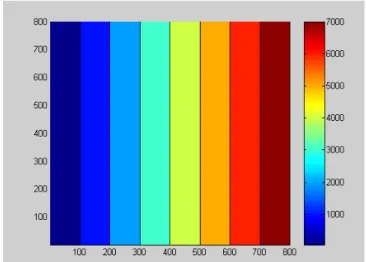
The contour plot of the repacked solution vector is shown below in Figure 11.

The plot shows that the solution is at least reasonably close to the expected result.

Inspection of the output file showed a maximum computed solution value of 7936.1 fitted

to an input file with a maximum contour line value of 7900.0.

These initial tests of the LSQR algorithm were encouraging for the reasons previously

stated:

1) Problems close to the target problem size could be easily handled by LSQR.

2) The computation time grew very slowly with respect to problem size as compared

to the MATLAB direct solver.

3) The solutions produced by the LSQR method appeared to compare favorably with

those produced by the direct solver. For example, the difference between a 400

(31)

30

iteration LSQR computation of a 50 by 50 input elevation grid and the

corresponding direct solution was essentially nil (~2.71e-08 for a 436.2622

computed elevation value.)

(32)

31

7.0 Saunders-Paige LSQR Experiments using Input Files Selected to Exercise

LSQR more Fully

The initial tests with LSQR were very encouraging, with the program processing files in

much less time than the MATLAB direct solver. More importantly, processor memory

requirements were also much lower. However, there were several deficiencies in the

initial test series that needed to be addressed.

No quantitative estimate of the agreement between the LSQR solution and the direct

solution was computed. In addition, the largest file processed was 800 by 800 elevation

grid nodes. Since the target was 1201 by 1201 grid nodes, it was necessary to attempt

this larger input file size.

Moreover, the tests were conducted with very simple input files with a constant elevation

gradient from one end of the grid to the other. The initial tests were run on test grids

produced by the Java program InputMatrix. This program was written to output a mock

contour line grid. The grid contour lines were evenly spaced at 10 unit increments, they

were all parallel, their elevation values increased linearly across the grid, and they were

parallel or perpendicular to the grid borders. This format was chosen because a correct

interpolation could be determined at a glance at the 2D contour plot output. It was

suspected that performance might be degraded if more realistic files were processed.

In order to determine this, a series of increasingly more complex input files were

prepared and used to exercise LSQR. The first test run, however was designed to obtain

a more quantitative comparison between the LSQR solution and the direct solution.

Test 1. Comparison of LSQR Solution of 200 by 200 Node Input Grid Produced by

InputMatrix with MATLAB Direct Solution

The 200 by 200 grid simple input file computed by LSQR in the last section was

recomputed and compared to the corresponding MATLAB direct solution. A difference

matrix was computed:

difference = c – cc

where c is the repacked solution vector from the direct solution and cc is the repacked

solution from the LSQR solution. The MATLAB Statistic (max(max)) (which computes

the maximum value in the matrix) was computed on the difference matrix and found to

be 6.6734. Then a contour plot of ‘difference’ was computed and inspected for the 200

by 200 node solution. This showed visually the differences between the two solutions

across the height and width of the grid. The results showed generally good agreement

between the two solvers. However, there was a deviation at the “lowest” edge of the

difference plot that was difficult to explain at the time but the reason for which

subsequently became clearer. A contour plot of the difference matrix is shown below.

(33)

32

Test 2. 1201 by 1201 Input Grids

As an extension of the above testing, a 1201 by 1201 node input grid was run to see if

LSQR could handle a file this big. A suitable input file was prepared using InputMatrix

and a solution was attempted. However, this approach did not work for the 1201 by 1201

grid as the routine never got past the sparse matrix preparation code after 24 hours of

trying. The reason, as discussed before, is the extremely poor performance of MATLAB

user-defined code modules.

As a consequence, a C++ program called Sparse was written to prepare a MATLAB

sparse matrix index file from an input elevation grid. (The code listing is included in

Appendix 3.) MATLAB allows importation of sparse matrices using such an index file

format. Although the input files can be quite large, despite the sparse data structure,

formulating the sparse matrix using Sparse was much faster than the MATLAB method,

requiring only a few minutes of processing time.

Using this technique, LSQR was able to solve the system in 1.586e+04 seconds using

400 iterations. Although no direct solution was available to compare it with, (because the

file was too big for the MATLAB direct solver) the contour plot was reasonable and the

computed values were as expected. The output contour plot for the 1201 by 1201 test file

is shown below in Figure 13.

(34)

33

Test 3 Wavy.dat

The next test was designed to investigate the performance of the LSQR solver when used

on irregular input grids. InputMatrix was modified to produce a more irregular input

grid. Instead of increasing regularly from minimum to maximum, the contour lines

generally increased, but in an irregular “wavy” pattern. The contour lines were no longer

evenly spaced. However, the contour lines were still parallel and still column aligned in

the input grid.

The results of the LSQR computation are shown in the mesh plot above left (Figure 14),

while the direct solution is to the right (Figure 15). The solution tracked the input

contour lines closely, fitting a smooth surface to the contour lines in 200 iterations.

The Figure 16 plot shows the difference contour for the LSQR and direct solutions.

Differences between the two plots were negligible.

Figure 14. LSQR wavy.dat Solution Vector

Figure 15. MATLAB direct Solution Vector

Figure 13. LSQR 1201 X 1201 Repacked Solution Vector

(35)

34

Test 4 square.dat

As a second test of an irregular input grid the instructor-supplied ‘square.dat’ was used.

This grid was specially constructed to present problems to interpolation algorithms. The

file is characterized by square, concentric contour lines. Poor interpolators produce a

stepped pyramid, while good ones produce a smoother surface. The LSQR solver

produced a solution that was very close to that produced by the direct solver. Mesh plots

of the solutions produced by the two solvers are shown below in Figures 17 and 18.

The difference contour for the two plots is shown below in Figure 19.

Figure 16. wavy.dat Difference Plot

Figure 17. LSQR square.dat Repacked Solution

(36)

35

Test 5. Tuckermans.dat

The next test was run on the instructor-supplied input grid of Mt. Washington, NH

derived from an actual USGS contour map and called tuckermans.dat. This was an 800

node by 800 node file, well within LSQR’s demonstrated solution capability. A Sparse

matrix index file and a RHS vector was prepared using Sparse as with the 1201 by 1201

grid described above.

The input file was solved by LSQR using 200 iterations in about 250 seconds.

Unfortunately, the solution computed by LSQR was grossly in error, with many large

negative elevations resulting. The surface and contour plots for this run are shown

below in Figures 20 and 21.

Figure 19. square.dat Difference Matrix

Figure 21. LSQR tuckermans.dat contourf plot

Figure 20. LSQR tuckermans.dat Repacked Solution

Figure

Figure 1. Unordered Sparse Matrix
Figure 2. colmmd Reordered Sparse Matrix
Figure 4. colamd Reordered Sparse Matrix
Figure 5. spaarms TightMatrix Reordered Sparse Matrix
+7

References

Related documents

Hydraulic schemes of fish attraction Dam Dam Fish pass Fish pass Attractive flow Attractive flow Current velocity Current velocity Fish guiding facility Vc – critical Vt – threshold

Thirteen of these were included in the BBN, while one (“frequency with which carcasses are removed from pens”) was excluded because all farms adopted the same practice. Two

BIJAGÓS IN-MIGRANT Total livelihood activities undertaken X X Total number of fishing gear types used X X Proportion of time observed allocated to fishing X X Proportion

The findings indicated that families put forward the following reasons for sending their children to preschool: preschool education prepares children for school and helps form

speci?ed anchor contact. 1 is a pictorial illustration of a system and method for matching nearest contacts in a contact hierarchy in accordance With one aspect of the

a remote computer in communication With the server, the server causing the display of the associated member of the ?rst group at the remote computer, the remote com puter having

Tendo em vista que o principal objetivo do trabalho é verificar a influência do desempenho do setor bancário obtido por meio de indicadores contábeis ou financeiros sobre

Our limits on the ejecta mass together with estimated rates directly confirm earlier purely theoretical or indirect observational conclusions that double neutron star mergers are