A tool for the interactive 3D visualization of electronic
structure in molecules and solids
Timothy B. Terriberry
a, David F. Cox
b, Doug A. Bowman
a,*
aDepartment of Computer Science(0106),Virginia Polytechnic Institute and State Uni6ersity,660McBryde Hall,Virginia Tech, Blacksburg,VA24061,USA
bDepartment of Chemical Engineering,Virginia Polytechnic Institute and State Uni6ersity,Blacksburg,VA24061,USA Received 12 September 2001; received in revised form 4 October 2001; accepted 17 October 2001
Abstract
This paper presents the Vienna ab initio simulation package (VASP) data viewer, a desktop 3D visualization application for the analysis of valence electronic structure information derived from first-principles quantum-mechan-ical density functional calculations. This tool allows a scientist to directly view and manipulate the calculated charge density or electron localization function (ELF) from an electronic structure calculation, providing insight into the nature of chemical bonding. Particular attention was given to the design and implementation of the user interface (UI) for the data viewer. It provides for expert and novice usage, and both natural direct manipulation and precise numerical control. The data viewer has proven useful to chemical scientists for understanding the results of electronic structure calculations. © 2002 Elsevier Science Ltd. All rights reserved.
Keywords:3D visualization; Electronic structure; VASP; Direct manipulation user interface
www.elsevier.com/locate/compchem
1. Introduction
Tools for three-dimensional (3D) scientific visualiza-tion of data sets are becoming more commonplace in the academic and industrial communities. These range from simple static images that convey 3D information to fully-immersive, interactive virtual environments. However, users of complex 3D visualization tools are often frustrated or distracted from their task of gaining insight into data by user interface (UI) and usability problems. While creating 3D images is fairly straight-forward, 3D interaction is not well-understood (Hern-don et al., 1994).
Springmeyer et al. (1992) provide important princi-ples for the interaction design of visualization tools. These include supporting active exploration, capturing the context of analysis, and decreasing the difficulty of
navigation. Adoption of these principles should lead to the development of tools that are easy to use, making the interface as transparent as possible so that the user is able to analyze and interact with the data directly.
In this paper, the development and usage of the Vienna ab initio simulation package (VASP) data viewer is described. The viewer is aWINDOWS™ based application which allows 3D viewing and manipulation of data produced by the VASP (Kresse and Hafner, 1993, 1994; Kresse and Furthmu¨ller, 1996a,b). The output from this package includes files with 3D maps of the valence charge density and the electron localization function (ELF). Visualization of this data is useful for gaining chemical insight into the electronic properties of molecules and solids.
The data viewer was developed from a user-centered perspective. An iterative design process was followed, with each successive prototype being presented to and discussed with the chemical engineer who would be the primary user of the viewer. An attempt was made to support both novice and expert users by providing a * Corresponding author. Tel.: +1-540-231-2058; fax:
+1-540-231-6075.
E-mail address:[email protected](D.A. Bowman).
0097-8485/02/$ - see front matter © 2002 Elsevier Science Ltd. All rights reserved. PII: S 0 0 9 7 - 8 4 8 5 ( 0 1 ) 0 0 1 2 0 - 6
traditional 2D windows-icons-menus-pointer (WIMP) interface style, keyboard shortcuts for all functions, and 3D direct manipulation of the data.
Springmeyer’s principles (Springmeyer et al., 1992) were followed during the design of the visualization tool. Active exploration is encouraged by easy accessi-bility to the data through direct manipulation and simple methods for reversing incorrect actions. The tool is focused on the use context for which it was devel-oped — the display of 3D maps of the valence charge density and the ELF provided in output files from VASP. The user can manually create bonds of varying thickness between selected atoms. Also, users may choose between direct manipulation and numerical in-put for parameters such as the orientation of a slice through the data, allowing both natural interaction and scientific precision. Navigation in and around the data set is made easier by providing multiple methods for setting the viewpoint’s position and orientation relative to the data.
In the next section, we describe the functionality of the tool and focus on two interaction techniques of particular interest. Section 3 gives an example of the use of the data viewer for examining the results of electronic structure calculations. We conclude by offer-ing some possibilities for further work.
2. Visualization considerations in the viewer development
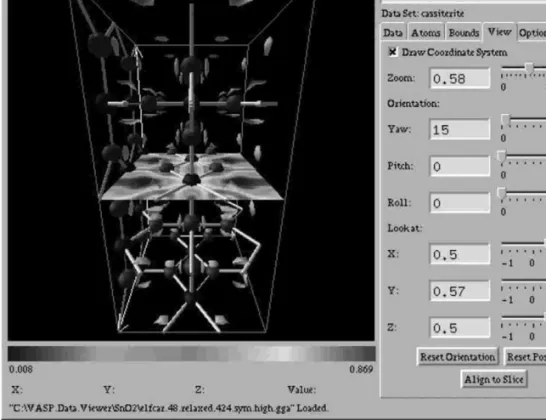
Fig. 1 shows theWINDOWS™ interface to the VASP data viewer. The left half of the window contains a 3D view of the data being visualized, while the right half contains interface components organized into several tabbed sections. Upon loading a data file, a standard 3D view is presented. This view consists of the atoms in the molecule or solid, a bounding box around the atoms defined by the unit cell, an isosurface, and a 2D slice through the data.
The user may directly manipulate the orientation of the data by dragging the bounding box using a modified Arcball technique (Section 2.1). The slice itself may also be manipulated directly using the mouse. Atoms may be selected by clicking on them — this functionality is used to hide atoms or create bonds between atoms. The user may also set the zoom factor with which the data is viewed, center the view on a particular atom, or align the view to the slice. Finally, the user can choose to replicate the original data set along any of the three principal axes, so that more than one unit cell of an infinite solid can be viewed. Most viewing controls are available via direct manipulation, slider or numeric input in the graphical user interface (GUI), or via keyboard controls.
The user can change the value associated with the isosurface, and also the level of detail with which it is rendered (important to allow interactive response on a range of machines). When the slice is activated, a color or gray scale legend indicating the mapping between data values and hue or gray level is shown.
The design of most of the GUI and interaction techniques was straightforward, although attention was paid to details such as labels, grouping of functionality in the tabbed panes, and the user’s mental model for setting slice orientation. Two of the direct manipulation techniques, however, posed interesting implementation problems. They are described in the following sections. 2.1.Specifying an orientation
A common problem encountered in visualizing 3D data is specifying a 3D orientation for the data set using only a 2D input device, such as a mouse. The orientation of a 3D object can be specified as three consecutive rotations, each around one of the principal axes, providing three degrees of freedom. A mouse, however, provides only two degrees of freedom.
The original solution to this problem was the concept of a Virtual sphere(Chen et al., 1988), which simulates a trackball. The Virtual sphere is represented by a circle drawn around the object being oriented. If the user drags the mouse inside the circle, the mouse position is projected orthographically onto a sphere passing through the circle outline. Rotations around two of the principal axes keep the point on the sphere the user initially clicked on under the mouse cursor, so that the user appears to drag the track-ball around. A third degree of freedom is achieved by dragging the mouse outside the circle, which produces a rotation about the third principal axis.
Another technique similar to the Virtual sphere is the Arcball (Shoemake, 1992). Instead of constraining rota-tions produced by dragging inside the sphere to two principal axes, it uses the mathematical concept of quaternions to find a ‘canonical’ rotation that moves one point on the sphere to another. Each dragging motion is still constrained to two degrees of freedom, but by using multiple dragging motions, any orienta-tion can be achieved. Hence the region outside the circle is eliminated. While the Virtual Sphere has been called the best-known 2D technique for 3D rotation, an empirical study (Hinckley et al., 1997) has shown that users achieve the same speed and accuracy with an Arcball as with a Virtual sphere.
While both of these techniques allow direct manipu-lation of a sphere enclosing the object to be oriented, neither allows actual direct manipulation of the object itself. Our tool uses a system based upon the Arcball, but in which the user manipulate the actual data. When the user first clicks on the object, the point in 3D space
where the user clicked can be determined by casting a ray from the viewpoint through the mouse cursor, and finding the first intersection with the object. An imagi-nary sphere can be constructed with radius equal to the distance of the click point from the center of the object, and further mouse movements can be projected onto this sphere, rotating the object as one would with the Arcball technique. The effect is that the point on which the user clicked always remains under the mouse cur-sor, so that it appears the user is rotating the object itself.
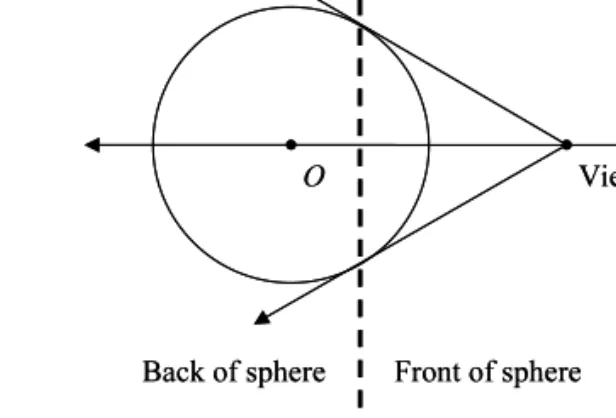
There is, however, one drawback to this method. With both the Virtual sphere and the Arcball, an orthographic projection was used to map cursor posi-tions onto the front half of the sphere. However, in trying to keep the point the user clicked on under the mouse cursor, one cannot always use the point on the front of the sphere. A ray cast from the viewpoint through the mouse cursor will intersect the sphere in two places. If the initial click is at the first of these two intersections, the user is said to have clicked the front of the sphere. If it is at the second, the user is said to have clicked the back. If the user clicks on the front of the sphere, all further tracking should be done on the front, and if they click on the back, all tracking should be on the back. However, there are points that are on the boundary between front and back, and the system’s choice of a point is based solely on rounding errors.
With an orthographic projection, these points are right where the user would expect them to be in the middle of the object, along the plane parallel to the screen that passes through the center of the object. The user can predict, by staying away from these points, which way the object will rotate. However, in trying to keep the initial click point under the mouse, one must use the same type of projection that is used to display the object. For a perspective projection, the plane con-taining these ambiguous points is well forward of the center of the object (Figs. 2 and 3). In fact, with the dimensions of the original test data set, the front, top
edge lay very close to this plane. By clicking slightly above the edge, one would drag the top backwards, and by clicking slightly below, one would drag the top forwards. This was not a very intuitive place for this singularity to occur, and caused some confusion.
On the other hand, this technique did make possible many of the other direct manipulation techniques used in the system. With the Virtual sphere and Arcball, the entire screen inside the sphere is a target for rotating the object. Using the present method, however, only the actual portions of the screen covered by the object are required. For example, rotating the bounding box sur-rounding a data set can rotate the entire data set. This leaves the region inside this box free for other direct manipulation, such as selecting atoms, drawing bonds between atoms, and rotating the 2D slice.
2.2.Region selection
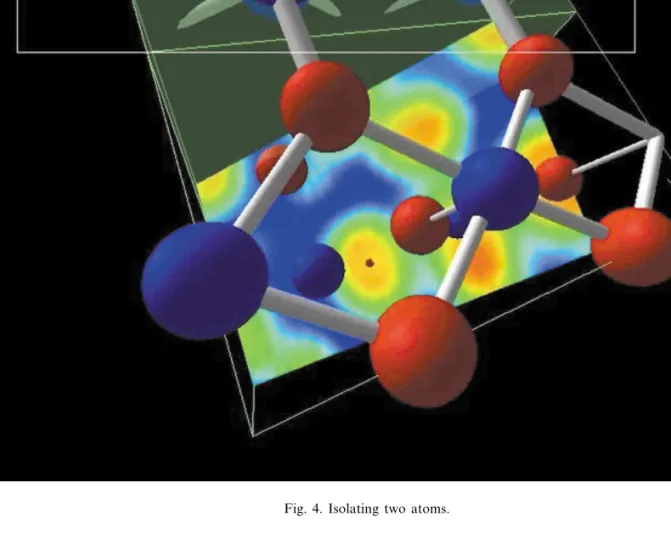
Another common problem in visualizing large data sets is the quick isolation of a specific portion of the data set. One way of solving this problem is to allow the user to travel into the data set with an egocentric viewpoint. However, this technique can disorient users, and may not be effective if the data set is dense and nearby objects occlude too much (Baker and Wickens, 1995). Instead, a simple mechanism has been provided that allows the user to intuitively cull away large por-tions of the data set at once. The user can click somewhere in an empty region (often just outside the boundaries of the data set), and drag out a rectangle that covers just the portions they wish to see, as seen in Fig. 4. The sides of the box surrounding the data set are
then moved inwards until they fit completely within the rectangle described by the user, whereupon the new region is centered on the screen.
The difficulty in implementing this technique is deter-mining how to cull the box so that it fits inside the rectangle. The approach with the current tool is to project the rectangle into a volume with four planar boundaries that pass through the edges of the rectangle. When using perspective projection, this is just an open-ended pyramid, while for an orthographic projection, this is a rectangular prism of infinite extent. Once these four planes have been defined, the edges of the box surrounding the data set can be clipped, moving in one of the sides of the box each time an edge is clipped.
However, clipping the edges in a different order can produce different boxes. In order to provide some sort of consistency for the user, the order in which to clip the edges needs to be unambiguously determined. The approach taken was to find all the intersection points between the four planes and the 12 box edges, and then clip the one closest to the viewer. This approach is reasonable from the perspective of the user because these points fall directly on the edge of the clip rectan-gle and are not obscured by anything else. Finally, the user is provided with feedback in the form of a translu-cent box surrounding the actual region as the rectangle is dragged out (Fig. 4).
Finally, since users often want to be able to ‘back up’ to see how a region fits into the data set as a whole (Meyer and Globus, 1993), a stack of previous views is kept, and allows the user to go back through them using a second mouse button. This also allows the user a way out if a feature is activated by accident, or the selected region does not match expectations.
Fig. 4. Isolating two atoms.
3. Visualization example: bulk SnO2
VASP can be used to determine the minimum energy configuration and electronic structure of atoms in a molecule or an infinite 3D solid. However, because a plane-wave basis set is used for the calculation, the wave functions are not as easily interpretable in chemi-cal terms as those generated using a linear combination of atomic orbitals (LCAO). Chemical insight can be improved by visualization of the valence charge density supplied by VASP in the CHGCAR output files or by visualization of the ELF (Savin et al., 1997) supplied in the ELFCAR output file. Visualization of the ELF is particularly useful as isosurfaces at high values of the ELF (0.8 – 1.0) can often be interpreted in terms of bonding and non-bonding electron pairs (Silvi and Savin, 1994; Noury et al., 1999; Burdett and Mc-Cormick, 1998). There is currently no standard tool available from the VASP group (VASP Group web site, 2001) for visualizing these files, so the viewer fills an
important need for users of the code. The usefulness of the visualization tool is illustrated for the case of a bulk SnO2structure.
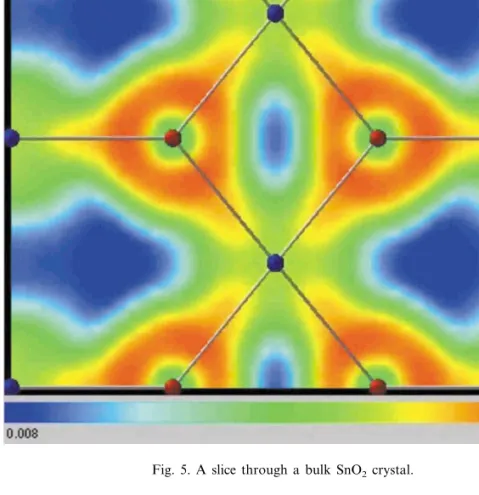
The ‘draw slice’ functionality on the Data tab allows one to examine the variation in ELF or valence charge density on a given plane within the structure. Using the slice angle and slice offset sliders one may position the slice anywhere within a structure. When the plane is chosen to include nearest-neighbor atoms, the nature of the ELF along the bond vector between the atoms gives insight into the nature of the bonding. In Fig. 5, a slice along a (110) plane containing both Sn and O atoms in bulk SnO2is shown. The viewer allows one to point at a particular location in the image and read the dis-played value associated with a particular color. The highest values of ELF (0.83) appear around the locations of the O atoms (red) in the structure, with intermediate values of 0.56 around the Sn atoms (yellow/green). ELF values of 0.5 are characteristic of a free electron gas, so the image suggests there is little
Fig. 5. A slice through a bulk SnO2crystal. charge localization about the tin atoms in the structure.
This distribution is indicative of a separation of charge due to the predominantly ionic nature of the bonding, but the trigonal shape of the ELF about the oxygen atoms and the elongation towards the tin atoms gives an indication of some covalent character to the bond.
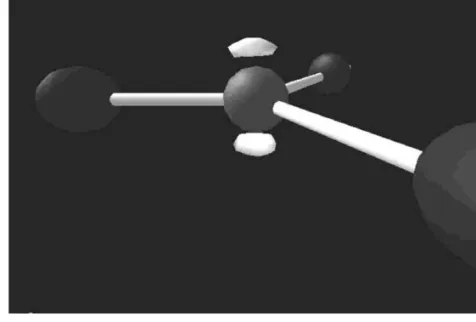
The isosurface feature allows one to examine the 3D distribution of the ELF or the charge density around the individual atoms in a structure. Features of the viewer that are particularly helpful for this purpose are those that allow navigation within the structure. The full 48 atom unit cell used in the calculations is shown in Fig. 1. However, one may select an atom within the structure, center it with the ‘look at atom’ feature on the Atoms tab, then move into the structure with the ‘zoom’ feature on the view tab. The local region around the chosen atom may then be selected or isolated from the rest of the structure by dragging a box around the region of interest. This type of manipulation was used to isolate a small region of the unit cell (Fig. 3) around an oxygen anion in bulk SnO2. Fig. 3 shows an ELF isosurface at a high (0.85) value around an O atom in
bulk SnO2. The two lobes above and below the plane containing the oxygen atom and the three nearest neighbor tin atoms are easily recognizable as the O 2p lone-pair electronic states described by LCAO tight-binding calculations of the SnO2 electronic structure (Robertson, 1979).
4. Distribution and future work
The VASP data viewer, a tool for 3D visualization of electronic structure information has been described. Due to the intuitive representation of the data, and the care with which the UI was constructed, this tool has proven useful to chemical scientists for understanding the results of electronic structure calculations of a number of silicate materials (Gibbs et al., 2002). The viewer is available as freeware on the web (http:// vaspview.sourceforge.net/), and provides immediate ac-cess to a scientific visualization tool for VASP users. Source code (in zip and tar formats), binary codes, and sample data files are available, along with a description
of the use of the different features of the viewer. All the code for reading the VASP data files is located in the module ds3vasp.c. This module could be modified to read file formats from other electron structure codes.
One possible extension to this work is to provide true 3D viewing and interaction using an immersive virtual environment. By employing a head-mounted display (HMD) or surround-screen stereoscopic display such as the CAVE™, a scientist could more naturally specify his viewpoint, and could more easily put himself ‘inside’ the dataset. When an exocentric view is desirable, a tabletop stereoscopic display such as the Immersive Workbench™ might prove useful. The use of 3D input devices, including position and orientation trackers, 3D mice, and gloves, along with appropriate 3D interaction techniques, should allow more natural and efficient manipulation of the data.
Plans also include continued experimentation with mouse-based 3D rotation techniques. The singularities in the current modified Arcball technique can cause confusion, so exploring further modifications to address this issue could have an impact on usability.
Finally, we would like to be able to view dynamic simulations within the 3D data set. VASP is capable of writing separate output files for each time step in a molecular dynamics simulation, and the tool could be used for simulation playback. This feature would be especially useful for understanding the atomic motions of the structure, and the spatial variations in the elec-tronic properties resulting from the motion.
Acknowledgements
The authors would like to thank Chad Wingrave for his comments and suggestions on early versions of the tool. D.F.C. gratefully acknowledges financial support
by the Chemical Sciences, Geosciences and Biosciences Division, Office of Basic Energy Sciences, Office of Science, U.S. Department of Energy through grant DE-F602-97ER14751.
References
Baker, M.P., Wickens, C.D., 1995. Tech. Rep. TR032, Na-tional Center for Supercomputing Applications.
Burdett, J.K., McCormick, T.A., 1998. J. Phys. Chem. A 102, 6366.
Chen, M., Mountford, S.J., Sellen, A., 1988. Comput. Graph-ics 22, 121.
Gibbs, G.V., Cox, D.F., Crawford, T.D., Boisen, M.B., Jr., Lim, M.S., 2002. Phys. Chem. Min., in press.
Herndon, K., van Dam, A., Gleicher, M., 1994. SIGCHI Bull. 26, 36.
Hinckley, K., Tullio, J., Pausch, R., Proffitt, D., Kassell, N., 1997. Proceedings of the ACM Symposium on User Inter-face Software and Technology, p. 1.
Kresse, G., Furthmu¨ller, J., 1996a. Comput. Mater. Sci. 6, 15. Kresse, G., Furthmu¨ller, J., 1996b. Phys. Rev. B 54, 11169. Kresse, G., Hafner, J., 1993. Phys. Rev. B 47, 558. Kresse, G., Hafner, J., 1994. Phys. Rev. B 49, 14251. Meyer, T., Globus, A., 1993. Tech. Rep. RNR-93-019, NASA
Ames Research Center.
Noury, S., Krokidis, X., Fuster, F., Silvi, B., 1999. Comput. Chem. 23, 597.
Robertson, J., 1979. J. Phys. C Solid State Phys. 12, 4767. Savin, A., Nesper, R., Wengert, S., Fa¨ssler, T.F., 1997.
Angew. Chem. Int. Ed. Engl. 36, 1808.
Shoemake, K., 1992. Proceedings of Graphics Interface ’92, p. 151.
Silvi, B., Savin, A., 1994. Nature 371, 683.
Springmeyer, R.R., Blattner, M.M., Max, N.L., 1992. Pro-ceedings of IEEE Visualization, p. 235.
The VASP Group Web site is available at http:// cms.mpi.univie.ac.at/vasp/.