Analyzing Tool Support for Inspecting Accessibility
Guidelines during the Development Process of Web Sites
Joseph Xiong, Christelle Farenc and Marco Winckler LIIHS-IRIT, Université Paul Sabatier,
118 route de Narbonne, 31062 Toulouse Cedex 4, France {xiong, farenc, winckler}@irit.fr
Abstract. Whilst accessibility is widely agreed as an essential requirement for promoting universal access of information, many Web sites still fail to provide accessible content. This paper investigates the support given by currently available tools for taking care of accessibility at different phases of the development process. At first, we provide a detailed classification of accessibility guidelines according to several levels of automation. Then we analyze which kind of automated inspection is supported by currently available tools for building Web sites. Lately, by the means of a case study we try to assess the cost/benefits of fixing accessibility problems at early phases of the development process. Our results provide insights for improving current available tools and for taking accessibility at all phases of development process of Web sites.
Keywords: accessibility, guidelines inspection, evaluation tools, Web sites, development process, Web design.
1 Introduction
Accessibility is an essential requirement for promoting universal access of Web sites. Accessibility gained in importance not only because of ethical issues (e.g. e-inclusion) but also because of the opportunities for creating new markets (e.g. elderly customers) and for increasing audience (e.g. accessible Web not only benefits impaired users but users in general).
In more recent year Accessibility became a legal requirement as many countries have enacted for Accessibility responsibility of content published on the Web. In the United States, the regulation Section 508 of the Rehabilitation Act 1973 [14] was amended in 1998 to address the new Information Technologies and the Web. In Europe, the European Council encourage state members to enact laws for accessibility of public Web sites at all levels of government. Many member states such as France [14], Germany [4], Portugal [11], and UK [6], among many others, have created laws for the accessibility of digital content. The European Council has also supported initiatives for promoting the accessibility such as the creation of a European e-Accessibility Certification (EuraCert) [8] and the development of a Unified Web Evaluation Methodology (UWEM 1.0) [21, 22] which aims is to provide a set of
guidelines and a standard procedure for manual and/or automated accessibility inspections. Whilst UWEM 1.0 and EuraCert represent important steps forward measurement and certification of Web sites, from a technological point of view they are similar to W3C’s Web Accessibility Initiatives [26] which already provide guidelines and tools for accessibility checking and digital certificates (e.g. WAI-A, WAI-AA, WAI-AAA) for accessible-compliant Web sites.
Currently, there are many tools for automating the inspection the guidelines inspection of Web site such as WebXACT [22], TAW [13], WAVE [24], Ocawa [10], and A-Prompt [2], most of them include the verification of usability and accessibility guidelines. Even though not all guidelines can be automatically assessed by these tools, they provide a valuable help by reducing costs and time of manual inspections. The main inconvenient with theses tools is that the evaluation is mainly done on the source code (i.e. HTML, XHTML, CSS) of Web sites which are only available at latter phases of the development process when the Web site is ready to be published. At that step the cost of fixing related to guidelines violation are high due the number of possible occurrences of the problem in all pages.
The main goal of this paper is to determine in which extension accessibility guidelines can be assessed in earlier steps of the development process and how such as early assessments might contribute to reduce costs of inspections and improve accessibility of Web sites in general. For that purpose we present hereafter a case study which combines several methods including analysis of tool execution over real Web sites, analysis of artifacts produced by tools, and analysis of support provided by tools during edition of Web pages.
The rest of the paper is organized as follows: Section 2 presents several issues related to the automation of accessibility guidelines, including interpretation of high-level guidelines and high-levels of automated inspection. Section 3 presents an overview of development tools and evaluation tools currently used to build Web sites. Tools presented in section 3 will be later employed in the case study which is fully described in section 4. Section 5 discusses the findings and point out some conclusions.
2 Accessibility Guidelines
Different guidelines exist [19], most of them mixing usability and accessibility recommendations. As far accessibility is the concerns, the W3C/WAI WCAG 1.0 accessibility guideline [26] is still the most widely agreed. WCAG 1.0 contains 14 guidelines which expresses general accessibility principles. They are divided into 65 checkpoints. A checkpoint is assigned a priority level that ranges from 1 (high priority) to 3 (low priority). Based on these priorities, a Web application is said to be level A conformant if all priority 1 checkpoints are satisfied, level AA if all priority 1 and 2 checkpoints are satisfied, and level AAA conformant if all checkpoints are satisfied. In the rest of the paper we use the term ‘guideline’ to both denote the terms ‘checkpoint’ and ‘guideline’.
2.1 Guidelines interpretation
Guidelines are expressed in natural language and interpretation is often necessary to translate them into a computing language. A guideline’s rule can be more or less abstract [15] and is not appropriate to an automatic translation in all the cases. If so, rules should be decoded in one or more concrete rules. For example, the rule “Provide
accessible content for visual impaired users” is too imprecise to be automatically
implemented. So it should be interpreted in a more concrete way having a single meaning. For example: “Provide alternative text for images”.
Quite often, many concrete rules must be created in order to cover all possible facets a guideline might have with respect to the UI contents or widgets. For example, what does the rule “Provide accessible content for visual impaired users” mean for images, menus, buttons, animation, and so on?
The translation process might also create a semantic distance between the original guidelines and the concrete rules created to support automated inspection. Considering the example above, the concrete guideline “Provide alternative text for
images” only helps to check if a text description is associated to images; this can be
considered as a kind of syntactic verification. Currently, there is no available tool supporting the verification of the semantics of alternative text and image’s content, thus creating a gap between the rule and what is possible to verify concerning the rule.
2.2 Guideline automation level
Due to their nature guidelines may be more or less suitable for automation. Characterizing the levels of automation for guidelines will help us to estimate the impact of correcting errors when guidelines are violated. Hereafter we present an extended version of Ivory’s taxonomy [10] for describing the levels of automation:
• None: the guideline has no level of automation, i.e. the guideline is supported by
the software tool but no automatic analysis is performed (this is typically the case of warnings that are always thrown, e.g. guideline 14.1: “Use the simplest and clearest language”);
• Capture: the software tool records data that are related with the guideline;
• Analysis: the software tool automatically detects guideline violations;
• Critique: the software tool automatically identifies guideline violations and
suggests improvements;
• Suggestion1: the software tool suggests accessibility and/or usability options when
designing the application so as to automatically conform to the guideline. For example, an accessibility option can be checked to automatically prompt the user to give a textual alternative every time he inserts an image in a page. Another example is the automatic suggestion and consequently creation of accessible tables.
3 Tools for Developing and Evaluating Accessible Web Sites
Tools for Web development are numerous [9] and can be used at different steps of the development process. The development tools are used during the design and implementation of applications while the latter denotes tools used to evaluate the final application. The following categories of tools are considered in this work.
(i) Visual editors and site managers concerns authoring tools that make developing Web sites easier by designing without HTML programming, and also provide features dedicated to site management. Tools in this category typically propose a WYSIWIG editor. Adobe® DreamWeaver®2 and Microsoft® FrontPage®3 are such products.
(ii) Database-centric tools do not offer more accessibility features than visual editors and site managers. Although Fraternali [1] divided this category into 4 classes of tools we grouped them in a single category as they are all database-driven. Tools in this category (a) were originally dedicated to offline hypermedia applications and later adapted for the Web (Web-enabled hypermedia authoring tools); (b) were conceived to simplify the integration of database queries within a Web page (Web-DBPL integrators); (c) support the deployment of data-intensive Web applications (Web form editors, report writers, and database publishing wizards); and (d) some of them gather (a), (b), and (c) categories of tools in a single framework in order to support the sum of their functionalities (multi-paradigm tools).
(iii) Model-driven application generators employ several conceptual models to generate the Web applications. Thus, such tools generally cover most of the lifecycle activities and provide a high level of automation. Some examples of tools in this category are: e-Citiz [2], WebRatio [20] and VisualWade [20]. Except by e-Citiz, accessibility is not currently supported by these tools.
(iv) Evaluation tools, typically,are used at the end of the development process to assess the final Web application in order to detect usability and/or accessibility problems. There are several categories of evaluation tools [10]: log analysis tools, automated inspection tools, HTML syntax valuators, etc. If all these categories may support accessibility evaluation or some aspects of accessibility evaluation, guidelines inspection tools are certainly the most powerful and the most widespread for assessing Web accessibility. Among the many products in this category are WebXACT [22], TAW [13], WAVE [24], Ocawa [10], and A-Prompt [2].
4 Case Study
Only the WCAG 1.0 guidelines were considered in the study. Moreover, the analysis was limited to the level AA guidelines (i.e. priority 1 and 2 checkpoints) making a total of 49 individual checkpoints.
2 Available at: http://www.adobe.com/products/dreamweaver/
3 Available at: http://www.microsoft.com/frontpage/. Frontage has been recently replaced by two new tools (Office SharePoint® Designer 2007 and Expression™ Web Designer) but this updates has no impact on the discussion carried out on this paper.
The analysis of guidelines, inspection of tools and the artifacts produced by tools allowed the estimation of the number of guidelines covered by tools, number of guidelines that could be evaluate at each phase of development process, estimation of the potential effort for correcting accessibility problems in early phases of the development process. So that, three different methods of assessment were used according to the category of tools, as follows:
1. Tool execution over real Web sites known by accessibility defects. This method was used with evaluation tools (i.e. TAW, Ocawa and WebXACT) and it reflects the results that can be obtained by the current practice.
2. Estimation of inspections that could be done using information available on artifacts (e.g. conceptual models, metrics, HTML code, etc). This method was used with tools following a model-driven approach (i.e. SketchiXML, VisualWade, WebRatio and e-Citiz). All artifacts produced/manipulated by these tools were analyzed in order to determine if the information they contain can be used (or not) for supporting inspection of accessibility guidelines.
3. Analysis of support provided during edition of Web pages. This method takes into account the support (e.g. active help, automatic correction, etc) to treat accessibility checkpoints during the edition of Web pages (i.e. HTML, XHTML and CSS). It was used with FrontPage 2003 and Dreamweaver.
In the analysis presented hereafter, we provide a ranking (left to right) of tools performing better according to the criteria measured.
4.1 Tools evaluated
The tools selected for this study are representative of the categories presented in section 3, except by the category data-centric tools which concerns generic tools (such as database systems, compilers, report writers, etc.) that do not have any impact on the development of the user interface.
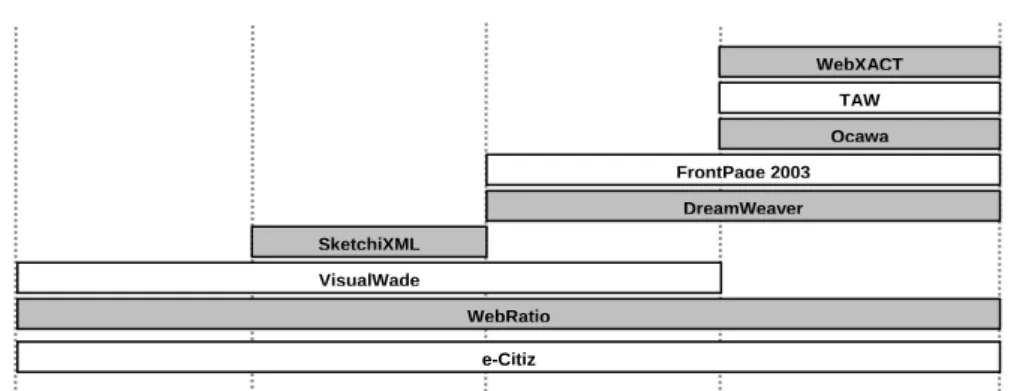
Figure 1 presents a distribution of tools according to phases of development process. Yet simplified, a development process is required to understand when tools are used in the development process. Although there is no consensus on phases of development process, one might agree on generic phases such as specification
(abstract modeling of application), design (models refinement including design constrains, integration of content, visual design of elements, etc.), implementation
(production of application code, database creation, etc.), post-implementation (testing and maintenance).
As depicted in Figure 1, some tools can be used in a specific phase of the development process (e.g. WebXACT, TAW and Ocawa, at post-implementation phase; SketchiXML, at Design phase), whilst other span several phases (e.g. Frontpage, Dreamweaver, VisualWade) or provide some support during the entire development process (e.g. WebRatio and e-Citiz). The notion of activities performed and tool support at each phase is important to understand where guidelines should be taken into account in the development process. Tools, like VisualWade, which generates HTML code from specification should implement accessibility polices very early in the development process to ensure the generation of accessibility problems on generated HTML code.
Figure 1. Tools support according to steps in development process.
As e-Citiz [2], WebRatio [2], and VisualWade [10] follow a model-driven approach which make them suitable in early phases of development process. WebRatio and VisualWade are generic tools for specification of Web sites whilst e-Citiz is a framework dedicated to the specification and deployment of electronic administrative procedure (or e-procedure). One of the raisons e-Citiz was included in this survey is the fact it implements accessibility policies to generate e-procedures compliant with WCAG 1.0 guidelines.
SketchiXML [2] is a representative tool for the activities carried out in the design phase. This tool allows a designer to rapidly draw an interface such as with a classic graphics painting program. An automatic identification of the different components is then performed to reconstruct the interface: this is made possible with a text recognition engine. The interface is specified using the UsiXML notation [20]. Thus, a mock-up reflecting the final interface of a Web page is easily obtained with SketchiXML. Even if SketchiXML has no features dedicated to accessibility conformity, evaluations can be performed on the UsiXML source code.
Macromedia DreamWeaver [1] and Microsoft FrontPage 2003 [12] are among the most popular tools that facilitate the development of Web sites. The main advantage of such tools is a high level of productivity even for a non expert in Web technologies. This is due to many facilities such as a WYSIWYG programming style, CSS styles editing, semi-automatic generation of code for complex structure (tables, forms, etc.), pre-designed block of scripts code (Javascript, Flash, etc.). Dreamweaver and FrontPage both include accessibility features that will help conforming to accessibility guidelines while developing the application.
WebXACT [22], TAW [13] and Ocawa [10] are quite known tools for accessibility evaluation. The purpose of these evaluation tools is to evaluate the accessibility of any Web application. All these tools are online Web services that parse the HTML source code of pages and produce an evaluation report where accessibility errors and warnings are mentioned.
Specification Design Implementation
VisualWade SketchiXML e-Citiz WebRatio DreamWeaver FrontPage 2003 Ocawa TAW WebXACT Post-implementation
4.2 Number of WCAG 1.0 checkpoint supported
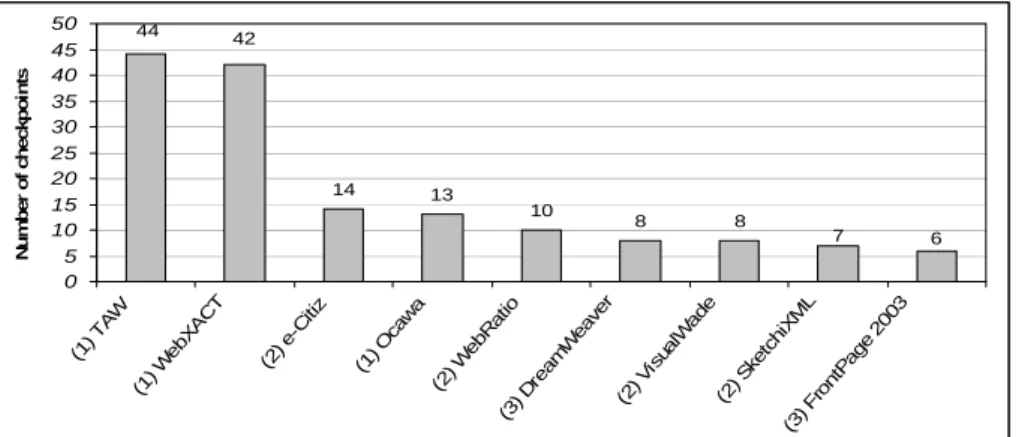
The number of checkpoints actually supported by tools devoted to evaluation is higher than those supported by development tools, as expected. As depicted by Figure 2, TAW presents the best performance, followed by WebXCAT, covering 44 of the 49 WCAG 1.0 checkpoints (i.e. priority 1 and 2 checkpoints, namely AA guidelines). We recall that results were obtained by different methods. In Figure 2, the numbers in parenthesis indicate the tool category and the method of analysis employed (i.e. (1) execution of evaluation tools, (2) estimation based on artifacts produced by model-driven tools, (3) analysis provided during edition of pages).
14 13 10 8 8 7 6 44 42 0 5 10 15 20 25 30 35 40 45 50 (1) TAW (1) W ebX AC T (2) e-C itiz (1) Oca wa (2) W ebR atio (3) Dre am Wea ver (2) Vis ualW ade (2) S ketc hiX ML (3) Fro ntP age 200 3 N u m b e r of ch ec kp oi n ts
Figure 2. Number of WCAG 1.0 checkpoint supported.
As one can notice in Figure 2, Ocawa is only able to check 13 of the 49 checkpoints, which means the worst performance among evaluation tools (i.e. category 1). This is explained by the fact Ocawa only considerer checkpoints which can be automatically detected (i.e. automation level analysis). However, in Figure 4 when comparing Ocawa performance to TAW and WebXACT, there is no slight difference in number of checkpoints inspected for the automation level analysis.
0 5 10 15 20 25 30 35 40 45 50 (1) TA W (1) We bXAC T (2) e-Citi z (1) Oc aw a (2) W ebR atio (3) D ream We aver (2) V isua lWa de (2) S ketc hiX ML (3) F ron tPa ge 20 03 N u mbe r of c h e c k poi nts None Capture Analysis Critique Suggestion
4.3 Analyzing quality of checkpoint support
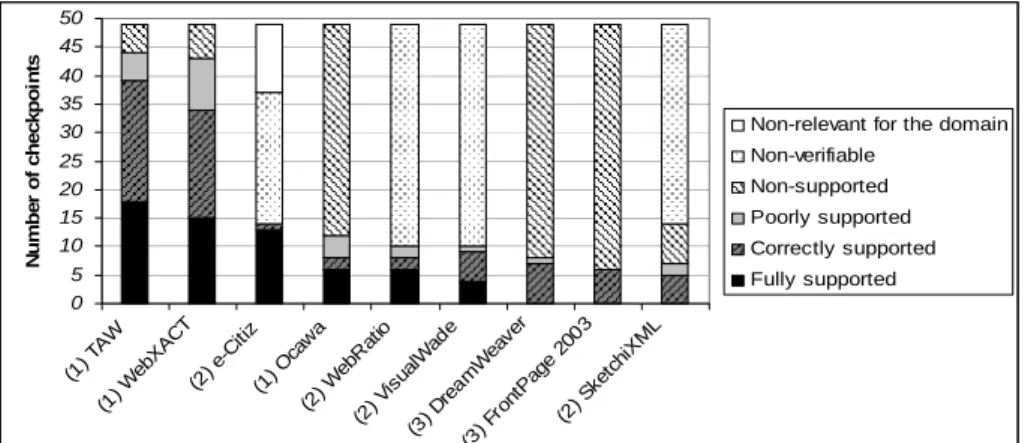
It is noteworthy that the support provided by tools can be different according to the information available in artifacts. The checkpoint “Provide alternative text for images” can be fully supported over HTML but it becomes non-verifiable over navigation models, for instance. In addition, some tools automatically detect errors (i.e. guideline violation) whilst others just raise warnings informing designers to proceed manual inspection.
In order to measure the quality of inspections we establish some criteria based on empirical evidence using the tools. Thus, Figure 4 provides a distribution of checkpoints according such a qualitative evaluation. Hereafter we provide a detailed description of criteria:
− Fully supported: all facets of the guideline are taken into account. Not only
inspection is done but extra features such examples and/or best practices are provided.
− Correctly supported: the guideline is supported by the tool but does not tackle all
the evaluations that are possible. Example: only highlighting errors/warning when automatic correction could be done;
− Poorly supported: only errors are thrown, not warnings; no explanations are given;
no additional documentation for corrections is given; etc.
− Non-supported: the guideline can be verified but is not implemented by the tool.
− Non-verifiable: the guideline cannot be verified even by a human expert, because it
require information which is missing. An example of such guidelines is 14.1: “Use the clearest and simplest language appropriate for a site’s content”. At the specification phase this rule is not verifiable because texts contained in Web pages are not yet available.
− Not-relevant for the domain: guidelines are not taken into account, deliberately,
because elements never appear in the application domain addressed by the tool.
0 5 10 15 20 25 30 35 40 45 50 (1) TA W (1) We bXA CT (2) e -Citi z (1) O cawa (2) W ebRa tio (2) V isual Wad e (3) D rea mW eav er (3) F ron tPage 2003 (2) Sk etchi XM L N u m b er o f ch e ckp o in ts
Non-relevant for the domain Non-verifiable
Non-supported Poorly supported Correctly supported Fully supported
4.4 Assessing guidelines support throughout the development process
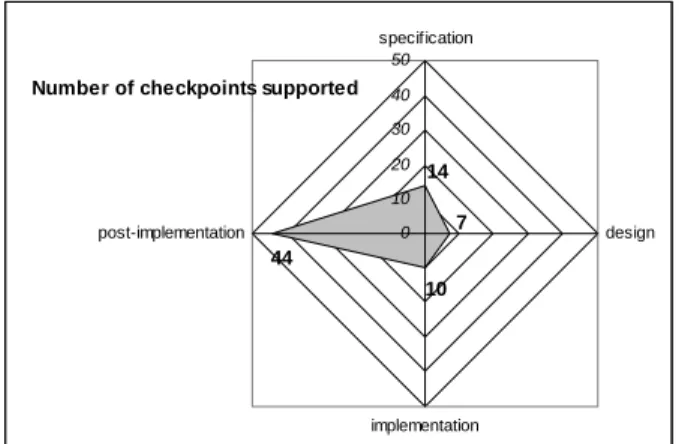
In order provide a rough estimation of the potential for accessibility evaluation of tools in this survey we keep in Figure 5 the best score of tools at each phase. So that, we have 14 checkpoint supported by e-Citiz at specification phase, 7 checkpoints supported by SketchiXML at the design phase, 10 checkpoints supported by both VisualWade and WebRatio at the implementation phase and 44 checkpoint supported by TAW at post-implementation phase. Such estimation should not be taken too seriously because it does reflect any real development process combining the synergistic use of these tools. However, it provides some insights about the potential of currently available artifacts to support automated inspection.
It is noteworthy that abstract models can provide enough information to support the inspection (at some level of automation) of 28,5% checkpoints. At design phase it is actually possible to inspect 15,9% of the guidelines. This lower number of guidelines inspected is due the kind of artifacts used in the analysis. More interesting is the performance of tools at the implementation phase, which indicates a poor support in terms of guidance and active help for accessibility during the edition of pages. This poor performance is very surprising because tools at implementation phase manipulate the same artifacts (i.e. HTML, XHTML, CSS code) used in inspection for evaluation tools which perform the best.
Number of checkpoints supported
7 14 10 44 0 10 20 30 40 50 specification design implementation post-implementation
Figure 5. Number of checkpoints supported during the development process.
4.5 Estimating correction effort
We propose hereafter an estimation of costs for correcting accessibility problems at different phases of development process. The effective cost correction of problems might change according to the guidelines involved, but at this stage of our research we don’t have accurate metrics to calculate precisely real costs of manual or automatic correction. Despite of this, we can do estimations based on actions required to fix problems. Thus, we roughly distinguished three actions an evaluator has to carry out when faced with guidelines violation:
− Add information to comply with the guideline. Example: include a textual alternative to the image;
− Delete information to comply with the guideline. Example: remove automatic page
refresh to avoid disorientation of impaired users;
− Modify existing information to comply with the guideline. Example: modify the
position of labels to align them to the corresponding form field.
For every action we gave a weight 1 if the correction should be done manually and
0 if the correction can be automated. Notice that the correction of some problems might require combined actions. We have applied this analysis to 3 checkpoints:
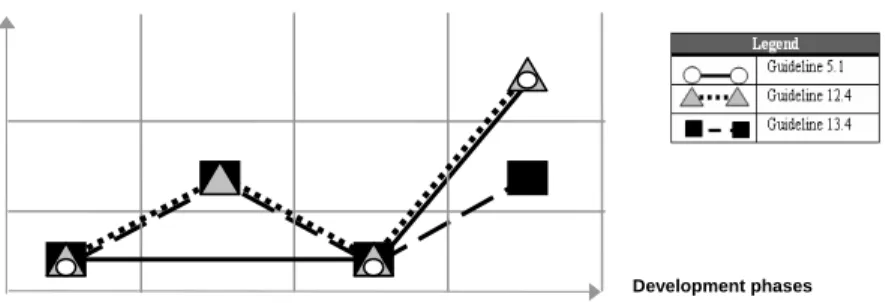
• Checkpoint 5.1 (i.e. every table should have a proper header for its cells). This checkpoint is automatically taken into account at specification phase by exploiting abstract models which can represent collection of data suitable to be implemented as tables. Artifacts produced at design phase miss information to inspect the validity of headers. At implementation phases, this checkpoint can be automatically checked by editor tools when creating new tables. At evaluation phase, this checkpoint can be automatically detected by analyzing the HTML code and the correction would require the creation of headers (action add) and introduction of appropriate labels (action add) but it should be manually fixed.
• Checkpoint 12.4 (i.e. create a direct association among labels and form fields). This checkpoint can be automatically taken into account at specification and implementation phases. At the design phase, designers must correct manually the positioning of elements; due the creative aspect of design is not suitable to do these corrections automatically. At post-implementation this problem can be automatically detected but if the checkpoint is violated developers should create a label (action
add id to the label)and establish an association between internal label and the field (action add cross-reference to the field).
• Checkpoint 13.4 (i.e. provide coherent visual mechanism across pages). By the means of appropriate templates, this correction can be automatically made at implementation and specification pages. The correction at design and post-implementation phases will require manual intervention to correctly positioned navigation elements in pages (action modify position).
The results of theses actions are summarized in Figure 6. For checkpoints 5.1 and 12.4, the effort required to correct problems is higher in post-implementation phases than in earlier phases. For the checkpoint 13.4 the effort is the same at design and post-implementation phase. This analysis does not take into account the cost of developing the tools that actually can do the corrections automatically.
Figure 6. Estimated correction effort during the development process.
specification
Correction effort
design Implementation post-implementation 2
1
5 Discussions
Using accessibility guidelines is not straightforward for developers and evaluators because some expertise is required to correctly understand and apply guidelines. In addition, manual inspections are tedious and costly. Currently, some tools for automated inspection exist but most of them only provide support at post-development phases of post-development process. However ensuring accessibility conformity should be a concern at each phase of the development process and consequently it should be integrated as soon as possible in the lifecycle.
Currently only a few tools allows to support accessibility inspection in earlier phases than post-implementation. So that we have to combined analysis of existing evaluation tools and estimative the possibility of inspection over artifacts produced by tools. Concerning the analysis over artifacts, it is important to say that results will certainly change according the kind of information artifacts contain. A feasibility study could determine which information could be added into artifacts (i.e. abstract models) to increase the number of accessibility checkpoints inspected.
The analysis performed demonstrated that is possible to evaluate some guidelines in very early phases of the development process. Even if the fully automation of all guidelines inspection is not possible in early phases, some automation is possible and it could help to reduce the costs of correction over final implementation. We are aware that we need better method to estimate costs, but the analysis performed seems enough to conclude that “do it right from the beginning is cheaper than do it again because it was wrong”. We also suggest that this proactive strategy applied in early phases of development would help designers to think about accessibility which would have a positive effect on the general quality of the user interface.
We found that most checkpoints could be inspected in early phase could also be integrated into development tools, thus preventing that designers introduce by mistake accessibility problems into design. A typical example of this is the checkpoint “creation of associations between labels in fields” which can be either automatically inspected but also used as start point to generate accessible final code of Web sites.
Not all checkpoints can be fully automated and some manual inspections are still required. But this case study shows that an important number of guidelines could be taken into account in early phases of the development process.
The results presented in this paper are part of a preliminary study on cost/benefits of anticipating inspections of accessibility guidelines in early phases of the development process. We did not exploit, for example, the multiplicative effect of errors (that could be detected in early phase, for example on a template) that are repeated in all pages of the Web site. More work is needed to provide a more accurate model for measuring theses aspects.
Acknowledgements
This research is partially supported by the WebAudit project, ANRT-CIFRE and Genigraph (http://www.genigraph.fr), Genitech Group.
References
1. Adobe Dreamweaver CS3. http://www.adobe.com/fr/products/dreamweaver/
2. Acerbis, R., et ali. WebRatio, an Innovative Technology for Web Application Development. In proceedings of ICWE’2004, Munich, Germany; July 28th -30th 2004. 3. A-Prompt, Web Accessibility Verifier, http://aprompt.snow.utoronto.ca/
4. Bühler, C. Barrier Free Access to the Internet for all in Germany, “Accessibility for all” Conference, Nice, France, 27-28 March 2003.
5. Coyette, A., Vanderdonckt, J., and Limbourg, Q.: SketchiXML: A Design Tool for Informal User Interface Rapid Prototyping. In: Proc. of International Workshop on Rapid Integration of Software Engineering techniques RISE’2006 (Geneva, 13-15 September 2006), N. Guelfi, D. Buchs (Eds.), LNSC, Springer-Verlag, (2007)
6. Disability. Available at : http://www.disability.gov.uk/
7. e-Citiz, Le monde des téléservices à portée de clic. http://www.e-citiz.com/ 8. European eAccessibility Certification. Available at: http://www.euracert.org/
9. Fraternali, P.: Tools and approaches for developing data-intensive Web applications: A survey. ACM Computing Surveys, 31, 227-263, (1999).
10. Gomez, J. Model-Driven Web Development with VisualWADE. In proceedings of ICWE’2004, Munich, Germany; July 28th -30th 2004. pp. 611-612. Ivory, M.Y., Automated Web Site Evaluation: Researchers’ and Practitioners’ Perspec-tives, Kluwer Academic Publishers, Dordrecht, 2003.
11. Martins, A., Monteiro, C. (reporters) Petition for the Accessibility of the Portuguese Internet. Report approved by the Portuguese Parliament, on 30th of June,1999. Also available at: http://www.acessibilidade.net/petition/parliament_report.html
12. Microsoft FrontPage 2003, www.microsoft.com/frontpage/ 13. Ocawa, Web Accessibility Expert. http://www.ocawa.com/
14. Official Journal of French Republic from February 11th 2005, Regulation number 2005-102.At: http://www.legifrance.gouv.fr/imagesJOE/2005/0212/joe_20050212_0036_0001.pdf
15. Plessers, P., et ali. Accessibility: a Web engineering approach. In 14th WWW Conference (Chiba, Japan, May 10 - 14, 2005). WWW '05. ACM Press, New York, NY, 353-362. 16. Scapin, D., et ali. Towards automated testing of web usability guidelines, in Ph. Kortum, E.
Kudzinger (eds.), Proc. of 6th Conf. on Human Factors and the Web HFWeb’2000 (Aus-tin, 19 June 2000), University of Texas, Aus(Aus-tin, 2000.
17. Section 508: The Road to Accessibility. Available at: http://www.section508.gov/ 18. TAW, Web Accessibility Test. http://www.tawdis.net
19. Vanderdonckt, J., Development Milestones towards a Tool for Working with Guidelines, Interacting with Computers, Vol. 12, No. 2, 1999, pp. 81-118.
20. Vanderdonckt, J., Limbourg, Q., Michotte, B., Bouillon, L., Trevisan, D., Florins, M.: UsiXML: a User Interface Description Language for Specifying Multimodal User Interfaces. In: Proc. of W3C Workshop on Multimodal Interaction WMI'2004, Sophia Antipolis, 19-20 July 2004, (2004)
21. Vellemann E, Strobbe C, Koch J, Velasco C A, Snaprud M (2007). A Unified Web Evaluation Methodology using WCAG. In: Universal Access in HCI (to appear, Proceedings of the 4th International Conference on Universal Access in Human–Computer Interaction, 22—27 July 2007, Beijing, China). New Jersey: Lawrence Erlbaum Associates. 22. WabCluster. The EU Web Accessibility Benchmarking Cluster, Evaluation and
benchmarking of Accessibility. Available at: http://www.wabcluster.org/ 23. Watchfire WebXACT. http://webxact.watchfire.com/
24. Wave 3.0, Web Accessibility Tool. http://wave.webaim.org 25. WebRatio, You think You get. http://www.webratio.com
26. World Wide Web Consortium (W3C), Web Accessibility Initiative (WAI). Available at: http://www.w3.org/WAI/