Smart Agent and Modified Master-Backup
Algorithm for Auto Switching Dynamic Host
Configuration Protocol Relay through Wireless
Router
Wahyul Amien Syafei
1*, Yosua Alvin Adi Soetrisno
1and Agung Budi Prasetijo
21Department of Electrical Engineering, 2Department of Computer Engineering Faculty of Engineering, Diponegoro University, Indonesia
Abstract: Potential problems in a wireless router are the number of connected clients to DHCP (Dynamic Host Configuration Protocol) services and the durability of connectivity. Practically, some of the wireless router limits the number of the client to 15 clients due to bandwidth consumption management. DHCP is one of the services needed by wireless router, but it might be interrupted when the memory or CPU is full. This article proposes a modification of the backup algorithm in DHCP relay to overcome this situation when the memory or CPU in the wireless router is limited. The proposed backup algorithm will automatically switch the main router to the backup router every time the main router’s memory is busy. Two main scenarios are conducted in this research to examine the proposed backup algorithm. First, Cisco DHCP relay services combined with OpenWRT wireless router. Second, Mikrotik original “Capsman” protocol DHCP relay combined alternatively with wireless-enabled and OpenWRT wireless router. Run test results show that the proposed backup algorithm with DHCP relay which are configured in OpenWRT wireless router can extend the number of connected clients and the durability of the wireless router when run its services as DHCP forwarder to DHCP relay and DHCP server. These combinations slightly affect the IP release time compared to regular DHCP which employs a direct connection.
Keywords: auto-switching, DHCP, release time, backup algorithm, wireless router, smart
1.
Introduction
A wireless router is a common interface used in the network today because of portability and compatibility. The main function of wireless router is to provide connectivity to the internet and provide automatic IP address allocation to the client. The arrangement of IP allocation made with DHCP service. DHCP service is IP allocation service that managed by the wireless router. However, a wireless router is not able to provide an IP address to the client when DHCP service is running out. DHCP service does not take a lot of memory, but if a wireless router is running out of memory because of other services, the DHCP service may also become unavailable. When DHCP service is not available, the user must set the IP manually on the device [1]. Potential problems that always exist in the wireless router are the number of clients that request the DHCP service and the durability of that router serves DHCP service.
Generally, a wireless router can serve 253 clients if the network is in the C class type network for IPv4 [2]. A wireless router does not limit the number of the client in practice, but for SOHO (small office home office) device, the number of the client sometimes is limited to 15 clients in
several brands. In other brands, there is a problem that wireless connectivity becomes corrupted when the device serves many clients in more than one day. Client or other activity could overload the wireless router with low memory and low CPU, so the router becomes stuck. Stuck could mean that the DHCP service is not running very well and needed to be restarted. Switching of DHCP service served by the wireless router to DHCP relay could become an alternative solution for this problem because the DHCP relay takes the handling of the load.
This solution also overcomes the proprietary limitation on some brands. In the market today, some wireless controllers which act as the DHCP server for DHCP relay only can be connected to the same brand. They do not match with other brands available in the market. To bridge this problem, OpenWRT can be used. After it is installed, the wireless router can be connected to some generic brand routers. [3]. This research used the generic router with OpenWRT modified operating system (OS) scenario rather than used the factory default firmware wireless controller.
Some DHCP researches had been conducted. Hooda, et al. manipulated the information of each network by using the relay agent. It provided extra IP information with some layer overlay. It was done by encapsulating the current layer of the network parameter request with information data extracted from the process that was passed in the network. The method used a relay agent to add information data into an information field and might comprise a DHCP option “82” field. In this research, information that was triggered by the agent was routing configuration in a generic router. [4]. Miao et al, worked in the behavior aware adaptive configuration in a wireless LAN. There was a combination of adaptive IP lease time and dynamic IP pool range. The adaptive lease time function was used to reduce IP peak usage based on usage pattern and user roles. Beside the adaptive lease time, there was a VLAN consideration based on spatial-temporal mobility correlation with a client. Resource allocation in this research was purely based on network segment allocation and consideration. Lease time was not set to be adaptive because every user must join to the selected area which was connected by the wireless network. [5].
database which contains Address Memory. In an embodiment, the entries of switch were increased to include IP address and DHCP data.
Other research proposed a DHCP failover with the use of smart agent. With this, when the router memory got leak, the agent detected memory allocation shortage directly and switched automatically to the nearest DHCP relay as a backup DHCP server. [7].
Protocol that used in ad hoc network architecture in [8] was hierarchical scenario. The main problem was same, how to tag the original host in many networks. The proposed system providing backward compatibility support to support co-existence with IP based application. The authors modified the factory firmware of the router to support compatibility between routers.
Exploration a wireless pool in a dynamic orthogonal manner was conducted in [9]. The problem addressed in this research was that the wireless router could not perform NAT (Network Address Translation) when a client does not receive an IP address from a central DHCP server. This research proposed the DHCP agent worked in multi-IP connection and pool scenario. The agent was located in between two routers, so the agent knew two different network segment of the router. The agent sent the script by detecting the network IP segment from where DHCP request came.
Smart agent is widely used in path planning. Itinerary planning is one kind of application that used by WSN (Wireless Sensor Network) as smart agent that can detect the presence of users requesting a route planning in a certain path. In [10] the path planning was used to route the DHCP load to another router having low service reservation. Relay concept also used in certain ways such as in MANET. An OLSR (Optimized Link State Routing) protocol was applied to consider best QoS (Quality of Services) metric. [11].
Fuzzy algorithm and QoS parameters as important criterions were employed to make decision in [12]. QoS metric in this research was simple because it was based on time and resource allocation.
The concept of programmatically agent is widely used in home automation [13]. Position based routing is used in geographic routing which router topology to gather the geographical scenario is important. Location routing is an interesting topic that could extend the current research of DHCP selection mechanism. Python program could tag and detect the DHCP agent from certain geographical area in some kind of topology and then make decision based on the geographical area.
In this research, the study limits the DHCP relay scenario based on available network equipment using as generic routers. Three scenarios are conducted. The first scenario is where the wireless router act as a DHCP server standalone. The second scenario is that the wireless router act as a passive interface connected with the DHCP server in Cisco and Mikrotik. The third scenario is that wireless router connected with another Cisco and Mikrotik router act as a DHCP relay, with Cisco and Mikrotik default proprietary DHCP relay helper or protocol terminology.
Different from literature [12], the mechanism that used in this research is that DHCP relay programmatically
coordinated and modified rather than used new routing protocol.
The wireless router devices that tested in this research were Linksys E1200 series and the TP-LINK WR-940ND series. Open-WRT firmware is installed as an open-source operating system in each wireless router. This research is a continuation and hardware real implementation from previous simulation research [1].
The main contribution of this research is to make a proof of concept for a smart agent that monitoring DHCP packet and auto triggering router command. This research makes a proper scenario to test an algorithm performance and implementation mechanism. A smart agent is an alternative solution for connecting multi proprietary limited device. This solution also overcomes the limitation of a connected client and enhances the durability of the wireless router’s services.
2.
DHCP Relay and Smart Agent for Wireless
Router
The proposed system consists of three parts. First part is a router as a DHCP server.
2.1 Generic Router as DHCP server
There are two generic router brands tested, i.e., Cisco and Mikrotik. Each router makes some DHCP pool for each network segment that exists in the client network. There is a different initial configuration in Cisco and Mikrotik. Cisco router works by default and does not need to be formatted. Mikrotik router by default acts as bridge interface and needs to be formatted to make all the interface become root interface that could serve an IP address and trunking mechanism. Internet connectivity is shared via NAT mechanism in Cisco and Mikrotik router. Cisco and Mikrotik router must ensure that the destination to default route, which is “0.0.0.0/0” in IPv4 is bypassed to router gateway which is connected with an available IP address.
Routing is needed to make a smart agent joined in one network segment that could monitor another network segment. Simple dynamic routing that used in this research is RIP version 2 protocol.
2.2 Generic Router as DHCP relay
A generic router can be configured as either DHCP server or DHCP relay. In Cisco router, to make interface become DHCP relay, the DHCP helper-address should be set. In Mikrotik for OpenWRT interface, the DHCP relay configuration needs to be set. In term of the proprietary protocol in Mikrotik Router, there is a “Capsman” protocol. It acts as a wireless controller in another brand. The wireless controller could manage wireless frequency, access point parameter, and distributed DHCP pool with bridge interface. Bridge interface joins two networks segment which are LAN available port and WLAN interface. When a bridge interface is created, the WLAN interface can get an IP address from the DHCP pool. This research also compares the proprietary “Capsman” protocol with OpenWRT modified wireless router in a direct DHCP bridge mode.
One router that function as DHCP server also act as “Capsman” manager in Mikrotik router. Other router that act as DHCP relay is managed with “Capsman” interface from DHCP server. The “Capsman” synchronization need time to automatically detect proper interface in DHCP relay side.
2.3 Smart Agent PC
The third part is a smart agent to capture DHCP traffic. A smart agent is a computer with network access to a generic router. The smart agent is an active interface that monitoring network with a Python program and networking library. Python script checks every packet that exists at interchange point between DHCP server and DHCP relay. Networking library that used is “tcpdump”. Library “tcpdump” could monitor every TCP packet with a specific filter like only monitoring DHCP.
Python program must convert that parameter with the “subprocess” program. There is many Python library used in network automation like “paramiko” and “netmiko”.
“paramiko” could be used to make an SSH connection to a
router. Cisco router that used is 1xxx series do not have SSH connection. The library used in the Cisco interface is
“pexpect” for “telnet” mechanism. Library “pexpect” could
detect special character exist in configuration mode. Cisco router differentiates “#” and “>” for global configuration and privilege mode. Mikrotik router uses directory base for differentiate configuration like in Linux terminal.
2.4 OpenWRT Wi-Fi DHCP passive bridge
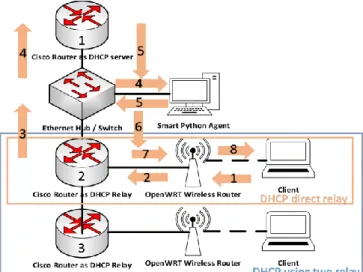
The fourth part of the system is a generic wireless router available. In this research, TP-LINK’s series WR-940ND router is used because having client limitation and Linksys’s series E1200 series is used because has a durability problem when tested in this research scenario. OpenWRT operating system is installed in each wireless router. OpenWRT can improve the functionality of the default wireless router by adding some Linux functionality. It makes a bridge interface that joins WAN interface (an interface that connected with internet) with WLAN interface. OpenWRT’s bridge interface can be connected to the generic router that running a DHCP server or DHCP relay in some interface. Figure 1 shows the overall system of smart agent and DHCP relay in the Cisco brand with default scenario.
Figure 1. Smart Agent and DHCP relay in default Cisco Scenario
Client requests DHCP information from nearest Cisco Router labelled 2 in default scenario in Figure 1. Cisco router labelled 2 forwards DHCP request to Cisco router act as DHCP server labelled 1. Smart Python agent in Figure 1 could monitor network segment from Ethernet hub or switch that connected to two Cisco router labelled 2 and 3 act as DHCP relay. Cisco router does not have a specific wireless controller protocol like “Capsman” in Mikrotik router. Cisco has a specialized wireless controller device. This research did not used specialized wireless controller device because of the connectivity issue. Cisco wireless controller must connected to Cisco specific type of wireless router that the OS cannot be modified like reformatted with OpenWRT. Cisco router labelled 2 connected with OpenWRT wireless router act as bridge interface in DHCP direct relay scenario. If there is two DHCP relay that joined such as Cisco router labelled 3 then there is DHCP using two relay scenario.
Figure 2. Smart Agent and DHCP relay using Smart Agent Cisco Scenario
When proposed algorithm is applied, smart Python agent in Figure 2 checks the memory capacity of Cisco router act as DHCP server labelled 1 then make a decision to use old DHCP server or new DHCP server which is labelled 2. Old DHCP route in Figure 2 is colored with red and new DHCP route is colored with green. There is no delegation to DHCP relay labelled 2 to become DHCP server in Figure 2.
Figure 3 shows DHCP route when using two relays. DHCP relay labelled 3 where the DHCP request come from is forwarding DHCP information to DHCP relay labelled 2. When DHCP information is pass through the DHCP relay labelled 2, the smart Python agent also checks the memory resources of the current DHCP server which is the DHCP server labelled 1 in Figure 3.
Mechanism happens in Figure 2, 3, and 4 also can be set up in Mikrotik router scenario
Figure 3. Smart Agent and DHCP relay using Smart Agent Cisco Scenario with two relay
Figure 4. Smart Agent and DHCP relay using Smart Agent Cisco Scenario when DHCP relay take over the DHCP
server duty
Figure 5. Smart Agent and DHCP relay in default Mikrotik Scenario
Figure 6 shows Mikrotik scenario that uses Mikrotik DHCP relay labelled 2 and 3 as “Capsman” managed interface. Mikrotik router labelled 1 acts as “Capsman” manager. Mikrotik has special “Capsman” protocol to manage all wireless interface. Mikrotik scenario with “Capsman” scenario does not need OpenWRT formatted wireless router but Mikrotik router labelled 2 and 3 need Wifi enabled router with specific series like RB941.
Figure 6. Smart Agent and DHCP relay in default Mikrotik Scenario with “Capsman” protocol
Figure 7 shows real network equipment and arrangement that used in this research. DHCP server and relay could be substitute between Cisco or Mikrotik. PC Smart Agent is usual PC desktop. Switch or hub is used to connect two network segments. Wireless router in this research is tested with TP-Link and Link-sys elderly maintained by Cisco. DHCP Wifi receiver is also generic PC desktop.
Figure 7. Real network devices and interfaces involved in the research scenarios
2.5 Network Scenario
DHCP packet. In Cisco scenario, command triggered from telnet connectivity when utilization of master DHCP is full. Cisco 1xxx series do not have SSH connectivity. In Mikrotik scenario, command triggered from SSH connectivity when Lower hierarchy DHCP relay become DHCP server by triggering make pool command from where network segment came. When utilization of later DHCP server is full, it’s also could be redirected to another router act as DHCP relay now. The client always seeks the nearest DHCP server, which could be reached with DHCP relay or directly.
2.6 DHCP server original selection mechanism
There is two default DHCP server selection algorithm, which is a polling and master-backup algorithm. DHCP server selection by default using a polling algorithm if there is no further configuration. In Cisco 1xxx series, there is no specific configuration to choose DHCP algorithm. This specific configuration is only available on Hewlett-Packard or Huawei router based on documentation [14].
Polling algorithm forwards DHCP requests to all DHCP servers available. There is no hierarchy usefulness in polling algorithm that could be used, so do not need further resource allocation. In a polling algorithm, it must ensure that the routing configuration must reach all DHCP server node. When there is no routing scheme to all available DHCP servers the DHCP IP address information cannot reach the destination address in different network segment. DHCP packets could be expired if the forwarding mechanism is failed.
Master-backup algorithm is more appropriate if there is a hierarchy in network. Master-backup algorithm forwards DHCP requests to the master DHCP server first. If the master DHCP server is not available, then the packet forwarded to the nearest backup DHCP server [14]. When the hierarchy is available, if the highest hierarchy DHCP server fails, the lower hierarchy will also fail. Therefore, this research seeks a way for making master DHCP server selection more flexible because of memory checking mechanism. Hierarchy scenario makes all available hierarchy node could become DHCP pool to underneath several networks.
2.7 Proposed Method for Smart Agent and master-backup modification algorithm
The method proposed in this research is to modify the mechanism of the original master backup algorithm. The router manages many services, so we could not suspect why router become stuck or overload with somewhat package. The hacking activity could also overload the router memory in a non-sense manner.
Modification of the algorithm has been done by simply checking the memory resource allocation. Memory resource allocation is one thing that also considered in load balancing [15]. Master-backup algorithm is having similarity with the load-balancing algorithm in a certain term. Memory resource allocation could be check by triggering resource check command to the router. Memory resource information must be parsed by Python program to get the desired memory that must be read.
Modification in networking is easier done by programming. Modification of the algorithm is done without changing the original behavior of the protocol. Without a change of the
original behavior, it is more like a man in the middle agent that triggered the command by inspecting the package. Addition of man in the middle in the hierarchy could take advantage of the hierarchy itself. The advantage is that the hierarchy is designed to consider that the highest tier is the most reliable router. With hierarchy, a top-down approach considered the load of every node. A load of every node must be focused in a higher available chosen node in the hierarchy manner. That is the point of the entire modification exist.
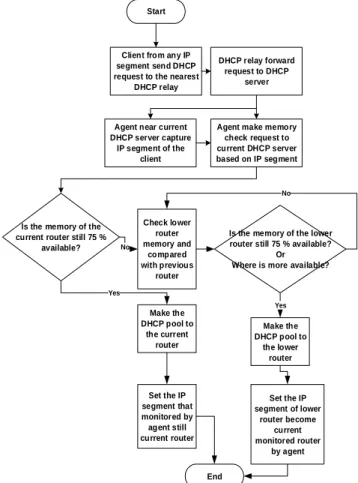
The algorithm is implemented using Python script because Python has a flexible networking library. A library that used was the same as in previous simulation research [1]. Figure 8 shows the flowchart of the modified master-backup algorithm.
Start
Agent near current DHCP server capture IP segment of the
client
Make the DHCP pool to
the current router Check lower
router memory and
compared with previous
router
Is the memory of the lower router still 75 % available?
Or Where is more available?
Make the DHCP pool to
the lower router
Set the IP segment of lower
router become current monitored router
by agent
Yes No
Yes
End
No
Client from any IP segment send DHCP request to the nearest
DHCP relay
DHCP relay forward request to DHCP
server
Agent make memory check request to current DHCP server based on IP segment
Is the memory of the current router still 75 %
available?
Set the IP segment that monitored by agent still current router
Figure 8. DHCP modified master-backup selection algorithm
2.8 Relation between Cisco and Mikrotik as DHCP Router Server and LinkSys and TP-Link as Wifi Router
Cisco as proprietary brand has a specific DHCP server can allocate dynamic IP addresses based on the relay information option (option 82) sent by the relay agent. Cisco does not have specific Wifi organization protocol so the Wifi must be set as Wifi bridge to receive DHCP configuration from Cisco router. With used of LinkSys and TP-Link as generic Wifi Router, default OS of both router must be reformatted to Open-WRT.
Mikrotik as a Linux based router has also DHCP compatibility, which is not proprietary. Mikrotik has a specific Wifi organization protocol which is “Capsman” protocol. “Capsman” protocol could manage Wifi router capability which is exist in several Mikrotik Wifi included router as Wifi bridge without modification of the Wifi router OS. “Capsman” protocol must be used in Mikrotik device. LinkSys and TP-Link as a generic Wifi router has default OS original configuration. TP-Link as a SOHO Wifi router consider only 15 client that could connect to Wifi Router to make bandwidth allocation proper to use by each user. LinkSys consider more client without considering bandwidth allocation but have several issue in durability. After one or two days used, the DHCP service could become corrupted. In order to accompany each router capability and also issue there is some scenario that mixed out the central DHCP router with Wifi router to test the compatibility and also the performance to release of DHCP information.
Cisco router as DHCP server could only connected to generic Wifi router which is has been formatted to OpenWRT OS. Cisco router must used another Cisco router as DHCP relay if there is several network hierarchy below the main DHCP server.
Mikrotik router as DHCP server could connected to Mikrotik Wifi router with default OS or generic Wifi router which is has been formatted to OpenWRT OS. Mikrotik in the term of DHCP relay could use “Capsman” protocol to act as DHCP relay to distribute IP from main DHCP server to each Wifi router joined. Mikrotik with “Capsman” protocol must be connected with Mikrotik Wifi router only. Mikrotik without “Capsman” protocol as a main DHCP server could be connected to another Mikrotik router act as DHCP relay. Mikrotik without “Capsman” protocol could be connected to generic Wifi router with OpenWRT OS.
3.
Evaluation Process
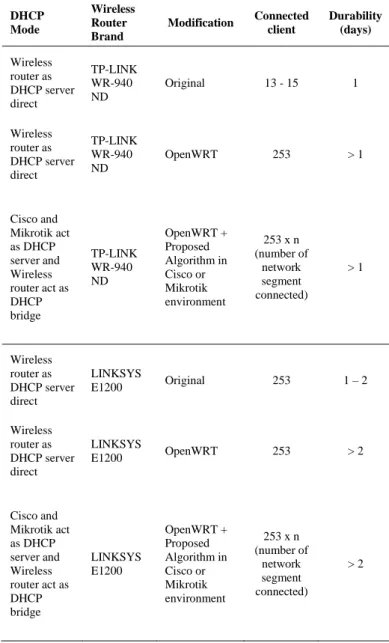
There is some evaluation in the term of implementation in real hardware. The first evaluation process is to check the wireless router availability problem. The scenario that used was formatting the wireless router OS with OpenWRT and changing the wireless functionality become bridge interface. Without changing the functionality, the algorithm and modification could not be implemented. The functionality changing in the wireless router is only overcome the availability problem in one network segment level. The modified algorithm is more expanding the availability to many network segment joined the smart DHCP system. Table I shows the comparison of the client connected and durability between the original router, modified router, and in the term of modified algorithm.
Table 1. Comparison of connected client and durability between Original, OpenWRT, and Proposed Backup
Algorithm DHCP Mode Wireless Router Brand
Modification Connected client Durability (days) Wireless router as DHCP server direct TP-LINK WR-940 ND
Original 13 - 15 1
Wireless router as DHCP server direct TP-LINK WR-940 ND
OpenWRT 253 > 1
Cisco and Mikrotik act as DHCP server and Wireless router act as DHCP bridge TP-LINK WR-940 ND OpenWRT + Proposed Algorithm in Cisco or Mikrotik environment
253 x n (number of network segment connected) > 1 Wireless router as DHCP server direct LINKSYS
E1200 Original 253 1 – 2
Wireless router as DHCP server direct
LINKSYS
E1200 OpenWRT 253 > 2
Cisco and Mikrotik act as DHCP server and Wireless router act as DHCP bridge LINKSYS E1200 OpenWRT + Proposed Algorithm in Cisco or Mikrotik environment
253 x n (number of
network segment connected)
> 2
Table 1 shows that there is an increase in client connections and also durability, especially in OpenWRT, modified OS wireless router. In the modified algorithm, the number of the client connected depends on how many nodes connected, but the number of clients in one network segment remains the same.
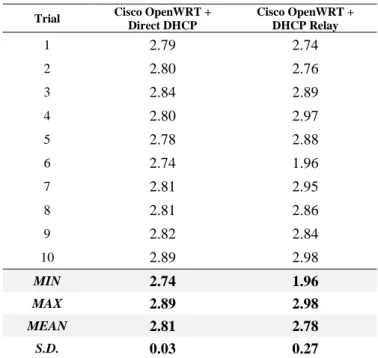
The DHCP release time performance is the second parameter that tested in this research. DCHP release time is measured by using the Python library of time measurement. DHCP release time measured from the DHCP package requested until the client could get the IP address.
Table 2. Comparison of Release Time between Cisco Using OpenWRT by Direct DHCP and Cisco Using OpenWRT by DHCP Relay
Trial Cisco OpenWRT +
Direct DHCP
Cisco OpenWRT + DHCP Relay
1 2.79 2.74
2 2.80 2.76
3 2.84 2.89
4 2.80 2.97
5 2.78 2.88
6 2.74 1.96
7 2.81 2.95
8 2.81 2.86
9 2.82 2.84
10 2.89 2.98
MIN 2.74 1.96
MAX 2.89 2.98
MEAN 2.81 2.78
S.D. 0.03 0.27
From the MEAN value, it can be found that DHCP release time was not affected by the existing of a relay. Although there is a DHCP relay, the release time was only different about 0.03 seconds. Testing in Cisco product was an interesting point because release time was decreasing. Generally, as the number of DHCP relay increases, the release time increases. The value of standard deviation (S.D.) in DHCP relay which was increasing showed that gaining IP address from the relay was not stable. However, it did not affect the release time as a performance parameter. As a comparison, observation of release time in Mikrotik were listed in Table 3.
Table 3. Comparison of Release Time between Mikrotik with Original “Capsman” Protocol and using the proposed algorithm with DHCP Relay
Trial
Mikrotik Capsman
Mikrotik OpenWRT
Mikrotik Capsman + DHCP Relay
Mikrotik OpenWRT + DHCP Relay
1 1.40 1.30 1.48 1.54
2 1.32 1.28 1.28 1.38
3 1.30 1.27 1.28 1.31
4 1.14 1.13 1.27 1.25
5 1.36 1.26 1.31 1.30
6 1.26 1.27 1.39 1.42
7 1.30 1.19 1.40 1.43
8 1.28 1.28 1.42 1.27
9 1.26 1.26 1.36 1.45
10 1.24 1.16 1.36 1.28
MIN 1.14 1.13 1.27 1.25
MAX 1.40 1.30 1.48 1.54
MEAN 1.26 1.24 1.36 1.38
S. D. 0.06 0.05 0.05 0.07
Table 3 shows many comparisons. The first and second column is using a single direct Mikrotik as DHCP server, and as Mikrotik a DHCP relay is set with or without “Capsman” protocol. There is no significant difference between those comparisons. Mean and standard deviation show that “Capsman” protocol is not faster compared to “Capsman” connected to generic wireless router reformatted with OpenWRT.
Compared with Cisco in Table 2, we could know that DHCP request is faster processed in Mikrotik environment. The impacting factor besides the protocol itself, it also depends on hardware technology. Cisco networking interface in this scenario, has a slower bandwidth in one output interface, which is Ethernet with 10 Mbps. This is indirectly affects the release time performance.
The second comparison from Table 3 is between Mikrotik OpenWRT using one DHCP server and using DHCP relay (2nd and 4th column). There are also no significant differences. The difference is only about 0.14 in the mean term. Mikrotik has faster release time in combination with DHCP relay than Cisco. Mikrotik has a DHCP relay’s delay, which is greater than Cisco, although the release time in an average is faster at Mikrotik.
Another interesting fact also exists in the third comparison. The third comparison from Table 3 is between Mikrotik using OpenWRT and Capsman in combination with DHCP relay (3rd and 4th column). Without using a relay in the first comparison, Mikrotik using OpenWRT’s release time is faster than using “Capsman” protocol. In the term of using DHCP relay, the release time using “Capsman” is faster than using OpenWRT.
“Capsman” protocol in a specific way must search the wireless interface. The wireless search process contributes to a different time in IP total release time. From the result, we could know that using a relay is increasing release time but with no significance different. This trial on real hardware is different from previous research [1] which show that DHCP relay is faster when using simulation.
4.
Conclusion and Future Work
We have tested a modified algorithm design in term with a variety of different brand and protocol of a wireless router. Variation of different brand and protocol give the interesting fact different from the simulation. From implementation, we could know that DHCP relay increases the time of release time in a fraction of second, which means very little. From different brand the DHCP relay act the different way, because could be slower or faster.
Modification of the original master-backup algorithm is not changing the way of protocol behave, but only intercept the package come and give the different action. The test result shows that the modified algorithm is still having an acceptable lease time. In combination with OS modification, it could increase the number of clients could connect and the durability. Modification of algorithm supported with modification of the wireless router functionality could extend the availability of DHCP and still has a reasonable release time difference, which is only 0.14 second for one DHCP relay.
5.
Acknowledgement
This research is funded by DRPM, Deputy for Strengthening Research and Development. Ministry of Research and Technology / National Agency for Research and Innovation of the Republic of Indonesia through Diponegoro University year 2019 – 2020.
References
[1] W. A. Syafei, Y. A. Adi Soetrisno, and A. B. Prasetijo, “Centralized Dynamic Host Configuration Protocol and Relay Agent for Smart Wireless Router,” in 2019
6th International Conference on Information
Technology, Computer and Electrical Engineering
(ICITACEE), Semarang, Indonesia, Sep. 2019, pp. 1–
5, doi: 10.1109/ICITACEE.2019.8904343.
[2] Bauer, Steven and Clark, David D. and Lehr, William, Understanding Broadband Speed Measurements (August 15, 2010). TPRC 2010. Available at SSRN: https://ssrn.com/abstract=1988332.
[3] Y. Guo and Z. Li, “WLAN Based Wireless Self-Organization Link: Research and Realization,” in 2017 International Conference on Computer Network,
Electronic and Automation (ICCNEA), Xi’an, Sep.
2017, pp. 268–271, doi: 10.1109/ICCNEA.2017.99. [4] S. K. Hooda, A. Ghule, V. Puneet, and A. Indiresan,
“DHCP in Layer-3 Overlay with Anycast Address Support and Network Address Transparency,” U.S. Patent 10,454,882, Oct 22, 2019.
[5] C. Miao et al., “BDAC: A Behavior-aware Dynamic Adaptive Configuration on DHCP in Wireless LANs,”
in 2019 IEEE 27th International Conference on
Network Protocols (ICNP), Chicago, IL, USA, Oct.
2019, pp. 1–11, doi: 10.1109/ICNP.2019.8888048. [6] A. Singh, R. K. Arehalli, and S. B. Suryananarayana,
“System and Method for Minimizing Broadcast Communcations when Allocating Network Address,” U.S. Patent 10,375,014, Aug 6, 2019.
[7] L. Trombeta and N. Torrisi, “DHCP Hierarchical Failover (DHCP-HF) Servers over a VPN Interconnected Campus,” Big Data and Cognitive
Computing, vol. 3, no. 1, p. 18, Mar. 2019, doi:
10.3390/bdcc3010018.
[8] S. Khalid, A. Mahboob, F. Azim, and A. Rehman, “IDHOCNET-A Novel Protocol Stack and Architecture for Ad hoc Networks,” in International Journal of Communication Networks and Information Security (IJCNIS) vol. 7, no. 1, p. 14, 2015.
[9] T. M. F. Pang, B. Yang, M. N. Kamath, and X. Zhou, “Dynamic Orthogonal Local DHCP IP Pools for Wireless Access Points,” U.S. Patent 2019/0281011, Sep 12, 2019.
[10] R. A. Alhanani, J. Abouchabaka, and R. Najat, “CDS-MIP: CDS-based Multiple Itineraries Planning for mobile agents in a wireless sensor network,” in International Journal of Communication Networks and Information Security (IJCNIS) vol. 11, no. 1, p. 10, 2019.
[11] A. Abdellaoui, J. Elmhamdi, and H. Berradi, “Multipoint Relay Selection based on Stability of Spatial Relation in Mobile Ad hoc Networks,” in International Journal of Communication Networks and Information Security (IJCNIS) vol. 10, no. 1, p. 8, 2018.
[12] H. Touil and Y. Fakhri, “A Fuzzy-based QoS Maximization Protocol for WiFi Multimedia (IEEE 802.11e) Ad hoc Networks,” in International Journal of Communication Networks and Information Security (IJCNIS) vol. 6, no. 3, p. 9, 2014.
[13] A. M. Popescu, I. G. Tudorache, B. Peng, and A. H. Kemp, “Surveying Position Based Routing Protocols for Wireless Sensor and Ad-hoc Networks,” in International Journal of Communication Networks and Information Security (IJCNIS) vol. 4, no. 1, p. 27, 2012.
[14] Hewlett Packard Enterprise Development LP, “Specifying the DHCP server selecting algorithm,” HPE FlexNetwork 5130 EI Switch Series Layer 3—IP
ServicesConfiguration Guide. [Online]. Available:
http://h22208.www2.hpe.com/eginfolib/networking/do
cs/switches/5130ei/5200-3942_l3-ip-svcs_cg/content/483572357.htm.
[15] A. Pourghaffari, M. Barari, and S. Sedighian Kashi, “An efficient method for allocating resources in a cloud computing environment with a load balancing approach,” Concurrency and Computation: Practice
and Experience, p. e5285, Apr. 2019, doi: