e Rook’s Guide to C++
© 2013 Jeremy A. Hansen
All rights reserved.
is work is licensed under a Creative Commons
Aribution-NonCommercial-ShareAlike 3.0 Unported License, as described at
http://creativecommons.org/licenses/by-nc-sa/3.0/legalcode
Printed in the United States of America
First edition: November 2013
ISBN 978-1-304-66105-0
Preface
What you are reading is the first of what I hope to be many
ever-improving iterations of a useful C++ textbook. We’ve gone fairly
quickly from whim to print on an all-volunteer basis, and as a result,
there are many things that I’d add and change if I had an infinite
amount of time in my schedule. e vast majority of the contents
were wrien in less than 36 hours by 25 students (mostly freshmen!)
at Norwich University over a long weekend. Some of it is mine, and
some was added by our crack team of technical editors as we
trans-lated sleep-deprived poor grammar into sleep-deprived beer
gram-mar.
Where it goes from here is mostly up to you! If there’s a section
that’s missing or in need of clarification, please take a bit of time
and make those changes. If you don’t want to bother yourself with
the GitHub repository, send me your additions and modifications
di-rectly.
I want to first thank my family for the time I didn’t spend with
them on the writing weekend and throughout the summer when I
was editing and typeseing. I promise I won’t do this next summer!
My next thanks go out to the technical editors and typeseers,
without whom you would have a much uglier book. anks to Ted
Rolle for building the initial L
ATEXframework and to Ma Jadud for
the incredibly helpful pointers on how to manage the pile of
typeset-ting files in a collaborative environment. I also thank Craig Robbins
and Levi Schuck, who, on different sides of the planet, managed to
contribute extensively to the heavy liing of geing the book into
the shape it’s in now. If we ever meet, I owe you a beer or whatever
you’re having!
I also would like to thank all of the Kickstarter backers not only
for the money which made this possible, but for reinforcing the idea
that this is a worthwhile contribution to the community. Peter
Stephen-son and Andrew Pedley also contributed food directly over the
text-book writing hackathon weekend, and without them we’d never have
goen our saturated fat quota! (Note to future project leaders: there’s
nothing that gets a bunch of college students who are generally
luke-warm about programming to write a textbook like free food. It didn’t
even maer what the food was. Really.)
anks to Ma Russo for shooting the video and organizing the
media and social networking efforts with the Kickstarter project through
the writing weekend.
Special thanks to Allyson LeFebvre
1for the textbook
photogra-phy, several diagrams, and the extensive search through the
semi-final textbook that turned up a bunch of mistakes that I missed.
And my last (and not at all least) thanks go out to all the
stu-dents who showed up in person or digitally. And without geing
too grandiose, you remind us all that we can make the world beer
by showing up. Keep showing up!
Jeremy
[email protected]
26 November 2013
Contents
1 History
1
2 Variables
3
2.1
How do I decide which data type I need? . . . .
4
2.2
Identifiers . . . .
4
2.3
Declaring a Variable . . . .
4
2.4
Initializing Variables . . . .
5
2.5
Assignment Statements . . . .
5
2.6
Review estions . . . .
6
2.7
Review Answers . . . .
6
2.8
Further Reading . . . .
6
3 Literals and Constants
7
3.1
Literals . . . .
7
3.2
Declared Constants . . . .
7
3.3
Review estions . . . .
8
3.4
Review Answers . . . .
8
4 Assignments
11
4.1
Review estions . . . 13
4.2
Review Answers . . . 13
5 Output
15
5.1
Review estions . . . 18
5.2
Review Answers . . . 19
5.3
Further Reading . . . 19
6 Input
21
6.1
Review estions . . . 23
6.2
Review Answers . . . 24
6.3
Further Reading . . . 24
7 Arithmetic
25
7.1
Review estions . . . 28
7.2
Review Answers . . . 30
7.3
Further Reading . . . 31
8 Comments
33
8.1
Review estions . . . 35
8.2
Review estions . . . 37
9 Data Types and Conversion
39
9.1
Floating-point types . . . 40
9.2
Other types introduced by C++11 . . . 42
9.3
Conversion Between Types . . . 42
9.4
Coercion & Casting . . . 43
9.5
Automatic Types in C++11 . . . 44
9.6
Review estions . . . 45
9.7
Review Answers . . . 45
9.8
Further Reading . . . 45
10 Conditionals
47
10.1
if
,
else
, and
else if
. . . 48
10.1.1 A small digression on expressions . . . 48
10.1.2 Using
else
. . . 49
10.3 Review estions . . . 54
10.4 Review Answers . . . 54
11 Strings
55
11.1 Review estions . . . 59
11.2 Review Answers . . . 60
11.3 Further Reading . . . 60
12 Loops
61
12.1 Introduction . . . 61
12.2 Having Fun
while
Programming . . . 61
12.3
do
-
while
Loops . . . 63
12.4 Event-Based Loops vs Count-Based Loops . . . 65
12.5
for
work or
for
play . . . 66
12.6 Picking a Loop . . . 67
12.7 Nested Loops . . . 68
12.8 Infinite Loops . . . 68
12.9 Review estions . . . 69
12.10 Review Answers . . . 70
12.11 Further Reading . . . 70
13 Arrays
71
13.1 Multi-dimensional Arrays . . . 73
13.2 Review estions . . . 74
13.3 Review Answers . . . 74
13.4 Further Reading . . . 75
14 Blocks, Functions, and Scope
77
14.1 Blocks . . . 77
14.2 Basic Functions in C++ . . . 78
14.2.1 What are functions and why do we use them? 78
14.2.2 e parts of a basic function . . . 78
14.3
void
Functions . . . 81
14.5 Scope . . . 83
14.6 Review estions . . . 85
14.7 Review Answers . . . 86
14.8 Further Reading . . . 88
15 Problem Solving & Troubleshooting
89
15.1 e Compilation Error . . . 89
15.2 e Logic Error . . . 90
15.3 e Infinite Loop . . . 90
15.4 Review estions . . . 91
15.5 Review Answers . . . 92
16 e Preprocessor
93
16.1 Review estions . . . 94
16.2 Review Answers . . . 95
17 Advanced Arithmetic
97
17.1 Examples . . . 98
17.1.1
pow()
. . . 98
17.1.2
sqrt()
. . . 99
17.1.3 Modulo . . . 100
17.2 Review estions . . . 101
17.3 Review Answers . . . 101
17.4 Further Reading . . . 102
18 File I/O
103
18.1 I/O Streams . . . 103
18.2 File I/O . . . 104
18.3 Opening and closing a File . . . 104
18.4 Reading from a File . . . 105
18.5 Writing data to a File . . . 106
18.6 Introduction to Classes and Objects . . . 107
18.7 Other functions . . . 108
18.9 Review Answers . . . 110
18.10 Further Reading . . . 110
19 Pointers
111
19.1 Review estions . . . 114
19.2 Review Answers . . . 115
20 Dynamic Data
117
20.1 Review estions . . . 121
20.2 Review Answers . . . 121
20.3 Further Reading . . . 121
21 Classes and Abstraction
123
21.1
struct
s . . . 123
21.2 Assigning values to member variables . . . 124
21.3 Classes . . . 124
21.4
public
and
private
variables and functions . . 125
21.5 Defining member functions . . . 126
21.6 Using member functions . . . 126
21.7
class
es and
struct
s together . . . 127
21.8 Constructors . . . 128
21.9 Overloading Member Functions . . . 129
21.10 Review estions . . . 130
21.11 Review Answers . . . 131
21.12 Further Reading . . . 132
22 Separate Compilation
133
22.1 Review estions . . . 135
22.2 Review Answers . . . 136
22.3 Further Reading . . . 136
23.2 #include <iterator> . . . 138
23.2.1 Forward iterators . . . 139
23.2.2 Bidirectional iterators . . . 139
23.2.3 Random access iterators . . . 140
23.3 #include <vector> . . . 140
23.4 #include <map> . . . 141
License
is work by Jeremy A. Hansen ([email protected]) is licensed
under a Creative Commons Aribution-NonCommercial-ShareAlike
3.0 Unported License, as described at
http://creativecommons.org/licenses/by-nc-sa/3.0/legalcode
Dramatis Personæ
Managing Editor:
Jeremy A. Hansen, PhD, CISSP
Technical Editing & Typesetting:
Jeremy A. Hansen Ma Jadud, PhD Craig D. Robbins eodore M. Rolle, Jr. Levi Schuck
Media & Outreach:
Mahew E. Russo
Cover Art & Graphic Design:
Allyson E. LeFebvre
Content Authors:
Tyler Atkinson, Troy M. Dundas, Connor J. Fortune, Jeremy A. Hansen, Sco T. Heimann, Benjamin J. Jones, Michelle Kellerman, Michael E. Kirl, Zachary LeBlanc, Allyson E. LeFebvre, Gerard O. McEleney, Phung P. Pham, Megan Rioux, Alex Robinson, Kyle R. Robinson-O’Brien, Jesse A. Rodimon, Mat-thew E. Russo, Yosary Silvestre, Dale R. Stevens, Ryan S. Sutherland, James M. Verderico, Christian J. Vergnes, Rebecca Weaver, Richard Z. Wells, and Branden M. Wilson.
Funding & Support:
Peter Stephenson, PhD, VSM, CISSP, CISM, FICAF, LPI at the Norwich Uni-versity Center for Advanced Computing & Digital Forensics
Andrew Pedley at Depot Square Pizza
Kickstarter contributors:
Chapter 1
History
Developed by Bjarne Stroustrup, C++ has become one of the most popular pro-gramming languages in the world. Originally, it was designed as an improvement upon the C language, which was developed by Bell Labs. Developed in the early 1970s, C’s name is derived from the B programming language, which in turn was derived from the BCPL language. C gained a large following, in part due to its use in the development of the UNIX operating system. Due to both its popularity and the number of versions on the market, an American National Standards Institute (ANSI) commiee was formed in 1982 to create a standard for the C language, which was adopted in 1989.
Stroustrup began with the idea that object oriented programming would be an important addition to C, and created C with Classes. In 1983, Stroustrup’s contri-butions officially became known as C++, its name stemming from C and adding the
++(increment) operator. It wasn’t until 1998 that the international standard for C++ was established.
Since then, most changes have been minor. In 2005, a report was released by the ISO on features that were intended to be included in the next version of C++. e early versions of this became known as C++0x, until 2011, when the C++11 standard was released by the ISO.
In this book, we’ll favor older techniques, pre-C++11. When C++11 features are discussed, they will be pointed out as such. While not all of the new features are discussed, we will be trying our best to explain them as we go.
Chapter 2
Variables
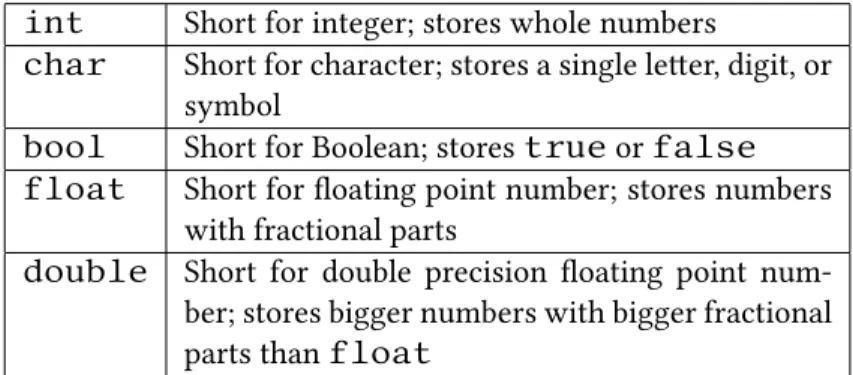
Variables are extremely important to every programmer - they will be a critical part of your programming toolkit regardless of the language you use. Very simply put, a variable is a space in memory that can store some range of values. Some of the basic data types are shown in Table 2.1. For a deeper discussion of data types, refer to Chapter 9.
int
Short for integer; stores whole numbers
char
Short for character; stores a single leer, digit, or
symbol
bool
Short for Boolean; stores
true
or
false
float
Short for floating point number; stores numbers
with fractional parts
double
Short for double precision floating point
num-ber; stores bigger numbers with bigger fractional
parts than
float
Table 2.1: A few basic data types
2.1 How do I decide which data type I need?
What you can do with a variable depends on the type of data they contain. For instance, you can’t store the number100000in acharbecause acharstores
only character data. To store100000the programmer should use anint. If you
think you are dealing with numbers that have fractional parts, you need at least a
float. You generally want to use the smallest variable type that will get your job done. Simply put, if it is a round number,intworks fine; if it’s atrueorfalse, usebool; for a leer, usechar; for fractional numbers, usefloat; for a really big number or a number with many digits aer the decimal point, usedouble.
2.2 Identifiers
Now we have an idea of what types of variables we will use in the program. How do we have the program differentiate between multipleints,chars, ordoubles? We have to name them! e name we use will give the variable an identity, so it’s known as anidentifier. An identifier can be almost anything you’d like, provided the identifier does not begin with a number or symbol.1Remember that the variable
name can only be one word long. You may use a an underscore to replace a space if you so desire, and note that C++ is case sensitive. at is, testresults,
TestResults, andTest_Resultsare all different identifiers.
2.3 Declaring a Variable
e line of code that creates a variable is called adeclaration. A declaration is the program telling the computer “save a place in memory for me with this name.”
A declaration for an integer variable namedmyVariablelooks like this:
i n t m y V a r i a b l e ;
e specificsyntax—the set of grammatical rules for the language—is impor-tant to follow when declaring variables. Notice that the first part (int) is the data type of the variable. e second part is the identifier (myVariable), or variable name. e last part is the semicolon (;) which signifies the end of a statement. You can think of the semicolon in C++ as equivalent to a period at the end of a sentence;
1ere are a few exceptions, including those words that describe data types (as
it is the end of a complete thought. Note that you may declare several variables of the same data type together. Consider this example:
i n t x , y , z ;
d o u b l e a ;
e above example creates three variables of typeintnamedx,y, andzand one variable of typedoublenameda.
2.4 Initializing Variables
Values can be immediately assigned to a variable at the time of its declaration. is is known asinitializinga variable. To do this, the variable’s name is followed by an equals sign (=, theassignment operator), the value, and a semicolon. Consider this example:
i n t x = 2 0 ;
d o u b l e a = 2 . 2 ;
Note that uninitialized variables can cause problems if they are used anywhere before they are assigned a value. When a variable is declared, it contains whatever was already in that space of memory, which can give them unpredictable values. is means that is is oen a good idea to initialize variables to some sensible initial value when they are declared.
2.5 Assignment Statements
An assignment statement is a method of assigning a value to a variable aer it has been declared. All assignment statements have the variable being assigned the value on the le side of an equals sign and the value to assign on the right side. Note that the expression on the right side of the assignment may contain arithmetic operations such as multiplication, division, addition, and subtraction, or even other variables. Consider the following example:
i n t a = 1 , b = 2 , x = 0 , y = 0 ; x = a + b ;
2.6 Review estions
1. Declare two variables of typeintand initialize them to an appropriate value.
2. Declare three integer variables:sum,a,b. Initialize the variablesaandb
to an appropriate integer and use an assignment statement to assignsum
the result ofaplusb.
3. Declare adoublevariable callednumberand initialize it to13.6. 4. Create a program in which 3 variables are declared. Create onefloat
namedmyFloat, oneintnamedmyInt, and onedoublenamed my-Double. Initialize them to3.14,3, and3.14159, respectively.
2.7 Review Answers
1. int a = 6; int b = 0;
2. int sum, a = 6, b = 0; sum = a + b;
3. double number = 13.6;
4.
i n t main ( ) {
f l o a t myFloat = 3 . 1 4 ;
i n t myInt = 3 ;
d o u b l e myDouble = 3 . 1 4 1 5 9 ;
r e t u r n 0 ; }
2.8 Further Reading
• http://www.cplusplus.com/doc/tutorial/variables/
Chapter 3
Literals and Constants
3.1 Literals
A literal is a value outside of a variable such as5,9,103, and−21. Each of those
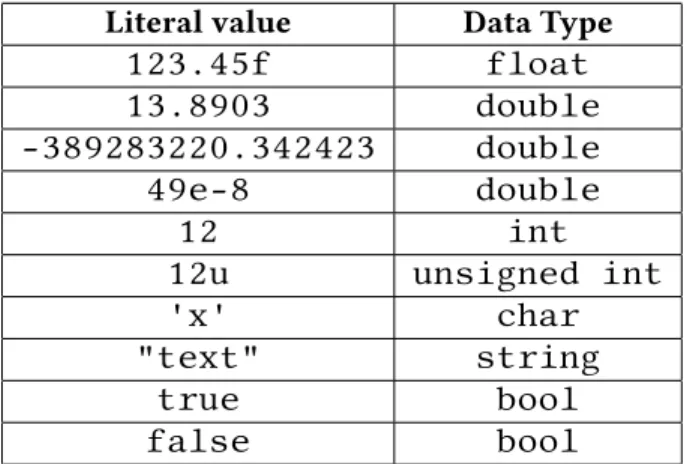
is anint, but a literal can be of any data type. e point is, these are values that the C++ compiler already recognizes, and can’t be changed. In other words, you can’t convince the compiler to give the literal 3 the value of 4, because 3 is constant. Table 3.1 contains a few examples.
3.2 Declared Constants
We call a variable whose value we cannot change a constant. Aer you declare a constant, you are unable to change it, no maer what. e difference between declaring a normal variable and a constant is that we simply place the keyword
constbefore the data type in the declaration. is indicates whatever variable and type that follows theconstwill be a constant and cannot be changed. Since it is a constant, we will also need to initialize the value at the time we declare the variable. Here is an example (we cover thecoutobject shortly in Chapter 5):
c o n s t f l o a t p i = 3 . 1 4 ;
f l o a t r a d i u s = 5 , a r e a ;
a r e a = r a d i u s * r a d i u s * p i ; c o u t << a r e a ; / / o u t p u t s 7 8 . 5
Literal value
Data Type
123.45f
float
13.8903
double
-389283220.342423
double
49e-8
double
12
int
12u
unsigned int
'x'
char
"text"
string
true
bool
false
bool
Table 3.1: Examples of a few literals
3.3 Review estions
1. Describe the difference between literals and declared constants. When would a declared constant be more useful than a literal constant?
2. What is the difference between a normal variable and a constant? 3. Build a program in C++ that does the following:
(a) Declare adoublevariable namedFeet. Initialize it to your height. (b) Declare adoubleconstant namedMetersPerFoot, with the
value of0.3048.
(c) Declare adoublevariable namedMeters. Set it toFeet multi-plied byMetersPerFoot.
4. Create a program that displays the diameter and area of a circle for any given radius. Use aconst floatto representπ.
3.4 Review Answers
1. A literal is a value not stored in a variable; a constant is an unchanging value stored in a variable.
3.
d o u b l e F e e t 5 . 5 ;
c o n s t d o u b l e M e t e r s P e r F o o t = . 3 0 4 8 ;
d o u b l e Meters = F e e t * M e t e r s P e r F o o t ;
4.
f l o a t r a d i u s = 5 ;
c o n s t f l o a t p i = 3 . 1 4 1 5 9
d o u b l e d i a m e t e r , a r e a ; d i a m e t e r = r a d i u s * 2 ;
Chapter 4
Assignments
Assignments are a way for a user or a programmer to assign a value to a variable. e way we assign a value to a variable in C++ is different from how we might do it in math. In mathematics we are allowed to say thatx = 3or3 = x, but in C++ the only acceptable way to assign the value of3toxis to typex = 3.
e=in the expressionx = 3is known as anassignment operator. is allows the program to set a variable’s value depending on its type. Here are some examples of seing a value to different types of variables:
i n t x = 4 ;
c h a r a l p h a = ’A ’; s t r i n g word = ” Alpha ”;
f l o a t y = 3 . 1 4 ;
We are able to declare variables and assign a value to those variables immedi-ately by using the assignment operator. When we assign literal values to variables of typechar, the value must be surrounded by single quotes (for example,'A'). When we assign values to variables of typestring, the literal value must be sur-rounded by double quotes (for example,"Alpha"). We do not have to initialize the values of the variables, however. We can set them later in the code like this:
i n t myVal ;
/ / some code
myVal = 0 ;
In all of the lines of code in this section where a variable is set using the as-signment operator, the “thing that is being given a value” is known as anlvalue, and the expression on the right that is being stored in the variable is known as the
rvalue. Literals such as'A'or3can never be an lvalue. Aside from literals, the rvalue can consist of other variables, like this:
myVal = myVal2 ;
Even thoughmyVal2is a variable, we are only using thevalue stored in the variable, not the variable itself. For example, ifmyVal2had a value of6,myVal
would then be assigned to the value6with the above code.
We can also store the results of an arithmetic expression in a variable like this: myVal = 5 + 6 ; / / a s s i g n s myVal a v a l u e o f 11
But we can’t write
5 + 6 = myVal ; / / ERROR !
since5 + 6doesn’t refer to a place where we can store a value. We can also combine arithmetic expressions with variables as an rvalue like this:
myVal2 = 6 ;
myVal = 4 + myVal2 ;
In this case, the variablemyValwould be assigned a value of10because the variablemyVal2was initialized to a value of 6, and4 + 6is10. e value ofmyVal2remains unchanged. Make sure that the variablemyVal, the variable
myVal2, and the literal4are of the same type. For example, the following code will result in an error:
i n t myValue = 4 ;
i n t yourVal ;
s t r i n g myString = ” word ”;
yourVal = myValue + myString ;
/ / Adding s t r i n g t o an i n t i s / / p r o b a b l y not what you meant !
When we try to combine different variable types, the compiler will get very mad at us. Some exceptions to this rule are if we try to combinefloats,ints, anddoubles. ese types have the ability to be combined (to a certain extent) because they are all numeric values. Bothdoubles andfloats can hold values with a decimal point such as−3.14,0.003, or5.167289whereas anintcan only
4.1 Review estions
1. Which of the following is an incorrect way to assign a value to a variablex
of typeint? (a) 7 = x;
(b) int x = 7;
(c) int x(7);
(d) x = 7;
2. Which of the following is an incorrect way to assign a value to a variable of typestring?
(a) string myString = "word";
(b) string myString = 'word';
(c) myString = "word";
3. Is the following code incorrect? If so, why? If it is correct, why?
i n t x = 6 , y ;
c h a r myChar = ’ x ’; y = myChar + x ;
4. Write a program that declares twointvariables and twodouble vari-ables. Add and subtract five from each of your declared integer varivari-ables. en add and subtract 7.32 yourdoublevariables by7.32. en output
each of your results to the screen.
4.2 Review Answers
1. a. When we store a value in a variable, the variable goes on the le of the assignment operator, and the value being stored in that variable goes to the right of the assignment operator.
2. b. String literals must be surrounded by double quotes, not single quotes; single quotes are used for single characters like'b'.
3. e code is incorrect. is will probably not produce the expected result it tries to add anintand acharand store that value in a variable of type
Chapter 5
Output
Output in C++ is done with the objectcout(“consoleoutput”). e objectcout
prints useful information to the screen for the user. For example, if we wanted to prompt the user with
Type in your name:
we would usecout.coutis extremely important when you are starting to learn C++ as it gives you the ability to display the current state of any variable and provide user feedback at any point in your program. Let’s make a program that outputs something to the screen:
# i n c l u d e < i o s t r e a m >
u s i n g namespace s t d ;
i n t main ( ) {
c o u t << ” Go C a d e t s ! ”;
r e t u r n 0 ; }
e symbol<<is called theinsertion operatorand is needed betweencout
and what you want to display to the screen. In this case, we are displaying a string literal"Go Cadets!". As you know, every statement in C++ ends with a semi-colon, and this one is no exception.
What if we want to print more, though?
# i n c l u d e < i o s t r e a m >
u s i n g namespace s t d ;
i n t main ( ) {
c o u t << ” Go C a d e t s ! ”; c o u t << ” You can do i t ! ”;
r e t u r n 0 ; }
Try to compile and run that. It works, but it’s not really the desired output. You should get:
Go Cadets!You can do it!
How do we get those on a different line? One of the ways we can do it is to use the objectendl. endlmeans “end line”, and is used when you want to end one line and start over on the next—it’s like hiing enter on your keyboard. You will also need another redirect operator between the string literal and theendl. Puing all of this together looks like this:
# i n c l u d e < i o s t r e a m >
u s i n g namespace s t d ;
i n t main ( ) {
c o u t << ” Go C a d e t s ! ” << e n d l ; c o u t << ” You can do i t ! ”;
r e t u r n 0 ; }
is prints:
Go Cadets! You can do it!
at works a bit more as intended. Alternatively, we can combine the two lines that usecoutinto a single one like this:
c o u t << ” Go C a d e t s ! ” << e n d l << ” You can do i t ! ”;
# i n c l u d e < i o s t r e a m >
u s i n g namespace s t d ;
i n t main ( ) {
c o u t << ” Go C a d e t s ! \ nYou can do i t ! ”;
r e t u r n 0 ; }
is prints:
Go Cadets! You can do it!
Another thing we can use with the console output object is the special character
'\t'. Printing this character is the same as pressing the tab key on your keyboard, and is used for indentation and formaing. Let’s look at an example that uses the newline character, the tab character, and some text:
# i n c l u d e < i o s t r e a m >
u s i n g namespace s t d ;
i n t main ( ) {
c o u t << ” \ tGo C a d e t s ! \ nYou can do i t ! ”;
r e t u r n 0 ; }
is code prints:
Go Cadets! You can do it!
We don’t always have to output words the screen usingcout. We can also print variables of typeint,double, andfloatand can control the number of digits that appear aer the decimal point. For example, if we had a variable that contained the value 3.14159265 we might only care about the first two numbers aer the decimal point and just want to output 3.14 to the screen. We do that with theprecision()member function. is function call will result in subsequent
floatordoublevariables being printed with the specified number of decimal places. In the following code, the number of digits is set to 2:
# i n c l u d e < i o s t r e a m >
u s i n g namespace s t d ;
i n t main ( ) {
is code prints:
3.14
To display data in a similar way as a spreadsheet, we can create a field of characters and set the number of characters in each field using thewidth()and
fill()member functions. Notice the use of theleftflag in the following code, which positions the output on the le side of the field; the default is for the output to be on the right side:
# i n c l u d e < i o s t r e a m >
u s i n g namespace s t d ;
i n t main ( ) {
c o u t << ” Norwich ” << e n d l ; c o u t . width ( 1 5 ) ;
c o u t << ” U n i v e r s i t y ” << e n d l ; c o u t . f i l l (’ * ’) ;
c o u t . width ( 2 0 ) ;
c o u t << l e f t << ” Corps o f C a d e t s ” << e n d l ; }
e above code prints:
Norwich
University Corps of Cadets*****
5.1 Review estions
1. Which of the following is a correct way to outputHello Worldto the screen?
(a) output: "Hello World";
(b) cout >> "Hello World";
(c) cout << "Hello World";
(d) console.output << "Hello World";
2. Which of the following is a correct way to outputHello! to the screen on one line andGoodbye!to the screen on the next line?
(a) cout >> "Hello!" >> "Goodbye!";
(b) output: "Hello!\nGoodbye!";
(c) cout << "Hello!" << \n << "Goodbye!";
3. Aside from the answer in the previous question, write two alternative ways of printingHello!andGoodbye!to the screen on two different lines. 4. Write several lines of code using thewidth()andfill()functions in a
main()that printsProgramming!to the screen with 4'x'characters printed aer it.
5. Write code to output the values 124, 12.376,z, 1000000, andstrings!as distinct values, separated by spaces.
6. What is the output of the following program?
# i n c l u d e < i o s t r e a m >
# i n c l u d e < s t r i n g >
u s i n g namespace s t d ;
i n t main ( ) {
s t r i n g s h i r t = ” maroon ”, p a n t s = ” b l u e ”;
c o u t << s h i r t << ” ” << p a n t s << e n d l ;
r e t u r n 0 ; }
5.2 Review Answers
1. c. 2. d.
3. cout << "Hello!" << endl << "Goodbye!";or
cout << "Hello!\nGoodbye!";
(other similar answers are possible)
4.
c o u t . f i l l (’ x ’) ; c o u t . width ( 1 6 ) ;
c o u t << l e f t << ” Programming ! ”;
5. cout << 124 << " " << 12.376 << " z " << 1000000 << " strings!";
6. maroon blue
5.3 Further Reading
Chapter 6
Input
When a programmer wants a user to enter data, such as the price of an item, he or she will use thecinobject, pronounced “see-in”, in conjunction with>>, the
extraction operatorin the program. Let us look at the following code:
# i n c l u d e < i o s t r e a m >
u s i n g namespace s t d ;
i n t main ( ) {
i n t x = 0 ;
c o u t << ” P l e a s e e n t e r a v a l u e f o r x : ” << e n d l ; c i n >> x ;
r e t u r n 0 ; }
When you compile and run this code, here’s what the output will look like:
Please enter a value for x:
As a user you may want to check the value that was entered. To do this, simply
add an additionalcoutstatement like this:
# i n c l u d e < i o s t r e a m >
u s i n g namespace s t d ;
i n t main ( ) {
i n t x = 0 ;
c o u t << ” P l e a s e e n t e r a v a l u e f o r x : ” << e n d l ; c i n >> x ;
c o u t << ” The v a l u e o f x i s : ” << x ;
r e t u r n 0 ; }
e output of this code is:
Please enter a value for x:
Suppose the user enters a value of 1 for x. e output that follows is:
The value of x is: 1
As you can see, the value displayed is the one entered. is can be a very useful technique in troubleshooting the values of variables throughout a program. Do not be afraid to insert additionalcoutstatements throughout a program to check the values of variables when debugging. is can help in the debugging process and speed up catching errors.
If you want to have a user input more than one value, just repeat the code for each individual variable:
# i n c l u d e < i o s t r e a m >
u s i n g namespace s t d ;
i n t main ( ) {
i n t x = 0 ;
i n t y = 0 ;
c o u t << ” P l e a s e e n t e r a v a l u e f o r x : ” << e n d l ; c i n >> x ;
c o u t << ” P l e a s e e n t e r a v a l u e f o r y : ” << e n d l ; c i n >> y ;
c o u t << ” The v a l u e o f x i s : ” << x << e n d l ; c o u t << ” The v a l u e o f y i s : ” << y << e n d l ;
r e t u r n 0 ; }
We can’t always trust that the user will input the correct data into a variable. For example, if a user was prompted to input an age into a variable of typeint
cin.fail()function in a conditional statement. Look at the following code:
# i n c l u d e < i o s t r e a m >
u s i n g namespace s t d ;
i n t main ( ) {
i n t x = 0 ;
i n t y = 0 ;
c o u t << ” P l e a s e e n t e r a v a l u e f o r x : ” << e n d l ; c i n >> x ;
i f ( c i n . f a i l ( ) ) {
c o u t << ” That i s not a v a l i d d a t a t y p e ! ”; }
}
is introduction tocinstatements is only the beginning. ey will get slightly more complicated aer we introducestrings, arrays, and overloaded operators.
6.1 Review estions
1. Which of the following numbered lines of code are propercinstatements?
# i n c l u d e < i o s t r e a m >
u s i n g namespace s t d ;
i n t main ( ) {
i n t x = 0 ;
i n t y = 0 ;
c o u t << ” P l e a s e e n t e r a v a l u e f o r x : ” ; c i n << x ; / / #1
c i n >> x ; / / #2
c i n >> x / / #3
c i n x ; / / #4
c i n >< x ; / / #5
x >> c i n ; / / #6
r e t u r n 0 ; }
2. Must you always usecinwithcout? Why or why not?
5. Write code that allows the user to enter an integer value and store it in a variable. Your code should prompt the user, receive their input, and then print their input value back to them.
6. Add some functionality to the code you wrote for the previous exercise. Add two new variables, onecharand onefloatordouble. Prompt the user properly for each value. e program should print out the values of the variables, clearly labeled, on separate lines.
6.2 Review Answers
1. Only #2 (cin >> x;) is correct.
2. You do not need to to usecinstatements exclusively withcout state-ments, though it is good practice to provide adequate feedback to users. 3. e redirect operator is>>, and it is used in conjunction withcinon the
le and a variable on the right that receives the value entered by the user. 4. Yes, and the previous value is overwrien.
6.3 Further Reading
Chapter 7
Arithmetic
One of the most important things provided by C++ is the ability to do math. Ev-erything a computer sees is a number. To a computer, its ability to do math and manipulate numbers is as essential to it as breathing is to us. (My apologies to anything not living that may be reading this).
e operators (+,-,*,/) in C++ are slightly different from what you may be used to from your second-grade math class. Addition is still a plus sign (+) and subtraction is still a minus sign (-). On the other hand, multiplication becomes an asterisk (*) and division becomes a forward slash (/). ink of the forward slash asoveras in “5 over 9” is the same as the fraction5/9or5
9.
To do math in C++, you will either want a variable to store the answer, or output the answer to the user.
e following code directly outputs the answer to the user: c o u t << 9 + 2 ; / / P r i n t s 11
is code shows how to use a variable to store the answer:
i n t sum = 9 + 2 ; / / sum now h o l d s 11
Note that when you use a variable to store an answer, the variable must come first in the equation (before the equal sign) and must be the only thing on the le side of the equation. ere are some other things to note. When you use more complicated equations, you can use parentheses to help. C++ uses a familiar or-der of operations (Parentheses, Exponents, Multiply, Divide, Add, and Subtract, or PEMDAS), but without the exponent operation (this topic is covered in Chapter 17). However, unlike in normal arithmetic, parentheses do not imply multiplication. For
example,(4)(3), which we might expect to mean “4 times 3” does not mean the same as4 * 3, the correct syntax. e expression(4)(3)results in a syntax error and will not compile. e compiler returns an error message like this:
'error: '4' cannot be used as a function.'
In C++, there are several methods of shortening and simplifying the code you’re creating. e first is the increment operator (++), which is found in the name of the language, C++. is operator increases the value of the variable it’s applied to by 1. Conversely, the decrement (--) operator decreases the value by 1.
Keep in mind that order does maer with the increment and decrement opera-tors. ey can be used as either prefixes or suffixes, but where you put the operator results in slightly different behavior. Starting with similarities,C++and++Cboth increase value ofCby one. e difference lies in when another variable is being set to that incremented value, such asB = C++.Bwill be set toCbeforeCis incre-mented.B = ++Cwill causeBto be set toC+1, in a similar way toB = 1 + C.
i n t A ; A = 4 ; A+ + ;
/ / A c o n t a i n s 5
i n t A ; A = 9 ; A−−;
/ / A c o n t a i n s 8
i n t A , B ; B = 7 ; A = B + + ;
/ / A c o n t a i n s 7 , B c o n t a i n s 8
i n t A , B ; B = 7 ; A = ++B ;
/ / A c o n t a i n s 8 , B c o n t a i n s 8
i n t A , B ; B = 3 ; A = B−−;
Expression
Equivalent to
A *= 3;
A = A * 3;
B -= 5;
B = B - 5;
C /= 10; C = C / 10;
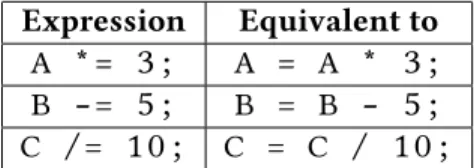
Table 7.1: Examples of compound assignment updates
i n t A , B ; B = 3 ; A =−−B ;
/ / A c o n t a i n s 2 , B c o n t a i n s 2
Compound assignment operators can decrease the amount you type and can make your code more readable. ese are the operators+=,-=,*=, and/=. What makes these operators special is that they use the value you want to change in the operation. For example,x += 2is equivalent tox = x + 2.
Keep in mind the order that was used, as this becomes important with sub-traction and division. e variable being changed is equivalent to the two lemost variables in the longhand expression. Let’s say we haveXandY, and want to set
Xequal to the value ofYdivided by the value of X. is is impossible with this method, asX /= Yis equivalent toX = X / Y, andY /= Xis equivalent to
Y = Y / X.
Here is some sample code using the concepts we presented in this chapter:
# i n c l u d e < i o s t r e a m >
u s i n g namespace s t d ;
i n t main ( ) {
i n t a = 5 , b = 1 0 , c = 1 5 , d = 2 0 ;
e output of this code is:
a + b = 15 d - c = 5 a * b = 50 d / a = 4
7.1 Review estions
1. Write a statement declaring two integer variablesaandband initialize them to 6 and 3, respectively.
2. Without changing the last line, fix the following code so there will be an output of 12.
i n t a = 4 , b= 2 ; a = a + 2 * b ; c o u t << a ;
3. What is the output of the following code?
i n t a = 2 , b = 5 , c = 6 ; a + + ;
4. What is the output of the following code?
i n t a , b , c ; a = 2 ; b = 8 ; c = 1 ; c = b − b ; c = a + a ; c = b * 8 ; b = b + b ; c = a + c ; b = a + b ; a = a * c ; b = a − c ; c = b + a ;
c o u t << a << e n d l ; c o u t << b << e n d l ; c o u t << c << e n d l ;
5. What is the output of the following code?
i n t a = 4 , b = 2 , c , d ; a = b + 3 ;
b + + ;
c = ( b + 4 ) * 2 ; c = c + 2 ; d = a + b − 3 ; a + + ;
a = a + 2 − b ; b = b * 2 ;
6. What is the output of the following code?
i n t m = 3 , n = 2 , x , y ; x = m + 5 ;
m−−;
y = (m + 4 ) / 3 ; n = n + 2 ; m = m + n / 2 ; m+ + ;
x = x * 2 − 3 ; y = y * 2 ; n = n + y * 3
c o u t << ”m= ” << m << e n d l ; c o u t << ” n= ” << n << e n d l ; c o u t << ” x= ” << x << e n d l ; c o u t << ” y= ” << y << e n d l ;
7.2 Review Answers
1. int a = 6, b = 3;
2.
i n t a = 4 , b = 2 ; a = ( a + 2 ) * b ; c o u t << a ;
3. 3 15 5
4. 132 66 198
5. a=5 b=6 c=16 d=5
7.3 Further Reading
• http://www.cplusplus.com/doc/tutorial/operators/
Chapter 8
Comments
As a C++ programmer, comments will make your life easier. ey are meant to serve as notes, not just for you, but for anyone that may aempt to read your code. To this end, comments are a quick explanation of the code. ere are two kinds of comments,single-line commentsandmulti-line comments.
Single-line comments typically come aer a line of code. For a single-line com-ment, simply type a double slash//at the end of the line, and follow it with what-ever notes you like, preferably to explain what that line of code does. Alternatively, the comment can start on a line of its own. Here are some examples:
i n t count ; / / T h i s v a r i a b l e was d e c l a r e d / / t o cou nt something
count = count + 1 ; / / I n c r e m e n t s count by 1
/ / V a r i a b l e d e c l a r e d , and i n i t i a l i z e d t o p i
f l o a t l e n g t h = 3 . 1 4 1 5 9 ;
Multi-line comments, sometimes calledblock comments, are used when you have a lot to say. ey begin with a slash star (/*) and are ended by a star slash (*/). Here is an example:
/ *
* T h i s i s a * m u l t i−l i n e * comment * /
/ * T h i s i s a l s o a comment * /
Block comments do not need a star at the beginning of every line (as in the preceding example), but many programmers write it anyways, because it makes it easier to see and understand that “this is still a comment, don’t write code here.” Some development environments will automatically color-code certain pieces of code, so comments might be gray, for example, and the*at the beginning of each line might be unnecessary in that case. However, someone else may use a different development environment that does not use colors, so the stars can still improve readability.
Keep in mind when commenting, the point is to be clear and concise. Try to explain what’s happening as accurately as possible, but try to keep it short. As you learn C++, use comments to explain what you’re doing and why. You have to assume that the person reading your code needs an explanation for each non-trivial line.
/ / Commenting a t t h e b e g i n n i n g o f t h e f i l e / / Allows you t o g i v e a summary o f your program
# i n c l u d e < i o s t r e a m >
u s i n g namespace s t d ;
i n t main ( ) {
/ / T h i s c o u t s t a t e m e n t o u t p u t s t o t h e s c r e e n
c o u t << ” H e l l o world ” << e n d l ; c o u t << ” What ’ s t h e d a t e ? ” << e n d l ;
/ / Comments s h o u l d be used t o e x p l a i n t h i n g s t h a t may / / not be o b v i o u s t o someone o t h e r than you
c i n >> d a t e ; / / Takes t h e d a t e from t h e u s e r
/ *
* You can a l s o use comments t o remind y o u r s e l f o f * changes you want t o make , e . g .
* ” debug code p a s t t h i s p o i n t ” * /
8.1 Review estions
1. Comment each line of this code:
# i n c l u d e < i o s t r e a m >
u s i n g namespace s t d ;
i n t main ( ) {
i n t t i m e ;
c o u t << ” E n t e r ti m e \ n ”; c i n >> t i m e ;
i n t answer = ( 3 2 * t i m e * t i m e ) / 2 ; c o u t << ” The d i s t a n c e i s ”;
c o u t << answer ; c o u t << ” s e c o n d s \ n ”;
r e t u r n 0 ; }
2. Fix this code by removing or modifying comments so that it runs and com-piles as it should.
/ * # i n c l u d e < i o s t r e a m > i n c l u d e s t h e i o s t r e a m *
u s i n g namespace s t d ;
i n t main ( ) {
i n t t i m e ; / / A p l a c e t o s t o r e t h e ti m e c o u t << ” E n t e r ti m e \ n ” ; / / Ask t o e n t e r t h e t i m e c i n >> t i m e ; / / Takes u s e r i n p u t
i n t answer = ( 3 2 * t i m e * t i m e ) / 2 ; / / C a l c u l a t e s i t c o u t << ” The d i s t a n c e i s ” ; / * Outputs c o u t << answer ; t h e d i s t a n c e c o u t << ” s e c o n d s \ n ” ; i n s e c o n d s * /
r e t u r n 0 ; }
3. Explain the purpose of commenting. How does it help you? Why would someone else need to be able to understand your code?
4. Write and properly comment your own simple program.
with a classmate or friend. Ask them if they understand what’s happening from just the comments.
6. Add comments to the following code.
Note: Save percentages in hockey are shown to three decimal places and not multiplied by 100: .900 instead of 90%.
# i n c l u d e < i o s t r e a m >
# i n c l u d e < c s t d l i b >
u s i n g namespace s t d ;
i n t main ( ) {
d o u b l e s h o t s , g o a l s , s a v e s , s a v e _ p e r c ;
c h a r c o n t ;
do {
c o u t . u n s e t f ( i o s : : f i x e d ) ; c o u t . u n s e t f ( i o s : : showpoint ) ;
c o u t << ” E n t e r t h e number o f s h o t s on g o a l : \ t ”; c i n >> s h o t s ;
c o u t << ” E n t e r t h e number o f g o a l s s c o r e d : \ t ”; c i n >> g o a l s ;
c o u t << e n d l ;
s a v e s = s h o t s − g o a l s ; s a v e _ p e r c = ( s a v e s / s h o t s ) ;
c o u t << ” I f t h e r e were ” << s h o t s << ” s h o t s and ” << g o a l s << ” g o a l s \ n ”;
c o u t << ” then t h e g o a l i e ’ s s a v e p e r c e n t a g e was ”;
c o u t . s e t f ( i o s : : f i x e d ) ; c o u t . s e t f ( i o s : : showpoint ) ; c o u t . p r e c i s i o n ( 3 ) ;
c o u t << s a v e _ p e r c << e n d l << e n d l ;
c o u t << ” Run a g a i n ? Y /N\ t ”; c i n >> c o n t ;
c o n t = t o u p p e r ( c o n t ) ; } w h i l e ( c o n t == ’ Y ’) ;
8.2 Review estions
1. Answers will vary
2.
# i n c l u d e < i o s t r e a m > / * i n c l u d e s t h e i o s t r e a m * /
u s i n g namespace s t d ;
i n t main ( ) {
i n t t i m e ; / / A p l a c e t o s t o r e t h e ti m e
c o u t << ” E n t e r ti m e \ n ”; / / Ask t o e n t e r t h e t i m e
c i n >> t i m e ; / / Takes u s e r i n p u t
i n t answer = ( 3 2 * t i m e * t i m e ) / 2 ; / / C a l c u l a t e s i t
c o u t << ” The d i s t a n c e i s ”; / / Outputs
c o u t << answer ; / / t h e d i s t a n c e
c o u t << ” s e c o n d s \ n ”; / / i n s e c o n d s
r e t u r n 0 ; }
3. Comments help you check that you know what you’re doing and make sure you are doing everything that needs to be done. ey also help other people understand your code, which is especially useful if your logic is different from theirs.
4. Answers will vary.
5. Keep trying until someone else understands the code from the comments alone.
Chapter 9
Data Types and
Conversion
Suppose you need to carry two products across a farmyard: apples and water. e container you choose would depend on the product, and how much of the product you have to move. You might choose a small hand basket to carry a few apples, and a larger bushel basket to carry a large number of apples. Similarly, you could use a one-gallon bucket or a five-gallon bucket, depending on how much water you expected to move.
In a similar way, we choose data types to describe the type of data we would like to store in a variable, and “how much” of that data we expect to store.
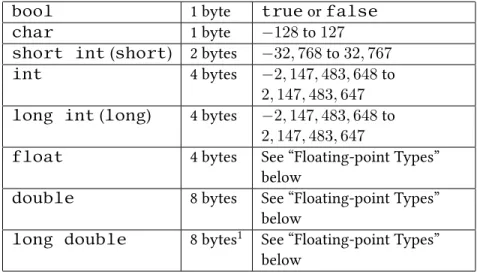
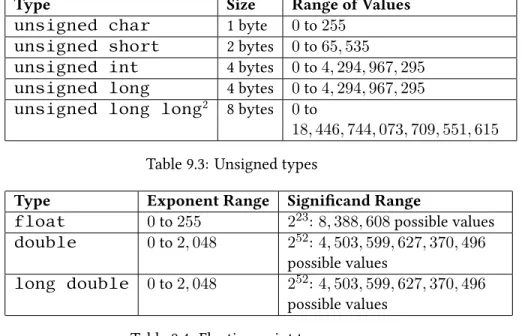
Every variable has adata typewhich describes the range of possible values that may be stored in the variable. e C++ language defines a handful of basic types, some of which were discussed in Chapter 4. ese types, their sizes (which may vary depending on the operating system), and the range of possible values can be found in Table 9.1. Additionally, the C++11 standard provides for thelong long intdata type as described in Table 9.2.
Several of the integer types have unsigned versions, which may only contain values greater than or equal to zero. efloating-point typesdo not have un-signed versions, as the sign is part of the standard that defines how these variables are represented in memory.
bool
1 byte
true
or
false
char
1 byte
−
128
to
127
short int
(
short
) 2 bytes
−
32
,
768
to
32
,
767
int
4 bytes
−
2
,
147
,
483
,
648
to
2
,
147
,
483
,
647
long int
(
long
)
4 bytes
−
2
,
147
,
483
,
648
to
2
,
147
,
483
,
647
float
4 bytes
See “Floating-point Types”
below
double
8 bytes
See “Floating-point Types”
below
long double
8 bytes
1See “Floating-point Types”
below
Table 9.1: Common data types and their ranges of values
Type
Size
Range of Values
long long int
(
long long
)
8 bytes
−
9
,
223
,
372
,
036
,
854
,
775
,
808
to
9
,
223
,
372
,
036
,
854
,
775
,
807
Table 9.2: C++11’s
long long int
data type
9.1 Floating-point types
Floating-point types are used to represent numbers that are not whole integers. For example:
f l o a t f = 3 . 3 5 ;
Variables of typefloatand of typedoublestore these numbers in similar components as scientific notation, so the above value could be represented as335× 10−2. e first part,335, (sometimes called thecoefficientorsignificand) is stored separately from the second part,−2, (called theexponent). e types can represent
1Along doublemightbe stored as an 80-bit extended precision type, but
Type
Size
Range of Values
unsigned char
1 byte
0
to
255
unsigned short
2 bytes
0
to
65
,
535
unsigned int
4 bytes
0
to
4
,
294
,
967
,
295
unsigned long
4 bytes
0
to
4
,
294
,
967
,
295
unsigned long long
28 bytes
0
to
18
,
446
,
744
,
073
,
709
,
551
,
615
Table 9.3: Unsigned types
Type
Exponent Range Significand Range
float
0
to
255
2
23:
8
,
388
,
608
possible values
double
0
to
2
,
048
2
52:
4
,
503
,
599
,
627
,
370
,
496
possible values
long double
0
to
2
,
048
2
52:
4
,
503
,
599
,
627
,
370
,
496
possible values
Table 9.4: Floating point types
different ranges of significand and exponents, as shown in Table 9.4.
In fact, we can use scientific notation in conjunction with floating-point vari-ables. e previous code that assigned a value tofcan also be wrien as:
f l o a t f = 335 e−2; / / S e t s f t o 3 . 3 5
Bothfloatanddoubleinclude a few special values that represent non-numeric results, such as infinity, negative infinity, andNaN(Not a Number).
f l o a t g = 1 0 . 0 / 0 . 0 ; / / g i s s e t t o i n f i n i t y
f l o a t h = g * −1.0; / / h i s s e t t o n e g a t i v e i n f i n i t y
f l o a t i = g / h ;
/ / S i n c e i n f i n i t y d i v i d e d by n e g a t i v e i n f i n i t y i s / / u n d e f i n e d , t h e r e s u l t o f t h e d i v i s i o n i s not a / / number , and i i s s e t t o NaN
9.2 Other types introduced by C++11
C++11 provides thecstdintlibrary, which defines several additional types that may be convenient. ese types are listed in Table 9.5.
Type
Purpose
Unsigned version
intmax_t
e integer of maximum size
supported on the platform
uintmax_t
int8_t
An integer of exactly 8 bits
uint8_t
int16_t
An integer of exactly 16 bits
uint16_t
int32_t
An integer of exactly 32 bits
uint32_t
int64_t
An integer of exactly 64 bits
uint64_t
Table 9.5: Data types found in C++11’s
cstdint
library
ese types are provided in part because the basic types likeintandshort
are not guaranteed to be of any particular size, which can cause problems when compiling the same code on different platforms.
9.3 Conversion Between Types
It is sometimes necessary to convert a variable of one type to another, perhaps in order to pass the variable to a function that doesn’t support the variable’s original type. Here is an example of a variable of typeintbeing converted (automatically) to adouble:
i n t x = 2 ;
d o u b l e y ;
y = x ; / / Type c o n v e r s i o n : t h e i n t e g e r 2 i s c o n v e r t e d / / t o t h e d o u b l e 2 . 0
c o u t << ” y = ” << y << e n d l ; / / T h i s p r i n t s y = 2
is example demonstrates awidening conversion, since any possible value ofxcan be represented iny. On the other hand, we can do the reverse conversion:
i n t x ;
d o u b l e y = 2 . 0 ;
x = y ; / / Type c o n v e r s i o n : t h e d o u b l e 2 . 0 i s c o n v e r t e d / / t o t h e i n t 2
is code compiles and runs, but the compiler produces the following warning:
warning: converting to 'int' from 'double'
e compiler has a good reason for this warning: not all possible values that can be represented in adoublecan be represented in anint. We refer to this as a
narrowing conversion. If we change the code slightly, we can see where problems can occur:
i n t x ;
d o u b l e y = 2 . 9 ;
x = y ; / / Type c o n v e r s i o n : t h e d o u b l e 2 . 9 i s c o n v e r t e d / / t o t h e i n t 2
c o u t << ” x = ” << x << e n d l ; / / T h i s p r i n t s x = 2
Because integers cannot represent the numbers aer the decimal point, they are simply dropped. is might seem counterintuitive, as we might expect the values to be rounded up from2.9to3. Fortunately, C++11 provides around()function in the<cmath>library that returns the integer closest to the passed parameter:
i n t x ;
d o u b l e y = 2 . 9 ; x = round ( y ) ;
/ / round ( y ) r e t u r n s t h e d o u b l e 3 . 0 ( t h e c l o s e s t i n t e g e r / / t o t h e p a s s e d p a r a m e t e r ) T h i s d o u b l e i s then
/ / c o n v e r t e d t o t h e i n t 3
c o u t << ” x = ” << x << e n d l ; / / T h i s p r i n t s x = 2
9.4 Coercion & Casting
e examples in the previous section relied on the compiler to perform the con-versions frominttodoubleanddoubletoint. is implicit, automatic conversion is oen referred to ascoercion, and can be found in the following ex-ample:
i n t z = 3 . 3 + 4 . 8 ; / / z i s s e t t o t h e i n t e g e r 8 / / ( c o e r c e d from t h e d o u b l e 8 . 1 )
e compiler still warns us that it is converting thedoubleto anint. In this case, we know that we want an integer value, so we can tell the compiler to explicitly convert thedoubles toints using explicitcasts, as follows:
i n t z = (i n t) 3 . 3 + (i n t) 4 . 8 ; / / z i s s e t t o 7
before the value or expression we want to convert. Doing this removes the warning that the compiler produces when it coerces thedoubletoint. e above still isn’t quite what we want, though, since the individualdoubles are converted to3
and4, respectively. (Remember that converting from adoubleto anintdrops
the part aer the decimal point rather than rounding!) It would be beer to convert the result of the addition, rather than the individual values, like this:
i n t z = (i n t) ( 3 . 3 + 4 . 8 ) ; / / z i s s e t t o 8
9.5 Automatic Types in C++11
C++11 introduces theautodata type, which leaves the determination of a vari-able’s type up to the compiler. At compile time, the data type of the value that is assigned determines the data type that replaces theautotype. Some of the syntax in the second line below may be unfamiliar—for a description of what’s happening there, refer to Chapter 19.
a u t o myVar = 3 ; / / myVar i s an i n t
a u t o myVar2 = &myVar ; / / myVar2 i s an i n t *
a u t o myVar3 = ’ t ’; / / myVar3 i s a c h a r
edecltypeoperator is another new feature, which extracts types from objects and is used in a similar way asauto:
a u t o myVar = 3 ; / / myVar i s an i n t
d e c l t y p e ( myVar ) myVar4 ; / / myVar4 i s an i n t
d e c l t y p e ( myVar < 1 ) myVar5 ; / / myVar5 i s a b o o l
In these examples, it is easy to determine the types assigned to the variable, but the power ofautois in conjunction with complicated types like iterators of container objects as discussed more in Chapter 23. Here is an example:
s t d : : v e c t o r <i n t> v ; / / C r e a t e a v e c t o r o f i n t e g e r s
v . push_back ( 2 ) ; / / Add an e l e m e n t c o n t a i n i n g 2 t o t h e v e c t o r
v . push_back ( 8 ) ; / / Add an e l e m e n t c o n t a i n i n g 8 t o t h e v e c t o r
a u t o m y I t e r a t o r = v . b e g i n ( ) ;
/ / The above i s e q u i v a l e n t t o :
9.6 Review estions
1. What’s the difference between the various data types that store numbers? Why would you use one over the other?
2. If you assign the result of an intdivided by anintto afloat(e.g.
float num = 13/7;), what could happen to the resulting value? 3. Declare a variable namedsampleSizeand set it to14.58093.
4. Write code that increasessampleSizeby12.495.
9.7 Review Answers
1. ints only store whole numbers. floats anddoubles can store num-bers with decimal points. ints are useful for anything that cannot have fractional parts, and you might also use adoublefor very large numbers. 2. e fractional part is le off. (numis 1 in the example)
3. double sampleSize = 14.58093;
4. sampleSize += 12.495;
9.8 Further Reading
• http://www.cplusplus.com/reference/cstdint/ • http://en.wikipedia.org/wiki/Floating_point • http://en.wikipedia.org/wiki/IEEE_floating_point
Chapter 10
Conditionals
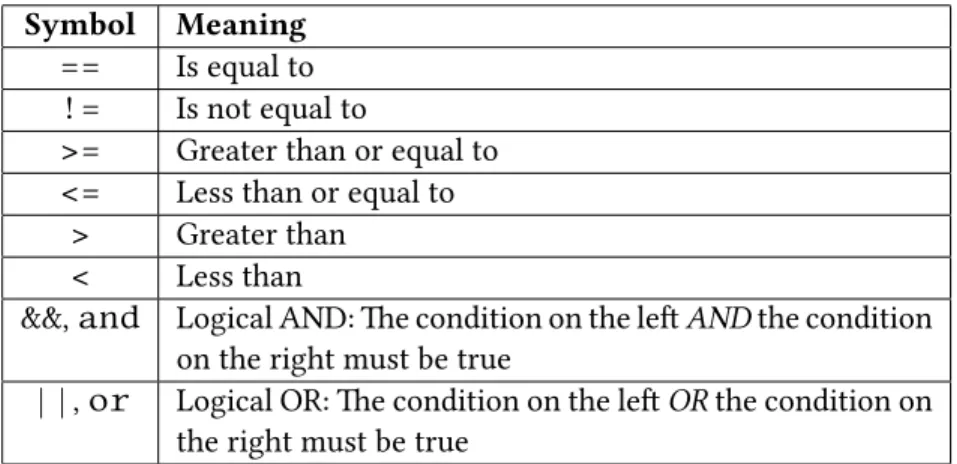
Conditionals are used to direct the program to different sections of code. In plain English, we might have a statement “If X is greater than Y, do this…” Conditionals direct the program to behave differently depending on the results of a comparison. Several common comparison operators used in C++ are:
Symbol
Meaning
==
Is equal to
!=
Is not equal to
>=
Greater than or equal to
<=
Less than or equal to
>
Greater than
<
Less than
&&
,
and
Logical AND: e condition on the le
AND
the condition
on the right must be true
||
,
or
Logical OR: e condition on the le
OR
the condition on
the right must be true
Table 10.1: Common comparison operators
10.1
if
,
else
, and
else if
e most popular conditional is theifstatement. Anifstatement looks like this:
i f( v a r i a b l e == v a r i a b l e 2 ) {
/ / Code h e r e e x e c u t e s on l y when
/ / t h e v a l u e o f v a r i a b l e i s t h e same a s v a r i a b l e 2
}
e keywordifis used to start the statement. Parentheses are used to contain the conditional expression. If the expression inside the parentheses is true, then the following expression will be executed.
10.1.1 A small digression on expressions
Note that curly braces merely surround expressions to become a single expression. e act of surrounding expressions creates a code block. However, having only one expression within a code block is the same as not having it in a code block.
i f ( v a r i a b l e == v a r i a b l e 2 ) {
c o u t << ” Yes ! ”; }
is the same as
i f ( v a r i a b l e == v a r i a b l e 2 ) c o u t << ” Yes ! ”;
It is not recommended to go without braces for mere brevity at the cost of making mistakes later on. For example, suppose you have some code for baking bread, like the following.
i f ( breadType == 1 0 ) ovenFanOn = t r u e;
en later you are told that bread type 10 needs to be cooked at350◦F. So you make the following change:
int a = 0; if var1 == var2
True
False
a = 1;
done a = 2;
Else
No Else
Figure 10.1:
if
and
else
statement flow of execution
Except that is really the same as:
i f ( breadType == 1 0 ) ovenFanOn = t r u e;
ovenTemp = 3 5 0 ;
Now the baker is upset because every loaf is being cooked wrong except bread of type 10! What you really meant was:
i f ( breadType == 1 0 ) {
ovenFanOn = t r u e; ovenTemp = 3 5 0 ; }
Here’s another bear trap that you’ll likely hit:
i f ( breadType == 9 ) ; ovenFanOn = t r u e;
It is still valid syntax, but the expression aer theifstatement is an empty expression. An empty expression does nothing, and so now every bread type will have the fan on, which is not what the baker wanted.
10.1.2 Using
else
block is executed. For example:
i n t a = 0 ;
i f( v a r 1 == v a r 2 ) {
/ / Code h e r e e x e c u t e s on l y when
/ / t h e v a l u e o f v a r i a b l e i s t h e same a s v a r i a b l e 2
a = 1 ; }
e l s e
{
/ / Code h e r e e x e c u t e s i f t h e y a r e not t h e same
a = 2 ; }
Anelsestatement is used when you want some code to execute in any other case where theifstatement is not true. An example of how this works is also shown in Figure 10.1.
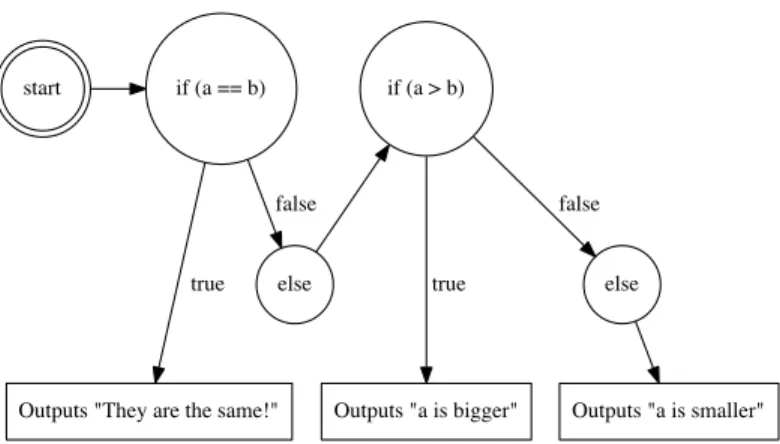
Anelse ifcould also be placed aer theifstatement. Anelse ifis an additionalifstatement checked only when the previousifstatement is false. Whileelseis a catch-all,else ifchains anifto test for other conditions. Multipleelse ifstatements can be used, and they are all checked sequentially, and if necessary, anelsestatement can be included at the end as a final catch-all. Take a look at Figure 10.2 for a flowchart example.
Here’s what the three statements would look like all together:
i f( a == b ) {
c o u t << ” They a r e t h e same ! ” << e n d l ; }
e l s e i f( a > b ) {
c o u t << ” a i s b i g g e r ! ” << e n d l ; }
e l s e
{
c o u t << ” a i s s m a l l e r ! ” << e n d l ; }
Note that every conditional expression is in parentheses. Eachifmust be followed by a(...) (with a Boolean expression inside the parentheses) in C++. Conditional expressions also appear in loops (discussed in Chapter 12) andswitch