Programming and Mathematical
Thinking
A Gentle Introduction to Discrete Math
Featuring Python
Allan M. Stavely
The New Mexico Tech Press
Programming and Mathematical Thinking
A Gentle Introduction to Discrete Math Featuring Python
Allan M. Stavely
Copyright©2014 Allan M. Stavely First Edition
Content of this book available under the Creative Commons Attribution-Noncommercial-ShareAlike License. See http://creativecommons.org/licenses/by-nc-sa/4.0/ for details.
Publisher's Cataloguing-in-Publication Data
Stavely, Allan M
Programming and mathematical thinking: a gentle introduction to discrete math featuring Python / Allan M. Stavely.
xii, 246 p.: ill. ; 28 cm
ISBN 978-1-938159-00-8 (pbk.) — 978-1-938159-01-5 (ebook) 1. Computer science—Mathematics. 2. Mathematics—Discrete Mathematics. 3. Python (Computer program language).
QA 76.9 .M35 .S79 2014 004-dc22
OCLC Number: 863653804
Published by The New Mexico Tech Press, a New Mexico nonprofit corporation
The New Mexico Tech Press Socorro, New Mexico, USA
Table of Contents
Preface ... vii
1. Introduction ... 1
1.1. Programs, data, and mathematical objects ... 1
1.2. A first look at Python ... 3
1.3. A little mathematical terminology ... 10
2. An overview of Python ... 17
2.1. Introduction ... 17
2.2. Values, types, and names ... 18
2.3. Integers ... 19
2.4. Floating-point numbers ... 23
2.5. Strings ... 25
3. Python programs ... 29
3.1. Statements ... 29
3.2. Conditionals ... 31
3.3. Iterations ... 35
4. Python functions ... 41
4.1. Function definitions ... 41
4.2. Recursive functions ... 43
4.3. Functions as values ... 45
4.4. Lambda expressions ... 48
5. Tuples ... 51
5.1. Ordered pairs andn-tuples ... 51
5.2. Tuples in Python ... 52
5.3. Files and databases ... 54
6. Sequences ... 57
6.1. Properties of sequences ... 57
6.2. Monoids ... 59
6.3. Sequences in Python ... 64
6.4. Higher-order sequence functions ... 67
6.5. Comprehensions ... 73
6.6. Parallel processing ... 74
7. Streams ... 83
7.1. Dynamically-generated sequences ... 83
7.3. Endless streams ... 90
7.4. Concatenation of streams ... 92
7.5. Programming with streams ... 95
7.6. Distributed processing ... 103
8. Sets ... 107
8.1. Mathematical sets ... 107
8.2. Sets in Python ... 110
8.3. A case study: finding students for jobs ... 114
8.4. Flat files, sets, and tuples ... 118
8.5. Other representations of sets ... 123
9. Mappings ... 127
9.1. Mathematical mappings ... 127
9.2. Python dictionaries ... 131
9.3. A case study: finding given words in a file of text ... 135
9.4. Dictionary or function? ... 140
9.5. Multisets ... 145
10. Relations ... 153
10.1. Mathematical terminology and notation ... 153
10.2. Representations in programs ... 156
10.3. Graphs ... 159
10.4. Paths and transitive closure ... 164
10.5. Relational database operations ... 167
11. Objects ... 175
11.1. Objects in programs ... 175
11.2. Defining classes ... 177
11.3. Inheritance and the hierarchy of classes ... 180
11.4. Object-oriented programming ... 184
11.5. A case study: moving averages ... 185
11.6. Recursively-defined objects: trees ... 194
11.7. State machines ... 201
12. Larger programs ... 213
12.1. Sharing tune lists ... 213
12.2. Biological surveys ... 218
12.3. Note cards for writers ... 227
Afterword ... 233
List of Examples
1.1. Finding a name ... 4
1.2. Finding an email address ... 7
1.3. Average of a collection of observations ... 8
6.1. Finding a name again, in functional style ... 71
6.2. Average of observations again, in functional style ... 72
7.1. Combinations using a generator function ... 89
8.1. Finding job candidates using set operations ... 117
8.2. Job candidates again, with different input files ... 122
9.1. Finding given words in a document ... 139
9.2. A memoized function: thenthFibonacci number ... 144
9.3. Number of students in each major field ... 149
10.1. Distances using symmetry and reflexivity ... 159
11.1. TheMovingAverageclass ... 191
11.2. TheMovingAverage class, version 2 ... 193
11.3. ThePushbuttonclass ... 204
11.4. A state machine for finding fields in a string ... 206
11.5. Code that uses aFieldsStateMachine... 207
Preface
My mission in this book is to encourage programmers to think mathematically as they develop programs.
This idea is nothing new to programmers in science and engineering fields, because much of their work is inherently based on numerical mathematics and the mathematics of real numbers. However, there is more to mathematics than numbers.
Some of the mathematics that is most relevant to programming is known as
“discrete mathematics”. This is the mathematics of discrete elements, such as symbols, character strings, truth values, and“objects”(to use a programming term) that are collections of properties. Discrete mathematics is concerned with such elements; collections of them, such as sets and sequences; and connections among elements, in structures such as mappings and relations. In many ways discrete mathematics is more relevant to programming than numerical mathematics is: not just to particular kinds of programming, but to all programming.
Many experienced programmers approach the design of a program by describing its input, output, and internal data objects in the vocabulary of discrete mathematics: sets, sequences, mappings, relations, and so on. This is a useful habit for us, as programmers, to cultivate. It can help to clarify our thinking about design problems; in fact, solutions often become obvious. And we inherit a well-understood vocabulary for specifying and documenting our programs and for discussing them with other programmers.1
For example, consider this simple programming problem. Suppose that we are writing software to analyze web pages, and we want some code that will read two web pages and find all of the URLs that appear in both. Some programmers might approach the problem like this:
1This paragraph and the example that follows are adapted from a previous book: Allan M. Stavely,
First I'll read the first web page and store all the URLs I find in a list. Then I'll read the second web page and, every time I find a URL, search the list for it. But wait: I don't want to include the same URL in my result more than once. I'll keep a second list of the URLs that I've already found in both web pages, and search that before I search the list of URLs from the first web page.
But a programmer who is accustomed to thinking in terms of discrete-mathematical structures might immediately think of a different approach:
The URLs in a web page are a set. I'll read each web page and build up the set of URLs in each using set insertion. Then I can get the URLs common to both web pages by using set intersection.
Either approach will work, but the second is conceptually simpler, and it will probably be more straightforward to implement. In fact, once the problem is described in mathematical terms, most of the design work is already done.
That's the kind of thinking that this book promotes.
As a vehicle, I use the programming language Python. It's a clean, modern language, and it comes with many of the mathematical structures that we will need: strings, sets, several kinds of sequences, finite mappings (dictionaries, which are more general than arrays), and functions that are first-class values. All these are built into the core of the language, not add-ons implemented by libraries as in many programming languages. Python is easy to get started with and makes a good first language, far better than C or C++ or Java, in my opinion. In short, Python is a good language for Getting Things Done with a minimum of fuss. I use it frequently in my own work, and many readers will find it sufficient for much or all of their own programming.
programmers never learn, and we'll see how to use them to create simple and elegant solutions to programming problems.
For example, one recurring theme in the book is the concept of a monoid. It turns out that monoids (more than, for example, groups and semigroups) are ubiquitous in the data types and data structures that programmers use most often. I emphasize the extent to which all monoids behave alike and how concepts and algorithms can be transferred from one to another.
I recommend this book for use in a first university-level course, or even an advanced high-school course, for mathematically-oriented students who have had some exposure to computers and programming. For students with no such exposure, the book could be supplemented by an introductory programming textbook, using either Python or another programming language, or by additional lecture material or tutorials presenting techniques of programming. Or the book could be used in a second course that is preceded by an introductory programming course of the usual kind.
Otherwise, the ideal reader is someone who has had at least some experience with programming, using either Python or another programming language. In fact, I hope that some of my readers will be quite experienced programmers who may never have been through a modern, mathematically-oriented program of study in computer science. If you are such a person, you'll see many ideas that will probably be new to you and that will probably improve your programming.
At the end of most chapters is a set of exercises. Instructors can use these exercises in laboratory sessions or as homework exercises, and some can be used as starting points for class discussions. Many instructors will want to supplement these exercises with their own extended programming assignments.
In a number of places I introduce a topic and then say something like “…
exception handling, parallel computing, distributed computing, various advanced data structures and algorithms, object-oriented programming, and state machines.
Similarly, I could have included many more topics in discrete mathematics than I did, but I had to draw the line somewhere. Some computer scientists and mathematicians may well disagree with my choices, but I have tried to include topics that have the most relevance to day-to-day programming. If you are a computer science student, you will probably go on to study discrete mathematics in more detail, and I hope that the material in this book will show you how the mathematics is relevant to your programming work and motivate you to take your discrete-mathematics classes more seriously.
This book is not designed to be a complete textbook or reference manual for the Python language. The book will introduce many Python constructs, and I'll describe them in enough detail that a reader unfamiliar with Python should be able to understand what's going on. However, I won't attempt to define these constructs in all their detail or to describe everything that a programmer can do with them. I'll omit some features of Python entirely: they are more advanced than we'll need or are otherwise outside the scope of this book. Here are a few of them:
• some types, such ascomplexandbyte
• some operators and many of the built-in functions and methods
• string formatting and many details of input and output
• the extensive standard library and the many other libraries that are commonly available
• some statement types, including break and continue, and else-clauses in while-statements and for-statements
• almost all “special”attributes and methods (those whose names start and end with a double underbar) that expose internal details of objects
• many variations on class definitions, including multiple inheritance and decorators
Any programmer who uses Python extensively should learn about all of these features of the language. I recommend that such a person peruse a comprehensive Python textbook or reference manual.2
In any case, there is more to Python than I present in this book. So whenever you think to yourself,“I see I can doxwith Python—can I doytoo?”, maybe you can. Again, you can find out in a Python textbook or reference manual.
This book will describe the most modern form of Python, called Python 3. It may be that the version of Python that you have on your computer is a version of Python 2, such as Python 2.3 or 2.7. There are only a few differences that you may see as you use the features of Python mentioned in this book. Here are the most important differences (for our purposes) between Python 3 and Python 2.7, the final and most mature version of Python 2:
• In Python 2,printis a statement type and not a function. Aprintstatement can contain syntax not shown in the examples in this book; however, the syntax used in the examples —print(e)wheree is a single expression—
works in both Python 2 and Python 3.
• Python 2 has a separate “long integer” type that is unbounded in size. Conversion between plain integers and long integers (when necessary) is largely invisible to the programmer, but long integers are (by default) displayed with an“L”at the end. In Python 3, all integers are of the same type, unbounded in size.
• Integer division produces an integer result in Python 2, not a floating-point result as in Python 3.
2As of the time of writing, comprehensive Python documentation, including the official reference
• In Python 2, characters in a string are ASCII and not Unicode by default; there is a separate Unicode type.
Versions of Python earlier than 2.7 have more incompatibilities than these: check the documentation for the version you use.
In the chapters that follow I usually use the author's“we” for a first-person pronoun, but I say“I”when I am expressing my personal opinion, speaking of my own experiences, and so on. And I follow this British punctuation convention: punctuation is placed inside quotation marks only if it is part of what is being quoted. Besides being more logical (in my opinion), this treatment avoids ambiguity. For example, here's how many American style guides tell you to punctuate:
To add one toi, you would write“i = i + 1.”
Is the“.”part of what you would write, or not? It can make a big difference, as any programmer knows. There is no ambiguity this way:
To add one toi, you would write“i = i + 1”.
I am grateful to all the friends and colleagues who have given me help, suggestions, and support in this writing project, most prominently Lisa Beinhoff, Horst Clausen, Jeff Havlena, Peter Henderson, Daryl Lee, Subhashish Mazumdar, Angelica Perry, Steve Schaffer, John Shipman, and Steve Simpson.
Finally, I am pleased to acknowledge my debt to a classic textbook:Structure and Interpretation of Computer Programs(SICP) by Abelson and Sussman.3
I have borrowed a few ideas from it: in particular, for my treatments of higher-order functions and streams. And I have tried to make my book a showcase for Python much as SICP was a showcase for the Scheme language. Most important, I have used SICP as an inspiration, a splendid example of how programming can be taught when educators take programming seriously.
Chapter 1
Introduction
1.1. Programs, data, and mathematical objects
A master programmer learns to think of programs and data at many levels of detail at different times. Sometimes the appropriate level is bits and bytes and machine words and machine instructions. Often, though, it is far more productive to think and work with higher-level data objects and higher-level program constructs.
Ultimately, at the lowest level, the program code that runs on our computers is patterns of bits in machine words. In the early days of computing, all programmers had to work with these machine-level instructions all the time. Now almost all programmers, almost all the time, use higher-level programming languages and are far more productive as a result.
Similarly, at the lowest level all data in computers is represented by bits packaged into bytes and words. Most beginning programmers learn about these representations, and they should. But they should also learn when to rise above machine-level representations and think in terms of higher-level data objects.
The thesis of this book is that, very often, mathematical objects are exactly the higher-level data objects we want. Some of these mathematical objects are numbers, but many—the objects of discrete mathematics—are quite different, as we will see.
So this book will present programming as done at a high level and with a mathematical slant. Here's how we will view programs and data:
writing, reading, and understanding by humans. We will not be much concerned with the correspondence between programming-language constructs and machine instructions.
The data in our programs will reside in a computer's main storage (which we often metaphorically call“memory”) that may look like a long sequence of machine words, but most of the time we will not be concerned with exactly how our data objects are represented there; the data objects will look like mathematical objects from our point of view. We assume that the main storage is quite large, usually large enough for all the data we might want to put into it, although not infinite in size.
We will assume that what looks simple in a program is also reasonably simple at the level of bits and bytes and machine instructions. There will be a straightforward correspondence between the two levels; a computer science student or master programmer will learn how to construct implementations of the higher-level constructs from low-level components, but from other books than this one. We will play fair; we will not present any program construct that hides lengthy computations or a mass of complexity in its low-level implementation. Thus we will be able to make occasional statements about program efficiency that may not be very specific, but that will at least be meaningful. And you can be assured that the programming techniques that we present will be reasonable to use in practical programs.
The language of science is mathematics; many scientists, going back to Galileo, have said so. Equally, the language of computing is mathematics. Computer science education teaches why and how this is so, and helps students gain some fluency in the aspects of this language that are most relevant to them. The current book takes a few steps in these directions by introducing some of the concepts of discrete mathematics, by showing how useful they can be in programming, and by encouraging programmers to think mathematically as they do their work.
1.2. A first look at Python
For the examples in this book, we'll use a particular programming language, called Python. I chose Python for several reasons. It's a language that's in common use today for producing many different kinds of software. It's available for most computers that you're likely to use. And it's a clean and well-designed language: for the most part, the way you express things in Python is straightforward, with a minimum of extraneous words and punctuation. I think you're going to enjoy using Python.
Python falls into several categories of programming language that you might hear programmers talk about:
• It's a scripting language. This term doesn't have a precise definition, but generally it means a language that lends itself to writing little programs called scripts, perhaps using the kinds of commands that you might type into a command-line window on a typical computer system. For example, some scripts are programs that someone writes on the spur of the moment to do simple manipulations on files or to extract data from them. Some scripts control other programs, and system administrators often use scripting languages to combine different functions of a computer's operating system to perform a task. We'll see examples of Python scripts shortly. (Other scripting languages that you might encounter are Perl and Ruby.)
• It's an object-oriented language. Object orientation is a very important concept in programming languages. It's a rather complex concept, though, so we'll wait to discuss it until Chapter 11. For now, let's just say that if you're going to be working on a programming project of any size, you'll need to know about object-oriented programming and you'll probably be using it. (Other object-oriented languages are Java and C++.)
• It's a very high-level language, or at least it has been called that. This is another concept that doesn't have a precise definition, but in the case of Python it means that mathematical objects are built into the core of the language, more so than in most other programming languages. Furthermore, in many cases we'll be able to work with these objects in notation that
resembles mathematical notation. We'll be exploiting these aspects of Python throughout the book.
Depending on how you use it, Python can be a language of any of these kinds or all of them at once.
Let's look at a few simple Python programs, to give you some idea of what Python looks like.
The first program is the kind of very short script that a Python programmer might write to use just once and then discard. Let's say that you have just attended a lecture, and you met someone named John, but you can't remember his last name. Fortunately, the lecturer has a file of the names of all the attendees and has made that file available to you. Let's say that you have put that file on your computer and called it“names”. There are several hundred names in the file, so you'd like to have the computer do the searching for you. Example 1.1 shows a Python script that will display all the lines of the file that start with the letters“John”.
Example 1.1. Finding a name
file = open("names") for line in file:
if line.startswith("John"): print(line)
You may be able to guess (and guess correctly) what most of the parts of this script do, especially if you have done any programming in another programming language, but I'll explain the script a line at a time. Let's not bother with the fine points, such as what the different punctuation marks mean in Python; you'll learn all that later. For now, I'll just explain each line in very general terms.
file = open("names")
This line performs an operation called“opening”a file on our computer. It's a rather complicated sequence of operations, but the general idea is this: get a file named“names” from our computer's file system and make it available for our program to read from. We give the namefileto the result.
Here and in the other examples in this book, we won't worry about what might happen if theopenoperation fails: for example, if there is no file with the given name, or if the file can't be read for some reason. Serious Python programmers need to learn about the features of Python that are used for handling situations like these, and need to include code for handling exceptional situations in most programs that do serious work.1 In a simple
one-time script like this one, though, a Python programmer probably wouldn't bother. In any case, we'll omit all such code in our examples, simply because that code would only distract from the points that we are trying to make.
for line in file:
This means,“For each line infile, do what comes next.”More precisely, it means this: take each line offile, one at a time. Each time, give that line the nameline, and then do the lines of the program that come next, the lines that are indented.
if line.startswith("John"):
This means what it appears to mean: iflinestarts with the letters“John”, do what comes next.
print(line)
Since the line of the file starts with“John”, it's one that we want to see, and this is what displays the line. On most computers, we can run the program in a window on our computer's screen, andprintwill display its results in that window.
1The term for such code is“exception handling”, in case you want to look up the topic in Python
documentation. Handling exceptions properly can be complicated, sometimes involving difficult design decisions, which is why we choose to treat the topic as beyond the scope of the current book.
If you run the program, here's what you might see (depending, of course, on what is in the filenames).
John Atencio
John Atkins
Johnson Cummings
John Davis
John Hammerstein
And so on. This is pretty much as you might expect, although there may be a couple of surprises here. Why is this output double-spaced? Well, it turns out that each line of the file ends with a“new line” character, and theprint operation adds another. (As you learn more details of Python, you'll probably learn how to make output like this come out single-spaced if that's what you'd prefer.) And why is there one person here with the first name “Johnson”
instead of“John”? That shouldn't be a surprise, since our simple little program doesn't really find first names in a line: it just looks for lines in which the first four letters are“John”. Anyway, this output is probably good enough for a script that you're only going to use once, especially if it reminds you that the person you were thinking of is John Davis.
Now let's say that you'd like to get in touch with John Davis. Your luck continues: the lecturer has provided another file containing the names and email addresses of all the attendees. Each line of the file contains a person's name and that person's email address, separated by a comma.
Suppose you transfer that file to your computer and give it the name“emails”. Then Example 1.2 shows a Python script that will find and display John Davis's email address if it's in the file.
Example 1.2. Finding an email address
file = open("emails") for line in file:
name, email = line.split(",") if name == "John Davis":
print(email)
Let's look at this program a line or two at a time.
file = open("emails") for line in file:
These lines are very much like the first two lines of the previous program; the only difference is the name of the file in the first line. In fact, this pattern of code is common in programs that read a file and do something with every line of it.
name, email = line.split(",")
The partline.split(",")splitslineinto two pieces at the comma. The result is two things: the piece before the comma and the piece after the comma. We give the names“name”and“email”to those two things.
if name == "John Davis":
This says: if nameequals (in other words, is the same as) “John Davis”, do what comes next. Python uses“==”, two adjacent equals-signs, for this kind of comparison. You might think that just a single equals-sign would mean
“equals”, but Python uses“=” to associate a name with a thing, as we have seen. So, to avoid any possible ambiguity, Python uses a different symbol for comparing two things for equality.
print(email)
This displays the result that we want.
As our final example, let's take a very simple computational task: finding the average of a collection of numbers. They might be a scientist's measurements
of flows in a stream, or the balances in a person's checking account on different days, or the weights of different boxes of corn flakes. It doesn't matter what they mean: for purposes of our computation, they are just numbers.
Let's say, for the sake of the example, that they are temperatures. You have a thermometer outside your window, and you read it at the same time each day for a month. You record each temperature to the nearest degree, so all your observations are whole numbers (the mathematical term for these is
“integers”). You put the numbers into a file on your computer, perhaps using a text-editing or word-processing program; let's say that the name of the file is“observations”. At the end of the month, you want to calculate the average temperature for the month.
Example 1.3 shows a Python program that will do that computation. It's a little longer than the previous two programs, but it's still short and simple enough that we might call it a“script”.
Example 1.3. Average of a collection of observations
sum = 0 count = 0
file = open("observations") for line in file:
n = int(line) sum += n count += 1
print(sum/count)
Let's look at this program a line or two at a time.
sum = 0 count = 0
To compute the average of the numbers in the file, we need to find the sum of all the numbers and also count how many there are. Here we give the names
sumandcount to those two values. We start both the sum and the count at zero.
file = open("observations") for line in file:
As in the previous two programs, these lines say: open the file that we want and then, for each line of the file, do what comes next. Specifically, do the lines that are indented, the next three lines.
n = int(line)
A line of a file is simply a sequence of characters. In this case, it will be a sequence of digits. The program needs to convert that into a single thing, a number. That's whatintdoes: it converts the sequence of digits into an integer. We give the namento the result.
sum += n count += 1
In Python,“+=” means“add the thing on the right to the thing on the left”. So, “sum += n” means“add n tosum” and “count += 1” means “add 1 to count”. This is the obvious way to accumulate the running sum and the running count of the numbers that the program has seen so far.
print(sum/count)
This step is done after all the numbers in the file have been summed and counted. It displays the result of the computation: the average of the numbers, which issumdivided bycount.
Notice, by the way, that we've used blank lines to divide the lines of the program into logical groups. You can do this in Python, and programmers often do. This doesn't affect what the program does, but it might make the program a little easier for a person to read and understand.
So now you've seen three very short and simple Python programs. They aren't entirely typical of Python programs, though, because they illustrate only a few of the most basic parts of the Python language. Python has many more
features, and you'll learn about many of them in the remaining chapters of this book. But these programs are enough examples of Python for now.
1.3. A little mathematical terminology
Now we'll introduce a few mathematical terms that we'll use throughout the book. We won't actually bedoingmuch mathematics, in the sense of deriving formulas or proving theorems; but, in keeping with the theme of the book, we'll constantly use mathematical terminology as a vocabulary for talking about programs and the computational problems that we solve with them.
The first term isset. A set is just an unordered collection of different things.
For example, we can speak of the set of all the people in a room, or the set of all the books that you have read this year, or the set of different items that are for sale in a particular shop.
The next term issequence. A sequence is simply an ordered collection of things.
For example, we can speak of the sequence of digits in your telephone number or the sequence of letters in your surname. Unlike a set, a sequence doesn't have the property that all the things in it are necessarily different. For example, many telephone numbers contain some digit more than once.
You may have heard the word“set” used in a mathematical context, or you may know the word just from its ordinary English usage. It may seem strange
sequences have some mathematical properties that we'll want to be aware of. For now, just notice the differences between the concepts“set”and“sequence”.
Let's try applying these mathematical concepts to the sample Python programs that we've just seen. In each of them, what kind of mathematical object is the data that the program operates on?
First, notice that each program operates on a file. A file, at least as a Python program sees it, is a sequence of lines. Code like this is very common in Python programs that read files a line at a time:
file = open("observations") for line in file:
In general, the Python construct
forelementinsequence:
is the Python way to do something with every element of a sequence, one element at a time.
Furthermore, each line of a file is a sequence of characters, as we have already observed. So we can describe a file as a sequence of sequences.
But let's look deeper.
Let's take the file of names in our first example (Example 1.1). In terms of the information that we want to get from it, the file is a collection of names. What kind of collection? We don't care about the order of names in it; we just want to see all the names that start with“John”. So, assuming that our lecturer hasn't included any name twice by mistake, the collection is a set as far as we're concerned.
In fact, both the input and the output of this program are sets. The input is the set of names of people who attended the lecture. The output is the set of members of that input set that start with the letters“John”. In mathematical terminology, the output set is a subset of the input set.
Notice that the names in the input may actually have some ordering; the point is that we don't care what the ordering is. For example, the names may be in alphabetical order by surname; we might guess that from the sample of the output that we have seen. And of course the names have an ordering imposed on them simply from being stored as a sequence of lines in a file. The point is that any such ordering is irrelevant to the problem at hand and what we intend to do with the collection of names.
What about the file of names and email addresses in the second example (Example 1.2)? First, let's consider the lines of that file individually. Each line contains a name and an email address. In mathematical terminology, that data is anordered pair.
The two elements are“ordered”in the sense that it makes a difference which is first and which is second. In this case, it makes a difference because the two elements mean two different things. An ordered pair is not the same as a set of two things.
Now what about the file as a whole? Like the input file for the first program, it is a set. We don't care whether the file is ordered by name or by email address, or not ordered at all; we just want to find an ordered pair in which the first element is“John Davis”and display the corresponding second element. So (again assuming that the file doesn't contain any duplicate lines) we can view the input data as a set of ordered pairs.
There's another mathematical name for a set of ordered pairs: arelation. We can view a set of ordered pairs as a mathematical structure that relates pairs of things with each other.
In the current program, our input data relates names with corresponding email addresses.
One particular kind of relation will be very important to us: the mapping. This is a set of ordered pairs in which no two first elements are the same. We can think of a mapping as a structure that's like a mechanism for looking things up: give it a value (such as a name) and, if that value occurs as a first element in the mapping, you get back a second element (such as an email address).
In mathematics, another word for “mapping” is “function”; you probably know about mathematical functions like the square-root and trigonometric functions. The word “function” has other connotations in programming, though, so we'll usually use the word“mapping”for the mathematical concept.
We don't know whether the input data for this program is a mapping. Some attendees may have given the lecturer more than one email address, and the lecturer may have included them all in the file. In that case, the data may contain more than one ordered pair for some names, and so the data is a relation but not a mapping. But if the lecturer took only one email address per person, the data is not only a relation but a mapping. We may not care
about the distinction in this case: if our program displays more than one email address for John Davis, that's probably OK.
Now what about the input data in our third example, the program that computes an average (Example 1.3)? When you add up a group of numbers to average them, the order of the numbers and the order of the additions don't matter. This fact follows from two fundamental properties of integer addition:
• Theassociative property: (a+b) +c=a+ (b+c) for any integersa,b, and c
• Thecommutative property:a+b=b+afor any integersaandb
So is this data a set, like the input data for our first two programs? Not quite. The difference is that the same number may appear in the input data more than once, because the temperature outside your window may be the same (to the nearest degree) on two different days.
This data is amultiset. This is a mathematical term for a collection that is like a set, except that its elements are not necessarily all different: any element may occur in the multiset more than once. But a multiset, like a set, is an unordered collection.
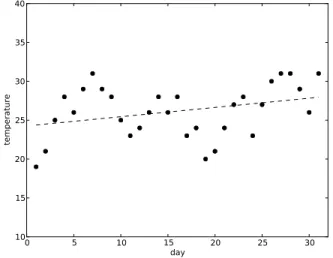
So, if our task is to compute the average of our collection of observations, the term“multiset”is an accurate description of that collection. But suppose we wanted to plot our observations to show the trend of the temperatures over the month, as in Figure 1.1?
Figure 1.1. Temperatures over a month, with trend line
Then the order of the observations would be important, so we would view the data as a sequence. The point here is that what kind of mathematical object a collection of data is, from a programmer's point of view, depends not only on properties of the data but also on what the programmer wants to do with the data.
Let's summarize. Here are the kinds of mathematical objects that we've mentioned so far:
• set
• multiset
• sequence
• ordered pair
• relation
• mapping
And here are the instances of these mathematical objects that we've observed in our examples:
• A generic file: asequenceofsequences.
• The data for our first script (names, Example 1.1): aset.
• The data for our second script (emails, Example 1.2): asetofordered pairs, forming arelation, possibly amapping.
• The data for our third script (average of observations, Example 1.3): a multiset. But if we want to use the same data to plot a trend, asequence.
In later chapters we'll explore properties of these and other mathematical objects and their connections with the data and computations of programs. Meanwhile, let's conclude the chapter with two simple observations:
• A collection of data, as a programmer views it, is likely to be a set, or a sequence, or a mapping, or some other well-known mathematical object.
• You can often view a collection of data as more than one kind of mathematical object, depending on what you want to do with the data.
Terms introduced in this chapter
mapping script
associative property set
commutative property sequence
multiset ordered pair
relation
Chapter 2
An overview of Python
2.1. Introduction
In this chapter and the two chapters that follow we'll give an overview of the Python language, enough (we hope) for you to understand the Python examples in the rest of the book. Along the way, we'll introduce terms for many Python concepts. Most of these terms are not specific to Python, but are part of the common language for speaking about programming languages in the computer science community. We'll use these terms in many places later in the book; so, even if you already know Python, you might want to skim through the chapters just to make sure that you are familiar with all the terms.
You have seen examples of Python programs that take their input data from files. In fact, Python programs themselves are made of text in files. If you had the scripts of the previous chapter on your computer, each would be in a file of its own.
On most computer systems, you can also use the Python interpreter interactively. You can type small bits of Python to the interpreter, and it will display the results. For example, you can use the interpreter as a calculator. You can type
3 + 2
and the interpreter will display
5
2.2. Values, types, and names
We'll start by explaining some very basic concepts of Python; you might think of these as defining how to think about computation in the Python world.
Computation in Python is done withvalues. Computations operate on values and produce other values as results. When you type “3 + 2” to the Python interpreter, Python takes the values 3 and 2, performs the operation of addition on them, and produces the value 5 as a result.
We have seen a few kinds of values already. The numbers 3 and 2 are values. So are sequences of characters like “John”. So are more complicated things like the opened files that the scripts of Chapter 1 used. As we'll see in later chapters, Python values also include other kinds of sequences, as well as sets and mappings and many other kinds of things.
Every value has atype. The type of whole numbers like 3 and 2 is“integer”. The type of a sequence of characters is “string”. There are other types in Python, and we'll see many of them later in the book.
A type is more than just a Python technical term for a kind of value. A type has two important properties, besides its name: a set of possible values, and the set of operations that you can do with those values. In Python, one of the operations on integers is addition, and one of the operations on strings is splitting at a given character.
Finally,namesare central to Python programming, and they are used in many ways. One important example is this: we canbinda name to a value. That's what happened when we did this in our script that computed an average:
count = 0
This binds the namecountto the value0. Another name for the operation in this example isassignment: we say that we assign0tocountand if a line like this occurs in a Python program, the line is called anassignment statement. There are several ways to bind a name to a value in Python, but the assignment statement is the most basic way.
A name that is bound in an assignment statement like this is called avariable. That's because the binding is not necessarily permanent: the name can be bound to a different value later. For example, our script for computing an average has this line farther along:
count += 1
This bindscount to a new value, which is one greater than the value that it was bound to before. A program can do such rebinding many times, and in fact our averaging script does: once for each line of the file of observations.
In Python you could even do this in the same program, although you probably wouldn't want to:
count = "Hello, John!"
So even the type of a variable isn't permanent. In Python, a type is a property of a value. We can speak of the type of a variable, but that's just the type of the value that happens to be bound to that variable.
However, as Python is actually used in practice, most variables have the same type throughout a program—that just turns out to be the most natural way for programmers to use variables. Furthermore, good programmers choose names that have some logical relationship with the way that the names are used. Giving a name like count to a string like "Hello, John!" is just silly, even though the Python interpreter would let you do it.
Saying that an assignment binds a name to a value is actually a slight oversimplification in Python. What actually happens is that a name is bound to something called an“object”, and it's the object that has a value. Later in the book we'll see how the distinction can make a difference. For now, this fine point isn't important, and we can just think of the name as being bound directly to the value.
2.3. Integers
Python integers are like mathematical integers: that is, they are the positive and negative whole numbers and zero.
Some of the operations that you can do with integers in Python, as you might expect, are addition, subtraction, multiplication, and division. Each of these operations is denoted by a symbol that comes between the quantities operated on, like this:
3 + 2 3 - 2 3 * 2 3 / 2
Each of those symbols is called an operator, and the quantities that they operate on are called operands. Many operators, like these, operate on two operands; such operators are called binary operators. (The term “binary”, when used in this way, doesn't have anything to do with the binary number system.)
In a Python program, a sequence of one or more digits, like 123or 2 or 0, represents a non-negative integer value. The sequence of digits is an example of aconstant: a symbol that can't be bound to anything other than the value that it represents.
To get a negative integer, we precede a sequence of digits with a minus sign in the obvious way, like this:
-123
Here, the minus sign is a unary operator, meaning that it takes only one operand. Notice that- can be either a binary operator or a unary operator, depending on context.
The combination of an operator and its operands is called anexpression. As in most programming languages, larger expressions can be built up by combining smaller expressions with operators, and parentheses can be used for grouping. We speak of evaluating an expression: this means finding the values of all its parts and performing all the operations to obtain a value.
If the operands of the+,-, and* operators are integers, the result is also an integer. The operator /is different: for example, the result of evaluating the expression is 1.5 just as in mathematics. But that 1.5 is not an integer,
of course, because it has a fractional part. It's an example of afloating-point number; we'll explain numbers of that type in the next section.
In Python, the result of dividing two integers with the/operator is always a floating-point number, whether the division comes out even or not. There's another division operator that always gives an integer result: it is//. So, for example, the value of4 / 2is the floating-point number 2.0, but the value of 4 // 2is 2, an integer. If the result of//does not come out even, it is rounded down, so that the value of14 // 3is the integer 4, with no fractional part; the remainder, 2, is dropped.
The operator % gives the remainder that would be left after a division. The value of14 % 3is 2, for example.
Python has other integer operators. Here's one more:**is the exponentiation operator. For example,2 ** 8means 28.
Python also has operators that combine arithmetic and assignment: these are calledaugmented assignment operators. We have already seen one of these, the+=operator, in this augmented-assignment statement:
count += 1
In evaluating this statement, the Python interpreter does the + operation in the usual way and then binds the left operand to the result. Python also has -=and*=and so on, but the+=operator is probably the one that programmers use most often.
In Python, there is no intrinsic limit on the size of an integer. The result of evaluating the expression2**2**8is a rather large number, but it's a perfectly good integer in Python, and Python integers can be much larger than that one.
However, there are practical limits to the size of a Python integer. You can't evaluate the expression 2**2**100 using the Python interpreter. That value would contain far more digits than your computer can store, and even if the Python interpreter could find somewhere to put all the digits, evaluating the expression would take an enormously long time.
In mathematics, 22100is a perfectly good number. It's a finite number, and it isn't hard to denote finite numbers that are much larger than that one: think of raising 2 to thatpower, for example. In mathematics there are also ways of making sense of infinite numbers, and mathematics draws a distinction between all finite numbers and the infinite numbers.1
Unlike many programming languages, Python has a way of representing
“infinity”, as we'll see in the next section. There is only one infinite number (and its negative) in Python, and the Python “infinity” has rather limited usefulness in Python programs, but it does exist.
In Python programming, and in all programming for that matter, it's important to recognize a third category of numbers, besides finite and infinite: numbers that are finite but that are far too large to compute with in practice, such as 22100
.
As we'll see in later chapters, sets can be represented as Python values, and so can sequences, mappings, and other mathematical structures. As with integers, the Python values are similar to the mathematical objects; Python was designed so that they would be. That's good, because we can use mathematical thinking to describe and understand those values and the operations on them. But, as with integers, Python sets and sequences and the rest have practical limitations. For example, a Python programmer must avoid computations that would try to construct sets that are far too large to store or operate on.
So, whereas in mathematics there's a distinction between finite and infinite, in programming there's also a distinction between finite and finite-but-far-too-large. The distinction applies to computations too: there are many computational problems that can't be solved in practice because the computations would take far too long. Drawing a line between practical and impractical, and categorizing values and computations according to which side of the line they are on, are central issues in the field of computer science, as you will see later in your studies if you are a computer science student.
2.4. Floating-point numbers
In Python, the floating-point numbers are another type, whose name is "float". Python uses floating-point numbers to represent numbers with a fractional part, and produces them in computations that may not come out even, like division of two integers using the / operator. As Python integers represent mathematical integers, Python floating-point numbers represent the real numbers of mathematics. Floating-point numbers are only an approximate representation of the real numbers, though; they differ from mathematical real numbers in some important ways, as we will see.
Python has two kinds of floating-point constants. The first is simply a sequence of digits with a decimal point somewhere in it;3.14and .001are examples. The second is a version of“scientific notation”: the number 6.02×10²³can
be written in Python as6.02E23. The number after the“E”(you can also use
“e”) is the power (“exponent”) of ten used in the scientific notation; it can be negative, as in1e-6, which represents one millionth.
Floating-point arithmetic in Python is much like integer arithmetic, except that if the operands in an expression are floating-point, so is the result. Floating-points and integers can be mixed in an expression: if one operand of a binary operator is a floating-point and the other is an integer, the integer is converted to a floating-point value and then the operation is done, giving a floating-point value.
To convert explicitly from an integer to a floating-point number or vice versa, we can use a Pythonfunction. As we'll see in later chapters, Python functions can behave in several different ways, but the kind that we'll consider now is like a mathematical function. It's a mapping: it takes a value, called an argument, and produces another value as a function of the argument.
To use a function, we write afunction call, which is another kind of expression besides those that we have seen. In the form that we'll consider now, a function call consists of the name of a function, followed by an expression in parentheses; that expression is the argument. When the Python interpreter evaluates a function call, we say that itcallsthe function,passingthe argument
to the function. The functionreturnsa value, which becomes the value of the function call expression.
To convert an integer value to floating-point, we can use thefloatfunction. For example, if the variablenhas the value3, thenfloat(n)has3.0as a value. To convert from floating-point to integer, we can use theintfunction if we just want to truncate the fractional part, or theroundfunction if we want to round to the nearest integer. For example, if the variablexhas the value2.7, the value ofint(x)is2and the value ofround(x)is3.
We can also usefloatto create a Python representation of“infinity”. Python has no constant that represents“infinity”, but we can create the Python value that represents“infinity”by writingfloat("inf")orfloat("Infinity")(the string passed tofloatcan have any combination of upper-case and lower-case letters). We can get the negative infinity by writing float("-inf") or -float("Infinity")or similar expressions.
Probably the most useful property of the Python “infinity” is that it is a floating-point number that is greater than any other floating-point number and greater than any integer. Similarly, the Python “negative infinity” is a floating-point number that is less than any other floating-point number and less than any integer. Except for showing a few applications of those properties, we won't say much more about Python's positive and negative infinity in this book.
Floating-point numbers (except for positive and negative infinity) are stored in the computer using a representation that is much like scientific notation: with a sign, an exponent, and some number of significant digits. On most computers, Python uses the “double precision” representation provided by the hardware.
For our purposes here, the exact representation isn't important, except for one point: both the exponent and the significant digits are represented using a fixed number of bits. An interesting consequence of this is that only finitely many floating-point numbers are representable on any given computer. In fact, in Python there are many more integers than floating-point numbers!
Notice that there must be a limit to the magnitude of a floating-point number, since there's an upper bound to the value of the exponent. This limitation usually isn't serious in practice, though, since on modern computers a floating-point number can easily be large enough for almost all common uses, such as representing measurements in the physical universe.
A more important limitation is that a floating-point number contains only a limited number of significant digits. This means that most of the mathematical real numbers can be represented only approximately with floating-point numbers. It also means that the result of any computation that produces a floating-point result, such as evaluating the expression1/3, will be truncated or rounded to a fixed number of significant digits, giving only an approximation to the true mathematical value in most cases.
Thus, we must be careful when we compute with floating-point numbers, keeping in mind that they are only approximations. For example, we can't assume that the value of1/3 + 1/3 + 1/3is exactly equal to1.0; we can only assume that the two values are approximately equal. The difference between a floating-point result and the true mathematical value is called roundoff error; in some situations, especially in long computations, roundoff error can build up and cause computations to be unacceptably inaccurate.
2.5. Strings
As we have already mentioned, sequences of characters are calledstrings. In Python, a string can contain not only the characters available on your keyboard, but all the characters of the character set called“Unicode”. Unicode contains characters from most of the world's written languages, including Chinese, Arabic, Hindi, and Cherokee, to name just a few. Unicode also contains mathematical symbols, technical symbols, unusual punctuation marks, and many more characters. For our purposes in this book, though, the characters on your keyboard will be enough.
A string constant is any sequence of characters enclosed in double-quote characters, as in
"Here's one"
or single-quote characters, as in
'His name is "John"'
Notice how a string delimited by double-quote characters can contain single-quote characters and vice versa.
The sequence of characters in a string may be empty, as in ""; this string is called theempty stringor the“null string”. Yes, the empty string does have uses, as we will see.
Python has no“character”type; it treats a single character as the same as a one-character string.
There is a function to convert from other types, such as integers and floating-point numbers, to strings: its name isstr. For example,str(3)produces the string value"3".
One important operation on strings isconcatenation, meaning joining together end-to-end. Python uses the +operator for concatenation. For example, the value of the expression"python" + "interpreter"is
"pythoninterpreter"
So Python gives the + operator three different meanings that we've seen so far: integer addition, floating-point addition, and string concatenation. We say that+isoverloadedwith these three meanings.
Python also overloads*to give it a meaning when one operand is a string and the other is an integer: this means concatenating together a number of copies. For example, the value of3 * "Hello"is"HelloHelloHello". The integer can be either the left or the right operand. But Python doesn't overload+or*for any imaginable combination of types. For example, Python doesn't allow+ of a string and an integer. You might guess that the Python interpreter would convert the integer to a string and do concatenation, but it won't.
Terms introduced in this chapter
evaluating type floating-point name augmented assignment binding function assignment argument assignment statement function call variablecalling a function integer
passing an argument operator return operand empty string binary operator concatenation constant overloading unary operator expression
Exercises
1. We said that 228was a perfectly good Python value but that 22100was far too large. For expressions of the form2**2**n, what values ofnmake the value of the expression too large to compute in practice? Experiment with your Python interpreter. Start with small values of n and then try larger values. What happens?
2. What happens if you actually try to evaluate2**2**100using your Python interpreter? Let it run for a long time, if necessary. Can you explain what you see?
3. Estimate how many decimal digits it would take to write out 22100 . Hint: logarithms. You can use your computer, if that will help.
4. The value of a comparison like1.0 == 1is eitherTrueorFalse. Experiment with your Python interpreter: you will probably getTruefor the value of 1.0 == 1, for example. Try1/3 + 1/3 + 1/3 == 1.0; you may getTrueor
find some comparisons that should give True according to mathematical real-number arithmetic, but that give youFalsein Python on your computer.
5. Does concatenation of strings have the associative property, as addition of integers does? Does concatenation of strings have the commutative property?
6. Make an improvement to the script that reads a file and finds lines that begin with“John”. Change it so that it actually compares the first name on each line with the name“John”, so that (for example) it doesn't display lines starting with “Johnson”. You have already seen enough of Python that you should be able to guess how to do this. Assume that each line of the file contains just a first name, a single blank space, and a last name. Test your solution using the Python interpreter.
Chapter 3
Python programs
3.1. Statements
Now we'll take the concepts and Python constructs from the last chapter and see how they can be used in larger Python constructs, up to and including whole programs.
A Python program is a sequence ofstatements. To illustrate some of the kinds of Python statements, let's look again at one of the sample programs from Section 1.2.
sum = 0 count = 0
file = open("observations") for line in file:
n = int(line) sum += n count += 1
print(sum/count)
This program contains several statements. Some of them are assignment and augmented-assignment statements; each is on a line of its own.
If a statement is too long to fit on one line, it can be broken across lines by using the backslash character\followed by a line break, like this:
z = x**4 + 4 * x**3 * y + 6 * x**2 * y**2 \ + 4 * x * y**3 + y**4
However, if the line break is inside bracketing characters such as parentheses, the backslash is not needed:
The last line of the sample program is also a statement. As it happens,print is a function in Python. (Here, its argument is a floating-point number, but in the examples of Section 1.2 we also sawprintbeing used to display strings. In fact,printis overloaded to work with these and many other Python types.)
An expression in Python, by itself, can be a statement, and the last line of the program is an example. For the expressions that we have considered until now, using one as a statement would make no sense; the Python interpreter would just evaluate it and do nothing with the result. But some expressions haveside effects: evaluating them has some effect besides producing a value.
Some Python functions are designed to be used as statements. They aren't mappings at all, because they don't produce values; they only cause side effects. The printfunction is one of these. Its “side effect”, which is really its only effect, is to display a value.
Assignment statements, augmented assignment statements, and expression statements are calledsimple statements. The line starting with“for”and the three lines that follow it are an example of acompound statement: a statement with other statements inside it.
for line in file: n = int(line) sum += n count += 1
The first line of a compound statement is called its header. A header starts with a keyword that indicates what kind of compound statement it is, and ends with a colon. Python has a number of keywords that are used for special purposes like this. As it happens, both for and in are keywords; they are structural parts of the header. Keywords can't be used as names; you can't have a variable named“for”or“in”.
The remaining lines of a compound statement, called thebodyof the statement, are indented with respect to the header.
As we have already seen, programs can contain blank lines, which are not statements and have no effect on what the program does, but are strictly for
the benefit of human readers. Similarly, all serious programming languages provide for comments, so that a programmer can insert commentary and explanations into a program. In Python, a comment starts with the character
“#”and continues to the end of the line. Here's the average-of-numbers script again with some comments added:
# A program to display the average of # the numbers in the file "observations". # We assume that the file contains
# whole numbers, one per line.
sum = 0 count = 0
file = open("observations") for line in file:
n = int(line) # convert digits to an integer sum += n
count += 1
print(sum/count)
3.2. Conditionals
In a sequence of statements, the Python interpreter normally executes the statements one after another in the order they appear. We say that theflow of controlpasses from one statement to the next in order.
Sometimes the flow of control needs to be different. For example, we often want certain statements to be executed only under certain conditions. A construct that causes this to happen is called aconditional.
The basic conditional construct in Python is a compound statement that starts with the keywordif. We call such a statement anif-statementfor short. The most basic kind of if-statement has this form:
ifcondition: statements
if name == "John Davis": print(email)
Most commonly, the condition in an if-statement header is a comparison, as in the example above. The result of a comparison is a value of the Boolean type. This type has only two values, True and False, and that's the way constants of the Boolean type are written. These values behave like the integers 1 and 0 in most contexts — in fact, Python considers them numeric values and you can do arithmetic with them—but the main use of Boolean values in Python is to control execution in if-statements (and in the while-statements that we'll see in the next section).
The comparison operator that means “does not equal”, like “≠” in mathematics, is written != in Python. The operators < and > mean “is less than”and“is greater than”, as you might expect. For“is less than or equal to”, like“≤”in mathematics, Python uses<=, and similarly>=means“≥”.
One more comparison operator isin, which (for example) can be used to test whether a character is in a string. Here is an example, where cis a variable containing a character:
if c in "aeiou":
print("c is a vowel")
More generally, if the operands of inare strings, the operator tests whether the left operand is asubstringof the right operand; in other words, whether the sequence of characters of the left operand occurs as a sequence of characters in the right operand. We'll see many more uses for the in operator in later chapters.
Python has operators whose operands are Booleans, too: and, or, and not. Thenotoperator is unary, and producesFalse if the value of its operand is TrueandTrueif the value of its operand isFalse, as you might expect.
Theoroperator also means what it appears to mean, but Python evaluates it in a particular way. In evaluating an expression of the formA or B, the Python interpreter first evaluates A. If its value is True, the value of the whole expression isTrue; otherwise, the interpreter evaluatesBand uses its value as
the value of the whole expression. Theandoperator is evaluated similarly: the interpreter evaluates the second operand only if the value of the first isFalse.
So, for theor and and operators, the interpreter doesn't just evaluate both operands and then do the operation, as it does with most operators. This can make a difference. Look at this example:
if y != 0 and x/y > 1:
Ifyis zero, the value of the whole Boolean expression isFalse, and the Python interpreter doesn't even evaluatex/y > 1. That's fortunate in this case, because dividing by zero is undefined in Python just as it is in ordinary arithmetic.
Python if-statements can have other forms, to create other kinds of control flow that occur commonly in programs. For example, often a program needs to do one thing if a condition is true and something else if the condition is false. The Python statement that does so has this form:
ifcondition: statements else:
statements
This is a compound statement with more than one“clause”, each with its own header and body; the headers are aligned with each other. Here's a simple example:
if a > b:
print("I'll take a") else:
print("I'll take b")
To distinguish more than two cases and handle them differently, you can combine if-statements, as in this example:
if testScore > medianScore: print("Above average." else:
if testScore == medianScore: print("Average.")
else:
print("Below average.")
Here we have one if-statement that contains another if-statement. By definition, a compound statement contains other statements, and these can be compound statements themselves.
When constructs contain other constructs of the same kind, we say that they are nested. Expressions are another example since, in an expression that contains an operator, the operands can be expressions themselves. Nested constructs appear in many places in programming languages.
The pattern of control flow in the above example is so common that Python provides a shorter way to do it. An if-statement can contain a clause beginning withelif, meaning“else if”, between the if-clause and the else-clause:
ifcondition: statements elifcondition:
statements else:
statements
So the example above could be written more concisely like this:
if testScore > medianScore: print("above average." elif testScore == medianScore:
print("average.") else:
print("below average.")
There can be more than one elif-clause, for computations in which there are more than three cases. The else-clause can be omitted whether or not there are elclauses. Thus, the general form of the statement in Python is an
clause, followed optionally by one or more elif-clauses, followed optionally by an else-clause.
3.3. Iterations
Another pattern of control flow is extremely common in programs: executing the same section of code many times. We call thisiteration.
Some iterations execute a section of code over and over forever, or at least until the program is interrupted or the computer is shut down. But we'll concentrate on the kind of iteration that executes a section of code as many times as necessary, according to the circumstances, and then stops.
Here's an example that we've already seen (Example 1.1):
file = open("names") for line in file:
if line.startswith("John"): print(line)
The compound statement starting with the keywordforis a Python iteration construct, the for-statement. As we have seen, this for-statement repeats its body as many times as there are lines in file. Since we're emphasizing mathematical structures throughout this book, iterations like this one—those that iterate over all elements of a sequence or set or other mathematical structure—will be especially important to us.
The general form of a for-statement is this:
fornameinexpression: statements
The expression provides the values to be iterated over. To give a simple example, the expression's value can be a string, which is a sequence of characters, as in the following: