LogLogic
Microsoft SQL Server
Log Configuration Guide
Document Release: March 2012 Part Number: LL600028-00ELS090002
This manual supports LogLogic Microsoft SQL Server Release 2.0 and later, and LogLogic Software Release 5.1 and later until replaced by a new edition.
© 2012 LogLogic, Inc. Proprietary Information
This document contains proprietary and confidential information of LogLogic, Inc. and its licensors. In accordance with the license, this document may not be copied, disclosed, modified, transmitted, or translated except as permitted in writing by LogLogic, Inc.
Trademarks
LogLogic and the LogLogic logo are trademarks or registered trademarks of LogLogic, Inc. in the United States and/or foreign countries. All other company or product names are trademarks or registered trademarks of their respective owners.
Notice
The information contained in this document is subject to change at any time without notice. All warranties with respect to the software and accompanying documentation are set our exclusively in the Software License Agreement or in the Product Purchase Agreement that covers the documentation.
LogLogic, Inc.
110 Rose Orchard Way, Suite 200 San Jose, CA 95134 Tel: +1 408 215 5900 Fax: +1 408 774 1752
Preface
About This Guide . . . . 5
Technical Support . . . . 5
Documentation Support . . . 6
Conventions. . . 6
Chapter 1 – Configuring LogLogic’s Microsoft SQL Server Log Collection Introduction to Microsoft SQL Server . . . 7
Prerequisites . . . 8
Configuring Microsoft SQL Server for Audit Events . . . 8
Configuring Login and C2 Audit Logging on Microsoft SQL Server. . . 8
Configuring Server-Side Traces. . . 11
Configuring Microsoft SQL Server for Trace File Log Collection . . . 12
Purging Trace Files . . . 16
Configuring Microsoft SQL Server for Operational Events . . . 17
Installing and Configuring Lasso . . . 17
Enabling the LogLogic Appliance to Capture Log Data . . . 17
Automatically Identifying a Microsoft SQL Server Device . . . 17
Adding a Microsoft SQL Server Device . . . 18
Verifying the Configuration . . . 21
Chapter 2 – How LogLogic Supports Microsoft SQL Server How LogLogic Captures Microsoft SQL Server Log Data . . . 22
Supported Microsoft SQL Server Log Data . . . 23
LogLogic Real-Time Reports . . . 24
LogLogic Search Filters . . . 25
Chapter 3 – Troubleshooting Troubleshooting . . . 26
Frequently Asked Questions . . . 27
Appendix A – Event Reference LogLogic Support for Microsoft SQL Server Events . . . 29
Preface
About This Guide
The LogLogic® Appliance-based solution lets you capture and manage log data from all types of log sources in your enterprise. The LogLogic support for Microsoft® SQL Server enables LogLogic Appliances to capture logs from machines running Microsoft SQL Server.
Once the logs are captured and parsed, you can generate reports and create alerts on Microsoft SQL Server’s operations. For more information on creating reports and alerts, see the LogLogic User Guide and LogLogic Online Help.
Technical Support
LogLogic is committed to the success of our customers and to ensuring our products improve customers' ability to maintain secure, reliable networks. Although LogLogic products are easy to use and maintain, occasional assistance might be necessary. LogLogic provides timely and comprehensive customer support and technical assistance from highly knowledgeable,
experienced engineers who can help you maximize the performance of your LogLogic Appliances.
To reach LogLogic Customer Support:
Telephone: Toll Free, US—1 800 957 LOGS (5647) Toll—1 408 834 7480
Telephone: Toll Free, Canada—1 800 957 LOGS (5647) Toll—1 408 834 7480
Telephone: Toll Free, Mexico—1 800 957 LOGS (5647) Toll—1 408 834 7480
Telephone: Toll Free, United Kingdom—00 800 0330 4444 Toll—01480 479391
Telephone: Toll Free, Mainland Europe—00 800 0330 4444 Toll— +44 1480 479391
Telephone: Toll Free, Japan IDC—0061 800 0330 4444 Toll— Not Available
Telephone: Toll Free, Japan KDD—0010 800 0330 4444 Toll— Not Available
Telephone: Toll Free, Brazil—0021 800 0330 4444 Toll— Not Available
Email: [email protected]
You can also visit the LogLogic Support website at: http://www.loglogic.com/services/support.
When contacting Customer Support, be prepared to provide: Your name, email address, phone number, and fax number Your company name and company address
Your machine type and release version
Documentation Support
Your feedback on LogLogic documentation is important to us. Send e-mail to
[email protected] if you have questions or comments. Your comments will be reviewed and addressed by the LogLogic technical writing team.
In your e-mail message, please indicate the software name and version you are using, as well as the title and document date of your documentation.
Conventions
LogLogic documentation uses the following conventions to highlight code and command-line elements:
A monospace font is used for programming elements (such as code fragments, objects, methods, parameters, and HTML tags) and system elements (such as filenames, directories, paths, and URLs).
A monospace bold font is used to distinguish system prompts or screen output from user responses, as in this example:
username:system
home directory:home\app
A monospace italic font is used for placeholders, which are general names that you replace with names specific to your site, as in this example:
LogLogic_home_directory\upgrade\
Straight brackets signal options in command-line syntax. For example:
Chapter 1 – Configuring LogLogic’s Microsoft SQL
Server Log Collection
This chapter describes configuration steps involved to enable a LogLogic Appliance to capture Microsoft SQL Server logs. The configuration steps assume that you have a functioning LogLogic Appliance that can be configured to capture Microsoft SQL Server log data.
Introduction to Microsoft SQL Server . . . 7
Prerequisites . . . 8
Configuring Microsoft SQL Server for Audit Events . . . 8
Configuring Microsoft SQL Server for Operational Events. . . 17
Enabling the LogLogic Appliance to Capture Log Data . . . 17
Verifying the Configuration . . . 21
Introduction to Microsoft SQL Server
The LogLogic Appliance enables captures Microsoft SQL Server audit and operational log data. Audit events can capture critical information for Microsoft SQL Server that is essential to meet compliance requirement. Microsoft SQL Server provides options to audit user activity, critical changes to database schema, changes in user and object level permissions, etc. Audit logs are generated per Microsoft SQL Server instance and activities for all databases under the instance are logged. Microsoft SQL Server logs operational information within Windows Event Logs.
Operational logs contain information such as database backup activity, replication, server shutdown, and success/failure login information.
Note: Operational logs only contain success/failure login information if Login auditing is enabled on Microsoft SQL Server. For more information, see Configuring Login and C2 Audit Logging on Microsoft SQL Server on page 8.
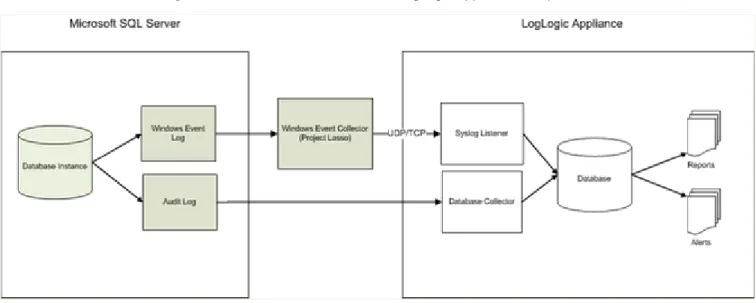
Microsoft SQL Server audit logs are captured via JDBC using LogLogic’s Database Collector. Microsoft SQL Server operational logs are captured by LogLogic’s Lasso collector. Lasso can run in Agent Mode, Collector Mode, or both (i.e., a hybrid mode). Regardless of the mode used, all collected operational logs are forwarded to the LogLogic Appliance using Syslog via UDP or TCP. The configuration procedures for Microsoft SQL Server and the LogLogic Appliance depend upon your environment, what logs you want to capture, and how Lasso is configured (if applicable). For more information, see How LogLogic Captures Microsoft SQL Server Log Data on page 22 and the LogLogic Lasso Collector Guide.
Prerequisites
Prior to configuring Microsoft SQL Server and the LogLogic Appliance, ensure that you meet the following prerequisites:
Microsoft SQL Server 2000/2005,(2008 R1/R2) Standard or Enterprise running on Windows 2000 SP4 or later/Windows 2003 SP1 or later/Windows 2008 or later, respectively
Note: LogLogic recommends using Microsoft SQL Server 2000 SP4 in order to read active trace files. If another version is used, then only inactive trace files will be read.
A database user with the proper access permissions to execute traces:
For Microsoft SQL Server 2000/2005/2008, a user with sysadmin permissions for the xp_cmdshell and fn_trace_gettable functions is required
For capturing operational logs: Lasso Release 2.0 or later installed on the Windows machine. For more information, see the LogLogic Lasso Collector Guide.
LogLogic Appliance running Release 5.1 or later installed with a Log Source Package that includes Microsoft SQL Server support
Administrative access on the LogLogic Appliance
Configuring Microsoft SQL Server for Audit Events
The following sections describe how to configure your Microsoft SQL Server to capture and log login and C2 audit events.
Configuring Login and C2 Audit Logging on Microsoft SQL
Server
Caution: If you have enabled C2 auditing, you might want to disable login auditing, otherwise you will record the same type of event twice, unnecessarily degrading your server performance.
To configure Microsoft SQL Server 2000/2005/2008 audit logging: 1. Log in to the Microsoft SQL Server 2000/2005/2008 machine.
2. In Microsoft SQL Server Management Studio, connect to an instance of the Microsoft SQL Server Database Engine with Object Explorer.
3. In Object Explorer, right-click the server name and select Properties.
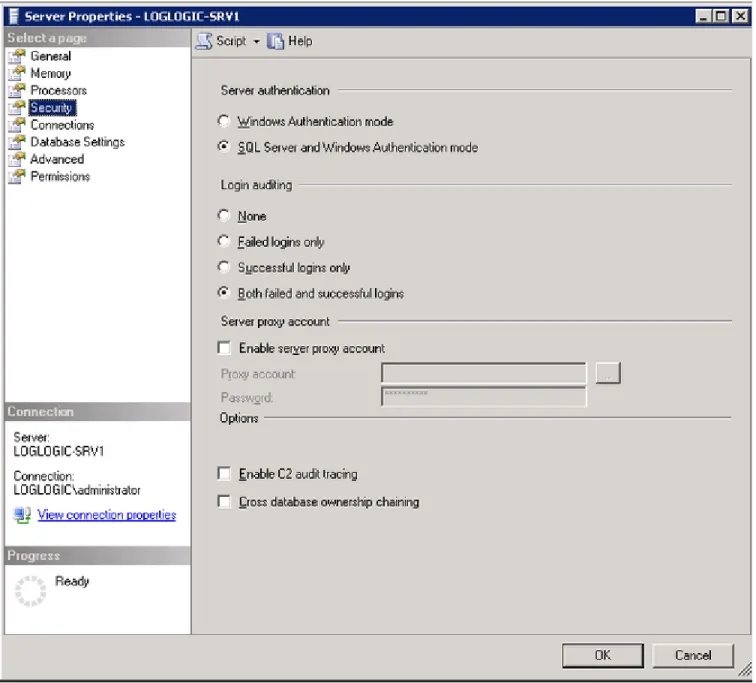
4. On the Security page, under Login auditing section select the radio button for the desired option. The available options are:
None
Failed logins only Successful logins only
Both failed and successful logins 5. Click OK.
Figure 1 Object Explorer - Server Properties > Security
To configure Microsoft SQL Server 2000 C2 auditing:
To configure the C2 audit mode option in Microsoft SQL Server 2000, you must use the
sp_configure stored procedure with the C2 audit mode parameter. Permissions to perform the configuration are limited to members of the sysadmin fixed server role.
1. Log in to the Microsoft SQL Server 2000 machine. 2. Open the Microsoft Query Analyzer.
3. Run the following sequence of T-SQL commands:
USE master
EXEC sp_configure 'show advanced option', '1' RECONFIGURE
EXEC sp_configure 'c2 audit mode', 1 RECONFIGURE
Assigning the c2 audit mode parameter a value of 1 enables auditing, 0 is the de-fault. c2 audit mode is an advanced option, so you must turn on the show
advanced option setting by assigning the parameter a value of 1. Changing the c2 audit mode parameter requires a Microsoft SQL Server restart.
To configure Microsoft SQL Server 2005/2008 C2 auditing: 1. Log in to the Microsoft SQL Server 2005/2008 machine.
2. In Microsoft SQL Server Management Studio, connect to an instance of the Microsoft SQL Server Database Engine with Object Explorer.
3. In Object Explorer, right-click the server name and select Properties.
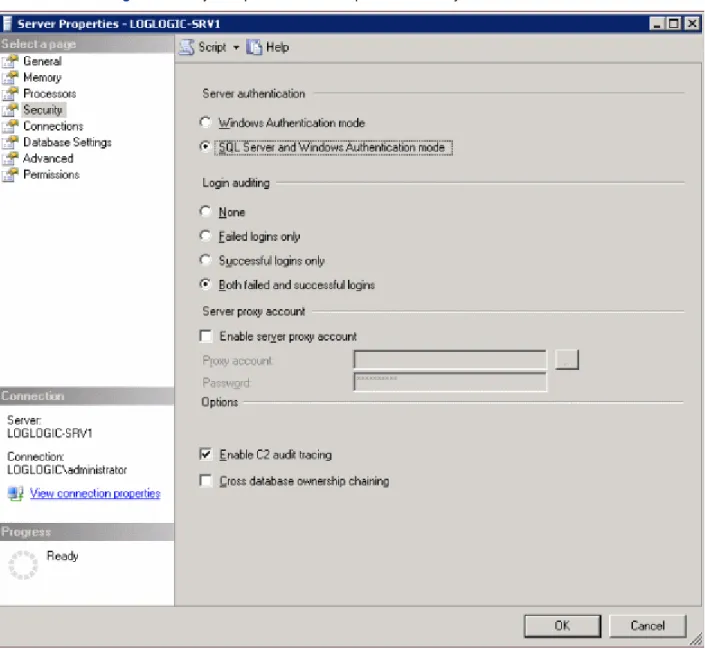
4. On the Security page, under the Options section, select the Enable C2 audit tracing
checkbox. 5. Click OK.
Configuring Server-Side Traces
C2 audit does not provide granularity on the event data and objects to be audited, so a recommended approach to collect audit log information is to enable server-side traces. Trace configuration can be customized to capture selected events only at the server/database/object scope with required information per event. The trace is enabled by executing a series of stored procedures that must be run every time Microsoft SQL Server is restarted. For more information on server-side traces for Microsoft SQL Server, see:
http://www.microsoft.com/technet/security/prodtech/sqlserver/sql2kaud.mspx
IMPORTANT! If you plan to use server-side traces to collect audit log information, make sure that you do not use underscores (_) in the trace filenames. Using underscores in the filename causes the Database Collector on the LogLogic Appliance to skip those files during collection.
Installing the LogLogic Audit Trace Configuration Script
An audit-trace-config.sql script is provided with LogLogic’s Log Source Package that will setup a server-side trace and also give option to enable or disable audit events as per your requirements. This script should be run every time Microsoft SQL Server restarts. This can be done using Microsoft SQL Server Agent.
Note: The Audit_Trace_Events.sql script is located in the scripts.tar package distributed with the LSP.
This script uses Microsoft SQL Server built-in stored procedures for automating the server-side traces. Execute this .sql script file in the Query Browser of Microsoft SQL Server along with valid input parameters for the trace file size and location of the trace file on file system.
After Microsoft SQL Server is restarted the existing trace file is stopped. You can run the script manually, or you can configure it to run according to a schedule or in response to alerts. If you want to run the script on a schedule, you can use SQL Server Agent jobs to automate routine administrative tasks and run them on a recurring basis, making administration more efficient. To create a job, a user must be a member of one of the SQL Server Agent fixed database roles or the sysadmin fixed server role. For more information about the SQL Server Agent, see the Microsoft SQL Server Product Documentation.
Stopping a Server-side Trace on Microsoft SQL Server
After server-side trace is started, the trace continues to run and generate output until you stop the trace manually.
To manually stop a server-side trace on Microsoft SQL Sever 2000/2005/2008: 1. Log in to the Microsoft SQL Server 2000/2005/2008 machine.
2. Open the Microsoft Query Analyzer.
3. Connect to the instance of SQL Server where the server-side trace is running. 4. Run the following Transact-SQL statement to retrieve the list of the running trace:
SELECT * FROM ::fn_trace_getinfo(NULL)
Make sure to note the traceid of the server-side trace that you want to stop.
5. Run the following Transact-SQL statement to stop the server-side trace (where traceid is the id of the server-side trace that you noted in Step 4:
6. Run the following Transact-SQL statement to close the trace and to delete the trace information (where traceid is the id of the server-side trace that you noted in Step 4):
EXEC sp_trace_setstatus @traceid = traceid , @status = 2
Configuring Microsoft SQL Server for Trace File Log Collection
To capture audit logs from Microsoft SQL 2000 Server for the LogLogic Appliance, you must enable xp_cmdshell, mixed mode authentication, and create a user with proper access permissions on the xp_cmdshell and fn_trace_gettable functions.To capture audit logs from Microsoft SQL 2005/2008 Server for the LogLogic Appliance, you may choose to use Windows or SQL Server authentication, xp_cmdshell and/or LogLogic’s MSSQL xp_cmd replacement.
Note: If you choose to use xp_cmdshell on Microsoft SQL 2005/2008 Server you will must still enable xp_cmdshell, and create a user with proper access permissions on the xp_cmdshell and fn_trace_gettable functions.
Enabling xp_cmdshell
In Microsoft SQL Server 2000, xp_cmdshell is enabled by default. In Microsoft SQL Server 2005/ 2008, you must enable the configuration manually.
To enable xp_cmdshell in Microsoft SQL Server 2005/2008:
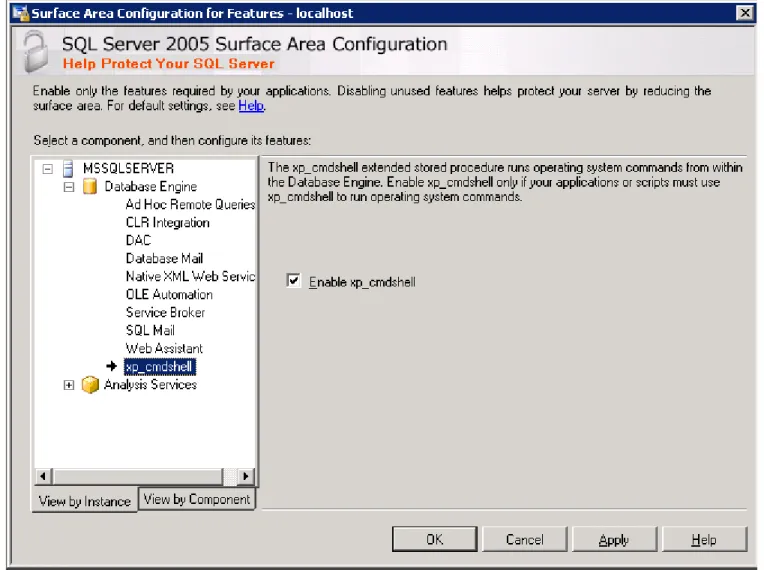
1. From the Windows Start menu, select Microsoft SQL Server 2005/2008 > Configuration Tools > SQL Server Surface Area Configuration Tool.
2. Click on Surface Area Configuration for Features.
3. Make sure that the View by Instance tab is select on the left, and click xp_cmdshell in the list.
4. Select the Enable xp_cmdshell checkbox. 5. Click OK.
Figure 3 Surface Area Configuration for Features Window
To enable xp_cmdshell in Microsoft SQL Server 2008: Run the following Transact-SQL statement: -- To allow advanced options to be changed. EXEC sp_configure 'show advanced options', 1 GO
--To update the currently configured value for advanced options. RECONFIGURE
GO
-- To enable the feature.
EXEC sp_configure 'xp_cmdshell', 1 GO
-- To update the currently configured value for this feature. RECONFIGURE
Installing the LogLogic MSSQL xp_cmdshell replacement on Microsoft SQL Server
2005/2008
An mssql_xp_cmdshell_replacement.zip archive is provided with LogLogic’s Log Source Package that will setup a server-side Trace File List function that will allow the LogLogic Applicance to retreave the list of trace files to collect without using xp_cmdshell.
The mssql_xp_cmdshell_replacement.zip archive contains an install script called Install_ListTraceFiles.sql which is included with the ListTraceFiles.dll file. To install ListTraceFiles.dll:
1. Extract mssql_xp_cmdshell_replacement.zip on the local Microsoft SQL 2005/2008 server 2. Open the Install_ListTraceFiles.sql file in Microsoft SQL Server Management Studio and
follow the instructions included in the SQL file.
Enabling Mixed Mode Authentication
To enable LogLogic Appliance to collect audit logs in trace files from Microsoft SQL Server, you must enable Mixed Mode authentication. Due to a limitation of the Microsoft JDBC driver, Microsoft SQL Server needs to be configured to use Mixed Mode authentication (i.e., SQL Server and Windows Authentication Mode) to collect trace files. Windows authentication is not
supported for connections to Microsoft SQL Server from the LogLogic Appliance. To enable Mixed Mode authentication in Microsoft SQL Server 2000/2005/2008:
1. Log in to the Microsoft SQL Server 2000/2005/2008 machine.
2. In Microsoft SQL Server Management Studio, connect to an instance of the Microsoft SQL Server Database Engine with Object Explorer.
3. In Object Explorer, right-click the server name and select Properties.
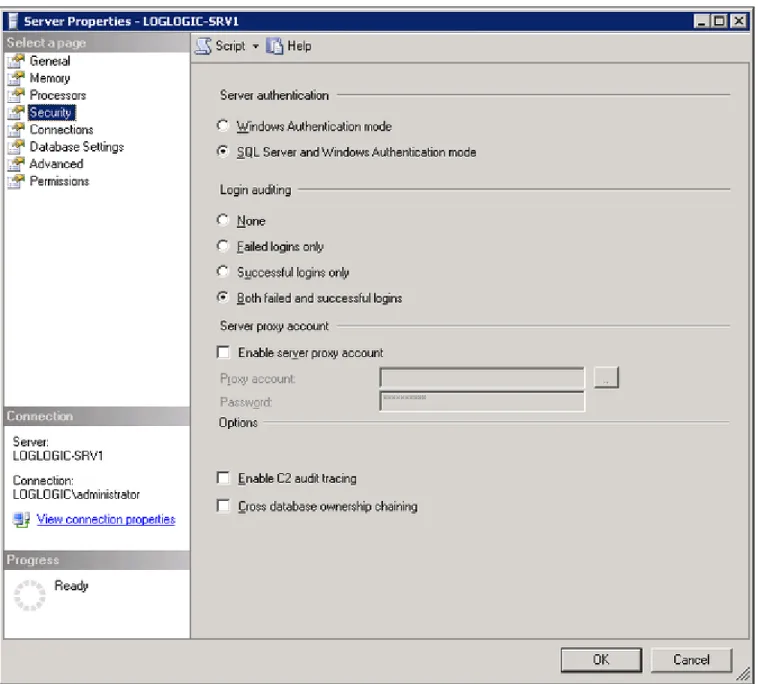
4. On the Security page, under the Server authentication section, select the SQL Server and Windows Authentication Mode radio button.
5. Click OK.
Note: For Microsoft SQL Server 2005/2008 Windows Authentication is supported. The Windows user must have a Server Role of ‘public & sysadmin’.
Figure 4 Object Explorer - Server Properties > Security
Creating a User with Proper Permissions
In order for the database collector on the LogLogic Appliance to read the audit trace files, a LogLogic user needs to be created on Microsoft SQL Server with the proper permissions for the xp_cmdshell and fn_trace_gettable functions. For Microsoft SQL Server 2000/2005/2008, the user must have sysadmin permissions for both functions.
Note: The userID and password for this user must be given while configuring Microsoft SQL Server Collector. For more information, see Adding a Microsoft SQL Server Device on page 18.
Purging Trace Files
LogLogic collects the audit log data from the trace files located on Microsoft SQL Server. Trace files are not purged or archived by LogLogic’s Database Collector. However, LogLogic does provide information on the data obtained by the collector from the trace files. A Microsoft SQL Server administrator can make use of this information to determine what trace files can be purged or archived in their Microsoft SQL Server file system.
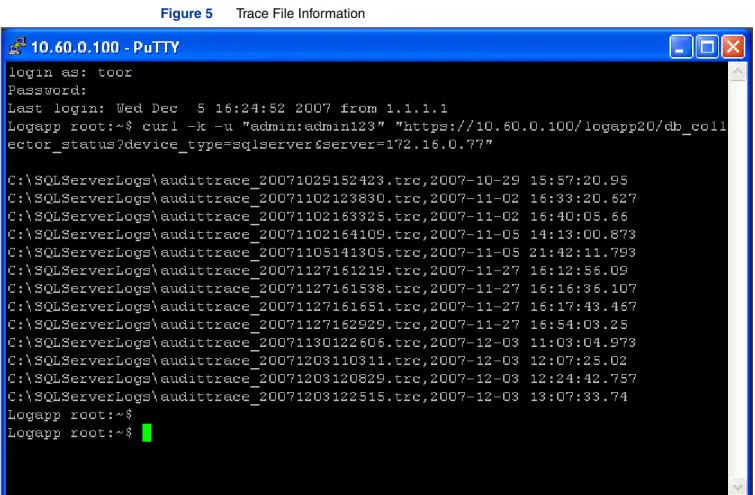
To obtain trace file information from the LogLogic Appliance:
1. Log in to the LogLogic Appliance’s Command Line Interface (CLI). 2. Type in the following command:
curl -k -u "userID:Password" https://applianceIPaddress/logapp20/ db_collector_status?device_type=sqlserver&server=mssqlserverIPaddr ess"
applianceIPaddress - IP address of the LogLogic Appliance where the Microsoft SQL Server device was configured
mssqlserverIPaddress - IP address of the host machine where Microsoft SQL Server is installed
For example,
curl -k -u "admin:passw0rd" "https://10.16.8.22/logapp20/ db_collector_status?device_type=sqlserver&server=10.116.24.52
The command returns a list of trace files that were read by the collector including the timestamp.
Configuring Microsoft SQL Server for Operational Events
Microsoft SQL Server operational events are posted in the Windows Event Viewer. The events are located in the Windows System logs. These events can be captured by LogLogic Appliance using Lasso.
Note: Operational logs only contain success/failure login information if Login auditing is enabled on Microsoft SQL Server. For more information, see Configuring Login and C2 Audit Logging on Microsoft SQL Server on page 8.
Installing and Configuring Lasso
The Microsoft SQL Server operational logs are collected and transported using Lasso. Lasso is used to collect and transfer Windows Event logs to the LogLogic Appliance.
By default, the Lasso program directory is located at:
C:\Program Files\Lasso
Lasso spools log messages if the connection to the Appliance is temporarily lost. By default, the following directory contains all spooled log messages:
C:\Program Files\Lasso\LassoRepository\Spool
You can change the host machine and event log identification information by editing the
hostlist.ini configuration file in Lasso. You can change the spool log location and other Lasso monitoring parameters by editing the Lasso.ini file. For the complete installation and
configuration procedures for Lasso, including information on the Lasso.ini and
hostlist.ini files, see the LogLogic Lasso Collector Guide.
Enabling the LogLogic Appliance to Capture Log Data
The following sections describe how to enable the LogLogic Appliance to capture Microsoft SQL Server log data.
Automatically Identifying a Microsoft SQL Server Device
With the auto-identification feature, the LogLogic Appliance recognizes Microsoft SQL Server operational log messages in Syslog format using Lasso. As the Syslog messages come into the Appliance, they are collected the same as any other MS Application event, and they are identified as originating from a Windows device and added to the log source device list. Default values are used for certain properties, such as the device name.
IMPORTANT! The Microsoft SQL Server device is auto-identified when operational events are captured by Lasso. However, you must add the device manually if you are capturing audit events using LogLogic’s Database Collector. For more information, see Adding a Microsoft SQL Server Device on page 18.
To enable auto-identification in the LogLogic Appliance: 1. Log in to the LogLogic Appliance.
2. From the navigation menu, select Administration > System Settings. The General tab appears.
3. For Auto-identify Log Sources, select Yes. 4. Click Update.
Once the automatically identified device is added, you can edit its properties.
IMPORTANT! Do not change the auto-identified Device Type and Host IP information.
To edit an existing Microsoft SQL Server device: 1. Log in to the LogLogic Appliance.
2. From the navigation menu, select Management > Devices. The Devices tab appears.
3. Click on an existing Microsoft SQL Server device in the list and click Modify Device. The Modify Device tab appears.
4. Edit the device fields as needed, then click Update Device.
Adding a Microsoft SQL Server Device
The LogLogic Database Collector is a base component of the LogLogic Appliance that connects to Microsoft SQL Server and retrieves the audit log information. You must add the server as a new device so LogLogic can properly handle the log file data to make it available through reports and searching.
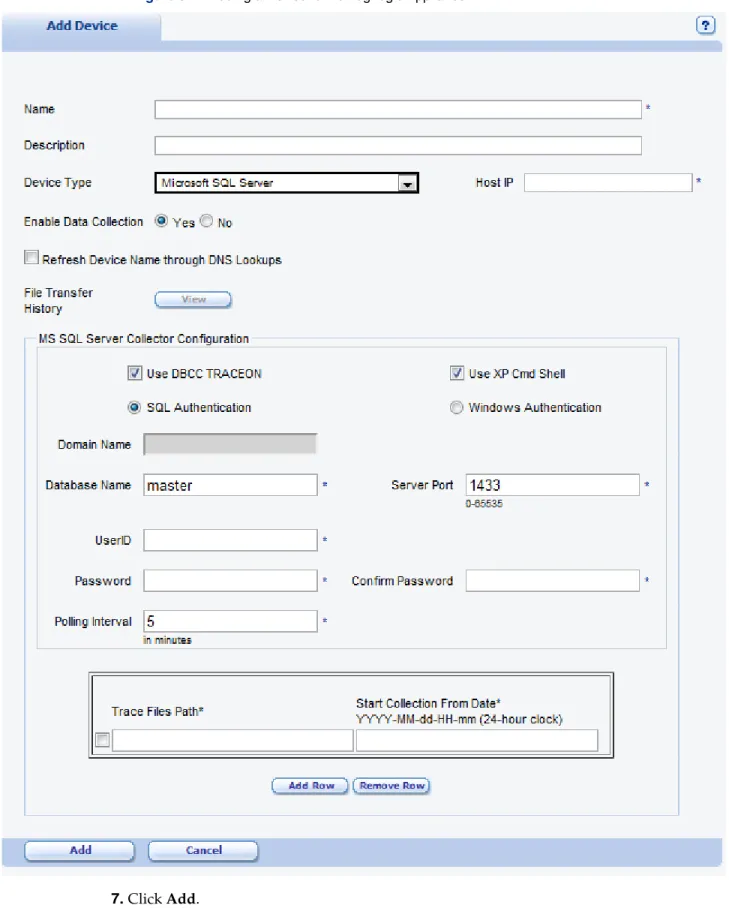
To add Microsoft SQL Server as a new device 1. Log in to the LogLogic Appliance.
2. From the navigation menu, select Management > Devices. The Devices tab appears.
3. Click Add New.
The Add Device tab appears.
4. Type in the following information for the device: Name—Name for the Microsoft SQL Server device
Description (optional)—Description of the Microsoft SQL Server device Device Type—Select Microsoft SQL Server from the drop-down menu Host IP—IP address of the Microsoft SQL Server appliance
Enable Data Collection—Select the Yes radio button
Refresh Device Name through DNS Lookups (optional)—Select this checkbox to enable the Name field to be automatically updated. The name is obtained using a reverse DNS lookup on the configured refresh interval. The DNS name overrides any manual name you assign.
5. Under the MS SQL Server Configuration section, type in the following information: Use DBCC TRACEON (optional) — Select this checkbox to use SQL query “DBCC
TRACEON (1903)” before collection of log data.
Use XP Cmd Shell (optional) - Select this checkbox to use xp_cmdshell Authentication—Select SQL Authentication or Windows Authentication. Domain Name —If you have selected Windows Authentication provide the
corresponding domain name of the user.
Database Name—Microsoft SQL Server database instance name Server Port—Port number for Microsoft SQL Server
UserID—User name for the Microsoft SQL Server sysadmin user or Windows Authentication domain user based on the selection of the Authentication type. Password/Confirm Password—Password for the corresponding user authentication
type.
Trace Files Path—Audit log file name for Microsoft SQL Server. The pathname must be the absolute path to the trace (.trc) file. The LogLogic Appliances need to be able to read new trace files that are created after server restart.
Start Collection From Date—Date and time that the LogLogic Appliance will begin to collect log data.
Note: User can collect data from trace files at multiple locations, to specify different location use “Add Row” button and input data for trace file path and start time.
Figure 6 Adding a Device to the LogLogic Appliance
7. Click Add.
8. Verify that your new device appears in the Devices tab and that Enabled is set to Yes. When the logs arrive from the specified Microsoft SQL Server appliance, the LogLogic Appliance uses the device you just added if the hostname or IP match.
Verifying the Configuration
The section describes how to verify that the configuration changes made to Microsoft SQL Server and the LogLogic Appliance are applied correctly.
To verify the configuration:
1. Log in to the LogLogic Appliance.
2. From the navigation menu, select Dashboards > Log Source Status. The Log Source Status tab appears.
3. Locate the IP address for each Microsoft SQL Server device.
If the device name (Microsoft SQL Server) appears in the list of devices, then the configuration is correct. If the device does not appear in the Log Source Status tab, check the Microsoft SQL Server logs for events that should have been sent. If events were detected and are still not appearing on the LogLogic Appliance, verify the Microsoft SQL Server configuration, the Lasso configuration (for operational logs), and the LogLogic Appliance configuration.
You can also verify that the LogLogic Appliance is properly capturing log data from Microsoft SQL Server by trying to view the data in the reports. LogLogic recommends checking the reports to make sure that the data obtained is valid and matches expectations. For more information, see LogLogic Real-Time Reports on page 24.
If the device name appears in the list of devices but operational log data for the device is not appearing within your reports, see Troubleshooting on page 26 for more information. If the device name appears in the list of devices but audit log data for the device is not appearing within your reports, you need to verify that your database connection is up and running properly. .
Chapter 2 – How LogLogic Supports Microsoft SQL
Server
This chapter describes LogLogic’s support for Microsoft SQL Server. LogLogic enables you to capture log data to monitor Microsoft SQL Server events.
How LogLogic Captures Microsoft SQL Server Log Data . . . 22 Supported Microsoft SQL Server Log Data . . . 23 LogLogic Real-Time Reports . . . 24 LogLogic Search Filters . . . 25
How LogLogic Captures Microsoft SQL Server Log Data
In order to collect audit log data from Microsoft SQL Server, C2 audit logging or a server-side traces must be enabled on the database. C2 audit logging does not provide granularity on the event data and objects to be audited, so LogLogic recommends collecting audit log information via server-side traces. For more information, see Configuring Login and C2 Audit Logging on Microsoft SQL Server on page 8 and Configuring Server-Side Traces on page 11. Regardless of the method used to collect the audit log information, LogLogic’s Database Collector can connect to multiple databases, via JDBC, to capture the log data.
LogLogic’s Lasso Collector is used to collect Microsoft SQL Server operational logs stored in the Windows Event Log. The operational logs are converted into text format by Lasso and sent to the Syslog Listener of the LogLogic Appliance via UDP or TCP.
Note: Lasso can run in Agent Mode, Collector Mode, or both (i.e., a hybrid mode) on a remote Host Server or on the host machine where Microsoft SQL Server is installed. For more information, see the LogLogic Lasso Collector Guide.
Once the data is captured and parsed, you can generate reports. In addition, you can create alerts to notify you of issues on Microsoft SQL Server. For more information on creating reports and alerts, see the LogLogic User Guide and LogLogic Online Help.
Note: When a log file is transferred, each file contains a timestamp which consists of a date and time. The timestamp refers to the file creation date and time for a particular message in the file. For a listing of LogLogic supported date and time formats, see the LogLogic Administration Guide.
Supported Microsoft SQL Server Log Data
The audit facility of Microsoft SQL Server acts at an instance level, recording all instance level activities and database level activities. Microsoft SQL Server supports logging of audit data in two ways – C2 audit and server-side traces. Enabling C2 auditing logs many events and can affect performance. LogLogic recommends configuring custom server-side traces for the audit events that are important as per the security policy of your organization.
Table 1 on page 30 and Table 2 on page 32 lists the Microsoft SQL Server 2005 audit and
operational events that are supported by the LogLogic Appliance. Table 3 on page 49 and Table 4
on page 50 lists the Microsoft SQL Server 2000 audit and operational events that are supported by the LogLogic Appliance.
Note: The LogLogic Appliance captures all messages from the Microsoft SQL Server logs, but includes only specific messages for report/alert generation.
For more information, see Appendix A – Event Reference on page 29 for sample log messages for each event and event to category mapping.
LogLogic Real-Time Reports
LogLogic provides pre-configured Real-Time Reports for Microsoft SQL Server log data. The following Real-Time Reports are available:
All Database Events—Displays the event types that are occurring. The report returns all Microsoft SQL Server events.
All Unparsed Events—Displays data for all events retrieved from the Microsoft SQL Server log for a specified time interval
Database Access—Displays all database server connections including user access and failed user access attempts. The access type field indicates if the event occurred during login, logoff, or logout and shows the access mechanism such as ODBC or SQL Shell.
Database Data Access—Displays user access and changes to your data for a specified time period
Database Privilege Modifications—Displays database privilege changes (e.g., user reconfiguration and privilege manipulation)
Database System Modifications—Displays system database changes (e.g., table drops and schema changes)
User Access—Displays data access and changes done to data during a specified time interval
User Authentication—Displays identity and access related events during a specified time interval
User Last Activity—Displays user specific details and used to track user activity during a specified time interval
Windows Events—Displays Windows event information served during a specified time interval
To access LMI 5 Real-Time Reports:
1. From the top navigation menu, click Reports. 2. Click Access Control.
The following Real-Time Reports are available: User Access
User Authentication User Last Activity Windows Events 3. Click Database Activity.
The following Real-Time Reports are available: All Database Events
Database Access Database Data Access
Database Privilege Modifications Database System Modifications 4. Click Operational.
The following Real-Time Report is available: All Unparsed Events
You can create custom reports from the existing Real-Time Report templates. For Microsoft SQL Server, LogLogic provides a set of pre-configured custom reports. For more information, see
LogLogic Search Filters
LogLogic provides pre-configured Search Filters for Microsoft SQL Server log data. Search Filters are used to filter report data and create alerts.
To access Search Filter-Based Reports:
1. From the navigation menu, select Search. 2. Select Search Filters.
The following Search Filters are available:
MS SQL Server: Aborting—Displays information related to SQL Server abort events MS SQL Server: Backup Complete—Displays information about completed SQL Server
backup events
MS SQL Server: Backup Failures—Displays information about failed SQL Server backup events
MS SQL Server: Login Failed—Displays information about SQL Server failed login events MS SQL Server: Login Successful—Displays information about SQL Server successful
login events
MS SQL Server: Memory Stack Overflow—Displays information about SQL Server memory stack overflow events
MS SQL Server: Paused—Displays information about events where SQL Server was paused
MS SQL Server: Recovery Complete—Displays information about completed SQL Server recovery events
MS SQL Server: Recovery Failure—Displays information about failed SQL Server recovery events
MS SQL Server: Restore Complete—Displays information about completed SQL Server restore events
MS SQL Server: Restore Failure—Displays information about failed SQL Server restore events
MS SQL Server: Shutdown—Displays information about completed SQL Server shutdown events
MS SQL Server: Start—Displays information about completed SQL Server startup events MS SQL Server: Startup Failed—Displays information about failed SQL Server startup
events
MS SQL Server: Terminating—Displays information about events where SQL Server was terminated
For more information on Search Filters, reports, and alerts see the LogLogic User Guide and LogLogic Online Help.
Chapter 3 – Troubleshooting
This chapter contains troubleshooting information regarding the configuration and/or use of log collection for Microsoft SQL Server. It also contains Frequently Asked Questions (FAQ), providing quick answers to common questions.
Troubleshooting . . . 26 Frequently Asked Questions . . . 27
Troubleshooting
Is your version of Microsoft SQL Server supported?
For more information, see Prerequisites on page 8.
Is your LogLogic Appliance running Release 5.1 or later?
If you are running an release prior to 5.1, you might require an upgrade. Contact LogLogic Support for more information.
Are you running Lasso 4.0 or later?
If you are running an release prior to 4.0, you might require an upgrade. Contact LogLogic Support for more information.
Is the appropriate Log Source Package (LSP) installed properly?
Check to make sure that the LSP that is installed includes support for Microsoft SQL Server. Also make sure that the package was installed successfully. For more information on LSP installation procedures, see the LogLogic Log Source Package Release Notes.
If Microsoft SQL Server operational events are not appearing on the LogLogic
Appliance...
You can verify that your log files are received by viewing the File Transfer History. You can view the history from the Administration > File Transfer History tab.
Make sure that you have properly installed and configured the Lasso Collector, and that no errors are present in Lasso’s error log (LassoTrace.log). For more information, see the LogLogic Lasso Collector Guide.
Also make sure that the Appliance is properly auto-identifying the device. If not, then try to add the device to the Appliance manually. For more information, Automatically Identifying a Microsoft SQL Server Device on page 17.
If operational events are not displaying on the LogLogic Appliance even after
configuring Microsoft SQL Server and Lasso correctly...
Microsoft SQL Server sends the logs, via UDP or TCP in Syslog format, to the LogLogic Appliance. Make sure that the UDP or TCP port is enabled on the Microsoft SQL Server machine. For more information on supported protocols and ports, see the LogLogic Administration Guide and the LogLogic Lasso Collector Guide.
If Microsoft SQL Server audit events are not appearing on the LogLogic
Appliance...
You need to verify if the database connection information provided to the LogLogic Appliance is correct and that the connection is up and running. For more information, see Adding a Microsoft SQL Server Device on page 18.
When using the LogLogic MSSQL xp_cmdshell replacement, and I click the “Test”
button, no logs are shown as eligible for collection.
Check to be sure that the Database Name configured in LogLogic matches that of the database specified in Step 3. (Enable Trustworthy) of the Install_ListTraceFiles.sql.
What does the following error mean?
This means that the LogLogic MSSQL xp_cmd replacement has not be installed correctly. For more information see Installing the LogLogic MSSQL xp_cmdshell replacement on Microsoft SQL Server 2005/2008 on page 14 .
Frequently Asked Questions
How does the LogLogic Appliance collect logs from Microsoft SQL Server?
For audit log collection, C2 audit logging or a server-side trace is enabled on the database. LogLogic’s Database Collector connects to the database via JDBC to capture the log data. For operational log collection, a Lasso Collector is required in order to read the .evt files from the Windows machine, convert them into text format, and forward them via Syslog using UDP or TCP to the LogLogic Appliance. The LogLogic Appliance functions as the Syslog server. For more information, see How LogLogic Captures Microsoft SQL Server Log Data on page 22.
What access permissions are required?
To configure logging on Microsoft SQL Server, the Windows user must have administrative permissions and the database user must have the proper access permissions to execute traces. For more information, see Prerequisites on page 8.
How do I configure logging on Microsoft SQL Server?
For audit logs, follow the procedures on Configuring Microsoft SQL Server for Audit Events on page 8. Also make sure that you have properly added the device and configured the database information on the LogLogic Appliance. For more information, see Adding a Microsoft SQL Server Device on page 18.
For operational logs, make sure that you have properly installed and configured Lasso. For more information, see Configuring Microsoft SQL Server for Operational Events on page 17 and the LogLogic Lasso Collector Guide.
Note: Operational logs only contain success/failure login information if Login auditing is enabled on Microsoft SQL Server. For more information, see Configuring Login and C2 Audit Logging on Microsoft SQL Server on page 8.
Appendix A – Event Reference
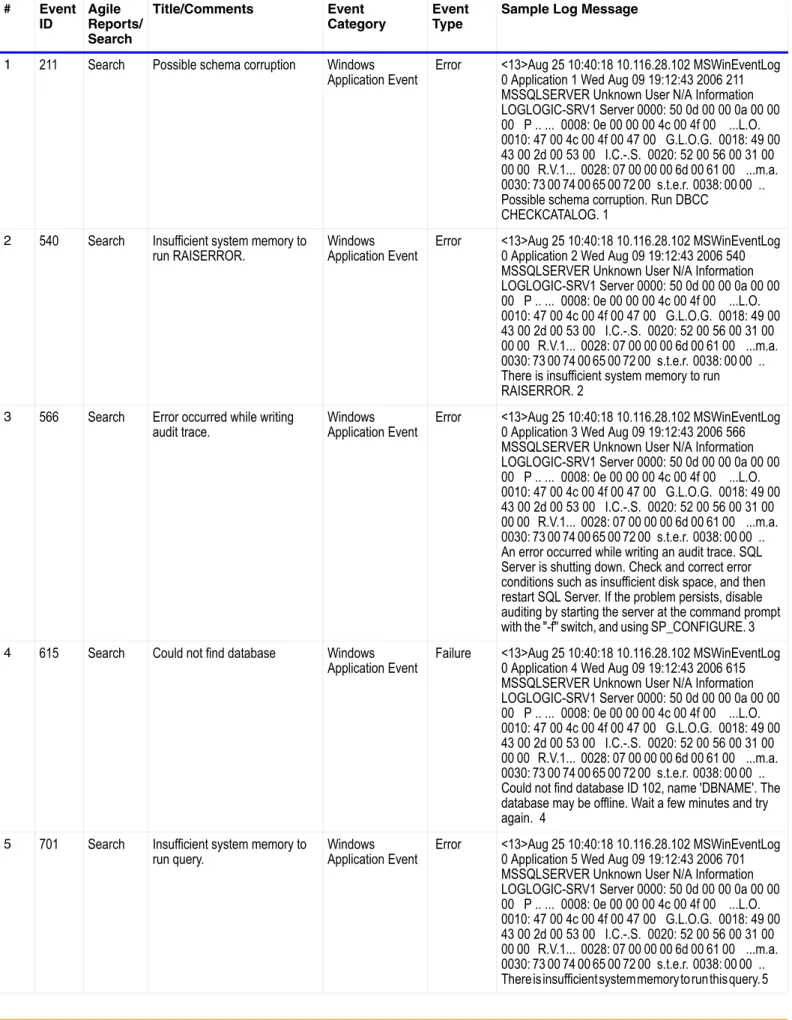
This appendix lists the LogLogic-supported Microsoft SQL Server events. The Microsoft SQL Server event table identifies events that can be analyzed through LogLogic reports. All sample operational log messages were captured by Lasso and forwarded to the Syslog Listener on the LogLogic Appliance. All sample audit log messages were captured by the LogLogic’s Database Collector on the LogLogic Appliance.
LogLogic Support for Microsoft SQL Server Events
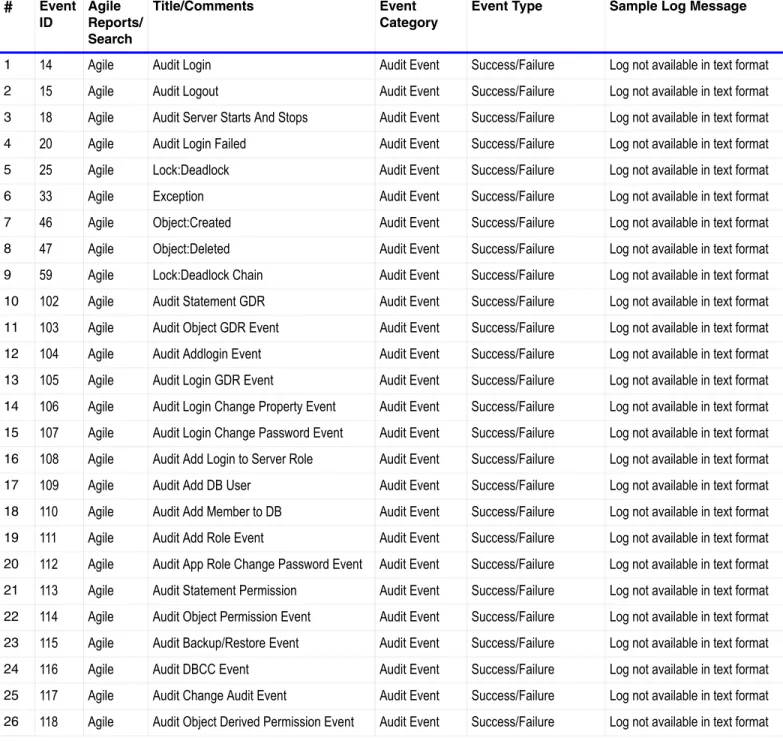
The following list describes the contents of each of the columns in the tables below. Event ID – Microsoft SQL Server event identifier
Agile Reports/Search – Defines if the Microsoft SQL Server event is available through the LogLogic Agile Report Engine or through the search capabilities. If the event is available through the Agile Report Engine, then you can use LogLogic’s Real-Time Reports and Summary Reports to analyze and display the captured log data. Otherwise, all other supported events that are captured by the LogLogic Appliance can be viewed by performing a search for the log data.
Title/Comments – Description of the event
Event Category – Category of events such as Audit or Operational Event Type – Type of event such as Success or Failure
Table 1 Microsoft SQL Server 2005 Audit Events
#
EventID
Agile Reports/ Search
Title/Comments Event
Category
Event Type Sample Log Message
1 14 Agile Audit Login Audit Event Success/Failure Log not available in text format 2 15 Agile Audit Logout Audit Event Success/Failure Log not available in text format 3 18 Agile Audit Server Starts And Stops Audit Event Success/Failure Log not available in text format 4 20 Agile Audit Login Failed Audit Event Failure Log not available in text format 5 25 Agile Lock:Deadlock Audit Event Log not available in text format 6 33 Agile Exception Audit Event Log not available in text format 7 46 Agile Object:Created Audit Event Log not available in text format 8 47 Agile Object:Deleted Audit Event Log not available in text format 9 59 Agile Lock:Deadlock Chain Audit Event Log not available in text format 10 102 Agile Audit Database Scope GDR Event Audit Event Success/Failure Log not available in text format 11 103 Agile Audit Schema Object GDR Event Audit Event Success/Failure Log not available in text format 12 104 Agile Audit Addlogin Event Audit Event Success/Failure Log not available in text format 13 105 Agile Audit Login GDR Event Audit Event Success/Failure Log not available in text format 14 106 Agile Audit Login Change Property Event Audit Event Success/Failure Log not available in text format 15 107 Agile Audit Login Change Password Event Audit Event Success/Failure Log not available in text format 16 108 Agile Audit Add Login to Server Role Event Audit Event Success/Failure Log not available in text format 17 109 Agile Audit Add DB User Event Audit Event Success/Failure Log not available in text format 18 110 Agile Audit Add Member to DB Role Event Audit Event Success/Failure Log not available in text format 19 111 Agile Audit Add Role Event Audit Event Success/Failure Log not available in text format 20 112 Agile Audit App Role Change Password Event Audit Event Success/Failure Log not available in text format 21 113 Agile Audit Statement Permission Event Audit Event Success/Failure Log not available in text format 22 114 Agile Audit Schema Object Access Event Audit Event Success/Failure Log not available in text format 23 115 Agile Audit Backup/Restore Event Audit Event Success/Failure Log not available in text format 24 116 Agile Audit DBCC Event Audit Event Success/Failure Log not available in text format 25 117 Agile Audit Change Audit Event Audit Event Success/Failure Log not available in text format 26 118 Agile Audit Object Derived Permission Event Audit Event Success/Failure Log not available in text format 27 128 Agile Audit Database Management Event Audit Event Success/Failure Log not available in text format 28 129 Agile Audit Database Object Management Event Audit Event Success/Failure Log not available in text format 29 130 Agile Audit Database Principal Management Event Audit Event Success/Failure Log not available in text format 30 131 Agile Audit Schema Object Management Event Audit Event Success/Failure Log not available in text format 31 132 Agile Audit Server Principal Impersonation Event Audit Event Success/Failure Log not available in text format 32 133 Agile Audit Database Principal Impersonation Event Audit Event Success/Failure Log not available in text format 33 134 Agile Audit Server Object Take Ownership Event Audit Event Success/Failure Log not available in text format 34 135 Agile Audit Database Object Take Ownership Event Audit Event Success/Failure Log not available in text format 35 137 Agile Blocked process report Audit Event Log not available in text format
37 153 Agile Audit Schema Object Take Ownership Event Audit Event Success/Failure Log not available in text format 38 164 Agile Object:Altered Audit Event Log not available in text format 39 167 Agile Database Mirroring State Change Audit Event Log not available in text format 40 170 Agile Audit Server Scope GDR Event Audit Event Success/Failure Log not available in text format 41 171 Agile Audit Server Object GDR Event Audit Event Success/Failure Log not available in text format 42 172 Agile Audit Database Object GDR Event Audit Event Success/Failure Log not available in text format 43 173 Agile Audit Server Operation Event Audit Event Success/Failure Log not available in text format 44 175 Agile Audit Server Alter Trace Event Audit Event Success/Failure Log not available in text format 45 176 Agile Audit Server Object Management Event Audit Event Success/Failure Log not available in text format 46 177 Agile Audit Server Principal Management Event Audit Event Success/Failure Log not available in text format 47 180 Agile Audit Database Object Access Event Audit Event Success/Failure Log not available in text format 48 193 Agile Background Job Error Audit Event Log not available in text format
#
Event IDAgile Reports/ Search
Title/Comments Event
Category
Table 2 Microsoft SQL Server 2005 Operational Events # Event ID Agile Reports/ Search Title/Comments Event Category Event Type
Sample Log Message
1 211 Search Possible schema corruption Windows
Application Event Error <13>Aug 25 10:40:18 10.116.28.102 MSWinEventLog 0 Application 1 Wed Aug 09 19:12:43 2006 211 MSSQLSERVER Unknown User N/A Information LOGLOGIC-SRV1 Server 0000: 50 0d 00 00 0a 00 00 00 P .. ... 0008: 0e 00 00 00 4c 00 4f 00 ...L.O. 0010: 47 00 4c 00 4f 00 47 00 G.L.O.G. 0018: 49 00 43 00 2d 00 53 00 I.C.-.S. 0020: 52 00 56 00 31 00 00 00 R.V.1... 0028: 07 00 00 00 6d 00 61 00 ...m.a. 0030: 73 00 74 00 65 00 72 00 s.t.e.r. 0038: 00 00 .. Possible schema corruption. Run DBCC
CHECKCATALOG. 1
2 540 Search Insufficient system memory to
run RAISERROR. Windows Application Event Error <13>Aug 25 10:40:18 10.116.28.102 MSWinEventLog 0 Application 2 Wed Aug 09 19:12:43 2006 540 MSSQLSERVER Unknown User N/A Information LOGLOGIC-SRV1 Server 0000: 50 0d 00 00 0a 00 00 00 P .. ... 0008: 0e 00 00 00 4c 00 4f 00 ...L.O. 0010: 47 00 4c 00 4f 00 47 00 G.L.O.G. 0018: 49 00 43 00 2d 00 53 00 I.C.-.S. 0020: 52 00 56 00 31 00 00 00 R.V.1... 0028: 07 00 00 00 6d 00 61 00 ...m.a. 0030: 73 00 74 00 65 00 72 00 s.t.e.r. 0038: 00 00 .. There is insufficient system memory to run
RAISERROR. 2
3 566 Search Error occurred while writing
audit trace. Windows Application Event Error <13>Aug 25 10:40:18 10.116.28.102 MSWinEventLog 0 Application 3 Wed Aug 09 19:12:43 2006 566 MSSQLSERVER Unknown User N/A Information LOGLOGIC-SRV1 Server 0000: 50 0d 00 00 0a 00 00 00 P .. ... 0008: 0e 00 00 00 4c 00 4f 00 ...L.O. 0010: 47 00 4c 00 4f 00 47 00 G.L.O.G. 0018: 49 00 43 00 2d 00 53 00 I.C.-.S. 0020: 52 00 56 00 31 00 00 00 R.V.1... 0028: 07 00 00 00 6d 00 61 00 ...m.a. 0030: 73 00 74 00 65 00 72 00 s.t.e.r. 0038: 00 00 .. An error occurred while writing an audit trace. SQL Server is shutting down. Check and correct error conditions such as insufficient disk space, and then restart SQL Server. If the problem persists, disable auditing by starting the server at the command prompt with the "-f" switch, and using SP_CONFIGURE. 3
4 615 Search Could not find database Windows
Application Event Failure 0 Application 4 Wed Aug 09 19:12:43 2006 615 <13>Aug 25 10:40:18 10.116.28.102 MSWinEventLog MSSQLSERVER Unknown User N/A Information LOGLOGIC-SRV1 Server 0000: 50 0d 00 00 0a 00 00 00 P .. ... 0008: 0e 00 00 00 4c 00 4f 00 ...L.O. 0010: 47 00 4c 00 4f 00 47 00 G.L.O.G. 0018: 49 00 43 00 2d 00 53 00 I.C.-.S. 0020: 52 00 56 00 31 00 00 00 R.V.1... 0028: 07 00 00 00 6d 00 61 00 ...m.a. 0030: 73 00 74 00 65 00 72 00 s.t.e.r. 0038: 00 00 .. Could not find database ID 102, name 'DBNAME'. The database may be offline. Wait a few minutes and try again. 4
5 701 Search Insufficient system memory to
run query. Windows Application Event Error <13>Aug 25 10:40:18 10.116.28.102 MSWinEventLog 0 Application 5 Wed Aug 09 19:12:43 2006 701 MSSQLSERVER Unknown User N/A Information LOGLOGIC-SRV1 Server 0000: 50 0d 00 00 0a 00 00 00 P .. ... 0008: 0e 00 00 00 4c 00 4f 00 ...L.O. 0010: 47 00 4c 00 4f 00 47 00 G.L.O.G. 0018: 49 00 43 00 2d 00 53 00 I.C.-.S. 0020: 52 00 56 00 31 00 00 00 R.V.1... 0028: 07 00 00 00 6d 00 61 00 ...m.a. 0030: 73 00 74 00 65 00 72 00 s.t.e.r. 0038: 00 00 ..
6 708 Search Low on virtual address space or
low on virtual memory. Windows Application Event Error <13>Aug 25 10:40:18 10.116.28.102 MSWinEventLog 0 Application 6 Wed Aug 09 19:12:43 2006 708 MSSQLSERVER Unknown User N/A Information LOGLOGIC-SRV1 Server 0000: 50 0d 00 00 0a 00 00 00 P .. ... 0008: 0e 00 00 00 4c 00 4f 00 ...L.O. 0010: 47 00 4c 00 4f 00 47 00 G.L.O.G. 0018: 49 00 43 00 2d 00 53 00 I.C.-.S. 0020: 52 00 56 00 31 00 00 00 R.V.1... 0028: 07 00 00 00 6d 00 61 00 ...m.a. 0030: 73 00 74 00 65 00 72 00 s.t.e.r. 0038: 00 00 .. Server is running low on virtual address space or machine is running low on virtual memory. Reserved memory used 3 times since startup. Cancel query and re-run, decrease server load, or cancel other applications. 6
7 829 Search Possible disk corruption. Windows
Application Event Error
8 913 Search Could not find database Windows
Application Event Failure 0 Application 8 Wed Aug 09 19:12:43 2006 913 <13>Aug 25 10:40:18 10.116.28.102 MSWinEventLog MSSQLSERVER Unknown User N/A Information LOGLOGIC-SRV1 Server 0000: 50 0d 00 00 0a 00 00 00 P .. ... 0008: 0e 00 00 00 4c 00 4f 00 ...L.O. 0010: 47 00 4c 00 4f 00 47 00 G.L.O.G. 0018: 49 00 43 00 2d 00 53 00 I.C.-.S. 0020: 52 00 56 00 31 00 00 00 R.V.1... 0028: 07 00 00 00 6d 00 61 00 ...m.a. 0030: 73 00 74 00 65 00 72 00 s.t.e.r. 0038: 00 00 .. Could not find database ID 102. Database may not be activated yet or may be in transition. Reissue the query once the database is available. If you do not think this error is due to a database that is transitioning its state and this error continues to occur, contact your primary support provider. Please have available for review the Microsoft SQL Server error log and any additional information relevant to the circumstances when the error occurred. 8
9 1445 Search Bypassing recovery for
database Windows Application Event Error <13>Aug 25 10:40:18 10.116.28.102 MSWinEventLog 0 Application 9 Wed Aug 09 19:12:43 2006 1445 MSSQLSERVER Unknown User N/A Information LOGLOGIC-SRV1 Server 0000: 50 0d 00 00 0a 00 00 00 P .. ... 0008: 0e 00 00 00 4c 00 4f 00 ...L.O. 0010: 47 00 4c 00 4f 00 47 00 G.L.O.G. 0018: 49 00 43 00 2d 00 53 00 I.C.-.S. 0020: 52 00 56 00 31 00 00 00 R.V.1... 0028: 07 00 00 00 6d 00 61 00 ...m.a. 0030: 73 00 74 00 65 00 72 00 s.t.e.r. 0038: 00 00 .. Bypassing recovery for database 'DBNAME' because it is marked as an inaccessible database mirroring database. A problem exists with the mirroring session. The session either lacks a quorum or the
communications links are broken because of problems with links, endpoint configuration, or permissions (for the server account or security certificate). To gain access to the database, figure out what has changed in the session configuration and undo the change. 9
10 1453 Search Database Mirroring suspended. Windows
Application Event Error The log format for this event is supported by the LogLogic Appliance, but the event has not been fully validated by LogLogic. Therefore no sample log message is available. For more information on this event, see the Microsoft Product Documentation.
# Event ID Agile Reports/ Search Title/Comments Event Category Event Type
11 1454 Search Database Mirroring suspended. Windows
Application Event Error The log format for this event is supported by the LogLogic Appliance, but the event has not been fully validated by LogLogic. Therefore no sample log message is available. For more information on this event, see the Microsoft Product Documentation.
12 1457 Search Synchronization of the mirror
database was interrupted Windows Application Event Error The log format for this event is supported by the LogLogic Appliance, but the event has not been fully validated by LogLogic. Therefore no sample log message is available. For more information on this event, see the Microsoft Product Documentation.
13 1458 Search Database Mirroring suspended. Windows
Application Event Error The log format for this event is supported by the LogLogic Appliance, but the event has not been fully validated by LogLogic. Therefore no sample log message is available. For more information on this event, see the Microsoft Product Documentation.
14 1459 Search Error occurred while accessing
the database mirroring metadata.
Windows
Application Event Error The log format for this event is supported by the LogLogic Appliance, but the event has not been fully validated by LogLogic. Therefore no sample log message is available. For more information on this event, see the Microsoft Product Documentation.
15 1499 Search Database mirroring error. Windows
Application Event Error The log format for this event is supported by the LogLogic Appliance, but the event has not been fully validated by LogLogic. Therefore no sample log message is available. For more information on this event, see the Microsoft Product Documentation.
16 3041 Search BACKUP failed to complete the
command Windows Application Event Failure 0 Application 16 Wed Aug 09 19:12:43 2006 3041 <13>Aug 25 10:40:18 10.116.28.102 MSWinEventLog MSSQLSERVER Unknown User N/A Information LOGLOGIC-SRV1 Server 0000: 50 0d 00 00 0a 00 00 00 P .. ... 0008: 0e 00 00 00 4c 00 4f 00 ...L.O. 0010: 47 00 4c 00 4f 00 47 00 G.L.O.G. 0018: 49 00 43 00 2d 00 53 00 I.C.-.S. 0020: 52 00 56 00 31 00 00 00 R.V.1... 0028: 07 00 00 00 6d 00 61 00 ...m.a. 0030: 73 00 74 00 65 00 72 00 s.t.e.r. 0038: 00 00 .. BACKUP failed to complete the command BACKUP DATABASE [HealthST1_SITE] TO DISK = N'\\Ushsfs\ITUtilities\SharePoint Portal
Server\backup1-ushsdb-HealthST1_SITE.SPB' WITH INIT , NOUNLOAD , NOSKIP , STATS = 5,
NOFORMAT. Check the backup application log for detailed messages. 16
17 3151 Search Failed to restore master
database.Shutting down SQL Server
Windows
Application Event Failure <13>Aug 25 10:40:18 10.116.28.102 MSWinEventLog 0 Application 17 Wed Aug 09 19:12:43 2006 3151 MSSQLSERVER Unknown User N/A Information LOGLOGIC-SRV1 Server 0000: 50 0d 00 00 0a 00 00 00 P .. ... 0008: 0e 00 00 00 4c 00 4f 00 ...L.O. 0010: 47 00 4c 00 4f 00 47 00 G.L.O.G. 0018: 49 00 43 00 2d 00 53 00 I.C.-.S. 0020: 52 00 56 00 31 00 00 00 R.V.1... 0028: 07 00 00 00 6d 00 61 00 ...m.a. 0030: 73 00 74 00 65 00 72 00 s.t.e.r. 0038: 00 00 .. Failed to restore master database. Shutting down SQL Server. Check the error logs, and rebuild the master database. For more information about how to rebuild the master database, see SQL Server Books Online. 17 # Event ID Agile Reports/ Search Title/Comments Event Category Event Type
18 3301 Search The transaction log contains a
record that is not valid. Windows Application Event Error <13>Aug 25 10:40:18 10.116.28.102 MSWinEventLog 0 Application 18 Wed Aug 09 19:12:43 2006 3301 MSSQLSERVER Unknown User N/A Information LOGLOGIC-SRV1 Server 0000: 50 0d 00 00 0a 00 00 00 P .. ... 0008: 0e 00 00 00 4c 00 4f 00 ...L.O. 0010: 47 00 4c 00 4f 00 47 00 G.L.O.G. 0018: 49 00 43 00 2d 00 53 00 I.C.-.S. 0020: 52 00 56 00 31 00 00 00 R.V.1... 0028: 07 00 00 00 6d 00 61 00 ...m.a. 0030: 73 00 74 00 65 00 72 00 s.t.e.r. 0038: 00 00 .. The transaction log contains a record (logop 42) that is not valid. The log has been corrupted. Restore the database from a full backup, or repair the database. 18
19 3315 Search During rollback following
process did not hold Windows Application Event Error <13>Aug 25 10:40:18 10.116.28.102 MSWinEventLog 0 Application 19 Wed Aug 09 19:12:43 2006 3315 MSSQLSERVER Unknown User N/A Information LOGLOGIC-SRV1 Server 0000: 50 0d 00 00 0a 00 00 00 P .. ... 0008: 0e 00 00 00 4c 00 4f 00 ...L.O. 0010: 47 00 4c 00 4f 00 47 00 G.L.O.G. 0018: 49 00 43 00 2d 00 53 00 I.C.-.S. 0020: 52 00 56 00 31 00 00 00 R.V.1... 0028: 07 00 00 00 6d 00 61 00 ...m.a. 0030: 73 00 74 00 65 00 72 00 s.t.e.r. 0038: 00 00 .. During rollback, the following process did not hold an expected lock: process 51 with mode 8 at level 2 for row Rid pageid is (1:73) and row num is 0x0 in database 'DatabaseName' under transaction (0:546).Restore a backup of the database, or repair the database. 19
20 3316 Search Error during undo of a logged
operation in database Windows Application Event Error The log format for this event is supported by the LogLogic Appliance, but the event has not been fully validated by LogLogic. Therefore no sample log message is available. For more information on this event, see the Microsoft Product Documentation.
21 3408 Search Recovery is complete. Windows
Application Event Success <13>Aug 25 10:40:18 10.116.28.102 MSWinEventLog 0 Application 21 Wed Aug 09 19:12:43 2006 3408 MSSQLSERVER Unknown User N/A Information LOGLOGIC-SRV1 Server 0000: 50 0d 00 00 0a 00 00 00 P .. ... 0008: 0e 00 00 00 4c 00 4f 00 ...L.O. 0010: 47 00 4c 00 4f 00 47 00 G.L.O.G. 0018: 49 00 43 00 2d 00 53 00 I.C.-.S. 0020: 52 00 56 00 31 00 00 00 R.V.1... 0028: 07 00 00 00 6d 00 61 00 ...m.a. 0030: 73 00 74 00 65 00 72 00 s.t.e.r. 0038: 00 00 .. Recovery is complete. This is an informational message only. No user action is required. 21
22 3420 Search Database snapshot has failed
an IO operation and is marked suspect.
Windows
Application Event Failure LogLogic Appliance, but the event has not been fully The log format for this event is supported by the validated by LogLogic. Therefore no sample log message is available. For more information on this event, see the Microsoft Product Documentation.
23 3449 Search Shutting down SQL Server Windows
Application Event Failure The log format for this event is supported by the LogLogic Appliance, but the event has not been fully validated by LogLogic. Therefore no sample log message is available. For more information on this event, see the Microsoft Product Documentation.
24 3456 Search Could not redo log record Windows
Application Event Failure LogLogic Appliance, but the event has not been fully The log format for this event is supported by the validated by LogLogic. Therefore no sample log message is available. For more information on this event, see the Microsoft Product Documentation.
# Event ID Agile Reports/ Search Title/Comments Event Category Event Type
25 3620 Search Automatic checkpointing is
disabled in database Windows Application Event Error <13>Aug 25 10:40:18 10.116.28.102 MSWinEventLog 0 Application 25 Wed Aug 09 19:12:43 2006 3620 MSSQLSERVER Unknown User N/A Information LOGLOGIC-SRV1 Server 0000: 50 0d 00 00 0a 00 00 00 P .. ... 0008: 0e 00 00 00 4c 00 4f 00 ...L.O. 0010: 47 00 4c 00 4f 00 47 00 G.L.O.G. 0018: 49 00 43 00 2d 00 53 00 I.C.-.S. 0020: 52 00 56 00 31 00 00 00 R.V.1... 0028: 07 00 00 00 6d 00 61 00 ...m.a. 0030: 73 00 74 00 65 00 72 00 s.t.e.r. 0038: 00 00 .. Automatic checkpointing is disabled in database 'Test' because the log is out of space. Automatic
checkpointing will be enabled when the database owner successfully checkpoints the database. Contact the database owner to either truncate the log file or add more disk space to the log. Then retry the CHECKPOINT statement. 25
26 5084 Search Setting database option Windows
Application Event Success The log format for this event is supported by the LogLogic Appliance, but the event has not been fully validated by LogLogic. Therefore no sample log message is available. For more information on this event, see the Microsoft Product Documentation.
27 6006 Search Shutting down SQL Server Windows
Application Event Success <13>Aug 25 10:40:18 10.116.28.102 MSWinEventLog 0 Application 27 Wed Aug 09 19:12:43 2006 6006 MSSQLSERVER Unknown User N/A Information LOGLOGIC-SRV1 Server 0000: 50 0d 00 00 0a 00 00 00 P .. ... 0008: 0e 00 00 00 4c 00 4f 00 ...L.O. 0010: 47 00 4c 00 4f 00 47 00 G.L.O.G. 0018: 49 00 43 00 2d 00 53 00 I.C.-.S. 0020: 52 00 56 00 31 00 00 00 R.V.1... 0028: 07 00 00 00 6d 00 61 00 ...m.a. 0030: 73 00 74 00 65 00 72 00 s.t.e.r. 0038: 00 00 .. Server shut down by LOGLOGIC\administrator from login LOGLOGIC\administrator. 27
28 6536 Search Shutting down SQL Server Windows
Application Event Error <13>Aug 25 10:40:18 10.116.28.102 MSWinEventLog 0 Application 28 Wed Aug 09 19:12:43 2006 6536 MSSQLSERVER Unknown User N/A Information LOGLOGIC-SRV1 Server 0000: 50 0d 00 00 0a 00 00 00 P .. ... 0008: 0e 00 00 00 4c 00 4f 00 ...L.O. 0010: 47 00 4c 00 4f 00 47 00 G.L.O.G. 0018: 49 00 43 00 2d 00 53 00 I.C.-.S. 0020: 52 00 56 00 31 00 00 00 R.V.1... 0028: 07 00 00 00 6d 00 61 00 ...m.a. 0030: 73 00 74 00 65 00 72 00 s.t.e.r. 0038: 00 00 .. A fatal error occurred in .NET Framework runtime. The server is shutting down. 28
29 6537 Search Shutting down SQL Server Windows
Application Event Error <13>Aug 25 10:40:18 10.116.28.102 MSWinEventLog 0 Application 29 Wed Aug 09 19:12:43 2006 6537 MSSQLSERVER Unknown User N/A Information LOGLOGIC-SRV1 Server 0000: 50 0d 00 00 0a 00 00 00 P .. ... 0008: 0e 00 00 00 4c 00 4f 00 ...L.O. 0010: 47 00 4c 00 4f 00 47 00 G.L.O.G. 0018: 49 00 43 00 2d 00 53 00 I.C.-.S. 0020: 52 00 56 00 31 00 00 00 R.V.1... 0028: 07 00 00 00 6d 00 61 00 ...m.a. 0030: 73 00 74 00 65 00 72 00 s.t.e.r. 0038: 00 00 .. .NET Framework runtime was shut down by user code. The server is shutting down. 29
30 8353 Search Event Tracing for Windows
failed to start. Windows Application Event Failure LogLogic Appliance, but the event has not been fully The log format for this event is supported by the validated by LogLogic. Therefore no sample log message is available. For more information on this event, see the Microsoft Product Documentation.
# Event ID Agile Reports/ Search Title/Comments Event Category Event Type
31 10325 Search Shutting down SQL Server Windows
Application Event Error <13>Aug 25 10:40:18 10.116.28.102 MSWinEventLog 0 Application 31 Wed Aug 09 19:12:43 2006 10325 MSSQLSERVER Unknown User N/A Information LOGLOGIC-SRV1 Server 0000: 50 0d 00 00 0a 00 00 00 P .. ... 0008: 0e 00 00 00 4c 00 4f 00 ...L.O. 0010: 47 00 4c 00 4f 00 47 00 G.L.O.G. 0018: 49 00 43 00 2d 00 53 00 I.C.-.S. 0020: 52 00 56 00 31 00 00 00 R.V.1... 0028: 07 00 00 00 6d 00 61 00 ...m.a. 0030: 73 00 74 00 65 00 72 00 s.t.e.r. 0038: 00 00 .. The server is shutting down due to stack overflow in user's unmanaged code. 31
32 11300 Search Shutting down SQL Server Windows
Application Event Error <13>Aug 25 10:40:18 10.116.28.102 MSWinEventLog 0 Application 32 Wed Aug 09 19:12:43 2006 11300 MSSQLSERVER Unknown User N/A Information LOGLOGIC-SRV1 Server 0000: 50 0d 00 00 0a 00 00 00 P .. ... 0008: 0e 00 00 00 4c 00 4f 00 ...L.O. 0010: 47 00 4c 00 4f 00 47 00 G.L.O.G. 0018: 49 00 43 00 2d 00 53 00 I.C.-.S. 0020: 52 00 56 00 31 00 00 00 R.V.1... 0028: 07 00 00 00 6d 00 61 00 ...m.a. 0030: 73 00 74 00 65 00 72 00 s.t.e.r. 0038: 00 00 .. Error wile committing a readonly or a TEMPDB XDES, Shutting down the server. 32
33 11302 Search Shutting down SQL Server Windows
Application Event Error The log format for this event is supported by the LogLogic Appliance, but the event has not been fully validated by LogLogic. Therefore no sample log message is available. For more information on this event, see the Microsoft Product Documentation.
34 11304 Search Failed to record outcome of a
local two-phase commit transaction.
Windows
Application Event Failure 0 Application 34 Wed Aug 09 19:12:43 2006 11304 <13>Aug 25 10:40:18 10.116.28.102 MSWinEventLog MSSQLSERVER Unknown User N/A Information LOGLOGIC-SRV1 Server 0000: 50 0d 00 00 0a 00 00 00 P .. ... 0008: 0e 00 00 00 4c 00 4f 00 ...L.O. 0010: 47 00 4c 00 4f 00 47 00 G.L.O.G. 0018: 49 00 43 00 2d 00 53 00 I.C.-.S. 0020: 52 00 56 00 31 00 00 00 R.V.1... 0028: 07 00 00 00 6d 00 61 00 ...m.a. 0030: 73 00 74 00 65 00 72 00 s.t.e.r. 0038: 00 00 .. Failed to record outcome of a local two-phase commit transaction. Taking database offline. 34
35 14151 Search Replication agent failed. Windows
Application Event Failure 0 Application 35 Wed Aug 09 19:12:43 2006 14151 <13>Aug 25 10:40:18 10.116.28.102 MSWinEventLog MSSQLSERVER Unknown User N/A Information LOGLOGIC-SRV1 Server 0000: 50 0d 00 00 0a 00 00 00 P .. ... 0008: 0e 00 00 00 4c 00 4f 00 ...L.O. 0010: 47 00 4c 00 4f 00 47 00 G.L.O.G. 0018: 49 00 43 00 2d 00 53 00 I.C.-.S. 0020: 52 00 56 00 31 00 00 00 R.V.1... 0028: 07 00 00 00 6d 00 61 00 ...m.a. 0030: 73 00 74 00 65 00 72 00 s.t.e.r. 0038: 00 00 .. Replication-Agen name: agent Test failed. sdhsd 35
36 14265 Search The MSSQLServer service
terminated unexpectedly. Windows Application Event Error <13>Aug 25 10:40:18 10.116.28.102 MSWinEventLog 0 Application 36 Wed Aug 09 19:12:43 2006 14265 MSSQLSERVER Unknown User N/A Information LOGLOGIC-SRV1 Server 0000: 50 0d 00 00 0a 00 00 00 P .. ... 0008: 0e 00 00 00 4c 00 4f 00 ...L.O. 0010: 47 00 4c 00 4f 00 47 00 G.L.O.G. 0018: 49 00 43 00 2d 00 53 00 I.C.-.S. 0020: 52 00 56 00 31 00 00 00 R.V.1... 0028: 07 00 00 00 6d 00 61 00 ...m.a. 0030: 73 00 74 00 65 00 72 00 s.t.e.r. 0038: 00 00 .. The MSSQLServer service terminated unexpectedly. Check the SQL Server error log and Windows System and Application event logs for possible causes. 36
# Event ID Agile Reports/ Search Title/Comments Event Category Event Type