Honeywell
Installation and
User Manual
BacNet protocol
for Variable Frequency Drives
Honeywell • 0
INDEX
Document: DPD00546B Version release date: 6.9.111.
Safety ...2
1.1 Danger ... 2
1.2 Warnings... 3
1.3 Grounding and ground fault protection ... 3
1.4 Electro-magnetic compatibility (EMC)... 4
2.
BACnet - general info ...6
3.
BACnet technical data...8
3.1 BACnet MS/TP protocol... 8
3.2 BACnet IP protocol ... 8
4.
BACnet installation...10
4.1 Prepare for use through Ethernet ... 11
4.2 Prepare for use through MS/TP ... 13
5.
Programming ...16
5.1 BACnet MS/TP parameters and monitoring values (M5.7.3)... 16
5.2 BACnet IP parameters and monitoring values... 18
5.2.1 Ethernet common settings (M5.8.1)... 18
5.2.2 BACnet IP settings... 18
5.3 BACnet MS/TP parameter descriptions ... 20
5.3.1 BACnet MS/TP Parameters ... 20
5.3.2 BACnet MS/TP monitoring values ... 21
5.4 BACnet IP parameter descriptions... 23
5.4.1 Ethernet common settings ... 23
5.4.2 BACnet IP settings... 24
5.4.3 BACnet IP monitoring values ... 24
6.
Communications...26
6.1 Object types and properties supported ... 26
6.1.1 Binary Value Object ... 27
6.1.2 Analog Value Object ... 29
6.2 Control word bits ... 31
6.3 Status word bits ... 31
7.
Fault tracing ...32
7.1 Typical fault conditions... 32
7.2 Other fault conditions ... 33
8.
Quick setup ...36
9.
Appendix - additional information ...37
9.1 Max master ... 37
Safety Honeywell • 2
1.
Safety
This manual contains clearly marked cautions and warnings which are intended for your per-sonal safety and to avoid any unintentional damage to the product or connected appliances. Please read the information included in cautions and warnings carefully.
The cautions and warnings are marked as follows:
Table 1. Warning signs
1.1
Danger
= DANGEROUS VOLTAGE!
= WARNING or CAUTION
The components of the power unit of the SmartDrive are live when the VFD is connected to mains potential. Coming into contact with this voltage is
extremely dangerous and may cause death or severe injury.
The motor terminals U, V, W and the brake resistor terminals are live when the drive is connected to mains, even if the motor is not running.
After disconnecting the VFD from the mains, wait until the indicators on the keypad go out (if no keypad is attached see the indicators on the cover). Wait 5 more minutes before doing any work on the connections of the drive. Do not open the cover before this time has expired. After expiration of this time, use a measur-ing equipment to absolutely ensure that no voltage is present. Always ensure absence of voltage before starting any electrical work!
The control I/O-terminals are isolated from the mains potential. However, the relay outputs and other I/O-terminals may have a dangerous control voltage present even when the drive is disconnected from mains.
Before connecting the VFD to mains make sure that the front and cable covers of the drive are closed.
During a ramp stop (see the Application Manual), the motor is still generating voltage to the drive. Therefore, do not touch the components of the VFD before the motor has completely stopped. Wait until the indicators on the keypad go out (if no keypad is attached see the indicators on the cover). Wait additional 5 min-utes before starting any work on the drive.
Honeywell • 3 Safety
1.2
Warnings
1.3
Grounding and ground fault protection
The Honeywell SmartDrive must always be grounded with a ground conductor to the ground terminal marked with .
The earth leakage current of the drive exceeds 3.5mA AC. According to EN61800-5-1, one or more of the following conditions for the associated protective circuit shall be satisfied:A fixed connection and
a) the protective earthing conductor shall have a cross-sectional area of at least 10 mm2 Cu or 16 mm2 Al.
The Honeywell SmartDrive is meant for fixed installations only.
Do not perform any measurements when the VFD is connected to the mains. The ground leakage current of the Honeywell SmartDrive exceeds 3.5mA AC. According to standard EN61800-5-1, a reinforced protective ground connec-tion must be ensured. See chapter 1.3.
Corner grounding is allowed for the drive types with the ratings from 72 A to 310 A at 380…480 V supply and from 75 A to 310 A at 208…240 V supply.
If the VFD is used as a part of a machine, the machine manufacturer is respon-sible for providing the machine with a supply disconnecting device (EN 60204-1).
Only spare parts delivered by Honeywell can be used.
At power-up, power brake or fault reset the motor will start immediately if the start signal is active, unless the pulse control for Start/Stop logic has been selected. Futhermore, the I/O functionalities (including start inputs) may change if parame-ters, applications or software are changed.Disconnect, therefore, the motor if an unexpected start can cause danger.
The motor starts automatically after automatic fault reset if the autoreset func-tion is activated. See the Applicafunc-tion Manual for more detailed informafunc-tion. Prior to measurements on the motor or the motor cable, disconnect the motor cable from the VFD.
Do not touch the components on the circuit boards. Static voltage discharge may damage the components.
Check that the EMC level of the VFD corresponds to the requirements of your supply network.
In a domestic environment, this product may cause radio interference in which case supplementary mitigation measures may be required.
Safety Honeywell • 4
or
b) an automatic disconnection of the supply in case of discontinuity of the protective earthing conductor.
or
c) provision of an additional terminal for a second protective earthing conductor of the same cross-sectional area as the original protective earthing conductor.
Table 2. Protective earthing conductor cross-section
The cross-sectional area of every protective grounding conductor which does not form part of the supply cable or cable enclosure shall, in any case, be not less than:
- 2.5mm2 if mechanical protection is provided or
- 4mm2 if mechanical protection is not provided. For cord-connected equipment,
provi-sions shall be made so that the protective earthing conductor in the cord shall, in the case of failure of the strain-relief mechanism, be the last conductor to be interrupted. NOTE! Due to the high capacitive currents present in the VFD, fault current protective switches may not function properly.
1.4
Electro-magnetic compatibility (EMC)
This equipment complies with IEC 61000-3-12 provided that the short-circuit power SSC is greater than or equal to 120 at the interface point between the user’s supply and the public sys-tem. It is the responsibility of the installer or user of the equipment to ensure, by consultation with the distribution network operator if necessary, that the equipment is connected only to a supply with a short-circuit power SSC greater than or equal to 120.
Cross-sectional area of phase conductors (S) [mm2]
Minimum cross-sectional area of the corre-sponding protective earthing conductor
[mm2] S 16 16 S35 35 < S S 16 S/2
The values above are valid only if the protective earthing conductor is made of the same metal as the phase conductors. If this is not so, the cross-sectional area of the protective earthing conductor shall be determined in a manner which produces a conductance equivalent to that which results from the application of this table.
Do not perform any voltage withstand tests on any part of the drive. There is a certain procedure according to which the tests shall be performed. Ignoring this procedure may result in damaged product.
BACnet - general info Honeywell • 6
2.
BACnet - general info
BACnet stands for ‘Building Automation and Control Networks’. It is the common name for the communication standard ISO 16484-5 which defines the methods and the protocol for cooper-ating building automation devices to communicate. Devices can be designed to operate using BACnet communication protocol as well as utilising BACnet protocol to communicate between systems. BACnet is an internationally accepted protocol for building automation (e.g. lightning control, air conditioning and heating automation) and control over a communications network. BACnet provides a method by which computer-based control equipment, from different manu-facturers can work together, or 'interoperate'. For this to be achieved, components must be able to exchange and understand BACnet data messages.
Your Honeywell SmartDrive is equipped with BACnet support as standard.
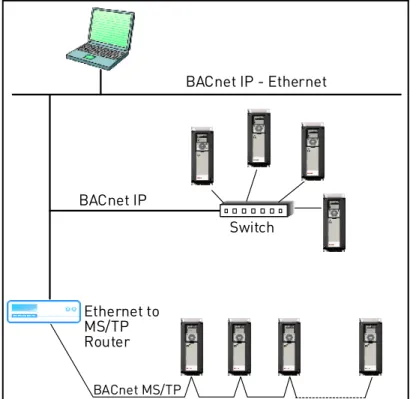
Figure 1.Principal example diagram of BACnet BACnet IP - Ethernet Ethernet to MS/TP Router Switch BACnet IP BACnet MS/TP
BACnet technical data Honeywell • 8
3.
BACnet technical data
3.1
BACnet MS/TP protocol
Table 3.3.2
BACnet IP protocol
Table 4. Connections and communications Interface RS-485Data transfer method RS-485 MS/TP, half-duplex
Transfer cable STP (Shielded Twisted Pair), type Belden 9841 or similar
Connector 2.5 mm2
Electrical isolation Functional
BACnet MS/TP As described in ANSI/ASHRAE Stan-dards 135-2004
Baud rate 9600, 19200, 38400 and 76800 baud(supports autobaud detection)
Connections and communications
Interface 100BaseTX, IEEE 802.3 compatible Data transfer method Ethernet half/full -duplex
Data transfer speed 10/100 MBit/s, autosensing
Protocol BACnet over UDP/IP
Connector Shielded RJ45 connector; NOTE: Max length of the non-bending part 40 mm.
Cable type CAT5e STP
BACnet IP As described in ANSI/ASHRAE Stan-dards 135-2004
BACnet installation Honeywell • 10
4.
BACnet installation
Figure 2.
1
Open the cover of the VFD.The relay outputs and other I/O-terminals may have a dangerous control voltage present even when the drive is disconnected from mains.
2
Locate the components that you will need on the VFD to connect and run the BACnet cables.Be sure not to plug the Ethernet/BACnet IP cable to the terminal under the key-pad! This might harm your personal computer.
Honeywell • 11 BACnet installation
Figure 3.
You can use the BACnet communication protocol through Ethernet and RS485.
4.1
Prepare for use through Ethernet
Figure 4.
3
Connect the Ethernet cable (see specification on page 8) to its terminal and run the cable through the conduit as shown in Figure 4.
NOTE: Pay attention that the non-bending part of the connector does not exceed 40 mm in length. Ethernet connector Ethernet cable run conduit I/O terminal (see larger picture) Grounding bar DIP switches 32 33 12 13 14 15 16 17 18 19 30 A B RS485 terminals 21 22 23 24 25 26 1 2 3 4 5 6 7 8 9 10 11 max. 40 mm Ethernet cable
BACnet installation Honeywell • 12
Figure 5.
Figure 6.
4
Cut the VFD cover opening for the Ethernet cable (protection class IP21).5
Remount the VFD cover. NOTE: When planning the cable runs, remember to keep the distance between the Ethernet cable and the motor cable at a mini-mum of 30 cm.IP21
Ethernet cable
Honeywell • 13 BACnet installation
4.2
Prepare for use through MS/TP
Figure 7.
3
Strip about 15 mm of the RS485 cable (see specification on page 8) and cut off the grey cable shield. Remember to do this for both bus cables.
Leave no more than 10 mm of the cable outside the terminal block and strip the cables at about 5 mm to fit in the terminals. See picture below.
Also strip the cable now at such a distance from the terminal that you can fix it to the frame with the grounding clamp. Strip the cable at a maximum length of 15 mm. Do not strip the aluminum cable shield!
4
Then connect the cable to its appropriate terminals on Honeywell SmartDrive standard terminal block, terminals A and B (A = negative, B = positive). See Figure 7.10
5
B
20
A
11
8 9 10
1213 14 15 16 17 18 19 20 AB 1 2 3 4 5 6 7 8 9 1011 21 22 23 24 25 26 2829 RS485 terminals (A and B)BACnet installation Honeywell • 14
5
Using the cable clamp included in the delivery of the drive, ground the shield of the RS485 cable to the frame of the VFD.
6
If the drive is the last device on the bus, the bus termination must be set. Locate the DIP switches to the right of the control keypad of the drive and turn the switch for the RS485 bus termination resistor to position ON. Biasing is built in the termination resistor. See also step 9 on page 15.
Cable clamp RS485* AO1 AI2 AI1 OFF ON Current Voltage Current Voltage Current Voltage
Honeywell • 15 BACnet installation
7
Unless already done for the other control cables, cut free the opening on the VFD cover for the RS485 cable (protection class IP21).
8
Remount the VFD cover and run the RS485 cables as shown in picture.
NOTE: When planning the cable runs, remem-ber to keep the distance between the fieldbus cable and the motor cable at a minimum of 30 cm.
9
The bus termination must be set for the first and the last device of the fieldbus line. See picture below. See also step 6 on page 14. We recommend that the first device on the bus and, thus, terminated was the Master device.
Fieldbus cables BACnet MS/TP = Bus termination Termination activated Termination activated with DIP switch Termination deactivated
Programming Honeywell • 16
5.
Programming
Basic information on how to use the control keypad you will find in the Application Manual.
The navigation path to the fieldbus parameters may differ from application to application. The exemplary paths below apply to the Honeywell SmartDrive.
1. First ensure that the right fieldbus protocol is selected.
2. Select ‘Fieldbus control’ as the Remote Control Place.
3. Choose source of reference.
4. Set fieldbus parameters (M5.7 and M5.8). See below.
5.1
BACnet MS/TP parameters and monitoring values (M5.7.3)
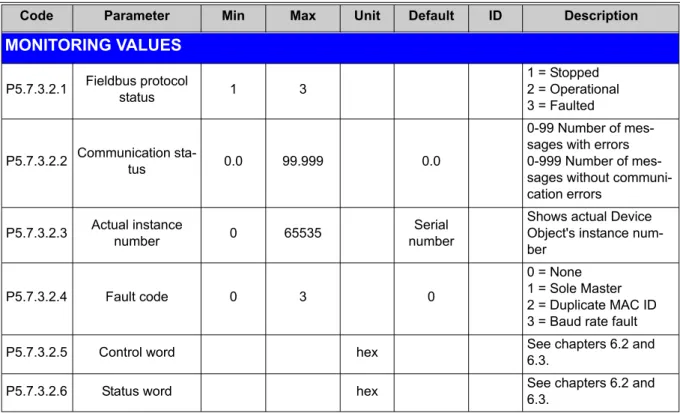
Code Parameter Min Max Unit Default ID Description
PARAMETERS P5.7.3.1.1 Baud rate 1 4 bd 1 Communication speed 1 = 9600 2 = 19200 3 = 38400 4 = 76800 P5.7.3.1.2 Autobauding 0 1 1 Automatic baudrate detection 0 = Off
1 = On; The automati-cally detected baud rate is then shown as value of parameter P5.7.3.1.1
P5.7.3.1.3 MAC address 1 127 1
P5.7.3.1.4 Instance number 0 65535 0
Device Object's instance number.
0 = Automatically gegerated P5.7.3.1.5 Communication time-out 0 65535 s 10 0 = Not used
Navigate: Main Menu > I/O and Hardware (M5) > RS-485 (M5.7) OR Ethernet (M5.8) > Common settings (M5.7.1) > Protocol (P5.7.1.1) > Edit > (Choose protocol)
Navigate: Main Menu > Quick Setup (M1) > Rem. Ctrl. Place (P1.15)
OR
Navigate: Main Menu > Parameters (M3) > Start/Stop Setup (M3.2) > Rem. Ctrl. Place (P3.2.1)
Honeywell • 17 Programming
Table 5. Parameters related with BACnet used through MS/TP
MONITORING VALUES
P5.7.3.2.1 Fieldbus protocol status 1 3
1 = Stopped 2 = Operational 3 = Faulted
P5.7.3.2.2 Communication sta-tus 0.0 99.999 0.0
0-99 Number of mes-sages with errors 0-999 Number of mes-sages without communi-cation errors
P5.7.3.2.3 Actual instance number 0 65535 numberSerial
Shows actual Device Object's instance num-ber
P5.7.3.2.4 Fault code 0 3 0
0 = None 1 = Sole Master 2 = Duplicate MAC ID 3 = Baud rate fault
P5.7.3.2.5 Control word hex See chapters 6.2 and
6.3.
P5.7.3.2.6 Status word hex See chapters 6.2 and
6.3.
Programming Honeywell • 18
5.2
BACnet IP parameters and monitoring values
5.2.1 Ethernet common settings (M5.8.1)
Table 6. Common settings for BACnet IP
5.2.2 BACnet IP settings
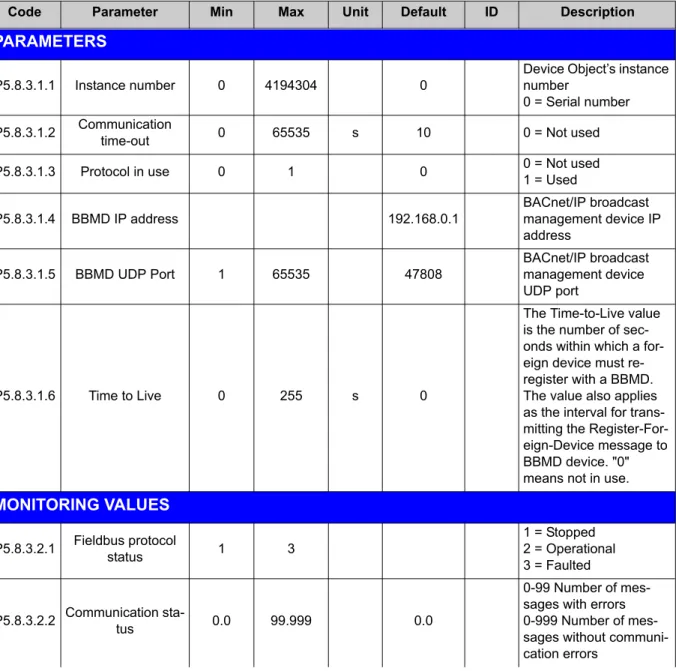
Code Parameter Min Max Unit Default ID Description
P5.8.1.1 IP address mode See page 23.
P5.8.1.2 IP address See page 23.
P5.8.1.3 Subnet mask See page 23.
P5.8.1.4 Default gateway See page 23.
P5.8.1.5 MAC address See page 23.
Code Parameter Min Max Unit Default ID Description
PARAMETERS
P5.8.3.1.1 Instance number 0 4194304 0
Device Object’s instance number
0 = Serial number P5.8.3.1.2 Communication time-out 0 65535 s 10 0 = Not used P5.8.3.1.3 Protocol in use 0 1 0 0 = Not used1 = Used
P5.8.3.1.4 BBMD IP address 192.168.0.1 BACnet/IP broadcast management device IP address P5.8.3.1.5 BBMD UDP Port 1 65535 47808 BACnet/IP broadcast management device UDP port P5.8.3.1.6 Time to Live 0 255 s 0
The Time-to-Live value is the number of sec-onds within which a for-eign device must re-register with a BBMD. The value also applies as the interval for trans-mitting the Register-For-eign-Device message to BBMD device. "0" means not in use.
MONITORING VALUES
P5.8.3.2.1 Fieldbus protocol status 1 3
1 = Stopped 2 = Operational 3 = Faulted
P5.8.3.2.2 Communication sta-tus 0.0 99.999 0.0
0-99 Number of mes-sages with errors 0-999 Number of mes-sages without communi-cation errors
Honeywell • 19 Programming
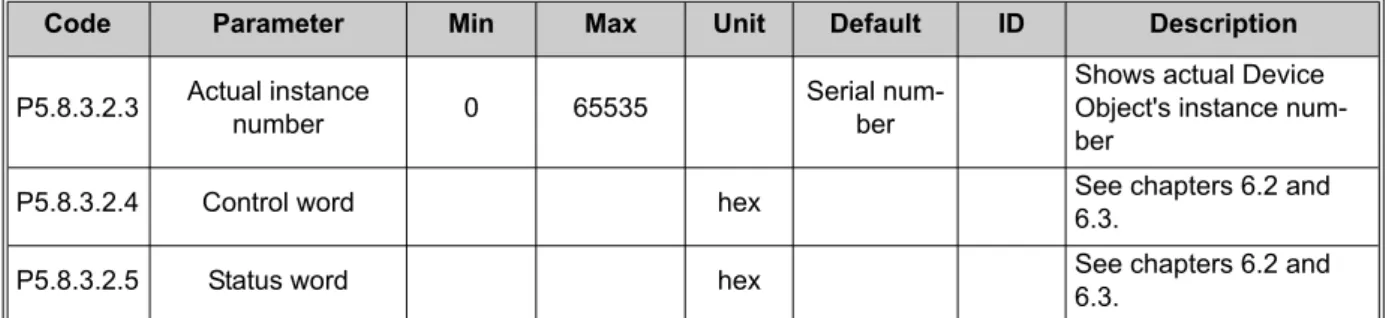
Table 7. Parameters related with BACnet used through Ethernet P5.8.3.2.3 Actual instance number 0 65535 Serial num-ber
Shows actual Device Object's instance num-ber
P5.8.3.2.4 Control word hex See chapters 6.2 and 6.3.
P5.8.3.2.5 Status word hex See chapters 6.2 and 6.3.
Programming Honeywell • 20
5.3
BACnet MS/TP parameter descriptions
5.3.1 BACnet MS/TP Parameters
P5.7.3.1.1 BAUDRATE
Select the communication speed for the network. The default value is 9600 baud. If value Auto
is chosen this parameter is not editable.
P5.7.3.1.2 AUTOBAUDING
NOTE! This function is only used at start-up.
This function is set off by default. If the parameter is given value 1 the automatic baud rate de-tection is used. The automatically detected baud rate is then shown as value of parameter
P5.7.3.1.1 Baud rate.
P5.7.3.1.3 MAC ADDRESS
The parameters of every device must be set before connecting to the bus. Especially the pa-rameters MAC address and Baud rate must be the same as in the master’s configuration. The first parameter, MAC (Medium Access Control) address, must be unique on the network to which it is connected. The same MAC address may be used on a device on another network within the internetwork.
Addresses 128-254 are reserved for slaves. Addresses 1-127 are valid for both masters and slaves. The portion of the address space that is actually used for masters in a particular instal-lation is determined by the value of the Max_Master property of the Device object.
It is recommended that MAC address 0 be reserved for use by the MS/TP router. 255 is re-served for broadcasts.
P5.7.3.1.4 INSTANCENUMBER
The Device Object's Instance number must be unique across the entire BACnet internetwork because it is used to uniquely identify the BACnet devices. It may be used to conveniently iden-tify the BACnet device from other devices during installation.
If 0 (default) is selected, the Device Instance number is read from the VFD. This unique number is then shown in the Monitor menu. If any other value than zero is selected, the value is used as Device Object's Instance number. The actual value is shown in the Monitor menu. The de-fault value for this parameter is generated from the Ethernet MAC address. Last 2 octets will be used. XX.XX.XX.XX.FF.FF.
P5.7.3.1.5 COMMUNICATIONTIME-OUT
BACnet board initiates a communication error if the board is a "sole master" in the network for a time defined with this parameter. ‘0’ means that no fault is generated.
Honeywell • 21 Programming 5.3.2 BACnet MS/TP monitoring values
P5.7.3.2.1 FIELDBUSPROTOCOLSTATUS
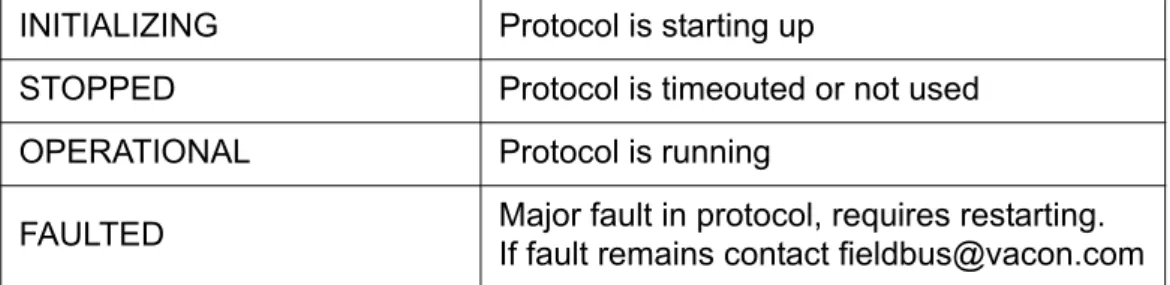
Fieldbus Protocol Status tells the status of the protocol.
Table 8. FB protocol statuses
P5.7.3.2.2 COMMUNICATIONSTATUS
The Communication status shows how many error and how many good messages the frequency converter has received. The Communication status includes a common error counter that counts CRC and parity errors and a counter for good messages.
Only messages to the current slave in use are counted in the good messages, not MS/TP token packages.
Table 9.
P5.7.3.2.3 ACTUALINSTANCENUMBER
Shows the actual instance number.
P5.7.3.2.4 FAULTCODE
Shows BACnet MS/TP fault codes.
Table 10.
P5.7.3.2.5 CONTROLWORD
Shows the Control Word received from the bus.
INITIALIZING Protocol is starting up
STOPPED Protocol is timeouted or not used
OPERATIONAL Protocol is running
FAULTED Major fault in protocol, requires restarting. If fault remains contact [email protected]
Bad Frames Good messages
0…99 Number of messages received
with errors 0…999
Number of messages received without errors
Code Code name Description
0 None
1 Sole Master No other devices on the bus
2 Duplicate MAC ID Two devices have identical MAC ID 3 Baud rate fault No baudrate detected by
Programming Honeywell • 22
P5.7.3.2.6 STATUSWORD
Honeywell • 23 Programming
5.4
BACnet IP parameter descriptions
5.4.1 Ethernet common settings
P5.8.1.1 IP ADDRESSMODE
Selectable alternatives are DHCP (Dynamic Host Configuration Protocol) and Fixed.
DHCP protocol gives IP addresses to new devices connecting to local network. This address is valid for a certain period of time.
A fixed IP address is specified manually and it does not change.
When the mode is changed from DHCP to Fixed the addresses will read
IP: 192.168.0.10
Subnet mask: 0.0.0.0
Default gateway: 0.0.0.0
P5.8.1.2 IP ADDRESS
An IP address is a series of numbers (like above) specific to the device connected to the Inter-net.
P5.8.1.3 SUBNETMASK
The network mask marks all the bits of an IP address for the identification of the network and the subnetwork.
P5.8.1.4 DEFAULTGATEWAY
Gateway address is the IP address of a network point that acts as an entrance to another net-work.
P5.8.1.5 MAC ADDRESS
The MAC address of the control board.
Programming Honeywell • 24 5.4.2 BACnet IP settings
P5.8.3.1.1 INSTANCENUMBER
Similar to BACnet MS/TP device object instance number (see page 20).
P5.8.3.1.2 COMMUNICATIONTIME-OUT
BACnet board initiates a communication error if the Ethernet connection is lost. Communica-tion time-out parameters define the minimum delay between UDP packages received from the master. The timer is reset and started after each received UDP package. This parameter can be used if the master is periodically polling the slaves.
P5.8.3.1.3 PROTOCOLINUSE
BACnet/IP protocol can be enabled and disabled with this parameter. When the parameter val-ue is set to "1" the BACnet/IP protocol is enabled and disabled when set to "0".
P5.8.3.1.4 BBMD IP ADDRESS
BACnet/IP broadcast management device IP address.
P5.8.3.1.5 BBMD UDP PORT
BACnet/IP broadcast management device UDP port.
P5.8.3.1.6 TIMETO LIVE
The Time-to-Live value is the number of seconds within which a foreign device must re-register with a BBMD. The value also applies as the interval for transmitting the Register-Foreign-De-vice message to BBMD deRegister-Foreign-De-vice. "0" means not in use.
5.4.3 BACnet IP monitoring values
P5.8.3.2.1 FIELDBUSPROTOCOLSTATUS
Fieldbus Protocol Status tells the status of the protocol.
P5.8.3.2.2 COMMUNICATIONSTATUS
The Communication status shows how many error and how many good messages the frequen-cy converter has received. The Communication status includes a common error counter that counts CRC and parity errors and a counter for good messages.
Table 11. Communication status
P5.8.3.2.3 ACTUALINSTANCENUMBER
The Device Object's actual instance number. This monitoring value is needed when value 0 is written to parameter P5.8.3.1.1.
Bad Frames Good messages
0…99 Number of messages received
with errors 0…999
Number of messages received without errors
Honeywell • 25 Programming
P5.8.3.2.3 CONTROLWORD
Shows the Control Word received from the bus.
P5.8.3.2.4 STATUSWORD
Communications Honeywell • 26
6.
Communications
6.1
Object types and properties supported
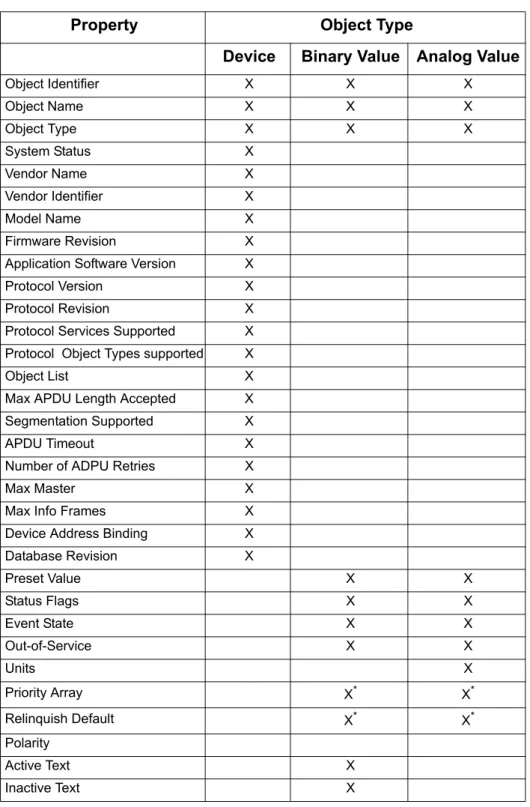
Table 12. Object types and properties supported
Property Object Type
Device Binary Value Analog Value
Object Identifier X X X Object Name X X X Object Type X X X System Status X Vendor Name X Vendor Identifier X Model Name X Firmware Revision X
Application Software Version X
Protocol Version X
Protocol Revision X
Protocol Services Supported X Protocol Object Types supported X
Object List X
Max APDU Length Accepted X Segmentation Supported X
APDU Timeout X
Number of ADPU Retries X
Max Master X
Max Info Frames X
Device Address Binding X
Database Revision X Preset Value X X Status Flags X X Event State X X Out-of-Service X X Units X Priority Array X*
*Only with commandable values
X*
Relinquish Default X* X*
Polarity
Active Text X
Honeywell • 27 Communications 6.1.1 Binary Value Object
Instance
ID Object Name Description
Inactive / Active Present Value Access Type
BV0 Ready State Indicates whether the drive is ready or not Not Ready / Ready R BV1 Run/Stop State Indicates whether the drive is running or stopped Stop / Run R BV2 Fwd/Rev State Indicates the rotation direc-tion of the motor Fwd / Rev R BV3 Fault State Indicates if a fault is active OK / Fault R BV4 Alarm State Indicates if an alarm is active OK / Alarm R BV5 At Setpoint Ref. Frequency reached False / True R BV6 At Zero Speed Motor Running at zero speed False / True R BV7 fb_ProcessdataOut_01 Bit_0 ProcessDataOut1 bit 0 0 / 1 R BV8 fb_ProcessdataOut_01 Bit_1 ProcessDataOut1 bit 1 0 / 1 R BV9 fb_ProcessdataOut_01 Bit_2 ProcessDataOut1 bit 2 0 / 1 R BV10 fb_ProcessdataOut_01 Bit_3 ProcessDataOut1 bit 3 0 / 1 R BV11 fb_ProcessdataOut_01 Bit_4 ProcessDataOut1 bit 4 0 / 1 R BV12 fb_ProcessdataOut_01 Bit_5 ProcessDataOut1 bit 5 0 / 1 R BV13 fb_ProcessdataOut_01 Bit_6 ProcessDataOut1 bit 6 0 / 1 R BV14 fb_ProcessdataOut_01 Bit_7 ProcessDataOut1 bit 7 0 / 1 R BV15 Run/Stop CMD Command to start drive (FB control is active) Stop / Run C
BV16 Fwd/Rev Direction of motor Fwd / Rev C
BV17 Reset Fault Command to reset Active Fault from drive 0 / Reset C
BV18 Stop By Coast Stop Drive by coast 0 / 1 C
BV19 Stop By Ramp Stop Drive by ramp 0 / 1 C
BV20 Quick Stop Quick Stop 0 / 1 C
BV21 Zero Ramp Stop by zero ramp 0 / 1 C
BV22 Hold Ramp Hold ramp 0 / 1 C
BV23 BusCtrl Activate Bus control 0 / 1 C
BV24 BusRef Activate Bus reference 0 / 1 C
BV25 fb_control_word Bit_10 fb_control_word bit 10 0 / 1 C BV26 fb_control_word Bit_11 fb_control_word bit 11 0 / 1 C BV27 fb_control_word Bit_12 fb_control_word bit 12 0 / 1 C
Communications Honeywell • 28
Table 13.
NOTE: Present Value Access Types: R = Read-only, W = Writeable, C = Commandable. Commandable values support priority arrays & relinquish defaults.
BV28 fb_control_word Bit_13 fb_control_word bit 13 0 / 1 C BV29 fb_control_word Bit_14 fb_control_word bit 14 0 / 1 C BV30 fb_control_word Bit_15 fb_control_word bit 15 0 / 1 C
Honeywell • 29 Communications 6.1.2 Analog Value Object
Instance ID Object Name Description Units Present Value Access Type
AV0 Frequency Setpoint Frequency Setpoint Hz R
AV1 Output Frequency Output Frequency Hz R
AV2 Motor Speed Motor Speed rpm R
AV3 Load (power) Motor Shaft Power % R
AV4 Kilowatt Hours total Kilowatt Hour Counter (Total) kWh R
AV5 Motor Current Motor Current A R
AV6 DC link Voltage DC link Voltage V R
AV7 Motor Voltage Motor Voltage V R
AV8 Unit Temperature Heatsink Temperature C R
AV9 Motor Torque In % of motor nominal Torque % R
AV10 Operating Days Operating Days (reset-table) Day R AV11 Operating Hours Operating Hours (reset-table) Hour R AV12 Kilowatt Hours Kilowatt Hours (resetta-ble) kWh R
AV13 Torque Reference Torque Reference % R
AV14 Temperature Rise
Calculated motor tem-perature 100,0% = nom-inal temperature of motor
% R
AV15 fb_ProcessdataOut_01 Application specific 16 bit Resolution 1 R AV16 fb_ProcessdataOut_02 Application specific 16 bit Resolution 1 R AV17 fb_ProcessdataOut_03 Application specific 16 bit Resolution 1 R AV18 fb_ProcessdataOut_04 Application specific 16 bit Resolution 1 R AV19 fb_ProcessdataOut_05 Application specific 16 bit Resolution 1 R AV20 fb_ProcessdataOut_06 Application specific 16 bit Resolution 1 R AV21 fb_ProcessdataOut_07 Application specific 16 bit Resolution 1 R AV22 fb_ProcessdataOut_08 Application specific 16 bit Resolution 1 R
AV23 Active Fault Code Active Fault Code - R
AV24 Speed Reference
Speed Reference, per-centage of nominal speed
% C
AV25 Current Limit Current Limit A W
Communications Honeywell • 30
Table 14.
NOTE: Present Value Access Types: R = Read-only, W = Writeable, C = Commandable. Commandable values support priority arrays & relinquish defaults.
High and Low limits for the objects are defined in the application. See corresponding applica-tion for exact limits.
AV27 Maximum Frequency Maximum Frequency Hz W
AV28 Accel Time Acceleration Time s W
AV29 Decel Time Deceleration Time s W
AV30 fb_ProcessdataIn_01 Application specific 16 bits Resolution 1 C AV31 fb_ProcessdataIn_02 Application specific 16 bits Resolution 1 C AV32 fb_ProcessdataIn_03 Application specific 16 bits Resolution 1 C AV33 fb_ProcessdataIn_04 Application specific 16 bits Resolution 1 C AV34 AnyParam ID ID number that is used in AV35 resolution 10 to 65535 W AV35 AnyParam Value Value of ID defined by AV34 32 bits Value W AV36* Fb_Control_Word Lo16 Fixed Control Word First 16 bits 0-15 16 bits Resolution 1 C
AV37* Fb_Control_Word Hi16 Fixed Control Word Last 16 bits 16-31 16 bits Resolution 1 C AV38 Fb_Status_Word Lo16 Fixed Status Word First 16 bits 0-15 16 bits Resolution 1 R AV39 Fb_Status_Word Hi16 Fixed Status Word Last 16 bits 16-31 16 bits Resolution 1 R *ANSI/IEEE-754 floating point. Binary coding can be done only if the value has no decimals.
Honeywell • 31 Communications
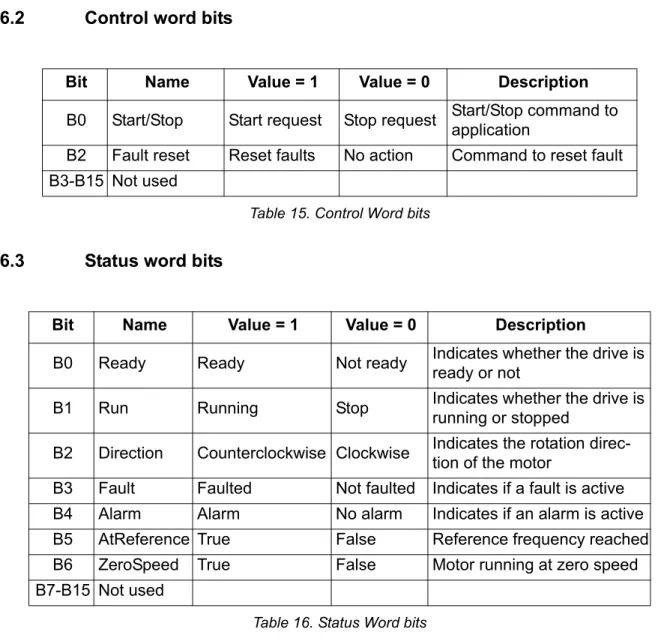
6.2
Control word bits
Table 15. Control Word bits
6.3
Status word bits
Table 16. Status Word bits
Bit Name Value = 1 Value = 0 Description
B0 Start/Stop Start request Stop request Start/Stop command to application
B2 Fault reset Reset faults No action Command to reset fault B3-B15 Not used
Bit Name Value = 1 Value = 0 Description
B0 Ready Ready Not ready Indicates whether the drive is ready or not
B1 Run Running Stop Indicates whether the drive is running or stopped
B2 Direction Counterclockwise Clockwise Indicates the rotation direc-tion of the motor
B3 Fault Faulted Not faulted Indicates if a fault is active B4 Alarm Alarm No alarm Indicates if an alarm is active B5 AtReference True False Reference frequency reached B6 ZeroSpeed True False Motor running at zero speed B7-B15 Not used
Fault tracing Honeywell • 32
7.
Fault tracing
When an unusual operating condition is detected by the VFD control diagnostics, the drive ini-tiates a notification visible, for example, on the keypad. The keypad will show the ordinal num-ber of the fault, the fault code and a short fault description.
The fault can be reset with the Reset button on the control keypad or via the I/O terminal. The faults are stored in the Fault history menu which can be browsed. The different fault codes you will find in the table below. This fault table presents only the faults related to the fieldbus in use.
7.1
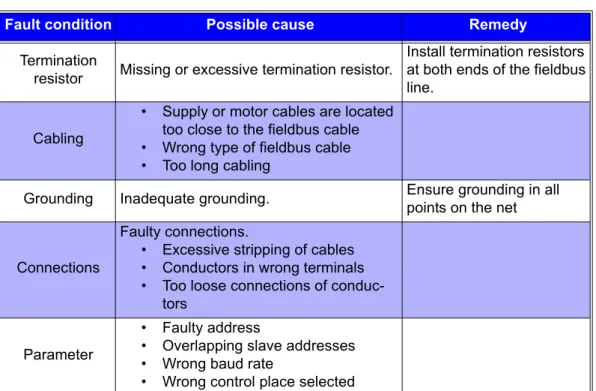
Typical fault conditions
Table 17. Typical fault conditions
Fault condition Possible cause Remedy
Termination
resistor Missing or excessive termination resistor.
Install termination resistors at both ends of the fieldbus line.
Cabling
• Supply or motor cables are located too close to the fieldbus cable • Wrong type of fieldbus cable • Too long cabling
Grounding Inadequate grounding. Ensure grounding in all points on the net
Connections
Faulty connections.
• Excessive stripping of cables • Conductors in wrong terminals • Too loose connections of
conduc-tors Parameter
• Faulty address
• Overlapping slave addresses • Wrong baud rate
Honeywell • 33 Fault tracing
7.2
Other fault conditions
The following fault tracing diagram will help you to locate and fix some of the most usual prob-lems. If the problem persists contact your local distributor.
Figure 8. Fault tracing diagram for BACnet MS/TP
Dri ve d oes n o t s ta rt fr om th e bu s Ch ec k c omm u n ic a ti on st at u s ( p ar . 5.7.3. 2.1/5. 8.3.2.2) Co u n te r do e s n o t ru n Cou n te r for ba d fr am es ( s ee T a bl e 3 ) in c re a s e s Cou n te r O K . No c o mm un ic a tion Po o r c o mm uni cat io n Is the d e vic e in R E A D Y st a te ? Ch ec k t h e led o n ke yp a d Ch ec k e x ter n a l in te rl o c kin g s ( I/O) Is fi e ldbus se le c ted as co n tr o l p la ce ? Ch ec k pa ra m e te r M 1 .15 o r M 3 .2.1 Do e s Ma st e r gi ve RUN c o m ma n d ? Us e k e yp a d to m o ni to r va ri a b le M 5 .7.3. 2 .5 Se t va ria b le A V 3 6 to ‘ 1 ’ Ch ec k fi e ldbu s p a ram e ters Ch ec k ot h e r f ield b u s p a ra m e te rs in m e n u M5 .8 Ch ec k sel e c ted pr o to c o l ( M 5 .7.1.1) Ch ec k Mas ter ’s p a ram e ters Ch ec k c on fi g u ra -ti o n s (Sla ve a dd-re s s , ba u d ra te e tc .) Ch ec k ter m in a ti on re s is to rs Ch ec k t h a t b o th en d s of th e f ield b u s li n e h a ve te rm in a tio n re s is tors (c hap te r 4.2) Ch e c k c a b li n g Chec k c a b le fo r c u ts Chec k corr e ct pla cem ent of co nduc to rs in te rmin a ls Ot h e r b u s d e vi c e s Ch ec k ot h e r ne c e ss ar y de vi ce s (e .g . rou te r) Ch ec k te rmi n a ti on re s is to rs Ch ec k t h a t b o th en ds of th e f ieldb u s li n e ha ve te rm i-nat io n re si s to rs ( c h a p ter 4 .2 ) C h e c k p a ram e te rs Chec k c a b lin g Ch ec k di s ta n c e s bet w een c a bl es, see chap te r 4.2 . Ch ec k c a b le t ypes , see c h a p te r 3 . Ch ec k gr ou n d in g Ch ec k gr ou n d in g , se e ch ap te r 4. R e me m b e r to mak e g rou n d in g for e a ch d e vi ce ! C h e c k c o nne ct io n s C h e ck s tri ppi ng o f ca bl es a n d con d u ct o rs, see c h a p te r 4 . Ch e ck ter m in a ls fo r loose con n e ct io n s
Fault tracing Honeywell • 34
Figure 9. Fault tracing diagram for BACnet IP
D riv e does not s tar t fr om the bus Check c om munic a ti on st a tu s (p ar . 5.7.3.2.1/ 5.8.3.2.2) Coun te r does not r u n Coun ter for bad fr am es (s ee T a bl e 3 ) in c rea s e s Coun ter OK . N o co m m u n ica ti o n Po o r co m m u n ica ti o n Is the d e vic e in R E AD Y st a te ? Check the led on ke yp a d Check e xt er nal in terl ockin g s (I/O) Is fi e ld b u s se le c te d as co n tr o l p la ce ? Ch e c k p a ra m e te r M 1 .1 5 or P3 .2 .1 D oes M a s ter gi ve RU N c o m m a n d ? Us e k eyp a d to monitor var iab le M5.7.3.2.5 Set var iab le A V3 6 to ‘ 1 ’ Check f ieldbus pa ra m e te rs Check ot her f ieldbus p a rame te rs i n me n u M5.8 Check s e le ct ed p ro to c o l (M5.7.1.1) Check M a s ter’ s pa ra m e te rs Check IP add re s s , gate way e tc. Che c k c a b li ng Ch e c k c a b le fo r cut s C h eck cor re ct pla ce-m e nt of co nduc to rs in te rm ina ls Other bus d e vic e s C h e c k other n e ce ss a ry d e vi ce s (e.g . s w it ches ) Check c abling Check di st anc e s be tween c a bl es , s e e cha p te r 4.2. Check c abl e t yp e s , s ee chapter 3 . Check c onnections Check str ipping of ca bl es a n d conduc to rs , see cha p te r 4 . Check e.g WLAN or other rou te rs
Quick setup Honeywell • 36
8.
Quick setup
Following these instructions, you can easily and fast set up your BACnet bus for use:
1
Choose control place.
A. Press LOC/REM button on keypad to select Remote Control Place
B. Select Fieldbus as remote control place: Main Menu > Quick Setup (M1) > Rem. Ctrl. Place (P1.15) > FieldbusCTRL
2
Make these settings in the master software
A. Set Control Word to ‘0’ (AV36 Fb_Control_Word_Lo16) B. Set Control Word to ‘1’ (AV36 Fb_Control_Word_Lo16) C. Frequency converter status is RUN
D. Set Reference value to ‘50’ (50.00%) (AV24 Speed Reference).
E. Frequency setpoint is 25.00 Hz (if MinFreq is 0.00 Hz and MaxFreq is 50.00 Hz) F. Set Control Word to ‘0’ (AV36 Fb_Control_Word_Lo16)
9
vacon • 37 Appendix - additional information
Tel. +358 (0) 201 2121 • Fax +358 (0)201 212 205
9.
A
PPENDIX
-
ADDITIONAL
INFORMATION
9.1
Max master
This parameter represents the value of the Max_Master property of the node's Device object. The value of Max_Master specifies the highest allowed address for the master nodes. The val-ue of Max_Master shall be less than or equal to 127. If Max_Master is not writable in a node, its value shall be 127. The drive has a readable-only value, thus 127.
Example of use:
We have 4 devices on the bus, given addresses from 1 to 4. A token is passed in the MS/TP allowing each device to send in turns. Device no. 1 passes the token to device no. 2, no. 2 to device no. 3, no. 3 to no. 4 and no. 4 to no. 1.
Max master is set to 127:
Having received the token and sent its data, the device with the highest address on the bus (in this case 4) will check the bus for new devices by sending a Poll for master message. After the first token-passing round, the Poll for master message is sent to address 5, after the second round time to address 6 and so forth until address 127 is reached. Because there are no de-vices at addresses 5 to 127, the sender of the message must wait for a reply to each Poll for master message after each token-passing round.
If there is on the bus another manufacturer’s device that supports Max master property, it can be used to prevent the Poll for master messages by giving it the highest address on the bus and setting the same value to Max master parameter. The device now understands being at the last address of the bus and passes the token to the first device.
Annex - Protocol implementation conformance statement Honeywell • 38
10.
Annex - Protocol implementation
conform-ance statement
PROTOCOL IMPLEMENTATION CONFORMANCE STATEMENT (NORMATIVE) (This annex is part of this Standard and is required for its use.)
BACnet Protocol Implementation Conformance Statement Date: November 7, 2008
Vendor Name: Honeywell
Product Name: Honeywell SmartDrive - xxx (xxx = MAC ID) Product Model Number: Honeywell SmartDrive
Applications Software Version: xxx Firmware Revision: 1
BACnet Protocol Revision: 4
Product Description: Honeywell SmartDrive HVAC
BACnet Standardized Device Profile (Annex L): BACnet Application Specific Controller (B-ASC)
List all BACnet Interoperability Building Blocks Supported (Annex K): RP-B, DS-RPM-B, DS-WP-B, DS-WPM-B, DM-DDB-B, DM-DOB-B.
Segmentation Capability:
Segmented requests supportedWindow Size
Segmented responses supportedWindow Size Standard Object Types Supported:An object type is supported if it may be present in the device. For each standard Object Type supported provide the following data:
Honeywell • 39 Annex - Protocol implementation conformance statement 2. Whether objects of this type are dynamically deletable using the DeleteObject service 3. List of the optional properties supported
4. List of all properties that are writable where not otherwise required by this standard 5. List of proprietary properties and for each its property identifier, datatype, and meaning 6. List of any property range restrictions
Data Link Layer Options:
MS/TP master (Clause 9), baud rate(s): 9600,19200,34800, 76800 (supports autobaud detec-tion)
BACnet IP, (Annex J) Device Address Binding:
Is static device binding supported? (This is currently necessary for two-way communication with MS/TP slaves and certain other devices.)
Yes
NoNetworking Options:
Router, Clause 6 - List all routing configurations, e.g., ARCNET-Ethernet, Ethernet-MS/TP, etc.
Annex H, BACnet Tunneling Router over IP
BACnet/IP Broadcast Management Device (BBMD)Does the BBMD support registrations by Foreign Devices?
Yes
No Character Sets Supported:Indicating support for multiple character sets does not imply that they can all be supported si-multaneously.
ANSI X3.4
IBM /Microsoft DBCS
ISO 8859-1
ISO 10646 (UCS-2)
ISO 10646 (UCS-4)
JIS C 6226If this product is a communication gateway, describe the types of non-BACnet equipment/net-works(s) that the gateway supports.
Automation and Control Solutions Honeywell GmbH Böblinger Str. 17 71101 Schönaich, Germany Telephone (49) 7031 637 01 Telefax (49) 7073 637 493 www.ecc.emea.honeywell.com EN2B-0371GE51 R1210 December 2010
© 2010 Honeywell International Inc.
Find out more
For more information on Honeywell’s variable frequency drives and other Honeywell products, visit us online at http://ecc.emea.honeywell.com