March 2013
METADATA-DRIVEN QLIKVIEW
APPLICATIONS AND POWERFUL
DATA INTEGRATION WITH
QLIKVIEW EXPRESSOR
Metadata-Driven QlikView Applications and Powerful Data Integration with QlikView Expressor | 2
Introduction
This technical brief highlights a subset of capabilities and approaches that are to be considered when developing metadata-driven QlikView applications using QlikView
Expressor. The information provided will cover core value and benefits when using QlikView Expressor for data preparation used by QlikView applications as compared to accessing, transforming and loading data natively using QlikView. The technical brief is strictly to inform QlikView developers of an alternative approach and additional functionality available to them when developing QlikView applications for large scale QlikView deployments. It is not meant to compare or contrast QlikView Expressor data provisioning versus native QlikView scripting nor recommend any specific one approach.
QlikView Expressor Dataflows
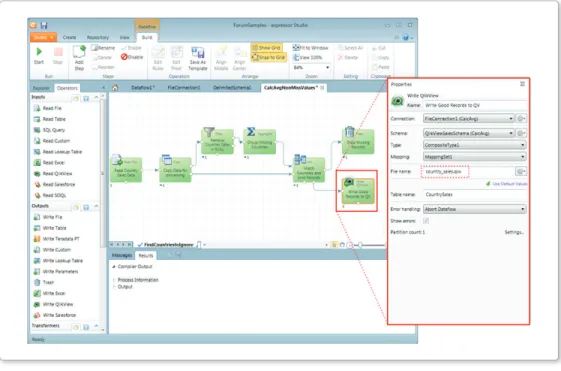
Simply stated, QlikView Expressor provides a rich development studio to provision data for QlikView and other data targets. Creating a QlikView Expressor Dataflow from a list of graphical operations that access, transform and load data - makes it easy to see where the data is coming from, how it is being transformed and where it is going. Property panels guide the developer in selecting available options allowing simple configuration of most operators. While developing a Dataflow, a layer of active metadata is defined about the data it is describing, resulting in a reusable collection of common business definitions and rules that can be applied across all integration and QlikView application projects. QlikView Expressor calls this reusable collection of active metadata a Semantic Type.
Active Metadata – Semantic Type
Metadata is defined as data about data. Active metadata can be defined as metadata in action. This active metadata layer used in QlikView Expressor is called a Semantic Type. Traditional Business Intelligence metadata is mostly static and limited to only describing a few properties about the data it refers to such as data type, column name, length and format. QlikView Expressor metadata is not static, it’s actionable. It describes common properties on the source and target data while actively respecting data validation rules that have been defined on its attributes.
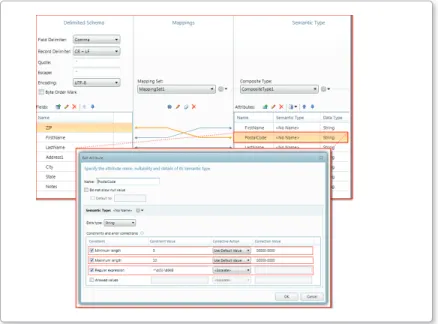
Let’s take a simplistic example using a string column named ZIP used to store a 5 digit +4 zip code. Not only can the metadata describe the attribute using a common business term such as PostalCode, but it can also specify a minimum and maximum string size constraint to ensure the data length only falls within a specified range. Furthermore, it can provide a pattern match rule using a regular expression such as ^\d{5}-\d{4}$. This will ensure that the data flowing to QlikView will absolutely match the XXXXX-XXXX pattern. - What if the value fails the rule(s) you might ask? A choice to set a corrective action or redirect the record to another part of the flow is available - allowing more control on how and where the data is to be processed.
Figure 2: QlikView Expressor Semantic Type and Edit Attribute dialog showing constraints and corrective actions
Other examples include using an allowable list of values, setting rounding / min / max / precision / scale / constraints on numeric values, date range validation, date formatting and string padding / truncation. The benefit to creating active metadata such as this is that instead of defining individual validation and redirect rules within script or within each individual
Metadata-Driven QlikView Applications and Powerful Data Integration with QlikView Expressor | 4 application, active metadata can be defined once and reused across all applications that require these attributes for decision making. And by storing the metadata in the QlikView Expressor version control repository it becomes reusable for other QlikView Expressor projects and deployments which is especially handy in a multi-developer environment.
Reuse, Storage and Sharing
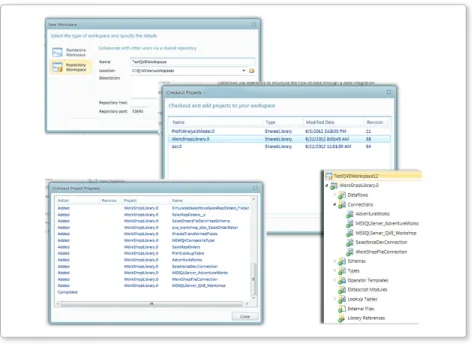
In order to speed up a project’s development and reduce its implementation time, it is important to leverage common work components that have already been developed. Within QlikView Expressor common project components that can be reused across all applications are Semantic Types, Schemas, Lookup Tables, Connections, Operators and Datascript modules. If there are projects that use common data sources, columns, expressions and business rules, it makes absolute sense to create those elements once and shared them with other developers. QlikView Expressor provides a combination of project storage options for its Dataflow building blocks known as artifacts. Local developers can simply choose to use a file system workspace where all projects and artifacts are stored locally for reuse on their system. They can enable simple sharing of their projects components by exporting them to an archive that can be imported by another developer. A more streamlined approach would be to use the QlikView Expressor Repository Workspace. This offers a centralized storage and version control system for storing QlikView Expressor artifacts. Developers can securely connect to their repository server from anywhere and check out the libraries with the artifacts they need. Furthermore, if certain updates are needed – they can occur in one place and be applied to all the applications easily with a simple update or check in. A great use of the centralized Repository Workspace is to check out and reuse pre-configured Operator Templates to apply a common set of business rules to any QlikView application.
Figure 3: Checking out a library and its artifacts from the QlikView Expressor Repository Workspace
Reusable Business Rules and Operator Templates
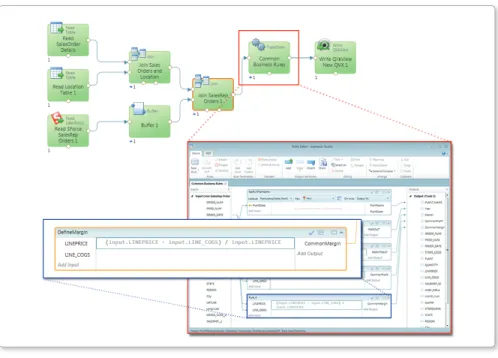
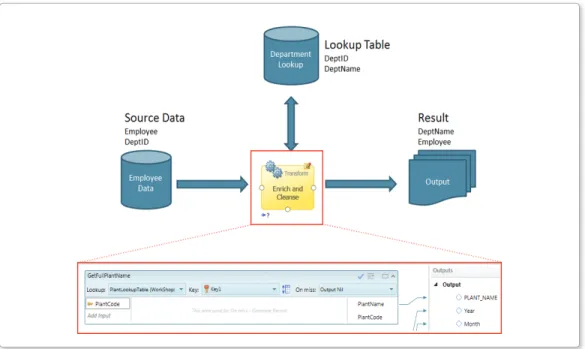
Another way to provide greater time to value when using QlikView Expressor is to create a reusable library of common business rules exposed as Operator Templates. QlikView Expressor Dataflows use a graphical operation to build business and transformation rules called a Transform operator. The Transform operator is an all-inclusive component used to create new and augment existing data. It can create a collection of reusable rules that accept incoming data attributes as inputs. Transformed data is defined in expressions using Expression, Function and Lookup Rules created within the Transform Operator’s Rules Editor. Rules enrich data with a variety of string, math, decision, utility and many more functions, including the ability to lookup data from lookup tables. Use of the Transform operator can be compared to creating expressions within QlikView load scripts or within UI sheet objects; however the operator and its already created rules can be made available as a reusable Operator Template that can be included in any QlikView Expressor dataflow. Some examples of common transformation rules may include - definitions of metrics such as profitability, churn rate or margin; data that combines multiple fields such as FNAME and LNAME to make FullName; standardized formatting and masking to properly format dates, phone numbers and social security numbers. All of the appropriate expressions to create those desired results can be include as rules in the Transform Operator, parameterized and made available as an Operator Template. The next developer to use that template would simply map the input attributes to the rule parameters and map the output attributes. Operator Templates are also commonly used to enrich incoming data with other disparate data from Lookup tables. A clear example of this looking up location data such as geocoding an incoming state code; country, city, zip address etc.
Figure 4: Dataflow, Transform Operator, Rules Editor and Rule that Defines a Common Metric
Metadata-Driven QlikView Applications and Powerful Data Integration with QlikView Expressor | 6
Lookup Tables
A Lookup Table is a database table designed to serve a special, limited function within a data integration application or group of applications. Lookup Tables are usually created from a subset of data from a larger table or from a source designed to add data that an application can use. For example, a Lookup Table might be created to provide department names to data from a source that contains only department numbers. During the process of integrating data, the Lookup Table could be read to add department names to department numbers. The advantage of Lookup Tables is that they are stored within an expressor Project and are included in Deployment Packages. Access to them is thereby made easier and faster. When their function and size are limited, accessing their data is also easy and fast. In QlikView Expressor, Lookup Expression Rules are similar to using the ApplyMap() function that is used with a MAPPING table created with MAPPING LOAD statement in QlikView load script. However with the Lookup Expression Rules, the developer is not limited to just two fields. Lookup Tables can have both single and composite keys and return multiple columns from them. The developer can also specify a default value if the value being looked up is not present. It is also possible to branch to another part of the Dataflow to perform another step, without having to use IF THEN ELSE scripting logic. Using the Range Lookup feature makes it possible to define lookups that are constructed as numeric ranges.
Extending Functionality with QlikView Expressor Datascript
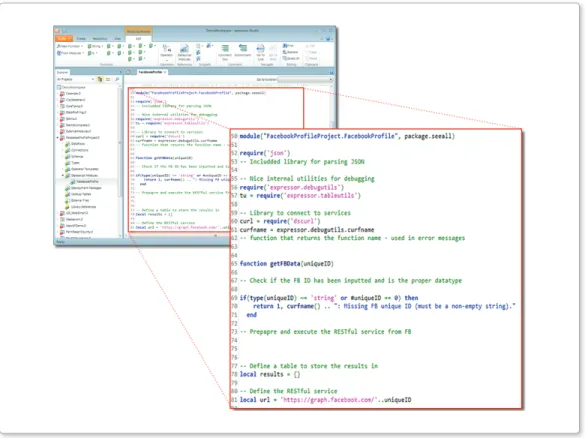
Business Intelligence solutions should always provide a software development kit to help organizations create new components and extend existing functionality that is not always available inside the box. It is impossible to have everything that everyone wants available in a graphical business user or development interface. Leveraging a SDK allows customers and partners the ability to create what they need when they want it without the reliance on the software vendor. With QlikView Expressor there is an option to use a script editor depending on the complexity of the data access or transformation needed. This functionality is comparable to using QlikView script or building extensions for a QlikView application. QlikView Expressor Datascript is a lightweight, fast interpreted scripting language based on Lua. It is easy to learn and provides an extensible library of additional modules that enable custom functionality to be defined and shared across all QlikView Expressor applications. Datascript can also come in handy when certain file management and job control flow capability is needed as file system, ftp and web service type modules can be made available.
Figure 6: A Datascript module that accesses, parses and flattens Facebook generic profile data
Metadata-Driven QlikView Applications and Powerful Data Integration with QlikView Expressor | 8
Semantic Conformance Mapping
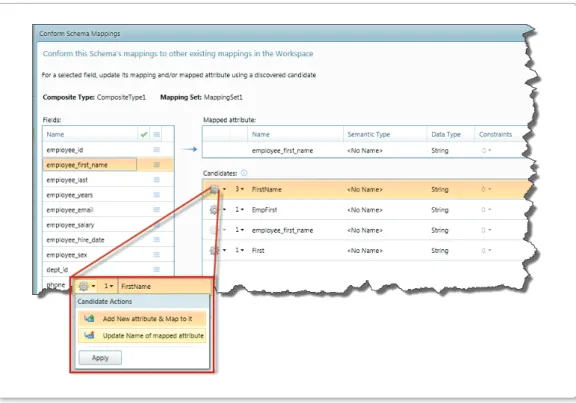
Data attributes used by QlikView should be easy to recognize and prepared with consistency. Determining whether “account_num” is used in the same manner as “customer_num” or whether “Profit Margin” is similar to “Gain”, can lead to confusion and delay in decision making. As applications grow rapidly, management of data and how it’s prepared can become an afterthought. Starting with version 3.9, QlikView Expressor has added a new feature that ensures data attributes remain consistent across multiple QlikView Expressor projects. The Conformance Mapping interface enables consistent naming of attributes representing a given data element. It reduces the proliferation of unnecessary variations that can cause inconsistent results in data processing. Conformance Mapping makes it simple to unify the attributes mapped to fields in a Schema. When an attribute shares similar properties with other attributes in the Workspace, it can be made to conform to one of the other attributes. QlikView Expressor Studio supports this in the following manner:
• For a given field in a schema, the Studio shows other attributes in the workspace that are mapped to fields of the same name known as Candidates.
• The user may then update the given field’s mapped-attribute, to conform to one or more already existing in the workspace.
Figure 7: Conformance Mapper, displaying list of possible candidates for the employee_first_name field
Metadata Analysis Search and Usage
You cannot manage what you can’t find. Understanding where data elements originate, how they are processed and where they end up reduces the many risks associated with managing data, such as its security, privacy and sensitivity. Managing these risks is necessary, but there’s one problem: in order to achieve compliance companies must be able to reveal where data comes from, where it flows to, and how it’s transformed as it travels through the enterprise. This is where tools that provide “impact analysis” come in handy; being able to analyze where data is, and how it flows so you can manage and secure it appropriately as it moves across the Enterprise.
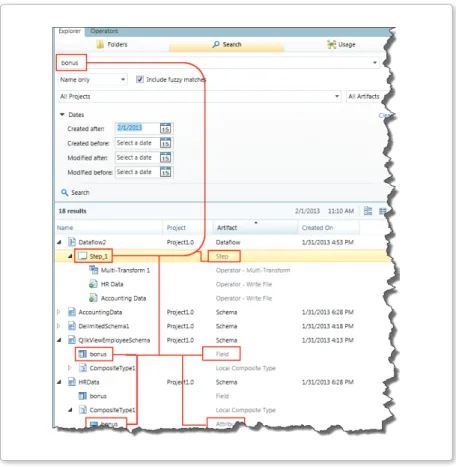
Starting with version 3.9, the Metadata Analysis Search and Usage interface helps locate QlikView Expressor artifacts (dataflows, schemas, types, connections, attributes, fields, etc.) within workspaces, projects and libraries that are used to manage and prepare data for QlikView and other data targets. It achieves this using the following two methods, Search and Usage.
• Search – supports a variety of user input parameters, including dates and fuzzy matching, to help you locate various artifacts across the workspace.
Metadata-Driven QlikView Applications and Powerful Data Integration with QlikView Expressor | 10 • Usage - supports the selection and searching of artifacts by “Uses” or “Used by”
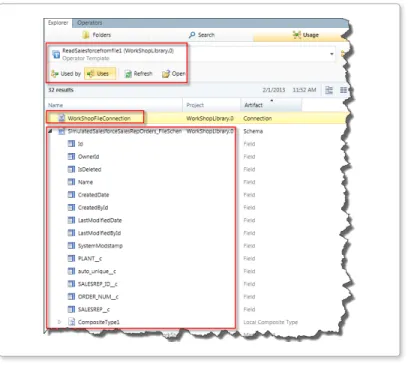
• Uses – displays all artifacts that the selected artifact uses
• i.e. a schema using a type
• i.e. an operator template using a connection and a Schema
Figure 9: Usage facility locating where and what is using the ReadSalesForcefromFile Template
• Used by – displays all artifacts that the selected artifact is used by
Figure 10: Usage facility locating the usage of the MSQLServerConnection artifact
Extensions SDK
What is a QlikView Expressor Extension?
A QlikView Expressor Extension is a plug-in (or add-on) that adds new operators and metadata artifacts to those included in the core Expressor product. Those capabilities can provide access to data from sources that are not accessible through the standard operators and artifact types such as Read and Write Table, Database and File Connection, and Table and Delimited Schema. Extensions can also be designed to perform transformations on data that cannot be performed by the standard QlikView Expressor operators.
The Extensions SDK
Starting with version 3.9, the Extension SDK will enable a set of toolkits and wizards that provide a framework with common functions for developing Extensions for QlikView Expressor. With Extensions, developers can provide clients with tools to integrate data from specialized sources and perform specialized transformations on data. An Extension’s operators, Connections and Schema integrate into the Studio interface and seamlessly work in conjunction with other Standard, Enterprise, and Extension artifacts and operators.
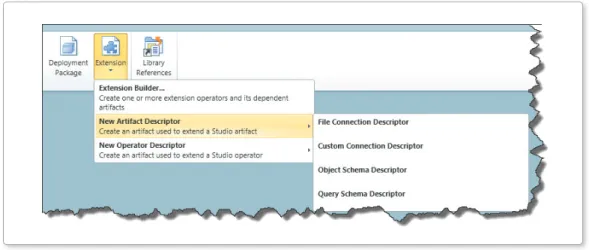
Figure 11: Extension Builder with Descriptor Wizards to create custom operators and artifacts
The Extensions SDK provides a set of compilation, utility, and data type conversion functions using built-in Datascript Modules (DSM). DSMs are the standard QlikView Expressor scripting module for Datascript which is based on the Lua open-source scripting language. Extensions build on these common functions add functionality to the QlikView Expressor Studio and support custom data sources and specialized transformations. Extensions developed with the SDK can be installed easily into an existing QlikView
Metadata-Driven QlikView Applications and Powerful Data Integration with QlikView Expressor | 12 Expressor software installation. All Extensions are installed and activated through the Manage Extensions option on the Studio menu.
Figure 12: Extension created, packaged and then enabled by the QlikView Expressor Extensions Manager
Fig. 13: Operators list with custom built operators, dataflow using those operators and custom properties
References
For detailed information on these features and much more please review the latest documentation found on the QlikCommunity or installed with QlikView Expressor Desktop. Documentation
http://community.qlikview.com/docs/DOC-3325 Forum
http://community.qlikview.com/community/qlikview_expressor QlikView Expressor Product Page
http://www.qlikview.com/us/explore/products/expressor QlikView Expressor Manual
http://documentation.qlikview.com/expressor/3.7/expressor_3.htm QlikCommunity QlikView Expressor Documents
http://community.qlikview.com/community/qlikview_expressor?view=documents Lua
http://www.lua.org/
http://en.wikipedia.org/wiki/Lua_(programming_language)
© 2013 QlikTech International AB. All rights reserved. QlikTech, QlikView, Qlik, Q, Simplifying Analysis for Everyone, Power of Simplicity, New Rules, The Uncontrollable Smile and other QlikTech products and services as well as their respective logos are trademarks or registered trademarks of QlikTech International AB. All other company names, products