Chapter 27
Secure Sockets Layer (SSL)
Introduction ... 27-2 SSL Operations ... 27-2 Phases ... 27-3 SSL on the Switch ... 27-5 SSL and the Graphical User Interface ... 27-5 Configuration Example ... 27-6 Command Reference ... 27-8 disable ssl debug ... 27-8 enable ssl debug ... 27-8 set ssl ... 27-9 show ssl ... 27-10 show ssl counters ... 27-12 show ssl sessions ... 27-20
27-2 AlliedWare OS Software Reference
Introduction
Secure Sockets Layer (SSL) is a security protocol that provides a secure and private TCP connection between a client and server. SSL can be used with many higher layer protocols including HTTP, File Transfer Protocol (FTP), and Net News Transfer Protocol (NNTP). Most web browsers and servers support SSL, and its most common deployment is for secure connections between a client and server over the Internet. The switch supports SSL versions 2.0 (client hello only) and 3.0 developed by Netscape, and the Internet Engineering Task Force (IETF) standard for SSL known as SSL version 3.1 or Transport Layer Security (TLS).
SSL sits between the HTTP and TCP protocol layers. HTTP communicates with SSL in the same way as with TCP. TCP processes SSL requests like any other protocol requesting its services.
SSL provides a secure connection over which web pages can be accessed from an HTTP server. The operation of SSL is transparent to the user, except that the start of the site’s URL changes from http to https, and the browser displays a padlock icon. By default, HTTP and HTTPS use the separate well-known ports 80 and 443 respectively. Secure connections over the Internet are important when transmitting confidential data such as credit card details or passwords. SSL allows the client to verify the server’s identity before either side sends any sensitive information. SSL also prevents a third party from interfering with the message because only trusted devices have access to unprotected data.
By default, SSL lets you securely manage the switch with the Graphical User Interface (GUI) with the Single DES algorithm.
SSL Operations
SSL uses encryption to ensure the security of data transmission. Encryption is a process that uses an algorithm to encode data so it can be accessed only by trusted devices. An encrypted message remains confidential.
All application data messages are authenticated by SSL with a message
authentication code (MAC). The MAC is a checksum that is created by the sender and is sent as part of the encrypted message. The recipient re-calculates the MAC, and if the values match, the sender’s identity is verified. The MAC also ensures that the message has not been tampered with by a third party because any change to the message changes the MAC.
SSL uses asymmetrical (Public Key) encryption to establish a connection between client and server, and symmetrical (Secret Key) encryption for the data transfer phase. SSL does not use RSA directly. SSL uses PKI, which uses RSA.
See Chapter 24, Encryption Services and Chapter 29, Public Key Infrastructure (PKI) for details on asymmetrical and symmetrical encryption.
Secure Sockets Layer (SSL) 27-3
Phases
An SSL connection has the following phases: ■ handshake
■ data transfer
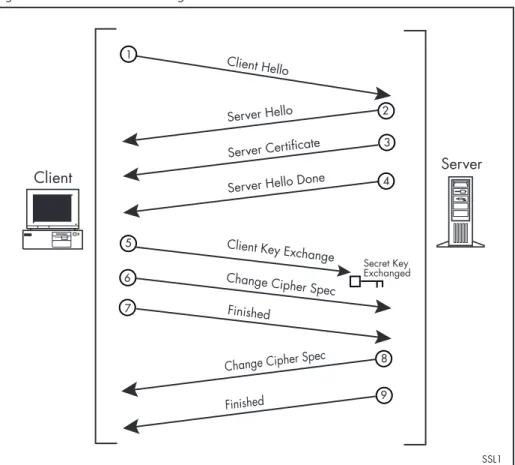
The handshake exchange happens in the following manner, illustrated in Figure 27-1 on page 27-4:
1. The client sends a CLIENT HELLO to the server. This contains the cryptographic systems that the client can support.
2. The server sends a SERVER HELLO to the client with the server’s chosen cryptographic systems. These are used during this session and any sessions that are resumed after being cached.
3. The server sends a CERTIFICATE message that contains its Public Key Certificate. This is an electronic identity document.
4. The server sends a SERVER HELLO DONE to tell the client that it has finished the HELLO transaction.
5. The client sends a CLIENT KEY EXCHANGE that contains a random sequence of numbers that have been encrypted with the server’s public key. This encrypted data becomes the secret key. The client verifies the identity of the server because the server must have the matching private key to decode the message that has been encrypted with its public key. 6. The client sends a CHANGE CIPHER SPEC that tells the server that all
subsequent messages from the client will be encrypted. This notifies the server that it must start decrypting the data it receives.
7. The client sends an encrypted FINISHED message to notify the server that it has completed the handshake exchange. This message contains a hash of previously transmitted handshake messages.
8. The server sends a CHANGE CIPHER SPEC that tells the client that all subsequent messages from the server will be encrypted. This notifies the client that it must start decrypting data that it receives.
9. The server sends an encrypted FINISHED message to notify the client that it has completed the handshake exchange. This message contains a hash of previously transmitted handshake messages.
27-4 AlliedWare OS Software Reference
Figure 27-1: Handshake exchange
SSL caches negotiated sessions so they can be quickly re-established. If a session is resumed, the client sends a CLIENT HELLO to the server, containing the SESSION ID of a previously negotiated session. The server replies with a SERVER HELLO that agrees with the suggested session ID. The two parties then use the secret key retrieved from the cached session and proceed to the data transfer phase.
SSL uses certificates for authentication. A Certification Authority (CA) issues certificates after checking that a public key belongs to its claimed owner. See Chapter 29, Public Key Infrastructure (PKI) for more on certificates and Certification Authorities.
Messages
SSL messages are encapsulated by the Record Layer before being passed to TCP for transmission. The types of SSL messages are:
• Handshake
• Change Cipher Spec • Alert
• Application data (HTTP, FTP or NNTP)
The handshake initiates an SSL session, during which data is securely transmitted between a client and server. During the handshake:
• The client and server establish the SSL version they use.
• The client and server negotiate the cipher suite for the session, which includes encryption, authentication, and key exchange algorithms. • The symmetrical key is exchanged.
• The client authenticates the server (optionally, the server authenticates SSL1 Server
Client
Server Hello Done
Client Hello
1
Server Hello 2
Server Certificate 3
4
5 6
Secret Key Exchanged Client Key Exchange
Change Cipher Spec Finished
7
8
Change Cipher Spec
Secure Sockets Layer (SSL) 27-5
Change cipher Spec informs the receiving party that all subsequent messages will be encrypted using previously negotiated security options. The parties use the strongest cryptographic systems that they both support.
The alert message is used if the client or server detects an error. Alert messages also inform the other end that the session is about to close. The Alert message contains a severity rating and a description of the alert. Possible reasons for an alert include if either party receives an invalid certificate or an unexpected message.
The application message encapsulates the encrypted application data.
SSL on the Switch
The switch implements the following versions of SSL:
■ Mandatory parts of RFC 2246 (TLSv1), except for DSS encryption ■ Mandatory parts of SSLv3
■ SSLv2 client hello
■ DES40 and DES encryption algorithms and RSA authentication and key exchange algorithms
■ SHA1 for MAC
To use SSL your switch must have PKI, ISAKMP, SSH, and SSL feature licences. If these licences are not already present on your switch, contact your authorised distributor or reseller.
The number of ENCO channels on the switch determines the number of SSL sessions that can be active at one time. For details, see “ENCO Services” on page 24-4 of Chapter 24, Encryption Services.
SSL and the Graphical User Interface
SSL provides a secure connection over a public network and the Internet. You can configure a switch via a Graphical User Interface (GUI) with a secure connection. This means that sensitive data including passwords and email addresses cannot be accessed by malicious parties. You can generate a
certificate and its associated private key using the command line, with the add pki certificate command on page 29-15 of Chapter 29, Public Key
Infrastructure (PKI) and the create enco key command on page 24-7 of Chapter 24, Encryption Services.
SSL lets you connect securely over an insecure network, but SSL must be initially set up from a private or previously secured interface.
27-6 AlliedWare OS Software Reference
Configuration Example
This example describes how to secure the switch’s HTTP server with SSL. Once the server is secured, you can use HTTPS when browsing to it from a PC to manage the switch securely via the GUI and to securely download files off the switch.
For this configuration to succeed, your switch may need a PKI feature licence. If it is not already on your switch, contact your authorised distributor or reseller. SSL does not require a feature licence.
1. Create a Security Officer user account.
Only a user with Security Officer privilege can enable system security and SSL.
To add a user with the login name "CIPHER", password "sbr4y3", login=yes, and Security Officer privilege, use the command:
add user="cipher" password="sbr4y3" privilege=securityofficer login=yes create config=ssl.cfg
restart switch
2. Login as a Security Officer.
To login as the user with Security Officer privilege called "CIPHER", use the command:
login cipher
And then enter the password for "CIPHER", "sbr4y3". 3. Enable system security.
To enable system security, use the command:
enable system security
4. Create an RSA key pair for this switch.
To create an RSA key pair, use the command:
create enco key=0 type=rsa length=1024
5. Set the switch’s distinguished name. To set the switch’s distinguished name to
"cn=switch1,o=my_company,c=us", use the command:
set system distinguishedname="cn=switch1, o=my_company,c=us"
6. Set the UTC offset.
To set the Universal Coordinated Time to inform the switch that the difference between local time and GMT is 7 hours, use the command:
set log utcoffset=7
7. Create a self-signed certificate for the switch.
To create a PKI certificate without contacting a CA for browsing to the GUI, use the command:
create pki certificate=cer_name keypair=0
serialnumber=12345 subject="cn=172.30.1.105, o=my_company, c=us"
Secure Sockets Layer (SSL) 27-7
This command creates a certificate suitable only for secure switch
management via the GUI and downloading files. A pop-up message in the browser window warns that the certificate is not issued by a trusted authority. For details, see Chapter 29, Public Key Infrastructure (PKI). 8. Load self-signed switch certificate.
To load the signed switch certificate onto the switch, use the command:
add pki certificate=cer_name location=cer_name.cer trust=yes
9. Enable SSL on the HTTP server.
To enable SSL on the HTTP server with previously created SSL Key and the port 443, use the command:
set http server security=on sslkey=0 port=443
10. Configure an IP interface to run SSL over.
To configure an IP interface over which SSL is to run, first enable IP using the command:
enable ip
To make 1 the IP interface and address 172.30.1.105 the interface’s IP address, use the command:
add ip interface=vlan1 ip=172.30.1.105
To add an IP route on this interface with a next hop of 172.30.1.254, use the command:
add ip route=0.0.0.0 interface=vlan1 next=172.30.1.254
For this example to succeed, the user would have to log in as "cipher" rather than "manager" when connecting to the switch with a web browser.
27-8 disable ssl debug AlliedWare OS Software Reference
Command Reference
This section describes the commands available to configure and monitor SSL on the switch.
The shortest valid command is denoted by capital letters in the Syntax section. See “Conventions” on page xxxviii of About this Software Reference in the front of this manual for details of the conventions used to describe command syntax. See Appendix A, Messages for a complete list of messages and their meanings.
Note that there is no enable command for SSL. The protocol is enabled with the set http server command on page 5-39 of Chapter 5, Managing
Configuration Files and Software Versions by specifying security=on.
disable ssl debug
Syntax DISable SSL DEBug[={ALL|PACket|STAte|TRAce}]
Description This command disables SSL debugging. Debugging is disabled by default.
Examples To disable all SSL debugging output, use the command:
dis ssl deb
To disable debugging for the handshake process, use the command:
dis ssl deb=sta
Related Commands enable ssl debug show ssl
enable ssl debug
Syntax ENAble SSL DEBug[={ALL|PACket|STAte|TRAce}]
Description This command enables SSL debugging. The all option enables packet, state, and trace debugging. The packet debugging displays a decoded version of the SSL records transmitted and received. This is particularly useful for viewing the handshake sequence. The state debugging displays the progress of the handshake process. The trace debugging displays error and informational messages. The default is all.
Examples To enable all SSL debugging output, use the command:
ena ssl deb
To enable SSL packet debugging, use the command:
ena ssl deb=pac
Related Commands disable ssl debug show ssl
Secure Sockets Layer (SSL) set ssl 27-9
set ssl
Syntax SET SSL [CAchetimeout=cachetimeout] [DEbugipaddress={ALL|
ipadd}] [MAXsessions=maxsessions]
where:
■ cachetimeout is a decimal number from 60 to 600 ■ ipadd is an IP address in dotted decimal notation ■ maxsessions is a decimal number from 0 to 5000
Description This command sets all of the parameters required to configure SSL.
The cachetimeout parameter determines the maximum time that a session is to be retained in the cache. The cache stores information about closed connections so they can be resumed quickly. The default is 300 seconds.
The debugipaddress parameter specifies the level of debug output to display. If an IP address is specified, the debug output displays information about traffic sent and received on that IP address. If all is specified, the debug output displays information about traffic on all IP addresses. The default is all. The maxsessions parameter specifies the maximum number of sessions allowed in the session resumption cache. The default is 2000 sessions.
Examples To set the timeout period for the session resumption cache to 180 seconds, use the command:
set ssl ca=180
If you have a client computer with an IP address of 192.168.123.156, and you want to examine debugging information about all traffic that has been sent to or from this computer, use the command:
set ssl de=192.168.123.156
Related Commands enable ssl debug show ssl
27-10 show ssl AlliedWare OS Software Reference
show ssl
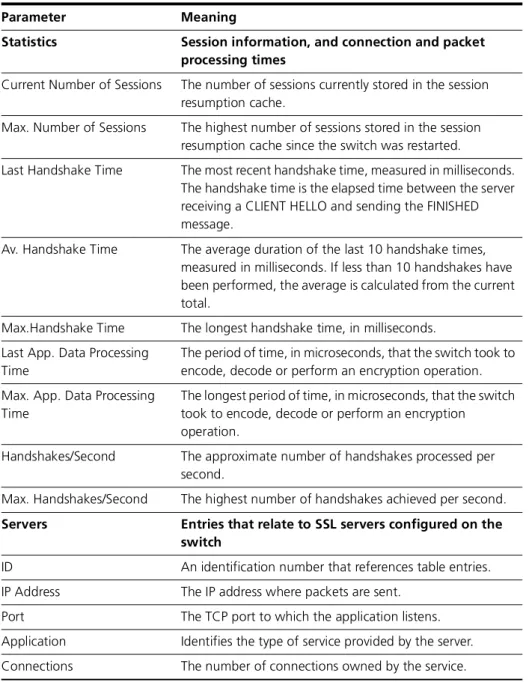
Syntax SHow SSLDescription This command displays current settings and statistical information about SSL. It also displays a table that shows the IP address and port number used for each application (Figure 27-2, Table 27-1).
Figure 27-2: Example output from the show ssl command
SHOW SSL
---SSL Configuration:
Version ... SSLv3, TLSv1 Ciphers Available ... DES, RSA Maximum Number of Sessions ... 2000 sessions Cache Timeout ... 300 seconds
Debug IP Address ... ALL
Debug Mode ... PKT,STATE,TRACE
Statistics:
Current Number of Sessions ... 0
Max. Number of Sessions ... 1
Last Handshake Time (ms) ... 120
Av. Handshake Time (ms) ... 120
Max. Handshake Time (ms) ... 120
Last App. Data Processing Time (us) .... 834
Max. App. Data Processing Time (us) .... 834
Handshakes/Second ... 0
Max Handshakes/Second ... 0
Servers: ID IP Address Port Application Connections ---0 ---0.---0.---0.---0 ---0---0443 HTTP Server ---0
---Table 27-1: Parameters in output of the show ssl command
Parameter Meaning
SSL Configuration General information about SSL
Version The SSL protocols that are supported.
Ciphers Available The encryption and authentication protocols that are supported.
Maximum Number of Sessions The maximum number of SSL connections that can be stored in the session resumption cache.
Cache Timeout The period of time in seconds that a session remains in the session resumption cache.
Debug IP Address Debugging examines traffic to and from this IP address if one is specified. If ALL is shown, debugging examines traffic from all IP addresses.
Debug Mode Whether the current debugging mode is ALL, PACKET, STATE, or TRACE.
Secure Sockets Layer (SSL) show ssl 27-11
Examples To display general information about SSL, use the command:
sh ssl
Related Commands show ssl counters show ssl sessions
Statistics Session information, and connection and packet processing times
Current Number of Sessions The number of sessions currently stored in the session resumption cache.
Max. Number of Sessions The highest number of sessions stored in the session resumption cache since the switch was restarted.
Last Handshake Time The most recent handshake time, measured in milliseconds. The handshake time is the elapsed time between the server receiving a CLIENT HELLO and sending the FINISHED message.
Av. Handshake Time The average duration of the last 10 handshake times, measured in milliseconds. If less than 10 handshakes have been performed, the average is calculated from the current total.
Max.Handshake Time The longest handshake time, in milliseconds. Last App. Data Processing
Time
The period of time, in microseconds, that the switch took to encode, decode or perform an encryption operation. Max. App. Data Processing
Time
The longest period of time, in microseconds, that the switch took to encode, decode or perform an encryption operation.
Handshakes/Second The approximate number of handshakes processed per second.
Max. Handshakes/Second The highest number of handshakes achieved per second.
Servers Entries that relate to SSL servers configured on the switch
ID An identification number that references table entries. IP Address The IP address where packets are sent.
Port The TCP port to which the application listens. Application Identifies the type of service provided by the server. Connections The number of connections owned by the service. Table 27-1: Parameters in output of the show ssl command (Continued)
27-12 show ssl counters AlliedWare OS Software Reference
show ssl counters
Syntax SHow SSL COUntersDescription This command displays counters for SSL (Figure 27-3 on page 27-12, Table 27-2 on page 27-14). The counters reset when the switch is restarted.
Figure 27-3: Example output from the show ssl counters command
Show SSL Counters
---TCP:
inData ... 2800 outData ... 4900
inRecord ... 4200 outRecord ... 4910
inChangeCS ... 700 outDataFail ... 0
inAlert ... 657 inDataPassThrough ... 0
inHandshake ... 2100 inDataWhileBusy ... 0
inAppData ... 700 inDataWhileClosing ... 0
inUnknown ... 0 inDataNoConnection ... 0
closedAfterFatalSent .... 700 writeInputFail ... 0
inDataNoData ... 0 tcpCloseRequest ... 700
tcpClosed ... 700 startFailed ... 0
closedNoConnection ... 0 appData ... 700
closeRequestNoConnection 0 appDataWhileBusy ... 0
appDataNoConnection ... 0 appDataNoData ... 0
processNeedMoreData ... 0 appFlowControlBlock ... 0
processBufferInvalid .... 0 processEncoError ... 0
tcpEstablished ... 700 appDataPassThrough ... 0
processDataInvalid ... 0
General: inHSMessages ... 4 inUnexpected ... 0
sslStop ... 0
Server: serverStart ... 2
inClientHello ... 0 outServerHello ... 2
inSSLv2ClientHello ... 2 outCert ... 2
inCert ... 0 outCertRequest ... 0
inClientKeyExchange ... 1 outHelloDone ... 2
inCertVerify ... 0 outChangeCS ... 1
inFinished ... 1 outFinished ... 1
resumeRequest ... 0 cacheHit ... 0
cacheMiss ... 0 cacheFull ... 0
noCipherMatch ... 0 sslVersion ... 0
sslv2ResumeRequest ... 0 resumeDiffCipher ... 0
noCertLoaded ... 0 finishBeforeCCS ... 0
missingMessageCheckFail . 0 hsHashFail(md5) ... 0
hsHashFail(sha) ... 0 hsHashFail(tls) ... 0
badSessionIdLen ... 0
Client: clientStart ... 0
inHelloRequest ... 0 outClientHello ... 0
inServerHello ... 0 outCert ... 0
inCert ... 0 outCKE ... 0
inCertRequest ... 0 outCertVerify ... 0
Secure Sockets Layer (SSL) show ssl counters 27-13
inHelloDone ... 0 outFinished ... 0
inChangeCipherSpec ... 0
inFinished ... 0
sslVersionFail ... 0 missingMessageFail ... 0
certRequestNoRSA ... 0 noCert ... 0
rxFinBeforeChangeCS ... 0 hsHashFail(md5) ... 0
hsHashFail(sha) ... 0 hsHashFail(tls) ... 0
badSessionIdLen ... 1
Alerts Received: fatal ... 0 warning ... 0
closeNotify ... 0 unexpectedMessage ... 0
badRecordMac ... 0 decryptionFailed ... 0
recordOverflow ... 0 decompressionFailure .... 0
handshakeFailure ... 0 noCertificate ... 0
badCertificate ... 0 unsupportedCert ... 0
certRevoked ... 0 certExpired ... 0
certUnknown ... 0 illegalParameter ... 0
unknownCA ... 0 accessDenied ... 0
decodeError ... 0 decryptError ... 0
exportRestriction ... 0 protocolVersion ... 0
insufficientSecurity .... 0 internalError ... 0
userCancelled ... 0 noRenegotiation ... 0
unknownAlert ... 0
Alerts Sent: total ... 1 decryptionFailed ... 0
unexpectedMessage ... 0 protocolVersion ... 0
hanshakeFailure ... 0 noCertificate ... 0
certUnknown ... 0 unsupportedCert ... 0
closeNotify... 1 badCertificate... 2
Enco: attach ... 2 attached ... 2
attachFail ... 0 detach ... 0
detached ... 0 resetE ... 1
resetEDone ... 1 resetEFail ... 0
resetD ... 1 resetDDone ... 1
resetDFail ... 0 encode ... 2
encoded ... 2 encodeFail ... 0
decode ... 2 decoded ... 2
decodeFail ... 0 handshake ... 1
handshakeOK ... 1 handshakeFail ... 0
callbackNoConnection .... 0 getKeyOk ... 2
getKeyFail ... 0 getCertGood ... 1
getCertFail ... 0 addCertGood ... 0
newCertNotTrusted... 0 addCertNoConnection ... 0
certNotTrusted... 0
Session Resumption Cache: sessionCreated ... 1 sessionCreateFail ... 0
sessionDestroy ... 0 sessionDestroyFail ... 0
27-14 show ssl counters AlliedWare OS Software Reference
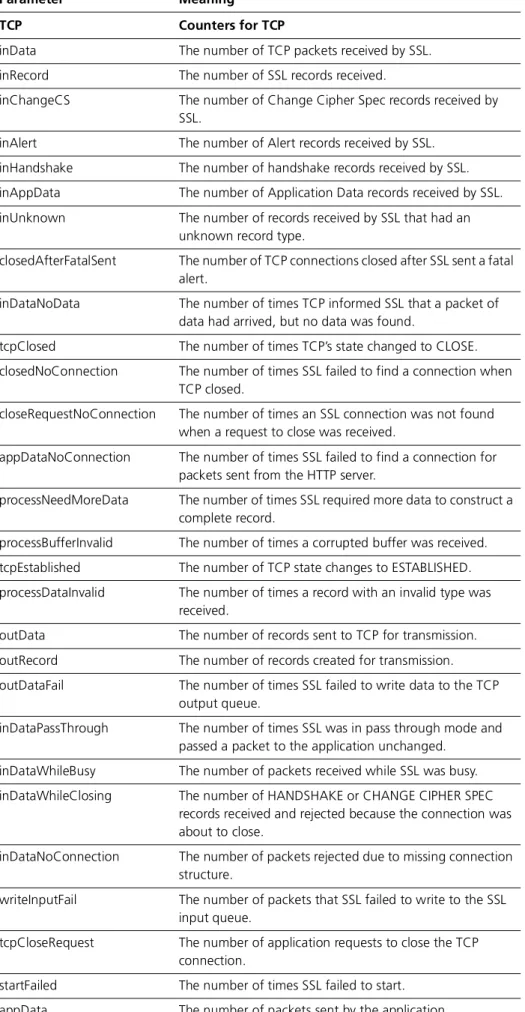
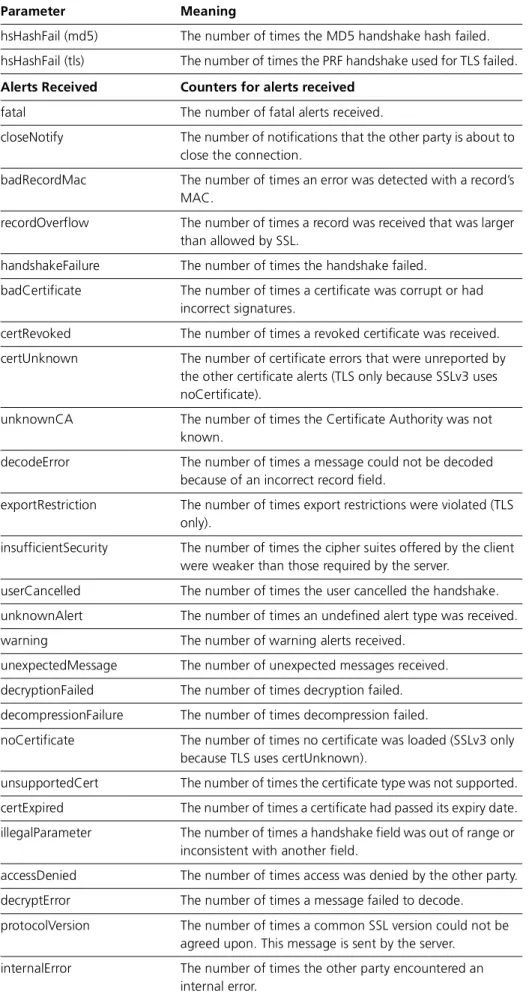
Table 27-2: Parameters in output of the show ssl counters command
Parameter Meaning
TCP Counters for TCP
inData The number of TCP packets received by SSL. inRecord The number of SSL records received.
inChangeCS The number of Change Cipher Spec records received by SSL.
inAlert The number of Alert records received by SSL. inHandshake The number of handshake records received by SSL. inAppData The number of Application Data records received by SSL. inUnknown The number of records received by SSL that had an
unknown record type.
closedAfterFatalSent The number of TCP connections closed after SSL sent a fatal alert.
inDataNoData The number of times TCP informed SSL that a packet of data had arrived, but no data was found.
tcpClosed The number of times TCP’s state changed to CLOSE. closedNoConnection The number of times SSL failed to find a connection when
TCP closed.
closeRequestNoConnection The number of times an SSL connection was not found when a request to close was received.
appDataNoConnection The number of times SSL failed to find a connection for packets sent from the HTTP server.
processNeedMoreData The number of times SSL required more data to construct a complete record.
processBufferInvalid The number of times a corrupted buffer was received. tcpEstablished The number of TCP state changes to ESTABLISHED. processDataInvalid The number of times a record with an invalid type was
received.
outData The number of records sent to TCP for transmission. outRecord The number of records created for transmission. outDataFail The number of times SSL failed to write data to the TCP
output queue.
inDataPassThrough The number of times SSL was in pass through mode and passed a packet to the application unchanged.
inDataWhileBusy The number of packets received while SSL was busy. inDataWhileClosing The number of HANDSHAKE or CHANGE CIPHER SPEC
records received and rejected because the connection was about to close.
inDataNoConnection The number of packets rejected due to missing connection structure.
writeInputFail The number of packets that SSL failed to write to the SSL input queue.
tcpCloseRequest The number of application requests to close the TCP connection.
startFailed The number of times SSL failed to start. appData The number of packets sent by the application.
Secure Sockets Layer (SSL) show ssl counters 27-15
appDataWhileBusy The number of packets of data sent from the HTTP server to SSL while SSL was busy.
appDataNoData The number of times the HTTP server requested that SSL send some data, but none was found.
appFlowControlBlock The number of times the output flow control has affected the transmission of a packet.
processEncoError The number of times an error was received when attempting to decode a record.
appDataPassThrough The number of packets of data from the HTTP server that passed through unchanged due to pass through mode.
Main General counters for the SSL client and/or server
inHSMessages The number of HANDSHAKE messages received.
sslStop The number of times the SSL stop routine has been entered as a result of TCP closing.
inUnexpected The number of unexpected HANDSHAKE messages received.
Server Counters for the SSL server
serverStart The number of times SSL started as a server. inClientHello The number of CLIENT HELLO messages received.
inSSLv2ClientHello The number of SSLv2 compatible CLIENT HELLO messages received.
inCert The number of CERTIFICATE messages received.
inClientKeyExchange The number of CLIENT KEY EXCHANGE messages received. inCertVerify The number of CERTIFICATE VERIFY messages received. inFinished The number of FINISHED messages received.
outServerHello The number of SERVER HELLO messages sent. outCert The number of CERTIFICATE messages sent.
outCertRequest The number of CERTIFICATE REQUEST messages sent. outHelloDone The number of SERVER HELLO DONE messages sent. outChangeCS The number of CHANGE CIPHER SPEC messages sent. outFinished The number of FINISHED messages sent.
resumeRequest The number of CLIENT HELLO messages received with a non-zero session ID.
cacheMiss The number of times a session was not found in the session resumption cache. (It may have expired).
noCipherMatch The number of times the server did not support any ciphers offered by the client.
sslv2ResumeRequest The number of times the server sent a message to resume a Table 27-2: Parameters in output of the show ssl counters command (Continued)
27-16 show ssl counters AlliedWare OS Software Reference
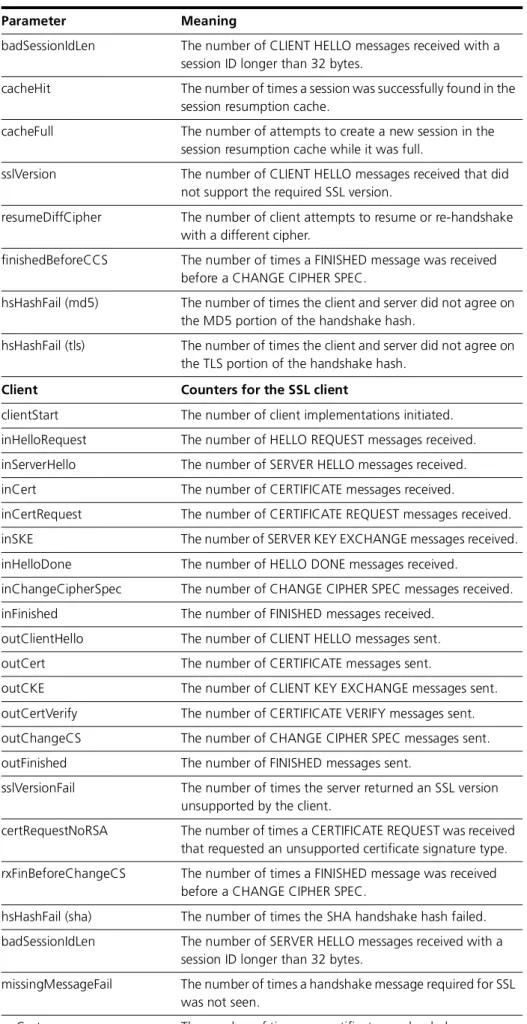
badSessionIdLen The number of CLIENT HELLO messages received with a session ID longer than 32 bytes.
cacheHit The number of times a session was successfully found in the session resumption cache.
cacheFull The number of attempts to create a new session in the session resumption cache while it was full.
sslVersion The number of CLIENT HELLO messages received that did not support the required SSL version.
resumeDiffCipher The number of client attempts to resume or re-handshake with a different cipher.
finishedBeforeCCS The number of times a FINISHED message was received before a CHANGE CIPHER SPEC.
hsHashFail (md5) The number of times the client and server did not agree on the MD5 portion of the handshake hash.
hsHashFail (tls) The number of times the client and server did not agree on the TLS portion of the handshake hash.
Client Counters for the SSL client
clientStart The number of client implementations initiated. inHelloRequest The number of HELLO REQUEST messages received. inServerHello The number of SERVER HELLO messages received. inCert The number of CERTIFICATE messages received.
inCertRequest The number of CERTIFICATE REQUEST messages received. inSKE The number of SERVER KEY EXCHANGE messages received. inHelloDone The number of HELLO DONE messages received.
inChangeCipherSpec The number of CHANGE CIPHER SPEC messages received. inFinished The number of FINISHED messages received.
outClientHello The number of CLIENT HELLO messages sent. outCert The number of CERTIFICATE messages sent.
outCKE The number of CLIENT KEY EXCHANGE messages sent. outCertVerify The number of CERTIFICATE VERIFY messages sent. outChangeCS The number of CHANGE CIPHER SPEC messages sent. outFinished The number of FINISHED messages sent.
sslVersionFail The number of times the server returned an SSL version unsupported by the client.
certRequestNoRSA The number of times a CERTIFICATE REQUEST was received that requested an unsupported certificate signature type. rxFinBeforeChangeCS The number of times a FINISHED message was received
before a CHANGE CIPHER SPEC.
hsHashFail (sha) The number of times the SHA handshake hash failed. badSessionIdLen The number of SERVER HELLO messages received with a
session ID longer than 32 bytes.
missingMessageFail The number of times a handshake message required for SSL was not seen.
noCert The number of times no certificate was loaded. Table 27-2: Parameters in output of the show ssl counters command (Continued)
Secure Sockets Layer (SSL) show ssl counters 27-17
hsHashFail (md5) The number of times the MD5 handshake hash failed. hsHashFail (tls) The number of times the PRF handshake used for TLS failed.
Alerts Received Counters for alerts received
fatal The number of fatal alerts received.
closeNotify The number of notifications that the other party is about to close the connection.
badRecordMac The number of times an error was detected with a record’s MAC.
recordOverflow The number of times a record was received that was larger than allowed by SSL.
handshakeFailure The number of times the handshake failed.
badCertificate The number of times a certificate was corrupt or had incorrect signatures.
certRevoked The number of times a revoked certificate was received. certUnknown The number of certificate errors that were unreported by
the other certificate alerts (TLS only because SSLv3 uses noCertificate).
unknownCA The number of times the Certificate Authority was not known.
decodeError The number of times a message could not be decoded because of an incorrect record field.
exportRestriction The number of times export restrictions were violated (TLS only).
insufficientSecurity The number of times the cipher suites offered by the client were weaker than those required by the server.
userCancelled The number of times the user cancelled the handshake. unknownAlert The number of times an undefined alert type was received. warning The number of warning alerts received.
unexpectedMessage The number of unexpected messages received. decryptionFailed The number of times decryption failed. decompressionFailure The number of times decompression failed.
noCertificate The number of times no certificate was loaded (SSLv3 only because TLS uses certUnknown).
unsupportedCert The number of times the certificate type was not supported. certExpired The number of times a certificate had passed its expiry date. illegalParameter The number of times a handshake field was out of range or
inconsistent with another field.
accessDenied The number of times access was denied by the other party. Table 27-2: Parameters in output of the show ssl counters command (Continued)
27-18 show ssl counters AlliedWare OS Software Reference
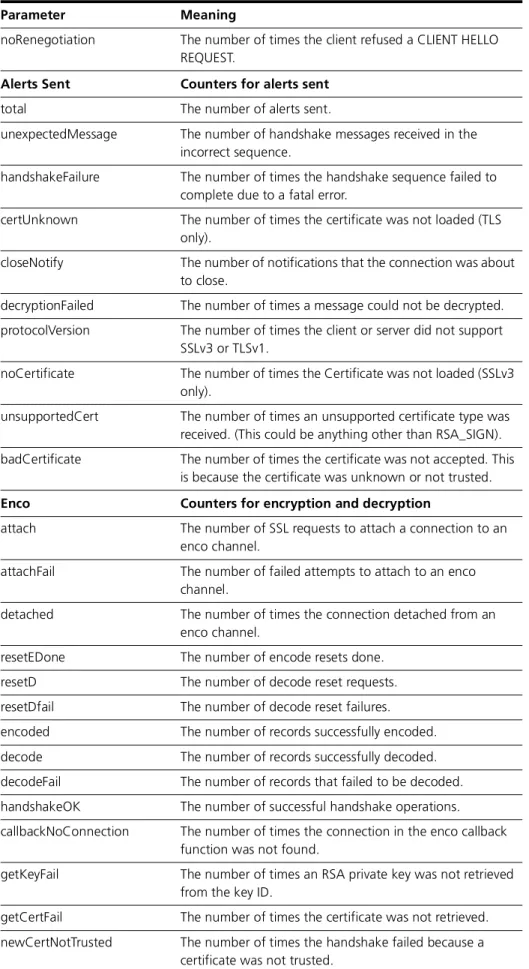
noRenegotiation The number of times the client refused a CLIENT HELLO REQUEST.
Alerts Sent Counters for alerts sent
total The number of alerts sent.
unexpectedMessage The number of handshake messages received in the incorrect sequence.
handshakeFailure The number of times the handshake sequence failed to complete due to a fatal error.
certUnknown The number of times the certificate was not loaded (TLS only).
closeNotify The number of notifications that the connection was about to close.
decryptionFailed The number of times a message could not be decrypted. protocolVersion The number of times the client or server did not support
SSLv3 or TLSv1.
noCertificate The number of times the Certificate was not loaded (SSLv3 only).
unsupportedCert The number of times an unsupported certificate type was received. (This could be anything other than RSA_SIGN). badCertificate The number of times the certificate was not accepted. This
is because the certificate was unknown or not trusted.
Enco Counters for encryption and decryption
attach The number of SSL requests to attach a connection to an enco channel.
attachFail The number of failed attempts to attach to an enco channel.
detached The number of times the connection detached from an enco channel.
resetEDone The number of encode resets done. resetD The number of decode reset requests. resetDfail The number of decode reset failures. encoded The number of records successfully encoded. decode The number of records successfully decoded. decodeFail The number of records that failed to be decoded. handshakeOK The number of successful handshake operations.
callbackNoConnection The number of times the connection in the enco callback function was not found.
getKeyFail The number of times an RSA private key was not retrieved from the key ID.
getCertFail The number of times the certificate was not retrieved. newCertNotTrusted The number of times the handshake failed because a
certificate was not trusted.
Table 27-2: Parameters in output of the show ssl counters command (Continued)
Secure Sockets Layer (SSL) show ssl counters 27-19
Examples To display SSL counters, use the command:
sh ssl cou
Related Commands show ssl
show ssl sessions
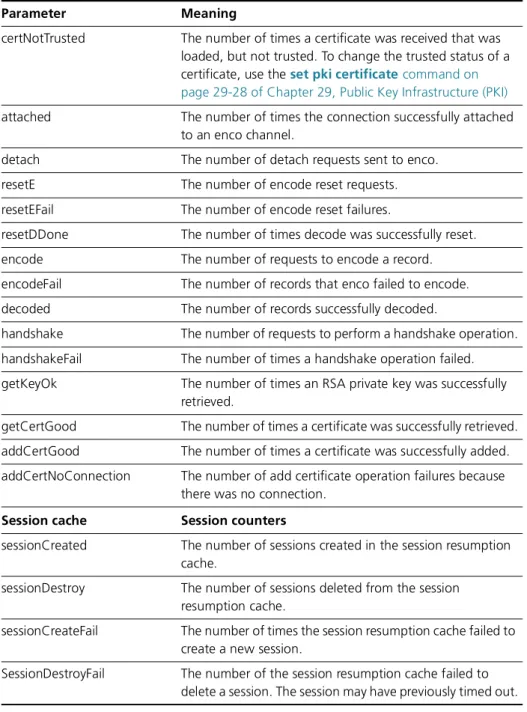
certNotTrusted The number of times a certificate was received that was loaded, but not trusted. To change the trusted status of a certificate, use the set pki certificate command on page 29-28 of Chapter 29, Public Key Infrastructure (PKI)
attached The number of times the connection successfully attached to an enco channel.
detach The number of detach requests sent to enco. resetE The number of encode reset requests. resetEFail The number of encode reset failures.
resetDDone The number of times decode was successfully reset. encode The number of requests to encode a record. encodeFail The number of records that enco failed to encode. decoded The number of records successfully decoded.
handshake The number of requests to perform a handshake operation. handshakeFail The number of times a handshake operation failed. getKeyOk The number of times an RSA private key was successfully
retrieved.
getCertGood The number of times a certificate was successfully retrieved. addCertGood The number of times a certificate was successfully added. addCertNoConnection The number of add certificate operation failures because
there was no connection.
Session cache Session counters
sessionCreated The number of sessions created in the session resumption cache.
sessionDestroy The number of sessions deleted from the session resumption cache.
sessionCreateFail The number of times the session resumption cache failed to create a new session.
SessionDestroyFail The number of the session resumption cache failed to delete a session. The session may have previously timed out. Table 27-2: Parameters in output of the show ssl counters command (Continued)
27-20 show ssl sessions AlliedWare OS Software Reference
show ssl sessions
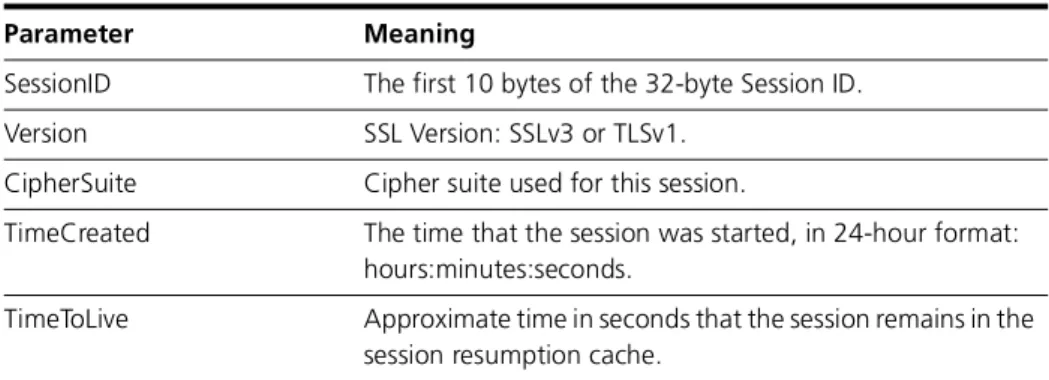
Syntax SHow SSL SESsionsDescription This command displays detailed information about the SSL sessions stored in the session resumption cache (Figure 27-4, Table 27-3).
Figure 27-4: Example output from the show ssl sessions command
Examples To show information about sessions stored in the session resumption cache, use the command:
sh ssl ses
Related Commands show ssl
show ssl counters
Session Database:
SessionId Version CipherSuite TimeCreated TimeToLive --- ab128672adbbb228c812... TLSv1 RSA_DES_SHA 16:23:55 300
e77bd142892e3d03602d... SSLv3 RSA_DES_SHA 16:24:07 300 647c09a97e133cfe0d7e... TLSv1 RSA_DES40_SHA 16:23:45 293
---Table 27-3: Parameters in output of the show ssl sessions command
Parameter Meaning
SessionID The first 10 bytes of the 32-byte Session ID. Version SSL Version: SSLv3 or TLSv1.
CipherSuite Cipher suite used for this session.
TimeCreated The time that the session was started, in 24-hour format: hours:minutes:seconds.
TimeToLive Approximate time in seconds that the session remains in the session resumption cache.