HP OpenView Smart Plug-in
for Microsoft Exchange
Data sheet
Email is no longer just a productivity application - it is a company’s lifeline. When email slows down or stops altogether, the business loses money.
Monitoring is a key component of caring for any messaging system and for a complex, distributed application such as Exchange, knowing what to monitor, from where, how often, and when to alarm are not trivial issues.
The HP OpenView Smart Plug-in for Microsoft Exchange delivers mission-critical monitoring and management of enterprise Exchange 5.5, 2000 and 2003 environments. The Smart Plug-in (SPI) provides valuable insight into the current health and ongoing trends in your Exchange environment, allowing you to increase Exchange availability and performance while lowering associated support costs, and improving capacity management and planning.
Key features and benefits
• Get service-level performance monitoring and reporting – with pre-written policies and reports, administrators can quickly see the health of the Exchange infrastructure
• Monitor the entire Exchange environment - Exchange 2003, 2000 and 5.5 are all supported by the Exchange Smart Plug In
• Deploy fast and get immediate value - pre-defined, customizable thresholds enable fast time to value, yet still allow individual policy customization over time
• Manage Exchange servers through a familiar interface - integration with the OpenView Operations for Windows service map ensures existing users get up to speed quickly
•
Enhanced troubleshooting – quickly drill down from the Exchange application to the operating system and server hardware to correlate errors and reduce your Mean Time to FixThe HP OpenView Smart Plug-in for Microsoft
Exchange helps operations personnel meet the
Service Level Agreements their businesses rely on
Product Functionality Overview
The HP OpenView Smart Plug-in for Microsoft Exchange brings market-leading HP OpenView management and control capabilities to Microsoft Exchange
environments. It enables you to perform business-centric service management, event management, performance monitoring and reporting on your environment, in support of your critical business processes.
Event /Action
The HP OpenView Smart Plug-in for Microsoft Exchange monitors the operational activities (services, performance counters, WMI counters, event logs) of key Exchange resources, such as:
• Process Monitor (for monitoring consumption and utilization of core Exchange processes)
• Exchange Service Monitor (for monitoring Exchange Server processes for activity)
• Mailbox and Public Folder Stores
• Delivery Times
• NDR rates
• Application and System Log events
OpenView Operations has a sophisticated policy engine that can be used to define automated or operator-assisted actions that can be embedded into operational procedures, ensuring the correct action is always quickly taken.
The Microsoft Exchange SPI allows OVO operators to take on tasks that
might otherwise be carried out by dedicated Exchange resources,
streamlining the support process and raising the value of the monitoring
team within the organization
Performance
Exchange plays a vital role in today’s business - but it can only play that role if it is
adequately monitored and managed. The Exchange SPI monitors critical application metrics to ensure that you are able to keep Exchange performing optimally and your email SLAs are met.
Examples include:
• Logical Disk Space (Metrics on Logical Disk Space Use)
• Storage Group Transaction Log backups
• Active Client Logons
• SMTP Server Message Volume
• Message Transfer Agent Message Volume
• Private Information Store Message Volumes
• Public Information Store Message Volumes
• Queue growth (IS, SMTP, MTA, Epoxy)
• User Mailbox Data
• Public Folder Data
Service reports and graphs
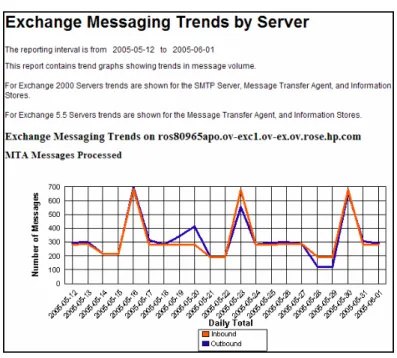
With over 80 pre-defined reports and 100+ near-real-time graphs, the Exchange SPI provides both customer experience and in-depth Exchange sub-system insight. The reports show trends in Exchange usage (eg. messages/megabytes processed, top10
senders/receivers), current and historical performance (eg. round trip times, SLA
measurement) and help plan Exchange infrastructure additions/upgrades (eg. number of mailboxes, database size)
If you use OpenView Reporter, you can install the Exchange SPI reports on the Reporter system, customize as desired, and apply to groups of Exchange servers.
Figure 1. Predefined graphs can highlight performance trends before are impacted
Service views
The Exchange SPI provides two methods by which you can visualize your Exchange infrastructure:
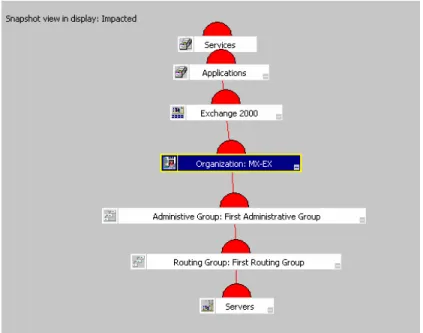
1. Service Maps - by integrating Exchange components into the OpenView
Operations Service Map, service dependencies can be visualized, helping understand the criticality of certain infrastructure elements and assist in troubleshooting
Figure 3. Understand the business impact of Exchange problems through HP OpenView Operations’ service views 2. OpenView Topology Viewer - comes bundled with both the Exchange and Active Directory SPIs and supplements information in the Service Map by providing a role - based view of Exchange and Active Directory environments.
Snapshots of the Active Directory and Exchange environments can be saved and manipulated offline for layout and design purposes.
Figure 4. In this screenshot the OpenView Topology Viewer displays both the location and roles of servers in an Exchange infrastructure
Technical specifications
System requirementsSoftware Microsoft Exchange 5.5, 2000 and 2003
Supported platforms, servers, and applications
Managed nodes Windows NT4 SP3, Windows 2000 Server, Windows Server 2003
Management Server
Intel: Windows 2000 Server, Windows Server 2003 HP9000: HP-UX 10.20, 11.0, 11.11 Sun SPARC: Solaris 2.6,7,8
OpenView Platforms HP OpenView Operations Agent, HP OpenView Performance Agent HP
OpenView Operations, HP OpenView Performance Manager, HP OpenView Reporter, HP OpenView Performance Insight
Ordering information
A
Part number Product name
B7448AA B7449AA
HP OpenView Smart Plug in for Microsoft Exchange LTU, Tier 3 HP OpenView Smart Plug in for Microsoft Exchange LTU, Tier 2
B7450AA HP OpenView Smart Plug in for Microsoft Exchange LTU, Tier 1 B7451AA HP OpenView Smart Plug in for Microsoft Exchange LTU, Tier 0
Media and manuals are included with the media kit for HP OpenView Operations
A Complete solution
For more information about the SPI for Microsoft Exchange visit
Get the most from your software investment
HP provides high-quality software services that address all aspects of your software application life-cycle needs. With HP, you have access to standards-based, modular, multi-platform software coupled with best-in-class services and support. The wide range of HP service offerings—from online self-solve support to proactive mission-critical services—enables you to choose the services that best match your business needs.
For an overview of HP software services, visit: www.managementsoftware.hp.com/service To access technical interactive support, visit Software Support Online at:
www.hp.com/managementsoftware/services
To learn more about HP Software Customer Connection, a one-stop information and learning portal for software products and services, visit: www.hp.com/go/swcustomerconnection
Comprehensive training
HP provides a comprehensive curriculum of HP OpenView and IT Service Management courses. These offerings provide the training you need to realize the full potential of your HP solutions, increase your network optimization and responsiveness, and achieve better return on your IT investments.
With more than 25 years experience meeting complex education challenges worldwide, HP knows training. This experience, coupled with unique insights into HP OpenView software, positions HP to deliver the optimum training experience. For more information about these educational courses, visit: www.hp.com/learn
The smartest way to invest in IT
HP Financial Services provides innovative financing and financial asset management
programs to help you cost-effectively acquire, manage and ultimately retire your HP solutions. For more information on these services, contact your HP sales representative or visit:
www.hp.com/go/hpfinancialservices
© Copyright 2005 Hewlett-Packard Development Company, L.P. The information contained herein is subject to change without notice. The only warranties for HP products and services are set forth in the express warranty statements accompanying such products and services. Nothing herein should be construed as constituting an additional warranty. HP shall not be liable for technical or editorial errors or omissions contained herein.
Microsoft and Windows are U.S. registered trademarks of Microsoft Corporation.
For more information, visit www.openview.com