Evaluating the Effects of Fluid Interface Components on
Tabletop Collaboration
Uta Hinrichs
Dept. of Computer Science University of Magdeburg
Magdeburg, Germany
[email protected]
Sheelagh Carpendale
Dept. of Computer Science University of Calgary
Calgary, Canada
[email protected]
Stacey D. Scott
Humans and Automation Lab Massachusetts Institute of
Technology Cambridge, MA, USA
[email protected]
ABSTRACT
Tabletop displays provide exciting opportunities to support individual and collaborative activities such as planning, or-ganizing, and storyboarding. It has been previously sug-gested that continuous flow of interface items can ease infor-mation access and exploration on a tabletop workspace, yet this concept has not been adequately studied. This paper presents an exploratory user study of Interface Currents, a reconfigurable and mobile tabletop interface component that offers a controllable flow for interface items placed on its sur-face. Our study shows that Interface Currents supported in-formation access and sharing on a tabletop workspace. The study findings also demonstrate that mobility, flexibility, and general adjustability of Interface Currents are impor-tant factors in providing interface support for variations in task and group interactions.
Categories and Subject Descriptors
H.5.2 [Information Interfaces and Presentation]: User Interfaces—User Centered Design, Evaluation/Methodology; H.5.3 [Information Interfaces and Presentation]: Group and Organization—CSCW, Evaluation/Methodology
General Terms
Design, Experimentation, Human Factors
Keywords
Visual Interface Design, Computer Supported Collaborative Work, Tabletop Displays, Interface Evaluation
1.
INTRODUCTION
With recent advances in display and input hardware large-screen, high-resolution tabletop displays have become a tech-nological reality. The large working surface and comfortable environment provided by these interactive tabletop displays
Permission to make digital or hard copies of all or part of this work for personal or classroom use is granted without fee provided that copies are not made or distributed for profit or commercial advantage and that copies bear this notice and the full citation on the first page. To copy otherwise, to republish, to post on servers or to redistribute to lists, requires prior specific permission and/or a fee.
AVI ’06, May 23–26, 2006, Venezia, Italy.
Copyright 2006 ACM 1-59593-353-0/06/0005 ...$5.00.
offer great potential for supporting many formal and infmal collaborative activities, such as planning, designing, or-ganizing, and storytelling [8, 6, 11, 12].
The large size and horizontal orientation of these displays introduces certain challenges for designing effective collab-orative user interfaces. For example, it can be difficult for people to reach items located across from them on the table-top workspace, especially when they are attempting to inter-act with small interface components. Additionally, tabletop collaborators often find it more comfortable and easier to converse when sitting on different sides of the table from each other and tend to walk around the table when working on certain tasks (e.g., planning and design) [11]. Conse-quently, tabletop collaborators often do not share the same viewing angle of tabletop items. While items are difficult to comprehend by someone who is looking at them sideways or upside-down, this can potentially result in misunderstand-ings or difficulties in trying to discuss these items [5].
To help mitigate these challenges for accessing and shar-ing interface items on a tabletop workspace several table-top groupware applications have included various forms of automated transportation and rotation of items across the tabletop workspace [12, 14]. Though this approach appears to offer potential for supporting information access and shar-ing durshar-ing tabletop collaboration, it has not been explicitly investigated. Thus, the literature offers little advice on the design and interaction requirements for incorporating such functionality into a tabletop groupware application.
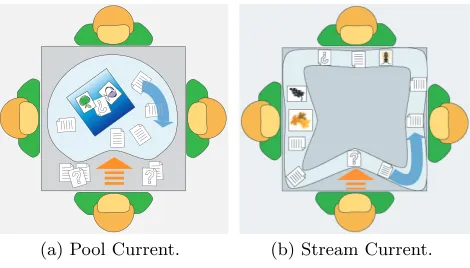
To address this issue and help enhance our understanding of assisting access to and sharing of digital information on a tabletop workspace we conducted an exploratory user study investigating the use of a tabletop interface component that provides automatic transportation and rotation of interface items. Specifically, the study investigated groups of people completing a story creation task on a tabletop workspace containing Interface Currents [3, 4], which are mobile, flex-ible interface components that contain a controllable flow. This flow automatically transports and reorients interface items placed on an Interface Current (see Figure 1).
2.
RELATED WORK
Several tabletop systems and interaction techniques have been developed to facilitate reaching, passing, and sharing of information on a tabletop display. Many of these approaches have also been designed to mitigate the orientation problem. In order to help collaborators pass information across large screen displays, Geißler [1] introduced a “throwing” gesture that enables interface items to smoothly slide across larger distances. However, this throwing gesture tends to be too inaccurate for some tabletop activities, such as moving an item to a specific location across on the display [9].
Omojola et al.’s Interactive Table [7] provided a physical lazy Susan, a rotatable plate common in Chinese restau-rants, upon which a virtual display was projected. As the lazy Susan was turned, the virtual display would also ro-tate, allowing people to share the virtual information with others at the table. Similarly, Shen et al.’s Personal Digital Historian (PDH) [12] provided a virtual lazy Susan for shar-ing virtual images on a digital table. This virtual lazy Susan provided a simple mechanism for automatically transporting a set of items across the tabletop workspace – a user could just rotate the workspace surface. The PDH also offered a solution for the orientation problem by automatically reori-enting all items on the virtual lazy Susan towards its outer boundary as they moved around the circular workspace.
Alternatively, the Caf´e Table [14] provided a “Flow Zone” around its perimeter where information items constantly flowed, similar to a virtual conveyer belt. This approach en-abled users to “browse opportunistically” through the infor-mation passing by while they were conversing with friends. The flow speed and direction on the Flow Zone could be adjusted by the users. However, similar to the virtual lazy Susan of the PDH, the location and shape of the Flow Zone on the display is fixed; thus, information always follows the same virtual path in the workspace.
St˚ahl et al.’s Pond tabletop system [13] provided a three-dimensional interface that allowed users to browse through digital media items that appeared as floating water crea-tures. Items frequently queried floated to the Pond’s sur-face while those less frequently accessed sank to the Pond’s bottom. Thus, instead of providing a clockwise or counter-clockwise movement of items such as the Caf´e Table, the Pond used an “up-and-down” flow of information.
3.
INTERFACE CURRENTS
This section provides a brief overview of the characteris-tics of the Interface Currents that were used in this study (for details see [3, 4]). An Interface Current is a mobile, flexible interface component that is dominated by an ongo-ing flow. Digital information such as pictures or documents that are placed on an Interface Current are affected by the flow and move along inside the Current container, similar to leaves driven by a current in a river.
An Interface Current is defined by its flow, path, and po-sition in the tabletop workspace. The Current’s flow is only visually indicated by the motion of the items that are placed on it. Both, the flow’s direction and velocity are adjustable by the user. The path of an Interface Current has a lo-cation and containing boundaries that define its shape and size, indicating the areas that are affected by the flow.
This study includes two basic types of Interface Currents, a pool Current and a stream Current (see Figure 1). Items
in both types of Currents are oriented to be upright to the Current’s outer edge and flow circularly around the center of the Current. The path of a pool Current is confined by only one, external boundary (see Figure 1(a)). In contrast, a stream Current is defined by an interior and an exterior boundary. Items on a stream Current flow between these two boundaries (see Figure 1(b)).
[image:2.595.321.556.159.293.2](a) Pool Current. (b) Stream Current.
Figure 1: Different types of Interface Currents. Users can reshape or resize the Current’s path, and change the width of a stream Current. This enables users to cre-ate nearly any shape of an Interface Current depending on the particular purpose for which the Current is being used. Pool and stream Currents are both mobile in the tabletop workspace, enabling users to position them in the most suit-able locations for their tasks.
Efficient and fluid collaborative work around tabletops is influenced by various factors, including group member’s maintaining awareness of each others ongoing activities [2], the orientation problem (i.e., being able to comprehend items being shared in the workspace) [5], territoriality in the table-top workspace [10], and the ability to easily access tabletable-top items [11].
The constant motion of information combined with the flexible interface design provided by Interface Currents of-fers the potential to address these issues. To investigate this potential and to gain a deeper understanding on how to facilitate collaborative tabletop interactions in a digital workspace we conducted an exploratory study. The remain-der of this paper describes this study and its findings.
4.
EXPLORATORY STUDY
While the concept of flow exists in various forms in digi-tal tabletop interfaces, it has never specifically been inves-tigated in a user study. To address this issue, we chose to study Interface Currents to help better understand how using flow in interfaces impact collaborative tabletop activ-ities. In particular, we were interested in exploring how people would interact with Interface Currents and for what tabletop activities they would find them helpful. Our re-search goal was to further our understanding of the potential of the Interface Current concept in the design of collabora-tive tabletop interfaces.
4.1
Participants and Setting
collaborative tabletop activity. Except for one of the groups, all pairs knew each other before.
The user study took place in the Interactions Lab at the University of Calgary. Participants performed the experi-mental task on a high resolution (2024×1280 pixels),
top-projected interactive tabletop display (see Figures 2 and 3) that used two ceiling mounted NEC GT 2150 projectors. The interactive tabletop enabled up to two simultaneous touch interactions by using a 72-inch SMARTBoardTMDViT 1810 interactive display that provides four cameras for input recognition.
The experimental software ran on a XeonTM2.80GHz Win-dows XP personal computer. While the DVIT interaction surface does not require any special pen input (e.g., it re-sponds to finger interaction), participants were provided styli to use in this study because pilot testing indicated they enabled more accurate interaction with the digital content on the tabletop workspace.
Projector Mirrors
[image:3.595.348.522.146.255.2]DviT SmartBoard
Figure 2: Technical setup of the tabletop system.
Figure 3: User arrangement during the study session. At the beginning of each study session the participants were seated across from each other (see Figure 3). However, they were not required to remain seated and two participants from two groups performed part of their activities standing.
4.2
Experimental Task
During the study, participants were asked to collabora-tively create a photo story on the digital tabletop workspace. Participants first chose a topic for their story from four pos-sible story titles listed on a whiteboard on a nearby wall. Each possible title related in some way to the photos that were available in the tabletop workspace.
To create the photo story, participants were given 80 pho-tos from a popular TV show (“Friends”) positioned on a large, stream Current spanning the periphery of the table-top workspace (see Figure 4), henceforth referred to as the “Peripheral Current”. To the right of each participant’s ini-tial seating position, the Peripheral Current was arranged to be slightly wider than the rest of the Current to provide an area of magnification for easier viewing of the photos. Two
[image:3.595.90.256.271.363.2]buttons for creating new pool and stream Currents were provided in a small toolbar in front of each participant’s ini-tial seating position. Touching one of the buttons resulted in a new circular Interface Current of approximately 20 cm diameter being created directly under the user’s stylus and could be positioned anywhere in the workspace.
Figure 4: Initial setup of the collaborative task. To create the photo story, participants had to arrange the photos onto a mobile Story Page that was located in the workspace (see Figure 4). This Story Page served as a mobile, reorientable container for arranging photos into the final storyline. When photos were placed on the Story Page they would maintain their relative positioning within the Story Page as it was moved around the workspace. Par-ticipants were asked to include at least ten of the given im-ages in their completed photo story whereas they were given 20 minutes to complete this task.
The purpose of this task was to explore how participants would make use of Interface Currents during a collabora-tive creativity task. We were interested in observing how they would use the Peripheral Current (e.g., if they would change its shape or manipulate items on the Current) and when (and if) participants would create and use additional Interface Currents in the workspace.
4.3
Procedure
Each pair of participants performed the experiment sepa-rately. At the beginning of each study session, participants signed consent forms and completed background question-naires gathering information related to their previous expe-riences with computer interaction, digital tabletops, partner familiarity, and general demographic information.
The experimenter then introduced the interactive table-top workspace, demonstrating how to manipulate the dig-ital tabletop objects and how to interact with the Inter-face Currents. After this introduction the pair completed a practice task in which they built a photo collage. The initial setup of the practice task was the same as for the photo story task except that a smaller amount (40) of dif-ferent pictures was used. During this task participants were free to ask the experimenter questions about the interaction techniques, workspace tools they were using (including the Interface Currents), and the task objectives. Participants were given 10 minutes to complete this practice task.
[image:3.595.91.258.404.497.2]and interview took about 90 minutes to complete.
4.4
Data Collection and Analysis
Video and audio data were collected during the experi-mental task sessions and participant interviews. The ex-perimenter also collected field notes highlighting particular events and participants’ comments during the task sessions and interviews. Also, participants’ interactions with the dig-ital tabletop workspace were logged to a data file.
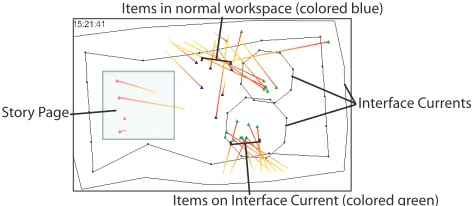
In order to interpret the interactions that occurred during the collaborative task sessions visualizations were produced from the actions recorded in the log files. These visualiza-tions revealed patterns of interacvisualiza-tions and use relating to the Interface Currents, contributing to our understanding of how Interface Currents were used by participants while performing the story creation task. In particular, user’s in-teractions with pictures (i.e, moving a picture, adding or removing a picture from an Interface Current) and user’s interactions with Interface Currents (i.e., moving, resizing, reshaping, or changing the width of a Current) were visual-ized (see Figure 5).
Items in normal workspace (colored blue)
Items on Interface Current (colored green) Interface Currents Story Page
]
[image:4.595.55.291.299.402.2]]
Figure 5: Example for computer generated visualization. To supplement the knowledge gained from the analysis of the workspace visualizations, the field notes and video data were also analyzed. The field notes indicated particu-lar events and emergent interaction patterns that should be investigated more closely using the video data. The video analysis began by first watching the video recordings several times in order to identify and better understand the general patterns of interactions. Then, the video data from both the story creation task and the participant interviews were transcribed to enable careful analysis of the interactions and the participant statements.
5.
FINDINGS
The results of the video and interaction analyses showed that users made extensive use of the Interface Currents to help them create the photo story. The interviews with par-ticipants revealed that, in general, people found both the Peripheral Current and smaller pool and stream Currents that they created additionally during their sessions useful for completing the story creation task.
5.1
Observed Work Phases
As true of most activities, completing the story creation task required participants to progress through a number of different subtasks, or task phases. The video and interaction analyses revealed that all six participant groups progressed through the same task phases while creating their photo stories, though the distinction between phases and the ex-act ordering of these phases differed from group to group,
depending on the groups’ preferred working styles, personal-ities, and which types of Interface Currents they chose to use during the task. In general, creating the photo story task in this experimental setting involved first, choosing a title for the story, then browsing and discovering which photos were available to include in the story, then choosing and col-lecting particular candidate photos, then organizing photos into a coherent story line, and finally assembling the story on the Story Page.
The data analyses also revealed that participants’ inter-actions with and use of the Interface Currents varied during the different task phases and the different types of work strategies that participants chose to use during those task phases (e.g., whether participants were working indepen-dently or closely together in the workspace). As the task progressed, and as their ideas about the story became more refined, the main focus of participants’ interactions shifted from the Peripheral Current, to the smaller Interface Cur-rents, and, finally, to refining the story line on the Story Page, with overlaps between these areas of focus.
5.2
Observed Working Strategies
When participants were actively focused on the Peripheral Current, they typically maintained a moving flow within the Current to help them browse the photos. During this pe-riod of time, participants typically worked independently choosing photos from the Peripheral Current. In general, they found the Peripheral Current very useful for discov-ering and browsing the large amounts of available photos, as expressed by several participants during their interviews: “There is no (other) way we could have seen all these tons and tons of pictures.”; “The peripheral Current was defi-nitely useful. Because there are so many pictures I don’t think I could have just shuffled them otherwise.”.
To facilitate the discovery and browsing activities, eight of the twelve participants increased the width of the Peripheral Current along the workspace edge in front of them, creating a “magnification area” that helped them to see the photos flowing on the Current more clearly. Seven of these eight participants both enlarged the given magnification area to their rightandcreated a new one right in front of them (six) or to their left (one). Participants also found the ability to start and stop the flow of photos in the Current useful for determining the available photo content, sharing the photos with their partners, and selecting candidate photos.
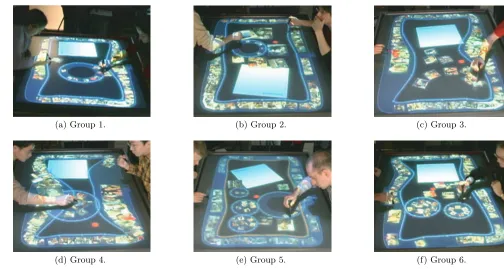
Five of the six groups created and made extensive use of several smaller pool or stream Currents to help them orga-nize candidate photos in the workspace. Since these addi-tional Currents were typically positioned inside of the Pe-ripheral Current in the workspace (see Figure 6) we will refer to them as “Interior Currents”. In general, these groups cre-ated either one stream Current (2 groups)or one or more pool Currents (3 groups) to help collect and organize their photos. Only one group created both types of Interior Cur-rents. However, this group made very limited use of the one stream Current they created, and tended to collect most of their photos into several pool Currents in the workspace (see Figure 6(e)).
Fig-(a) Group 1. (b) Group 2. (c) Group 3.
[image:5.595.44.548.69.338.2](d) Group 4. (e) Group 5. (f) Group 6.
Figure 6: Five out of six groups created Interior Currents to organize the collected pictures. ure 6(a) and 6(b)).
In contrast, two of the three groups who created pool Cur-rents for collecting and organizing the photos created sev-eral, small pool Currents and positioned them near individ-ual team members. These pool Currents were then utilized fairly exclusively by the nearby team member for collecting candidate photos (see Figure 6(e), and 6(f)). One partic-ipant positioned several pool Currents in front of himself and used them to categorize different types of photos dur-ing the collection phase (see Figure 6(e)). Once his groupdur-ing strategy had been developed he described it to his partner, who then added several photos to the collections in these Currents.
The third group that made use of the pool Current created one fairly large pool Current and positioned it between both participants (see Figure 6(d)). This different usage of the pool Current may have occurred because they were the only group that enlarged their Peripheral Current by so much that it left very little room in the central workspace area for several small Interior Currents (see Figure 6(d)). Also their interview comments indicated that they did not find the Interior Current that helpful for the photo story creation activity.
Once participants had chosen the majority of their can-didate photos and begun focusing on the photos in the In-terior Currents, or in the main workspace, the groups often stopped the flow in the Peripheral Current (to minimize the visual distraction in their peripheral vision). During this phase of the task, participants typically worked together in the central area of the workspace, examining and sharing the set of candidate photos collected by each participant and discussing the possible story line.
Groups typically kept the flow on the Interior Currents moving continuously, especially in those Currents that were
being shared by both participants. However, sometimes par-ticipants unintentionally stopped the flow on a pool Current during manipulation of a photo contained on it. When this occurred, participants often did not restart the flow, pos-sibly because all photos were typically still visible by both team members.
When the participants who had been collecting photos in separate areas of the workspace (e.g., not on a shared Cur-rent) began working closely together to refine the storyline, they often manipulated the photo collections to make them more accessible to their partner. For the one group who did not use any Interior Currents (see Figure 6(c)), this ma-nipulation consisted of manually spreading out the collected pictures (see Figure 7(b)). In contrast, both participants of a group that was using several small pool Currents enlarged their pool-shaped Currents when they began working to-gether on the story line (see Figure 7(a)). This action made the Currents easier to physically reach by both partners and initiated an automatic rescaling of the photos so that they were more clearly visible by both partners.
One group who had collected their photos in a shared stream Current created a new stream Current and began sequencing the photos into a coherent storyline inside this Current once they had finished choosing candidate photos (see Figure 7(c)). One group member commented that they chose to use the stream Current (rather than a pool Current) “because it rotates in timeline versus the pool (that) is sort of like random images going in there.”. Once they had agreed on the storyline, they moved their ordered photos to the Story Page.
(a) Team using pool-shaped Interior Currents (Group 6). (b) Team working without Inte-rior Currents (Group 3).
[image:6.595.70.556.72.198.2](c) Team using an stream-shaped Interior Current as time line (Group 2).
Figure 7: Groups transitioning from the collection phase to the composing phase. the interviews indicated that, in general, people felt that
pool Currents were more useful for casual organization of the photos, as articulated in the comment: “We used the smaller (pool) Currents basically for organization to kind of cluster ideas and group images together.”.
While participants were refining their photo story, they often returned to the Peripheral Current to search for par-ticular photos. In these situations they tended to frequently start and stop the Current or change the speed of the flow, which was easily accomplished by touching (to stop) or mak-ing a short flickmak-ing motion (to start or change the flow rate) on the Current’s surface.
In general, the Peripheral Current helped participants to get an overview of the available pictures and it supported them browsing through the pictures and finding certain ones. Interior Currents were used for collecting candidate pictures for the story. Pool Currents were mainly used for unstruc-tured grouping of pictures while stream Currents also served as a tool for organizing pictures in a certain sequence.
Our findings demonstrate that Interface Currents sup-port collaborative work around tabletop displays in different ways. The general contributions of Interface Currents to col-laborative tasks are discussed in the following section.
6.
DISCUSSION
Our study reveals that Interface Currents support collabo-rative tasks that involve large amounts of visual information in several ways. The flow on Interface Currents facilitates the exploration of and access to information by more than one person at the same time. Interface Currents support casual and more structured information organization strate-gies and, furthermore, they enable these types of stratestrate-gies in either group or personal spaces. The mobility and flexi-bility of Interface Currents support different work strategies that occur during collaborative work, such as individual and group activities, and allow smooth and fluid transitions be-tween them.
6.1
Supporting Information Discovery and
Ac-cess
Browsing manually through large amounts of unknown information can be laborious and frustrating. In contrast, Interface Currents offer users a convenient way of discover-ing and accessdiscover-ing information datasets. The study finddiscover-ings revealed that all participants found the Peripheral Current useful for browsing through the large amounts of pictures.
Furthermore, the fact that participants frequently returned
to the Peripheral Current when they were refining the story, indicates that searching for particular pictures floating on an Interface Current was not perceived as time consuming or laborious. Participants usually found photos that they had previously noticed or that showed a certain theme very quickly, and with little effort.
6.2
Supporting Information Organization
Interface Currents also supported the organization of con-tent within the tabletop workspace during the story creation task. The study findings revealed that Interface Currents of-fer various levels of organizational support. They also sup-port both individual- and group-level organization. For in-stance, Interface Currents often served as personal storage containers for individual participants during the collection phase of the activity and then were later enlarged or moved to a more central location when the groups began refining their story lines.The different types of Interface Currents allow for dif-ferent types of organization, including casual, unstructured organization and more ordered, linear organization. Partic-ipants using pool Currents for organizing photos usually es-tablished more than one pool in the workspace and tended to keep the information in these Currents rather unstruc-tured, typically not rearranging the contents of the Currents after initially placing the items there. In contrast, stream Currents were often used for both collection and for more refined organization of their photo contents. Participants appeared to perceive them as more structured and more ap-propriate for linearly sequencing the story line during the story creation activity.
(a) Pool Current. (b) Stream Current.
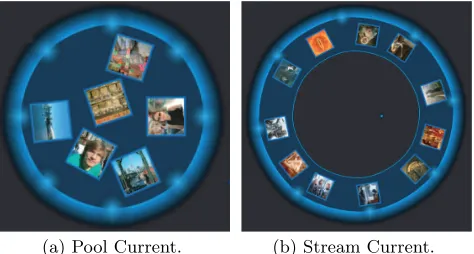
[image:6.595.320.557.585.712.2]The visual appearance of these two types of Currents likely contributed to these different organizational usage pat-terns. The visual “track” of the stream Current possibly led to the participants’ tendency to perceive a stream as more of an organizational tool than the solid visual “con-tainer” provided by the pool Current. Although these two types of interface components offered technically very simi-lar functionality — that is, objects placed on either of them move along a single, continuous flow around the container’s central point and are automatically aligned with the con-tainer’s exterior boundary (see Figure 8(a)) — the interior boundary of the stream Current provides visual separation between objects across the central point and provides more precise alignment of the contained objects (see Figure 8(b)). Thus, stream Currents provide more obvious linearity to the arrangement of objects within the Current and appear to provide better support for more formal organization than the pool Currents.
6.3
Supporting Information Sharing and
Co-operative Activities
Interface Currents appeared to be highly effective at sup-porting the sharing of workspace content during the study’s collaborative tabletop task. By putting a photo on a Current with moving flow (or when starting the flow), participants knew that the photo would pass by their partner shortly, at an appropriate orientation. People found this feature useful for sharing the photos during the task, as expressed by this participant comment: “The Peripheral Current was useful because it was passing the images all the time.” While this was not the most efficient “passing” mechanism available on the table, participants tended to find this an effective way to display and share the photos. This was particularly evident in their use of the Interior Currents where they placed par-ticular photos they felt were appropriate for the story and often wanted to show their partners. When more efficient passing was required, the participants would simply move a photo directly across the main workspace to pass it to their partner.
Another feature of the continuous flow on Interface Cur-rents that was found to be important was that different group members could explore the same set of information at the same time. Participant responses indicated that they really appreciated this property. For example: “Particularly in a situation where it is a large screen and we have to share images, the constant cycling is really helpful just because it gives everybody the maximum visibility for a certain amount of time.”
In most groupwork, individual group members often tem-porarily disengage from the shared group interaction and partake in independent activities which are then later fed back into the overall shared activity [2, 11]. Therefore, in addition to supporting shared group interactions, an effec-tive collaboraeffec-tive tabletop workspace should also facilitate group members’ independent interactions and fluid transi-tions between these shared and independent interactransi-tions.
6.3.1
Supporting Independent Interactions
The flow and the automatic reorientation of the photos so that each photo was always aligned towards the exterior boundary of the Current helped support independent inter-action with the photos. Photos located near a person at the table would be oriented towards that person and a simple
adjustment of the flow would bring photos on the other side of the Current quickly within reach and at proper viewing orientation for that person.
The flexibility of a Current’s shape also facilitated inde-pendent interaction. For instance, participants often widened the section of the Peripheral Current that passed through their personal territories [10] to establish a “personal mag-nification area”. Though, participants could have also nar-rowed the Peripheral Current or moved it out of the personal territory by reshaping it when it was not being used, we did not observe this behaviour in this study. However, this flex-ibility gives each person working in the tabletop workspace the maximum power to adjust their personal workspace with-out influencing the group workspace or the work of their partners.
While the single, continuous flow enables collaborators to share the same information dataset, this feature also has a disadvantage: A change of the flow by one person also impacts the flow passing in front of others at the table. Par-ticipants sometimes found this feature disruptive, particu-larly when the flow was changed on the Peripheral Current by their partner without advanced notice. To help avoid this conflict, several groups developed a protocol to verbally notify their partner when someone intended to adjust the flow of the Peripheral Current. It was interesting to note, though, that this was much less of a problem when the flow rate was changed on the shared Interior Currents. This is likely because the physical action of adjusting the flow on a Current located in the central region (i.e., in the group ter-ritory) of the table was much more likely to be noticed than an action initiated on the table directly in front of someone (i.e., in their personal territory). Mitigating this issue in the Peripheral Current needs further investigation.
6.3.2
Supporting Transitions between Shared and
In-dependent Interactions
Transitioning between shared and independent interac-tions during groupwork has been previously identified as a common disruption point during collaboration [11]. How-ever, the study findings revealed that participants smoothly transitioned between both the different task phases and the shared and independent interactions in the workspace.
The adjustability and mobility of Currents appeared to facilitate moving between shared and independent interac-tions with the workspace content during the story creation task. For example, after working independently with pho-tos in an Interface Current, it can be enlarge or moved to a more central location using simple interaction mechanisms. In summary, Interface Currents positively influenced par-ticipants’ ability to perform the story creation task on the tabletop workspace. The combination of Interface Current’s flow, mobility, and flexible shape facilitated the sharing, passing, organizing, and exploration of the large amounts of information that collaborators used during this task. In-terface Currents also smoothly supported users’ natural col-laborative and individual work habits such as territoriality and transitions between individual and shared group activ-ities.
7.
CONCLUSION AND FUTURE WORK
information access and sharing. These results also revealed that providing a user-controllable flow is an essential feature in interface mechanisms containing such a flow.
This study also elucidated critical design considerations for facilitating tabletop collaboration with continuous flow mechanisms. It appears that the mobility and adjustability of Interface Currents were important factors in the ability of Interface Currents to effectively support the variety of task activities and participant interactions that occurred during the tabletop collaboration sessions.
Overall, the study revealed that Interface Currents effec-tively supported the following task and group interactions:
• the exploration and discovery of visual information, • equal access to information between group members, • casual and structured information organization, • both individual and collaborative work with
informa-tion, and
• smooth and fluid transitions between individual and
collaborative activities.
Interface Currents appeared to enable both individuals and groups to handle large amounts of information with little cognitive effort. Furthermore, informal observations during the study suggest that the continuous flow of information inspired the participant’s creativity, possibly due to Stathis et al.’s [14] notion of “opportunistic browsing” enabled by the continuous flow of information items. This issue will need further investigation.
Our ongoing work is focused on improving the implemen-tation of Interface Currents and developing other types of Currents. Since this study was conducted we have developed Interface Currents which are populated from a “source”, such as a folder, rather than simply individual interface items. These Currents enable users to discover a larger va-riety and number of possible information or media items during their tabletop activities. Furthermore, other fea-tures such as annotating workspace content, highlighting and grouping items that are floating on an Interface Cur-rent will be included into the system.
Based on this initial exploratory study we will conduct more focused quantitative studies in order to compare In-terface Currents with other existing approaches for tabletop information organization.
Another important aspect that requires further investiga-tion is the suitability of Interface Currents to other types of tabletop activities that involve text documents, for instance. The use of documents might demand for different function-alities on Interface Currents since overlapping and size of documents might become issues. In order to fully under-stand the advantages and disadvantages and possible design considerations of Interface Currents, our future work will in-clude investigations of the use of Currents during tabletop activities different from the story creation task explored in this study.
8.
ACKNOWLEDGMENTS
We would like to thank Natural Science and Engineering Research Council of Canada, Alberta’s Informatics Circle of Research Excellence, Alberta Ingenuity, and the Cana-dian Foundation of Innovation for research support. We
also thank our fellow researchers from the Interactions Lab at the University of Calgary for their insightful comments on this work.
9.
REFERENCES
[1] J. Geißler. Shuffle, throw, or take it! working effectively with an interactive wall. In Proc. of CHI’98, pages 256–266, 1998.
[2] C. Gutwin and S. Greenberg. The mechanics of collaboration: Developing low cost usability evaluation methods for shared workspaces. InProc. of
WETICE’00, pages 98–103, 2000.
[3] U. Hinrichs, S. Carpendale, and S. D. Scott. Interface Currents: Supporting fluent face-to-face collaboration. InConference Abstracts and Applications of
SIGGRAPH’05, 2005.
[4] U. Hinrichs, S. Carpendale, S. D. Scott, and E. Pattison. Interface Currents: Supporting fluent collaboration on tabletop displays. InProc. of Smart Graphics’05, pages 185–197, 2005.
[5] R. Kruger, S. Carpendale, S. D. Scott, and
S. Greenberg. How people use orientation on tables: Comprehension, coordination and communication. In Proc. of GROUP’03, pages 369–378, 2003.
[6] R. L. Mandryk, S. D. Scott, and K. M. Inkpen. Display factors influencing co-located collaboration. Extended Abstracts of CSCW’02, 137-138, 2002. [7] O. Omojola, E. R. Post, M. D. Hancher, Y. Maguire,
R. Pappu, B. Schoner, P. R. Russo, R. Fletcher, and N. Gershenfeld. An installation of interactive
furniture.IBM Systems JOURNAL, 39(3&4):861–878, 2000.
[8] Y. Rogers and S. Lindley. Collaborating around large interactive displays: Which way is best to meet? Interacting with Computers, 16(6):1133–1152, 2004. [9] S. Scott, S. Carpendale, and S. Habelski. Storage
Bins: Mobile storage for collaborative tabletop displays.IEEE Computer Graphics & Applications, 25(4):2–9, 2005.
[10] S. D. Scott, M. S. T. Carpendale, and K. M. Inkpen. Territoriality in collaborative tabletop workspaces. In Proc. of CSCW’04, pages 294–303, 2004.
[11] S. D. Scott, K. D. Grant, and R. L. Mandryk. System guidelines for co-located collaborative work on a tabletop display. InProc. of ECSCW’03, pages 159–178, 2003.
[12] C. Shen, N. Lesh, B. Moghaddam, P. Beardsley, and R. Bardsley. Personal Digital Historian: User interface design. InExtended Abstracts of CHI ’01, pages 29–30, 2001.
[13] O. St˚ahl, A. Wallberg, J. Humble, L. E. Fahlen, A. Bullock, and J. Lundberg. Information exploration using the Pond. InProc. of CVE’02, pages 72–79, 2002.