Thesis for Master Human Media Interaction
Faculty of Electrical Engineering, Mathematics and Computer Science, Human Media Interaction (HMI),
University of Twente
Interaction capabilities of Second Life
A framework to determine Second Life’s suitabilityfor a 3D virtual world application
By Ruben van den Berg May 2008
Limited version
(see page i for more information)
Version 1.4
About this limited version:
This version contains limited information about Second Life and the projects encountered at IBM. Some of the information collected was obtained confidential and is therefore not published in this version.
A full version is available for those who sign a confidentiality paper from IBM.
Please contact Anton Nijholt or Betsy van Dijk from Human Media Interaction at the University of Twente for more information.
Regards,
Abstract
In this master thesis a framework is proposed. The framework can be used to determine the suitability of Second Life for a 3D virtual world application. The framework consists of three components and their relations. The first component describes the basic interaction capability and communication functionality. The second component describes more complex supporting functionalities. The third component is a repository of 3D virtual world applications.
The framework can be used to formulate an advice. The advice is elicited by comparing the contents of the framework with requirements for a 3D virtual world application. A positive advice supports continuation of development in the 3D virtual world. A negative advice motivates to take appropriate steps, e.g. reformulate requirements or study alternative 3D virtual worlds for suitability of the application.
The 3D virtual world Second Life is studied, because IBM is interested in its capabilities. An early determination of an application‟s suitability could prevent IBM from spending valuable development resources.
Acknowledgements
This report forms the completion of my Master of Science education. Like my Bachelor education it was a challenging time, where I found that family and friends are valuable and essential for success.
The research presented in this thesis was conducted at IBM‟s Center for Advanced Studies (CAS) in Amsterdam. IBM provided me with two supervisors, Jasper Schröder and Frank van Rooij, who enabled me to experience life outside the academic world. With their support I was able to work with researchers within IBM‟s network. Through this network, I was given the opportunity to gain expertise on a variety of Second Life projects from around the world. I was in contact with China, India, various European nations and the United States of America. All of which were warm and supporting and above all willing to help. I keep a warm remembrance on all contacts.
Professor Anton Nijholt and Betsy van Dijk supervised my research on behalf of the Human Media Interaction chair at the University of Twente. I like to thank all of my four supervisors for their patience and guiding me in the right direction, resulting in the successful completion of this project.
Many thanks go to my family, and especially to Berit, for their continuous and loving support. The value of a strong family is priceless. With new family members gained, who give the same warmth and strength, I consider myself very fortunate. Together, with my entire family I confidently look at our future.
My thanks also go to my friends, who supported my work, provided relaxation or suitable distraction, or all of the above. I especially enjoyed the “little discussions” with Arne or the more philosophical ones with Pedro. I was able to fight some stress during a weekly game of squash with friends from physics. Special thanks go to Kommer Braber, Wendy Ooms, Arne de Vries, Koen Wolters and Pedro Ferreira da Silva. Each provided me with valuable support, reviews and advice to complete my thesis.
R J van den Berg
Table of Contents
ABSTRACT ...V
ACKNOWLEDGEMENTS...VII
TABLE OF CONTENTS ...X
LIST OF FIGURES ... XIII
LIST OF TABLES ... XV
1. INTRODUCTION ... 1
1.1. BACKGROUND ... 1
1.2. OBJECTIVE ... 3
1.3. APPROACH ... 3
1.4. REPORT OUTLINE ... 4
2. INTRODUCTION TO SECOND LIFE... 5
2.1. SECOND LIFE‟S BASIC CONCEPTS ... 5
2.2. SECOND LIFE, SOME HISTORY ... 9
2.3. SECOND LIFE &IBM ... 11
2.4. CONCLUSIONS ... 12
3. CATEGORIZATION OF INTERACTION CAPABILITIES ... 13
3.1. INTERACTION AND INTERACTION CAPABILITIES ... 13
3.2. HUMAN COMPUTER INTERACTION ... 14
3.3. COLLABORATIVE VIRTUAL ENVIRONMENTS ... 14
3.4. INTERACTION CAPABILITIES ... 16
3.5. CONCLUSIONS ... 19
4. INTERACTION CAPABILITIES IN SECOND LIFE... 21
4.1. RETRIEVED FROM INTERVIEWS WITH EXPERTS, LITERATURE AND WEBSITES ... 21
4.2. RETRIEVED FROM EXTREME BLUE PROJECTS ... 27
4.3. THREE ADDITIONAL CATEGORIES... 27
4.4. CONCLUSIONS ... 29
5. FRAMEWORK ... 31
5.1. THE FRAMEWORK ... 31
5.2. EXAMPLE APPLICATIONS IN SECOND LIFE ... 34
5.3. COMPONENT COMPATIBILITY ... 35
5.4. USE OF THE FRAMEWORK ... 36
5.5. CONCLUSIONS ... 37
6. VALIDATION ... 39
6.1. VALIDATION CRITERIA ... 40
6.3. ADVICE FOR SELECTIVE MUTISM APPLICATION... 40
6.4. FEEDBACK... 44
6.5. CONCLUSIONS ... 45
7. CONCLUSIONS ... 47
7.1. RESULT ... 47
7.2. DISCUSSION... 47
7.3. RECOMMENDATIONS ... 48
REFERENCES ... 51
A. EXTREME BLUETM PROJECTS ... 57
B. EB PROJECT ... 59
C. FRAMEWORK CONTENTS ... 61
D. VALIDATION CASE – SELECTIVE MUTISM ... 63
D.1. INTRODUCTION TO SELECTIVE MUTISM ... 63
D.2. REQUIREMENTS ANALYSIS ... 64
D.3. ELABORATION ON EXISTING COMPLICATIONS... 67
D.4. ADVICE – CONCLUSION ... 68
List of figures
Figure 1 Avatars in Second Life ...6
Figure 2 Places to visit in Second Life ...7
Figure 3 Starwood hotel ...8
Figure 4 Second Life griever attacks ... 10
Figure 5 IBM in Second Life ... 11
Figure 6 Typical Second Life Pop-up menu with buttons (left) and a Second Life HUD (right) ... 22
Figure 7 Avatar gestures ... 23
Figure 8 Different interactive objects to travel ... 25
Figure 9 A two and a three dimensional map in Second Life... 26
Figure 10 Content presentation at Circuit City ... 29
Figure 11 Proposed framework ... 32
Figure 12 Validation process ... 39
Figure 13 A conventional and child friendly keyboard Section ... 44
Figure 14 Use case diagram for case on selective mutism ... 65
List of tables
Table 1 Categorization of interaction capabilities ... 19
Table 2 Basic interaction ... 23
Table 3 Embodiment interaction capabilities ... 24
Table 4 Interactive objects interaction capabilities ... 24
Table 5 Navigation & exploration interaction capabilities ... 26
Table 6 Discourse interaction capabilities ... 26
Table 7 External system communication... 28
Table 8 Transactions ... 28
Table 9 Construction interaction capabilities ... 29
Table 10 Component 1 – Basic interaction capabilities ... 32
Table 11 Component 2 – Supporting interaction capabilities... 33
Table 12 Universal translator - component 1 interactive capabilities ... 35
Table 13 Universal translator – component 2 interactive capabilities ... 35
Table 14 Universal translator - compatibility ... 36
Table 15 Example advice list ... 36
Table 16 Comparison table of case-study requirements analysis ... 43
Table 17 Component 1 - Basic interaction capabilities ... 61
Table 18 Component 2 – Supporting interaction capabilities... 61
Table 19 Component 3 – Applications ... 62
Table 20 Compatibility issues between components ... 62
1.
Introduction
The main topic of this thesis is the question if we can decide whether Second Life provides sufficient support for a 3D virtual world application. The result of this thesis is a framework that helps to investigate the required interaction capabilities, by which we can decide whether the application can be successfully implemented.
To introduce the thesis, this chapter presents four sections. The first section presents background. The second discusses the objective. The third presents the approach. The fourth presents the report structure.
1.1.
Background
The subject of this research is capabilities of 3D virtual worlds. 3D virtual worlds are three-dimensional, computer simulated environments on the Internet. They can be explored, used for simulation of a particular activity, and allow its users to interact and inhabit a virtual world (Nijholt 2000; Book 2006; Wikimedia 2007). To support this, 3D virtual worlds possess various capabilities.
The Internet already contains different capabilities to support various forms of user interaction, e.g. provide information via web-pages or support text-, voice-, or video-chat. A 3D virtual world provides a richer way of interacting. It merges existing user interaction capabilities from the two-dimensional Internet and complements this with new, e.g. three-dimensional representation of users and objects. In fact, a 3D virtual world can also provide users with a place to live, e.g. a 3D virtual home. Creating a 3D virtual home can have some advantages. For example, have a 3D home away from home when travelling or having virtual switches linked to equipment in the real world, e.g. the heating system.
R J van den Berg Introduction
In 3D virtual worlds, users are able to have various social relations with each other, e.g. hierarchies in a gaming environment or friendships with people from around the world. Having social relations is also possible on the 2D web-based Internet, but a 3D virtual world provides a more realistic experience. It allows its users to express themselves more closely in relation to the real world, e.g. visually see other users and make gestures.
3D virtual worlds are also used by companies that can hold meetings in 3D meeting rooms with employees from around the world or display 3D product to customers. A 3D virtual world can also be used by companies to combine these advantages. For example provide expert services to customers. Experts do not have to physically travel the world to meet with relations in remote locations.
Second Life is chosen to focus this research on. There exist several different 3D virtual worlds, e.g. Active Worlds (www.activeworlds.com), There (www.there.com) or Second Life (www.secondlife.com). Main arguments to study Second Life are its popularity (30,000+ users 24/7), users are free to create contents, and the increasing presence of companies and research institutes, e.g. IBM, Philips, the TU-Delft and RU Groningen. An incomplete list of organizations in Second Life can be found at Business Communicators of Second Life Wiki. (Zimmer 2007)
Second Life is used for multiple 3D virtual world applications. A 3D virtual world application is an application inside a 3D virtual world that utilizes the capabilities of the 3D virtual world. Examples of such applications are virtual shops, virtual education centers or virtual therapy centers (Nood and Attema 2006).
Whether Second Life is a suitable platform for certain applications is dependent on multiple factors, e.g. accessibility, reliability, and usability. These factors are much dependent on the interaction capabilities offered within Second Life, which are studied in this research. Interaction capabilities are the abilities of a person or thing to interact, e.g. the ability to communicate.
1.2.
Objective
The problem encountered is that it is often unknown whether Second Life supports the requirements for a certain 3D virtual world application. The main objective of this research is to develop a framework to determine whether Second Life is suitable to support a certain application. In general a framework is especially designed to be reused in different projects. It involves bringing together several components that are already developed and provide significant functionality (Lethbridge and Laganiere 2001). This results in the main research question:
Can a framework be developed, based on interaction capabilities,
which determines the suitability of Second Life for a 3D virtual world application?
The framework must contain interaction capabilities known to exist in Second Life. The contents of the framework can then be used to formulate an advice. The aim IBM has with this framework is to provide such an advice to the applicant of an application. If the advice is positive it is possible to implement the requirements in Second Life. With a positive advice the applicant can continue the development process. If the advice is negative, it contains a list of requirements not found to exist in Second Life. With a negative advice the applicant can take appropriate steps, e.g. revise the requirements or study alternative 3D virtual worlds for suitability of the application.
To help answering the main research question we will investigate which interaction capabilities are possible in 3D virtual worlds, and check which capabilities are currently supported in Second Life.
Which interaction capabilities are currently implemented in Second Life?
Based on the results we propose a framework that may be used to determine whether a certain application is suitable for Second Life.
1.3.
Approach
The approach taken to find a solution is to look at existing applications in Second Life. By eliciting interaction capabilities from these applications, contents for the framework can be obtained.
R J van den Berg Introduction
(www.ibm.com/nl/extremeblue). In the summer of 2007 a number of these internship projects focused on interaction capabilities or applications in Second Life.
Two qualitative methods were used to obtain data, namely interviews and a questionnaire.
Experts were interviewed. This allowed for an easy discussion on multiple applications.
The Extreme Blue projects were first sent a questionnaire, followed by alternative communication methods, e.g. Second Life meetings, conference calls, emails or instant messages. This was done for two reasons. First, the projects are scattered around the world, e.g. Pune (India), Dublin (Ireland) and Austin (U.S.A.). Second, they are focused on a specific subject. A questionnaire obtained an impression of their work. Based on the data retrieved, succeeding communications were held to obtain more specific data.
The obtained data was categorized. Based on observations made from the data and inspired by work from Turner and Turner (Turner and Turner 2002) three components for the framework were proposed. The first are basic interaction capabilities, e.g. the computer mouse and display. The second are supporting interaction capabilities, e.g. the ability to navigate and to have discourse. The third captures the 3D virtual world application and its requirements. By comparing the desired requirements (component 3) with the interaction capabilities provided by Second Life (component 1 and 2), we can decide whether Second Life can successfully support the new application, or whether the requirements of the application need to be adapted to make it fit.
After formulating a framework, it needs to be validated. Validation of the framework was done by determining Second Life‟s suitability for a new 3D virtual world application. Based on the result an advice was written. Feedback based on the advice provided the answer to the main research question.
1.4.
Report outline
2.
Introduction to Second Life
Second Life is a 3D virtual world developed by Linden Labs (www.lindenlabs.com). It provides a virtual environment where its users, called residents, can interact with each other and together engage in a range of activities. Examples of such activities are socializing, running businesses, collaborating and attending meetings and presentations (Ondrejka 2004; Nood and Attema 2006; Rymaszewski, Au et al. 2006).
The goal of this chapter is to provide an introduction to Second Life. To do so the following sections introduce Second Life‟s basic concepts, some history, and IBM‟s interest in Second Life.
2.1.
Second Life’s basic concepts
Philip Rosedale "I'm not building a game, I'm building a new country." (Terdiman 2004) With these words Philip Rosedale made it clear that he wants to create an environment that allows for more than just gaming or providing information. In his vision Second Life is an environment that is to demonstrate a viable model for a virtual economy and virtual society.
According to Philip Rosedale, Second Life is an environment to provide its users with a platform to create their own virtual experiences. Such experiences could be gaming related, but it doesn‟t start and end there. Second Life attempts to be a platform that simulates a society, completely with governments, economies and warfare. Societies are built by its residents and so is Second Life. (Rosedale 2006)
Second Life offers individual persons a platform to meet other persons, to access information services and shops, and to participate in social communities. As such Second Life is of interest for companies and other social institutions to present their offerings and provide meeting points.
R J van den Berg Introduction to Second Life
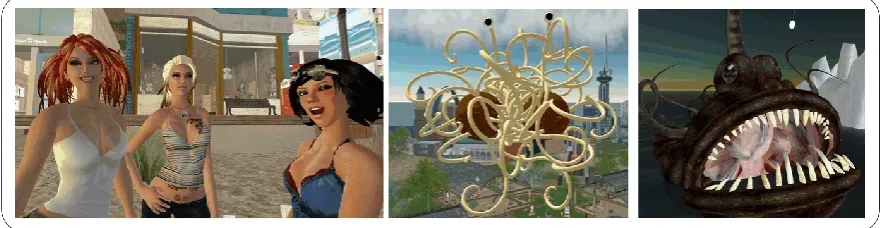
Figure 1 Avatars in Second Life
2.1.1. Avatars
Every user is represented by a virtual character, also known as an avatar. The basic avatar is a humanoid, but users can also create their own appearance. User‟s avatars usually reflect not who they are, but who they want to be. Some examples are displayed in Figure 1.
A user can improve or change his avatar in Second Life by finding, purchasing or creating replacement shapes, skins or clothing. Changes to an avatar can be made anytime the user wants. Thus the user needs only one avatar in Second Life for different purposes, e.g. a representative look for formal occasions or a dwarf warrior for role playing games.
An avatar in Second Life is not a static representation, as often encountered on the web. For example, the avatar shows a walking animation when moving through Second Life. The avatar can also be used to express emotions or gestures, e.g. anger or waving respectively.
In Second Life users can attach objects to their avatars. Next to objects that give the avatar its look they can also have a functional purpose. For example, a jet-pack attached to the user‟s avatar is used to support it in flight or in a place called Paris 1900 the user can attach a parachute to his avatar and glide down the Eifel tower.
2.1.2. Building
Everything in Second Life is created by its users (LindenLabs 2003; Rosedale and Ondrejka 2003; Rymaszewski, Au et al. 2006). The basic building blocks are called prims. These include a cube, a prism, a pyramid, a cylinder, a cone, a sphere, a torus, a tube, a donut, a tree and a bush. Complex objects can be created by changing the color, texture or shape and combine them with other prims. Examples are chairs, vehicles or buildings.
Users can also add behavior to the objects created. By adding behavior to an object it becomes more than simply a visual representation. For example, behavior allows for the object to become interactive, e.g. to mediate sounds, images or other information. Behavior also allows the object to become dynamic, e.g. move around the virtual world as if it were an avatar controlled by a user. Behavior is embedded in an object by using the scripting language provided by Linden Labs.
2.1.3. Places
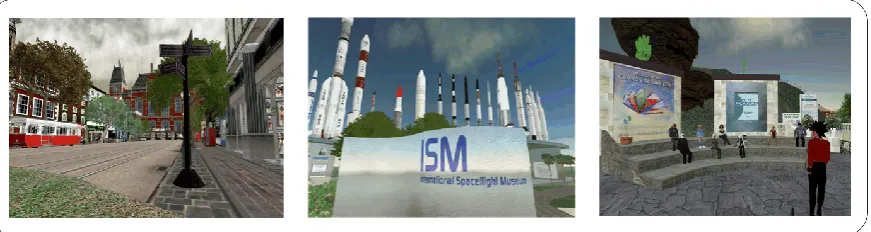
In Second Life a user can visit various places. Examples are three-dimensional recreations of cities and museums or meeting places for various social interactions. Figure 2 shows three such places. The left shows a recreation of Amsterdam. The middle shows the International Spaceflight Museum. The right shows a Second Life Campus meeting.
The recreation of real world places opens up new opportunities for tourism. A user can visit such a recreation before deciding if the spot is worth visiting in the real world.
Places are also used as meeting points. Users can meet like-minded people in for example campus environments, disco‟s or gaming environments.
ABN-AMRO created a place for like-minded people to meet. On their island investor meetings are organized and young professionals are attracted.
The investor meetings are twice a month. Experts from ABN-AMRO provide interactive presentations. Afterwards participants can “sit down” and talk with each other.
[image:25.595.107.543.560.676.2]By setting up a branch in Second Life ABN-AMRO hopes to attract young professionals. On a special island “cool” events are organized and recruiters are active to spot potential new employees. (AMRO 2006; Reuters 2006-a)
R J van den Berg Introduction to Second Life
Figure 3 Starwood hotel
2.1.4. Economy
Second Life has its own in-world economy. Users can pay real-world currency to be exchanged for the virtual Second Life currency called the Linden Dollar (L$). Currently the L$ is exchanged at a rate of approximately 260 L$ to one US Dollar (Rymaszewski, Au et al. 2006; SecondLife 2007-b).
With the L$ a user can for example buy virtual property or virtual objects, import textures or buy stocks in virtual companies.
Users can make money in Second Life, e.g. by selling virtual goods in a virtual store. By creating a new object the user owns the intellectual property rights of the object. Owning objects allows the user to sell it to others.
Earned L$‟s can then be exchanged for US$ to be spend in the real world. On November 26th 2006 Business Week reported on the first Second Life millionaire. Ailin Graef (in Second Life known as Anshe Chung) is a virtual land baroness. She became the first person to make a million US $‟s by trading virtual land (Hof 2006).
2.1.5. Sharing and collaboration
In Second Life users from around the world can come together. This allows for sharing of expertise, e.g. providing a service desk for customers, or working together on creative projects, e.g. designing a scale model of a new building.
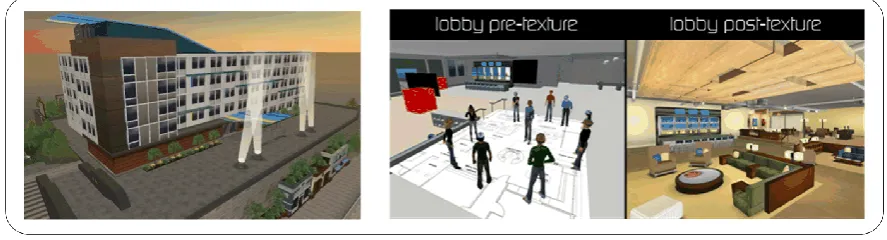
An example of bringing together experts and working on a creative project is the Starwood hotel (see Figure 3). The concept was two folded. First, obtain valuable information about the design from Second Life residents. Second, provide the design team with a virtual platform to design the new hotel. The real-world hotel is under construction and should be ready in 2008. (Jana 2006; Edo and C 2007)
2.1.6. Architecture
Second Life consists of two sides, a client side and server side. The client program is made open source, the server side is not. (SecondLife 2007-c)
To communicate with the Second Life world a client program is required. The client program provides a window to a 3D virtual world, like a browser presents the 2D web. The server side runs instances of the Second Life platform called sims. The size of a sim is about 16 acres, i.e. 256x256 meters. One sim communicates in a grid with four surrounding sims. This technology allowed Second Life to become scalable and supported its huge growth potential.
There are two types of sims. The first is located on what is called a continent. A sim on a continent goes over fluently into the next. The second are islands. Islands are located in the seas around the main land and (thus) provide more privacy. (Rosedale and Ondrejka 2003)
2.2.
Second Life, some history
The company behind Second Life is Linden Labs. Linden Labs was founded by Philip Rosedale in 1999. The name finds its origin in Linden Street, the company‟s original home base.
Rumors go around that Linden Labs started out as a hardware company geared towards research and development of haptic interfaces. A haptic interface supports the user via touch by applying force, vibrations and/or motions to the user. A virtual world was required to go with the hardware and so they built Linden World.
Linden world was launched in March 2002. It didn‟t have an economy and consisted of only six to nine sims. On the 21st of November 2002 the first (closed) beta opened and the name was changed into Second Life. In June 2003 Second Life opened to the public.
R J van den Berg Introduction to Second Life
Figure 4 Second Life griever attacks
2.2.1. Grievers
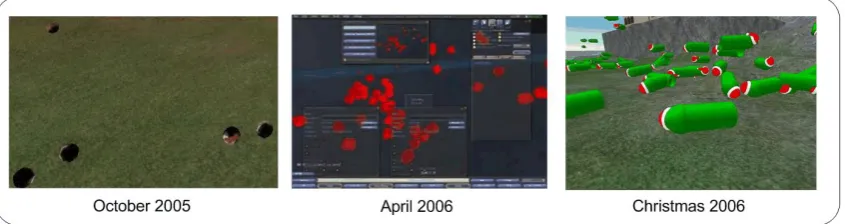
Second Life is not free of hazards. For example, grievers are people who want to harm other‟s experience or the 3D virtual world. They crashed the entire grid in October 2005 (see Figure 4).
Grievers managed to crash the grid by spamming the sims with self-replicating objects, also called object spam. The number of objects in a sim influences its performance, especially objects provided with behavior.
Overcrowding a sim with object spam slowed it down, eventually resulting in a grid wide crash on October 25th 2005. New attacks were recorded around April 15th and December 26th 2006. (Ludlow and Wallace 2003 - present)
2.2.2. Early business
Around mid 2006 the Second Life population reached one million registered users. This started to attract different companies. The website from Second Life Business Communicators provides an impression of the real world companies that created a presence in Second Life in the last 18 months. (Zimmer 2007)
A few of the first companies to create a virtual presence in Second Life were Adidas and Toyota. Adidas opened a shoe store to present its new shoes in a three-dimensional setting. Toyota opened a store to give away a virtual edition of the Scion XB (Au 2006). These companies were looking for ways to reach their customers and deliver their products, utilizing the three dimensional social experience Second Life provides.
2.3.
Second Life & IBM
The question to answer is: “Why is IBM in Second Life?” IBM sees possibilities in the short, mid and long term.
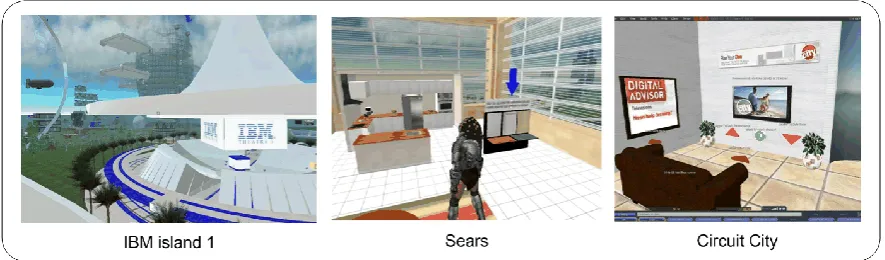
First of all, for the short term, IBM is interested in 3D virtual worlds like Second Life because of the innovative projects, the “cool factor” to bring to its customers, and new interaction techniques and metaphors. For example, Sears and Circuit City opened their stores in Second Life in collaboration with IBM. (McMahon 2006; Reuters 2006-b; Hughes 2007)
Sears opened a virtual shop on one of the IBM islands. The concept is to provide a preview to what business could present in Second Life. A good example of this is the Sears customizable kitchen (see Figure 5, center). It allows customers to preview a kitchen in 3D. The social aspects of the Second Life environment allow the creator of the kitchen to obtain (expert) feedback from friends and companies in a freely accessible environment.
Circuit city opened a virtual shop right next to Sears. They present their products, e.g. flat screen TV‟s, digital media or computers. Though the 3D doesn‟t seem to add much value compared to a regular website at first. Walking around in an intuitive looking, shop is already experienced by as a big plus. Secondly a demo showing the size of flat-screen TV in relation to the distance from the sofa gave many an „oh now I get it‟ response (see Figure 5, right).
[image:29.595.101.544.610.740.2]R J van den Berg Introduction to Second Life
For the long-term, IBM is able to provide and support soft- and hardware, needed to power this new web. By selling soft- and hardware and the services that enable them to function properly IBM thinks it is able to financially profit from this technology in the future. (Baizhen and Chatterjee 2007)
IBM is also utilizing its resources to develop standardization for 3D virtual worlds like Second Life. The common conception is that multiple types of 3D virtual worlds need to talk to one another. This allows for example a user‟s avatar to be transferred between 3D virtual worlds, e.g. from Second Life to Active Worlds. IBM wishes to be part and guide the process with its knowledge, to set the standards. (Reynolds 2007)
2.4.
Conclusions
Chapter two answered the question what is Second Life? It introduced Second Life as a 3D virtual world that has shapeable avatars and allows for building to create places where users can meet. It has its own economy and supports sharing and collaboration in different activities.
Second Life grew from a testing environment, probably for haptic interfaces, to one of the largest 3D virtual worlds with over 30,000 active users 24 / 7. The real economy has provided ground for new business opportunities, e.g. selling virtual goods or providing a platform for 3D product display for real-world companies.
IBM‟s sees in Second Life a 3D virtual world that might one day become a significant part in the interaction on the Web. For the short, mid and long term it sees various business opportunities ranging from innovative and collaborative projects to support for hard- and software.
3.
Categorization of interaction capabilities
This chapter provides a short literature study about interaction capabilities. The result is a categorization. This categorization has two purposes. First, it supports a directed search for interaction capabilities existing in the virtual world of Second Life discussed in the previous chapter. Second, it allows us to neatly arrange the different types of interaction capabilities. The result of the search is presented in chapter four. Part of the categorization is further used in the framework discussed in chapter five.
This chapter consists of five sections. The first section describes interaction. The second presents a short introduction to the field of Human Computer Interaction. The third section elaborates on 3D Collaborative Virtual Environments. The fourth section elaborates on interaction capabilities. The fifth section concludes this chapter.
3.1.
Interaction and interaction capabilities
To study the interaction capabilities existing in an environment like Second Life we first need some understanding of the meaning of interaction.
The Cambridge advanced learner‟s dictionary (Woodford and Jackson 2003) provides a clear and unambiguous definition of interaction:
Interaction: “when two or more people or things interact, i.e. communicate with or react to each other” (Woodford and Jackson 2003)
Two people communicate when one person sends a message to which the other person responds. Examples of messages are verbal utterances and facial expressions. A thing reacts to something when it perceives an event and reacts to it, e.g. a sliding door perceives a moving object, e.g. a person, in front of the door and responds by sliding the door open.
Interaction capabilities: “the abilities to interact”
The interaction capabilities of a person or thing can then be described as the abilities to interact. Take for example the iPod TM from Apple TM. The iPod TM has interaction capabilities, because it can respond to the user‟s actions. An example is the ability to
R J van den Berg Categorization of interaction capabilities
3.2.
Human Computer Interaction
According to Myers Human Computer Interaction (HCI) has been spectacularly successful and has fundamentally changed computing. (Myers 1998) Well known examples are the computer mouse, the graphical interface and Hypertext (by which documents are linked to related documents). These examples find their origin in research dating back to the 1960‟s.
Although HCI has improved the use of the computer since the early 1960‟s, no satisfying definition for the field has been formulated so far. The “problem” is that HCI is a multidisciplinary field, which combines the theories and practices from cognitive and behavioral psychology, ergonomics, anthropology, sociology, computer science, engineering and graphical design, among others (Hewett, Baecker et al. 1992; Rex Hartson 1998; Dix, Finlay et al. 2004). An often cited working definition comes from Hewett et al.:
Human-computer interaction (HCI): “a discipline concerned with the design, evaluation and implementation of interactive computing systems for human use and with the study of major phenomena surrounding them”. (Hewett, Baecker et al. 1992)
The focus of HCI is to generate an understanding of interaction, i.e. the communication a user can have with a computer. The goal of HCI is to improve usability, i.e. ease of use, usefulness and user experience. With this understanding technologies and tools can be designed and built that facilitate interaction. The important thing about this interaction is that a user interacts with the computer to accomplish something, e.g. a particular task or activity (Wulff and Mahling 1990; Rex Hartson 1998; Rozanski and Haake 2003; Dix, Finlay et al. 2004). Therefore, the way to interact and the tasks or activities a user can perform are taken as a starting point for a categorization. More specifically, the way to interact and tasks or activities found in Collaborative Virtual Environments.
3.3.
Collaborative Virtual Environments
This section provides a short introduction to Collaborative Virtual Environments (CVE). As mentioned in chapter one, Second Life is a 3D virtual world. Such environments are often simply referred to as 3D CVEs (Menchaca, Balladares et al. 2005; Jäkälä and Pekkola 2007).
Collaborative Virtual Environment: “a computer-based, distributed, virtual space or set of places. In such places, people can meet and interact with others, with agents or virtual objects. CVEs might vary in their representation richness from 3D graphical spaces, 2.5D and 2D environments, to text-based environments”. (Churchill, Snowdon et al. 2002)
3D CVEs facilitate access to information located in public data networks to people without deep technical knowledge of computing. This is done by presenting the information more intuitive and natural than software applications whose interfaces are based on two-dimensional graphics. There is more sense of a task and less sense of the computer as intermediary. (Rex Hartson 1998; Normand, Babski et al. 1999; Menchaca, Balladares et al. 2005)
CVEs can be found in different forms, i.e. different graphical representations. We can differentiate among text-based, two-dimensional, and three-dimensional CVEs. Text-based CVEs support synchronous communication between users and access to a shared database. The database may contain text descriptions of users and objects. Two-dimensional graphical environments complement the text-based showing a background image, some rooms or locations to visit and avatars representing the users. Three-dimensional graphical environments are no longer primarily meant to communicate with other users, but more to explore, to explain or to simulate a particular activity. (Nijholt 2000)
During the exploration or simulation users can interact with contents in the environment, e.g. agents and interactive objects. Computer agents are programs that operate under autonomous control, perceiving their environment, persisting over a prolonged period of time, adapting to change, and being capable of taking on another ones goals (Russell and Norvig 2003). A detailed discussion on computer agents falls outside the scope of this research.
R J van den Berg Categorization of interaction capabilities
3.4.
Interaction capabilities
There are two ways to classify interaction capabilities. The first one is the basic categorization as can be found in the handbooks of HCI, such as Preece et al. (Preece, Rogers et al. 1994). Here we encounter input & output devices and interaction styles. The input & output devices relate to the hardware used to interact with the environment. The interaction styles are software solutions to interact with a 2D environment, but are also encountered in 3D environments. Examples are drop-down menus or command lines.
Another classification is based on task-oriented functions, such as work by Tromp et al. (Tromp, Steed et al. 2003). Here we encounter navigation & exploration, finding other users, finding interactive objects, and collaboration. Each task is further divided into subtasks. For example, finding other users is concerned with locating others, recognizing others, establishing contact and positioning embodiment for interaction. When looking at the task finding other users, we are not interested in the way to find the other user. This is captured by the question how to navigate & explore. Therefore, the focus of finding other users is put on the appearance, more specifically their embodiment. For similar reasons, the focus of finding interactive objects is put on interactive objects in general. Finally, a more general notion of collaboration is the ability to communicate. Non-verbal communication is encompassed by embodiment. So for now the focus of collaboration is put on the ability to verbally communicate, more specifically to have discourse.
For our purpose we need a categorization that supports a structured search for interaction capabilities existing in Second Life. To get a complete picture we will use both the basic categorization, as well as the task-oriented functions. Therefore, we propose the following categories: basic interaction, embodiment, interactive objects, navigation & exploration, and discourse as a primary function to collaborate. The following sections elaborate on these categories.
3.4.1. Basic interaction
The user can interact with a 3D CVE by issuing instructions, e.g. instruct the user‟s avatar to move forward or instruct an interactive object to perform an operation. The way in which the user issues instructions can vary from pressing buttons to typing in strings of characters. (Preece, Rogers et al. 2002)
interaction styles implement the way to interact with a 2D environment, e.g. drop-down menus or command line input. A 3D interaction technique is more a way of using an input/output device to perform a generic task in a human-computer dialogue. The interpretation of the user‟s physical movements can be used to interact, e.g. to express emotions or to navigate. (Rex Hartson 1998; Bowman, Kruijff et al. 2001)
3.4.2. Embodiment
3D CVEs are by default social environments where people can engage in various social activities, e.g. play games, find like-minded people or work on a joined project. To engage in such activities 3D CVEs often support their users to have a virtual representation of themselves. This allows them to control and manipulate the environment through it, to find each other and is often also used to express gestures and emotions. (Benford, Bowers et al. 1995; Jäkälä and Pekkola 2007)
Embodiment, or a user‟s avatar, represents the user‟s virtual body. In the real world our bodies provide communication information about various aspects, e.g. activity, attention, mood, and identity. In a 3D CVE, embodiment allows the user to not only experience the virtual environment from the outside looking in, but also to convey this key communication information. Embodiments help to co-ordinate and manage interaction with the virtual environment and are a means of sensing various objects in the world. (Thalmann 1993; Benford, Bowers et al. 1995; Guye-Vuillème, Capin et al. 1999; Normand, Babski et al. 1999; Thalmann 2000)
Benford et al. divides embodiment into the appearance of the virtual body and the manipulation & control of it by the user. Appearance of the virtual body is concerned with the identity of the user in the CVE. Examples are humanoid appearances resembling the real user or fantasy appearances used to be anonymous or be part of an experience like a role-playing game. The manipulation and control of the appearance by the user is concerned with the functions, behaviors and the relation to the physical body of the user. In our case we are not interested in how the user instructs the embodiment since this is already captured by the basic interaction. We are here focusing on the results of such instructions, e.g. the non-verbal communications like gestures, emotional expression, and gaze directions. (Benford, Bowers et al. 1995; Thalmann 2000)
3.4.3. Interactive objects
R J van den Berg Categorization of interaction capabilities
only. For example, a user instructs an object to change its color or orientation. Smart interaction objects have the ability to describe in detail its functionality and its possible interactions, being also able to give all the expected low-level manipulation actions. As such it is able to provide the expected behavior of its users (Kallmann and Thalmann 2002). Take for example a user‟s avatar opening a door. A reactive door would simply open upon receiving such an instruction. The smart door interacts with the avatar, telling it where to position and how to animate its movements, e.g. the grasping of the door knot. Intelligent interactive objects have the ability to act rational, i.e. perceive events and select an action that is expected to maximize its performance (Russell and Norvig 2003). Take for example an animated agent, with whom a user can play chess or have a conversation.
3.4.4. Navigation & exploration
“Navigation is the process by which people control their movement using environmental cues and artificial aids such as maps so that they can achieve their goals without getting lost” (Darken and Sibert 1993). Navigation is the act of directing a ship, aircraft, etc. from one place to another (Cambridge Online Dictionary). Navigation in a 3D CVE can thus be described as the act of directing an avatar from one place to another, optionally using environment cues and artificial aids.
Navigation is one of the most important tasks in 3D CVEs, because it allows the user to obtain a more advantageous position to perform other tasks. Therefore it is probably also the most encountered task in 3D CVE research, some examples are Bowman et al, (Bowman, Kruijff et al. 2001), the COVEN project (Normand, Babski et al. 1999), and Vinson et al. providing navigation support (Vinson 1999) and assistance (van Dijk, op den Akker et al. 2001).
Bowman et al. divides navigation into travel and way-finding (Bowman, Kruijff et al. 2001). Travel is the movement of the viewpoint from one location to another. Examples of support for travel in 3D CVEs are walking or teleportation. Way-finding can be described as the (cognitive) process of defining a path through an environment, thereby using and acquiring spatial knowledge to build up a cognitive map of an environment. Examples of way-finding support in 3D CVEs are maps, compasses, grids and landmarks.
3.4.5. Discourse
and Martin 2000) Since a monologue is not interactive only a dialogue is discussed further.
A dialogue is a conversation where each participant takes turns being a speaker and a hearer. Examples of dialogues are face to face conversations, telephone calls, or chat sessions, where these are complemented by at least one of the following aspects, turn-taking, grounding and implicature. Turn-taking is the turning point in the conversation where the speaker becomes the hearer and vice versa. Grounding is the phenomenon that both speaker and hearer must constantly establish common ground, i.e. the set of things that are mutually believed by both speakers. For example, the utterance “ hm-mmm” is used as a continuer, i.e. a short utterance to acknowledge the previous utterance in some way of cuing the other speaker to continue. Implicature means a particular class of licensed inferences. This relates to the way the interpretation of an utterance relies on more than just the literal meaning of the sentence. For example, by providing response to a question that implicates the answer but does not explicitly state so. (Jurafsky and Martin 2000; Preece, Rogers et al. 2002)
3.5.
Conclusions
In this chapter five categories of interaction capabilities are introduced to study Second Life. The categories were derived the basic categorization as found in the handbooks of HCI and from a hierarchical task analysis by Tromp et al. (2003). The five categories are: interaction, embodiment, interactive objects, navigation & exploration, and discourse. Some categories have two or more subcategories. A complete list is show in Table 1.
[image:37.595.91.534.571.740.2]Based on these categories a directed search for interaction capabilities is presented in the next chapter as well as the interaction capabilities existing in Second Life. Part of the categorization is used in the framework presented in chapter five.
Table 1 Categorization of interaction capabilities
Category Type
Interaction
Input/output device Interaction styles Interaction techniques
Embodiment Appearance
Manipulation & control
Interactive objects
4.
Interaction capabilities in Second Life
The previous chapter listed five categories, namely interaction, embodiment, interactive objects, navigation & exploration, and discourse. They are used in this chapter to structure and direct the search for interaction capabilities. This chapter presents the interaction capabilities existing in Second Life. The result of this chapter is used to provide contents for the framework presented in chapter five.
Interaction in Second Life is an effect that occurs when two or more actors have an effect on one another through the Second Life environment. Actors for Second Life are the human user, an external system or an in-world application.
The interaction capabilities, discussed in this chapter, were found by interviewing experts, studying Extreme Blue projects and searching literature and websites.
This chapter consists of four sections. The first section presents the interaction capabilities that were found by interviewing experts, studying literature and websites. The second section presents interaction capabilities encountered when studying Extreme Blue projects. The third section presents three new interaction categories encountered during our search. The fourth section concludes this chapter.
4.1.
Retrieved from interviews with experts, literature and websites
The first part of the search for interactive capabilities existing in Second Life focused on interviews with experts, literature and websites. The following sections present the results from this search, structured in the categories presented in the previous chapter.
4.1.1. Basic interaction
The category basic interaction consists of three subcategories, namely input & output devices, 2D interaction styles and 3D interaction techniques.
Second Life was initially designed to be a desktop virtual environment. A desktop virtual environment utilizes the basic input and output devices to support interaction with the user. The desktop input devices are the keyboard, mouse and microphone. The desktop output devices are the computer monitor and the speaker system.
R J van den Berg Interaction capabilities
Figure 6 Typical Second Life Pop-up menu with buttons (left) and a Second Life HUD (right)
a fitness device (www.sl-fitness.com) used for navigating a virtual bike and have a work-out.
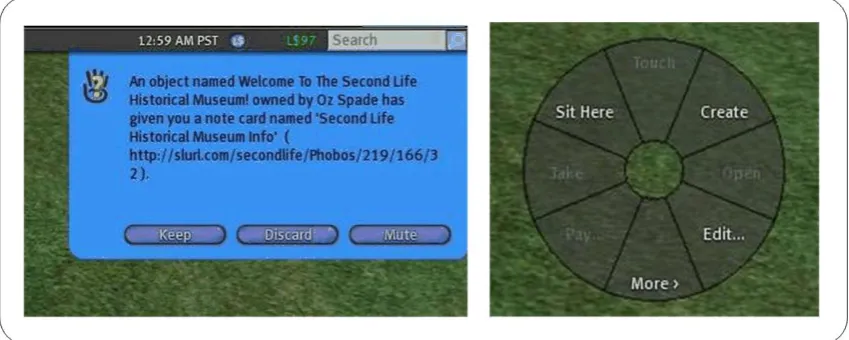
Second Life supports the following 2D interaction styles that allow the user to interact with the environment or its contents: pop-up menus with buttons, command line, direct manipulation, and the Second Life Heads Up Display (SL-HUD). Users can receive information from the environment and provide choices to the environment through (blue) pop-up menus and buttons, a command line and the Second Life-HUD. The blue pop-up menus are used to provide small messages and supports buttons from which the user can chose an option. Figure 6 displays a typical Second Life pop-up menu. The command line is primarily used for chatting (see 4.1.5 Discourse), but it can also be used to issue commands, e.g. to make the avatar perform a gesture. The Second Life HUD provides a pie shaped disc with multiple options for the user to choose from. It is only visible to the user and is not depicted in world. Figure 6 displays a typical Second Life HUD.
Second Life does not provide a wide range of 3D interaction techniques. The only example currently known is the fitness device. The fitness device analyses the user‟s movement, i.e. the user cycles and the speed is measured. The speed is then mapped on to the user‟s avatar allowing it to move. The orientation of the steering is mapped on the user‟s avatar allowing it to change directions.
Table 2 Basic interaction
Category Type
Input devices Keyboard, mouse, microphone, neurological
interface, haptic interface, fitness device;
Output devices Computer monitor, speaker system;
2D interaction styles Pop-up menu‟s with buttons, command line, direct manipulation, SL-HUD;
3D interaction techniques Analyze user‟s speed
4.1.2. Embodiment
The category embodiment consists of two subcategories, namely appearance and manipulation & control.
A user is represented in Second Life by means of a three-dimensional avatar, as mentioned in section 2.1.1. Avatars can be found in many different shapes, sizes, colors and so on, depending on the function or role of the avatar. For example, a user might play a medieval themed role-playing game and appear in it as a knight with a shining armor. A user can change his appearances at any time. Three examples are displayed in Figure 1 on page 6.
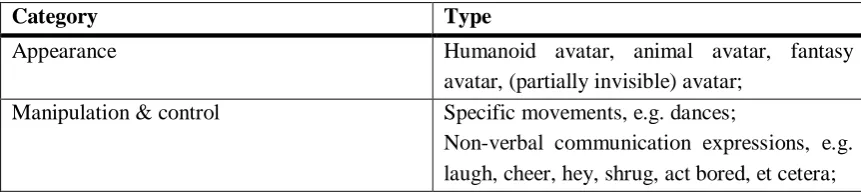
Manipulation and Control of the embodiment in Second Life is supported by being able to make specific movements and express non-verbal communication. Examples of specific movements are dances. Examples of non-verbal communication are gestures and emotional expressions, e.g. laughing or cheering. Figure 7 depicts three examples of non-verbal communication for a humanoid avatar. From left to right, “hey”, “shrug” and “bored”. The avatar can depict a set of standard gestures provided with the client or the user can make and add new ones.
[image:41.595.102.524.576.693.2]R J van den Berg Interaction capabilities
Table 3 Embodiment interaction capabilities
Category Type
Appearance Humanoid avatar, animal avatar, fantasy
avatar, (partially invisible) avatar; Manipulation & control Specific movements, e.g. dances;
Non-verbal communication expressions, e.g. laugh, cheer, hey, shrug, act bored, et cetera;
4.1.3. Interactive objects
The interactive objects category consists of three subcategories, namely reactive objects, smart objects, and intelligent objects.
Reactive objects in Second Life respond to instructions, e.g. a mouse click or a choice on the HUD, they receive from a user. Some examples are requests to change an objects appearance, e.g. the color of a product in a store, or the appearance of a kitchen in a demonstration room.
Smart objects in Second Life allow for the joined animation of objects. Examples of smart objects in Second Life are a smart motor cycle, a smart spot at the beach or a smart dancing spot in a disco. The smart motor cycle, for example, communicates with the user‟s avatar, instructing it to take a position (see Figure 8 on page 25). Without interference of the user, its avatar animates driving a motor cycle.
Intelligent objects in Second Life respond to events that occur. An event can be an avatar entering a specific zone or a chat communication matching a cue in the object‟s event list. For example, a user‟s avatar is walking into a shop. The intelligent object then registers the avatar to be near a projection wall and automatically starts playing a promotional video.
[image:42.595.66.493.635.762.2]Contents of the category interactive objects existing in Second Life can be found in Table 4.
Table 4 Interactive objects interaction capabilities
Category Type
Reactive objects Change appearance, change orientation,
change location;
Smart objects Object - avatar interaction, e.g. a smart piano, a smart spot at the beach, or a smart dancing spot in a disco;
Intelligent objects Sensors detecting movement, sensors
4.1.4. Navigation & exploration
The category navigation & exploration consists of two subcategories, namely travel and way-finding.
Travel in Second Life is supported by means of walking, running, jumping, flying, teleporting, changing the camera perspective, ride on an interactive object or be prevented from entering certain areas. Users can walk, run, jump or fly to travel relative small distances. To cross larger distances in a split second users can teleport their avatar. Teleportation can be done both on a short distance as well as on a large distance. Users may also send request to teleport a friend to their location. Users may also use interactive objects (see 4.1.3 Interactive Objects) to transport them to another location. Examples are cars, motorcycles, airplanes, yet packs or bubbles. Figure 8 displays some of these travel devices. Travel prevention ensures security to keep out unwanted guests. Travel prevention can be used to restrict users from entering parts of a location, e.g. a room or building, or a complete island.
Way-finding in Second Life is supported by two or three-dimensional maps of a location or island, two or three-dimensional signs, labels, roads, tunnels, and red location beacon. Examples of a two and a three dimensional map are shown in Figure 9. Two or three-dimensional maps of a location of island provide the user with an overview of an area. 2D or 3D signs can be used to point directions or function as signs of shops, museums or other buildings. Labels can be used to name objects. Labels are in two dimensions only. They provide can a short description, e.g. a name or purpose, or direction. Roads and tunnels are used to structure city like environments. The red location beacon is used to indicate the position of a searched location. The beacon is shown as a static red light vertical into air and is only seen by the user himself.
[image:43.595.103.524.571.709.2]R J van den Berg Interaction capabilities
[image:44.595.65.497.262.361.2]Figure 9 A two and a three dimensional map in Second Life
Table 5 Navigation & exploration interaction capabilities
Category Type
Travel Walk, run, jump, fly, teleport, change camera
perspective, ride an (interactive) object, travel prevention;
Way finding 2D or 3D maps, 2D or 3D signs, labels, roads,
tunnels, red location beacon;
4.1.5. Discourse
The category discourse is focused only on the ability to have a dialogue or conversation.
Holding a dialogue or having a conversation in Second Life supports the exchange of messages between two or more users. Conversation is supported through chat, voice-chat, instant message, and e-mail. A user can chat with other users standing in their direct vicinity. A user may also “whisper”, such that the range is reduced even further. If the user‟s system is supported with a microphone and sound speakers, the user can also use voice-chat to exchange verbal messages. Instant messages differ somewhat of regular chat. To exchange instant messages users have to register as friends or belong to a group. An instant message is not bound by a specific distance or time. This allows them to be send anytime and from anywhere inside Second Life. Users can exchange e-mail messages from inside Second Life to the outside world. A reply can be received at the user‟s registered e-mail address.
Contents of the category discourse existing in Second Life can be found in Table 6.
Table 6 Discourse interaction capabilities
Category Type
4.2.
Retrieved from Extreme Blue projects
Confidential
4.2.1. Additions to interaction
Confidential
4.2.2. Additions to embodiment
Confidential
4.2.3. Additions to interactive objects
Confidential
4.2.4. Additions to navigation & exploration
Confidential
4.2.5. Additions to discourse
Confidential
4.3.
Three additional categories
During our search in Second Life we encountered three types of interaction capabilities that could not be positioned properly in the categorization made in the previous chapter. The three types are the ability the ability Second Life has to communicate with an external system, the ability a user has to make transactions, and to construct new contents. Each category is elaborated in more detail in the following sections.
4.3.1. External system communication
The behavior of interactive capabilities is not restricted to the user and Second Life, but also supports the object to interact with external systems, e.g. a web server. This behavior is supported by Second Life through the HTTP and XML-RPC (www.xmlrpc.com) protocols. (SecondLife 2007-d) Examples of this are the support for streaming media (both audio and video) and the ability to forward a user to an external website.
Confidential
R J van den Berg Interaction capabilities
Table 7 External system communication
Category Type
External system communication HTTP, XML-RPC, forward to external website, live stream video and audio,
Confidential, Confidential;
4.3.2. Transactions
In section 2.1.4 it was explained that Second Life contains an economy and its own currency, the Linden Dollar. With this system in place users can trade products. To do so, Second Life supports transactions. Transaction are encountered in three ways, namely a user may buy, sell freely exchange products.
Contents of the category transactions existing in Second Life can be found in Table 8.
Table 8 Transactions
Category Type
Transactions Buy products, sell products, freely exchange virtual products
4.3.3. Construction
Many 3D CVEs are constructed before they are visited by the users, e.g. World of Warcraft. Some 3D CVEs are not necessarily pre-constructed. They allow their users to construct new contents in real-time. Active Worlds and Second Life are such examples. Users can extend and change the world by building homes and environments on “unoccupied” area. (Normand, Babski et al. 1999; Nijholt 2000; Book 2006)
The category construction is focused on the ability a user has to create new contents in the virtual world. In this sense Second Life can be seen as a platform that provides its users the ability to create their own experience, e.g. games, shops, or museums.
user can fly or teleport in a 3D virtual world. Behavior can be added to an object by making use the Linden Scripting Language (LSL). For more information on the LSL see the LSL portal at: http://wiki.secondlife.com/wiki/LSL_Portal.
Figure 10 depicts three examples. From left to right, 3D products that can forward you to an external website, a 3D product customizable in-world, and a streamed movie trailer. The blue pop-up menu in the center picture allows the user to select a color for the 3D product.
[image:47.595.100.528.249.361.2]Contents of the category construction existing in Second Life can be found in Table 9.
Figure 10 Content presentation at Circuit City
Table 9 Construction interaction capabilities
Category Type
Create objects Cube, prism, pyramid, cylinder, half cylinder, sphere, half sphere, cone, half cone, torus, tube, donut, grass, trees;
Join objects Create complex shapes, e.g. buildings,
vehicles and chairs.
Textures Regular images files
Behavior Laws of physics, listen/respond to events,
communicate with external systems, (streaming) audio, (streaming) video, …
4.3.4. Construction from Extreme Blue projects
Confidential
4.4.
Conclusions
R J van den Berg Interaction capabilities
Due to the dynamic nature of Second Life new interaction capabilities are created by users. The current list is only a snapshot, taken in the summer of 2007.
5.
Framework
In the previous chapter, interaction capabilities of Second Life were presented. To build meaningful applications we have to combine the basic interaction capabilities into more complex functions. For example, the basic function of the keyboard is to allow the user to provide input to the environment. This kind of input can be utilized for various interaction capabilities, e.g. to navigate, to have discourse or to construct. In turn, these more complex functions can support the required functionality within the application. The categorization made in chapter 3 does not show these relations. Therefore, to analyze whether a 3D virtual world, such as Second Life, is suitable for a certain application we propose to use a more hierarchical framework based on three levels, namely basic interaction capabilities, supporting interaction capabilities and applications.
This chapter consists of five sections. The first presents the framework. The second discusses a few applications encountered in Second Life. The third discusses the components compatibility. The fourth elaborates on the use of the framework. The fifth section concludes this chapter.
5.1.
The framework
R J van den Berg The framework
[image:50.595.72.500.131.337.2]In a similar way, our components are, from right to left in Figure 11, the basic interaction capabilities (component 1); the supporting interaction capabilities (component 2); a repository of 3D virtual world applications (component 3).
Figure 11 Proposed framework
5.1.1. Component 1 – Basic interaction capabilities
Component 1 describes the basic interaction capabilities between external actors and Second Life. It mediates between Second Life and external actors. It can be utilized by supporting interaction capabilities of component two.
[image:50.595.66.505.572.773.2]Two actors can be distinguished to have external interaction with Second Life, namely a human user and an external system. Hence the following categories provide contents for this component, namely Basic interaction and external system communication, described in 4.1.1, 4.2.1, and 4.3.1. The basic interaction capabilities of component one are listed in Table 10.
Table 10 Component 1 – Basic interaction capabilities
Category Type
Basic interaction – input / output Keyboard, Mouse, Microphone, Confidential, brain sensor, home trainer.
Monitor, speaker system,
Basic interaction – 2D interaction styles Pop-up menus with buttons, command line, SL-HUD, direct manipulation;
Basic interaction – 3D interaction
techniques Confidential
External system communication
HTTP, XML-RPC, Forward to external website, live stream video and audio, forward to external website,
5.1.2. Component 2 – Supporting interaction capabilities
Component 2 describes the supporting interaction capabilities in Second Life, that use the basic interaction capabilities of component 1. Supporting interaction capabilities provide support for applications to realize their goals. As such they can be utilized by a Second Life application of component 3.
[image:51.595.96.534.267.754.2]Examples of component 2 interaction capabilities are chat and avatar representation in discourse and embodiment respectively. The supporting interaction capabilities of component 2 are listed in Table 11
Table 11 Component 2 – Supporting interaction capabilities
Category Type
Navigation & exploration – travel
Walk, run, jump, fly, teleport, change camera perspective, ride an interactive object, real-time user movement;
Navigation & exploration – way finding 2D maps, 3D maps, signs, labels;
Embodiment – appearance Humanoid avatar, animal avatar, fantasy avatar, (partially) invisible avatar;
Embodiment – manipulation & control
Specific movements, e.g. dances, non-verbal communication expressions, e.g. laugh, cheer, hey, shrug, act bored, et cetera, natural looking gestures;
Discourse – conversation Chat, instant message, voice chat, email; Interactive objects – reactive Change appearance, play sound, play
animation;
Interactive objects – smart
Object – avatar interaction, e.g. a smart motor, a smart spot at the beach, or a smart dancing spot in a disco;
Interactive objects – intelligent Sensors detecting movement, sensors detecting chat conversations;
Construction – create objects
Cube, prism, pyramid, cylinder, half cylinder, sphere, half sphere, cone, half cone, torus, tube, donut, grass, trees, immersive sphere; Construction – join objects Create complex shapes, e.g. buildings,
vehicles and chairs. Construction – textures Regular image files;
Construction – behavior
Respond to laws of physics, listen/respond to events, live steam video and audio,
R J van den Berg The framework
5.1.3. Component 3 – Repository of 3D virtual world applications
Component 3 describe the 3D virtual world applications. Applications in Second life can be made by utilizing the interaction capabilities of the first two components. The third component then becomes a repository of previously realized applications and their used interaction capabilities.
Since applications come in various sizes it is possible to utilize smaller applications to support larger ones. For example, a universal translator discussed in section 5.2.2 could be an important requirement for a much larger international support center application. The repository of applications contains multiple applications types. Possible categories are shops, museums, educational centers, support centers, meeting spots, simulators, games, mixed reality, et cetera. Several of these already exist in Second Life as was introduced in Chapter 2. To give an idea of such applications two examples are elaborated in the next section.
5.2.
Example applications in Second Life
This section presents two example applications in Second Life. They were encountered during the search for interaction capabilities.
Confidential
The universal translator application is an application that supports discourse between users.
5.2.1. Extreme Blue project
Confidential
5.2.2. Universal translator
A more complex form of conversation is a universal translator developed by an IBM employee for Second Life (Smart 2007). The universal translator is built on top of the basic chat system and communicates with an external translation services, e.g. Google translate (http://translate.google.com) and Babel Fish Translation (http://babelfish.altavista.com). It translates text chat in user‟s native language to English and vice versa.