Developing the Curriculum of Computer Mathematics
using Mobile Educational Techniques to Improve
Students' Skills Dealing with Logic Gates
Elsaeed Abdelrazek
Department of Computer Teacher Preparation Faculty of Specific Education, Damietta University, Damietta,
Egypt
Doaa M. Abu-Rashed
Department of Computer Teacher Preparation Faculty of Specific Education, Damietta University, Damietta,
Egypt
Asmaa E. Ahmed
Master Researcher
ABSTRACT
The purpose of this study is to determines the effectiveness of the proposed application based on mobile education to develop basic concepts in logical gates, dealing with the methodology and variables of the study, the procedures of the study, the preparation and construction of the study tools, the stages of production of the proposed application and the procedures for implementing the pilot and basic study. The study results showed that there are statistically significant differences at 0.05% between the mean of control, and experimental group in favor of the experimental group, which means the effectiveness of the proposed model.
Keywords
Mobile education, logical gates, control group, and experimental group.
1.
INTRODUCTION
Currently, great new possibilities for people in all areas of living are opening due to progress in information technologies filed. As education is essential step in every person's life, it has to increase its' popularity, convenience and availability for everyone. Nowadays internet has become the best friend of the student, and some young people prefer not to go to the universities but just to study themselves; this is a very unsatisfactory fact. One of the easiest methods to attract people's attention in the educational process is increase the role of the gadgets. All young person, even school children, has a combination of different devices which using in his everyday life such as computer, laptop, tablet, and smartphone, so all the power of devices should use in the educational process, this leads us to a new term M-learning [1].
Today’s societies face rapid changes and strong competition, so enhancing and expressing creativity are important key to schools, organizations, and individuals in the 21st century [2].
[image:1.595.323.539.261.455.2]M-learning derives from E-learning (a way of learning that benefits on the support and improvement brought by the computer and by diverse communication techniques); and in turn E-learning derives from D-learning (distance learning) as shown in (fig 1) [3].
Fig 1: Ways of earning [3]
Using modern mobile technology incorporated in M-learning changes the way of students learn and educate to be more interesting, flexible, interactive and widely available, and M-learning is cost efficient technique that support students to learn and get knowledge without conventional education system restrictions [4].
2.
INSTRUCTIONAL DESIGN
It is a logical process that deals with the procedures necessary to organize, develop, implement and evaluate education in accordance with the cognitive characteristics of the learner. It is a science that seeks to describe the best educational methods that achieve the desired scientific results and develop them according to certain conditions [5].
The importance of educational design is that it is the decisive factor in the effectiveness or ineffectiveness of the educational process using multi-media systems. Studies have shown the effectiveness of using multi-media systems if they are well designed and produced, but conversely if they are not designed in a good way [5].
Effective curriculum design must meet several conditions [5]:
1. The effectiveness of use in the educational purposes for which the design was prepared.
3. Safety and integrity in design and free of problems that may hinder the performance of the learner.
4. Maximize design use when used for a variety of purposes.
5. Easy to use for all learners.
[image:2.595.58.279.263.428.2]Previous studies showed that the theory of educational design (I D) is based on a number of educational design models that show the link between the theories of education and training and the construction of traditional and electronic educational designs and systems. The theory of educational design is one of the main theories in the preparation and design of various educational courses and programs. (fig 2) shows the theory of educational design and its many models, on the one hand, and all other theories of education, such as structural theory, cognitive and behavioral and remind each of them that the design process goes through several basic stages [6].
Fig 2: Basic stages of educational design [6]
The majority of the models of educational design are based on the ADDLE model. This abbreviation is due to the first letters of terms that form the five stages namely [7]:
1. Analyze: is to analyze system needs such as job and task analysis, student goals, community needs, location and time, materials, budget and student capabilities.
2. Design: it includes the identification of the problem whether the training was related to the work or education and education, and then determine the objectives, and strategies, and the various educational methods necessary to achieve the goals
3. Development: includes the development of plans for available resources, and the preparation of educational materials.
4. Application: it includes the delivery, implementation and distribution of educational materials and tools.
5. The calendar: it includes the formative assessment of the educational materials, the adequacy of the organization in a course (course), as well as evaluate the usefulness of such a decision to the community, and then the final or final evaluation.
There are many models that represent the history of the educational design process for multimedia educational programs from the sixties of the last century until the beginning of this century:
Stokold University Education Model
Mohammed Al - Baghdadi Model
A model on Abdel Moneim and Arafat Hassan
ELgazar Model Model of Atia khames
It's found that these models have been developed to build any educational program, can be followed in the design of educational programs [8].
3.
STAGES OF THE MODEL
This model also consists of five stages, including analysis, design, construction, production, evaluation and use.
3.1 Study and Analysis Stage
The analysis phase aims to identify the educational problem, determine the method of treatment, identify the characteristics and needs of the learners, determine the general goals and behaviors to be achieved, and prepare the educational content.
3.1.1 Determine the Characteristics of Learners
Most models of educational design have focused on the need to attention design processes on learners' requirements and characteristics. The student is the beneficiary of the proposed application, and therefore must take into account the individual tendencies, capacities and differences between them. The general characteristics of the students in terms of educational level and previous experience were determined by identifying the knowledge and information that learners already possess and using them in learning new information and analyzing the characteristics of the target learners in determining:
- The level of educational experience and the level of activities appropriate to them.
- Treatment of educational content, formulation and organization to suit them.
- Choose appropriate teaching and learning strategies for them.
The research sample was selected from the first grade, Computer Teacher Preparation Department, Faculty of Specific Education, Damietta University during the second semester of 2018/2019, sections one, two and three. Where they have the following characteristics:
- They have experience in using modern mobile phones.
- They have no previous experience with the scientific content of the proposed application.
3.1.2 Identify the Educational Needs of the
Program Subject
3.1.3 Identify Needs and Resources Available
This step lists the needs and available educational resources and facilities that can be used to serve the learning process.
M-learning Application Requirements:
1. Technical requirements (Software)
- Android studio 3.1 canary 2 to build Android application.
- Adobe photoshop to set the application icon of application and the pictures that used in the application.
2. Instrumentation and equipment (Hardware)
- Laptop device with good specifications has android studio program.
- Portable devices such as cellphone, tablet or note with android operating system.
3.2 Design Stage
This is the next phase of the analysis phase and this stage includes the following actions.
3.2.1 Identify and Formulate the Procedural
Objectives of the Application
The process of defining learning objectives is a key step in the planning of any educational application. The process of setting goals includes a set of steps that are focused on identifying the tasks required to perform their analysis in terms of knowledge, skills and trends leading to the development of the basic steps to implement these goals.
The process of setting educational goals is one of the most important steps in designing and preparing an application which includes:
- Identify the expected change that occurs in student performance.
- Building content of educational materials in a scientific way.
- Direct and control the learning process.
- Preparation of research tools "Statistical analysis of the cognitive aspects of content".
- Choose the appropriate methods and means.
A list of educational goals was prepared and determined based on logic gate skills required to develop. These goals were formulated in general goals and behavioral goals. In addition to, there are many educational strategies that can be used, and the specific education strategy has been chosen "tutorial mode ". The application presents the learning material to the learner in the form of windows that can move between its contents with the buttons. It includes a series of examples that will allow the student to learn at the speed that suits his abilities and readiness when using an electronic calculator that enables the student to create truth table.
3.2.2 Identify Educational Content Elements
M-learning Application contain the logic gate content to the grade one of specific education faculty. It consists of three tabs; Digital content, Calculator, and logical gates simplification, each tab consists as following: -
- First: Digital content
Explanation of logical gates AND, OR and NOT with examples. in addition to, the definitions that the student encounters while dealing with logic gates.
- Second: logical gates simplification
In this tab, an explanation of logical algebra and how to use the laws of algebra in the logical gates with example of simplification of each law.
- Third: Calculator
From its name, it is found that it is really like the calculator that makes the student input more than one variable and see its outputs that appear in the form of the truth table which makes the student feel the fun and suspense during the introduction of variables.
- Fourth: Questions
Questions that are resolved by students after the teaching process directly affect the development of students' thinking skills, and the purpose of the unit of questions in the educational application is to enable students to solve questions and see if they are true or false, which will eventually lead to the number of questions they have solved and the length of the solution, making it each time solving questions to challenge such a game to achieve a higher degree than before, it consists of quiz and evaluation .
3.2.3 Selection of Media Elements and
Educational Materials
- Texts
- Pictures, charts
- Video clips
- Music, sounds, and sound effects
- Animation, and flash files
- Interactive software and software simulation elements
- Tests and exercises programmed
3.2.4 Message Design on Multimedia Elements
Message design on multimedia element includes he educational objectives, the educational experience, the interaction to be implemented, the type of experience and the interaction, the method of grouping the learners, the teaching style, and strategy used to teach each goal.
3.2.5 Designing Educational Events and Learning
Process Elements
This step includes learning and teaching procedures that contribute to learning events and management, achieve the desired goals, and employ learning resources. These elements according to the model of the butcher are:
- Acquisition of the attention of the learner
- The learner's definition of learning objectives
- Call the previous learning
- Presentation of stimuli
- Direct learning
- Edit and activate the learner's response
- Help the learner to maintain and transfer learning
3.2.6 Design of Navigation Methods and Interface
with the Program
In this step, the appropriate sailing methods were followed to interact the learner with the educational software, and choose the appropriate interface for that, as well as choose the forms of interaction with the software, which is:
- Press a symbol, space, or item on the mobile screen.
- Choose an item or command from a drop-down menu through which to split and select.
- Visual interaction with windows or video clips, or images and diagrams.
- Dealing with the electronic calculator attached to it to build the right table.
3.2.7 Computer-Aided Learning Application
Scenario Design
This step involves designing a scenario for multimedia educational software components, through which a procedural map will be developed, including the steps of the implementation of the educational software, represented by the forms of the screens and their components of the multimedia elements (audio, picture, video, diagrams, Interactive).
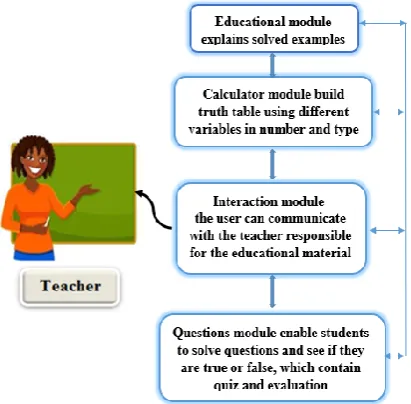
[image:4.595.66.272.416.618.2]This program is composed of four modules those modules are: educational module, interaction module, calculator module and questions module as shown in (fig 3).
Fig 3: The M-learning application modules
3.2.8 Designing an Education Strategy, and
Interacting with the Program
A learning strategy is a general and customized plan, consisting of a set of specific educational activities and actions arranged in a sequence appropriate to specific learning objectives. Depending on the nature of the educational software that runs on the computer systems, the individual learning strategy will be most appropriate when achieving the requirements for achieving the goals. There are many educational strategies that can be used and the specific education strategy has been chosen "tutorial mode ". The
application presents the learning material to the learner in the form of windows that can move between its contents with the buttons. It includes a series of examples that will allow the student to learn at the speed that suits his abilities and readiness. When using an electronic calculator that enables the student to create truth table.
3.2.8.1 Design User Interaction Interface
The interaction interface is all that is interacted with the user on the screen of the mobile during the process of education. The interface was designed to be characterized by simplicity, clarity, usability, and attract the attention of learners in line with educational goals and educational content and in light of the standards of building educational applications through screen designs and buttons that achieve the type Appropriate control. The general principles of the design of the screens are the simplicity of the configuration and the gap between the educational and technical technology in the output so as not to lose its educational importance and determine all the information to be presented on the same screen as well as That used in the design and taking into account consistency between regions or allocated to the display screen in space, and uses the appropriate visual effects when moving from one screen to another and clarify through the following formulas that will meet us during the clarification and explanation of the chapter.
3.2.8.2 Design the Application's Logon Icon
The researcher designed the application's login icon where students can access the application when pressed like any application on the mobile, (fig 4, and 5) show the application icon.
3.2.8.3 Designing an Education Strategy, and
Interacting with the Program
A learning strategy is a general and customized plan, consisting of a set of specific educational activities and actions arranged in a sequence appropriate to specific learning objectives. Depending on the nature of the educational software that runs on the computer systems, the individual learning strategy will be most appropriate when achieving the requirements for achieving the goals.
[image:4.595.322.538.600.737.2]There are many educational strategies that can be used and the specific education strategy has been chosen "tutorial mode ". The application presents the learning material to the learner in the form of windows that can move between its contents with the buttons. It includes a series of examples that will allow the student to learn at the speed that suits his abilities and readiness. When using an electronic calculator that enables the student to create truth table.
Fig 5: Screenshot of application icon
3.2.8.4 Design modules
A.
Educational module
The educational module organizes the learning resource. It presents educational material as shown in (fig 6), from this window it can get digital content and logical gates simplification, as shown in (fig 7,8, and 9), and (fig 10,11,12, and 13).
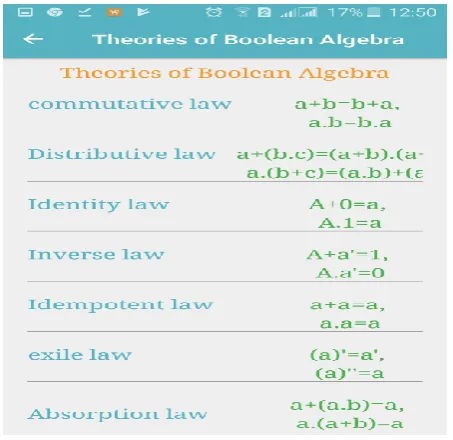
Logical gates are displayed through a number of pages, every logic gate has a page that contains (images and text). After explain the logic gate skill there is solved example on it. The student tries to solve it with negative or positive feedback. He /She also has navigation tools to move from logic gates skill to another or back for example when click on logical gates simplification button we found windows as shown in (fig 7), where using scroll bar the content is displayed, when pressing any law of Boolean algebra we can understand it with an example and a special form that illustrates it as shown in (fig 8). In addition to get some examples that facilitate students' understanding of the use of Boolean Algebra to simplify logical gate as shown in (fig 9).
[image:5.595.61.271.73.234.2]Fig 6: Screenshot of educational module
Fig 7: Screenshot of logical gates simplification
[image:5.595.320.540.300.625.2] [image:5.595.54.277.483.672.2]Fig 9: Screenshot example of logical gates simplification
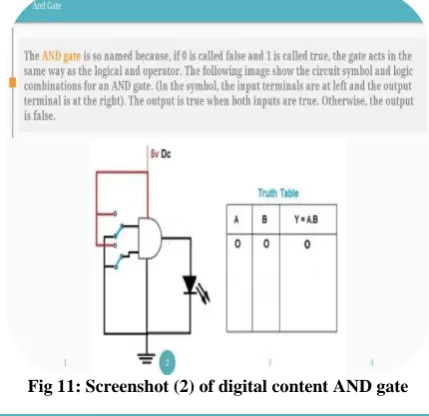
As well as, when click on digital content button it will found window contain two main button, first button is called gates view as arc-layout through which logic gates are displayed with explanation AND gate button as shown in (fig 10, 11, 12, and 13).
[image:6.595.319.534.78.286.2]Fig 10: Screenshot (1) of digital content AND gate
[image:6.595.323.537.305.698.2]Fig 11: Screenshot (2) of digital content AND gate
Fig 12: Screenshot (3) of digital content AND gate
[image:6.595.54.281.466.642.2]The other buttons are definitions button, when pressed on it, definitions are obtained that meet the user while studying the logic gates with examplesand are navigated using scroll bar as shown in (fig 14, and 15).
[image:7.595.57.277.118.308.2]Fig 14: Screenshot (1) of digital content definitions
Fig 15: Screenshot (2) of digital content definitions
The learner actively constructs their own understanding and all teaching, and evaluation are in line with the intended results. finally, the educational module represented in digital content and logical gates simplification, it allows the student to access through educational process, the student from this module learn all about logic gates and their equations and how to simplify them.
B.
Interaction module
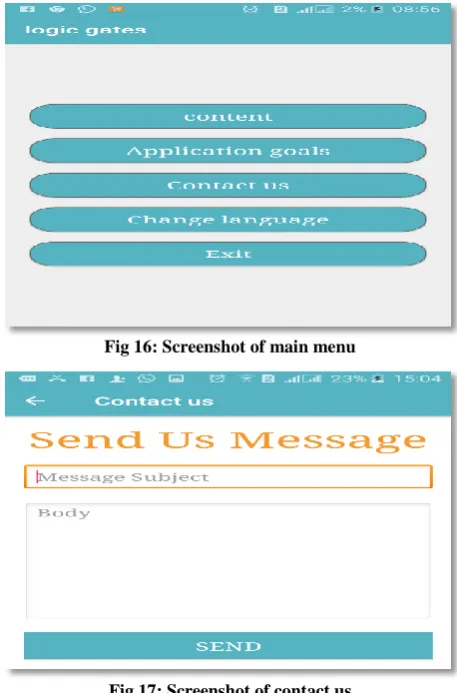
The interaction module provides to the student user interfaces and communication tools. User interfaces are the user manual with the program and all tools that exit on the screen such as buttons and menus to facilitate using the application. The main objectives when designing the user interface is simple so as not lose its educational goals. The student can interact with the application throw the main menu as shown in (fig 16). While the communication tool aims to facilitate interaction between the teacher and student as shown in (fig 17), it was designed and developed according to the quality standards for the construction of M-Learning environment.
Fig 16: Screenshot of main menu
Fig 17: Screenshot of contact us
C.
Calculator module
It is considered the most important module in educational application; it enables the students to build truth table by inserting the different variables in a logical equation and seeing the output in the image of the truth table as shown in (fig 18, and 19)
[image:7.595.327.532.494.685.2]Fig 19: Screenshot (2) of calculator
D.
Question module
[image:8.595.67.268.71.232.2]Questions that are resolved by students after the teaching process directly affect the development of students' thinking skills and the purpose of the unit of questions in the educational application to enable students to solve questions and see if they are true or false, which will eventually lead to the number of questions they have solved and the length of the solution, making it each time solving questions to challenge such a game to achieve a higher degree than before. It appears in (fig 20, 21, 22, and 23).
Fig 20: Screenshot (1) of question screen
[image:8.595.318.539.73.216.2]Fig 21: Screenshot (2) of question screen
Fig 22: Screenshot (3) of question screen
Fig 23: Screenshot (4) of question screen
3.3 Implementation and Production Stage
3.3.1 Production of Mobile Application's Elements
Adobe Photoshop was used to produce pictures of the application educational content and create application icon.
3.3.2 Coding
Java language and xml were used to create the propose Android Application through Android Studio program 3.1 canary.
3.3.3 Scenario Design
Scenario preparation step meaning phase in which they are converting outline set by the designer application to detailed procedures based on that and in the term of the educational objectives that has been determined to be achieved through educational content. In case design M-learning application, there are additional two point's message and synchronization.
3.3.4 Message
The M-learning application notifies student by instant message with brief text content messaging .it also enables interactive and collaborative learning activities among students.
The proposed mobile application allows interacts with the student by messages in the following cases:
- Allow the student content with the teacher by email.
[image:8.595.56.278.369.516.2] [image:8.595.57.278.534.678.2]3.3.5 Synchronization
Students have synchronization activities through M-Learning. The proposed M-Learning synchronizes the student as follows:
- Provide curricula in an organized manner with the possibility to look back and return again if the student wanted.
- Provide examples to illustrate.
- Provide feedback.
- The ability to build the correct tables and see the output is similar to being in a game, changing inputs and seeing output regardless of the number of inputs.
3.4 Evaluation Stage
Is the last stage in the system of procedural steps for the production of educational application, which is an important step as it is the indicator, which is indicative of the efficiency and effectiveness of educational application in general.
The evaluation of the educational application on the mobile is a basic process during the preparation of the application in order to maximize its effectiveness. The internal evaluation of the application was carried out by presenting it to the experts in the field of computer, teaching methods and educational technology to verify the validity of the application for self-learning and its use for teaching their opinion about the appropriate screens for purpose of them, suitable background color, suitable font, color, size, suitable places buttons, insufficient information screen elements. The initial scenario was converted to the actual screens of the proposed mobile learning application. This stage includes the following steps:
3.4.1 Continuous Follow-up to Design and
Production Stage
During the design and production of the proposed mobile application, there is follow-up to it commensurate and achieve the goals of responding.
3.4.2 The First Experimentation to M-Learning
Application stage
Through this step has been ensuring that the proposed application works well and free of any software errors or errors in the educational content.
3.4.3 Apply the M-Learning program stage
In this stage; the proposed M-Learning application was applied. It was sent the application APK file. The APK file is the file format used for installing software on the Android operating system. Then the students installed it to use.
4.
PROPOSED M-LEARNING
APPLICATION IMPLEMENTATION
The M-Learning was implemented by using some tools as survey, observation sheet and the achievement test. It was implemented in the following steps:
4.1 Students' Aptitude for Using Mobile
Devices in the Educational Process Survey
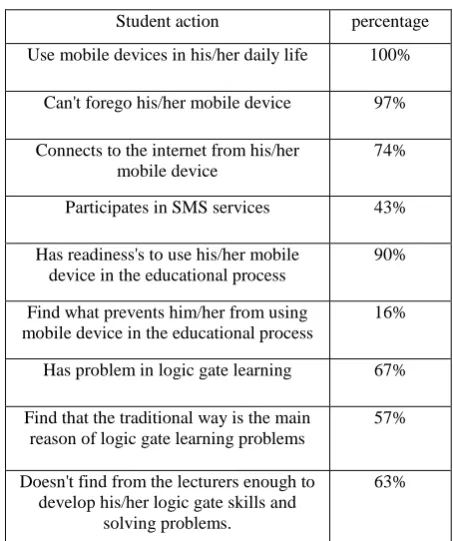
[image:9.595.314.541.94.365.2]There is a survey was made to measure the students' aptitude for using mobile in the educational process. Its results shown in table 1.
Table 1. Students' aptitude for using mobile devices in the educational process
Student action percentage
Use mobile devices in his/her daily life 100%
Can't forego his/her mobile device 97%
Connects to the internet from his/her mobile device
74%
Participates in SMS services 43%
Has readiness's to use his/her mobile device in the educational process
90%
Find what prevents him/her from using mobile device in the educational process
16%
Has problem in logic gate learning 67%
Find that the traditional way is the main reason of logic gate learning problems
57%
Doesn't find from the lecturers enough to develop his/her logic gate skills and
solving problems.
63%
4.2 Content Analysis
It has been identified skills contained in the three tabs ؛; Digital content, Calculator and logical gates simplification. That scheduled to students' grade one, Computer Teacher Preparation Department, faculty of specific education, the three tabs included the following sub-skills:
- Logical gates' skills.
- Logical gates simplifications' skills.
- Truth table calculate' skill.
- Questions.
4.3 Experiment Preparation
The experiment was prepared and implemented according to the following steps:
4.3.1 The sample research selection
The sample research was selected from the grade one, Computer Teacher Preparation Department, faculty of specific education, new Damietta University during the first semester 2018/2019 section one, two and three. This sample was divided into two groups randomly 30 students to the control group studying the curriculum through the traditional way, and 30 students to the experimental group studying through the proposed m-learning application.
4.3.2 Study tools
The study was based on the following tools:
1. Note card: To assess the performance of students in the experimental group in technical aspects.
2. Interviews: To identify the students to be dealt with both in the control group and the experimental group
surveyed about their everyday use of mobile phones
4. Achievement test: For the control group to determine the level of the educational achievement of the logical gates.
5.
PROGRAM IMPLEMENTATION
RESULTS
5.1 Design of Study Tools
At first, the interview was conducted on all students of the first section in Computer Teacher Preparation Department, then the students divided into experimental group and control. A questionnaire was then prepared for the experimental group about their daily use of the mobile phone and their use in their scientific life. They were then handed over to the application on their mobile phones and trained on it. Monitoring tools were then used to monitor their understanding of the application. On the other hand, a control test was conducted for the control group to measure their cognitive understanding of the traditional method of obtaining information about logic gates and general computer mathematics. The application was also provided with an evaluation test to measure their understanding and knowledge while using the application.
5.2 Effect of The Application of Proposed
Model
To study effect of the application of the proposed model on improving students' skills in dealing with computer mathematics in general and logical gates in particular, applying and testing the proposed model was applied and tested 60 students from the Department of Computer Teacher Preparation Department in the Faculty of Specific Education was divided into two groups as follows:
a. Control group: number (30) (taught in a traditional method) to apply the observation card to them.
b. Experimental group: 30 students (taught through the proposed educational application) to apply the observation card to them after using the proposed system.
A set of questions were prepared to assess students, and questions were prepared to include seven different skills, and this skill are as follow:
a. Knowledge of the fundamentals of Boolean algebra.
b. Understanding of sub-concepts related to logical processes and logical variable.
c. Configuring logical expression and dealing with logical gates.
d. Resolve the truth table with high accuracy and super speed.
e. Understanding simple logic gates.
f. Dealing with theories of Boolean algebra and its use in simplifying logical expressions.
g. Dealing with electrical circuits.
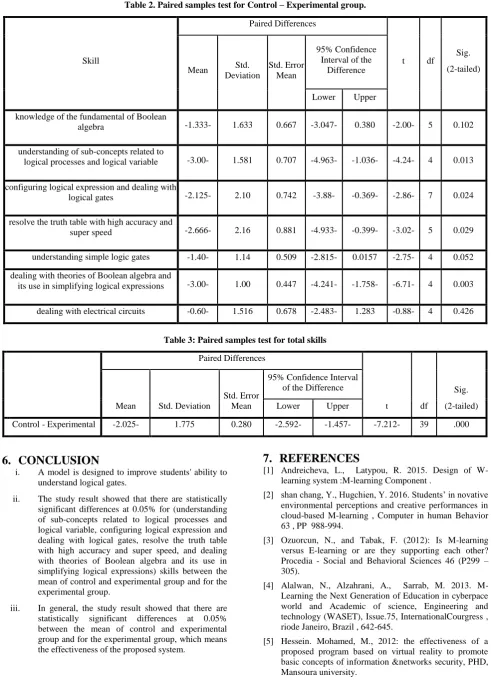
To evaluate the results of the application of the model and its impact on the improvement of students' skills, the SPSS program was used, a set of tables were prepared, including the results of the comparison between the grades of the students of the control and experimental groups using paired-samples T test.
Table 2 shows that there are statistically significant differences at 0.05% for (understanding of sub-concepts related to logical processes and logical variable, configuring logical expression and dealing with logical gates, resolve the truth table with high accuracy and super speed, and dealing with theories of Boolean algebra and its use in simplifying logical expressions) skills between the mean of control and experimental group and for the experimental group, which means rejecting the zero hypothesis and accepting the alternative hypothesis. But for (knowledge of the fundamental of Boolean algebra, understanding simple logic gates skill, and dealing with electrical circuits) skills, the value of the statistical function at the level of significance is more than 0.05, which means accepting the zero hypothesis and rejecting the alternative hypothesis.
Table 3: Paired samples test for total skills
Paired Differences
t df
Sig.
(2-tailed) Mean Std. Deviation
Std. Error Mean
95% Confidence Interval of the Difference
Lower Upper
Control - Experimental -2.025- 1.775 0.280 -2.592- -1.457- -7.212- 39 .000
6.
CONCLUSION
i. A model is designed to improve students' ability to understand logical gates.
ii. The study result showed that there are statistically significant differences at 0.05% for (understanding of sub-concepts related to logical processes and logical variable, configuring logical expression and dealing with logical gates, resolve the truth table with high accuracy and super speed, and dealing with theories of Boolean algebra and its use in simplifying logical expressions) skills between the mean of control and experimental group and for the experimental group.
iii. In general, the study result showed that there are statistically significant differences at 0.05% between the mean of control and experimental group and for the experimental group, which means the effectiveness of the proposed system.
7.
REFERENCES
[1] Andreicheva, L., Latypou, R. 2015. Design of W-learning system :M-W-learning Component .
[2] shan chang, Y., Hugchien, Y. 2016. Students’ in novative environmental perceptions and creative performances in cloud-based M-learning , Computer in human Behavior 63 , PP 988-994.
[3] Ozuorcun, N., and Tabak, F. (2012): Is M-learning versus E-learning or are they supporting each other? Procedia - Social and Behavioral Sciences 46 (P299 – 305).
[4] Alalwan, N., Alzahrani, A., Sarrab, M. 2013. M-Learning the Next Generation of Education in cyberpace world and Academic of science, Engineering and technology (WASET), Issue.75, InternationalCourgress , riode Janeiro, Brazil , 642-645.
[image:11.595.52.544.82.769.2][5] Hessein. Mohamed, M., 2012: the effectiveness of a proposed program based on virtual reality to promote basic concepts of information &networks security, PHD, Mansoura university.
Table 2. Paired samples test for Control – Experimental group.
Skill
Paired Differences
t df Sig. (2-tailed)
Mean Std.
Deviation
Std. Error Mean
95% Confidence Interval of the
Difference
Lower Upper
knowledge of the fundamental of Boolean
algebra -1.333- 1.633 0.667 -3.047- 0.380 -2.00- 5 0.102
understanding of sub-concepts related to
logical processes and logical variable -3.00- 1.581 0.707 -4.963- -1.036- -4.24- 4 0.013
configuring logical expression and dealing with
logical gates -2.125- 2.10 0.742 -3.88- -0.369- -2.86- 7 0.024
resolve the truth table with high accuracy and
super speed -2.666- 2.16 0.881 -4.933- -0.399- -3.02- 5 0.029
understanding simple logic gates -1.40- 1.14 0.509 -2.815- 0.0157 -2.75- 4 0.052
dealing with theories of Boolean algebra and
its use in simplifying logical expressions -3.00- 1.00 0.447 -4.241- -1.758- -6.71- 4 0.003
[6] Mahumoud., Abdelghany, S., 2013. Design and production of a programmed unit according to the model of Abdullatif Al-jazzar to teach the principles of crochet for the students of the preparatory stage - Journal of Faculty of Education, Port Said University, the number fourteenth (P519 – P535).
[7] Elgazzar, Elsafy, A., 2014. Developing e-learning environments for field practitioners and developmental researchers: A third revision of an ISD model to meet e-
online february 2014 in scires.
http://www.scirp.org/journal/jss
http://dx.doi.org/10.4236/jss.2014.22005.
![Fig 1: Ways of earning [3]](https://thumb-us.123doks.com/thumbv2/123dok_us/9301513.429086/1.595.323.539.261.455/fig-ways-of-earning.webp)
![Fig 2: Basic stages of educational design [6]](https://thumb-us.123doks.com/thumbv2/123dok_us/9301513.429086/2.595.58.279.263.428/fig-basic-stages-educational-design.webp)