Efficient Daemon GUI Utility to Extract the Web/Win
Application Components and Generates Customized
Reports
Neelima Galla
Alcorn State University
Madhu Dande
VIT University
ABSTRACT
Daemon GUI Utility providing the solution, as “Prevention is better than cure”. It automatically validates entire application, which includes Win/Web pages/links and its components. Providing input parameters as valid domain name or .exe/.jar files with valid credentials if needed else static website. It searches the entire website in both levels(basic and advanced) to identify the issues such as invalid web page references on the website before losing the customer value, pinpointing precisely where to fix the problem and development easy to fix it, which will reduce the effort in analyzing it. Reports the success and failure of the web links and response time of the links, pages, components and images of the web application.
General Terms
System Testing, URL links, Web Components, Metrics and Reports.
Keywords
Broken URL Links, Web Components, Web Page/Image response time, Fonts size and style standards, Summary Reports, Metrics.
1.
INTRODUCTION
In this digital world, most of the business carried over the internet. Any business needs software to continue to track the information by developing different types of applications to achieve their specific tasks/transactions.
There are different types of application architectures, such as 2-tier, which is called as Client/Server, 3-tier Web based, 4-tier/n-tier distributed applications. Similarly Client-side static Mashup, Server Side Static Mashup, Client Side Dynamic Mashup and generic web application architectures [1]. As well, different application architectures explained in detail [17]. There are different types of web applications, which are Static, Dynamic, and Transaction based. Online applications will have multiple web pages accessed via multiple URL links [2]. Uniform resource identifier (URI) will be identified either based on location (URL) or name (URN) [18]. URL consists of application layer protocol i.e. http/https, IP address and port number. Eg: http://www.ip address.port number. IP address is in digits, which is hard to remember when compared to name. Domain Name Space (DNS) created to translate IP address to Name. To identify the computer system in the Internet world to access needed to update URL in Fully Qualified Domain Name (FQDN).
Each web page will consist of various components such as buttons, text box, text, hyperlinks, images, drop down box, radio buttons etc.
URL redirection or forward the links in the entire web
redirection or same page called more than once in the website and its importance [2]. Web Application has web pages, which consists of URL links. To check the performance and classification of the web pages by using URL features with specialized Supervised machine learning algorithms [4]. Web application functionality updated by modifying the code. Identifying the reusable components in the application based on the properties of the components, which read by the tool to validate the changes [5]. While developing the web applications development teams are following different frameworks. In that Model/View/Controller is the best model, which recognized by the Microsoft [6]. Extraction of the web pages and links will follow different approaches in that Tree structure which is familiar from Microsoft as well Parent-Child-sub child structure [15] [16]. Different http response/error codes are explained [7].
Organization of the paper with brief details of each section
Section-2 Design of GUI Utility
Section-3 Architecture of GUI Utility
Section-4 Steps followed to execute the GUI Utility
Section-5 Analysis report of the website with all metrics
2.
DESIGN OF GUI UTILITY
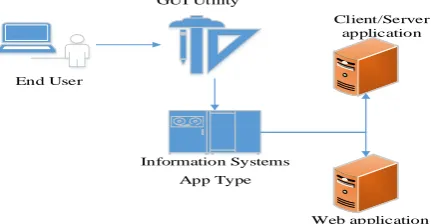
The GUI based application architectures will be Win and Web Based, which also known as two tier and three or n-tier. The GUI Utility developed using .net and works on applications, which has developed on Microsoft, Java, PHP and any other web technologies. The structure of the code based on languages like object oriented programming or functionality of the program to simplify for future enhancement. Fig.1 represents end user launch the Daemon GUI utility that installed on local desktop.
[image:1.595.321.537.622.734.2]GUI Utility will execute either client/server based application by passing the .exe or .jar file or domain name of the web application.
Fig 1: Diagram of GUI Utility.
Information Systems End User
GUI Utility
App Type
Client/Server application
In case of web-based application, GUI utility will start executing application by scanning the HTML source in the background. The web components which are used in the application will be available in the source code i.e. HTML code. For each component will create each function as a thread, will extract the web application components and its details pushed into the spreadsheet as shown.
Fig 2: Architectural Diagram of GUI Utility.
The above figure represents the architectural diagram of the utility, and indicates how an end user can use the tool in locating the broken links, which are a serious problem for everyone using the internet [9][10].
Most of the time web page will be down or any URL link may be broken for several reasons. The simplest and most common reason is that the page no longer exists. The typical error code of a dead link is a 404 error, indicating that the web server responded, but the specific page could not found. Commonly reported http/https response/error codes are as follows [7]
HTTP 404 - File not found (but could become available)
HTTP 500 - Internal server error
HTTP 502 - Bad gateway "Connection failure”. When the server cannot even reached e.t.c.
Another type of the dead link occurs when the server hosting the target page stops working or relocates to a new domain name. A link might also be broken because of some form of blocking such as a content filter/firewall. Dead links on the Internet commonly occur on the authoring side. The reason for this is that the website content assembled, copied, or deployed without properly verifying the targets folders. Dead links can also occur when a target website without clean URLs is "reorganized”.
When a website does not keep its links updated, leading to the proliferation of dead links, it becomes very difficult for the customers or users of that company or organization‟s site to access the information they are looking for [12].
Broken links are hyperlinks in a web page that lead to a nonexistent page or website. If the website still exists, you will end up at a 404-error page. If thewebsite does not have custom error pages, then you will receive a web server error. When the website does not exist anymore, you will see a browser error page.
It is important to find broken links of website, else it will in turn losing the visitors or sales because users cannot get to their required page.
The GUI Utility starts validating the entire site by going through all the web pages that a website has and lists the
locations where a broken link is present. It also generates a statistical report based on the number of broken links.
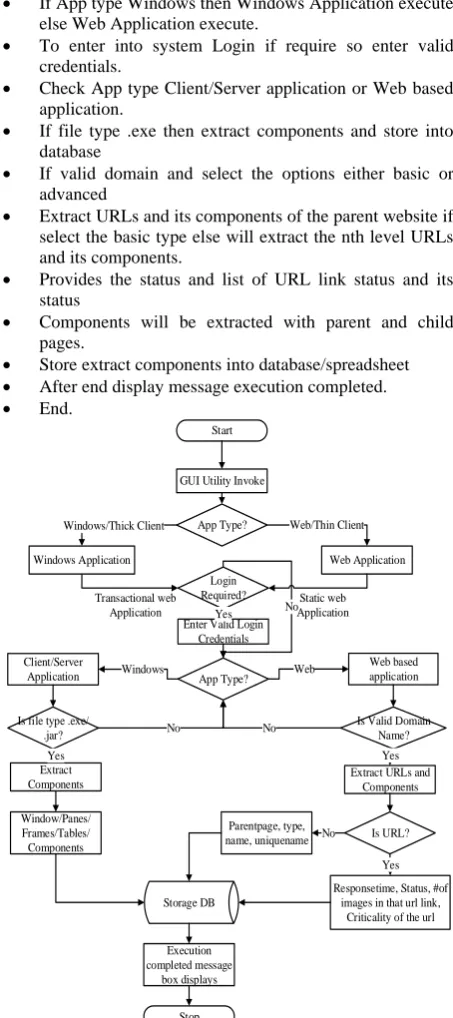
2.1
Pseudo code of algorithm for the below
flowchart in fig 3.
Start
Invoke GUI Utility mode
Check App type Windows or Web
If App type Windows then Windows Application execute
else Web Application execute.
To enter into system Login if require so enter valid credentials.
Check App type Client/Server application or Web based
application.
If file type .exe then extract components and store into database
If valid domain and select the options either basic or advanced
Extract URLs and its components of the parent website if
select the basic type else will extract the nth level URLs and its components.
Provides the status and list of URL link status and its status
Components will be extracted with parent and child pages.
Store extract components into database/spreadsheet
After end display message execution completed.
[image:2.595.314.541.181.691.2] End.
Fig 3: Flowchart of GUI Utility.
Daemon GUI Utility Utility User
Excel Work Book Data Base Application Start Stop Web Application App Type?
Extract URLs and Components GUI Utility Invoke
Web/Thin Client App Type?
Windows Application Windows/Thick Client
Enter Valid Login Credentials Login Required? Storage DB Is URL? Yes
Responsetime, Status, #of images in that url link,
Criticality of the url Yes Web based application Web Windows Client/Server Application
Is Valid Domain Name? Is file type .exe/
.jar? No No
Extract Components
Yes
Parentpage, type, name, uniquename No Yes Window/Panes/ Frames/Tables/ Components Execution completed message box displays
NoApplicationStatic web Transactional web
3.
OPERATION PROCEDURE OF GUI
UTILITY
3.1
Steps to execute GUI Utility
.
1. Enter the URL with a complete domain name.
2. Click on LOAD button to load the URL of the web page
3. Click on START button
4. Note: Based on the option chosen, either basic or advanced URL checking will be performed
5. GUI Utility starts extracting all the URLs and its web components in the spreadsheet.
6. This Utility tool will provide the details of the links and components on clicking the view statistics button.
[image:3.595.317.541.193.396.2]3.2
Functionality of the GUI Utility
Fig 4: GUI Utility with functionality
3.2.1
The functionality of the GUI Utility
1. URL: name of the website URL entered in the
address bar.
2. Extract URLs: This feature extracts only the URLs that are present in the page and lists them on the window with the URL status and the number of times occurred
3. Extract User Controls: This feature extracts all the user controls that are present in the URL that provided [8].
4. Start: This feature starts the execution of the tool 5. Stop: This feature stops the execution process, and
provides the results produced up to that point. 6. Export to Excel: Extracts all the results that
displayed on the screen into Excel sheets.
4.
ILLUSTRATED WITH AN EXAMPLE
Consider an example: http://www.alcorn.edu provided in the URL location. When the application opened, there is a blue colored text, indicating „idle‟. When we provide the URL and click on the START button, it verifies the URL and changes the state to “Valid URL”. A URL provided with the application in idle mode, until click on load button. It has dropdown with two options.
Basic
Advanced
When the basic mode selected, only the URLs and the controls of the default page extracted, and no information provided for the end level.
In the Advanced mode, when Load Time option is checked, two radio buttons displayed default page and end level. If
default page selected, then the URLs and Controls of only the default pages displayed with no information for the end level. In the case where End Level selected, the system extracts all the URLs and Controls present in the link. Once the utility launched, in the URL tab we have to enter the URL we wish to validate. The mode is idle. When the URL is entered the idle changes to Valid URL. The user checks the options that displays on the screen according to what he/she wishes to view on the screen. Once the URL is loaded and the execution started GUI utility validates the status of all the URL links and gives you the status, error message and execution time.
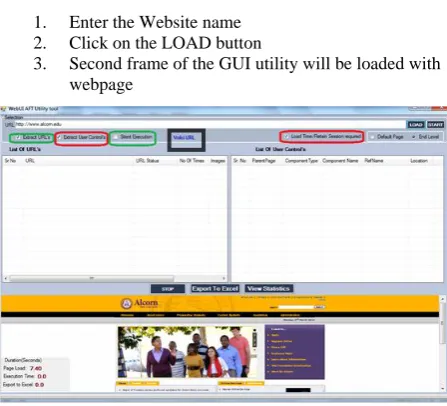
1. Enter the Website name
2. Click on the LOAD button
3. Second frame of the GUI utility will be loaded with webpage
Fig 5: Web Application launch with valid URL
[image:3.595.55.280.229.403.2]The above screenshot shows how the idle mode changes to valid mode and the options that are available to us in validating the URL, as well as a list of URL‟s and user controls.
Fig 6: Warning Message Box
Then the user must select to extract either URLs or controls, or both. Here we have selected both, by enabling checkbox. Once the execution starts, the web page‟s URL links and its web components are extracted and displayed, as visible in the below snapshot. The duration recorded time in seconds. Then, after the URL is loaded, we can start the execution process. The list of all the valid and invalid URLs displayed, as well as the response time for each URL/Page to load. The execution times displayed once the complete URLs extracted.
4.1
Extraction of URL Links into Excel
Extract the URL links with parent>>child>>sub-child level and store it in that order in Excel sheet.
Utility collects duration required for the following actions:
Web page to load into the browser
Extracting all controls from the web site
[image:3.595.318.543.462.550.2] Load each individual link listed on the web site
[image:4.595.55.284.75.251.2] Validate each URL and check the status
Fig 7: List of URL links exported into Excel
4.2
Extraction of User Controls into Excel
The user select the type of components to extract – such as text box, Dropdown box, Labels etc. Extract the components of the specific web page similarly as above. Concatenate and create a unique id for each component, which used in system testing. Separate sheets created for web links and web UI components.
Fig 8: Controls Page components exported into Excel
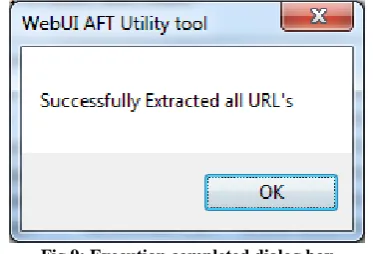
[image:4.595.316.544.114.230.2]Once the execution is completed and all the URLs extracted successfully, which exports the data on to an Excel sheet. When the execution is complete, the result displayed. Following message displays. To click OK button to complete the process of the utility.
Fig 9: Execution completed dialog box
5.
GRAPHICAL REPRESENTATION OF
ANALYSIS DATA
The analyzed data viewed by clicking onto the View Statistics option on the tool. Once selected the option displays the list of metrics where the number of input controls, the number of spam and number of drop-down displayed statically. The
number of valid and invalid URLs can be viewed either in a frequency chart or a load time chart as shown in the below fig 10.
Fig 10: List of URLs count bar chart
[image:4.595.315.545.314.632.2]The time it took for the execution to complete is 6924 Sec, and all the URLs successfully extracted. The metrics viewed by using the view statistics tab in different form charts. The number of valid URLs is 2238 and of invalid URLs is 153. A bar chart created based on the analyzed the data as follows in the fig 11
Fig 11: Valid and Invalid URLs bar chart
Fig 12: Valid and Invalid URLs pie chart
According to the pie chart is created using extracted data is analyzed as follows in the fig 12.
Access Forbidden: 7%
URL not found: 54%
Bad request: 22%
Others: 70%
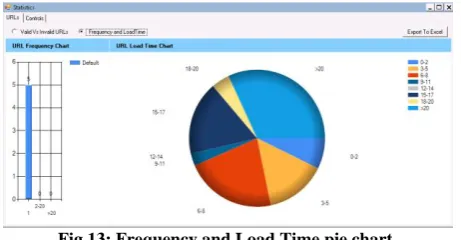
[image:4.595.54.283.346.479.2] [image:4.595.73.260.553.680.2]Fig 13: Frequency and Load Time pie chart
[image:5.595.54.282.248.371.2]Extracted URL links with details like response time, frequency of occurrences, number of images and its formats. These data analyzed and viewed in the bar chart.
Fig 14: Frequency of URLs in bar chart
[image:5.595.55.282.420.543.2]The utility tool used to find the number of links that are broken on any website. Here we have used it on the Alcorn website and it gave us a bar graph where the data analyzed.
Fig 15: Bar Graph for the UI Components
From the above graph, the number of input controls is 397 and the number of SPAN is 37 as shown in fig 15.
[image:5.595.52.282.614.754.2]Analyzing the components and types represented in the bar chart as shown in the fig 16. Number of input controls, spam and drop down in the URLs.
Fig 16: UI Components bar chart
From the above analysis, development team job becomes much simpler to fix broken links, which do not have a major impact on the customer-hit rate. With the help of GUI utility URL links and its components will be working. It will benefit the business in minimizing losses occurring due to unknown downtime of the URL link and its components.
5.1
GUI Utility features are as follows
Provides exact location of the broken/dead/orphan link.
No limitation on number of web pages to extract.
Validates URL link for entire website with session ID.
Detects all sorts of URL links with status.
Displays 404 and other HTTP response codes - for each
broken link.
Gives List of Controls ID along with URL's status [8].
Gives Summary Report on URL's status.
Validation of standardization of GUI component
declaration, its font style and font size.
Time taken to download Images and Data i.e. grid or table
Setting up a time between the URL link1 to link2 (Think
time)
Flash, PDF, Excel and any other format of the file which
is missing
Any graphics or background colors or marquee messages
Scans the complete application until the end or nth level.
Customized report can be generated
Validate required or specific web pages.
Validate between two different environments of the
URLs.
o Validation done for single URL link between two environments
o Validate all URL links between two
environments.
E.g: System Test Environment and Pre-Production
environment or any other environments.
6.
LIMITATIONS
Daemon thread can only analyze one Web site at a
time.
The URL links of Client/Server based applications,
which use plugins needed to display the content through web based or html pages are not able to extract.
Third party components may not be able to extract.
Unable to track the URL links in URL hidden
sessions.
Multiple users will not be able to login
simultaneously.
Different Users/Roles will not be able to extract the links or components.
The response time between the network and system
loading of the web components is not calculated.
7.
CONCLUSION
This utility makes sure the entire website or web URL links are working 24/7, which is not available in other tools, which track broken URL links. In addition, this Utility handles the websites having Sessions on the pages, and this Utility provides a statistical report of the URL status and other Web Controls.
The GUI utility not only helps in validating the entire website, but also tells us the exact location of the broken URLs, so identifying the problem becomes easier. Exports the data on to excel sheet where analysis is very easy. The tool also helps in generating the statistics in the form of a bar chart and pie chart, which helps us in improving the website without the loss of customers or reputation.
8.
ACKNOWLEDGMENTS
We like to thank Dr Xang and Dr Yu from Alcorn State University for providing the valuable support in completing the Daemon GUI Utility Project on time. To carry out this project on Alcorn state university, received the permission and provided the results and analysis reports to the concern team in the Alcorn State University.
9.
REFERENCES
[1] John Kemp, Daniel, Ashok Malhotra, T.V.Raman “Web
Application Architectures”
http://www.w3.org/2001/tag/2010/05/WebApps.html
[2] Jeff Offutt “Web Software Applications Quality
Attribute”
https://cs.gmu.edu/~offutt/rsrch/papers/conquest02.pdf
[3] Mark Gavalda and the Kinsta Team “A Beginner‟s Guide
to Website Speed Optimization”
https://kinsta.com/learn/page-speed/ 2017
[4] Min-Yen Kan, Hoang Oanh Nguyen Thi “Fast Webpage
Classification Using URL Features” CIKM '05 Proceedings of the 14th ACM international conference on Information and knowledge management. Pages 325-326
[5] Simon P. Warrington “System and method for managing
web page components” International Business Machines Corporation US7194682 B2
[6] Avraham LeffJames T. Rayfield “Web-Application
Development Using the Model/View/Controller Design
Pattern” EDOC '01 Proceedings of the 5th IEEE International Conference on Enterprise Distributed Object Computing Page 118
[7] Berners-Lee, Tim, Roy Fielding, and Henrik
Frystyk. Hypertext transfer protocol--HTTP/1.0. No. RFC 1945. 1996.
[8] Sannella, M. J. “Constraint Satisfaction and Debugging for Interactive User Interfaces”. Ph.D. Thesis, University of Washington, Seattle, WA, 1994.
[9] http://www.brokenlinkcheck.com/
[10]http://www.webpagemistakes.ca/find-broken-links/
[11]Juan Martinez-Romo , Lourdes Araujo “Retrieving
Broken Web Links using an Approach based on Contextual Information” ACM 978-1-60558-486-7/09/06
[12]Juan Martinez-Romo, Lourdes Araujo “Updating broken
web links: An automatic recommendation system” Elsevier Ltd-2011
[13]Animesh Shrivastava and Anand Singh Rajawat “A Review on Web Recommendation System” International Journal of Computer Applications(IJCA) Dec-2013 [14]Bernhard Haslhofer and Niko P. Popitsch “DSNotify:
handling broken links in the web of data” ACM New York, NY, USA -2010
[15]Vivek D. Mohod, Mrs. J. V. Megha “A Survey on Data
Extraction of Web Pages Using Tag Tree Structure” International Journal of Computer Science and Information Technologies, Vol. 5 (3) -2014
[16]Madhu Dande and Neelima Galla, "Automation Testing Frameworks for SharePoint application", International Journal of Computer Sciences and Engineering, Vol.3, Issue.11, pp.33-38, 2015
[17]Muhammad Akram and Sikandar Hayat “Qualitative & Quantitative analysis of tiered Architecture of Web-Applications”
http://channukambalyal.tripod.com/NTierArchitecture.pd f