UNIVERSITY OF TWENTE
What are the effects of different search
engine interface designs on user behaviour?
Master thesis
Linus Lawrence ([email protected])
Student number: 1228803
Date: October 1, 2015
Master thesis / Business Administration
School of Management and Governance
University of Twente
1st Supervisor: Dr. E. Constantinides
Management Summary
Studying user behaviour in the context of web search is becoming more and more popular.
Search engines are the main way for internet users to conduct informational, navigational and
transactional search tasks. The latter is of particular interest, as search engine result pages
(SERPs) for transactional queries always include sponsored listings, i.e. ads. These sponsored
listings are the main revenue stream for most search engine providers and each click on such
a listing means the providers get paid a small sum, also called pay-per-click (PPC).
Consequently, this means it is crucial for any search engine provider to design ads that draw
the most amount of clicks and different providers use alternative SERP interface designs for
transactional search queries.
This research focusses on whether there is a difference in transactional search behaviour
between different search engine interface designs. Therefore, this study first reviewed
scientific as well as non-scientific literature on this topic. Based on this review, we found that
an experiment using an eye-tracking device is a very common method for research on user
behaviour in online search. The review also revealed that visual hierarchy, competition for
attention and banner blindness, are three important factors that may influence transactional
search behaviour. This influence was studied by looking at Google and Bing’s different
interfaces using an eye-tracking device. In this experiment, participants were required to
complete a number of transactional search tasks using both search engines.
The results show that only small differences were found in transactional search behaviour for
two different search engine interfaces. Regarding the three factors, we found that the way
visual hierarchy is organised is not directly related to transactional search behaviour.
Moreover, competition for attention was not influential on search behaviour. Lastly, the
banner blindness phenomenon only exists to a certain extent and search behaviour is only
Overall, this study contributed to a deeper understanding of differences in search behaviour
between different search engine interfaces. Although search engine interfaces for
List of Figures
Figure 1. Schematic representation of the general SERP layout 7
Figure 2. Example of a Google results screen as of June 2015, 1280x1024 8
Figure 3. Example of a Bing results screen as of June 2015, 1280x1024 10
Figure 4. Theoretical framework 19
Figure 5. Aggregated percentage of viewers, mean time & heatmaps for Google SERPs 30
Figure 6. Aggregated percentage of viewers, mean time & heatmaps for Bing SERPs 32
Figure 7. Click percentages of result listing positions 35
List of tables
Table 1. Search queries used by participants during the experiment 23
Table 2. Mean eye-tracking indices for sponsored listings at the top by search engine 31
Table 3. Mean eye-tracking indices for organic listings above the fold by search engine 33
Table of contents
1. Introduction 1
1.1Research Problem and Question 2
1.2Aim and relevance of the study 3
2. Literature review and overview of Google vs Bing 5
2.1 Google vs Bing 5
2.1.1 Google vs Bing: An overview of both search engines 5
2.1.2 Layout of SERPs 6
2.2 Eye-tracking research of SERPs 12
2.2.1 Introduction of eye-tracking studies of SERPs 12
2.2.2 Eye-tracking studies comparing multiple search engines 13
2.2.3 Search engine user types and viewing patterns 14
2.3 Key theories considered for eye-tracking analyses of SERPs 15
2.3.1 Visual hierarchy 16
2.3.2 Competition for attention 17
2.3.3 Banner blindness 18
2.4 Theoretical framework 19
3. Methodology 20
3.1 Design 20
3.2 Data Collection 23
3.3 Participants 24
3.4 Procedure 25
3.5 Analysis and Measures 27
3.6 Reliability of methodology 28
4. Results 29
5. Discussion 35
5.2 Future research 37
5.3 Practical & scientific implications 38
1. Introduction
The study of user behaviour in the context of web search can advance our understanding of
fundamental behaviours involved in the online search process. It can also help design search
engine interface designs, which can prove beneficial to both search engine providers and the
people who use them. To date, a prominent method to delve deeper into user behaviour
during web search is eye-tracking. A number of researchers have examined users’ search
behaviour in relation to navigational and informational queries (Joachims et al., 2007;
Granka, Feusner, & Lorigo, 2008; Lorigo et al., 2008; Phillips, Yang, & Djamasbi, 2013).
Their research suggests that the presentation of SERPs has a profound impact on users’
viewing behaviour and selection of certain results. According to Höchstötter & Lewandowski
(2009), the most crucial part for users and search engines is the stage when users are initially
presented with the search engine results page (SERP) for their query. As a result, the first
impression of a search engine page design is considered to be very important. However, an
in-depth search on some popular search engines reveals that SERPs for informational and
navigational queries seldom include more than two if any sponsored listings, and the page
designs of different search engines are often strikingly similar. In contrast, search engine
providers use different page designs for transactional queries, most notably image-based ads
vs text-based ads. Furthermore, these queries include many sponsored listings at the top and
to right of the SERP. This is important to consider, as major search engines predominantly
use an advertising business model in which paid listings of the SERP generate the majority of
their revenues (Brin & Page, 1998; Teece, 2010). As a result, paid listings dominate the
initial SERP and only a few organic listings are visible. The majority of organic listings are
only visible “below the fold”, i.e. they can only be viewed when a user scrolls down.
The intent behind these queries is to make a transaction online and may include exact brand
2
include terms such as “buy”, “order”, or “purchase” which imply that the searcher is
considering making an immediate purchase or a purchase in the near future. The layouts of
these transactional SERPs is to have advertisements, i.e. pay-per-click (PPC) content, at the
top of the page, and organic listings underneath. The reasoning behind this stems from the
theory of visual hierarchy which suggests that listings at the top are likely to receive a great
deal of attention (Faraday, 2000). In addition, larger objects, e.g. image-based ads which
dominate the SERP, may receive more attention according to the competition for attention
theory (Janiszewski, 1998). Nevertheless, many users circumnavigate the intrusive sponsored
listings and instead view the organic listings (Chatterjee, 2008). This user behaviour is often
linked to the banner blindness phenomenon, which states that users unintentionally or
intentionally ignore and skip ads on a webpage (Drèze & Hussherr, 2003).
1.1Research Problem and Question
Search engines such as Google, Bing, Yahoo etc. present their SERPs using different
interface designs, in particular for transactional search queries. The most notable distinction
is the integration of sponsored listings. Google uses image and text-based ads whereas other
search engines solely use text-based ads. Further, more subtle, differences in search engine
interface designs pertain to font type and size, and the placement of certain elements such as
“related searches” (Höchstötter & Lewandowski, 2009). Consequently, the problem we face
is whether user behaviour varies based on different designs of search engine interfaces.
In this study we want to explore users’ behaviour and break new ground by using
eye-tracking. Guiding this study is the following research question:
Is there a difference in transactional search behaviour between different search engine
3
In an experimental design we compare user behaviour between two search engine interfaces.
In order to be able to answer the main research question the following sub-questions need to
be answered.
To what extent does transactional search behaviour vary for different search engine interface
designs in regards to the visual hierarchy theory?
To what extent does transactional search behaviour vary for different search engine interface
designs in regards to the competition for attention theory?
To what extent does transactional search behaviour vary for different search engine interface
designs in regards to the banner blindness phenomenon?
Which search results receive the majority of clicks from users?
To explore this, we apply eye-tracking technology which can detect where users look at a
point in time, how long they look at something, and the path their eyes follow (Bergstrom &
Schall, 2014). This technology helps us look deeper into user behaviour during online search
and has been used to study human behaviour for decades (Lori Lorigo et al., 2008). While
eye-tracking studies have explored general search behaviour on SERPs (Pan et al., 2004; Pan
et al., 2007; Terai et al., 2008) only one scientific study by Lori Lorigo et al. (2008) has
compared the viewing behaviour between two different search engines, however it focussed
on navigational and informational search queries.
1.2Aim and relevance of the study
The aim of this paper is to study differences in transactional search behaviour for the search
engine page designs of Google and Bing, the two most popular search engines (comScore,
2015). This is a highly important topic for a number of reasons. Firstly, research of user
4
business community. Secondly, understanding how users view SERP interfaces presented by
different search engines is also of major interest. Does the viewing behaviour vary for
different search engines interface designs? If so, why is this the case? Does this mean that
one search engine interface design is more effective than the other and therefore superior?
These are all interesting questions that still need to be answered, in order to fully understand
user search behaviour of SERPs. Next, the scientific contribution and practical value behind
this research are described.
The main scientific contribution of this research is to gain understanding of different search
engine page designs and their effect on transactional search behaviour. Such an approach has
previously not been conducted, yet is important considering the different page designs search
engines use. The results of this study contribute to the existing literature of web search
behaviour (Joachims, Granka, & Pan, 2005; Phillips et al., 2013; Poole & Ball, 2005 etc.).
Additionally, this type of study is a way to get more research focussing on the different
interface designs that search engines use and their effects on user behaviour. Furthermore, the
eye-tracking method allowed a closer examination of three theories that are strongly related
to web search behaviour. Overall, the scientific contribution of this thesis adds value to the
current literature on user behaviour in regards to page interface designs, especially in relation
to interfaces of a transactional nature.
The practical value of this study is understanding user behaviour which can help improve
search engine usability and search engine marketing. Search engine developers can leverage
the findings and optimise search engine interfaces for improved user experience. For
businesses and online ad agencies, understanding the effects of different page designs on user
behaviours can have large commercial implications in terms of which interfaces are more
5
becoming increasingly important, as companies are spending more and more on online
advertising (Statista, 2015).
The rest of this paper is organised as follows: Section 2 provides an overview and facts of
both search engines and the differences and similarities of the SERPs. Furthermore, the
existing body of knowledge on eye-tracking research on SERPs is also discussed. After that,
we describe the theoretical model and pose our hypotheses. In the methods section, we detail
the design of the experiment and also describe how the data analysis was carried out. Then,
we present the results of the experiment in the following section and discuss the results as
well as emphasise the practical and scientific implications. In the last section, we conclude
about our work and provide the answer to the research question.
2. Literature review and overview of Google vs Bing
2.1 Google vs Bing
This first section provides a brief overview of the past and current trends regarding search
engine market share. With this information we clearly argue why Google and Bing were
chosen for the experiment. Next, the SERP interfaces are described to explicitly show the
differences and similarities there are between the SERPs from the two search engines, as well
as which areas of interest (AOIs) were considered for the experiment.
2.1.1 Google vs Bing: An overview of both search engines
Google the often heralded “king of search” has been the most popular search engine over the
last decade. In this period, Google has won the so-called “search engine war” against
AltaVista, Excite and most recently Yahoo. However, the introduction of Microsoft’s Bing in
2009, has seen a slow but growing shift in the search engine sphere. According to comScore
6
search engine (3rd: Yahoo, 12.7%) in only six years. Although Bing’s high percentage in
market share is not reflected in Europe, it only accounts for 2-3% of searches and Google
<90% (Business Insider, 2014; Lunapark, 2014), its search market share is slowly increasing.
As a result, more and more companies are advertising on Bing (Adobe Digital Index, 2014).
Overall, Bing’s market share has mostly come at the expense of its search alliance partner
Yahoo and the two search engines have traded places. Google still remains the most popular
search engine, nevertheless, its search market share has fallen from 67.6% in May 2014
(comScore, 2014) to 64.2% in May 2015 (comScore, 2015). Furthermore, since Bing’s
launch in 2009 Google has frequently experimented with new elements (carousels,
knowledge graphs etc.) on its SERPs, most notably its product listing ads. With these
elements, Google has differentiated itself from Bing and other search engines in order to
provide more targeted search results for users, better value for companies using Google
AdWords and ultimately increase its search engine market share. In spite of that, Bing has
slowly increased its search engine market share and a new search engine war has unfolded,
clearly evident when Google accused Bing of copying search results (Search Engine Land,
2011).
2.1.2 Layout of SERPs
This section provides a short overview of results presentations in general web search engines
and the main differences between Google and Bing.
SERPs can be defined into different areas. The two main areas are the visible area and the
scrolling area. The visible area, also known as “above the fold” or “above the scroll”, is what
users can see on a webpage without scrolling. All information, which is not immediately
7
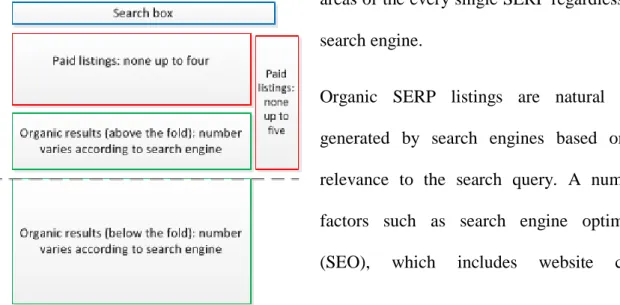
Generally, SERPs of major search engines like Google, Yahoo!, and Bing consist of organic
listings, paid listings and the search box (see Fig. 1). These are the most important and largest
areas of the every single SERP regardless of the
search engine.
Organic SERP listings are natural listings
generated by search engines based on their
relevance to the search query. A number of
factors such as search engine optimisation
(SEO), which includes website content,
trustworthiness of the website, backlinking etc.,
are considered most important (Juon, Greiling &
Buerkle, 2011). These organic listings can be
found at the central/ bottom of the visible area and cover the majority of the scroll area. In
contrast, paid listings, or sponsored links are ads that businesses have paid for and can be
found in the top/central and right area of SERPs. In order to have their ad appear in search
engines as a sponsored link, businesses enter an auction and bid for a position according to
certain parameters, most importantly relevance to a user’s search query. This is called pay per
click (PPC) advertising in which businesses pay the search engine for clicks on their ads.
Lastly, the search box allows users to submit new queries, which sends the user to a new
SERP once the search button has been clicked. These are the major elements of most search
engines; however, search engines use different ways of integrating them. Therefore,
differences and similarities between Google and Bing’s SERPs, are discussed next. In
addition, this section also covers the factors visual hierarchy, competition for attention and
banner blindness and their relation to the different interfaces. Figure 1 - Schematic representation of the
8
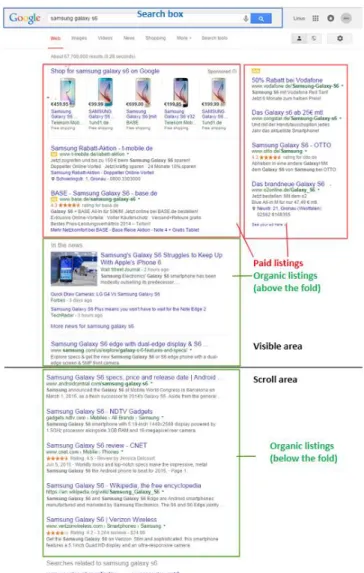
Figure 2 presents an example of a typical SERP for a transactional search query on Google.
At the top of the SERP, the search box is lightly coloured and clearly visible next to the
Google logo. Below, the paid listings at the top are situated in the focal area of the SERP.
These listings include Google’s product listing ads (PLAs), which are cost per click (CPC)
ads online merchants purchase through AdWords. These ads distinguish themselves from
regular text-based ads by using product images that include titles, prices and the URL. The
header of these PLAs includes a link to Google shopping, which allows users to search and
compare products from different vendors on Google’s online shopping website. The top right
text in the PLAs notifies users that the results are sponsored.
9
The nature of the PLAs is an important aspect to consider and can be directly related to the
three factors previously mentioned. In terms of both visual hierarchy and competition for
attention, it can be assumed that the purpose of the PLAs is to manipulate users into paying
attention to the top of the page and then viewing the page using a top-down approach. This
would mean that the banner blindness factor would not occur. These assumptions behind
Google’s use of PLAs are supported by the following findings. According to Marin Software
(2014), consumers prefer the richer and more engaging PLAs. Consequently, more people are
inclined to look at the top part of the SERP, although ads are present. Furthermore, in 2013
the average click-through-rate (CTR) of PLAs increased by 6% while the CTR for text-based
ads decreased by 13% (Marin Software, 2014).
Surrounding the PLAs below and to the right are traditional text-based ads with a page title,
short snippet, URL and in some cases product ratings. Depending on the keyword, the
number of text ads beneath the PLAs ranges from 1-2 and 1-5 to the right of the PLAs. These
ads are highlighted with Google’s yellow ad label and line barriers to distinguish them from
the organic listings.
At the bottom third of the visible area the first organic listings appear. These listings appear
due to their relevance to the search query. For transactional queries, the first listing is
predominantly a link to the products official website, followed by further organic listings
from online merchants and review sites. In some cases, new products with a lot of media
attention may appear as ‘in the news’ listings immediately below the sponsored listings (e.g.
10
also include Google images of the products1. Lastly, the bottom of the SERP includes
searches related to the search query.
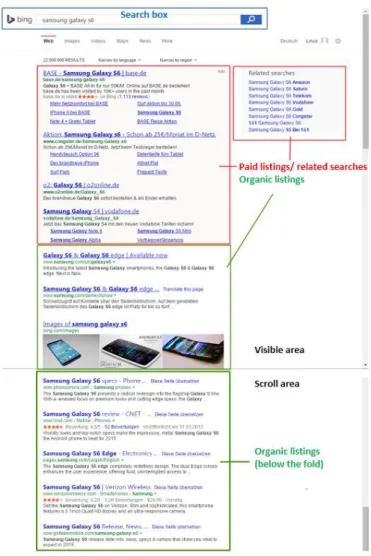
In comparison, Fig. 3 shows an example of a typical Bing results screen for a transactional
query.
Figure 3 - Example of a Bing results screen as of June 2015, 1280x1024
The positions, layouts and designs (i.e. snippet and URL font and position) of organic listings
and the search box are similar for both search engines. The only exceptions are that Bing uses
a bold font for its search result page titles and in this example includes Bing images of
1
In this example no further images were generated by the search engine. However, SERPs for other products
11
products at the bottom of the visible area instead of a news section. In terms of the search
results, the products official website also ranks number one on Bing and a further result by
CNET can also be found on Google’s SERP. Aside from these similarities, the other search
results are completely different.
As previously mentioned in section 1, the main differences between the search engines are
the approaches in presenting SERPs for transactional queries. Instead of using PLAs, Bing
uses traditional text-based paid listings at the top of its SERPs. These ads are more
conservative compared to Google’s and are nearly indistinguishable from the organic listings.
The lightly coloured background, line barriers and small ad notification are what separate the
two different kinds of listings. In terms of the design, Bing’s paid listings include the page
title, URL, snippets as well as additional sitelink extensions. These sitelinks allow companies
to promote additional products and sections of their websites. However, the inclusion of
sitelinks means that the listings are very large and only a few listings cover the majority of
the visible area. Therefore, a maximum of four sponsored results are limited to this area. In
terms of paid listings to the right, Bing uses similar type of ads as Google, but often not all of
the four ad positions are used. The reason for this is believed to be the lack of competition on
Bing Ads as many companies are still using Google AdWords (Wordstream, 2015).
Consequently, the area to the right includes eight links to related searches, which appear
below the ads when these are present. From the brief discussion, it can be seen that SERPs
for transactional queries from two different search engines clearly present visual differences,
especially differences regarding the paid listings.
Lastly, Bing’s method for presenting sponsored listings is important to consider in relation to
the factors concerning visual hierarchy, competition for attention and banner blindness. In
terms of visual hierarchy, Bing’s listings at the top of the page include snippets and sitelinks
of the SERP. This means, information at the top may be perceived to be of greater interest.
However, the list-based format means that the competition for attention of listings is high
(Hong, Thong, & Tam, 2005), therefore users do not necessarily look at listings at the top of
the page. They might also look directly at the organic listings in the visible area. As a result,
it can be assumed that banner blindness is more likely to occur either intentionally or
unintentionally.
In summary, it can be said that the method used for presenting paid listings at the central/top
area of the SERP varies between the two search engines. Other differences include the order
and design of the listings, which are not as noticeable. In terms of similarities, the design and
size of the organic listings are small similarities that can be found on both search engines.
The major similarity is the layout of the SERPs. Both SERPs can be divided into the four key
AOIs which are (1) sponsored/ paid listings at the top, (2) sponsored/ paid listings to the
right, (3) organic listings above the fold, and (4) organic listings to the right. These four AOIs
were also the main focus in the experiment and used for the subsequent analyses.
2.2 Eye-tracking research of SERPs
In this section, we give an overview of the most relevant eye-tracking papers analysing
SERPs as well as search engine user types and viewing patterns. We will show that a number
of studies have used eye-tracking to study search behaviour and viewing patterns on SERPs
and webpages, which have provided interesting results. Reviewing the literature and
describing the findings help put our study into the current context, and why it is relevant.
2.2.1 Introduction of eye-tracking studies of SERPs
Joachims, Granka, & Pan (2005) explored the way in which searchers examined a SERP.
13
results. Users have a strong bias towards results at higher positions on the SERP. Later
studies by Bing Pan et al. (2007) and Guan & Cutrell (2007) reported similar findings. Their
research found that users place their trust in the rank and relevancy of search results on
Google’s search engine and therefore users were more inclined to click on the first result
entry.
Looking into how eye movements are influenced by the snippets of different search results,
Cutrell & Guan (2007) reported that longer snippets improved search performance for
informational tasks. In contrast, performance for navigational tasks degraded and
transactional tasks were not included in the research.
More recent eye-tracking studies have also presented interesting results. Phillips et al. (2013)
found that most users did not only view organic listings, but also viewed advertisements.
What’s more, results also showed that items at the top of the SERP received more attention
than listings towards the bottom of the page. A study by Buscher & Dumais (2010)
discovered that factors such as task type and ad quality influence how users view different
components of SERPs. The visual attention users allocate towards organic results depends on
both task type and ad quality. In addition, users’ visual attention devoted to ads is contingent
on ad quality, but not on task type.
2.2.2 Eye-tracking studies comparing multiple search engines
In the scientific community, most eye-tracking studies of SERPs use the Google search
engine to conduct their research. In some cases, researchers have programmed their own
SERP interfaces to resemble a commercial web search engine, e.g. Buscher & Dumais
(2010). This approach allows researchers control of the SERP output, i.e. the number and
position of search results. However, studies comparing viewing behaviours across search
14
time spent on tasks for Google and Yahoo. Their findings showed no differences in the user
processing of the SERPs. In terms of non-scientific research, User Centric Inc. (now GfK, a
market research company) twice examined users’ distribution of attention on equivalent areas
of Google and Bing. Their initial study (User Centric, 2009), which used informational and
transactional tasks, found clear differences in the amount of attention attracted by the
sponsored listings to the right. On Bing, 42% of participants looked at the sponsored links,
while only 25% looked on Google. Other findings showed that Bing’s “related searches”
received greater attention than Google’s. Two years later User Centric (2011) conducted the
same research, but only allowed experienced users of both Google and Bing to participate in
order to minimise variability among the sample. They found that users’ visual attention was
comparable. Most users focused on the sponsored listings at the top and the organic listings.
The right pane attracted considerably less attention on both search engines. Differences
emerged in the time participants spent looking at different areas, with Google’s top sponsored
and organic listings receiving more gaze time than Bing’s.
2.2.3 Search engine user types and viewing patterns
Aula, Majaranta, & Räihä (2005) found that two different types of searchers exists, i.e.
exhaustive and economic searchers. Exhaustive searchers explore a SERP thoroughly and
scroll up and down the SERP several times before choosing a search result to click on. In
contrast, economic searchers sequentially examine a SERP from top to bottom and click on
the most relevant search result. Klöckner, Wirschum, & Jameson (2004) reported similar
findings and explored the order in which users explore a SERP before clicking on a result.
Their research showed that most people use a linear pattern, evaluate each result in turn, and
decide whether to click on a link before moving to the next result. Only 15% of users
employed a more exhaustive search pattern in which all results were evaluated before
15
viewing behaviour by using heatmaps. Studies by Hotchkiss, Alston & Edwards (2006) and
Nielsen (2006) revealed users follow an “F-shaped” pattern, i.e. the eyes scan the top of the
page horizontally and then scan downwards. This pattern has also been termed the “Golden
Triangle”, where the bottom of the triangle extends until the third or fourth search result.
More recent research of Google’s SERPs found that the addition of various elements (e.g.
knowledge graphs, product listings, carousels etc.) can cause a different search pattern
(Mediative, 2014). Consequently, the highly coveted “Golden Triangle” no longer always
exists. Furthermore, Mediative’s data (2014) showed that users are now scanning SERPs
more vertically instead of horizontally. The reason for this is believed to be the increased
adoption of mobile devices, which have habitually conditioned search engine users.
2.3 Key theories considered for eye-tracking analyses of SERPs
This section focusses on three theories related to web viewing behaviour and we justify why
we chose these versus others found in the literature, before describing each in the following
section.
As a general argument, we noticed that these three theories are the most recurring in the
existing literature on web search behaviour. Countless studies, e.g. Djamasbi, Siegel, & Tullis
(2011), Hervet & Gue (2011), Owens, Chaparro, & Palmer (2011), Djamasbi, Hall-Phillips,
& Yang (2013), use these theories as their main focus of their research into web viewing
behaviour. The specific reasons for choosing each theory are discussed next.
The argumentation for focussing on visual hierarchy stems from typical user behaviours.
Research shows that the typical user behaviour in online search is to start viewing web pages
on the top left handside (Lorigo et al., 2008). This is where search engine interfaces place
their main search results, thus the theory of visual hierarchy is important on every single
16
a webpage can alter typical user behaviours (Djamasbi, Hall-Phillips, et al., 2013). This needs
to be considered as SERP interfaces include larger and smaller sized objects in different
areas. Lastly, existing literature on the banner blindness phenomenon shows conflicting
results. Some studies show that this phenomenon exists, whereas others refute this claim,
which will be discussed in 2.3.3. As a result, this theory needs to be investigated further. This
is the main line of reasoning for choosing these three theories. Given the experimental
setting, we could not take more theories into account and limited them to these three which
are all highly relevant. Other theories that were considered, but not deemed as important for
the study purposes, were for example the “attractiveness bias theory” (Langlois et al., 2000)
and “information foraging theory” (Pirolli & Fu, 2003).
Having explained the reasoning for choosing these well-known theories, the following
sub-sections will describe each theory, review the main literature and explain why each is
important in relation to this study.
2.3.1 Visual hierarchy
Expanding the idea of web viewing behaviour, Faraday (2000) defined visual hierarchy of a
page as the order in which information is communicated to a user. He states that items placed
at the top of a web page tend to be of greater importance. Consequently, Djamasbi, Siegel, &
Tullis (2010) state that visual attention plays a crucial role in determining a person’s viewing
behaviour. Furthermore, viewing a stimulus is a sequential cognitive activity, and users are
only able to process one visual stimulus at a time. This is the case for stimuli that are adjacent
to one another and therefore compete for a viewer’s attention (Desimone & Duncan, 1995),
especially for items in close proximity to the focal area (Anstis, 1974). In addition, Web
pages interact and exchange information with users through perceptual elements such as text,
17
critical role in how users navigate a web page (Faraday, 2000). For example, the visual
hierarchy of a page can be manipulated by changing the size of a focal object or making static
elements dynamic. These changes can influence the viewing patterns and search process of
users. Djamasbi, Siegel, & Tullis (2011) found that the complexity of visual hierarchy, i.e.
larger items vs smaller ones and users’ preferences to exhibit top down viewing, can affect
the viewing pattern, and make users view webpages more carefully.
2.3.2 Competition for attention
The competition for attention theory states that each item on a web page competes for a
user’s attention (Janiszewski, 1998). For example, large objects that are not close to the focal
area may compete for a user’s attention and act as a distraction2
. Accordingly, Janiszewski
(1998) posits that the amount of competition experienced by each item can be expressed
numerically, by means of capturing the size and distance of competing objects. He states that
the demand for attention of non-focal objects can be estimated by the ratio of the area it
occupies and its distance from the focal vision.
Hong, Thong, & Tam (2005) used this theory in the context of web pages. Their research
shows that competition for attention is higher when items are arranged in a list format.
Consequently, the format of a viewing area can play a significant role in a user’s performance
when searching for information. These results have profound implications for SERPs because
search results on Bing are typically displayed in a list format. However, at the lower end of
the initial SERP, Bing also includes images of products, people etc. that may distract from the
focal area and compete for attention. In contrast, Google uses product images in the focal
area to grab a user’s attention, which can take away the attention from list search entries. This
2
18
is particularly important as viewers have a tendency of viewing images before other items
(Gregory, 2015).
2.3.3 Banner blindness
The term banner blindness refers to users unintentionally or intentionally ignoring and
skipping ads on a webpage (Drèze & Hussherr, 2003). Banner blindness has also been
described as users being ‘functionally blind’ to advertisements on web pages or SERPs
(Benway & Lane, 1998; Burke, Hornof, Nilsen & Gorman, 2005). Research by Chatterjee
(2008) shows that users tend to disregard adverts, especially those found in typical banner
locations, and instead focus their attention on the web results or other web page elements.
Despite the mixed reasons as to why users have a tendency to ‘act blind’ towards an
advertisement, studies by Desimone & Duncan (1995), Pagendaum & Schaumburg (2006),
Buscher & Dumais (2010), and Owens, Chaparro, & Palmer (2011) continue to reaffirm
similar findings, i.e. web users tend to not view advertisements on a web page. This is
especially frustrating for online marketers and advertisers who carefully craft their
advertisements to solicit clicks from users as well as provide sponsored links related to the
search query. Making it even more difficult for advertisers, a study by Owens et al. (2011)
found that users exhibit ‘banner blindness’ to both text and image-based advertisements.
According to Phillips et al. (2013), the type of search is also a factor, users ignore adverts
unless perceived as useful in accomplishing their search task. In contrast to the findings
suggesting that the banner blindness phenomenon exists, studies by Djamasbi, Hall-phillips,
& Hall-phillips, (2013) and Phillips et al. (2013) found that users do look at advertisements
19
The three theories and the findings from existing literature are important to consider and help
formulate the hypotheses in the next section, which will be tested with the help of the
experiment.
2.4 Theoretical framework
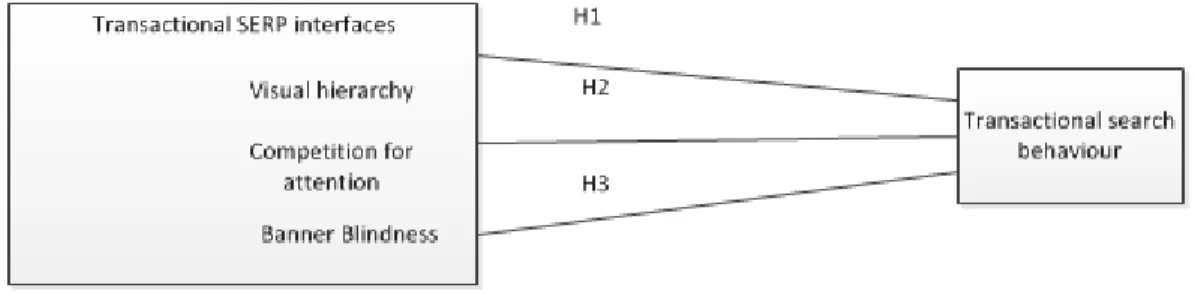
Having studied the literature, we expect the three factors visual hierarchy, competition for
attention and banner blindness to influence transactional search behaviour. This influence is
studied by looking at Google and Bing’s different interfaces. Next, we describe the
theoretical framework (Fig. 4) and the hypotheses.
Figure 4 – Theoretical framework
The theory of visual hierarchy states that items placed at the top of a web page determine a
person’s search behaviour. The size of focal objects, text, images, font etc. can manipulate
the visual hierarchy. With Google using its large and image-based PLAs and Bing using
slightly shaded text-based ads the first hypothesis is:
H1: The way visual hierarchy is organised is directly related to transactional search
behaviour.
In terms of competition for attention, Google’s PLAs and product images dominate the
20
Furthermore, research shows that people have a tendency of viewing images before text.
Therefore, the following hypothesis is:
H2: Competition for attention has a direct relationship with transactional search behaviour.
Next, banner blindness is said to be a common phenomenon when people view webpages.
Nevertheless, a few studies show that people do look at advertisements. As a result, the
following hypothesis is:
H3: Banner blindness has a direct relationship with transactional search behaviour.
These hypotheses will serve as a guide during the data analysis and help answer the research
question of this study.
3. Methodology
3.1 Design
Most of the previous studies on web search behaviour analysis have focused on log files,
click-through data and mouse tracking. Log files can provide valuable information about a
user’s web search behaviour in SERPs (Jansen, Jansen, Spink, & Spink, 2006; Mat-Hassan &
Levene, 2005; Wedig & Madani, 2006). They reveal what users click but do not reveal what
they are looking at. Click-through data and mouse tracking tools capture actions of the users
but are very limited if the user is not moving the mouse and just browsing (Guo & Agichtein,
2010a, 2010b; Huang, White, & Dumais, 2011). In contrast, eye-tracking is a promising
technique as the examination of eye movements has long been used in psychology and
behavioural science research as a means of understanding a person’s processes of reasoning
and decision-making (Rayner, 2009). According to Just & Carpenter (1976), what a person is
21
recording eye movements can provide data of where a person’s attention is being directed
regarding a visual display. As a result, this study conducted an experiment of different search
engines using eye-tracking.
The study utilised the Facelab 4.5 eye tracker and Gazetracker software to collect and
analyse eye gaze data from users searching the web in a laboratory setting. Each subject
participating in the study was required to carry out a number of search tasks using both
Google and Bing. The SERPs were then analysed to reveal whether participants’ viewing
behaviour differed for the two search engines.
In this study, participant visual fixations were recorded during live web search. These were
analysed in order to understand whether the viewing behaviour for transactional tasks differs
when participants use two different search engines. Fixation was defined by Joachims et al.
(2005) as, “a spatially stable gaze lasting for approximately 200-300 milliseconds, during
which the visual attention is directed to a specific area of the visual display” (p. 156). Visual
fixations indicate where a user is looking; however, areas of interest (AOIs) must be coded
for each fixation in order to make the eye-tracking data useful.
The GazeTracker eye-tracking software allows researchers to draw AOIs, termed LookZones
in GazeTracker, on specific sections of a stimulus, such as a SERP. Poole & Ball
(2005)define an AOI as “an analysis method used in eye-tracking. Researchers define areas
of interest over certain parts of a display or interface under evaluation, and analyse only the
eye movements that fall within such areas” (p.10). AOIs are typically defined after the data
has been collected, and this is done by manually drawing around those areas. The AOIs in
this study were (1) sponsored results at the top left/centre, (2) sponsored results to the right,
(3) the organic results above the fold and (4) organic results below the fold which represent
the four largest and most important areas of a SERP (Höchstötter & Lewandowski, 2009).
22
fixations that landed within the boundaries of an AOI. Next, the tasks and queries used for
this study are explained in detail..
Broadly speaking, all search tasks were of a transactional nature, which are based on the
intent to perform some web-mediated activity such as a purchase, booking a flight,
downloading of software, online banking etc. (Broder, 2002). In this study, this broad range
of transactional tasks was narrowed down to transactional search queries with a strong
commercial intent, i.e. when a user searches for a product or service, which is likely to be
obtained on the internet (Lewandowski, Drechsler, & Von MacH, 2012). Due to the
commercial nature, ads were a major component of the SERPs presented to the participants.
The following reason also explains why navigational and informational queries were not
chosen as search tasks for this experiment. Research shows that informational and
navigational queries are the most prominent among users (Lewandowski et al., 2012),
however, transactional queries are considered to be most relevant for search engines for a
number of reasons. Firstly, these queries are most likely to deliver ROIin paid searches. If
people are looking to make a transaction, i.e. looking to buy a specific product, a sponsored
ad is more likely to deliver what users are searching for than results for informational or
navigational tasks (Wordstream, 2012). Secondly, the sponsored listings (i.e. the main
revenue streams for search engines) take up a lot of the “above the fold” space on SERPs for
transactional queries. In contrast, informational and navigational search queries often have
none or only a few sponsored listings at the top of the SERPs. Lastly, search engines embed
their sponsored listings for transactional queries in different ways, which we have previously
described.
Moving on to the experiment, every subject was required to conduct the same search tasks on
both Bing and Google. All tasks involved using the actual real-time Google and Bing search
23
experiment, the literature does not specify what kind of search queries to use for eye-tracking
studies on SERPs. Previous studies have all used different search queries. Consequently, this
study used Google Trends to see which commercial queries were some of the most searched
for in the Netherlands. Table 1 shows the four queries that participants had to enter during the
experiment.
Table 1:Search queries used by participants during the experiment
Transactional task queries
samsung galaxy s6
ray ban aviator
converse all stars
canon camera
3.2 Data Collection
The subjects’ eye movements were collected using Seeing Machines faceLAB 4.5 eye tracker
that utilises two flea cameras mounted under the computer screen (LCD monitor, resolution
1280 by 1024 pixels).The eye-tracking device exploits the corneal and pupil reflections to
determine the subject’s eye position at a rate of 60Hz. From these two points, the faceLAB
software computed pupil diameter and line of gaze for each eye fixation. This experiment
utilised faceLAB’s precision gaze configuration which allowed higher accuracy gaze
tracking, i.e. fixations on very small objects (e.g. SERP snippets) were tracked by the device.
Furthermore, the software also produces length of total time spent on the page and duration of
fixations. Accompanying the faceLAB system, GazeTracker, a software application for
eye-movement analysis, was used for acquiring a subject’s eye eye-movement data. The GazeTracker
24
device. After the data is recorded, the GazeTracker software is able to analyse this data in
different ways, e.g. GazeTrails, LookZones, Graphing etc.. All browsing history, including
cookies, web page history, download history and passwords in Internet Explorer were deleted
between subjects. This measure was taken so that a previous subject’s browsing history did
not influence the search results of later sessions. After all sessions were completed, the data
were saved as OUT files and later processed.
3.3 Participants
Participants were undergraduate students from a Dutch university and were recruited through
conversations and announcements on the university notice boards. Of the 20 appointments
scheduled, 18 participants came to the university’s lab and completed the study. Due to
calibration issues four datasets had to be removed, therefore the final analyses included 14
datasets. Specifically, there were seven females and seven males, all between the ages of 20
and 24 (μ=21.86). This convenience sampling method was chosen as it was easy to find
students that met the criteria for participation. These criteria were:
web experience (daily use of search engines as well as having previously used search
engines for transactional search queries)
familiarity with both Google and Bing’s search engine, i.e. have used both search
engines at least a number of times in the past
no visual impairments, i.e. glasses or contact lenses
These were the important criteria for selecting subjects for the experiment. The criteria web
experience and familiarity were chosen in order to reduce variability between the subjects,
which was a major limitation in the UserCentric study in 2009, and one of the reasons a
follow-up study was conducted in 2011. In addition, only students with no visual
25
as glasses and contact lenses, can significantly distort the eye-tracking capability of the
device.
In this study, the participants all reported that they used search engines for all kinds of tasks
on a daily basis and considered themselves ‘experienced’ web users. Furthermore, most
participants reported Google as their primary search engine; nevertheless all participants had
also previously used Bing at some time or another. Lastly, no participants with visual
impairments took part in the experiment.
3.4 Procedure
Each session was scheduled to last 30 minutes and participants were asked to conduct eight
search tasks: four using Google and four using Bing. Approximately the first five minutes of
each session were used to verify the participant’s identity and to have each student fill out a
consent form and a short demographic questionnaire. Next, brief verbal instructions were
provided and the participant was seated and his or her position was adjusted relative to the
eye-tracking device. This was followed by the calibration, which used a nine-point standard
calibration procedure for each participant. After calibration, faceLAB’s tracking quality
indicator presented the accuracy of eye movements. For this study tracking quality was at
least 75% (as recommended in the faceLAB manual). Participants with a tracking quality
under the 75% threshold had to be recalibrated. After calibration, participants were permitted
to ask questions before, during, and after a practise task, nevertheless, some participants
asked questions during the experiment. The experiment started when the participants felt
comfortable and the eye-tracking quality was consistently high. Participants were told to
imagine themselves having or wanting to buy a new product, which would replace their
current items. In this study, students were given specific task queries they should enter into
26
which can strongly affect the calibration, the task queries were read aloud. Each subject was
told to view the SERPs and search as they typically would under normal conditions. The
self-paced nature of this procedure helped eliminate sources of stress and allowed each participant
to search at a natural pace. To end a web search for a query and view the next task,
participants notified the researcher who would immediately give them the next query. In
order to discourage rushing, participants were not notified of the maximum number of search
tasks. Furthermore, to minimise order effects, the order of search queries and the order of the
search engines were counterbalanced across the sample. After the final search of a session
was performed, a discussion about the experiment took place. Participants were allowed to
review their eye-movements with the use of GazeTracker’s video function and describe their
thoughts and decisions behind some of their viewing behaviours. For the subsequent analysis,
only data sets which fulfilled the stringent calibration thresholds and task requirements were
considered. In four cases, inaccurate and inconsistent results, e.g. invalid samples, were
excluded and deleted from the data analysis. The following bulletin list summarises the
procedure that was performed before, during and after the experiment for each participant.
verbal instructions provided to participants
seating position adjusted for camera configuration
calibration (accuracy ≥ 75% threshold)
(recalibration if accuracy < 75% threshold)
start of experiment:
o task query read aloud
o completion of task followed by new task query
end of experiment: all tasks completed
discussion + review of eye-recordings with participants
27
exclusion of inconsistent datasets
This is a similar procedure as suggested by both the faceLAB and GazeTracker manuals.
From a technical standpoint, a comprehensive step-by-step guide on how faceLAB and
GazeTracker were used and integrated into the experiment can be found in Appendix A.
3.5 Analysis and Measures
A user’s initial interaction with a webpage can have a significant impact on their behaviour
(Djamasbi et al., 2011; Lindgaard, Fernandes, Dudek, & Brown, 2006). Thus, this study
looked at a user’s viewing behaviour from the time that a SERP was loaded to the time an
action was taken by either clicking on a link or typing the query for the next search task. In
order to measure this, fixations were used to measure users’ attention. This is an important
measurement because, while the field of vision of a user typically consists of numerous
objects, one can only focus on one object at a given moment (Faraday, 2000). In addition,
fixations have been declared as a reliable measure of attention and are regarded as an
important indicator of viewing behaviour (Edward Cutrell & Guan, 2007; Djamasbi & Tullis,
2007). Lastly, previous studies by Lori Lorigo et al. (2008), Djamasbi & Hall-phillips
(2013), and Phillips et al., 2013) have used metrics such as time on page, total fixation
duration, number of fixations, fixation distribution and average fixation duration in their data
analyses. Some of these metrics were also used in the data analysis of this experiment.
The following process was used to analyse the eye-tracking data utilising the GazeTracker
software. First, GazeTracker collected the raw data as x, y, and z coordinates of gaze points
on the computer screen. These points were inferred from changes in the distance between a
participant’s pupil and cornea. Spatially and temporally similar coordinates were combined
into fixation points. The majority of these fixations lasted between 200-300ms as stated by
28
four AOIs previously defined in 4.1. These AOIs were manually configured for each SERP
using GazeTracker’s Lookzone (i.e. AOI) function, which allowed the experimenter to
outline Lookzones using the mouse. After this, a dataset for each participant was exported as
an OUT file from GazeTracker and opened in Microsoft’s Notepad. Because there were 14
separate files and the data in these files was not arranged in a useful order and included
numerous metrics, steps were taken to arrange the data in a workable way. Therefore, before
the analysis began, a separate Excel analysis spreadsheet was created. In this spreadsheet the
most relevant metrics, were transferred from the OUT file and subsequently used for the data
analysis. In addition, the eye-movement recordings were also manually reviewed after the
experiment. The last step, was to create aggregated heatmaps for each AOI. For this purpose,
the data from the OUT files was cleansed and uploaded to “R”, an open source statistical
computing language and environment software, where it was coded and processed to create
the heatmaps.
3.6 Reliability of methodology
This section addresses any reliability issues regarding the methodology. Both the faceLAB
eye-tracking device/ software and the GazeTracker analysis tool were setup using the exact
specifications provided by the respective manuals. These manuals clearly stated which
settings and thresholds were important for this kind of experiment. The most important
reliability issue was the tracking accuracy. As previously mentioned, the faceLAB
eye-tracker includes an eye-tracking quality gage, which shows a percentage of how accurate the
device is. In cases where the accuracy dipped below the threshold the eye-tracker was
re-calibrated. Moreover, reliability was also scrutinised with the help of the data in the OUT
files in which “total tracking time lost” is listed as a metric. Datasets, in which more than
three seconds of tracking time was lost, were not deemed reliable for the subsequent analysis.
29
performed by Pan et al. (2004) and Pan et al. (2007). Both studies used the GazeTracker
software for collecting and analysing their data and this thesis used a similar approach with
additional help from the manual. In terms of the metrics used for the analysis, we previously
mentioned that time on page, total fixation duration, number of fixations are reliable metrics
for this kind of eye-tracking study.
4. Results
As stated in H1, we expected that the way visual hierarchy is organised is directly related to
transactional search behaviour. This was tested on the two different search engine interfaces,
i.e. Google’s PLAs and Bing’s text-based ads. For this purpose we looked at the data for total
time spent, number of fixations, duration of fixations in AOI#1, which comprised the paid
listings at the top left/centre of the SERP.
In addition to the data obtained from the GazeTracker software, observations of search
behaviour, were made both during and after the experiment, as well as aggregated heatmaps
created for each AOI using R. Figures 5 and 6 show the areas that received the most amount
of attention and how much time participants spent in each AOI for different search engine
interfaces. Data from mean eye-tracking indices for sponsored listings at the top show that
time spent by participants in this area was 5.41 secs on Google and 5.40 secs on Bing and
therefore nearly identical (see Fig. 5 & 6).
We also found that the percentage of time spent in this zone in relation to the total time on the
SERP only deviated by 1%. Moreover, we checked whether one of the search engine
interfaces drew more/less fixations and longer/shorter fixation duration. Table 2 shows that
30
Figure 5 - Aggregated percentage of viewers, mean time & heatmaps for AOIs on all Google SERPs (darker areas signify more fixations)
Consequently, the results do not support H1, meaning that the way visual hierarchy is
organised is not directly related to transactional search behaviour. User behaviours were very
similar, although the interfaces showed clear visual differences in this AOI. This is also
supported by observations made during the experiment and showed that 100% of subjects
began their searches by looking at AOI #1 and then followed a top-down approach on both
search engines. A post-test review of the eye-movement recordings, which showed the gaze
31
Table 2
Mean eye-tracking indices for sponsored listings at the top by search engine Eye-tracking indices AOI#1
(sponsored listings at the top/left)
Bing Google
Total time in AOI (seconds)
(% of total time on page)
5.40 (18.4%) 5.41 (19.41%)
Number of fixations in zone
(% of fixations per page)
7.76 (14.4%) 7.96 (16.08%)
Duration of fixations in zone (seconds) 0.244 0.243
These findings are also important for H3, where we hypothesized that banner blindness has a
direct relationship with transactional search behaviour. This means that before scrolling to the
organic listings, users would not look at the sponsored listings. From Table 2 we already
know that users spent roughly 19% of the total time on the SERP looking at the sponsored
listings at the top. Furthermore, data from the OUT files shows that 100% of the participants
looked at the sponsored listings at the top for each search task (see Fig. 5 & 6). These
findings clearly contradict the banner blindness phenomenon which is in line with the results
presented by Djamasbi et al. (2013) and Phillips et al. (2013). However, the sponsored
listings to the right (i.e. AOI #2) also need to be considered. Overall, only 72.1% of
participants looked at the sponsored listings to the right on Bing. The percentage was even
lower on Google where only 58.9% of participants viewed sponsored listings to the right.
This suggests that users have a tendency to ignore or overlook the sponsored listings to the
right. The data from the OUT files also shows that when users did look at this area they spent
very little time doing so (Google, 3.44secs; Bing, 2.98secs) and therefore the number of
fixations was also low. Moreover, the fixation duration was also the lowest in this area for
32
was 9ms less than the average duration for the whole page. On Bing, the durations lasted
235ms, which was 14ms less than the average duration for the whole page. These small
differences also show that this AOI was not as important to the participants than other AOIs
where the duration of fixations was longer. Overall, we found that most of the data showed
no support for H3. Before scrolling to the organic listings, 100% of users spent time viewing
sponsored listings at the top/left of the SERP, therefore banner blindness did not occur.
However, this was not always the case for sponsored listings to the right, which some users
intentionally or unintentionally overlooked.
Figure 6 - Aggregated percentage of viewers, mean time & heatmaps for AOIs on all Bing
33
In H2, we hypothesized that competition for attention has a direct relationship with
transactional search behaviour. Google’s large PLAs would act as a distraction and grab more
of users’ attention than other items such as text-based listings. Data from Table 2 shows that
the mean time spent in this area was 5.41 seconds and a mean fixation duration of 0.243ms.
The easiest way to test H2 is to compare the aggregated heatmaps for the typical SERP
interfaces of the two search engines. Figures 5 and 6 show that the images did not receive
more fixations. Furthermore, user fixation duration and the time spent on Google’s PLAs was
not longer than in the equivalent area of Bing’s interface. Table 2 shows near identical
results, meaning although Google PLAs are image-based, users did not fixate longer on them
than in comparison to Bing’s text-based listings. Instead, the heatmaps for the first organic
listings show a very competitive area of competition although being far less obvious than the
images (see Fig. 5 & 6). To support this, Table 3 shows that the text-based listings in AOI #3,
underneath the PLAs, received more attention, i.e. users spent 7.11 seconds in this area and
fixation duration was 11ms longer. The heatmaps also show that other images, which
dominated some aspects of certain AOIs (e.g. news headlines or product images), did not
receive more attention. Figures 5 and 6 clearly show that the viewing behaviour of
participants was scattered, i.e. they looked at many different listings. Therefore, the results do
not support H2.
Table 3: Mean eye-tracking indices for organic listings above the fold by search engine
Eye-tracking indices AOI#3
(organic listings above the fold)
Bing Google
Total time in AOI (seconds)
(% of total time on page)
9.01 (30.8%) 7.11 (25.5%)
Number of fixations in zone
(% of fixations per page)
13.80 (25.61%) 10.96 (22.14%)
34
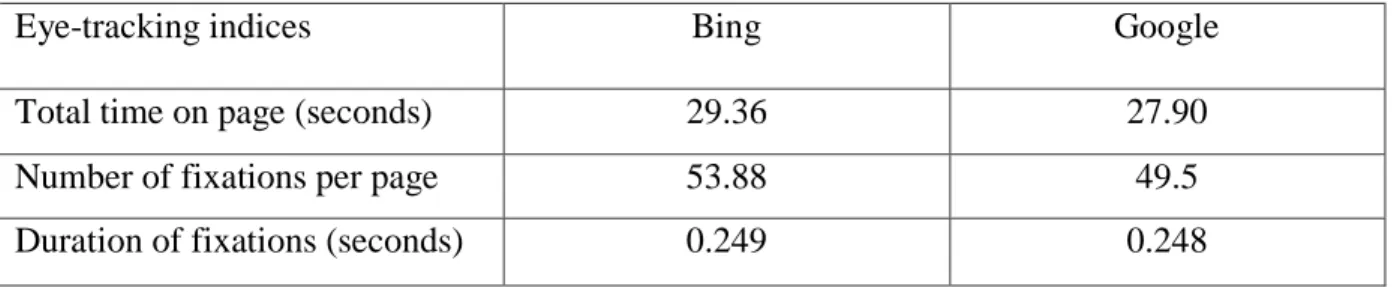
In order to show just how similar transactional search behaviour was, Table 4 shows the
mean eye-tracking indices for the whole time spent on the SERP. Participants spent a slightly
longer time on Bing, the difference of which is similar to that found in the total time spent
viewing the organic listings above the fold (see Table 3). Table 4 also shows that the number
of fixations was only slightly higher on Google’s SERP and the mean fixation durations are
almost identical and only deviate by a fraction of 1ms.
Table 4: Mean eye-tracking indices by search engine
Eye-tracking indices Bing Google
Total time on page (seconds) 29.36 27.90
Number of fixations per page 53.88 49.5
Duration of fixations (seconds) 0.249 0.248
In addition to the eye-tracking data, observations of search and click behaviour were made
both during and after the experiment. The observations during the experiment showed that
users tend to scroll down and then return to the top of the page which support Hong et al.'s
(2005) findings. These observations were also validated by reviewing the eye-movement
recordings which showed the gaze paths of the participants. In terms of click behaviour, notes
were taken on which result listings the participants clicked to complete the task. Figure 7
shows which link positions participants predominantly clicked on. With 23.21% on Bing and
21.43% on Google, the second position of the organic listings received the most amount of
clicks. Overall, participants were more inclined to click on organic listings. Nevertheless,
sponsored listings at the top did receive a large part of clicks, especially on Bing. As for
sponsored listings to the right, these did not receive any of the clicks. The same can be said