1495
Design Of Issuing And Self-Returning Modules For
Library Books For Mega Campus By Using Arm 7
Web-Server And Cloud
Kantilal P Rane
Abstract: In mega Universities, Colleges and Hostels, there are mega libraries and located at long distances. It is very difficult to always approach to distance libraries to all the students for accession of books. To get the hostel room delivery of particular books, app like Amazon is designed. The Issuing Module is designed for delivery of book by delivery boy. To submit the books without wasting more time, multiple Self -returning modules are designed through which one can submit his/her books at any corner of the campus. Students may submit their books at any returning module nearby available in the campus. Cloud connected returning modules are designed that gets and sends the information to cloud through internet. Students can get acknowledgement on the App assigned to them regarding to the transactions of the books immediately through Web-server in module itself. Issuing Model is designed based on NFC RFID technology. A specific android App is designed for Issuing Model that accesses the RFID information of students and books and authenticates through Cloud. It is also responsible for issuing the book and sending notification to user. Library Console based on .net platform is used as a supporting technology for proposed system. The whole system is working satisfactorily with the use of various cloud databases.
Key Index: Library Automation, ARM 7, Cloud, Web-Server, App design
—————————— ——————————
1.
INTRODUCTION
For big campuses like Universities, Colleges and Hostels, there are very big libraries available at long distances. Students are always facing problem of approaching to distance libraries for accessing the books. They are also facing problems of long queue in issuing and submitting counters. So to overcome the problem, outdoor units are proposed to use in campus of educational institutes. It is proposed to use hostel room delivery of particular books through delivery boy (may be paid service). For accessing this facility app like Amazon can be designed through which students can check the all the book stacking in library and also can observe the available book at any instant. Student can issue the book online so that he may get it on predefined time at his hostel room location. Once the order is placed for issuing the book, the library console will give them confirmation of issuing books through notification on students App. Delivery boy picks the books from central library and as per the student‘s location and address, he drops the books at specified room on predefined time. He has to carry the issuing Model with him. The Issuing Module is basically designed for delivery of book through delivery boy. Students Id, books Id can be scanned using Issuing Model for authentication, and then the book is delivered to student at his location. Notification is send by Issuing Module for confirmation of book delivery. The information is then sent to cloud for updating the corresponding information. Multiple Self-returning modules are designed to return the books without wasting more time through which one can submit the books at any corner of the campus one by one. At any nearly module students can submit his book in campus. Self-returning modules are designed that accesses the information to cloud through internet. Students may be issued notification on the App regarding to the transactions of the books immediately through Web-server. Web-server is embedded in to the module itself for immediate response. To submit the book into the Self-receiving module, RFID cards are used. After proper authentication through RFID card, students can submit the book into the returning module. Immediately after the transaction, data on cloud is updated. This data is accessible to librarian and administrator for getting record. Mobile App is
(Boss 2004 and Klaus, 2003). It is justifiable to state that Libraries in Sri Lanka do not implement the installment of RFID systems in their libraries mainly due to the lack of funds at that time [3]. In 2008 paper titled as ―Evaluation of a Radio Frequency Identification (RFID) Library System: Preliminary Results‖ [4] addresses gap in the literature showing operational efficiencies. It explored the effect of mobile phones, wireless computers and metallic selves. Later in 2009 RFID based Library Management system (LMS) would allow fast transaction flow for the library. To identify the percentage of books detected using RFID reader, Simulation test was conducted. The percentage of tags detected by the handheld reader was also calculated. [5]. In [6], integration of RFID system and the creation of graphical user interface at the host PC were performed. Then in 2011 [7] the work discusses elimination of transactional module from existing RFID based Library Management System. Here RFID provides the transactions like issuing, reissuing, and returning of material. Limitation is one have to go to librarian for the transaction [7]. Here automatically updates the database for all the transactions. Drawback of this system was need of librarian to update database that time manually [7]. But today, due to the use of cloud database and fast Internet facility, it is becoming easy to create and update databases. Self-service management platform was design for library based on RFID [8] puts forward with the necessity of new technology of self-service book issuing and self-returning that replaces the old bar code technology.
2.
PROPOSED SYSTEM
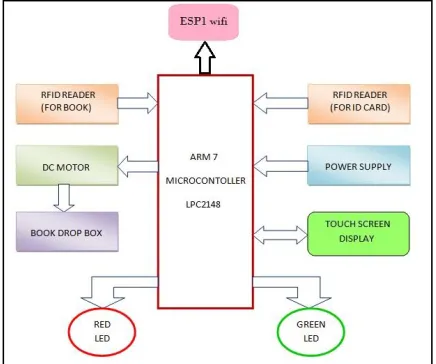
In crowded libraries, present check-in and check-out system for books transactions can be further automated by the use of RFID technology for reducing the long queue for issuing and submitting book using different modules. An outdoor library system can be developed based on the Delivery Module and its App so that the students may get the required book at the door of their hostel at a particular time. On the other hand Self-returning Module can also be made available at various places in campus for returning of books that may be based on RFID. As RIFD technology is reliable and economical, this will save money, time of library staff in returning of their books. By discussing all the problems about library management, it is proposed to design two systems as 1st for Issuing (Delivery Boy) Module and 2nd returning Module. The Self-returning system is basically fully automated self check-in station which consists of ARM7 microcontroller, RFID readers, RFID tags, book drop box and touch screen display. RFID tags are also attached to books in terms of stickers and ID cards are read through RFID reader then the signals are proceed to microcontroller. All the essential information is displayed on touch screen display through GUI. There is one drop box where books are to be collected automatically. Issuing Module is designed for accessing RFID tags using NFC RFID enabled mobile. This module involves the NFC RFID enabled mobile, NFC accessing, cloud accessing and GUI for user interface.
3.
METHODOLOGY
The main library also can adopt RFID technology that has been aimed here for improving the self service. This project is implementing new generation of library management System for self service operation in book submission using Self-returning Module and delivery boy assisted service for issuing books who has to use a Issuing Module with him for RFID
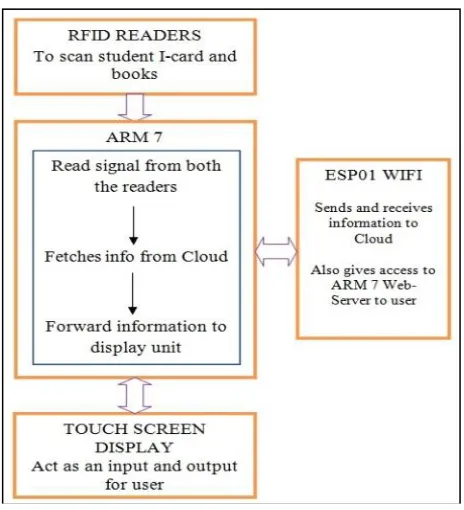
scanning of books and student ID. Here we have implemented the above modules in detail. A simple diagram of Book Returning system (Fig 1) and that of Issuing Module (Fig 2) is shown as below.
Fig 1. Proposed system for both Self-returning Module
Fig 2. Issuing Module
1497
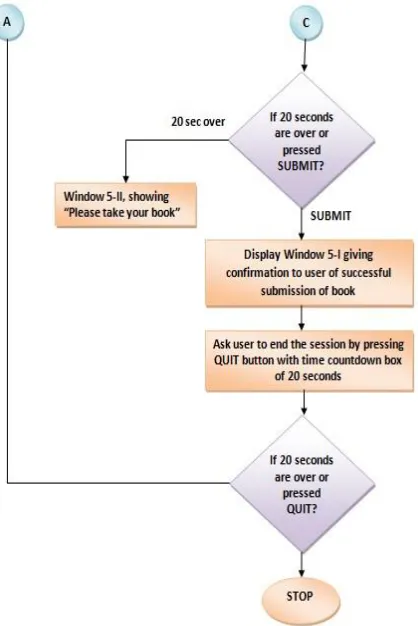
(attached internally to scan book) and DC motor, once patron puts the book in slot, internal RFID reader reads book tag. Then after that microcontroller takes it‘s processing time of few seconds with indication of green led. Microcontroller fetches the information regarding book from cloud ‗Library Database‘ and the display it, that is the book title and its author. Then patron asks to choose SUBMITT and then DC motor moves the try toward drop box (internally) and book is successfully submitted. Display gives confirmation to patron regarding submission of book with the list of remaining books issued on his ID through accessing cloud database ‗Student Issued Books Database‘. It sends the notification to the students App for confirmation using Web-server. Detail operation flow of system is shown in following diagram (Fig 4-Fig 6).
Fig 3. Self-returning Module
Issuing (Delivery Boy) Module: Delivery boy has to carry the books to be delivered to the hostellers. He has to click START button to initiate the issuing process. System asks to scan students RFID ID card near to RFID reader (attached externally to scan ID). After identifying the patron with a library ID card that is a RFID card, the patron is asked to choose the next action. After choosing NEXT button, it display shows basic information about patron and asks to scan a book to be delivered. Once process completed, then after that microcontroller fetches the information regarding student and the display it, that is the book title and its author. Then delivery boy has to press issue button. Showing book is successfully issued. Display gives confirmation to patron regarding issuing of book with the list of remaining books issued on his ID. Information is reflected to the students App immediately after book issued for confirmation through the Web-Server response. Operation flow of Issuing Module is same as that of Self-returning Module with slight changes as discussed above. Display windows for this module are also similar to that of Self-returning Module.
Fig 4.Operational flow of Self-returning Module (part 1)
Fig 6.Operational flow of Self-returning Module (part 3)
Issuing Modules operates with the specific App designed for accessing RFID details of students by NFC facility in NFC enabled mobile. As shown in Fig. 2, the RFID details are accessed 1st from student‘s ID and then RFID sticker tag available on the book t0 be delivered is scanned. The scanned information is matched with the requested information by using cloud database ‗Student Issue Request Database‘. If the scanned book is same as the requested book, then further processing is initialized. The book is issued and the information is updated on Cloud on database called ‗Student Issued Books Database‘ with its time stamps. The information is then sent to particular student‘s App for confirmation. Android App design for Student: Students App is design for checking the book transactions with its time stamps. This information is accessed from ‗Student Issued Books Database‘. App can also be used for sending request for issuing books for delivery at his hostel room at a specified time. It updates ‗Student Issue Request Database‘ on cloud. Confirmation of delivery of book is sent before to the students App prior to delivery through notification (sent by Library console Module). After issuing book by delivery boy, the notification is sent to this App for confirmation by Issuing Module. In case of returning the book at any Self-returning Module, after successful returning, the confirmation notification receives in this App by Self-returning Module. This App also enlists all the books and presently available books for issuing to the students by accessing ‗Library Database‘ and ‗Available Book Database‘. Cloud for Library Automation: ThingSpeak cloud is used for storing the library information in terms of various databases required for library automation. Databases designed are ‗Library Database‘, ‗Available Book Database‘,
‗Student Issue Request Database‘, ‗Student Issued Books Database‘, and ‗Registered Student Database‘. Various modules like Students App, Self-returning Module, Issuing Module, and Liberian Console Module can access all the databases for their specific applications. MATLAB Interface Codes for Cloud Computing: Self-returning Module require to access and updates ‗Registered Student Database‘ for students authentication, ‗Library Database‘ for books authentication and ‗Student Issued Books Database‘ for checking the issued list. Some temporary databases are used by this module for sending various requests like ‗Students Info Request Database‘, ‗Book info Request Database‘, ‗Issued Book info Request Database‘, ‗Book Update Request Database‘, ‗All Book info Request Database‘ and ‗Available Book info Request Database‘.
MATLAB Code1 is designed for processing the requests from Self-returning Module.
Checks the ‗Students Info Request Database‘ one by one. Checks the corresponding students ‗Book info Request Database‘.
If valid information, then proceeds.
Else if invalid information, then denies the access.
Checks the corresponding students ‗Issued Book info Request Database‘.
Analyze the corresponding database and sends the list to asking Self-returning Module.
Checks the corresponding students ‗Book Update Request Database‘.
Updates the corresponding students ‗Student Issued Books Database‘.
Issuing Modules require to access and updates ‗Student Issue Request Database‘ and ‗Student Issued Books Database‘ through various requests. Same temporary databases are used by Issuing Module as that of used by Self-returning Module for sending various requests.
MATLAB Code2 is designed for processing the requests from Issuing Module.
Checks the ‗Students Info Request Database‘ one by one. Checks the corresponding students ‗Book info Request Database‘.
If valid information, then proceeds.
Else if invalid information, then denies the access.
Checks the corresponding students ‗Issued Book info Request Database‘.
Analyze the corresponding database and sends the list to the asking Issuing Module.
Checks the corresponding students ‗Book Update Request Database‘.
Updates the corresponding students ‗Student Issued Books Database‘.
Students App require to access and updates ‗Library Database‘, ‗Student Issued Books Database‘ and ‗Available Book Database‘ through various requests.
MATLAB Code3 is designed for processing the requests from Students App.
Checks the ‗Students Info Request Database‘ one by one. Checks the corresponding students ‗Book info Request Database‘.
If valid information, then proceeds.
Else if invalid information, then denies the access.
1499
Analyze the corresponding database and sends the list to Students App.
Checks the corresponding students ‗All Book info Request Database‘.
Analyze the corresponding database and sends the list to Students App.
Checks the corresponding students ‗Available Book info Request Database‘.
Analyze the corresponding database and sends the list to Students App.
Library Console Module: Console Module requires to access
and updates all available databases through various requests. Customized .net platform [9] is used for assessing all the databases for sophisticated analysis and monitoring. Ready to use console module is utilized for this application.
Web-servers for Instant Notification: Web-servers are
designed for sending instant notification against student‘s transactions by various modules as Self-returning Module/ Library console. Using Self-returning Module, notifications to the particular student App can be send through the embedded Web-server designed using ARM 7. Notification from Issuing Module is directly send to students App. Library console can send the notification to particular student App through web-server designed by .net platform [9]. Web page is designed for sending notification to user App if transactions of books are failed or completed. This webpage is stored in SD card that is interfaced to ARM 7 through wifi port. ARM 7 is configured with web-server Header files and accessing protocol [10] for proposed web-server. ARM ip address needs to be port forward in order to view webpage from external network.
4.
EXPERIMENTAL RESULTS
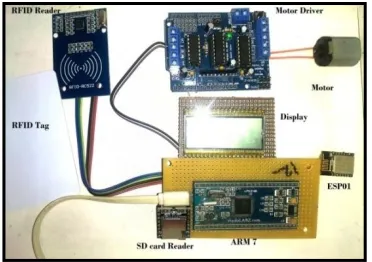
Experimental setup for Self-returning Module is shown as bellow. Whole hardware is installed into the metallic enclosure to make finished model.
Fig 7. Experimental Setup for Self-returning Module
Fig.8 gives model of complete proposed module called Self-returning Module. Initialize the system with ―Welcome‖ message as shown in Fig 9.
Fig 8. Self-returning Model Fig 9. Initializing
Then next procedure is as shown in Fi 10. Patron asks to press ―ENTER‖ button on touch screen display to return his book. After pressing ―ENTER‖ button system proceed to next window as in Fig 11.
Fig 10. Window 1 Fig 11. Window 2
There after window 2 asks patron to scan his unique RFID I-card allotted him by library. This window also shows the time countdown box with red indication shown as follows.
Fig 12. Window 2 with Red Indicator
As soon as patron scans his RFID I-card, ARM processor checks its validation. If and only if I-card is valid system moves further to window 2-II as shown in Fig 13. Otherwise it displays window 2-I shown in Fig 14. Window 2-II gives options to patron whether to proceed or cancel.
Fig 13. Window 2-II Fig 14. Window 2-I
As patron proceeds further by pressing ―NEXT‖ button his information is displayed on screen shown in Fig 15. At the same time returning book time countdown is started informing user to insert the book in given slot of system. Slot is shown in Fig 16.
Fig 15. Window 3-I
Fig 16. Slot (Try)
Fig 17. Processing window
Fig 18 shows Window 4 displays book information, also asks patron to press ―SUBMIT‖ button to submit inserted book within time limit.
Fig 18. Window 4 Fig 19 Window 5-I
This is the final stage of returning system. If time limit over system displays message ―Please take your book‖, and patron have to perform all the process again. And if patron pressed SUBMIT within time limit, he will have to finish the process. Book is collected in a drop box automatically and patron will get confirmation message on screen with the list of remaining issued books as shown in Fig 19. Confirmation is also send to Student App using either by Web-server or by Cloud Computing. At the end of the day, before closing the library, library staff will have collect all books from various self-returning modules available in various places in campus. They checks the quantity as per the data received from cloud and then replaces them at appropriate place. Fig 20 shows Issuing App Module used for issuing of books. Its displays windows are similar to that of Self-returning Module.
Fig 20. Issuing App Module for NFC enabled Mobile
Fig 21-a. System Databases
Fig 21-b. Temporary Databases
Fig 22. Student Android App
Fig 21 shows cloud databases used. System databases are show in Fig 21-a. and Temporary databases used are shown in Fig 21-b. Fig 22 shows Student Android App used for giving request for issuing books and to enlist all the available books in library.
5.
CONCLUSION
RFID is one of the most demanded and working technology in large successful industries such as Wal-Mart, Dell, airlines, supermarkets, computer stores, bookshops and so on with the trust that operating costs will decrease and products will get more perfect. The use of RFID in the library work speeds up book issuing and returning process and thus students may be free to do more user friendly service tasks. We recommended to use delivery boy to deliver the books at the hostel place as need is to give more labor job to needy persons and to reduce the books issuing time for students. The self-returning module is also responsible for reducing the queue time. Proposed modules, mobile App and total system is effectively implemented. According to it, the satisfaction level can increase as compared to previous libraries. For better efficiency and results, cloud services like Google cloud computing may be used in future but might be costly.
6 REFERENCES
1501
[2]. J. Landt, ―The History of RFID,‖ IEEE Potential, Vol 24, Number 4, PP:8-11, 2005.
[3]. Thanuja C. Ranawella, BSc. Hons. (Kelaniya), MLS (Colombo), ―An Introduction to a Library material management and security control system - Radio Frequency identification (RFID) technology‖, Journal of the University Librarians Association of Sri Lanka , (Vol. 10') ,Yr. 2006,pp.29-39.
[4]. Paul Golding and Vanesa Tennant, ―Evaluation of a Radio Frequency Identification (RFID) Library System: Preliminary Results‖, International Journal of Multimedia and Ubiquitous Engineering ,Vol. 3, No. 1, January 2008,pp.1-18.
[5]. Dhanalakshmi M, Uppala Mamatha, ―RFID Based Library Management System‖, Proceedings of ASCNT – 2009, CDAC, Noida, India, pp. 227 – 234. [6]. Bin Abdullah, A.T. ,Shah Alam,; Ismail, I.B. ; Ibrahim,
A.B. ; Hakim Bin Noor, M.Z, ―Library shelf management system using RFID technology‖ System Engineering and Technology (ICSET), IEEE International Conference,Yr.2011
[7]. Moiz S. Ansari, Naveed Ghani Khatri , ―Automated RFID based Library Management Systems,‖ Symposium on Information & Computer Sciences (ICS 2011),pp.5-8.
[8]. Dong Zhang , Xiling Shi ―Self-service management platform design for library based on RFID‖ Artificial Intelligence, Management Science and Electronic Commerce (AIMSEC), 2nd International Conference-2011.
[9]. http://meeraacademy.com/library-management-system-project-in-asp-net/