August 1993 Number 19
In-Depth Coverage of the Icon Programming Language
In this issue …
Lost Languages — Seque … 1 Handling Events in X-Icon … 4 Anatomy of a Program … 6 Programming Tips … 10 What’s Coming Up … 12
Lost Languages — Seque
As the name suggests, Seque is concerned with sequences. The road that leads to Seque goes roughly as follows:
Generators in Icon are capable of producing sequences of alternative results. Generation usually is defined in operational terms, as in “find(s) produces all the positions at which s
occurs as a substring of the subject”. The results that a generator actually produces de-pend on the context in which the generator is evaluated; a generator only produces alterna-tive results if it is resumed by an outer expres-sion that needs them. In order to use sequences as a conceptual tool, it’s useful to think of the results that a generator is capable of produc-ing, even if it does not produce all of them in a given context. This leads to the idea of result sequences [1] as an abstract characterization of sequences. An abstract characterization sug-gests a concrete one. Why not design a pro-gramming language in which sequences are actual first-class values?
Thus, Seque was motivated by the idea of sequences as data objects that could be manipulated by a program.
Seque cannot be separated from Icon. Seque builds on Icon and although Seque has it own syntax and semantics for matters related to se-quences, it uses Icon control structures and
expres-sions freely. In particular, Seque relies on Icon generators for constructing sequences.
Streams
In Seque, sequences are called streams. There is a stream data type and numerous operations on streams.
There are several ways of creating streams. The simplest stream-valued operation is analogous to the creation of an Icon list with specific values. The expression
{expr1, expr2, … exprn}
creates a stream based on the values that expr1, expr2, … exprn are capable of producing. For ex-ample,
Primaries := {"cyan", "magenta", "yellow"}
assigns to Primaries a stream that consists of three strings, "cyan","magenta", and "yellow".
In this simple example, each of the three ex-pressions is capable of producing only a single value. But generators can be used when creating a stream, as in
Index := {1 to 3, 6 to 9}
which assigns to Index a string of seven values that is equivalent to {1, 2, 3, 6, 7, 8, 9}. Similarly, the stream Primaries could have been created by
{"cyan" | "magenta" | "yellow"}
Any Icon generator can be used in the con-struction of a stream, as in
Naturals := {seq()}
which creates an infinite stream consisting of the natural numbers 1, 2, 3, … .
Referencing the Elements of a Stream
An element of a stream can be referenced by its position in the stream, much like a list is subscripted by position, although the syntax is different. Forexample, the value of
Primaries ! 2
is "magenta".
An element of a stream can be changed by assignment, as in
Index ! 4 := 5
which changes the stream Index to
{1, 2, 3, 5, 7, 8, 9}
As you’d expect, an out-of-bounds stream reference fails.
The Dynamic Nature of Streams
At this point you may have lots of questions if not serious reservations. For example, it’s obvious that all the values in {seq()} are not computed when the stream is formed. But it’s possible to reference any element in this sequence.
The underlying idea is that a stream consists of two components: a computational component that is capable of producing values and a storage component that holds values that have been com-puted. A newly created stream has a computa-tional component based on the expressions speci-fied for it, and its storage component is empty. The computational component subsequently produces elements as they are needed and their values are put in the storage component.
Some consequences of this approach have serious implications. For example,
Naturals ! 100000
results in the computation and storage of 100,000 integers, provided none have been computed be-fore. If you need to do something like this in Seque, you need a platform with lots of memory. In prac-tice, however, although it’s possible to reference streams at arbitrarily chosen positions, most refer-ences are in order from the beginning.
Operations on Streams
Seque provides several operations for creat-ing streams from existcreat-ing ones. Most of these op-erations are based on the mathematical properties of sequences as ordered series of values.
Concatenation of streams is an obvious ex-ample, and is represented by
S1 –> S2
which creates a new stream whose elements con-sist of those of S1 followed by those of S2. An example is
Nonnegatives := {0} –> Naturals
It’s also possible to form subsequences (“substreams”) in various ways.
Operations that can be performed on the ele-ments of a stream also can be performed on the entire stream, as in
Negatives := –Naturals
Similarly,
{1, 2, 3} + {10, 100, 1000}
produces the stream {11, 102, 1003}.
Derived Streams
Many sequences can be represented compactly as values of a operation performed over the posi-tive integers. For example, the cubes of the posiposi-tive integers, 1, 8, 27, … can be represented by
i 3 i = 1, 2, 3, …
Seque supports such derived streams, using square brackets to enclose the operation, as in
Cubes := [i ^ 3]
which assigns to Cube a stream consisting of the cubes of the positive integers.
The bound variable i is distinguished in such contexts and is implicitly associated with the natu-ral numbers. Seque provides ways of specifying different underlying streams and other bound vari-ables.
Other Features
Seque has many other features; too many to describe in detail here. But we’ll mention a few that are important.
Streams, like data structures in Icon, can be heterogeneous and contain values of different types. Since streams are first-class data values, the ele-ments of a stream can be other streams. As indi-cated above, streams can be infinite. Seque also provides a way to declare recurrence relations that can be used to create streams.
Seque has several functions that operate on streams. For example, Copy(S) produces a copy of the stream S and Simage(S, i) produces a string
image of S limited to i elements. See References 2 and 3 for more information about Seque’s compu-tational repertoire.
Implementation
Since Seque is a subset of Icon, you might expect it to be implemented on top of Icon. It is, in a sense, but not as extension of the implementation of Icon itself. Instead, a variant translator [4] trans-lates a Seque program into an Icon program, which is linked with a library of Icon procedures that perform run-time operations.
For example, the Seque expression
{1 to 3, 6 to 9}
is translated into
stream([ ], create (1 to 3) | (6 to 9))
where stream() is a record constructor for the declaration
record stream(store, compute)
Thus, the storage component is an empty list ini-tially and the computational component is a co-expression, which, when activated, produces the elements of the stream which then are pushed onto the list.
This makes the implementation sound simple. In fact, it’s complex and must deal with many difficult conceptual problems. For example, all Icon operations can be applied to streams as well as to the types to which they can be applied in Icon. The variant translator converts an operation into a call of a procedure that handles the details.
To give you an idea of what’s involved, –x is translated into Unop_("–", x), where Unop_() is a Seque library procedure that implements unary operators. The procedure looks roughly like this:
procedure Unop_(op, arg) if type(arg) ~== "stream" then suspend op(arg) else return stream( [ ], create op(|@^arg.compute) ) end
If arg is not a stream, op is applied to it using string invocation, being careful to suspend, since op might be a generator. Otherwise, a new stream is created
with an empty list. The computational component of this stream is more complicated. A refreshed copy of the co-expression from arg is created so that the two streams will be independent. The expression op(|@^arg.compute) repeatedly acti-vates this new co-expression and applies op to the results. The create constructs a co-expression for the computational component of this new stream. If you’re not an expert on co-expressions, don’t worry about the details. We have an upcom-ing article for the
Analyst
that will help illuminate such arcane matters.Conclusions
The implementation of Seque is what’s called a “proof-of-concept” implementation (a term we detest, since it’s a euphemism that often is used to make failed work sound credible). The use of a variant translator in combination with a library of Icon procedures allowed experimentation with language design with a manageable amount of effort.
Although Seque worked, it was only used by a handful of local persons. We declined outside requests for Seque, since we lacked the resources to package, distribute, and maintain such an imple-mentation.
It’s been some seven years since we used Seque ourselves. We didn’t know Seque was really lost until we started to write this article and could find only traces of it — the procedure library, but not the variant translator, and only a few small test programs. It appears that in a combination of comings and goings of the persons involved, as well as a coincident change in our local computer system, most of the original files were lost. It is one of those “I thought you had it. Gee, no, I thought you did” situations.
That’s why there are no examples of Seque programs here. Maybe it’s just as well that Seque is lost. We’re spared an attempt to rehabilitate old software. But we not-so-secretly wish we could run Seque and see if programming with sequences really is useful.
References
1. "Result Sequences",
Icon Analyst
7, pp. 5-8. 2. “Seque: A Programming Language for Manipu-lating Sequences”, Ralph E. Griswold and Janalee O’Bagy, Computer Languages, Vol. 13, No. 1 (1988), pp. 13-22.3. Reference Manual for the Seque Programming Lan-guage, Ralph E. Griswold and Janalee O’Bagy, Tech-nical Report TR 85-4, Department of Computer Science, The University of Arizona, 1985.
4. “Variant Translators”.
Icon Analyst
7, pp. 2-5.&lpress left mouse press
&ldrag left mouse drag
&lrelease left mouse release
&mpress middle mouse press
&mdrag middle mouse drag
&mrelease middle mouse release
&rpress right mouse press
&rdrag right mouse drag
&rrelease right mouse release
&resize window resizing
Processing Event Queues
A program can process an event queue using the function XEvent(window), which produces the next event for window and removes the event. If there are no events pending, XEvent() waits for one. As with other X functions, if window is omit-ted, it defaults to &window. For example, the following loop might be provided to allow the user to control the program:
while event := XEvent() do { case event of {
"q" | &lpress: exit() "c" | &mpress: break
"e" | &rpress: XEraseArea() }
}
If the event is a press of the q key or the left button, the program terminates. If the event is a c or a middle button press, the program breaks out of the loop. If the event is an e or a right button press, the window is erased. All other events are discarded. When an event is removed from an event queue, the other two values associated with the event also are removed and the information con-tained in them is used to set the value of keywords. Four keywords relate to the location of the mouse cursor at the time the event occurred:
&x x coordinate
&y y coordinate
&row text row
&col text column
These keywords might be used to determine, for example, the location at which text is entered in a window.
Integer values also can be assigned directly to these keywords, as in
Handling Events in X-Icon
This is the fourth in a series of articles on Icon. This article deals with user actions that an X-Icon program can sense.
When the mouse cursor is positioned within a window, key presses and mouse actions produce events. Some actions, such as moving a window, are handled automatically and are not seen by the X-Icon application that owns the window. Other kinds of events are reported to the X-Icon program. Events accumulate in an event queue for the win-dow. There is a separate event queue for each window. Event queues are Icon lists that store events until they are processed.
Events
There are several kinds of events. Key presses fall into two categories: “standard” keys that are used for representing text and “special” keys that are used for manipulating the display or other non-text purposes. The mouse actions that produce events are pressing a button, dragging the mouse while a button is depressed, and releasing a button. Note that a mouse “click” produces two events: the press and the release. The standard X mouse has three buttons, and there are corresponding events for each. Window resizing is handled automati-cally, but an event is reported so that the X-Icon program can rearrange its display if necessary.
When an event occurs, three values are put on the event queue for the associated window: the event itself and two integers that contain informa-tion about the event.
Standard key presses are encoded as strings. For example, pressing the key a puts the string "a"
on the event queue. Special key presses are en-coded as integers. See Appendix D of Reference 1 for examples.
Mouse actions and window resizing events also are encoded as integers. Integer-valued key-words with corresponding values are provided:
&x := 10
When values are assigned to pixel-coordinate key-words, the values of the corresponding text-coor-dinate keywords are changed automatically, and vice versa. Such assignments can be useful in trans-lating between pixel and text coordinates.
Three keywords are set corresponding to the status of “modifier” keys at the time of the event:
&controlcontrol key
&meta meta key
&shift shift key
The labelings of these keys depend on the X server keyboard.
In the case of standard characters, the status of the shift key also is encoded in the event value. For example, if the a key is pressed with the shift key pressed, the event value is "A".
Modifier status keywords return the null value if the corresponding modifier key was pressed at the time of the event but fail otherwise. For ex-ample,
case XEvent of { &mrelease: {
if &control then expr1 else expr2 }
… }
evaluates expr1 if the control key was pressed at the time the middle mouse button was released, but evaluates expr2 if the control key was not pressed.
When an event is processed, the keyword
&interval also is set. The value is the interval, in milliseconds, between the time that the event oc-curred and the time of the previous event.
read(window) and reads(window, i) also pro-cess events and remove them from the event queue for window. Standard key presses are echoed to the window and accumulate to produce the value for such a function call. All other kinds of events are discarded when these functions are processing the event queue. read(window) does not return a value until the enter (“carriage return”) key is pressed. reads(window, i) does not return until there are i characters. &window is not a default for these functions.
The function XPending(window) produces
the event queue for window. If there are no pend-ing events, the list is empty. Thus,
∗XPending() > 0
succeeds if events are pending for &window but fails otherwise. Note that the value of ∗XPending()
is three times the number of pending events, since there are three values for each event.
Since the event queue is an Icon list, it can be manipulated directly. For example,
while get(XPending())
removes all events from the event queue for &win-dow. Similarly, pushing three values onto an event queue creates an artificial event, which is the next one to be processed. Since real events can occur at any time, it is not safe to append values to an event queue using put(). To append events safely,
XPending() can be supplied with trailing argu-ments, For example,
XPending(x1, x2, x3)
appends an event corresponding to x1, x2, and x3
to the event queue for &window.
Direct manipulation of event queues requires considerable care. Not only must three values be provided for each event, but the second and third values must correctly encode event information. See Appendix E of Reference 1. There is a proce-dure in the Icon program library, qevent(), that handles the details of placing artificial events on an event queue. See evqueue.icn.
Multiple Windows
In applications that support multiple win-dows, it may be useful or necessary to keep track of activity in different windows. The function
XActive() returns a window in which an event is pending. If no event is pending in any window,
XActive() waits for one. To find a window with a pending event, XActive() checks each window in turn, starting with a different window on each call to avoid “starvation”. XActive() fails if no window is open.
Reference
1. X-Icon: An Icon Window Interface; Version 8.10, Clinton L. Jeffery and Gregg M. Townsend, Tech-nical Report TR 93-9, Department of Computer Science, The University of Arizona, 1993.
Anatomy of a Program — Timing
Icon Expressions (continued)
This article is a continuation of a discussion of the design and implementation of empg, which started in the last issue of the
Analyst
. empgprocesses specifications for expressions and pro-duces a program that times these expressions. To avoid having to say “the program produced by
empg” over and over, we’ll just call it “the timing program”.
Program Structure
Given the design decisions made earlier, the basic structure of empg might look something like this:
write("procedure main()") …
while line := read() do line ? {
if =":" then evaluate(tab(0)) else if ="%" then declare(tab(0)) else if ="#" then next
else timeloop(tab(0)) }
…
write("end")
A procedure header and its closing end are written to surround the other code produced by empg, since empg writes a complete program. The actual generation of code is done by the procedures evalu-ate(), declare(), and timeloop().
We’ve chosen to use procedures rather than to write the necessary code in line because it makes the organization of the program easy to under-stand and modify. Granted, for at least two of the cases, the code is going to be simple. Nonetheless, it’s easier to go back and replace procedure calls by line code than it is to add procedures after
in-line code is written. And it’s often the case that code that starts out simple gets more complicated as features are added.
The procedure to evaluate an expression only once is easy enough:
procedure evaluate(exp) write(" ", exp)
return end
The blanks provide indentation in the code to make it easier to read, in case that should be neces-sary.
Declarations require a bit more thought. Since
empg writes expressions to be evaluated within a main procedure, the declarations cannot be writ-ten out when they are read in — if they were, they would appear in the middle of the main procedure and be syntactically incorrect.
We could, of course, insist that all declara-tions appear before anything else and not write the main procedure header until after all declarations had been processed. But that’s not only unneces-sarily restrictive on the form of input to empg, it’s actually harder to implement than to allow decla-rations to appear anywhere in the input.
Since declarations can occur in any order in a program, the easy thing for empg to do is to save all declaration lines until the end of the input and then write them out at the end of the timing pro-gram.
The obvious way to save declaration lines is to put them on a list:
global decls procedure main() decls := []
…
# main processing loop …
every write(!decls) end
where declare() is:
procedure declare(line) push(decls, line) return
end
Downloading Icon Material
Most implementations of Icon are available for downloading electronically:
RBBS: (602) 621-2283 FTP: cs.arizona.edu (cd /icon)
This leaves only timeloop(), which can be written as follows:
procedure timeloop(expr)
write(" write(", image(expr), ")") write(" _Itime := &time")
write(" every 1 to _Limit do {") write(" &null & (", expr, ")") write(" }")
write(" write(real(&time – _Itime", " –_Delta) / _Limit, \"ms.\")") write(" write()")
return end
Initial underscores are used for identifiers in the generated code to minimize the chances of colli-sions with identifiers in the input exprescolli-sions. The first line written provides code to list the expres-sion when the timing program is run. The value of
_Delta is used to adjust the timings as discussed earlier. We’ll get to the computation of _Delta
later. The last line of output provides a space between consecutive timing lines.
To make the generated code more concrete, consider the input line
1 + 1.0
empg produces the following output, with the type size reduced so it will fit here:
write("1 + 1.0") _Itime := &time every 1 to _Limit do { &null & (1 + 1.0) }
write(real(&time – _Itime – _Delta) / _Limit, "ms.") write()
We’ve alluded to initialization code empg
needs to produce before the code for timing, namely assigning appropriate values to _Limit and _Delta. The appropriate value for _Limit raises inter-esting design questions. As mentioned in the sec-tion on measuring execusec-tion time, _Limit should be large enough to avoid problems with low clock resolution. But _Limit should not be excessively large, since that slows down timings and uses unnecessary resources. A value that is appropriate for one platform may be inappropriate for another. There are many possibilities. The desired num-ber of iterations could be specified on the com-mand line when empg is run. For later binding to
give more flexibility, it could be specified on the command line of the timing program. For even greater flexibility in one sense, but less in another, the desired number of iterations could be given in the input to empg, and even on a per-line basis. (This would avoid the need for special syntax for expressions that are to be evaluated only once.)
There could be a hierarchy of defaults, with
empg having a default limit that could be overrid-den on its command line to provide a default for the timing program. This in turn could be
overrid-The Icon Analyst
Madge T. Griswold and Ralph E. Griswold Editors
The Icon Analyst is published six times a year. A one-year subscription is $25 in the United States, Canada, and Mexico and $35 elsewhere. To sub-scribe, contact
Icon Project
Department of Computer Science Gould-Simpson Building The University of Arizona Tucson, Arizona 85721 U.S.A.
voice: (602) 621-8448 fax: (602) 621-4246 Electronic mail may be sent to:
or
…uunet!arizona!icon-project
and
© 1993 by Madge T. Griswold and Ralph E. Griswold All rights reserved.
The Bright Forest Company Tucson Arizona
point will help down the line (we had to resort to hindsight, at some cost).
Writing out the code above from empg is not a problem in itself; we’ve shown some samples of code that writes such code already. The point is that we may decide to make empg more capable — and programs like this are subject to endless em-bellishment, as we discussed earlier. Additional features in empg may (in fact, will) require more complex initialization in the timing program. Of course we can add to the code-writing code in
empg when this happens, but there’s an alterna-tive: Put the initialization code in a separate file and just link it in the timing program.
The advantage of this approach is that it’s easier to write, understand, and modify initializa-tion code than it is to write, understand, and modify code that writes such code. The disadvantage is that there’s another file besides empg.icn to worry about. But Icon supports and encourages separate program modules and there’s nothing novel about linking: It’s used extensively in the Icon program library. In fact, if you get the version of empg we’re describing here as part of the Icon program library, you won’t even have to know about a file that is linked by timing programs.
As we said earlier, we got to this point by hindsight. If you have an old version of empg, you’ll see what we mean.
Getting back to the business at hand, empg.icn
now contains code that looks like this:
write("link empgsup")
write("procedure main(args)")
write(" _Limit := integer(args[1]) | 10000") write(" _Delta := _Initialize(_Limit)")
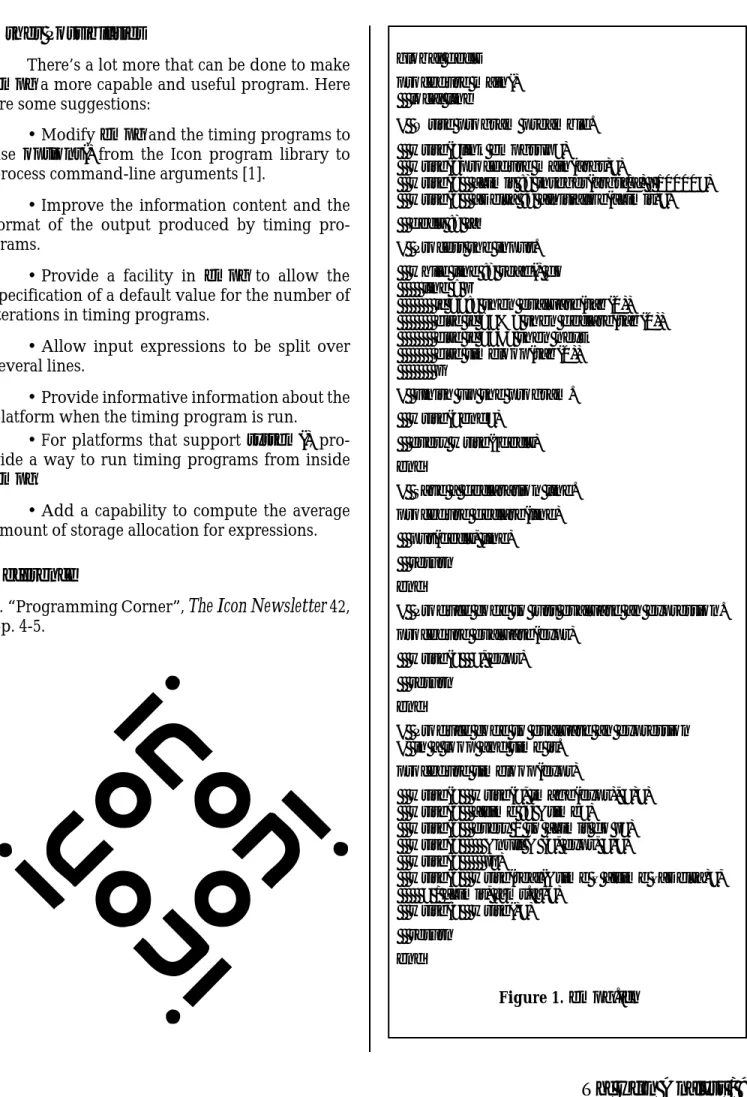
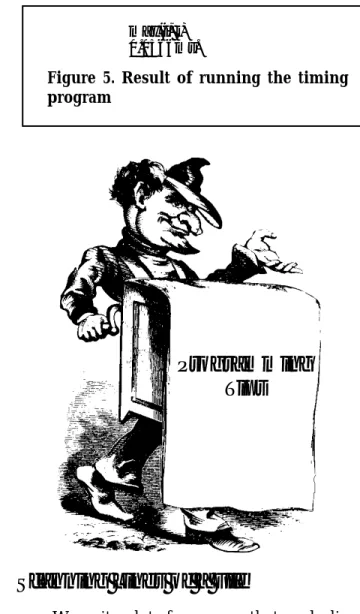
where _Initialize() is in empgsup.icn. Figures 1 and 2 show empg.icn and empgsup.icn, respec-tively. An example of input to empg and the corresponding timing program are shown in Fig-ures 3 and 4. Finally, the result of running the timing program is shown in Figure 5.
den on its command line, which then could be overridden on a per-expression basis by optional limits specified in the input to empg.
One problem with software design is that there often are too many possibilities. And soft-ware that is too capable may be hard to under-stand, learn, use, and maintain. On the other hand, software that lacks sufficient capability may not do what you want. One extreme may occur because of excessive zeal or “creeping featurism”, while the other may be the result of laziness or inadequate consideration of the possibilities.
We won’t include many of the possible fea-tures here. If we showed a full-fledged program with lots of bells and whistles, we’d fill up the rest of this issue of the
Analyst
. We’ll make enough of a concession to functionality to have the number of iterations specifiable on the command line when the timing program is run but otherwise provide a default that is suitable for most situations. 10,000 seems reasonable.Referring back to the discussion of comput-ing the overhead for the timcomput-ing loop, the code to compute it looks like this:
procedure main(args) … _Limit := integer(args[1]) | 10000 _Itime := &time every 1 to _Limit do { &null }
_Time1 := (&time – _Itime) _Itime := &time
every 1 to _Limit do { &null & &null }
_Time3 := (&time – _Itime) _Delta := (_Time1 + _Time3) / 2
… end
For generality, this code needs to be executed when the timing program is run. However, if you are going to run empg and timing programs on the same platform and the timing there is stable, such as on your personal Macintosh, computing _Delta
in empg would be reasonable, simpler, and more efficient.
We’ll assume this code needs to be executed in the timing program. The obvious thing to do is to have empg put the code above in every timing program. But a little insight or foresight at this
Back Issues
Back issues of
The Icon Analys
t are avail-able for $5 each. This price includes ship-ping in the United States, Canada, and Mexico. Add $2 per order for airmail post-age to other countries.Other Possibilities
There’s a lot more that can be done to make
empg a more capable and useful program. Here are some suggestions:
• Modify empg and the timing programs to use options() from the Icon program library to process command-line arguments [1].
• Improve the information content and the format of the output produced by timing pro-grams.
• Provide a facility in empg to allow the specification of a default value for the number of iterations in timing programs.
• Allow input expressions to be split over several lines.
• Provide informative information about the platform when the timing program is run.
• For platforms that support system(), pro-vide a way to run timing programs from inside
empg.
• Add a capability to compute the average amount of storage allocation for expressions.
Reference
1. “Programming Corner”,
The Icon Newsletter
42, pp. 4-5.global decls procedure main() local line
# Write program preamble. write("link empgsup")
write("procedure main(args)")
write(" _Limit := integer(args[1]) | 10000") write(" _Delta := _Initialize(_Limit)") decls := []
# Process the input. while line := read() do line ? {
if =":" then evaluate(tab(0)) else if ="%" then declare(tab(0)) else if ="#" then next
else timeloop(tab(0)) }
# Finish up the program. write("end")
every write(!decls) end
# Save a declaration line. procedure declare(line) put(decls, line) return
end
# Produce code to just evaluate an expression. procedure evaluate(expr)
write(" ", expr) return
end
# Produce code to evaluate an expression # in a loop and time it.
procedure timeloop(expr)
write(" write(", image(expr), ")") write(" _Itime := &time")
write(" every 1 to _Limit do {") write(" &null & (", expr, ")") write(" }")
write(" write(real(&time – _Itime –_Delta)", " / _Limit, \"ms.\")")
write(" write()") return
end
procedure _Initialize(limit) local itime, t1, t3 itime := &time every 1 to limit do { &null } t1 := (&time – itime) itime := &time every 1 to limit do { &null & &null } t3 := (&time – itime) return (t1 + t3) / 2 end Figure 2.empgsup.icn link empgsup procedure main(args) _Limit := integer(args[1]) | 10000 _Delta := _Initialize(_Limit) i := ?1000 j := ?1000 write("max(i, j)") _Itime := &time every 1 to _Limit do { &null & (max(i, j)) }
write(real(&time – _Itime –_Delta) / _Limit, "ms.") write()
end
# Compute the maximum of two values procedure max(i, j)
return (i < j) | i end
Figure 4. The timing program
%# Compute the maximum of two values % %procedure max(i, j) % return (i < j) | i %end :i := ?1000 :j := ?1000 max(i, j)
Figure 3. Sample input to empg
max(i, j) 0.0566ms.
Figure 5. Result of running the timing
program
Programming
Tips
Scanning Lines of a File
We write a lot of programs that read a line of input, process the line using string scanning, read another line, process it the same way, and so on. Some of the programs are text “filters” that trans-form a file from one trans-form to another. Other pro-grams extract information from a file and produce tabulation, and so on. For these kinds of programs, we use the iterative model of string scanning [1] with a while loop. The basic structure of such programs looks like this:
while line := read() do line ? {
while … do … }
We’ve written these lines so many times that we’ve thought of making a little text template to paste into new programs. But the template now is “in our fingers”, so it seems hardly worth another form of mechanization. Still, every time we start a program with these lines, we’re bit annoyed. After
all, Icon is supposed to make things easy to do; there should be some shortcut for these few lines that appear so often in programs.
If we ever design another programming lan-guage, we’ll keep this in mind. But in the mean-time, we’ve asked ourselves if there isn’t some way to at least reduce the size of the ”wrapper” for this kind of programming.
One of the problems is that the identifier line
(or whatever name we choose) is excess baggage and has to be written twice. And, if we’re being careful to follow our own guidelines, we have to add a local declaration for it too.
So one question is, can the identifier be avoided? It’s tempting to try
while read() ? { while … do … }
This doesn’t work, since loops themselves fail when they’re done, so the scanning expression fails, the control expression for the outer while loop fails, and the next line of input is not read.
There’s another approach. The idea is to use a different way of producing the lines of input: gen-erate them.
You may have seen some programs that use the following kind of loop
every line := !&input do …
instead of
while line := read() do …
In the every loop, !&input generates a line of input every time it is resumed by the every control struc-ture, as opposed to read() in the while loop, which is repeatedly evaluated. To process a file other than standard input in an every loop, you can use !infile
in place of !&input, where infile is the file you want to process.
We’ve used both kinds of loops at one time or another, but in recent years we’ve opted for the
while loop on the grounds that it is more straight-forward and because it is at least as easy to key-board as the every loop.
But in doing so, we overlooked a possibility. Although it is not possible in general to omit the identifier and the do clause in the while loop, it is possible to omit the identifier when using an every
loop in combination with string scanning:
every !&input ? { while … do … }
This loop works just fine. The key is that it doesn’t matter that the scanning expression fails. When it fails, !&input is resumed to produce another line of input. In fact, the every control structure is not needed. In
!&input ? {
while … do … }
the failure of the while loop causes the scanning expression to fail, which causes !&input to be resumed to produce another line of input.
So far we’ve dutifully used braces to enclose the scanning expression as recommended in Refer-ence 1. Knowing how scanning expressions and
while-do group, we’ll take the final step toward brevity and write
!&input ? while … do …
All this works because the scanning expres-sion fails as the result of the loop in it failing. Suppose we now take a bolder step and allow scanning expressions that do not always fail. If we put the every back to cause the resumption of
!&input regardless of the success or failure of the scanning expression, we now can use
every !&input ? { …
}
for any scanning expression.
Or so it seems. We need to be careful. If a scanning expression succeeds, it suspends so that scanning environments can be maintained prop-erly [2]. Since the scanning expression suspends after !&input suspends, it is resumed before !&in-put is. If the scanning expression has no more results to produce, it fails, and then !&input is resumed. There is, of course, a bit more overhead in the whole process. If, however, the scanning expression has another result, that result is pro-duced before the next line is read.
This is what you should expect. For example, in
every !&input ? { write(upto(',')) }
fails. It does if it runs to completion, but if it’s terminated by break, the outcome of the loop depends on the argument of break. If the argu-ment of break is omitted, &null is provided by default. Consequently, the loop
while … do { …
if … then break }
does not fail if the break is evaluated; it produces the null value. So even using every with scanning expressions that consist of a while loop, it’s pos-sible to get in trouble with
break next
You’ll have to decide if using the compact form of scanning with every is worth the risk.
A note in closing: Although this article fo-cuses on scanning lines from a file, the techniques can be used with any expression that generates strings.
References
1. “Writing Scanning Expressions”,
Icon Analyst
4, pp. 2-5.2. “Modeling String Scanning”,
Icon Analys
t 6, pp. 1-2.3. The Icon Programming Language, second edition, Ralph E. Griswold and Madge T. Griswold, Prentice Hall, Englewood Cliffs, New Jersey, 1990, p. 20. the position of every comma in every line is
writ-ten. If you don’t want a string scanning expression to produce another result, you can, of course limit it to one result:
every !&input ? { write(upto(',') \ 1) }
So far, so good. At least things work “as expected”. We’ve used this technique frequently for scanning expressions that succeed as well as ones that fail. We thought it all through and con-vinced ourselves that our logic was correct. But we had nagging doubts, and it’s as well we did. There’s one situation we failed to consider that we might have argued never would happen in practice if it hadn’t actually occurred in one of our programs and produced a baffling bug.
The problem is the next expression. There always has been some question about what next
does in every loops. In a while loop, the function of
next is clear: It transfers control to the beginning of the control expression. In an every loop, however,
next causes the resumption of the last suspended generator. This behavior of next is not documented anywhere else but here, as far as we know, and the Icon book misstates it [3].
Consider the following situation:
every !&input ? {
if ="#" then next # skip comments move(1) # else process
… }
The intention is to skip lines that begin with a #. However, next in a scanning expression causes the scanning expression to suspend as it always does when it doesn’t fail. Since the scanning expression is the last expression to suspend, it is immediately resumed by every and continues with move(1)!
You could argue that this is a bug in the implementation of Icon. We could argue that it’s a feature and a necessary consequence of the seman-tics of expression evaluation. Either way, it’s what Icon does and even if it’s not what’s wanted, it surely is not going to be changed. Bug or feature, we have to live with it.
Because of this problem, we almost decided not to mention the use of every with string scan-ning expressions that don’t fail or even not to publish this article at all. We finally decided to include it with enough discussion that you’ll be wary. Be very wary. We’ve blithely said while-do
What’s Coming Up
In the next issue of the