XMP SPECIFICATION PART 2
ADDITIONAL PROPERTIES
July, 2010Copyright © 2010 Adobe Systems Incorporated. All rights reserved.
Adobe XMP Specification Part 2: Additional Properties.
NOTICE: All information contained herein is the property of Adobe Systems Incorporated. No part of this publication (whether in hardcopy or electronic form) may be reproduced or transmitted, in any form or by any means, electronic, mechanical, photocopying, recording, or otherwise, without the prior written consent of Adobe Systems Incorporated. Adobe, the Adobe logo, ActionScript, Creative Suite, Photoshop, and the XMP logo are either registered trademarks or trademarks of Adobe Systems Incorporated in the United States and/or other countries. MS-DOS, Windows, and Win-dows NT are either registered trademarks or trademarks of Microsoft Corporation in the United States and/or other countries. Apple, Macintosh, Mac OS, and QuickTime are trademarks of Apple Computer, Inc., registered in the United States and other countries. UNIX is a trademark in the United States and other countries, licensed exclusively through X/Open Company, Ltd. All other trademarks are the property of their respective owners.
This publication and the information herein is furnished AS IS, is subject to change without notice, and should not be construed as a commitment by Adobe Systems Incorporated. Adobe Systems Incorporated assumes no responsibility or liability for any errors or inaccuracies, makes no warranty of any kind (express, implied, or statutory) with respect to this publication, and expressly disclaims any and all warranties of merchantability, fitness for particular purposes, and noninfringement of third party rights.
Contents
Preface . . . 5
1 XMP namespaces. . . 9
1.1 XMP namespace definitions . . . 9
1.1.1 Included namespaces. . . 9
1.1.2 Namespace definition conventions. . . 10
1.2 Property value types . . . 10
1.2.1 Core value types. . . 10
1.2.2 Complex value types . . . 11
1.2.3 Media management value types. . . 13
1.2.4 ResourceEvent . . . 14
1.2.5 Basic job/workflow value types. . . 16
1.2.6 Video media value types . . . 17
1.2.7 Exif namespace value types. . . 22
1.3 Extensibility of namespaces. . . 24
1.3.1 Creating custom namespaces . . . 24
1.3.2 Extending namespaces . . . 24
2 XMP standard namespaces . . . 27
2.1 XMP namespace . . . 27
2.2 XMP Media Management namespace . . . 28
2.3 XMP Basic Job Ticket namespace . . . 30
2.4 XMP Paged-text namespace . . . 30
2.5 XMP Dynamic Media namespace . . . 31
3 Specialized Namespaces . . . 37
3.1 Adobe PDF namespace. . . 37
3.2 Photoshop namespace . . . 37
3.2.1 Types . . . 37
3.2.2 Properties . . . 38
3.3 Camera Raw namespace. . . 39
3.4 Exif namespaces . . . 41
3.4.1 Exif namespace for TIFF properties . . . 41
3.4.2 Exif namespace for Exif-specific properties . . . 43
3.4.3 Exif namespace for additional Exif properties . . . 50
4 Authority over property values. . . 51
4.1 Overview. . . 51
4.2 Dublin Core properties’ internal/external state. . . 51
4.3 XMP Basic properties’ internal/external state. . . 51
4.4 XMP Rights Management properties’ internal/external state . . . 52
4.5 XMP Media Management properties’ internal/external state . . . 52
4.6 XMP Basic Job Ticket properties’ internal/external state . . . 52
4.7 XMP Paged-text properties’ internal/external state . . . 52
4.8 XMP Dynamic Media properties’ internal/external state . . . 52
4.9 Adobe PDF properties’ internal/external state . . . 53
4.10Photoshop properties’ internal/external state . . . 53
4.11Camera Raw Properties’ internal/external state . . . 53
Preface
This document set provides a complete specification for the Extensible Metadata Platform (XMP), which provides a standard format for the creation, processing, and interchange of metadata, for a wide variety of applications.
The specification has three parts:
• Part 1, Data Model, Serialization, and Core Properties, covers the basic metadata representation model that is the foundation of the XMP standard format. The data model prescribes how XMP metadata can be organized; it is independent of file format or specific usage. The serialization information prescribes how the data model is represented in XML, specifically RDF/XML. Core properties are those XMP properties that have general applicability across a broad range of resources; these include general-purpose namespaces such as Dublin Core. This document also provides details needed to implement a metadata manipulation system such as the XMP Toolkit (which is available from Adobe®).
• Part 2, Additional Properties, provides detailed property lists and descriptions for standard XMP metadata namespaces beyond the core properties; these include special-purpose namespaces for Adobe applications such as Photoshop®. It also provides information on extending existing namespaces and creating new namespaces.
• Part 3, Storage in Files, provides information about how serialized XMP metadata is packaged into XMP Packets and embedded in different file formats. It includes information about how XMP relates to and incorporates other metadata formats, and how to reconcile values that are represented in multiple metadata formats.
About this document
This document, XMP SpecificationPart 2, Additional Properties, is intended for developers of applications that will generate, process, or manage files containing XMP metadata. Such developers may use either the XMP Toolkit provided by Adobe, or independent implementations.
Previously-defined formats (native formats) for still-image metadata, such as Exif and IPTC/TIFF, represent information that is also represented by properties defined in standard XMP namespaces. For information on how to reconcile property values among formats, and on how such reconciliation has been managed in Adobe applications, see XMP SpecificationPart 3, Storage in Files.
How this document is organized
This document has the following sections:• 1, “XMP namespaces”, explains how the namespace definitions are presented, and provides details of property value types. It also describes how you can extend existing namespaces or define new ones. • 2, “XMP standard namespaces”, provides namespace definitions for standard general-purpose
namespaces.
• 3, “Specialized Namespaces”, provides namespace definitions for namespaces that are specialized for Adobe applications or usages.
Document history
This release of this document (April 2010) has changed in these ways since the previous release (2008, SDK 4.4.2):
• The XPath type has been removed, and the field xmp:Advisory has been deprecated.
• In the XMP Media Management namespace (xmpMM), these fields have been deprecated: lastURL, RenditionOf, SaveID.
• In the XMP Dynamic Media namespace (xmpDM): — The value field has been removed.
— Allowed values have changed in pulldown and videoPixelDepth.
— These fields have been added: cameraAngle, cameraLabel, cameraModel, cameraMove, client, comment, director, directorPhotography, good, projectName, shotDay, shotNumber, shotSize, takeNumber
• All fields in the Camera Raw namespace (crs) are now Internal.
• In the Photoshop namespace (photoshop), these properties have been added: AncestorID, ColorMode, DocumentAncestors, History, ICCProfile, TextLayers
• The mapping of Exif properties DateTimeOriginal and DateTimeDigitized into XMP has been modified to relect the Metadata Working Group (MWG) image metadata guidelines. A mapping for IPTC DigitalCreateDate has also been added.
• ISO-style formatting has been applied.
• Mature properties have been moved to Part 1.
Conventions used in this document
The following type styles are used for specific types of text:
Where to go for more information
See these sites for information on the Internet standards and recommendations on which XMP Metadata is based:
Table 1 — Conventions for type styles
Typeface Style Used for:
bold XMP property names. For example, xmp:CreateDate
Monospaced Regular XML code and other literal values, such as value types and names in other languages or formats
Table 2 — Sources for additional information
Dublin Core Metadata Initiative http://www.dublincore.org/ Extensible Markup Language
(XML) http://www.w3.org/XML/
IETF RFC 3066, Tags for the
Identification of Languages http://www.ietf.org/rfc/rfc3066.txt ISO 639, Standard for Language
Codes
http://www.loc.gov/standards/iso639-2/ ISO 3166, Standard for Country
Codes http://www.iso.ch/iso/en/prods-services/iso3166ma/index.html IETF RFC 3986, Uniform Resource
Identifier (URI): Generic Syntax http://www.ietf.org/rfc/rfc3986.txt IETF RFC 2046, Multipurpose
Internet Mail Extensions (MIME) Part Two: Media Types
http://www.ietf.org/rfc/rfc2046.txt
Naming and Addressing: URIs,
URLs, and so on http://www.w3.org/Addressing/ Resource Description Framework
RDF Model and Syntax
Specification http://www.w3.org/TR/rdf-syntax-grammar/
Unicode http://www.unicode.org/
XML 1.0 Specification http://www.w3.org/TR/xml/ Namespaces in XML 1.0 http://www.w3.org/TR/xml-names/
1 XMP namespaces
This chapter contains the following information:
• 1.1, “XMP namespace definitions”: An overview of namespace definitions and terminology.
• 1.2, “Property value types”: Definitions and explanations of property values used by the namespaces. • 1.3, “Extensibility of namespaces”: Guidelines for creating custom XMP properties.
1.1
XMP namespace definitions
The namespaces define a set of properties. In any given XMP Packet, a property may be absent or present: • Absent: The property has no value. Properties are absent until given a value for the first time.
• Present: The property has a defined value. A present property may have the empty string as its value; this is different from an absent property. However, writers are encouraged not to set properties with a value of the empty string.
For any given XMP, there is no requirement that all properties from a given namespace must be present. For structured properties, there is no requirement that all fields be present (unless otherwise specified by a namespace).
XMP metadata may include properties from one or more of the namespaces. For example, a typical subset used by many Adobe applications might include the following:
• Dublin Core namespace: dc:title, dc:creator, dc:description, dc:subject, dc:format, dc:rights
• XMP basic namespace: xmp:CreateDate, xmp:CreatorTool, xmp:ModifyDate, xmp:MetadataDate
• XMP rights management namespace: xmpRights:WebStatement, xmpRights:Marked
• XMP media management namespace: xmpMM:DocumentID
1.1.1 Included namespaces
The following namespaces definitions are included in this document: • 2, “XMP standard namespaces”
— 2.1, “XMP namespace”
— 2.2, “XMP Media Management namespace” — 2.3, “XMP Basic Job Ticket namespace” — 2.4, “XMP Paged-text namespace” — 2.5, “XMP Dynamic Media namespace” • 3, “Specialized Namespaces”
— 3.1, “Adobe PDF namespace” — 3.2, “Photoshop namespace” — 3.3, “Camera Raw namespace” — 3.4, “Exif namespaces”
NOTE This document does not provide details of the IPTC namespace. For complete information on this namespace, see the IPTC Web site at http://www.iptc.org/IPTC4XMP/.
1.1.2 Namespace definition conventions
The namespace definitions in this document show the XML namespace URI that identifies the namespace, and a preferred namespace prefix, followed by a table that lists all properties defined for the namespace. Each table has the following columns:
• Name — the name of the property, including the preferred namespace prefix.
• Type — The value type of the property, with links to where each value type is described in 1.2, “Property value types”. Array types are preceded by the container type: ordered, unordered, or alternative; see XMP SpecificationPart 1, Data Model, Serialization, and Core Properties for details.
• Description — The description of the property.
Some XMP properties have been deprecated since earlier versions of the specification. They are defined here for compatibility purposes, but should not be used in the future.
Previous versions of this specification referred to aliased properties. Specific XMP implementations may treat a property in one namespace as equivalent to a property in another namespace. However, to foster interchange, applications must always write the standard, “base” form of the property. In this version of the specification, only the base properties are listed.
1.2
Property value types
The following sections list the value types used in the XMP namespaces. • 1.2.1, “Core value types”
• 1.2.3, “Media management value types” • 1.2.5, “Basic job/workflow value types” • 1.2.6, “Video media value types” • 1.2.7, “Exif namespace value types”
1.2.1 Core value types
Refer to Part 1, Data Model, Serialization, and Core Properties, for definitions of the following: • AgentName • Boolean • Choice • Date • GUID • Integer • Language Alternative • Locale • MIMEType • ProperName • Real • RenditionClass • ResourceRef • Text
• URI
• URL
1.2.2 Complex value types
1.2.2.1 Colorant
A structure containing the characteristics of a colorant (swatch) used in a document. • The field namespace URI is http://ns.adobe.com/xap/1.0/g/
• The preferred field namespace prefix is xmpG
1.2.2.2 Dimensions
A structure containing dimensions for a drawn object.
The field namespace URI is http://ns.adobe.com/xap/1.0/sType/Dimensions# The preferred field namespace prefix is stDim
1.2.2.3 Font
A structure containing the characteristics of a font used in a document.
Table 3 — Colorant fields
Name Type Description
xmpG:A
xmpG:B Integer A or B value when the mode is LAB. Range -128 to 127.
xmpG:L Real L value when the mode is LAB. Range 0-100.
xmpG:black xmpG:cyan xmpG:magenta xmpG:yellow
Real Colour value when the mode is CMYK. Range 0-100.
xmpG:blue xmpG:green xmpG:red
Integer Colour value when the mode is RGB. Range 0-255.
xmpG:mode closed Choice The colour space in which the colour is defined. One of: CMYK, RGB, LAB.
Library colours are represented in the colour
space for which they are defined.
xmpG:swatchName Text Name of the swatch.
xmpG:type closed Choice The type of colour, one of PROCESS or SPOT.
Table 4 — Dimensions fields
Name Type Description
stDim:h
stDim:w Real Height and width magnitude.
• The field namespace URI is http:ns.adobe.com/xap/1.0/sType/Font# • The preferred field namespace prefix is stFnt
1.2.2.4 Thumbnail
A thumbnail image for a file.
• The field namespace URI is http://ns.adobe.com/xap/1.0/g/img/ • The preferred field namespace prefix is xmpGImg
Table 5 — Fonts fields
Name Type Description
stFnt:childFontFiles ordered array of String
The list of file names for the fonts that make up a composite font.
stFnt:composite Boolean When true, this is a composite font.
stFnt:fontFace Text The font face name.
stFnt:fontFamily Text The font family name.
stFnt:fontFileName String The font file name (not a complete path).
stFnt:fontName Text PostScript® name of the font.
stFnt:fontType open
Choice The font type, such as TrueType, Type 1, Open Type, and so on.
stFnt:versionString String The version string:
• /version for Type1 fonts
• nameId 5 for Apple True Type and OpenType • /CIDFontVersion for CID fonts
• The empty string for bitmap fonts
CoolType allows two fonts with the same PostScript name and different technologies to be used at the same time, but not if they are from different versions. So even without this data for a given
document you will have unique font data. However, the version can tell you if the font has changed metrics, glyph forms or other important information. This is useful for comparing fonts in two documents or fonts in a document to those in your system.
Table 6 — Thumbnail fields
Name Type Description
xmpGImg:format Closed Choice The image encoding. Defined value: JPEG.
xmpGImg:height xmpGImg:width
Integer Height and width in pixels
xmpGImg:image Text The full thumbnail image data, converted to base 64 notation (according to section 6.8 of RFC 2045). This is the thumbnail data typically found in a digital image, such as the value of tag 513 in a JPEG stream.
1.2.3 Media management value types
1.2.3.1 Part
A Unicode string that identifies a portion of a resource. This is typically a general or logical portion, rather than a specific physical portion. For example, the metadata or the content, or the audio portion of a movie or the video portion.
Part names are a hierarchy of arbitrary depth, specified using path syntax where levels in the hierarchy shall be indicated by a slash ("/", U+002F). The slash shall not be used for any other purpose in these strings. The leftmost character shall be a slash. A path may be just a slash, indicating any or all parts.
All paths implicitly encompass further descendants. For example, "/content" includes all content, whereas "/ content/audio" includes all audio but excludes other content such as "/content/video". The collection of part components is open. Additional levels of subparts or alternatives for existing levels may be used; for example, "/content/audio/channels/left" or "/content/audio/FFTaudio/high". When such subparts are used, each subpart name shall be unique and signify a component that is disjoint from any of its siblings.
A part component name shall follow a restricted syntax of an XML Name as defined in Extensible Markup Language. At most one colon (":" U+003A) shall be used, and a colon shall not be the first character. Of the XML Name characters below U+0080, only "A" through "Z", "a" through "z", "0" through "9", and colon may be used. Other XML Name characters below U+0080 are reserved for future use. XMP readers should tolerate reserved characters, and should ignore the remainder of a path from the leftmost component containing a reserved character.
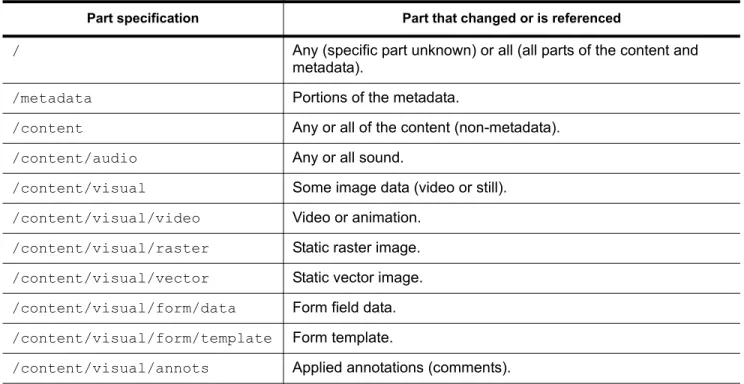
Table 7 lists part component names that are explicitly defined:
Table 7 — Part component names
Part specification Part that changed or is referenced
/ Any (specific part unknown) or all (all parts of the content and metadata).
/metadata Portions of the metadata.
/content Any or all of the content (non-metadata). /content/audio Any or all sound.
/content/visual Some image data (video or still). /content/visual/video Video or animation.
/content/visual/raster Static raster image. /content/visual/vector Static vector image. /content/visual/form/data Form field data. /content/visual/form/template Form template.
1.2.4 ResourceEvent
A structure denoting a high-level event that occurred in the processing of a resource.
• The field namespace URI shall be "http://ns.adobe.com/xap/1.0/sType/ResourceEvent#". • The preferred field namespace prefix is stEvt.
Table 8 lists the fields available in ResourceEvent. The structure shall include the stEvt:action and
stEvt:when fields; other fields need not be present. The fields, if used, shall be of the specified types. The field content should be as described.
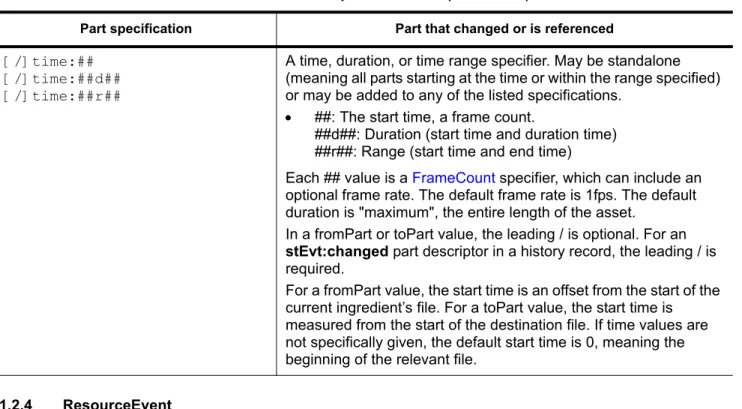
[/]time:## [/]time:##d## [/]time:##r##
A time, duration, or time range specifier. May be standalone (meaning all parts starting at the time or within the range specified) or may be added to any of the listed specifications.
• ##: The start time, a frame count.
##d##: Duration (start time and duration time) ##r##: Range (start time and end time)
Each ## value is a FrameCount specifier, which can include an optional frame rate. The default frame rate is 1fps. The default duration is "maximum", the entire length of the asset.
In a fromPart or toPart value, the leading / is optional. For an
stEvt:changed part descriptor in a history record, the leading / is required.
For a fromPart value, the start time is an offset from the start of the current ingredient’s file. For a toPart value, the start time is measured from the start of the destination file. If time values are not specifically given, the default start time is 0, meaning the beginning of the relevant file.
Table 7 — Part component names (Continued)
Part specification Part that changed or is referenced
Table 8 — ResourceEvent fields
Name Type Definition
stEvt:action Open Choice
of Text The action that occurred. Defined values are:
converted, copied, created, cropped, edited, filtered, formatted, version_updated, printed, published, managed, produced, resized, saved.
New values should be verbs in the past tense.
stEvt:changed Text A semicolon-delimited list of the parts of the resource that were changed since the previous event history.
If not present, presumed to be undefined. When tracking changes and the scope of the changed components is unknown, it should be assumed that anything might have changed.
stEvt:instanceID GUID The value of the xmpMM:InstanceID property for the modified (output) resource.
stEvt:parameters Text Additional description of the action.
1.2.4.1 ResourceRef
A multiple part reference to a resource. Used to indicate prior versions, originals of renditions, originals for derived documents, and so on. The fields present in any specific reference depend on usage and on whether the referenced resource is managed. Except for instanceID, the fields are all properties from the referenced resource’s xmpMM namespace.
• The field namespace URI is http://ns.adobe.com/xap/1.0/sType/ResourceRef# • The preferred field namespace prefix is stRef
stEvt:when Date Timestamp of when the action occurred.
For events that create or write to a file, this should be the approximate modification time of the file.
Table 8 — ResourceEvent fields (Continued)
Name Type Definition
Table 9 — ResourceRef fields
Name Type Description
stRef:alternatePaths ordered array
of URI The referenced resource’s fallback file paths or URLs. The sequence order is the recommended order in attempting to locate the resource.
stRef:documentID URI Refer to Part 1, Data Model, Serialization, and Core Properties, for definition.
stRef:filePath URI Refer to Part 1, Data Model, Serialization, and Core
Properties, for definition.
stRef:fromPart Part For a resource within an xmpMM:Ingredients list, the part of this resource that is incorporated in the containing document.
stRef:instanceID URI Refer to Part 1, Data Model, Serialization, and Core Properties, for definition.
stRef:lastModifyDate Date The value of stEvt:when for the last time the file was written.
stRef:manager AgentName The referenced resource’s xmpMM:Manager.
stRef:managerVariant Text The referenced resource’s xmpMM: ManagerVariant.
stRef:manageTo URI The referenced resource’s xmpMM:ManageTo.
stRef:manageUI URI The referenced resource’s xmpMM:ManageUI.
stRef:maskMarkers closed Choice For a resource within an xmpMM:Ingredients list, whether markers in this resource should be ignored (masked) or processed normally. One of:
All: Ignore markers in this ingredient and all its children. None: Process markers in this ingredient and all its children.
stRef:partMapping Text The name or URI of a mapping function used to map the fromPart to the toPart. The default for time mappings is "linear".
stRef:renditionClass RenditionClass Refer to Part 1, Data Model, Serialization, and Core Properties, for definition.
1.2.4.2 Version
Describes one version of a document.
• The field namespace URI is http://ns.adobe.com/xap/1.0/sType/Version# • The preferred field namespace prefix is stVer
1.2.5 Basic job/workflow value types
The following value type is used for the Basic Job/Workflow namespace.
1.2.5.1 Job
Describes a job for a job-management system.
• The field namespace URI is http://ns.adobe.com/xap/1.0/sType/Job# • The preferred field namespace prefix is stJob
stRef:renditionParams Text Refer to Part 1, Data Model, Serialization, and Core Properties, for definition.
stRef:toPart Part For a resource within an xmpMM:Ingredients list, the part of the containing document into which this resource is
incorporated.
stRef:versionID Text The referenced resource’s xmpMM:VersionID.
Table 9 — ResourceRef fields (Continued)
Name Type Description
Table 10 — Version fields
Name Type Description
stVer:comments Text Comments concerning what was changed.
stVer:event ResourceEvent High-level, formal description of what operation the user performed.
stVer:modifier ProperName The person who modified this version.
stVer:modifyDate Date The date on which this version was checked in.
stVer:version Text The new version number.
Table 11 — Job fields
Name Type Description
stJob:id Text Unique ID for the job. This field is a reference into some external job management system.
stJob:name Text Informal name of job. This name is for user display and informal systems.
1.2.6 Video media value types
The following value types are used for the XMP Dynamic Media namespace. • The field namespace URI is http://ns.adobe.com/xmp/1.0/DynamicMedia/ • The preferred field namespace prefix is xmpDM
1.2.6.1 beatSpliceStretch
A set of parameters used when stretching audio using the Beat Splice stretch mode.
1.2.6.2 CuePointParam
A key-value pair describing a parameter of a cue-point Marker.
1.2.6.3 FrameCount
A number of frames at a given frame rate, which specifies an audio or video time value for a Marker (as the value of xmpDM:duration or xmpDM:startTime). Can also be used in the time portion of a document Part. The frame-count value can include the frame rate as shown. For Markers within a Track, the frame rate can be specified separately in the xmpDM:frameRate of the Track.
The string value is in one of these formats:
Table 12 — beatSpliceStretch fields
Name Type Description
xmpDM:riseInDecibel Real The amount sound must increase in amplitude to detect a beat.
xmpDM:riseInTimeDuration Time The duration of the sampling window used to measure the audio increase for locating beats.
xmpDM:useFileBeatsMarker Boolean When true, the file beat markers are used for stretching. Otherwise the rise and duration fields are used to automatically locate the beats.
Table 13 — CuePointParam fields
Name Type Description
xmpDM:key Text The key.
xmpDM:value Text The value.
Table 14 — FrameCount values
"##" For a Marker that is not in a Track, a simple integer value is interpreted as a number of seconds, at the default frame rate of 1 fps.
For Markers within a Track, an integer value is interpreted as ticks/frames in the timescale specified by the track’s xmpDM:frameRate.
1.2.6.4 FrameRate
A frame-rate value can be part of the FrameCount specification of a Marker. For Markers within a Track, however, the frame count can be a simple integer, and the associated frame rate is specified separately, in the xmpDM:frameRate of the Track.
A frame rate is expressed as a number of frames divided by a number of seconds (f/s). The number of seconds is called the rate basis; it defaults to 1, for the common frames-per-second (fps) expression. If no frame rate is specified in either the frame count itself or in the associated track, the frame count is also the number of seconds, at the default rate of 1 fps.
The string value is in one of these formats:
1.2.6.5 Marker
A marker type used to describe an important location in an audio or video sequence. It is a value of the
xmpDM:markers array in a Track. "##f###"
"##f###s###"
A number of frames specified together with a FrameRate, which can contain an optional rate basis. The rate basis defaults to 1.
These examples show how a FrameCount value of 15 is expressed for common video and audio frame rates:
• Film at 24 fps (frame rate = 24, rate basis = 1): "15f24"
• Speech-to-text in milliseconds (frame rate = 1000, rate basis = 1): "15f1000" • NTSC at 29.97 fps (frame rate = 30000, rate basis = 1001): "15f30000s1001" • DVATicks (frame rate = 254016000000, rate basis = 1): "15f254016000000" "maximum" Allowed for a duration value; indicates that the time span is unlimited, or is determined
automatically up to the full duration of the source.
Table 14 — FrameCount values (Continued)
Table 15 — FrameRate values
"f###" The frame rate in frames-per-second (fps). The rate basis is assumed to be 1. For example, a frame rate of 24fps is specified as “f24”.
"f###s###" Specifies a frame rate with a rate basis. The second number is the rate basis, a number of seconds.
For example, the NTSC 29.97 frame rate is specified as “f30000s1001”.
Table 16 — Marker fields
Name Type Description
xmpDM:comment Text Optional. A descriptive comment.
xmpDM:cuePointParams ordered array of CuePointParam
Optional. An ordered sequence of processing parameters for an FLVCuePoint-type marker.
xmpDM:cuePointType Text Optional. The cue-point type for an FLVCuePoint-type marker, one of Navigation or Event.
1.2.6.6 Media
A reference to a media asset. This is typically a local file, but can be anything that can be specified with a URL. Contains information about usage in the parent media (typically a sequence), and the associated media rights.
xmpDM:duration FrameCount Optional. The duration of the marker. Default is 0. This is a number of ticks/frames in the timescale specified by an optionally included frame rate. If the parent Track specifies xmpDM:frameRate, that becomes the default frame rate for all member markers.
If no frame rate is specified in either the marker or the track, this value is a number of seconds (frames at the default frame rate of 1fps).
xmpDM:location URI Optional. The URL of the location to jump to, for a WebLink-type marker. For example, http://
www.mysite.com.
xmpDM:name Text The name of the marker. For timed text, the phrase,
word, or syllable.
xmpDM:probability Real Optional. For auto-detected speech, the probability that the word is accurate.
xmpDM:speaker Text Optional. The name or other identifier of the speaker or performer, for a Speech-type marker. The speaker need only be identified if it changes from the previous phrase.
xmpDM:startTime FrameCount The timeline position of the marker. Default is 0, the beginning of the file that contains the track.
xmpDM:target Text Optional. A frame target, for a WebLink-type marker.
xmpDM:type Open Choice
of Text, comma-delimited list
Optional. A comma-delimited list of marker types. The type indicates how a marker or set of markers is intended to be used, and what other information is associated with it. Predefined value types include: Chapter
Cue Index Speech Track
This type overrides any type specified in the containing Track.
Table 16 — Marker fields (Continued)
Name Type Description
Table 17 — Media fields
Name Type Description
xmpDM:duration Time The duration of the asset in the timeline.
xmpDM:managed Boolean When true, this is a rights-managed resource.
1.2.6.7 ProjectLink
The type of a video file and path of the project that created it.
1.2.6.8 resampleStretch
A set of parameters used when stretching audio using the Resample stretch mode.
1.2.6.9 Time
A representation of a time value in seconds. This is similar to After Effect’s TDB, or QuickTime’s representation of time. They each have a value, and the scale of the value. For example, if the scale is the rational 1/25 (PAL 25fps), and the value is 50, the time is 2 seconds.
xmpDM:startTime Time The timeline position of the start of the asset, an offset from the beginning of the file that contains the track.
xmpDM:track Text An identifier for the track that contained this asset. Could be a track name or a number.
xmpDM:webStatement URI The location of a web page describing the owner and/or rights statement for this resource.
Table 17 — Media fields (Continued)
Name Type Description
Table 18 — ProjectLink fields
Name Type Description
xmpDM:path URI Full path to the project that created this file.
xmpDM:type Closed Choice of Text The file type. One of: movie
still audio custom
Table 19 — resampleStretch fields
Name Type Description
xmpDM:quality Closed Choice of Text One of: High Medium Low
Table 20 — Time fields
Name Type Description
xmpDM:scale Rational The scale for the time value.
• For NTSC, use 1001/30000, or the less accurate 100/2997. • For PAL, use 1/25.
1.2.6.10 Timecode
A timecode value in video.
1.2.6.11 timeScaleStretch
A set of parameters used when stretching audio using the Time-Scale stretch mode.
1.2.6.12 Track
A named set of Markers, that can specify different default time-frame rates from those of the contained markers.
Table 21 — Timecode fields
Name Type Description
xmpDM:timeFormat Closed Choice
of Text The format used in the timeValue. One of:24Timecode 25Timecode
2997DropTimecode (semicolon delimiter) 2997NonDropTimecode 30Timecode 50Timecode 5994DropTimecode 5994NonDropTimecode 60Timecode 23976Timecode
xmpDM:timeValue Text A time value in the specified format. Time values use a colon delimiter in all formats except 2997drop, which uses a semicolon.
The four fields indicate hours, minutes,
seconds, and frames:
hh:mm:ss:ffThe actual duration in seconds depends on the format.
Table 22 — timeScaleStretch fields
Name Type Description
xmpDM:frameOverlappingPercentage Real The percentage of overlap between frames.
xmpDM:frameSize Real The splices per beat.
xmpDM:quality Closed Choice
of Text One of:High Medium Low
Table 23 — Track fields
xmpDM:frameRate FrameRate The default frame rate for the markers in the track.
xmpDM:markers ordered array of
Marker An ordered list of markers.
xmpDM:trackName Text The name of the track. (For example: Lyrics, Speech, Voiceover, Audition Conditions, and so on.)
1.2.7 Exif namespace value types
These types are used only within the Exif namespace.
1.2.7.1 CFAPattern
A structure describing the CFA pattern.
• The field namespace URI is http://ns.adobe.com/exif/1.0/ • The preferred field namespace prefix is exif
1.2.7.2 DeviceSettings
A structure describing the device settings.
• The field namespace URI is http://ns.adobe.com/exif/1.0/ • The preferred field namespace prefix is exif
1.2.7.3 Flash
A structure describing the flash state.
• The field namespace URI is http://ns.adobe.com/exif/1.0/
xmpDM:trackType Open Choice of Text, comma-delimited list
The default marker types for all markers in the track. See Marker field xmpDM:type.
Table 23 — Track fields (Continued)
Table 24 — CFAPattern fields
Name Type Description
exif:Columns Integer Number of columns, n.
exif:Rows Integer Number of rows, m.
exif:Values ordered array of Integer
CFA values, sequence should be, in order: value [0,0] ... value [n
−
1, 0] value [0, m−
1] ... value [n−
1, m−
1]Table 25 — DeviceSettings fields
Name Type Description
exif:Columns Integer Display columns.
exif:Rows Integer Display rows.
• The preferred field namespace prefix is exif
1.2.7.4 GPSCoordinate
A Text value in the form “DDD,MM,SSk” or “DDD,MM.mmk”, where:
• DDD is a number of degrees
• MM is a number of minutes
• SS is a number of seconds
• mm is a fraction of minutes
• k is a single character N, S, E, or W indicating a direction (north, south, east, west)
Leading zeros are not necessary for the for DDD, MM, and SS values. The DDD,MM.mmk form should be used when
any of the native Exif component rational values has a denominator other than 1. There can be any number of fractional digits.
1.2.7.5 OECF/SFR
A structure describing the OECF/SFR.
• The field namespace URI is http://ns.adobe.com/exif/1.0/ • The preferred field namespace prefix is exif
Table 26 — Flash fields
Name Type Description
exif:Fired Boolean True if flash fired.
exif:Function Boolean True if flash function is not present.
exif:Mode Closed
Choice The flash mode. One of:0 = unknown 1 = compulsory flash firing 2 = compulsory flash suppression 3 = auto mode
exif:RedEyeMode Boolean True if red-eye reduction is supported.
exif:Return Closed
Choice Whether strobe return is supported and if supported, detected. One of:0 = no strobe return detection 2 = strobe return light not detected
3 = strobe return light detected
Table 27 — OECF/SFR fields
Name Type Description
exif:Columns Integer Number of columns, n.
exif:Names ordered
array of Text Column item names,
n entries.
1.2.7.6 Rational
To represent Exif rational values in XMP, they must be converted to text. The recommended approach is to use a value of type Text of the form numerator /denominator. For example, the value 2/3 becomes the text value
"2/3" when converted to XMP.
1.3
Extensibility of namespaces
This section discusses how to create new namespaces and extend existing ones.
1.3.1 Creating custom namespaces
The namespaces defined in this document are core namespaces that are believed to be applicable to a wide variety of needs. If possible, it is always desirable to use properties from existing namespaces. However, XMP was designed to be easily extensible by the addition of custom namespaces. If your metadata needs are not already covered by the core namespaces, you can define and use your own namespaces.
If you are considering creating a new namespace, observe the following:
• Avoid including properties that have the same semantics as properties in existing namespaces.
• If your properties might be useful to others, try to collaborate in creating a common namespace, to avoid having a multitude of incompatible ones.
To define a new namespace, you should write a human-readable namespace specification document. The specification document should be made available to any developers who need to write code that understands your metadata. (Future versions of XMP might include support for machine-readable namespace specifications, but such support will always be in addition to the requirement for human-readable namespace specification documents.)
Your specification document should include:
• A unique name for your namespace in the form of a URI and a preferred prefix.
• A table containing the name of each property, the value type, and the description of the property. If you define properties that have structured value types, you may wish to use additional URI names to identify the components of a structured property value.
You can then add more properties as needed, following the RDF and XMP syntax requirements described in this document to create compatible RDF metadata.
1.3.2 Extending namespaces
Keep in mind the following points when extending a namespace:
• New properties can be added to existing namespaces without causing problems for applications.
• The definitions of properties in existing namespaces should always remain the same; otherwise,
exif:Values ordered
array of Rational
OECF/SFR values, sequence should be, in order: value [0,0] ... value [n
−
1, 0] value [0, m−
1] ... value [n−
1, m−
1]property should be created, and the old one declared as deprecated.
• It is possible to create a “new version” of a namespace; however, there is no logical connection between the old version and the new version. The same local name in two different XML namespaces refers to two different properties.
2 XMP standard namespaces
This chapter contains the following information namespace definitions for standard namespaces. The following namespaces definitions are included here:
• 2.1, “XMP namespace”
• 2.2, “XMP Media Management namespace” • 2.3, “XMP Basic Job Ticket namespace” • 2.4, “XMP Paged-text namespace” • 2.5, “XMP Dynamic Media namespace”
2.1
XMP namespace
The XMP basic namespace contains properties that provide basic descriptive information. • The namespace URI is http://ns.adobe.com/xap/1.0/
• The preferred namespace prefix is xmp
Table 28 — Properties in the XMP namespace
Name Type Description
xmp:Advisory
(deprecated) unordered array of XPath An unordered array specifying properties that were edited outside the authoring application. Each item should contain a single namespace and XPath separated by one ASCII space (U+0020).
xmp:BaseURL URL The base URL for relative URLs in the document content.
If this document contains Internet links, and those links are relative, they are relative to this base URL.
This property provides a standard way for embedded relative URLs to be interpreted by tools. Web authoring tools should set the value based on their notion of where URLs will be interpreted.
xmp:CreateDate Date Refer to Part 1, Data Model, Serialization, and Core Properties, for definition.
xmp:CreatorTool AgentName Refer to Part 1, Data Model, Serialization, and Core Properties, for definition.
xmp:Identifier unordered array of Text Refer to Part 1, Data Model, Serialization, and Core Properties, for definition.
xmp:Label Text Refer to Part 1, Data Model, Serialization, and Core Properties, for definition.
xmp:MetadataDate Date Refer to Part 1, Data Model, Serialization, and Core Properties, for definition.
xmp:ModifyDate Date Refer to Part 1, Data Model, Serialization, and Core Properties, for definition.
xmp:Nickname Text A short informal name for the resource.
xmp:Rating Closed Choice of Real Refer to Part 1, Data Model, Serialization, and Core Properties, for definition.
2.2
XMP Media Management namespace
This namespace is primarily for use by digital asset management (DAM) systems.
The following properties are “owned” by the DAM system and should be set by applications under their direction; they should not be used by unmanaged files: xmpMM: ManagedFrom, xmpMM:Manager, xmpMM:ManageTo, xmpMM:ManageUI, xmpMM: ManagerVariant.
The following properties are owned by the DAM system for managed files, but can also be used by applications for unmanaged files: xmpMM:DerivedFrom, xmpMM:DocumentID, xmpMM: RenditionClass, xmpMM: RenditionParams, xmpMM:VersionID, xmpMM:Versions.
The xmpMM:History property is always owned by the application. • The namespace URI is http://ns.adobe.com/xap/1.0/mm/ • The preferred namespace prefix is xmpMM
xmp:Thumbnails alternative array of
Thumbnail An alternative array of thumbnail images for a file, which can differ in characteristics such as size or image encoding.
Table 28 — Properties in the XMP namespace (Continued)
Name Type Description
Table 29 — XMP Media Management properties
Name Type Description
xmpMM:DerivedFrom ResourceRef Refer to Part 1, Data Model, Serialization, and Core Properties, for definition.
xmpMM:DocumentID URI Refer to Part 1, Data Model, Serialization, and Core Properties, for definition.
xmpMM:History ordered array of ResourceEvent
High-level actions that resulted in this resource. It is intended to give human readers a description of the steps taken to make the changes from the previous version to this one. The list should be at an abstract level; it is not
intended to be an exhaustive keystroke or other detailed history. The description should be sufficient for metadata management, as well as for workflow enhancement.
xmpMM:Ingredients unordered array of
ResourceRef References to resources that were incorporated, by inclusion or reference, into this resource.
xmpMM:InstanceID URI Refer to Part 1, Data Model, Serialization, and Core Properties, for definition.
xmpMM: ManagedFrom
ResourceRef A reference to the document as it was prior to becoming managed. It is set when a managed document is
introduced to an asset management system that does not currently own it. It may or may not include references to different management systems.
xmpMM:Manager AgentName The name of the asset management system that manages this resource. Along with xmpMM: ManagerVariant, it tells applications which asset management system to contact concerning this document.
xmpMM:ManageTo URI A URI identifying the managed resource to the asset management system; the presence of this property is the formal indication that this resource is managed. The form and content of this URI is private to the asset management system.
xmpMM:ManageUI URI A URI that can be used to access information about the managed resource through a web browser. It might require a custom browser plug-in.
xmpMM:
ManagerVariant Text Specifies a particular variant of the asset management system. The format of this property is private to the specific asset management system.
xmpMM:
OriginalDocumentID URI Refer to PropertiesPart 1, Data Model, Serialization, and Core , for definition.
xmpMM:Pantry unordered array of struct
Each array item has a structure value with a potentially unique set of fields, containing extracted XMP from a component. Each field is a property from the XMP of a contained resource component, with all substructure preserved.
Each pantry entry shall contain an xmpMM:InstanceID. Only one copy of the pantry entry for any given
xmpMM:InstanceID shall be retained in the pantry. Nested pantry items shall be removed from the individual pantry item and promoted to the top level of the pantry.
xmpMM:
RenditionClass RenditionClass Refer to PropertiesPart 1, Data Model, Serialization, and Core , for definition.
xmpMM:
RenditionParams Text Refer to PropertiesPart 1, Data Model, Serialization, and Core , for definition.
xmpMM:VersionID Text The document version identifier for this resource.
Each version of a document gets a new identifier, usually simply by incrementing integers 1, 2, 3 . . . and so on. Media management systems can have other conventions or support branching which requires a more complex scheme.
xmpMM:Versions ordered array of
Version
The version history associated with this resource. Entry [1] is the oldest known version for this document, entry [last()] is the most recent version.Typically, a media management system would fill in the version information in the metadata on check-in.
It is not guaranteed that a complete history of versions from the first to this one will be present in the xmpMM:Versions property. Interior version information can be compressed or eliminated and the version history can be truncated at some point.
Table 30 — Deprecated Media Management properties xmpMM:LastURL
(deprecated) URL Deprecated for privacy protection.
Table 29 — XMP Media Management properties (Continued)
2.3
XMP Basic Job Ticket namespace
This namespace describes very simple workflow or job information. • The namespace URI is http://ns.adobe.com/xap/1.0/bj/
• The preferred namespace prefix is xmpBJ
2.4
XMP Paged-text namespace
This namespace is used for text appearing on a page in a document. • The namespace URI is http://ns.adobe.com/xap/1.0/t/pg/ • The preferred namespace prefix is xmpTPg
xmpMM:RenditionOf
(deprecated) ResourceRef Deprecated in favour of xmpMM:DerivedFrom. A reference to the document of which this is a rendition. xmpMM:SaveID
(deprecated) Integer Deprecated. Previously used only to support the xmpMM:LastURL property.
Table 30 — Deprecated Media Management properties (Continued)
Table 31 — Basic Job Ticket properties
Name Type Description
xmpBJ:JobRef unordered array of Job
References an external job management file for a job process in which the document is being used. Use of job names is under user control. Typical use would be to identify all documents that are part of a particular job or contract.
There are multiple values because there can be more than one job using a particular document at any time, and it can also be useful to keep historical information about what jobs a document was part of previously.
Table 32 — Paged-text properties
Name Type Description
xmpTPg:Colorants ordered array of Complex value types
An ordered array of colorants (swatches) that are used in the document (including any in contained documents).
xmpTPg:Fonts unordered
array of Font An unordered array of fonts that are used in the document (including any in contained documents).
xmpTPg:MaxPageSize Dimensions The size of the largest page in the document (including any in contained documents).
xmpTPg:NPages Integer The number of pages in the document (including any in contained documents).
xmpTPg:PlateNames ordered
2.5
XMP Dynamic Media namespace
This namespace specifies properties used by the Adobe dynamic media group. • The namespace URI is http://ns.adobe.com/xmp/1.0/DynamicMedia/ • The preferred namespace prefix is xmpDM
Table 33 — XMP Dynamic Media properties
Name Type Description
xmpDM:absPeakAudioFilePath URI The absolute path to the file’s peak audio file. If empty, no peak file exists.
xmpDM:album Text The name of the album.
xmpDM:altTapeName Text An alternative tape name, set via the project window or timecode dialog in Premiere. If an alternative name has been set and has not been reverted, that name is displayed.
xmpDM:altTimecode Timecode A timecode set by the user. When specified, it is used instead of the startTimecode.
xmpDM:artist Text The name of the artist or artists.
xmpDM:audioModDate
(deprecated) Date The date and time when the audio was last modified.
xmpDM:audioChannelType closed Choice
of Text The audio channel type. One of: Mono Stereo
5.1 7.1
16 Channel Other
xmpDM:audioCompressor Text The audio compression used. For example, MP3.
xmpDM:audioSampleRate Integer The audio sample rate. Can be any value, but commonly 32000, 44100, or 48000.
xmpDM:audioSampleType closed Choice
of Text The audio sample type. One of:8Int 16Int 24Int 32Int 32Float Compressed Packed Other
xmpDM:beatSpliceParams beatSpliceStretch Additional parameters for Beat Splice stretch mode.
xmpDM:cameraAngle open Choice
of Text The orientation of the camera to the subject in a static shot, from a fixed set of industry standard terminology. Predefined values include:
Low Angle Eye Level High Angle Overhead Shot Birds Eye Shot Dutch Angle POV
Over the Shoulder Reaction Shot
xmpDM:cameraLabel Text A description of the camera used for a shoot. Can be any string, but is usually simply a number, for example "1", "2", or more explicitly "Camera 1".
xmpDM:cameraModel Text The make and model of the camera used for a
shoot.
xmpDM:cameraMove open Choice
of Text The movement of the camera during the shot, from a fixed set of industry standard terminology. Predefined values include:
Aerial Boom Up Boom Down Crane Up Crane Down Dolly In Dolly Out Pan Left Pan Right Pedestal Up Pedestal Down Tilt Up Tilt Down Tracking Truck Left Truck Right Zoom In Zoom Out
xmpDM:client Text The client for the job of which this shot or take is a part.
xmpDM:comment Text A user’s comments.
xmpDM:composer Text The composer’s name.
xmpDM:contributedMedia unordered array
of Media An unordered list of all media used to create this media. xmpDM:copyright
(deprecated) Text Deprecated in favour of dc:rights.
xmpDM:director Text The director of the scene.
Table 33 — XMP Dynamic Media properties (Continued)
xmpDM:directorPhotography Text The director of photography for the scene.
xmpDM:duration Time The duration of the media file.
xmpDM:engineer Text The engineer’s name.
xmpDM:fileDataRate Rational The file data rate in megabytes per second. For example: “36/10” = 3.6 MB/sec
xmpDM:genre Text The name of the genre.
xmpDM:good Boolean A checkbox for tracking whether a shot is a keeper.
xmpDM:instrument Text The musical instrument.
xmpDM:introTime Time The duration of lead time for queuing music.
xmpDM:key closed Choice
of Text
The audio’s musical key. One of: C C# D D# E F F# G G# A A# B
xmpDM:logComment Text User’s log comments.
xmpDM:loop Boolean When true, the clip can be looped seamlessly.
xmpDM:numberOfBeats Real The total number of musical beats in a clip; for example, the beats-per-second times the duration in seconds.
xmpDM:markers ordered array of
Marker
An ordered list of markers. See also xmpDM:Tracks.
xmpDM:metadataModDate
(deprecated) Date The date and time when the metadata was last modified.
xmpDM:outCue Time The time at which to fade out.
xmpDM:projectName Text The name of the project of which this file is a part.
xmpDM:projectRef ProjectLink A reference to the project of which this file is a part.
Table 33 — XMP Dynamic Media properties (Continued)
xmpDM:pullDown closed Choice
of Text The sampling phase of film to be converted to video (pull-down). One of: WSSWW SSWWW SWWWS WWWSS WWSSW WWWSW WWSWW WSWWW SWWWW WWWWS xmpDM: relativePeakAudioFilePath
URI The relative path to the file’s peak audio file. If empty, no peak file exists.
xmpDM:relativeTimestamp Time The start time of the media inside the audio project.
xmpDM:releaseDate Date The date the title was released.
xmpDM:resampleParams resampleStretch Additional parameters for Resample stretch mode.
xmpDM:scaleType closed Choice
of Text The musical scale used in the music. One of: Major Minor
Both Neither
Neither is most often used for instruments with no associated scale, such as drums.
xmpDM:scene Text The name of the scene.
xmpDM:shotDate Date The date and time when the video was shot.
xmpDM:shotDay Text The day in a multiday shoot. For example: "Day 2", "Friday".
xmpDM:shotLocation Text The name of the location where the video was
shot. For example: “Oktoberfest, Munich Germany” For more accurate positioning, use the Exif GPS values.
xmpDM:shotName Text The name of the shot or take.
xmpDM:shotNumber Text The position of the shot in a script or production, relative to other shots. For example: 1, 2, 1a, 1b, 1.1, 1.2.
Table 33 — XMP Dynamic Media properties (Continued)
xmpDM:shotSize open Choice
of Text The size or scale of the shot framing, from a fixed set of industry standard terminology. Predefined values include:
ECU --extreme close-up MCU -- medium close-up CU -- close-up
MS -- medium shot WS -- wide shot
MWS -- medium wide shot EWS -- extreme wide shot
xmpDM:speakerPlacement Text A description of the speaker angles from centre front in degrees. For example: “Left = -30, Right = 30, Centre = 0, LFE = 45, Left Surround = -110, Right Surround = 110”
xmpDM:startTimecode Timecode The timecode of the first frame of video in the file, as obtained from the device control.
xmpDM:stretchMode closed Choice
of Text The audio stretch mode. One of: Fixed length Time-Scale
Resample Beat Splice Hybrid
xmpDM:takeNumber Integer A numeric value indicating the absolute number of a take.
xmpDM:tapeName Text The name of the tape from which the clip was
captured, as set during the capture process.
xmpDM:tempo Real The audio’s tempo.
xmpDM:timeScaleParams timeScaleStretch Additional parameters for Time-Scale stretch mode.
xmpDM:timeSignature closed Choice of Text
The time signature of the music. One of: 2/4 3/4 4/4 5/4 7/4 6/8 9/8 12/8 other
xmpDM:trackNumber Integer A numeric value indicating the order of the audio file within its original recording.
xmpDM:Tracks unordered array
of Track
An unordered list of tracks. A track is a named set of markers, which can specify a frame rate for all markers in the set. See also xmpDM:markers.
Table 33 — XMP Dynamic Media properties (Continued)
xmpDM:videoAlphaMode closed Choice
of Text The alpha mode. One of: straight pre-multiplied none xmpDM: videoAlphaPremultipleColor Complex value types
A colour in CMYK or RGB to be used as the premultiple colour when alpha mode is premultiplied.
xmpDM:
videoAlphaUnityIsTransparent Boolean When true, unity is clear, when false, it is opaque. xmpDM:videoColorSpace closed Choice
of Text The colour space. One of:sRGB (used by Photoshop) CCIR-601 (used for NTSC) CCIR-709 (used for HD)
xmpDM:videoCompressor Text Video compression used. For example, jpeg.
xmpDM:videoFieldOrder closed Choice of Text
The field order for video. One of: Upper
Lower Progressive
xmpDM:videoFrameRate open Choice
of Text The video frame rate. Predefined values include: 24 NTSC
PAL
xmpDM:videoFrameSize Dimensions The frame size. For example: w:720, h: 480, unit:pixels
xmpDM:videoModDate
(deprecated) Date The date and time when the video was last modified.
xmpDM:videoPixelDepth closed Choice of Text
The size in bits of each colour component of a pixel. Standard Windows 32-bit pixels have 8 bits per component. One of:
8Int 16Int 24Int 32Int 32Float Other
xmpDM:videoPixelAspectRatio Rational The aspect ratio, expressed as wd/ht. For example: “648/720” = 0.9
Table 33 — XMP Dynamic Media properties (Continued)
3 Specialized Namespaces
This chapter contains namespace definitions for namespaces that are specialized for Adobe applications and usages. The following namespace definitions are included here:
• 3.1, “Adobe PDF namespace” • 3.2, “Photoshop namespace” • 3.3, “Camera Raw namespace” • 3.4, “Exif namespaces”
3.1
Adobe PDF namespace
This namespace specifies properties used with Adobe PDF documents. • The namespace URI is http://ns.adobe.com/pdf/1.3/
• The preferred namespace prefix is pdf
3.2
Photoshop namespace
This namespace specifies properties used by Adobe Photoshop. • The namespace URI is http://ns.adobe.com/photoshop/1.0/ • The preferred namespace prefix is photoshop
3.2.1 Types
These types are defined in the Photoshop namespace for use by the Photoshop metadata:
3.2.1.1 Ancestor
A structure identifying a document that was copied or placed into the current document.
Table 34 — PDF properties
Name Type Description
pdf:Keywords Text Keywords.
pdf:PDFVersion Text The PDF file version (for example: 1.0, 1.3, and so on).
pdf:Producer AgentName The name of the tool that created the PDF document.
pdf:Trapped Boolean True when the document has been trapped.
Table 35 — Ancestor fields
Name Type Description
3.2.1.2 Layer
A structure associating an identifying name and text content with a text layer of a Photoshop document.
3.2.2 Properties
Table 36 — Layer fields
Name Type Description
photoshop:LayerName Text The identifying name of the text layer.
photoshop:LayerText Text The text content of the text layer.
Table 37 — Photoshop properties
Name Type Description
photoshop:AuthorsPosition Text By-line title.
photoshop:CaptionWriter ProperName Writer/editor.
photoshop:Category Text Category. Limited to 3 7-bit ASCII characters.
photoshop:City Text City.
photoshop:ColorMode Closed
Choice of Integer
The colour mode. One of: 0 = Bitmap 1 = Gray scale 2 = Indexed colour 3 = RGB colour 4 = CMYK colour 7 = Multi-channel 8 = Duotone 9 = LAB colour
photoshop:Country Text Country/primary location.
photoshop:Credit Text Credit.
photoshop:DateCreated Text The date the intellectual content of the document was created (rather than the creation date of the physical representation), following IIM conventions. For example, a photo taken during the American Civil War would have a creation date during that epoch (1861-1865) rather than the date the photo was digitized for archiving.
photoshop:
DocumentAncestors
unordered array of Ancestor
If the source document for a copy-and-paste or place operation has a document ID, that ID is added to this list in the destination document's XMP.
photoshop:Headline Text Headline.
photoshop:History Text The history that appears in the FileInfo panel, if activated in the application preferences.
photoshop:ICCProfile Text The colour profile, such as AppleRGB, AdobeRGB1998.
3.3
Camera Raw namespace
This namespace specifies settings associated with image files produced in camera raw mode. • The namespace URI is http://ns.adobe.com/camera-raw-settings/1.0/
• The preferred namespace prefix is crs
photoshop:Source Text Source.
photoshop:State Text Province/state.
photoshop:
SupplementalCategories unordered array of Text Supplemental category.
photoshop:TextLayers ordered array of Layer
If a document has text layers, this property caches the text for each layer.
photoshop:
TransmissionReference Text Original transmission reference. photoshop:Urgency Integer Urgency. Valid range is 1-8.
Table 37 — Photoshop properties (Continued)
Name Type Description
Table 38 — Camera Raw properties
Name Type Description
crs:AutoBrightness Boolean When true, "Brightness" is automatically adjusted.
crs:AutoContrast Boolean When true, "Contrast" is automatically adjusted.
crs:AutoExposure Boolean When true, "Exposure" is automatically adjusted.
crs:AutoShadows Boolean When true, "Shadows" is automatically adjusted.
crs:BlueHue Integer "Blue Hue" setting. Range -100 to 100.
crs:BlueSaturation Integer "Blue Saturation" setting. Range -100 to 100.
crs:Brightness Integer "Brightness" setting. Range 0 to 150.
crs:CameraProfile Text "Camera Profile" setting.
crs:
ChromaticAberrationB Integer "Chromatic Aberration, Fix Blue/Yellow Fringe" setting. Range -100 to 100.
crs:
ChromaticAberrationR Integer "Chromatic Aberration, Fix Red/Cyan Fringe" setting. Range -100 to 100.
crs:
ColorNoiseReduction Integer "Color Noise Reduction" setting. Range 0 to 100. crs:Contrast Integer "Contrast" setting. Range -50 to 100.
crs:CropTop Real When HasCrop is true, top of crop rectangle
crs:CropLeft Real When HasCrop is true, left of crop rectangle.
crs:CropRight Real When HasCrop is true, right of crop rectangle.
crs:CropAngle Real When HasCrop is true, angle of crop rectangle.
crs:CropWidth Real Width of resulting cropped image in CropUnits units.
crs:CropHeight Real Height of resulting cropped image in CropUnits units.
crs:CropUnits Integer Units for CropWidth and CropHeight. One of: 0 = pixels
1 = inches 2 = cm
crs:Exposure Real "Exposure" setting. Range -4.0 to 4.0.
crs:GreenHue Integer "Green Hue" setting. Range -100 to 100.
crs:GreenSaturation Integer "Green Saturation" setting. Range -100 to 100.
crs:HasCrop Boolean When true, image has a cropping rectangle.
crs:HasSettings Boolean When true, nondefault camera raw settings.
crs:
LuminanceSmoothing
Integer "Luminance Smoothing" setting. Range 0 to 100.
crs:RawFileName Text File name for raw file (not a complete path).
crs:RedHue Integer "Red Hue" setting. Range -100 to 100.
crs:RedSaturation Integer "Red Saturation" setting. Range -100 to 100.
crs:Saturation Integer "Saturation" setting. Range -100 to 100.
crs:Shadows Integer "Shadows" setting. Range 0 to 100.
crs:ShadowTint Integer "Shadow Tint" setting. Range -100 to 100.
crs:Sharpness Integer "Sharpness" setting. Range 0 to 100.
crs:Temperature Integer "Temperature" setting. Range 2000 to 50000.
crs:Tint Integer "Tint" setting. Range -150 to 150.
crs:ToneCurve ordered
array of points (Integer, Integer)
Array of points (Integer, Integer) defining a “Tone Curve.”
crs:ToneCurveName Choice of
Text The name of the Tone Curve described by ToneCurve. One of: Linear Medium Contrast
Strong Contrast Custom
or a user-defined preset name
crs:Version Text Version of Camera Raw plug-in.
crs:VignetteAmount Integer "Vignetting Amount" setting. Range -100 to 100.
Table 38 — Camera Raw properties (Continued)
3.4
Exif namespaces
Exif is a metadata standard for image files, used widely by digital cameras. The Exif 2.2 specification can be found at http://www.exif.org/specifications.html.
There are two XMP namespaces that correspond to parts of the Exif 2.2 specification, described in the following sections:
• 3.4.1, “Exif namespace for TIFF properties” • 3.4.2, “Exif namespace for Exif-specific properties”
• 3.4.3, “Exif namespace for additional Exif properties” describes a namespace that defines additional properties for the equipment used to produce Exif data. The property descriptions assume that the reader has some familiarity with Exif metadata. The XMP property names are identical to the names used within the Exif specification; more complete descriptions of the properties can be found in the specification. • 1.2.7, “Exif namespace value types” describes Exif-specific value types.
NOTE XMP properties of type Date include fractional seconds; therefore Exif properties for fractional seconds (SubSecTime, SubSecTimeOriginal, SubSecTimeDigitized) are included in the “main XMP property” list.
3.4.1 Exif namespace for TIFF properties
The following table lists the properties for TIFF-derived data. Only those TIFF properties that are mentioned in the Exif 2.2 specification are included here.
• The namespace name is http://ns.adobe.com/tiff/1.0/ • The preferred namespace prefix is tiff
crs:VignetteMidpoint Integer "Vignetting Midpoint" setting. Range 0 to 100.
crs:WhiteBalance Closed
Choice of Text
"White Balance" setting. One of: As Shot Auto Daylight Cloudy Shade Tungsten Fluorescent Flash Custom
Table 38 — Camera Raw properties (Continued)