DECSYS-7
OPERATING MANUAL
Copyright 1966 by Digital Equipment Corporation
Chapter
2
CONTENTS
DESCRIPTION . . . • . . . • . . .
Reference Documents. . . • . . . • . . . • . . . . .. . 2
System Use . . . • . . . • . . . . . • • . . • . . . • . . . . . 2
System Tape Editing. . •.•. . •. . .. .• • .. . . . ... .. . . ... . .. . . .. . .. .. 3
Working-Program Editing. . . • . . . • • . . . • . . . 4
FORTRAN Operations . . • . . • . . . 4
DECtape Transport Assignments • • . . . • . . . 6
Sense Switches . . . • . . . • • . . . • • . . . 7
System Tape Format ••.••.••..•...•..•..••.•.•••••..•...•...•. 8
OPERATING INSTRUCTIONS . . . .. System Setup .••••.•...•...•...•.•••....•...••...•...•. Mounting Tapes and Assigning Tape-Unit Numbers ..•...•..•...
0.
Bootstrap Loading and Monitor Call ing ...•..•.•...••.... 0 • • • • •
General Recovery Instructions .•..•.•...•...•... Tape Editing .•....•.•.••.•.•....••••...•.•...•...•. Tape Label (Name and Date) Procedure ...•.••...••..•... T ape Contents Procedure ... " ••.••..•...•••.•.•. 0 • 0 0 -0 0 0 0 • 0 0 • 0 • • 0 0 0 • DECSYS-7 Tape Complete Copying Procedure •.•. o • • • o . 0 • • 0 • 0 0 0 • • • • • 0 DECSYS-7 Tape Selective Copying Procedure ••• 0 • • • • 0 0 . 0 0 0 . 0 . 0 0 • • 0 o. DEC SY S-7 Paper-Tape I nput Procedure .•..• 0 0 • • • 0 • • 0 • 0 • • 0 • • 0 • 0 • • • • • 0 Working Program Procedures ••••.• 0 • • • • • • • • eo ••••• 0 • • 0 • • • • • • 0 • • • • • • • • • • Compil ing ..•....• 0 • • • • • • • • • • • • • • • • • • • • • • • • • • • • • • • • • • • • • • • • • • • • •
Compil ing (Go) Procedure .. 0 • • • • • • • • • • • • • • • • • • • • • • • • • • • • • • • • • • • " • • Compile (Wait) Procedure .•...••.••..•..••••.•...•.•...•. " ..
Program Assembl ing . . . .
Assembling (Go) Procedure •...•••..•.•...•... ' .•.
Assemble (Wait) Procedure
Program Loading and Execution ..•.•.••••..•.••.•••...•...
FORTRAN Program Check-Out ••••.••••..••..•..•...
DECSYS-7 Editor ..••••.•....•..•...••...•...•.
Executive-Command Mode .•...•.•••.•.••••.••...•.•...•...
~:hapter
2 (cont)
Table
CONTENTS (continued)
Edit Mode ...•.•...•....•...
Page
34
Create Mode . . . • . . . • . . . 37
TABLES
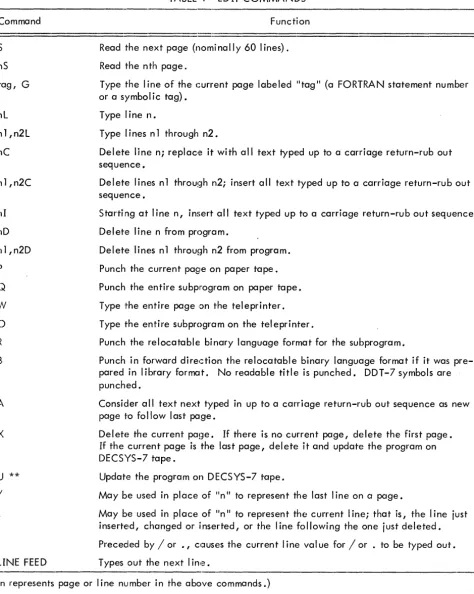
Edit Commands. . . • . . . • . . . • . . . . • . • . . . . . . 36
CHAPTER 1
DES C R
I PT ION
DECSYS-7, a DECtape-oriented operating system, facilitates FORTRAN programming for Digital
Equipment's PDP-7 general-purpose computer. Prime advantages are:
Minimum dependence on paper tape
Less user in terven ti on
Efficient use of computer time
Improved user-computer communications
Machine requirements for use of the system include a PDP-7 configuration having at least 8,192 words
of core memory, one DECtape Control Type 550, and two DECtape transports (either one Dual DECtape
Unit Type 555, or two Single DECtape Transports Type TU55).
Each DECSYS-7 installation receives one reel of DECtape (the system master) and a paper tape containing
a permanent Bootstrap Routine. The system master tape contains a Keyboard Monitor, eleven system
(utility) programs, FORTRAN input-output library routines, and eleven commonly-required library
arith-metic functions.
The DECSYS-7 system tape combines the logical functions of a system master, or library, tape with
those of an input, or working tape. As such, it stores three types of programs: system, library, and
working. System programs are those required for operation of DECSYS-7. The user calls them implicitly
through the entry of a keyboard command to the DECSYS-7 Keyboard Monitor. The Monitor accepts and
verifies such requests, initiates the printout of error messages where necessary, and loads the Clppropriate
system program. Common Iy required subroutines are classed as library programs. The worki ng group
con-sists of user programs originating in the FORTRAN' Icmguage. Under control of the appropriate system
program, the user can call these programs from the system tape to be edited, compiled, assembled,
de-bugged, or executed.
Although users may optionally add their own system, library, and working programs to the supplied
DECSYS-7 system tape, it is recommended that they reserve this original tape as a master. Using the
capabilities of DECSYS-7, they should make so-called working system tapes to which they can add
sys-tems, library, and working programs as they desire. Adherence to this convention will protect the original
REFERENCE DOCUMENTS
The following indicated documents should be readi Iy avai lable to the DECSYS-7 user. Although a minimum
of reference is made to them in this manual, a familiarity with their contents will enable a more rapid
gmsp of DECSYS-7 operational concepts.
Document No. Title
F-75 PDP-7 User's Handbook
7-2-S
7-3-S
7-4-S
7-20-10-FB
PDP-7 Programming Manual, FORTRAN II
PDP-7 Programming Manual, Symbolic Assembler
PDP-7 Programming Manual, Debugging System
PDP-7 DECTOG Program, PDP-7 Program Library
Some items of which the user should be awarE~ are:
1. The differences between the FIODEC and ASCII codes (refer to F-75).
2. The concept of assembling subroutines in library format (refer to 7-3-S, The
FORTRAN Assembly System).
3. The differences in assembling programs in absolute binary or relocatable binary
format.
4. The operation of the Linking Loader (refer to 7-3-S).
5. The procedure for certifying DECtape (writing mark and timing tracks, refer to
DECTOG Program).
SYSTEM USE
The DECSYS-7 Operating System has three general uses.
1. Editing a system tape or creating a system tape.
2. Editing the working-program group of a system tape.
3. FORTRAN operations (compile, assemble, etc.).
Each is initialized by the user's call for a system program residing on the system tape in use (the assumption
is made throughout this manual that users will follow Digital Equipment's recommendation that they make
working system tapes by copying the supplied DECSYS-7 master tape onto certified DECtape). Of the
eleven system programs supplied by Digital on the master tape, only the following may be called through
the Keyboard Monitor.
LABEL CONTENTS UPDATE COMPILE
ASSEMBLE LOAD EDIT
The four other supplied system programs (compi ler, assembler, loader, and FORTRAN object time system)
are implicitly called through the three set-up programs: COMPILE, ASSEMBLE, and LOAD.
System Tape Editing
Three system programs are involved in system tape editing: UPDATE, LABE L, and CONTE NTS.
UPDATE
UPDA TE has two functions:
1. Make a new system tape by copying the contents of a system tape mounted on one
DECtape transport onto a certified DECtape mounted on the other transport.
2. Add system, library, and working programs to a system tape from paper-tape input.
In making a system tape, the user may request that the entire contents be copied, or he may specify
cer-tain system, library, and working programs to be deleted from the new tape during the copying operation.
He maya Iso add programs of the three types to the new tape from paper-tape input.
LABEL
LABEL prints the tape label (name and date identification) for the system tape in use. This label consists
of two alphanumeric strings separated by a colon (:). The user can modify the label by typein at the
con-sole teleprinter. When a new system tape is made, UPDATE automatically calls in LABEL for the
assign-ment of identification to the new tape.
CONTENTS
CONTENTS prints both the program names and the initial block numbers of their system tape residence for
Working-Program Editing
A working program may exist on a system tape in any or all of three versions: FORTRAN, intermediate
kmguage (assemSler source), and relocatable binary (assembler output). The EDIT system program permits
the user to accomplish or direct the accomplishment of the following operations by typeins.
1. Modify, add to, and delete frt:>m FORTRAN and intermediate language versions.
2. List (print out) a FORTRAN or intermediate language version either in its entirety
or one page at a time.
3. Produce a paper tape in FIODEC or ASCII of a FORTRAN or intermediate language
version in its entirety or one page at a time.
4. Produce a paper tape of a relocatable version. A jump to the appropriate entry in
the Linking Loader is punched rather than the loader itse If. If a program has been
as-sembled in library format, the tape may be punched in I ibrary format.
5. Through a text mode, create FORTRAN or intermediate language versions for
addi-ti on to the system tape.
FORTRAN Operations
FORTRAN operations include the compiling" assembling, loading, executing, and debugging of working
type programs stored on a system tape. System programs which may be called through the Keyboard
Monitor to accpmplish these operations are COMPI LE, ASSEMBLE, and LOAD.
COMPILE
The user may execute this system program, the setup routine for the DECtape FORTRAN compiler, in
either of two modes: wait or go. After the call for COMPILE has been answered, the user types Wor G,
to select the mode, followed by a list of not more than five program names. The first name is normally
the main program; the remaining names are subprograms. Each must exist on the system tape in FORTRAN
language. COMPILE sets up a duty table, indicating the initial system tape residences of the named
programs, and calls in the compi ler. As eac:h program is compi led, the intermediate language output is
stored on the scratch tape (a certified DECtape must be mounted on one of the transports for temporary storage
use during all FORTRAN operations). If wait is selected, COMPILE pauses after each compilation. The
user must indicate what disposition is to be made of the output. He may request that:
1. The output be added to the system tape, and processing continued. If a previously
compi led version of the same named program exists on tape, it wi II be overwritten.
2. The output not be saved, and processing continued.
3. The output be added to the system tape, and the Keyboard Monitor reca lied.
4. The output not be saved, and the Keyboard Monitor recalled.
Mnemonics for these dispositions are, respectively: yes, no, end, and kill. If yes or no disposition is
indicated following compilation of the last program in the list, COMPILE automatically calls in
ASSEMBLE. In the go mode of COMPI LE, the named programs are compi led, assembled, and loaded
without user intervention; COMPILE suppresses the pauses and functions as if a pseudo-response of yes
was entered for each compilation. ASSEMBLE performs likewise, and then calls in the LOAD system
pro-gram, which loads the programs and required subroutines (library functions and subprograms) for execution
or debugging.
ASSEMBLE
ASSEMBLE" the setup program for the assembler, may also be executed in either a wait or go mode. If
called by the user, its mode operations are the same as expressed for COMPILE, with the exception, of
course, that re locatable binary (assembler output) versions are produced. The user must se lect the mode
and type a list of not more than five names of programs to be assembled. When called by COMPI LE,
ASSEMBLE assumes the mode in effect and processes previously named programs; i.e., COMPILE in the
go mode calls in ASSEMBLE in the go mode. Regardless of how ASSEMBLE is initiated, intermediate
language versions of the named programs must be present on the system tape for the system program and
assemb ler to operate.
LOAD
LOAD, the setup program for the Linking Loader and the debug program, has execute and debug modes
of operation as opposed to the wait and go modes of COMPI LE and ASSEMBLE. When called through the
Keyboard Monitor, LOAD waits for the user to type a list of not more than five program names, the first of
which must be the main program. A subroutine need not be included in this list if the name under which
it is stored on the system tape is the same as the name which designates the subroutine in the main program;
the loader searches for and retrieves it from the system tape. After all required subroutines and library
m()de or debug mode. In execute, the loader calls in the FORTRAN object time system from the system
talPe and executes the program. At the conclusion of program execution, the user must recall the
Key-board Monitor if he wishes to return to the s}'stem. In debug mode, the loader permits the user to insert
a breakpoint prior to execution of the program. At the breakpoint, the values of selected variables are
printed. The user may continue inserting breakpoints, one at a time for each execution, unti I he is
satis-fied with the program's configuration. The program may then be executed, or "the Monitor may be recalled,
if the user so desires.
DECTAPE TRANSPORT ASSIGNMENTS
Each transport has, among its manual controls, an eight-position transport selection switch. By setting
this switch to number 1, 2, or 3, the user assigns the respective transport to perform specific functions as
directed by DECSYS-7 system programs. DECSYS-7 recognizes only these three numbers; it ignores the
five other numbered positions (4-8). The user should never assign the same number to more than one
trans-port at the same time as contradictory identification will result in faulty operation of the DECSYS-7
sys-tem. The functions associated with the three effective numbers are as follows:
Number 1 - DECSYS-7 assumes that a system tape is on a transport assi gned number 1 •
The system considers this tape as a library (read only) source for the purpose of making
another system tape. The user may I' when necessary, modify the master tape labe I
(names and date identification) by entering keyboard commands at the teleprinter.
When not making a labe I change, the user shou Id ensure that the number 1 transport's
write-control switch is in the WRITE LOCK position to prevent inadvertent overwriting
of the master tape contents.
Number 2 - The posHion of the leftmost ACCUMULATOR switch, ACO, determines the
manner in which a transport assigned number 2 functions under DECSYS-7 control.
With the switch cleared (down position), the system assumes that a system tape is on the
transport. This tape is normally a c,opy of the master system tape, containing system
programs, library routines, and user-written FORTRAN programs. With this setup, the
user can compile, assemble, load and execute, debug, and edit FORTRAN programs
previously added to the system tape from paper tape or the teleprinter. He may also
add system, library, and FORTRAN programs to the system tape from paper tape. The
transport write-control switch must be in the WRITE position.
If the ACO switch is set (up position), the DECSYS-7 system assumes that a certified
DECtape is on the number 2 transport. The user can convert the DECtape into a system
tape by copying the contents of a system tape mounted on another transport assigned
number 1. While making a system tape, the user can also add his system program,
library, routine and FORTRAN programs to t-he new system tape from paper-tape input.
Number 3 - DECSYS-7 assumes that a certified DECtape is mounted on a transport
identified as number 3. This scratch tape serves as an intermediate storage for data
accumulated during the performance of operations such as the compi ling, assembling,
loclding, debugging, and editing of user-written FORTRAN programs. Certain system
programs may transfer data from the scratch tape to a DECSYS-7 system tape mounted
on transport number 2 for the purpose of modifying or adding to the latter's contents.
The write-control switch for the scratch tape transport must be in the WRITE position.
Note that the use of three identifying numbers has no relationship to the actual number of DECtape
trans-ports necessary for operation of the DECSYS-7 system. In the minimum confi guration of the PDP-7
com-puter system, each of the two required transports may at some time be assi gned to perform anyone of the
functions associated with the three numbers.
SE NSE SWI TCHES
ACCUMUlATOR switches ACO, AC1, AC2, and AC3 (the leftmost four of the 18) serve as sense switches
for the DECSYS-7 system. That is, the position in which the user places them, either set (up) or clear
(down), imparts control information to the system.
SWITCH ACO selects the DECtape transport from which the system is to acquire data. With the switch set,
the system reads information from a system tape on a transport assigned number 1. Writing on this tape is
program-prohibited with the exception of tape label modifications (name and date changes). Normally,
this tape is the master library system tape. When cleared, switch ACO establishes a system tape on a
transport assigned number 2 as the source for data. This tape is normally a user-made copy of the master
t-ape with the permissible addition of user-written system programs, library routines, and FORTRAN programs.
SWITCH AC1, when cleared, permits the printout of procedural statements on the console teleprinter as
they occur during the execution of a system program. The user familiar with DECSYS-7 can set ACl to
suppress the ma jori ty of these statements.
SWITCH AC2 determines in which of two formats, FIODEC or ASCII,(see the PDP-7 Users Handbook for
the system, both in core and on magnetic t<lpe, however, is FIODEC. With AC2 set (up), the system
assumes that the symbolic tape to be read is punched in FIODEC. The code is therefore accepted directly.
\Nith AC2 cleared (down), the system expects the symbolic paper tape to be punched in ASCII. DECSYS-7
therefore translates the code input into FIODEC. The production of symbolic paper tapes by the system is
olf simi lar nature. Switch AC2 is set when 1::1 symbolic tape is to be punched in FIODEC. Clearing the
switch directs the system to punch the tape in ASCII.
SWITCH AC3 operates in conjunction with the EDIT system program only. The user sets this switch to
suppress automatic tabulation. With AC3 cleared, automatic tabulation occurs, as appropriate.
SYSTEM TAPE FORMAT
DECtapes prepared for the DECSYS-7 user c:ontains 576 blocks of 256 la-bit words each (the standard
format for the PDP-7 computer). The first seven blocks of each system tape are allocated, as follows:
Block 0
Block 1
Block 2
Unused
Tape Label
System and
Working Program
Directory
a
Contains alphanumeric strings which identify the
tape name and the date on which it was made,
updated r edi ted, etc.
Indicates the system and working programs present
on the system tape. Each system entry requires
five words: one to desi gnate the type, two for
the program name (maximum of six characters),
one for the starti ng address, and one for the
initial block number of the program's residence.
Each working program entry requires six words:
one for the type, two for the name, and one word
each for the initial block residences of the three
possib Ie program versions: FORTRAN, assemb ler
source, and relocatable binary. When the
direc-tory is full, no more programs can be added to the
system tape. Two directory words are reserved to
indioate the next free directory looation and the
Block 3
Block 4
Library Directory
Keyboard Mon i tor
Residence
Stores the names and initial block residences of
programs that are stored on the system tape as
library subroutines. Each entry requires three
words: two for the name, and one for the initial
b lock residences.
Store the Keyboard Monitor in absolute binary
(machine) language for call into memory by the
Bootstrap Routi ne wh i ch must be resi dent in
memory.
The remaining blocks are allocated to the storage of system, working and library programs. System
pro-grams are assembled in absolute binary language for call by the user through the Keyboard Monitor. They
have first-word addresses of not less than 20 (octal) and last-word addresses of not more than 10777 (octal).
Working programs may be stored in any or a II of three versions: FOR TRAN, intermediate language
(as-sembler source), and relocatable binary. A relocatable binary version must have originated in the
DEC-SYS-7 OpE~rating System because the internal definitions of the FORTRAN object time system for DECSYS-7
differ from those of the paper-tape FORTRAN system. Only subroutines and functions may be included on
a system tape as library programs. They must have been assembled in library format, a special relocatable
binary format (refer to the PDP-7 Symbolic Assembler Programming Manual, Digital-7-3-S, liThe FORTRAN
Assembly Systemll
CHAPTER 2
OPERATING INSTRUCTIONS
This chapter details step-by-step procedures for using DECSYS-7. Users should be fam
iI
iar with the contentsof the PDP-7 User's Handbook and the PDP-7 FORTRAN II Manual, and should read the entire DECSYS-7
Operating Manual before attempting to operate the system. Fail ure to observe this precaution may result
in inadvertent destruction of the suppl ied contents of the DECSYS-7 master tape.
SYSTEM SETUP
Setup of the DECSYS-7 system includes:
1. Mounting tapes on the DECtape transports
2. Assigning tape-unit numbers for the procedure to be performed
3. Loading the Bootstrap Routine into core memory
DECtapes must be certified (i. e., have their mark and tim ing tracks written) before use with DECSYS-7
(refer to PDP-7 DECTOG, Digital-7-20-10-FB, in the PDP-7 Program Library).
Mounting Tapes and Assigning Tape-Unit Numbers
1. Mount a DECSYS-7 system tape (the one suppl ied or a user-made copy of it) and a
certified DECtape on separate tape transports (units).
2. Assign tape-unit numbers as follows:
a. Assign number 1 to the DECSYS-7 'tape and number 2 to the DECtape if
the contents of the DECSYS-7 tape are to be copied, completely or in part,
onto the DECtape. Place the unit 1 write control switch in the WRITE LOC K
position to prevent an accidental write; place the unit 2 write control switch
in the WRITE position.
b. For any DECSYS-7 operation other than copying the system tape, assign
number 2 to the DECSYS-7 tape and number 3 to the DECtape; the latter
serves as a scratch tape during DECSYS-7 operations. Place the write control
Mounting Tapes and Assigning Tape-Unit Numbers (cont.)
NOTE: The tape label and tape contents procedures (page 14 and 15, respec-tively) can be performed with the DECSYS-7 tape on either tape unit 1 or tape unit 2.
3. Set switch ACO (up position) if the DECSYS-7 tape is mounted on tape unit 1 i clear
the switch (down position) if the tClpe is on tape unit 2.
Bootstrap L.oading and Mon ito~._.Sal_1 ing
The Bootstrap Routine, once loaded, remains resident in core memory unless overwritten by the loading of
an absolute binary language program or routine from paper tape, e.g., the Paper-Tape Loader. In this
case it must be reloaded to continue using DECSYS-7. To load the Bootstrap Routine:
1. Place the Bootstrap Routine paper tape in the paper-tape reader.
(For PDP-4 the Bootstrap is a normc!1 RIM mode tape. Start RIM loader at 1777° 8,)
2. Set the ADDRESS switches to 17640 (octal).
3. Depress the READ-IN switch. Release it when tape motion begins.
4. The loaded Bootstrap Routine clutornatically reads in the Keyboard Monitor from the
DECSYS-7 tape and transfers control to it.
5. The Mon i tor types
GA (for Go ~head)
when ready to accept a typed call for a system program to initiate one of the DECSYS-7
procedures. This message also appears when the Monitor regains control because of
procedure termination or user recall. The Monitor is recalled by:
a. Setting the ADDRESS switches to 17640 (octal), and
b. Momentari I y depressing START.
General Recovery Instructions
The following instructions specify recovery (]ction appropriate to all DECSYS-7 procedures.
Procedure Initiation Error
If Monitor types
name (what was typed) NFD (for Not i,ounD)
General Recovery Instructions (cont.)
in response to a typed call for a system program, either the input was incorrectly typed or Monitor could
not find the requested program in its search of the DECSYS-7 tape. Retype the input.
Input Typing Errors
Input typing errors are deleted by typing an equal number of rubouts prior to typing an input terminator
(exclamati()n point or carriage return).
DECtape Error Messages
The followi'ng DECtape error messages may occur during any DECSYS-7 procedure. Recovery action is
shown where appl icable:
ITE (incorrigible tape error) - If, in search mode, a block cannot be found after two passes down the tape,
the search routine halts and displays the required blc::>cknumber in the AC lights. Depress CONTI NUE to
recall the Monitor.
EFS (error flag in search mode) - This flag should never occur in search mode. If the error is bel ieved to
be transient, depress CONTINUE to resume the search.
EOT (end c)f tape) - The physical end of tape has been reached during a write operation. No recovery
is possibl e.
MTE (miss, mark-track error, end) - The most likely cause for this error is that a tape-unit in WRITE LOCK
position was disabled when a write operation was initiated. (Depress CONTINUE to recall the Monitor.)
CSE (checksum error) - Checksum failed during a read operation. Depress CONTINUE to recall the
Monitor.
TAPE EDITING
DECSYS-7 tape editing procedures enable the user to:
1. Check and/or change a tape label (name and date).
2 • Determ i ne what programs are stored on a tape.
Tape Labe I (Name and Date) Procedure
4. Copy selected programs from a DECSYS-7 tape onto a certified DECtape to create
another DECSYS-7 tape.
5. Add programs to DECSYS-7 tape from paper tape.
Tape Label (Name and Date) Procedure
This procedure prints out a DECSYS-7 tape I(lbel; a typein can change the label if required.
1. Type: LABEL!
2. LABEL types the existing tape I(lbel; e.g.:
BINGO: 7 MAY 1965
3.
There are four options: change the date, change the name, change the name anddate, or retain the label.
NOTE: If the DECSYS-7 tape is on tape unit 1, the unit's write control switch must be in the WRITE position before a label change is made. LABEL is the only system program that permits writing on a DECSYS-7 tape mounted
on unit 1. Switch ACO determines from which unit the label is read: up
posi-tion reads unit 1, down position reads un it 2.
a. To retain the tape label as is, type an exclamation point (1).
b. To change just the date, type a colon (:) and then the date, which may
be expressed in a variety of formats;, Typical formats are: 8 MAY 1965,
8/5/65, and MAY 8, 1965. T,erminate the date with an exclamation point.
c. To change the entire tape label, or just the name, type the following:
NAME (alphanumeric string punctuated by space alone), a colon, the new
date or old date, and an exclamation point.
If the label types, TYPIN ERROR, retype the input.
4.
The typing of an exclamation p()int (!), alone or following a tape label change,terminates the tape label procedure. Control returns automatically to the Keyboard
Monitor, which types
GA
to signify its readiness to accept a system program call.
Tape Contents Procedure
T ape Contents Procedure
This procedure determines what programs and routines are present on a DECSYS-7 tape. Switch ACO is
up to read the contents of the tape on un it 1, and down to read the contents of the tape on un it 2.
1. Type: CONTENTS!
2. When called, CONTENTS types the following message, unless switch ACl is set
(up) to suppress the typeout:
INDICATE REQUIRED FILES (S, L, W)
where S represents Systems programs, L represents Library programs and W represents
Work ing (user-originated) programs. II Fil esll refers to these program groups.
3. Type the letters for the program directories that are to be printed out. They must
be typed in the S-L-W order; i. e., S must precede Land W, and L must precede W.
Terminate the entry with an exclamation point (1). Comma punctuation is not required,
but it is accepted by the CONTENTS program. If a requested program directory is not
present on the system tape, CONTENTS recalls the Keyboard Monitor. The user must
again call CONTENTS and request directories that are present on the tape.
4. If requested directories are present, the CONTENTS program prints out the system
tape label and then the program directories in the following format:
NAME S Decimal Number NAME L Decimal Number
NAME W Decimal Number, Decimal Number, Decimal Number
The printout format consists of the name, or names, assigned to the program in the
re-quested directory (only I ibrary programs may have more than one name); the type
(indicated by letter, see 2 above); and the decimal number of the first block of tape
allocated to storage of the named program. For working programs, starting tape-block
numbers are shown for, respectively, the FORTRAN symbolic, assembly source
(pre-viously compiled) and relocatable binary (pre(pre-viously assembled) languages. An
all-zero number appears for any work ing program format not present on the tape.
5. Following the printout, control returns automatically to the Monitor which types
GA
to signify that it has control and can accept an input.
DECSYS-7 Tape Complete Copying Procedure
DECSYS-7 Tape Complete Copying ProcedlJre (cont.)
programs constituting the DECSYS-7 system .. or he will make working DECSYS-7 tapes to which he can
add programs from paper tape by the paper-tape input procedure (q. v.). The DECSYS-7 tape is on un it 1
0NRITE LOCK), the scratch DECtape is on unit 2 (WRITE), and switch ACO is up.
1. Type UPDATE!
2. When called, UPDATE types the following message unless switch AC1 is set to 1 to
suppress it.
SELECT MODE AND FILES (A., S, L, W).
3.
Type an exclamation point (!) only (this accompl ishes copying of the entire tape).All programs stored on the DECSYS-7 tape on unit 1 are written on DECtape unit
2.
When all programs have been copi '3d, UPDATE types TYPE LABEL AN D DAT E •
4.
Type an alphanumeric string, punctuated by space alone, for the label (the tapename), then a colon (:), and finally an alphanumeric string for the date. For example:
ANYNAME: 1 APRIL 1965!
Terminate the label and date with an exclamation point. If the program types,
TYPEIN ERROR
retype the name and date. If an e:~clamation point is typed alone, the label of the
system tape on unit 1 is written as-its label on the new tape.
5. UPDATE types
DISABLE WRITE ON UNIT TWO
and halts.
DECSYS-7 Tape Selective Copying Procedure
Use this procedure to make working DECSYS-7 tapes for specific appl ications. With it, selected programs
are copied from a DECSYS-7 tape (on unit 1 with WRITE LOC K) onto a certified DECtape (on unit 2 with
WRITE on). Switch ACO is in the up position. The procedure also enables replacement programs to be
added from paper tape to the new DECSYS-/' tape. Previous versions of programs must be removed before
new versions with the same names can be added. By restricting the copying of certain programs, the
pro-cedure, in effect, removes these programs from the new tape. This method is the only way of removing
programs from a DECSYS-7 tape.
DECSYS-7 Tape Selective Copying Procedure (cont.)
1. Type: UPDATE!
2. When called, UPDATE types the following message unless switch ACl is set (up) to
suppress it.
SELECT MODE AND FILES (A, S, L, W)
where S, L, ~nd W represent, respectively, the fil es (groups) of system, library, and
work ing (user-originated) programs. The letter A refers to the append, or
adding_from-paper_tape, mode of UPDATE. This mode is not called as part of this procedure, but
use is made of its control, as described below.
3. Type the letters representing the groups that contain programs to be deleted or added.
The letters must be typed in the S-L-W sequence and comma punctuated; terminate the
entry with an exclamation point. UPDATE processes the program groups in the S-L-W
order. It first checks to see if changes for a group are indicated. If not, it copies the
group of programs onto the new tape. If changes are indicated, UPDATE requests inputs,
makes the changes, and then copies the amended group onto the new tape.
4. When the first requested group is processed, UPDATE types
REMOVE FROM TYPE X (where X is the first typed program group letter).
Type a program name which is to be deletedj terminate with an exclamation point (!).
For working programs, the user can delete a specific language version (FORTRAN
symbolic, assembly source, or relocatable binary) by prefixing the working program
name with F, A, or R, respectively followed by a commaj typing just the working
pro-gram name de'letes all versions present on the DECSYS-7 tape.
5. UPDATE accepts the typed name and performs a carriagecreturn to indicate its
readiness for the next program name. When all programs of the indicated group to be
del eted have been named, type! in response to the UPDATE carriage-return.
6. After copying the amended program group onto the new tape, UPDATE types
ADD TO TYPE X (where X is the letter for the program group just amended).
I f no programs are to be added to the amended program group from paper tape, type an
exclamation point( If programs are to be added, refer to the applicable instructions
below.
~
DECSYS-7 Tape Selective Copying Procedure (cont.)
a. Adding to Type S (System) Programs
Programs added to the system program group must have been assembled into
absol ute binary language, have first-word addresses of not I ess than 20 (octo I),
and last-word addresses of not more than 10777 (octal). Each routine of the
added program must end with START. liST ART name" is not acceptable.
Sys-tem programs supplied by DEC are self starting so that STM (sysSys-tem tape maker)
can bui Id DECSYS-7 tapes from binary paper tapes.
(1) Load paper-tape readier with tape containing a program to be added.
(2) Type the program name, a colon (:), the first-word address, a comma (,),
the last-word address, a semicolon (i), and the entry point of the program (all addresses are in octal). Terminate the entry with an exclamation point.
(3) UPDATE loads the routine and I istens for the next command.
(4) If the program is on more than one tape, place the next tape in the
reader and continue the pl~ocedure. Otherwise, skip to step (6). Set the
ADDRESS switches to 17770 (octal) and press the START switch. UPDATE
loads the program segment and halts.
(5) Continue in this manner until all segments of the program are loaded.
(6) Now set the ADDRESS switches to 11601 (octal) and press START.
UPDATE writes the program onto the new DECSYS-7 tape and types OK.
Add another program to the system program group by following the
"adding-to-type-S" instructions or terminate the procedure by typing! alone.
NOTE: The Bootstrap Routine must be reloaded to recall the Monitor (page 12).
b. Adding to Type L (Library) Programs
Library programs must have been assembl ed in I ibrary format, a spec ial
re-locatable binary format (refer j·o the PDP-7 Symbol ic Assembler Manual,
Digital-7-3-S, liThe FORTRA"1 Assembly System").
DECSYS-7 Tape Selective Copying Procedure (cont.)
(1) Place the I ibrary tape in the paper-tape reader.
(2) Press CONTINuE. UPDATE writes the program on the new DECSYS-7
tape and halts with all ACCUMULATOR lights on.
(3) Continue loading I ibrary tapes or term inate the procedure by pressing
CONTINUE while no tape is in the reader.
c. Adding to Type W (Working) Progrclm
Sub-type designators are F ,A, R. Working programs can be coded in anyone of
three languages: FORTRAN symbol ic, assembler source, or relocatable binary.
However, a relocatable binary version of a program must have originated in the
DECSYS-7 system since the internal definitions of the FORTRAN object-time
system for DECSYS-7 differ from those of the paper-tape FORTRAN system.
Symbolic tapes can be punched in either FIODEC or ASCII code. If more than
one program is on a single paper tape, the reader head must be raised when
the appropriate portion of tape has been read.
(1) Place the paper tape in the reader. Set switch AC2 to 1 if the tape is
punched in FIODEC code; cl ear AC2 to 0 if the tape is punched in ASC II.
(2) Type F, A, or R to indicate the language format of the program on
the paper tape, FORTRAN symboll ic, assembl er source, or relocatable
binary, respectively. Type a comma and the program name; terminate
with an exclamation point.
(3) UPDATE writes the program on the new DECSYS-7 tape and types OK,
indicating its readiness to accept the next working program. Place the
next tape in the reader and type the appropriate entry, as in step (2), or
terminate the procedure by typing an exclamation point alone.
7. Following completion of all adding procedures, UDATE types
TYPE LABEL AND DATE.
8. Type an alphanumeric string, punctuated by space alone, for the label (the tape
DECSYS-7 Tape Selective Copying Procedure (cont.)
ANYNAME:25 JUNE 1965!
Terminate the label-and-date entry with an exclamation point. If UPDATE types
TYPE IN ERROR
retype the entry. Typing! alone in place of the name and date entry causes the label
for the tape on unit 1 to be writtel1 on the new tape.
9. UPDATE types
DISABLE WRITE ON UNIT 2 and halts.
If bootstrap is still in core (check is made),
hitting CONTINUE will transfer control to
it. Check that ACe is set correctl y.
READER IS NOT READY
The reader head is not down or select
is lost; back up tape and hit
CON-TINUE.
DECSYS-7 Paper-Tape Input Procedure
Use this procedure to add user-written systems, library, or working programs to the contents of a DECSYS-7
system tape from paper tape. The system tape is on un it 2, a certified DECtape is on unit 3 for use as a
scratch tape, and both write-control switches are in the WRITE position. Clear switch ACe (down position) ..
1. Type: UPDATE!
2. When called, UPDATE types the following message unless switch AC1 is set to 1:
SELECT MODE AND FILES (A .. S, L, W)
where S, L, and W represent, respectively, the files, or groups, of System, Library,
and Working (user-originated) programs. The letter A refers to the append, or adding_
from..paper-tape, mode of the updafe program.
3. Type A, followed by the letters of the groups to wh ich programs are to be added.
The letters must be in the S-L-W sequence, comma punctuated, and terminated by an
exclamation point, e.g., A, S, W! or A, L, W! UPDATE handles the groups in the
System, Library, Working program sequence.
4. UPDATE types
ADD TO TYPE X (where X is the first typed program-group letter).
This message appears for each requested group at its appointed time in the UPDATE
program. Refer to the instruction se~ts, below, for the appl icable
adding-from-paper-tape procedure.
DECSYS-7 Paper-Tape Input Procedure (cont.)
a. Addi ng to Type S (System) Programs
Programs added to the system program group must have been assembled in
absolute binary language, have first-word addresses of not less than 20 (octal),
and last-word addresses of not more than 10777 (octal). Each routine of the
added program must end with START. II START name" is not acceptable.
(1) Load paper-tape reader with tape contain ing a program to be added.
(2) Type the program name, a colon (:), the first-word address, the
last-word address, a semicolon (;), and the entry point of the program. (All
addresses are in octal.) Terminate the entry with an exclamation point.
(3) UPDATE loads the routine and listens for the next command.
(4) If the program is on more than one tape, place the next tape in the
reader and conti nue the procedure. Otherwise, sk ip to step 6. Set the
ADDRESS switches to 17770 (octc]l) and press the START switch. UPDATE
loads the program segment and waits.
(5) Continue in this manner until all segments of the program are loaded.
(6) Now set ADDRESS switches to 11601 (octal) and press START. UPDATE
writes the program onto the new DECSYS-7 tape and types OK. Add
another program to the system program group by following the
adding-to-type-S instructions or terminclte the procedure by typing 1 alone.
(The Bootstrap Routine must be reloaded to recall the Monitor, page 12.)
b. Adding to Type L (Library) Programs
Library programs must have been assembled in library format, a special
re-locatable binary format (refer to the PDP-7 Symbol ic Assembler Manual,
Digital-7-3-S, liThe FORTRAN Assembly System").
(1) Place the I ibrary tape in the paper-tape reader.
DECSYS-7 Paper-Tape Input Procedure (conir.)
(3) Continue loading I ibmry tapes or terminate the procedure by pressing
CONTINUE while no tape is in the reader.
c. Adding to Type W (Working) Programs
Working programs can be coded in anyone of three languages: FORTRAN
symbol ic, assembler source, or relocatable binary. However, a relocatable
binary version of a program must have originated in the DECSYS-7 system
since the internal definitions of the FORTRAN object time system for DECSYS-7
differ from those of the paper tape FORTRAN system. Symbol ic tapes can be
punched in either F IODEC or ASC II code. If more than one program is on a
single paper tope, the reader head must be raised when the appropriate portion
of tape has been read.
(1) Place paper tape in the reader. Set switch AC2 to 1 if the tape is
punched in FIODEC code;: clear AC2 to 0 if the tape is punched in ASCII.
(2) Type F, A, or R to indicate the language format of the program on
the paper tape, FORTRAN symbol ie, assembler source, or relocatable
binary, respectively. Type a comma and the program namei terminate
with an exclamation point.
(3) UPDATE writes the program on the new DECSYS-7 tape and types OK,
indicating its readiness to accept the next working program. Place the
next tape in the reader and type the appropriate entry I as in step 2, or
terminate the procedure by typing an exclamation point alone.
5.
Following completion of all adding procedures, UPDATE typesTYPE LABEL AND DATE.
6. Type an alphanumeric string, punctuated by space alone, for the label (the tape
name), then a colon, and finally em alphanumeric string for the date. For example:
ANYNAME:25 JUNE 19651
Terminate the label-and-date entry with an exclamation point. If UPDATE types
TYPEIN ERROR
DECSYS-7 Paper-Tape Input Procedure (cont.)
retype the entry. Typing! alone in place of the name and date entry causes the label
for the tape on un it 1 to be written on the new tape.
7. UPDATE types
DISABLE WRITE ON UNIT 2
and halts.
WORKING PROGRAM PROCEDURES
Compiling
The DECSYS-7 FORTRAN compil ing procedure may be executed in either of two modes: go or wait. The
go mode functions without user intervention to compile, assemble, and load no more than five programs
(main program and up to four subprograms thereof) indicated by the user at initialization of the mode.
The wait mode perm its user intervention, following each compi lation, to sel ect one of four options:
1. Store the program just compiled on DECSYS-7 tape and proceed to the next progrclm.
2. Do not store the compiled program; proceed to the next.
3. Store the compiled program; return control to the Keyboard Monitor.
4. Do not store the compiled program; return control to the Keyboard Monitor.
If option 1 or 2 is selected following compil ing of the last program, Program Assembl ing (page 26) is
automatically called. The DECSYS-7 tape is on unit 2, a scratch DECtape is on unit 3, and both write
control switches are in the WRITE position. Clear switch ACO (down position).
1. Type: COMPILE!
2. When called, COMPILE types the following message unless switch ACl is set to 1
to suppress the typing:
ENABLE WRITE ON TWO THREE
USE W (AIT) OR G (0)
(The lIenablell message is a reminder that both tape units must be in the write mode of
Compiling (Go) Procedure
Compi ling {Go} Procedure
1. Type: G, names!
where "names" is a comma-punctuat,ed list of no more than five names of FORTRAN
programs (main program and subprograms) to be compiled.
NOTE: The main program must be named first in the list if it is to be executed following the compile, assemble, and load actions.
2. Intermediate resu I ts {assembler source, relocatabl e binary} are automatica II y
stored on the DECSYS-7 tape.
3. After the programs are compiled, assembled, and loaded, the Load program types
the following message:
name (the first name in I ist) LOAD COMPLETE
TYPE X CARRIAGE RETURN OR T
The functions of these ind icators are:
X
T
Reads in the OTS (object time system) and executes the loaded program.
Types the names and first-word addresses of routines loaded; following
this typeout the us(:!r may type either X or carriage return in response
to the IITYPE X CARRIAGE RETURN OR Til message, which is repeated.
Carriage Return
Selects the debug mode of DECSYS-7 (see FORTRAN Program Check-out,
page 30).
NOTE: If any message other than "name LOAD COMPLETE •.. II is typed
following initiation of the go procedure, compiling has not been accomplished. Refer to the error messages (pag'e 25) for the reason.
Compile (Wait) Procedure
1. Type: W, names!
where II names" is a comma-punctuated I ist of no more than five names of FORTRAN
programs to be compiled.
NOTE: The main program must be named first if the compil ing is "to be followed with assemble and load actions, and then execution.
Compi Ie (Wait) Procedure (cont.)
2. As each named program is compiled, COMPILE types
name COMPILED
TYPE YES, NO, END, KILL
The functions of these indicators are:
YES
NO
END
KILL
Store (write on DECSYS-? tape) the assembly source language for the
program just compiled; proceed to the next named program.
Do not store the assembly source language for the program just com-'
piled; proceed to the next named program.
Store the assembly source language for the program just compiled;
re-turn control to the Keyboard Mon itor.
Do not store the assembly source language for the program just
com-piled; return control to the Keyboard Monitor.
Type the applicable indicator, either completely or just its initial letter (i .e., Y, N, E, or
K),
followed by a carriage return. If YES or NO (or initial letter) is typed after the last named program is compiled,control is transferred automatically to Program Assembl ing (page 26).
name NFD
NOTE: If COMPILE types any messa~Je other than IIname COMPILED TYPE
YES ... ,11 compiling has not been accomplished. Refer to error messages,
below, for the reason.
Error Messages
RESTART TOO MANY NAMES
USE W (All) OR G (0)
Named program cannot be found on the DECSYS-7 tape.
List of named programs exceeds five.
Program Assemb ling
PROGRAM ASSEMBLING
DECSYS-7 has two assembling procedures: gl:> and wait. Once initiated, the go procedure assembles up
to five programs, and loads them without user intervention. The wait procedure can also handle up to
five programs, but it permits user intervention, as each program is assembled, to select one of four options:
1. Store the program just assembled and proceed to the next.
2. Do not store the assembled program; proceed to the next.
3.
Store the assembled program; return control to the Keyboard Monitor.4.
Do not store the assembled program; return control to the Keyboard Mon itor.If c:>ption 1 or 2 is selected following assembly of the last program, Program Loading and Execution (page 28)
is automatically called. All programs to be (lssembled must have an assembly source language version on
the DECSYS-7 tape. The DECSYS-7 tape is on unit 2, a scratch DECtape is on unit 3, and both write
control switches are in the WRITE position. Clear switch ACO (down position).
1. Type: ASSEMBLE!
2. When called, ASSEMBLE types the following message unless switch ACl is set to 1
to suppress the typing:
ENABLE WRITE ON TWO, THREE
USE W (AIT) OR G (0)
(The "enable" message is a reminder that both tape units mllst be in the write mode of
operation before continuing with this procedure.) Proceed with the go or the wait
procedure.
Assembl ing (Go) Procedure
1. Type: G, names!
where "names" is a comma-punctuat,ed I ist of up to five names of programs to be assembl ed.
NOTE: The main program must be named first in the I ist if it is to be executed followi ng the assembl e and load actions.
Assembling (Go) Procedure (cont.)
2. After the programs are assembled and loaded, the Load program types the following
message:
name (the first name in I ist) LOAD COMPLETE
TYPE X CARRIAGE RETURN OR T
The functions of these indicators are:
X
T
Reads in the OTS (object time system) and executes the loaded program.
Types the names and first-word addresses of routines loaded; following
this typeout, the user may type either X or carriage return in response
to the "TYPE X CARRIAGE RETURN OR T" message which is repeated.
Corriage Return
Selects the debug mode of DECSYS-7 (See FORTRAN Program
Check-out, page 30).
NOTE: If any message other than "name LOAD COMPLETE ... " is typed following in itiation of the go procedure, assembl ing has not been accompl ished. Refer to the error messages (page 28) for the reason.
Assemble (Wait) Procedure
1,0 Type: W, names!
where "names" is a comma-punctuated list of up to five names of programs to be assembled.
NOTE: The main program must be named first if it is to be executed.
2. As each named program is assembled, ASSEMBLE types:
name ASSEMBLED
TYPE YES, NO, END, KILL
The functions of these indicators are:
YES Save the relocatable binary language for the program just assembled; proceed
Assemble (Wait) Procedure (cont.)
NO Do not save the relocatable binary language for the program just
assem-bled; proceed to the next named program.
END Save the relocatable binary language for the program just assembled;
return control to the Keyboard Monitor.
KILL Do not save the relocatable binary language for the program just
assembled; return control to the Keyboard 'Monitor.
Type the applicable indicator, either completely or just its initial letter (i .e., Y, N, E, or K), followed
by a carriage return. If YES or NO (or initial letter) is typed after the last named program is assembled,
control is transferred automatically to Program Loading and Execution (page 28).
NOTE: If ASSEMBLE types any message other than "name ASSEMBLED TYPE YES ..• , II assembl ing has not been accompl ished. Refer to error messages,
be-low, for the reason.
name NFD
RESTART TOO MANY NAMES
USE W (AIT) OR G (0)
ASSEMBLY INPUT MISSING
Error Messages
Named program cannot be found on the DECSYS-7 tape.
List of named programs exceeds five.
Procedural error.
Assembly source language for a program is not present on
the DECSYS-7 tape.
Recover from these error conditions by momentarily depressing CONTINUE: then type the proper input.
PROGRAM LOADING AND EXECUTION
With this procedure the user can, at one time, load a main program and up to four subprograms from
DECSYS-7 tape into memory for execution. All I ibrary programs and working-program subroutines required
by the programs to be loaded must be present on the same DECSYS-7 tape in the relocatable binary language
format. The DECSYS-7 tape is on unit 2, a scratch DECtape is on unit 3, and both write control switches
are in the WRITE position. Clear switch ACO (down position).
Program Loading and Executilon (cont.)
1. Type: LOAD! The main program is loaded starting at 1008.
2:
When called, LOAD types the following message unless switch ACl is set to 1 tosuppress the typing:
ENABLE WRITE ON TWO, THREE
(This message is a reminder that both tape units must be in the write mode of operation
before continuing with this procedure.)
Type the name of the main program and the names of up to four subprograms to be loaded.
Separate the names by commas and terminate the I ist with an exclamation point.
NOT.E: The user need not name all routines and programs required by the main program or subprograms thereof since a required routine or program wi II be automatically called from the DECSYS-7 tape for loading provided: its name in the DECSYS-7 library- or working-program directories agrees with the name used by the program requesting it; it exists on tape in the relocatable binary language format. All user programs must be referenced by at least one of the routines named.
3. At the conclusion of loading, LOAD types the following nonsuppressible message
(i .e., setting switch ACl to 1 cannot halt the typing):
name ( the main program) LOAD COM.PLETE
TYPE X CARRIAGE RETURN OR T.
The functions of these indicators are:
X
T
Carriage Return
Reads in the OTS (object time system) and executes the loaded program.
Types the names and first-·word addresses of routine loaded; following
this typeout, the user ma>' type either X or carriage return in response
to the "TYPE X CARRIAGE RETURN OR T" message which is repeated.
LOAD enters the debug mode (refer to FORTRAN Program Check-Out,
page 30).
If LOAD types any message other than "name LOAD COMPLETE ... , II loading of the program has been
terminated because of errors or restrictions. Refer to the following list of messages to determine the
Program Loadi ng and Execution (cont.)
Message
name UNDEFINED
CORE STORE FULL
CANNOT PROCEED UNEXPLAINED
ERROR
RESTART TOO MANY NAMES
name NFD SYNONYM
Indication
Requesting variable name cannot be found.
The loader·s table of required symbols exceeds the
core-memory allocation.
Relocatable binary language for required program or
rou-tine is incorrectly stored on the DECSYS-7 tape, not
present, or overwritten.
List of program names entered in step 3 exceeds five.
Repeat procedure from step 2 on.
Subroutine required by program cannot be found. If an
equivalent call exists, type the name terminated by an
exclamation point.
FORTRAN PROGRAM CHECK-OUT
The following procedure describes the actions to take when using the debug-mode feature of DECSYS-7
for fast, dynamic testing of FORTRAN programs stored on DECSYS-7 tape. The procedure includes setup,
-- --===-
---loclding a main program (and subprograms, if applicable) from tape into memory, and establishing the
parameters for debugging operation. A FORTRAN program must be compiled and assembled before it can
be debugged. Refer to the appropriate procedures (Program Compi ling, page 23; Program Assembl-ing,
pa~~e 26) if the program to be checked has not been compiled and/or assembled. Steps 1, 2, and 3 are
the same as for normal program loading.
1. Type: LOAD!
2. When called, LOAD types the following message unless switch ACl is set to 1 to
suppress the typing:
ENABLE WRITE ON TWO, THREE
(This message is a reminder that both tape units must be in the write mode of operation
before continuing with this procedure.)
Type: name!
where "name II is the FORTRAN progmm to be debugged.
FORTRAN Program Check-Out (cont.)
3. The name programs are now loaded into memory from their DECSYS-7 tape residence.
Following the loadingl LOAD types:
name LOAD COMPLETE
TYPE X CARRIAGE RETURN OR T
X and T are used with the Program Loading and Execution procedure (page 28). Type a
carriage return to enter the debug mode of DECSYS-7.
NOTE: If LOAD types any message other than "name LOAD COMPLETE ... , II
the named program has not been loaded. Refer to the Program Loading and Execution procedure (page 28) .
4. Following the typing of a carriage return to enter the debug mode, LOAD types:
TYPE BP (breakpoint)
Type the number of the FORTRAN statement at which the program sequence is to be
conditionall y interrupted to type out (dump) the computed val ues for selected variables.
Terminate the number with an exclamation point. If more than one program uses the
same statement number (or tags), the one first encountered by the loader is the one used.
NOTE: Retype the statement number if LOAD responds to the input by typing: INPUT FORMAT ERROR
5. LOAD next types:
XPVL (for fixed-point variable list).
Now indicate the fixed-point variables to be dumped at the breakpoint. If there are
none, type an exclamation point. If some fixed-point variables are to be dumped, type
their names in a comma-punctuated string and terminate with an exclamation point.
NOTE: If a variable to be dumped is em array, its name must be followed by
a number enc losed with parentheses. This number indicates the subscript limit, the highest element of the array that is to be dumped at execution of the break-point; e.g., IRAY(5}I Array elements from the initial through the subscript
FORTRAN Program Check-Out (cont.)
6. LOAD types:
FPVL (for floating-point variable list)
Now indicate the floating-point variables to be dumped at the breakpoint. If there
are none, type an exclamation point. If some floating-point variables are to be dumped
at the breakpoint, type their names in a comma-punctuated list and terminate with an
exclamation point. (The note in step 5, above, also applies here.)
7. LOAD types:
R COUNT (repetition count)
R, or repetition, count is the number of program passes to be made through the
point prior to the pass during which the indicated variables are dumped. If the
break-point is to be executed on the first pass, type an exclamation break-point. Otherwise, type
the number representing the passes desired and terminate with an exclamation point.
NOTE: It is not always possible to delay the breakpoint execution for the desired repetition count. For example: if the breakpoint is inserted in a program at the occurrence of a CAL (call subroutine) instruction (see User's Handbook, F-75), the breakpoint is executed at the first pass through the se lected FORTRAN statement, regardless of the R count entered.
8. LOAD executes the program through the breakpoint the desired number of passes
(if possible), dumps (prints out) the specified variables on the te leprinter, and then
types:
TYPE X CARRIAGE RETURN OR T
a. To continue program debugging, type a carriage return; proceed with step 9.
b. To debug another program, recall the Keyboard Monitor and repeat the
FOR-TRAN program check-out procedure.
c. To execute the program, type X (refer to the Program Loading and Execution
procedure, page 28).
9. LOAD types, TYPE BP, in response to the carriage return. Change the R count, or
any or a II of the previously entered breakpoint parameters.