Computer Science and Information Technology 1(1): 57-64, 2013 http://www.hrpub.org DOI: 10.13189/csit.2013.010107
ProtoCloud: A Cloud based Desktop
Imran Ali Mirza
*, Amiya K. Tripathy, Vishwanath Sarang, Ameya Joshi, Shefali Shah
Department of Computer Engineering, Don Bosco Institute of Technology, Mumbai 400 070, India *Corresponding Author: [email protected]
Copyright © 2013 Horizon Research Publishing All rights reserved.
Abstract
In this work an attempt has been made to implement a Desktop Service that is accessible on a web browser and a few basic applications which aim at enhancing portable environments using concepts of cloud computing, thus providing users an efficient and portable access to an Online Operating System. This proposed system deals with taking the concept of Operating Systems to the Web. It aims to combine small to medium-scale applications and services into a standalone Operating System, wherein applications and services live and run on the internet instead of on the hard-disk.Keywords
Cloud Computing, Operating System, Dynamic Load Balancing, Web Security1. Introduction
Enterprise datacenters have a large number of applications that are implemented on existing infrastructure with known scalability or resiliency issues. Although migration of an application to a cloud does not solve all intrinsic application scalability or resiliency issues, organisations might be able to derive tangible financial and operational benefits in moving an application from legacy servers to a cloud [1]. This is the fundamental approach that boosts the development of an operating system as a service in a cloud.
Today’s enterprises run their server applications in datacenters, which provide them with computational and storage resources. Cloud computing platforms provide a new avenue for enterprises to host and access their applications and data [2]. There is growing commercial interest and opportunity in automating the management of such applications and services. A market for cloud computing software and services has emerged and is developing rapidly, offering powerful new platforms for elastic services that grow and shrink their service capacity dynamically as their request load changes [3].
There are multiple ways in which organisations provide portability of data and mobility to users. For example many organisations make use of distributed system architecture. This requires installation of the client operating system on every machine in the organisation and a distributed operating
system that manages these individual machines and the individual user data. Due to purchase of licenses for genuine software that need to be used, the cost incurred in such a system is high. Also, the scalability offered by such systems is limited since every new client needs to be reconfigured or client software may be needed to be installed on it.
Another method of allowing users private data on-the-go is by making use of Virtual Private Networks (VPNs). However this method involves the overhead of managing VPN devices and gateways. VPN technologies from different vendors may not work in coordination with each other. Additionally, the availability and performance of an organization's wide-area VPN depends on factors largely outside of their control [4].
As a manifestation of a potential solution to the above problems faced by the traditional methodologies, an attempt has been made to implement an online desktop that executes in a cloud of servers. The system can be viewed as an extension to the cloud philosophy of migration of desktop applications to the browser, so as to provide Desktop as a Service in a cloud. For such a kind of a system, the minimal requirement of the client computers would be a light-weight base operating system whose minimal requirement is so as to run a web browser and of course an internet connection. Using lightweight open-source operating systems will not just conserve client-side resources but also provide financial benefits to the organisation on account of the cost savings. Also the system can function using a private cloud of web servers or an intranet, which generally forms a part of every organisations infrastructure. Thus it can be deployed on such already available infrastructure without many scalability issues.
Figure 1. Forecast: Global Public Cloud Market Size, 2011-20
2. System Architecture
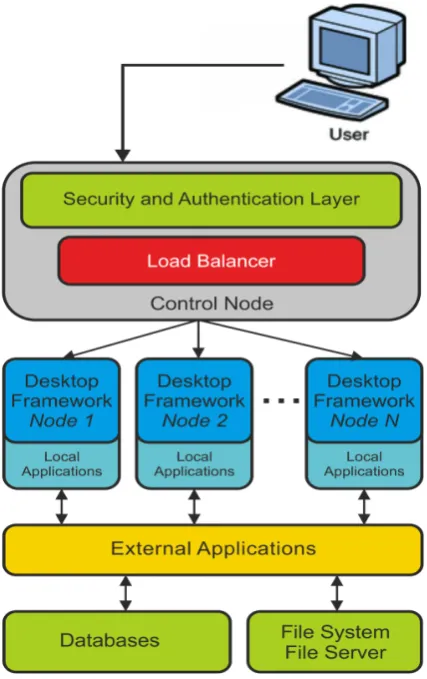
The approach followed by the system architecture allows the different components to be isolated from each other by executing on independent servers. The communication between these servers is explicitly managed over the internet by the generic request-response mechanism. The architecture follows a philosophy of grouping functionalities that require common resources. Also, it isolates the data from the applications. This is done in order to improve scalability of the system, wherein newer modules and applications can be easily embedded into the system with minimal reconfiguration and effect on the data. The system architecture is as shown in Figure 2.
The components of the architecture are as follows: 1) Client: The client is a user accessing the system via a browser on a client computer. The minimum requirements of such a client machine are a web browser and an internet connection. Since the requirements of client are very scant, client machines need not be of high configurations. This results in an indirect saving of resources.
2) Control Node: The Control Node hosts the Security and
Authentication Layer and the Software Level Load Balancer. Thus the major functions of the node include managing the users, security and balancing the users by the redirecting to different nodes. The Control Node necessarily executes on the cloud server so as to many a larger number of incoming requests. Once the user logs into the system the number of interactions increase immensely. In order to balance these interactions a software level load balancer migrates the users
[image:2.595.84.524.85.343.2] [image:2.595.330.544.386.726.2]Computer Science and Information Technology 1(1): 57-64, 2013 59
3 ) Security and Authentication: The security and
authentication layer operates as the first layer and manages two major functions. Firstly, it is responsible for the authentication of the users that login to the system. The second function of this layer is to manage security of the system. This it does by executing several scripts for keeping track of users on the site, intrusion detection, monitoring their behaviour etc.
4) Load Balancer: A load balancer is implemented in
software to balance the incoming users to the machines. The interactions on the control node are minimal. But once the users logs into system, the number of interactions increase as the number of users increase. To manage this load, the load balancer redirects the user to different replicas of the Desktop Framework running on different nodes. Independent nodes execute the Desktop Framework and other local applications. Local Applications are applications which do not depend on external resources and data and hence can be executed at the Desktop Framework nodes itself.
5)Desktop Framework: The Desktop Framework and local
applications are replicated on multiple servers to avoid excessive load on a single machine. The framework consists of the basic desktop functionalities and background services that need to execute during the session and the references to the various services. It is important to note that when the Framework loads in the client machine, not all applications are loaded, but only their references are, thus avoiding the overhead of transporting entire applications to the client, if they are not going to be used. The applications are called only when they are required and are destroyed once their execution is over or they are aborted.
6) External Applications: A major advantage of the
proposed system is that it provides a provision to embedding already developed and deployed third party web applications into the system. Thus, applications developed and hosted by third party organisations can be referenced such that they provide users with additional functionalities. This embedding not just provides with ease of scalability of the system but also offers a window to external third party applications.
7) Databases: Unlike the framework and local applications, data is not replicated. This is to provide security by decreasing the number of vulnerable locations of attack and avoid the overhead of propagating the changes in multiple copies of data. However to improve the reliability of the data, the overhead of frequent backup of the databases becomes necessary.
8) File System and File Server: Since the system does not replicated data, the File Server assigns predefined storage space to the users. Users cannot exceed the limit of storage space granted to them.
3. Software Approach
As an explicit design choice, we leverage as much
functionality as possible from existing low level services. Certain modifications to these services are also implemented for better functionality:
A. Framework – Prototype.js
Prototype is an open-source JavaScript Framework that aims to ease development of dynamic web applications. It offers a familiar class-style Object Oriented framework, extensive AJAX support, higher-order programming constructs, and easy DOM manipulation.
Prototype currently targets the following platforms:
Table I. Compatibility of Prototype.js Framework
Sr.no Browsers
1 Microsoft Internet Explorer for Windows, version 6.0 and higher
2 Mozilla Firefox 1.5 and higher
3 Apple Safari 2.0.4 and higher
4 Opera 9.25 and higher
5 Chrome 1.0 and higher
The prototype window class is based on the prototype.js framework. This class is responsible for displaying the windows in the browser. The class involves methods to initialise, position, define size, close and other events that control the window parameters. The window class is based on the script.aculo.us library provides the effects for opening, closing and resizing of the window.
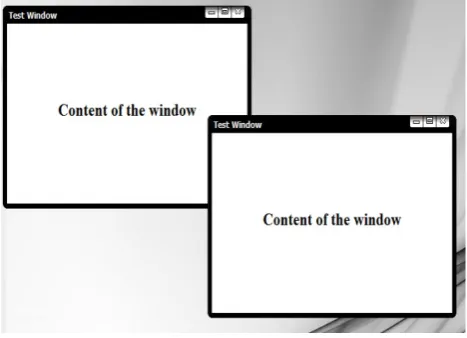
Whenever a reference to an application is made, first the JavaScript window loads using the parameters specified in the function call. Everytime a window is opened a new instance of the object is created and destroy on close. A sample window that is created using the Prototype Window is shown in Figure 3. The windows can be maximised, minimised, dragged, resized and ordered on top of one another. Closing a window also destroyed the application executing in it.
[image:3.595.316.550.568.737.2]Figure 4. Screenshot of applications executing on the system
[image:4.595.71.543.75.348.2] [image:4.595.72.544.313.721.2]Computer Science and Information Technology 1(1): 57-64, 2013 61
B. Applications and Services
The system gives users the freedom of work from any location using a web browser. The system makes an attempt to migrate desktop applications to the web. It also aims to unify web applications, providing users with a single point of access through which they can utilize tools and services, store files, read emails and perform tasks which are traditionally done using desktop applications. The Figure 4 shows a snapshot of a word processor implement using the open source TinyMCE WYSIWYG Editor, a Flash game and Calculator Application.
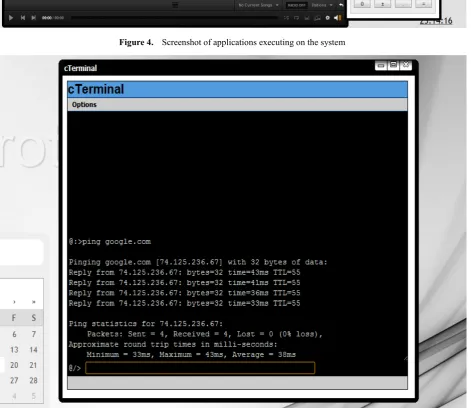
A cTerminal application also forms a part of the system. It allows users to execute certain Terminal commands on the server. Due to security concerns, users are disallowed from executing machine level commands and only a partial set of permitted commands are allowed to be executed by a user. Also, the cTerminal feature is only available for local intranets and LANs and disabled for remote cloud servers due to security concerns as it may be a vulnerability that may be harmful to the system. Figure 5 displays cTerminal executing server side commands.
The system makes use of Ajaxplorer Core 4.0.4 which is an open source Web File Explorer. This allows users to upload and download their files and in some cases view their files too.
Other applications included in the system are cConnect - a chat application, games, cNote - a web notepad alternative. Other applications can be embedded into the system with ease. The most important feature of the system is that it can simultaneously run inbuilt applications as well as embedded third party applications without any dependence whatsoever. C. Load Balancing Technique
The load balancing technique that the system uses is Round Robin with Threshold. Traditional Round Robin algorithm will redirect the users equally to the all the servers in the cluster. However, this approach will result into large number of iterations throughout the series of servers. Inorder to reduce the number of iterations, the system uses a threshold, to redirect a certain predefined number of users, to every server in a round robin manner. The threshold is the number of users that are consecutively redirected to the same server.
Input:
threshold: Consecutive users to be redirected to the same server.
servers: Number of servers with replicated applications. Output:
siteid: the Server ID to redirect the user to. Algorithm:
1. Calculate looplimit = threshold * servers. 2. Initialise the countervalue to 0 and write to a file.
3. On a valid login to the system, read countervalue. 4. Increment countervalue by 1.
5. If countervalue: = looplimit, initialise countervalue back to 0.
6. Write countervalue back to file.
7. Calculate siteid = floor ( countervalue / threshold ) 8. Return siteid.
D. Security
As the system is over a public network, security forms a significant factor to judge its reliability. An attempt has been made to improve the security of the system by making use of scripts and mechanisms that allow easy and secure access to the system. These mechanisms are explained as follows:
Preventing SQL Injections: The login page inorder to
prevent spurious users from attacking the system using SQL injections.
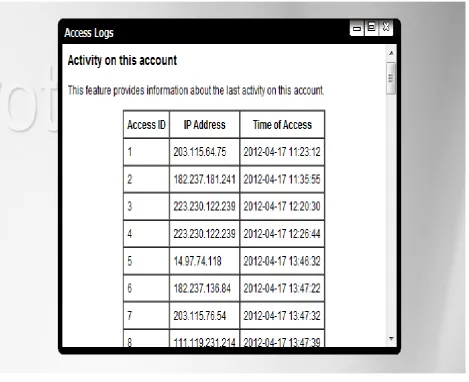
Access Logs: This feature can be used by the users to trace their login activity to the system. A user may be able to trace malicious access to the system by checking these logs (Figure 6).
Monitoring: The system monitors the activity of the users that are trying to log into the system. These logs can be used to trace malicious activity at the login itself (Figure 7). Further spurious users may not be allowed access using the IP Blocking mechanism.
IP Blocking: The security mechanism allows blocking of
particular IP addresses an access to the system. These IP address can be address of spurious users that have been tracked based on their suspicious activity.
Privacy Control: Privacy control aims at allowing users
access only to their data. It prevents the user from accessing the data of another user. The system keeps a track of the user details throughout the session using multiple session variables. Privacy Control is done by concatenating the user information to the user data.
4. Cloud Implementation
ProtoCloud runs on a cloud server executing on Linux CentOS 5.5 (64bit). The system is powered by VMware® ESX 4.0. VMware ESX is an enterprise-level computer virtualization product offered by VMware, Inc. ESX is a component of VMware's larger offering, VMware Infrastructure, and adds management and reliability services to the core server product [6]. Major features of the system are as follows:
1. Cloud Server OS- Linux CentOS 5.5 – 64bit 2. Virtualisation - Powered by VMware® ESX 4.0 3. OC192/9953 Mbps Data Centre Internet Backbone 4. Firewall - ASA 5500 Series Cisco® Anti-DdoS
Figure 6. Access Logs
[image:6.595.73.543.75.457.2] [image:6.595.67.546.235.724.2]Computer Science and Information Technology 1(1): 57-64, 2013 63
5. Testing
The compatibility of system is as shown in the Table II. The system is not compatible with many versions of Internet Explorer due to a complex frame structure and use of HTML5 technologies. However it functions correctly with other major browsers. Performance on Google Chrome is found to be most desirable.
Table II. Compatibility of ProtoCloud
Sr.
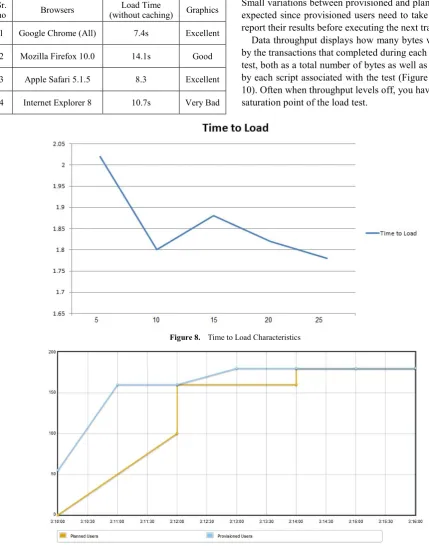
no Browsers (without caching) Graphics Load Time
1 Google Chrome (All) 7.4s Excellent
2 Mozilla Firefox 10.0 14.1s Good
3 Apple Safari 5.1.5 8.3 Excellent
4 Internet Explorer 8 10.7s Very Bad
A very important benefit of using a caching web browser is that as a user repeatedly accesses the site, certain files get cached and lead to faster loading of the system. This can be illustrated with the help of the chart shown in Figure 5.
The system has been tested also for the load (Figure 8) that it can take with respect to simultaneous accesses to the main desktop since it contains the highest number of scripts and resources. Figure 6 shows how many concurrent users were planned and many were actually provisioned and executing. Small variations between provisioned and planned users are expected since provisioned users need to take a moment to report their results before executing the next transaction.
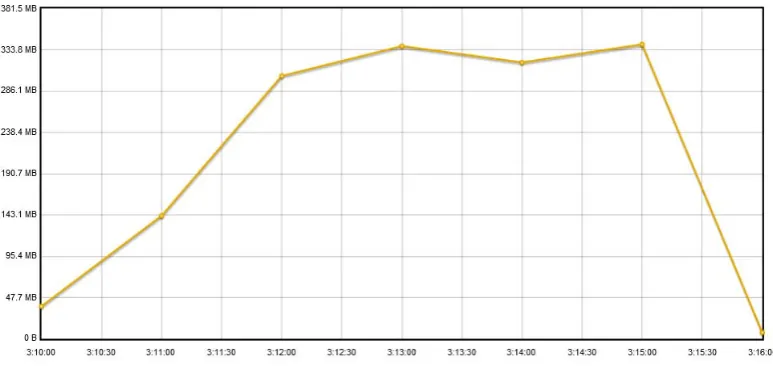
Data throughput displays how many bytes were received by the transactions that completed during each minute of the test, both as a total number of bytes as well as broken down by each script associated with the test (Figure 9 and Figure 10). Often when throughput levels off, you have reached the saturation point of the load test.
Figure 8. Time to Load Characteristics
[image:7.595.69.499.193.740.2]Figure 10. Data Throughput of the System
6. Conclusion
In this paper an attempt has been made to present approach for implementing a desktop service that executes on a web browser. With the recent trends in the web technologies and the growing impact of it on the business and domestic uses, the scope of ProtoCloud and similar technologies seems promising and may be a very good option for portable operating environments on the internet. ProtoCloud provides users, an efficient, scalable and reliable alternative mode for easy custom operating mechanism along with providing secure storage.
REFERENCES
[1] Planning the Migration of Enterprise Applications to the Cloud: White Paper, Cisco Systems, Inc. C11-618438-00 08/10
[2] Timothy Wood K.K. Ramakrishnan, Prashant Shenoy, Jacobus Van der Merwe, CloudNet: Dynamic Pooling of Cloud Resources by Live WAN Migration of Virtual Machines, University of Massachusetts, Technical Report 2010 - Preliminary Draft
[3] Harold C. Lim, Shivnath Babu, Jeffrey S. Chase, Automated Control for Elastic Storage, ICAC’10, June 7–11, 2010, ACM 978-1-4503-0074-2/10/06
[4] Introduction to VPN: Scalability and VPNs, Disadvantages of VPNs,
http://homepages.uel.ac.uk/u0117002/NETWORKS.COM/a a010701c.htm, Date of Access: March 31, 2012.
[5] Stefan Ried, Ph.D., Holger Kisker, Ph.D., Pascal Matzke, Andrew Bartels, Miroslaw Lisserman, Sizing the Cloud: Understanding And Quantifying The Future Of Cloud Computing, Forrester Research
[6] VMware ESXi and ESX Info Center: Migrate to ESXi Hypervisor,
[image:8.595.111.498.74.257.2]