Interface Behaviour through Software
Architectural Design
Devina Ramduny-Ellis
A thesis submitted in partial fulfilment of the
requirements of Staffordshire University for the
degree of Doctor of Philosophy
Abstract
Frameworks for Enhancing Temporal Interface
Behaviour through Software Architectural Design
Devina Ramduny-Ellis
A thesis submitted in partial fulfilment of the requirements of Staffordshire University for the degree of Doctor of Philosophy
December, 2002
The work reported in this thesis is concerned with understanding aspects of temporal behaviour. A large part of the thesis is based on analytical studies of temporal properties and interface and architectural concerns. The main areas covered include:
(i) analysing long-term human processes and the impact of interruptions and delays (ii) investigating how infrastructures can be designed to support synchronous fast pace
activity
(iii) design of the Getting-to-Know (GtK) experimental notification server
The work is motivated by the failure of many collaborative systems to effectively manage the temporal behaviour at the interface level, as they often assume that the interaction is taking place over fast, reliable local area networks. However, the Web has challenged this assumption and users are faced with frequent network-related delays. The nature of cooperative work increases the importance of timing issues. Collaborative users require both rapid feedback of their own actions and timely feedthrough of other actions.
Although it may appear that software architectures are about the internals of system design and not a necessary concern for the user interface, internal details do show up at the surface in non-functional aspects, such as timing. The focus of this work is on understanding the behavioural aspects and how they are influenced by the infrastructure. The thesis has contributed to several areas of research:
(a) the study of long-term work processes generated a trigger analysis technique for task decomposition in HCI
(b) the analysis of architectures was later applied to investigate architectural options for mobile interfaces
(c) the framework for notification servers commenced a design vocabulary in CSCW for the implementation of notification services, with the aim of improving design
(d) the impedance matching framework facilitate both goal-directed feedthrough and awareness
Acknowledgements
I would like to thank my supervisor, Alan Dix, for his guidance and support throughout the duration of this research. His critical comments on drafts of this thesis have been invaluable.
I would also like to share this achievement with my parents and parents-in-laws who have been wondering what I have been doing for so many years.
Table of contents
Abstract ...i
Acknowledgements...ii
Table of contents...iii
List of figures ...xi
List of tables ...xiv
Chapter 1 Introduction ...1
1.1 Background to the problem...2
1.2 Objectives of the work...4
1.3 Approach of the work...4
1.4 Novel characteristics of the work ...7
1.5 Contributions to the research area ...7
1.6 Structure of the thesis ...8
Chapter 2 Time and Interactivity...11
2.1 Background ...12
2.1.1 The Human memory...12
2.1.1.1 Working memory...12
2.1.1.2 Long-term memory...13
2.1.1.3 Effect of interruptions ...13
2.1.2 Cognitive models ...13
2.1.2.1 GOMS Model...13
2.1.2.2 Keystroke-Level Model...14
2.2 Time and the interactive process...15
2.2.1 Response time ...15
2.2.2 Impact of delays ...17
2.2.3 Need for feedback...18
2.2.4 Types of feedback ...19
2.2.4.1 Alert box ...19
2.2.4.2 Progress Indicator...19
2.2.5 Coping strategies ...19
2.3 Interaction over the Web...20
2.3.1 Problem areas...21
2.3.1.2 Network latency ...21
2.3.1.3 Collaborative interaction...21
2.3.2 Coping Strategies...22
2.3.3 Potential solutions ...23
2.4 Temporal properties of interactive systems...23
2.4.1 Interface behaviour ...23
2.4.1.1 Events, status and agents ...23
2.4.1.2 Mediating status ...24
2.4.2 Pace of Interaction...24
2.4.2.1 Pace of communication channel...25
2.4.2.2 Pace of task...25
2.4.2.3 Pace of users ...25
2.4.2.4 Delays ...26
2.4.2.5 Coping with delays...26
2.4.2.6 Time granularity...27
2.5 Summary...28
Chapter 3 Single-user Interface and Architecture Issues ...30
3.1 Requirements...30
3.1.1 Separation...31
3.1.2 Direct manipulation...31
3.1.3 Feedback ...31
3.1.4 Consistency...32
3.2 Architectural models ...32
3.2.1 Seeheim model ...32
3.2.2 Arch/Slinky model...33
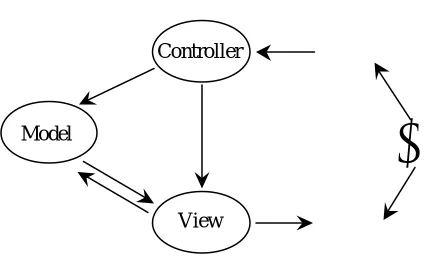
3.2.3 Model-View-Controller ...34
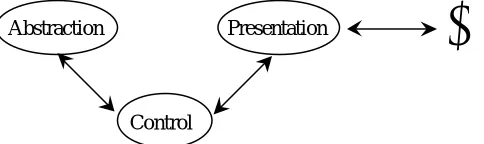
3.2.4 Presentation-Abstraction-Control...36
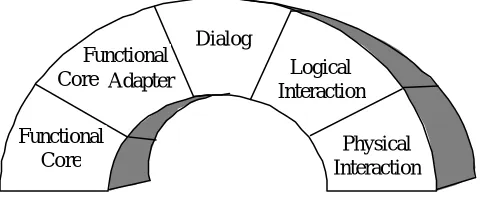
3.3 Analysing architectural models...37
3.3.1 Conceptual architecture...37
3.3.2 Physical architecture...38
3.4 Interface development tools...39
3.4.1 Windowing systems ...39
3.4.2 Toolkit...40
3.4.3 User Interface Management Systems ...40
3.4.4 User Interface Development Environments...41
3.5 Design paradigms...41
3.5.2 Object-oriented ...42
3.5.3 Constraint-based ...42
3.5.4 Callback...43
3.6 Summary...44
Chapter 4 Multi-user Interface and Architecture Issues for Collaboration...46
4.1 Requirements...47
4.1.1 Separation...47
4.1.2 Feedback ...47
4.1.3 Feedthrough ...48
4.1.4 Awareness...48
4.1.5 Sharing...49
4.1.6 Control...50
4.2 Architectural models ...50
4.2.1 Centralised architecture...51
4.2.1.1 Rendezvous Abstraction-Link-View architecture...51
4.2.2 Replicated architecture...52
4.2.3 Hybrid architecture ...54
4.3 Interface development tools...56
4.3.1 Shared window systems ...56
4.3.2 Shared object systems ...57
4.3.3 Groupware toolkits ...59
4.3.4 Multi-user User Interface Management Systems ...59
4.3.5 Multi-user interface generator...61
4.4 Design paradigms...61
4.4.1 Constraints ...61
4.4.2 Callbacks ...62
4.4.3 Active values ...62
4.5 Summary...63
Chapter 5 Why, What, Where, When: An analysis of Collaborative Architectures on the Web...65
5.1 Overview of the Web...66
5.1.1 Architecture...66
5.1.2 Limitations ...67
5.1.2.1 Asymmetric nature ...68
5.1.2.2 Lack of awareness ...68
5.1.2.5 Unreliable transmission...68
5.1.2.6 Poor user interface ...69
5.1.3 Improving functionality...69
5.1.3.1 Using CGI scripts...69
5.1.3.2 Implementing dedicated servers and clients ...69
5.1.3.3 Augmenting Web interface...69
5.1.3.4 Enhancing network protocol...70
5.2 Analytic focus ...71
5.3 Why – behavioural issues...72
5.3.1 Feedback ...72
5.3.2 Feedthrough ...72
5.3.3 Awareness...72
5.3.4 Shared objects...73
5.3.5 Control...73
5.4 What – architectural components...73
5.4.1 Presentation...73
5.4.2 Shared data ...74
5.4.3 Control...74
5.4.4 Notification...74
5.5 Where – placement decisions ...75
5.5.1 Replication and Caching...75
5.5.2 Control...76
5.5.3 Notification...78
5.5.4 Different kinds of remoteness ...78
5.6 When – moving information and code...79
5.6.1 Moving data ...79
5.6.2 Moving code ...80
5.7 Narrowing down options for the Web ...80
5.7.1 Remote execution and use...81
5.7.2 Local execution and use ...81
5.8 Impact on research ...82
5.8.1 Behavioural considerations ...83
5.8.2 Influence on architecture...83
5.9 Summary...84
Chapter 6 Exploring the Design Space for Notification Servers ...86
6.1 Need for notification mechanism...87
6.2.1 Key concepts ...88
6.2.2 Mediation...88
6.3 Status change discovery...89
6.3.1 Case 1: watch...89
6.3.2 Case 2: tell...90
6.3.3 Case 3: ask...90
6.3.4 Case 4: gatekeeper ...90
6.3.5 Source vs. Initiative...91
6.4 Notification Servers as Mediators...92
6.4.1 Change discovery options without a Notification Server ...92
6.4.2 Change discovery options with a Notification Server...93
6.5 Taxonomy of notification servers ...95
6.5.1 Possible arrangements...96
6.5.2 Location of notification server...98
6.6 Notifying users...99
6.6.1 Layering ...99
6.7 Notification models ...100
6.7.1 Event-based ...100
6.7.2 Status-oriented ...100
6.8 Summary...101
Chapter 7 Impedance Matching: Coping with Limited Resources ...103
7.1 Need for impedance matching ...104
7.2 Where to control pace of feedthrough...105
7.2.1 Interaction without notification server...105
7.2.2 Interaction with notification server...106
7.3 Impedance Matching Policies ...107
7.3.1 Pace Impedance ...107
7.3.2 Volume Impedance...108
7.3.3 Impedance matching vs. QoS...108
7.3.4 Implementation Issues...108
7.4 Exploring pace policies...109
7.4.1 Fixed time interval...110
7.4.2 Time delay...111
7.4.3 Volume of messages ...111
7.4.4 Message size ...112
7.5 Scenarios for impedance matching...112
7.5.2 Multi-user chat system ...113
7.5.2.1 Applying impedance matching...115
7.5.3 Avatar-based chat system...115
7.5.3.1 Applying impedance matching...116
7.6 Further issues...118
7.6.1 Impact of rich media ...118
7.6.2 Ordering of events ...119
7.6.3 Priority of notification...121
7.6.4 Generating notification of non-events ...122
7.6.5 Optimising the timing of notification delivery...123
7.6.6 Impedance matching in other areas ...123
7.7 Summary...125
Chapter 8 Getting-to-Know: An experimental Notification Server...127
8.1 Basic architecture...128
8.2 Messaging and event layer...128
8.2.1 Messaging protocol...129
8.2.2 Message format ...130
8.2.2.1 Message class...130
8.2.2.2 Event handler...131
8.2.3 Message exchange ...132
8.3 Notification Manager ...134
8.3.1 Main functions ...135
8.3.2 Managing interests ...136
8.3.2.1 Add interest ...137
8.3.2.2 Remove interest ...137
8.3.3 Broadcasting events ...137
8.3.3.1 Tell All...138
8.3.4 Illustrating type translation...138
8.4 Augmenting GtK for Impedance Matching...140
8.4.1 Pace parameters ...140
8.4.1.1 Frequency class ...140
8.4.2 Managing interests with frequency...141
8.4.2.1 Add interest ...142
8.4.2.2 Remove interest ...142
8.4.3 Event queue management ...144
8.4.3.1 Tell all...144
8.4.4 Altering pace parameters...146
8.4.4.1 Change frequency ...146
8.5 Example real-time online conferencing application...147
8.6 Summary...149
Chapter 9 Demonstration through an Exemplar...151
9.1 Evaluation criteria...151
9.2 Interface behaviour ...152
9.2.1 Connect to application ...152
9.2.2 Register with application...153
9.2.3 Create new conference ...154
9.2.4 Join conference...154
9.2.5 Add contribution...155
9.2.6 Interact with multiple conferences...156
9.2.7 Leave conference...157
9.2.8 Quit application...157
9.3 Application implementation...158
9.3.1 Connect to Conference Manager...158
9.3.2 Register with Conference Manager...158
9.3.3 Create new conference ...160
9.3.4 Join conference...162
9.3.5 Add contribution...166
9.3.6 Leave conference...168
9.3.7 Quit application...169
9.4 Pace controlled feedthrough ...170
9.4.1 Set frequency levels ...170
9.4.2 Track users focus...171
9.4.3 Register pace interest ...171
9.4.4 Illustrating pace impedance matching ...172
9.5 Summary...183
Chapter 10 Architectural Evaluation...185
10.1 Flexibility...185
10.1.1 Current notification arrangement ...186
10.1.2 GtK as a pure notification server ...188
10.1.3 Further architectural possibilities...189
10.2 Distribution...191
10.2.2 Possibility for supporting multiple data sources...192
10.3 Mobility...193
10.3.1 Introducing mobility in the GtK framework ...193
10.3.1.1 Point of Presence ...194
10.3.1.2 Interaction through the PoP ...194
10.3.2 Pace issues in mobile interaction...196
10.4 Event Management...197
10.4.1 Event ordering in the GtK framework ...198
10.4.2 Maintaining event ordering with impedance matching...199
10.4.2.1 Limitations ...199
10.5 Interacting with existing data...200
10.6 Summary...201
Chapter 11 Conclusion ...203
11.1 Issues raised by analytical studies...204
11.2 Meeting the objectives of the work ...208
11.3 Broader research themes...213
11.3.1 Trigger analysis ...213
11.3.2 Analysing architectural options for mobile interfaces...214
11.3.3 Requirements for notification mechanisms ...214
11.4 Final remark...216
References ...215
Appendix Case Study of Long-term Interaction...235
1. Problems of long-term interaction...235
2. Analytic method ...237
3. Details of the study...239
4. Findings of the study...244
5. Related approaches...247
6. Design implications ...249
List of figures
Figure 1.1 Collaborative interaction...1
Figure 1.2 Temporal context...5
Figure 1.3 Thesis structure ...9
Figure 2.1 Norman’s interaction cycle ...15
Figure 2.2 Factors influencing pace of interaction...25
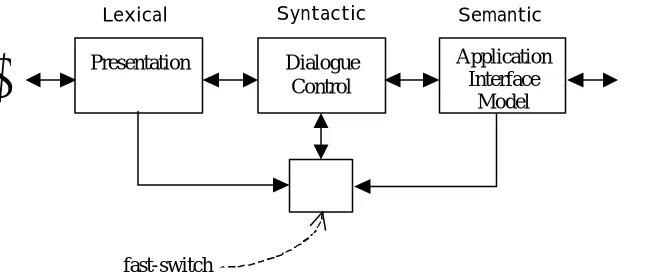
Figure 3.1 Logical components of Seeheim model ...33
Figure 3.2 Arch/Slinky model ...34
Figure 3.3 Model-View-Controller model...35
Figure 3.4 Presentation-Abstraction-Control model...36
Figure 4.1 Centralised architecture ...51
Figure 4.2 ALV architecture ...52
Figure 4.3 Replicated architecture ...53
Figure 4.4 Suite hybrid architecture ...54
Figure 4.5 (a) Output and (b) Input structure of a shared window system...57
Figure 4.6 Run-time ALV architecture ...60
Figure 5.1 Web client-server architecture ...66
Figure 5.2 (a) Caching and (b) Replication ...76
Figure 5.3 Data Usage vs. Data Storage ...79
Figure 5.4 Code Usage vs. Code Storage ...80
Figure 5.5 Linked matrices...81
Figure 6.1 Status -agent interaction...89
Figure 6.2 Source v/s Initiative...91
Figure 6.3 Client-data interaction without notification server...92
Figure 6.4 Client-data interaction with notification server...94
Figure 6.5 Notification server communicating with active client and data...94
Figure 6.6 Notification server relaying change to passive client...95
Figure 6.7 4x2 matrix for change discovery and propagation...96
Figure 6.8 Notification server taxonomy ...96
Figure 7.1 Update propagation...104
Figure 7.2 (a) broadcast and (b) peer-to-peer interaction...106
Figure 7.3 Using notification server as mediator...106
Figure 7.4 Time -space diagram without impedance matching ...110
Figure 7.5 Time -space diagram with fixed time interval ...110
Figure 7.6 Time -space diagram with time delay ...111
Figure 7.7 Time -space diagram with volume of messages...111
Figure 7.8 Time -space diagram with message size ...112
Figure 7.9 Example bulletin board system layout...113
Figure 7.10 Example Babble screenshot...114
Figure 7.11 Example Xchat screenshot...114
Figure 7.12 Example chat session with impedance matching...115
Figure 7.13 Example avatar-based chat room...117
Figure 7.14 Example avatar-based chat room with impedance matching...117
Figure 7.15 Timing diagram with point-to-point ordering of events...119
Figure 7.16 Example conferencing system transcript ...120
Figure 7.17 Monitoring the occurrence of non-events ...122
Figure 8.1 GtK infrastructure ...128
Figure 8.2 Interest table ...136
Figure 8.3 Flow of events between client and server objects...139
Figure 8.4 Effect of pace impedance on interest table ...141
Figure 8.5 Conferencing exemplar on GtK infrastructure ...148
Figure 8.6 Event vs. message ...148
Figure 8.7 Event and message exchange in conferencing exemplar...148
Figure 9.1 Typical client applet ...153
Figure 9.2 User registration...153
Figure 9.3 Create new conference...154
Figure 9.4 Join conference...154
Figure 9.5 Pop-up conference window...155
Figure 9.6 Add contribution ...155
Figure 9.7 Overlapping conference windows ...156
Figure 9.8 Leave conference ...157
Figure 9.10 Client object registers with Conference Manager...159
Figure 9.11 Conference Manager sends conference list to client object ...160
Figure 9.12 Create new conference and broadcast updated list...162
Figure 9.13 Join conference...163
Figure 9.14 Send greeting message ...164
Figure 9.15 Another us er joins conference ...165
Figure 9.16 User adds contribution ...166
Figure 9.17 Contributions from multiple users ...167
Figure 9.18 Leave conference ...169
Figure 9.19 (a) Example scenario...173
Figure 9.20 (b) Adding contributions ...174
Figure 9.21 (c) Managing contributions ...176
Figure 9.22 (d) Queue flush time reached...178
Figure 9.23 (e) Adding contributions ...180
Figure 9.24 (f) Change in conference focus ...182
Figure 10.1 Revisiting the 4x2 matrix...186
Figure 10.2 Main components of conferencing exemplar...186
Figure 10.3 Flow of events during change propagation...187
Figure 10.4 GtK within the conferencing exemplar...187
Figure 10.5 GtK as a pure notification server...188
Figure 10.6 Additional location for GtK...189
Figure 10.7 Physical structure of conferencing exemplar...191
Figure 10.8 GtK framework with heterogeneous data servers ...192
Figure 10.9 Logical components of GtK framework ...194
Figure 10.10 Point of Presence ...194
Figure 10.11 Logical components in mobile environment ...195
Figure 10.12 Pace impedance matching in mobile environment ...197
Figure 10.13 Star configuration in GtK framework ...198
Figure 10.14 Possibility of race condition with peer-peer network ...198
Figure 10.15 Event ordering with impedance matching...199
List of tables
Table 3.1 Summary of functionalities offered by architectural models ...38
Table 3.2 Mapping of components between architectural models...38
Table 4.1 Centralised vs. Replicated architecture ...56
Table 4.2 Collaboration transparency vs. Collaboration aware ...59
Table 11.1 Summary of issues raised in analytical studies...207
Table 11.2 Summary of how objectives have been met...212
Chapter 1 Introduction
The rapid growth in worldwide communications has enabled users to collaborate and access shared resources remotely. Most systems assume that the network communications are fast enough to give the illusion of communicating over local networks. However, these assumptions do not always hold true and this may give rise to unexpected behaviour for the users. This thesis deals with the issues of time and collaboration and looks at how temporal factors affect collaborative work, particularly when it involves interaction over a wide area network.
Consider an example where a number of remote users are collaborating through a chat system. Each user’s contribution to a certain topic has to be broadcast to all other users who are interested in that particular chat session. This implies that the contributions have to be sent across the network. If the network suffers from delays, the interested users will not be able to see the contributions within an acceptable time. The flow of conversation can easily get out of synchronisation and users will be confused. On the other hand, if the contributions are sent rapidly over a very fast network, users may find it too distracting to cope with many contributions simultaneously, especially if they have launched several chat sessions on different topics. It is therefore desirable that users see the contributions to each chat session in a timely manner.
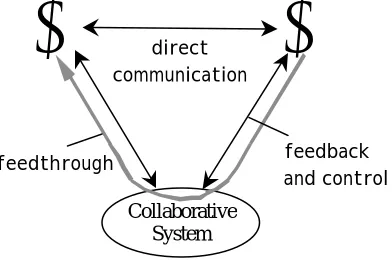
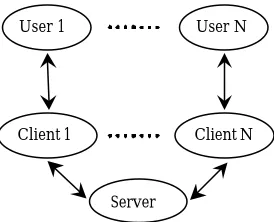
Temporal properties have traditionally been linked to the system response time, in other words, the delay between a user’s action and the system displaying results back on the screen. In single-user interaction, feedback is the dominant temporal property. Feedback is the rate at which users see the effects of their own actions. But with collaborative interaction (figure 1.1), there is another major temporal property in addition to feedback. Feedthrough is the rate at which users see the effect of other group members’ actions.
J
J
Collaborative System
feedback and control feedthrough
[image:16.596.225.421.526.656.2]direct communication
Figure 1.1 Collaborative interaction
network usage. The unreliability of timely responses increases user frustration and application errors, and can eventually lead to a complete breakdown in the work process.
Collaborative users require both feedback and feedthrough information at a fast enough rate to allow the flow of collaboration to take place successfully. However, the provision of feedthrough is more problematic in a distributed environment as the application may execute on a completely different server from the local user interface through which each user is interacting with. Components placed at different locations face higher communication costs and delays than those at the same location.
There is this fallacy when building infrastructures that we can ignore the implementation details so long as the platform has sufficient capability. The infrastructure is very often treated as a ‘black box’. However, the way that things are implemented does actually matter, as the underlying infrastructure tends to show up in non-functional aspects, particularly in timing, for instance during network delays.
Both temporal factors and implementation infrastructures are therefore very important issues in Computer Supported Collaborative Work (CSCW). This thesis will partly consider the issues surrounding temporal properties and collaboration but the principal focus is on the underlying infrastructure that enables the construction of temporally coherent collaborative applications.
This work does not attempt to overcome the problems of communication delays by constructing an effective network protocol. It accepts that delays are likely to occur even over fast networks within a collaborative context and it uses this fact to drive the development of an underlying infrastructure that provides remote users with satisfactory temporal behaviour at the interface.
1.1 Background to the problem
Although the temporal properties of interaction are theoretically essential, they have been poorly investigated with the exception of a few studies (Dix, 1987), (Dix, 1992a), (Dix, 1994a), (Gray et al., 1994). There is also a sociological tradition of studying temporal phenomena that has recently been used in some ethnographic studies (Hudson et al., 2002), (Reddy and Dourish, 2002). Temporal properties in system design have traditionally been associated with the system response time (Miller, 1968), (Card et al., 1991), (Nielsen, 1993). However, the response time is not the only temporal property of interactive systems. This research uses two additional properties as its foundation for assessing temporal problems that users perceive at the interface.
The second temporal property lies in the issues surrounding pace of interaction. The pace of interaction is the rate at which users interact with computer systems, the physical world and one another (Dix, 1992a), (Dix, 1994a), (Dix, 1995a). The pace of interaction is influenced by three factors: the pace of the communication channels, the pace of the shared task and the pace at which users operate. A mismatch between either one of these factors and the resulting pace of interaction generates delays. Unlike bandwidth, which gives a measure of the amount of information that is transmitted, pace indicates the frequency of communication.
Thinking about pace makes one concentrate on the timescale over which interaction occurs. This may take place over different lengths of time. When users interact with computer systems they normally expect the delay between their actions and the system feedback to be rather short. For example, in direct manipulation interfaces, the feedback needs to be in the order of 100ms. However, people across organisations often have to interact over a much longer timescale, which may range from hours to days. As a result, the interaction is likely to suffer from frequent interruptions, thus intensifying the temporal problems that people may have to face.
The emergence of the Web as an interactive environment has increased the significance of the temporal properties of interaction. The Web provides an information infrastructure that is universally accepted and this influences our everyday interaction through the Internet. The focus of this interaction is mainly on the communication infrastructure rather than the devices that access it; hence we tend to make inherent assumptions about the architecture of the infrastructure.
Over the last few years, various techniques have been developed for the analysis of CSCW and groupware (Benford and Fahlén, 1993), (Dix, 1994b), (Dix, 1994a). Also, there are many existing architectures for single-user interfaces and multi-user collaborative interfaces (Pfaff and Hagen, 1985), (Bentley et al., 1994), (Hill et al., 1994). However, most of these architectures are based on assumptions that will be broken once the software is no longer running on a single machine or even on a local network. However, these existing architectures form an essential starting point for this work.
Collaborative users require two important temporal requirements − feedback and feedthrough. The provision of feedthrough is more challenging in a collaborative application that executes over a distributed environment such as the Web. For example, rapid user interface feedback on the Web can be promoted by running code locally as downloaded Java applets; however local data updates may conflict with the needs of feedthrough. Feedthrough is an essential feature of cooperative interfaces but there is often little support for it, from either existing applications or the Web protocol itself.
models (Benford et al., 1993), (Rodden, 1996) have emerged largely due to work on Collaborative Virtual Environments (CVE).
The analytic focus of this research is driven by the need for optimising temporal performance. The motivation lies in the timeliness of information, as informed by the temporal requirements of collaborative users and the design considerations of the underlying system architecture.
1.2 Objectives of the work
The primary objective of the work reported in this thesis was to develop the existing analysis of temporal problems and use this analysis to drive the development of software architectures for widely distributed groupware systems. This objective can be broken down into the following sub-goals:
• To develop an architectural framework that enables the construction of collaborative applications that satisfy appropriate temporal properties.
• To demonstrate the feasibility of the conceptual framework by using it as a basis for developing an exemplar that provides collaborative users with a temporal behaviour that meets their pace of interaction.
• To evaluate the effectiveness of the approach embodied by the model.
A major goal of this research was to support the construction of distributed collaborative applications that effectively manage the temporal behaviour at the interface level. The architectural requirements of this research are therefore driven by the desired temporal performance of the user interface. The next section shows how these goals have been addressed.
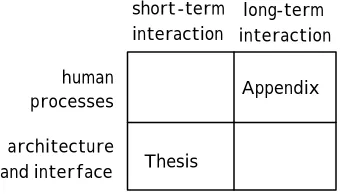
1.3 Approach of the work
short-term
interaction interaction long-term human
processes architecture and interface
Appendix
[image:20.596.237.407.75.172.2]Thesis
Figure 1.2 Temporal context
Software architecture is about dividing systems into components to perform certain functionalities and then linking the components together in such a way that they can communicate effectively. Although it may at first seem that software architectures are related to the internals of system design and not a necessary concern for the user interface, internal details manifest themselves at the surface. As a result, the consideration of the physical architecture becomes unavoidable. Architectural decisions directly influence the behaviour of the user interface and the most significant behavioural implication on a distributed platform is often the temporal impact.
Interface requirements and architectural models for both single-user applications and multi-user collaborative applications are analysed based on the existing body of literature. This architectural analysis is then extended to the Web, an environment that is predominantly subjected to delays. However, the Web also offers immense potential for the development of distributed collaborative applications, despite the fact that its protocol were originally designed and used largely for accessing anonymous static or slowly changing information.
The Web forces the concern between the location of the data and that of the control, thus generating various alternatives for the placement of architectural components. Location decision is decisive in determining the users rates of feedback and feedthrough. In order to clarify the various architectural options and their effects on the temporal properties offered by the interface, a framework for analysing cooperative architectures on the Web is presented.
Feedthrough is an intrinsic temporal limitation in collaborative applications in general. Furthermore, the needs for feedthrough on the Web conflict with those of feedback. However, feedthrough is crucial for maintaining collaboration and promoting awareness. There are two key requirements for feedthrough − firstly, the ability to access and update shared data, and secondly knowing when that data has been updated. The former lies behind the design of shared data repositories, either bespoke systems designed for CSCW or off-the-shelf databases and shared object stores. The latter requires notification mechanisms, the key element in informing people about status and change.
applications. The notification server can thus mediate feedthrough information between end-user clients.
Users involved in cooperative work often have to interact with a large number of shared objects. It may not always be possible to provide a fast rate of feedthrough for each object, as there is not enough network and computational resources available. Even if the network was infinitely fast and there was an infinite amount of memory, a maximum rate of feedthrough will generate further network congestion. The extra computational load implies delays for all the objects including the ones that are of higher interests to the users. Furthermore, from a cognitive viewpoint, collaborative users may find it too distracting to cope with a fast rate of updates.
This research therefore proposes that the notification server, through its central mediating role between end-user clients, is ideally placed to provide collaborative users with an effective level of feedthrough by matching the supplied pace of updates with the users required pace of updates. This matching has been called impedance matching. Feedthrough demands can be reduced by subsequently reducing the pace of updates (pace impedance) and the volume of updates (volume impedance).
The principles of notification server design and the issues surrounding impedance matching have been employed to develop the Getting-to-Know (GtK) purpose-built separable notification server. GtK is based on a distributed object infrastructure and it is largely an example to show how a controlled pace of feedthrough can be achieved in practice. GtK only supports pace impedance matching given the interests on pace issues in this research.
In order to demonstrate the practicality of the GtK notification server further, an example real-time Web conferencing application has been constructed using the GtK infrastructure. The application offers functionalities that are common in most Web-based chat systems. However, its novel feature lies in its ability to enable collaborative users to interact with multiple conferences simultaneously while adjusting the pace of feedthrough to match their rates of interests.
1.4 Novel characteristics of the work
The work reported in this thesis represents a novel integration of user interface and architectural issues to provide distributed collaborative users with effective temporal behaviour. Software architecture is very often driven by implementation reasons rather than the desired level behaviour. In contrast, this work lays particular emphasis on a user-oriented approach in establishing the requirements of a collaborative architecture.
The method of providing collaborative users with a controlled pace of feedthrough through impedance matching is innovative in CSCW. It emerges from the extensive analytic focus of this research, which also demonstrates that a careful placement of architectural components can facilitate explicit notification mechanisms that match the users’ pace of interaction.
This work also generated a novel method of analysing work processes through the 4Rs framework, which emerged from the study into long-term interaction. The 4Rs (Request, Receipt, Response, Release) recurrent pattern of activities is a fundamental unit of long-term work, as the same sequence repeats itself with similar triggers and similar failure modes. The 4Rs framework and the triggers for activities can be applied to assess the reliability of individual parts of a work process during system design.
1.5 Contributions to the research area
There have been a number of publications that this work has generated both in the HCI and CSCW research community. The interests of this research were presented to a panel of experienced researchers and practitioners at a doctoral colloquium session in a past CSCW conference (Ramduny, 1996).
The case study into long-term interaction led to a technical report (Dix et al., 1995), a short conference paper (Dix et al., 1996) and a journal paper (Dix et al., 1998). The trigger analysis technique that emerged from this study has also been proposed as a technique for task decomposition (Dix et al., 2003) that can be applied in conjunction with other task analysis or workflow methods.
The architectural framework for developing Web-based collaborative applications was published as a full conference paper (Ramduny and Dix, 1997a) and a poster (Ramduny and Dix, 1997b). The analytic technique was employed in a later research project1 to investigate software architecture options for mobile user-interfaces and the findings were published as a journal paper (Dix et al., 2000).
The structured analysis of the design space of notification servers also led to a full conference paper (Ramduny et al., 1998). This is an important contribution to the CSCW discipline as the last few years have seen the beginnings of a literature of notification servers in their own rights.
Finally, the issues surrounding impedance matching for providing effective user-level feedthrough were discussed at a day conference (Ramduny, 1999) and the findings were recently published as a full conference paper (Ramduny and Dix, 2002).
1.6 Structure of the thesis
Figure 1.3 shows the overall structure of the thesis. A series of analytical studies are presented in Chapters 2 − 7 which provide an understanding of the nature of temporal problems, infrastructure issues and design considerations. These analytical studies lead to the GtK framework that provides pace impedance matching. Chapters 8 − 10 describe the development of the GtK infrastructure, its use through the GtK notification server and evaluation via a real-time Web conferencing exemplar.
Chapter 2 starts by investigating the issues surrounding the temporal properties of interaction. It examines the impact of delays and interruptions on the interactive process and explores the temporal problems that users face on the Web. The foundations of interface behaviour and the issues of pace of interaction are applied to analyse the temporal problems that users perceive at the interface. The results of a case study that was carried out to check the completeness of the existing analysis on the pace of interaction and to identify the temporal problems faced during long-term interaction are discussed in the Appendix.
Chapter 3 considers the interface and architectural concerns involved in designing single-user applications. The analysis is based on examining architectural and temporal requirements for user interfaces, exploring mature architectural models, reviewing some of the tools that assist in the design and development of user interfaces and the various design paradigms employed in architectural and interface development. Similar issues for multi-user collaborative applications are discussed in Chapter 4.
Chapter 2 Time and Interactivity
Temporal issues
Appendix Long-term Interaction:
A Case Study
Chapter 3 Single-user Interface and Architecture Issues
Chapter 4 Multi-user Interface and
Architecture Issues for Collaboration
Chapter 5 Why, What, Where, When: An analysis of Collaborative
architectures on the Web
Chapter 7 Impedance Matching:
Coping with limited resources Chapter 6 Exploring the Design Space for Notification
Servers Chapter 8 Getting-to-Know: An experimental notification server Chapter 9 Demonstration through an exemplar Chapter 10 Architectural Evaluation
Infrastructure issues Design concerns Implementation details
analytic studies
Figure 1.3 Thesis structure
Chapter 6 explores and clarifies the design space for notification servers by adopting an analytical approach similar to that applied in Chapter 4. A taxonomy of the design space for notification servers is also presented. Status–Event analysis (discussed in Chapter 2) is used as the foundation for examining issues of change propagation. The analysis also confirms the important role of the notification server as a mediator of updates between collaborative users in a distributed setting.
Chapter 7 proposes impedance matching as a method for providing collaborative users with an effective user-level behaviour. Due to its mediator role, the notification server is ideally placed for supporting impedance matching by controlling the frequency of notification to match the users pace of interaction. The issues surrounding impedance matching and the related implementation details are thoroughly examined.
Chapter 9 shows how an example real-time Web conferencing application has been constructed on the GtK framework in order to explore the practicality of the GtK notification server as an impedance matcher.
Chapter 10 complements the technical critique in Chapter 9 through an architectural evaluation of the GtK framework. The GtK framework is measured against some important architectural parameters such as the ease of flexibility, possibility for migration, support for dynamic mobility, event management and interaction with existing data.
Chapter 2 Time and Interactivity
Time plays an important role in computer systems in general and even more so in establishing the quality of human-computer interaction. Early approaches developed to analyse interaction such as GOMS (Card et al., 1983), TAKD (Diaper, 1989) and production rules (Newell and Simon, 1972) mainly concentrated on identifying operator tasks and examining traces of interaction. These cognitive models largely ignored the temporal properties of interaction because the main focus then was on single-user interaction with stand-alone systems.
Over the last few years, the development of groupware applications like conferencing systems and shared text editors has shifted the focus to multi-user collaborative systems. In addition, there has been a significant growth of distributed information sources using Internet facilities. In particular, the rapid growth of the World Wide Web has promoted a new category of applications to be developed on a distributed platform – Web-based collaborative applications.
Unlike single-user applications, the requirements for cooperative applications are far more complex, both in computational terms and in meeting the needs of the user. This has undoubtedly increased the importance of the temporal properties of interaction. Group users not only need to see the response of their own actions (feedback) within a reasonable time limit, but they must also be able to see the effect of others actions (feedthrough) promptly to allow successful collaboration through the artefact.
The unreliability of timely responses can lead to user frustration and application errors. In the worse case it can cause a complete breakdown in the work process. Furthermore, interaction over a network increases the likelihood of delays between the transmission and reception of users actions, thus affecting the system’s response. Remote site failures, high network traffic and slow bandwidth intensify user frustration and error.
Although it is desirable that users perceive system responses almost instantaneously, this is not always possible due to processing time, network delays or delays in the pace of interaction between group users. Clearly, the absence of timely feedback and feedthrough will have a negative impact on group interaction. A thorough understanding of temporal issues will inform system design and development. This chapter investigates the issues surrounding the temporal properties of interaction.
behaviour and pace of interaction to analyse the temporal problems that users perceive at the interface.
2.1 Background
The cognitive psychology literature provides a good foundation for understanding the temporal properties of interaction from a user-centred perspective. These studies examine how the human memory functions and consider the impact of delays and interruptions on our short-term and long-term memory. With the widespread use of computers, usability issues have become a major concern and usability guidelines have for long been informed by cognitive psychology.
Indeed, there is a very close link between human-computer interaction (HCI) and cognitive psychology (Norman, 1988). Cognitive modelling is used in HCI to get a better understanding of how people interact with computer systems and identify aspects of the system that are easy or difficult to use and/or learn. The areas where people are most likely to make persistent errors can also be anticipated.
This section will first consider the aspects related to the human mind and the effects of interruptions, before looking at some common cognitive models that have been developed to represent the way the user of a computer system thinks.
2.1.1 The Human memory
The human mind is an information-processing system (Card et al., 1983) that can be divided into three interacting sub-systems consisting of memories and processors:
(a) perceptual system − this carries sensations of the physical world detected by the body’s sensory system into internal representations of the mind by using integrated sensory systems. Our visual system is a good example of this (Card et al., 1983). Although the eye receives the visual scene over a wide angle, detail is only obtained over a narrow region, the fovea. The rest of the retina provides peripheral vision for orientation and whenever the target is more that 30 degrees away from the fovea, head movements occur to reduce the angular distance. The central vision, the peripheral vision, eye movements and head movements function altogether as an automatic integrated system to provide a persistent representation of the visual scene.
(b) motor system − this translates our thoughts into action by activating patterns of voluntary muscles. The arm-hand-finger system and the head-eye system are the two most important sets of effectors in computers users (Card et al., 1983).
(c) cognitive system − this connects inputs from the perceptual system to the correct outputs of the motor system. The cognitive system has two important memories, a working memory and a long-term memory.
Working memory or short-term memory as it is also known, only holds information that is under current consideration and the representations produced by the perceptual system. It consists of a subset of activated elements from long-term memory, called chunks. Chunks can be related to other chunks and thus be organised in large units.
Short-term memory can be accessed very rapidly but it also decays at a fast rate. The chunks of information can only be held temporarily for a short amount of time, usually in the order of 200 milliseconds (Dix et al., 1993). Furthermore, short-term memory has a limited capacity for retaining information. The classic paper (Miller, 1956) stated that in general, people have the capacity to memorise approximately seven chunks of information at a time and that information can be held in short-term memory for about 15 to 30 seconds.
2.1.1.2 Long-term memory
Long-term memory stores knowledge for future use and unlike short-term memory, it has unlimited capacity for storing information. However, retrieving information from long-term memory usually takes longer, in the range of a tenth of a second and its success usually depends on whether associations between chunks can be found (Card et al., 1983).
People tend to cope with complex problems by chunking them down to simple components. The size of a chunk depends on an individual’s knowledge, experience and familiarity with the material (Shneiderman, 1992). Furthermore, there is little decay with long-term memory as recalling information after minutes takes just as long as retrieving it after hours or days.
2.1.1.3 Effect of interruptions
Both long-term memory and short-term memory are highly volatile but the latter is almost instantly affected during interruptions. It is very difficult to recall recently stored information when people are interrupted. If there are long delays, the memory may need to be refreshed. However, people may still resume their work after an interruption if they proceed immediately and record their solution in short-term memory. If instead they record their solution in long-term memory, such as on a piece of paper or on a complex device, the probability for errors increase and the pace of work may slow down considerably (Shneiderman, 1992).
2.1.2 Cognitive models
Cognitive models attempt to represent users’ interaction with an interface by taking into account some aspect of the users’ understanding, knowledge, intentions or processing (Dix et al., 1993). The cognitive aspect of HCI focuses on the cognitive capacities of users in general and also how these affect the users’ ability to carry out specific tasks with computer systems. Very often, this is explained in terms of mental processes expressed in computational terms, as shown by two well-known cognitive models discussed below.
The GOMS model was one of the first cognitive models that described how users perform and coordinate tasks. A GOMS analysis involves describing the task structure and decisions made by users in terms of Goals, Operators, Methods and Selection rules (GOMS) (Card et al., 1983). A goal is something the user wants to achieve. Operators are low-level actions (perceptual, motor or cognitive acts) the user can perform. Methods are the procedures (sequence of operators) required to achieve the goal. Selections are the choices that the user can make between alternative methods of achieving a goal.
A typical GOMS analysis of a particular task involves decomposing an overall goal into sub-goals, each of which can in turn be decomposed into further sub-goals until ultimately these are reduced to basic operators. The actions required to complete the task are arranged into a hierarchical network of goals, sub-goals and operators. GOMS is well suited for analysing routine tasks where the users know all the relevant information about the system they are working with (in other words, expert users) and the tasks can be described into procedures.
The GOMS analysis has been applied to measure performance. The stacking depth of a goal structure can be used to estimate short-term memory requirements. By calculating the time it takes to perform each basic operator and then aggregating the operator times for all operators involved in the task, the total time for completing the tasks can be predicted. Although the GOMS model makes total time predictions, it is not appropriate in situations where errors and interruptions occur (Card et al., 1983).
2.1.2.2 Keystroke-Level Model
Like GOMS, the Keystroke-Level model (Card et al., 1983) only predicts error-free expert behaviour. But unlike GOMS, the Keystroke-Level model needs the method as input (it has no goals or method selection rules) and it only predicts the time to execute a task. User performance is based on key tasks during an interaction, such as the execution of simple commands. The Keystroke-Level model assumes that users first divide complex tasks into subtasks before they are mapped into physical actions.
The Keystroke-Level model decomposes unit tasks into four different physical-motor operators, one mental operator and a system response operator. The total time taken to execute a particular unit task is calculated by adding the time for each keystroke of the various operators. If the user has to wait for a response from the system then an appropriate time is added, which is measured by observing the system; otherwise the system response is assumed to be zero.
Both GOMS and Keystroke-Level models analyse interaction based on identifying operator tasks and examining traces of interaction. The temporal properties are largely ignored in these cognitive models perhaps because at the time they were developed, the interface requirements mainly involved single-users interacting with software that execute on a single machine. The temporal nature in such a mode of interaction is primarily related to the response time following users actions. But even at the single-user level, delays in receiving feedback have a negative effect on interaction and disrupt our mental processing ability. The next section analyses the impact of time and delays on the interactive process.
2.2 Time and the interactive process
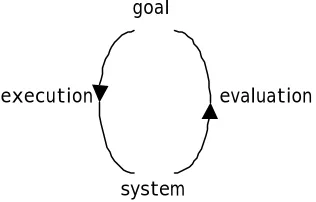
The impact of delays is typified by Norman’s interaction cycle (Norman, 1984), (Norman, 1986), (Norman, 1988) (figure 2.1). It describes user activity as consisting of four different stages − intention, selection, execution and evaluation. When users interact with a computer system during problem solving, they usually have a goal, they formulate certain actions to further that goal (plan), execute the actions and then evaluate the results of those actions against the expected outcome and the goal.
This model only works if one assumes that the results of the users actions are immediately available. If the delay between executing the actions and observing the results is greater than short-term memory times, the evaluation stage becomes far more difficult. This problem is referred to as the ‘broken loop of interaction’ and users may be forced to either re-formulate their plans or continue to wait for a response.
goal
system
[image:30.596.242.400.445.546.2]execution evaluation
Figure 2.1 Norman’s interaction cycle
When delays are predictable or expected, the interaction cycle will not necessarily be affected as users can incorporate known delays into their plans. But when delays are unpredictable, users may forget part of the plan and they may be forced to review the plan continually, thus causing a breakdown in the interactive process. Furthermore, when unexpected delays impede a task progress, many people become frustrated, annoyed and eventually angry (Shneiderman, 1992).
2.2.1 Response time
Traditional human factors research into response times suggests three time levels that provide different effects on interaction and for almost thirty years, the same norm has been observed (Miller, 1968), (Card et al., 1991), (Nielsen, 1993):
0.1 second − this is the required limit that allows users to feel that the system is reacting instantaneously.
1.0 second − this limit is necessary to avoid interruptions in the users flow of thoughts, although they will notice the delay. No special feedback is usually required for delays in the range of 0.1 − 1.0 second, but users may lose the feeling of operating directly on the data.
10 seconds − this limit is essential for keeping users attention focussed on the dialogue. If the delay is longer, users will perform other tasks while waiting for the results of their actions. Therefore, they should be given some form of feedback to indicate when the computer expects to complete the task.
The above limits do not specify how the interaction process is affected if the delay in receiving a response lies between 1.0 − 10 seconds, a range where many responses actually fall. Also, they do not deal with the factors that can alter the way in which interaction is affected by response times. For instance, some studies have shown that novices prefer and are more productive with a slower response time (Shneiderman, 1992) while others have shown that novices, like expert users, tend to make more errors with longer response times (Long, 1976), (Kuhmann et al., 1987).
Furthermore, user expectations may vary depending on their previous experience and the task at hand. Users can also change their interaction mode with the artefact as they become more familiar with it or as their perception and skills change (Thomas, 1998) but more importantly, users may change their work strategies to adapt to different response times. It is therefore very difficult to assess whether the timing of an interactive activity is too fast or too slow as there are too many user, task and environment variables at play to determine any generally acceptable rate of interface response (Shneiderman, 1992).
Although shorter response times are more beneficial to users, it is possible for the computer to react so fast that the user cannot keep up with. For example, a scrolling list may move so fast that the user cannot stop it in time for the required element to stay within the available window. The fact that computer can be too fast suggests that user-interface changes should be timed according to the real-time clock and not as an indirect effect of the computer’s execution speed (Nielsen, 1993). A fast interaction sequence can inhibit users from formulating a solution plan correctly (Shneiderman, 1992). Conversely, users can pick up the pace of a rapid interaction sequence and consequently they may learn less, read with lower comprehension and commit more errors (Shneiderman, 1992).
the interface stays usable and this can only happen if the response time is fast enough to match the task at hand.
2.2.2 Impact of delays
A number of studies (Dix, 1987), (Johnson and Gray, 1995), (Nielsen, 1993), (Smith and Mosier, 1986), (Shneiderman, 1992) have considered the effects of delays on user performance and on the behaviour of single-user applications. A delay of more than a fraction of a second in mouse-based interfaces has been found to reduce the success of the interaction. With the emergence of timesharing systems in the early 1960’s, other studies (Miller, 1968), (Smith, 1983) investigated the effects of system delay on multi-user performance. Delays of the order of 100 milliseconds have been found to be disruptive within some collaborative virtual environment applications (Macedonia et al., 1994).
The increasing popularity of the Web, both as an interaction and a development platform, has widened the number and types of users and tasks. The changeable nature of the users and the tasks makes it even more difficult to have a single model that relates response time with user performance. Most research assumes that user productivity increases with faster system response times. For example, a study showed that user performance is systematically affected by system delays and users tend to choose task strategies that best suit a given system delay (Teal and Rudnicky, 1992). However, the task that the users were given in the study was relatively straightforward data entry. It may therefore be more difficult to characterise the relationship between response time and user strategy when users are engaged in more complex tasks.
It is generally agreed in the research literature that delays in the system response increase users’ frustration, as they are left wondering whether the system is still working or not. If the users do eventually receive a response after a long delay, their attention may have wandered and they may forget which action the machine is responding to. The absence of a system response can therefore be very disconcerting to the user and in the worst case, she may suspect a complete system failure, with consequent disruption and/or termination of the interaction sequence.
Although rapid response times should be regarded as an explicit design goal, it is important to ensure that the user interface matches the rate at which the computer operates. For some frequent user actions, such as function keys or menu selections, a few seconds delay may prove to be intolerable. However, users may accept a relatively slow processing time for instance, during a repetitive form filling dialogue (Smith and Mosier, 1986).
However, most studies agree that in order to improve the usability of a user interface, it is more effective to make all responses uniformly fast. In cases where this is not possible, some form of feedback should be used (Smith and Mosier, 1986), (Myers, 1989). As a result, a slow response would become predictable to the user even if it were inconsistent with other responses.
2.2.3 Need for feedback
Our innate ability to act and communicate with each other depends heavily on the feedback we get from the environment and from one another (Dix, 1995a). Studies investigating the effect of delays on user performance (Johnson and Gray, 1995), (Nielsen, 1993), (Dix, 1994a), (Teal and Rudnicky, 1992) emphasise the need for feedback during delays. Feedback information is very important for maintaining users’ orientation when they interact with the system. It allows users to know where they are, what they have done and whether the task was successful or not. Feedback is vital in situations where the response times are likely to be highly variable, such as over a network.
When a user is faced with some delay, it is usually hard to ascertain the source of that delay. In traditional interface design, the underlying system architecture and computation tend to be hidden from the users. Although in some cases, information abstraction and hiding enable the design of the user interface to be focussed on user-centred requirements, in other situations, it may have a negative effect. For instance, when a user clicks on a hyperlink or a button on a Web browser either to move to a different page or to download a file, the response time for such an action to complete may vary, depending on the size or location of the file. If the user is not informed of the location or file size prior to requesting the information, it is difficult to estimate the likely response time.
Another problem during interface design is that users cannot distinguish between actions that may lead to different system behaviours and hence different response times. For example, when a user clicks on a button on a menu bar, there is no indication of the complexity of the underlying computation or the expected response time. At the same time, the user may be faced with inconsistent response times when clicking on several buttons that look similar. The difference in the functionality and computation may be obvious to an expert user but less so to a novice user. Feedback is therefore required at two levels − the interface level, to register the user’s action (e.g. a button press) and the application level, to show the effect of the action (e.g. a window pops up).
2.2.4 Types of feedback
Different types of feedback have been recommended in the research literature to help users cope with inconsistent response times and lengthy delays.
2.2.4.1 Alert box
The alert box is one of the most frequent forms of feedback that provides users with the necessary assurance that everything is working well. It is usually an interim message that pops up on the screen to let the user know that processing has been initiated or a signal that appears while the system is processing the input.
2.2.4.2 Progress Indicator
A progress indicator or percent-done indicator is a form of continuous feedback that is recommended when the computer cannot provide a fairly immediate response or for operations that take longer than 10 seconds (Myers, 1985). Besides reassuring users that the system has not crashed and that there is an ongoing activity, progress indicators also inform users approximately how long they may have to wait. This allows users to plan their time more effectively and perhaps perform other tasks during long waits.
When the processing load cannot be estimated in advance, a running progress feedback can be used to reassure the user by displaying the absolute amount of work done. For example, when a system is performing a search on an unknown number of remote databases, a running progress feedback would be in the form of a list of name of each database as it is processed (Nielsen, 1993). However, a progress indicator is unsuitable for operations that execute reasonably fast, between 2 to 10 seconds (Nielsen, 1993) as users will be unable to keep pace with rapidly flashing changes on the screen. A less conspicuous progress feedback can therefore be used, for example by combining a "busy" cursor with a rapidly changing number in a small field in the bottom of the screen to indicate how much work has been done (Nielsen, 1993).
If a running progress indicator is not suitable, a less specific progress indicator can be used, such as a spinning ball, a busy bee flying over the screen, dots printed on a status line or any other mechanism that shows that the system is working but not necessarily what it is doing (Myers, 1985). Non-obtrusive auditory signals like a chime can also be used to notify users when the display output is complete.
Feedback information is vital but it has to be carefully presented to the users to ensure that they are not dealing with seemingly inconsistent interface behaviour. However, some systems still fail to provide the necessary feedback and in such cases, users attempt to deal with delays themselves by adopting coping strategies (Dix, 1992a).
Multi-tasking is a common coping strategy that users have applied for a long time during consistent real-time delays in the system response. Users perform multiple tasks in parallel to speed up their rate of completion. Web users also tend to run multiple browser sessions in parallel to cope with the boredom of delays.
A few studies (Cypher, 1986), (Miyata and Norman, 1986), (Conn, 1995) have even suggested that in the event of delays, an appropriate alternative task must be proffered by the interface, together with some support for users to resume the suspended task at an “appropriate” time. However, enforcing such a strategy at the interface level can add an extra burden on the task at hand and cause interference between the different tasks. Although people are adaptable, there are situations where such task management techniques would fail, especially during synchronous collaboration as users interact closely and their contributions undoubtedly overlap.
Most single-user systems are designed to perform certain defined tasks in a specified manner. Often, the data processing loads can be anticipated and integrated in user interface design to provide adequately fast response for all transactions.
However, when task performance requires data exchange and/or interaction with other users over a communication channel, then every participant must be provided with status information about each other (Smith and Mosier, 1986). The support for fast response times therefore becomes more problematic. For instance, in the Quake2 arena-like game, instead of waiting to know if there were enemies round the corner, users were found to turn corners and shoot even before receiving the feedback from their own actions (Knight and Munro, 1998).
The next section will now analyse the temporal problems that users may face when they interact over the Web, an environment that is predominantly subjected to delays. Some potential solutions will also be discussed.
2.3 Interaction over the Web
A number of factors contribute to delays over the Web − network problems due to high network traffic, slow bandwidth or remote site failures, low processing power of host and client machines and poorly designed Web site interfaces. Although there are many high-speed computers appearing on the market and the network capacity is increasing daily, the problems of delays still remain. This tends to affect users’ interaction in Web applications in general, but even more so in collaborative Web-based applications.
The length of delays experienced on the Web varies and unpredictable delays have a worse effect on interaction than consistent response times (Section 2.2.2). According to a pilot study (Byrne and Picking, 1997), Web users are critical of delays and regard time-related factors to be of importance to Web usability. The Web is therefore an ideal environment to
study the effect of response time and the role that time plays on the interactive process. Note that, issues directly related to Web site design will not be considered here as the discussion centres on the Web infrastructure.
2.3.1 Problem areas
Traditional interface design tends to hide the underlying system architecture and computations from the users (Section 2.2.3). Web interface design seems to adopt the same policy, thus reducing its usability. For example, when a user visits a Web site, it is impossible to tell how long the browser will take to load the whole page. This obviously depends on the size of the page, any associated graphics or computations that must be carried out on the local machine and the network speed. However, users are not usually provided with such a level of detailed information, which will allow them to make informed decisions.
2.3.1.1 Response time
Like traditional human factors research into response times (Section 2.2.1), research on Web systems has also shown that users need response times of less than 1.0 second when moving from one page to another if they are to navigate freely through an information space (Nielsen, 1995). Web users are not currently getting sub-second response times; hence they get frustrated (Nielsen, 1997). A response time of no more than 10 seconds has been recommended as the limit for keeping users attention focussed while waiting for Web pages to download.
Often, the Web browser affords users an understanding of the progress in the computer activity whilst they are waiting, through a progress indicator. Although this enable users to tolerate delays, browsers should provide useful progress bars that communicate what percentage of the entire download for a page has been completed (Nielsen, 1997).
2.3.1.2 Network latency
On the Web, the latency of the network is the most obvious cause for delays. A faster network connection only tend to increase the Web performance by a small factor. For instance, upgrading from a dialup modem to an ISDN line only doubles the performance (Nielsen, 1997). Even if a high bandwidth connection to the Internet is used at both user-end and server-user-end, the response time will increase during network bottlenecks, especially for cross-continent connections and for use at peak hours. In extreme cases, the communication may be broken for longer periods if not completely, for instance during mobile work (Dix, 1995a).
2.3.1.3 Collaborative interaction