THE DEVELOPMENT OF ARCHERY GAMES USING MOTION CAPTURE
AND VR DEVICES ON ARCHERY VIRTUAL REALITY
Riki Prasetia Aprial, Tito Waluyo Purboyo and Anton Raharjo Siswo Ansori
Faculty of Electrical Engineering, Telkom University, Bandung, Indonesia E-Mail: [email protected]
ABSTRACT
Motion capture is the process of capturing motion information, and the location of the subject over time. Animation production is the largest user of the Motion Capture system, examples of applications like movies, broadcasts, games, production stages, demonstration, and more. Motion capture is an attractive method for making movements in computer animation. Motion capture techniques rely on recording and retrieval of movements of humans, animals and inanimate objects as 3-dimensional data. This motion capture technique has various ways of applying it. With the development of technology as it is today, a new technology has been created, namely virtual reality. Virtual reality is a technology that allows us to interact with objects of imagination by using computers and displaying a 3-dimensional atmosphere that seems real. Virtual reality technology has also been widely used in the game world. Game is one of the entertainment media that is the choice of the community to eliminate boredom or just to fill their spare time. In addition to being an entertainment medium, games can also be a learning media to improve one's brain development. In this study, we will discuss archery games using motion capture and virtual reality (VR) devices on archery virtual reality.
Keywords: game, virtual reality, motion capture, archery.
INTRODUCTION
The utilization of motion capture in computer character animation is relatively fresh, and only began to develop in the late 1970s [2]. Motion is a recording of the mobility of the human body (or any other movement) for analysis and direct or delayed playback [1]. The information taken can be used as a simple body position in space or as a face and muscle mass [7]. Mapping human movements into computer character movements involves motion capture for animated computer characters. Topography can be direct, or indirectly like the movement of a human arm that controls the movement of the character's arm, like human hands and finger patterns that have a skin or emotional character [4].
In this digital era, one of the technologies that is often used is multimedia technology which also develops, making the delivery of information more interactive and effective because it can reach the human senses, for example, the technology of Virtual Reality (VR) [8]. Virtual reality is a new technology that allows users to simulate a real object using a computer that is able to evoke a three dimensional atmosphere. This technology allows users to interact with a computer-simulated environment [21]. The progress of the VR world is supported by technological advancements that have a special role in the advancement of computer technology [15].
The progress of computer technology was also supported by software that developed rapidly too. The existence of these advancements makes it easier for us to make animations and three-dimensional games [16].One of the technological developments affecting the virtual world is Motion capture technology. Motion capture is the process of retrieving information on the movement and location of a subject from time to time. Animation production is the largest user of the Motion capture system, examples of applications such as film, broadcast,
video games, production stages, simulations, and others [5].
In a three-dimensional (3D) animation production there is a virtual environment. The virtual three-dimensional (3D) environment produces three three-dimensional space (3D) that is imagined or represented from the real world. In a virtual environment, a three dimensional (3D) model can be entered and can be animated. With this technology, a three-dimensional (3D) model in a virtual environment can be integrated with data on human movements caught on camera [3].
With the development of technology as it is today, it can be made a technology-based game using virtual reality devices (VR) and motion capture technology so that users can experience play simulations that are close to real conditions [6].
THEORETICAL BASIS
Game
Games are one type of play activity, which is carried out in the context of pretending but looks like reality, where the player has the goal of getting one victory and done according to the rules of the game made [20]. According to Agustinus Nilwan game is a computer game made with animation techniques and methods [12]. Deepening the use of animation must understand game development.
can also be played by inserting a CD that can be replaced [10].
Archery game
Archery is an activity normally carried out by soldiers while fighting. Initially archery activities were used for hunting and later developed into weapons in battle. But now archery is better known as one of the sports. Archers must master the archery technique correctly in order to achieve maximum performance [14]. The technique is the attitude of shooting (shooting form), which is viewed in terms of biomechanics does not violate the laws of motion mechanics that apply. Mastery of archery techniques correctly will allow consistency in shooting. An archer uses an arrow to shoot arrows. Archery equipment used in archery is of course a bow, arrows, finger protectors, armguards, arrows, and flied glasses [7]. Regardless of what is right, it is clear that before archery met its form as a sport as we know it today, it has gone through a long period of growth. Through different roles, archery is first used by people as a means to defend themselves from attacks by wild animals, as a means of foraging, or for hunting, for weapons of war and only later acts as a sport as a recreation or achievement [22]. In doing archery, everyone has different lengths of draw length. And that affects the draw weight, because the weight of the pull on the limbs is the weight of the pull for the standard length of pull (28 inches) [19].
Virtual Reality
Virtual Reality (VR) is a term for technology that allows users to enter a simulation environment that can create sensory experiences: vision, smell, sound, and touch. Virtual Reality can generate a 3-dimensional atmosphere where the user is physically involved [18]. Basically, Virtual Reality is a theory based on the human desire to cross the boundaries of the real world and this is done by embracing cyberspace [11]. Human and machine interactions besides the keyboard, mouse or touch screen are means that can interact with visual immersion as a whole [13]. Virtual Reality seeks to provide an immersive experience for its users. Immersion is a feeling where the user does not realize he is in an artificial world, and is not aware of events in the outside world [9].
In Figure-1 we can see the device from Oculus Go. This device has a controller that functions as a laser pointer in the virtual world. This pointer can be used to resemble a hand but does not yet have complex functions like a real human hand, because in the oculus go there is only one different controller from a VR device such as Oculus Rift which already uses two controller devices [17].
Figure-1. Oculus Go Device.
METHOD and SYSTEM
System Requirements Analysis
To design a system, a device that can support the system is needed to be implemented into an application. The software used is as follows:
a) Unity2018.2.19f1
b) Blender 2.79
c) Android Studio 3.1.2
d) Java Development Kit (SDK)
e) Oculus Integration Development Kit (SDK)
The hardware used is as follows: Oculus Go Standalone VR 64GB
Notebook Intel core i7. 7700HQ 2.80GHz
Android phone
Unity Input Asset
Assets are collected to be used as material in making the virtual world. Assets to be collected include the area of play, position, atmosphere, and various supporting assets that will be created manually or taken from data that is already available in Unity software. In this study the assets for making archery games on the Unity game engine were carried out using the help of a Blender graphics processing device. Making is done with reference to the x, y, z axes because the position and rotation of the design in Blender have an effect on the coordinates in Unity.
Device Calibration Process
a) Enable developer mode on the device
b) Debug USB
c) Enter the SDK on a unity device
d) Address the SDK on the notebook
Game Making Stages
In the initial stage of this final project, the initial process is carried out, namely making a game that will be used as data to be converted to VR devices. Some of the steps taken are:
a) Making Bow and Arrow
The initial process is done using the Blender software to create Bow and Arrow. In Figure-2 is the process of making arcs and arrows that will be used in games that will be made in unity. Making these arcs and arrows uses the x, y, and z axes as references because they are influential when they are entered into unity.
Figure-2. Making Bow and Arrow.
b) Making Environment
This stage is done using unity. Assets that have been made before are entered and arranged coordinates on unity to be used as the playing field.
Figure-3. Environment in unity.
SYSTEM TESTING
Process of Calibration and Integration
In this process a device is calibrated so that the game can be built into an APK form and can be entered
and executed into the device. This process is carried out in several stages, namely:
a) In unity software
Before the settings are done on the unity device, SDK data is downloaded to the Android Studio so the game can be built into the Android base. Installation of Android tools and platforms is done so that the game on Unity can be built with the Android format. Next, unity is entered in the SDK address in the Preferences menu.
Figure-4. Preferences Setting.
After the equipment setup process is completed, then on the unity the game development platform is replaced to Android mode. In order to be built into a file with the APK format.
Figure-5. Unity Build Setting.
At this stage, the program builds settings to run on hardware. Arrangements are made by adjusting the suitability of the API level so that when entered into the hardware the game can run properly and no errors occur.
b) Setting up the Oculus Go hardware
Figure-6.oculus application display on android device.
This application on Android is used to enter developer mode on the Oculus Go device. Developer mode is activated by entering the settings menu, then connect the device to the application. After the device is installed, there will be a developer mode menu in it.
The Process of Building a Game into a VR Device This process is done so that the game can run and be played on Oculus Go hardware. This process can be done after setting up the build settings on the unity device. The initial process is done by adding environment variables on the computer so that the directory and path of the android that we enter can be called or can be addressed clearly.
Figure-7. Add Variables.
After that the application development was done on Unity software to get an Android-based file, because the Oculus Go hardware used was an Android-based device. The file that is built will be stored in the directory where the application files are stored in Unity, after that the apk file that was created is moved to the installation folder adb.
On the computer, the driver installation is adb. The purpose of adb itself is that hardware can be included in various types of specific commands for developers, so that games that have been made can be entered into the device.
Figure-8. Installation Process.
The adb command is executed by using the command prompt on the computer, on cmd the user enters as an administrator. There are several commands that are executed to install the Oculus Go hardware, namely: Adb devices
This command is used to check the device or android device that is connected to the computer.
Cd C: \ adb
This command is used to enter the adb directory. Adb install [folder name] .apk
This command is used to install the Oculus Go device.
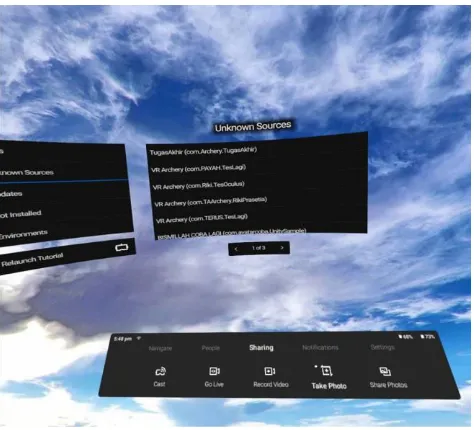
Oculus Go hardware. The installed application will go to the Unknown Source folder in the device library with the name as set in the project settings on unity.
Figure 9. Display on the Oculus Go Device.
The unknown source on the Oculus Go device is a library where applications created by developers can be run, in this library the games that have been built can be run using the device.
Figure-10.Display of the game.
In Figure-10 is the display of the game when run on the Oculus Go device. The movement of the bow is regulated using a controller, so that the user can aim at the target as if he were playing the real game.
CONCLUSIONS AND RECOMMENDATIONS
Conclusions
Based on the results of testing, it can be concluded as follows: the development of games using VR devices requires modifications in order to be better, further research and development is needed to achieve game conditions that make users feel truly in the game.
RECOMMENDATIONS
After evaluating this research, the following advice that there are many methods that can be adopted in making games and also oculus go devices that are deemed less suitable in making games using the actual movements of users.
REFERENCES
[1] Ashish Sharma, M. A. 2103. Motion capture process, techniques and applications. International Journal on Recent and Innovation Trends in Computing and Communication.
[2] B. Rosenhahn J. W. 2008. Markerless Motion Capture of Man-Machine Interaction. 26th IEEE Conference on Computer Vision and Pattern Recognition, CVPR.
[3] Choi S. D.-H. 2013. Interactive full-body motion capture using infrared sensor network. International Journal of Computer Graphics & Animation (IJCGA).
[4] Christian Schönauer T. P. 2011. Full Body Motion Capture A Flexible Marker-Based Solution.
[5] D Vlasic R. A. 2007. Practical motion capture in everyday surroundings. ACM Transactions on Graphics.
[6] Eka Prasetyono E. M. 2009. Penangkapan Gerak Manusia 3D Berdasar Pada Penanda Aktif Dengan Kamera Murah Seminar Nasional Electrical, Informatics, and It’s Educations.
[7] Ghaffar Rizqi D. I. 2015. Pembuatan lingkungan virtual 3D yang berintegrasi dengan data gerakan dari motive pada simulasi ruangan.
[8] Ghotkar A. S. 2014. Animation of 3D Human Model Using Markerless Motion Capture Applied To Sports. International Journal of Computer Graphics & Animation (IJCGA). 4(1).
[9] I Dewa Bagas Suryajaya, E. U. 2015. Optimalisasi Teknik Markerless Motion Capture Menggunakan Multisensor Pada Pembuatan Animasi 3D. Konferensi Nasional Sistem & Informatika.
[10]Ismahafezi Ismail, e. a. 2016. A Study on Motion Capture Data Editing in Virtual Environment. World Applied Sciences Journal.
[image:5.595.51.287.439.572.2][12]Jimenez-Olmedo B. P. 2017. Application of motion capture technology for sport performance analysis. Federación Española de Asociaciones de Docentes de Educación Física (FEADEF).
[13]Magdin M. 2017. Simple MoCap System for Home Usage. International Journal of Interactive Multimedia and Artificial Intelligence. 4(4).
[14]Pedraza-Hueso, M. M.-C.-P. (n.d.). Rehabilitation Using Kinect-based Games and Virtual Reality. Procedia Computer Science.
[15]Sturman D. J. 1999. A Brief History of Motion Capture for Computer Character Animation.
[16]Takaaki Shiratori H. S. 2011. Motion Capture from Body-Mounted Cameras. ACM Transactions on Graphics.
[17]Tiago Henrique Ribeiro, M. L. 2016. Motion capture technology - benefits and challenges. International Journal of Innovative Research in Technology & Science (IJIRTS).
[18]Tomasz Hachaj M. P. 2017. Human Actions Analysis: Templates Generation, Matching and Visualization Applied to Motion Capture of Highly-Skilled Karate Athletes. Sensors (Switzerland).
[19]Veronika Fecov J. N.-M. 2011. Simulation and Animation of Design Workplace and Models by Motion Capture Technology. Technical University of Kosice Faculty of Manufacturing Technologies.
[20]William Antonius M. R. 2016. Rancang Bangun Sistem Motion Capture Dan Motion Database Untuk Simulasi Pergerakan Karakter Animasi Manusia 3D. Jurnal Aksara Komputer Terapan Politeknik Caltex Riau.
[21]Aprilia Y. D., Latuconsina R., Purboyo T.W. 2018. A Review of Several Alghoritms for Data Mining. Journal of Engineering and Aplied Sciences.