6
I
January 2018
Multi-Client Server Communication Enhancement
through Intranet
Saloni Takawale1, Dr. Rupesh C. Jaiswal2
1,2
E&TC Department, Pune Institute of Computer Technology, Pune, Maharashtra, India.
Abstract: Chat application is a platform of communication which provides real time transmission of information in the form of text messages or files.
The following chat application does not use internet for its operation. It requires all the computers to be connected in a single network, where one of the computers is considered as servers and all others as clients.
Every user needs to make a request to the server using the server’s IP address and port number. The sender can later select the intended receiver from the list of online users. The sender can also chose to broadcast the message to all the online users. The user can also chose to share various files in different file formats.
I. INTRODUCTION
Communication is an essential part of human relations. There are different ways in which people communicate to each other. Some of the ways in which people communicate to each other are audio, video, photo sharing, text messages etc. The most inexpensive and efficient way of communication these days is electronics messaging. There also exists systems that use the physical LAN connections to have communication with others. But due to requirements of other expensive software’s to manage and control the ongoing communication process and extra wiring needed it was quite expensive one. This existing system does not have control over network connection so, there was a problem of data security and information misconduct ion. Also few communication softwares require additional internet connectivity. The following chat application is a messaging platform designed to be used in a single wired or wireless LAN. The advantage of the application is that it does not require any active internet connection and is secured as only people inside the firewall will have access to the application.
II. LITERATURE REVIEW
The study in [5] proposes an application using LAN. There are two main components for this application. One of the component is server and the other one is client. The client has to provide authorization before entering the chat application by provide its login credentials and then the IP address and port number of server. There are 2 sockets, one for the client and other for the server. Then the client is connected to the server and start communicating through the socket As articulated by [10] a chat application is of great help for offices with large size because the people can communicate to anyone at a distance without getting up from the place and thus increasing the productivity of the staff. People can share all sorts of information like, different kinds of file formats (zip, txt, pdf etc.), images (jpg, tif etc.). Also this application supports conference where multiple colleagues can chat with each other and also exchange files with multiple people. The chat application uses client/server network opposed to peer to peer network as it has many advantages over the peer to peer network. As all the clients are connected to a central server, new clients can added of removed from the network at any time. Client/ server network is more secure as the server holds all the files and manages all the resources, and decides which client can access the files. In the client/server model all the exchange of information (text, files) happens through the server, hence the communication is more secure.
III. PROPOSED WORK
A. System Features
The chat application provides following features to the users:
1) The chat application is platform independent and works on cross platform. 2) It sends text messages quickly.
3) It sends images and audio files to the intended client.
4) The communication is secure i.e. the users are authenticated with unique username and password.
B. System Architecture
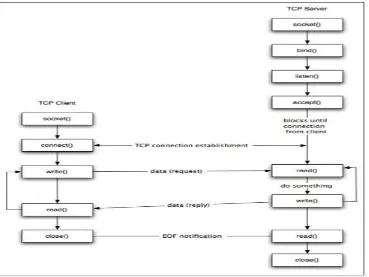
[image:3.612.154.471.144.376.2]The system incorporates the client-server model for the communication to take place. The client/server network is model where in there is a centralized administrator called server that manages and provides all the resources, and multiple clients that utilize these resources..
Fig 1: Block Diagram
Socket programming was used to implement the chat application. The sockets used in the applications are TCP sockets as TCP is a connection oriented protocol and ensures reliable data transfer without the loss of any data.
[image:3.612.124.493.445.722.2]C. The following Steps WERE used To Design The Chat Application
1) Browse for database file (data.xml).Database file consists of username and password of registered users.
2) Server socket is created on the default port 13000 or the port number given by the user when the “Start server” button is pressed on the server frame (Server UI).
3) Server listens over the socket and waits for clients to connect. Whenever a new client joins the chat application, a new thread is created on server side and a client ID is given to each active user.
4) On client side, the user enters server’s IP/ name and port number to connect to the server.
5) Once the server and client are connected to each other the communication begins.
6) Each activity on client side is communicated to server in the form of message containing four fields:
a) Type
b) Sender
c) Content
d) Recipient
7) Based on the ‘Type’ of message the further processing is carried out:
a) Login: Message type login validates the credentials of the user on server side and returns TRUE if the credentials are matched. A ‘login successful’ message is displayed on the client textbox.
b) New user: New user message type is responsible for adding the name of any new user that enters the chat application into the list of active (online) users.
c) Signup: Signup type of message is sent when the user is entering the chat application for the first time. The user needs to enter his new username and password. These credentials are updated in the database file on the sever side.
d) Message: The message is sent to a particular user or broadcasted depending on the name of the recipient. If the content of message is ‘.bye’ then the user is signed out from the chat application.
e) Upload Request: When a sender wishes to transfer a file/image from his pc to the other active user then he/she sends an Upload Request type of message. The file is transferred only if the recipient user accepts the request.
d) Upload Response: The response from recipient is in a message of Upload Response type When there is a positive reply the recipient’s IP address and port number is sent back to create a new socket. The sender connects to this socket and sends the file on this socket. .
8) While sending any of the above mentioned type messages, if the message type is ‘message’ then the message is also updated in the history table which can be viewed by the user by browsing the history.xml file.
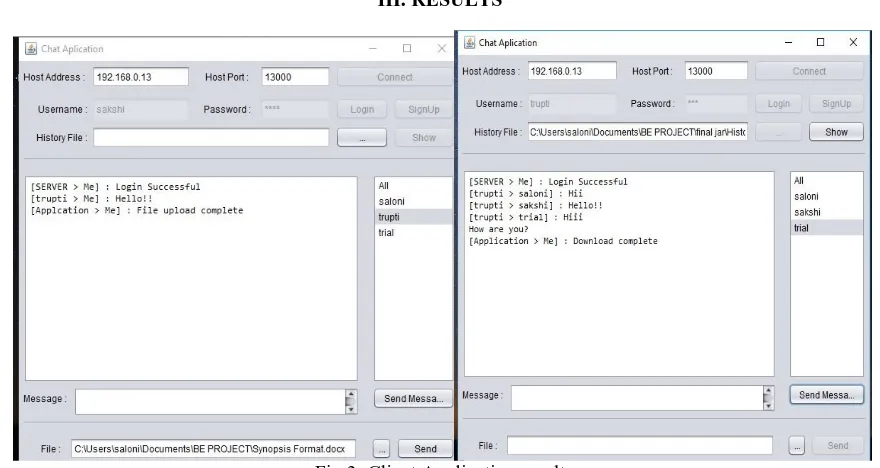
[image:4.612.86.526.480.714.2]III. RESULTS
IV. CONCLUSION
The intranet chat application incorporates the client-server model for communication with each other. This communication occurs through sockets using the TCP/IP protocol. The TCP/IP protocol is used for transferring the data is a connection oriented protocol and thus ensures a reliable transfer of data. The data transferred is in the form of text messages and files that reach the target client connected in the network.
About 50 clients can be connected at a time in the network. A short message(less than 10 strings) takes less than 1 sec to reach the receiver. Message can be sent successfully over 2.4GHz bandwidth of local hotspot (LAN).
V. ACKNOWLEDGEMENT
I would express my gratitude towards my mentor, Dr. R. C. Jaiswal for being of great support and guiding me through the research. He gave this paper the insight and the expertise it needed for making it a presentable one. His guidance, constructive criticism and encouragement at various stages has been a great support.
REFRENCES [1] Behrouz A. Forouzan, Data Communications and Networking, 4th Edition,:McGrallHill.
[2] Larry L. Peterson, Bruce S. Davie, Computer Networks: A System Approach, 5th Edition: Morgan Kaufmann. [3] G. Held, TCP/IP Professional Reference Guide, CRC Press, 2000.
[4] Meghanathan, N. (2010), Recent Trends in Networks and Communications, Germany: Springer-Verlag.
[5] Williams, S (2004) Computer Networking with Internet Protocols and Technology Alan Apt, Pearson Education, Upper Saddle River. [6] Kenneth L. Calvert and Michael J. Donahoo, TCP/IP Sockets in Java: Practical Guide for Programmers, Second Edition, USA: Elsevier Inc.
[7] Ibrahim Muhammed Abba Socsit “Lan Chat Messenger (LCM) Using Java Programming With Voip ”3rd IEEE International Conference on Research and Innovation in Information Systems – 2013 (ICRIIS’13)
[8] Ahmed A. Shahin, and Mohamed Younis “Efficient Multi-Group Formation and Communication Protocol for Wi-Fi Direct” 40th Annual IEEE Conference
on Local Computer Networks.
[9] Handel, M and Herbsleb, J.D (2002) “What Is Chat Doing in the Workplace?”, ACM Publishers, New York
[10] Umar, S and Justin, M.P. (2003). “Service-oriented Network Socket”, ACM Publishers New York,1st international conference on Mobile systems, applications and services
[11] Bonnie, A.N, Steve, W and Erin, B (2000) “Interaction and Outeraction: Instant Messaging in Action”, ACM Publishers, New York
[12] “JAVA Networking and Socket programming”: www.tutorialspoint.com/ java/java_networking.htm
[13] “LAN Messenger”: http://en.wikipedia.org/wiki/LAN_messenger (2012)