Undergraduate Topics in Computer Science (UTiCS) delivers high-quality instructional content for undergraduates studying in all areas of computing and information science. From core foundational and theoretical material to final-year topics and applications, UTiCS books take fresh, concise, and modern approach and are ideal for self-study or for a one- or two-semester course. The texts are all authored by established experts in their fields, reviewed by an international advisory board, and contain numerous examples and problems. Many include fully worked solutions.
For further volumes:
Kent D. Lee
Python
Dr. Kent D. Lee Dept. Computer Science Luther College
College Drive 700 52101 Decorah, IA USA
Series editor
Ian Mackie
Advisory board
Samson Abramsky, University of Oxford, Oxford, UK Chris Hankin, Imperial College London, London, UK Dexter Kozen, Cornell University, Ithaca, USA
Andrew Pitts, University of Cambridge, Cambridge, UK
Hanne Riis Nielson, Technical University of Denmark, Lungby, Denmark Steven Skiena, Stony Brook University, Stony Brooks, USA
Iain Stewart, University of Durham, Durham, UK
ISSN 1863-7310
ISBN 978-1-84996-536-1 e-ISBN 978-1-84996-537-8
DOI 10.1007/978-1-84996-537-8
Springer London Dordrecht Heidelberg New York
British Library Cataloguing in Publication Data
A catalogue record for this book is available from the British Library
Library of Congress Control Number: 2010937477 © Springer-Verlag London Limited 2011
Apart from any fair dealing for the purposes of research or private study, or criticism or review, as per-mitted under the Copyright, Designs and Patents Act 1988, this publication may only be reproduced, stored or transmitted, in any form or by any means, with the prior permission in writing of the publish-ers, or in the case of reprographic reproduction in accordance with the terms of licenses issued by the Copyright Licensing Agency. Enquiries concerning reproduction outside those terms should be sent to the publishers.
The use of registered names, trademarks, etc., in this publication does not imply, even in the absence of a specific statement, that such names are exempt from the relevant laws and regulations and therefore free for general use.
The publisher makes no representation, express or implied, with regard to the accuracy of the information contained in this book and cannot accept any legal responsibility or liability for any errors or omissions that may be made.
Printed on acid-free paper
Preface
Computer Science is a creative, challenging, and rewarding discipline. Computer program-mers, sometimes called software engineers, solve problems involving data: computing, moving, and handling large quantities of data are all tasks made easier or possible by computer programs. Money magazine ranked software engineer as the number one job in America in terms of flexibility, creativity, low stress levels, ease of entry, compensation, and job growth within the field [4].
Learning to program a computer is a skill that can bring you great enjoyment because of the creativity involved in designing and implementing a solution to a problem. Python is a good first language to learn because there is very little overhead in learning to write simple programs. Python also has many libraries available that make it easy to write some very interesting programs including programs in the areas of Computer Graphics and Graphical User Interfaces: two topics that are covered in this text.
In this text, students are taught to program by giving them many examples and practice exercises with solutions that they can work on in an interactive classroom environment. The interaction can be accomplished using a computer or using pen and paper. By making the classroom experience active, students reflect on and apply what they have read and heard in the classroom. By using a skill or concept right away, students quickly discover if they need more reinforcement of the concept, while teachers also get immediate feedback. There is a big difference between seeing a concept demonstrated and using it yourself and this text encourages applying concepts immediately to test understanding. This is vital in Computer Science since new skills and concepts build on what we have already learned.
In several places within this book there are examples presented that highlight patterns of programming. These patterns appear over and over in programs we write. In this text, patterns like the Accumulator Pattern and the Guess and Check Pattern are presented and exercises reinforce the recognition and application of these and other abstract patterns used in problem-solving. Learning a language is certainly one important goal of an introductory text, but acquiring the necessary problem-solving skills is even more important. Students learn to solve problems on their own by recognizing when certain patterns are relevant and then applying these patterns in their own programs.
Recent studies in Computer Science Education indicate the use of a debugger can greatly enhance a student’s understanding of programming [1]. A debugger is a tool that
vi Preface
lets the programmer inspect the state of a program at any point while it is executing. There is something about actually seeing what is happening as a program is executed that helps make an abstract concept more concrete. This text introduces students to the use of a de-bugger and includes exercises and examples that show students how to use a dede-bugger to discover how programs work.
There are additional resources available for instructors teaching from this text. They include lecture slides and a sample schedule of lectures for a semester long course. Solutions to all programming exercises are also available upon request. Visit
http://cs.luther.edu/~leekent/CS1for more information.
Python is a good language for teaching introductory Computer Science because it is very accessible and can be incrementally taught so students can start to write programs be-fore having to learn the whole language. However, at the same time, Python is also a devel-oping language. Python 3.1 was recently released to the public. This release of Python in-cluded many performance enhancements which were very good additions to the language. There were also some language issues with version 2.6 and earlier that were cleaned up at the same time that were not backwards compatible. The result is that not all Python 2 pro-grams are compatible with Python 3 and vice versa. Because both Python 2 and Python 3 are in use today, this text will point out the differences between the two versions where appropriate. These differences will be described by inset boxes titledPython 23within the text where the differences are first encountered.
It is recommended that students reading this text use Python 3.1 or later for writing and running their programs. All Python programs presented in the text are Python 3 programs. The libraries used in this text all work with Python 3. However, there may be some libraries that have not been ported to Python 3 that a particular instructor would like to use. In terms of what is covered in this text, the differences between Python 2 and 3 are pretty minor and either language implementation will work to use with the text.
Acknowledgments
I’d like to thank David Ranum, who encouraged me to write a text on introductory pro-gramming that included some of the projects I’ve developed, and Brad Miller, who sug-gested we try Python as an introductory language. It’s wonderful to work with colleagues that care as much as I do about teaching students a rewarding and creative discipline. But most importantly, I would like to thank the students who have taken classes from me. Teaching has given me back much more than the many hours I have invested in it and seeing a student grow in his or her programming skills is its own reward.
Credits vii
Credits
At times in this text Microsoft Windows is referred to when installing software. Windows is a registered trademark of Microsoft Corporation in the United States and other countries. Mac OS X is referred to at times within this text. Mac and Mac OS are trademarks of Apple Inc., registered in the U.S. and other countries. The Garmin Forerunner and Garmin Train-ing Center are referred to in Chap. 4. Garmin is a registered trademark, and Forerunner and Training Center are trademarks of Garmin Ltd. or its subsidiaries in the United States and other countries.
This book also introduces readers to Wing IDE 101, which is used in examples through-out the text. Wing IDE 101 is a free simplified edition of Wing IDE Professional, a full-featured integrated development environment designed specifically for Python. For more information on Wing IDE, seewww.wingware.com. Wingware and Wing IDE are trade-marks or registered tradetrade-marks of Wingware in the United States and other countries.
Suggestions
Contents
1 Introduction . . . 1
1.1 The Python Programming Language . . . 2
1.2 Installing Python and Wing IDE 101 . . . 3
1.3 Writing Your First Program . . . 7
1.4 What is a Computer? . . . 8
1.5 Binary Number Representation . . . 10
1.6 What is a Programming Language? . . . 13
1.7 Hexadecimal and Octal Representation . . . 15
1.8 Writing Your Second Program . . . 16
1.9 Syntax Errors . . . 18
1.10 Types of Values . . . 19
1.11 The Reference Type and Assignment Statements . . . 20
1.12 Integers and Real Numbers . . . 21
1.13 Strings . . . 24
1.14 Integer to String Conversion and Back Again . . . 25
1.15 Getting Input . . . 26
1.16 Formatting Output . . . 27
1.17 When Things Go Wrong . . . 30
1.18 Review Questions . . . 33
1.19 Exercises . . . 34
1.20 Solutions to Practice Problems . . . 36
2 Decision Making . . . . 41
2.1 Finding the Max of Three Integers . . . 45
2.2 The Guess and Check Pattern . . . 47
2.3 Choosing from a List of Alternatives . . . 48
2.4 The Boolean Type . . . 50
2.5 Short Circuit Logic . . . 53
2.6 Comparing Floats for Equality . . . 54
2.7 Exception Handling . . . 55
2.8 Review Questions . . . 57
x Contents
2.9 Exercises . . . 58
2.10 Solutions to Practice Problems . . . 61
3 Repetitive Tasks . . . . 65
3.1 Operators . . . 67
3.2 Iterating Over a Sequence . . . 69
3.3 Lists . . . 71
3.4 The Guess and Check Pattern for Lists . . . 74
3.5 Mutability of Lists . . . 75
3.6 The Accumulator Pattern . . . 79
3.7 Reading from and Writing to a File . . . 80
3.8 Reading Records from a File . . . 82
3.9 Review Questions . . . 85
3.10 Exercises . . . 86
3.11 Solutions to Practice Problems . . . 88
4 Using Objects . . . . 93
4.1 Constructors . . . 96
4.2 Accessor Methods . . . 98
4.3 Mutator Methods . . . 98
4.4 Immutable Classes . . . 99
4.5 Object-Oriented Programming . . . 100
4.6 Working with XML Files . . . 100
4.7 Extracting Elements from an XML File . . . 103
4.8 Dictionaries . . . 104
4.9 Getting at the Data in an XML File . . . 105
4.10 Working with Time . . . 107
4.11 Parallel Lists . . . 107
4.12 Visualizing a Workout . . . 108
4.13 Review Questions . . . 110
4.14 Exercises . . . 110
4.15 Solutions to Practice Problems . . . 113
5 Defining Functions . . . . 119
5.1 Why Write Functions? . . . 120
5.2 Passing Arguments and Returning a Value . . . 121
5.3 Scope of Variables . . . 122
5.4 The Run-time Stack . . . 126
5.5 Mutable Data and Functions . . . 129
5.6 Predicate Functions . . . 131
5.7 Top-Down Design . . . 133
5.8 Bottom-Up Design . . . 134
5.9 Recursive Functions . . . 134
5.10 The Main Function . . . 136
Contents xi
5.12 Default Values . . . 140
5.13 Functions with Variable Number of Parameters . . . 140
5.14 Dictionary Parameter Passing . . . 141
5.15 Review Questions . . . 142
5.16 Exercises . . . 142
5.17 Solutions to Practice Problems . . . 145
6 Event-Driven Programming . . . . 149
6.1 The Root Window . . . 150
6.2 Menus . . . 151
6.3 Frames . . . 152
6.4 The Text Widget . . . 152
6.5 The Button Widget . . . 153
6.6 Creating a Reminder! . . . 154
6.7 Finishing up the Reminder! Application . . . 156
6.8 Label and Entry Widgets . . . 157
6.9 Layout Management . . . 158
6.10 Message Boxes . . . 159
6.11 Review Questions . . . 160
6.12 Exercises . . . 161
6.13 Solutions to Practice Problems . . . 164
7 Defining Classes . . . . 167
7.1 Creating an Object . . . 168
7.2 Inheritance . . . 172
7.3 A Bouncing Ball Example . . . 178
7.4 Polymorphism . . . 180
7.5 Getting Hooked on Python . . . 181
7.6 Review Questions . . . 184
7.7 Exercises . . . 184
7.8 Solutions to Practice Problems . . . 190
Appendix A Integer Operators . . . . 193
Appendix B Float Operators . . . . 195
Appendix C String Operators and Methods . . . 197
Appendix D List Operators and Methods . . . . 201
Appendix E Dictionary Operators and Methods . . . . 203
Appendix F Turtle Methods . . . . 205
Appendix G TurtleScreen Methods . . . . 217
xii Contents
Appendix I The Bouncing Ball Program . . . 227
Glossary . . . 231
References . . . . 237
Introduction
1
The intent of this text is to introduce you to computer programming using the Python programming language. Learning to program is a bit like learning to play piano, although quite a bit easier since we won’t have to program while keeping time according to a time signature. Programming is a creative process so we’ll be working on developing some creative skills. At the same time, there are certain patterns that can be used over and over again in this creative process. The goal of this text and the course you are taking is to get you familiar with these patterns and show you how they can be used in programs. After working through this text and studying and practicing you will be able to identify which of these patterns are needed to implement a program for a particular task and you will be able to apply these patterns to solve new and interesting problems.
As human beings our intelligent behavior hinges on our ability to match patterns. We are pattern-matchers from the moment we are born. We watch and listen to our parents and siblings to learn how to react to situations. Babies watch us to learn to talk, walk, eat, and even to smile. All these behaviors are learned through pattern matching. Computer Science is no different. Many of the programs we create in Computer Science are based on just a few patterns that we learn early in our education as programmers. Once we’ve learned the patterns we become effective programmers by learning to apply the patterns to new situations. As babies we are wired to learn quickly with a little practice. As we grow older we can learn to use patterns that are more abstract. That is what Computer Science is all about: the application of abstract patterns to solve new and interesting prob-lems.
PRACTICE is important. There is a huge difference between reading something in this text or understanding what is said during a lecture and being able to do it yourself. At times this may be frustrating, but with practice you will get better at it. As you read the text make sure you take time to do the practice exercises. Practice exercises are clearly labeled with a gray background color. These exercises are your chance to use a concept that you have just learned. Answers to practice exercises are included at the end of each chapter so you can check your answers.
K.D. Lee, Python Programming Fundamentals, Undergraduate Topics in Computer Science, DOI10.1007/978-1-84996-537-8_1, © Springer-Verlag London Limited 2011
1
2 1 Introduction
Fig. 1.1 The Python interpreter
1.1
The Python Programming Language
Python is the programming language this text uses to introduce computer programming. To run a Python program you need an interpreter. The Python interpreter is a program that reads a Python program and then executes the statements found in it as depicted in Fig.1.1. While studying this text you will write many Python programs. Once your program is written and you are ready to try it you will tell the Python interpreter to execute your Python program so you can see what it does.
For this process to work you must first have Python installed on your computer. Python is free and available for download from the internet. The next section of this chapter will take you through downloading and installing Python. Within the last few years there were some changes to the Python programming language between Python 2 and Python 3. The text will describe differences between the two versions of Python as they come up. In terms of learning to program, the differences between the two versions of Python are pretty minor.
To write Python programs you need an editor to type in the program. It is convenient to have an editor that is designed for writing Python programs. An editor that is specifically designed for writing programs is called an IDE or Integrated Development Environment. An IDE is more than just an editor. It provides highlighting and indentation that can help as you write a program. It also provides a way to run your program straight from the editor. Since you will typically run your program many times as you write it, having a way to run it quickly is handy. This text uses the Wing IDE 101 in many of its examples. This IDE is simple to install and is free for educational use. Wing IDE 101 is available for Mac OS X, Microsoft Windows, and Linux.
1.2 Installing Python and Wing IDE 101 3
Fig. 1.2 Installing Python on Windows
1.2
Installing Python and Wing IDE 101
To begin writing Python programs on your own computer, you need to have Python stalled. There were some significant changes between Python 2.6 and Python 3 which in-cluded a few changes that make programs written for version 3 incompatible with programs written for version 2.6 and vice versa. If you are using this book as part of an introductory course, your instructor may prefer you install one version or the other. Example programs in this text are written using Python 3 syntax but the differences between Python 2 and 3 are few enough that it is possible to use either Python 2 or 3 when writing programs for the exercises in this text. Inset boxes titledPython 23will highlight the differences when they are first encountered in the text.
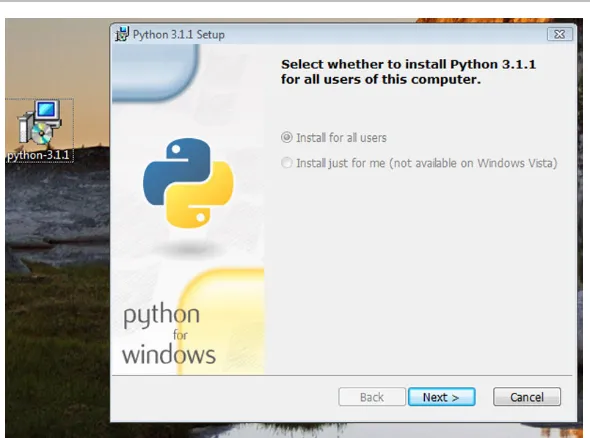
If you are running Windows you will likely have to install Python yourself. You can get the installation package fromhttp://python.org. Click the DOWNLOAD link on the page. Then pick the appropriate installer package. Most will want to download the Python 3.1 (or newer) Windows x86 MSI Installer package. Once you have downloaded it, double-click the package and take all the defaults to install it as pictured in Fig.1.2.
1
4 1 Introduction
You should see something like this:
Kent's Mac> python
Python 3.1.1 (r311:74543, Aug 24 2009, 18:44:04) [GCC 4.0.1 (Apple Inc. build 5493)] on darwin
Type "help", "copyright", "credits" or "license" for more info. >>>
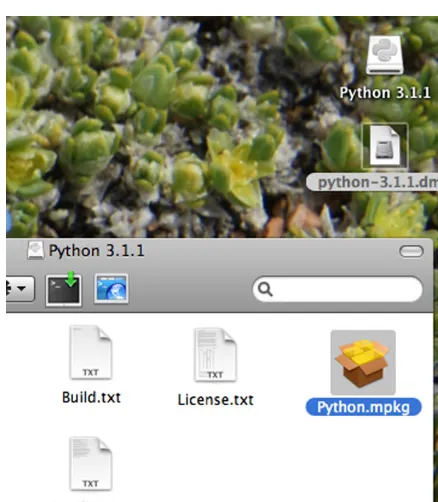
You can press and hold the control key (i.e. the ctrl key) and press ‘d’ to exit Python or just close the terminal window. If you do not have version 3.1 or newer installed on your Mac you may wish to download the Python 3.1 (or newer) MacOS Installer Disk Image from thehttp://python.orgweb site. Once the file is downloaded you can double-click the disk image file and then look for the Python.mpkg file and double-click it as pictured in Fig.1.3. You will need an administrator password to install it which in most cases is just your own password.
If you have a Mac you will also need the X11 Server installed. The X11 Server, called the XQuartz project, is needed to run Wing IDE 101 on a Mac. Directions for installing the X11 Server can be found athttp://wingware.com/doc/howtos/osx. The server is provided by Apple and the XQuartz developers and is freely distributed. The X11 server has shipped with Mac OS X since version 10.5.
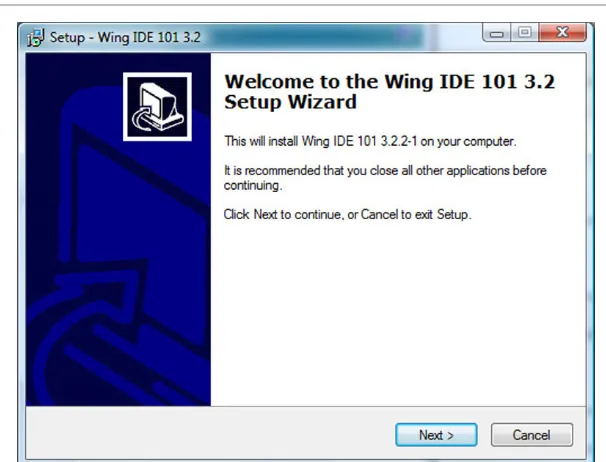
[image:18.457.167.386.344.595.2]While you don’t need an IDE like Wing to write and run Python programs, the debug-ger support that an IDE like Wing provides will help you understand how Python programs work. It is also convenient to write your programs in an IDE so you can run them quickly and easily. To install Wing IDE 101 you need to go to thehttp://wingware.comweb site.
1.2 Installing Python and Wing IDE 101 5
[image:19.457.68.371.46.277.2]Fig. 1.4 Installing Wing IDE 101 on Windows
Fig. 1.5 Installing Wing IDE 101 on a Mac
1
[image:20.457.170.385.58.271.2]6 1 Introduction
Fig. 1.6 Configuring Wing’s Python interpreter
If you are installing Wing IDE 101 on a Mac then you need to mount the disk image. To do this you must double-click a file that looks like wingide-101-3.2.2-1-i386.dmg. After double-clicking that file you will have a mounted disk image of the same name, minus the .dmg extension). If you open a Finder window for that disk image you will see a window that looks like Fig.1.5. Drag the Wing IDE icon to your Applications folder and you can add it to your dock if you like.
Configuring Wing
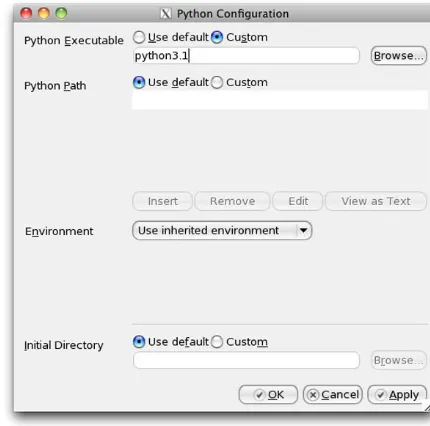
If you look at Fig.1.8you will see that the Python interpreter shows up as Python 3.1.1. When you install Wing, you should open it and take a look at your Python Shell tab. If you see the wrong version of Python then you need to configure Wing to use the correct Python Shell. To do this you must open Wing and go to the Edit menu. Under the Edit menu, select Configure Python. . . and type in the appropriate interpreter. If you are using a Mac and wish to use version 3.1 then you would type python3.1. Figure1.6shows you what this dialog box looks like and what you would type in on a Mac. In Windows, you should click the browse button and find python.exe. This will be in a directory like C:\Python31 if you chose the defaults when installing.
1.3 Writing Your First Program 7
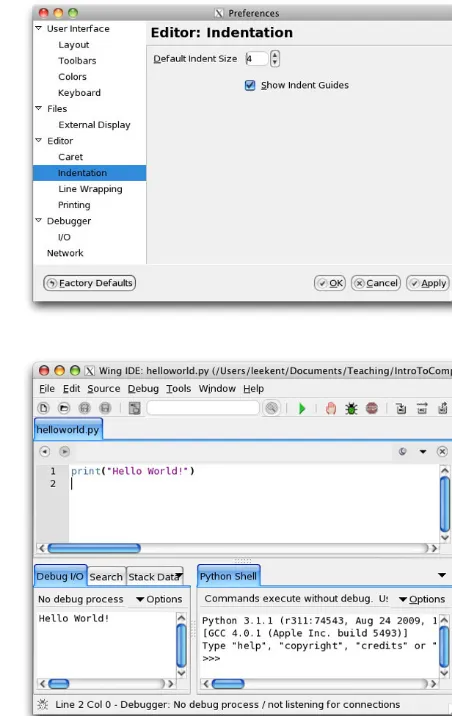
Fig. 1.7 Configuring indent guides
Fig. 1.8 The Wing IDE
That’s it! Whether you are a Mac or Windows user if you’ve followed the directions in this section you should have Python and Wing IDE 101 installed and ready to use. The next section shows you how to write your first program so you can test your installation of Wing IDE 101 and Python.
1.3
Writing Your First Program
1
8 1 Introduction
Open your IDE if you have not already done so. If you are using Windows you can select it by going to the Start menu in the bottom left hand corner and selecting All Programs. Look for Wing IDE 101 under the Start menu and select it. If you are using a Mac, go to the Applications folder and double-click the Wing IDE icon or click on it in your dock if you installed the icon on your dock. Once you’ve done this you will have a window that looks like Fig.1.8.
In the IDE window you go to the File menu and select New to get a new edit tab within the IDE. You then enter one statement, the print statement shown in Fig.1.8to print Hello World! to the screen. After entering the one line program you can run it by clicking the green debug button (i.e. that button that looks like a bug) at the top of the window. You will be prompted to save the file. Click the Save Se-lected Files button and save it as helloworld.py. You should then see Hello World! printed at the bottom of the IDE window in the Debug I/O tab.
The print statement that you see in this pro-gram prints the string “Hello World!” to stan-dard output. Text printed to stanstan-dard output ap-pears in the Debug I/O tab in the Wing IDE. That should do it. If it doesn’t you’ll need to re-read the installation instructions either here or on the websites you downloaded Python and Wing IDE from or you can find someone to help you install them properly. An IDE is used in examples and practice exercises throughout this text so you’ll need a working installation of an IDE and Python to make full use of this text.
1.4
What is a Computer?
So you’ve written your first program and you’ve been using a computer all your life. But, what is a computer, really? A computer is composed of a Central Processing Unit (abbre-viated CPU), memory, and Input/Output (abbre(abbre-viated I/O) devices. A screen is an output device. A mouse is an input device. A hard drive is an I/O device.
1.4 What is a Computer? 9
Fig. 1.9 Conceptual view of a computer
things depending on the outcome of that comparison. The CPU can also control which instruction it will execute next. Normally there are a list of instructions, one after another, that the CPU executes. Sometimes the CPU may jump to a different location within that list of instructions depending on the outcome of some comparison.
That’s it. A CPU can’t do much more than what was described in the previous para-graph. CPU’s aren’t intelligent by any leap of the imagination. In fact, given such limited power, it’s amazing how much we are able to do with a computer. Everything we use a computer for is built on the work of many, many people who have built layers and layers of programs that make our life easier.
The memory of a computer is a place where values can be stored and retrieved. It is a relatively fast storage device, but it loses its contents as soon as the computer is turned off. It is called volatile store. The memory of a computer is divided into different locations. Each location within memory has an address and can hold a value. Figure1.9shows the contents of memory location 100 containing the number 48.
The hard drive is non-volatile storage or sometimes called persistent storage. Val-ues can be stored and retrieved from the hard drive, but it is relatively slow com-pared to the memory and CPU. However, it retains its contents even when the power is off.
In a computer, everything is stored as a sequence of 0’s and 1’s. For instance, the string 01010011 can be interpreted as the decimal number 83. It can also represent the capital letter ‘S’. How we interpret these strings of 0’s and 1’s is up to us. We can tell the CPU how to interpret a location in memory by which instruction we tell the CPU to execute. Some instructions treat 01010011 as the number 83. Other instructions treat it as the let-ter ‘S’.
1
10 1 Introduction
Binary Dec Char Binary Dec Char Binary Dec Char
0100000 32 1000000 64 @ 1100000 96 ‘
0100001 33 ! 1000001 65 A 1100001 97 a
0100010 34 " 1000010 66 B 1100010 98 b
0100011 35 # 1000011 67 C 1100011 99 c
0100100 36 $ 1000100 68 D 1100100 100 d
0100101 37 % 1000101 69 E 1100101 101 e
0100110 38 & 1000110 70 F 1100110 102 f
0100111 39 ’ 1000111 71 G 1100111 103 g
0101000 40 ( 1001000 72 H 1101000 104 h
0101001 41 ) 1001001 73 I 1101001 105 i
0101010 42 * 1001010 74 J 1101010 106 j
0101011 43 + 1001011 75 K 1101011 107 k
0101100 44 , 1001100 76 L 1101100 108 l
0101101 45 - 1001101 77 M 1101101 109 m
0101110 46 . 1001110 78 N 1101110 110 n
0101111 47 / 1001111 79 O 1101111 111 o
0110000 48 0 1010000 80 P 1110000 112 p
0110001 49 1 1010001 81 Q 1110001 113 q
0110010 50 2 1010010 82 R 1110010 114 r
0110011 51 3 1010011 83 S 1110011 115 s
0110100 52 4 1010100 84 T 1110100 116 t
0110101 53 5 1010101 85 U 1110101 117 u
0110110 54 6 1010110 86 V 1110110 118 v
0110111 55 7 1010111 87 W 1110111 119 w
0111000 56 8 1011000 88 X 1111000 120 x
0111001 57 9 1011001 89 Y 1111001 121 y
0111010 58 : 1011010 90 Z 1111010 122 z
0111011 59 ; 1011011 91 [ 1111011 123 {
0111100 60 < 1011100 92 \ 1111100 124 |
0111101 61 = 1011101 93 ] 1111101 125 }
0111110 62 > 1011110 94 ^ 1111110 126 ~ 0111111 63 ? 1011111 95 _ 1111111 127 DEL
Fig. 1.10 The ASCII table
1.5
Binary Number Representation
1.5 Binary Number Representation 11
decimal numbers. The right-most digit of a binary number represents the number of times 20=1 is needed in the representation of the integer. Our choices are only 0 or 1 (i.e. we
can use one 20 if the number is odd), because 0 and 1 are the only choices for digits in a
binary number. The next right-most is 21=2 and so on. So 01010011 is 0∗27+1∗26+ 0∗25+1∗24+0∗23+0∗22+1∗21+1∗20=83. Any binary number can be converted to its decimal representation by following the steps given above. Any decimal number can be converted to its binary representation by subtracting the largest power of two that is less than the number, marking that digit as a 1 in the binary number and then repeating the process with the remainder after subtracting that power of two from the number.
Practice 1.1 What is the decimal equivalent of the binary number 010101012?
Example 1.1 There is an elegant algorithm for converting a decimal number to a binary number. You need to carry out long division by 2 to use this algorithm. If we want to convert 8310to binary then we can repeatedly perform long division by 2 on the quotient of each
result until the quotient is zero. Then, the string of the remainders that were accumulated while dividing make up the binary number. For example,
83/2=41 remainder 1 41/2=20 remainder 1 20/2=10 remainder 0 10/2=5 remainder 0 5/2=2 remainder 1 2/2=1 remainder 0 1/2=0 remainder 1
The remainders from last to first are 10100112which is 8310. This set of steps is called an
algorithm. An algorithm is like a recipe for doing a computation. We can use this algorithm any time we want to convert a number from decimal to binary.
Practice 1.2 Use the conversion algorithm to find the binary representation of 5810.
To add two numbers in binary we perform addition just the way we would in base 10 format. So, for instance, 00112+01012=10002. In decimal format this is 3+5=8. In
binary format, any time we add two 1’s, the result is 0 and 1 is carried.
1
12 1 Introduction
Typically thirty-two or sixty-four bit addition is used. To keep things simple we’ll do some eight bit addition in this text. Consider 000000112=310.
It turns out that the 2’s complement of a number is the negative of that number in binary. For example, the numbers 310=000000112and−310=111111012. 111111012is the 2’s
complement of 00000011. It can be found by reversing all the 1’s and 0’s (which is called the 1’s complement) and then adding 1 to the result.
Example 1.2 Adding 00000011 and 11111101 together gives us
00000011
+11111101
=100000000
This only works if we limit ourselves to 8 bit addition. The carried 1 is in the ninth digit and is thrown away. The result is 0.
Practice 1.3 If 010100112=8310, then what does −8310 look like in binary?
HINT: Take the 2’s complement of 83 or figure out what to add to 010100112to
get 0.
If binary 111111012= −310does that mean that 253 can’t be represented? The answer
is yes and no. It turns out that 111111012 can represent−310 or it can represent 25310
depending on whether we want to represent both negative and positive values or just pos-itive values. The CPU instructions we choose to operate on these values determine what types of values they are. We can choose to use signed integers in our programs or unsigned integers. The type of value is determined by us when we write the program.
Typically, 4 bytes, or one word, are used to represent an integer. This means that 232 different signed integers can be represented from−231to 231−1. In fact, Python can handle more integers than this but it switches to a different representation to handle integers outside this range. If we chose to use unsigned integers we could represent numbers from 0 to 232−1 using one word of memory.
Not only can 010100112represent 8310, it can also represent a character in the alphabet.
If 010100112 is to be interpreted as a character almost all computers use a convention
1.6 What is a Programming Language? 13
Fig. 1.11 The Python shell
Practice 1.4 What is the binary and decimal equivalent of the space character?
Practice 1.5 What determines how the bytes in memory are interpreted? In other words, what makes 4 bytes an integer as opposed to four ASCII characters?
1.6
What is a Programming Language?
If we were to have to write programs as sequences of numbers we wouldn’t get very far. It would be so tedious to program that no one would want to be a programmer. In the spring of 2006 Money Magazine ranked Software Engineer [4] as the number one job in America in terms of overall satisfaction which included things like compensation, growth, and stress-levels. So it must not be all that tedious.
1
[image:28.457.204.349.55.172.2]14 1 Introduction
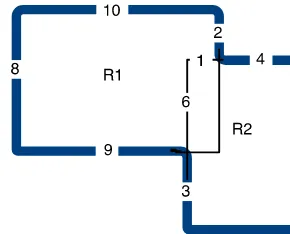
Fig. 1.12 Overlapping rectangles
IDE has a tab labeled Python Shell. The shell allows programmers to interact with the Python interpreter. The interpreter is a program that interprets the programs we write. If you have a Mac or Linux computer you can also start the Python interpreter by opening up a terminal window. If you use Windows you can start a Command Prompt by looking under the Accessories program group. Typing python at a command prompt starts a Python interpreter as shown in Fig.1.11.
Consider computing the area of a shape constructed of overlapping regular polygons. In Fig. 1.12 all angles are right angles and all distances are in meters. Our job is to figure out the area in square meters. The lighter lines in the middle help us figure out how to compute the area. We can compute the area of the two rectangles and then sub-tract one of the overlapping parts since otherwise the overlapping part would be counted twice.
This can be computed on your calculator of course. The Python Shell is like a calculator and Fig.1.11shows how it can be used to compute the area of the shape. The first line sets a variable called R1_width to the value of 10. Then R1_height is set to 8. We can store a value in memory and give it a name. This is called an assignment statement. Your calculator can store values. So can Python. In Python these values can be given names that mean something in our program. R1_height is the name we gave to the height of the R1 rectangle. Anytime we want to retrieve that value we can just write R1_height and Python will retrieve its value for us.
1.7 Hexadecimal and Octal Representation 15
Practice 1.7 Take a moment and answer these questions from the material you just read.
1. What is an assignment statement? 2. How do we retrieve a value from memory?
3. Can we retrieve a value before it has been stored? What happens when we try to do that?
Interacting directly with the Python shell is a good way to quickly see how something works. However, it is also painful because mistakes can’t be undone. In the next section we’ll go back to writing programs in an editor so they can be changed and run as many times as we like. In fact, this is how most Python programming is done. Write a little, then test it by running it. Then write a little more and run it again. This is called prototyp-ing and is an effective way to write programs. You should write all your programs usprototyp-ing prototyping while reading this text. Write a little, then try it. That’s an effective way to program and takes less time than writing a lot and then trying to figure out what went wrong.
1.7
Hexadecimal and Octal Representation
Most programmers do not have to work with binary number representations. Programming languages let programmers write numbers in base 10 and they do the conversion for us. However, once in a while a programmer must be concerned about the binary representa-tion of a number. As we’ve seen, converting between binary and decimal isn’t hard, but it is somewhat tedious. The difficulty arises because 10 is not a power of 2. Converting between base 10 and base 2 would be a lot easier if 10 were a power of 2. When computer programmers have to work with binary numbers they don’t want to have to write out all the zeroes and ones. This would obviously be tedious as well. Instead of converting num-bers to base 10 or writing all numnum-bers in binary, computer programmers have adopted two other representations for binary numbers, base 16 (called hexadecimal) and base 8 (called octal).
In hexadecimal each digit of a number can represent sixteen different binary numbers. The sixteen hexadecimal digits are 0–9, and A–F. Since 16 is a power of 2, there are exactly 4 binary digits that make up each hexadecimal digit. So, 00002 is 016and 11112 isF16.
So, the binary number 10101110 is AE in hexadecimal notation and 256 in octal notation. If we wish to convert either of these two numbers to binary format the conversion is just as easy. 10102isA16for instance. Again, these conversions can be done quickly because
1
16 1 Introduction
Example 1.3 To convert the binary number 010100112 to hexadecimal we have only to
break the number into two four digit binary numbers 01012 and 00112. 01012=516and
00112=316. So the hexadecimal representation of 010100112is 5316.
Python has built-in support of hexadecimal numbers. If you want to express a number in hexadecimal form you preface it with a 0xto signify that it is a hexadecimal number. For instance, here is how Python responds to 0x53 being entered into the Python shell. Kent's Mac> python
Python 3.1.1 (r311:74543, Aug 24 2009, 18:44:04) [GCC 4.0.1 (Apple Inc. build 5493)] on darwin
Type "help", "copyright", "credits" or "license" for more info. >>> 0x53
83
>>> 0o123 83
>>>
Since 8=23, each digit of an octal number
represents three binary digits. The octal dig-its are 0–7. The number 010100112=1238.
When converting a binary number to octal or hexadecimal we must be sure to start with the right-most bits. Since there are only 8 bits in 01010011 the left-most octal digit corresponds to the left-most two binary digits. The other
two octal digits each have three binary digits. Again, Python has built-in support for repre-senting octal digits. Writing a number with a leading zero and the letter o means that it is in octal format. So 0o123 is the Python representation of 1238and it is equal to 8310.
Practice 1.8 Convert the number 5810to binary and then to hexadecimal and octal.
1.8
Writing Your Second Program
1.8 Writing Your Second Program 17
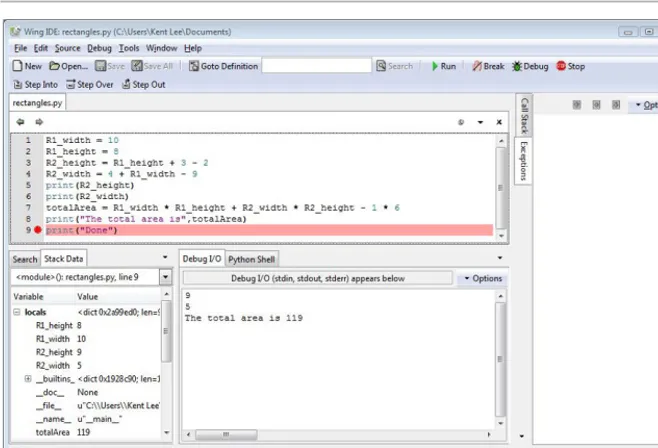
Fig. 1.13 The Wing IDE
a program we can write a little bit and then execute it in the Python interpreter by pressing F5 on the keyboard or by clicking the debug button.
When we write a program we will almost certainly have to debug it. Debugging is the word we use when we have to find errors in our program. Errors are very common and typically you will find a lot of them before the program works perfectly. Debugging refers to removing bugs from a program. Bugs are another name for errors. The use of the words bug and debugging in Computer Science dates back to at least 1952 and prob-ably much earlier. Wikipedia has an interesting discussion of the word debugging if you want to know more. While you can use the Python Shell for some limited debugging, a debugger is a program that assists you in debugging your program. Figure1.13has a picture of the Wing IDE with the program we’ve been working on typed into the editor part of the IDE. To use the debugger we can click the mouse in the area where the red circle appears next to the numbers. This is called setting a breakpoint. A breakpoint tells Python to stop running when Python reaches that statement in the program. The program is not finished when it reaches that step, but it stops so you can inspect the state of the program.
1
18 1 Introduction
Practice 1.9 Create an edit pane within the Wing IDE and write the program as it appears in Fig.1.13. Write a few lines, then run it by pressing F5 on the keyboard or clicking on the Debug button. The first time you press F5 you will be prompted to save the program. Make sure you save your program where you can find it later.
Try setting a break point by clicking where the circle appears next to the numbers in Fig.1.13. You should see a red circle appear if you did it right. Then run the program again to see that it stops at the breakpoint as it appears in Fig.1.13. You can stop a program at any point by setting a breakpoint on that line. When the debugger stops at a breakpoint it stops before the statement is executed. You must click the Debug button, not the Run button to get it to stop at breakpoints.
Look at the Stack Data to inspect the state of the program just before the word Done is printed. Make sure it matches what you see here. Then continue the execu-tion by clicking the Debug button or pressing F5 again to see that Done is printed.
1.9
Syntax Errors
Not every error is found using a debugger. Sometimes errors are syntax errors. A syntax error occurs when we write something that is not part of the Python language. Many times a syntax error can occur if we forget to write something. For instance, if we forget a paren-thesis or a double quote is left out it will not be a correct Python program. Syntax errors are typically easier to find than bugs in our program because Python can flag them right away for us. These errors are usually highlighted right away by the IDE or interpreter. Syntax errors are those errors that are reported before the program starts executing. You can tell its a syntax error in Wing because there will not be any Stack Data. Since a syntax error shows up before the program runs, the program is not currently executing and therefore there is not state information in the stack data. When a syntax error is reported the editor or Python will typically indicate the location of the error after it actually occurs so the best way to find syntax errors is to look backwards from where the error is first reported.
Example 1.4 Forgetting a parenthesis is a common syntax error.
p r i n t(R2_height
1.10 Types of Values 19
Fig. 1.14 A syntax error
There are other types of errors we can have in our programs. Syntax errors are perhaps the easiest errors to find. All other errors can be grouped into the category of run-time errors. Syntax errors are detected before the program runs. Run-time errors are detected while the program is running. Unfortunately, run-time errors are sometimes much harder to find than syntax errors. Many run-time errors are caused by the use of invalid operations being applied to values in our programs. It is important to understand what types of values we can use in our programs and what operations are valid for each of these types. That’s the topic of the next section.
1.10
Types of Values
Earlier in this chapter we found that bytes in memory can be interpreted in different ways. The way bytes in memory are interpreted is determined by the type of the value or object and the operations we apply to these values. Each value in Python is called an object. Each object is of a particular type. There are several data types in Python. These include integer (called int in Python), float, boolean (called bool in Python), string (called str in Python), list, tuple, set, dictionary (called dict in Python), and None.
1
20 1 Introduction
Fig. 1.15 A reference
again. Reviewing types and their operations is a common practice among programmers as they design and write new programs.
1.11
The Reference Type and Assignment Statements
There is one type in Python that is typically not seen, but nevertheless is important to understand. It is called the reference type. A reference is a pointer that points to an object. A pointer is the address of an object. Each object in memory is stored at a unique address and a reference is a pointer that points to an object.
An assignment statement makes a reference point to an object. The general form of an assignment statement is:
<identifier> = <expression>
An identifier is any letters, digits, or underscores written without spaces between them. The identifier must begin with a letter or underscore. It cannot start with a digit. The expression is any expression that when evaluated results in one of the types described in Sect.1.10. The left hand side of the equals sign must be an identifier and only one identifier. The right hand side of the equals sign can contain any expression that may be evaluated.
In Fig.1.15, the variable R1_width (orange in the figure) is a reference that points at the integer object 10 colored green in the figure. This is what happens in memory in response to the assignment statement:
R1_width = 10
The 0x264 is the reference value, written in hexadecimal, which is a pointer (i.e. the ad-dress) that points at the integer object 10. However, typically you don’t see reference val-ues in Python. Instead, you see what a reference points to. So if you type R1_width in the Python shell after executing the statement above, you won’t see 0x264 printed to the screen, you’ll see 10, the value that R1_width refers to. When you set a breakpoint and look at the stack data in the debugger you will also see what the reference refers to, not the reference itself (see Fig.1.13).
It is possible, and common, in Python to write statements like this:
x = 1
1.12 Integers and Real Numbers 21
Fig. 1.16 Before incrementing x
Fig. 1.17 After incrementing x
According to what we have just seen, Fig.1.16depicts the state of memory after executing the first line of code and before executing the second line of code. In the second line of code, writingx=x+1 is not an algebraic statement. It is an assignment statement where one is added to the value that x refers to. The correct way to read an assignment statement is from right to left. The expression on the right hand side of the equals sign is evaluated to produce an object. The equals sign takes the reference to the new value and stores it in the reference named by the identifier on the left hand side of the equals sign. So, to properly understand how an assignment statement works, it must be read from right to left. After executing the second statement (the line beginning with a pound sign is a comment and is not executed), the state of memory looks like Fig.1.17. The reference called x is updated to point to the new value that results from adding the old value referred to by x and the 1 together.
The space for the two left over objects containing the integers 1 in Fig.1.17is reclaimed by the garbage collector. You can think of the garbage collector as your favorite arcade game character running around memory looking for unattached objects (objects with no references pointing to them—the stuff in the cloud in Fig.1.17). When such an object is found the garbage collector reclaims that memory for use later much like the video game character eats dots and fruit as it runs around.
The garbage collector reclaims the space in memory occupied by unreferenced objects so the space can be used later. Not all programming languages include garbage collection but many languages developed recently include it and Python is one of these languages. This is a nice feature of a language because otherwise we would have to be responsible for freeing all of our own memory ourselves.
1.12
Integers and Real Numbers
1
22 1 Introduction
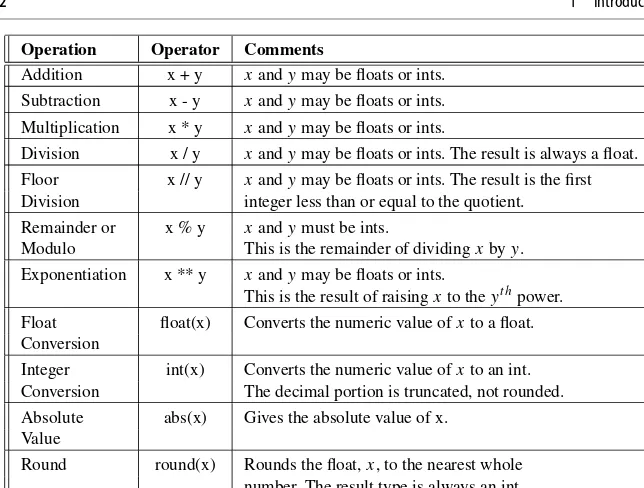
Operation Operator Comments
Addition x + y xandymay be floats or ints. Subtraction x - y xandymay be floats or ints. Multiplication x * y xandymay be floats or ints.
Division x / y xandymay be floats or ints. The result is always a float. Floor x // y xandymay be floats or ints. The result is the first Division integer less than or equal to the quotient. Remainder or x % y xandymust be ints.
Modulo This is the remainder of dividingxbyy. Exponentiation x ** y xandymay be floats or ints.
This is the result of raisingxto theyt hpower.
Float float(x) Converts the numeric value ofxto a float. Conversion
Integer int(x) Converts the numeric value ofxto an int. Conversion The decimal portion is truncated, not rounded. Absolute abs(x) Gives the absolute value of x.
Value
[image:36.457.61.383.39.283.2]Round round(x) Rounds the float,x, to the nearest whole number. The result type is always an int.
Fig. 1.18 Numeric operations
digits, like 83 for instance. Real numbers, called float in Python, are written with a decimal point as in 83.0. This distinction affects how the numbers are stored in memory and what type of value you will get as a result of some operations.
In Fig.1.18the type of the result is a float if either operand is a float unless noted otherwise in the table.
Dividing the integer 83 by 2 yields 41.5 if it is written 81/2. However, if it is written 83//2 then the result is 41. This goes back to long di-vision as we first learned in elementary school. 83//2 is 41 with a remainder of 1. The result of floor division isn’t always an int. 83//2.0 yields 41.0 so be careful. While floor division returns an integer, it doesn’t necessarily return an int.
We can insure a number is a float or an inte-ger by writing float or int in front of the num-ber. So, float(83)//2 also yields 41.0. Likewise, int(83.0)//2 yields 41.
There are infinitely many real numbers but only a finite number of floats that can be
1.12 Integers and Real Numbers 23
that number can’t be represented in some implementations of Python. Instead, that number is approximated as 3.1415899999999999 in at least one Python implementation. Writing 3.14159 in a Python program is valid, but it is still stored internally as the approximated value. This is not a limitation of Python. It is a limitation of computers in general. Com-puters can only approximate values when there are infinitely many possibilities because computers are finite machines.
You can use what is called integer conversion to transform a floating point number to its integer portion. In effect, integer conversion truncates the digits after the decimal point in a floating point number to get just the whole number part. To do this you write int in front of the floating point number you wish to convert. This does not convert the existing number. It creates a new number using only the integer portion of the floating point number.
Example 1.5 Assume that you work for the waste water treatment plant. Part of your job dictates that you report the gallons of water treated at the plant. However, your meter reports lbs of water treated. You have been told to to report the amount of treated waste water in gallons and ounces. There are 128 ounces in a gallon and 16 ounces in a pound. Here is a short program that performs the conversion.
1 lbs = float(input("Please enter the lbs of water treated: "))
2 ounces = lbs * 16
3 gallons = int(ounces / 128)
4 ounces = ounces - gallons * 128
5 p r i n t("That's",gallons,"gallons and", \
6 ounces,"ounces of treated waste water.")
In Example1.5the lbs were first converted to ounces. Then the whole gallons were computed from the ounces by converting to an integer the result of dividing the ounces float by 128. On line 4 the remaining ounces were computed after taking out the number of ounces contained in the computed gallons.
1
24 1 Introduction
Operation Operator Comments
Indexing s[x] Yields thext hcharacter of the strings. The index is zero
based, so s[0] is the first character.
Concatenation s + t Yields the juxtaposition of the stringssandt. Length len(s) Yields the number of characters ins. Ordinal ord(c) Yields the ordinal value of a characterc.
Value The ordinal value is the ASCII code of the character. Character chr(x) Yields the character that corresponds to the
Value ASCII value ofx.
String str(x) Yields the string representation of the value ofx. Conversion The value ofxmay be an int, float, or other type of value. Integer int(s) Yields the integer value contained in the strings. Ifs Conversion does not contain an integer an error will occur. Float float(s) Yields the float value contained in the strings. Ifs Conversion does not contain a float an error will occur.
Fig. 1.19 String operations
Practice 1.10 Write a short program that computes the length of the hypotenuse of a right triangle given the two legs as pictured in Fig.1.23on page32. The program should use three variables, sideA, sideB, and sideC. The Pythagorean theorem states that the sum of the squares of the two legs of the triangle equals the square of the hypotenuse. Be sure to assign all three variables their correct values and print the length of sideC at the end of the program. HINT: Raising a value to the 1/2 power is the same thing as finding the square root. Try values 6 and 8 for sideA and sideB.
1.13
Strings
Strings are another type of data in Python. A string is a sequence of characters.
name = 'Sophus Lie'
p r i n t("A famous Norwegian Mathematician is", name)
1.14 Integer to String Conversion and Back Again 25
single quote at the beginning of a string literal, you must use a single quote at the end of the string literal. Delimiters must come in matching pairs.
Strings are one type of sequence in Python. There are other kinds of sequences in Python as well, such as lists which we’ll look at in a couple of chapters. Python supports operations on sequences. For instance, you can get an individual item from a sequence. Writing,
p r i n t(name[0])
will print the first character of the string that name references. The 0 is called an index. Each subsequent character is assigned a subsequent position in the string. Notice the first position in the string is assigned 0 as its index. The second character is assigned index 1, and so on. Strings and their operations are discussed in more detail in Chap. 3.
Practice 1.11 Write the three line program given in the two listings on page24. Then, without writing the string literal “house”, modify it to print the string “house” to the screen using string indexing. HINT: You can add strings together to build a new string. So,
name = "Sophus" + " Lie"
will result in name referring to the string “Sophus Lie”.
1.14
Integer to String Conversion and Back Again
It is possible in Python to convert an integer to a string. For instance,
x = str(83)
p r i n t(x[0])
p r i n t(x[1]) y = int(x)
p r i n t(y)
This program converts 83 to ‘83’ and back again. Integers and floats can be converted to a string by using the str conversion operator. Likewise, an integer or a float contained in a string can be converted to its numeric equivalent by using the int or float conversion op-erator. Conversion between numeric types and string types is frequently used in programs especially when producing output and getting input.
1
26 1 Introduction
ASCII character equivalent you use the chr conversion operator. For instance, chr(83) is ‘S’. Likewise, if you want to convert a character to its ASCII code equivalent you use the ord conversion operator. So ord(‘S’) is equal to 83.
Practice 1.12 Change the program above to convert 83 to its ASCII character equiv-alent. Save the value in a variable and print the following to the screen in the exact format you see here.
The ASCII character equivalent of 83 is S.
You might have noticed in Fig.1.19there is an operator called int and another called float. Both of these operators are also numeric operators and appear in Fig.1.18. This is called an overloaded operator because int and float are operators that work for both numeric and string operands. Python supports overloaded operators like this. This is a nice feature of the language since both versions of int and float do similar things.
1.15
Getting Input
To get input from the user you can use the input function. When the input function is called the program stops running the program, prompts the user to enter something at the keyboard by printing a string called the prompt to the screen, and then waits for the user to press the Enter key. The user types a string of characters and presses enter. Then the input function returns that string and Python continues running the program by executing the next statement after the input statement.
Example 1.6 Consider this short program.
name = input("Please enter your name:")
p r i n t("The name you entered was", name)
1.16 Formatting Output 27
conversion operator. For instance, if we want to get an int from the user, we must use the int conversion operator.
Practice 1.13 Assume that we want to pause our program to display some output and we want to let the user press some key to continue. We want to print “press any key to continue. . . ” to the screen. Can we use the input function to implement this? If so, how would you write the input statement? If not, why can’t you use input?
Example 1.7 This code prompts the user to enter their age. The string that was returned by input is first converted to an integer and then stored in the variable called age. Then the age variable can be added to another integer. It is important to remember that input always returns a string. If some other type of data is desired, then the appropriate type conversion must be applied to the string.
age = int(input("Please enter your age:")) olderAge = age + 1
p r i n t("Next year you will be", olderAge)
1.16
Formatting Output
1
28 1 Introduction
When printing, we may print as many items as we like on one line by separating each item by a comma. Each time a comma appears between items in a print statement, a space appears in the output.
Example 1.8 Here is some code that prints a few values to the screen.
name = "Sophus"
p r i n t(name,"how are you doing?")
p r i n t("I hope that,", name, "is feeling well today.") The output from this is:
Sophus how are your doing?
I hope that Sophus is feeling well today.
To print the contents of variables without spaces appearing between the items, the vari-ables must be converted to strings and string concatenation can be used. The + operator adds numbers together, but it also concatenates strings. For the correct + operator to be called, each item must first be converted to a string before concatenation can be performed.
Example 1.9 Assume that we ask the user to enter two floating point numbers,xandy, and we wish to print the result of raisingxto theyth power. We would like the output to look like this.
Please enter a number: 4.5 Please enter an exponent: 3.2
4.5^3.2 = 123.10623351
Here is a program that will produce that output, with no spaces in the exponentiation ex-pression. NOTE: The caret symbol (i.e.^) is not the Python symbol for exponentiation.
1 base = float(input("Please enter a number: "))
2 exp = float(input("Please enter an exponent: "))
3 answer = base ** exp
4 p r i n t(str(base) + "^" + str(exp), "=", answer)
1.16 Formatting Output 29
Type Specifier Comments
int %wd Places an integer in a field of widthwif specified.%2d would place an integer in a field of width 2.wmay be omitted.
int %wx Format the integer in hexadecimal. Put it in a field of widthwif specified. wmay be omitted.
int %wo Format the integer in octal. Put it in a field of widthwif specified.wmay be omitted.
float %w.df Format a floating point number with total widthw(including the decimal point) and withd digits after the decimal point. Displaying the entire number include thed digits takes precedence over displaying in a field ofwcharacters shouldwnot be big enough.wanddmay be omitted. float %w.de Format a floating point number using scientific notation withddigits of
precision andwfield width. Scientific notation uses an exponent of 10 to move the decimal point so only one digit appears to the left of the decimal point.wanddmay be omitted.
str %ws Place a string in a field of widthw.wmay be omitted. %% Include a%sign in the formatted string.
Fig. 1.20 Format specifiers
Practice 1.14 The sum of the first n positive integers can be computed by the for-mula
sum(1..n)=1+2+3+4+ · · · +n=n(n+1)/2
Write a short Python program that computes the sum of the first 100 positive integers and prints it to the screen in the format shown below. Use variables to represent the 1, the 100, and the result of the computation. Your program must compute the 5050 value. You cannot just print the result to the screen. You must compute it first from the 100.
sum(1..100)=5050
For advanced control of the format of printing we can use string formatting. String formatting was first used in the C language printf function back in the 1970’s. It’s an idea that has been around a long time, but is still useful. The idea is that we place formatting instructions in a string and then tell Python to replace the formatting instructions with the actual values. This is best described with an example.
1
30 1 Introduction
number we wish to round the numbers to two digits of precision when they are printed to the console. Assume we wish to round the answer to 4 decimal places when displayed. The following code will do this.
1 base = float(input("Please enter a number: "))
2 exp = float(input("Please enter an exponent: "))
3 answer = base ** exp
4 p r i n t("%1.2f^%1.2f = %1.4f"%(base,exp,answer)) Running this program produces the following output.
Please enter a number: 4.666666667 Please enter an exponent: 3.3333333333 4.67^3.33 = 169.8332
Line 4 in Example1.10prints the result of formatting a string. To use Python format-ting, a format string must be written first, followed by a percent sign, followed by the replacement values. If there is more than one replacement value, they must be written in parentheses. Each time a%appears inside the format string it is replaced by one of the values that appear after the format string. How a value is formatted when it is placed in the format string is controlled by the format specifier. Figure1.20contains some specifiers for common types of data in Python. Every format specifier may include an optional width field. If specified, the width field specifies the actual width of the replaced data. If the width of the data being inserted into the format string exceeds the alloted width, the entire field is included anyway, stretching the width of the formatted string. String formatting can be very useful when generating a printed report of some data.
Practice 1.15 Re-do Practice1.14using format specifiers when printing instead of converting each item to a string. The goal is for the output to look exactly the same.
sum(1..100)=5050
1.17
When Things Go Wrong
1.17 When Things Go Wrong 31
Fig. 1.21 A run-time error
mistakes and correct them. Debugging programs is a skill that can be learned and therefore can be taught as well. But, it takes lots of practice and patience. Fortunately, you will have many chances to practice as you work your way through this book.
Sometimes, especially when you are first learning to debug your programs, it can help to have someone to talk to. Just the act of reading your code to someone else may cause you to find your mistake. Of course, if you are using this text as part of a course you may not want to read your code to another class member as that may violate the guidelines your instructor has set forth. But, nevertheless, you might find that reading your code to someone else may help you discover problems. This is called a code walk-through by pro-gramming professionals. It is a common practice and is frequently required when writing commercially available programs.
There is no substitute for thorough testing. You should run your program using varied values for input. Try to think of values that might cause your program to break. For in-stance, what if 0 is entered for an integer? What if a non-integer value is entered when an integer was required? What happens if the user enters a string of characters when a number was required?
1
32 1 Introduction
Fig. 1.22 An index out of range error
Fig. 1.23 A right triangle
program in Fig.1.21. The program is trying to use the gallons variable which has not been assigned a value. The error message is on the right side of the window. The line where the error was first detected by Python is highlighted.
In the example in Fig.1.21the actual error is not on the line that is highlighted. The highlighted line is the line where Python first detected the error. This is a very common occurrence when debugging. Detection of an error frequently occurs after the location of the actual error. To become a good programmer you must learn to look backwards through your code from the point where an error is detected to find the location where it occurred. In this case, the gallon variable should have been written as gallons on line 3 but was incorrectly typed.
Another common error is the index out of range error. This can occur when trying to access a value in a sequence by indexing into the sequence. If the index is for an item that is outside the range of the sequence, an index out of range error will occur. For instance, if you have a string called x that is one character long and you try to access the second element of the string, your program will abort with an index out of range error. Figure1.22
1.18 Review Questions 33
Once again, in the example in Fig.1.22the error did not occur on the line that is high-lighted. The error occurred because the programmer meant to take the str(83) which would result in “83” as a string instead of the chr(83) which results in the string “S”. If the string had been “83” then line 3 would have worked and would have printed 3 to the screen.
When an error occurs it is called an uncaught exception. Uncaught exceptions result in the program terminating. They cannot be recovered from. Because uncaught exceptions result in the program terminating it is vital to test your code so that all variations of running the program are tested before the program is released to users. Even so, there are times when a user may encounter an error. Perhaps it has happened to you? In any case, thorough testing is critical to your success as a programmer and learning to debug and test your code is as important as learning to program in the first place. As new topics are introduced in this text, debugging techniques will also be introduced to provide you with the information you need to become a better debugger.
1.18
Review Questions
1. What does the acronym IDE stand for? What does it do? 2. What does the acronym CPU stand for? What does it do? 3. How many bytes are in a GB? What does GB stand for? 4. What is the decimal equivalent of the binary number 01101100? 5. What is the hexadecimal equivalent of the binary number 01101100? 6. What is the binary equivalent of the number−62?
7. What is the ASCII equivalent of the decimal number 62?
8. What is a type in Python? Give an example. Why are there types in Python programs? 9. How can you tell what type of value is stored in 4 contiguous bytes of memory? 10. How can you interactively work with the Python interpreter?
11. What is prototyping as it applies to computer programming?
12. Name two different types of errors that you can get when writing a computer program? What is unique about each type of error?
13. What is a reference in a Python program? 14. Why shouldn’t you compare floats for equality?
15. What would you have to write to ask the user to enter an integer and then read it into a variable in your program? Write some sample code to do this.
1
34 1 Introduction
1.19
Exercises
1. Write a program that asks the user to enter their name. Then it should print out the ASCII equivalent of each of the first four characters of your name. For instance, here is a sample run of the program below.
Please enter your name: Kent K ASCII value is 75
e ASCII value is 101 n ASCII value is 110 t ASCII value is 116
2. Write a program that capitalizes the first four characters of a string by converting the characters to their ASCII equivalent, then adding the necessary amount to capitalize them, and converting the integers back to characters. Print the capitalized string. Here is a sample of running this program.
Please enter a four character string: kent The string capitalized is KENT
3. You can keep track of your car’s miles per gallon if you keep track of how many miles you drive your car on a tank of gas and you always fill up your tank when getting gas. Write a program that asks the user to enter the number of miles you drove your car and the number of gallons of gas you put in your car and then prints the miles per gallon you got on that tank of gas. Here is a sample run of the program.
Please enter the miles you drove: 256
Please enter the gallons of gas you put in the tank: 10.1 You got 25.346534653465348 mpg on that tank of gas.
4. Write a program that converts US Dollars to a Foreign Currency. You can do this by finding the exchange rate on the internet and then prompting for the exchange rate in your program. When you run the program it should look exactly like