Intuitive Approach
to an Interactive
Bachelor Thesis for Creative Technology
Intuitive approach to an interactive
tutorial for the VirtuScope
Kells Hsiao s1521373
Supervisor: Dennis Reidsma
Abstract
The rapid emergence of AR led to many contemporary designs aiming for engagement such as AR storytelling and interactive tourism applications. The VirtuScope is such a device that merges these concepts to revolutionise the traditional binoculars stands that can often be seen in locations for tourism. This report documents the process of researching an intuitive
Acknowledgment
I would like to thank all those who provided me with support and confidence during my studies in Creative Technology. Thank you all for your persistent positivity and above all, your belief in me.
T
ABLE OF
C
ONTENTS
1 INTRODUCTION ... 7
2 ANALYSIS ... 9
2.1 RELATED WORK... 9
2.1.1 Interactive Tourism ... 9
2.1.2 AR in Tourism ... 9
2.1.3 Digital Tutorials ... 10
2.1.4 Conclusion ... 11
2.2 PROBLEM ANALYSIS ... 11
2.2.1 Context ... 11
2.2.2 Concerning Factors ... 13
2.3 RESEARCH METHOD... 13
2.4 STATE OF THE ART ... 14
2.4.1 Interactive tutorial design and targeted user groups ... 14
2.4.2 Contemporary application of AR technology ... 14
2.4.3 Conclusion ... 15
3 METHOD AND APPROACH ... 16
3.1 DESIGN PROCESS ... 16
3.1.1 Design Process for Creative Technology ... 16
3.1.2 Adjustment of the Design Process for the Current Project ... 16
3.1.3 User Scenarios ... 17
3.2 APPROACH ... 17
4 PROJECT IDEATION... 19
4.1 STAKEHOLDER ANALYSIS ... 19
4.2 USER ANALYSIS ... 20
4.3 CONSTRAINTS... 20
4.4 INSPIRATION AND REFERENCE ANALYSIS... 21
4.4.1 Inspiration from other applications and media ... 21
4.5 INTERACTION IDEAS ... 22
4.6 USER INTERFACE IDEAS ... 22
4.7 TUTORIAL SCENARIO IDEAS ... 22
4.8 STATEMENT OF FINAL PRODUCT IDEA ... 24
4.8.1 Digital Mock Prototype ... 24
5 PROJECT SPECIFICATION ... 25
5.1 USER SPECIFICATIONS ... 25
5.2 FUNCTIONAL REQUIREMENTS... 27
5.2.1 Client Request ... 28
5.2.2 Research Goal requirements... 28
5.2.3 Table of functional requirements ... 28
5.3 PROTOTYPE SPECIFICATIONS ... 29
5.3.1 Visual elements for the tutorial ... 29
5.3.2 Interactive Ideas for the tutorial ... 29
5.3.3 Digital prototype on a VirtuScope Prototype ... 29
6 VISUAL ELEMENTS DESIGN ... 31
6.1 VISUAL ELEMENTS FOR THE TUTORIAL ... 31
6.1.1 Client Feedback ... 31
6.2 VISUAL GUIDANCE BY ANIMATION ... 31
6.3 REALISATION OF DEMO ... 33
6.3.2 Hardware Simulation ... 33
6.4 EVALUATION OF DEMO ... 34
6.4.1 User Evaluation ... 34
6.4.2 Results ... 34
6.4.3 Discussion ... 36
6.4.3 Follow up testing ... 36
6.4.4 Design Implications ... 37
7 TUTORIAL INTERACTION DESIGN ... 38
7.1 TRANSITION TO INTERACTIVE TUTORIAL ... 38
7.2 TUTORIAL INTERACTION ... 39
7.3 MINI GAME DEMO ... 39
7.4 STORY LANDSCAPE DEMO REALISATION IN VIRTUAL REALITY ... 40
7.5 EVALUATION AND FEEDBACK ... 42
7.5.1 Results Evaluation ... 42
7.5.2 Results Preference... 44
7.6 PRACTICALITY AND CONTEXT ... 45
7.7 DESIGN IMPLEMENTATION ... 45
8 FINAL FRAMEWORK AND PROTOTYPE ... 46
8.1 THE FRAMEWORK ... 46
8.2 DEMONSTRATION LANDSCAPE ... 47
8.2.1 City Exploration ... 47
8.2.2 Tourism Centric Information ... 48
8.2.3 Story, the setting ... 48
8.2.4 Story, the content ... 49
8.3 INTEGRATION OF GUIDANCE TUTORIAL ... 49
8.4 FINAL PROTOTYPE EVALUATION ... 50
8.4.1 Evaluation Goal ... 50
8.4.2 Evaluation Plan ... 50
8.4.3 Execution of User Testing ... 51
8.5 EVALUATION RESULTS ... 52
8.5.1 Results ... 52
8.5.2 Findings and Discussion ... 54
8.6 CONCLUSION ON THE MERIT OF A TUTORIAL FOR THE VIRTUSCOPE ... 55
9 CONCLUDING REMARKS ... 56
9.1 REVIEW AND DISCUSSION... 56
9.2 RECOMMENDATIONS AND FUTURE WORK ... 57
REFERENCES ... 58
APPENDICES ... 60
APPENDIX A DIGITAL MOCK PROTOTYPE ... 60
APPENDIX B INTERACTION DEMO EVALUATION ... 61
APPENDIX C FINAL PROTOTYPE VRLOCATIONS ... 63
APPENDIX D FINAL PROTOTYPE SCENARIO STORY CONTENT ... 65
1 I
NTRODUCTION
The VirtuScope is a device installed in physical locations that takes on the shape of a pair of viewing binoculars but with an added function that distinguishes itself from ordinary
observational devices. It implements augmented reality technology and layers digital objects on the environment as the user observes through the lenses, while also providing interactivity through the digital projections that is location orientated. Aside from being able to zoom in and out and freely move the binoculars to observe in 360 degrees, the VirtuScope can also access online data and provide a whole array of interactive information—opening up possibilities for various applications.
The device is developed by 100%FAT, Epona Labs and Moxiemedia, and aims to be installed in various tourism locations including both nature and urban spaces. Apart from requiring engaging content that will pique the interest of a wide demographic of potential tourists, the device also needs to be equally user-friendly, and have intuitive controls that can make it widely accessible to the public. As discovered in the early feedback stage by
100%FAT, it is found that a lot of users, especially those who are less tech-savvy, have trouble interpreting the device as a physically interactive one. It appears that a clear guideline that provides instruction to people is crucial when reaching out to a large selection of users.
Being the main client for this project, 100%FAT reached out to the University of Twente with project proposals regarding the VirtuScope so aspects of the development can be further researched and completed. The proposal for this project focuses on developing an intuitive tutorial to guide first time users through the steps required to make use of the interactive aspects of the VirtuScope. The challenge is to make the tutorial suitable for the device, on top of being engaging and understandable for people of all ages regardless of technical literacy. User interface design for the binoculars is also a potential aspect to consider, along with other functions such as menu operation, on-screen element explanation, exploration guidance and mini games. In order to design an active and user-friendly tutorial for tech users and non-tech users alike, research would tap into disciplines such as Human Factors, Human-Computer Interaction(HCI) design, Game Design and storytelling.
Ø How can we design an intuitive and engaging interactive tutorial that can convey all essential information about operating a VirtuScope?
2 A
NALYSIS
In this chapter, the research area of HCI and tutorial design will be further expanded on and researched as the main problem is analysed in detail. The state of the art of the project will then be reviewed, backing up the novelty and importance of the question in regards to this project.
2.1 Related Work
Related work to the VirtuScope can be narrowed down from interactive tourism application and devices, to such works that implement AR technology, and finally to other interactive binoculars developed for specific cities and locations. While related studies regarding interactive tutorial design is most prevalent in digital applications and game design.
2.1.1 Interactive Tourism
With the popularisation of mobile devices and technology, the tourism industry is faced with a revolutionising wave of innovating ways to enhance the tourism experience. From
applications designed specifically for a particular event, tourism spot, museum or conventions, apps like Digalix and Scavify are also going with the trend of making the experience of exploring a new place interactive and stimulating. These applications provide users with an accessible information source that guides them during their travel, and instead of having to take initiative in finding information themselves, such apps provide an engaging way to spark a traveller’s interest for exploration.
2.1.2 AR in Tourism
The most notable application and related work in the field have to be augmented reality technology. Designed to bridge together the digital and physical world, AR has the potential to enhance the tourist experience and provide relevant information to tourists while
entertaining them in the process. Defined by Yovcheva et al. [1], AR tourism is a “complex construct which involves the emotions, feelings, knowledge and skills resulting from the perception, processing and interaction with virtual information that is merged with the real physical world surrounding the tourist”, and further argues that AR technology in the context of tourism still remains insufficiently researched.
experience that enhance the outdoor experience for users, encouraging them to explore the area around them while picking up new information.
Other cases of AR technology experiences made accessible to the public have mainly focused virtual tour guiding, urban games or providing a looking glass through time in the provided location. In all these applications, entertainment and engagement is important, and offering interaction fulfils this purpose.
The Digital Binocular Station developed by MindSpace Solutions is a similar work with the same premise as the VirtuScope, using AR technology implemented with a binocular stand to offer users a multi-dimensional experience[3]. It is notably used in museums to provide visual interactivity, with the technology being used to simulate otherwise impossible experiences such as reviving extinct animals, worn-out frescos or fragmented cultural artefacts[4]. However, the focus is mainly on the digital content added, and less so on the physical interaction between the user and the physical space. Other similar products include the interactive binoculars by Redia Work[5] and the Augmented Reality Binoculars
developed by SRI International, with the former fulfilling the same touristic purpose and the latter aiding in observer training[6].
2.1.3 Digital Tutorials
The area of tutorial design is less featured in public instalments such as the previously explored devices, as much of these products and applications feature little controls itself and does not need a walkthrough or tutorial. For similar works in this case, the observing glass is turned to video games, specifically in immersive virtual reality and games that involve physical interaction with the gaming device itself. Though some kind of tutorial can be found in almost any interactive applications, and are essential to its design. They are often
communicated through the use of simple imagery, animation and requires the user’s real time response.
HCI have researched the length of time for a user to become capable in using any computer-based system for many years[7], as it directly affects the perceived usability of a system or application. For several systems, notably mobile applications or public devices, it is important for a user to learn the application quickly. Intuitive designs are obviously essential, but a simple tutorial is the primary method to assisting a user in learning an application[8].
thought could be applied to other digital applications that include a wide range of targeted users.
2.1.4 Conclusion
AR and VR being fast growing and innovative technologies have been seeing more and more implementation in public installations. While adding AR onto existing tourism devices or locations is becoming more and more common, truly interactive applications with the intention to reach to all demographics of users have yet to sustain a mainstream appeal. As not all people have been conditioned to subconsciously grasp the use of technology, it is important to consider the intuition of people with low technical literacy. What may be instinctual for a certain group of people, may not be for others.
2.2 Problem Analysis
It is important to consider the device itself and its platform to identify the optimal approach to the problem at hand. This section examines the already defined function of the VirtuScope as well as the essential bits that should be included in the tutorial.
2.2.1 Context
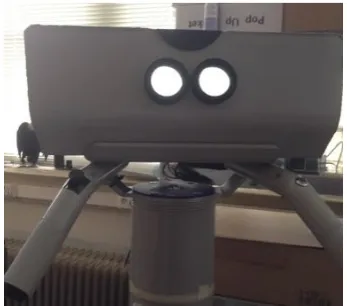
[image:12.595.211.386.512.745.2]The VirtuScope, in addition to its added digital elements, includes important control elements such as zooming, turning the device, and the use of a button for interactive purposes. Through early user testing with the current prototype(see figure 1), it is found that not everyone was able to immediately grasp the interactive design for the VirtuScope, therefore an interactive tutorial to guide them through the steps are necessary.
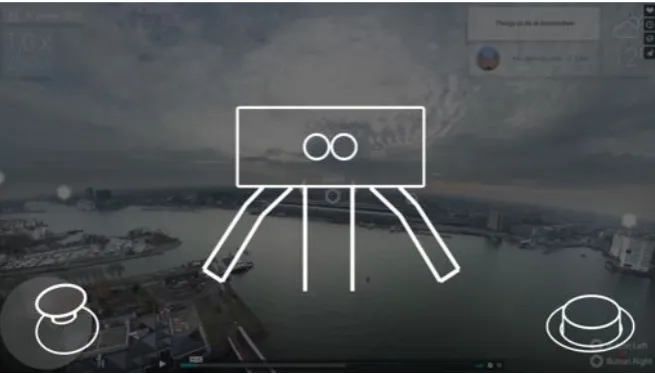
Aside from featuring an interactive guide to the controls of the device, it is also important to clarify all the on-screen elements and other necessary visual information to the user. The current prototype of the digital view can be seen in figure 2, which features basic elements such as interactive points, map, and basic information display. The focus at this stage is on clarifying the use of the buttons and the interactive points, the zoom function in addition to the other dynamic information present on screen.
Figure 2. View from the VirtuScope interaction demo
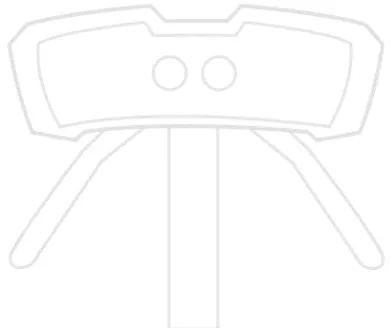
The physical controls of the VirtuScope can be seen in figure 3. The two bars on the side of the binoculars are meant to be held by the user with control buttons installed on the top. The zoom button is placed on the left handle while the interaction button is placed on the right. While designs are not yet final, the concept will remain the same. Additionally, the user can also turn and tilt the binoculars however they wish within the physical constraints.
[image:13.595.212.386.590.743.2]2.2.2 Concerning Factors
While the design of the control is extremely simplistic, it is still nonetheless apparent that not everyone was able to figure out how to operate the binoculars to get the actual interactive experience. Additionally, besides the controls, it is also important to introduce the user to the additional functions provided by the VirtuScope that is not normally featured in other sightseeing binoculars. The tutorial should not only aim to teach people the controls, but also guide them into exploring more of the device’s functionalities.
A few additional factors to consider when designing the tutorial also includes not making it overly explanatory or cumbersome to more experienced technology users. It is therefore important that the process remains engaging and to the point, or even better, ties neatly into the whole interactive and storytelling experience that should seem invisible to the user.
2.3 Research Method
The main research is motivated by the objective of the project that is to design an effective and engaging tutorial to guide potential users through the basic operations of the device. The research question is then defined by the need understand the methods that makes an
interactive digital tutorial intuitive and engaging, allowing it to connect with a person’s subliminal perception. Thus additional research will also be done on subliminal priming and support, as the aim is also to make the tutorial immersive, not overwhelming but also encouraging further exploration and usage of the device.
To investigate further, the research will take root in game design, branching into user interface design, visual communication and interactive digital storytelling. Principles from game tutorial design and digital learning will be taken into account, with emphasis on games that are designed for a general audience, as these types of games are likely to be more simplistic, visual, and interactive. HCI will also be taken into account when considering the visual aspects, user interface and feedback elements.
The main research question and sub questions are listed below.
Ø How can we design an intuitive and engaging interactive tutorial that can convey all essential information about operating a VirtuScope to any potential user?
§ How can we design an engaging tutorial?
2.4 State of the Art
Studies that have been done on related topics concerning HCI and AR are mostly
contemporary due to it being a newly emerging field of study, and mostly the same could be said for tutorial design. Most researches and studies however, place the focus on actual gameplay and interaction instead, with little focus on purely the design of an introductory tutorial. Additionally, as most games are generally designed for audiences that have interest and knowledge in digital gameplay, a different approach to traditional gameplay tutorial might be needed when considering the intuition of people who are not at all acquainted with the use of technology. It is therefore important to research user-centred interaction design for people of all levels of technical literacy.
2.4.1 Interactive tutorial design and targeted user groups
A good tutorial is integral when trying to reach a large audience for a game, and essential for any other interactive applications to assimilate its users so they can properly utilize its functions. While specifics will vary depending on its context, it is generally agreed that a good game tutorial is one that players will barely notice that it exist[11]. That is, the digital learning experience is so well integrated into the narrative, it becomes part of the game which should be engaging and fun.
While the importance of a good gameplay tutorial is widely recognized in the field of game design, with many HCI research being done on the topic, there are considerably less research on gameplay design for users outside of the general gamer demographic. Take senior users for instance. They represent a valid group of users who can benefit greatly from
technology or even digital games, yet less attention has been given to this particular demographic compared to other age groups[12], even when there are increasing demand as more and more elderly users are beginning to adopt technology and new electronic
devices[13]. When designing interactive applications for any potential users, it is important to consider the cognition and perspective of users generally not included in the demographics that are considered when discussing the usage of modern day technology[14]. Further research regarding specific technologies and designing for such audiences are still significantly under-explored.
2.4.2 Contemporary application of AR technology
AR is widely considered one of the most significant technology of the future, with its
application being seen in more and more professional fields including medicine along side the entertainment and mobile industry[15]. AR reached a temporary height in the modern
Furthermore, as discussed in the section of related works, AR technology is becoming more and more popular in the tourism industry as well with its ability to integrate virtual
projections with real-world surroundings. Such applications are allowing the tech to reach towards a wider audience than ever.
Other popular research being done on AR in the past decade is on its utilization in education[16]. AR has great potential in presenting information to users, being able to have virtual objects and real environment coexist to allow people to visualize complex spatial relationships and abstract concepts[17]. This aspect of it is often used to reach into professional fields and ties in well with its application in tourism, as its way of presenting digital information has a lot of appeal that makes it effective as a tour guide.
2.4.3 Conclusion
3 M
ETHOD AND
A
PPROACH
The fundamentals from which this project will be built upon will be explored in detail in this chapter. By breaking down the necessary components that is required to produce a testable prototype, the entirety of the project is divided methodically to provide a systematic approach. First, the designing process for CreaTe will be explored and the specifics to this project will be laid out for documentation. Following that, the different designing and testing phase that leads up to the realization of the product will be analysed in detail as the actual process and results will be documented and explored in further chapters.
3.1 Design Process
As a thesis project for creative technology, the Creative Technology Design Process will be utilized to complete the assignment. By dividing the project into four main phases: ideation, specification, realization and evaluation, the graduation project is approached in a systematic way. Specification regarding this process and how it is applied to the project in question is discussed in this section.
3.1.1 Design Process for Creative Technology
The Design Process for Creative Technology is a design process defined specifically to suit projects within the creative technology curriculum. It starts with the ideation phase in which the stakes of the project are analysed, setting a foundation on which ideas are brainstormed and narrowed down by selection. The brainstorming point is based around the research question, and elaborated appropriately to the benefit of the final product. Finally, the creative ideas should converge based on its relevance into specific project ideas.
Once the project ideas are defined, it transitions into the specification phase. During this phase, clear functional and non-functional requirements are defined along with user scenarios and experience specifications. By the end of this stage, the results the final product should yield will be analysed.
The realisation phase is the last phase of the execution of the project itself, in which the prototypes are realised based on results of the previous phases. The idea for the final product is decomposed and realised in segments. In the end, it should be able to test the function that answers the research question.
3.1.2 Adjustment of the Design Process for the Current Project
realisation and evaluation phases separately, the two phases will be combined in this case. Since the prototype will be broken down into segments and evaluated as it is realised before it is combined and integrated into a final design, user evaluation will be performed in between each stages of design. This report documents the realisation of the product as each part of the prototypes is realised and tested.
3.1.3 User Scenarios
Defining users for the product is important to guide the design process, and it is also an important part of the research question. The tutorial to be designed for the VirtuScope is required to be intuitive for a large potential user base, and thus user scenarios that describe the general walkthrough of the prototype and why the product is relevant will be devised
3.2 Approach
Following the guideline of the design process, the thesis project is divided and executed accordingly. Part two of this report consists of two chapters focused on the conceptualisation of the prototype. Chapter 4 comprises of the entire ideation phase, beginning with an
elaboration of the stakeholder and user analysis, providing a constraint for the brainstorming and initial design for the whole prototype. Concepts for each segments of the prototype are then listed and evaluated based on the defined idea selection criteria, providing a base line where the actual design can be built upon with an emphasis on feasibility and ease for testing. The different segments of the prototype this chapter will dive into includes the visual design, interaction design and demo scenarios which the interactive elements will be applied to. Finally, a demonstration for the final product idea will be defined, in which the previously conceptualised ideas will be integrated into. Digital mock-ups will be used to visualise the concepts that can be pitched to the client.
Following that in chapter 5, the project specifications will be defined, in which the project requirements and user scenarios will be explored. Several personas will be used to construct specific user scenarios to guide the specification of the product, and the ideas in the previous chapter will be organised to provide specification of the prototype designs, thus completing the conceptualisation of the product.
4 P
ROJECT
I
DEATION
Beginning with identifying and analysing the stakes and conceptual requirements, the ideation phase is a cyclic process that aims to conclude with a statement of the final product idea.
4.1 Stakeholder Analysis
In this section, the four main identified stakeholders will be characterised.
Researcher and Project conductor—the student
The student is the most important stakeholder as they are the one to define specifically, design and create the whole project. While the project is initiated and must be approved by the client and supervisor, it is mainly in the student’s interest that the project is specified, as it should be closely related to the student’s ability and learning potentials.
The Client—100%FAT
As the initiator of the project, the client will have specific wishes for the project’s outcome, and is the one who holds the right to the product that the project will be built upon. The client provides assistance in setting a project goal, as well as in other areas such as finance and engineering if necessary. They also define the constraints concerning the product.
Target audience—any potential tourists with the ability to see and perform motor interaction
The target audience is who the final product is aimed at, and in this case, it is a not clearly defined large group of users including members from different age groups with different levels of technical literacy. While focus will be put on groups of users with lower technical literacy, more experienced users will also be considered as the product needs to be engaging for them as well. As a result, a large variety of potential users’ interest will be factored into the design specification.
Supervisor—University of Twente
4.2 User Analysis
The goal of designing an intuitive tutorial for a device that is placed in a public tourist space means that a wide range of potential users would come in contact with the product. It is thus important to consider all the possible representative groups. However, to narrow down to specifics, user groups that would more likely need an introductory tutorial to operate an AR device such as the VirtuScope will receive special attention. Potential users are divided into groups based on presumed technical literacy and experience with interactive AR products.
Advanced/Experienced Users
These are people who presumably have no need for instructions to operate any general interactive digital product or devices. The group is generally comprised of experienced gamers or technical students who are familiar with such interactive installations, and when designing the tutorial, their engagement should be considered and the product should not be too ‘dumbed down’, leading it to lose its appeal.
Casual Users
This tier of users is likely to not be as acquainted with related devices and installations but nonetheless would have the instinct and comprehension that would allow them to figure the operation with relative ease. However, they may still need guidance in understanding the full interface and full functions of the device, and require an engaging introduction.
Clueless Users
These are people who are not at all acquainted with related technology and do not have the instinct to figure out interactive functions of such devices on their own. The criteria of intuitive design would mainly be aimed at them.
4.3 Constraints
developed or conceptualised either, the prototype made for this project will not be building upon it.
4.4 Inspiration and reference analysis
Inspiration for the product is drawn from various sources including related work such as video games, AR games, AR applications and interactive documentaries. This thesis is also built upon another Bachelor Thesis assignment made for Creative Technology also focused on research related to the VirtuScope. In that thesis report, storytelling methods and interaction designed for the VirtuScope is explored[18]. This project will therefore lend results from that assignment and use it as a foundation to build upon when applicable.
4.4.1 Inspiration from other applications and media
Video games were the first thing that came to mind when thinking of related work to
interactive tutorials. Most if not all games have a tutorial of some kind, and can often make or break its appeal to many new players.
One such game that is iconic for its design of tutorials is Portal, developed by Valve Corporation. With only the bare amount of instruction on the controls in the beginning
segment, the player is immediately sent into the game and taught the game mechanics through a series of puzzle rooms called test chambers, each introducing new logic to the game while guiding the player just enough through subtle cues and clever puzzle design. It perfectly ties in tutorial elements with the main gameplay itself, not making the whole process feel like an instruction at all.
While the mechanics of Portal is a lot more complicated than any of the mechanics that would be involved in the VirtuScope, several points of design logic can be drawn from the example of the game. First, the player should have a moment to be familiarise themselves with the basic controls, whether it is moving around in the game or in the case of the
interactive binoculars, move the device around in all four directions to look around the surrounding. Then, information regarding the interactive logic presented in the game or scenario should be slowly introduced to the player piece by piece. With the minimal amount of or no text at all, the player should on their own, grasp the logic of whatever they will be interacting with on screen. Relevant information and new ways to solve puzzles or advance through the program should be systematically exposed to the player as they naturally walk themselves through it. By applying this design logic to the VirtuScope tutorial, the tutorial is broken down into a few progression stages, which is further elaborated on in section 4.7 where the tutorial scenario structure is conceptualised.
an interactive scenario where the tutorial can be weaved into, whether it be a game or guided storytelling designed for the medium. In this case, an interactive story landscape is more appropriate. This also builds upon the results and finding from the previous report titled ‘Improving interaction and Storytelling for the VirtuScope’[18], where it also points out that the storytelling of the VirtuScope should be like an interactive documentary.
4.5 Interaction Ideas
Several ideas for the interaction that will be featured in the prototype are generated based on general tutorial design while factoring in the important elements that should be introduced about the VirtuScope. The controls of the VirtuScope itself is simple, in addition to looking around through the lenses, the only two unique controls are the zoom button and the interaction button. The focus is therefore on how these buttons are used to interact with the additional features of the device, and in this case, the AR story layered on top of the environment.
First, general tutorial elements and the stages of it are considered. As mentioned previously section, the stage design of Portal is the inspiration for the concept of methodically easing the player into discovering and learning the mechanics on their own. The idea is to have a segment of the storytelling scenario made available to the player upon initiation. After following through that segment of carefully designed interaction, the full scope of the content will be available for the player to explore.
4.6 User Interface Ideas
Since many other advanced functions such as maps, games, advanced menus of the
VirtuScope are still under development, the tutorial does not need to include an introduction to these elements. Instead, the focus should be on getting users to understand how the interactive buttons work, for once that knowledge is instilled in their conscious, additional functions can be naturally explored by the user’s own initiation. This area therefore does not need to be explored further beyond basic stylisation and aesthetic design of any required image that will appear on the screen for the tutorial.
4.7 Tutorial Scenario ideas
how to apply the interactive controls of the installation with the elements through the field of view.
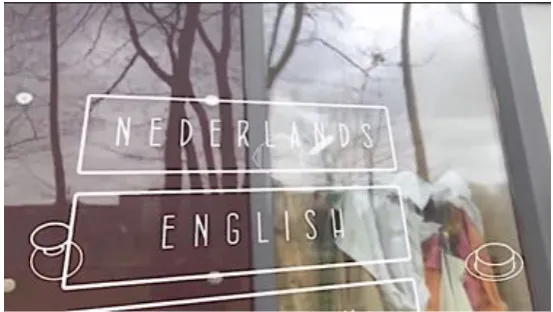
[image:24.595.135.463.357.544.2]In the beginning, upon the initiation of an interaction between the user and the device, the user should already be prompted to explore the controls on their own initiative, while also being required to do so before further interaction is possible. This applies to any idea for specific scenarios. The idea to achieve this is to have something that is immediately interactive, and obviously should be can be interacted with upon glancing around with the movable handles. This is a good time to place a language selection screen, since it comes naturally to people that if there is a selection menu on a screen, you are supposed to pick an option. And in trying to do so, the user will already be taught on how to use the interaction button and look around with the binoculars. However, in case it does not immediately occur to people that they are supposed to grasp the handles and move them around, it may be helpful to add a wordless description on the start-up screen that illustrates the basic controls. The concept can be seen in figure 4.
Figure 4: Start up screen layout
Following the interactions that prompt basic exploration should be introductory scenarios that provide content on a smaller scale that can introduce the user to the kind of interaction they can expect when using the installation.
prototype to be more flexible, it is more beneficial to create standalone interactive points and agents that have a coherent and contained story in itself just to demonstrate the idea of the interactive tutorial. The idea is visualised through a video demo as described in section 4.8.1 and Appendix A.
4.8 Statement of Final Product Idea
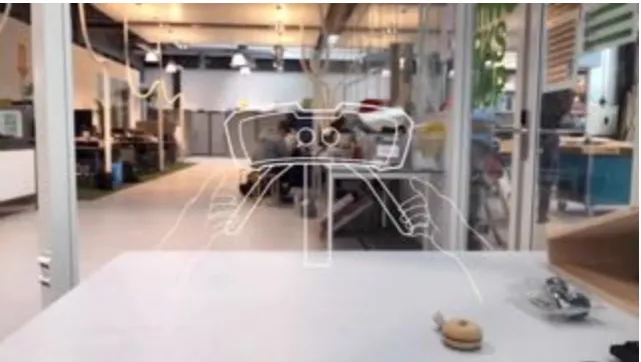
When a user first approaches the VirtuScope, they can see their immediate environment through the lenses like every other binoculars. The additional feature is that an outline of the very device itself will also be shown in the view, and as the user moves the VirtuScope around, a language selection screen will be prompted, where they can select the language in which the story experience will be conducted in. Upon the appearance of the menu, an animation highlighting the buttons on the handles will be shown on the corner of the screen, indicating visually that the user should press the button to select a language. For the purpose of the demo, only English will be available.
Once the language is selected, the outline of the VirtuScope and the visual hints will momentarily disappear and instead a few AR characters and objects along with other points of interest that can be explored will appear on screen. When the user hovers over a character or object, story segments related to said object will be communicated to the user. When the user hovers over a POI for over 1.5 seconds without selecting it, the visual hint of the selection button will appear on screen. Furthermore, the different elements on screen will be designed in such a way that there is a relationship between all of them, and the different elements can be strung together to form a mini narrative.
4.8.1 Digital Mock Prototype
A digital mock prototype is created to better showcase and portray the idea of how the basic tutorial elements will be laid out. The main functions shown in the video prototype are the language selection function, and how the interactive elements on screen will be displayed, and how the zoom function can be used to look over walls and space.
5
P
ROJECT
S
PECIFICATION
In this chapter, the specifics regarding what the final product of the project should contain, feature and explore is listed and analysed with the aid of user scenarios. Furthermore, the requirements will be catered around the request of the client, which in this case is one of the founder of 100%FAT Lieven Maes.
Following that in chapter 5, the project specifications will be defined, in which the project requirements and user scenarios will be explored. Several personas will be used to construct specific user scenarios to guide the specification of the product, and the ideas in the previous chapter will be applied onto the actual prototype design. Digital mock-ups will be used to visualise the concept and specifications of the prototype that will be realised, which will be documented in chapter 6.
5.1 User Specifications
Defining personas and subsequent user scenarios is a good way to help define a well-rounded product specification. The following section defines three completely unique personas and a plausible user scenario to help building project requirements.
S
TEVE:
R
ETIREDG
ARDENER,
67,
F
RENCHSteve has had a steady home life since his retirement, living with his spouse in the suburbs. He spends most of his time taking care of his animals, arranging his garden and baking, and is not an avid user of technology, though he does possess basic skills with a smart phone and a computer. He would on occasion accompany his other family members who would visit him on vacation or trips. He is overall a charming and open-minded individual that enjoys and is open to new experiences.
view. The view from the tower was indeed majestic, and the sweet addition of one VirtuScope device made the visit even more worthwhile. The interactive function and extensive content featured in the VirtuScope was a pleasant surprise for Steve and the kids as not only did they get to explore the city in bird’s eye view, they also got some nice stories that gave them some interesting insights into the city’s historical background. Steve was delighted to discover such technology implemented into a familiar device like the binoculars that is sophisticated yet very accessible to not only him, but the kids as well. Besides, he is all the happier that his grandkids got to learn something from the trip while having fun.
M
AI:
S
OFTWARE ENGINEER,
31,
V
IETNAMESE-D
UTCHA highly trained professional, Mai has been working as a software engineer since obtaining her master degree in said field. While she is a very practical person, she has a rather laidback personality and have a wide range of interests in the entertainment media field. She also writes novels as a hobby, and used to be an avid gamer when she was younger. She is currently single and lives with a long-time friend in a shared apartment in Rotterdam, and enjoys the occasional weekend trip together with her friend to other cities close by.
N
ADIA:
F
IRST GRADE STUDENT,
6,
D
UTCHNadia just recently moved from the countryside to big cities as her parents thought it would be better for her education. She is a curious and active kid, and growing up amongst nature and open fields meant that she is used to spending much more time outdoors than indoors surrounded by technology. While not disheartened by her parents’ decision to move to a bustling city and subsequently changed her entire world. She does need some time to become used to the new life style. Her parents however do take her out and travelling whenever it is possible.
Scenario:
Nadia is used to seeing the world around her as it is, without the process of questioning why things are the way they are. That doesn’t mean she is not curious, however, and as she started adjusting to her new life in the city she slowly became more and more aware of the world around her. Her curiosities in how the world came to be raised her interest in learning about the past and of other people’s experiences. Through watching television, she started developing interest in stories and that interest carried her through experimenting with other digital devices that contain more information that she could ever imagine. When she found out about interactive AR devices, she was more than excited to have a try at it, and although the information present in this VirtuScope device she discovered in one of her favourite sightseeing location was a bit complicated for her to process, the dynamicinteractions combined with the accessible and intuitive city exploration function were quite enough to capture her interest.
5.2 Functional Requirements
5.2.1 Client Request
The main client of this project is Lieven Maes of 100%FAT. This thesis project should contribute to their in-development project the VirtuScope and is built upon a previous project also conducted by a student from the University of Twente. The project proposal is initiated by the client, due to the lack of design for actual content it was discovered through early testings of the prototype that a lot of users are not aware of the interactive nature of the VirtuScope. The most important goal to realise for the tutorial prototype is to convey in an effective and intuitive way how the two buttons on each handle functions and how it is meant to be used to interact with any future content that may be designed for the VirtuScope.
5.2.2 Research Goal requirements
The realised prototypes should serve its purpose through evaluation that contributes to the overarching research question defined in Part 1 of this thesis report.
Ø How can we design an intuitive and engaging interactive tutorial that can convey all essential information about operating a VirtuScope to any potential user?
5.2.3 Table of functional requirements
The necessary functional requirements of the prototype are defined in the following table, compensation is acceptable if the function can be simulated for a testable prototype.
Function Requirements
Prototype Program ¨ Program must be interactive and available on a
digital platform
¨ Program should cover the basic aspects of the tutorial
¨ Program should be able to be directly implemented into the VirtuScope
Program Content ¨ Content should contribute to the design and flow of
an interactive tutorial that introduces the function of the VirtuScope
¨ Additional interactive content should have a coherent self-contained narrative that serves the purpose for the tutorial
¨ The tutorial should include introduction to the controls
¨ Interactive button must be functional, or can be simulated to function as intended
[image:30.595.196.484.71.148.2]¨ Zoom button must be functional, or can be simulated to function as intended
Table 1: List of functional requirements
5.3 Prototype Specifications
The prototype designed based on the requirements and ideation will be broken down in this section, with each specific element described in detail.
5.3.1 Visual elements for the tutorial
Visual elements and guides are important for a comprehensive and straight forward tutorial. It is important to address to the user how the VirtuScope is designed to provide an interactive experience. Based upon the ideation sketches, refined versions of the visuals will be implemented into an AR prototype for user evaluation, the process and results are documented in chapter 6.
5.3.2 Interactive Ideas for the tutorial
The interactions are all of the ‘point and click’ type, as the main concept of the VirtuScope will be centred around exploration through the point and click interaction. However, more active and dynamic interactions such as mini games are possible and have been demonstrated in a video reel for the VirtuScope. The potential for these kinds of interaction to be applied to the tutorial is evaluated in the second phase of design.
5.3.3 Digital prototype on a VirtuScope Prototype
After specifying the elements required in the prototype, it is decided that to make the prototype easily testable, the main goal of realisation is to produce a digital prototype that runs on a smartphone. Furthermore, for the purpose of simulating the controls of a VirtuScope, fake controls will be crafted to hold the smartphone to mimic the look of a portable VirtuScope binoculars.
6 V
ISUAL
E
LEMENTS
D
ESIGN
Visual messages are the most effective way to communicate information to users in the shortest amount of time. It is often the preferred method deployed in instruction manuals and naturally by extension, in games or application tutorials.
This chapter details the process of implementing the visual design elements into the tutorial prototype and the user evaluation conducted to determine the most effective way of visual communication.
6.1 Visual elements for the tutorial
The concept design of the visual elements in the tutorial is refined and illustrated in photoshop in a minimalistic and instructive style. The completed design, which resembles the physical product of the VirtuScope is then imported into Unity as sprites in which the demo prototype is realised(Figure 5). First, the imported sprites are composited onto the UI canvas and is demonstrated in an AR application on the smartphone. The result is shown to the client before further steps in the prototype construction is taken.
6.1.1 Client Feedback
The primary feedback on the demo was that the buttons in the corner were as noticeable as they should be in the beginning. This led to the exploration of animated visual cues, whether or not animation can aid in conveying information and in which way is it more effective and visually pleasant. This idea is realised and tested to bring conclusion to the first stage of the design phase.
6.2 Visual Guidance by Animation
[image:32.595.307.503.288.452.2]Animations are effective visual cues to guide a users’ attention and improve orientation for the interface. It is in human nature to be instinctively drawn to movement, and successful interaction animation that feels familiar and natural can help encourage the user to explore and discover. Prompted by feedback on the concept demo by the client, it is decided that
animation should be added to supplement the visual elements in the introduction screen to improve clarity.
The starting screen also acts as the beginning of the unspoken tutorial. To ensure that the user can immediately notice the buttons, animations are implemented to the illustrated components. Aside from design appeal, it also acts as guidance to indicate the controls as can be seen in figure 6 where two hands move towards the two handles of the device in
[image:33.595.139.460.224.405.2]demonstration of how one should handle the installation.
Figure 6: Start-up screen concept for the VirtuScope, hands animated to grab the handles
6.3 Realisation of Demo
A semi-interactive demo is realised using Unity and exported to a mobile platform for user evaluation and feedback. The interaction and controls can only be simulated manually and explained to the user. This is due to the unavailability of the actual VirtuScope prototype. Therefore, in order to compensate, a model of the VirtuScope binoculars is made using cardboard material and separate controller components as can be seen in figure 10. The mobile device is inserted where the viewing lenses are on the model and the demo will play the introduction screen displaying the main components in an AR space.
6.3.1 Mobile Application
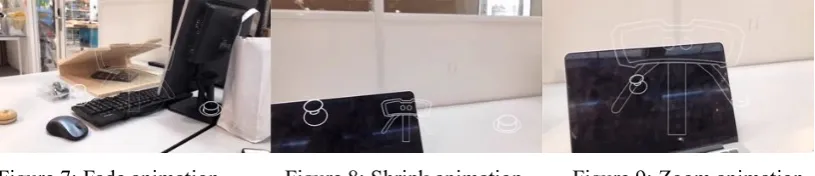
[image:34.595.92.500.339.427.2]The demo is made in Unity using ARkit and exported to an ios device. The three different versions of the start-up animation, labelled ‘fade’, ‘shrink’ and ‘zoom’ are animated in Unity as seen below, all to draw attention to the buttons on the bottom two corners.
Figure 7: Fade animation Figure 8: Shrink animation Figure 9: Zoom animation
6.3.2 Hardware Simulation
Due to the unavailability of the official VirtuScope prototype, a temporary one that can simulate its features was made for a more accurate presentation when testing how users respond to the guidance animation. It is handled the same way one would handle a completed VirtuScope device, though scaled down in its overall size by around 0.5 times.
[image:34.595.92.500.567.735.2]Figure 10: cardboard VirtuScope, and how to handle it
6.4 Evaluation of Demo
The smartphone is inserted into the slot crafted in the paper prototype thus completing the setup for the user evaluation.
6.4.1 User Evaluation
The user evaluation is done in the design lab due to the number of available persons. Students and staffs are approached at random to evaluate the starting interface of the product. Given nothing else but the basic context of the device and what the paper prototype is supposed to represent, the subjects are given the device as the three versions of the introductory screen are played to them. They are then asked to rate the three versions in a mini questionnaire based on association, integration and clarity, followed by a rating of appeal and give their overall preference out of all three. If a subject felt no particular difference in the instructive quality between each version, they are asked to state their preference or how well the information is presented based on instinct. Verbal feedbacks are also noted down and taken into account when analysing the results.
6.4.2 Results
Opinions were gathered among 10 students; the results are presented in this section followed by another section where the findings and conclusion will be discussed.
Preference
Participants were asked to choose the visual transition they preferred the most.
Association
Participants were asked if they were able to immediately associate the on-screen illustrations with the physical controls, rated on a scale of 1(completely disagree) to 5(completely agree).
Graph 2: Visual elements evaluation: Association (x-rating; y-number of answers)
Integration
Participants were asked if the on-screen illustrations are clear and not distracting and overall feels integrated, rated on a scale of 1 to 5.
Graph 3: Visual elements evaluation: Integration (x-rating; y-number of answers)
Clarity
Participants were asked if the instructions and controls are clear and easily understood, rated on a scale of 1 to 5.
6.4.3 Discussion
It was found that the opinions were generally neutral. Most students report to have no strong preference for either animation, however, after one particular feedback, it is speculated that it may be because of the order in which the different versions are shown to the participants. A student responded that since they were first shown the most straight forward one with least animation(the one where the illustration simply fades), they didn’t really gather the purpose of the other two.
Other feedbacks also note that there were no notable differences between each version, with some also saying that the purpose of the buttons on screen were unclear, due to lack of immediate feedback. However, the latter was to be expected, as the final product would be fully interactive and therefore upon interacting with the controls, the user would immediately find out what they do.
Furthermore, it is concluded that since the prototype is simulated on a much smaller screen compared to the actual device of a VirtuScope, the difference in the on-screen display is less noticeable. However visual design wise some students have pointed out that the shrink one is less clear than the other two. In conclusion, the preliminary evaluation results are inconclusive in determining the best method for visual guidance, however it does show that the illustrated elements on screen were clear in its directions.
6.4.3 Follow up testing
[image:37.595.90.494.564.677.2]Follow up testing is done to improve on the previous user evaluation. To better simulate the actual program this time, the icons were decreased in size to mimic the proportion of a real VirtuScope and evaluated again with ten other students. Additionally, the order the three different versions were shown to the students were adjusted.
Figure 12: Adjusted proportions of the icons Graph 5: Preference results
point out they didn’t like the shrink version. There is still an overall preference for ‘zoom’ and ‘fade’. With ‘zoom’ being slightly more preferred.
6.4.4 Design Implications
7 T
UTORIAL
I
NTERACTION
D
ESIGN
Interaction is the heart of tutorials. Tutorials should introduce information as they are required, there should be less text and no front loading. Furthermore, information learned should be reinforced through fun interaction, and the goal of this design phase is to realise the two different interactive concepts and evaluate their engagement and intuitive value.
7.1 Transition to interactive tutorial
Content will be triggered after a short delay upon sensing movement of the camera control, and the introductory screen containing the visuals established in the previous chapter will see transition into actual interactive content.
It is important for there to be immediate feedback when the user interacts with the control. And while it is found that most participants tend to toy with the controls immediately, it is still important to require these actions early on to reinforce the knowledge of what the controls do.
[image:39.595.160.437.448.604.2]The idea is to have a menu screen being the first thing that pops up, for instance, a language selection menu would be cohesive and can already introduce the user to utilise the camera control and the interaction button on the right-hand side. As a result, this will be implemented into both tutorial demos.
Figure 13: Language selection menu in an AR prototype
While naturally the language selection screen does not hold any meaning for the
7.2 Tutorial interaction
Two versions of the demo tutorial that reinforces the controls while introducing the user to future functions of the VirtuScope is to be realised and tested before defining a final framework. Potential future content for the VirtuScope include location oriented interactive stories, information for tourists, games and other AR based interactive applications. The tutorial should familiarise the user with ways to navigate through the interactive content while performing action when required.
The two demos devised are based on the two more prominent features of the VirtuScope, and their merit as an effective tutorial are evaluated based on how well they are integrated, how engaging they are, how intuitive they are and how well they manage to set up expectations for the user and introduce them to the interactive device itself. The following sections explain the realised prototype for each version and summarises the user evaluation result.
7.3 Mini Game demo
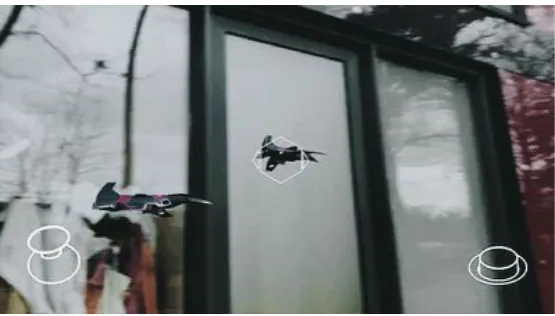
One of the tutorial prototype to be evaluated is a demo that includes a mini game that is intended to act as an intuitive and fun way to encourage the user to explore the environment and interact with dynamic objects. The demo includes a short shooting game that requires the user to make use of the camera control and the interactive button. The demo is realised in Unity and exported onto an ios mobile device. The interactive buttons are programmed to be controlled through the touch screen of the mobile and a webcam script is applied to a 3D plane to simulate an AR background.
[image:40.595.160.438.587.745.2]After the introduction graphics fade away, the user will find a language selection menu that they can interact with. By directing the pointer in the centre of the screen towards one of the options and pressing the button on the right-hand corner, they will immediately be led into the tutorial as the flying objects appear on screen.
A free Unity asset that includes 3D plane models was used to act as the flying targets. A box collider is applied onto the model and they are programmed to fly back and forth on the screen until the user shoots and destroy them.
The centre pointer, which is used in all interactions, has a Raycast script applied to it to select on screen elements with a collider. The final product is a short program that goes through the transition as shown in the below sequence of images. Additionally, a voice over script is written to supplement it to complete the demo.
7.4 Story landscape Demo realisation in Virtual Reality
The user guiding and storytelling framework defined in a previous research is based upon to design a mini scenario. Relevant elements from that framework states that 1) story telling must start from the environment, 2) the story should be presented as an interactive
documentary, 3) interaction must support the narrative and finally 4) the interaction must be intuitive.
In this case, the intuitive interaction is the already defined way where the user hovers over an object to get a response and click on it to initiate interaction. Additionally, audio support is preferred over text, and multiple layers of interaction are not preferred. While the defined framework is directed towards effective storytelling for more elaborate content, the essence of the concept is nonetheless useful to help design a small, self-contained scenario. The tutorial to demonstrate the storytelling function does not need to be elaborate, it need only to convey the concept and familiarise the user with the story environment. For the scenario story of the demo, a VR scene with story elements is made due to the location-oriented characteristic of the VirtuScope. After all the Points of Interest are explored through, the tutorial will be over.
The story demonstrated is as follows: A boy loses track of his cat which had ran off to chase a bird. However, the bird had seen to that and had dropped a shiny object in the stream to attract the cat and fish so the cat would be distracted. Meanwhile, the cat indeed had been distracted by the bird’s ploy.
The small, environment-based story has three main interactive points of interest, the boy, the cat and the bird. After the user gets through the introduction screen and the menu, the
The characters were illustrated in photoshop and imported into Unity as sprites. With a skybox that displays the environment of a park, the sprites were then placed in appropriate positions and scripted to display narrative text bubbles when interacted with. The final scenario is exported onto an ios mobile device for evaluation along the mini game scenario.
7.5 Evaluation and Feedback
The two demo prototypes are tested on the mobile device with interaction featured through the touchscreen and audio guidance simulated through live narration off a script. Once again students were approached in the Design Lab and asked to participate in a short testing session to evaluate the two demos. After each testing the participant is asked to fill out a
questionnaire, and by the end they were asked to compare the two based on the main subject of evaluation(see Appendix B).
The focus of the testing is on content integration, engagement, intuitiveness of interaction and how well the demo allowed them to understand the functionalities of the VirtuScope.
7.5.1 Results Evaluation
A total of 15 students participated in this user test and provided feedback and evaluation for the three main categories. A statement was provided for them to rate it from 1(completely disagree) to 5(completely agree). This section graphs the results of the concluding questions from each category and compare the two demo prototypes so conclusions can be drawn.
Content Integration
Participants were asked if they understood what the tutorial wanted them to do.
Participants were asked if they understood what functions they can expect from the VirtuScope based on the tutorial segment they experienced.
Graph 8: Evaluation results: Game demo Graph 9: Evaluation results: Scenario demo
Engagement
Participants were asked if they found the interaction to be engaging.
Graph 10: Evaluation results: Game demo Graph 11: Evaluation results: Scenario demo
Participants were asked if they were interested to continue exploring after the interaction.
Intuitiveness
Participants were asked if they found the tutorial interaction to be overall intuitive(average score of control intuitiveness and interactive elements intuitiveness)
Graph 14: Evaluation results: Game demo Graph 15: Evaluation results: Scenario demo
7.5.2 Results Preference
When the participants were asked to compare the two versions based on their engagement and intuitiveness, the responses were as follows.
Graph 15&16: Results comparing the preference of test users based on two main evaluation factors, engagement and intuitiveness
7.6 Practicality and context
As discovered from the feedback the mini game is intuitive, but can feel out of context and sudden without fully realised content and structure. Most feel like if fully implemented, the mini scenario would be better purposed for a tutorial. Additionally, the mini game requires too much movement. However, the concept is interesting and fun since the actual VirtuScope is meant to have gaming content as well. Conclusion is that it depends on the final content of the VirtuScope, with preference to the mini scenario and moderate visual guidance.
7.7 Design Implementation
8 F
INAL
F
RAMEWORK AND
P
ROTOTYPE
For the final prototype that will provide answers for the research question, an interrelated interactive landscape is constructed in VR that demonstrates the touristic value of the VirtuScope. As story scenarios with a context proved to be more effective in creating
engagement with users, story elements along with tourism and exploration related features are added to this prototype so the practicality of a tutorial can be effectively considered.
8.1 The Framework
Using the material and findings from the previous phases of prototyping, important
[image:47.595.196.402.385.735.2]conclusions are gathered in order to define a solid concept for a tutorial for the VirtuScope—a framework and essential ingredients for its future content to base upon(Figure 16). Notably, to construct content based on the device’s location is of high importance. The final prototype will therefore put focus on that aspect and define a well-rounded and structured VR landscape and put the framework to test.
8.2 Demonstration Landscape
To simulate touristic purposes, a real-world location with available panorama image resources is selected to form a base for the demonstration scenario landscape. In this case, Paris was chosen since the city provided a recognisable and rich environment for not only tourism related information but also a canvas for meaningful storytelling on top of having a city skyline view where multiple landmark locations are visible. Most importantly, free resources were found available online, lending the demo a realistic touch and is optimal for a more accurate usability test. More on the chosen locations in the city can be seen in Appendix C.
8.2.1 City Exploration
[image:48.595.92.511.357.564.2]Constructing the VR environment in a structured manner, the start-up screen provides an overview of the city skyline(Figure 17) in which the user can zoom in and out freely and explore with points of interest where it is possible for them to explore specific locations in Paris.
Figure 17: 360° panorama image of Paris
The above panorama is imported into Unity to create a skybox texture so it can be interacted with as a background. After that, with the aid of GoogleMaps, several landmarks of the city with their own panorama images available are identified within the skyline. Pentagon shaped points of interests are then placed around the approximate locations in which these landmarks are located so when interacted with, the user’s view will be directed to a new scene in
correspondence to actual geography.
Chapelle interior, the Louvre pyramid, the Pont de Bir-Hakiem, the Eiffel Tower and finally La Défense on the far right.
Figure 18: Paris view with locations available to explore on the ios prototype
8.2.2 Tourism Centric Information
In the demonstration of this function, interactive points can be seen in certain street view scenes where upon clicking on it, a window with information regarding certain locations or notable architectural structures will pop up to provide information for the user. While at this moment, this function is drastically simplified content-wise, the idea of it is nonetheless parallel to the other interactive story elements in this prototype and will therefore be introduced to the user through guiding them to interact with the other elements on screen.
Figure 19: Hover response of interactive POI Figure 20: Information on Notre Dame POI
8.2.3 Story, the setting
[image:49.595.93.506.518.635.2]history that helped shaped this is during the roaring twenties, an era in the city’s history dubbed Les Années Folles. During this post World War I period, citizens of Paris rejected pre-war values and embraced a new, more extravagant lifestyle which turned the city into the heart of everything art—ranging from fashion and entertainment to all sorts of decorative, literary and architectural marvels. Many artists and writers flourished during this time, and the city still live off their legacy to this day. A short character and information driven narrative scenario is devised and integrated into the established VR space, with the segments of the story placed in different locations in the environment, the user should be able to put the pieces together and identify the story contained within.
8.2.4 Story, the content
During the time period of the roaring twenties, many great artists and performers made their mark on the city of Paris as American influences flooded in. It wasn’t until the Great
Depression when this exuberant period of time was put to an end. The story scenario is set in July 1930 and the effects of the Great Depression is beginning to spread. More and more artists are being forced onto the streets as many establishments begin to shut down, meanwhile, the effects of the previous war are still deeply reminiscent to some.
The story is conveyed through different characters in different locations who each speak out lines that serves to illustrate the scenario. Details alluding to the time and specific events can be discovered through finding and interacting with all the characters and connect the bigger picture. Black and white image sprites are composited into the scenes to suggest a historical context of the story. The content can be seen in Appendix D.
8.3 Integration of Guidance Tutorial
With an interactive environment with a story established, the practical application of a guidance tutorial can be applied to be examined if further tutorial elements can enhance a user’s experience with content exploration. As a result, two versions of the prototype are made: one with no restriction in terms of content access and has no visual cues to help the user find contents while the other guides the user to explore all the content specifically before allowing them complete freedom to explore. The guided version not only has visual cues such as those seen in figures 21 and 22 but also walks the user through the ‘program’ by limiting their access to the full scope of content in the early stages. The process is intended to
Figure 21: Directional visual cue(arrow up) Figure 22: Indication visual cue(go here)
The two versions are evaluated with two groups of people to draw insights from, the results process and results are documented in the following sections.
8.4 Final Prototype Evaluation
It is necessary to define an evaluation goal before crafting an evaluation plan so that meaningful conclusions can be drawn from the user test of the final prototype.
8.4.1 Evaluation Goal
Calling back to the research goals and the design elements that led up to the final prototype, the goal of the final prototype’s design is based on constructing a story space in which tutorial guidance elements are integrated. The goal is therefore to determine the usefulness of an interactive tutorial for the tourism/storytelling platform featured in the VirtuScope, and so the evaluation will be based around that objective.
The overall goal of this evaluation is to compare two versions of the same interactive materials, one without tutorial guidance and one without to see if the tutorial elements can enhance the storytelling, make it more comprehensible and engaging. Research questions are defined as follows for this evaluation:
Ø Does the tutorial allow users to better experience and understand the story within the interactive environment?
Ø Are users more likely to explore the full scope of the content due to the tutorial?
Ø Does the tutorial help provide an intuitive approach to experience the content?
The research method to answer the questions are addressed in the evaluation plan, centred on comparing two versions of the prototype with two groups of people.