LIANNE GROEN
MASTER
’
S THESIS
Developing guidelines for integrating instruction in multimedia drills
for Dutch primary schools
An educational design research
Lianne Groen - s1093347
Master Educational Science & Technology
Faculty of Behavioural, Management and Social Sciences University of Twente
Graduation committee
First supervisor
Dr. Hans van der Meij, department IST
Second supervisor
Dr. Henny Leemkuil, department IST
Acknowledgement
With this thesis, I am completing the master’s program Educational Science & Technology at the University of Twente. Looking back at conducting my master’s thesis for almost one year, I have learned a lot, which has led to a more confident and independent version of me as a researcher. However, this would not have been possible without a number of people, that I would like to thank. I would like to thank the people from Gynzy, for giving me the unique opportunity to conduct my thesis in this inspiring and dynamic organization. Thanks to all of the colleagues, for the practical help and nice atmosphere. Special thanks to Pieter Smits, for providing me with all the information I needed and also for reading my thesis and giving useful tips. Furthermore I would like to thank my first supervisor, Hans van der Meij, for giving constructive feedback, asking critical questions and for providing advice as an expert. Thanks to Henny Leemkuil, my second supervisor, for providing clear feedback and concrete suggestions at the end phase of my research. Of course, I would also like to thank all of the teachers and students for their
enthusiastic and honest participation in this research. Thanks to my parents and friends for their support during this year and last but certainly not least, Jouke, for always listening and being patient with me, for reading my thesis and correcting my English.
Abstract
In the recent years, digital learning environments have been increasingly developed to support primary school teachers in offering differentiated education. Gynzy offers such an environment, including multimedia drills. When education is differentiated, instruction should be as well. However, teachers experience difficulties in giving differentiated instruction and instruction for multimedia drills has been little investigated. Therefore, this master’s thesis focused on the development of guidelines for the integration of instruction in multimedia drills for learning to spell, in a design-based research.
An initial design was created based on problem analysis and outcomes of previous research. This design was tested in an iterative process with teachers and students, who use Gynzy iPads in their classroom. Two rounds of teacher testing were conducted through interviews with a total of 7 teachers. After these interviews, the design was evaluated with educational experts and revisions were made.
Finally, two rounds of testing with students were conducted, in which a total of 16 students were observed and interviewed. Based on the outcomes of the testing with teachers and students and consultation of experts, different guidelines were developed. These guidelines could be divided into the categories: content’, ‘learner control’, ‘representation’ and ‘providing help’.
In addition to the initially developed criteria, the most important guidelines that were derived from this research were: use multiple examples or vary with examples, choose most relevant terminology, use stepwise instructions, adapt hints or instructions based on different spelling phases and offer choices in showing or hiding buttons. These guidelines provide a baseline for further research into the integration of instruction in adaptive multimedia drills.
Table of Contents
Acknowledgement ... 2
Abstract ... 3
1. Introduction ... 6
1.1. Background ... 6
1.2. Organizational context ... 6
1.3. Learning to spell ... 7
1.4. The current research ... 7
1.5. Research question and research model ... 7
1.6. Scientific & practical relevance ... 8
2. Method ... 9
2.1. Research design ... 9
2.2. Respondents ... 9
2.3. Instrumentation ... 10
2.3.1. Needs assessment questionnaire. ... 10
2.3.2. Usability testing with teachers ... 10
2.3.3. Usability testing with students ... 10
2.3. Procedure ... 10
2.4. Data analysis ... 11
3. Problem analysis... 12
3.1. Context analysis... 12
3.1.1. Needs assessment ... 12
3.1.2. Environment analysis ... 13
3.2. Learner analysis ... 15
3.3. Task analysis ... 16
3.4. Design criteria based on problem analysis ... 19
4. Development & design ... 20
4.1. Design process ... 20
4.2. Justification of first design ... 20
4.2.1. Theories of instruction ... 20
4.2.2. Instructional design ... 20
4.2.3. Designing instruction for learning to spell ... 21
4.2.4. Designing for multimedia drills ... 21
4.3. Design criteria ... 23
4.4. Demographic variables ... 25
4.4.1. Teachers ... 25
4.5. Results ... 26
4.5.1. Usability testing with teachers and adaptations ... 26
4.5.2. Usability testing with students (round 1) and adaptations... 27
4.5.3. Usability testing with students (round 2) ... 28
4.6. Design guidelines ... 29
4.6.1. Content ... 31
4.6.2. Learner control ... 31
4.6.3. Representation ... 32
4.6.4. Providing help ... 32
5. Discussion ... 33
5.1. Research question ... 33
5.2. Recommendations ... 34
5.2.1. Recommendations for practice ... 34
5.2.2. Recommendations for further research ... 34
5.3. Limitations and strengths ... 35
5.4. Final conclusion ... 35
References ... 36
Appendices ... 40
A: Questionnaire needs assessment ... 40
B: Usability testing with teachers: interview scheme ... 41
C: Usability testing with students: observation scheme ... 42
D: Usability testing with students: interview scheme... 44
E: Screenshots of first design ... 46
F: Screenshots of second designs... 48
G: Screenshots of final designs ... 51
1.
Introduction
1.1.
Background
Over the past years, primary schools in the Netherlands have been increasingly stimulated to provide inclusive education (Rijksoverheid, 2014). In inclusive education, students follow regular education as much as possible, including students that need extra support and those who previously would have gone to special needs schools (Rijksoverheid, 2014). This
development requires a different approach towards education. The ministry of education in the Netherlands (2014), therefore states the importance of differentiation in the classroom. By differentiating, learners can grow and learn more efficiently, results can improve and motivation to learn can grow (Nieboer, 2015). However, a lot of teachers of primary schools in the
Netherlands, experience difficulties in differentiating their instructions between the different needs of their students. It seems that this is often caused by high work pressure or insufficient preparation of the differentiation in their education (Inspectie van het onderwijs, 2014).
1.2.
Organizational context
To support teachers who offer differentiated education, digital adaptive learning environments are being developed. In these learning environments, students can work on lessons or
assignments individually. An organization developing such a learning environment is Gynzy. Gynzy offers a digital training environment, called ‘Gynzy iPads’, that includes adaptive techniques for practicing items of different subjects, like spelling and arithmetics (see chapter 3), at primary schools. In schools that use the software of Gynzy, every student owns an iPad that runs Gynzy iPads.
Gynzy iPads is being developed since 2015, by a cooperation of the organizations Topicus and Gynzy. It has been adopted in an increasing amount of classrooms of primary schools in the Netherlands. Most of the schools that use Gynzy iPads, started in September 2016. Gynzy iPads is currently available for grade 2 and 3 (Dutch grades 4 and 5) in the Netherlands. The software is still in development and will be updated regularly, to implement the latest educational developments and new challenges.
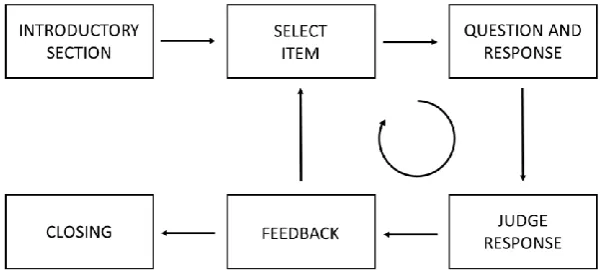
The content of Gynzy iPads includes sessions of items, that are provided in the form of a multimedia drill (Alessi & Trollip, 2001). In figure 1, the general structure and flow of a
[image:7.595.76.378.525.660.2]multimedia drill is shown. Drills can be developed for helping learners to practice material by repetition of the material until a certain skill or rule is mastered (Alessi & Trollip, 2001).
Figure 1. General structure & flow of a drill (Alessi & Trollip, 2001)
instruction, like explanations about learning rules that need to be learned (e.g. in spelling: differences between ‘short’ and ‘long’ sounds), is lacking.
In several studies, it was found that using a computer for offering spelling instruction was a feasible possibility (Fulk & Stormont-Spurgin, 1995; Gordon et al., 1993), because of the possibilities from computers to offer direct and personalized instruction for students with learning disabilities. Computer based instruction seemed to motivate students to learn. However, until now, there also have been no other digital training environments available for primary schools, that has integrated these instructions for students.
1.3.
Learning to spell
One subject that Gynzy iPads offers, is spelling. Lots of students with learning disabilities experience difficulties with this subject (Bos & Vaughn, 2006). Learning spelling rules relates to procedural knowledge, which is defined as ‘the ability to execute action sequences to solve problems, including the ability to adapt known procedures to novel problems (Rittle-Johnson, Siegler, & Alibali, 2001). Gagné (1970) defined learning spelling rules as an intellectual skill. He stated that in rule learning, it is not important if students can verbalize or state the rule. What is more important, is that students can demonstrate the rule by applying it appropriately to a class of problems, even problems that not have been encountered. This is also referred to as transfer (Simons & Verschaffel, 1992). When talking about transfer, near transfer regards to situations that are very similar. This occurs more often than far transfer: in which there is less similarity. Far transfer only spontaneously exists for a small part of very motivated and intelligent
students. With hints or clues, this transfer exists for 10% of these students. With more extensive help or instruction, this is maximal 30%. To conclude, far transfer is most coherent with the aim of rule learning: being able to apply known rules to new situations.
1.4.
The current research
Based on experiences from teachers and educationalists of Gynzy, it has become clear that students often struggle with different subjects at school. However, teachers are not always available to help, due to large numbers of students requiring their attention and administrative tasks. Also, in the current form of differentiated education, students might need different
instructions at different times. It was found that learning rules could be stimulated, with hints or more extensive instructions (Simons & Verschaffel, 1992) and that using a computer-based instruction is a promising possibility, due to the possibilities for direct and personalized
instruction and outcomes about enhancing the motivation of students to learn (Fulk & Stormont-Spurgin, 1995; Gordon et al., 1993).
However, until now, integrated instructions for ‘drill & practices’ like Gynzy iPads have not been investigated. Therefore, Gynzy requested an exploration of the possibilities for integrating more extensive instruction in the learning environment, in which students can consult the instruction at any time. For feasibility reasons, this research focused on the possibilities of integrated instruction for learning spelling rules and not for different subjects.
1.5.
Research question and research model
Thorough problem analysis (chapter 3), including needs assessment (paragraph 3.1.1.) and specific questions stated by Gynzy, illustrated the need for the development of integrated instruction for spelling rules in Gynzy iPads. For this master’s thesis, it was decided to focus on developing a text-based instruction. Therefore, the following research question was addressed: “Which guidelines are important in developing textual spelling explanations in multimedia drills for students in grade 2 and 3 of primary school?”
1.6.
Scientific & practical relevance
This research could lead towards a standard for developing instructions for Gynzy iPads in the future, by developing a prototype of instructions for spelling rules. The integration of instruction in Gynzy iPads is expected to contribute positively towards the use of the current learning environment, because students will have access to instructions at any time.
2.
Method
2.1.
Research design
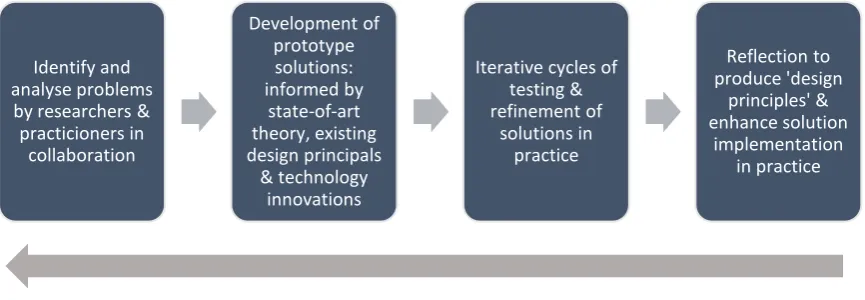
[image:10.595.73.506.191.341.2]The type of research that was conducted in this research, is an educational design research. According to Reeves (2006), educational design research is structured in the order of analysis, development, testing cycles and reflection (figure 2). After each iteration, the prototype of the design is revised and evaluated until the desired stage has been reached. The line below defines the continuous evaluation and refinement of the problems, solutions, methods and design principles (Reeves, 2006).
Figure 2. The process of educational design research (Reeves, 2006)
2.2.
Respondents
The sample group in this study existed of educational experts, teachers and students of schools that use Gynzy iPads in the classroom. An inclusion criterium for teachers and students was that they experienced working with Gynzy iPads for at least three months. Therefore, there was a ‘selective sample’. The sampling method was based on convenience sampling, resulting in the inclusion of all accessible subjects that met the criteria (Marshall, 1996). A newsletter was used to spread a needs assessment survey among the teachers.
Based on email responses followed by the newsletter, teachers of different schools were approached for interviews. In the first rounds of testing, teachers were invited to give their first impressions of a designed instruction. The minimal amount of teachers required for this round was four. Ideally, the different teachers had varying years of experience in the classroom. The results of these interviews were used to further develop the prototype in collaboration with educational experts.
After two rounds of testing with teachers, the design was improved and usability testing took place with the target group: primary school students. The students were approached by asking the teachers that participated in the interviews. Inclusion criteria for students were that they had their own Gynzy iPad and that they were already somewhat familiar with the spelling rule that the instruction discussed. Also, their ability to formulate their thoughts in the interview was judged by their teacher. Initially, in consultation with educational experts and teachers, it was decided that students from grade 3, would be more suitable for participation than students in grade 2. The group of participating students was aimed to have a subdivision in ‘good’, ‘average’ and ‘bad’ spellers, inclusion in any of these groups was based upon achievements in Gynzy iPads and teacher’s judgment. Ideally, the three groups were of similar size. Also, it was aimed to have a practically equal number of boys and girls participating in the testing rounds, to create a representative sample. Furthermore, it was decided to test the instruction with students in two rounds with a minimum of eight students per round.
Identify and analyse problems by researchers &
practicioners in collaboration Development of prototype solutions: informed by state-of-art theory, existing design principals & technology innovations
2.3.
Instrumentation
2.3.1.
Needs assessment questionnaire.
The current situation and needs of teachers working with Gynzy iPads were investigated through a short needs assessment questionnaire (appendix A). This questionnaire was
developed based on former need’s assessment questionnaires and consultation with educational experts and teachers. It was spread among schools that currently use Gynzy iPads to clarify the context, knowledge, needs and wishes regarding the current situation. Before spreading the questionnaire among the teachers, it was tested and evaluated with a few employees of Gynzy.
2.3.2.
Usability testing with teachers
Teachers that use Gynzy iPads in their classroom were asked to discuss aspects of the initial design of the instruction in a semi-structured way. This was done by providing the teachers the first version of a possible instruction on paper and using the ‘plus-minus’ method (de Jong & Rijnks, 2006). In this method, respondents are asked to evaluate aspects of a text, by putting a plus or a minus at any aspects they consider as positive (e.g. clear, understandable) or negative (e.g. vague, confusing). Research by Sienot (1997) showed that participants can identify more types of problems using the ‘plus-minus’ method than while using the think-aloud method (Sienot, 1997). Using this method, the process of reading is minimally disturbed. Teachers were asked to think as if they were their students, who would have to use the instruction while working in Gynzy iPads. After this, the plusses and minuses were discussed and additional questions were asked about different topics, based on literature about multimedia learning and consultation of educational experts. Based on the outcomes of these interviews, the design was evaluated and improved.
2.3.3.
Usability testing with students
After two rounds of testing with teachers, students were asked to walk through a session of Gynzy iPads, while having the opportunity to use the instruction or the hint. Students worked on their iPads on a session in Gynzy, consisting of 12 items of the spelling rule. They could access the designed instruction or an already available ‘hint’, by using a button of a light bulb (on paper) that they could ‘press’ with their hands. After a set number of four errors, students also received a suggestion for a hint or additional instruction.
Observations. An observation scheme was developed (Appendix C), based on the ISTE approach to usability testing (van der Meij, 1997). This method offers a reliable and valid way to observe users. This method of observation has proven to be easy to use and adaptable based on the situation. In the observations, the usability of the design for students is measured.
Interviews. When students finished the session of 12 items, they answered additional questions in a short, semi-structured interview (appendix D). The decision of interviewing students was based on the fact that the effectiveness of spelling programs depends highly on the attitudes of students (Graham, 1983). In this interview, the ideas and opinions of students about the hint and the additional instruction were investigated.
2.3.
Procedure
At first, a needs questionnaire (appendix A) was spread to analyze the current situation. Furthermore, one specific spelling rule was chosen to focus on for this research. This rule was chosen based on analyzation data of frequently made errors in Gynzy iPads (see chapter 3) and consultation with teachers. Based on these findings and former research about instructional design, an initial design was then developed. This initial design was discussed through
interviews with teachers who use Gynzy iPads in their classroom, using the ‘plus-minus’ method and additional questions. The findings were evaluated and discussed with educational experts of Gynzy, to further improve and revise the design.
the study through an informational letter. The actions of the students were observed while using the hint and the instruction. Afterwards, the short interview was conducted and the students received a small present. The usability testing was repeated at least one time, so improvements of the design could be implemented and evaluated. Teachers, students and parents of the students who participate, were fully informed about the background and rationale of the
research and could withdraw from the study at any time. Also, teachers and students were asked for permission to record the interviews in advance. Based on the results of usability testing, design guidelines for designing instruction in multimedia drills for spelling, like in Gynzy iPads were developed.
2.4.
Data analysis
The data that was generated from this study was qualitative and quantitative data. Therefore, this is a mixed-method study. During the problem analysis, data was gathered through a questionnaire among teachers and file analysis of the most commonly made mistakes for the needs assessment. The responses from this questionnaire are analyzed, by computing percentiles for each question.
During usability testing with teachers, qualitative data was gathered from teachers, using the ‘plus-minus’ method and additional interviews. The interviews were recorded and
transcribed, so that all the originally made statements were maintained, ensuring reliable data. The interviews were analyzed by decoding to discover recurrences. The findings of the
3.
Problem analysis
3.1.
Context analysis
Before starting with instructional design, an extensive analysis is needed to become familiar with learners, the learning context and the instructional task (Smith & Ragan, 2005). According to Smith & Ragan (2005), the analysis of the context broadly involves two components: the substantiation of a need for instruction to help learners reach learning goals, and a description of the learning environment in which the instruction will be used.
3.1.1.
Needs assessment
The needs assessment was divided into a needs assessment for the teachers and the students who use Gynzy iPads in the classroom.
Teachers. To investigate whether the need also exists among teachers that make use of Gynzy iPads, a short questionnaire with six different questions was developed (Appendix A) and spread among schools in which Gynzy iPads is used in the classroom. Eventually, twelve
individual teachers filled in the questionnaire. Because the questionnaire was anonymous, and more than one teacher per school could have filled it in, it was not possible to calculate a response rate. Based on the results of question 1, the opinions about the current instruction varied among the respondents, 50% of the respondents responded with yes and 50% with no, upon the question whether the current explanations or instructions are clearly described within Gynzy iPads. From the answers to question 2, it could be derived that all of the participants (n=12) agreed that at least parts of the (classical) instruction could be integrated into Gynzy iPads (100%). However, teachers differed in their opinions about the amount of instruction that should be integrated. The answers to question 3 showed that 16,67% (n=2) thought the whole instruction could be integrated, 33,33% (n=4) thought a large part could be integrated and 50%(n=6) thought only a small part should be integrated. Teachers mostly agreed upon what should be the availability of the instruction, 100% (n=12) answered that instruction should be accessible by students all of the time. Furthermore, 50% (n=6) of the respondents answered that the instruction should also be accessible before a lesson. For this question, multiple answers were possible. Finally, almost all of the teachers (n=11) answered yes upon the last question if the current instructions/explanations in Gynzy iPads should be adjusted or improved.
Based on these results, it was concluded that in the view of teachers who use Gynzy iPads in their classrooms, the integration of instruction in Gynzy iPads needs to be further explored. There was a high agreement between the teachers upon the most questions, with exception of question about which part of the classical instruction should be included in Gynzy iPads. This could possibly be explained because it might be vague or hard to imagine yet what these instructions would behold. Nevertheless, it became clear that a large amount of the teachers think it’s important that integrated instructions should be an addition, instead of a replacement of the classical instruction of the teachers.
Students. Because of the age of the students and feasibility reasons, a needs
questionnaire was not conducted with the students. However, logfiles were provided by Gynzy which could be analyzed with respect to microgoals in which spelling errors were most often made. Those microgoals are represented in table 1. In the table, the amount of right and wrong answers and percentiles of wrong answers are provided for each microgoal in spelling. While the reasons why these are the most commonly made errors were not completely clear, some reasons could be ruled out. Because the high diversity of items, the errors should not be due to unclear questions. Also, the different types of items are more or less the same for all of the microgoals. Furthermore, for each microgoal students need to meet specific conditionalities, to have access to these goals. Therefore, it is ruled out that errors are due to insufficient prior knowledge.
Log data of most frequently made spelling errors in Gynzy iPads
All of the microgoals in Table 1 had a high percentile of wrong answers. Based on these findings and consultation with educational experts, decisions were made for the focus of the instruction. For the topics of spelling, two goals were found to be most interesting to focus on (goals 3 and 4). This was based on experiences of (former) teachers working at Gynzy, they considered these goals as being experienced as very difficult topics for students. Also, in these microgoals, rules need to be learned. Students could profit from additional support from integrated instructions. Eventually, after consultation with educational experts, goal 3 was chosen to focus on.
3.1.2.
Environment analysis
[image:14.595.70.528.101.259.2]The learning environment in which the instruction takes place is the spelling area of the digital learning environment of Gynzy iPads. Dutch students in grade 2 and 3 (Dutch grades 4 and 5), with ages between 7 and 11 years old are currently working with Gynzy iPads. In figure 3, a screenshot of an item for students is represented.
Figure 3. Example of an item in Gynzy iPads Spelling errors
Name of microgoal Total amount
of answers Amount of wrong answers
Amount of right answers
Percentile of wrong answers
Persoonsvorm: onvoltooid verleden tijd sterke werkwoorden met stam op ~D of ~T
776 385 391 0.4961
Verkleinwoord na open lettergreep
op ~A, ~E, ~O, ~U 1721 988 733 0.5741
Woorden met open klankgroep en
lange klank 37394 15022 22372 0.4017
Woorden met gesloten klankgroep
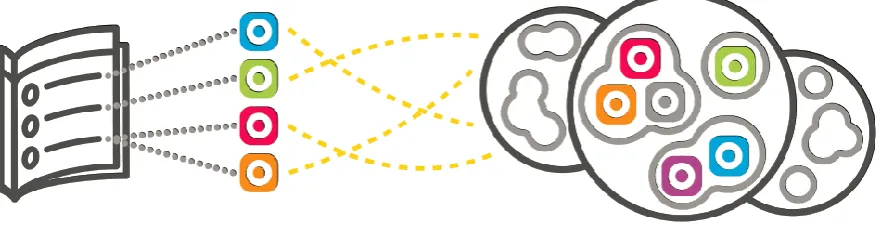
For Gynzy iPads, a specific learning track was developed by professional educational experts and based on general guidelines and goals for spelling education in the Netherlands. This learning track includes keygoals, subgoals and microgoals and is connected to the goals and content of different learning methods for spelling for primary schools in the Netherlands. There is also an option not to learn with methods, but in so called ‘Worlds’, or to use both (figure 4). In Gynzy Worlds, there is a wide range of assignments of certain topics that the students can practice with. The worlds exist out of different ‘Islands’, which represent the subgoals and these Islands exist again of microgoals, called ‘Villages’.
[image:15.595.77.518.202.316.2]Figure 4. Integrating learning with methods and worlds
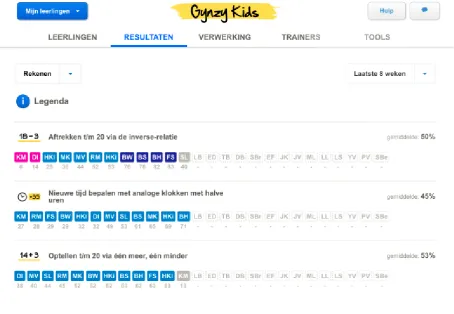
Figure 5. Overview for a teacher of achievements of their students on specific topics
Competition analysis. In a competition analysis, the current status of existing adaptive learning environments was investigated. Other adaptive software that has been developed for adaptive learning in the classroom in the Netherlands called Snappet, Muiswerk and
Rekentuin/Taalzee were analyzed. The following things could be concluded from this orientation:
• A lot of digital non-adaptive instruction for learning spelling and arithmetic in primary schools is available (e.g. web pages or instructional videos). Also, learning methods often offer their own digital learning environments to enable students to practice.
• In none of the investigated learning platforms for primary education, integrated instruction about concepts or rules was available.
• For a different audience, software has been developed that provides adaptive
instructions to the learner, like TrainTool. In this tool, personal feedback from peers and the trainer is provided and the learner practices with real-life situations through role-playing. Learners can practice as long as they want and are able to share this with their peers and teacher to give feedback. Instruction is provided through a video with a few examples.
3.2.
Learner analysis
To get further insights into the target audience, a learner analysis among the students that use Gynzy iPads, was conducted. A learner analysis is important for designing instruction which is effective and interesting to learners (Smith & Ragan, 2005) and includes taking into account all characteristics of the target population.
between the students. Furthermore, it must be taken into account that students differ in their reading levels. Some students might be more visually orientated and some students might prefer speech instead of text.
Cognitive levels and moral development can differ widely among students, especially between students of schools with regular education and schools with ‘special’ education. The amount of prior knowledge can differ widely among different topics. This is due to some topics being restricted to a certain grade, and some of the topics being ‘grade transcending’.
Furthermore, this is also something that can differ between schools, because schools differ in what topics are addressed at which grade. Therefore, it is important to take into account
differences that might exist in prior knowledge, since students might differ widely in their needs for instruction.
To further investigate the target group, possible scenarios for different kind of spellers were worked out. For each scenario, it was worked out how a certain student, based on spelling performances, would walk through a session of Gynzy iPads and what the possible need for additional instruction would be. Based on these scenario’s, it was found that different spellers might be in need of different instructions at different times. A student with little or no difficulties with spelling will make little mistakes and will probably have little need for instruction.
Therefore, instructions need to be short and clear and not focus too much on repeating prior knowledge. A hint should be available and optional for the student to refresh the rule of the spelling goal. A student with average or low spelling ability, however, will sometimes experience difficulties and would have sometimes more need for instruction than other times. Sometimes only a hint would be enough, but there should also be a possibility for additional explanations. If this student repeatedly makes errors for certain microgoals, a hint or additional instruction could be suggested as well.
From research, it was found that for students with learning disabilities, it is preferred to use multi sensory techniques for spelling instruction, for example, the ‘write and say’ method (Fulk & Stormont-Spurgin, 1995; McNaughton et al., 1994; Gordon et al., 1993). Speech is
important to add, for poor readers or young children or visually impaired learners. Therefore, in designing instruction, for every line of text, should be the possibility for the student to have the text spoken out loud. It is important that speech is from high quality. In previous research it was found that providing text and sound simultaneously could decrease learning. It would be better to use bullet points or pictures accompanied by speech. Mayer (1997, 2001) found that adding spoken text to printed text might produce an effect of redundancy and fails to produce learning gains while compared to offering only printed text. However, when discussing with teachers, it was often stated that many students, especially weak spellers or students with dyslexia, would benefit from spoken text. Therefore, spoken text should be included as an optional aid.
3.3.
Task analysis
A task analysis was conducted to decompose the goals and different steps of the task that need to be done and what student’s need to do to achieve the goal (Smith & Ragan, 2005). Information about the tasks that students need to perform in Gynzy iPads, is provided by experts, former research and exploration of the learning environment.
Former achievements are considered in determining the level of difficulty for the individual student. After each item, the next item is computed, based upon a 75% success rate for the student. A lesson exists of a series of multiple items. Every item features a short introduction of what needs to be done (e.g. “Divide the words into sounds. Click between the letters”). After the student answers the question, the software provides feedback and selects the next item. The items vary both in item types and item modes.
A session in Gynzy Worlds normally consists of twelve items. The session can be started, after which the goals that will be practiced are presented to the student. For every item, a short instruction is provided of what needs to be done, for example: “Press the long sound. Click between the letters”(figure 6). The items vary in item types and item modes. In some of the items, there is an option to ask for a hint (figure 7). This is often a statement, meant to direct the student towards the right line of reasoning. Until now, limited research about the combination of drills and instruction has been conducted. Alessi & Trollip (2001) stated that drills could include hints, which provide help or a second chance. These hints could improve memorability and motivation of learners.
Furthermore, for the microgoal that this research focuses on (learning how to recognize and spell words with long sounds and open syllables), Gynzy uses different spelling phases in which students can be classified. Every student begins in phase 1, which is about analyzing the word. When a student begins with a certain microgoal, the student is in phase 1 and only
receives items for the phase ‘Word analysis’. In the specific goal that is used in this research, this is about recognizing ‘long sounds’. The second phase is about knowing which spelling category a word belongs to. When the student has reached this phase, items are presented that are about the actual rule. Phase 3 is about finishing words and sentences and in phase 4 students need to write down the words and sentences themselves. In the last two phases, the students need to apply the rules for themselves (respectively ‘Finish words/sentences’ and ‘Write them off’). This means that the items that students receive differ, based on the phase that the student is in.
[image:18.595.69.520.432.700.2]Figure 7. Example of a hint in Gynzy iPads
If relevant and possible, the items are supported with pictures and the difficulty of the items adapts directly after an item, based on the achievements so far. There are no limits in pace for answering the different items. Also, the lesson can be ended at any time and data is
remembered (temporary termination). Also, if a goal is completed, students do not necessarily have to practice these goals again (permanent termination). When an answer is given, feedback is provided in terms of: “Well done!” when the student has succeeded, or: “Too bad, try again.” when the student has failed on a certain item. A second attempt is then allowed because accidental mistakes such as typos might occur. After two wrong attempts the feedback is: “Too bad, go ahead”. A third chance is then provided at the end of the session when this attempt is wrong after which the correct answer is shown. he TAt the end of the lesson, the results are shown
Figure 8. Screenshot of a results overview in Gynzy iPads
3.4.
Design criteria based on problem analysis
Based on the problem analysis, the following design criteria should be taken into account while developing the first design:
• The instruction is relevant for students between 7-11 years old
• The instruction should be able to account for differences in reading ability and preferences for speech or text
• The instruction should take in account prior knowledge of the students
4.
Development & design
4.1.
Design process
The process of the design started with the development of an initial concept, based on design criteria (figure 9) that followed from the problem analysis and previous research, as described in the next paragraph. Together with an educationalist of Gynzy, the decisions were discussed, leading to a paper prototype of the initial design (Appendix E). In the first rounds of usability testing, five teachers were asked about their opinions of the different aspects of the design. Based on outcomes of the consultation with educationalists, it was decided that there should be more than just one instruction, to fit the needs of different students. Therefore, three paper prototypes were developed for the second round of usability testing with teachers. This last round of usability testing with teachers took place with 2 teachers at the same time. Again, the outcomes were discussed, based on which adaptations were made. After this, the first round of usability testing with the actual users, students, took place. Based on the observations and interviews with the students, adjustments were made for the final testing round. In both rounds, 8 students participated.
4.2.
Justification of first design
Before developing the first design (Appendix E), initial design criteria were developed. These initial design criteria are for a large part based on the outcomes of problem analysis and consultation of educational experts. The paragraph below explains theoretical foundations for other design criteria.
4.2.1.
Theories of instruction
In an article of Reigeluth (2013), instructional theories are defined as: “theories that explicitly support the learning and development process of the learner.” There have been many theories of instruction developed and there are many ways to define instruction as well. Gagné (1970), is well known for his learning theories. He differed between different learning results: learning facts, concepts, principles and procedures. He also stated the importance of preventing overload of the short memory and referring to pre-existing knowledge, while designing for instruction.
Alessi & Trollip (2001) defined instruction as “the creation and use of environments in which learning is facilitated”. More specific, this can be about, for example, learning concepts, procedures, principles or rules. Instruction can be strictly directed, as well as more open ended. According to Alessi & Trollip, four phases are needed to provide effective learning & efficient learning in classroom instruction: 1) Presenting info, 2) Guiding learner, 3) Practicing and 4) Assessing learning. One or more of these phases could also be used in multimedia learning. For phase three, “practicing”, drills are often used.
4.2.2.
Instructional design
Snelbecker (1974) compared different theories of instructional design and specifically focused on the differences between the theory of design and the practice of design. In his theory, researchers are ‘knowledge producers’ and practitioners are ‘knowledge users’. He advocates a critical analysis of different theories that are relevant for scientists and practitioners and to interpret the theory in the right perspective.
Cognitive load theory. Decisions in instructional design are often based on the theory of cognitive load. Overviews of this theory were provided by Sweller, van Merrienboer & Paas (1998), Mayer (2002) and Mayer and Moreno (2003). The cognitive load theory states that there are three forms of cognitive load: intrinsic, extraneous and germane load.
Intrinsic cognitive load relates to the difficulty of the subject matter (Cooper 1998; Sweller & Chandler 1994) and is often considered as not being able to change through
starting with few elements and gradually building up complexity or training partial tasks separately.
According to van Merrienboer and Sweller (2005, p. 150): ‘‘Extraneous cognitive load, in contrast, is load that is not necessary for learning (i.e., schema construction and automation) and that can be altered by instructional interventions’’. Extraneous load may also arise when the instructional design uses only one of the subsystems, visual and auditory parts, of working memory. The ‘‘modality principle’ ’implies that material can be more efficiently presented when visual and auditory material are combined (Savoji, Hassanabadi, & Fasihipour, 2011). Cognitive resources can be freed by using the “redundancy principle”. This principle relates to including just one of the two (or more) sources of information.
Thirdly, germane cognitive load is the load that is caused when schemas are constructed through interpreting, exemplifying, classifying, inferring, differentiating, and organizing (Mayer 2002). The load that is imposed by these processes is denominated germane cognitive load. Instructional designs should, of course, try to stimulate and guide students to engage in schema construction and automation and in this way increase germane cognitive load.
There are two important recommendations that could be derived from cognitive load theory for instructional design. Firstly, it is important to present material which is in line with the prior knowledge of the learner (intrinsic load) Furthermore, it is important to avoid information that is non-essential or confusing (extraneous load). While the principles of cognitive load have been used in the early years of educational design, this area is still widely being investigated.
4.2.3.
Designing instruction for learning to spell
From previous research, clear directions were derived for effective spelling instruction. Instructions need to be direct and explicit (Bosman, 2016): students need to know ‘why words are spelled, the way they are spelled’. Also, students learn better when they have practiced to speak what is written, then to speak what it sounds like (Schiffelers, Bosman, & van Hell, 2002). Furthermore, students need to practice until they have ‘overlearned’. This requires a structured method, with useful spelling categories.
Already in 1983, Graham defined principles to achieve effective spelling instruction. He stated that contemporary classroom instruction did not account for the wide range of spelling abilities and achievements, that can appear at every level and that many students do not profit from instruction in large groups. Also, he mentioned that instruction of spelling in the classroom was often based on traditional practices, in contrast to results from research, while spelling is among the most researched areas. From his view, effective spelling programs contain
individualized instruction, because different spelling problems exist between children. Also, the effectiveness of spelling programs highly depends on the attitudes of students.
4.2.4.
Designing for multimedia drills
Content.The instructions of different spelling methods were analyzed. Most of the methods used relatively the same steps to explain this specific spelling rule. Furthermore, it was decided to use the example for the children that was already available in the hint, again to be consistent, to illustrate the spelling rule that needs to be learned. This could lead to better transfer. Butterfield & Nelson stated already in 1989 that a good choice of examples could be beneficial for the transfer of knowledge.
existing differences between the reading ability of learners, it is also important to offer the choice between text or speech.
Regarding sequence, students should be able to go back- and forward in instruction at any time. Based on this, buttons can be provided for navigating back- and forward. Buttons have the advantage that they are visual. They can also be distracting and they take space and should be minimalized. The function of the buttons should become clear by using text or pictures. Furthermore, the pace is important in user control. Students should be able to control how fast they go through the instructions as it attributes to their autonomy (Artino, 2008; Liaw, Huang, Chen, 2007).
Representation.It was decided to use text, to represent the information in the instruction. While video is sometimes preferred, it is also expensive and time-consuming (Alessi & Trollip, 2001). However, the length of the instruction was based on the guideline for video instruction, which said that it should generally take no longer than 20-30 seconds to watch or read. Of course, this is still subjective and it depends on how long a student needs to process the text.
When using text, it is important to be consistent, for example in the use of terminology (Alessi & Trollip, 2001). However, while exploring different spelling methods, it was found that terminology differed widely over different spelling methods. In consultation with Gynzy, it was decided to use the terms that Gynzy uses in the software and the already available hint, in order to maintain consistency. Also, the layout of text should be consistent with how text is normally read, from left to right and from top to bottom. Furthermore, lines and words should not be abruptly ended and the screen should be filled. Blank spaces could be used to divide paragraphs.
Important text that needs attention can be highlighted by making it bold (Alessi & Trollip, 2001). This is preferred over underlined text because underlined text might be confused with hyperlinks. While red and blue were found to be difficult for learners to process, blue was used to be consistent with already available hints in Gynzy iPads. Color has been found to be useful to attract attention towards important information (Schneiderman & Plaisant, 1998; Durret, 1987) and to be effective for attracting attention when used in moderation (Alessi & Trollip, 2001). It is also important to provide contrast in background and foreground. Also, it is important to use no more than a few colors and to be consistent with the use of colors.
Providing help. In consultation with teachers and educationalists, it was discussed whether the instruction should be optional, or forced. In both groups, it was agreed upon that instruction should always be available for the students and not forced towards them. Forcing could lead to demotivation towards the use of Gynzy iPads. However, it was suggested that for students who make many errors, the instruction could be ‘suggested’. It would still be optional but might give them a reminder of the ability to use the instructions.
Multiple studies have been conducted towards the use of (animated) pedagogical agents. The outcomes of these studies show conflicting outcomes. It was found that animated
pedagogical agents can be beneficial for learning, decrease anxiety and positively influence the attention of students towards key elements (Clark & Choi, 2005; Gulz, 2005). From other research, however, it seemed that agents don’t necessarily lead towards more effect than only a spoken voice (Moreno, Mayer, Spires and Lester, 2001). In a recent meta-analysis (Schroeder, Adesope & Gilbert, 2013), small, but significant positive effects of pedagogical agents were found. It was found that pedagogical agents which communicated using on-screen text, facilitated more learning than agents that only provided narration. In general, the use of
4.3.
Design criteria
From the learner analysis (chapter 3) and theoretical foundations as described in the previous paragraph, design criteria for developing the first design were derived.
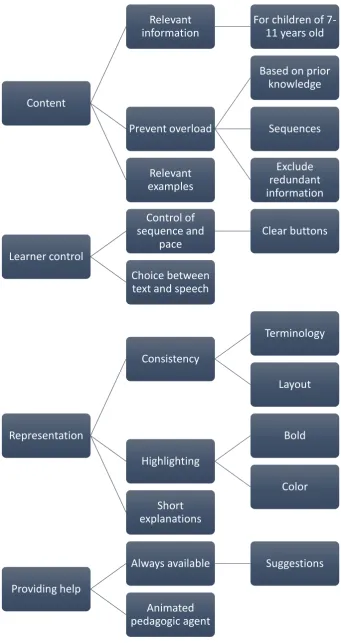
The final list (table 2) consists of 10 criteria which are categorized in ‘content’, ‘learner control’, representation’ and ‘providing help’. The point ‘account for differences’ from the learner analysis, was combined with ‘provide individualized instructions’ in ‘differentiation’ (2) the design criteria. Furthermore, “ take into account prior knowledge of the students” from the learner analysis was integrated into with “present information in line with prior knowledge” in point 3.1. of the criteria. Finally “offer the possibility for the student to have the text spoken out loud as an option” from learner analysis was integrated with “provide a choice between text or speech” in point 7 in the design criteria.
[image:24.595.69.421.340.701.2]The design criteria could be categorized in four categories: learner control, content, representation and providing help. In figure 9, an overview of the categories is shown.
Table 2.
Final list of design criteria.
Design criterium
Content 1. Provide relevant information
2. Prevent overload of short term memory: 2.1. Information based on prior knowledge 2.2. Offer information in sequences 2.3. Exclude redundant information
3. Use relevant examples
Learner control 4. Provide control in sequence and pace 4.1. Clear buttons
5. Choice between text and speech
Representation 6. Be consistent 6.1. In terminology
6.2. In layout
7. Highlight important text 7.1. Use few and consistent colors 7.2. Mark important words as bold
8. Keep explanations short
Providing help 9. Keep instruction always available
9.1. Suggestions
Figure 9. Initial design criteria
Content
Relevant
information
For children of
7-11 years old
Prevent overload
Based on prior
knowledge
Sequences
Exclude
redundant
information
Relevant
examples
Learner control
Control of
sequence and
pace
Clear buttons
Choice between
text and speech
Representation
Consistency
Terminology
Layout
Highlighting
Bold
Color
Short
explanations
Providing help
Always available
Suggestions
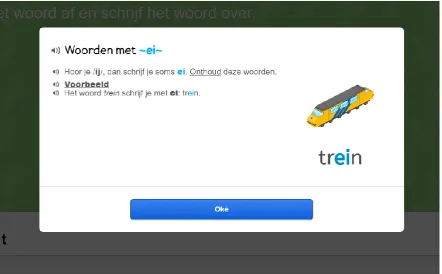
Based on these guidelines, the first design for an instruction was developed. Figure 10 shows one screenshot of the first design, see Appendix E for the complete instruction.
Figure 10. Screenshot of first design
4.4.
Demographic variables
4.4.1.
Teachers
For the first round of usability testing with teachers, five teachers from across the country were provided with the design of the initially developed instruction and asked to provide their
opinions using the ‘plus-minus’ method. A complete overview of the demographic variables of all the teachers that participated in this study (round 1 & round 2), is shown in Table 3. From this teachers, six were female and one was male and the age ranged from 31 to 56 with a mean age of 41.1 years. Furthermore, the amount of teaching experience ranged from 8 to 35 years, with a mean of 19.8 years. Due to practical reasons, some teachers were interviewed as a pair. Table 3.
Demographic variables of participated teachers Teacher
(N=7) Round Gender Age Region* Grade Teaching experience Experience with Gynzy Method(ology)
T1** 1 F 36 Middle 3 16 years January
2017 Zo leer je kinderen lezen en spellen
T2** 1 M 37 Middle 3 17 years January
2017 Zo leer je kinderen lezen en spellen
T3 1 F 56 South 2 35 years September
2016 Taal op Maat
T4 1 F 41 North 15 years August
2016 Staal
T5 1 F 36 South 2 14 years November
2016 TaalActief***
T6** 2 F 31 North 2 8 years September
2016 Taal op Maat
T7** 2 F 51 North 3 30 years September
[image:26.595.74.526.537.750.2]*The region relates to the part of the Netherlands in which the school is located. **: Teachers 1 and 2 and teachers 5 and 6 were interviewed as pairs. *** This school only used the arithmetic’s part of Gynzy iPads,
not the spelling part.
4.4.2.
Students
In the first round of usability testing with students, eight students (S1 – S8) were observed and interviewed about the designs. In this round, five girls and three boys participated. In the second round of usability testing with students, eight students (S9 - S16) were observed and interviewed about the designs. In this round, four girls, as well as four boys participated. The total mean age of the students was 7.56 years old. The demographic variables of the students can be found in table 4.
Table 4.
Demographic variables of participated students (round 1)
4.5.
Results
4.5.1.
Usability testing with teachers and adaptations
In general, all of the teachers valued the paper prototype of the instruction as positive and clear. However, it was often mentioned that some things were overdue and that text was too small. The symbols were found to be clear. Another common finding in the interviews was that instructional videos were preferred over text-based instruction. Also, teachers stated that children pick up new things very quickly and that it does not take much time for them to find new functions in the learning environment. Furthermore, all teachers valued the choice for an animated agent as positive. They mentioned that the agent ‘Virko’ is recognizable for the students. Another positive aspect was the option to have the text read out aloud. All teachers stated the importance of a short instruction, in which the main elements of the spelling rule are clearly explained. Also, teachers mention that learning in clear, distinguishable ‘steps’ is important.
Two teachers were wondering if the ‘backward’ button would have value. Two of the mentioned statements were: "But I wonder if many children would click on this."[T1] and "The ‘going back button’ doesn’t have to be in there for me. You just need to finish the full
instruction." [T2] This issue was included in the consultation with experts. Student (N=8) Gender Age Grade Type of speller
S1 F 8 3 Weak
S2 F 9 3 Average
S3 M 9 3 Weak
S4 F 8 3 Weak
S5 F 8 3 Average
S6 M 9 3 Strong
S7 F 8 3 Average
S8 M 8 3 Strong
S9 F 7 2 Weak
S10 M 7 2 Weak/average
S11* F 8 2 Weak/average
S12 F 7 2 Weak
S13 M 8 2 Weak/average
S14 F 9 3 Weak
S15 M 9 3 Weak
S16 M 8 2 Weak/average
After usability testing with teachers, the outcomes were discussed with educationalists of Gynzy and based on this, a few adaptations were made. The second designs can be found in Appendix F. It was decided to divide the instruction into three designs, for three possible phases (as was explained in paragraph 3.3). Phase 3 and 4 were combined because students need the same instructions for these phases, namely the rule and how to apply it. Teachers and experts both stimulated the use of clear and short sentences. Based on these views, the ‘pages’ of the designed instruction were further shortened. Furthermore, the instruction was shortened by removing redundant text. The words and text box were enlarged and the color of the
background was made darker to minimize distraction. The highlighted parts were replaced with another color blue to be more in line with the corporate identity of Gynzy.
Although teachers would prefer video instruction, it was chosen to focus on a text-based instruction for this research. The main reason was that it would be easier for children to
navigate through the instruction and minimizing the actions they need to conduct. For the same reason, it was decided to keep the ‘backward’ button. In this way, students would be able to go back and forwards in the instruction whenever they want. It was considered as an interesting point to observe in the usability testing with students. If it would turn out that this button would never be used, it could still be suggested to delete the button. Furthermore, while some of the teachers preferred to have a picture with the text, it was decided to not include this, because this could lead to distraction and extraneous cognitive load (Paas, Renkl & Sweller, 2003). Also, based on the advice of a language expert, capital letters in words were erased if they were not in the beginning of a sentence.
4.5.2.
Usability testing with students (round 1) and adaptations
Observations.In the first usability testing round with students, only one student pushed the button for a hint. After the hint was given, the student was able to move on and did not ask for additional instruction. Furthermore, none of the students made four or more errors, which were needed to receive a suggestion for a hint.
Almost all of the students were in phase 3 or 4 at the end of the session. Therefore, only the instruction for the last phase could be shown to the students. For example, a certain student could begin in phase 1, which is about ‘recognizing long sounds’, but when answered enough items correctly, the student will move on (because of the adaptive character of the software) to a next phase, during the session of twelve items. While shown the additional instruction, two of the students had trouble understanding the function of the arrows for navigating back and forward through the instruction. One student suggested in the interview: “Maybe it could be that you put here for example ‘go further’ and here ‘back’ or something like that..” [S7].
Interviews.After the students completed the session, they were shown the hint and the instruction, which were both valued positively. Many students appreciated the fact that
explanations were available: “That you can get explanations about quite a lot of things. And then you can move on.” [S5] The one student that actually used the hint, pointed out that it was a good thing that “there was an explanation in the first place” [S3].
Sometimes, students showed a preference for the additional instruction, compared to the hint. For example, one student, who was not in need of a hint or extra instruction himself,
example this could be a little bit bigger”. A similar comment was: “I like this one more. The text is bigger. And there are exclamation marks” [S8].
Another student, [S1] positively valued the font size and colors in the additional
instruction: “Because often people write with too small font sizes and here there are also bigger font types” and “I think it’s useful that the colors that are important in a text, are blue/purple-ish”. Another student mentioned: “I think it’s useful that you also put words in italic and bold and in other colors” [S7]. One student mentioned that the blue colors could be more distinctive: “I like the color but it might maybe be a little bit more clear if it’s a little bit brighter” [S7]. One student mentioned the colors and the presence of an example as positive things: I think it is good that the words that are important are bold. And that there is an example” [S8].
All of the students liked the pedagogic agent called Virko, almost all of them recognized it from a game that Gynzy offers as well. A lot of the students called the agent “funny”. “One
student said: “I think it’s good. Maybe it makes children happier” [S6].
The audio button for spoken text wasn’t used by the students while reviewing the hints and the additional instructions. However, two students mentioned something about the audio symbol. S7: “I would like it, if I could click on that”Another student mentioned that he liked “that there is a sound thing” [S8].
Adaptations. After this test round the blue colors were made slightly brighter and text was placed on the arrows, so students would better understand their function. The final designs can be found in Appendix G. Also, for the next testing round, children were approached who did not master this specific spelling goal yet, because it was expected they would profit more from this additional instruction.
4.5.3.
Usability testing with students (round 2)
Observations. Of the eight students, four of them [S9; S10; S15; S16] pressed the ‘hint’ button on own initiative, one of them pressed it twice [S15]. Two of them [S9; S16], asked for additional instruction after this hint.
Four students [S9; S12; S14; S15] received a suggestion for more instruction after four wrong answers in a row. One of them [S09] pressed “No, I would like to practice more”, one of them [S14] pressed: “Yes, I would like a hint” and two of them [S12; S15] pressed “Yes, I would like additional instructions”.
Another observation was that many of the students read the instructions aloud by themselves [S12; S13; S15; S16]. Two of them pressed the audio button [S12; S16] to have the text read aloud.
One thing that stood out from both testing rounds, was that during the student
interviews, all of the students seemed to understand the explanations, even though they might use different spelling methods in their school, including different terminology. Furthermore, during testing, it was not noticed that students were distracted by certain aspects.
Interviews.In the final testing round, the mean age of the students was lower (M=7.88), which was noticeable in the interviews. For many students, it was hard to explain their thoughts, for example about why they liked something or not.
Most of the student positively valued the hint as well as the additional instructions. For example, student 14 mentioned that she liked the fact “that they explained it well”.
Furthermore, student 15 said about the additional instruction: “This one is more” and “More is better”. One student mentioned about the example in the hint: “I know this one, referring to the word ‘hammer’. But I don’t understand this” [S9]. She then pressed “Extra instruction”.
Again, most of the students valued the agent as positive. One male student mentioned something about gender: “It’s good. It’s a boy” [S13]. And another student mentioned that she recognized the figure: “This one is already in Gynzy. Most of the times. So the figure is good.” [S9].
Furthermore, the audio button was valued as important. Indirectly, this might relate to the fact that some children were not good at reading: “even more to read, I’m not that good at reading” [S12]. One student did not directly mention the audio button, but pointed at it, after he was asked about what was good about the instruction [S16].
4.6.
Design guidelines
Content Use relevant information
For children of 7-11 years old
Differentation
Hint / additional instruction
Based on phase in spelling goal Relevant
terminology and steps
Prevent overload
Based on prior knowledge Sequences Exlude redundant information Relevant examples Multiple examples Variation Learner control Control of sequence and pace Use clear buttons Choice between text and speech
Showing / hiding buttons Representation Consistency Terminology Layout Highlighting Bold Colour Short explanations Providing help
Always available Suggestions
Figure 11. Organization of final design guidelines
In the final guidelines, all of the initial design criteria are included. Those criteria were not rejected during the research, some of them were additionally supported. Furthermore,
additional guidelines were derived. Again, the guidelines were categorized in ‘content’, ‘learner control’, ‘representation’ and ‘providing help’. The most important findings for each category are described in the paragraph below.
4.6.1.
Content
Differentiation. In the first design of the instructions, there were not many aspects that enabled to differentiate between different spellers, except the availability of an audio button for the more audio-oriënted students or weak readers. After a few rounds, the instruction was focused on the different phases. Currently, Gynzy differentiates based on the level of difficulty. Therefore, it is recommended to also base instructions on these different phases. From usability testing with students, it became clear that a small number of students actually needed the additional instructions and some of them needed only a small hint. Therefore, it is stimulated to keep the hint as short as possible and offer extra instruction only after the hint.
It was found that some students were still in a lower phase of the specific spelling goal and therefore the current hint was too extensive. Therefore it is recommended to also adapt the hint, based on the matching spelling phase for each individual student. The prior knowledge influences the content because based on which phase that the student is in, content might change. It was found from research, that to be able to differentiate in instruction, it is important to consider pre-existing factors that could influence instruction. Based on the phase that a student is in, he or she should be able to receive relevant hints or instructions. Therefore, prior knowledge influences the content of the instruction.
Terminology & steps. For the initial instruction, the terminology that Gynzy uses was chosen for the instructions. The steps were based on different spelling methods, which broadly use the same steps to explain the spelling rule. In the interviews with teachers, the steps were positively valued and in usability testing with students, no striking observations were made in relation to the steps. However, many teachers mentioned that the terminology from Gynzy sometimes differed from the terminology of the spelling method they use and were concerned this might lead to problems for students in understanding the instructions. However, in usability testing with students, this was not found to be a problem. While students use methods with different terminology, they did not seem to have trouble understanding the words or phrases in the instruction or the hint. Therefore, it is recommended to decide which terminology and steps are most relevant and to be consistent in using these in the learning environment. Several teachers as well as students praised the fact that explanations were presented in divided steps.
Relevant examples. The example that was used in the developed instruction, was the same example that was already used for the hint in Gynzy iPads. It was found that some students, did know how to apply the rule with the given example, but that it was not always possible for them to transfer this knowledge for other words. Therefore, it is recommended to use more examples or to vary with the examples (Butterfield & Nelson, 1989; Alessi & Trollip, 2001).
4.6.2.
Learner control
Choice between text and speech. Speech was added in the additional instruction as an optional addition. While not many children used the audio button in usability testing, it is recommended to keep this button, because of the many statements teachers gave about their students using it. All of the interviewed teachers praised the ability to play audio and some of the students did as well. Also, the possibility to hide buttons could be considerd, for students that never make use of it, to minimize the number of symbols on the screen.
4.6.3.
Representation
Highlighting. To be consistent with the colors that Gynzy uses, the color blue was chosen for highlighting important letters or words and marked in bold. Teachers and students both reacted positively to the highlighted letters, words or phrases. However, one student tried to click on a word in the final testing phase. It is therefore suggested that it should be made clear if a word is a hyperlink or not. This could be done by changing the mouse when going over a hyperlink. Furthermore, the color blue could be reconsidered, because of findings that colors red and blue were found to be difficult for learners to progress (Alessi & Trollip, 2001). Students mentioned they liked that the text was in a big font size. Teachers also mentioned that text should be large and the whole screen should be used.
4.6.4.
Providing help
Always available – suggestions. Based on consultation with teachers and educationalists, it was decided that instruction should always be available for the students and not forced towards. Forcing could lead towards demotivation of the use of Gynzy iPads. However, it was
recommended that for students who make many errors, the instruction could be ‘suggested’. In this case, using additional instruction would still be optional, but might give students a reminder of the ability to use the instructions. In the testing with students, it was observed that after a suggestion, students often choose to read the hint or instruction
Animated pedogogic agent. An animated pedagogic agent was chosen for guiding the students through the additional explanations. Since Gynzy already uses a certain agent for other