An Experimentation to Simulate Mouse Movement
using Hand Gestures based on Human Computer
Interaction
Siddhika Aher
Department of ComputerEngineering NHITM, Mumbai University
India
Bhairavi Brahme
Department of ComputerEngineering NHITM, Mumbai University
India
Chhaya Upadhyay
Department of ComputerEngineering NHITM, Mumbai University
India
Megha Gupta
Department of Computer Engineering NHITM, Mumbai University
India
Debajyoti Mukhopadhyay,
PhD Department of Computer EngineeringNHITM, Mumbai University India
ABSTRACT
This paper proposes a new approach for controlling mouse movement using a real-time camera. Most of the existing approaches involve changing mouse parts such as adding more buttons or changing the position of the tracking ball. Instead, it proposes to change the hardware design. The method uses a camera and computer vision technology, such as image segmentation and gesture recognition, to control mouse tasks (left click and right click, selection, scroll and drag). Hand gestures are acquired using a Web camera based on colour detection. In this research work, three colour tapes are used on fingers. The tapes will be used for clicking events of the mouse. Through a Web camera, the real-time video is captured. Image processing is performed on each frame of that video to detect the colour and mouse tasks are performed.
General Terms
Colour recognition, Centroid detection, Image processing.
Keywords
Hand gesture, colour detection, human computer interaction (HCI), HSV (hue, saturation, value) Colour Model, Web camera, RYB (red, yellow, blue).
1.
INTRODUCTION
Human Computer Interaction, mainly deals with natural interfaces. The Graphical User Interface (GUI) on Personal Computers (PCs) is developed, providing an efficient interface for a user to interact with the computer and access the various applications effortlessly.
Today, the technology used for interaction by mobile phone is mainly touch screen. But this technology is still not that cheap to be used in laptops and desktops. The aim is to create a virtual mouse system having a user-friendly interface and an alternative to a touch screen.
Human Computer Interaction is not just limited to keyboard and mouse interaction. The interaction between human beings comes from different sensory modes like
The idea which the paper proposes uses gesture to operate the cursor. Gestures are a major form of human communication. The primary goal of gesture recognition is to create a system that can identify specific human gesture and use them to correctly identify a corresponding action for controlling the device. A user can control a computer by making a specific gesture in front of a video camera which is linked to the computer.
This paper is based on human computer interaction. To make fewer human efforts to operate their computer and to use hand gestures to communicate with the computer:
• The paper emphasizes to command your computer using natural hands gesture
• No remote controls required
• No wearable devices required
• Only one thing required: YOUR HAND
The aim is to create a virtual mouse system that is a user-friendly device and an alternative to a touch screen. By applying computer vision technology and controlling the mouse by natural hand gestures, one can reduce the workspace required. This paper proposes a novel approach that uses real-time video capturing to control the mouse movement.
2.
LITERATURE SURVEY
Many researchers in the robotics and human computer interaction fields have tried to control mouse movement using various devices. However, different technologies have different methods to simulate the mouse movement.
starts with retrieving images from camera drivers. Upon a valid image, it first finds the location of the possible projected screen by Canny Edge detection. After finding the target screen, it calculates the position mapping between device resolution and camera resolution. The projected screen detection is executed after every 10 seconds in case the target screen or the camera is moved accidentally. After the basic environment setup process, the system reads images in a ring buffer and shows the differences between frames based on MHI.
In [4], Kamran Niyazi used a web camera to detect colour tapes for cursor movement. The clicking actions were performed by calculating the distance between two coloured tapes in the fingers. For left click on the very first step, the system records the distance (say D) between the yellow and red tapes in the index finger and the thumb respectively. Here, the index and thumb must be apart as much as possible to get maximum distance. This distance is regarded as the threshold distance for the event. Now, as the thumb moves towards the index finger, the distance between the fingertips or in other words, the distance between yellow and red tapes is decreased. In the second step, when the thumb is closer to the index finger the system records the reduced distance. When the distance between the tapes is reduced to D' or less then consider the event as the left click event of the mouse cursor. The concept of waiting time is used to simulate the right click event of the cursor. If the yellow tape on the index finger is waiting for 7 seconds(say) in front of the camera pointing at the same location, then the event is recognized as the right click event of the mouse. Here, the distance between the red and yellow tapes should be between D and D' respectively. In the same way, the double click event of the cursor can also be made, considering the waiting time.
In [5], A. Erdem uses a fingertip tracking to control the motion of the mouse. A click of the mouse button was implemented by defining a screen such that a click occurred when a user’s hand (fingertip) passed over the region.
3.
PROBLEM STATEMENT
The hand gesture mouse is based on Human Computer Interaction (HCI) and Image Processing which performs the mouse functions such as cursor movement, left click, right click, scrolling using hand gestures. The hand gesture
sensors to enrich user experience. For example, a video camera and computer vision techniques may be used to capture the shape and movements of the hand. The movements of the hand may be analyzed to effortlessly communicate with the system. This approach may lead to a faster, more natural style of interaction to perform certain tasks.
The paper, Mouse Simulation Using Three Colored Tapes is in ubiquitous computing. Here, three colored tapes will be wrapped around the fingers. One of the tapes will be used for controlling cursor movement while the relative distance between the center of specific two-colored tapes will be used for the click events of the mouse. Thus, the system will provide a new experience for users in interacting with the computer.
4.2
Technical Overview:
The platform used for implementation is Anaconda3. Anaconda3 is an open source distribution of Python language. Anaconda Navigator (virtual environment manager) helps in eliminating the need to learn to install each library independently also it gives high-performance computing.
The program uses Image Processing, it is a method to perform some operations on an image, in order to get an enhanced image of the palm or to extract some useful data. It is a type of processing in which image or characteristics/features are extracted associated with that image to perform mouse tasks. The program is implemented in Python. It uses image processing module OpenCV and implements the mouse actions using python specific library PyAutoGUI.
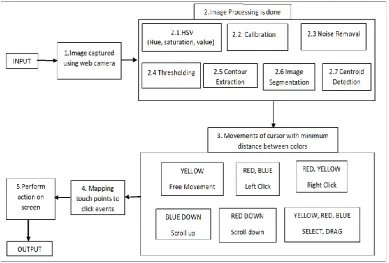
Figure 1: Proposed system architecture
# finding the centroid using the method
of 'moments'
4.2.1
Capturing the real-time video
The web camera will be used as a sensor. It will be used to capture the real-time video and to detect the hand movements. The web camera captures the movements through a fixed frame size. Users can use an inbuilt camera or can externally connect a camera.
4.2.2
4Hand Recognition and Colour Tape
Detection
The first step is to separate the essential hand pixels from the non-hand pixels. This can be done by a background subtraction scheme which segments any potential foreground hand information from the non-changing background. The background image is captured and segmented, only the appropriate background is used for further processing. After background subtraction, the process of skin segmentation is done. Here, a histogram-based skin classifier assigns each of the RYB pixels in the training set to either a 3D skin histogram or a non-skin histogram. The skin segmentation process outputs an image that is ready for the detection of color tapes on the fingers. For this, an algorithm based on HSV color space is used which is very effective to select a certain color out of an image. The idea is to convert the RYB pixels into the HSV color plane so that it is less affected by variations in
convolution phase to reduce the noise introduced.
4.2.3
Cursor Position
Defining cursor position with yellow. The user might be left or right handed, so a video frame of rectangular sub-portion of smaller size is considered. Due to the noise captured and vibrations of the hand, the centers keep dislocating the mean position. It uses setcursorposition() so that the new center position is set close to the old center. Now the three centers are sent for deciding what action to be performed depending upon their relative position. This is done by the chooseAction() in the code depending upon its output. The performAction() carries out either of the following pyaotogui library function: click, select, drag, scroll.
4.2.4
Controlling mouse
a) Moving mouse cursor
For finding the cursor on the screen and for the cursor moment any specific color (yellow) on a finger is used to perform the movement on the screen.
b) Clicking Action
Clicking action is based on the detection of the colors and center tip of the finger
• If Blue along with Red is detected, then Left Click action is performed.
• If Red along with Green is detected, then Right Click action is performed.
• If Red is detected and the movement of the finger is in the downward direction than Down Scroll action is performed.
Each colour range is calibrated by using cv2.inRange() function.
Step 3. Noise Removal
The noise removal algorithms reduce or remove the visibility of noise by smoothing the entire image, leaving areas near contrast boundaries. It is done in two step morphism i.e. erosion and dilation. Dilation adds pixels to the boundaries of objects in an image, while erosion removes pixels on object boundaries.
Step 4. Centroid Detection
The centers of each colour is detected using the method of moments.
Step 5. Cursor Position
The yellow coloured finger is used for cursor movement. Due to the noise captured while calibrating the colour the centroid vibrates, to reduce the vibrations of the cursor it compares the new position with the previous position of the cursor using the def setCursorPos(). The new cursor position is calculated in such a way that the mean deviation from the desired steady state is reduced.
Step 6. Perform Mouse Movements
[image:4.595.335.535.211.405.2]Based on the position of the cursor left click, right click, scroll up, scroll down, drag/select are performed.
Figure 2: Calibration
5.2
Centroid Detection
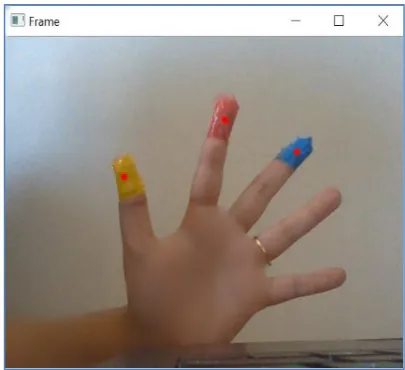
Centers of yellow, red, blue are detected
.
Figure 3: Centroid detection
5.3
Mouse Function
5.3.1
Left click
[image:4.595.332.535.460.645.2]Figure 4: Hand gesture for Left click action
5.3.2
Right click
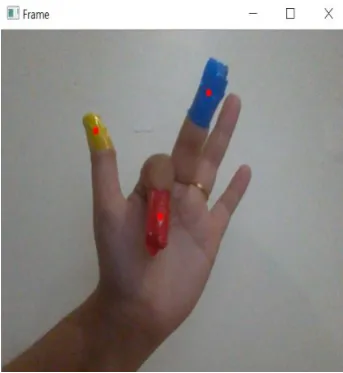
When the Red and Yellow tapes are brought together and cross a certain threshold distance, right-click action is performed.
Figure 5: Hand gesture for Right click action
5.3.3
Drag and select
[image:5.595.346.518.71.240.2]All three tapes should be together for selection and dragging. The distance should be minimized between the centers of the colour.
Figure 6: Hand Gesture for Drag and Select
5.3.4
Scrolling up
[image:5.595.348.522.301.494.2]Move the blue coloured finger in the downwarddirection to scroll up.
Figure 7: Hand gesture for Scroll up operation
5.3.5
Scrolling down
[image:5.595.98.272.335.535.2] [image:5.595.349.521.554.741.2]tasks such as left clicking, right clicking, and scrolling are implemented. In the future, additional features such as enlarging and shrinking windows, closing the window, etc. will be implemented. This method is created under a standardized operating system. Various application programs can be developed exclusively from this technology to create a wide range of applications with the minimum requirements of resources.
8.
REFERENCES
[1] Chetana S. Ingulkar, A.N. Gaikwad; Hand Data Glove: A wearable real-time device for human computer Interaction; J. International Journal of
[4] Kamran Niyazi, Vikram Kumar, Swapnil Mahe, and Swapnil Vyawahare; Mouse Simulation Using Two Coloured Tapes; Department of Computer Engineering, AISSMS COE, University of Pune, India International Journal of Information Sciences and Techniques (IJIST) Vol.2, No.2; March 2012.