ULTIMATE BASIC LANGUAGE
REFERENCE GUIDE
HOW TO ORDER THIS GUIDE
The ULTIMATE BASIC Reference Guide is included with the system documentation set.
For additional copies, please call your dealer or the ULTIMATE corporation.
PROPRIETARY INFORMATION
This document contains information which is proprietary to and considered a trade secret of the ULTIMATE CORPORATION. It is expressly agreed that i t shall not be reproduced in whole or in part, disclosed, divulged, or otherwise made available to any third party either directly or indirectly. Reproduction of this document for any purpose is prohibited without the prior express written authorization of the
ULTIMATE CORPORATION.
Copyright September, 1985, THE ULTIMATE CORP. Operating System Release 10 - Rev 140
HOW TO USE THIS MANUAL
This manual is intended as a reference for programmers using the ULTIMATE BASIC programming language. Although not a tutorial, i t covers all aspects of using BASIC with the ULTIMATE system file structure and operating system. The material is presented in a structured format, with text and graphics integrated into single-topic units.
How the manual is organized
Chapter I gives an overview of programming with ULTIMATE BASIC. It covers the program file structure, components of a program, compiler options and directives, and methods of executing programs.
Chapter 2 discusses how data can be represented in a BASIC program: as constants (literals), variables, or arrays. It also covers the use of expressions (arithmetic, logical, string, and relational) and the extended arithmetic package
(floating point and string).
Chapter 3 lists all statements and functions in alphabetical order. Each statement and function is detailed in a
single-topic unit.
Chapter 4 explains the testing and debugging procedure and each command in the BASIC Debugger.
Chapter 5 reviews the ULTIMATE data file structure and gives some recommended coding techniques. The chapter also
contains several sample programs for reference. These programs illustrate the use of ULTIMATE BASIC for file updating, job control, and other special applications. The appendixes list error messages, ASCII codes, debugger commands and messages.
How the manual is formatted
This manual is presented in a structured format. Each individual topic is an independent unit with its own headline, summary, text, and one or more exhibits.
with a structured format the reader can easily locate the specific topic(s) needed, and all pertinent information is included within the unit.
Each topic typically has one or more exhibits.
Figure A is
always the first exhibit, Figure B is the second exhibit, and
so on.
conventions used
This manual presents general formats for each of the BASIC
statements and intrinsic functions. In presenting and
explaining these general forms, the following conventions
apply:
Example
READ
expr
{expr}
Meaning
Words printed in capital letters are required and
must appear exactly as shown.
Words printed in lower-case letters are parameters
to be supplied by the user (i.e., variables,
expressions, etc.).
Parameters are underlined for easy reference in
the text explanation below the general form.
Braces enclosing a word and/or a parameter
indicates that the word and/or parameter is
optional and may be included or omitted at the
user's option. If an ellipsis (i.e., three dots ... )
follows the terminating bracket, then the word
and/or parameter may be omitted or repeated an
arbitrary number of times.
RND(expr) All functions require a set of parentheses, which
COL1()
usually enclose a parameter.
No space is allowed
between the function name and the left parenthesis.
The figures on the opposite page illustrate the general
figure identifications and content for the topics describing
the BASIC Statements and Intrinsic Functions.
other conventions used throughout the manual are:
BOLD<CR>
Bold face type is used for section and unit
headings.
It is also used in exhibits to indicate
user input as opposed to system-displayed data, and
in the Appendix message listings.
THIS FIGURE USUALLY PRESENTS A GENERAL
FORMAT FOR THE FUNCTION OR STATEMENT
Figure A. General Format
THIS FIGURE USUALLY PRESENTS A NUMBER OF
EXAMPLES OF CORRECT USAGE.
Figure B. Examples of Correct Usage
THIS FIGURE, IF PRESENT, USUALLY PRESENTS A NUMBER OF
EXAMPLES OF INCORRECT USAGE.
Topic
THE ULTIMATE BASIC REFERENCE MANUAL TABLE OF CONTENTS
How to Use This Manual . . . P-l Chapter 1 OVERVIEW OF PROGRAMMING WITH THE BASIC LANGUAGE
1.1 1.2 1.3 1.4 1.5 1.6 1.7 1.8 1.9 1.10
An Overview of the BASIC Language . . . . The File Structure of BASIC Source Programs . . . . The Components of a BASIC Program . . . . compiler Directives ($) within BASIC Programs . . . . The Process of creating and Compiling BASIC Programs .. BASIC compiler options: A, C, E, L, N, and P options .. BASIC Compiler options: M, S, and X options . . . . Cataloging BASIC Programs: CATALOG and DE CATALOG Verbs Executing Compiled BASIC Programs . . . . Executing BASIC Source (Compile-and-go) Programs . . . .
2 4 5 8 10 13 15 16 18 22
Chapter 2 REPRESENTING DATA (CONSTANTS, VARIABLES, EXPRESSIONS) 2.1 2.2 2.3 2.4 2.5 2.6 2.7 2.8 2.9 2.10 2.11 2.12 2.13 2.14
Representing Data Values: Numbers and strings . . . . Multi-valued Strings: Dynamic Arrays . . . . Defining Data Values as Constants or Variables . . . . Representing changing Data Values: Variables . . . . Multi-valued Variables: Dimensioned Arrays . . . . Arithmetic Expressions: Standard Arithmetic . . . . Ext
7
nded (Floa~ing Point and String) Arithmetic . . . . Strl.ng Expressl.ons . . . . Format strings: Numeric Mask and Format Mask Codes ... . Relational Expressions . . . . Rel~tional Expr7
ssions: Pattern Matching . . . • . Logl.cal Expressl.ons . . . . Summary of Expression Evaluation . . . • . . . How Variables are Structured and Allocated . . . .24 26 29 30 32 34 36 39 42 46 48 50 52 53 Chapter 3 BASIC STATEMENTS AND FUNCTIONS
3.1 A Summary of the Statements and Functions . . . 58
3.2 Alphabetical Listing of Statements and Functions... 59
! statement... 60
*
statement...
60=
Assignment S t a t e m e n t . . . 62@
Function...
64
ABORT S ta tement. . . . 67
ABS Function... 68
ALPHA Function... . . . 69
ASCII Function... 70
Assignment Statements... 71
BEGIN CASE S t a t e m e n t . . . 72
BREAK (ON/OFF) Statement... 73
CALL Statement. . . . . . . . . . ... . . .. 74
CASE statement... 78
CLEARFILE Statement ..••.• CLOSE Statement •..•...••. COLI and COL2 Functions .. COMMON Statement.
COS Function ... COUNT Function.
DATA Statement ••.•... DATE Function ..
DCOUNT Function ..• DEL Statement •.• DELETE Function •. DELETE Statement •.
DIM Statement ..•..•...•..••••• DISPLAY Statement.
EBCDIC Function •.••.
ECHO (ON/OFF) Statement .. END Statement ••.••.•
END CASE Statement .. ENTER Statement ... EOF Function .•.•.•. EQUATE Statement .. EXECUTE Statement. EXIT Statement •.. EXP Function .•.•. EXTRACT Function .• FADD Function. FCMP Function •• FDIV Function •• FFIX Function •. FFLT Function ..
FIELD Function .•••••• FMUL Function ..•
FOOTING Statement •. FOR Statement •. FSUB Function •.••. GET Statement •••• GOSUB Statement •• GOTO Statement .•. HEADING Statement •.
ICONV Function .• IF Statement ••.•• INDEX Function •••.
INPUT Statement ••••••••• INPUTCLEAR statement •• INS Statement ••.•• INSERT Function •• INT Function •••
LEN Function •••.••••••• LET Statement ••
LN Function •••. LOCATE Statement •. LOCK Statement ••.
LOOP Statement •....•...• MAT
=
Statement ••MATREAD statement .•. MATREADU Statement.
NOT Function . . . . NULL statement .. NUM Function . . . . OCONV Function ..
ON GOSUB and ON GOTO statements. OPEN statement . . . . PAGE statement . . . .
PRECISION Statement. PRINT Statement ... . PRINTER Statement .. . PRINTERR Statement. PROCREAD Statement .. PROCWRITE Statement. PROGRAM Statement. PROMPT Statement. PUT Statement .. PWR Function . . . . . READ Statement ... . READNEXT Statement .. READT Statement. READU Statement ... READV Statement .. READVU Statement. RELEASE Statement. REM Function . . . . REM Statement . . . . . REPEAT Statement. REPLACE Function .. RETURN (TO) Statement .. REWIND Statement ..
RND Function .. RQM Statement. SADD Function. SCMP Function .. SDIV Function ... SEEK Statement .. SELECT Statement .. SEQ Function .. SIN Function ... . SMUL Function .. . SPACE Function .. SQRT Function ... SSUB Function .. STOP Statement .. STORAGE Statement. STR Function . . . . SUBROUTINE Statement .. SYSTEM Function . . . . TAN Function . . . .
TIME Function . . . . . TIMEDATE Function. TRIM Function . . . UNLOCK Statement. UNTIL Statement. WEOF Statement .. WHILE Statement.
WRITE Statement . . . . WRITET Statement.
WRITEVU Statement . . • . . • • • . • • • . . . • . . . • . . . 289
Chapter 4 TESTING AND DEBUGGING BASIC PROGRAMS
4.1 4.2 4.3 4.4 4.5 4.6 4.7 4.8 4.9 4.10 4.11
BASIC Symbolic Debugger ••••••.••.••••.•••...••.... The Symbol Table . . . . Displaying Source Code: Land Z Commands • . • . . . • . . . . • The Trace Table: T and U Commands • . . • • • . . . • . . . . • . Breakpoint Table: Band K Commands . . . • • • . • . . • . . . • • Displaying Tables: D Command . . . . Execution Control: E, G, and N Commands . . • . . . Execution Control: END and OFF Commands . . . . Displaying and Changing Variables: the / Command • . . . Special Commands . . . . Example of Using the BASIC Debugger . . . . • . . . • • . . . • .
Chapter 5 REFERENCE FOR PROGRAMMERS
5.1 5.2 5.3 5.4 5.5 5.6 5.7 5.8 5.9 5.10 5.11
Understanding the ULTIMATE System File Structure ...•. Programming Techniques for Handling I/O . . • • . • . • . . . Programming Considerations about I/O for
Network Users . . . .
Programming Techniques for Handling File Items . . . . Guidelines for Cursor Positioning . . . • . . . Programming for Maximum System Performance . . . • . Programming Example: PRIME . . • . . • • • • . . . • . Programming Example: COLOR . . . . • . . . • . . . • . Programming Example: POOOO (File Update) ••••...•. Programming Example: ITEMS.BY.CODE (Job Control) .••.•. Programming Example: SUMMARY.REPORT (Menu/Report) ..•.. APPENDIX A: BASIC Compiler Error Messages
APPENDIX B: BASIC Run-time Error Messages APPENDIX C: Lis~ of ASCII Codes
APPENDIX D: Summary of BASIC Debugger Commands APPENDIX E: BASIC Debugger Messages
CHAPTER 1
OVERVIEW OF PROGRAMMING WITH THE BASIC LANGUAGE
1.1 An Overview of the BASIC Language Figure A. BASIC Statements
Figure B. BASIC Intrinsic Functions Figure C. BASIC Compiler Directives Figure D. BASIC Redirection Variables 1.2 The File Structure of BASIC Source Programs 1.3 The Components of a BASIC Program
Figure A. Sample BASIC Program
Figure B. Sample Program with Remark Statements 1.4 Compiler Directives within a BASIC Program
1.5 The Process of Creating and compiling BASIC Programs Figure A. General Forms for Editing/compiling Programs Figure B. BASIC Program "COUNT" Created,. Filed, Compiled 1.6 BASIC Compiler Options: A, C, E, L, N, and P Options
Figure A. General Description of Compiler Options Figure B. Sample Code Conversions During compilation 1.7 BASIC compiler Options: M, S, and X Options
1.8 Cataloging BASIC Programs: CATALOG and DE CATALOG Verbs 1.9 Executing Compiled BASIC Programs
1.1 AN OVERVIEW OF THE BASIC LANGUAGE
This manual describes the ULTIMATE BASIC programming
language, which is an extended version of Dartmouth BASIC.
BASIC (Beginners All-Purpose Symbolic Instruction Code) is a simple yet versatile programming language suitable for
expressing a wide range of problems. Developed at Dartmouth College in 1963, BASIC is a language especially easy for the beginning programmer to master. ULTIMATE BASIC includes the following extensions to Dartmouth BASIC:
optional alphanumeric or numeric statement labels - Statement labels of any length
- Multiple statements on one line - Single statements on multiple lines - Computed GOTO statements
- Complex and multi-line IF statements - Priority case statement selection - string handling with variable length
strings up to 32,267 characters - External subroutine calls
- Direct and indirect calls - Magnetic tape input and output - Fixed point arithmetic with up to
15 digit precision
- Floating point and string arithmetic - Data conversion capabilities
- ULTIMATE file access and update capabilities - File level or group level lock capabilities - Pattern matching
- Dynamic arrays
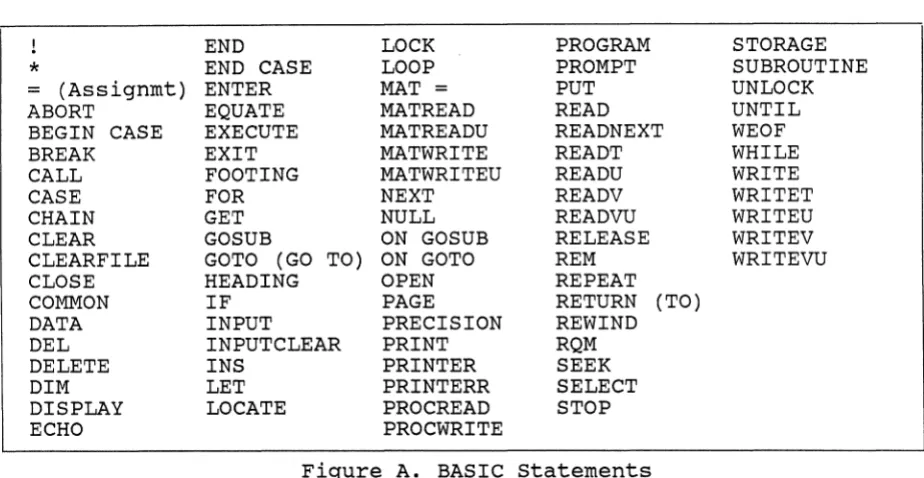
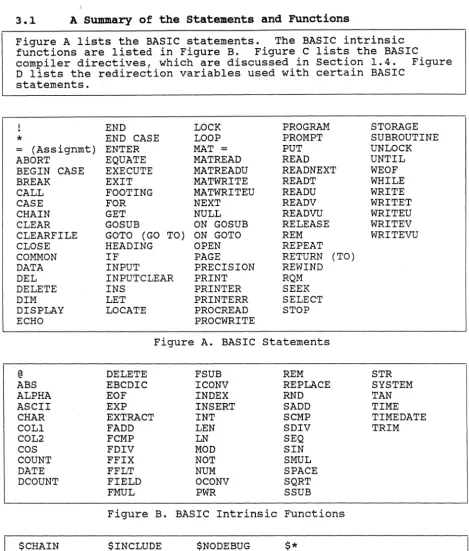
Figure A lists the BASIC statements. The BASIC intrinsic functions are listed in Figure B. Figures C and D list the BASIC compiler directives and redirection variables,
respectively. All terms listed are BASIC "keywords" and cannot be used as variable names.
! END LOCK PROGRAM STORAGE
*
END CASE LOOP PROMPT SUBROUTINE= (Assignmt) ENTER MAT = PUT UNLOCK
ABORT EQUATE MATREAD READ UNTIL
BEGIN CASE EXECUTE MATREADU READNEXT WEOF
BREAK EXIT MATWRITE READT WHILE
CALL FOOTING MATWRITEU READU WRITE
CASE FOR NEXT READV WRITET
CHAIN GET NULL READVU WRITEU
CLEAR GOSUB ON GOSUB RELEASE WRITEV
CLEARFILE GO TO (GO TO) ON GOTO REM WRITEVU
CLOSE HEADING OPEN REPEAT
COMMON IF PAGE RETURN (TO)
DATA INPUT PRECISION REWIND
DEL INPUTCLEAR PRINT RQM
DELETE INS PRINTER SEEK
DIM LET PRINTERR SELECT
DISPLAY LOCATE PROCREAD STOP
ECHO PROCWRITE
Figure A. BASIC Statements
@ DELETE FSUB REM STR
ABS EBCDIC ICONV REPLACE SYSTEM
ALPHA EOF INDEX RND TAN
ASCII EXP INSERT SADD TIME
CHAR EXTRACT INT SCMP TIMEDATE
COLl FADD LEN SDIV TRIM
COL2 FCMP LN SEQ
COS FDIV MOD SIN
COUNT FFIX NOT SMUL
DATE FFLT NUM SPACE
DCOUNT FIELD OCONV SQRT
FMUL PWR SSUB
Figure B. BASIC Intrinsic Functions
$CHAIN $INCLUDE $NODEBUG $*
Figure C. BASIC Directives
ARG. MSG. SELECT. IN. OUT.
[image:14.613.115.577.165.404.2]1.2 The File structure of BASIC Source Programs
BASIC source programs are stored as items in disk files. Object code is referenced through pointer items in file dictionaries.
BASIC source programs are stored as items in the data section of a disk file. The compiler generates pointers to object code in the dictionary section of the file. In order to compile programs, the data and dictionary sections must be distinct files.
Stored along with the object code of each program (unless suppressed at compile-time) is a symbol table for use with the BASIC debugger. The symbol table contains all variable names defined in the program. (For details on the BASIC debugger, please refer to Chapter 4, Testing and Debugging BASIC Programs.)
Object pointer items have a format similar to that of POINTER-FILE items used with Recall save-list statements:
Attribute
a
(item-id) 12
3
4 5
Contents Program name CC
Starting FID of object code Number of frames of object code
(null)
Time and date of compilation The term "FID" stands for "frame-id", or frame number. Attributes
a
through 4 are protected by the system against alterations by the Editor or any other file-updating program. When object pointer items are saved on tape as part of afile-save or account-save, the associated object code is also saved. Individual object programs may also be saved on tape using the T-DUMP verb by T-DUMPing specified pointers in a file dictionary. Programs may be restored from file-save and account-save tapes using ACCOUNT-RESTORE or SEL-RESTORE
1.3 The Components of a BASIC Proqram
A BASIC proqram is comprised of BASIC statements. A program may also include directives that are interpreted and used by the compiler.
A BASIC program consists of a sequence of BASIC statements. Each BASIC statement tells the system to perform a specific program operation. A statement may include one or more data values, expressions, and/or intrinsic functions. (Please refer to Chapter 2 for details on representing data and
expressions. Refer to Chapter 3 for an alphabetical listing and discussion of each BASIC statement and intrinsic
function.)
More than one statement may appear on the same program line, separated by semicolons. For example:
x
=
0; Y=
0; GOTO 50certain statements which take an indefinite number of
arguments may be continued on several lines; each line except the last must end with a comma. For example:
CALL A.BIG.SUBROUTINE(LONGPARAMETERNAME1,
LONGPARAMETERNAME2, EVEN. LONGER. PARAMETERNAME3) The continued lines may be indented to improve program clarity, but this is not required by the BASIC Compiler. statements with the multi-line option are noted in their individual discussions.
Any BASIC statement may begin with an optional statement label. A statement label is used so that the statement may be referenced from other parts of the program. A statement label may be either alphanumeric or numeric. Numeric statement labels may be any constant whole number. The following INPUT statement, for example, has a statement label of 100:
100 INPUT X
Alphanumeric statement labels may contain letters, numbers, dollar signs, and periods, but the first character must be a letter. When an alphanumeric label is used, i t must be followed by a colon before the statement which i t labels.
(The colon is optional with numeric labels.) The following subroutine has a statement label of INPUTLOOP and references two other labels:
INPUTLOOP: GOSUB GET INPUT GOSUB DOlT GOTO INPUTLOOP
TOP:
GOSUB DOITAGAIN
A helpful feature to use when writing a BASIC program is the Remark statement. A Remark statement is used to explain or document the program. It allows the programmer to place comments anywhere in the program without affecting program execution. (The Remark statement, which can be written as REM, !, or
*,
is detailed in Chapter 3.)A BASIC program can also include compiler directives. Directives always begin with
"$".
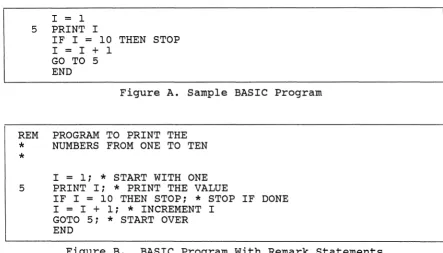
They appear similar to BASIC statements, but they affect the way a program is compiled, not the way i t runs. (For details, see the next topic.)Except for situations explicitly called out in the following sections, blank spaces appearing in the program line (which are not part of a data item) will be ignored. All-blank lines and null lines (containing no text and no blanks) will also be ignored. Thus, blanks and null lines may be used freely within the program for purposes of appearance. A simple BASIC program is illustrated in Figure A to show overall program format. Figure B illustrates the same program with a number of Remark statements and a null line added for clarity.
The user should note that a BASIC program, when stored, constitutes a file item, and is referenced by its item-id. The item-id is the name given to the program when i t is created via the EDITOR; refer to Section 1.5, entitled "The Process of Creating and Compiling BASIC Programs". An
I
=
15 PRINT I
IF I
=
10 THEN STOPI
=
I + 1GO TO 5 END
Figure A. Sample BASIC Program
REM PROGRAM TO PRINT THE
*
NUMBERS FROM ONE TO TEN*
I
=
1;*
START WITH ONE 5 PRINT I;*
PRINT THE VALUEIF I
=
10 THEN STOP;*
STOP IF DONE I=
I + 1;*
INCREMENT IGOTO 5;
*
START OVER END [image:18.613.133.576.128.381.2]1.4 compiler Directives within a BASIC Program
compiler directives can be included in programs just like BASIC statements. Any line in a BASIC source program which begins with "$" is interpreted as a compiler directive and not a BASIC statement.
Compiler directives appear similar to BASIC statements, but they affect the way a program is compiled, not the way i t runs. Each type of directive is detailed below.
$INCLUDE Directive
=
Sharing Source Code Among Programs The $INCLUDE directive may be used to include source code stored in one program file item as part of another. The general format of the $INCLUDE directive is:$INCLUDE {filename} itemname
If filename is omitted, the file is assumed to be the one containing the program currently being compiled. The
itemname specifies the name under which the program item is stored. $INCLUDE directives may be nested up to three levels deep. Users should note that the object code of any BASIC program or external subroutine, whether or not i t contains $INCLUDE directives, should not exceed 32768 bytes in size. A typical use for the $INCLUDE directive is with a set of
related BASIC programs using variables in COMMON. The COMMON statements can be placed in a single item which is "included" in each program by the $INCLUDE directive. This has the advantages of saving space, making changes easier, and reducing the chance of declarations in one program mismatching those in another.
$CHAIN directive
=
Linking program file itemsThe $CHAIN directive can be used to link program file items together at compilation. The general format of the $CHAIN directive is:
$CHAIN {filename} itemname
If filename is omitted, the file is assumed to be the one containing the program currently being compiled. The $CHAIN directive continues compilation with the specified program itemname. Since any source code appearing after the $CHAIN directive is ignored, the directive should be the last line in the source code.
$NODEBUG directive
=
Omitting test capabilitiesThe $NODEBUG directive may be used after a program has been debugged. It directs the compiler to discard information used during program testing. The general format is:
$NODEBUG
The $NODEBUG directive causes the compiler to not save the EOL opcodes and the symbol table as part of the object code.
(This has the same effect as specifying the "C" and "S" options on the COMPILE or BASIC verb.)
$* directive
=
Inserting specified textThe $* directive can be used to embed text (such as a
copyright notice) in a program's object code. The general format is:
$* text
1.5 The Process of creating and Compiling BASIC Programs A BASIC program is created via the Editor as any other
data-file item. Once this source code item has been filed, i t is compiled by issuing a COMPILE command (or a BASIC command) at the TCL level.
BASIC programs are created via the ULTIMATE system Editor. To enter the Editor, issue the following command at the TCL level:
ED{IT} filename item-id EEDIT filename item-id
The system will then enter the Editor, and you may begin entering the BASIC program. The EEDIT command performs the same function as EDIT, but compresses the storage space used by eliminating all spaces when the item is filed.
Program listings are easier to follow when you indent
statements within a loop or routine. You may set tab stops at the TCL level or within the Editor, as shown in Figure B.
(See the System Command Guide for further discussion of the EDIT command: see the Editor manual for details about using the Editor.)
The program will be stored in the file specified by filename under the name specified by item-ide
Once the BASIC program has been entered and filed, i t may be compiled at the TCL level. Two TCL verbs are available to create the object code: COMPILE and BASIC: either verb may be used since they perform the same operation. The EBASIC form of BASIC must be used to compile programs created with an EEDIT command. EBASIC expands the item to include any spaces that were compressed by EEDIT.
Compiling a program creates object code that can be executed with the RUN verb and can be cataloged. The symbol table is also included with the object code (unless suppressed by the
"s"
option). The general compile command formats are: COMPILE filename item-list {(options)}BASIC filename item-list {(options)} EBASIC filename item-list {(options)}
The item-list may contain one or more explicit item-ids
(program names) separated by one or more blanks, or may be an asterisk (*) to indicate all programs in the file. The
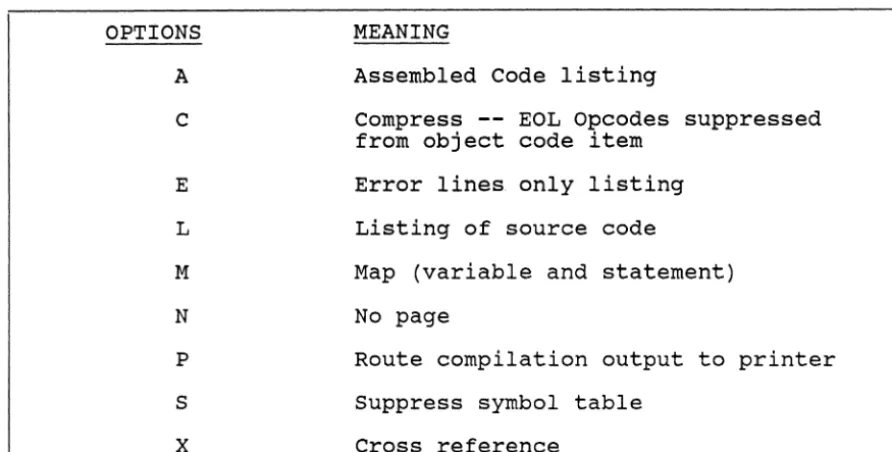
The valid options are listed below. For detailed descriptions of each, see the next two section topics.
A Assembled code option
C Suppress End Of Line (EOL) opcodes from object code.
E List error lines only. L List BASIC program.
M List map of BASIC program N No page
P Print compilation output on line printer S Suppress generation of symbol table
X Cross reference all variables
The BASIC compiler stores a compiler version number in each program's object code. The run-time system program checks this number each time before running a program to see if i t is compatible with the current compiler version. If i t is not, the program is not allowed to run; the system issues an error message (B23). The message indicates that the program must be recompiled before it can be run.
Note that compiling does not create an item in the user's Master Dictionary. Master Dictionary items are created by cataloging the compiled program or by using the compile-and-go format in the BASIC source program.
EEDIT filename item-id ED{IT} filename item-id
COMPILE filename item-list {(options)} BASIC filename item-list {(options)} EBASIC filename item-list {(options)}
Figure A. General Forms for Editing and compiling a BASIC Program
>TABS I 4,8,12 <CR>
>ED BP COUNT <CR> New Item
Top .I <CR>
<--- User sets input tabs at TCL level
<--- User edits item 'COUNT'
in file 'BP' (Basic Programs)
<--- User enters input mode and begins to enter program 001*
002 003 004
005 006
TOP
PROGRAM COUNTS FROM 1-10 <CR>
FOR I
=
1 TO 10 <CR> <--- Entered with CTL/I (or TAB key) PRINT I <CR> <--- pressed once for indentation NEXT I <CR>I
to first tab stop.END <CR>
I
<CR> --- CTL/I (or TAB key) pressed .FI <CR>
<---I
twice for second tab stop indentation
--- User files item 'COUNT' Filed
>COMPILE BP COUNT <CR> <--- User issues compile command
*****
Successful compile; 1 frames used.
[image:23.621.28.530.198.583.2]1.6 BASIC Compiler options: A, C, E, L, N, and P Options Nine options are available with the BASIC compile statement. six are described below: They are the "A" for assembled code,
the
"c"
for suppression of end of line opcode, "E" for thelisting of error lines only, the "L" for the listing of the program during compilation, the "P" for routing output to the printer, and the "N" option for no paging. The next topic describes the remaining three compiler options.
The general forms of the BASIC compile command are: BASIC filename item-list {(options)}
COMPILE filename item-list {(options)} EBASIC filename item-list {(options)}
Multiple options are separated by commas. The options are: A The Assembled code option. The "A" option generates a
listing of the source code line numbers, the labels and the BASIC opcodes used by the program. This is a
'pseudo' assembly code listing which allows the user to see what BASIC opcodes his program has generated. The hexadecimal numbers on the left of the listing are the BASIC opcodes and the mnemonics are listed on the right. The assembled code listing of the BASIC program "COUNT"
(from previous section) is shown, as an example, in Figure B.
C The Compress option. The Compress option suppresses the end-of-line (EOL) opcodes from the object code. The EOL opcodes are used to count lines for error messages.
This eliminates 1 byte from the run time object code for every line in the source code. This option is designed to be used with debugged cataloged programs. Any run time error message will specify a line number of 1. E The 'list error lines only' option. The liE" option
generates a listing of the error lines encountered during the compilation of the program. The listing indicates the line number in the source code item, the source line itself and a description of the error associated with the line.
L The list program option. The ilL" option generates a line by line listing of the program during compilation. Error lines with associated error messages are
indicated.
N No page. Inhibits automatic paging on terminal when using the "L" and/or "M" options.
OPTIONS
A
C
E
L
M
N
P
S
x
MEANING
Assembled Code listing
Compress -- EOL Opcodes suppressed from object code item
Error lines only listing Listing of source code
Map (variable and statement) No page
Route compilation output to printer Suppress symbol table
Cross reference
Figure A. General Description of Compiler options
SOURCE BASIC PSEUDO
CODE OBJECT ASSEMBLY
LINE NO. CODE CODE
001 01 EOL
002 03 LOADA I
002 FD LOAD. 1
002 20 ONE
002 2D SUBTRACT
002 5F STORE
002 1001
002 05 LOADN 10
002 03 LOADA I
002 20 ONE
002 28 FORTEST 2001
002 01 EOL
003 5D LOAD I
003 50 PRINTCRLF
003 01 EOL
004 06 BRANCH 1001
004 2001
004 01 EOL
005 01 EOL
006 45 EXIT
[image:25.624.29.475.119.345.2] [image:25.624.36.478.397.716.2]i
1.7 BASIC compiler options: X, S,
& X options
This section describes the remaining three options available when issuing the BASIC compile statement. They are the "M" for map, the
"s"
for suppressing generation of the symbol table, and the "X" for cross reference.The options are:
M The map option. The "M" option generates a variable map and a statement map, both of which are printed out after compilation. These maps show where the program data has been stored in the user's workspace. The variable map lists the offset in decimal (from the beginning of the seventh frame of the IS buffer) of every BASIC variable in the program. For example, the form:
20 xxx 30 yyy
shows that the descriptor of variable 'xxx' starts on byte 20 and the descriptor of variable 'yyy' starts on byte 30 of the seventh frame of the IS buffer.
Descriptors are 10 bytes in length.
The statement map shows which statements of the BASIC program are contained in which object code frames. Frame 01 is the starting FID stored in the object
pointer item. The statement map may be used to determine if frequently executed loops cross frame boundaries. S The suppress symbol table option. The
"s"
optionsuppresses saving the symbol table generated during compilation. The symbol table is used exclusively by the BASIC Debugger for reference; therefore i t must be kept only if the user wishes to use the Debugger.
X The cross reference option. The "X" option creates a cross reference of all the labels and variables used in a BASIC program and stores this information in the BSYM file. NOTE: A BSYM file must exist (a modulo and
separation of 1,1 should be sufficient). The "X" option first clears the information in the BSYM file, then
creates an item for every variable and label used in the program. The item-id is the variable or label name. The attributes contain the line numbers of where the
variable or label is referenced. An asterisk will precede the line number where a label is defined, or where the value of the variable is changed.
No output is generated by this option. An attribute definition item should be placed in the dictionary of the "BSYM" file which allows a cross reference listing of the program to be generated by the command:
1.8 Cataloging BASIC Programs: CATALOG and DE CATALOG Verbs
Compiled BASIC programs can be cataloged and used
at the TCL level.
They can also be decataloged.
and DE CATALOG verbs are used to create and delete
commands for compiled BASIC programs.
The general form of the CATALOG command is:
CATALOG filename item-list {(L)}
as commands
The CATALOG
TCL
The filename specifies the file containing programs to be
cataloged.
Item-list consists of one or more program names
(item-ids), or
"*"
to indicate all programs in the file.
The
~option indicates that the program is not to be executed
automatically at logon time.
When the
~option is not
present, if a program name is the same as an account name,
that program will be automatically run whenever the account
logs on.
(For details, please refer to section
1.9,"Executing Compiled BASIC Programs".)
Programs to be cataloged must first be compiled.
The program
may not have the same name as an existing item in the user's
Master Dictionary unless that item is also a cataloged
program verb.
For example, if the BASIC source program "A"
is in the Master Dictionary, another program cannot be
cataloged with the name "A".
If a conflicting item already
exists in the user's Master Dictionary, the system will
respond with:
[4l5J (item-id) exists on file
and the program will not be cataloged.
For each program successfully cataloged, the system responds
with
[244J (item-id) cataloged
Once a program is cataloged, it may be run simply by typing
its name at the TCL prompt.
CATALOG adds the program name as
a verb in the user's Master Dictionary (when not already
present) with the following form:
1)
PC
2) E6 3)4)
5)
filename item-id
The DE CATALOG verb has the primary purpose of removing the object code from the system. The general form of the
DE CATALOG command is:
DE CATALOG filename item-list
DE CATALOG removes the object programs specified by item-list in the file filename by deleting the appropriate pointer items from the dictionary of the file; the associated frames containing the object code are returned to the system's available pool ("overflow"). DE CATALOG also deletes the verbs for cataloged programs from the Master Dictionary, but a program does not have to be cataloged before it is
decataloged.
External subroutines used with the BASIC CALL statement may also be cataloged, though it is unnecessary when both the subroutine and the calling routine are in the same program file. The CALL statement will first search the Master Dictionary for a catalog verb in order to locate a
subroutine's object code. If not found, it will then look for an object pointer in the dictionary of the program file for the calling routine.
1.9 Executing Compiled BASIC Programs
All execution of BASIC programs is performed at the TCL
level.TCL can interpret a RUN command, a PROC name, and/or
a BASIC program name (both source and compiled versions).
A
compiled BASIC program can be executed by issuing a RUN
command.
If the program has been cataloged, it can be
executed by issuing only the program name.
Programs with the
same name as an account name can be automatically executed at
logon time.
The general format of the RUN command is:
RUN filename item-id {argument list} {(options)}
The filename and item-id specify the compiled BASIC program
to be executed.
The optional argument list specifies any
parameters that must be passed to the program.
If used, the
options must be enclosed in parentheses. Multiple options may
be separated by commas.
Valid options are as follows:
A
Abort option. The "A" option inhibits entry to the Basic
Debugger under all error conditions; instead, the program
will print a message and terminate execution.
D
Run-time debug option; causes the BASIC Debugger to be
entered before the start of program execution. Note that
the BASIC Debugger may also be called at any time while
the program is executing, by pressing the BREAK key on
the terminal.
E
Errors option. The "E" option forces the program to enter
the Basic Debugger whenever an error condition occurs.
The use of this option will force the operator to either
accept the error by using the Debugger, or exit to TCL.
I
Inhibit initialization of data area (refer to the
description of the BASIC CHAIN statement).
N
Nopage option. The "N" option cancels the default wait at
the end of each page of output when that output has been
routed to the terminal by a program using the HEADING,
FOOTING, and/or PAGE statements.
Issuing ~ Program Name directly from TCL
A compiled and cataloged program can be executed directly from the TCL level using the following general format:
>progname {argument list}
The pro~name must be entered exactly as the program name is stored ln the user's Master Dictionary. The optional argument list contains any parameters that need to be passed to the program.
Executing BASIC programs from ~ FROC or other BASIC program PROCs (procedures) may be used to perform various tasks from a single integrated "procedure". A TCL command, and special PROC commands are stored within the PROC. The following
example illustrates the use of a BASIC program in conjunction with a Recall SSELECT (Sort Select) command.
A PROC named LISTBT is as follows: PQ
HSSELECT BASIC/TEST STON
HRUN BASIC/TEST LISTIDS
P
A BASIC program named LISTIDS is as follows:
OPEN 'BASIC/TEST' ELSE PRINT 'FILE MISSING'; STOP 10 N
=
020 READNEXT ID ELSE STOP PRINT ID 'L#18':
N
=
N + 1IF N>= 4 THEN PRINT; GO TO 10 GO TO 20
END
By typing in LISTBT at the TCL level, the PROC LISTBT selects the item-ids contained in file BASIC/TEST and invokes the BASIC program LISTIDS to list the item-ids selected, four to a line, left justified in a field of 18 blanks.
A PROC can be executed automatically at logon time if the PROC name is the same as the logon account name. For further
information about PROCs, refer to the ULTIMATE PROC Manual. As an alternative to using PROCs for job control tasks, users can execute BASIC programs, PROCs, and TCL verbs within a "controlling" BASIC program. The controlling program can use an EXECUTE statement(s), as well as other supporting
For details on using these statements, please refer to the appropriate statement name, listed alphabetically in Chapter 3 of this manual.
Executing Programs at Logon Time
When a user logs on, the system will attempt to execute a program in the user's Master Dictionary with the same name as the logon account name. This program may be a PROC, or a compile-and-go BASIC program, or a cataloged BASIC program. This feature is useful to run a standard job control sequence or present a custom tailored menu of choices to the user. In some cases, users may need to catalog a BASIC program with the same name as the account name but NOT to run i t auto-matically at logon time. To avoid automatic execution, the program can be cataloged with the L option. For example, if INVENTORY were an account name, the CATALOG command:
CATALOG BP INVENTORY (L)
would catalog the program, but would not link i t for automatic execution whenever a user logs on the INVENTORY account.
TCL COMMAND: >RUN filename item-id {argument list} {(options)}
PROC: >PROC1
CATALOGED or
SOURCE PROG: >progname {argument list}
LOGON: Logon please:ACCOUNTNAME {argument list}
Figure A. options at TCL Level for Executing BASIC Programs
NOTE: In each example below, the same "RUN PROGRAMS TESTING" command is interpreted at the TCL level, regardless of the point of origin of the command.
TCL COMMAND: PROC:
PROGRAM:
>RUN PROGRAMS TESTING <CR>
HRUN PROGRAMS TESTING P
EXECUTE "RUN PROGRAMS TESTING"
In the example below, the program name "TESTING" is executed if an account name of "TESTING" has been established.
LOGON: Logon please:TESTING
[image:32.615.83.580.119.510.2]1.10 Executing BASIC Source (Compi1e-and-go) Programs
BASIC source programs may be entered as items in Master Dictionaries and treated as compile-and-go verbs or PROCs. Programs and PROCs may be executed automatically at logon time. BASIC source programs can also be executed from within other BASIC programs via the EXECUTE statement.
Compile-and-go
A BASIC source program can be executed from the TCL level without previous compilation. This option, called
"compile-and-go", requires only that the source program be entered as an item in a Master Dictionary. These BASIC
programs must have a PROGRAM statement beginning at the first character (no leading blanks) of line one. The PROGRAM
statement can be abbreviated as PROG. For example: HELLO
001 PROG
002 PRINT "HELLO" 003 END
The general format for running the program is: >progname {argument list}
For example: >HELLO
would compile and execute the BASIC source program named "HELLO" .
CHAPTER 2 REPRESENTING DATA:
CONSTANTS, VARIABLES, AND EXPRESSIONS 2.1 Representing Data Values: Numbers and strings
Figure A. Correct and Incorrect Usage of Strings 2.2 Multi-valued strings: Dynamic Arrays
Figure A. General Form of Dynamic Array
Figure B. Examples of Correct Usage of Dynamic Arrays 2.3 Defining Data Values as Constants or Variables
2.4 Representing Changing Data Values: Variables
Figure A. Correct and Incorrect Usage of Variable Names 2.5 Multi-valued Variables: Dimensioned Arrays
2.6 Arithmetic Figure A. Figure B. Figure C.
Expressions: Standard Arithmetic Arithmetic Operators
Examples of Correct Usage of Arithmetic Expressions
Examples of Incorrect Arithmetic Expressions 2.7 Extended (Floating Point and String) Arithmetic
2.8 string Expressions
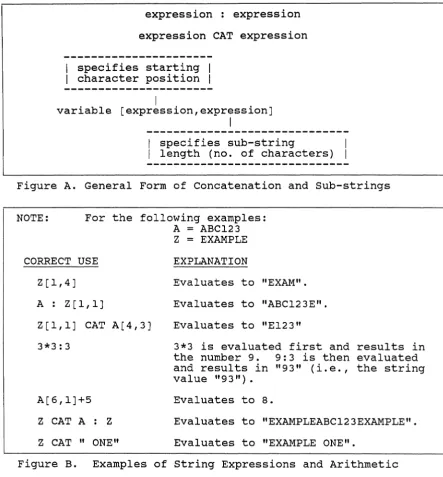
Figure A. General Form of Concatenation and Sub-strings Figure B. Examples of string Exressions and Arithmetic 2.9 Format Strings: Numeric Mask and Format Mask Codes
Figure A. Explanation of the Format String Codes Figure B. General Form and Summary of
Format String Codes
Figure C. Examples of Correct Usage of Format Strings Figure D. Examles of Incorrect Format strings
2.10 Relational Expressions
Figure A. Relational Operators
Figure B. Examples of Correct Relational Expressions 2.11 Relational Expressions: Pattern Matching
Figure A. General Form of Pattern Matching Relation Figure B. Examples of Correct Pattern Matching Relation 2.12 Logical Expressions
Figure A. Logical Operators
Figure B. Examples of Correct Logical Expressions 2.13 Summary of Expression Evaluation
2.1 Representing Data Values: Numbers and Strings
In ULTIMATE BASIC, there are two types of data: numeric and string. Numeric data consists of a series of digits and represents an amount (e.g., 255). String data consists of a set of ASCII characters which may be alphabetic, numeric, and/or keyboard symbols.
Numbers and Numeric Data
A number may contain up to 15 digits, including the digits following the decimal point. In a BASIC program, the PRECISION statement establishes the number of fractional digits. The default PRECISION is 4, so that numbers must be in the range:
-14,073,748,835.0000 to 14,073,748,835.0000
when a program uses the default PRECISION. To change the acceptable form and range of numbers, the PRECISION statement must be used.
Since a number can have a maximum of "n" fractional digits, where "n" is the PRECISION, the value:
1234.567
is a legal number if the PRECISION is 3 or 4, but is not a legal number if the PRECISION is 0, 1, or 2. By changing the PRECISION to a value less than 4, the range of the allowable whole numbers is increased accordingly. (For details, see the PRECISION statement, listed alphabetically in Chapter 3.) The unary minus sign is used to specify negative numbers. For example:
string Data
A string is represented by a set of characters enclosed in single quotes, double quotes, or backslashes. For example:
"THIS IS A STRING" 'ABCD1234#*' \3A\
If a string value contains one string delimiter (', ", or \), then another delimiter must be used to delimit that string. For example:
"THIS IS A 'STRING' EXAMPLE" 'THIS IS A "STRING" EXAMPLE'
A string may contain from 0 to 32,267 characters (i.e., maximum length of an ULTIMATE file item). Internally, a string is delimited by a Segment Mark (SM) , which is a character having a decimal value of 255. No string,
therefore, may contain a Segment Mark. Figure A presents a number of valid and invalid string constants.
A string having the format of an ULTIMATE file item is called a "dynamic array". Since values within a file item may
change, dynamic array strings usually contain variable, rather than constant, data. Dynamic array strings are explained in the next topic.
Data consisting of only digits may be defined as numeric (e.g., 2.5) or string (e.g., "2.5"); either data type is legal. The choice normally depends on the type of operations and expressions in which the value will be used. For
arithmetic usage, the numeric data type is more efficient; for joining (i.e., concatenation), the string data type is more efficient. Either type, however, will be processed with accurate results without programmer intervention.
VALID STRING "ABC%123#*4AB"
, lQ2 Z •... '
"A 'LITERAL' STRING" 'A "LITERAL" STRING'
INVALID STRING ABC123
(i.e., quotes are missing) 'ABC%QQR"
(i.e., either two single quotes or two double quotes
must be used) " (Le., the empty string) "12345678910
(i.e., terminating double
\DEF\ quote missing)
2.2 Multi-valued Strings: Dynamic Arrays
A string having the format of an ULTIMATE file item is called
a dynamic array.
The string is an "array" in that its
component data elements can be referenced using subscripts.
It is "dynamic" in that individual elements may be added,
changed, or deleted within the string, causing the relative
positions of the elements to be subject to change.
Dynamic arrays are significant in ULTIMATE BASIC because they
may be used to represent data in disk files.
Special
constructs are available for manipulating dynamic arrays,
thus making it easier to access and update files.
Review of ULTIMATE File Structure
An ULTIMATE data file consists of a set of file items.
Each
item consists of a string that is in item format.
Such a
string is called a dynamic array.
A dynamic array consists of one or more attributes; multiple
attributes are separated by attribute marks (i.e., an
attribute mark has an ASCII equivalent of 254, shown as """).
An attribute, in turn, may consist of one or more values;
multiple values in an attribute are separated by value marks
(i.e, a value mark has an ASCII equivalent of 253, shown as
"]"). Finally, a value may consist of one or more subvalues;
multiple subvalues in a value are separated by subvalue marks
(i.e., a subvalue mark has an ASCII equivalent of 252, shown
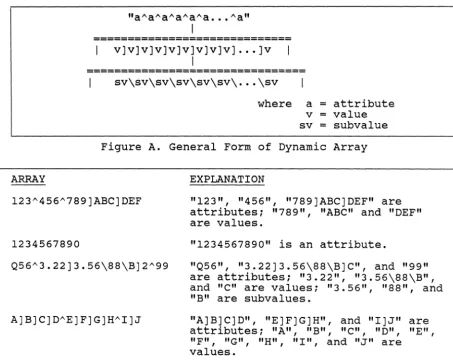
as "\"). This structure is summarized in Figure A.
An example of a dynamic array is as follows:
"55"ABCD"732XYZ"100000.33"
where "55", "ABCD", "73XYZ", and "100000.33" are attributes.
The following illustrates a more complex dynamic array:
"Q5"AAAA"952]ABC] 12345"A"B"C]TEST\12I\9\99. 3]2"555"
where "Q5", "AAAA", "952]ABC]12345", "A", "B",
"C]TEST\12I\9\99.3]2" and "555" are attributes; "952", "ABC",
"12345", "C", "TEST\12I\9\99. 3" , and "2" are values; and
"TEST", "12I", "9", and "99.3" are subvalues.
The maximum length of a dynamic array (including attribute
marks, value marks, and subvalue marks) is 32,266 characters.
Additional examples of correctly formed dynamic arrays are
Accessing Elements of ~ Dynamic Array
Individual elements of a dynamic array can be referenced by specifying the appropriate subscript position (attribute, value, and subvalue number) within the string. Attributes, values, and subvalues are numbered beginning with 1.
Subscripts are normally written in angle brackets following the string, with the first subscript specifying an attribute, the second subscript (if present) specifying a value within the selected attribute, and the third subscript (if present) specifying a subvalue within the selected value.
For example, if X represents the first example dynamic array above, then X<2> denotes attribute two of the string, or "ABCD". If Y represents the second dynamic array above, then Y<3,2>
=
"ABC" and Y<6,2,1>=
"TEST".If a program attempts to access a non-existent attribute, value, or subvalue, the system returns a null string. Each of the elements in the arrays below, for example, would be returned as a null string:
Element <3> <3,2> <3,2,2>
Array "Q5"'AAAA" "Q5"'AAAA'" 3 " "Q5"'AAAA"'3]2"
Dynamic arrays may also be referenced with BASIC functions and statements such as EXTRACT, DELETE, INSERT, REPLACE, and LOCATE. For details, please refer to the appropriate
ARRAY
"aAaAaAaAaAa .•• Aa"
I
=============================
v]v]v]v]v]v]v]v]v] ••• ]v
I
================================
sv\sv\sv\sv\sv\sv\ .•• \sv
where a
=
attribute v=
value sv=
subvalueFigure A. General Form of Dynamic Array
EXPLANATION
"123", "456", "789]ABC]DEF" are attributes; "789", "ABC" and "DEF" are values.
1234567890
Q56 A3.22]3.56\88\B]2 A99
"1234567890" is an attribute.
"Q56" , "3.22]3.56\88\B]C", and "99" are attributes; "3.22", "3.56\88\B", and
"c"
are values; "3.56", "88", and "B" are subvalues."A]B]C]D", "E]F]G]H", and "I]J" are attributes; "A", "B", "C", "D", "E", "F", "G", "H", "I", and
"J"
are values. [image:39.620.42.495.117.478.2]2.3 Defining Data Values as Constants or variables
Within a BASIC program, a numeric or string data value may be represented as either a variable or a constant. A constant is a value that may have an associated name. A variable is a name for a storage location that may have a changing value.
Constants
A "constant", as its name implies, has the same value
throughout the execution of a program. A constant may be a literal value such as the number 2 or string "HELLO" when used in a BASIC statement. A constant may also be a named value. In this case, a symbolic name would be equated with a constant value; for example, the name "AM" could be equated to
CHAR(254). To improve a program's readability, the name would be used instead of the value in BASIC statements.
The EQUATE statement can be used to associate a name with a value. For details, see the EQUATE statement, listed
alphabetically in Chapter 3. variables
A IIvariable" has both a name and a value (or may identify a file). The value of a variable may be either numeric or string, and may change dynamically during the execution of the program. A variable may contain one or more value elements, as in the case of a dynamic array assigned as the value of a variable. A simple variable is associated with a single storage location, and has only one value at any given time. By contrast, a
dimensioned array variable is associated with multiple storage locations, each of which has a separate value and, in general, can function as a simple variable. A particular location (or element) within a dimensioned array is specified by following the array name with subscripts (numbers or other arithmetic expressions) in parentheses. For example, A(lO) refers to the tenth element of the one-dimensional array A.
Subscripts in angle brackets are also used to refer to elements of dynamic arrays. If variable X contains a dynamic array, for example, X<3> specifies the third attribute of the dynamic
array. However, dynamic arrays, which are strings, should not be confused with dimensioned arrays, which are sets of storage locations. Unlike dimensioned array elements, the individual attributes, values, and subvalues of a dynamic array are not directly addressable, and are searched for on each reference since they may move as the dynamic array changes.
2.4 Representing Changing Data Values: Variables
Data values that may change in a BASIC program are defined as variables. The name of a variable refers to a particular data storage area. The value(s) of a variable refer to the current contents of the storage area. Values may be either numeric or string, and may change dynamically throughout the execution of a BASIC program.
Naming Variables
The name of a variable identifies the variable; the name remains the same throughout program execution. Variable names consist of an alphabetic character followed by zero or more letters, numerals, periods, or dollar signs. Variable names ending with a period are reserved for ULTIMATE pre-defined variables. Variable names may be of any length.
The following terms would all be valid variable names:
X
DATA. LENGTH
QUANTITY
B$ •• $
BASIC keywords (i.e., words that define BASIC statements, functions, and system variables) may not be used as variable names. The BASIC keywords are listed in the figures of Section 1.1, entitled "An Overview of the BASIC Language".
The name of a variable and its storage location are assigned by the first BASIC statement in a program that uses the name.
This is typically an assignment, INPUT, or READ statement, which assigns the variable a value.
Assigning and Accessing Values in ~ Variable
The value of a variable may change during the execution of the program. The variable X, for example, may be assigned the value 100 at the start of a program, and may then later be assigned the value "THIS IS A STRING". A program can retrieve the value of a variable by specifying the variable name. For example:
A
=
"12" PRINT Awould print the number "12".
When a variable contains a dynamic array string, each element of the dynamic array can be addressed by specifying its
position within angle brackets. The angle brackets "<" and ">" enclose the element identifier, as in <2>. For example:
B<2,6>
would access the 6th value of attribute 2 of variable B. Multi-valued variables are called "dimensioned arrays", or simply "arrays". Dimensioned arrays are variables with a pre-defined number of storage locations assigned by a DIM or COMMON statement. Dimensioned arrays should not be confused with dynamic arrays, which are simply strings in file item
format. A dynamic array may be stored in any variable, including an element of a dimensioned array. See the next topic for more information about dimensioned arrays.
The following statements pertain to assigning variables. (For details, see the appropriate statement, listed alphabetically in Chapter 3.)
Name
=
EQUATE
COMMON
STORAGE DIM
Purpose
(Assignment). Names and assigns a value, and a storage location if needed, to a variable.
Allows one variable to be defined as the equivalent of another variable.
Allows certain variables to be allocated storage space before any other variables in the program; also allows for the passing of values between programs.
Allows a program to change the buffer size for storing variables in a program.
(Dimension). Names and assigns a specified number of storage locations to a multi-valued array
variable.
VALID VARIABLE NAME INVALID VARIABLE NAME
A5 ABC 123
(i.e., no space allowed) ABCDEFGHI
5AB
QUANTITY. ON. HAND (i.e., must begin with letter)
R$$$$P$ Z. , $
(i.e., comma not allowed) J1B2Z
A-B
INTEGER (i.e.,
"_II
not allowed)THIS.IS.A.NAME
2.5 Multi-valued Variables: Dimensioned Arrays
Dimensioned arrays are variables that have been dimensioned
by a DIM or COMMON statement and contain a pre-defined number
of elements.
Before a dimensioned array may be used in a BASIC program,
the maximum dimension(s) of the array must be specified.
The
DIM or COMMON statement reserves the array's variable name
and the number of storage locations.
(Please refer to the
DIM or COMMON statement, listed alphabetically in Chapter 3.)
A BASIC program can address any element of a dimensioned
array as a separate variable.
It can assign values to
any/all elements in a single statement.
When an array is
dimensioned, values can be stored in each separate "slot" or
element in the array.
A dimensioned array contains one value per element.
For
example, Array A has been dimensioned as A(4):
3
1---- The first element of A has value 3
---8
1---- The second element of A has value 8
---1-20.31---- The third element of A has value -20.3
---1 ABC ---1---- The fourth element of A has string value "ABC"
---The above example illustrates a one-dimensional array (called
a vector). A two-dimensional array (called a matrix) is
characterized by having rows and columns. For example, Array
Z has been dimensioned as Z(3,4):
COL.l COL.2
COL.3
COL.4
Row
11 3
1 XYZ 1
A
1 -8.2 1
1---1
Row 2 1 8
1 3.
11 500 1 . 333 1
1---1
Row 3 1 2
1 -5 1 Ql23 1 84
1
Any array element may be accessed by specifying its position
in the array. This position is like an offset from the
\
J
,
1
-71---
Element B(l)1---1
1
231---
Element B(2)1---1
IXYZABCI--- Element B(3)
In this example element B(l) has a value of -7, while element B(3) has a string value of "XYZABC". For a two-dimensional array (matrix) the first subscript specifies the row, while the second specifies the column. For example, in array Z above:
Element Z(l,l) Element Z(2,3)
has a value of 3 has a value of 500.
2.6 Arithmetic Expressions: Standard Arithmetic
Expressions are formed by combining operators with variables, constants, or BASIC intrinsic functions. Arithmetic
expressions are formed by using arithmetic operators.
When an expression is encountered as part of a BASIC program statement, i t is evaluated by performing the operations specified by each of the operators on the adjacent operands, i.e., the adjacent constants, variables, or intrinsic
functions.
Arithmetic expressions are formed by using the arithmetic operators listed in Figure A. The simplest arithmetic
expression is a single unsigned numeric constant, variable, or Intrinsic Function. A simple arithmetic expression may combine two operands using an arithmetic operator. More complicated arithmetic expressions are formed by combining simple expressions using arithmetic operators.
When more than one operator appears in an expression, certain rules are followed to determine which operation is to be
performed first. Each operator has a precedence rating. In any given expression the highest precedence operation will be performed first. Figure A shows the precedence of the
arithmetic operators. If there are two or more operators with the same precedence (or an operator appears more than once) the leftmost operation is performed first. For example, consider this expression: -R/A+B*C. The division and multiplication operators have the same (high) precedence; since the division operator is leftmost, i t is evaluated first (Le., R/A
=
result 1). The expression then becomes: -(result l)+B*C. The multiplication operation is performed next (i.e., B*C=
result 2). The expression then becomes: -(result l)+(result 2). The negation and addition operators have the same precedence; since the negation operator is leftmost, i t is evaluated first (i.e., -(result 1)=
result 3). The expression then becomes: (result 3)+(result 2). The addition is then performed, yielding the final result.Using some figures in the above expression illustrates, for example, that the expression -50/5+3*2 evaluates to -4.
Any sUb-expression may be enclosed in parentheses. within the parentheses, the rules of precedence apply. However, the parenthesized subexpression as a whole has highest precedence and is evaluated first. For example: (10+2)*(3-1)
=
12*2=
24. Parentheses may be used anywhere to clarify the order of evaluation, even if they do not change the order.number. For example, 123 + "456" evaluates to 579.
If a string value containing non-numeric characters is used in an arithmetic expression, a warning message will be
printed (refer to APPENDIX B - BAStC RUN-TIME ERROR MESSAGES) and zero will be assumed for the string value.
The following expression, for example, evaluates to 123: 123 + "ABC"
OPERATOR SYMBOL
A
*
/
+
OPERATION
exponentiation multiplication division
addition or identity subtraction or negation
PRECEDENCE 1 (high)
2
2 3
3 (low) Figure A. Arithmetic Operators
CORRECT USE EXPLANATION 2+6+8/2+6 Evaluates to 18 12/2*3 Evaluates to 18 12/(2*3) Evaluates to 2
A+75/25 Evaluates to 3 plus
the current value of variable A. -5+2 Evaluates to -3
-(5+2) Evaluates to -7 8*(-2) Evaluates to -16 5 * "3" Evaluates to 15
[image:46.612.126.575.166.562.2]2.7 Extended (Floating Point and string) Arithmetic
For some application