
Implementing a compliance manager
17
0
0
Full text
(2) Implementing a Compliance Manager* Stephen Armitage & Richard Stevens Quality Systems & Software Ltd. Magdalen Centre Oxford Science Park Oxford. OX4 4GA, UK {steve.armitage | richard.stevens}@oxford.qss.co.uk. Anthony Finkelstein Dept. of Computer Science University College, London London WC1E 6BT, UK [email protected]. Abstract Many companies claim to adhere to standards for software project development. This is often used as a marketing tool when eliciting business. But how does the customer or project manager know that these standards are being completely and consistently applied in their projects? In the paper "Managing Standards Compliance"[2], we identify this problem and describe a support environment to provide identification and correction of non-compliance to standards. This paper details the experiences gained while implementing such a tolerant support system.. 1. Introduction. 1.1 Project Documentation The types of documentation produced by a project vary depending upon project size and style but include specification documents and plans. A typical, formal project is likely to include a requirements specification, design documents, test documents, project management plans and configuration management plans. The management plans, such as the project management plan will be broken down into sub-plans that describe the development activities for each phase. The printed documents do not convey all of the information that is available in a project. Associated with documents and their contents are attributes, which are used to enrich the information provided. These attributes are used to store ancillary information, such as implementation cost, clarity and stability. A further source of information can be derived from the relationship between documents and their paragraphs. For example, there is a relationship between the cost of implementing the users’ mandatory requirements (in the requirements specification document) and the cost of completing the project (as stated in the project plan). “Projects are being moved from being controlled through paper to being information based.” [9] By referencing information, rather than documentation, a much richer quantity of information can be extracted, manipulated and verified.. *. This work was funded by the Teaching Company Directorate, scheme number 1884.
(3) 1.2. Standards “There are three types of documentation standards: 1. Documentation process standards 2. Document standards. 3. Document interchange standards” [8]. Of the documentation standards defined above, we are only interested in those that affect the documents contents and structure. Document process standards define the process used to produce the content of the documents. This will include ancillary information, such as traceability matrices that should exist, showing the relationships between the documents. Document standards define naming conventions, document structure, and presentation of the documents. These types of standard are usually combined to provide a coherent output (i.e. both structure and content). An example of such a coherent standard is the European Space Agency’s, Software Engineering Standards (PSS-05) [5]. PSS-05 defines some 450 mandatory and optional practices. These practices define the structure of the documents, in the form of document templates, the content of the documents, in the form of attributes and a document generation process, in the form of what should be produced, by whom and when. Specifically, these practices define properties that must exist in the project documentation for the practice to be satisfied. A practice can therefore be verified by testing for a change in the project documentation. An example of a practice from PSS-05 is: “SR12 – The SRD (Software Requirements Document) shall cover all requirements stated in the URD (User Requirements Document)” [5] This practice defines a property between the SRD and the URD. The implementation of the property may be to have a cross-reference index, relating all system requirements to the user requirements. Once a property has been defined, it can be formalised into a rule. This formalised rule will allow automatic verification of the property. 1.3 Checking for Quality By following a standard through the project development process, a certain amount of quality is assured. However, there needs to be a verification process in place to check that the output complies with the standard. This verification can be performed by reviews, such as Fagan Inspections [3]. This type of inspection is aimed at identifying defects in the content of the items being reviewed as opposed to the quality of the decisions made. However, the review is made on a piece of static information which may not reflect the current standing of the project, i.e. is the related information correct? “Reality is always much more intricate, concurrent and conditional than any model would suggest, and this is particularly true for the creative tasks of development.” [9] A problem with document reviews is that they are manual processes and therefore compliance with the applied standards cannot be guaranteed. This is also compounded by the fact that the review is undertaken at the end of the document generation process.
(4) when the author believes the document to be complete. If there are major flaws in the document, insufficient time may have been allocated to allow correction of the problems. 1.4 Compliance By checking the completeness or compliance to the practices that a standard specifies, we can monitor the state and progress of a project. To do this, the properties need to be formalised into checks. These checks can then be applied to the project documentation to verify that the properties have been successfully completed. 1.4.1. Policies. When the property has been defined, a policy needs to be associated with it. A policy defines: when the property is to be applied, how rigorously the property is to be applied and the type of diagnostic that is displayed to the user The properties need to be applied to the project’s documentation at discrete intervals. Too frequently and the feedback to the user would be overwhelming and interfering, too infrequently would increase uncertainty about project compliance. These intervals are determined by events on the project documentation. A definition of how rigorously the property is applied is also required. To allow a flexible approach, the user needs to have the option to continue even if there are noncompliant items. This is defined by an operating mode that may be guideline, warning or error. Guideline mode allows the user to choose not to apply the rule. Warning mode rules are always applied. Error mode rules are always applied when the event occurs, but the user is not allowed to continue with the current action. The feedback given to the user is in the form of a diagnosis. There are two forms of diagnosis available: list and statistics. The list diagnosis displays all items (if applicable) that are non-compliant. The statistical diagnosis displays statistical information, such as the number of items checked and the number of items that failed. 1.4.2. State. The properties need to have a state that reflects the properties’ status. This reflects the current state of the property and the success of the last application of the check. The states are described below: • Non-compliant. A non-compliant property means that the application of the check has failed. The reason for failure may be that the change described by the practice has not been completed, or that the current environment does not support the property. • Unsafe. An unsafe property is one where the status of the objects is unknown. This is because the check has attempted to be applied, but the user has vetoed the check. • Undefined. An undefined property is one where there is no check available. This may be because a practice cannot be automatically verified or that the check has not been implemented..
(5) • Not required. A check that is not required has a policy defined, but the associated event has not yet occurred. • Compliant. A property that is compliant means that the project’s documentation meets the criteria specified by the check. 1.5 Outline In this paper, we describe in more detail two development iterations of a prototype system, detailing an overview of the implementation, the lessons learnt and proposed further work.. 2. Prototype 1. 2.1 Purpose The purpose of the first prototype was a proof of concept and feasibility study. The goal was to implement the compliance manager model, as described in the paper “Managing Standards Compliance”[2]. The model in Figure 1 shows the concepts underlying the environment.. standard standard **. composed composed of of. prescribes prescribes. **. justified justifiedby by practice practice **. isisin in. rationale rationale. entails entails concerns concerns. property property. document document. **. standards standards. ** assesses assesses. evaluates evaluates state state. support support. informs informs check check. diagnosis diagnosis identifies identifies. updates updates policy policy. monitors monitors. occurs occurs on on event event. Figure 1. Standards Compliance Model [2] 2.2 Tools To implement the prototype, we decided to exploit existing technology. This would reduce the implementation costs and simplify the interfaces. For the prototype, we.
(6) identified the facilities that we needed: an information manager, an event generator, an event receiver, an environment to allow specification of document properties and a specification application mechanism. For this prototype, we used DOORS [6] and FLEA [4], as described below: 2.2.1 DOORS DOORS (Dynamic Object Oriented Requirements System) is a project information management tool, supplied by Quality Systems & Software Limited. The DOORS product has an international customer base that uses the tool to manage large and complex projects. For the prototype, DOORS provides a number of important features that we can exploit: • Manages all project documents in a single, navigatable repository • Paragraphs in a document are stored in a structured hierarchy. • Allows additional information to be associated with documents and paragraphs, by associating attributes. • Allows document and paragraph association through links. • User events are generated. • An internal programming language DXL (Doors eXtension Language [7]), is available. This allows custom interfaces to be written, access to the DOORS database and interaction with the external environment. 2.2.2 FLEA FLEA (Formal Language for Expressing Assumptions) is an event monitoring system developed by Martin Feather as part of a research project. FLEA uses AP5 [1], which is an extension to common lisp and provides a mechanism to program common lisp at a ‘specification level’ [1]. The important features that FLEA provides include: • High level specification of document properties • Relationships between policies, properties and document contents • Event monitoring mechanism • Verification that the information stored in the clisp repository complies with the specification. 2.3 Architecture The architecture of the prototype adheres to the model, as described above (Figure 1) and has a physical architecture, as shown below. Figure 2 illustrates the communication channels between the two applications, with the direction of flow of information. 2.4 Implementation The properties and policies are entered into a DOORS module (Figure 3) and exported to FLEA as rules and relationships. The property described in Figure 3 relates to the userrequirement paragraphs in the URD document (user requirements document). The property checks that the user requirement paragraphs (par_set column – paragraph type) in the URD (document column) have an attribute named ‘Priority’ and that the value is greater than zero (Property wff (Well Formed Formula) column)..
(7) document updates. notification. event bus. policy description. property description. DOORS. FLEA AP5. Figure 2. Physical Architecture of Prototype 1[2] Associated with the property is a policy (Figure 4) that defines when the property is checked. In the example in Figure 4, the property is checked when the URD module is closed (Event wff column). The check is applied in ‘Warning’ mode (i.e. the user warned of a non-compliance, but is allowed to continue). If there are non-compliant paragraphs, the user is given a diagnosis of the problem in Stat. (Statistical) mode (Diagnosis column).. Figure 3. Property Definition. Figure 4. Policy Definition The documents held in DOORS modules are exported to the lisp database so that the FLEA rules can be applied. The user would use the DOORS interface to add, edit and delete documents, as usual. When specific events occur in DOORS (i.e. open a module in edit mode, edit an attribute and baseline a module), an update message is sent to FLEA, via the event bus file. The example, given in Figure 5, shows two events. The first event identifies that an open module event has occurred. In this case, the user has opened the ICD document in edit mode. The second event shows that a paragraph with.
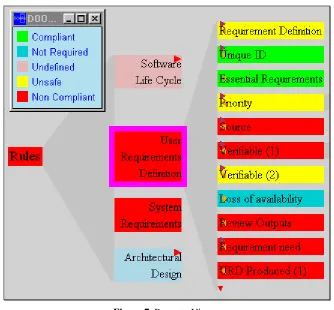
(8) identity ‘1’ in the ‘ICD’ document has had the title added or edited with the new value of “Facilities for the disabled”. (open-module ICD edit) (++ has-title 'ICD$1 "Facilities for the disabled"). Figure 5. Event Notification DOORS would then wait for a response from the notification file. FLEA takes the information from the bus file and inserts it into the database. AP5 examines the data to verify that it satisfies the rules. Should any parts of the document no longer comply with the rules, a list of non-compliances are sent to the notification file. If a ‘continue’ message is present, no further action is take. Otherwise, the user is presented with the non-compliances in the appropriate diagnosis mode. Figure 6 shows that two notifications have been generated when the user has closed the URD. The first is a notification for the ‘Priority Existence’ property. The rules have identified that the paragraphs listed are non-compliant. The non-compliant paragraphs are identified with the module name and their unique identifier. (Notification (PRIORITY-EXISTENCE@@CLOSE-URD "16:20:24" (URD$686 URD$503 URD$88))) (Notification (EI-DESCRIPTION@@CLOSE-URD "16:20:24" (URD$772 URD$733 URD$732))) END-NOTIFICATION. Figure 6. Non-compliance Notification Output To get an overview of the compliance of the project, a property viewer has been developed (Figure 7). This provides an overview of the status of the properties applied to the whole project. The colours of the branches in the hierarchy relate to the status of the properties and are filtered up the hierarchy, in a ‘worse case’ manner. 2.5 Outcome From this initial prototype, we learnt the following: 2.5.1 Configuring Checks After implementing a selection of practices, as specified in PSS-05 [5], we found that there was a group of common rules, which had slightly different configurations. A more usable mechanism would be to allow the user to configure these basic checks in a template. 2.5.2 Optimising Communications Because of the very different ways that DOORS and FLEA worked, it became important that no more than the minimum of data should be sent between the applications. The most straightforward way to limit the communications is to have a single source for the project data. 2.5.3 Tool Limitations DOORS only supports a limited number of user events, but for our model, other events such as baselining are important and need to be captured. Workarounds were found by.
(9) adding our own event call into the baseline function. There is also no mechanism to trigger DOORS when FLEA/AP5 returned a response. This caused file access problems and was only cured by adding a large wait time between the read cycles in DOORS.. Figure 7. Property Viewer 2.6 Problems with this Approach With the approach taken, a number of implementation issues arose which needed to be addressed, to allow the project to have the greatest change of commercial success. 2.6.1 Performance There were a number of performance issues associated with the prototype. These were mainly centred around the interface with DOORS and FLEA. DOORS appends an event to the bus file and waits until an entry is inserted into the notification file. FLEA reads the bus file, checks that the data conforms to the compliance rules and outputs an appropriate notification. This activity however would take up to 30 seconds, in which time the user would not be able to perform any function. This wait time is acceptable for some events, such as opening and closing modules, but for editing objects was too long..
(10) 2.6.2 Portability DOORS is available on a wide range of operating systems. Currently FLEA and AP5 are only available on Microsoft Windows and SUN Solaris. 2.6.3 Duplication of Data The source data that is modified by the user is held in the DOORS repository. Both FLEA and AP5 need access to this data. To overcome this problem, the documents were exported in a format compatible with FLEA/AP5. The problem with data duplication is compounded by the user being able to modify the data without the compliance manager being enabled. This causes the data to become unsynchronised and therefore inconsistent. 2.6.4 Interfacing There were a number of issues that arose while interfacing DOORS with FLEA/AP5. The primary problem was sharing information between the two applications. ASCII files were used for this purpose. This lead to further problems involving synchronising file access. Another interfacing issue included starting FLEA/AP5 automatically. This could not be achieved, as start-up commands need to be entered through the text interface. 2.6.5 Complexity The properties are defined as a FLEA specification. These are reasonably readable, but require some training in first-order logic and clisp to create effective property definitions. This is the traditional trade-off with complexity, that of power vs. simplicity. 2.6.6 Schema Definition To allow a specific type of data to be identified, a document schema is required. The document schema defines the structure of the document, attributes that are required, and paragraph types. For example, in a system requirements document, the third section contains requirement paragraphs. These paragraphs have specific attributes, which are not relevant to other parts of the document (i.e. priority, clarity, verifiability, etc.). DOORS does not support such a schema definition directly. I.e. you can define a class of document, such a System Requirements Document, which contains a specification of attributes and structure. The problem arises after instantiation, when the document structure can be modified and will no longer conform to the class. Attributes can be used to specifically set the type of a paragraph, but these can easily become invalid if paragraphs are moved or copied to other documents.. 3. Prototype 2. 3.1 Purpose After reviewing the first prototype, we decided to create a second prototype, with a modified architecture. This addressed the following issues, arising from the first prototype and new requirements for the system, to allow external evaluation of the concept..
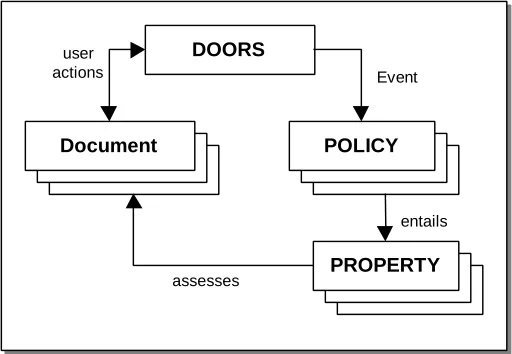
(11) 3.1.1 Performance By implementing the compliance manager entirely in DXL, the problems with waiting for external sources to compute should be reduced. However, we needed to verify that the checks can still be executed in DOORS with a similar or improved efficiency. 3.1.2 Portability With the move to implementing the compliance manager in DXL, the portability issues are solved. This would remove the problems with having to create versions of FLEA/AP5/clisp, which executed in a similar manner on all operating systems. 3.1.3 Duplication of Data This is no longer an issue with the compliance manager being totally supported by DOORS. There is now only one source of the data, which removes the problems of keeping two databases synchronised. 3.1.4 Interfacing As there are no external interfaces from the DOORS tool, interfacing is no longer an issue. 3.1.5 Complexity We attacked the issue of complexity from two angles. By improving the interface to the property definitions, the user is able to create complex rules, but the complexity of their implementation is hidden. A template mechanism for creating rules has also been developed to aid the user in creating rules. This has culminated in the creation of a wizard-style interface.. user user actions actions. DOORS DOORS Event Event. Document Document. POLICY POLICY. entails entails. assesses assesses. PROPERTY PROPERTY. Figure 8. Prototype 2 Physical Architecture.
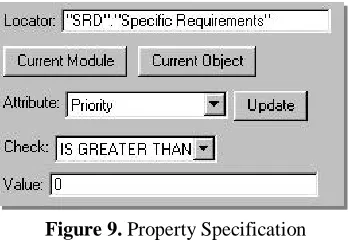
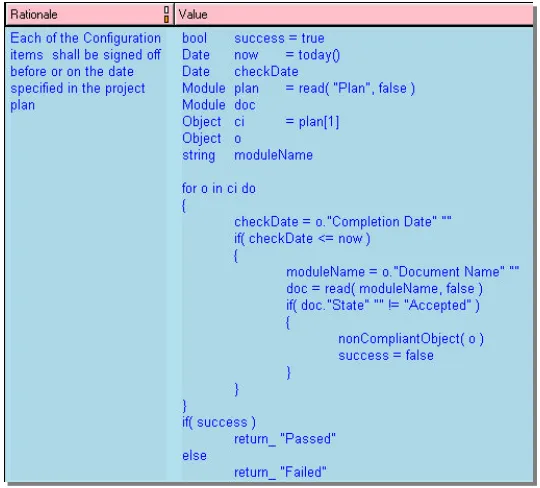
(12) 3.1.6 Schema Definition The schema definition is no longer required to the same extent as with the previous prototype. This is primarily due to the assumptions, as detailed below. 3.2 Architecture By eliminating the external interface, the architecture is greatly simplified, as shown in Figure 8. Because there is no longer an external link from DOORS, the messaging files can be discarded and there is no longer a need for a duplicate external copy of the data. There are a number of important assumptions that the second prototype of the compliance manager makes: • All paragraphs under a given point in the hierarchical tree have a property, as defined by the property specification. This is an important difference to the previous prototype, which relied on tagging paragraphs in a document with their type, and ignored the document structure. • If a parent paragraph in the document structure has the correct value, then it is assumed that this is inherited by the child paragraphs. By making these assumptions, the checking for compliance can be made more powerful. This is because the point in the hierarchy where the data is stored is no longer limited to the leaf paragraphs. 3.3. Implementation. 3.3.1 Properties The property definition in the first prototype was a complicated first-order logic definition. This was deemed too complicated and could be simplified by using a template mechanism for property definition. For property descriptions that fall beyond the bounds of the template, DOORS’ internal programming language DXL, can be used. To aid in creating the property descriptions, a form was created, as shown in Figure 9. The template defines the part of the document which will be checked for the property, in this case the ‘Specific Requirements’ section of the ‘SRD’ document. The check makes sure that the attribute ‘Priority’ has a value, which is greater than zero. Any paragraphs not meeting that specification are marked as non-compliant.. Figure 9. Property Specification Figure 10 shows an example DXL specification. A number of features have been included to make the DXL rules consistent with those defined using the template. For.
(13) example, if the author wishes to identify a paragraph as non-compliant, they can call the function nonCompliantAttribute(Object o ), which sets the paragraph defined by ‘o’ to noncompliant.. Figure 10. DXL Rule Specification. Figure 11. Policy Definition 3.3.2 Policies The definition of policies has remained very similar to the previous prototype, but are now written more efficiently. This has been done by creating a single instance of each.
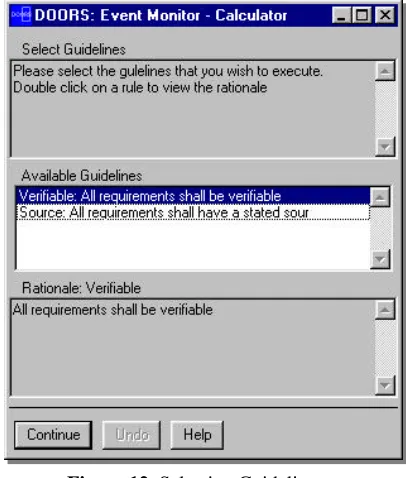
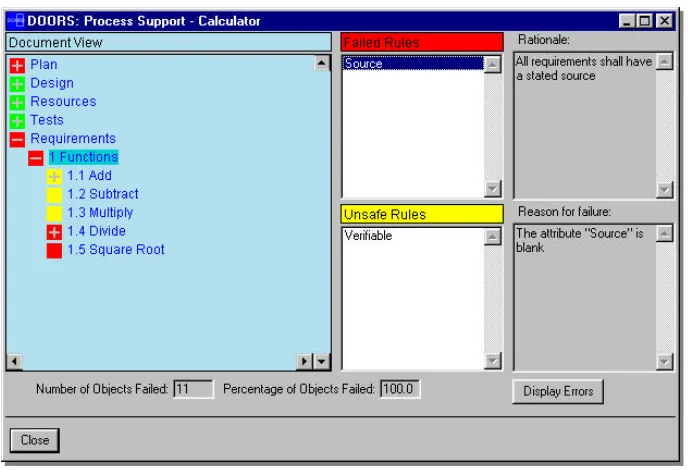
(14) execution policy and linking it to the associated properties. Figure 11 shows an example of a policy. The policies are composed of an associated event, document name, execution mode and diagnosis option. In the example, the rules column shows the properties, which the execution policy is linked to. 3.3.3 Event Monitor The event monitor is written in DXL. This provides us with a number of important advantages over the previous prototype, as detailed above. While the user performs certain functions, they are presented with feedback, as show in Figures 12 and 13. Figure 12 shows the optional display that is only shown if there are properties, which are to be checked in ‘guideline’mode. In guideline mode, the user is allowed to select which rules are applied to the project data. Figure 13 shows the diagnosis screen, with a list of noncompliant properties. In the bottom panel is a textual ‘reason’ for the failure.. Figure 12. Selecting Guidelines 3.3.4 Document Overview The rule viewer gives information about the status of the rules, but does not provide any feedback about the state of the documentation. The document viewer allows the rules to be viewed from the viewpoint of the documents. Figure 14 shows a screen snapshot of the prototype tool. On the left side are the documents in the project. The contents of the documents can be expanded, as shown with the ‘Requirements’ document. In the centre are the non-compliant and unsafe rules that are relevant to the currently selected part of the document. If a rule is selected, the rationale and reason for failure is shown in the right hand area. The user has the option to navigate to the non-compliant paragraphs via the ‘Display Errors’ button..
(15) Figure 13. Diagnosis Display. Figure 14. Document Overview.
(16) 4. Conclusion. 4.1 Current Status The prototype of the compliance manager forms a tool suite. This consists of: • A Rule Wizard – to create the rules and associate execution policies • An Event monitor – to wait for events and execute the appropriate checks • A Document Overview Tool – displays the status of the project from the viewpoint of the documentation • A Rule Overview Tool –displays the status of the project from the viewpoint of the rules. This toolkit provides the basic functionality for a project to manage compliance. The tool suite is starting to be used inside QSS to help enforce quality in their product development. 4.2 Further work Before the Compliance Manager is marketed as a product, an industrial evaluation is required. This, along with the identified requirements will put the tool suite in a better market position. 4.2.1 Industrial Trial To really gauge the appropriateness of such a project support environment we are asking current users of DOORS to evaluate the tool suite. The outcome of this evaluation will be an industrial evaluation of the usefulness of such a tool and new requirements for future enhancements. 4.2.2 Manual Application While writing a document, the user may wish to verify the quality of work completed, without causing an event that activates the compliance manager. This mechanism will allow the user to apply the rule at any time. 4.2.3 Compliance Waiver During the project there needs to be a mechanism, where the project manager can allow a non-compliant items to remain. This flexible approach allows a project to continue after positively accepting that it will deviate from the standards. Once a property has been ‘waived’, it will be ignored by the property checking mechanism. 4.2.4 Property and Role Association There is currently no mechanism, to verify only those properties, for which the developer is responsible. In addition, for large projects, there is the possibility of being overwhelmed by a large amount of data, which the developer has no power to rectify. There should be a mechanism to associate development roles to developers and properties..
(17) 4.2.5 Selective Property Application The current system applies all of the properties whenever the associated event occurs. This can be optimised by intelligently running those rules that only apply to items in the project that have changed.. 5. Acknowledgements. The authors would like to thank Wolfgang Emmerich for his contribution in defining and supporting the Compliance Manager project. We are also grateful to Ken McDonald and Anthony Brigginshaw for their suggestions and feedback during the review process.. 6. References. [1] Cohen. D., AP5 Reference Manual. http://www.isi.edu/softwaresciences/relab/ap5/refman.html. 1992. [2] Emmerich, W., Finkelstein, A., Montangero, C., Antonelli, S., Armitage, S., Stevens, R., Managing Standards Compliance. http://www.cs.ucl.ac.uk/staff/w.emmerich/publications/TSE/stdscompl.html. Submitted for publication in 1998 [3] Fagan, M., Design and Code Inspections to Reduce Errors in Program Development. IBM Systems Journal, 15(3), 182-211, 1976. [4] Feather, M., FLEA: Formal Language for Expressing Assumptions. Private communication, 1997 [5] Mazza, C., Fairclough, J., Melton, B., De Pablo, D., Scheffer, A., Stevens, R., Software Engineering Standards. Prentice Hall, 1994. ISBN 0-13-106568-8 [6] Quality Systems and Software, Ltd., Oxford Science Park, Oxford. UK. DOORS Reference Guide (v4.0), 1998. [7] Quality Systems and Software, Ltd., Oxford Science Park, Oxford. UK. DXL Reference (v4.0), 1998. [8] Sommerville, I., Software Engineering. 5th ed. Wokingham, England: AddisonWesley, 1995. ISBN: 0-201-42765-6 [9] Stevens, R., Brook, P., Jackson, P., Arnold, S., Systems Engineering. Hemel Hempstead, England: Prentice Hall, 1998. ISBN: 0-13-095085-8.
(18)
Figure
![Figure 1. Standards Compliance Model [2]](https://thumb-us.123doks.com/thumbv2/123dok_us/8026721.1335396/5.595.128.476.371.635/figure-standards-compliance-model.webp)
![Figure 2. Physical Architecture of Prototype 1[2]](https://thumb-us.123doks.com/thumbv2/123dok_us/8026721.1335396/7.595.156.442.137.362/figure-physical-architecture-of-prototype.webp)
+5
Related documents
20 THE COURT: If you were to plead not guilty or 21 persist in any previously entered plea of not guilty -- I 22 don't think that's happened here -- if you were to plead 23 not
Love-Politics: Lesbian Wedding Practices in Canada and the United States from the 1920s to the 1970s
14 When black, Latina, and white women like Sandy and June organized wedding ceremonies, they “imagine[d] a world ordered by love, by a radical embrace of difference.”
We conclude that pattern-driven learning data extracted from any web application using the approach presented in this thesis can be used to train a supervised learning model that
c+c%+c'ccc#c c ou shouldn¶t go to India without visiting the ajMahal.c Oo deberías ir a la India sin visitar el TajGahal.c I¶minterested in studyingpsychology.c!c@stoy interesado
UPnP Control Point (DLNA) Device Discovery HTTP Server (DLNA, Chormecast, AirPlay Photo/Video) RTSP Server (AirPlay Audio) Streaming Server.. Figure 11: Simplified
The directive establishes a framework for achieving or maintaining a good environmental status (GES) of the marine environment by the EU Member States by 2020. A good
The drugs used in the treatment of high blood pressure will have the added benefit of reducing symptoms of angina and controlling your heart beat.. These drugs work by opening up
For the poorest farmers in eastern India, then, the benefits of groundwater irrigation have come through three routes: in large part, through purchased pump irrigation and, in a
