AT&T
PARTNER
®
Plus
COMMUNICATIONS SYSTEM
Copyright © 1991 AT&T
All Rights Reserved
Printed in U.S.A.
AT&T 518-455-710
Issue 1
April 1991
Notice
Every effort was made to ensure that the information in this document was complete and accurate at the time of printing. However, information is subject to change.
Federal Communications Commission (FCC) Information
This equipment has been tested and found to comply with the limits for a Class A digital device, pursuant to Part 15 of FCC rules. These limits are designed to provide reasonable protection against harmful interference when the equipment is operated in a commercial environment. The equipment generates, uses, and can radiate radio frequency energy and, if not installed and used in accordance with the instruction manual, may cause harmful interference to radio communications. Operation of this equipment in a residential area is likely to cause harmful interference, in which case the user will have to correct the interference at his or her own expense.
Trademarks
PARTNER, MLS-34D, MLS-12D, MLS-12, and MLS-6 are trademarks of AT&T. Magic on Hold is a registered trademark of AT&T.
Warranty
AT&T provides a one-year limited warranty on the PARTNER Plus Communications System and the PARTNER Plus Attendant. Refer to PARTNER Plus Communications System: Installation and Use for warranty conditions.
Ordering Information
The order number for this book is 518-455-710. The order number for the planner is 518-600-110. To order, call the AT&T Customer Information Center at 1 800 432-6600 in the U.S., or 1 800 255-1242 in Canada. To order additional Attendants, system modules, system telephones, answering machines, fax machines, Magic on Hold®
systems, and other equipment and accessories, contact any of the following:
United States: AT&T Sourcebook Catalog Sales 1 800 451-2100
AT&T Sales Office 1 800 247-7000
AT&T Phone Center Store 1 800 222-3111 AT&T-Authorized Dealer 1 800 247-1212 Canada: AT&T Canada (Eastern Canada and Ottawa) 1 514 335-7200 AT&T Canada (Ontario) 1 416 756-5236 AT&T Canada (Central and Western Canada) 1 800 561-5165
How To Comment on This Guide
A feedback form is in the back of this book, just before the index. If it is missing, please send your comments and recommen-dations for changes to A. Sherwood, AT&T, 99 Jefferson Road (Room 2A-25), Parsippany, NJ 07054, fax (201) 887-6898.
Support Telephone Numbers
If you have any problems with the Attendant, see Appendix B, "Troubleshooting." For additional help installing, programming, or using the Attendant, in the U.S. please call the AT&T Helpline toll free, 24 hours a day, at 1 800 628-2888. In Canada, call one of the following Technical Assistance Centers for service or assistance:
Eastern Canada and Ottawa 1 800 363-1882
Ontario 1 800 387-4268
Central and Western Canada 1 800 663-9817
Contents
1
Setup Decisions
■ Overview
■ Determining the Call Answering Mode
■ Determining the Number of Attendants Required
■ Determining the Attendant Extensions and Transfer Return Extensions ■ Determining Lines the Attendant Will Answer
■ Determining the Route Plan
■ Allocating Time for Announcements ■ Music-on-Hold Source
■ Answering Machines ■ Example Setups
1-i 1-1 1-4 1-5 1-6 1-6 1-6 1-8 1-8 1-9 1-9
2
Installation and Programming
■ Important Safety Instructions ■ Hardware Requirements ■ The Attendant Unit ■ Installing the Attendant
■ Programming Guidelines ■ Attendant Programming
■ System Programming for Attendant Operation ■ Testing for Proper Operation
2-i 2-ii
2-1 2-1 2-2 2-4 2-6 2-10 2-12
A
Planning Form
A-1B
Troubleshooting
B-1C
Specifications
C-1Setup Decisions
1
Contents
Overview
■
■
■
How the Attendant Answers and Transfers Calls: an Example Answering an Attendant-Transferred Call
Setup Decisions: An Introduction
Determining the Call Answering Mode
■
■
Immediate Call Answering Mode Backup Call Answering Mode
Determining the Number of Attendants Required
Determining the Attendant Extensions
and Transfer Return Extensions
Determining Lines the Attendant Will Answer
Determining the Route Plan
Allocating Time for Announcements
1-1
1-1 1-3 1-3
1-4
1-4 1-5
1-5
1-6
1-6
1-6
1-8
Music-on-Hold Source
1-8Answering Machines
1-9Example Setups
1-9■ Attendant with Routes and Secondary Destinations 1-10
■ Attendant with Answering Machines for
System Answer Assurance and Messaging 1-12
Overview
The PARTNER®
Plus Attendant provides automatic call answering and redirection for your PARTNER®
Plus Communications System (Release 2 or later).
The Attendant helps your business handle incoming calls efficiently, even after business hours and on holidays and weekends. It can serve as a backup for a busy receptionist, or it can serve as the primary answering position.
In the typical scenario, the Attendant answers all calls—if you prefer just calls on certain lines—with a prerecorded announcement. This announcement instructs the caller to select a destination by pressing a button on a touch-tone phone. Then the Attendant transfers the call to the appropriate extension.
The example below illustrates how the Attendant answers calls at ABC Supermarket.
How the Attendant Answers and Transfers Calls: An Example
During ABC Supermarket’s business hours, the Attendant answers incoming calls with this Day Announcement:
"Thank you for calling ABC Supermarket.
If you know the two-digit extension you want and are at a touch-tone phone, please dial it now.
For Customer Service, press 1 now... For the Bakery, press 2 now... For the Deli Corner, press 3 now... Or hold for the operator."
At night, when ABC is closed, the Attendant answers with this brief Night Announcement, and then—because no one is available at ABC to answer calls—hangs up:
"Thank you for calling ABC Supermarket. Sorry we’re closed now. Please call again during business hours...Monday through Saturday from 8 a.m. to 10 p.m., Sunday 8 to 8. Good night."
How the Attendant transfers calls at ABC depends on what the caller does after the Attendant answers. As described above, the caller has three choices: (1) press a single digit for automatic transfer to Customer Service, the Bakery, or the Deli, (2) dial a two-digit extension number, or (3) do nothing.
Caller Presses a Single Digit
Let’s say the caller presses 1. The single digit (in this example 1, 2, or 3) ispresses 1, the Attendant puts the call on hold and tries to transfer it to exten-sion 20. While the Attendant attempts the transfer, the caller hears the Hold Announcement ("One moment please"), followed by music (because ABC has a music-on-hold system connected to the system’s control unit). What happens next depends on the status of extension 20.
Extension Is Available
If extension 20 (the Destination extension for Route 1) is available (not busy), the Attendant transfers the call by ringing the extension. After the first ring, the Attendant passes control of the call to the PARTNER Plus system control unit (thereby freeing the Attendant to answer another call). The system will ring extension 20 up to four more times, and if there is still no answer, the system will transfer the call to the operator on extension 10. (The extension that will get calls when the Destination extension does not answer is called the Transfer Return extension. At ABC the operator on extension 10 is responsible for handling those calls, so extension 10 is the Transfer Return extension.)
Extension Is Busy
If Route 1 is busy, the caller hears the Transfer Fail Announcement ("Sorry, that extension is unavailable. Please hold for the operator or try again. For Cus-tomer Service, press 1..."). The caller can select a different route, choose the same route again, or hold for the operator.
The following conditions produce a busy signal:
■
■
■
■
Standard phone’s handset is off the hook;
System phone has both intercom buttons occupied (lights next to both Intercom buttons are steady on or blinking);
System phone has Do Not Disturb feature activated; or
System phone is in programming mode.
NOTE:
System phones are the AT&T MLS-34D™, MLS-12D™, MLS-12™, MLS-6™, and MLC-6, designed specifically for AT&T’s PARTNER Plus Communications System.
Caller Dials a Two-Digit
Now let’s say the caller dials a two-digit extension instead of a route.Assum-Extension Number
ing that ABC has 12 extensions (extensions 10–21), this is how the Attendant would transfer the call:■ If the caller dials a valid extension (extensions 10–21), the Attendant tries to transfer the call, just like it does for routes.
Caller Does Nothing
The caller’s last alternative is to do nothing (the caller does not dial a route or extension, or has a rotary phone). The Attendant automatically puts the call on Route 0. Again, at ABC the call would be transferred to extension 10, the Destination extension for Route 0.NOTE:
Route 0 is called the "Automatic Route." The Attendant automatically routes calls to Route 0 when a caller takes no action.
Answering an Attendant-Transferred Call
When the Attendant transfers a call to a Destination extension that has a system display phone (MLS-12D or MLS-34D), the Attendant’s two-digit extension number will appear on the display. The person picking up the call should glance at the display before answering, and answer with a greeting that appropriately follows the Attendant’s announcement. For example, at ABC Supermarket, the person at the Deli Corner answers with the message, "Deli Corner, how may I help you," and does not start with "ABC Supermarket" because the caller already heard it from the Attendant.
When the Attendant transfers a call to a display phone at the Attendant’s
Transfer Return extension because a particular extension did not answer, the
words "Transfer from AA" will appear on the display. The person at the Transfer Return extension should be aware that the caller did not reach the desired extension and answer the call appropriately. For example, at ABC Supermar-ket, the operator says, "This is the operator. The extension you are trying to reach is not answering. How may I help you?"
Of course, if an extension functions as both a Destination extension and a Transfer Return extension, either message can appear. (In the usual setup, the operator at extension 10 is both the Destination extension for Route 0 and the Transfer Return extension.) The person should therefore be prepared to answer Attendant-transferred calls both ways.
Setup Decisions: An Introduction
Attendants can be set up in many different ways. ABC Supermarket is an example of a typical setup. Your needs may demand a less or more sophisti-cated setup. The rest of this chapter will help you decide on the best configu-ration for your business.
Before installing any Attendants, make a copy of the planning form in Appendix A and fill it out as you make the following decisions:
1 .
2 .
Determine the Call Answering Mode. Should your Attendant answer calls as soon as they come in, or only if the receptionist or operator is busy? How should calls be answered after hours?
3 . For each Attendant, determine the Attendant extension (the extension the Attendant will be connected to) and the Transfer Return extension (the extension to which calls will be routed if a Destination extension does not answer).
4 . Determine the lines to be answered.
5 . Determine the route plan for the Attendant (that is, the routes and their corresponding Destination extensions).
6 . Determine the wording for the announcements.
The rest of this chapter explains these setup decisions in greater detail and gives more example setups.
Determining the Call Answering Mode
The Attendant can answer calls immediately (Immediate Call Answering mode) or after a delay (Backup Call Answering mode). Programming instructions are on page 2-10.
Immediate Call Answering Mode
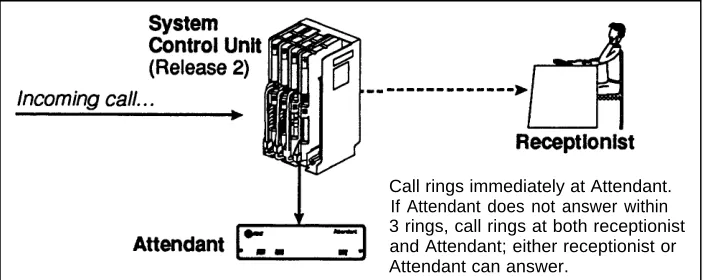
In Immediate Call Answering mode (Figure 1-1), an incoming call rings at the
Attendant first. If the Attendant does not pick up within three rings (because it
is busy transferring another call), the call will ring at the receptionist or opera-tor. This mode helps reduce the receptionist’s workload.
Call rings immediately at Attendant. If Attendant does not answer within 3 rings, call rings at both receptionist and Attendant; either receptionist or Attendant can answer.
Figure 1-1 Immediate Call Answering Mode
NOTE:
Backup Call Answering Mode
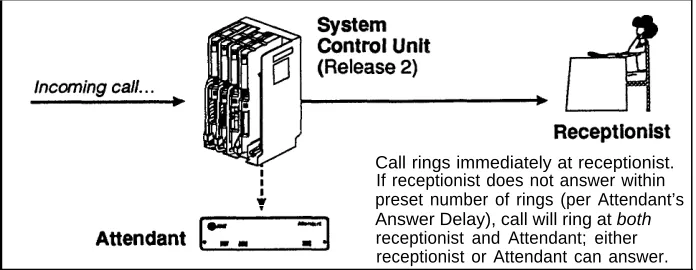
In Backup Call Answering mode (Figure 1-2), incoming calls ring at the
recep-tionist first. If the receprecep-tionist doesn’t pick up within a specific number of rings,
the Attendant answers the call, playing an announcement that prompts the caller to either choose a route or hold for the receptionist. Backup Call Answer-ing mode is useful when you want the receptionist to personally answer as many calls as possible.
Call rings immediately at receptionist. If receptionist does not answer within preset number of rings (per Attendant’s Answer Delay), call will ring at both receptionist and Attendant; either receptionist or Attendant can answer.
Figure 1-2 Backup Call Answering Mode
Determining the Number of Attendants Required
For Immediate Call Answering mode, if you can estimate the number of calls you receive every hour during peak incoming call volume, use these guidelines to determine the number of Attendants you need:
Less than 18 calls per hour = 1 Attendant 18–74 calls per hour = 2 Attendants 75–150 calls per hour = 3 Attendants More than 150 calls per hour = 4 Attendants
If you cannot estimate the number of calls you receive per hour, then deter-mine the number of Attendants based on the number of lines to be answered by the Attendant(s):
1–2 lines = 1 Attendant 3–5 lines = 2 Attendants 6–8 lines = 3 Attendants
If you use the Attendant only for Backup Call Answering mode, or only after hours to answer but not route calls, you probably need only one Attendant. However, if call volume is heavy, you may need more.
Determining the Attendant Extensions and Transfer Return Extensions
Each Attendant connects to its own extension jack on a 206 module. When determining Attendant extensions, keep the following guidelines in mind:
■
■
Do not connect Attendants to "power failure transfer" extensions 10, 16, 22, or 28.
The Attendant cannot share an extension with another device.
For each Attendant extension, you need to identify its Transfer Return exten-sion. This is the extension where calls go when the Attendant transfers a call and the Destination extension does not answer. The factory setting is for unanswered calls to return to the Attendant; but you can have calls return to extension 10 or any other extension.
Determining Lines the Attendant Will Answer
The Attendant can answer any or all of the lines. For example, at ABC the Attendant answers all lines except the owner’s private line, which is always answered personally by a secretary.
If you have more than one Attendant, decide which lines each Attendant should answer. You can set up your Attendants so a particular line is an-swered by one or more Attendants. When making your decision, keep in mind that an Attendant can answer and transfer only one call at a time. For ex-ample, a mail order business with three Attendants might assign the order line to all Attendants, and all other lines to only the third Attendant.
NOTES:
■ If you have more than one Attendant answering the same lines, each must answer after a different number of rings (for example, Attendant 1 answers after 1 ring, Attendant 2 answers after 2 rings, and so on). This is accomplished during Attendant Programming by setting the Answer Delay; see the instructions on page 2-8.
■
■
Do not assign dedicated fax or modem lines to the Attendant extension.
For two businesses or departments that have separate outside lines, assign the lines for the first business to one Attendant, and the lines for the second business to a second Attendant.
Determining the Route Plan
For each route, you must identify a Primary Destination extension and, if you wish, a Secondary Destination extension. (The Attendant will try ringing the Primary first, then the Secondary if the Primary is busy. See page 1-2, "Exten-sion Is Busy"). You can also identify different Primary and Secondary Destina-tion extensions during the day (during business hours) and at night (after hours).
NOTES:
■ It is a good idea to have a multi-line system phone (MLC-6, 6, MLS-12, MLS-12D, or MLS-34D) at each Destination extension, instead of a standard touch-tone or rotary phone. The system phone has two inter-com buttons and is therefore less likely to be busy when the Attendant tries to transfer calls to it (because the Attendant transfers calls as intercom calls). A system display phone (MLS-12D or MLS-34D) is the best choice—the display shows you when a call is being transferred by the Attendant, so you can answer the call appropriately.
■ If you have a system phone, you can turn on the Do Not Disturb feature when you are away from your phone (this feature must be programmed on a button with a light). This makes the Attendant transfer calls directly to the Secondary Destination for the route, without playing the Transfer Fail announcement. This is useful for forwarding calls to another exten-sion when you are away from your phone.
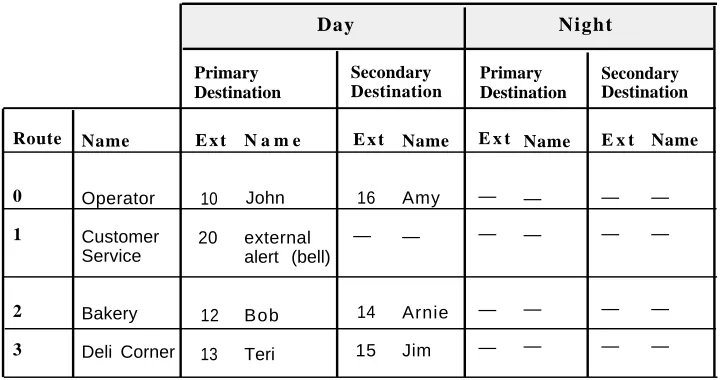
The route plan for ABC Supermarket (the example setup described in the beginning of this chapter) is shown in Table 1-1. In this example, Secondary Destinations back up some routes when the Primary Destinations are busy. For example, the manager’s secretary (extension 16) backs up the operator at extension 10. Also, there are no night destinations because no one is at the store at night to answer customer calls. (The Attendant is programmed to hang up after playing the Night announcement.)
Day Night Primary Destination Secondary Destination Primary Destination Secondary Destination Route 0 1 2 3 Name Operator Customer Service Bakery Deli Corner
E x t
10 20
12 13
N a m e
John external alert (bell)
Bob Teri
E x t
16 — 14 15 Name Amy — Arnie Jim
E x t
— — — — Name — — — —
E x t
— — — — Name — — — —
Allocating Time for Announcements
As described in the ABC Supermarket example, each Attendant can have 5 announcements, with a maximum total length of 64 seconds for all announce-ments. Table 1-2 shows the factory-set length for each announcement.
Type of
Announcement
Factory Setting
Description
Day 20 secs Greets callers when the Attendant answers during business hours
Night 15 secs Greets callers when the Attendant answers after hours
Day Transfer Fail 14 secs Plays during business hours when the Attendant cannot transfer a call to a Destina-tion extension
Hold 5 secs Plays after the Attendant puts the caller on hold in order to transfer the call—asks the caller to wait while the Attendant transfers the call
Night Transfer Fail 10 secs Plays at night when the Attendant cannot transfer a call to a Destination extension
Table 1-2 Factory Settings for Attendant Announcement Times
The times for each announcement can be reallocated during Attendant Programming. Not all announcements need to be used; for example, if the Attendant will not answer calls at night, you can allocate the 25 seconds from the Night and Night Transfer Fail announcements to the daytime
announcements. For programming instructions, see "Reallocating Announcement Lengths" on page 2-7.
Music-on-Hold Source
An audio source is strongly recommended for providing music or other audio to callers while the Attendant is transferring their calls. This will remind the callers that they are still connected. (When a call is being transferred, the caller does not hear ringing.)
AT&T’s Magic on Hold®
messages and information about your business to your customers. For informa-tion, call your AT&T Sales Office at 1 800 247-7000 or the AT&T Sourcebook at
1 800 451-2100.
NOTES:
■ To have music on hold, your system’s Music-on-Hold setting must be "active" (the factory setting). See page 2-10 for programming information. ■ You can connect any audio source that has an RCA plug—for example, a
receiver set to an appropriate music or news station—to the Music-on-Hold jack on the system’s processor module. However, users of equip-ment that rebroadcasts copyrighted music or other material may be required to obtain a license from a third party, such as ASCAP or BMI.
Answering Machines
Answering machines can be used with the Attendant to provide an inexpensive messaging system:
■ By combining answering machines with phones, individual users can receive messages when they are away from their phones and retrieve them later.
■ An answering machine installed at any system extension can serve as a message desk for the entire business. (In this case, one of the
Attendant’s routes would be for the answering machine; its Destination extension would be the extension the answering machine is connected to.)
If you are going to use answering machines with your system, the Transfer Return Rings setting for the system (see page 2-11) must be greater than the answer delay on answering machines, to ensure that answering machines pick up calls before they go to the Transfer Return extension for the Attendant.
For more information on setting up answering machines, see the Installation
and Use book provided with the system’s control unit.
Example Setups
The rest of this chapter shows three example setups, starting with ABC Super-market, to help you decide how to set up your Attendant(s). Examples include completed planning forms showing the settings needed for each setup.
Attendant with Routes and Secondary Destinations
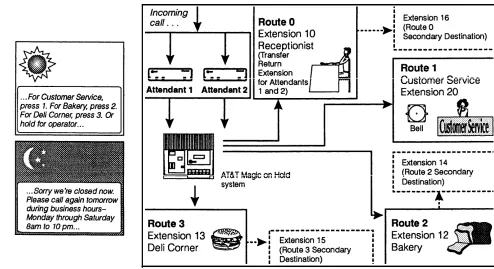
ABC Supermarket uses two Attendants to answer the phone number published in the local directory. (The Attendants do not answer other incoming lines— such as the owner’s private line.) Using two Attendants ensures prompt call answering, usually within two rings. During business hours the Attendants offer callers three options: press a single digit for automatic transfer to one of three routes (Customer Service, Bakery, or Deli), dial a two-digit extension, or hold for the operator. After a caller selects a route, the supermarket’s Magic on Hold system plays a customized marketing message during the transfer.
A bell (or external alert) is connected to extension 20 (Customer Service). When a caller selects Route 1, a bell rings; the first available Customer Service representative picks up the call. (Each representative has Call Pickup for extension 20 programmed on a system phone button—see the Installation and
Use guide provided with the system’s control unit for instructions.)
There are Primary and Secondary Destinations for Routes 2 and 3, to make it likely that each call reaches someone at the selected route. Teri, the Deli clerk at extension 13, turns on Do Not Disturb when she is away from her phone, so that calls go directly to Jim (at extension 15) instead of back to the operator.
At night the Attendant announces normal business hours and hangs up without transferring calls. Since the Night Transfer Fail announcement is not needed,
10 seconds of announcement time is freed up for other announcements.
Only the planning form for the first Attendant is shown. The Answer Delay for the second Attendant should be set to 2 rings for both day and night; other settings are the same as those for the first Attendant.
PARTNER Plus Attendant
Planning Form
(complete one form for each Attendant) Attendant:System Attendant Extension: 2 1
Programming System extension where Attendant is connected
✓
❑Call Answering Mode:Immediate. Attendant answers first (immedate Line Ringing for Attendant; delayed or no ring for receptionist)
❑Backup. Receptionist answers first (immediate Line Ringing for receptionist; delayed ring for Attendant)
❑ Attendant in Night Service Group
Extension 10 should be able to turn Attendant on and off using Night Service button (The Attendant extension cannot be in the Night Service Group if System Password is programmed).
✓
❑
Automatic Extension Privacy
Receptionist can pick up calls after Attendant has already answered (Privacy "not assigned")
❑Receptionist cannot pick up calls after Attendant has al-ready answered (Privacy "assigned")
Attendant Transfer Return Extension: 1 0 System extension where calls transferred by the Attendant return if the Destination extension does not answer Transfer Return Rings: 4
(0–9 rings; factory setting is 4 rings) Number of times a call rings Destination extension before returning to Transfer Return exten-sion (Attendant rings once before giving control of call to system, so total number of rings is one more than this setting). Lines Attendant Will Answer:
❑ ✓Line 1 ❑ ✓Line 2 ❑ ✓Line 3 ❑ ✓Line 4
❑ ✓Line 5 ❑ Line 6 ❑ Line 7 ❑ Line 8
❑ None (2nd-level Attendants)
Attendant Answer Delay: 1 rings during day Automatic Tries 3 tries during day
Programming 1 rings at night to Route 0: 3 tries at night
1-15 rings (factory setting is 1 ring). Number of times incoming 1-20 tries (factory setting is 3 tries). Number of times Attendant call will ring before Attendant answers. If multiple Attendants will automatically transfer a call to route 0 when caller does not are answering the same lines, set the Answer Delay differently dial a route or extension number. After the specified number of on each Attendant. tries, the Attendant will hang up.
Business
Schedule 8:00 am 8:00 pm
Specify times as a.m. or p.m., or
Sunday
Monday 8:00 am 10:00 pm
enter in military notation Tuesday 8:00 am 10:00 pm
(9.00 a.m.= 09:00; Wednesday 8:00 am 10:00 pm
9:00 p.m. = 21:00) Thursday 8:00 am 10:00 pm
❑✓ Check here instead if schedule Friday 8:00 am 10:00 pm
is Monday-Friday 8:30-5:00 Saturday 8:00 am 10:00 pm
p.m. (factory setting) or
(same hours all 7 days) Entire week _____:_____ _____:_____
Business Days Opening Time Closing Time
Announcements
Day: "Thank you for calling ABC Supermarket. If you know the two-digit extension you want and are at a touch-tone phone, please dial it now. For Customer Service, press 1 now. For the Bakery, press 2 now. For the Deli Corner, press 3 now. Or hold for the operator" (30 secs)Night: "Thank you for calling ABC Supermarket. Sorry we’re closed now. Please call again tomor-row during business hours—Monday through Saturday from 8 AM to 10 PM, Sunday 8 to 8. Good night." (15 secs)
Day Transfer Fail: "Sorry, that extension is unavailable. Please hold for the operator or try again. For Customer Service, press 1. For the Bakery, press 2. For the Deli Corner, press 3." (15 secs) Hold: "One moment please" (4 secs)
Attendant with Answering Machines for System Answer Assurance and Messaging
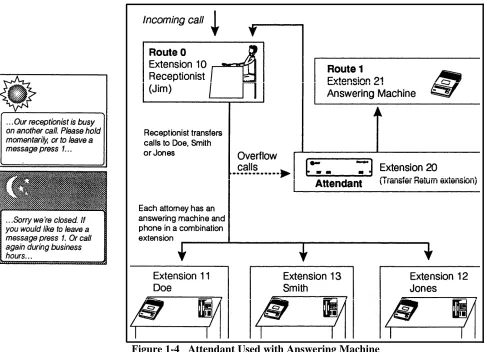
At Doe, Smith, and Jones (Attorneys), the receptionist (Jim) handles most incoming calls, with an Attendant as his backup. When Jim is unavailable, the Attendant answers—the caller can hold until Jim is free or press 1 to leave a message. (Unlike ABC Supermarket, the Attendant does not offer a choice of routes—the attorneys do not want to receive unscreened calls—but callers who know the extensions can dial them directly.) Here the Attendant’s Transfer Return extension is the Attendant itself, so the Attendant controls calls until the receptionist or the answering machine is free.
With an answering machine at each extension, you can have an inexpensive messaging system. (Each extension has an answering machine and a phone, combined on one jack using an inexpensive AT&T 267F2 adapter.) A caller who knows an attorney’s extension can dial it directly; if the attorney does not answer, the answering machine takes a message. The attorney can call in later and dial a code to retrieve messages from the machine—by dialing the exten-sion after hours, or by transfer when Jim is there.
PARTNER Plus Attendant
Planning Form
(complete one form for each Attendant) Attendant:System Attendant Extension: 2 0
Programming System extension where Attendant is connected
Call Answering Mode:
❑ Immediate. Attendant answers first (immediate Line
✓
❑
Ringing for Attendant; delayed or no ring for receptionist)
Backup. Receptionist answers first (immediate Line Ringing for receptionist; delayed ring for Attendant)
❑ Attendant in Night Service Group
Extension 10 should be able to turn Attendant on and off using Night Service button (The Attendant extension cannot be in the Night Service Group if System Password is programmed).
✓
❑
Automatic Extension Privacy
Receptionist can pick up calls after Attendant has already answered (Privacy "not assigned")
❑ Receptionist cannot pick up calls after Attendant has al-ready answered (Privacy "assigned")
Attendant Transfer Return Extension: 2 0
System extension where calls transferred by the Attendant return if the Destination extension does not answer
Transfer Return Rings: 4
(0–9 rings; factory setting is 4 rings) Number of times a call rings Destination extension before returning to Transfer Return exten-sion (Attendant rings once before giving control of call to system, so total number of rings is one more than this setting). Lines Attendant Will Answer:
✓
❑ Line 1 ❑✓Line 2 ❑✓ Line 3 ❑ Line 4
❑ Line 5 ❑ Line 6 ❑ Line 7 ❑ Line 8
❑ None (2nd-level Attendants)
Attendant Answer Delay: 3 rings during day Automatic Tries 1 0 tries during day
Programming 1 rings at night to Route 0: 3 tries at night
1-15 rings (factory setting is 1 ring). Number of times incoming 1-20 tries (factory setting is 3 tries). Number of times Attendant call will ring before Attendant answers. If multiple Attendants will automatically transfer a call to route 0 when caller does not are answering the same lines, set the Answer Delay differently dial a route or extension number. After the specified number of on each Attendant. tries, the Attendant will hang up.
Business Business Days
Schedule Sunday
Specify times as a.m. or p.m., or Monday enter in military notation Tuesday (9:00 a.m. = 09:00;
9:00 p.m. = 21:00) Wednesday Thursday
Opening Time Closing Time
: : : : : : : : : : : : : : : : ✓
❑ Check here instead if schedule Friday is Monday-Friday 8:30-5:00 Saturday p.m. (factory setting) o r
(same hours all 7 days) Entire week
Announcements
Day: "Thank you for calling Doe, Smith, and Jones. I’m sorry, but all lines are currently busy. Please hold momentarily, or if you prefer to leave a message, dial 1 now." (25 secs)Night: "Thank you for calling Doe, Smith, and Jones. Sorry we’re closed. If you would like to leave a message, press 1 now. Or call again during business hours Monday through Friday, 8:30 to 5. Good night" (15 secs)
Day Transfer Fail: "We’re sorry, the party you are trying to reach is currently unavailable. Please continue to hold for the receptionist, or press 1 to leave a message." (10 secs)
Hold: "Please hold." (4 secs)
First- and Second-Level Attendants
Auto City has a sales department that stays open after the others are closed. Its sales staff has a reputation for professional service, so there is one Atten-dant to answer the main phone number (AttenAtten-dant A) and a second AttenAtten-dant (Attendant B) dedicated to Sales. The dealership can quickly route calls to the customer’s salesperson and can also provide sales messages to callers.
Attendant A answers all calls and gives the caller a choice of routes (1–3 during the day, 1 at night). A caller after 6 p.m. can press 1 to reach Sales, which is open until 9 p.m. Monday through Saturday (a caller after 6 p.m. who holds without pressing a digit is also transferred to Sales). When the call reaches Sales (extension 30), Attendant B greets the caller with a sales mes-sage and a choice of routes for the Sales staff.
PARTNER Plus Attendant
Planning Form
(complete one form for each Attendant) Attendant:System Attendant Extension: 1 1
Programming System extension where Attendant is connected
✓
❑
Call Answering Mode:
Immediate. Attendant answers first (immediate Line Ringing for Attendant; delayed or no ring for receptionist)
❑Backup. Receptionist answers first (immediate Line Ringing for receptionist; delayed ring for Attendant)
❑Attendant in Night Service Group
Extension 10 should be able to turn Attendant on and off using Night Service button (The Attendant extension cannot be in the Night Service Group if System Password is programmed).
✓
❑Receptionist can pick up calls after Attendant has alreadyAutomatic Extension Privacy anwered (Privacy "not assigned")
❑Receptionist cannot pick up calls after Attendant has al-ready answered (Privacy "assigned")
Attendant Transfer Return Extension: 1 0
System extension where calls transferred by the Attendant return if the Destinstion extension does not answer Transfer Return Rings: 4
(0–9 rings; factory setting is 4 rings) Number of times a call rings Destination extension before returning to Transfer Return exten-sion (Attendant rings once before giving control of call to system, so total number of rings is one more than this setting). Lines Attendant Will Answer:
❑ ✓ Line 1 ❑ ✓Line 2 ❑ ✓Line 3 ❑ Line 4
❑ Line 5 ❑ Line 6 ❑ Line 7 ❑ Line 8
❑ None (2nd-level Attendants)
Attendant Answer Delay: 1 rings during day Automatic Tries 3 tries during day
Programming 1 rings at night to Route 0: 3 tries at night
1-15 rings (factory setting is 1 ring). Number of times incoming 1-20 tries (factory setting is 3 tries). Number of times Attendant call will ring before Attendant answers. If multiple Attendants will automatically transfer a call to route 0 when caller does not are answering the same lines, set the Answer Delay differently dial a route or extension number. After the specified number of on each Attendant. tries, the Attendant will hang up.
Business Business Days Opening Time Closing Time Schedule
Specify times as a.m. or p.m., or enter in military notation (9:00 a.m. = 09:00; 9.00 p.m. = 21:00)
Sunday Monday Tuesday Wednesday Thursday Closed 9:00 am 9:00 am 9:00 am 9:00 am 9:00 am 9:00 am : Closed 6:00 pm 6:00 pm 6:00 pm 6:00 pm 6:00 pm 6:00 pm :
❑ Check here instead if schedule Friday is Monday-Friday 8:30-5:00 Saturday p.m. (factory setting) or
(same hours all 7 days) Entire week
Announcements
Day: "Thank you for calling Auto City. If you know the two-digit extension you want and are at a(Attendant A)
touch-tone phone, please dial it now. Of if you want Sales, press 1 now. For Service, press 2 now. For Parts, press 3 now. Or hold for the operator." (25 secs)Night: "Thank you for calling Auto City. Our Sales Department is open until 9 pm Monday through Saturday. For Sales, press 1 now. Other departments are open Monday through Saturday 9 AM to 6 PM. Please call again during business hours." (20 secs)
Day Transfer Fail: "Sorry, that department or extension is not available. Please hold for the operator or try again. For Sales, press 7. For Service, press 2. For Parts, press 3." (10 secs)
Hold: "Please hold." (4 secs)
PARTNER Plus Attendant
Planning Form
(complete one form for each Attendant) Attendant:System Attendant Extension: 3 0
Programming System extension where Attendant is connected
✓
❑
Call Answering Mode:
Immediate. Attendant answers first (immediate Line Ringing for Attendant; delayed or no ring for receptionist)
❑ Backup. Receptionist answers first (immediate Line Ringing for receptionist; delayed ring for Attendant)
❑Attendant in Night Service Group
Extension 10 should be able to turn Attendant on and off using Night Service button (The Attendant extension cannot be in the Night Service Group if System Password is programmed).
✓
❑
Automatic Extension Privacy
Receptionist can pick up calls after Attendant has already answered (Privacy "not assigned")
❑ Receptionist cannot pick up calls after Attendant has al-ready answered (Privacy "assigned")
Attendant Transfer Return Extension: 2 2
System extension where calls transferred by the Attendant return if the Destination extension does not answer Transfer Return Rings: 4
(0–9 rings; factory setting is 4 rings) Number of times a call rings Destination extension before returning to Transfer Return exten-sion (Attendant rings once before giving control of call to system, so total number of rings is one more than this setting). Lines Attendant Will Answer:
❑ Line 1 ❑ Line 2 ❑ Line 3 ❑ Line 4
❑ Line 5 ❑ Line 6 ❑ Line 7 ❑ Line 8
❑ ✓None (2nd-level Attendants)
Attendant Answer Delay: 1 rings during day Automatic Tries 3 tries during day
Programming 1 rings at night to Route 0: 3 tries at night
1-15 rings (factory setting is 1 ring). Number of times incoming 1-20 tries (factory setting is 3 tries). Number of times Attendant call will ring before Attendant answers. If multiple Attendants will automatically transfer a call to route 0 when caller does not are answering the same lines, set the Answer Delay differently dial a route or extension number. After the specified number of on each Attendant. tries, the Attendant will hang up.
Business Business Days Opening Time Closing Time Schedule
Specify times as a.m. or p.m., or enter in military notation (9:00 a.m. = 09:00; 9:00 p.m. = 21:00)
❑ Check here instead if schedule is Monday-Friday 8:30-5:00 p.m. (factory setting)
Sunday Monday Tuesday Wednesday Thursday Friday Saturday or Closed 9:00 am 9:00 am 9:00 am 9:00 am 9:00 am 9:00 am : Closed 9:00 pm 9:00 pm 9:00 pm 9:00 pm 9:00 pm 9:00 pm :
(same hours all 7 days) Entire week
A n n o u n c e m e n t
Day: "You have reached the Sales Department. Ask about our Red-Dot specials, with 7% financing(Attendant B)
and rebates up to $2000. Please hold for the first available salesperson, or. . . For Lawrence Schecter press 1. For Emily Becker press 2. For Mark Tillman, press 3." (30 secs)Night: "Sorry the Sales Department is closed. Please call again Monday through Saturday 9 AM to 9 PM. Ask about our Red-Dot Specials, including 7% financing and factory rebates up to $2000. Good night." (20 secs)
Day Transfer Fail: "Sorry that extension is not available. Please hold for the sales receptionist." (10 secs)
Installation and Programming
2
Contents
Important Safety Instructions
Hardware Requirements
The Attendant Unit
■ Front Panel ■ Back Panel
Installing the Attendant
Programming Guidelines
■ Introduction
■ Using the Programming Charts
Attendant Programming
Clock
Business Days Business Hours
Reallocating Announcement Lengths Recording Announcements
Routes Answer Delay
Automatic Tries to Route 0 Security Code 2-ii 2-1 2-1 2-1 2-2 2-2 2-4 2-4 2-4 2-6 2-6 2-6 2-7 2-7 2-7 2-8 2-8 2-9 2-9
System Programming for Attendant Operation
Attendant Extensions Attendant Line Assignments Music on Hold
Call Answering Mode Transfer Return Extensions Transfer Return Rings Night Service Group
Ensuring Attendant Extensions Are Not in the Calling Group Automatic Extension Privacy
Line Access Restrictions, Outgoing Call Restrictions, and Automatic Line Selection
Disallowed Phone Number Lists
Testing for Proper Operation
■ ■ ■ ■ ■ ■ ■ ■ ■ ■ ■ ■ ■ ■ ■ ■ ■ ■ ■ ■ ■ ■
Testing Basic Operation
Testing Secondary Destinations
Important Safety Instructions
Always follow these basic safety precautions when using the Attendant:
1.
2.
3.
4.
5.
6.
7.
8.
Read and understand all instructions.
Follow all warnings and instructions marked on the product.
To prevent the product from overheating, DO NOT stack Attendants or place them in a separate enclosure, unless proper ventilation is provided.
Never spill liquid on the product or drop objects into openings on the unit. Doing so may result in serious damage to the unit.
Repair or service must be performed by a qualified repair person.
The product is provided with a 3-wire grounding type plug. This is a safety feature. DO NOT defeat the safety purpose of the grounding type plug.
DO NOT staple or otherwise attach the AC power supply cord to building surfaces.
DO NOT use the product near water or in a wet or damp place (such as a wet basement).
Additional Safety Instructions for Installation Personnel
1.
2.
3.
4.
5.
6.
Install the product to meet all the environmental and electrical requirements listed in Appendix C, "Specifications."
Place the product only on a stable surface, or mount it securely on a sturdy wall using the mounting bracket provided with the product.
DO NOT install telephone wiring during a lightning storm.
DO NOT install telephone jacks in a wet location unless the jack is specifically designed for wet locations.
Never touch uninsulated telephone wires or terminals, unless the telephone line has been disconnected at the network interface.
Use caution when installing or modifying telephone lines.
Hardware Requirements
206 MODULE
R2.O
PROCESSOR MODULE
R2.O
Each Attendant connects to its own extension jack on a 206 module. When installing Attendants, keep the following guidelines in mind:
■ The system’s processor module (the module in the center slot) must be Release 2 or later. See the illustration in the left margin.
■ Multiple Attendants can be connected to the same module or to different modules. The 206 module(s) to which Attendants are connected must be Release 2 or later; in addition, at least one 206 or 200 module (any release) is needed per Attendant.
■ Do not connect Attendants to "power failure transfer" extensions 10, 16, 22, or 28.
■ The Attendant cannot share an extension with another device.
The Attendant Unit
Front Panel
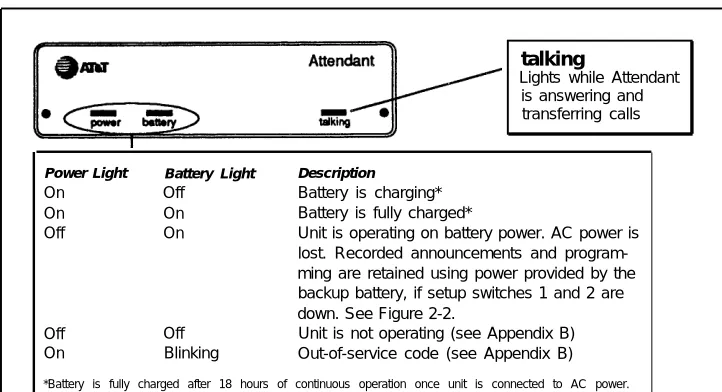
The front panel of the Attendant (Figure 2-1) has lights to show the unit’s operating status.
talking
Lights while Attendant is answering and transferring calls
Power Light Battery Light Description
On Off Battery is charging* On On Battery is fully charged*
Off On Unit is operating on battery power. AC power is lost. Recorded announcements and program-ming are retained using power provided by the backup battery, if setup switches 1 and 2 are down. See Figure 2-2.
Off Off Unit is not operating (see Appendix B) On Blinking Out-of-service code (see Appendix B)
*Battery is fully charged after 18 hours of continuous operation once unit is connected to AC power. If AC power is lost, and the battery is not yet fully charged, recorded announcements and program-ming may be erased or corrupted and the unit must be reprogrammed.
Back Panel
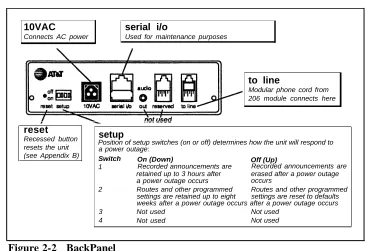
The back panel (Figure 2-2) has the switches, connectors, and jacks neces-sary for installation.
10VAC
Connects AC power
serial i/o
Used for maintenance purposes
to line
Modular phone cord from 206 module connects here
reset
Recessed button resets the unit (see Appendix B)
setup
Position of setup switches (on or off) determines how the unit will respond to a power outage:
Switch On (Down) Off (Up)
1 Recorded announcements are Recorded announcements are retained up to 3 hours after erased after a power outage a power outage occurs occurs
2 Routes and other programmed Routes and other programmed settings are retained up to eight settings are reset to defaults weeks after a power outage occurs after a power outage occurs 3 Not used Not used
4 Not used Not used
Figure 2-2 BackPanel
Installing the Attendant
Before starting installation:
■ Read and understand "Safety Instructions" on page 2-ii.
■ Identify Attendant extensions (see page 1-6).
■ Locate the Attendant so it is within 10 feet of the system control unit, and within 5 feet of the AC outlet. The location must also meet the environ-ment requireenviron-ments listed in Appendix C, "Specifications."
■ Wall mounting Attendants is optional but strongly recommended.
■ If you install multiple Attendants without wall mounting, do not stack the units.
NOTE:
Attendant
Power
Cord
Phone
Cord
Mounting
Bracket
1
Make sure the above parts are2
3
enclosed. If any parts are missing, call the Helpline at 1 800 628-2888.
4
A Making sure all setup5
6
switches are OFF (up), plug one end of the modular phone cord into the "to line" jack on the back panel of the Attendant.
B Plug the other end of the phone cord into an extension jack on a 206 module (see "Hardware Requirements" on page 2-1).
Set all switches on the back panel to OFF (up).
Plug one end of the power cord into the 10VAC power connector on the back of the Attendant. Plug the other end into a 120V AC outlet, preferably the same one to which the system control unit is connected.
The power light goes on. A blinking battery light indicates that announce-ments have not yet been recorded. Once announcements are recorded, the battery light stays off until the battery is fully charged (18 hours). See page 2-7 for instructions on recording announcements.
To wall mount with bracket: A Using #10 or smaller screw (wood, sheet metal, or concrete screw, depending on wall surface), attach bracket to wall so that hook end is down. Leave clearances shown above. B Align keyhole opening on bottom of unit with hook on bracket.
C Slide unit over hook, then down to secure it.
Move setup switches 1 and 2 to ON (down). These settings will save recorded announcements and other programming during a power outage.
NOTE:
Programming Guidelines
Introduction
Once you have decided how you want the Attendant to work with your telephone system and have connected the Attendant to the system’s control unit, you are ready for programming. Programming modifies the Attendant and the system’s control unit so they work together correctly.
Two kinds of programming need to be done: Attendant Programming and PARTNER Plus System Programming. To program the Attendant, use any touch-tone phone that can dial [ ★ ] and [ # ] this means you can even do
Attendant Programming when you are off site. On the other hand, System Programming must be done on site, using either an AT&T MLS-12D or
MLS-34D display phone at extension 10, with the programming overlay placed over the buttons of the phone. (The overlay was packed with your control unit.)
Using the Programming Charts
The rest of the chapter provides charts showing all the programming procedures, starting with Attendant Programming and ending with System Programming.
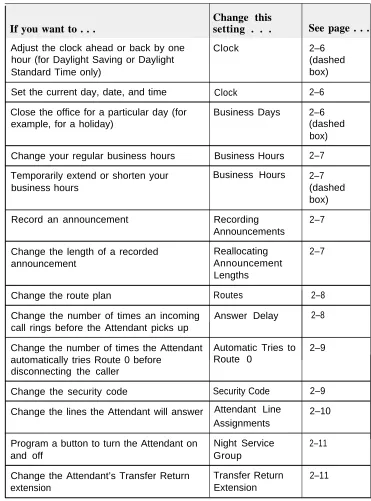
If you are setting up the Attendant for the first time, or if you are completely reprogramming an Attendant, simply start with the first box of instructions and perform all programming procedures in the order in which they are presented.
Change this
setting . . .
If you want to . . .
See page . . .
Adjust the clock ahead or back by one Clock 2–6
hour (for Daylight Saving or Daylight (dashed
Standard Time only) box)
Set the current day, date, and time Clock 2–6
Close the office for a particular day (for Business Days 2–6
example, for a holiday) (dashed
box)
Change your regular business hours Business Hours 2–7
Temporarily extend or shorten your Business Hours 2–7
business hours (dashed
box)
Record an announcement Recording 2–7
Announcements
Change the length of a recorded Reallocating 2–7
announcement Announcement
Lengths
Change the route plan Routes 2–8
Change the number of times an incoming Answer Delay 2–8 call rings before the Attendant picks up
Change the number of times the Attendant Automatic Tries to 2–9 automatically tries Route 0 before Route 0
disconnecting the caller
Change the security code Security Code 2–9
Change the lines the Attendant will answer Attendant Line 2–10 Assignments
Program a button to turn the Attendant on Night Service 2–11
and off Group
Change the Attendant’s Transfer Return Transfer Return 2–11
extension Extension
Attendant Programming
Instructions
1 . Enter Attendant Programming mode A.B.
Dial the Attendant.
If on site, dial the Attendant extension using your phone’s handset. If off site, dial a tele-phone number that is answered by the Attendant.
Wait for an answer.
If you do not enter a security code within four seconds, the Attendant will transfer you to Route 0. If no announcements have been recorded, a single beep sounds to indicate that you need to record announcements.
2 .
3 .
C. Dial the Security Code: [ ★ ] [ 7 ] [ 8 ] [ 9 ] [ # ]. (7 8 9 is the default security code; if you have
changed it, enter the appropriate code here.) A two-beep confirmation code sounds.
Follow the boxed instructions for the setting(s) you want to change.
A two-beep confirmation tone follows correctly entered codes. A three-beep error tone follows incorrectly entered codes. If you make a mistake entering a command, press [ ★ ] to start entering the command again.
When the programming session is finished, dial [ ★ ] [ # ] to exit programming mode followed by
[ # ] to terminate the call, or just hang up.
Clock
Sets the current date and time. DIAL DIAL DIAL DIAL DIAL DIAL DIAL
[ ★ ] [ 7 ] [ 1 ]
one digit for current day of week:
1=Sunday 5=Thursday
2=Monday 6=Friday
3=Tuesday 7=Saturday
4= Wednesday
two digits for current month: 01=January 07=July 02=February 08=August 03=March 09=September 04=April 10=October 05=May 11=November 06=June 12=December
two digits for current date (01–31) two digits for current year (00–99)
four digits for current time in 24-hour military notation: from 0000 for 12 midnight to 2359 for 11:59 PM.
Examples: 9:00 AM = 0900 5:00 PM = 1700
[ # ]
Business Days
Defines each day of the week as normally open or closed, so caller hears the appropriate announcement. Factory setting is open Monday-Friday, closed Saturday and Sunday. Use this procedure to change the setting for any day that differs from the factory setting.
DIAL [ ★ ] [ 7 ] [ 4 ]
DIAL one digit for a day of the week:
1=Sunday 5=Thursday
2=Monday 6=Friday
3= Tuesday 7=Saturday 4= Wednesday
DIAL [ 1 ] or [ 2 ]
[ 1 ] if business is normally open that day (Day announcement will play during business hours; Night announcement will play after hours)
[ 2 ] if business is normally closed that day (Night announcement will play all day) REPEAT each step for remaining days
To adjust clock for Daylight Saving Time: DIAL [ ★ ] [ 7 ] [ 2 ]
DIAL [ 1 ] or [ 2 ]
[ 1 ] to add one hour (normally in spring to start Daylight Saving Time)
[ 2 ] to subtract one hour (normally in fall to end Daylight Saving Time)
To temporarily change business schedule:
When your business will be closed on a day normally open, such as for a holiday, follow these steps up to 6 days before the closing:
DIAL [ ★ ] [ 7 ] [ 4 ]
DIAL the digit representing the day of the week ( 1–7) DIAL [ 3 ]
The Attendant will automatically resume your normal schedule at midnight
Business Hours
Defines normal business hours for each day of the week so caller hears the right announcement. If your business is open 8:30–5:00 Monday–Friday (the factory setting), skip this procedure.
DIAL DIAL
DIAL
DIAL
[ ★ ] [ 7 ] [ 3 ]
one digit for the day of the week:
1=Sunday 5=Thursday
2=Monday 6=Friday
3=Tuesday 7=Saturday or
4=Wednesday 9=business hours are the same for all seven days (this will not affect closed days)
four digits for the opening time in 24-hour military notation
Examples:
1:00AM = 0100 1:00PM = 1300 5:00AM = 0500 5:00PM = 1700 7:30AM = 0730 7:30PM = 1930 9:00AM = 0900 9:00PM = 2100 10:00AM = 1000 10:00PM = 2200 Noon = 1200 Midnight = 2400
four digits for the closing time in 24-hour military notation (for example, 6:00PM = 1800)
REPEAT for all days open for business
Reallocating Announcement Lengths
IMPORTANT: When you reallocate announcement
lengths, all voice recordings are erased.
Changes the maximum duration of each recorded an-nouncement. Factory settings are:
Day 20 seconds
Night 15 seconds
Day Transfer Fail 14 seconds
Hold 05 seconds
Night Transfer Fail 10 seconds
Total 64 seconds
Use the procedure to change the time allocations; however, the total time must not exceed 64 seconds. DIAL [ ★ ] [ 4 ] [ 9 ]
DIAL 2 digits for duration of Day announcement (example: 5 seconds = 05)
DIAL 2 digits for duration of Night announcement DIAL 2 digits for duration of Day Transfer Fail
announcement
DIAL 2 digits for duration of Hold announcement DIAL 2 digits for duration of Night Transfer Fail
announcement DIAL [ # ]
RERECORD all announcements (see "Recording Announcements" below)
To set manually for Day or Night operation:
You can override the clock and manually put the Attendant into day or night mode—for example, when staying open for a special sale. The Attendant stays in the indicated mode of operation until you tell it to resume normal operation.
Follow these steps so the right announcement plays: DIAL [ ★ ] [ 7 ] [ 5 ]
DIAL [ 1 ] or [ 2 ] [ 1 ] = Open
[ 2 ] = Closed
Day announcement will play until you program to resume normal schedule
Night announcement will play until you program to resume normal schedule
To resume normal schedule: DIAL [ ★ ] [ 7 ] [ 5 ]
DIAL [ 0 ] (zero)
Recording Announcements
Records greeting and transfer announcements for Attendant to play to caller.
DIAL [ ★ ] [ 4 ]
DIAL a code representing the announcement you want to record:
1 = Day announcement 2 = Night announcement
3 = Day Transfer Fail announcement 4 = Hold announcement
5 = Night Transfer Fail announcement RECORD the announcement
Pause for approximately 1 second before speaking. Speak clearly, using a normal tone of voice. When listing route numbers, pause after each one so caller has time to write it down if necessary.
DIAL [ # ] when finished speaking
A beep sounds if you exceed the allocated time for the announcement. The Attendant will not respond with a confirmation tone until the allocated announcement length has expired. Therefore, if only 15 seconds of a 25-second announcement is actually used, wait an additional 10 seconds for the confirmation tone to sound, then continue programming.
REPEAT each step for all announcements
To verify that each announcement was recorded properly:
DIAL DIAL LISTEN REPEAT
[ ★ ] [ 5 ]
the announcement code (1, 2, 3, 4, or 5) to the announcement
Routes
see example Example: Programming Routes for ABC Supermarket The following instructions show how to program the routes NOTE:Program all Destination extensions before programming for the ABC Supermarket example setup described on
disconnects. page 1-10:
To program a route for transfer to a Destination To program Route 0:
extension: DIAL [ ★ ] [ 3 ] [ 0 ] [ 1 ] [ 0 ] [ # ] [ 1 ] [ 6 ] [ # ] [ # ] [ # ]
DIAL [ ★ ] [ 3 ] where 0 is the route number, 10 is the DayPrimary Destination, and 16 is the Day
Second-DIAL Route number (0–9) ary Destination
DIAL Day Primary extension number Also enter the following command so the Attendant will DIAL [ # ]
hang up after playing the Night Announcement:
DIAL Day Secondary extension number (optional) DIAL [ where 0 is the route number, 21 is the code for★ ] [ 8 ] [ 0 ] [ 2 ] [ 1 ] [ 5 ] [ # ] [ # ]
DIAL [ # ] Night Primary Destination, and 5 means
DIAL Night Primary extension number (optional) "disconnect" To program Route 1: DIAL [ # ]
DIAL Night Secondary extension number (optional) DIAL [ ★ ] [ 3 ] [ 1 ] [ 2 ] [ 0 ] [ # ] [ # ] [ # ] [ # ]
DIAL [ # ]
where 1 is the route number, 20 is the Day Primary Destination, and there is no Night Primary Destination
To program the Attendant to hang up when a certain
in after-hours mode): DIAL [ ★ ] [ 8 ]
DIAL Route number
ENTER a two-digit number for the Destination to be programmed:
11 = Day Primary 12 = Day Secondary 21 = Night Primary 22 = Night Secondary DIAL [ 5 ]
DIAL [ # ] [ # ]
To erase a Destination extension for a route: DIAL [ ★ ] [ 8 ]
DIAL Route number
ENTER a two-digit number for the Destination to be programmed:
11 = Day Primary 12 = Day Secondary 21 = Night Primary 22 = Night Secondary DIAL [ 0 ] (zero)
DIAL [ # ] [ # ]
route is selected:
If route is selected, Attendant hangs up (useful for Route 0 To program Route 2:
DIAL [ ★ ] [ 3 ] [ 2 ] [ 1 ] [ 2 ] [ # ] [ 1 ] [ 4 ] [ # ] [ # ] [ # ] where 2 is the route number, 12 is the Day Primary Destination, and 14 is the Day Second-ary Destination
To program Route 3:
DIAL [ ★ ] [ 3 ] [ 3 ] [ 1 ] [ 3 ] [ # ] [ 1 ] [ 5 ] [ # ] [ # ] [ # ] where 3 is the route number, 13 is the Day Primary Destination, and 15 is the Day Secondary Destination
Answer Delay (Day)
Sets the number of rings before the Attendant answers a call during business hours.
DIAL [ ★ ] [ 2 ] [ 9 ] [ 0 ] [ 1 ] DIAL Number of rings
Valid settings = 1–15 rings Factory setting = 1 ring DIAL [ # ]
Answer Delay (Night)
Sets the number of rings before the Attendant answers When business is closed.
DIAL DIAL
DIAL
[ ★ ] [ 2 ] [ 9 ] [ 0 ] [ 2 ] Number of rings
Valid settings = 1–15 rings Factory settings = 1 ring
Automatic Tries to Route 0 (Day)
Sets the number of times the Attendant will automatically transfer a caller to Route 0—when the caller does not dial a route or extension during the Day, Night, or Transfer Fail announcement—before the Attendant hangs up (during business hours).
DIAL [ ★ ] [ 2 ] [ 9 ] [ 0 ] [ 6 ]
DIAL Number of transfer attempts Valid settings = 1–20 attempts Factory setting = 3 attempts DIAL [ # ]
Automatic Tries to Route 0 (Night)
Sets the number of times the Attendant will automatically transfer a caller to Route 0—when the caller does not dial a route or extension during the Day, Night, or Transfer Fail announcement—before the Attendant hangs up (after business hours).
DIAL [ ★ ] [ 2 ] [ 9 ] [ 0 ] [ 7 ]
DIAL Number of transfer attempts Valid settings = 1–20 attempts Factory setting = 3 attempts DIAL [ # ]
Security Code
Identifies a code (1–6 digits in length) that must be entered in order to program the Attendant. The default security code is 789.
To change the security code: DIAL [ ★ ] [ 6 ]
DIAL New code (1–6 digits in length) DIAL [ # ]
DIAL New code again DIAL [ # ] to confirm new code
A two-beep confirmation tone sounds. Be sure to remember the new security code. If you forget it, you will need to reprogram all Attendant settings (see "Lost Security Code" in Appendix B).
System Programming for Attendant Operation
Instructions
1. 2. 3.4.
At extension 10, place programming overlay on MLS-34D or MLS-12D phone.
Press [ Feature ] [ 0 ] [ 0 ] [ System Program ] [ System Program ] to enter System Programming mode. Follow boxed instructions for the setting(s) you want to change.
When setting up the Attendant for the first time, start with the Attendant Extensions procedure and continue with the procedures in the order in which they are presented. (After you follow the instruc-tions in a box, you will be in System Programming mode and can perform another procedure.) When programming session is finished, press [ Feature ] [ 0 ] [ 0 ] to exit program mode.
NOTE:
The page numbers next to the names of programming procedures indicate the pages in this book where setup decisions related to the procedure are described.
Attendant Extensions
(page 1-6)Call Answering Mode
(page 1-4)Identifies the extensions to which the Attendant is con-nected.
DIAL DIAL
DIAL
REPEAT
[ # ] [ 6 ] [ 0 ] [ 7 ]
Attendant extension (11–33)
Do not assign to extension 10, 16, 22, or 28 [ 1 ] or[ 2 ]
[ 1 ] = assign the extension as an Attendant
extension, or
Programs Attendant to answer in Immediate Call Answer-ing Mode (calls rAnswer-ing first at Attendant) or Backup Call Answering Mode (calls ring first at receptionist).
To program for Immediate Call Answering Mode: For each line assigned to Attendant, set the Attendant’s extension to "Immediate Ring," the receptionist’s extension to "Delayed Ring," and other extensions that have the line to "No Ring." Repeat for each Attendant.
[ 2 ] = unassign the extension
To program for Backup Call Answering Mode: all steps for each Attendant For each line assiqned to Attendant, set both the
Attendant’s and the receptionist’s extensions to
"Immedi-Attendant Line Assignments
(page 1-6)Identifies the lines the Attendant will answer. DIAL [ # ] [ 3 ] [ 0 ] [ 1 ]
DIAL number of the extension (11–33) on which Attendant is installed
DIAL number of the line (1–8) to be answered by Attendant
DIAL [ 1 ] or [ 2 ]
[ 1 ] = assign the line to the Attendant so the
Attendant answers it, or
[ 2 ] = unassign the line so the Attendant does
not answer it REPEAT for each line REPEAT for each Attendant
ate Ring" and other extensions that have the line to "No Ring." Finally, set the Attendant’s Answer Delay to the number of times the receptionist’s extension should ring before the Attendant picks up the call. (To program Answer Delay, see the instructions on page 2-8.)
PRESS DIAL PRESS PRESS DIAL PRESS
Music on Hold
(page 1-8)Turns the Music-on-hold jack on the system processor module on or off.
DIAL [ # ] [ 6 ] [ 0 ] [ 2 ] DIAL [ 1 ] or [ 2 ]
[ 1 ] = Active (the factory setting), or [ 2 ] = Not Active
PRESS DIAL
PRESS REPEAT
[ Central Tel Program ]
Attendant’s extension number
Display shows green lights next to each line assigned to Attendant extension
each line button until display shows "Immediate Ring"
[ Central Tel Program ]
receptionist’s extension (usually 10)
each line button until display shows "Delayed Ring" for Immediate Call Answering or "Immedi-ate Ring" for Backup Call Answering
[ Central Tel Program ]
another extension with lines to be answered by Attendant
each line button until display shows "No Ring" the last three steps for remaining extensions PRESS [ Central Tel Program ] [ System Program ]
Transfer Return Extensions
(page 1-6)Automatic Extension Privacy
Identifies the Transfer Return extension for each Attendant If the receptionist wants to be able to pick up calls after extension. A call returns to this extension when a Destina- the Attendant has already answered (by pressing a line tion extension for a call transferred by the Attendant does button), use this procedure to set the Automatic Extension not answer. The factory setting is that the call will return to Privacy feature for the Attendant extension to "Not As-the Attendant (originating) extension. signed" (set to "Assigned" if the receptionist should not DIAL [ # ] [ 3 ] [ 0 ] [ 6 ] pick up calls).
DIAL Attendant extension number DIAL [ # ] [ 3 ] [ 0 ] [ 4 ] (Automatic Extension Privacy)
DIAL Transfer Return extension number DIAL Attendant extension number REPEAT all steps for each Attendant DIAL [ 1 ] (Assigned) or
NOTE: If the Transfer Return extension is another
Atten-dant, the Day Anno