SOFTWARE DEFINED TESTBED USING MININET
EMULATOR
Vipin Gupta
1, Sukhveer Kaur
2, Karamjeet Kaur
3 1U-Net Solutions, Moga, India
2,3
Computer Science and Applications, AD College, Dharamkot, Moga, India
ABSTRACT
Software Defined Networking (SDN) is changing the way future networks will function. Already Big companies like Google, facebook are using SDN. SDN is also the emerging research area. For doing research we need SDN testbed such as Geni, Emulab etc or very costly sdn switches. Since most of the time, getting resources at testbeds or purchasing hardware for SDN is difficult, we need some other solution. For performing research, Mininet emulator has been created. Mininet can be easily installed on Desktop, Laptop, Physical server or as a virtual machine thus enabling you to perform simple as well as complex experiments on limited resources available. Mininet is an emulator which uses light weight virtualization technology to create simple as well as complex networks. It enables you to create a network consisting of few hosts and switches as well as thousands of hosts and switches by using simple commands. Other solutions for doing research could be using simulators such as NS3 but the problems with simulator is that you cannot run real code on them whereas an emulator allows you to run real, unmodified code. Other choice is creating hardware test beds which can prove very costly and time consuming. Mininet offers easiness of use, good performance, scalability, accuracy. In this paper, we will paper, first section will be introduction to Mininet, Second section about SDN Architecture, 3rd Section will discuss about different mininet topologies, 4rth section about using mininet with network, Fifth section will deal with using Mininet advantages & disadvantages & last section will be conclusion.
Keywords
:
Mininet, OpenFlow, Software Defined Networking, POX Controller
I. INTRODUCTION
Mininet is an emulator which allows you to create various topologies consisting of hosts, switches, controllers and links between them. Mininet [1] is very easy to install, use and very light weight in resource usage. It can be used as SDN test bed for performing SDN [2] experiments. It is very powerful tool in testing SDN networking applications. It is written in python and uses light weight virtualization for creating and isolating network resources.
You can use mininet to create pre defined topologies or custom topologies. Another advantage is that it is open source.
II. SOFTWARE DEFINED NETWORKING ARCHITECTURE
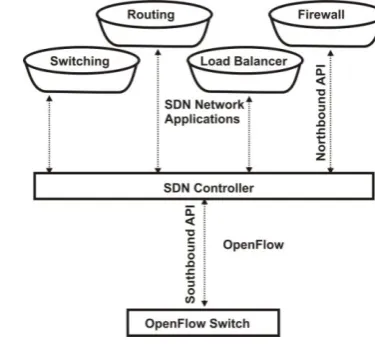
SDN is going to change the ways future networks are going to get implemented. All the network devices consist of control plane and data plane. Control plane contains the control logic and data plane performs the actual forwarding of the packets. But the problem with these devices is that they are tightly integrated. You cannot buy them separately. There functionality is rigid. These devices are classified as hub, router, switches, load balancers, proxy servers, firewall, intrusion detection, intrusion prevention systems. The devices are vendor specific and very costly. There is very large time gap between adding new features in these devices. Also it depends on the will of vendors whether they are going to add the feature or not and most importantly when. Most of the time, their decision is based on financial considerations. SDN has decoupled these planes. Now you can acquire & use data plane and control plane separately. The data plane is available in both the physical and virtual form. The control plane is also called controller (network OS). Various controllers such as NOX [9], POX [10], Beacon [11], Floodlight [12], OpenDayLight [13], and RYU [14] are available. All of these controllers are open source and free. The difference is mainly in which languages they are written and what openflow version they support. Openflow is protocol for communication between control plane and data plane. POX, RYU are written in python while Floodlight, Opendaylight in Java. While Pox supports Openflow version 1.0 while RYU supports versions from 1.0 to 1.5.
III. MININET TOPOLOGIES
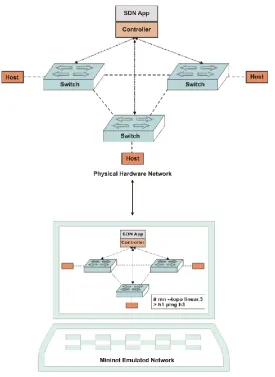
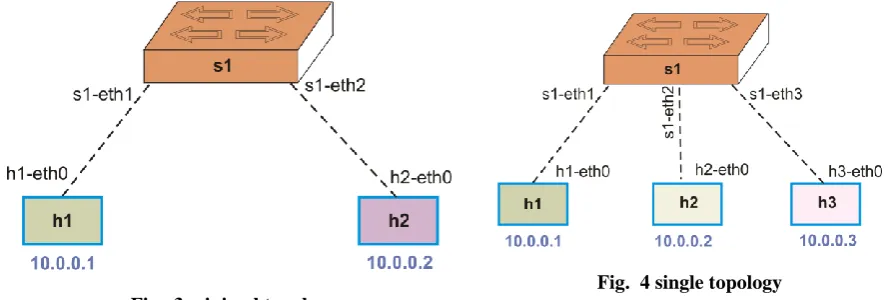
There are many default topologies available in mininet such as minimal, linear, tree, single. Here we will be discussing these different topologies. Topology in mininet consists of hosts, switches, controller and links between them as shown in Fig. 2. Understanding naming conventions is required. Host are named from h1 to hN, switches are from s1 to sN. Names of the interfaces in hosts are created by prefixing host name followed by Ethernet name beginning with 0. Host h1's first interface will be h1-eth0, second h1-eth1, and third h1-eth2 and
so on. In switches, the number starts from 1. So Switch ports are named s1-eth1, s1-eth2, and s1-eth3 and so on.
3.1 Mininet Topologies
3.1.1 Minimal
Topology
# mn --topo minimal
It will create a topology consisting of 1 switch s1 and 2 hosts h1 and h2. The hosts will be having default ip address of 10.0.0.1 and 10.0.0.2 as shown in Fig. 3.
3.1.2 Single Topology
# mn --topo single,3
It creates 1 switch and n hosts. It creates links between switch and n hosts as shown in Fig. 4
3.1.3 Linear Topology
# mn --topo linear,3
It consists of n switches and n hosts. It creates link between hosts, switch & between switches as shown in Fig.
5.
3.1.4 Tree Topology
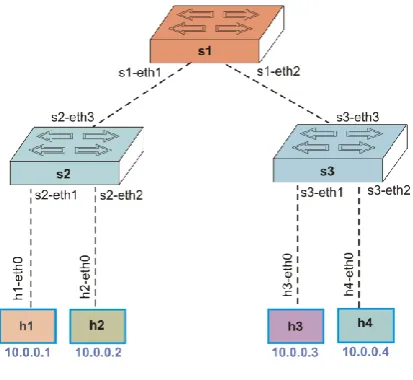
# mn --topo tree,2
It creates topology having n levels and default 2 hosts are attached with each switch as shown in Fig. 6
3.1.5 Custom Topology
We can create custom topologies by writing few line of python code. We can create any type of complex topology.
Fig. 4 single topology
IV. USING MININET WITH NETWORK APPLICATIONS
We can create networking applications such as hub, switch and load balancer using controllers. We can use mininet to test these applications. We are here using pox controller. Pox controller is written in python. By writing few lines of python code, we can write these applications. The mininet virtual machine that we downloaded from mininet web site already contains hub, switch and load balancing applications. These are very simple applications. We can create very complex applications like firewall, intrusion detection system, intrusion prevention systems and then test these applications on mininet. Whenever you are creating applications, we should be aware of the logic behind these devices i.e. we must know how these devices work, only then we can create these applications.
4.1 Hub
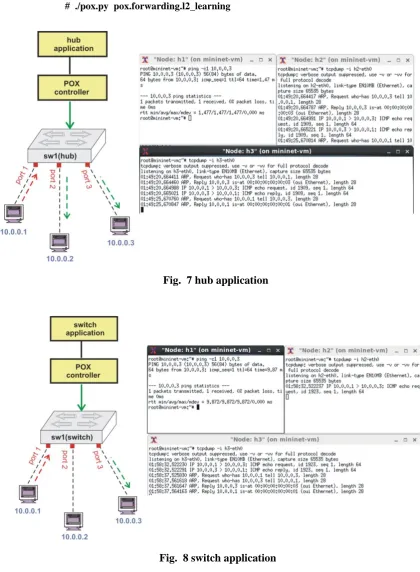
Hub is a device which floods the packets that it receives on a specific port. As in Fig. 7, when the hub receives the packet at port 1, it floods the packets to all others ports, in this case port 2 and port 3. For all the applications, we will create the topology using this simple command
# mn --topo single,3 --controller=remote
In one terminal. On other terminal in case of hub, we will run the command # ./pox.py pox.forwarding.hub
We capture the traffic using tcpdump command. When we are sending ping from h1 to h3, packets are received on h2 also, thus verifying the default behavior of hub.
4.2 Switch
Hub is an unintelligent device. On the other hand, switch is intelligent device as shown in Fig. 8. It maintains a mac table consisting of entries showing the relationship between ports and the mac address of the host connected to that port. As can be seen in figure 8, when we are pinging from h1 to h3, no packet is received on h2. That is we are successful in testing switch application on topology created on mininet. The command for running switch application is
# ./pox.py pox.forwarding.l2_learning
4.3. Load Balancer
Load Balancer is a an application that is used to distribute load to different servers based on different strategies such as random, round robin, least connections etc. Default load balancer included with pox controller is based
./pox.py pox.misc.ip_loadbalancer –ip=10.0.0.254 –servers=10.0.0.2,10.0.0.3
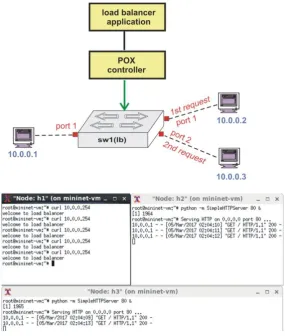
As shown in Fig. 9, when we try to access web server on virtual ip address 10.0.0.254 from host h1, it first send the request to h3 and then 3 requests to h2, then again to h3 on based of random strategy. Thus mininet enables us to test different application. Same code can be used on real hardware without making any changes. Thus Mininet can be used as perfect test bed for testing SDN Applications.
V. MININET ADVANTAGES AND DISADVANTAGES
5.1. Advantages
-You can create simple defaults topologies consisting of 1 switch, 2 hosts as well as large topologies consisting of thousands of switches and hosts.
- You can also create custom topologies by writing few lines of python code.
- Mininet can be installed on physical or virtual machine. It can be installed on even raspberry pi.
- No need for any modification in network application code. Any code that will run on mininet, will run on real hardware.
- Creating networks in mininet takes very little time. Performance is good. - Using mininet is very easy. Learning curve is very fast.
5.2. Disadvantages
- When creating very large topologies, performance suffers.
VI. CONCLUSION
Mininet can be used as a tested for doing SDN research. It enables us to create standard topologies as well as custom topologies by writing few lines of python code. It is much better than simulators where you cannot run real application code. One issue with Mininet could be performance when creating very large scale topologies. Future work could involve extending mininet code to work in clustering mode so that performance can be further increased.
REFERENCES
[1] Lantz, de Oliveira, Rogério Leão Santos, Ailton Akira Shinoda, Christiane Marie Schweitzer, and Ligia Rodrigues Prete. "Using mininet for emulation and prototyping software-defined networks." In Communications and Computing (COLCOM), 2014 IEEE Colombian Conference on, pp. 1-6. IEEE, 2014.
[2] Nunes, Bruno Astuto A., Marc Mendonca, Xuan-Nam Nguyen, Katia Obraczka, and Thierry Turletti. "A survey of software-defined networking: Past, present, and future of programmable networks." IEEE Communications Surveys & Tutorials 16, no. 3 (2014): 1617-1634.
[3] Bavier, Andy, Nick Feamster, Mark Huang, Larry Peterson, and Jennifer Rexford. "In VINI veritas: realistic and controlled network experimentation." ACM SIGCOMM Computer Communication Review 36, no. 4 (2006): 3-14.
[4] Lantz, Bob, Brandon Heller, and Nick McKeown. "A network in a laptop: rapid prototyping for software-defined networks." In Proceedings of the 9th ACM SIGCOMM Workshop on Hot Topics in Networks, p. 19. ACM, 2010.
[5] G arcia, Andres Perez, Christos Siaterlis, and Marcelo Masera. "Testing the fidelity of an emulab testbed." In Distributed Computing Systems Workshops (ICDCSW), 2010 IEEE 30th International Conference on, pp. 307-312. IEEE, 2010.
[6] Berman, Mark, Jeffrey S. Chase, Lawrence Landweber, Akihiro Nakao, Max Ott, Dipankar Raychaudhuri, Robert Ricci, and Ivan Seskar. "GENI: A federated testbed for innovative network experiments." Computer Networks 61 (2014): 5-23.
[7] Carneiro, Gustavo. "NS-3: Network simulator 3." In UTM Lab Meeting April, vol. 20. 2010.
[8] Wang, Shie-Yuan, Chih-Liang Chou, and Chun-Ming Yang. "EstiNet openflow network simulator and emulator." IEEE Communications Magazine 51, no. 9 (2013): 110-117.
[9] Gude, Natasha, Teemu Koponen, Justin Pettit, Ben Pfaff, Martín Casado, Nick McKeown, and Scott Shenker. "NOX: towards an operating system for networks." ACM SIGCOMM Computer Communication Review 38, no. 3 (2008): 105-110.
[11] Erickson, David. "The beacon openflow controller." In Proceedings of the second ACM SIGCOMM workshop on Hot topics in software defined networking, pp. 13-18. ACM, 2013.
[12] Govindraj, Srinivas, Arunkumar Jayaraman, Nitin Khanna, and Kaushik Ravi Prakash. "Openflow: Load balancing in enterprise networks using floodlight controller." University of Colorado (2012).
[13] Khattak, Zuhran Khan, Muhammad Awais, and Adnan Iqbal. "Performance evaluation of OpenDaylight SDN controller." In Parallel and Distributed Systems (ICPADS), 2014 20th IEEE International Conference on, pp. 671-676. IEEE, 2014.
[14] Lin, Thomas, Joon-Myung Kang, Hadi Bannazadeh, and Alberto Leon-Garcia. "Enabling sdn applications on software-defined infrastructure." In Network Operations and Management Symposium (NOMS), 2014 IEEE, pp. 1-7. IEEE, 2014.