Available Online at www.ijcsmc.com
International Journal of Computer Science and Mobile Computing
A Monthly Journal of Computer Science and Information Technology
ISSN 2320–088X
IMPACT FACTOR: 6.017IJCSMC, Vol. 7, Issue. 12, December 2018, pg.14 – 28
Complaint Handling Ticketing
Application Web Based Using
Codeigniter Framework (Case Study
at PT Indosat Ooredoo Tbk Jakarta)
Baghaskara Sadewa
1, Suhendra, S.Kom, M.Kom
2¹,²Faculty of Computer Science, Mercu Buana University, Indonesia
1
[email protected]; 2 [email protected]
Abstract— With the development of fast internet-based technology, cellphones are becoming widely used in everyday life. Short messages also play the most important role in our daily lives, mobile users can get information on time and comfortably via SMS. The SMS Gateway system is utilized by GSM SMS services. The system can be used by SMS from anywhere covered by GSM services. the system can also be programmed to send specific SMS to a predetermined number of conditions. SMS has made a big impact on the way of communication. People prefer SMS for messaging and for information exchange. The purpose of this study is to create a web ticketing based application that is integrated with the SMS Gateway as Indosat customer complaints services, especially the internet or bad signals. CI (CodeIgniter) i s a framework that is used to create or develop a web-based application in a more systematic way that is compiled using the PHP language (Hypertext Preprocessor). In the CI there are several types of classes in the form of libraries and helper. Both function to help programmers in developing their applications. The CI work structure starts from the browser that will interact through the controller. By using SMS as a complaint service feature, customers can easily report their complaints regarding network problems because the web ticketing system can be integrated with an SMS Gateway that can transfer SMS to tickets, and can make it easier for CS to respond to complaints tickets.
Keywords— SMS Gateway, GSM, Ticketing, Codeigniter Framework
I. INTRODUCTION
other customer's telephone queue must wait and need time. In addition to telephone, Indosat also provides complaints services through social media or e-mail, but not all people can operate e-mail or social media properly, and still require a considerable amount of time to handle it. From these problems, we need a system that can make it easier for customers to complain and can be handled with service repair quickly by the authorized team. With this system the customer complains by sending a complaint SMS and will receive an SMS reply to monitor the complaint. With the existence of a complaint via SMS system, it is expected that the customer complaint process will be more effective and efficient to do, as well as in terms of handling the problem.
A. Research Problems
Based on the background described above, then the outline of the problem is:
1) How to simplify customer complaints related to network service problems?
2) How to design a Complaint Handling Application?
3) How to build the Complaint Handling Application?
4) How can the NOC (Network Operation Center) & CS (Customer Service) report tickets through the
application to be built?
B. Limitation of Research
In order for the research to be conducted is not too widespread, there are limits to this research:
1) This system uses the SMS Gateway as a service to complain of network interference (internet / weak
signals).
2) Complaint data via SMS still does not use the text filtering feature
3) Due to the IM3 simcard registration process that requires time, this SMS Gateway uses the Simpati service
provider number.
4) This type of complaint is only for handling Indosat Ooredoo network users (internet / weak signals).
5) Checking can be said to be appropriate if it has been checked by the NOC (Network Operation Center).
6) This system is used as an additional service related to customer complaint responses other than using the
telephone.
7) The Onsite Team will launch to the site if the NOC (Network Operation Center) escalation results do
require onsite support.
8) CS (Customer Service) sends ticket status to customers via the SMS Gateway.
9) Customers get SMS in the form of notes / problem solving methods, from CS (Customer Service).
10) The customer receives Ticket Closed status from the SMS Gateway when the Ticket status becomes Solved
/ Closed.
11) Scope of data used is dummy data.
12) This application does not discuss the SLA (Service Level Agreement).
C. Objectives and Benefits
The expected goal and the benefits of this research are:
1) To create a ticketing application that is integrated with the SMS Gateway.
2) Providing additional services used for customer complaints.
3) To facilitate customer complaints and responses from CS
4) Using one application for follow-up complaint process by CS and NOC can be recorded.
II. STUDY OF LITERATURE
A. Previous Research
Smart vending machine based on SMS gateway for general transactions By S. M. S. Arifin et al. 2017[2]. study of vending machines for office stationery transactions. The advantage of the proposed vending machine is that Transactions can be carried out using a short message system (SMS), all transactions can be monitored online by the owner using Android, machine sellers have the Early Warning System (EWS) feature when the system is in trouble, and also equipped with battery backup when the electricity goes out, there is no need to make special agreements with banks or telecommunications providers. The Smart Seller Machine is built using common hardware components such as Arduino as a controller, Wavecome as an SMS Gateway module, Servos, Power Supply, Battery as backup power, Keypad and buttons as input, LCD 16x2 as a display.
SMS ticketing system for local trains By Bilal Khan, Sushil Moray, and Sukruti Kaulgud. 2016[4]. This research reveals that cellular SMS can be used for purchasing city transportation tickets, where customers can bring city transportation train tickets with a quick response code that is stored in the customer's cellphone message inbox. For example, customers want to order tickets without having to queue for long queues, this system becomes very useful where customers can access ticket reservations by simply sending messages via cell phone.
Codeigniter Performance Analysis Framework and CakePHP in Website Creation By A. K. Himawan. 2014[5].
In this paper, to perform performance testing on the performance of the local web server (localhost) that has been made is to use Apache Benchmark Software. First request testing (Stress Testing Reques) to the web using the Codeigniter and CakePHP Framework. In terms of features, PHP Cake provides more features than CodeIgniter. However, after a comparative analysis of the two frameworks in creating a website, the author prefers to use Codeigniter because it is lighter and easier to learn, modify, and integrate Library and Helper. However, everything returns to any PHP framework user, what is suitable for use in each development based on the results of the analysis that has been done.
Development And Functional Testing On CodeIgniter Framework Based Academic System By M. T. Muslihi.
2017[6]. In this paper, researchers use a framework that is widely used in building web-based applications
namely CodeIgniter. This is because the framework supports php4 and php5 and has many good communities and forums (Wiswakarma, 2009). In addition, the CodeIgniter technology in the development of information systems built has become more organized due to orderly structures and arrangements (Koespradono, Suraya, Rachmawati, 2013). In making the academic system in the Sleman area using CodeIgniter states that the use of CodeIgniter in making academic systems shows results that are tested both in terms of efficiency, reliability and usability (Sari, 2016).
B. E-Ticketing
Electronic tickets abbreviated as E-Ticket, is a digital form of paper tickets. The e-ticket system is a more efficient and reliable method of entering, processing, and ticket marketing that is used for companies[7].
C. Waterfall Development
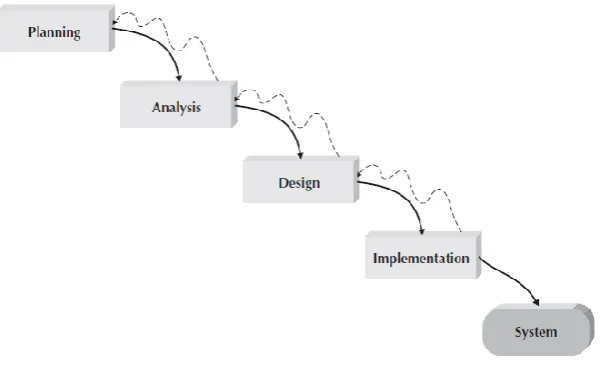
Waterfall Development is the original structured design methodology. the analysts and users proceed in sequence from one phase to the next. This methodology is referred to as waterfall development because it moves forward from phase to phase in the same manner as a waterfall. Although it is possible to go backward in the SDLC (e.g., from design back to analysis), it is extremely difficult[8].
Figure 1 Waterfall Development
1. Planning
Planning Phase is a fundamental process for understanding why a system must be built and determining how the project team will build it.
2. Analysis
During this phase, the project team analyzes the current system, identifies opportunities for improvement, and develops concepts for the new system.
3. Design
strategic decisions about systems are made in developing system concepts during the analysis phase, the steps in the design phase determine exactly how the system will operate.
4. Implementation
The final phase in waterfall development is the implementation phase, where the system is built. This is the phase that usually gets the most attention, because for most systems it is the single most expensive part of the development process.
D. SWOT Analysis
SWOT Analysis, which stands for Strengths, Weaknesses, Opportunities and Threats analysis, is a system or process of considering the internal and external factors affecting the performance of an organization in relation to competitor or market situation[9].
E. UML
UML (Unified Modelling Language) is one of the most widely used to define needs, create analysis & design, as well as describe the architecture in object-oriented programming.[10] UML can be used to visualize, determine, build, and document artifacts from incentive software systems. Software architecture makes UML diagrams to help develop software [11].
F. MVC (Model View Controller)
MVC is used to separate data access and business logic from presenting data and user interactions. The separation was made so that any changes in the logic of presentation or business logic did not have a complicated effect on each other. MVC separation solutions are expected to increase the flexibility and reusability of the application[5].
G. Framework
Framework is a set of libraries set in architectural design to provide speed, accuracy, comfort, and consistency in application development. Framework contains the following element elements[5].
III.RESEARCH METHODS
A. Research Flow
Start
Problem Identification
Study of literature
Goal Setting
Data Collection
User Requirement
Analysis Current System
Analysis
System Development
System Testing
A
A
N
Y
Implementation
Conclusion
End
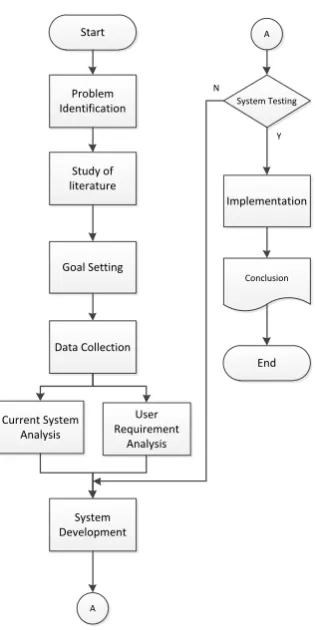
Based on figure 2 there are 10 core stages that will be carried out in this study. Starting from problem identification, literature study, goal setting, data collection, etc.
1. Problem Identification, is to find out the problems regarding the process complaint from user.
2. Literature Study, is to find references that will later be used to solve existing problems.
3. Goal Setting, is to determines what will be done next to solve existing problems.
4. Data Collection, is collect data from observations and interviews at the research case study site.
5. Current System Analysis, in which the current system is analyzed can identify problems that arise in more
detail.
6. User Requirements Analysis, is to adjust from the stage of determining the goal is in accordance with what
the user wants.
7. System Development, is where you start to design the system and start making applications.
8. System Testing, is where the system tested, before it can be used live.
9. Implementation, if the system has been tested and can be used immediately by the user.
10. Conclusion, when the system has been successfully implemented, then concluded whether the application is
as expected or not.
B. Analysis Method
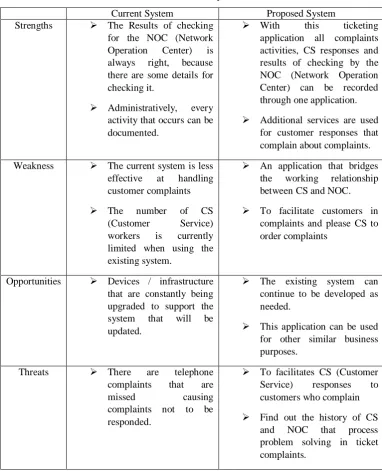
Table 1 Swot Analysis
Current System Proposed System
Strengths The Results of checking
for the NOC (Network
Operation Center) is
always right, because
there are some details for checking it.
Administratively, every
activity that occurs can be documented.
With this ticketing
application all complaints activities, CS responses and results of checking by the NOC (Network Operation Center) can be recorded through one application.
Additional services are used
for customer responses that complain about complaints.
Weakness The current system is less
effective at handling
customer complaints
The number of CS
(Customer Service)
workers is currently
limited when using the existing system.
An application that bridges
the working relationship
between CS and NOC.
To facilitate customers in
complaints and please CS to order complaints
Opportunities Devices / infrastructure
that are constantly being upgraded to support the
system that will be
updated.
The existing system can
continue to be developed as needed.
This application can be used
for other similar business purposes.
Threats There are telephone
complaints that are
missed causing
complaints not to be responded.
To facilitates CS (Customer
Service) responses to
customers who complain
Find out the history of CS
and NOC that process
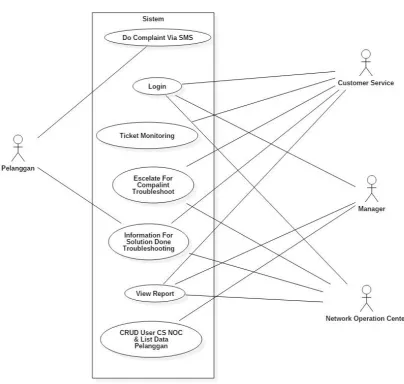
C. Use Case Diagram
Figure 3 Use Case Diagram
D. Class Diagram
E. System Testing
No. Tested Interface Testing Scenario Expected results Test result
1.
The customer sends a message to the SMS gateway
The customer writes a message, then enters the destination SMS Gateway number and presses the send / send button
The SMS gateway will send an auto reply message to the customer
Success
2.
The customer sends a message to the SMS gateway
The customer writes a message, then enters the destination SMS Gateway number and presses the send / send button
The ticket will enter the web ticket and can be
monitored Success
3.
Login CS, NOC & Manager
Enter the appropriate username & password on the web ticket login page and press the Sign In button
The web ticket will direct to each page
according to its role Success
4.
Login CS, NOC & Manager
Enter an invalid username & password on the web ticket login page and press the Sign In button
The web ticket will display the message "username or password is not appropriate"
Success
5.
Login CS, NOC & Manager
empty condition username & password on the web ticket login page and press the Sign In button
The web ticket will display a message "please enter your username and password"
Success
6.
Select the Inbox by CS menu
Select the Inbox CS menu The page will direct to
to the Inbox CS menu and display the new ticket or ticket that has been followed up to the NOC
Success
7.
Proceed by CS Select the Inbox menu on the
CS side and choose the ticket to select the Proceed menu
After the proceed menu is selected, the proceed button cannot be clicked back
Success
8.
Proceed by CS Select the Inbox menu on the
CS side and choose the ticket to select the Proceed menu
The SMS & Solve Send menu cannot be
clicked Success
9.
Select the Open Ticket by NOC menu
Select the Open Ticket NOC menu
The page will direct to to the Open Ticket NOC menu and display the tickets obtained from CS or tickets that are being
troubleshooted
Success
10.
Troubleshoot by NOC Select the Open ticket menu
on the NOC side and choose the ticket to select the Troubleshoot menu
After the troubleshoot menu is selected, the NOC must
troubleshoot the complaint
Success
11.
Troubleshoot by NOC Select the Open ticket menu
on the NOC side and choose the ticket to select the Troubleshoot menu
After the troubleshoot menu is selected, the menu solved on the ticket will be active, and the troubleshoot cannot be clicked again
12.
Solved by NOC Select the Open ticket menu
on the NOC side and choose the ticket to select the Solved menu
A send solution pop-up will appear to CS, to
inform the customer Success
13.
Solved - Submit solution by NOC
Select the submit solution menu in the pop up that appears
After selecting the solution solution menu, the ticket will send to CS
Success
14.
Menu Report NOC Select the Report menu on
the NOC side
The page will display the ticket whose status has been solved
Success
15.
Menu Inbox CS - Send SMS
Select the Send SMS menu on the CS side
A send SMS pop-up will appear to the customer
Success
16.
Menu Inbox CS - Send SMS
Select the Send SMS menu on the CS side
Select the send SMS menu after the pop up appears, which means sending the solution to the customer, and the send SMS menu cannot be clicked back
Success
17.
Customers receive SMS solutions
When CS has done the Send SMS action and filled out the solution to the customer
Get notifications from
the SMS gateway Success
18. CS Inbox Menu - Close Issue Select the Report CS menu on the CS side Select the Close Issue menu on the CS side Success
19.
Menu Report CS Select the Report CS menu
on the CS side
The page will display a ticket whose status has been solved and closed by the NOC or CS
Success
20.
All Report Manager menu
Select the All Report menu on the Manager side
The page will display all tickets and their respective status
Success
21. Menu Manage CS Select the Manage CS menu The page will display
all CS data Success
22. Menu Manage CS - Add New CS Select the Add New CS menu Will display a page for new CS add Success
23.
Menu Manage CS - Edit Data CS
Choose a menu with a pencil logo
Will display a page for editing selected CS data
Success
24.
Menu Manage CS - Delete Data CS
Select the menu with the bin logo
Will display a page for deleting selected CS data
Success
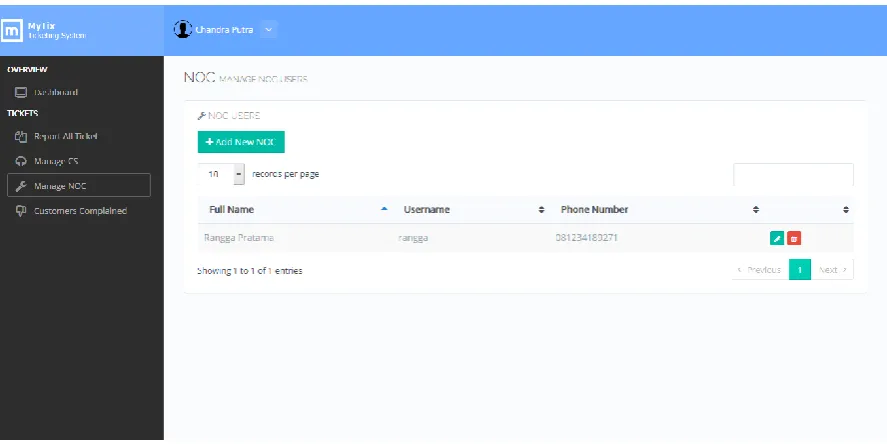
25. Menu Manage NOC Select the Manage NOC
menu
The page will display
all NOC data Success
26 Menu Manage NOC - Add New NOC Select the Add New NOC menu Will display a page for adding new NOC Success
27.
Menu Manage NOC - Edit Data NOC
Choose a menu with a pencil logo
Will display the page to edit the selected NOC data
Success
28.
Menu Manage NOC - Delete Data NOC
Select the menu with the bin logo
Will display a page for deleting selected NOC data
Success
29.
Manage Customer (Pelanggan)
When Open link (/pelanggan)
Will display all Customer (Pelanggan) data
30. Menu Manage Manage Customer (Pelanggan) - Add New Pelanggan
Select the Add New Customer menu
Will display a page for adding new customers
Success
31.
Menu Manage Manage Customer (Pelanggan) - Edit Data Pelanggan
Choose a menu with a pencil logo
Will display a page for editing selected
Customer data Success
32.
Menu Manage Manage Customer (Pelanggan) - Delete Data Pelanggan
Pilih menu dengan logo bin Select the menu with
the bin logo
Success
F. System Implementation
Figure 5 Screenshot Login
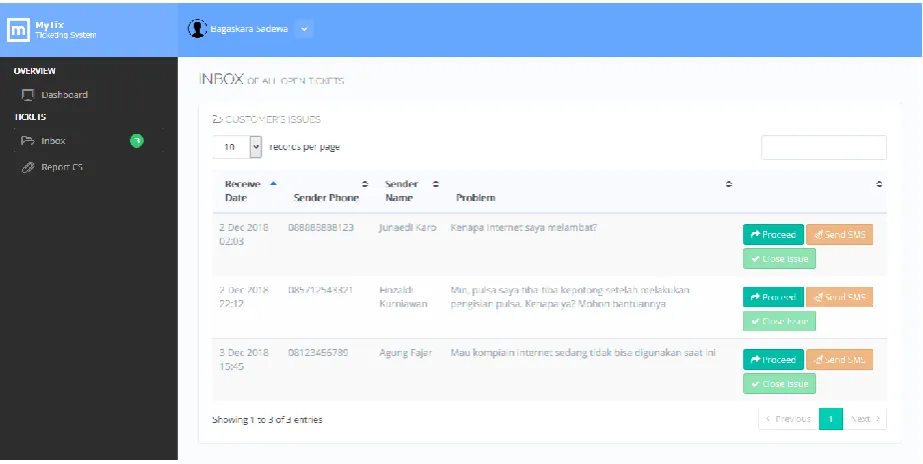
Figure 7 Screenshot Pop-Up Send SMS (CS Webpage)
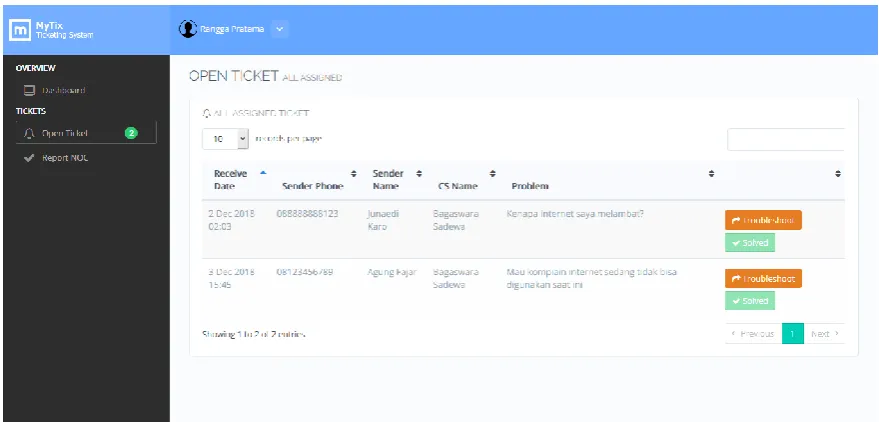
Figure 9 Screenshot Open Ticket (NOC Webpage)
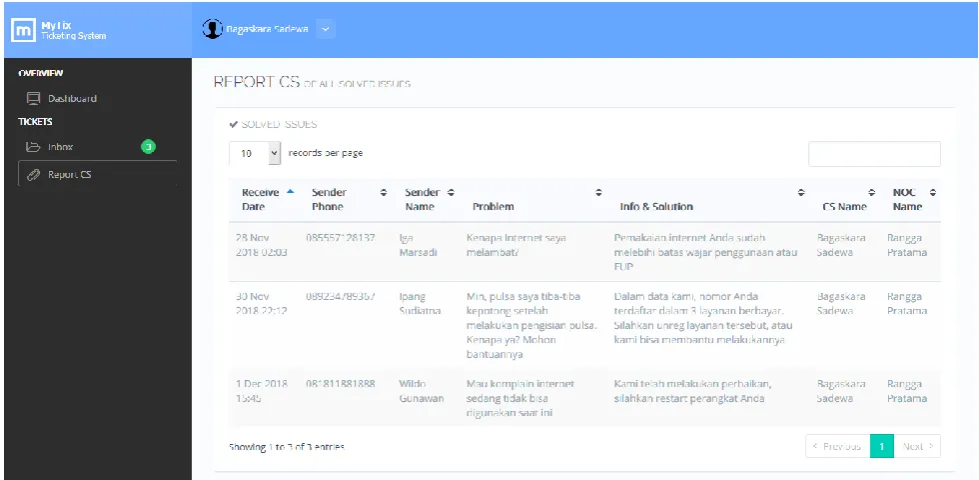
Figure 11 Screenshot Report NOC (NOC Webpage)
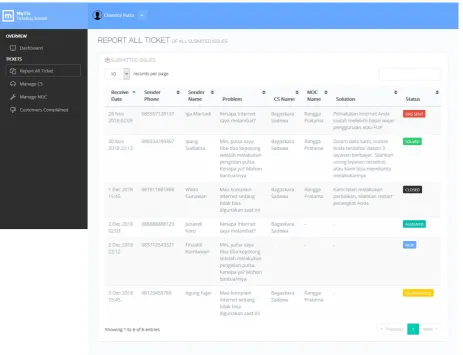
Figure 13 Screenshot Manage CS (Manager Webpage)
Figure 15 Screenshot Notification for User (Auto Reply From SMS Gateway)
IV.CONCLUSIONS
After being described application, the application for borrowing inventory items can be concluded:
1. By using SMS as a service feature of this complaint, customers can easily report their complaints regarding
network problems because the web ticketing system can be integrated with an SMS Gateway that can transfer SMS to tickets, and can minimize CS time to respond to complaints tickets.
2. Using UML as a design can describe the whole of the system.
3. Using the SWOT Method as an analysis, it will be easier for the development of the previous system.
4. This application is an application that combines the escalation process between CS and NOC, so that after
CS escalates to the NOC, the NOC will solve the problem related to customer complaints, and provide the results of improvements to CS, and after checking from the NOC, CS will inform the solution to customers, so they can display ticket report data that has been processed by CS and NOC.
R
EFERENCES
[1] T. Apanasevic and J. Markendahl, “Mobile ticketing services in the Northern Europe: Critical business model issues,” Jt. 13th CTTE 10th C. Conf. Internet Things - Bus. Model. Users, Networks, vol. 2018–Janua, pp. 1–8, 2018.
[2] S. M. S. Arifin et al., “Smart vending machine based on SMS gateway for general transactions,” QiR 2017 - 2017 15th Int. Conf. Qual. Res. Int. Symp. Electr. Comput. Eng., vol. 2017–Decem, no. 2, pp. 34–39, 2017.
[3] A. K. Morey and K. H. Morey, “Remote file search using SMS,” Proc. - 2015 Int. Conf. Commun. Inf. Comput. Technol. ICCICT 2015, 2015.
[4] Bilal Khan, Sushil Moray, and Sukruti Kaulgud, “SMS ticketing system for local trains,” Int. Conf. Work. Electron. Telecommun., vol. 5, pp. 201–204, 2016.
[5] A. K. Himawan, “Performance Analysis Framework Codeigniter and CakePHP in Website Creation,” vol. 94, no. 20, p. 8887, 2014.
[6] M. T. Muslihi, “Development And Functional Testing On CodeIgniter Framework Based Academic System,” vol. 01, no. 02. [7] S. Kazi, “Smart E-Ticketing System for Public Transport Bus,” 2018 Int. Conf. Smart City Emerg. Technol., pp. 1–7. [8] A. Dennis, B. H. Wixom, and D. Tegarden, Systems analysis and design: An object-oriented approach with UML. 2015.
[9] N. Abubakar and G. B. Bello, “STRENGTHS , WEAKNESSES , OPPORTUNITIES AND THREATS ( SWOT ) ANALYSIS ON GLOBACOM LTD,” vol. 16, no. 1, pp. 83–91, 2013.
[10] E. P. Apriliani and I. Ranggadara, “ANALYSIS AND DESIGN OF KOREA MERCHANDISE SALES SYSTEM ( CASE STUDY IN SUEWEETIESID ),” vol. 7, no. 6, pp. 197–209, 2018.