Liquid Turbine Flow Meter
Subject to change without notice.
Content
1. General Information ...
2
2. Technical Data ...
3
3. Model and Selection ...
6
4. Cautions for Installation...
7
5. Electrical Wiring ...
13
6. Programming and Setup ...
17
1. General Information
This manual will assist you in installing, using and maintaining your SURE flow meter. It is your responsibility to make sure that all operators have access to adequate instructions about safe operating and maintenance procedure.
Warning
For your safety, review the major warnings and cautions below before operating your equipment. 1. Use only fluids that are compatible with the
housing material and wetted components of your turbine.
2. When measuring flammable liquids, observe precautions against fire or explosion.
3.When handling hazardous liquids, always follow the liquid manufacturer’s safety precautions. 4. When working in hazardous environments, always exercise appropriate safety precautions.
5.During turbine removal, liquid may spill. Follow the liquid manufacturer’s safety precautions for clean up of minor spills.
6.Do not blow compressed air through the turbine. 7. Handle the rotor carefully. Even small scratches or nicks can affect accuracy.
8.When tightening the turbine, use a wrench only on the wrench flats.
9. For best results, calibrate the meter at least 1 time per year.
1.1 Product Description
Operating Principle:
Liquid flows through the turbine housing causing an internal rotor to spin. As the rotor spins, an electrical signal is generated in the pickup coil. This signal is converted into engineering units (liters, cubic meters, gallons etc.) on the local display where is applicable. Optional accessory modules can be used to export the signal to other equipment.
Upon receipt, examine your meter for visible damage. The turbine is a precision measuring instrument and should be handled carefully. Remove the protective plugs and caps for a thorough inspection. If any items are damaged or missing, contact SURE.
Make sure the turbine flow model meets your specific needs. For your future reference, it might be useful to record this information on nameplate in the manual in case it becomes unreadable on the turbine. Refer to the nameplate for your customized product’s specification.
2. Technical Data
Measuring system
Liquid: water; diesel; gasoline Application range (1) Without Impurity
(2) Low viscosity
Measured Value
Primary measured value Flow Rate Secondary measured value Volume flow
Design
Features
Modular construction The measurement system consists of a flow sensor and a signal converter. It is available as compact and as separate version.
Compact version converter N Type: Pulse output without local display A Type: 4-20mA Output without local display B Type: Local Display; Lithium Battery Power;
No Output
C Type: Local Display; 24V DC Power; 4-20mA Output;
Optional Function:
(1) Backup Power Supply: Lithium Battery (2) Modbus RS485
(3) Pulse Output
Connection Thread: DN4-DN50
Flange: DN15-DN200 (DIN, ANSI, JIS) Wafer: DN15-DN100
Measurement Ratio Standard – 10:1; Optional: 20:1
Measuring accuracy
Reference conditions Flow conditions similar to EN 29104 Medium: Water
Electrical conductivity: ≥ 300 μS/cm
Temperature: +10...+30°C / +50...+86°F
Inlet section: ≥ 10 DN
Operating pressure: 1 bar / 14.5 psig
Flow Meter Accuracy Standard: 1.0% of rate
Operating conditions
TemperatureProcess temperature T1 Level: -20...+80°C T2 Level: -20...+120°C T3 Level: -20...+150°C
Ambient temperature Standard (with aluminum converter housing): (all versions) -10…+55°C
Storage temperature -20...+70°
Pressure
EN 1092-1 DN100…DN200: PN 16
DN15…DN80: PN 25
Other pressures on request ASME B16.5 1/2”...8": 150 lb RF
Other pressures on request
JIS 1/2”...8": 10 K
Other pressures on request
Installation conditions
Installation Take care that flow sensor is always fully filled For detailed information see chapter "Cautions for Installation"
Flow direction Forward
Arrow on flow sensor indicates flow direction.
Inlet run ≥ 10 DN
Materials
Sensor housing SS304
Other materials on request
Flanges SS304
Other materials on request
Rotor
EN10088-3 1.4021 X20Cr13
Standard: 2Cr13 AISIBS 420420S37
JIS SUS410J1
Optional: CD4MCu DN15…DN80
Bearings and Shaft Tungsten Carbide
Converter Housing Standard: polyurethane coated die-castaluminum
Process connections
Flange
EN 1092-1 DN15...200 in PN 6...40
ASME 1/2”…8" in 150 lb RF
JIS 1/2”…8” in 10...20K
Design of gasket surface RF
Other sizes or pressure ratings on request
Thread DN4…DN50 in PN63
Measurable Flow Rate Range:
Note: The flow range as blow is for reference only. Consult the factory if you have special requirement.
Refer to the nameplate or certificate for actual flow range.
Nominal Diameter Standard Flow Range Extended Flow Range
(mm) (in.) (m3/h) (m3/h)
4 0.15 0.04 to 0.25 0.04 to 0.4
6 0.25 0.1 to 0.6 0.06 to 0.6
10 0.4 0.2 to 1.2 0.15 to 1.5
15 0.5 0.6 to 6 0.4 to 8
20 0.75 0.8 to 8 0.45 to 9
25 1 1 to 10 0.5 to 10
32 1.25 1.5 to 15 0.8 to 15
40 1.5 2 to 20 1 to 20
50 2 4 to 40 2 to 40
65 2.5 7 to 70 4 to 70
80 3 10 to 100 5 to 100
100 4 20 to 200 10 to 200
125 5 25 to 250 13 to 250
150 6 30 to 300 15 to 300
3. Model and Selection
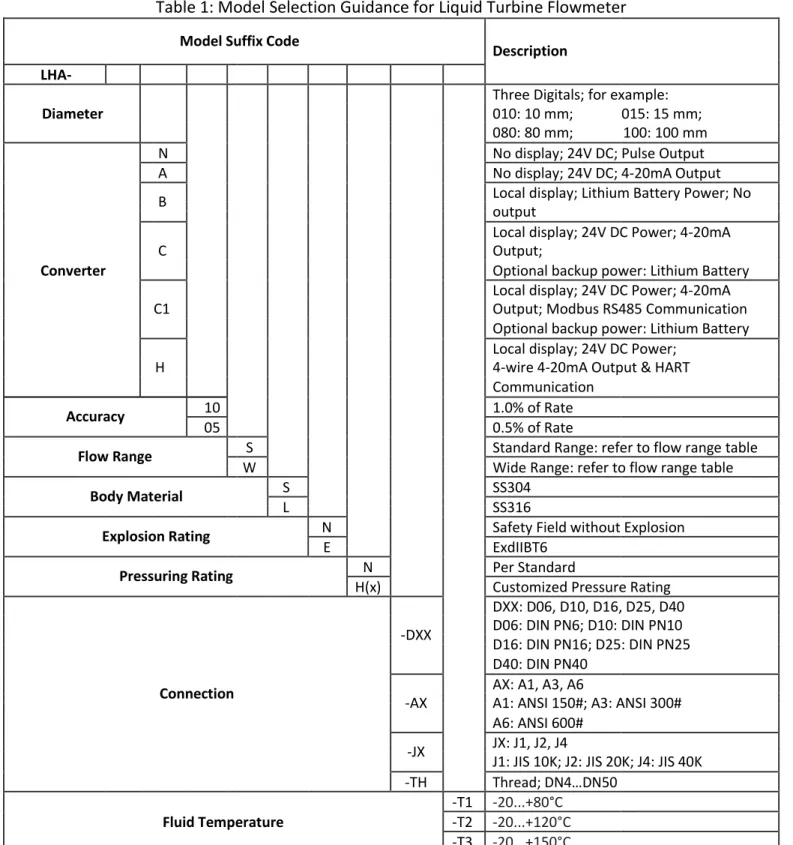
Model Selection
(See Table 1)
Table 1: Model Selection Guidance for Liquid Turbine Flowmeter
Model Suffix Code Description
LHA-
Three Digitals; for example:
Diameter 010: 10 mm; 015: 15 mm;
080: 80 mm; 100: 100 mm
N No display; 24V DC; Pulse Output
A No display; 24V DC; 4-20mA Output
B Local display; Lithium Battery Power; Nooutput
Local display; 24V DC Power; 4-20mA
C Output;
Converter Optional backup power: Lithium Battery
Local display; 24V DC Power; 4-20mA
C1 Output; Modbus RS485 Communication
Optional backup power: Lithium Battery
Local display; 24V DC Power;
H 4-wire 4-20mA Output & HART
Communication
Accuracy 1005 1.0% of Rate0.5% of Rate
Flow Range WS Standard Range: refer to flow range tableWide Range: refer to flow range table
Body Material SL SS304SS316
Explosion Rating NE Safety Field without ExplosionExdIIBT6
Pressuring Rating H(x)N Per StandardCustomized Pressure Rating
DXX: D06, D10, D16, D25, D40
-DXX D06: DIN PN6; D10: DIN PN10
D16: DIN PN16; D25: DIN PN25
D40: DIN PN40
Connection -AX AX: A1, A3, A6A1: ANSI 150#; A3: ANSI 300#
A6: ANSI 600#
-JX JX: J1, J2, J4
J1: JIS 10K; J2: JIS 20K; J4: JIS 40K
-TH Thread; DN4…DN50
-T1 -20...+80°C
Fluid Temperature -T2 -20...+120°C
-T3 -20...+150°C
Model Code: LHA-050C10SSNN-A1-T1
Explanation - Diameter: 50mm; Converter: 24V DC Power Supply, 4-20mA Output, Local Display Accuracy: 1.0%; Flow range: 4-40 m3/h; Body Material: SS304; No Explosion;
4. Cautions for Installation
4.1 Mounting Positions
Pipes must be fully filled with liquids. It is essential that pipes remain fully filled at all times, otherwise flow rate indications may be affected and measurement errors may be caused.
Avoid Air Bubbles. If air bubbles enter a measurement pipe, flow rate indications may be affected and measurement errors may be caused.
Avoid all pipe locations where the flow is pulsating, such as in the outlet side of piston or diaphragm pumps.
Avoid locations near equipment producing electrical interference such as electric motors, transformers, variable frequency, etc.
Install the meter with enough room for future access for maintenance purposes. Warning: Precaution for direct sunshine and rain when the meter is installed outside.
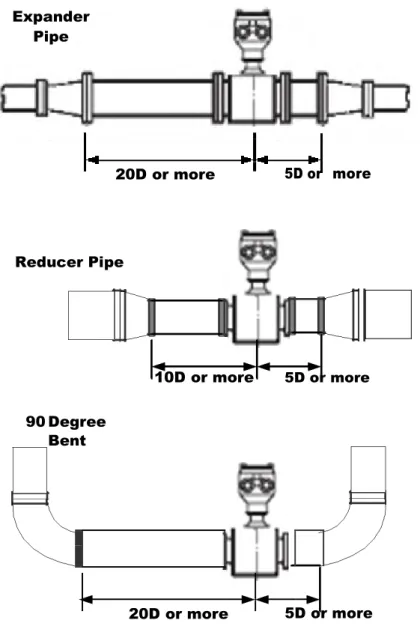
4.2 Required Lengths of Straight Runs
Flow altering device such as elbows, valves and reducers can affect accuracy. See diagram below for typical flow meter system installation.
Expander Pipe
20D or more 5D or more
Reducer Pipe
10D or more 5D or more
90Degree
Bent
20D or more 5D or more
The recommended guidelines are given to enhance accuracy and maximize performance. Distance given here are minimum requirements; double them for desired straight pipe lengths.
Upstream: allow a minimum straight pipe length at least 10 times the internal diameter of the pipe. For example, with the 50mm pipe, there should be 500mm of straight pipe immediately upstream. Desired upstream straight pipe length is 1000mm.
Downstream: allow a minimum straight pipe length at least 5 times the internal diameter of the pipe. For example, with the 50mm pipe, there should be 250mm of straight pipe immediately upstream. Desired upstream straight pipe length is 500mm.
4.3 Anti-Cavitation
Cavitation can be caused by entrained air, and it can seriously damage the rotor on a turbine flow meter. An amount higher than about 100 mg/l of entrained air or gas can produce error. In addition, cavitation can be caused by too little backpressure on the flow meter. For SURE turbine flow meters, you should provide a backpressure (downstream pressure) of at least 1.25 times the vapor pressure, plus 2 times the pressure drop through the flow meter. See formula 1.
Formula 1: Pb ≥ 1.25×Pv + 2× (Pin – Pout)
In formula 1: (Pb: Back pressure; Pv: Vapor Pressure; Pin: Inlet Pressure; Pout: Outlet Pressure)
Create backpressure by installing a control valve on the downstream side of the meter at the proper distance detailed above.
Special Notice
Foreign material in the liquid being measured can clog the meter’s rotor and adversely affect accuracy. If this problem is anticipated or experienced, install screens to filter impurities from incoming liquids.
To ensure accurate measurement, drain all air from the system before use.
When the meter contains removable coverplates. Leave the coverplate installed unless accessory modules specify removal. Don’t remove the coverplates when the meter is powered, or electrical shock and explosion hazard can be caused.
4.4 Connections
4.4.1 Thread Connection
Note: Default Thread is Male G Thread, other thread are available on request. For example: Female NPT Thread, Male NPT Thread; Consult SURE for more information
DN4…DN10: Straight Runs and filter are included in the length for DN4 to DN10. DN15…DN50: Straight Runs are optional on request.
Diameter (mm) L (mm) Thread Criteria
4 279 G ½ ”
6 270 G ½ ”
10 390 G ½ ”
15 75 G 1”
20 80 G 1”
25 100 G 1-¼ ”
32 140 G 2”
40 140 G 2”
4.4.2 Flange Connection
PCD
B
A
ANSI Flange Meter Dimensions
ANSI Flange Flange Bolt Hole
Bolt Circle Bolt Hole
Size Code A Diameter
Rating Class Diameter (B) Diameter Quantity
(PCD)
(inch) (mm) (mm) (mm) (mm) (mm)
1/2" 15 75 150 89 16 60 4
300 95 16 67 4
3/4" 20 80 150 99 16 70 4
300 117 19 83 4
1" 25 100 150 108 16 79 4
300 124 19 89 4
1-1/4" 32 140 150 115 16 89 4
300 135 19 98 4
1-1/2" 40 140 150 127 16 99 4
300 155 22 114 4
2" 50 150 150 152 19 121 4
300 165 19 127 8
2-1/2" 65 170 150 180 19 140 4
300 190 22 149 8
3" 80 200 150 191 19 152 4
300 210 22 168 8
4" 100 220 150 229 19 191 8
300 254 22 200 8
5" 125 250 150 255 22 216 8
300 280 22 235 8
6" 150 300 150 279 22 241 8
300 318 22 270 12
8" 200 360 150 343 22 298 8
300 381 25 330 12
DIN Flange Meter Dimensions
DIN Flange Flange Bolt Hole Bolt Circle Bolt Hole
Size Code A Pressure Diameter
Diameter (B) Diameter Quantity
Rating (PCD)
(inch) (mm) (mm) MPa (mm) (mm) (mm)
1/2" 15 75 2.5 95 14 65 4
3/4" 20 80 2.5 105 14 75 4
1" 25 100 2.5 115 14 85 4
1-1/4" 32 140 2.5 140 14 100 4
1-1/2" 40 140 2.5 150 18 110 4
2" 50 150 2.5 165 18 125 4
2-1/2" 65 170 1.6 185 18 145 4
3" 80 200 1.6 200 18 160 8
4" 100 220 1.6 220 18 180 8
5" 125 250 1.6 250 18 210 8
6" 150 300 1.6 285 22 240 8
8" 200 360 1.6 340 22 295 12
5. Electrical Wiring
Warning: Electrical Hazard
Disconnect power before beginning wiring.
5.1 LHA-N; Pulse Output, Basic Model.
Cable Color Terminal Symbols Description
Red Wire Power (+) Power Supply: “24V+”
White Wire Common GND
Yellow Wire Pulse (+) Pulse Output
5.2 LHA-N; Pulse Output, explosion proof model.
Terminal Configuration Terminal Wiring
Terminal Symbols Description
+
Power Supply: “24V+”
LHA-N
-
GNDExplosion Proof
Pulse Output
+ -
5.3 LHA-A; two-wire 4-20mA Output, No Local Display.
Terminal Configuration
Terminal Wiring
Terminal Symbols Description
LHA-A
+A
Power Supply: “24V+”-B
Current Output
+A -B
+A -B 24V+ PLC InputI+
5.4 LHA-B, LHA-C, LHA-C1; Local Display
Note: Terminal configuration is same for LHA-B, LHA-C and LHA-C1, but some functions are ONLY available on specified model. The table lists the function of each model.
Function List for converter with local display
Primary Optional Optional
Model Power Dual Power Output Dual Communication Note
Supply Supply Output
LHA-B Lithium Not Not Not Not Available
Battery Available Available Available
LHA-C 24V DC Lithium 4-20mA Pulse Not Available Output is only
Battery
available when 24V
Lithium Not
LHA-C1 24V DC Pulse Modbus RS485 Power supply is on.
Battery Available Terminal Configuration BAT 1 -+ ON K 1
1 23 Lit
hium B at ter y E R 26500 Part N umbe r:
+
1 2
3
4
5
6
7
8
GND +24V GND FOUT IOUT-IOUT+ 485B 485AK O ON F F
DIP Switch: K1
Function 1 2 3
Original Pulse Output ON OFF OFF
Scaled Pulse Output: 1 m3 / Pulse OFF ON OFF
Scaled Pulse Output: 1L/Pulse;
10L/Pulse; 100L/Pulse OFF OFF ON
Configure it in parameter setting
Terminal Wiring
5.4.2 LHA-C and LHA-C1
Model Function (Optional) Terminal Terminal Description
Code Symbols
(2 wires) 4-20mA Output 3 IOUT+ 24V DC+
4
IOUT-
GND
7 +24V 24V+ DC Power Supply
(3 wires) 4-20mA Output 8 GND GND
LHA-C 3 IOUT+ Current Output 4-20mA DC (+)
7 +24V 24V+ DC Power Supply
(4 wires) 4-20mA Output 8 GND GND
3
IOUT+
Current Output (+) Iout+
6 GND Current Output (-)
7 +24V 24V+ DC Power Supply
8 GND GND
LHA-C1 Pulse Output and RS485 5 FOUT Pulse output+
Communication 6
GND
Pulse
1 485A RS485+
2 485B
RS485-Electrical Wiring Diagram
GND 24V DC+
Pulse
Output GND
24V DC+ RS485B
RS485A
LHA-C1 LHA-C
GND GND
24V DC+ 24V DC+
Iout
-Iout + Iout +
5.5 LHA-H
Function List for converter with local display
Model Power Supply Output Optional Dual Communication Note
Output
LHA-H 24V DC 4-20mA Not Available HART
(4-wire)
Electrical Wiring Diagram
6. Programming and Setup
: All flowmeters are tested and calibrated prior to leaving the factory, and the unique
K-factor is provided on the calibration certificate. Keep the calibration certificate well to avoid
the loss of K-factor.
6.1 LHA-N; No display; Pulse Output
Customer should set the correct K-factor into PLC or Flow totalizer in order to get the correct flow rate.
6.2 LHA-A; No display; 4-20mA Output
Only perform the Zero Point Calibration where it’s necessary.
6.2.1 Zero Point Calibration
(1)Shut off the value where the flowmeter is installed, ensure there is no flow rate in pipe. (2)Put high accuracy amperometer into the circuit loop as series connection.
(3)Adjust the potentiometer W502 to make sure the display on amperometer is 4mA.
6.2.2 Full Scale Calibration: it’s ONLY available for factory; return the flowmeter to factory for full scale calibration where is applicable.
6.3 LHA-B, LHA-C, and LHA-C1; Local Display
Note: all menus are present in all signal converter versions, but some parameter settings are ONLY valid for specified models.
6.3.1 Display and Keys
①
②
③
①
②
Flow Rate Total Flow
ᬇ
Keys (See table below for function and representation in text)④Key Measuring mode Menu mode Sub-menu or function Parameter and data
mode mode
Enter 1. Display the frequency Select menu Press 1 time, return Save the value and
corresponding to flow to menu mode, data advance to next menu
rate saved
2. Enter the parameter
setting mode
- - - For numerical values,
move cursor one
position to the right or
left
- - Select sub-menu or Use cursor highlighted
function to change number,
unit, setting
Esc - Return to measuring Return to measuring Return to measuring
mode but prompt mode but prompt mode but prompt
whether the data whether the data whether the data
should be saved should be saved should be saved
Note: Data are not saved when press“Esc”to return to measuring mode. If the value need to be changed, press“Enter”
to save value first
6.3.2 Parameters Set
Press “Enter” two times at measuring mode, it leads to Password Menu “- - - -“. (1) Input correct password and press “Enter” can start parameter setting. (2) Press “Enter” again and no password is input can ONLY view all parameters
The total menus in “Parameters Set” are 16, and users can access and modify these menus depending on the input password grade. See table below for more information on password grade.
Table. Description of Password Grade
Password Grade Password Login Privileges
Grade 1 No PasswordRequirement Read Only
Grade 2 1234 Read and Edit
Grade 3 5678 factory defaultsSave all data as
Grade 4 1111 Reload factorydefaults
Note: parameter setting can be ONLY performed by authorized engineer, as parameter change can affect the accuracy of the flowmeter.
Specific Menu – Parameters Set
Menu Parameter Name Setting Method Grades Range F---01 Flow Rate Unit ParameterSelect FactoryONLY 1; 2; 3
Scaled Pulse Output 1: 1 Liter/Pulse F---02
Select
Parameter User 10: 10 Liter/Pulse
In Liters
100: 100 Liter/Pulse
F---03 Damping Time Input Value User Unit: SecondValue: 1-10
F---04 Maximum Flow Rate Input Value User Unit: same as Flow Rate F---05 Minimum Flow Rate Input Value User Unit: same as Flow Rate F---06 Maximum FrequencyOutput Input Value User 0-3000 HzAccuracy: 0.1Hz
1200; 2400; 4800; 9600;
F---07 Baud Rate ParameterSelect User 19200
Data Format: n; 8; 1
F---08 Device Address Input Value User 01-99 F---09 Frequency OutputMode ParameterSelect User 1; 2
Total Flow Reset the new value and
F---10 Input Value User press “Enter” to confirm
Reset
the change promptly.
P1 Linearization of theFlowcurve: point 1 Input Value FactoryONLY First Row: Frequency (P1)Second Row: K-Factor (P1)
P2 Linearization of theFlowcurve: point 2 Input Value FactoryONLY First Row: Frequency (P2)Second Row: K-Factor (P2)
P3 Linearization of theFlowcurve: point 3 Input Value FactoryONLY First Row: Frequency (P3)Second Row: K-Factor (P3)
P4 Linearization of theFlowcurve: point 4 Input Value FactoryONLY First Row: Frequency (P4)Second Row: K-Factor (P4)
P5 Linearization of theFlowcurve: point 5 Input Value FactoryONLY First Row: Frequency (P5)Second Row: K-Factor (P5)
P Average Input Value FactoryONLY First Row: Frequency (P)Second Row: K-Factor (P)
P4 P5
P
P2 P3
6.3.3 Parameter Function Table
No.
Function
Settings / descriptions
Selectable: 1, 2, 3
F---01 Flow Rate Unit 1: m3; 2: Liter; 3. Factory ReservedConsult the factory first to change the unit, as the K-factor should also be
changed.
Selectable: 1, 10, 100
F---02 Output In LitersScaled Pulse 1: 1 liter/Pulse; 10: 10 Liters/Pulse; 100: 100 Liters/PulseOnly valid for model supporting Pulse Output; and Position 3 of DIP
Switch is ON, others two are OFF.
F---03 Damping Time Value: 1-10 second; Recommended Value: 4 Second
Flow Range
F---04 Maximum FlowRate Unit: same as Flow Rate
F---05 Minimum FlowRate Unit: same as Flow Rate
Frequency Output
Maximum Value: 0-3000 Hz
F---06 Frequency
Accuracy: 0.1Hz
Output
RS485 Communication
F---07 Baud Rate Selectable: Default Data Format: 9600, n, 8, 11200; 2400; 4800; 9600; 19200 (Unit: Hz)
F---08 Device Address Value: 01-99
Frequency Output Selectable: 1, 2
F---09
1: Original Pulse Output without linearization
Mode
2: Corrected Pulse Output after linearization
Reset Total Flow
F---10 Total FlowReset Reset the new value and press “Enter” to confirm the change promptly.
Linearization
P1 Linearization of the First Row: Frequency (P1)
Flowcurve: point 1 Second Row: K-Factor (P1)
P2 Linearization of the First Row: Frequency (P2)
Flowcurve: point 2 Second Row: K-Factor (P2)
P3 Linearization of theFlowcurve: point 3 First Row: Frequency (P3) Second Row: K-Factor (P3)
P4 Linearization of the First Row: Frequency (P4)
Flowcurve: point 4 Second Row: K-Factor (P4)
P5 Linearization of theFlowcurve: point 5 First Row: Frequency (P5) Second Row: K-Factor (P5)
P Average K-Factor First Row: Frequency (P) Second Row: K-Factor (P)
6.4 LHA-H
6.4.1 Display and Keys
ᬅ
Flow Rateᬆ
Sensor K-Factorᬇ
Frequency④
Keys (See table below for function and representation in text)Key Measuring mode Menu mode Sub-menu or function Parameter and data
mode mode
Return to measuring Return to measuring Press 2 time and save
mode but prompt mode but prompt the data
whether the data whether the data should be saved should be saved
- Select main menu Select sub-menu or Use cursor highlighted
function to change number,
unit, setting
- Select main menu Select sub-menu or Use cursor highlighted
function to change number,
unit, setting
Enter the parameter advance to next sub- Advance to next For numerical values,
setting mode menu menu move cursor one
position to the right or
6.4.2 Parameters Set
1.Long press key for 5 seconds, LCD displays total flow, then long press key reach to lock screens if need. 2.When power on, firstly press key and enter the parameter setting mode. In “Parameter set” there are five main menus, when enter first menu “Basic”, do not input password, but enter the second menu “System”, should input ones, the same for the fifth main menu “Detail”.
Note: parameter setting can be ONLY performed by authorized engineer, as parameter change can affect the accuracy of the flowmeter.
Specific Menu – Parameters Set
Main Sub-menu Setting Grades Range
menu Method
PV Units ParameterSelect FactoryOnly Other optionsm3/h
PV Decimal ParameterSelect User 1; 2; 3
Basic Total Units ParameterSelect FactoryOnly L, m3, Gal
Total Decimal ParameterSelect User 1; 2; 3
Damping time(s) Input value User Value: 0.1-99.9Unit: Second
New password Input value User xxxx
Language ParameterSelect User English; Chinese
Signal Qmax (m3/h) Input value User Unit: same as Flow Rate
Low Cutoff (%) Input value User Unit: %
Freq Max (Hz) Input value User Unit: Hz
Pulse Liter/Pulse Input value User Unit: Liter/Pulse System output Pulse Width (ms) Input value User Unit: ms
Pulse Level ParameterSelect User Active L;Active H
HART Address Input value FactoryOnly 00-15
Select User NO; Yes
Total Set Parameter
Input value User Unit:m3
Load settings ParameterSelect User NO; Yes
20mA Trim Input value User
Loop test Input value User
Test
Pulse test Input value User
New password Input value User XXXX
Sensor K Input value FactoryOnly
Freq Direct ParameterSelect User NO; Yes
Linearization of the Input Value Factory First Row: Frequency (P1)
Detail Flowcurve: point 1 ONLY Second Row: K-Factor (P1)
Linearization of the Input Value Factory First Row: Frequency (P2) Flowcurve: point 2 ONLY Second Row: K-Factor (P2) Revise
Linearization of the Input Value Factory First Row: Frequency (P3) Flowcurve: point 3 ONLY Second Row: K-Factor (P3) Linearization of the Input Value Factory First Row: Frequency (P4)
Flowcurve: point 4 ONLY Second Row: K-Factor (P4) Save Settings ParameterSelect FactoryOnly NO; Yes
6.4.3 Parameter Function Table
Parameter Function Table
Main Submenu Settings and description
Menu
PV Units Selectable:L/s,L/m,L/h,m3/s,m3/m,m3/h,gal/s,gal/m,gal/hDefault: m3/h Selectable: 1, 2, 3
PV Decimal Default: 3
Instantaneous flow of decimal digits Basic Total Units Selectable: L, m3, GalDefault: m3
Total Selectable: 1, 2, 3Default: 3
Decimal Cumulative flow of decimal digits
Damping Floating point: 99.9-0.1
time(s) Default: 1.0
New Selectable range: 0000 - 9999
Password Default: 0200
Language Selectable: Chinese, EnglishDefault: English
Qmax (m3/h) Maximum Flow Rate
Signal Low Cutoff (%) Floating Point: 9.9-0.0 Default: 1.0
Freq Max (Hz) Floating Point: 5000.0-100.0Default: 2000.0 Liter/Pulse Floating Point: xxx-0.0Default: 0.0
Pulse Floating Point: 1000.0-0.0
output Pulse Width (ms)
System Default: 0.0
Pulse Level Selectable: Active L, Active HDefault: Active L
HART Selectable: 00-15
Address Default: 00
Clear Total Selectable: No, YesDefault: No Total Set
FWD Preset(m3) Floating Point: 9999999999.0-0Default: 0 Selectable: No, Yes
Load Default: No
settings When set Yes, all data restore the factory parameter settings and realize initialization
4mA Trim Floating Point: 5.0-3.0Default: 0.0 Calibration
20mA Trim Floating Point:21.0-19.0Default: 0.0
Pulse test Floating Point: 5000.0-1.0Default: 1000.0
New Selectable range: 0000 - 9999
password Default: 1111
Sensor K Floating Point: 999999999.0-0.1Default: 100000.0 Freq Direct Selectable: No, YesDefault: No
Linearization of the First Row: Frequency (P1)
Flowcurve: point 1 Second Row: K-Factor (P1)
Detail Linearization of the First Row: Frequency (P2)
Flowcurve: point 2 Second Row: K-Factor (P2)
Revise
Linearization of the First Row: Frequency (P3)
Flowcurve: point 3 Second Row: K-Factor (P3)
Linearization of the First Row: Frequency (P4)
Flowcurve: point 4 Second Row: K-Factor (P4)
Selectable: No, Yes
Save When set Yes, the factory settings been saved as a copy in system,Default: No Settings when transmitter got damage due to any reasons, we could use
7. Troubleshooting
Symptom
Probable Cause
Solution
More Volume/Output 1. Rotor may drag due to foreign Check for debris inside the meter. than displayed or matter obstruction. Clean and reassemble.
registered
2. Magnetic pickup not screwed down Screw the magnetic pickup all the way all the way into the turbine flowmeter down into the turbine flow-meter body. body. This causes it not to detect all Hand-tighten only.
the rotor blades as they pass
3. Turbine Flowmeter installed Install the flowmeter in accordance with
backwards the process flow direction
4. Turbine flowmeter rotor installed Install the flowmeter rotor in accordance
backwards with the process flow direction
5. K-factor is too high in Verify K-factor used. K-factor should be electronic/readout device decreased.
Less Volume/Output 1. Caused by trapped air in the Install an air eliminator upstream of
than displayed or process line turbine flowmeter.
registered 2. K-factor is too low in Verify K-factor used. K-factor should be electronic/readout device increased.
Flow rate indication is 1. Battery Power Type: Bad contact on Open back cover and repower the flow unstable the connector between battery and meter
PCB
2. DC Power Type: supply voltage is Check and ensure power supply is 24V DC abnormal
Limited Warranty Policy
Tianjin SURE Instrument hereby provides a limited warranty against defects in materials and workmanship. This product includes a 1-year warranty. The warranty period shall begin on the date of the original new equipment purchase. Warrantor’s obligation hereunder shall be limited to repairing defective workmanship or replacing or repairing any defective parts.
In the event Purchaser believes the SURE product is defective, the product must be returned to SURE, transportation prepaid by Purchaser, within the appropriate warranty period relative to the product. If SURE’s inspection determines the workmanship or materials are defective and the required maintenance has been performed and, has been properly installed and operated, the product will be either repaired or replaced, at SURE’s sole determination, free of additional charge, and the goods will be returned, transportation paid by SURE, using a transportation method selected by SURE.
Prior to returning the product to SURE, Purchaser must obtain a Returned Material
Authorization (RMA) Number from SURE’s Customer Service Department within 30 days after discovery of a purported breach of warranty, but not later than the warranty period; otherwise, such claims shall be deemed waived.
If SURE’s inspection reveals the SURE product to be free of defects in material and workmanship or such inspection reveals the goods were improperly used, improperly installed, and/or improperly selected for service intended, SURE will notify the purchaser in writing and will deliver the goods back to Purchaser upon receipt of Purchaser's written instructions and agreement to pay the cost of transportation. If Purchaser does not respond within thirty (30) days after notice from SURE, the goods will be disposed of in SURE’s discretion. SURE does not warrant the product to meet the requirements of any safety code or other jurisdiction, and Purchaser assumes all risk and liability whatsoever resulting from the use thereof, whether used singlely or in combination with other machines or apparatus.
This warranty shall not apply to any SURE product or parts thereof, which have been repaired outside SURE’s factory or altered in any way, or have been subject to misuse, negligence, or accident, or have not been operated in accordance with SURE’s printed instructions or have been operated under conditions more severe than, or otherwise exceeding, those set in the specifications.
FOR NON-WARRANTY REPAIRS OR CALIBRATIONS, consult SURE for current repair/calibration charges. Have the following information available BEFORE contacting SURE:
1.P.O. number to cover the COST of the repair/calibration, 2.Model and serial number of the product.