Microsoft Dynamics NAV
Statement of Direction
Date: February 2010
www.microsoft.com/dynamics/nav
© 2010 Microsoft Corporation. All rights reserved.
The information and product plans contained in this document are based on current market conditions and are subject to change at any time. The information in this document should not be assumed to represent a commitment on the part of Microsoft. The products addressed in this document are subject to availability in your country or region. The document will be updated as market conditions and product plans change over time. Monitor PartnerSource or CustomerSource for the latest information about changes in this document. Or contact your local Microsoft country office for local product availability, questions or more information about this document.
2
Do NOT distribute broadly
Contents
1. EXECUTIVE SUMMARY
... 3
2. MICROSOFT DYNAMICS
... 6
3. INTRODUCTION TO MICROSOFT DYNAMICS NAV
... 10
4. MICROSOFT DYNAMICS NAV 2009
... 15
5. MICROSOFT DYNAMICS NAV ASPIRATIONS
... 17
5.1 COMPELLING BUSINESS APPLICATION
... 17
5.2 MORE USERS MORE PRODUCTIVE
... 25
5.3 SOFTWARE-PLUS-SERVICES
... 27
5.4 HOW WE TAKE ADVANTAGE OF MICROSOFT TECHNOLOGY
... 29
5.5 INCREASED PARTNER PRODUCTIVITY
... 30
6.
PRODUCT DEVELOPMENT ROADMAP
... 32
6.1 MICROSOFT DYNAMICS NAV 2009 SERVICE PACK 2 IN 2010-2011
.. 32
6.2 MICROSOFT DYNAMICS NAV‖7‖ 2011-2012
... 32
6.3 MICROSOFT DYNAMICS NAV ‖8‖ 2013-2014
... 39
3
Do NOT distribute broadly
1. EXECUTIVE SUMMARY
This section summarizes the contents of the Statement of Direction for Microsoft Dynamics® NAV. We recommend that you read the document in its entirety.
The purpose of this document is to update customers and partners on the broad strategy for Microsoft Dynamics NAV and the specific product roadmap for the next major release, Microsoft Dynamics NAV ―7‖, and the initiatives planned for Microsoft Dynamics NAV ―8‖ and ―9‖. This information is intended to help
partners and customers understand the investments we are making and the direction we are taking with Microsoft Dynamics NAV in the next several releases.
Introduction to Microsoft Dynamics
Microsoft Dynamics is a line of integrated, adaptable business applications, which works like and with familiar Microsoft software enabling people to work more productively and make important business decisions with greater
confidence. These solutions automate and streamline financial, customer
relationship, and supply chain processes in a way that can help companies drive business success. Microsoft Dynamics NAV is an ERP solution for midsized
companies that helps them simplify and streamline specialized business processes, rapidly adapting to their unique way of doing business. Microsoft Dynamics NAV Strategy
Our strategy involves focusing on creating relevant core business functionality and by further developing the application to support current and emerging regulatory requirements. As we continue to add new functionality to Microsoft Dynamics NAV we will focus on five basic values:
Simplicity Productivity
Continuously take advantage of Microsoft Technology User Experience Leadership
Rapid Time-to-Value
Our goal is to enable partners to address a variety of business scenarios, including vertical business needs based on the application that Microsoft delivers. We will continue to provide customers and partners with a clear roadmap of where we want to invest in the application and where business opportunities for partners will be. We will include enhancements in the
application that make it easier for our partners to build solutions on Microsoft Dynamics NAV.
4
Do NOT distribute broadly
SUMMARY OF MICROSOFT DYNAMICS NAV PRODUCT RELEASE ROADMAP 2010-2017 AND BEYOND
Microsoft Dynamics NAV “7” 2011-2012
Key investments planned include ensuring compelling business application functionality, improving partner productivity, making more users more productive throughout the company, reducing the time to value and helping partners take advantage of new business opportunities through Software-plus-Services and other product enhancements.
Within the application, we will work to deliver functionality that will improve business processes and productivity for customers while providing a broad horizontal platform on which partners can build vertical solutions.
Important application highlights planned for this release include consolidating compelling country-specific functionality into the global product; improving integration of the standard modules to increase user visibility into relevant information; streamlining business processes across the company and with business partners with features like electronic banking and enhanced bank reconciliation and reporting capabilities. We plan to deliver a connector to Microsoft Dynamics CRM in Microsoft Dynamics NAV ―7‖.
We also plan to enable more users, including occasional users, to be more productive through enhanced interoperability with Microsoft Office®, Microsoft
SharePoint® and Microsoft Dynamics CRM.
The 3-step architectural transition that we started with Microsoft Dynamics NAV 2009 continues with Microsoft Dynamics NAV ―7‖ and will be completed with ―8‖. This means that support for the NAV Database (C/SIDE) ends with Microsoft Dynamics NAV ―7,‖ and we will only support Microsoft SQL Server® as a database
platform. We also plan to discontinue Forms in Microsoft Dynamics NAV ―7‖. Therefore, we strongly recommend that our partners continue and complete upgrading their solutions to the RoleTailored Client and Microsoft SQL Server with Microsoft Dynamics NAV 2009 SP1 to be ready for the release of Microsoft Dynamics NAV ―7‖.
To support new business opportunities for partners, we will provide Software-plus-Services by attaching Online Services for Microsoft Dynamics ERP and make it easier for partners to consume Web services which, together with the ability to expose Web Services, will enable partners to create cloud services.
Microsoft Dynamics NAV “8” 2013-2014
Our plan is to invest in new application functionality by building on the
application enhancements realized in Microsoft Dynamics NAV ―7‖. This means we will increase focus on driving business productivity across the company with new Workflow capabilities and even more interoperability with other Microsoft products.
5
Do NOT distribute broadly
We also expect to complete the transition of our development tools into the RoleTailored Client and move any remaining administration and management tools. We expect to upgrade the development experience with the RoleTailored development experience in this release. We also plan to complete the transition of our architecture to managed code, giving better solution quality, making maintenance and implementation easier, and opening up for new partner opportunities.
Microsoft Dynamics NAV “9” 2016-2017 and Beyond
We plan to continue investing according to our overall strategy of even better business productivity and user experience leadership. We will continue to invest in core business functionality that complies with current and future regulatory requirements, and functionality that will meet our customers‘ core business needs across our key industries. We will also focus on functionality that will enable our partners to develop vertical solutions. As always, we will take advantage of the investments and innovations provided by other Microsoft technologies.
6
Do NOT distribute broadly
2. MICROSOFT DYNAMICS
This section explains what makes Microsoft Dynamics unique
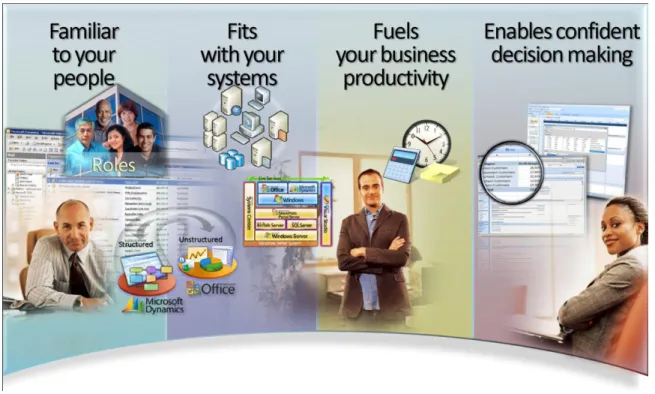
Microsoft Dynamics is a line of integrated, adaptable ERP solutions that enable people to make important business decisions with greater confidence. Microsoft Dynamics works like and with familiar Microsoft software—easing adoption and reducing the risks inherent with implementing a new solution. These solutions automate and streamline financial, customer relationship, and supply chain processes in a way that can help companies and organizations drive business success.
Designed with a focus on people‘s roles throughout a company, Microsoft Dynamics delivers an individualized, RoleTailored user experience that enables employees to easily personalize and automate their tasks based on their own preferences and work style. That means less training and development time, a rapid return on investment, and, most importantly, significant productivity gains throughout the organization. We believe this is the unique value the RoleTailored user experience provides customers.
We can break down ―works like and with‖ into four primary areas or benefits to business owners, their staff and ultimately their business.
7
Do NOT distribute broadly
Familiar to Your People
A Microsoft Dynamics implementation helps to support and enhance the work employees do, and the way they do it. By building on their familiarity with the software they already have, the teams and individuals in a business can be more productive to accomplish their personal and organizational goals.
Fits Your Systems
Microsoft Dynamics works the way most current technology works, and fits easily and seamlessly into existing systems helping organizations maximize the benefits from their existing technology investment. It also offers the opportunity to take advantage of other Microsoft product innovations, including Microsoft SQL Server and Microsoft Windows® Server.
Fuels Business Productivity
Automating business processes is the backbone of Microsoft Dynamics. From financial and accounting processes to supply chain and manufacturing to sales and marketing - automating business processes helps your people concentrate more on productive tasks and less on repetitive tasks. This also helps to reduce the cost and complexity of doing business.
Enables Confident Decision Making
An organization needs to be able to respond quickly to changing conditions. It is people who have to respond to these changes, make informed decisions, and set the business apart from other organizations. Microsoft Dynamics provides access to critical data that can be easily analyzed using familiar tools such as Microsoft Office® Excel®.
2.1 Microsoft Dynamics NAV
Microsoft Dynamics NAV is one of the four ERP products in the Microsoft Dynamics product line. It is a business management solution for midsized companies that help them simplify and streamline specialized business processes, rapidly adapting to their unique way of doing business. Microsoft Dynamics NAV provides relevant, industry-specific functionality, even for the most specialized industries and companies through partner developed solutions. Leveraging the rapid adaptability, simplified customization, and ease of use offered by Microsoft Dynamics NAV, companies can easily add functionality, customized applications, and online business capabilities. In this way, Microsoft Dynamics NAV enables companies to work more effectively and be more
8
Do NOT distribute broadly
2.2 The Microsoft People-Ready Approach – Putting People First People are at the heart of every company—they bring the creativity, passion, hard work and thought leadership that ultimately propel a business forward. The Microsoft People-Ready™ business is based on empowering people with the right tools, information, and opportunities they need to succeed. Microsoft‘s long-term strategy is to raise usability to a higher standard to enable the People-Ready Business. User Experience researchers and designers at Microsoft conduct extensive research into the requirements customers have for business
management solutions. The detail oriented approach includes three practices: Research, the Microsoft Dynamics Customer Model, and RoleTailored Design. The Microsoft Dynamics Customer Model
Microsoft Dynamics User Experience researchers and designers distilled voluminous research results into a framework called the Customer Model—a representation of the people within a typical company, the departments within which they work, and the actual work that they do. Part of the design strategy to enhance productivity in Microsoft Dynamics NAV is based on the Microsoft
9
Do NOT distribute broadly
Figure 2: The Microsoft Dynamics Customer Model describes how people in departments do work within and across organizations. The findings are based on interviews with several thousand people.
RoleTailored Design
RoleTailored design enables people to cut through the clutter, delivering just the information they need, where and when they need it. It offers perspective by providing an overview of the work ahead, so that organizations can plan and prioritize efforts. RoleTailored Design is the cornerstone of business productivity and it‘s a key part of our partner‘s competitive advantage when they build vertical solutions.
10
Do NOT distribute broadly
3. INTRODUCTION TO MICROSOFT DYNAMICS NAV
This section gives an overview of Microsoft Dynamics NAV
Microsoft Dynamics NAV is a leading ERP business management solution that helps people work faster and smarter and gives businesses the flexibility to adapt to new opportunities and growth.With over 1.35 million licensed users, more than 40 localized versions and a global network of 4,000 certified partners, Microsoft Dynamics NAV provides real business value to a growing number of more than 76,000 customers around the globe.
Microsoft Dynamics NAV is designed to be fast to implement, easy to customize and simple to use. Microsoft Dynamics NAV helps enable companies to simplify and streamline their specialized business processes and can be rapidly adapted to the unique way they do business. With Microsoft Dynamics NAV, a company‘s employees are able to work more effectively. These productivity gains and the product‘s rapid time to value help make companies more competitive.
3.1 Market Focus
Microsoft Dynamics NAV is especially suited for midsized companies with unique business processes and a strong need for a flexible, vertically-focused solution1.
Customers rarely require pure horizontal solutions or industry-specific
functionality – they require solutions that are tailored to the vertical or micro-vertical they are operating within. Reaching these micro-verticals through partners is a key part of the Microsoft Dynamics NAV strategy. And, we believe that our partners are the best-suited to deliver these solutions as they have the most knowledge about our customers‘ needs. Enabling partners to create vertical solutions is a key strength of Microsoft Dynamics NAV and we intend to increase our efforts in this area in the future.
A major factor in our vertical strategy includes providing partners with the best application platform for building vertical solutions. And, this means including functionality that provides value to as many partners as possible. We want to provide partners with the appropriate tooling and infrastructure to support development and distribution of verticals.
In addition to enabling our partners to build vertical solutions, we will work towards building partner capacity in a focused way around the Microsoft Dynamics NAV key industries; Manufacturing, Distribution, Professional
1
When we speak about vertically-focused or vertical solutions we mean software solutions that are designed for a particular industry such as distribution, retail or manufacturing – to name just few. Vertical solutions can be even more specialized – and we call these micro-verticals. Micro-vertical solutions use software that is designed for a specific segment within a particular vertical. For example, you can have a vertical solution that targets Food and Beverage industry and a micro-vertical solution that targets Specialty Food Retailing.
11
Do NOT distribute broadly
Services, Retail and Public sector. We will enable our partners to build vertical and micro-vertical solutions that meet the needs of our customers.
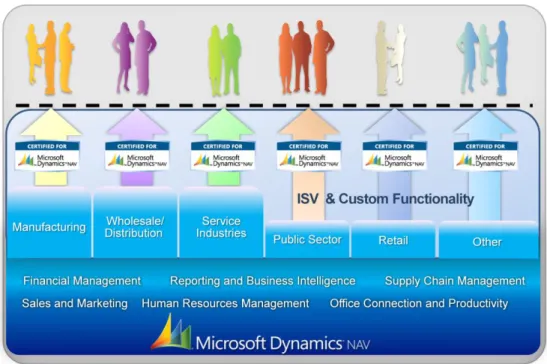
More than 100 solutions have received the Certified for Microsoft Dynamics distinction, which is recognition for solutions that meet Microsoft‘s highest quality standards, and the number is ever increasing. These certified solutions cover the needs of customers in a wide range of verticals from chemical
manufacturing, consumer packaged goods, construction, food and beverage, high tech, industrial equipment, public administration, specialty retail, wholesale and distribution.
Certified for Microsoft provides customers with the confidence that the solution they are investing in meets their unique business needs, tested and seamlessly integrated with Microsoft Dynamics NAV, and used and recommended by other companies like theirs.
With Microsoft Dynamics NAV and partner-developed certified solutions,
customers are able to take advantage of a simple, smart and innovative system that provides the vertical functionality they need with the quality they require.
Figure 3: Certified for Microsoft Dynamics is a certification for packaged business management solutions built on Microsoft Dynamics. The program gives Microsoft partners the opportunity to obtain the highest Microsoft accreditation for partner-developed solutions and thereby offer customers solutions that are independently proven, tested and recommended. Our long-term goal with this program is to offer certified solutions for all major verticals in all regions.
12
Do NOT distribute broadly
We will focus on 5 core industries; Manufacturing, Retail, Distribution,
Professional Services and Public Sector from a go-to-market perspective. From a development perspective, we are taking a slightly different approach to each industry. For Distribution, Professional Services and Manufacturing companies, we will continue to ensure that Microsoft Dynamics NAV provides functionality that addresses the most common business needs within these types of
companies. We will also ensure that our partners can easily build their vertical solutions on Microsoft Dynamics NAV to address these specific needs.
To address specific needs for Retail and Public Sector companies – as well as other industries – we will enable our partners to build their vertical solutions on Microsoft Dynamics NAV.
Please find more information about vertical solutions for Microsoft Dynamics here.
3.2 Microsoft Dynamics NAV Enables Increased Business Productivity Microsoft Dynamics NAV is a comprehensive ERP solution that includes the following application areas: Financial Management, Sales and Marketing,
Manufacturing, Warehouse and Distribution, Jobs and Resources, Reporting and Business Intelligence.
Simplicity, adaptability and ease-of-use are the core values of Microsoft Dynamics NAV; and with each release, we strive to deliver a product that empowers partners and customers to build and grow a successful business through increased business productivity.
An independent study measured how Microsoft Dynamics NAV affects end-user productivity and business performance. This analysis is largely based on
Software Usability Measurement Inventory (SUMI) which defines business productivity as these six factors:
1. Usability – ease of use, user command of application and user enjoyment with software
2. Familiarity – ease of learning, intuitiveness of system, user comfort with application
3. Transactional Efficiency – user effectiveness in executing repetitive tasks, efficiency of user interface, speed and reliability of system2
4. Flexibility – agility in handling unexpected issues, ease of completing infrequent or unusual tasks, system adaptability to business needs
5. Business Insight – ease of comprehensive reporting, real-time access to information, visibility across departments
6. Collaboration – ease of collaboration with colleagues, efficiency of application workflow, ease of communication with suppliers, partners and customers
13
Do NOT distribute broadly
Our development efforts for Microsoft Dynamics NAV will continue to focus on how we can add functionality that will boost business productivity for customers and partners across these six areas.
Figure 4: Microsoft Dynamics NAV
Delivering increased business productivity across six dimensions 3.3 Rapid Time to Value
Another key goal for the Microsoft Dynamics NAV strategy is to provide a solution that gives rapid time to value. This will require that we continue to invest in three scenarios that are described below.
Shorter time to deployment: We will strive to ensure that Microsoft Dynamics NAV continues to be very easy to deploy, configure and learn for our customers.
Even better productivity: We will continue to invest in research into how we can provide even better productivity for our customers by investigating how people work and how their work processes can be improved.
Value of Upgrade: For existing customers we will strive to ensure a
smooth upgrade path through improved upgrade tools and methodologies. Plus, End-users, IT Professionals and Developers can also take advantage of the Microsoft Support Lifecycle policy which provides consistent and predictable guidelines for product support availability when a product releases and
14
Do NOT distribute broadly
throughout that product‘s life. By understanding the product support available, customers are better able to maximize the management of their IT investments and strategically plan for a successful IT future. Microsoft Dynamics products now have a minimum of 10 years of support. This support includes the
15
Do NOT distribute broadly
4. MICROSOFT DYNAMICS NAV 2009
This section provides an overview of the latest Microsoft Dynamics NAV release
Microsoft Dynamics NAV gives companies the flexibility to adapt to new opportunities and growth. It offers a breakthrough user experience and technology innovations that can simplify access to information, improve
organizational agility, streamline integration with a wide range of applications, and enhance reporting capabilities –even for the most highly specialized
industries and companies.
Microsoft Dynamics NAV is a role-specific user-friendly ERP solution with innovative capabilities to help customers and partners boost their productivity and work smarter. It offers:
Personalized Role Centers corresponding to 21 key job functions provide individual employees with tools, alerts and efficiency capabilities tuned to the needs of their particular role within a single screen, while other RoleTailored attributes make employees' jobs easier as their work takes them to other parts of the application. What‘s more, partners can modify existing or add additional Role Centers, and customize and personalize them.
Enhanced reporting and business intelligence (BI) capabilities
based on the Microsoft SQL Server database, enable employees to drill into data, identify trends, generate business insights, and monitor how they‘re tracking against key performance indicators (KPIs).
Web Services allow partners and customers to integrate data and
business logic from Microsoft Dynamics NAV 2009 with other applications to support a wide range of scenarios.
Microsoft Dynamics NAV 2009 offers partners broad opportunities to increase the value and scope of their solutions, while providing customers with
unprecedented advances in productivity – for the individual employee and throughout the company.
Furthermore, Microsoft Dynamics NAV 2009 Service Pack 1 (SP1) delivers enhanced productivity and quality to customers and partners with:
Innovative client extensibility developer capabilities which give
partners a unique opportunity to integrate third-party or custom-built controls and UI parts into the RoleTailored user experience – for existing and new customers
Keyboard shortcut changes that improve navigation and aligned with
Microsoft Windows
Dynamic reporting enhancements that give users more insight into
their data by making it easier to drill through from one report to another report based on a filter. For example, it‘s possible to drill through a pie chart in a report and open a new report filtered on the section clicked in
16
Do NOT distribute broadly
the pie chart. Reporting performance of the server system is also improved.
Filtering improvements such as Advanced Search features that allow customers to search for pages, report views and other items with the Search box, just like in Microsoft Internet Explorer and Microsoft Outlook Data entry enhancements such as the ability to make calculations in
fields, enable single-cell data copying and Excel-like navigation
Connect capabilities that connect users from the Role Center with the Internet to access resources such as product updates, newsgroups, training and other tools that are targeted to their role Additional quality enhancements such as VAT regulatory features for
EU countries and performance plus improved purchase order integration with Jobs
4.1 Database Options for Microsoft Dynamics NAV
Microsoft Dynamics NAV 2009 SP1 contains two database options: The native NAV database and Microsoft SQL Server. The Classic Client works on both
database options whereas the RoleTailored Client requires Microsoft SQL Server. For Microsoft Dynamics NAV ―7‖, Microsoft SQL Server is the only database
platform Microsoft Dynamics NAV will support. Therefore, we strongly urge
17
Do NOT distribute broadly
5. MICROSOFT DYNAMICS NAV ASPIRATIONS
This section provides information about the future development and investment
areas for Microsoft Dynamics NAV
Our overall development goal is to deliver a solution that can help our partners and customers realize their full potential. We work to ensure that Microsoft Dynamics NAV is easy to learn and use, enables customers and partners to work more efficiently, utilizes the latest developments within Microsoft technology, leads the way in ground-breaking user experience and provides rapid time to value.
We summarize this goal as five key values that guide our development activities: Simplicity
Productivity
Continuously take advantage of Microsoft Technology User Experience Leadership
Rapid Time-to-Value
Microsoft Dynamics NAV continues to provide customers and partners with a strong platform on which to increase productivity and drive business success. We are committed to supporting the investments that customers and partners make in Microsoft Dynamics NAV by improving the product even more – through ongoing innovation, an even better understanding of the challenges and needs of customers and partners and a continuing focus on the six dimensions of business productivity: Usability, Familiarity, Transactional Efficiency, Flexibility, Business Insight and Collaboration.
5.1 COMPELLING BUSINESS APPLICATION
Our aim continues to be to deliver a comprehensive application that supports the most common business scenarios on which partners can build their solutions and meet the needs of customers. Solutions include customer-specific customization as well as vertical solutions built for multiple customers or segments of
customers. To help our partners build and maintain a successful business, we will strive to limit the need for similar and recurring customizations and thereby help minimize the amount of time partners spend on each installation. Therefore, delivering a comprehensive and innovative application for partners to build on is an overriding goal of our development efforts.
A compelling business application is a key factor in helping customers and partners build and grow a successful business with Microsoft Dynamics NAV. Therefore, we plan to focus on creating even more relevant and compelling core
18
Do NOT distribute broadly
business functionality and further develop the application to support current and emerging regulatory requirements in the key industries where we are present. As part of this work, we aim to include enhancements in the application that make it easier for our partners to build solutions on Microsoft Dynamics NAV. We want to enable partners to address vertical business needs in an easier and more effective way – based on the application that Microsoft delivers. We will support the most common and core business scenarios in our key focus
industries out of the box, while delivering a richer application that is even more relevant for partners building solutions.
To ensure a compelling business application in Microsoft Dynamics NAV, our development initiatives will focus on the following core application areas: 5.1.1 Financial Management
The origins of the Microsoft Dynamics NAV value proposition are deeply rooted in providing midsized companies with the accounting and financial management capabilities they need to drive a successful business. Today, Microsoft Dynamics NAV offers comprehensive financial management functionality that gives
companies a flexible and easy way to control and gain insight into the financial status of their business. As we look ahead, Financial Management will continue to be a core area for Microsoft Dynamics NAV. We aim to focus even more on providing the features and functionality that can help companies improve productivity through more control of their financial business processes. This includes providing increased insight and visibility into financial data and information to ensure compliance with legal and regulatory requirements by improving the processes of reporting and recording data and information to governmental authorities.
One area we plan to address is environmental management accounting.
Companies are facing increasing pressure from supply chain, regulatory agencies and other stakeholders to record, register and report environment-related
information and data. Our goal is to ensure we have a solid foundation on which to build and deliver environmental management accounting and compliance capabilities in the future.
Other initiatives where we plan to focus our development efforts include electronic payments and electronic invoicing. We want to continue to enable customers to streamline activities with their business partners and customers through improved connectivity and collaboration.
We are looking to improve the functionality within Receivables and Payables to deliver improved business processes that help end-users stay productive.
For Fixed Assets and Intercompany Postings, we plan to keep the existing scope of functionality and deliver enhancements that support emerging legal
requirements.
Features which are compliant with global standards, such as IFRS/IAS and local GAAPs and legal requirements, will continue to be part of Financial Management in Microsoft Dynamics NAV.
19
Do NOT distribute broadly
There are also several initiatives we have identified within Financial Management where we can focus our development efforts to help partners increase
productivity. As much of the financial management functionality in Microsoft Dynamics NAV today is country-specific, we will work to consolidate the most compelling country-specific features and functionality into the global version of the product. This will help reduce the number of resources partners must use to customize and implement their own solutions.
5.1.2 Sales and Marketing Management and Microsoft Dynamics CRM Connector
Microsoft Dynamics NAV provides flexible alternatives for customers requiring CRM capabilities. The built-in Sales and Marketing modules in Microsoft
Dynamics NAV deliver a powerful solution for customers who need CRM
capabilities that are fully integrated with Microsoft Dynamics NAV. What‘s more, the built-in Sales and Marketing modules have strong integration with Microsoft Office, including Microsoft Outlook.
In addition, customers can also benefit from Microsoft Dynamics CRM via integration through third-party CRM connectors. As part of our goal to help partners expand their business through verticals, Microsoft plans to release a connector between Microsoft Dynamics NAV and Microsoft Dynamics CRM in Microsoft Dynamics NAV ―7‖. The connector that Microsoft will provide will enable the most common integration scenarios. We expect that partners will extend the connector solution to include additional integration scenarios that are specific for vertical needs.
In addition to this connector, partners and customers will continue to benefit from the integrated CRM modules in Microsoft Dynamics NAV consisting of Sales & Marketing and Service Management. As we move forward, we will continue to track market requirements and demands and further develop the application to meet these needs.
5.1.3 Service Management
As companies face higher costs, increasing competition from global markets and an uncertain economic environment, the ability to retain existing customers has become even more important in realizing business success. Providing efficient service management is crucial to developing long-term customer relationships and generating repeat customer business.
Our long-term development goal for Service Management is to deliver functionality that will more comprehensively support customers providing professional services. To prepare for this, we plan to focus our efforts on strengthening Service Management by improving integration and aligning resources across the application. This includes closer integration with other application areas such as Jobs, Resource Management, Warehouse, Distribution and Microsoft Dynamics CRM, via a connector.
20
Do NOT distribute broadly
Closer integration can provide customers with significant productivity benefits as they will have better insight into and management of the resources across their business, such as maintaining attendance records, tasks and calendars in a simple way and having more insight into the allocation of resources. In addition, we are planning to enhance Service Management with robust features that will improve the productivity of service employees by enabling faster and easier access to service information directly from the system. These are just a few examples of how we plan to enhance the Service Management area by improving integration and aligning resources across the application.
5.1.4 Manufacturing
Our goals for Manufacturing include providing the best possible foundation for supporting manufacturing, with full integration to the rest of the Microsoft Dynamics NAV application. The solution already includes functionality for supporting the entire manufacturing process – from the planning of material needs to the shipping of the finished goods to the customer. This functionality also serves as a solid foundation for creating more specific partner-developed solutions within the manufacturing area.
A key investment area will be Manufacturing Management and Production Planning, including production planning overview, tracking and analyzing of plans, prioritization and subcontracting. To support the industry trend of increased use of subcontractors during production, our aim is a solution that handles the entire scenario of sending items to a single subcontractor or
between multiple subcontractors, as well as receiving these modified items from subcontractors. All scenarios include cost and warehouse handling.
In addition, we will invest in providing full integration of manufacturing
capacities with other resources in Microsoft Dynamics NAV, such as Projects in the Jobs module. This will ensure a strong uniform platform for partners to utilize all the Microsoft Dynamics NAV resources even more. Furthermore, this will increase overview and agility, for example, by having one calendar for all resources. With this investment, we move closer to the next goal of better support of project-based manufacturing.
Another investment area - that will benefit manufacturing and other application areas - is increased client extensibility and visualization capabilities for the RoleTailored client. It will be even easier for partners to make, deploy, and install specialized controls that can integrate business data visualizations into Microsoft Dynamics NAV. Partners can enrich their solutions with new and easier ways to present data. This can be useful in creating customized graphical
overviews with capacity load and the possibility for resource reassignment and leveling.
21
Do NOT distribute broadly
5.1.5 Warehouse and Distribution
In the Warehouse and Distribution area, our goal is to have visibility and flexibility to ensure productivity and sound decision-making for companies requiring Supply Chain Management within Microsoft Dynamics NAV. For companies, visibility into internal processes is paramount for effective
operations. What is the availability of the items depending on time, location, and reservation? Are all the processes in place to value the inventory - from cycle counting to cost adjustment – in an easy way? These are just two of the important questions in the warehouse and distribution world, and Microsoft Dynamics NAV will continue to excel in this area. Successful companies are able to ―open-up‖ their operations both downstream and upstream; Microsoft
Dynamics NAV will support this visibility and facilitate this by adding collaboration functionality. These areas could be:
Enhanced Forecasting and collaboration-driven procurement – the collaboration with both customer and supplier must be seamless supporting fulfillment or procurement agreements.
Optimizing the logistics – in addition to the existing Warehouse
Management System (WMS) functionality, Microsoft Dynamics NAV must include all necessary features such as scheduling of shipments, packing list, transportation agreements to minimize costs related to logistics. The solution must allow best-of-breed Transportation Management System (TMS) to integrate with Microsoft Dynamics NAV to leverage the existing expertise of the transportation sector.
Increased focus on environmental sustainability which will result in specific features that support reverse logistics or the ability to collect activity-related data that are relevant for environmental reports or compliance requirements.
5.1.6 Jobs and Project Management
Our goal for Jobs and Project Management is to provide the best possible foundation for project-based delivery of customer-specific services and goods based on orders, contracts or schedules. The intention is to provide a solution that includes project accounting and project management capabilities to support the entire lifecycle or a project from lead-to-cash.
Our aim is to create a fully connected project management solution. Microsoft Dynamics NAV currently has a direct connection with resource management and the financial processes, but the real productivity gains and competitive
advantages will come when all various activates in the lead-to-cash processes are connected. Therefore, our vision is to create a connected platform for industries and verticals where manufacturing requires integrated project-based delivery and after-sales service. This means we plan to focus on streamlining the processes between Supply Chain Management, Sales and Marketing and Service Management.
22
Do NOT distribute broadly
5.1.7 Resource Management
Resource Management is about assigning the right resource with the right skills to the right activity at the right time. Our goal is to have consistent usage of Resources throughout the application by establishing one common concept for capacity, availability and absence. The idea is to combine Manufacturing‘s
capacity solution with the Resource Management solution into one strong holistic platform for Resource Management.
In the coming releases, we also plan to focus on a gradual implementation of forecasting of required resources and integration of scheduling processes as well as the two core aspects of demand-orientation and optimization.
Other investments will include enhancing the user interface, improving integration with Microsoft Outlook and purchasing.
5.1.8 Microsoft Dynamics NAV Business Intelligence (BI) and Reporting The Microsoft vision for BI is to help drive businesses to better performance by empowering all employees throughout the company to make better decisions. Microsoft plans to achieve this vision by providing cross-product integration, delivering business intelligence capabilities within Microsoft Office and making its business intelligence offerings scalable so that everyone in the company is
empowered with business intelligence tools. Whether they are working on the strategic, the tactical, or the operational level, Microsoft Business Intelligence applications are designed to help make more informed decisions a natural part of the daily work experience for all employees.
Microsoft Dynamics NAV provides flexible business intelligence capabilities and a growth path that helps to reinforce and leverage our customers‘ existing
investments. Going forward, our development efforts will include a continued focus on delivering a comprehensive and integrated business intelligence solution that is scalable and sustainable to the company, with widespread
delivery of insight to the right people, at the right time and in the right format as our primary goal.
To realize this goal, we plan to empower Information Workers by delivering the data and information they need – whether they have simple or advanced
Business Intelligence needs – in a role-tailored and customizable way through Microsoft Dynamics NAV, reports and Microsoft Office applications. Our
objectives include:
Help enable more users to make the most of their data and information with self-service BI and Reporting capabilities rather than IT-department managed data and tools
Provide even faster access to data, information and reports directly from the Role Centers
Use tools and applications that are familiar and easy to use from day one, such as Microsoft Office Excel and Microsoft SharePoint.
23
Do NOT distribute broadly
In addition, we will continue to build a strong data foundation for Microsoft BI tools and solutions so companies can gain insight from their data out-of-the-box. Our goal is to build on the flexibility and comprehensive BI capabilities already available in Microsoft Dynamics NAV to enable companies to start small and build their BI capabilities as their business grows and their BI needs change. We are making ongoing investments in cross product integration to the relevant tools within the Microsoft BI stack, including Microsoft Office applications like Microsoft Office Excel 2010, Microsoft SharePoint 2010 and Microsoft SQL Server and PowerPivot for Microsoft Office Excel 2010. Cross-product integration to the Microsoft BI stack makes it possible for users to get more out of the data in their Microsoft Dynamics NAV solution. For example, PowerPivot for Microsoft Office Excel 2010 provides an end-to-end approach for creating data-driven, user-managed business intelligence solutions in Excel workbooks. Users are able to build relationships between vast amounts of data from different sources, such as Microsoft Dynamics NAV, and present the data or store it in Excel more easily. Among our plans for reporting is utilizing the benefits of Microsoft SQL Reporting technology in Microsoft SQL Server Reporting Services. Our focus will be on making it easier for users to create and display reports, Key Performance
Indicators, charts and other data and information in a more advanced way from the RoleTailored Client. Finally, we are committed to empowering users by making it even easier for them to customize the reports they need to enhance productivity and insight across the company.
Should additional Business Intelligence capabilities be required, we recommend that our customers consider the many Microsoft Dynamics NAV
partner-developed solutions which are available. 5.1.9 Workflow
Workflow, as part of an ERP solution, is one way to help ensure control while enabling flexible and consistent business processes and improving productivity. Workflow helps ensure that all tasks, activities and approvals occur in the correct sequence and in a controlled way – according to a set of rules and approvals that the company defines to suit their specific needs and requirements. Today, Microsoft Dynamics NAV provides some workflow capabilities with
Document Approval and business process alerts from the Role Center. In coming releases, closer integration with Microsoft SharePoint will enable partners to set up orchestration of processes. In addition, our vision for Workflow in Microsoft Dynamics NAV is to make it easier for companies to automate and streamline business processes so employees focus on the right tasks and work productively. Our goal is to build a Workflow engine that will enable power users to create, customize and configure individual workflows so companies are better able to adapt their processes quickly and consistently. And, as part of this, we are evaluating Windows Workflow Foundation (WWF).
24
Do NOT distribute broadly
As in several other areas, we recommend to all our customers that if you require wide-ranging workflow capabilities, please consider the many Microsoft
Dynamics NAV partner-developed solutions which are available. These are ideal solutions as we work to provide a broader platform for our partners to build even better workflow capabilities.
Some of our customers are currently using the Business Notification feature in Microsoft Dynamics NAV to support their workflow needs. The Business
Notification feature is dependent upon certain functionality in Microsoft SQL Server. This functionality has been removed from Microsoft SQL Server 2008. Therefore, the existing Business Notification functionality in Microsoft Dynamics NAV will no longer be available. Current customers should consider this when upgrading to Microsoft Dynamics NAV 2009, as it will not be available.
5.1.10 Certified for Microsoft Dynamics NAV Partner-Developed Solutions
There are over 120 partner-developed Microsoft Dynamics NAV solutions in the market today available through the Certified for Microsoft Dynamics Program. These solutions offer customers specific regional or industry-specific functionality that may not be available in the global version of the product. The Certified for Microsoft Dynamics logo helps you clearly distinguish packaged software
solutions delivered by Microsoft partners which have met Microsoft‘s highest standard for partner developed software solutions. The logo indicates that these solutions are:
• Locally enriched
• Compatibility-tested
• Customer-trusted
The close reach of our Microsoft partners to the market and their unique area of expertise allow them to tailor their specific solutions to the needs of their
customers. Our overall development strategy going forward is to continue to provide a broad horizontal platform on which partners can build compelling vertical solutions and provide them with the tools and resources they need to build and maintain a successful business.
25
Do NOT distribute broadly
5.2 MORE USERS MORE PRODUCTIVE
At Microsoft, we believe that the key to helping businesses become more agile and productive in the global economy is to empower individual workers – giving them tools that improve efficiency and enable them to focus on the highest-value work. Further development of Microsoft Dynamics NAV will include extending the capabilities of Microsoft Dynamics NAV to more users inside the company. We want to enable scenarios for those users who, in the past, may not have been typical users of the capabilities of Microsoft Dynamics NAV; but, in the future, will be able to realize productivity gains through Microsoft Dynamics NAV. The way we will extend Microsoft Dynamics NAV to more users within a company is by focusing on the following areas:
5.2.1 RoleTailored User Experience
The RoleTailored user experience in Microsoft Dynamics NAV represents a significant development and major breakthrough in usability and improved user productivity. The design promotes the actions and information that you need to do your job, leaving you with an uncluttered window and an overview of
upcoming tasks – helping you prioritize your tasks, and keeping your work productive, stimulating and fun. The RoleTailored User Experience empowers people to work smarter and more effectively so businesses can boost
productivity and maximize their effectiveness in driving business impact. As we continue to invest in improving and extending the RoleTailored user experience in Microsoft Dynamics NAV, we can already document significant results with the RoleTailored user experience in empowering employees to be more productive more quickly.
Comparative benchmark studies show that when using Microsoft Dynamics NAV 2009 novice users will experience a significant decrease in learning time and are more successful in completing tasks. Employees with little or no experience with Microsoft Dynamics NAV can quickly start using the program often with minimal or even no training, meaning that companies can save considerably on training costs. Plus, the high degree of familiarity with Microsoft Office products makes navigation easier and faster. Users are able to find the information they need to do their work faster. Power users as well as new or infrequent users of Microsoft Dynamics NAV are able to work with greater efficiency, confidence and
satisfaction, making the RoleTailored user experience a key factor in boosting user and business productivity.
Microsoft is committed to delivering business applications that people love using, and we intend to make Microsoft Dynamics NAV even more easy and enjoyable to learn and use. In this connection, we have over 200 customer case studies that demonstrate how customers are using Microsoft Dynamics NAV today.
26
Do NOT distribute broadly
5.2.2 Extending the Value of Microsoft Dynamics NAV to More Users
A major goal for the future development of Microsoft Dynamics NAV is to extend the use of Microsoft Dynamics NAV data and functionality across the company so more users, including occasional users, can benefit. Closer interoperability with Microsoft Office SharePoint will help us do that.
Microsoft Office SharePoint interoperability is a crucial part of the Microsoft Dynamics NAV development strategy.We are working to deliver an integration framework that takes advantage of the business productivity benefits in
Microsoft SharePoint – such as increased collaboration, search and workflows – with the rich data and innovative functionality in Microsoft Dynamics NAV. The integration framework will make it possible for businesses to leverage the productivity benefits inherent in Microsoft Dynamics NAV and Microsoft
SharePoint by enabling new occasional user scenarios such as time registration, purchase requisitioning and expense management.
In addition, the integration framework will help provide more business
opportunities for partners by making it easier for them to build and provide their own integration scenarios such as portal Internet applications, internal remote access scenarios and more integration of Microsoft Dynamics NAV to Microsoft SharePoint functionality.
5.2.3 User Assistance in Help
User assistance provides information to help a person to interact with software. This can include describing the user interface, but also focuses on how to help the user to best apply the software capabilities to their needs. User assistance can be considered a component of the broader category of user experience. And a key goal for helping partners and customers increase productivity is to make it easier to obtain guidance and help by providing intuitive, comprehensive and task-focused content for User Assistance.
For customers, our goal is to make it as easy for customers to collaboratively extend context-aware Help as it is to write a Microsoft Word document, or create an HTML file, or a Microsoft SharePoint page, or contribute to a wiki. To realize this, we have planned the following initiatives that will benefit customers: A dynamic Help system that works on a variety of clients that will enable
partners and customers to extend Help to match each customized solution. We want to ensure that updates to Microsoft-provided Help do not overwrite partner- or customer-provided Help.
Empower customers to customize Help to reflect their company processes and workflow. Partners and customers will be able to add instructional videos to their Help experience. Together these will empower users to define the assistance they need for their tasks in their individual companies.
For partners, we will improve User Assistance to support scenario-based help, improved connectivity and reduced costs by:
27
Do NOT distribute broadly
Transitioning the Developer and IT Pro documentation to scenario-based Help, with walkthroughs, that maximizes partner productivity, and delivers it online.
Enabling partners to get the latest Help online.
Integrating context-aware Help and improving F1 within the development environment: from within the code editor, object designers, and developer role center.
Supporting Microsoft Visual Studio® scenarios by integrating Help with
Microsoft Visual Studio as appropriate.
Eliminating compiled Help files as the delivery format for Help to reduce the cost to implement custom Help.
Providing mechanisms for partners to extend Microsoft Dynamics NAV Help at a low cost, by integrating Help authoring into the Microsoft Dynamics NAV development process, and by using Microsoft Word, HTML, and Microsoft SharePoint. And, we will make it easy for partners to extend Help with content on a partner Website.
5.3 SOFTWARE-PLUS-SERVICES
Our vision for the next generation of enterprise computing is ―Software-plus-Services.‖ As its name suggests, this deployment strategy has two components. These, when combined, provide outstanding benefits for today‘s companies. The first component is software that can be deployed in one of two ways: either on-premise or hosted in a public cloud by Microsoft Dynamics hosting partners around the globe (commonly referred to as software-as-a-service (SaaS)). The second component is online services, which includes new offerings around payments, commerce, and, in the future, sites through our recently announced Windows Azure™ platform.
5.3.1 BETTER ENABLEMENT OF PARTNER-HOSTED MICROSOFT DYNAMICS NAV
Today, customers and partners are already hosting Microsoft Dynamics NAV. There are several approaches to hosting:
Unmanaged data center services or co-location: This is where a customer contracts with a data center provider, for example a telecommunications company or a dedicated data center service company for rack space. The data center provider will simply provide the data center space and a network connection to the facility and physical site maintenance. This means that the IT department of a company will be the one that places the servers into the data center and will remotely manage these machines.
Managed data center services: This is where the customer will contract with a data center provider to provide rack space for service and provide some server and operational management of the machines. The IT department of a
28
Do NOT distribute broadly
company will still manage the application and software installed on the machines or some hybrid of this depending on what is negotiated between the two companies.
Application Services Providers: In this situation, a specific application or service is provided by the data center company. There could be a negotiation between the two partners on the degree of management that is shared
between a company‗s IT department and the company providing the application in the data center.
A company will assess its skills and needs, depending on the state of their business. With Microsoft Dynamics NAV 2009, a customer has the ―Power of Choice‖ to run their solution hosted or on-premise and change if their business needs require so. A customer can also leverage combinations of in-house mixed with hosted applications, depending on their circumstances.
That choice extends to the licensing models, too. Today, we offer Microsoft Dynamics NAV under the traditional perpetual licensing models and under the Service Provider Licensing Agreement (SPLA). Partners can use this to offer customers a subscription-based access to the business application. We will continue to enhance the features and technical capabilities in Microsoft Dynamics NAV that help partners and customers who are hosting Microsoft Dynamics NAV in remote data centers.
5.3.2 ONLINE SERVICES
Online services for Microsoft Dynamics ERP are new Internet-enabled payment and commerce offerings that work together with Microsoft Dynamics ERP to help organizations extend the functionality of their Microsoft Dynamics ERP system. Online services are managed by Microsoft experts in our secure data centers. This helps alleviate IT departments from having to worry about behind-the-scenes tasks or hiring outside specialists. The services are easy to deploy, enabling organizations to concentrate on running their business, not running their software. These offerings help customers incrementally move to a model where particular business processes are supported by online services.
With Microsoft Dynamics NAV 2009 SP1 we released the first service, Connect for Microsoft Dynamics ERP. This service provides rapid access to powerful information companies can use to maximize the effectiveness of their Microsoft Dynamics solution. With Connect, employees can access community-driven knowledge, best practices, training, and updates tailored to their specific role directly from their Microsoft Dynamics ERP application. Other online services could include Payment whereby companies can accept credit and debit transactions as they ring up sales right in their ERP solution.
29
Do NOT distribute broadly
5.4 HOW WE TAKE ADVANTAGE OF MICROSOFT TECHNOLOGY Microsoft Dynamics NAV enables companies and partners to utilize their investments in Microsoft technology. Our strategy is to continue to look for services and functionality provided by the .NET Framework, Microsoft Windows, Microsoft SQL Server, Microsoft BizTalk® Server, Microsoft SharePoint, Microsoft
Office, Microsoft Dynamics CRM and other emerging technologies that can create synergies and enhance the capabilities of Microsoft Dynamics NAV – focusing on business productivity and optimizing the business processes of Microsoft
Dynamics NAV customers.
We continue our strong focus on Microsoft SharePoint technologies. Examples of this include the work that was carried out in Microsoft Dynamics NAV 2009 utilizing the current Microsoft SharePoint technology, such as using Business Data Catalogue and Web services. Upcoming Microsoft SharePoint technologies like Business Connectivity Services will make it easier for partners to build portal solutions based on Microsoft SharePoint.
With the new Microsoft SharePoint 2010 and Microsoft SharePoint Foundation, we will enable our customers to take full advantage of Microsoft Dynamics NAV and Microsoft SharePoint technology by delivering the Microsoft Dynamics NAV SharePoint Integration Framework.
We intend to focus on delivering a framework that covers new scenarios for optimizing business processes, improved collaboration, business intelligence, search and workflows and the ability to utilize the strengths of the structured Microsoft Dynamics NAV data, extending the value of Microsoft Dynamics NAV to more users across the company.
Another key goal for Microsoft Dynamics NAV is to make sure that we take full advantage of all Microsoft SQL Server and Windows Server®. This means that we
expect to support each new release ofMicrosoft SQL Server and Windows Server within 3 months following their general availability.
Microsoft Dynamics NAV 2009 SP1 and Microsoft Dynamics NAV 5.0 SP1 are compatible with Microsoft Windows 7 and Windows Server 2008. Furthermore, Microsoft Dynamics NAV 2009 SP1 is certified with the Microsoft Windows 7 logo.
30
Do NOT distribute broadly
5.5 INCREASED PARTNER PRODUCTIVITY
Increasing partner productivity even more is a major goal for Microsoft
Dynamics NAV, and delivering an efficient technology platform is a key element in helping us to achieve this goal.
A large part of the success of Microsoft Dynamics NAV is due to the integrated development environment (C/SIDE), which is proven to be fast to learn and simple to use. C/SIDE is perceived as a secure and reliable environment providing the right framework to allow partners to focus on the business pain they are trying to address instead of focusing on IT resources management. Therefore, in delivering a new technology platform, we want to continue to maintain a simple and easy development experience, and thereby continue to offer a great developer experience for existing and future partners with business domain expertise as opposed to deep technology knowledge.
We see the transition to the new technology platform as a three-step process which starts with Microsoft Dynamics NAV 2009 SP1 and concludes with Microsoft Dynamics NAV ―8‖. With Microsoft Dynamics NAV ―8‖, we expect to deliver a complete role-based developer experience that will make it even easier and faster for partners to develop their solutions and customizations. As we will have moved our development, administration and management tools into the RoleTailored client with Microsoft Dynamics NAV ―8‖, there will no longer be a need for the Classic Client. Therefore, the Classic Client will be discontinued with Microsoft Dynamics NAV ―8‖.
Instead of a ―big bang‖ approach, we have chosen to build a bridge to the new technology platform to make it easier for partners and ensure that their
investments in one release are secure in subsequent releases. For this approach to be successful, it is essential that partners upgrade their solutions to the most current releases to be ready for the upcoming versions. In other words, to take advantage of the investments we are making in Microsoft Dynamics NAV ―7‖, it is crucial that partners have upgraded their solutions to Microsoft Dynamics NAV 2009 and the RoleTailored client as soon as possible. This will reduce the future upgrade burden significantly and allow partners to take advantage of new innovations quickly while giving them a head start on the competition.
31
Do NOT distribute broadly
Figure 5: The new technology platform means big productivity gains for partners. The transition to the new technology platform is a three-step process from Microsoft Dynamics NAV 2009 SP1 to Microsoft Dynamics NAV “8”. This approach helps make it easier for partners to move to the new technology platform and protects their investments.
DYNAMICS NAV 2009 •3-Tier
•RoleTailored Client •Web Services (expose) •SQL Reporting Services
DYNAMICS NAV ”7” •RoleTailored administration tools •RoleTailored debugger
•Improved page designer •Improved reporting •.NET interop
•Web Services (consume)
DYNAMICS NAV ”8” •RoleTailored developer
experience
•Additional RoleTailored development tools •Runtime in managed code
32
Do NOT distribute broadly
6. PRODUCT DEVELOPMENT ROADMAP
This section provides a detailed overview of the next 4 releases
The Microsoft Dynamics NAV Roadmap illustrated below covers our current product plans from 2010 through 2017. In the following sections you will find detailed information about our plans for each release.
RoleTailored User Experience Web Services New Reporting Functionality New Architecture Application enhancement SharePoint User Client Richness and Visualizations Improved Reporting Office 2010 Attached Services Compelling Business Functionality More Users, More Productive More Software + Services RoleTailored .NET Programming Environment w/in NAV Full .NET Runtime
Continued innovation targeted at mid-market with particular focus on:
Simplicity Productivity Dynamics User Experience Leadership Microsoft technology Time-to-Value MAJOR RELEASES Additional SP’s RTM NAV 2009 SP1 RTM NAV 5.0 SP1 RTM
SERVICE PACKS/MINOR RELEASES
Additional SP’s RTM Additional SP’s RTM
Figure 6: Microsoft Dynamics NAV Roadmap 2009-2017
6.1 MICROSOFT DYNAMICS NAV 2009 SERVICE PACK 2 IN 2010-2011 The planned Microsoft Dynamics NAV 2009 SP2 will consist of a hot-fix rollup and other minor enhancements which address issues arising since Microsoft Dynamics NAV 2009 SP1.
6.2 MICROSOFT DYNAMICS NAV”7” 2011-2012
Our goal for this release is to ensure that Microsoft Dynamics NAV continues to deliver industry-leading business productivity benefits for midmarket companies by providing a flexible, adaptable platform on which partners can build vertical solutions to meet the unique needs of their customers.
33
Do NOT distribute broadly
Compelling application functionality to enable even more productivity improvements for our customers as well as providing a stronger application on which partners can build their solutions and grow their business
Improving partner productivity by building on a role-based developer experience, enabling easier deployment, configuration and installation and ensuring that partners spend less time on horizontal customizations
Extending the value of Microsoft Dynamics NAV throughout the
organization by making more users more productive, including occasional users of Dynamics NAV
Reducing the time to value by making it even easier for customers to learn and use their solutions and less time for partners to customize and deploy solutions
Helping to enable new business opportunities for partners and customers through Software-plus-Services and other enhancements
6.2.1 Compelling Application Functionality
The following enhancements in Microsoft Dynamics NAV ‖7‖ focus on improving functionality in existing areas to improve customer productivity while supporting partner industry enablement.
Consolidation of application functionality
Microsoft Dynamics NAV contains over 40 local versions and many of these versions contain key functionality that is country, region or industry-specific. Some of this local functionality actually addresses global requirements, and the unclear line between local and global functionality slows down implementation for customers that require implementations in several countries and slows down partner investment in creating solutions that can be extended and reused in multiple countries. Therefore, we intend to consolidate this functionality and make it available in the global version of the product. In doing so, we can
provide more customers with more key features and help partners by decreasing the time and resources they spend on customizing and implementing their own solutions.
Some of this functionality includes:
Kitting – which is a process where separate but related items are grouped, packaged and supplied together as one new unit or item either as kit-to-stock or kit-to-order.
Cost accounting – Basic cost accounting to structure the cost center hierarchy/chart of accounts, distribute costs, and integrate with G/L and budgets
34
Do NOT distribute broadly
VAT enhancements + EU Reporting to comply with regulations and to make VAT/Sales Tax reporting easier
Financial Management
Helping companies to improve processes and streamline activities with business partners is a key priority for Financial Management in Microsoft Dynamics NAV ‖7‖. Planned functionality enhancements are:
Support for electronic-payments in the form of file-format handling and creating and sending e-payment files
Improved bank reconciliation functionality with the ability to import and store bank statements, and automatically reconcile the statements with Dynamics NAV bank ledger entries
Multiple interest rates whereby users will be able to set up and apply multiple interest rates in different periods
Improved posting descriptions that will allow users to add customized posting descriptions
Sales and Marketing Management
The Sales and Marketing Management modules in Microsoft Dynamics NAV provide customers with the tools they need to build and maintain successful customer relationships. We plan to provide more integrated functionality to help customers with large, mobile sales forces that need off-line capabilities. To do this, we plan to deliver a connector to Microsoft Dynamics CRM. The connector that Microsoft will provide will enable the most common integration scenarios. We expect that partners will extend the connector solution to include additional integration scenarios that are specific for vertical needs.
Service Management
Our overall goal for Microsoft Dynamics NAV ‖7‖ is to strengthen Service Management by improving integration and aligning resources across the
application. This includes closer integration with other application areas such as Jobs, Resource Management, Warehouse and Distribution as well as Microsoft Dynamics CRM, via a connector. Plans to enhance Service Management include:
Ability to simplify common tasks and provide a way to build service history for Service Items
Support for more flexible customer invoicing and visibility into projected revenue from Contracts
Enable effective management of resource allocation and employee capacity in Jobs and Services
Support the return of items for Services Manufacturing