Configuring the Redundancy Feature in a Spectralink IP-DECT Server 6500
Page | 1
Configuring the Redundancy Feature in
a Spectralink IP-DECT Server 6500
Introduction
Introduction
Introduction
Introduction
The redundancy feature of the Spectralink IP-DECT Server 6500 solution allows adding a backup server to the system, offering both better availability and better performance due to load balancing. By adding a backup server, the most critical failure point of the system is eliminated, allowing the system to continue running and provide service to the users, even in the event that a server fails. Any active calls or sessions handled by the failed component will however be lost.
The redundancy feature is designed to be as non-intrusive as possible. Except for a few simple redundancy options, configuration and administration of a redundant solution is not different from a single server solution. All configurations are executed on the master, and everything is presented in the same familiar menus. Configuration data and statistics are automatically propagated between all the SPECTRALINK IP-DECT Server 6500 entities, e.g. base stations, media resource and server.
This application note describes how to design, configure and administer a redundant SPECTRALINK IP-DECT Server 6500 solution including a master and a backup server. Note: Please note that if a third party application is connected to the SPECTRALINK
IP-DECT Server 6500, e.g. a messaging application or a nurse call application, this application must connect to the master SPECTRALINK IP-DECT Server 6500. In case of a failure in the master server, the application will not be able to communicate with the handsets unless the application is designed for redundancy. This is further described in the XML-RPC SDK document available upon request. Please send an email to [email protected].
Firmware Compatibility
It is required that the backup SPECTRALINK IP-DECT Server has the same firmware revision and licensed features as the master SPECTRALINK IP-DECT Server to be able to connect to the master. In case a backup tries to connect with a different firmware version or other licensed features than the master, an error message will be logged and the backup will be rejected.
For latest SW available, please go to www.support.spectralink.com
Design
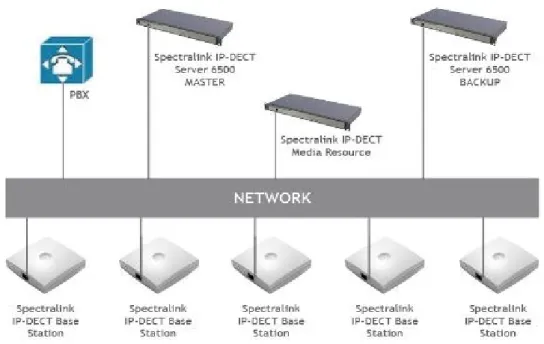
Designing a redundant SPECTRALINK IP-DECT Server 6500 solution is very similar to designing any other redundant network service. In a redundant SPECTRALINK IP-DECT Server 6500 solution, the servers should be connected to separate switches, power groups etc. Figure 1 illustrates an example design of a redundant SPECTRALINK IP-DECT Version 4.0 l January 2015 l 14205401
Server 6500 solution including a master SPECTRALINK IP-DECT Server 6500 and a redundant backup SPECTRALINK IP-DECT Server
Figure 1 – Redundancy Setup for SPECTRALINK IP-DECT Server 6500
How This Works
The redundancy feature works as a two-step function, adding the redundancy feature and the load balancing feature to the system. All users will be split up in two sections: a 50% of the users will be registered on the master SPECTRALINK IP-DECT Server 6500 and 50% of the users on the backup server. This is indicated on the user interface in the right hand side under NODE by an M for master server and an S for backup server (see picture below):
The users will not always be on the same system; after a reboot of the SPECTRALINK IP-DECT Servers some of the users can have changed servers, there is no option to connect a specific user to a specific server, this is done randomly by the system.
This is also the reason why both servers need to have the same licenses installed, because both servers are acting as the same server with one configuration and the backup server is a load balancing server combined with the redundancy feature.
Also note that when a failure is discovered by the system, users, base stations and media resources are switched automatically to the “new” server.
Configuration
In order to enable the redundancy features, a license code with the proper permissions must be installed on both the master and the backup SPECTRALINK IP-DECT Server 6500. Be aware that if a license is installed on the master SPECTRALINK IP-DECT Server 6500, a corresponding license must be installed on the backup SPECTRALINK IP-DECT Server 6500. For example, if a 500 user license is installed on the master, a 500 user license must be installed on the backup as well.
• License required on the master:
14075250 – Software license for master SPECTRALINK IP-DECT Server 6500 redundancy.
When ordering this license, please inform about the ARI code of the SPECTRALINK IP-DECT Server 6500 selected as master.
• License required on the backup:
14075260 – Software license for backup SPECTRALINK IP-DECT Server 6500 redundancy.
When ordering this license, please inform about the ARI code of the SPECTRALINK IP-DECT Server 6500 selected as backup.
Note:Please note that the software license for the backup SPECTRALINK IP-DECT Server redundancy contains an ARI change license (also known as ARI swap license), meaning that the SPECTRALINK IP-DECT Server 6500 redundant solution only refers to the ARI code of the master SPECTRALINK IP-DECT Server 6500, and not the ARI code of the backup SPECTRALINK IP-DECT Server 6500. For more information, please see section Administration Scenarios.
Configuration of the redundancy feature is performed in the Configuration > Redundancy menu.
Configuring a Master SPECTRALINK IP-DECT Server 6500
The master SPECTRALINK IP-DECT Server 6500 must be configured as a normal single server solution with base stations, media resources and users as “normal” and it must be verified that the desired functionality is working before enabling the redundancy feature, and the backup SPECTRALINK IP-DECT Server 6500 is added. When this is done please go to Configuration and redundancy tap in the Web GUI, set node type to “Master” then enter the Fixed IP address for the backup SPECTRALINK IP-DECT Server 6500, set the failover time, then press save and system should be ready.
Configuring a Backup SPECTRALINK IP-DECT Server 6500
On the backup SPECTRALINK IP-DECT Server 6500 only basic network settings and redundancy settings need to be configured. All other settings are retrieved from the master SPECTRALINK IP-DECT Server 6500. Set the backup node type to ‘Slave’, configure the IP address of the master and then reboot the SPECTRALINK IP-DECT Server 6500. Following this step, all other configuration settings will be unavailable on the GUI.
Note: Please note that if the internal corporate phone book feature on the SPECTRALINK IP-DECT Server 6500 is to be used together with the redundancy feature, the corporate phone book needs to be configured for LDAP. If the internal corporate phone book is configured to use a comma separated file, it will not be compatible with the redundancy feature.
Server Settings
The following server settings must be used to configure the redundancy features:
Setting Configuration key Description
Failover time
redundancy.failover_time (integer)
The time in seconds from the SPECTRALINK IP-DECT Server 6500 detects a failure until it initiates a failover operation.
(See the fact box Failover time conditions on the following page).
Peer node
redundancy.peer (string) The hostname or IP address of the peer SPECTRALINK IP-DECT Server 6500.
The peer address signifies the other SPECTRALINK IP-DECT Server 6500 in the solution, i.e. on the master server, it must be set to the address of the backup (slave) SPECTRALINK IP-DECT Server 6500, and on the backup server it must be set to the address of the master SPECTRALINK IP-DECT Server 6500.
Database UUID
redundancy.database_uuid (string)
Unique ID of the distributed database of the solution, which must match for replication to be performed. When reset on the master server, the UUID is
automatically generated, and when reset on the backup server, it is retrieved from the master server. The UUID must be reset when a master SPECTRALINK IP-DECT Server 6500 is changed to a backup
SPECTRALINK IP-DECT Server 6500 or when a backup SPECTRALINK IP-DECT Server 6500 is moved to another solution.
Setting Configuration key Description
Mode redundancy.mode (string: single/master/slave)
The mode of the SPECTRALINK IP-DECT Server 6500: Either a normal single server solution, a master or a backup (slave) in a redundant solution.
Base Station and Media Resource Configuration
The base stations and media resource should be configured just as in a single SPECTRALINK IP-DECT Server 6500 solution, and the server address should be set to the address of the master SPECTRALINK IP-DECT Server 6500. After connecting to the master SPECTRALINK IP-DECT Server 6500, the base stations and media resource will automatically be configured to connect to the backup SPECTRALINK IP-DECT Server 6500. In the event that the master SPECTRALINK IP-DECT Server 6500 fails, they will continue to provide service to the backup SPECTRALINK IP-DECT Server 6500.
Administration Scenarios
This section describes a common configuration scenario as well as some common administration scenarios where either the master or the backup SPECTRALINK IP-DECT Server 6500 fails.
Upgrading an Existing SPECTRALINK IP-DECT Server 6500
Solution into a Redundant Solution
When ordering a redundancy license to an existing running SPECTRALINK IP-DECT Server 6500 solution, please remember to inform about the existing SPECTRALINK IP-DECT Server 6500 ARI code and the NEW backup servers ARI code, to make sure that the master redundancy license code is not generated to the wrong server. All handsets need to be re-subscribed if this happens because the backup servers ARI code will be changed to match the master server, and the whole redundant system refers to the ARI code of the master after the licenses have activated. And if the two servers license codes have been generates incorrectly the re-register of all handsets has to be performed, and also a complete reconfiguration of the master server.
Temporary Failure on the Master SPECTRALINK IP-DECT Server
6500
In the case where the master SPECTRALINK IP-DECT Server 6500 fails due to loss of power, network connection etc., the backup SPECTRALINK IP-DECT Server 6500 will continue to provide service after a short failover time (see the fact box Failover time conditions). When the master SPECTRALINK IP-DECT Server 6500 returns to operation, it will resume its normal operation in cooperation with the backup SPECTRALINK IP-DECT Server 6500. However, during the failover situation, it will not be possible to change any configuration settings, add or remove users or change the subscription state of any handset.
Permanent Failure on the Master SPECTRALINK IP-DECT Server
6500
If the master SPECTRALINK IP-DECT Server 6500 has been damaged, lost or had its data erased, it will have to be replaced by the backup SPECTRALINK IP-DECT Server 6500 in order to return the system to normal operation mode. This is done by promoting the backup SPECTRALINK IP-DECT Server 6500 to ‘Master’ and the backup server will then assume the responsibilities of a master server. The repaired or replaced master server can then be added as a new backup server, following the above procedure of setting up a backup SPECTRALINK IP-DECT Server 6500. Please be aware that if for some reason a repaired or replaced former master SPECTRALINK IP-DECT Server 6500 is re-instated as master, it should be done very carefully. First, it must be configured as a backup SPECTRALINK IP-DECT Server 6500 in order to get the current user data and configuration from the acting master SPECTRALINK IP-DECT Server 6500 (i.e. the original backup server). Subsequently, when all data are replicated from the acting master to the original master, the acting master can be demoted to backup server, and the acting
backup server (i.e. the original master) can be re-instated as master SPECTRALINK IP-DECT Server 6500.
Failure on the Backup SPECTRALINK IP-DECT Server 6500
A failure of the backup SPECTRALINK IP-DECT Server 6500 will induce a short service outage, and the master SPECTRALINK IP-DECT Server 6500 will reestablish full operation as a single server solution. If the backup SPECTRALINK IP-DECT Server 6500 resumes its operation, it will automatically return to be part of the redundant system. In case the backup SPECTRALINK IP-DECT Server 6500 has to be replaced, the new backup SPECTRALINK IP-DECT Server 6500 must be added to the solution, just as described above.
Failover time conditions
The default failover time is 15 seconds; however this may be adjusted in the Failover time setting (see Server settings above). A failure is detected within 15 seconds, and the server will wait the specified failover time before initiating the failover operation. The failover operation moves the users handled by the failing peer to the working peer by re-registering them to the PBX.
When re-registration is completed, the users are able to receive calls again. Outgoing calls can be performed shortly after the failover. The speed of re-registration depends on the PBX, and the load on the system. However, for a system with 4000 users the re-registration is expected to be completed within 4000 / 2 / 100 = 20 seconds.