Stonesoft 5.5
F i r e w a l l / V P N R e f e r e n c e G u i d e
F irewall
Legal Information
End-User License AgreementThe use of the products described in these materials is subject to the then current end-user license agreement, which can be found at the Stonesoft website:
www.stonesoft.com/en/support/eula.html
Third Party Licenses
The Stonesoft software includes several open source or third-party software packages. The appropriate software licensing information for those products can be found at the Stonesoft website:
www.stonesoft.com/en/customer_care/support/third_party_licenses.html
U.S. Government Acquisitions
If Licensee is acquiring the Software, including accompanying documentation on behalf of the U.S. Government, the following provisions apply. If the Software is supplied to the Department of Defense (“DoD”), the Software is subject to “Restricted Rights”, as that term is defined in the DOD Supplement to the Federal Acquisition Regulations (“DFAR”) in paragraph 252.227-7013(c) (1). If the Software is supplied to any unit or agency of the United States Government other than DOD, the Government’s rights in the Software will be as defined in paragraph 52.227-19(c) (2) of the Federal Acquisition Regulations (“FAR”). Use, duplication, reproduction or disclosure by the Government is subject to such restrictions or successor provisions.
Product Export Restrictions
The products described in this document are subject to export control under the laws of Finland and the European Council Regulation (EC) N:o 1334/2000 of 22 June 2000 setting up a Community regime for the control of exports of dual-use items and technology (as amended). Thus, the export of this Stonesoft software in any manner is restricted and requires a license by the relevant authorities. General Terms and Conditions of Support and Maintenance Services
The support and maintenance services for the products described in these materials are provided pursuant to the general terms for support and maintenance services and the related service description, which can be found at the Stonesoft website:
www.stonesoft.com/en/customer_care/support/
Replacement Service
The instructions for replacement service can be found at the Stonesoft website:
www.stonesoft.com/en/customer_care/support/rma/
Hardware Warranty
The appliances described in these materials have a limited hardware warranty. The terms of the hardware warranty can be found at the Stonesoft website:
www.stonesoft.com/en/customer_care/support/warranty_service/
Trademarks and Patents
The products described in these materials are protected by one or more of the following European and US patents: European Patent Nos. 1065844, 1189410, 1231538, 1231754, 1259028, 1271283, 1289183, 1289202, 1304830, 1304849, 1313290, 1326393, 1361724, 1379037, and 1379046 and US Patent Nos. 6,650,621; 6,856,621; 6,912,200; 6,996,573; 7,099,284; 7,127,739; 7,130,266; 7,130,305; 7,146,421; 7,162,737; 7,234,166; 7,260,843; 7,280,540; 7,325,248; 7,360,242; 7,386,525; 7,406,534; 7,461,401; 7,573,823; 7,721,084; and 7,739,727 and may be protected by other EU, US, or other patents, or pending applications. Stonesoft, the Stonesoft logo and StoneGate, are all trademarks or registered trademarks of Stonesoft Corporation. All other trademarks or registered trademarks are property of their respective owners.
Disclaimer
Although every precaution has been taken to prepare these materials, THESE MATERIALS ARE PROVIDED "AS-IS" and Stonesoft makes no warranty to the correctness of information and assumes no responsibility for errors, omissions, or resulting damages from the use of the information contained herein. All IP addresses in these materials were chosen at random and are used for illustrative purposes only. Copyright © 2013 Stonesoft Corporation. All rights reserved. All specifications are subject to change.
TABLE OF CONTENTS
I
NTRODUCTIONCHAPTER 1
Using Stonesoft Documentation. . . 13
How to Use This Guide . . . 14
Documentation Available . . . 15
Product Documentation. . . 15
Support Documentation . . . 16
System Requirements. . . 16
Supported Features . . . 16
Contact Information . . . 16
Licensing Issues . . . 16
Technical Support. . . 16
Your Comments . . . 16
Other Queries. . . 16
CHAPTER 2 Introduction to Firewalls . . . 17
The Role of the Firewall. . . 18
Firewall Technologies . . . 19
Packet Filtering. . . 19
Proxy Firewalls . . . 19
Stateful Inspection . . . 20
Stonesoft Multi-Layer Inspection . . . 20
Additional Firewall Features . . . 21
Authentication . . . 21
Deep Packet Inspection and Unified Threat Management . . . 21
Integration With External Content Inspection. . 22
Load Balancing and Traffic Management. . . 22
Logging and Reporting . . . 23
Network Address Translation (NAT). . . 23
VPNs . . . 23
Firewall Weaknesses. . . 24
Complexity of Administration . . . 24
Single Point of Failure . . . 24
Worms, Viruses, and Targeted Attacks . . . 24
CHAPTER 3 Introduction to Stonesoft Firewalls . . . 25
The Stonesoft Security Platform. . . 26
Built-in Clustering for Load Balancing and High Availability . . . 29
Multi-Link Technology . . . 29
Built-in Inbound Traffic Management . . . 30
QoS and Bandwidth Management . . . 30
Integration with Stonesoft IPS and Stonesoft Layer 2 Firewalls . . . 31
Clustered Multi-Link VPNs. . . 31
CHAPTER 4 Stonesoft Firewall/VPN Deployment. . . 33
Deployment Overview . . . 34
Supported Platforms . . . 34
General Deployment Guidelines . . . 34
Positioning Firewalls. . . 35
External to Internal Network Boundary . . . 36
Internal Network Boundaries. . . 37
DMZ Network Boundaries . . . 38
I
NTERFACES ANDR
OUTING CHAPTER 5 Single Firewall Configuration. . . 41Overview to Single Firewall Configuration . . . 42
Configuration of Single Firewalls . . . 42
Dynamic Firewall Interface Addresses . . . 42
Internal DHCP Server . . . 43
Security Strength of Management Connections 43 Configuration Workflow . . . 43
Task 1: Create Single Firewall Elements . . . 43
Task 2: Define Physical Interfaces . . . 43
Task 3: Define VLAN Interfaces. . . 44
Task 4: Define Tunnel Interfaces. . . 44
Task 5: Define an ADSL Interface . . . 44
Task 6: Define a Wireless Interface. . . 44
Task 7: Define IP Addresses. . . 44
Task 8: Define Loopback IP Addresses . . . . 45
Task 9: Define Modem Interfaces . . . 45
Task 10: Install the Firewall Engine . . . 45
Task 11: Install a Firewall Policy . . . 46
CHAPTER 6
Firewall Cluster Configuration . . . 49
Overview to Firewall Cluster Configuration. . . 50
Benefits of Clustering . . . 50
Communication Between the Nodes. . . 50
Hardware . . . 51
Security Strength of Management Connections 51 Configuration of Firewall Clusters. . . 51
Load Balancing. . . 51
Standby Operation . . . 52
Network Interfaces and IP Addresses . . . 52
Clustering Modes . . . 53
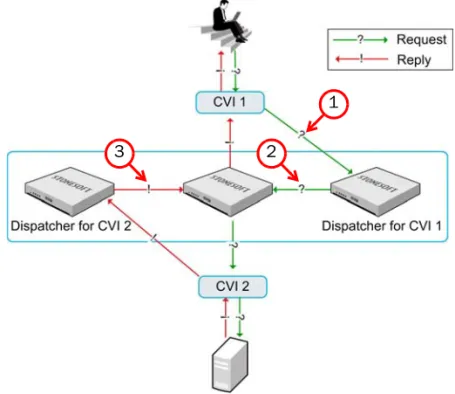
How Packet Dispatch Works . . . 54
Configuration Workflow . . . 55
Task 1: Create a Firewall Cluster Element. . . 55
Task 2: Create Physical Interfaces. . . 55
Task 3: Define VLAN Interfaces . . . 55
Task 4: Define Tunnel Interfaces . . . 56
Task 5: Configure Physical or VLAN Interfaces . . . 56
Task 6: Define Loopback IP Addresses . . . . 57
Task 7: Install the Firewall Engines . . . 57
Task 8: Install a Firewall Policy . . . 57
Using a Firewall Cluster. . . 58
Internal DHCP Server . . . 58
Node State Synchronization. . . 58
Security Level for State Synchronization . . . 59
Manual Load Balancing. . . 59
Examples of Firewall Cluster Deployment . . . 60
Setting up a Firewall Cluster . . . 60
Adding a Node to a Firewall Cluster . . . 61
CHAPTER 7 Master Engine and Virtual Firewall Configuration . . . 63
Overview to Master Engine and Virtual Firewall Configuration . . . 64
Configuration of Master Engines and Virtual Firewalls . . . 64
Configuration Workflow . . . 65
Task 1: Create a Master Engine Element. . . 65
Task 2: Create Virtual Resource Element(s) . . . 65
Task 3: Configure Master Engine Interfaces . . . 65
Task 4: Create a Virtual Firewall Task 5: Configure Virtual Firewall Interfaces . . . 66
Task 6: Install a Firewall Policy . . . 66
Using Master Engines and Virtual Firewalls . . . 67
Moving a Virtual Firewall to a Different Master Engine . . . 67
Using Master Engines and Virtual Firewalls With Domains . . . 67
Example of Master Engine and Virtual Firewall Deployment . . . 67
Deploying Virtual Firewalls for MSSP Customers . . . 67
CHAPTER 8 Routing and Antispoofing . . . 69
Overview to Routing and Antispoofing . . . 70
Configuration of Routing and Antispoofing . . . . 70
Reading the Routing and Antispoofing Trees. . 70
Multi-Link Routing for Single and Clustered Firewalls . . . 72
Default Elements . . . 73
Configuration Workflow . . . 73
Task 1: Add Router or NetLink . . . 73
Task 2: Add Network(s) . . . 73
Task 3: Refresh Firewall Policy . . . 73
Using Routing and Antispoofing. . . 74
Policy Routing . . . 74
Multicast Routing. . . 74
Modifying Antispoofing . . . 74
Monitoring Routing. . . 75
Examples of Routing . . . 75
Routing Traffic with Two Interfaces. . . 75
Routing Internet Traffic with Multi-Link . . . 75
Routing Traffic to Networks That Use Same Address Space . . . 76
A
CCESSC
ONTROLP
OLICIES CHAPTER 9 Firewall Policies . . . 79Overview to Firewall Policies . . . 80
Policy Hierarchy . . . 80
How the Engine Examines Traffic . . . 80
Configuration of Policy Elements . . . 82
Configuration Workflow . . . 86
Task 1: Create a Template Policy. . . 86
Task 2: Create a Policy . . . 87
Task 3: Create a Firewall Sub-Policy. . . 87
Task 4: Install the Policy . . . 88
Using Policy Elements and Rules . . . 89
Validating Policies. . . 89
User Responses. . . 89
Connection Tracking vs. Connectionless Packet Inspection . . . 90
Policy Snapshots . . . 92
Continue Rules. . . 92
Adding Comments to Rules . . . 93
Examples of Policy Element Use . . . 93
Protecting Essential Communications . . . 93
Improving Readability and Performance . . . 94
Restricting Administrator Editing Rights . . . 94
CHAPTER 10 Access Rules . . . 97
Overview to Access Rules . . . 98
Configuration of Access Rules . . . 99
Considerations for Designing Access Rules . . 101
Default Elements . . . 101
Configuration Workflow . . . 102
Task 1: Define the Source and Destination . . . 102
Task 2: Define the Service . . . 102
Task 3: Select the Action and Action Options . . . 103
Task 4: Select Logging Options . . . 105
Task 5: Add User Authentication Requirements . . . 105
Task 6: Restrict the Time When the Rule Is Enforced. . . 106
Task 7: Restrict the Rule Match Based on Source VPN . . . 106
Using Access Rules . . . 106
Allowing System Communications . . . 106
Configuring Default Settings for Several Rules 107 Using Continue Rules to Set Logging Options . . . 108
Using Continue Rules to Set the Protocol. . . 108
Using Aliases in Access Rules . . . 109
Creating User-Specific Access Rules . . . 109
Example of Rule Order . . . 111
Example of Continue Rules . . . 113
Example of User-Specific Rules . . . 114
CHAPTER 11 Inspection Policies . . . 115
Overview to Inspection Policies . . . 116
Configuration of Inspection Policies . . . 117
Verifying and Tuning Inspection . . . 118
Considerations for Designing Inspection Policies . . . 119
Exception Rule Cells. . . 120
Default Elements . . . 121
Configuration Workflow . . . 122
Task 1: Create an Inspection Policy. . . 122
Task 2: Activate Deep Inspection in Firewall Policies . . . 122
Task 3: Activate the Relevant Inspection Checks . . . 122
Task 4: Define the Exceptions . . . 123
Task 5: Eliminate False Positives . . . 123
Task 6: Add Custom Inspection Checks. . . . 123
Using Inspection Policies . . . 124
Setting Default Options for Several Inspection Exceptions . . . 124
Importing Snort Rules Libraries. . . 124
Example of Inspection Rules . . . 125
Eliminating a False Positive. . . 125
CHAPTER 12 Network Address Translation (NAT) Rules . . . . 127
Overview to NAT . . . 128
Static Source Translation . . . 128
Dynamic Source Translation . . . 129
Static Destination Translation . . . 130
Destination Port Translation . . . 130
Configuration of NAT. . . 131
Considerations for Designing NAT Rules . . . . 132
Default Elements . . . 132
Configuration Workflow . . . 133
Task 1: Define Source, Destination, and Service . . . 133
Task 2: Define Address Translation. . . 133
Task 3: Define the Firewall(s) that Apply the Rule . . . 133
Example of a Situation Where a
Contact Address is Needed . . . 135
Contact Addresses and Locations . . . 136
Outbound Load Balancing NAT . . . 136
Proxy ARP and NAT . . . 137
Protocols and NAT . . . 137
Examples of NAT. . . 137
Dynamic Source Address Translation . . . 137
Static Address Translation. . . 138
NAT with Hosts in the Same Network . . . 138
CHAPTER 13 Protocol Agents. . . 141
Overview to Protocol Agents . . . 142
Connection Handling. . . 142
Protocol Validation . . . 142
NAT in Application Data. . . 143
Configuration of Protocol Agents . . . 143
Configuration Workflow . . . 143
Task 1: Create a Custom Service with a Protocol Agent. . . 143
Task 2: Set Parameters for the Protocol Agent . . . 144
Task 3: Insert the Service in Access Rules . . . 144
Using Protocol Agents . . . 145
FTP Agent . . . 145
GRE Agent . . . 145
H323 Agent . . . 146
HTTP Agent . . . 146
HTTPS Agent . . . 146
MSRPC Agent. . . 146
NetBIOS Agent . . . 146
Oracle Agent . . . 147
Services in Firewall Agent . . . 147
Shell Agent . . . 147
SIP Agent. . . 147
SMTP Agent . . . 147
SSH Agent . . . 147
SunRPC Agent . . . 148
TCP Proxy Agent . . . 148
TFTP Agent. . . 148
Examples of Protocol Agent Use . . . 149
Preventing Active Mode FTP. . . 149
Logging URLs Accessed by Internal Users . . . 149
CHAPTER 14 TLS Inspection . . . 151
Overview to TLS Inspection . . . 152
Configuration of TLS Inspection. . . 153
Default Elements . . . 154
Configuration Workflow . . . 154
Task 1: Create Server Credentials Elements . . . 154
Task 2: Create Client Protection Certificate Authority Elements . . . 154
Task 3: Exclude Traffic from Decryption and Inspection. . . 155
Task 4: Activate TLS Inspection . . . 155
Using TLS Inspection . . . 156
Security Considerations . . . 156
Virus Scanning of Decrypted TLS Traffic . . . 156
Web Filtering Decrypted TLS Traffic . . . 156
Examples of TLS Inspection . . . 157
Server Protection . . . 157
Client Protection . . . 157
CHAPTER 15 Web Filtering . . . 159
Overview to Web Filtering . . . 160
Configuration of Web Filtering . . . 161
Default Elements . . . 161
Configuration Workflow . . . 161
Task 1: Prepare the Firewall . . . 161
Task 2: Create User Response Messages . . 161
Task 3: Blacklist/Whitelist Individual URLs . 162 Task 4: Configure Web Filtering Rules in the Policy. . . 162
Examples of Web Filtering. . . 163
Allowing a Blocked URL . . . 163
CHAPTER 16 Spam Filtering . . . 165
Overview to Spam Filtering . . . 166
Configuring Spam Filtering . . . 166
Configuration Workflow . . . 166
Task 1: Define Spam Filtering for a Firewall . . . 166
Task 2: Select Traffic for Inspection with Access Rules . . . 166
Task 3: Select Traffic Not to Be Filtered . . . 166
Using Spam Filtering . . . 167
Anti-Spoofing and Anti-Relay Protection . . . 167
Spam Filtering Rules. . . 168
DNS-Based Blackhole Lists . . . 168
CHAPTER 17 Virus Scanning. . . 169
Overview to Virus Scanning . . . 170
Configuration of Virus Scanning . . . 170
Configuration Workflow . . . 170
Task 1: Activate the Anti-Virus Feature for a Firewall . . . 170
Task 2: Select Traffic for Inspection with Access Rules . . . 170
Task 3: Define the Content Not to Be Scanned . . . 170
Using Virus Scanning . . . 171
Integrated Scanning vs. Content Inspection Server . . . 171
Limitations of Virus Scanning on Clusters . . . 171
CHAPTER 18 External Content Inspection. . . 173
Overview to Content Inspection . . . 174
Configuration of Content Inspection . . . 175
Default Elements . . . 176
Configuration Workflow . . . 176
Task 1: Create a CIS Server Element . . . 176
Task 2: Create a Custom Service for Content Inspection Server Redirection . . . 176
Task 3: Define Access Rules for Redirection . . . 176
Task 4: Configure NAT Rules for Content Inspection Server Redirection . . . 177
Using Content Inspection . . . 177
Example of Content Inspection . . . 178
Inspecting Internal User’s Web Browsing and File Transfers . . . 178
CHAPTER 19 Situations . . . 181
Overview to Situations . . . 182
Configuration of Situations . . . 182
Situation Contexts . . . 183
Correlation Contexts . . . 183
Anti-Virus Contexts . . . 184
DoS Detection Contexts . . . 184
Scan Detection Contexts. . . 184
Protocol-Specific Contexts. . . 184
File Contexts . . . 185
Configuration Workflow . . . 185
Task 1: Create a Situation Element . . . 185
Task 2: Add a Context for the Situation . . . 186
Task 3: Associate Tags and/or Situation Types with the Situation . . . 186
Task 4: Associate the Situation with a Vulnerability . . . 186
Using Situations . . . 187
Example of Custom Situations . . . 187
Detecting the Use of Forbidden Software . . . . 187
CHAPTER 20 Applications . . . 189
Overview to Applications. . . 190
Configuration of Applications. . . 190
Default Elements . . . 190
Configuration Workflow . . . 191
Task 1: Define TLS Matches . . . 191
Task 2: Create Access Rules . . . 191
Examples of Applications . . . 192
Blocking Application Use . . . 192
CHAPTER 21 Blacklisting. . . 193
Overview to Blacklisting . . . 194
Risks of Blacklisting. . . 194
Configuration of Blacklisting . . . 195
Configuration Workflow . . . 196
Task 1: Define Blacklisting in Access Rules . . . 196
Task 2: Define Exceptions in the Inspection Policy . . . 196
Using Blacklisting. . . 196
Manual Blacklisting . . . 196
Monitoring Blacklisting . . . 196
Whitelisting . . . 196
U
SERS ANDA
UTHENTICATION CHAPTER 22 Directory Servers . . . 199Overview to Directory Servers . . . 200
Configuration of Directory Servers . . . 200
Internal User Database . . . 200
Configuration Workflow . . . 202
Task 1: Create an LDAP Server or an Active Directory Server Element . . . 202
Task 2: Add an LDAP Domain . . . 202
Task 3: Add Users and User Groups or Link Users . . . 203
Task 4: Install and Configure the User Agent . . . 203
Examples of Directory Servers . . . 204
Using the Internal User Database . . . 204
Integrating a Microsoft Active Directory Server 204 CHAPTER 23 User Authentication on the Firewall . . . 205
Overview to User Authentication on the Firewall 206 Configuration of User Authentication on the Firewall . . . 207
Default Elements . . . 207
Configuration Workflow . . . 207
Task 1: Define User Authentication in IPv4 Access Rules . . . 207
Task 2: Configure User Authentication Interfaces . . . 208
Example of User Authentication on the Firewall . 209 Authenticating VPN Client Users . . . 209
CHAPTER 24 External User Authentication. . . 211
Overview to External User Authentication . . . 212
Configuration of External User Authentication . . 213
Directory Servers for External User Authentication . . . 214
RADIUS Authentication . . . 214
TACACS+ Authentication . . . 215
Authentication Methods . . . 215
Federated Authentication . . . 216
Default Elements . . . 216
Configuration Workflow . . . 216
Task 1: Define Servers . . . 216
Task 2: Associate Authentication Methods with Servers. . . 217
Task 3: Define User Authentication in IPv4 Access Rules . . . 217
Task 4: Configure User Authentication Interfaces . . . 218
Examples of External User Authentication. . . 218
Integrating a Microsoft Active Directory Server 218 Using SecurID Authentication with Stonesoft IPsec VPN Clients . . . 219
T
RAFFICM
ANAGEMENT CHAPTER 25 Outbound Traffic Management . . . 223Overview to Outbound Traffic Management. . . . 224
Configuration of Multi-Link . . . 224
Load Balancing Methods . . . 225
Standby NetLinks for High Availability . . . 225
Link Status Probing . . . 226
Configuration Workflow . . . 226
Task 1: Create NetLink Elements . . . 226
Task 2: Configure Routing for NetLinks . . . . 226
Task 3: Combine NetLinks into Outbound Multi-Link Elements . . . 227
Task 4: Create NAT Rules for Outbound Traffic . . . 227
Using Multi-Link . . . 228
Multi-Link with a Single Firewall. . . 228
Multi-Link with a Firewall Cluster . . . 229
Using Multiple Outbound Multi-Link Elements . 229 Examples of Multi-Link . . . 230
Preparing for ISP Breakdown. . . 230
Excluding a NetLink from Handling a QoS Class of Traffic. . . 230
Balancing Traffic According to Link Capacity . . 231
Balancing Traffic between Internet Connections 231 CHAPTER 26 Inbound Traffic Management. . . 233
Overview to Server Pool Configuration . . . 234
Configuration of Server Pools . . . 234
Multi-Link for Server Pools . . . 235
Default Elements . . . 235
Configuration Workflow . . . 236
Task 1: Define Hosts . . . 236
Task 2: Combine Hosts into a Server Pool Element . . . 236
Task 3: Configure the External DNS Server. . . 236
Task 4: Create an Inbound Load Balancing Rule . . . 236
Task 5: Set up Server Pool Monitoring Agents . . . 236
Using Server Pools. . . 236
Dynamic DNS (DDNS) Updates . . . 237
Using Server Pool Monitoring Agents . . . 237
Setting up Multi-Link and Dynamic DNS
Updates. . . 241
CHAPTER 27 Bandwidth Management and Traffic Prioritization . . . 243
Overview to Bandwidth Management and Traffic Prioritization . . . 244
Bandwidth Management . . . 244
Traffic Prioritization . . . 244
Effects of Bandwidth Management and Prioritization. . . 245
Configuration of Limits, Guarantees, and Priorities for Traffic . . . 245
Default Elements . . . 246
Configuration Workflow . . . 247
Task 1: Define QoS Classes . . . 247
Task 2: Define QoS Policies . . . 247
Task 3: Assign QoS Classes to Traffic . . . 249
Task 4: Define QoS for Interfaces and VPNs . . . 249
Using Bandwidth Management and Traffic Prioritization . . . 250
Designing QoS Policies . . . 251
Communicating DSCP Markers . . . 252
Managing Bandwidth of Incoming Traffic . . . 253
Collecting QoS Class-Based Statistics . . . 253
Examples of Bandwidth Management and Traffic Prioritization . . . 254
Ensuring Quality of Important Communications 254 Preparing for ISP Breakdown . . . 255
Limiting the Total Bandwidth Required . . . 256
V
IRTUALP
RIVATEN
ETWORKS CHAPTER 28 Overview to VPNs . . . 259Introduction to VPNs . . . 260
IPsec VPNs . . . 260
Tunnels . . . 260
Security Associations (SA). . . 261
Internet Key Exchange (IKE). . . 261
Perfect Forward Secrecy (PFS) . . . 262
Authentication Header (AH) and Encapsulating Security Payload (ESP) . . . 262
Authentication . . . 263
CHAPTER 29 Policy-Based VPN Configuration . . . 267
Overview to Policy-Based VPN Configuration . . . 268
Configuration of Policy-Based VPNs . . . 269
Default Elements . . . 270
Configuration Workflow . . . 271
Task 1: Define the Gateway Settings. . . 271
Task 2: Define the Gateway Profile . . . 271
Task 3: Define the Gateways . . . 271
Task 4: Define the Sites. . . 272
Task 5: Create Certificates . . . 272
Task 6: Define the VPN Profile . . . 273
Task 7: Define the VPN Element . . . 273
Task 8: Modify the Firewall Policy . . . 274
Task 9: Configure VPN Clients and External Gateway Devices. . . 275
Using VPNs . . . 276
VPN Logging . . . 276
Using a Dynamic IP Address for a VPN End-Point. . . 276
Using a NAT Address for a VPN End-Point . . . . 277
Supported Authentication and Encryption Methods . . . 277
FIPS Mode. . . 277
GOST-Compliant Systems . . . 278
Message Digest Algorithms . . . 278
Authentication Methods . . . 279
Encryption Algorithms. . . 279
Using Pre-Shared Key Authentication . . . 281
Using Certificate Authentication . . . 281
Validity of Certificates . . . 282
Internal VPN Certificate Authorities . . . 283
External Certificate Authorities . . . 284
Configuring Policy-Based VPNs with External Gateway Devices . . . 284
Clustering and Policy-Based VPNs . . . 285
Multi-Link and Policy-Based VPNs . . . 285
Providing Encryption for the Route-Based VPN in Tunnel Mode . . . 287
Examples of Policy-Based VPN Configurations . 287 Creating a Policy-Based VPN Between Three Offices . . . 287
Creating a Policy-Based VPN for Mobile Users 289
Creating a Policy-Based VPN That Requires NAT. . . 290
CHAPTER 30
Route-Based VPN Configuration. . . 293
Overview to Route-Based VPN Configuration . . . 294
Configuration of the Route-Based VPN . . . 294
Default Elements . . . 295
Configuration Workflow . . . 296
Task 1: Define Tunnel Interfaces . . . 296
Task 2: Configure Routing and Antispoofing for Tunnel Interfaces . . . 296
Task 3: Define the Gateways. . . 296
Task 4: Define the VPN Profile. . . 297
Task 5: Define Route-Based VPN Tunnels. . . 297
Task 6: Add Access Rules to Allow the Traffic . . . 298
Task 7: Refresh Firewall Policy . . . 298
Using the Route-Based VPN. . . 299
Configuring the Route-Based VPN with External Gateway Devices . . . 299
Using the Route-Based VPN in Tunnel Mode . . 299
Using the Route-Based VPN with Dynamic Routing . . . 300
Examples of Route-Based VPN Configurations. . 300
Protecting Dynamic Routing Communications . 300 Configuring a Route-Based VPN with an External Gateway . . . 301
A
PPENDICES APPENDIX A Command Line Tools . . . 305Management Center Commands . . . 306
Engine Commands . . . 317
Server Pool Monitoring Agent Commands . . . 324
APPENDIX B Default Communication Ports. . . 327
Management Center Ports. . . 328
Security Engine Ports . . . 331
APPENDIX C Predefined Aliases. . . 335
Predefined User Aliases . . . 336
System Aliases. . . 336
APPENDIX D Situation Context Parameters. . . 339
Port/Host Scan Detection Parameters . . . 340
Correlation Context Parameters . . . 341
Regular Expression Parameter . . . 344
APPENDIX E Regular Expression Syntax. . . 345
Syntax for Stonesoft Regular Expressions . . . . 346
Special Character Sequences . . . 348
Pattern-Matching Modifiers . . . 349
Bit Variable Extensions . . . 350
Variable Expression Evaluation . . . 352
Stream Operations. . . 354
Other Expressions . . . 355
System Variables . . . 356
Independent Subexpressions . . . 357
Parallel Matching Groups . . . 358
APPENDIX F Schema Updates for External LDAP Servers. . . 359
APPENDIX G SNMP Traps and MIBs . . . 361
APPENDIX H Multicasting . . . 377
The General Features of Multicasting. . . 378
Multicasting vs. Unicasting . . . 378
Multicasting vs. Broadcasting . . . 378
IP Multicasting Overview . . . 378
Multicasting Applications . . . 379
Internet Group Management Protocol. . . 379
Membership Messages . . . 379
Ethernet Multicasting . . . 380
Multicasting and Stonesoft Firewalls . . . 380
Unicast MAC . . . 381
Multicast MAC . . . 382
Multicast MAC with IGMP . . . 383
Glossary . . . 385
I
NTRODUCTION
In this section:
Using Stonesoft Documentation - 13 Introduction to Firewalls - 17 Introduction to Stonesoft Firewalls - 25 Stonesoft Firewall/VPN Deployment - 33C
HA PT E R
1
U
SING
S
TONESOFT
D
OCUMENTATION
This chapter describes how to use this Guide and related documentation. It also provides directions for obtaining technical support and giving feedback about the documentation. The following sections are included:
How to Use This Guide (page 14)
Documentation Available (page 15)
How to Use This Guide
This Reference Guide provides information that helps administrators of Stonesoft Firewalls understand the system and its features. It provides high-level descriptions and examples of the configuration workflows.
This guide is divided into several sections. The chapters in the first section provide a general introduction to Stonesoft Firewalls. The sections that follow each include chapters related to one feature area. The last section provides detailed reference information in tabular form, and some guideline information.
For other available documentation, see Documentation Available (page 15).
Typographical Conventions
The following conventions are used throughout the documentation:
We use the following ways to indicate important or additional information:
Tip – Tips provide additional helpful information, such as alternative ways to complete steps.
Example Examples present a concrete scenario that clarifies the points made in the adjacent text.
Table 1.1 Typographical Conventions
Formatting Informative Uses
User Interface text Text you see in the User Interface (buttons, menus, etc.) and any other interaction with the user interface are in bold-face.
References, terms Cross-references and first use of acronyms and terms are in italics.
Command line File names, directories, and text displayed on the screen are monospaced.
User input User input on screen is in monospacedbold-face.
Command parameters Command parameter names are in monospaced italics.
Note – Notes prevent commonly-made mistakes by pointing out important points. Caution – Cautions prevent breaches of security, information loss, or system downtime. Cautions always contain critical information that you must observe.
Documentation Available
Stonesoft technical documentation is divided into two main categories: Product Documentation
and Support Documentation (page 16). Each Stonesoft product has a separate set of manuals.
Product Documentation
The table below lists the available product documentation.
PDF guides are available at http://www.stonesoft.com/en/customer_care/documentation/ current/. The Stonesoft Administrator’s Guide, and the Reference Guides and Installation Guides
for Stonesoft Management Center, Stonesoft Firewall/VPN, Stonesoft IPS, and Stonesoft Layer 2 Firewall are also available as PDFs on the Management Center DVD.
Table 1.2 Product Documentation
Guide Description
Reference Guide
Explains the operation and features of the Stonesoft system comprehensively. Demonstrates the general workflow and provides example scenarios for each feature area. Available as separate guides for Stonesoft Management Center and Stonesoft Firewall/ VPN, and as a combined guide for Stonesoft IPS and Stonesoft Layer 2 Firewall.
Installation Guide
Instructions for planning, installing, and upgrading a Stonesoft system. Available as separate guides for Stonesoft Management Center and Stonesoft Firewall/VPN, and as a combined guide for Stonesoft IPS and Stonesoft Layer 2 Firewall.
Online Help
Describes how to configure and manage the system step-by-step. Accessible through the Help menu and by using the Help button or the F1 key in any window or dialog. Available in the Stonesoft Management Client and the Stonesoft Web Portal. An HTML-based system is available in the Stonesoft SSL VPN Administrator through help links and icons.
Administrator’s Guide
Describes how to configure and manage the system step-by-step. Available as a combined guide for Stonesoft Firewall/VPN, Stonesoft IPS, and Stonesoft Layer 2 Firewall, and as separate guides for Stonesoft SSL VPN and Stonesoft IPsec VPN Client.
User’s Guide Instructions for end-users. Available for the Stonesoft IPsec VPN Client and the Stonesoft Web Portal.
Appliance Installation Guide Instructions for physically installing and maintaining Stonesoft appliances (rack mounting, cabling, etc.). Available for all Stonesoft hardware appliances.
Support Documentation
The Stonesoft support documentation provides additional and late-breaking technical
information. These technical documents support the Stonesoft Guide books, for example, by giving further examples on specific configuration scenarios.
The latest Stonesoft technical documentation is available on the Stonesoft web site at
http://www.stonesoft.com/en/customer_care/support/.
System Requirements
The certified platforms for running Stonesoft engine software can be found at the product pages at http://www.stonesoft.com/en/products/firewall_vpn/.
The hardware and software requirements for the version you are running can also be found in the Release Notes available at http://www.stonesoft.com/en/customer_care/kb/.
Supported Features
Not all features are supported on all platforms. See the Appliance Software Support Table at the Stonesoft Support Documentation pages for more information.
Contact Information
For street addresses, phone numbers, and general information about Stonesoft products and Stonesoft Corporation, visit our web site at http://www.stonesoft.com/.
Licensing Issues
You can view your current licenses at the License Center section of the Stonesoft web site at
https://my.stonesoft.com/managelicense.do.
For license-related queries, e-mail [email protected].
Technical Support
Stonesoft offers global technical support services for Stonesoft’s product families. For more information on technical support, visit the Support section at the Stonesoft web site at
http://www.stonesoft.com/en/customer_care/support/.
Your Comments
We want to make our products fulfill your needs as well as possible. We are always pleased to receive any suggestions you may have for improvements.
•To comment on software and hardware products, e-mail [email protected].
•To comment on the documentation, e-mail [email protected].
Other Queries
C
HA PT E R
2
I
NTRODUCTION
TO
F
IREWALLS
This chapter introduces and discusses the underlying security principles of firewalls in general. In this chapter we will discuss what firewalls are, which different types of firewalls there are, how they are used, what they are capable of, as well as what their possible weaknesses are.
The following sections are included:
The Role of the Firewall (page 18)
Firewall Technologies (page 19)
Additional Firewall Features (page 21)
The Role of the Firewall
Firewalls are the primary tool for perimeter access control between networks with different security levels. Firewalls control the traffic between networks and deny access that does not look like acceptable business use as defined by the administrators.
The generally accepted principle of access control is whatever is not expressly permitted is denied. The most secure network is achieved when nobody and nothing is permitted entry to the protected network. In most cases, such a network is naturally too limited, so a firewall must be introduced to allow specific limited services to pass in a safe way. That means that in order for any traffic to be allowed into the network, it must first match an explicit “allow” rule.
There are three main types of platforms for running a firewall:
•Dedicated firewall appliances.
•Firewall software installed on a server dedicated to be used as a firewall.
•Firewall software running as a virtual machine in a virtualized server environment. Stonesoft Firewalls are available on all of these platform types.
Regardless of the type of platform, the network structure in which the firewalls are placed must be carefully designed so that there are no loopholes or back doors. Firewalls can only control traffic that actually passes through them; even the most carefully planned firewall system can be undermined by a single back door that allows traffic to circumvent the firewall.
In addition to access control, modern firewall devices often include a variety of additional integrated features, such as intrusion preventionsystems (IPS), content filtering, anti-virus, and
anti-spam. In this chapter, the additional features are discussed separately, and the discussion focuses on the primary role of access control. Such additional features in Stonesoft Firewalls are covered in more detail in section Additional Firewall Features (page 21).
Firewall Technologies
This section presents an overview to the main firewall techniques, and explains how Stonesoft Firewalls use them. The discussion here is limited to the traditional firewall component of a firewall system; the various additional inspection features that modern firewalls often incorporate are discussed separately.
Traditional firewall features are commonly achieved through three main techniques:
•packet filtering
•proxy firewalls
•stateful inspection.
The next sections first discuss these techniques separately and then explains how they can be utilized together to achieve an optimal balance between performance and security.
Packet Filtering
Packet filtering examines the header information of packets and allows or stops each packet individually. In addition to firewalls, such simple access control lists (ACLs) are implemented on most common routing devices. Pure packet filters cannot protect against protocol misuse or other malicious contents in higher levels of the protocol stack. However, for some simple network protocols, packet filtering can be light on firewall resources and even provide an adequate level of protection.
Proxy Firewalls
Proxy firewalls are firewalls running application proxy services. Proxies are a man-in-the-middle, and they establish their own separate connections to both the client and the server. This type of firewall is fully application-aware, and therefore very secure, but at the same time there’s a trade-off in performance due to the inevitable increase in overhead.
Stateful Inspection
Stateful inspection firewalls are aware of basic networking standards and use historical data about connections in determining whether to allow or stop a packet. They track the established connections and their states in dynamic state tables and ensure that the connections comply with the security policies and protocol standards.
Since stateful inspection understands the context of connections (and therefore can relate the returning packets to appropriate connections), connections already determined to be “secure” can be allowed without full examination based on previous packets. This is especially important with services such as FTP, which can open several related connections that do not match a single basic profile. Even though Stateful inspection has some application awareness, it concentrates on protocols, not on inspecting data at the application layer.
Stonesoft Multi-Layer Inspection
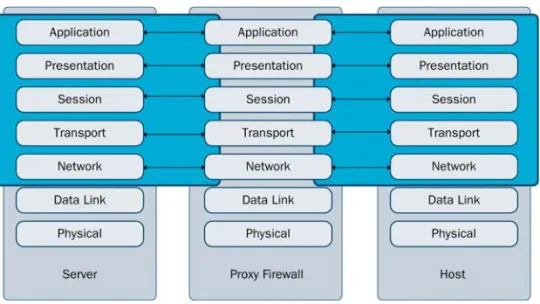
Stonesoft Multi-Layer Inspection combines application layer inspection, stateful inspection, and packet filtering technologies flexibly for optimal security and system performance. Like stateful inspection, the Stonesoft Firewall uses state tables to track connections and judge whether a packet is a part of an established connection or not. The Stonesoft Firewall also features application-layer inspection through specific Protocol Agents, when necessary, for enhanced security to inspect data all the way up to the application layer. The Stonesoft Firewall can also act as a packet filter for types of connections that do not require the security considerations of stateful inspection.
Illustration 2.2 Multi-layer Inspection Model
By default, all Stonesoft Firewall Access rules implement stateful inspection, but the administrator can flexibly configure rules with simple packet filtering or an additional layer of application level security as needed.
Stonesoft Firewalls apply application level inspection with or without proxying the connections, depending on what is required. Application level inspection can be selected to certain types of traffic by attaching a connection to a protocol-specific Protocol Agent.
Protocol Agents are also used to handle protocols that generate complex connection patterns, to redirect traffic to content inspection servers, and to modify data payload if necessary. For example, the FTP Protocol Agent, can inspect the control connection and only allow packets containing valid FTP commands. If an FTP data connection is opened using a dynamically assigned port, the Protocol Agent reads the port and allows the traffic. If NAT (network address translation) is applied to the connection, the Protocol Agent can also modify the IP address and port transported in the packet payload to allow the connection to continue despite the NAT. The Protocol Agents are covered in more detail in Protocol Agents (page 141).
Additional Firewall Features
A firewall can have several different functions on a network. Although a firewall’s primary function is to control network access, they can be used in several complementary roles depending on the firewall product used. This section concentrates on the main features available in Stonesoft Firewalls.
Authentication
The primary task of any firewall is to control access to data resources, so that only authorized connections are allowed. Adding an authentication requirement to firewall policies allows the firewall to also consider the user before access is granted.
For more information on authentication, see User Authentication on the Firewall (page 205) and
External User Authentication (page 211).
Deep Packet Inspection and Unified Threat Management
Deep packet inspection includes measures such as virus detection, web content filtering, intrusion detection, or some other check of the actual data being transferred. When several such features are combined together with a firewall, the solution is often called unified threat management (UTM). Stonesoft’s UTM solution includes:
•Virus checking.
•URL filtering.
•Intrusion detection.
By combining several features, a UTM solution simplifies the physical network setup and makes the administration simpler. However, device performance limits can be quickly reached when several advanced inspection features are active. Therefore, UTM firewalls are generally used in environments where the traffic load stays relatively low even at peak times. When higher traffic volumes are needed, external content inspection servers and IPS devices are more often used for further inspecting the traffic.
For more information on the advanced traffic inspection features, see Inspection Policies
Integration With External Content Inspection
External content inspection servers (CIS) are a preferred choice in high traffic environments, as they offer better hardware optimization. Content inspection services can be run on a dedicated physical or virtual server that can be configured, scaled, and exchanged independently from the firewall. The firewall redirects the traffic to the CIS, which either strips anything deemed malicious from the packet or drops the packet altogether, according to what the security rules in force on the CIS define. Screened traffic continues to the destination.
Illustration 2.3 Content Screening with CIS
For instance, incoming SMTP e-mail traffic could be forwarded from the firewall to the CIS for virus and content checking. The CIS removes suspicious content and the “scrubbed” packets are returned back to the firewall for routing to their final destination.
For more information on integrating a CIS with Stonesoft Firewalls, see External Content Inspection (page 173).
In addition to sending traffic to external content inspection, Stonesoft Firewalls also integrate with Stonesoft IPS and Stonesoft Layer 2 Firewalls. The Firewalls can accept blacklisting requests from the IPS and Layer 2 Firewalls. They can therefore stop traffic that the IPS engines or the Layer 2 Firewalls have detected to be harmful. For more information on Stonesoft IPS and Layer 2 Firewalls, see the IPS and Layer 2 Firewall Reference Guide.
Load Balancing and Traffic Management
As an access controller with address translation duties, a firewall is also a natural point for affecting the distribution of traffic load. Stonesoft Firewalls utilize Stonesoft’s patented Multi-Link technology to flexibly use several standard network links to increase bandwidth and provide automatic failover when links go down.
For more information on traffic management, see Outbound Traffic Management (page 223) and
Inbound Traffic Management (page 233).
Outbound bandwidth can be additionally managed through QoS measures by setting priorities, limits, and guarantees for different types of traffic.
For more information on the QoS features, see Bandwidth Management and Traffic Prioritization
(page 243).
Client Server
Content Inspection Server Firewall
Logging and Reporting
As a perimeter security device a firewall is a primary tool for logging the traffic that crosses or attempts to cross the network perimeter. Properly recorded log data can be used to monitor the capacity of networks, detect network misuse and intruders, and even to establish evidence to use against attackers.
Since a firewall operating in any corporate-type setting will quickly generate huge masses of log data, it is essential to have efficient tools to access and manage the logs in the form of filtered views, statistics, and reports. Consolidating logs from several sources is also vital in supporting the administrators in fully understanding the numerous network events.
For more information on logging, see the Management Center Reference Guide.
Network Address Translation (NAT)
Network address translation (NAT) modifies the IP headers of packets, changing IP address and port information for the source and/or destination.
Originally created to alleviate the problem of the rapidly diminishing IP address space, NAT has an added benefit; it can be used to conceal the private IP addresses of hosts and the structure of an internal network. In fact, NAT enables even hiding an entire network behind a single public IP address. As handy as NAT is, it is important to understand that NAT is not primarily a security feature. It simply a method of modifying packets that lends itself to security applications. For more information on NAT, see Network Address Translation (NAT) Rules (page 127).
VPNs
VPNs (virtual private networks) conceal and encrypt traffic between end-points to establish a virtual, secure tunnel through an insecure network.
In IPsec VPNs, a firewall transparently encrypts and decrypts data exchanges at the network layer with some other IPsec VPN end-point on behalf of any number of computers. IPsec VPNs can also provide remote access to internal resources for individual client computers that have a VPN client application installed. IPsec VPNs are a good fit for VPN access that involves many communicating parties and/or many different applications.
SSL VPNs (secure socket layer virtual private networks) provide clientless access by utilizing the SSL encryption features included in web browsers. Users log in to a portal to access those resources that administrators have specifically configured. SSL VPNs are a good fit when there is a need to provide remote access to a few specific resources from various different types of devices and platforms.
Stonesoft SSL VPN is available as a separate appliance product. For more information on Stonesoft SSL VPN, refer to the SSL VPN Administrator’s Guide.
IPsec VPN features are integrated in the Firewall. For more information on IPsec VPNs, see
Overview to VPNs (page 259). For more information on how IPsec VPNs are configured, see
Firewall Weaknesses
Complexity of Administration
When a complex system is maintained with limited resources, the ease of administration becomes crucial. A great part of the benefits of a security system are wasted if administrators find it difficult to keep up with monitoring the system and the requests for adjusting its policies, if upgrades have to be postponed due to the effort required, or if there is no support for checking and finding errors in the configuration.
Ease of administration is central to the Stonesoft Management Center (SMC). The SMC’s centralized management system provides the administrators more visibility into the whole network, simplifies and automates system maintenance tasks, and reduces the work required to configure the system. If you think the system could work even better for you, let us know by writing to [email protected].
Single Point of Failure
As a network choke point, the failure of the firewall to pass traffic can mean that the network connectivity is completely cut off. In some environments, this small risk can be considered acceptable. However, an increasing number of organizations require network connectivity to conduct business, so a reliable high availability solution is required.
Stonesoft Firewalls have built-in support for clustering, which allows operating up to 16 physical Firewall devices as a single unit. All units can actively handle traffic at the same time. No special configuration is required in the surrounding network to achieve this, as the whole implementation is achieved through basic networking standards. Units can be plugged in, taken out, and replaced flexibly without cutting network connectivity from the users. For more
information on clustering Stonesoft Firewalls, see Firewall Cluster Configuration (page 49).
Worms, Viruses, and Targeted Attacks
As essential as a firewall is, it should not cause a false sense of being safe from all harm in the organization. There are many security threats that the firewall cannot stop, even if it
incorporates several different kinds of additional inspection methods:
•Many virus and worm outbreaks and even many intentional attacks may start within an organization’s internal network. Malicious code can be introduced to the network on removable media, unauthorized equipment attached to the network, or on the laptops of travelling users. The firewall has no way to detect and prevent something before it crosses a network boundary that the firewall enforces.
•Attackers may be able to bypass security measures by obtaining legitimate credentials of users or even administrators through spying and social engineering. If the firewall is not properly secured, it may itself be susceptible to a targeted attack. If the attacker gains remote administrator access or physical access to the firewall, the system can be covertly altered to allow and conceal further malicious activities.
•A denial-of-service attack may consume all of the inbound bandwidth before any of the organization’s own security devices receive the traffic.
C
HA PT E R
3
I
NTRODUCTION
TO
S
TONESOFT
F
IREWALLS
This chapter gives you an overview of the Stonesoft Firewall/VPN system’s architecture and how the system inspects traffic.
The following sections are included:
The Stonesoft Security Platform (page 26)
Stonesoft Firewall/VPN System Components (page 27)
The Stonesoft Security Platform
Stonesoft Firewall/VPN is part of the Stonesoft security platform, which is especially well-suited to complex and distributed network environments. In addition to Firewalls and virtual private networking, the Stonesoft security platform also provides intrusion detection and prevention.
Illustration 3.1 Stonesoft Security Platform in Distributed Networks
The configuration, monitoring, and control of the system is done through a centralized
management system that provides a single point of contact for a large number of geographically distributed administrators. The unified management platform provides major benefits for organizations of all sizes:
•Interaction between the Stonesoft Firewall/VPN, Stonesoft IPS, Stonesoft Layer 2 Firewall, Master Engine, and Virtual Security Engine components in the same system creates real security benefits by allowing automatic coordinated responses when a security threat is detected, providing instant blocking of unwanted traffic, and reducing the need for immediate human intervention.
•Multiple administrators can log in at the same time to efficiently configure and monitor all Stonesoft components. The system provides a single user interface that allows unified configuration, monitoring, and reporting of the whole Stonesoft security platform with the same tools and within the same user session.
•The reuse of configuration information across components in the system allows you to avoid the laborious and error-prone duplicate work of configuring the same details for all
components individually or exporting and importing the configurations between multiple separate systems.
•The system is designed to manage large installations and to be geographically distributed, so it is flexible and allows scaling up the existing components and adding new types of
Stonesoft Firewall/VPN System Components
The Stonesoft system components and their roles are illustrated below.
Illustration 3.2 Stonesoft Security Platform Components
One Stonesoft Management Center can manage a large number of Security Engines, Master Engines, and Virtual Security Engines. The distributed architecture allows you to deploy the system components effectively in different network environments. You can flexibly add, remove, and reposition Stonesoft system components according to your needs.
Table 3.1 Stonesoft System Components
Component Description
Management Clients Provide a user interface for configuring, controlling, and monitoring the system. Connect to the Management Server. Management Servers Store all configuration data and relay commands to the engines. Log Servers Store logs and correlate events detected by multiple security engines. Web Portal Servers Provide restricted viewing of configuration information, reports, and logs.
Security Engines Management
Server ServerLog Web Portal Server Authentication Server Management
All communications between system components are authenticated and encrypted. The security engines work independently according to their installed configuration, so even if the connections to the Management Center are cut, traffic inspection continues without interruption.
Firewall/VPN Engines
The term Firewall engine refers to the combination of the physical device and the Firewall/VPN software, including the integrated operating system (a specially hardened version of Linux). There is no need for separate operating system patches or upgrades; all software on the engines is upgraded during the Firewall/VPN software upgrade.
Firewall engines have the following representations in the Management Client:
•The Firewall element is a container for the main configuration information directly related to the Firewall.
•The individual physical Firewall engines are shown as one or more Nodes under the main Firewall element in some views of the Management Client.
Main Benefits of Stonesoft Firewall/VPN
In addition to standard firewall features, the Stonesoft Firewall/VPN system provides additional advanced features.
Advanced Traffic Inspection
The Stonesoft Firewall’s traffic inspection process is designed to ensure a high level of security and throughput.
The Firewalls’ policies determine when to use stateful connection tracking, packet filtering, or application-level security. The system expends the resources necessary for application-level security only when the situation so demands and without unnecessarily slowing or limiting network traffic.
Some types of connections can be selected for inspection of the data content against harmful or otherwise undesired patterns in connections. The deep packet inspection features provide IPS-type capabilities right on the Firewall, and help in finding and stopping malicious or
suspicious network activities. You can even inspect the content of encrypted HTTPS connections using the built-in deep packet inspection features.
An antivirus scanner complements the standard traffic inspection features when the Firewall is licensed for the UTM (unified threat management) feature.
Security Engines
Inspect and filter traffic. Correlate events in traffic inspected by the security engine itself. Security Engines that have a license for the Master Engine feature can also be used to provide resources for Virtual Security Engines. See Master Engine and Virtual Firewall Configuration (page 63).
Table 3.1 Stonesoft System Components (Continued)
Built-in Clustering for Load Balancing and High Availability
The Stonesoft Firewall provides innovative built-in clustering and load-balancing features that provide several benefits over traditional solutions.
Traditionally, in order to achieve high availability on the Firewall itself, additional hardware switches, software clustering products, or special load balancing devices have been added and maintained. This often results in the transfer of a single point of failure to another network component — typically the network link.
In the Stonesoft Firewall, however, the clustering of the Firewall engines is integrated in the product, thus introducing true built-in high availability and load balancing. The Firewall engines dynamically load-balance individual connections between the cluster nodes, transparently transferring connections to available nodes in case a node becomes overloaded or experiences a failure.
A Firewall Cluster can have a maximum of 16 nodes. With load balancing, the processing of network traffic is automatically balanced between the cluster nodes. This way, the performance of the Firewall can be upgraded by simply adding new nodes to the cluster when necessary. Individual nodes can also be taken offline during business hours for maintenance purposes; connections that were handled by that particular engine are transparently redistributed to other online nodes.
The Stonesoft Firewall also comes with built-in technology for high availability and load-balancing between different network connections as explained in the next section.
Multi-Link Technology
Single-node and clustered Firewall installations both support Multi-Link, which ensures high availability for network connections by utilizing alternative network links.
Multi-Link allows configuring redundant network connections out of standard network connections without the complexity of traditional solutions that require redundant external routers and switches. In contrast to many alternative solutions, there is no need to use complex routing protocols, such as Border Gateway Protocol (BGP) and Hot Standby Routing Protocol
(HSRP), and peering arrangements between the ISPs.
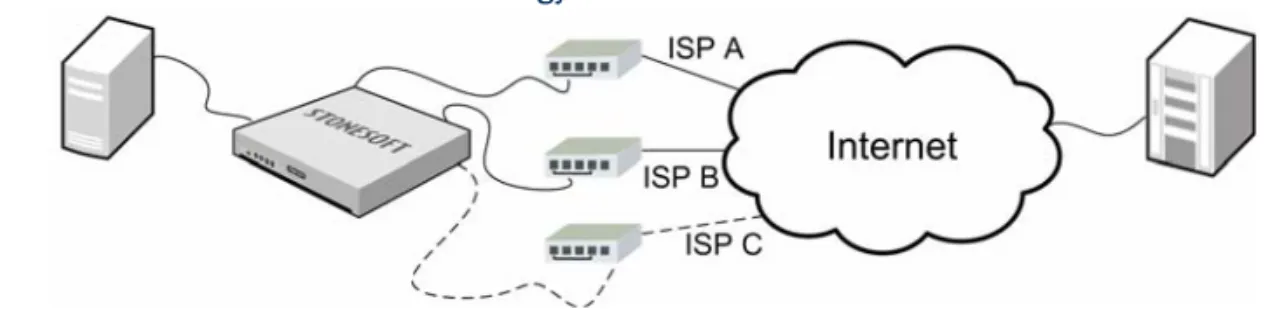
Any IP-based link with a dedicated IP address range can be used as part of a Multi-Link configuration. You can also define standby links that are used only when primary links fail. The illustration that follows shows a basic Multi-Link setup with a single Firewall that has two active and one standby network links to the Internet.
Most often, multiple network links are used to ensure continuity of Internet access, but Multi-Link can be used to provide redundant links to internal networks as well. Traffic is dynamically balanced across the different links based on a performance measurement or based on the links’ relative bandwidths. The traffic automatically fails over to other links when the Firewall detects that one of the links fails. The Firewall uses network address translation (NAT) to direct the traffic through the different links to make the source IP address valid for the link used. Multi-Link technology provides highly available network connections for the following scenarios:
•Outbound connections: Multi-Link routing ensures that outbound traffic always uses the optimal link towards its destination and allows configuring standby links as backups. The traffic can be distributed across the links in several different ways. For more information, see
Outbound Traffic Management (page 223).
•Inbound connections: the built-in inbound traffic management feature can utilize Multi-Link for ensuring continuity of services your company offers to external users. For more information, see Multi-Link for Server Pools (page 235).
•VPN connections: the Multi-Link tunnel selection for VPN traffic is done independently from other types of traffic. Standby links can also be selected independently for a VPN. For more information, see Multi-Link and Policy-Based VPNs (page 285).
Built-in Inbound Traffic Management
The built-in Server Pool feature allows Stonesoft Firewalls to monitor a pool of alternative servers that offer the same service to the users. If one of the servers becomes unavailable or overloaded, the Firewall automatically redirects new connections to the alternative servers. Server pools can also interact with the Multi-Link feature for high availability of the incoming network connection.
For more information, see Inbound Traffic Management (page 233).
QoS and Bandwidth Management
Quality of Service (QoS) Policies are interface-specific rules on a Firewall that help you ensure that important network services are given priority over less important traffic. Quality of Service and bandwidth management features are not supported for Modem interfaces of single Firewalls.
With QoS rules, you can set up a minimum guaranteed bandwidth and maximum bandwidth limit for traffic, and set a priority value for the traffic. You can optionally define settings for Active Queue Management (AQM) to queue and send traffic according to a scheduling algorithm. This reduces the volume of dropped or retransmitted packets when there is network congestion. In addition to or instead of QoS rules, you can also create DSCP Match/Mark rules that read or write DiffServ Code Point (DSCP) type of service (ToS) field values. This allows you to integrate the Firewall with other network equipment that implements QoS management in your own or your ISP’s network.
Integration with Stonesoft IPS and Stonesoft Layer 2 Firewalls
The interoperation between Stonesoft Firewall/VPN, Stonesoft IPS, and Stonesoft Layer 2 Firewall products makes the combination of these a very powerful network security solution. The common Stonesoft Management Center (SMC) with the secured inter-system communications ensure efficient integration of all system components.
IP address blacklisting is a shared feature for Stonesoft Firewall/VPN, Stonesoft IPS, and Stonesoft Layer 2 Firewalls. This allows blocking harmful traffic not just at the component that detects it, but also on other engines on the connection path.
Clustered Multi-Link VPNs
The Stonesoft Firewall provides fast, secure, and reliable IPsec VPN connections with the added benefits of the clustering and Multi-Link technologies that provide load balancing and failover for both the VPN gateways and the network connections. The system’s scalability allows
administrators full control over how many tunnels are created and used.
The VPN links can be in three different modes: active, aggregate, and standby. If there are multiple links in active mode, traffic is dynamically balanced across the different links based on a performance measurement or based on the links’ relative bandwidths. If there are multiple links in aggregate mode, each connection is balanced between all the aggregate links in round robin fashion. The standby links are only used if the active or aggregate links fail.
For more information on VPNs, see Overview to VPNs (page 259) and Policy-Based VPN Configuration (page 267).
C
HA PT E R
4
S
TONESOFT
F
IREWALL
/VPN D
EPLOYMENT
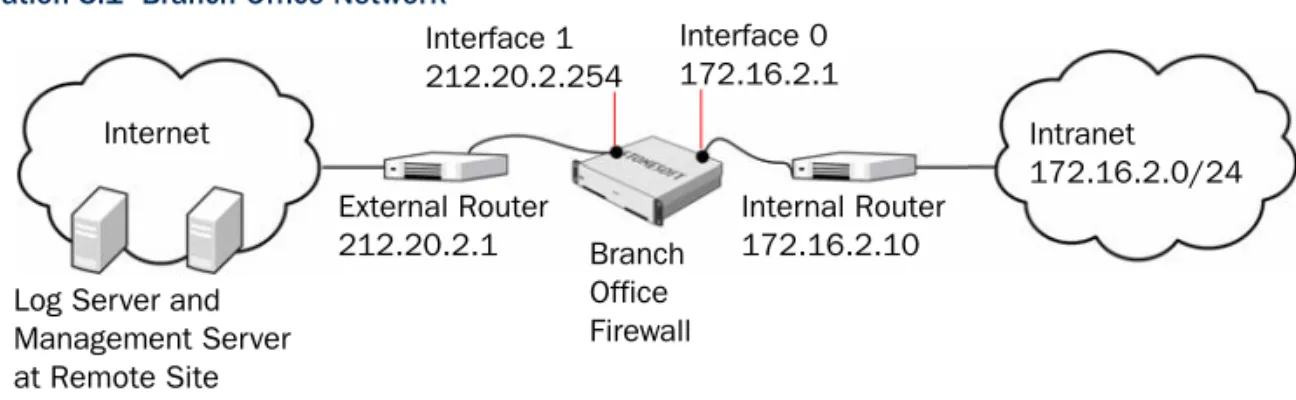
This chapter provides general guidelines for the Stonesoft Firewall/VPN system deployment. It also illustrates a typical deployment with an example scenario.
The following sections are included:
Deployment Overview (page 34)
Deployment Overview
Supported Platforms
Stonesoft Firewall/VPN can be run on the following general types of platforms:
•Purpose-built Stonesoft Firewall/VPN or Security Engine appliances.
•Standard Intel-compatible servers. Search for the version-specific Hardware Requirements in the technical documentation search at http://www.stonesoft.com/en/support/.
•Virtualization platforms that support the deployment of Open Virtual Format (OVF) templates. VMWare is officially supported. Other virtualization platforms may also be supported. More information can be found in the Firewall/VPN Installation Guide.
The Firewall engine can optionally be used as a Master Engine to provide resources for Virtual Security Engines. For more information about Master Engines and Virtual Security Engines, see
Master Engine and Virtual Firewall Configuration (page 63). Master Engines can be run on the following general types of platforms:
•Purpose-built Stonesoft Security Engine appliances with 64-bit architecture.
•Standard Intel-compatible servers with 64-bit architecture.
The engines have an integrated, hardened Linux operating system that is always a part of the engine software. This eliminates the need for separate operating system installation,
configuration, and patching.
General Deployment Guidelines
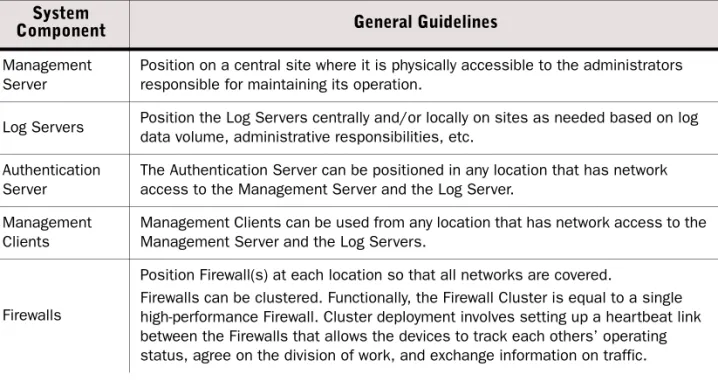
Table 4.1 summarizes the general deployment guidelines for Stonesoft Firewall/VPN, Master Engines, and the Management Center.
Table 4.1 General Guidelines for Stonesoft Firewall/VPN Deployment System
Component General Guidelines
Management
Server Position on a central site where it is physically accessible to the administrators responsible for maintaining its operation. Log Servers Position the Log Servers centrally and/or locally on sites as needed based on log data volume, administrative responsibilities, etc. Authentication
Server The Authentication Server can be positioned in any location that has network access to the Management Server and the Log Server. Management
Clients Management Clients can be used from any location that has network access to the Management Server and the Log Servers.
Firewalls
Position Firewall(s) at each location so that all networks are covered.
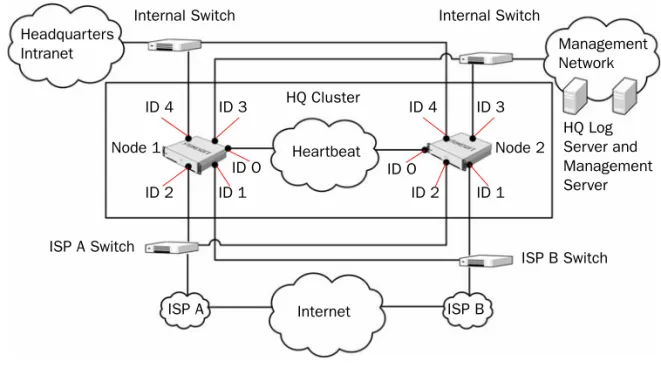
Firewalls can be clustered. Functionally, the Firewall Cluster is equal to a single high-performance Firewall. Cluster deployment involves setting up a heartbeat link between the Firewalls that allows the devices to track each others’ operating status, agree on the division of work, and exchange information on traffic.