T
T
e
e
k
k
S
S
M
M
T
T
P
P
Installation & Configuration Guide
Version 1.0
© 2013 KaplanSoft - http://www.kaplansoft.com/ 2 Document Revision 1.0
http://www.kaplansoft.com/
TekSMTP is built by Yasin KAPLAN
Read “Readme.txt” for last minute changes and updates which can be found under application directory.
Copyright © 2013 KaplanSoft. All Rights Reserved. This document is supplied by KaplanSoft. No part of this document may be reproduced, republished or retransmitted in any form or by any means whatsoever, whether electronically or mechanically, including, but not limited to, by way of photocopying, recording, information recording or through retrieval systems, without the written permission of KaplanSoft. If you would like permission to use any of this material, please contact KaplanSoft.
KaplanSoft reserves the right to revise this document and make changes at any time without prior notice. Specifications contained in this document are subject to change without notice. Please send your comments by email to [email protected].
KaplanSoft is registered trademark of Kaplan Bilisim Teknolojileri Yazılım ve Ticaret Ltd.
Microsoft, Win32, Windows 2000, Windows, Windows NT and Windows Vista are either registered trademarks or trademarks of Microsoft Corporation in the United States and/or other countries.
Table of Contents
Table of Contents ... 3
Introduction ... 4
System Requirements ... 4
Installation ... 4
Configuration ... 4
Settings / Service Parameters Tab ... 4
Settings / Protocols Tab ... 5
Settings / Anti-SPAM Tab ... 6
Mailboxes ... 6
Application Log ... 7
Starting TekSMTP ... 7
© 2013 KaplanSoft - http://www.kaplansoft.com/ 4
Introduction
TekSMTP is a simple SMTP/POP3 server runs under Windows (XP, Vista, 7, 8, 2003-2008 Server). Major features;
Simple design and easy to use user interface. Simple interface for user definitions.
Multi domain operation.
TLS support for both POP3 and SMTP. Customizable SMTP ports.
Black listing and RBL for anti-spam. POP3 password discovery for migration.
Performance monitoring through Windows Performance Monitor. TekSMTP consists of a GUI (TekSMTP Manager) and a service application.
System Requirements
1. A Windows system with at least 2048 MB of RAM. 2. Microsoft.NET Framework v2.0.50727 (Min.) 3. 4 MB of disk space for installation.
4. Administrative privileges.
Installation
Unzip “TekSMTP.zip” and click “Setup.exe” comes with the distribution. Follow the instruction of setup wizard. Setup will install TekSMTP Manager GUI and TekSMTP Service, add a shortcut for TekSMTP to desktop and the start menu.
Configuration
Run TekSMTP from Start Menu / Program Files / TekSMTP Manager. TekSMTP automatically configures itself at first run. Click Settings Tab to start configuration. Settings tab has four sub sections. Enter following information:
Settings / Service Parameters Tab
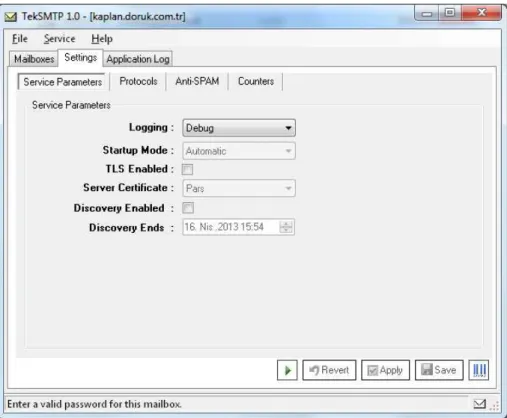
Logging: Select logging level of TekSMTP. Select “None” if you do not want logging, select “Errors” to log errors and select “Sessions” to log session information and errors. Log files are located under <Application Directory>\Logs directory.
Startup: Set TekSpot service startup mode, Manual or Automatic. You can also disable service startup.
TLS Enabled: Enable TLS for SMTP / POP3 connections. Server Certificate: Select server certificate for TLS.
Discover Enabled: When you migrate an e-mail domain you can discover user passwords when users try to login their POP mailboxes.
Figure - 1. TekSMTP Settings / Service Parameters tab
Settings / Protocols Tab
You can set SMTP / POP3 listen ports at Protocols tab. You can set multiple ports for SMTP service. You can optionally enable / disable SMTP authentication which is enabled by default. If enabled, TekSMTP monitors failed SMTP/POP3 connection attempts from suspicious endpoints and blacklists them.
© 2013 KaplanSoft - http://www.kaplansoft.com/ 6
Settings / Anti-SPAM Tab
TekSMTP can query RBL databases to filter SPAM messages. You can specify your own DNS black lists. Some RBL systems require connecting them directly. You can also check validity of sender domain.
Figure - 3. TekSMTP Settings / Anti-SPAM tab
Mailboxes
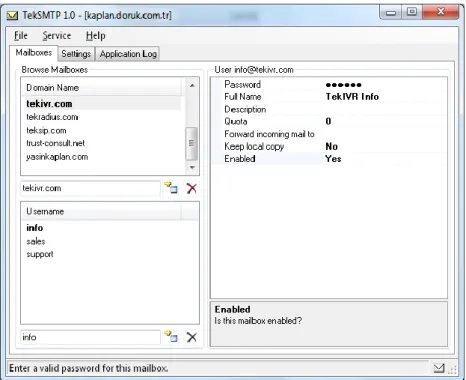
You can define e-mail domains and mailboxes in “Mailboxes” tab.
Application Log
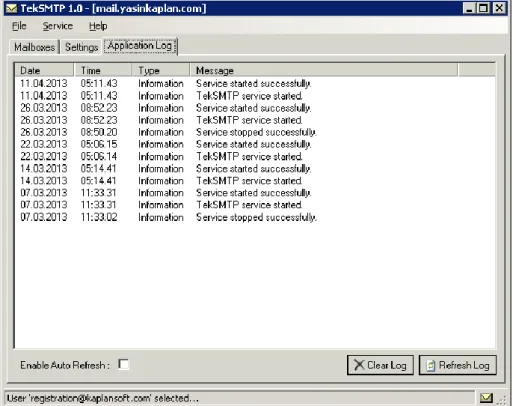
You can monitor system events in Application Log tab. You can manually refresh log entries and clear log entries. Click Enable Auto Refresh option to refresh log list every seconds.
Figure - 6. Application Log Tab
Starting TekSMTP
Click “Service” menu and select “Start Service” to run TekSMTP after making necessary configuration and saving configuration. If service starts successfully you will see “TekSMTP is started” message at bottom left message section of TekSMTP Manager. Optionally you can start/stop TekSMTP using the button on Settings tab. When you make any change(s) in configuration, TekSMTP must be restarted.
If TekSMTP cannot start please examine Application Log tab as well as TekSMTP log file under <Application Directory>\Logs if you were enabled logging in Settings tab.
Troubleshooting
TekSMTP provides many messages when problems occur. You can see error messages on TekSMTP Status bar or in the log file of TekSMTP service. You can enable logging in Settings Tab. There are three levels of logging; None, Errors, Sessions. If you select Errors, TekSMTP logs just error messages. If you select Sessions both Session and Error messages will be logged. You have to save or apply settings changes if you change logging level setting. Log files are located under <Application Directory>\Logs directory.
© 2013 KaplanSoft - http://www.kaplansoft.com/ 8
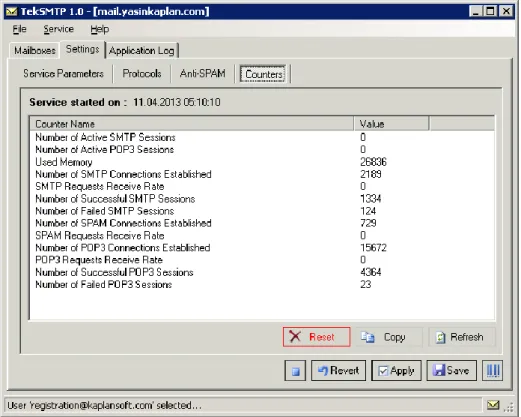
Figure - 7. TekSpot Windows Performance Counters
TekSpot also utilizes Windows Performance Monitor providing numerous counters; Used Memory
Number of Active SMTP Sessions Number of Active POP3 Sessions
Number of SMTP Connections Established SMTP Requests Receive Rate
Number of Successful SMTP Sessions Number of Failed SMTP Sessions
Number of POP3 Connections Established POP3 Requests Receive Rate
Number of Successful POP3 Sessions Number of Failed POP3 Sessions
Number of SPAM Connections Established SPAM Requests Receive Rate
You can add and monitor them using Windows Performance Monitor (Perfmon.exe). You can also monitor these counters through TekSMTP Manager interface (Settings / Counters).