Developing PowerPoint Standards for Teaching
Chinese as a Foreign Language
Siyi Gao
Chinese Language Department, Asian School One, Defense Language Institute Foreign Language Center, USA
Abstract—As we live in a time when standards, frameworks, and benchmarks are becoming increasingly prominent, it makes sense that some sort of teacher technology standards would be desirable. Standards on the state or national levels call for the integrating of multimedia into teaching, but there are not clear guidelines illustrating how integrating a technology into the classroom should be accomplished. Nor is there an evaluation system in place to ensure that teachers possess the multimedia skills and knowledge required in teaching. It is thus important to devise a set of teacher technology standards as a resource for teachers as they attempt to integrate multimedia into their curricula. Therefore, this study provided a set of guidelines and standards for evaluating PowerPoint presentations for use in language teaching to provide more support to language teachers at the institutional level. In this article, four case studies of PowerPoint presentation in Chinese language teaching sample slides are explored to show how the devised standard guidelines and a score assessment system can be used to evaluate the effectiveness of a presentation and thus to help language instructors to develop their skills in making PowerPoint Presentations and improving teaching effectiveness. A proposed teacher PowerPoint standards were developed based on the author’s personal experience teaching Chinese using multimedia in classrooms in China, Europe and America will also be shared in this case study.
Index Terms—standards, case study, professional development, PowerPoint presentation, evaluation
I. INTRODUCTION
Teaching standards or guidelines have been set at both the national and state levels to promote effective use of technology in the classroom. The American Council on the Teaching of Foreign Languages (ACTFL) acknowledges and encourages employing the potential of technology as a tool to support and enhance classroom-based language instruction. However, since language is one of the most complex of all human activities and interactions, ACTFL recognizes the pivotal role of a qualified language teacher to incorporate and manage the implementation of technology so that it effectively supports the language learning experience (ACTFL, 2012b). At the state level, the California Commission on Teacher Credentialing (CCTC)’s California Standards for the Teaching Profession: Continuum of Teaching Practice (CSTP) describes the following teaching practices regarding technology use (CCTC, 2014):
● Standard 1.4: “Using a variety of instructional strategies, resources and technologies to meet students’ diverse
learning needs”;
● Standard 3.5: “Using and adapting resources, technologies, and standards-aligned instructional materials,
including adopted materials, to make subject matter accessible to all students”;
● Standard 5.6: “Using available technologies to assist in assessment, analysis, and communication of student
learning.”
Hanban1 (2007) published standards for technology-enhanced Chinese language teaching. It stated that teachers should “demonstrate an understanding of the basic knowledge and operation of computers, be familiar with various kinds of software and multimedia devices in teaching Chinese, and be able to use them appropriately in teaching Chinese to speakers of other languages.” These standards appear to realize the value of technology in making learning Chinese an active and engaged experience.
However, without appropriate institutionalized training for teachers in using technology, some studies reported that teachers found it difficult to realize the true value and effectiveness of integrating multimedia into teaching. In an attempt to understand how K-12 educators use technology in schools, Project Tomorrow (2014) conducted its annual Speak Up Survey in 2013 among over 333,000 students, teachers, and administrators from over 9,000 schools. The study found that all teachers put “how to differentiate instruction using technology” at the top of their professional development wish-lists. In addition, the Bill & Melinda Gates Foundation (2012) reported that teachers said access to computers, personal comfort level, and time for planning are the three biggest barriers to using technology in class. Union and school rules are the least important barriers to using technology.
Similar challenges were found in the international setting. Yang and Huang (2008) argued that although ESL teachers in Taiwan believed that students might benefit from the utilization of technology in instruction, they faced barriers that made integration difficult to implement. These teachers highlighted barriers such as lack of appropriate training
workshops, lack of personal guidance and consultancy, lack of suitable instructional software and hardware and time constraints.
As we live in a time when standards, frameworks, and benchmarks are becoming increasingly prominent, it makes sense that some sort of teacher technology standards would be desirable. Standards on the state or national levels call for the integrating of multimedia into teaching, but there are not clear guidelines illustrating how integrating a technology into the classroom should be accomplished. Nor is there an evaluation system in place to ensure that teachers possess the multimedia skills and knowledge required in teaching. To address this gap, this study develops a set of teacher technology standards as a resource for teachers as they attempt to integrate multimedia into their curricula. Using four case studies of PowerPoint presentation samples, this study illustrates how a set of devised standard guidelines and a score assessment system can be used to evaluate the effectiveness of a presentation.
II. METHODOLOGY
The proposed teacher PowerPoint (PPT) standards given below are devised based on years of personal experience teaching Chinese using multimedia in classrooms in China, Europe, and America. In addition, several Chinese language instructors in California who teach multiple levels of Chinese have been consulted about their experiences, suggestions, and problems with using multimedia in teaching, who offered me their PPT samples. In addition, the extant literature has been reviewed regarding the preparation and evaluation of effective PowerPoints for teaching. Moreover, information on the standard was gathered during discussions with Dr. David Hemphill from San Francisco State University and Dr. Hui Zhang from Beijing Normal University. In addition, Hanban (2017) provided more information about how to make an effective PPT for teaching and how to evaluate it.
During the period that these guidelines and grading system were being developed in 2014, 40 PPTs from 40 different Teach Chinese as a Foreign Language (TCFL) teachers from all over the world were reviewed. Of those PPT samples, eight of them were downloaded from the Confucius Institute Online Teaching Resources, ten were downloaded from the Hanban Chinese language volunteer teacher training program resources obtained when the researcher was in the training program, ten were from graduate students majoring in Teaching Chinese as A Second Language Teacher who studied at universities in both China and United States, and 12 were from local Chinese language instructors in Northern California. After reviewing all those PPTs, it proves the problems of lacking guidance of using PPT when develop curriculum and prepare teaching materials that the eight Chinese language teachers whom the author interviewed were facing, and strongly supports for the development of standards. The standards of selecting the participants were mainly based on their years of teaching experience, interest of using PPT and other technology in teaching, as well as the PPT slide products that they shared with me. The interview was conducted either over the phone or face to face for about an hour.
As described previously, the number of Chinese language instructors using multimedia to teach Chinese in their classrooms has increased. At the same time, some problems have been discovered in how the TCFL teachers are using multimedia in teaching. After phone interviews with eight Chinese language teachers from different schools in Northern California about their use of PPT in teaching, it became clear that many of them do not yet know how to incorporate appropriate multimedia tools and software to teach Chinese. Among those who reported that they did use PPT very often in teaching Chinese language, most them did not get as good results as they expected. They reported that they had not really realized that PPT is a software that not only can integrate texts and images but also audio, video, animation and other software and links. Also, they revealed a belief on their part that there are not enough related training programs. Therefore, it can be concluded that there have not been enough professional teacher training programs offered to those Chinese language teachers in this field, thus most of them did not know how to incorporate appropriate multimedia tools and software, including PPT, to teach Chinese effectively. Consequently, there is a need to develop a set of standards for Chinese language teachers to employ to incorporate multimedia into their teaching.
To safeguard personal information, teachers who provided the samples of PowerPoint presentations for use in the case studies were also protected from disclosure of school information.
III. STANDARDS
A. Standards to Intergrade PowerPoint into Chinese Language Teaching
Presentation tools allow students and teachers to take text, numerical data, graphs, sounds, and visual images and organize this information into multimedia presentations. While it is possible to use multiple media – for example, audios and images – within a presentation, it is also possible to create a text-only presentation. Although PowerPoint support the creation of complex presentations, the degree of complexity is very much under the control of the creator. This paper introduces a set of standards that provide guidance on how instructors can effectively use PPTs in Chinese language teaching classrooms.
following this standard and grading scale, they can understand the best ways to take advantage of multimedia use to overcome the disadvantages of traditional teaching and this will also help with improving the quality of their teaching and hone their skills.
The devised standards have two uses: on the one hand, the standards may be used by Chinese language teachers to develop a general idea about common multimedia tools and software for use in classroom teaching and how to use them, as well as general guidelines for creating PPTs for teaching, and how to use multimedia to teach appropriately and effectively; on the other hand, the standards can also be used as a reference when conducting evaluations of teachers’ PPTs for teaching Chinese. Based on the two purposes stated above, the proposed standards for multimedia use for Chinese language teaching contain the following categories: (1) general rules; (2) content and curriculum sequence; (3) technology use; and (4) artistic quality. For each of the parts, an original grading system was created as well as a standard based on the functions and rules for a PPT to be used as multimedia in Chinese language classes.
First, the “general rules” part is mainly about the basic rules and skills for making an effective PPT. Those rules can be used for PPTs for any subject and presentation. They are the basic elements of any PPT including font, color, quantity of lines, slides, and other elements. Also, making each slide simple and concise for easy reading by students is a necessity. Another requirement is the use of hyperlinks to insert different multimedia tools in one PPT to save slides and time. Of course, it is important to make sure that each slide contains useful information as well. These basic “grand” rules, which are so important in making the first impression and establishing study attitudes, were assigned a total of 20 points distributed among seven categories. When using this standard as well as the point system to grade a PPT, points can be added or deducted from a category as details are detected.
Second, “content and curriculum sequence”, the core part of the standards, consists of four categories: listening, speaking, reading and writing. This very important part displays the significant knowledge and information for the students. Each category has sub-categories showing the detailed contents of each category. For example, “writing” has two sub-categories: “Chinese characters” and “grammar.” Also, the description for using different multimedia for each of the sub-categories is different based on the characteristics of each medium. For instance, when teaching how to write a Chinese character, teachers would use “text, animation and Chinese character-writing software to teach Chinese characters” but not audio or video.
Using the grading system to evaluate a PPT depends upon what categories are taught. For example, if a teacher teaches all four categories – listening, speaking, reading, and writing in one lesson, then the PPT would be graded with all 40 points. However, if the PPT is used to teach only listening and speaking in this lesson, the total points used for its total would be 20 points. Therefore, grading a PPT on its content and curriculum sequence should be based on what categories the teacher is teaching.
Third, the part “technology use” includes two categories: “multimedia design and effect” and “operating conditions.” Under each of these root categories, there are also sub-categories as well. The “multimedia design and effect” is mainly about the selection, use and design of multimedia which is the basis of integrating multimedia in PPTs. Only by making appropriate and effective selection of multimedia tools can a teacher design and produce good teaching materials to attract students and improve their teaching quality. However, a good PPT alone is not enough; access to operation hardware is also essential because without operating hardware, the most fantastic PPT goes unused and is useless. Therefore, a good operation environment and situation are imperative for ensuring that the software can be used. Since using multimedia in teaching is becoming an integral teaching strategy, this standard is also created for teaching and evaluating how to integrate multimedia in the PPT, so this part is worth 30 points.
TABLE 1
TEACHER STANDARDS FOR INTEGRATING POWERPOINT INTO TCFL
General Rules (20 points)
Only use multimedia when there is a need, don't show any slides that are not related to teaching that wa ste time (0-2 points)
Be Simple and concise, easy for students to follow with no confusion (0 -3 points) Use no more than five lines of text on one slide (0-3 points)
Use no more than two or three different fonts and at least a 28 font size on one slide (0-3 points) Use between three and six colors per screen (0-3 points)
No more than 50 Slides in a PPT (0-3 points)
Use hyperlink to insert text, image, video, audio, animation, etc. to save more slides (0 -3 points)
Standards Categories Sub-Categories Description
Content & curriculum sequence (40 points)
Listening (10 points)
Pronunciation Integrate audio and video to teach pronunciation; Vocabulary
Integrate text, audio and video to teach vocabulary Text
Speaking (10 points)
Pronunciation Use audio and video to teach Conversation
Use audio video and image to help students to get output Simulation
Reading (10 points)
Vocabulary
Use image, text, audio, and video to do reading Text
Writing (10 points)
Chinese Characters Use text, animation and Chinese characters writing software to teach Chinese characters
Grammar Use text audio, video, and images to teach Chinese Grammar
Technology Use (30 points)
Multimedia Design & Effect
(18 points)
Selection of Multimedia (6 points)
Good, appropriate selection of multimedia tools; good balance using text, image, video, audio, animation, etc. (0-6 points)
The use of multimedia (6 points)
Use good software or online resources; or DIY an appropriate PPT with different multimedia tools for the class (0-6 points)
Design (6 points)
DIY; Good technical and design skills; teaching materials are appropriate; Production Good and attractive to students (0-6 points) Operating Conditions (12 points) Operation Environment (6 points)
The PPT and the computer will not "shut down" by accident; no mistakes in navigation and links; Good operational conditions (0-6 points)
Operational circumstances
(6 points)
Easy to start and operate, flexible, good interaction, transaction time is short between slides and hyperlinks (0-6 points)
Artistic Quality (10 points)
Effects of the Design (10 points)
Slide Effect (4 points)
Clarity (clear background, appropriate font and text), creativity, unity and harmony, consistency, simple and smart navigation (0-4 points)
Aesthetic Effect (4 points)
Focal point/Eye catching, balanced colors and background (0-4 points)
Extra Credits (2 points)
Unique, creative, and attractive, showed independent thinking, creates an interactive (0-2 points)
B. Case Studies: Effective versus Ineffective Presentations
As mentioned above, one reason to develop these standards with the grading system is that they can be used as a reference in evaluating how the TCFL teachers are integrating multimedia in the PPTs they have used for teaching in classes. They should know the criteria for judging an ideal PPT that will integrate multimedia into a PPT. Moreover, they should also learn what and how to integrate multimedia in PPTs for their teaching.
The following are eight PPT slides selected out of the 40 PPTs reviewed as examples to show effective PPTs versus ineffective ones based on general rules, technology use and artistic quality. Moreover, included are analyses explaining the reasons why those slides were selected for this comparison of effective and ineffective PPT slides. By following this standard and grading scale, they can understand the best ways to take advantage of multimedia use to overcome the disadvantages of traditional teaching; this will also help ameliorate the quality of their teaching and hone their skills. Also, for future reference, these authentic examples will provide a visual illustration by which they can see what works and what does not.
Cases 1 and 2 demonstrate both ineffective presentations and effective presentations as evaluated based on the “general rules”. Case 3 presents a contrasting presentation based on “technology use”, while Case 4 displays a contrasting presentation based on its “artistic quality”.
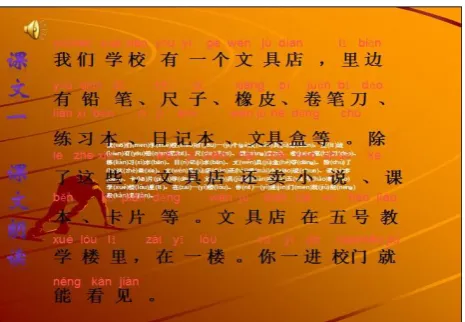
Figure 1 Ineffective Presentation based on the General Rules of Standards (Case 1)
Figure 1 is a slide teaching a text; it does not agree with the following general rules:
1. The standard indicates that a PPT slide should be simple and concise, easy for students to follow without confusion for 0-3 Points. However, this slide has a very messy background and does not show the content clearly. Also, neither the font nor the color of Pinyin above the Chinese characters is easy for students to read. Thus, this may confuse them. For this reason, three points will be deducted during the evaluation. 2. The standard also states that a PPT slide should use no more than five lines of text on one slide (0-3 Point);
there are seven lines on this one slide. Therefore, three points will be deducted during the evaluation. 3. The standard also notes that a PPT slide should use at least a 28 font size on a slide; a 20 font size is used
here; it does not meet the requirements (0-3 Points).
4. In evaluating the artistic quality, it is also evident that this slide shows neither a good slide effect nor a good aesthetic effect. It does not have a clear, balanced color and background, it does not use an appropriate font, and it is so crowded that it is hard to tell if it has creativity, unity and harmony, or consistency. It is not eye catching at all. In this case, this slide also loses points for artistic quality.
Case 1: Effective Presentation
Figure 2 Effective Presentation based on the General Rules of Standards (Case 1)
Figure 2 is a slide teaching a text; it meets the general rules due to the following reasons:
1. This slide meets the standard that a PPT slide should be kept simple and concise, easy for students to follow without confusion (0-3 Point). The background of this slide is very clear and easily shows the content. Also, both the Pinyin and the Chinese characters are easy for students to see. Thus, this author will receive three points during the evaluation.
2. This slide almost meets the standard that a PPT slide should use no more than five lines of text on one slide (0-3 Point); this one has eight lines on this one slide. However, other aspects cause this not to detract; therefore, the author will get those three points as well.
3. This slide meets the standard that a PPT slide should have at least a 28 font size on one slide.
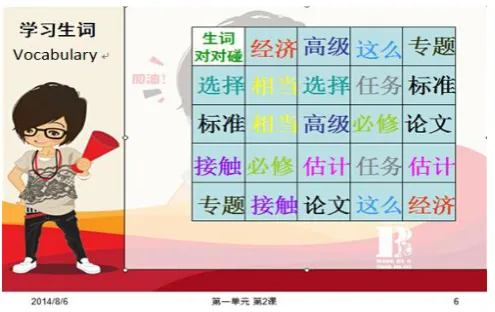
Figure 3 Ineffective Presentation based on the General Rules of Standards (Case 2)
Figure 3 is a slide teaching the target vocabulary; it does not agree with some of the general rules or with some rules for using multimedia to teach vocabulary. Consider the following:
1. The standard states that a PPT slide should use between three and six colors per screen (0-3 Point) while this slides uses ten different colors which can be confusing to follow. Therefore, three points will be deducted during the evaluation.
2. The standard also notes a requirement to integrate text, audio, and video to teach vocabulary (0-3 Point). However, this PPT does not use any audios or videos. It uses only texts for teaching vocabulary, which is similar to the traditional way of teaching.
Case 2: Effective Presentation
Figure 4 Effective Presentation based on General Rules of Standards (Case 2)
Figure 4 is a slide teaching targeted vocabulary; it meets all the general rules of the standard and shows a contrast with the ineffective presentation:
1. This slide meets the standards that a PPT slide should keep it simple and concise, easy for students to follow without confusion (0-3 Point); and that it should use between three and six colors per screen (0-3 Point) as well as the other rules. In summary, this is a very clear slide for showing its content.
2. This slide meets the standard for integrating text, audio, and video to teach vocabulary (0-3 Point). The picture shows that the author added hyperlinks for inserting audios to teach pronunciation of the vocabulary which displays a difference from using the traditional way where teachers read and students try to repeat. With the audio inserted into the PPT, it is easy and convenient for students to follow the audio any time that they choose to do outside of class if the teachers share their PPT with students.
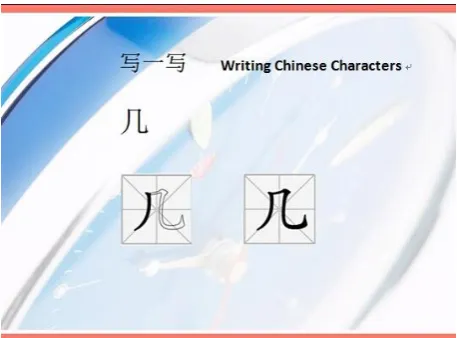
Figure 5 Ineffective Presentation based on the Technology Use Rules of Standards (Case 3)
Figure 5 is a slide teaching how to write a Chinese Character; it does not meet the rules of using multimedia to teach Chinese characters due to the following reasons: The standard states that a PPT slide should use text, animation, and Chinese character-writing software to teach Chinese characters, but this slide only shows the picture of how to write the Chinese character; the students does not see how to write the character stroke by stroke by means of animation or software. Thus, even though the teacher displayed the pictures showing how to write this word by using separate pictures with the required strokes added in each picture, it is not different from using the traditional way to teach. Also, since this is a two-stroke Chinese character, it is easy to show the writing with only pictures. When it is a complicated character consisting of 20 strokes, it is very difficult to show the writing process with pictures since one picture shows only one stroke movement. Therefore, inserting only pictures to teach the strokes of the Chinese characters does not meet the standards.
Case 3: Effective Presentation
Figure 6 Effective Presentation based on Technology Use Rules of Standards (Case 3)
Figure 6 is a slide teaching how to write a target Chinese character; it meets the standard of using multimedia to teach Chinese characters due to the following reasons:
1. The standard expresses that a PPT slide should use text, animation, and Chinese character-writing software to teach Chinese characters which this slide has done by inserting a hyperlink of the software that shows how to write the Chinese character animated stroke by animated stroke. Also, the student can click on “continue”, “next” and “repeat” to see the writing procedure. In this case, the students not only can learn how to write a certain word by themselves, but also all the characters that they want to learn the meanings of and to write with this software at any time they want. It is as if the students have a free teacher writing the Chinese characters. At the same time, the teacher saved time showing the students how to write the characters in class. Therefore, the way that this teacher inserted the animation to teach Chinese characters met the standards and got the points since it proves the advantages of using multimedia in class to benefit both the teachers and the students.
resources (0-6 Point). In summary, this slide earned points by showing an efficient way of inserting multimedia in teaching Chinese.
Case 4: Ineffective Presentation
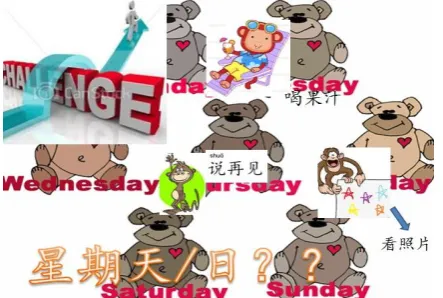
Figure 7 Ineffective Presentation based on Artistic Quality Rules of Standards (Case 4)
Figure 7 does not meet the artistic quality standard due to the following reasons:
1. The standard indicates a PPT slide should have clarity with a clear background, appropriate font and text, creativity, unity and harmony, consistency, be simple and have smart navigation. But in this presentation, the background is so messy with its different texts, fonts, and pictures. It is also hard to tell the main points and ideas the teacher wants to demonstrate with this slide. Thus, four points are deducted to account for the slide effect on this presentation.
2. The standard requires eye catching, balanced colors and background. There are too many cluttered pictures and colors in the background of this slide; it is not eye catching at all. Furthermore, the texts and the pictures are not arranged in a symmetrical, balanced way and thus creates a disorganized feeling. Therefore, four points of the aesthetic effects should also be deducted.
Case 4: Effective Presentation
Figure 8 Effective Presentation based on Artistic Quality Rules of Standards (Case 4)
Figure 8 meets the artistic quality standard due to the following:
1. This slide is very simple and clear with a light background. The font and text are also appropriate, exhibiting unity, harmony, and consistency. In this case, the presentation will get four points for the slide effect. 2. The slide also meets the standard requiring eye catching, balanced colors and background. There are few
colors in the background of this slide, and the colors of the background as well as the texts are quite cohesive. It is very clear and appealing. Therefore, it earns the four points for aesthetic effects.
IV. CONCLUSION
language teaching and learning, the score system can be used for teachers to learn how to integrate multimedia in teaching and to evaluate the effectiveness of a presentation.
To make effective use of multimedia technology to aid teaching and learning of TCFL, it is important to not only think of the advantages of, but also bear in mind the limitations of, multimedia technology. When making multimedia an integral part of TCFL curriculum, instructors should consider what pedagogical problems a multimedia program can solve, and how that program might contribute to successful learning and teaching of TCFL. To that end, PowerPoint (PPT), a popular multimedia tool in teaching, is used to illustrate the ways by which TCFL teachers not only in Northern California but also around the world can make PowerPoint even more effective as an integral part of a successful Chinese language program.
One of the limitations of this case study is that the sample size is too small to conduct statistical tests from the quantitative data collected via the interview. A mixed method of questionnaires and focus group interviews with selected teachers could have resulted in better and more in-depth understanding of the problem. Overall, the PowerPoint samples in this case study was limited. It is recommended future studies validate and extend the sample size and results found in this study.
Future research can explore how to design and develop a curriculum for professional PowerPoint training classes for all TCFL teachers in the U.S. Another option is to investigate the efficacy of various multimedia in helping to engage students in learning the Chinese characters, or the effects of appropriate uses of images on improving students’ learning. Any related research subjects can help TCFL teachers have a better idea about what multimedia skills to learn and to incorporate into their teaching.
ACKNOWLEDGEMENTS
The author wishes to thank Dr. David Hemphill for his continuous guidance and support throughout this field study; Dr. Ming-yeh Lee and Dr. Wen-Chao Li for their encouragement and recommendations; and Professor Hui Zhang and Professor Zhongshan Li from Beijing Normal University for providing valuable feedbacks in their review of the survey and case study.
REFERENCES
[1] American Council on the Teaching of Foreign Languages. (2012a, December 11). Foreign language enrollments in K-12 public schools: Are students ready for a global society? [Executive Summary]. Retrieved Sept 25, 2013, from http://www.actfl.org/sites/default/files/pdfs/ReportSummary2011.pdf.
[2] American Council on the Teaching of Foreign Languages. (2012b, July 30). Role of technology in language learning. Retrieved June 25, 2014, from https://www.actfl.org/news/position-statements/role-technology-language-learning.
[3] American Council on the Teaching of Foreign Languages. (n.d.). Certified proficiency testing program & ACTFL testing office. Retrieved June 25, 2014, from http://www.actfl.org/professional-development/certified-proficiency-testing-program-actfl-testing-office.
[4] Bill & Melinda Gates Foundation. (2012). Innovation in education: Technology & effective teaching in the U.S. Seattle, WA: Bill & Melinda Gates Foundation.
[5] California Commission on Teacher Credentialing. (2014, June). California standards for the teaching profession: Continuum of teaching practice. Retrieved June 14, 2014, from http://ca-btsainduction.org/sites/ca-btsainduction.org/files/fact/docs/Combined%20CSTP%20CTP%202014.pdf.
[6] Project Tomorrow. (2014, June). The new digital learning playbook, advancing college and career ready skill development in K-12 schools. Retrieved June 20, 2014, from http://www.tomorrow.org/speakup/pdfs/SU13Educatorreport_WEB.pdf.
[7] Standards for Teachers of Chinese to Speakers of Other Languages. Hanban. (2007). Beijing, China: Foreign Languages Teaching and Research Press.
[8] Yang, S. C., & Huang, Y. F. (2008). A Study of High School English Teachers’ Behavior, Concerns and Beliefs in Integrating Information Technology into English Instruction. Computers in Human Behavior, 24(3), 1085-1103.