A STUDY OF USER EFFORT AS MEASURED USING
QUERY CONSTRUCTION AND INTERFACE
SELECTION
by Paul Gerwe
A Masters paper submitted to the faculty of the School of Information and Library Science of the University of North Carolina at Chapel Hill in partial fulfillment of the
requirements for the degree of Master of Science in Information Science.
Chapel Hill, North Carolina November, 1999
Approved by:
Paul V. Gerwe. A Study of User Effort as Measured Using Query Construction and Interface Selection. A Master’s paper for the M.S. in I.S. degree, November, 1999. 26 pages. Advisor: Charles L. Viles.
This pilot study was designed to examine user beliefs and behaviors on the selection and use of search features and search interfaces. The study consisted of five weeks of user logs taken from an Ultraseek server and surveys administered immediately before and after this time period. The survey results indicated a strong correlation between a user’s level of effort and their perceived benefit of that effort. Results from the log files were inconclusive but suggested a reluctance to use the advanced search interface. Reported feature use increased by more than 35% over the five weeks. This raises the question of how the behavior of an Internet user changes over time. Further study into the increased use of features and the best interface to provide them is recommended.
Headings:
Online Searching
World Wide Web Case Studies End User Searching
Table of Contents
Introduction………....1
Literature Review………...… 1
Methodology………..…… 7
Search Engine……… 9
The Collection ………...……… 12
Data Collected ………...……… 13
Constructed Measures ………...………… 13
Search Engine Use Analysis……….. 19
Conclusion………. 23
Acknowledgements……… 24
References……….. 25
Appendix A: A Brief History of the World Wide Web Appendix B: Consent Form
Appendix C: Pre-Survey Appendix D: Post-Survey
Introduction
The World Wide Web is a cacophony of sights, sounds and information. The resources are diverse and intended to satisfy numerous audiences. When attempting to estimate the current extent of the Web, the phenomenal growth rate prompts experts to agree simply that it’s vast. (Hsieh-Yee, 1998, Lawrence & Giles, 1998) Most users spend at least some portion of their time on the Web looking for resources. They may simply browse following links from page to page and site to site, or utilize one of the many search services available.
How much effort is a searcher willing to expend creating a web based search? In this study we addressed this question by designing a measure of effort and collecting data through surveys and log analysis. Effort was measured using several factors. The
number of terms used in each search and the number of search features selected were the primary two factors to determine effort. Features were defined as the use of Boolean operators, the number of text fields used and the number of non-default options selected from drop down or check boxes. In addition, selection of an interface other than the one initially displayed was considered another indication of effort.
We believe that by better understanding the effort searchers are willing to put into Web based searches, the interfaces and the information indexed can be refined to best match the way users search.
Literature Review
Engines, please see Appendix A.) Schwartz (1998) provides an excellent survey of the research done through 1997. The performance evaluation research to that time tends to focus on features, precision and relevance – most often precision. Precision is defined as the proportion of retrieved documents that are relevant. (Korfhage, 1997) Examples of features include Boolean searches, exact phrase matches, specifying which terms must or must not be present, proximity searching, fielded searching and restricting searches by language or dates. Queries are posed to a number of search engines and the results are compared. Given the volume of “hits”, precision is often calculated by reviewing the first 10 or 20 documents. This is often referred to as first X precision, where X
represents the number of documents reviewed for precision for a given search. (Schwartz, 1998, Leighton & Srivastava, 1999) An example of this sort of study is the article by Leighton and Srivastava (1999), which looks at first 20 precision among five major search engines. Other research detailed in Schwartz’s “Web Search Engines” (1998) looked at the amount of duplication within a search engine’s collection, link validity and relevance.
Of the two cornerstone measurements within systems based information retrieval theory, recall and precision, little work has been done in attempting to measure recall. To measure recall would require knowing the number of relevant documents within a
Other studies involving Web based search engines have focused on the user. A study conducted at the State University of New York in 1995 (Wei He and Jacobson, 1996)surveyed the users of six Internet kiosks within the University Library. Part of the information they were looking for was demographic to determine who their user base was. Undergraduates accounted for 52% of their users and graduate students for another 36%. As one might expect, a large percent (79%) of the user population were of ages 18 to 34. Of those surveyed 97% found the Internet useful, and 66% reported using Web based search engines. Almost half (46%) had been using the Internet for 6 months or less.
may help spur the use of advanced search engine interfaces and other web based applications that are considered more complicated as the average user becomes more comfortable with Web based interfaces in general.
Pollock and Hockley (1997) looked at the usability of web-based search engines by “Internet-naïve” users. They did two trials with the first consisting of participants with little computer experience and the second specifically targeting individuals who were comfortable with personal computers but who had little exposure to the Internet. Their study indicated that familiarity with PCs did not make the process of finding information on the Internet for the novice user any easier. Both groups had trouble generating good keywords, even when the researches deemed they had all necessary information. Basic search interfaces usually limit users to terms and Boolean operators. It may be better to look at interfaces that have different select fields and check boxes not as more advanced but as more basic – training wheels for the novice Internet searcher.
points were reviewed as they applied to the two sites for the study. One was graphic intensive while the other was text based.
One area that has received almost no attention for web based searching is that of measuring user effort. Ultimately the user will decide which documents are relevant and whether a search has concluded successfully or unsuccessfully. In the case of systems based testing, how do researchers determine the queries they use as grounds for comparison? Will the number of terms submitted be consistent with the average user? Can the use of Boolean operators or other features be either expected or rejected? Are those search services recommended truly “best” for the typical searcher?
Search terms have been studied in different manners including their selection and their effectiveness (Siegfried, Wilde & Bates, 1993, Spink &Saracevic, 1993, Spink & Saracevic, 1997, Wildemuth & Moore, 1995) but the number of terms has not been studied as a direct measure of effort. Paris (1998) as part of her doctoral dissertation reviewed user effort as measured by their persistence in reviewing results and determined optimal cutoffs from the user’s perspective. The median number of documents reviewed was 100 and the mean was 116 documents. Her research looked at the maximum effort, not the amount of effort initially invested.
considered critical. In another study, transaction logs were used by Tolle (1983) to determine the features used for an on-line catalogue.
The paper by Jansen, Spink, Bateman & Saracevic (1998) is the only study we have found which focuses on query formulation in a web-based environment. It also looks at the number of queries in a session and the number of search terms used. With search terms the focus is on how many per query and which ones are most frequently sought. From Excite they obtained the logs of all searches on a single day. The search interface has a single text entry field for terms and operators.
Jansen et. al (1998) concludes that there is a low use of advanced search techniques. This finding is supported by Schwartz’s survey where she discusses advanced features available from various search engines.
Many search engines do provide a full array of sophisticated search commands, but the casual user is usually protected from these by their being in a help file or only accessible under the guise of “power” or “advanced” search. (Schwartz, 1998)
Is the single entry field necessarily better than a one with more available fields and features? The single text entry field interface which is the normal layout for the “basic” search interface provides no real difference to a command line interface and in most cases offers less feature options than search engines that are specifically command line driven. It seems reasonable that to make best use of the medium of a graphical user interface, requires the use of fields and features that can be operated with a click of a button rather than typing and a dependence on memory for commands and syntax.
Advanced Search interfaces have as Schwartz says been removed from users. There is at least some extra effort to get to that interface, which almost invariably requires stepping through a page with the basic search interface. Yuan (1997) points out that for most users, searching is only an occasional task. If this is indeed the case then the terms “advanced” and “power” can be barriers to use.
Methodology
students, 25% are undergraduate students and 10% are continuing education students. The course is described as providing an introduction to Internet applications, services and concepts, and is intended for those with limited knowledge of the Internet including the World Wide Web. Because of the various applications and services covered, experience for any given area varies.
Looking at the statistics for GVU’s 10th WWW User Survey places the majority of the students in these classes in the most frequent categories for users based on age, and educational experience. For age, individuals between the ages of 21 and 35 comprise the three highest reported categories and account for 42.2% of GVU’s surveyed population, with the largest bracket being the 26 – 30 category at 16.1%. With regard to educational attainment, individuals having completed a bachelor or a master’s degree accounted for 52.1% of those surveyed of a total of 9 categories. “Some College” was the second largest category at 28.5%. While the students in the two sections of INLS 181 are not representative of the population of those using the Web as a whole, they do represent a significant subset of that population.
contact information and the statement of consent. If they wished to participate they were asked to read, sign and return one copy. The other would be for them to keep in case they had questions. A copy of the consent form can be found in Appendix B.
Students were then given a copy of the pre-survey. Each student was requested to put their name on each page of the survey for the purpose of comparing their initial
results to the second survey. Once the surveys had been matched, the space with their name would be removed. There would then be no way to associate the responses with any given individual. The survey was divided into two parts. The first part asked about their use of search engines and search features. The second part asked how frequently they found various search related conditions to be true, such as how often it is useful to be able to search for an exact phrase. A copy of the pre-survey can be found in Appendix C. After five weeks the students were given the follow up survey. All the questions in the first two sections of the pre-survey were duplicated in the corresponding sections of the post-survey. There was one question added to the second section that asked if they’d used the class search engine. There was then a third section on the use of the provided search engine if they had used it. The post survey can be found in Appendix D.
Search Engine
Two search engines were considered for use with this project, Ultraseek and ht://Dig. Ultraseek is the commercial version of Infoseek’s search engine. Both search engines shared a number of features including customization of the spider for depth and URL pattern matching, full text indexing of HTML and text documents, Boolean
ht://Dig allowed for customization of the search algorithms used and provides the full source code under the GNU General Public License. It will index metadata keywords and weight on those keywords. The ht://Dig server will also provide email notification when pages change.
Ultraseek can do real-time updates and schedule indexing times. It also supports a number of additional document formats including Rich Text Format (RTF), the
eXtensible Markup Language (XML), Microsoft Word, PDF and others. Re-indexing of sites can be customized and the spider can work through firewalls and use password access. In addition to HTTP, it can also index over FTP and NNTP, and there are a number of other server and indexing options available. In addition, there are a host of additional search options including searching by phrase, on title and on URL. It provides mechanisms for relevance feedback using the “Find Similar” option. XML fields can also be mapped and searched. Searches can also be limited to a specific date range.
As the goal of this study was to measure the effort the user is willing to expend in the initial interface selection and query formulation, the Ultraseek server was the better choice based on the advanced search interface and the features to which they mapped. Infoseek was also rated one of the top three search engines based on first 20 precision in a study of five popular search engines – Infoseek, Alta Vista, Excite, HotBot and Lycos. (Leighton & Srivastava, 1998) While the study did not use Ultraseek, the underlying search engine is the same in both and some measure of known quality can be inferred.
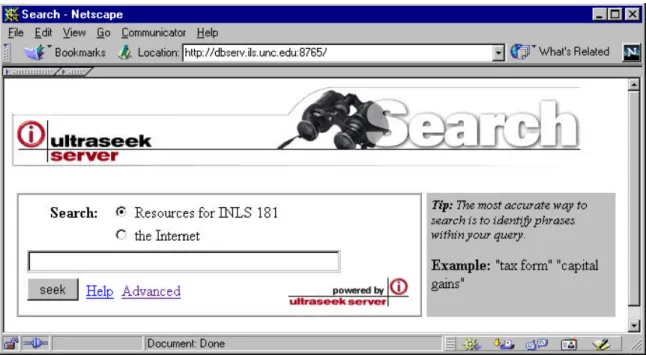
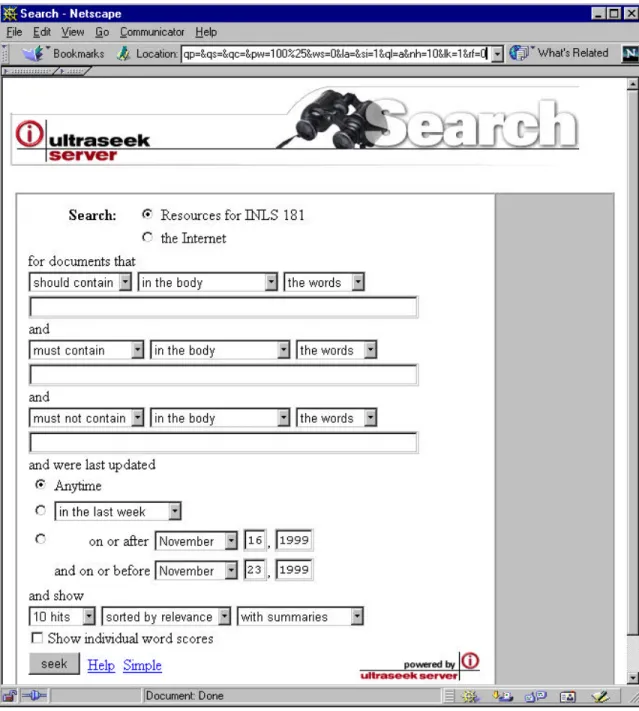
searchers. The first person would be sent to the basic search interface, the next to the advanced and back and forth. Once presented with a given interface they would use the same one through their session unless they specifically switched to the other. Links to the other interface were prominent and available.
Figure 1. Basic Search Interface
Figure 2. Advanced Search Interface
The Collection
was reached. A listing of the sites indexed and the parameters used for the spidering of those sites can be found in Appendix E.
Data Collected
As described earlier, data collection took the form of two surveys and the log files for the search engine. For the pre-survey, 54 surveys were returned. Of these two did not have accompanying waivers agreeing to participate in this process and were therefore removed from consideration. With the post-surveys, 50 were returned of which 47 matched by name pre-surveys. Two others had no name and therefore no associated waiver and were removed from consideration. The last post-survey was submitted with a waiver and included in the data. Overall a total of 53 participants supplied data used in this study. On a few surveys a question or two were skipped, however there was no overlap in the missing data, and all calculations were done without them. The search engine logs recorded 32 sessions over the five weeks set aside for that aspect of the study. Sessions were differentiated by the interface accessed, the time and the terms used.
Constructed Measures
1. I have used a web search engine within the last: day week 2 weeks month or more never
2. I have used quotation marks (“ “) to specify an exact phrase in a search within the 3. Besides quotation marks and just putting the terms next to each other, I have used
another method to specify an exact phrase in a search within the last… 4. Have you ever used Boolean operator AND in a search?
5. Have you ever used Boolean operator OR in a search?
6. Have you ever used the Boolean operator NOT in a search?
7. I have used the “advanced” search page of any web search engine within the last… 9. How many terms do you typically enter before having the search engine run your
search?
The second measure of effort provided a bit more leeway in the time frame in which the various features were used. Rather than needing to match the time specified in question one, one rank of time difference were permitted for questions two through seven. So, if the search engine had last been used in the past day, then day or week were considered matches for the purpose of effort. Likewise if a week had been specified, then a week or two weeks were acceptable and so on.
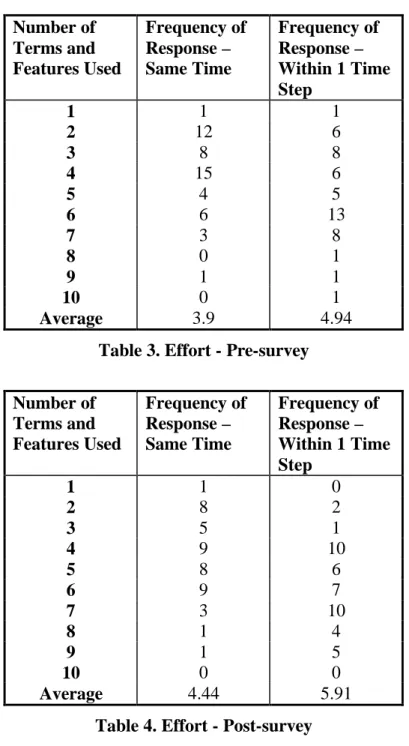
Actual effort scores ranged from one to ten on the pre-survey and one to nine on the post-survey. Table 1 shows the number of terms used on average, while Table 3 shows the combined terms and features for the pre-survey. This information is provided for the post-survey in Tables 2 and 4 respectively.
Number of Terms Used:
Frequency of Response
1 4
2 22
3 14
4-6 11
7-10 0
11+ 0
Average 2.63
Table 1. Terms Used - Pre-survey
Number of Terms Used:
Frequency of Response
1 1
2 21
3 13
4-6 10
7-10 0
11+ 0
Average 2.71
Table 2. Terms used - Post-survey
Over the six week period between the two surveys the average number of terms increased only slightly from 2.63 to 2.71. The use of other features though increased more notably. Number of Terms and Features Used Frequency of Response – Same Time Frequency of Response – Within 1 Time Step
1 1 1
2 12 6
3 8 8
4 15 6
5 4 5
6 6 13
7 3 8
8 0 1
9 1 1
10 0 1
Average 3.9 4.94
Table 3. Effort - Pre-survey
Number of Terms and Features Used Frequency of Response – Same Time Frequency of Response – Within 1 Time Step
1 1 0
2 8 2
3 5 1
4 9 10
5 8 6
6 9 7
7 3 10
8 1 4
9 1 5
10 0 0
Average 4.44 5.91
Table 4. Effort - Post-survey
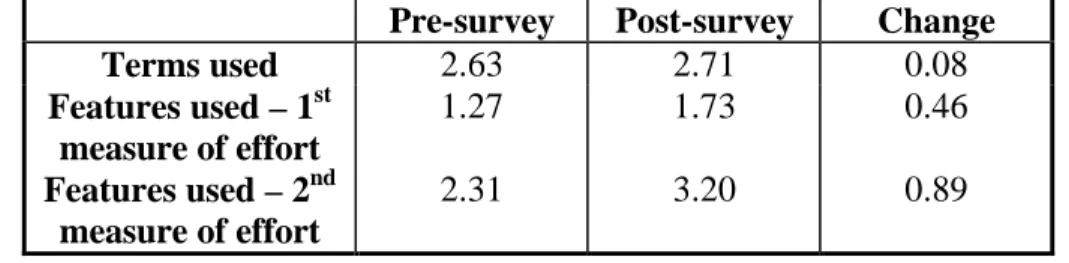
number of terms used. For the second measure of effort, the average was 5.91 yielding an increase of 0.89. One explanation for these increases is due to regular use of search engines. Table 5 shows the differences in terms and features between the two surveys. More than 60% of the participants indicated having used a search engine within the last day on the pre-survey and a like percentage indicated the same on the post-survey. All but two of the respondents on each survey had used a search engine within the last week.
Pre-survey Post-survey Change Terms used 2.63 2.71 0.08
Features used – 1st measure of effort
1.27 1.73 0.46
Features used – 2nd measure of effort
2.31 3.20 0.89
Table 5. Changes in Term and Feature Use
Other features comprise a significant part of the overall effort expended in the searches. This number also increased more rapidly than the average number of terms being used, suggesting that it is the additional features more than additional terms that help searchers find what they are looking for. But is this a valid assessment? Do the searchers really believe that the use of additional terms and features will improve their search? To help answer this question we created another measure that we termed “the perceived benefit of effort.” This included the following questions from the surveys:
11. Specifying more terms and options decreases the number of pages I have to look through…
12. Specifying more terms and options finds more of the pages I’m looking for… 13. Specifying more terms and options decreases the time I spend looking for
Again, the numbers above correspond to the questions in the two surveys. There were four answers “rarely”, “some”, “often” and “always.” These were given values of “1” to “4” respectively for a total range of “3” to “12”.
The mode of these questions in all cases but one was “some.” The exception being question 11 on the post-survey where “often” was the mode with “some” close behind. This may help explain the differences in the two measures of effort. While there is a perceived benefit of effort it is not sufficient to warrant the use of additional features on a more frequent basis. This seems to suggest that the user may be using a wider variety of features, but not using them within the same query. Determining a more definitive answer would require additional study.
We ran a comparison of each measure of effort vs. the perceived benefit of effort using the Pearson Correlation test. Table 6 shows the results of those correlations. There is a correlation between each measure of effort in the pre-survey and for the second measure of effort in the post-survey. These correlations indicate that the users actually behave as their belief dictates.
Perceived Benefit of Effort
Pre-survey: Effort – Same
Time
Pre-survey: Within One Time Step
Post-survey: Effort – Same
Time
Post-survey: Within One Time Step Pearson
Correlation
.421 .350 .280 .542
Significance (2-tailed)
.002 .013 .063 .000
N 50 50 45 45
Search Engine Use Analysis
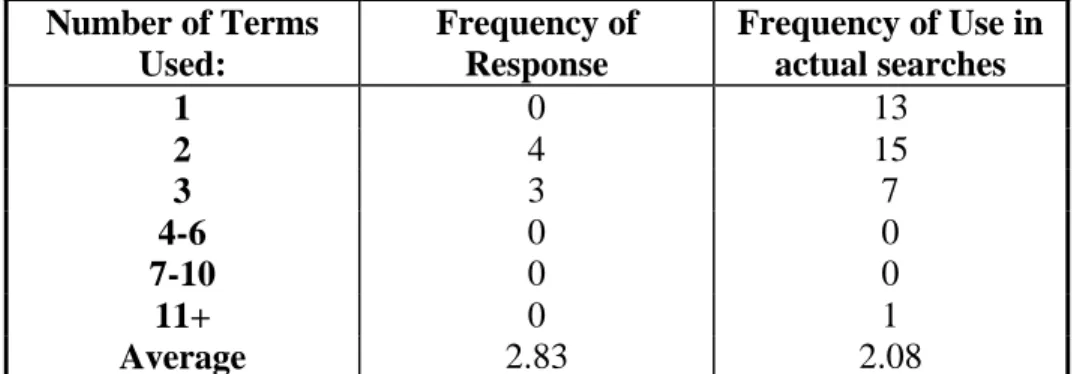
Using the survey responses we were able to calculate the terms and effort for those who reported using the provided search engine. Seven individuals reported having used the search engine, accounting for all 36 queries over 17 sessions. Tables 7 and 8 show the number of terms and the effort that this group reported on the post-survey.
Number of Terms Used:
Frequency of Response
Frequency of Use in actual searches
1 0 13
2 4 15
3 3 7
4-6 0 0
7-10 0 0
11+ 0 1
Average 2.83 2.08
Table 7. Terms Used by Searchers (Post-survey and search engine)
Number of Terms and Features Used Frequency of Response – Same Time Frequency of Response – Within 1 Time
Step
Actual Searches
1 0 0 13
2 1 1 8
3 1 0 13
4 1 2 0
5 2 0 1
6 1 1 0
7 0 2 0
8 1 1 0
12 0 0 1
Average 4.71 5.43 2.36
Table 8. Effort by Searchers (Post-survey)
made for the number of terms used. The second measure of effort dropped by 0.60 to an average of 2.60 features used within one time step.
Comparing the reported results against those actually obtained showed notable differences. The average term frequency used in actual searches was 2.08 down 0.75 from the reported average. The number of features used was 2.36, which indicates only a 0.28 feature use compared to the 2.6 reported in the post-survey. Before attempting to make sense of these discrepancies, other information needs to be considered.
The provided search engine was only accessed 32 times over the course of the five weeks allocated for its data collection. Of these 32 sessions, only 17 resulted in actual searches. The breakdown of access can be seen in Table 9. The use of features seems to be spread out over a variety of searches and over the course of time. As seven people indicated that they used the search engine, this means that on average each individual performed less than 3 searches. More data would be determine whether the discrepancies indicated within the current data set are indicative of an actual disparity between the reported and observed.
Accessed but not Used
Accessed and Used Switched To
Basic Interface 5 11 2
Advanced Interface
10 6 1, but not used
Table 9. Search Engine Access
to that page unless it is already book-marked. Locating the link and selecting it are extra steps and therefore extra effort that a user has to exert in order to get to their desired search interface. The theoretical complexity of the advanced search interface is used as a reason to not make it the default.
All searches that can be accomplished using a basic search interface can be done using the advanced search interface. No loss of capabilities would be sustained by utilizing the advanced search interface over the basic. In addition, the ready availability of additional features may inspire their use and ideally improve the search results by increasing the precision. A preference for the advanced interface or an ambivalence to which search interface is used, would strengthen the argument for providing the advanced search interface as the default and encourage search engine creators to improve on the fields and manners of limiting searches such as through the use of metadata standards and tags.
It is worth comparing the results obtained from the search engine to those obtained by Jansen et. al (1998). Their analysis of 51, 473 queries produced an average term frequency of 2.35 as compared 2.08 for the use of the search engine and an average of 2.67 terms between the two surveys. While they do not have a strict measure of features, they do list that “about one in 12 queries contained a Boolean operator” and “about one in 11 queries incorporayed (sic) a ‘+’ or ‘-‘ modifier.” Of the queries
submitted to the search engine, 7 of the 36 queries or roughly one in 5 actually made use of a feature.
Other Questions
We considered a number of additional relationships as part of this study. They included:
• Ease of use vs. how often the advanced search interface was used
• Whether there were enough options provided by web search interfaces vs. how often the advanced search interface was used
• How often they reported finding the information they were looking for vs. the effort they put into their search
• How often they reported finding the information they were looking for vs. the perceived benefit of effort
• The effort they put into their search vs. how often they had to submit additional queries
Conclusion
This study was a pilot and intended to explore and perhaps lay the groundwork for further research. While little could be drawn conclusively from the use of the search engine, there were a couple of interesting and potentially promising results. The first is that being presented with the advanced search engine first was not necessarily a
difficulty, or at least not one that warranted extra effort to correct. Those that switched from it to the more basic interface used the advanced search first. This should still be tempered by the fact that twice as many individuals did not use the advanced search engine when presented with it vs. those who did not use the basic search engine. A larger data set would be needed to examine and to clarify the results. The second thing of note was the increased use of features over the study by Jansen et. al (1998). Rather than the previously reported one in 11 or one in 12, the use of features was closer to one in 5. The nature of the features used was different. In the use of the provided search engine, no Boolean operators were used at all – though they were certainly available for use. The features used were additional fields, selections from drop down boxes and proximity operators, the last most closely resembling the features used in the Excite study. It is certainly possible that the ready availability of additional features is enough to bring them into occasional use. A more detailed study could also be done to determine exactly what search features are most desired and equally important – the manner in which they are presented to the user.
question of how the behavior of an Internet user changes over time. A longitudinal study would be needed to answer this question.
Part of the reluctance to use advanced search interfaces beyond the possible complexity issue is whether or not it really has much impact. The perceived benefit of effort as measured by the surveys indicated that while effort was seen to have some
impact, the impact was not constant. The results also showed a correlation between effort and it’s perceived benefit in most cases. Improving one will likely improve the other. The difficulty comes in making that improvement. The infrequent occasion of no returns on a Web based search has mitigated the need to extensively learn the interface. This has made searching accessible to a larger audience but at the potential cost of time spent.
Continued study of the effort that a user is willing to Web based search needs to be done. The crafting of queries based on information from actual use needs to be understood to allow for additional improvements in the interface and the mechanisms behind it. Ideally the results at the top of the list will meet the needs of the searcher. The question is how to maximize the content into the system and put it in context. That is what we hope to see in future studies.
Acknowledgements
References
1. AltaVista. (1999a). About AltaVista [On-line]. Available: http://www.altavista.com/av/content/about.htm
2. AltaVista. (1999b). Highlights – AltaVista Notable Facts & Figures [On-line]. Available: http://www.altavista.com/av/content/about_highlights.htm
3. Berger, K.W. & Hines, R.W. (1994, November). What does the user really want? The library user survey project at Duke University. Journal of Academic
Librarianship, 20, 306-309.
4. Berners-Lee, T. (1989). The original proposal of the WWW, HTMLized. [On-line]. Available: http://www.w3.org/History/1989/proposal.html
5. Berners-Lee, T. (1992). Summary – /WWW. [On-line]. Available:
http://www.w3.org/History/19921103-hypertext/hypertext/WWW/Summary.html 6. Berners-Lee, T. & Connolly, D. (1995). Hypertext Markup Language - 2.0. [On-line].
Available: http://www.ics.uci.edu/pub/ietf/html/rfc1866.txt 7. Excite. (1999). Excite: Background [On-line]. Available:
http://corp.excite.com/about/exciteback.html
8. Gray, M. (1995). Measuring the Growth of the Web [On-line]. Available: http://www.mit.edu/people/mkgray/growth/
9. Georgia Institute of Technology. (1999). GVU’s Center WWW User Surveys. [On-line]. Available: http://www.gvu.gatech.edu/user_surveys/
10. Hsieh-Yee, I. (1998 ). Search Tactics of Web Users in Searching for Texts, Graphics, Known Items and Subjects: A Search Simulation Study. The Reference Librarian, 60, 61-85.
11. ht://Dig – Internet Search Engine Software [Computer software]. (1999). the ht://Dig Group. Available: http://www.htdig.org/
12. Jansen, B.J., Spink, A., Bateman, J. & Saracevic T. (1998, Spring). Real Life
Information Retrieval: A Study of User Queries On the Web. SIGIR Forum, 32, 5-17. 13. Korfhage, R. (1997). Information Storage and Retrieval. New York: Wiley Computer
Publishing.
14. Lawrence S. & Giles C. L. (1998, April 3). Searching the World Wide Web. Science, 280, 98-100.
15. Leighton, H.V. & Srivastava, J. (1998, July). First 20 Precision among World Wide Web Search Services (Search Engines). Journal of the American Society for
Information Science, 50, 870-881.
16. Lycos. (1999). Lycos Corporate Fact Sheet [On-line]. Available: http://www.lycos.com/info/fact.html
17. Paris, L.A.H. (1998). Stopping behavior: user persistence in online searching and its relation to optimal cutoff points for information retrieval systems (Doctoral
18. Pollock, A. & Hockley, A. (1997, March). What’s Wrong with Internet Searching. D-Lib Magazine, [On-line], 3. Available:
http://www.dlib.org/dlib/march97/bt/03pollock.html.
19. Schwartz, C. (1998, September). Web Search Engines. Journal of the American Society for Information Science, 49, 973-982.
20. Siegfried, S., Wilde, D.N. & Bates, M.J. (1993, June). A profile of end-user searching behavior by humanities scholars the Getty Online Searching Project Report No. 2. Journal of the American Society for Information Science, 44, 273-291.
21. Spink, A. & Saracevic, T. (1993). Search term selection during mediated online searching. Proceedings of the 14th National Online Meeting, 14, 387-397. 22. Spink, A. & Saracevic, T. (1997, August). Interaction in Information Retrieval:
Selection and Effectiveness of Search Terms. Journal of the American Society for Information Science, 48, 741-761.
23. Tolle, J.E. (1983). Understanding patrons’ use of online catalogs: transaction log analysis of the search method. Productivity in the information age: proceedings of the 46th ASIS Annual Meeting, 20, 161-171.
24. Ultraseek [Computer software]. (1999). Infoseek. Available: http://software.infoseek.com/products/ultraseek/ultratop.htm
25. WebCrawler. (1999) WebCrawler [On-line]. Available: http://www.webcrawler.com – copyright info in footer
26. Wei He, P. & Jacobson, T. (1996, Spring). What Are They Doing with the Internet? A Study of User Information Seeking Behaviors. Internet Reference Services
Quarterly, 1, 31-51.
27. Wildemuth, B.M. & Moore, M. E. (1995, July). End-user search behaviors and their relationship to search effectiveness. Bulletin of the Medical Library Association, 83, 294-304.
28. World Wide Web Consortium. (1998). Classic HTTP Documents [On-line]. Available: http://www.w3.org/Protocols/Classic.html
29. Yahoo!. (1999). the history of Yahoo! [On-line]. Available: http://join.yahoo.com/overview.html
Appendix A: Brief History of the World Wide Web
The World Wide Web, commonly referred to as just the Web, began with a proposal from Tim Berners-Lee to the management at CERN for a system that would keep track of large projects.(Berners-Lee, 1989) The proposal called for the
implementation of a hypertext system. Documents could be created that had links to other documents. The collection of linked documents could be accessed in a consistent and immediate fashion, regardless of where the actual documents resided. This allowed for distributed authoring and maintenance of the documents, which facilitated keeping the information up to date.
Tim Berners-Lee described the more general purpose of the World Wide Web model a few years later.
The WWW model gets over the frustrating incompatibilities of data format between suppliers and reader by allowing negotiation of format between a smart browser and a smart server. This should provide a basis for extension into multimedia, and allow those who share application standards to make full use of them across the web. (Berners-Lee, 1992)
Rise of Spiders and Search Engines
One of the goals for this project was to make information easy to find and to enable the automation of this process. Software programs called spiders were written to walk the web of documents by following links to additional pages and systems. The first spider was called the Wanderer and was launched at MIT in 1993. (Gray, 1995) Spiders were used to build indexes that could be used with search engines to help find documents on user specified topics. Early search engines created full text indexes of pages and provided a simple keyword search mechanism. This interface would continue in what would commonly be referred to as the basic search interface.
Later on, an effort was made to provide specific information about individual pages such as keywords, summaries and author. The META tag was introduced in HTML 2.0 in 1995 for just this function.(Berners-Lee & Connolly, 1995) Unfortunately widespread use of this tag didn’t occur, likely due to a combination of required effort and lack of knowledge. Since then it has been utilized to some extent, most frequently to specify keywords and descriptions or to implement a redirection of the browser to another page entirely.
Growing Pains
Webcrawler: 1994 Yahoo: 1994 Alta Vista: 1995 Excite: 1995 Lycos: 1995
Initially these search services provided a simple keyword interface to their collections. As the collections grew, technologies expanded, and in an effort to distinguish
themselves from other search services by making the information they had easier to find, more advanced interfaces were developed.
Today
The Web is vast, and any given search engine contains only a fraction of the total accessible pages. A number of pages are not accessible to search engines because they are behind firewalls, are password protected or contain files that indicate that they are not to be indexed. An estimate of the size of the Web was made in 1998 by comparing the results to 575 queries for pairs of search engines at a time, looking for unique documents. Based on the results the minimum size expected for the web at the end of 1997 was 320 million pages, and the most expansive collection of pages for a given search engine was Hot Bot at 34% of the total indexed pages. (Lawrence & Giles, 1998)
Appendix B: Consent Form
User Effort in Initiating a Web-based Query
Consent Form
As an individual enrolled in INLS 181, you are invited to participate in a study which will examine the amount of effort individuals are willing to put into a Web based search, given expected returns on their effort. Relevant information has become increasingly harder to find as the volume of materials contained within most search engine databases continues to grow. New and refined interfaces and methods need to be developed in order to improve upon the returns for these searches. One aspect that needs to be considered is the effort the individual user is willing to invest in their search.
Measuring effort is the goal of this study and is being undertaken as the basis of Paul Gerwe’s master’s paper, under the guidance of Dr. Charles Viles.
Participants in this study will be given one survey now and another at the beginning of November which will ask you about your experiences and thoughts on searching using a Web interface. Each survey should take approximately 10 minutes to complete. In addition, whether or not you participate in the surveys, you will have access to a search engine with a custom database of resources. The sites indexed by this search engine have been tailored to INLS 181 but may be of use to you for other classes. Information will be gathered from the search engine logs to measure the effort involved in those searches. Data collection will be completed at the end of October, however the search engine will remain an available resource for the duration of the semester.
Your privacy is very important, and I wish to assure you that every effort will be made to protect your privacy. I request that you put your names on each surveys so that I can match your first survey to the follow-up one. Once I have made a match, your name will be removed from both copies so that there will be no means of associating those responses with you. The search engine will be accessed from:
http://ils.unc.edu/~gerwp/search.cgi
and will require no special log on. Use of the search engine will be completely anonymous.
You are free to decide whether or not you wish to participate in this study, and to what extent. The search engine is available for use, and does not require completing the surveys to use it. However, because of the anonymous nature of the search engine, I will be unable to remove any queries you have executed from the general body of data. While I encourage you to take advantage of the search engine and believe it will be useful to you in your class, there is no requirement to do so.
from the collection once the second survey has been processed, as I will have no means of identifying your responses from the others.
The Academic Affairs Institutional Review Board (AA-IRB) of the University of North Carolina at Chapel Hill has approved this study. If you have any concerns about your rights in this study you may contact the Chair of the AA-IRB, David A. Eckerman, at CB #4100, 300 Bynum Hall, UNC-CH, Chapel Hill, NC 27599-4100, (919) 962-7761 email [email protected].
If you have any questions or concerns regarding the study itself, you may contact Paul Gerwe at [email protected] or by phone at (919) 929-9334. You may also contact Dr. Charles Viles at [email protected] or by phone at (919) 962-8366.
By signing this form, you agree to participate in the study with the understanding that you can leave the study at any time. You also agree that I may use the information gained in this study in any way I feel is best for publication or education. Signing this form indicates that a second copy of this form has been provided to you for your own records.
Appendix C: Pre-Survey
Part I
Instructions: All of the questions below are specific to the use of a search engine accessed through a Web browser. When selecting an answer, please select the one that best
describes your experience. To make the selection, please put an “X” or a check mark within the [ ] immediately to the left of the option being selected.
1. I have used a web search engine within the last…
[ ] Day [ ] Week [ ] 2 Weeks [ ] Month or more [ ] Never 2. I have used quotation marks (“ “) to specify an exact phrase in a search within the
last…
[ ] Day [ ] Week [ ] 2 Weeks [ ] Month or more [ ] Never 3. Besides quotation marks and just putting the terms next to each other, I have used
another method to specify an exact phrase in a search within the last…
[ ] Day [ ] Week [ ] 2 Weeks [ ] Month or more [ ] Never 4. Have you ever used Boolean operator AND in a search?
[ ] No
[ ] Yes à 4b. Within the last…
[ ] Day [ ] Week [ ] 2 Weeks [ ] Month or more 5. Have you ever used Boolean operator OR in a search?
[ ] No
[ ] Yes à 5b. Within the last…
[ ] Day [ ] Week [ ] 2 Weeks [ ] Month or more 6. Have you ever used the Boolean operator NOT in a search?
[ ] No
[ ] Yes à 6b. Within the last…
[ ] Day [ ] Week [ ] 2 Weeks [ ] Month or more 7. I have used the “advanced” search page of any web search engine within the last… [ ] Day [ ] Week [ ] 2 Weeks [ ] Month or more [ ] Never 8. Which search engine(s) have you used in the last 2 weeks?
[ ] Altavista [ ] Hot Bot [ ] Lycos [ ] Yahoo
[ ] Excite [ ] Infoseek [ ] Northern Light [ ] Class Search Engine [ ] Google [ ] Inktomi [ ] WebCrawler [ ] Other________________ 9. How many terms do you typically enter before having the search engine run your
search?
Survey – Web Search Engine Use
Name:_____________________Part II
Instructions: Select the frequency that best completes or answers each statement for you. 10. I have to submit additional search requests to find the information I’m looking for… [ ] rarely [ ] some [ ] often [ ] always 11. Specifying more terms and options decreases the number of pages I have to look
through…
[ ] rarely [ ] some [ ] often [ ] always 12. Specifying more terms and options finds more of the pages I’m looking for…
[ ] rarely [ ] some [ ] often [ ] always 13. Specifying more terms and options decreases the time I spend looking for
information…
[ ] rarely [ ] some [ ] often [ ] always 14. I find that being able to search for an exact phrase is useful…
[ ] rarely [ ] some [ ] often [ ] always 15. When using a web search engine I find what I’m looking for…
[ ] rarely [ ] some [ ] often [ ] always 16. Searching using a single term or phrase is sufficient to find what I’m looking for… [ ] rarely [ ] some [ ] often [ ] always 17. I look through too many web pages to find what I’m looking for…
[ ] rarely [ ] some [ ] often [ ] always 18. Being able to specify how close my terms appear to each other in a document is
useful to me…
[ ] rarely [ ] some [ ] often [ ] always 19. In general Web search interfaces are easy to use…
Appendix D: Post-Survey
Part I
Instructions: All of the questions below are specific to the use of a search engine accessed through a Web browser. When selecting an answer, please select the one that best
describes your experience. To make the selection, please put an “X” or a check mark within the [ ] immediately to the left of the option being selected.
1. I have used a web search engine within the last…
[ ] Day [ ] Week [ ] 2 Weeks [ ] Month or more [ ] Never 2. I have used quotation marks (“ “) to specify an exact phrase in a search within the
last…
[ ] Day [ ] Week [ ] 2 Weeks [ ] Month or more [ ] Never 3. Besides quotation marks and just putting the terms next to each other, I have used
another method to specify an exact phrase in a search within the last…
[ ] Day [ ] Week [ ] 2 Weeks [ ] Month or more [ ] Never 4. Have you ever used Boolean operator AND in a search?
[ ] No
[ ] Yes à 4b. Within the last…
[ ] Day [ ] Week [ ] 2 Weeks [ ] Month or more 5. Have you ever used Boolean operator OR in a search?
[ ] No
[ ] Yes à 5b. Within the last…
[ ] Day [ ] Week [ ] 2 Weeks [ ] Month or more 6. Have you ever used the Boolean operator NOT in a search?
[ ] No
[ ] Yes à 6b. Within the last…
[ ] Day [ ] Week [ ] 2 Weeks [ ] Month or more 7. I have used the “advanced” search page of any web search engine within the last… [ ] Day [ ] Week [ ] 2 Weeks [ ] Month or more [ ] Never 8. Which search engine(s) have you used in the last 2 weeks?
[ ] Altavista [ ] Hot Bot [ ] Lycos [ ] Yahoo
[ ] Excite [ ] Infoseek [ ] Northern Light [ ] Class Search Engine [ ] Google [ ] Inktomi [ ] WebCrawler [ ] Other________________ 9. How many terms do you typically enter before having the search engine run your
search?
Survey – Web Search Engine Use
Name:_____________________Part II
Instructions: Select the frequency that best completes or answers each statement for you. 10. I have to submit additional search requests to find the information I’m looking for… [ ] rarely [ ] some [ ] often [ ] always 11. Specifying more terms and options decreases the number of pages I have to look
through…
[ ] rarely [ ] some [ ] often [ ] always 12. Specifying more terms and options finds more of the pages I’m looking for…
[ ] rarely [ ] some [ ] often [ ] always 13. Specifying more terms and options decreases the time I spend looking for
information…
[ ] rarely [ ] some [ ] often [ ] always 14. I find that being able to search for an exact phrase is useful…
[ ] rarely [ ] some [ ] often [ ] always 15. When using a web search engine I find what I’m looking for…
[ ] rarely [ ] some [ ] often [ ] always 16. Searching using a single term or phrase is sufficient to find what I’m looking for… [ ] rarely [ ] some [ ] often [ ] always 17. I look through too many web pages to find what I’m looking for…
[ ] rarely [ ] some [ ] often [ ] always 18. Being able to specify how close my terms appear to each other in a document is
useful to me…
[ ] rarely [ ] some [ ] often [ ] always 19. In general Web search interfaces are easy to use…
[ ] rarely [ ] some [ ] often [ ] always 20. In general Web search interfaces provide enough options for an effective search… [ ] rarely [ ] some [ ] often [ ] always 21. I have used the class search engine within the last…
Survey – Web Search Engine Use
Name:_____________________Part III
Instructions: If you have used the class search engine (answered yes to question 21 above) please answer the following questions.
22. Did you use the Basic Search Interface? [ ] No
[ ] Yes à 22 a. I had to submit additional search requests to find the information I was looking for…
[ ] rarely [ ] some [ ] often [ ] always 22 b. When using the basic search interface I found what I was looking
for…
[ ] rarely [ ] some [ ] often [ ] always 22 c. The basic search interface was easy to use.
[ ] True [ ] False
23. Did you use the Advanced Search Interface? [ ] No
[ ] Yes à 23 a. I had to submit additional search requests to find the information I was looking for…
[ ] rarely [ ] some [ ] often [ ] always 23 b. When using the advanced search interface I found what I was
looking for…
[ ] rarely [ ] some [ ] often [ ] always 23 c. Having more than a single entry field for terms was useful… [ ] rarely [ ] some [ ] often [ ] always
23 d. The advanced search interface was easy to use. [ ] True
[ ] False
24. Of the two interfaces I preferred to use: [ ] the advanced search interface [ ] the basic search interface [ ] neither
Appendix E: Sites Indexed and Spider Parameters
Document Roots
ftp://ftp.isi.edu/in-notes/rfc822.txt ftp://ftp.isi.edu/in-notes/rfc959.txt
http://hoohoo.ncsa.uiuc.edu/cgi/primer.html http://ils.unc.edu/~bert/Authoring1998/ http://www.boutell.com/faq/
http://www.con.wesleyan.edu/~triemer/network/docservs.html http://www.extensibility.com/main_best.htm
http://www.hotwired.com/webmonkey/ http://www.hunnysoft.com/mime/ http://www.ietf.org/
http://www.isoc.org/internet-history/ http://www.jmarshall.com/easy/http/ http://www.lights.com/hytelnet/ http://www.lynda.com/
http://www.networksolutions.com/internic/internic.html http://www.opensource.org/
http://www.rfc-editor.org/ http://www.ucc.ie/xml/
http://www.useit.com/alertbox/ http://www.w3.org/MarkUp/ http://www.w3.org/Style/css/ http://www.zdwebopedia.com/
Additional Parameters
Maximum number of directories: 10
Maximum number of hops from root URL: 50 Disallow all URLs to CGI scripts
Disallow all URLs with query strings
Disallow parent directory links from apparent directory listing documents. Allowed Languages: English
Filters
ftp://ftp.isi.edu/in-notes/*
http://hoohoo.ncsa.uiuc.edu/cgi/*
http://ils.unc.edu/~bert/Authoring1998/* http://www.boutell.com/faq/*
http://www.con.wesleyan.edu/~triemer/network/* http://www.hotwired.com/webmonkey/*
http://www.hunnysoft.com/mime/* http://www.isoc.org/internet-history/* http://www.jmarshall.com/easy/http/* http://www.lights.com/hytelnet/*
http://www.networksolutions.com/internic/* http://www.ucc.ie/xml/*
http://www.useit.com/alertbox/* http://www.w3.org/MarkUp/* http://www.w3.org/Style/css/*
Other allowed sites for documents
www.extensibility.com www.ietf.org
Appendix: F Access and Query History
Accessed 32 times resulting in 36 queries 9/27 Advanced accessed – not used Basic used for a search – 1 term Advanced accessed – not used Help consulted
Basic used for a search – 1 term
9/28 Advanced used – 2 terms multiple combinations of options: 2 terms – both required in title
2 terms – should be contained in body
1 term required in title, 1 term should be contained in body 1 term required in title, 1 term required in body
Switched to Basic Interface
Basic used – 2 searches – 2 terms, 2 terms (both attempted to use ‘with’)
9/29 Advanced accessed – not used
Basic used – 3 searches – 1 term, 1 term, 2 terms
Advanced used to search outside the 181 collection – 1 term
9/30 Basic search interface used – 8 searches – 1 term, 3 terms, 2 terms, 12 terms, 3 terms, 3 terms, 3 terms
Advanced search used – 2 searches 2 terms, 2 terms 10/3 Basic search accessed – not used
10/4 Advanced search accessed – not used 10/6 Basic search used – 1 term
Advanced search accessed – not used 10/7 Basic search used – 2 terms
Advanced search accessed – not used Basic search accessed – not used 10/8 Advanced search accessed – not used
Basic search used – 3 searches - 1 term, 1 term, 1 term Advanced search accessed – not used
10/10 Basic search used – 1 term Advanced search used – 2 terms Switched to basic search
Basic search used – 2 terms as before plus 1 additional term New search (BSI) – 2 terms
10/11 Advanced search used – 1 term Basic search accessed – not used
10/12 Advanced search used – 3 terms used internet not custom collection 10/18 Basic Search used - 2 terms
10/19 Basic Search Interface accessed – not used
Advanced search engine interface accessed – not used 10/20 Basic Search Interface accessed – not used
collection
10/26 user searched using Basic. Ran 2 searches – 1 term, 2 terms Switched to advanced interface
Advanced interface – not used