EMC Atmos Cloud Optimized Storage
for Web Services
Best Practices Planning
Abstract
This white paper provides an in-depth analysis for the management, storage, and retrieval of objects that are accessed and retrieved frequently via web services using an object pool. This analysis compares standard solutions available today with the EMC® Atmos™ Cloud Optimized Storage technology. This paper also provides best practices for planning, configuring, and architecting an Atmos Cloud Optimized Storage solution for this particular use case.
Copyright © 2010 EMC Corporation. All rights reserved.
EMC believes the information in this publication is accurate as of its publication date. The information is subject to change without notice.
THE INFORMATION IN THIS PUBLICATION IS PROVIDED “AS IS.” EMC CORPORATION MAKES NO REPRESENTATIONS OR WARRANTIES OF ANY KIND WITH RESPECT TO THE INFORMATION IN THIS PUBLICATION, AND SPECIFICALLY DISCLAIMS IMPLIED
WARRANTIES OF MERCHANTABILITY OR FITNESS FOR A PARTICULAR PURPOSE. Use, copying, and distribution of any EMC software described in this publication requires an applicable software license.
For the most up-to-date listing of EMC product names, see EMC Corporation Trademarks on EMC.com All other trademarks used herein are the property of their respective owners.
Table of Contents
Executive summary ...5
Introduction...5
Audience ... 5
Business use case...5
Detailed use case description... 6
Current storage solutions... 7
SAN/NAS/CAS and COS, a new storage tier... 8
Web services storage solutions ... 8
Best practice design... 10
Atmos deployment ... 10
Atmos configuration... 10
Web services API deployment ... 13
Best practices and recommendations... 17
Tenant management ... 17
Application pool layout ... 17
Application independence ... 18
Load-balancer layout... 18
Network and bandwidth considerations ... 18
Metadata server layout... 18
Performance... 19
Geographic optimization... 19
Policy ... 20
Backup and disaster recovery... 20
Data usage ... 21
Web services API ... 22
Business case implementation... 26
Reference architecture... 26
Conclusion ... 28
List of Figures
Figure 1. Atmos high-level architecture... 7
Figure 2. Atmos geographic scale... 9
Figure 3. Configuring a tenant with web services access nodes... 11
Figure 4. Subtenant link... 11
Figure 5. Adding a UID... 12
Figure 6. Entering the UID name... 12
Figure 7. UID and Shared Secret for a subtenant... 13
Figure 8. Specifying an NTP server at installation... 14
Figure 9. Specifying an NTP server post-installation... 14
Figure 10. Geographic read policy optimization... 19
Executive summary
While designing a system for managing, storing, and retrieving unstructured objects such as pictures and videos in today’s web-based world, a wide number of architectural decisions need to be considered. For instance, global storage, accessibility, scalability, simple management, web services, cost, and performance are some of the architectural choices. Today’s trends also show an increase in storage of photos, pictures, and files on web-based platforms with less consideration of local storage on individual hard drives. In other words, the consumer wants access to their data anywhere and anytime. Going hand in hand with these web-based trends is having a web services strategy to provide a mechanism for integrating enterprise applications, like a web-based picture or movie service that provides access to these objects over multiple mechanisms such as home computers and mobile devices. In order to keep pace with today’s technology needs, a solution needs to go beyond the capabilities of today’s storage offerings into another dimension, that of Cloud Optimized Storage (COS).
EMC’s Atmos® offering is a multi-petabyte platform for efficient storage and global distribution of digital content. Atmos combines massive scalability with specialized intelligence to address the unique cost, distribution, and management challenges that are associated with the vast amounts of unstructured content. Atmos is an offering combing both hardware and software that is ideal for a cost-effective, globally distributed, multi-petabyte platform.
Introduction
This white paper starts by describing the business use case of managing, storing, and retrieving objects over a web-based platform. These objects are often written once, and accessed many times over the Internet. Then, the paper takes a brief look at some traditional storage platforms such as SAN, NAS, and CAS and their limitations versus COS in addressing these specific requirements. Next, an in-depth examination of using Atmos to implement the web services business use case is presented. Following this, the paper describes the COS approach, detailing system and architectural considerations and best practice design. Finally, the paper shows a sample web services implementation of storing and retrieving objects with the Atmos web services interface.
Audience
This white paper is intended for anyone wishing to learn more about the benefits of using EMC’s Atmos solution to meet today’s demands for managing, accessing, and retrieving unstructured objects in a web-based application model. The audience may range from executives wanting more details on a cost-effective web storage strategy to IT administrators and system engineers responsible for managing and planning the implementation, and web-based application architects and engineers tasked with designing and developing a solution for a global web services platform based on Atmos.
Business use case
As more and more solutions move toward a web-based services model, a company needs a storage solution that will keep up with today’s technology demands. This storage, for instance, not only provides global accessibility and availability but also provides an interface for web service access. This white paper will take a detailed look at one type of web-based service – a service that stores and retrieves objects through a website. For instance, this could be a website that provides a picture service that stores digital images and allows users to share them with friends and family. To meet the demands of anytime access of today’s customer, this picture service must be available around the clock and also distributed globally so customers can share their memories with friends from all over the world. The picture service will provide a few service levels such as Free and Gold. For instance, the Free service will store the picture and a backup in the U.S. geography and will set an expiration of 30 days on those non-paying users’ data. In contrast, the Gold service stores several copies of the picture in different global locations such as the U.S., Europe, and Asia with one copy on compressed storage. In addition, the retrieval of the picture is optimized based on the geographical location. As an example, if a Gold account customer in the U.S. who has saved pictures
sends a link to his friend in Europe, then that friend will view the pictures that are geographically located in Europe, thus having an optimized retrieval of the object.
As this paper describes a media web services use case, Atmos is a solution for any generic web services for unstructured data management.
The following list summarizes the unique challenges and characteristics of a web-based services model for storing and retrieving rich digital media such as a picture service:
• Greater capacity requirements (petabyte versus gigabyte/terabyte-size systems)
• Global distribution of objects with a single point of management
• Internet accessibility
• Less predictable growth and access patterns
• Varied file sizes
• Billions and billions of objects, petabytes and exabyte of storage
• Single writer, multiple reader access patterns
Detailed use case description
A NextGen Digital Media Application (NDMA) is designed to allow users to store today’s rich digital objects such as photos or videos through different web page interfaces. For instance, a user can log in to their account and use a web page that uploads a single object or multiple objects.
Once the objects have been uploaded, the NDMA gives the end user the ability to view the objects through associated web pages. In addition, the user can send links to friends to view the objects. The NDMA has different tiers of accounts for Free and Premium users. With a Gold account, the storage policy for an object is to have three replicas, or copies of the object, one each in the U.S., Europe, and Asia. The NDMA is available anytime and anywhere, thus allowing for global access to friends in different countries. Furthermore, if the user has a Premium account, then the user’s friends will have better accessibility as a readable copy will be located “near” that friend.
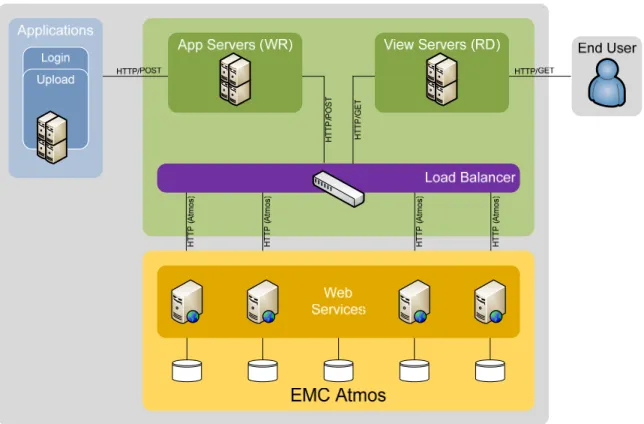
Physically, the NDMA consists of an application developed in Java or .Net for storing digital media. The NDMA will have a database for application administration such as serving sequence numbers and storing metadata. Application and View Servers receive requests from external users and the NDMA application. The Application and View Servers feed into the load balancers that ensure requests are distributed across the web services on EMC® Atmos. Figure 1 shows a visual representation of the architecture.
Figure 1. Atmos high-level architecture
Current storage solutions
For many years, IT departments have attempted to satisfy their storage infrastructure needs using storage area network (SAN) and network-attached storage (NAS) implementations to not only run their
transactional systems, but also store their unstructured content. Another common design concept was to consolidate computing and storage resources in two or three central locations for better management and high availability. To stretch a storage network worldwide presented several more logistical and cost implications to meet the need for high bandwidth and low network latency. As a final architectural element, top-to-bottom application topologies have often been structured in three tiers for the database, the application server, and the web server. In these topologies, it was common for the user requesting data from the system to run some form of a client application locally. In more recent years, to meet the growing demands of compliance and electronic record retention, Content Addressed Storage (CAS) was introduced as an immutable archiving solution. Objects are written once and read many times to satisfy a strict legal and evidentiary standard. The result was a heavily centralized, three-tier infrastructure that was very difficult to both scale up and scale out in an agile manner for IT to meet the rapidly changing demands of the business.
With the massive growth of digital media and unstructured content in recent years, traditional SAN and NAS storage has presented some limitations for supporting the architecture of a web-based, geographically distributed application. Most of today’s storage systems are highly optimized to deliver high-performance I/O for small chunks of data. Furthermore, these systems were designed to support gigabyte- and terabyte-size information stores.
A SAN storage solution is known for its performance but suffers from the cost associated with
administration, deployment, and cost per gigabyte of capacity due to highly specialized hardware to meet the performance criteria. SANs may use high-cost Fibre Channel and SCSI technology. Another drawback is the requirement for separate disaster recovery sites, especially for large enterprise companies. A
dedicated disaster recovery solution has additional costs such as additional IT support, failover
hidden drawback for disaster recovery is the management of replicas. How do you bring them online in the event of a failure, and manage the application failover?
In a NAS solution, the typical usage is for a file server. NAS performance is dependent upon network traffic. When demand for storage increases, additional NAS storage devices are added to meet those demands, thus increasing the management of the devices. Also, adding more NAS storage devices tends to limit bandwidth, which decreases availability and increases latency. Similar to SAN and CAS, NAS also has specialized hardware, such as the use of RAID technology, that drives up cost.
The CAS solution is a targeted solution for long-term storage and retrieval of fixed content such as compliance documents or medical information such as x-rays. One advantage of the CAS model is to decouple the application from knowing the exact physical location of the content – the CAS uses a unique identifier. Another advantage is its digital fingerprint to adhere to stringent compliance rules and
regulations. Since this is a targeted solution, this storage solution does not work in the traditional storage operations for day-to-day use.
Today’s rich digital media and unstructured business content have unique characteristics and storage requirements that are different from traditional structured data types (like database records) for which many of today’s storage systems were specially designed for.
SAN/NAS/CAS and COS, a new storage tier
To meet these demands for global-scale, management, low-cost and native web services access, EMC introduces the Atmos storage infrastructure product. Atmos is built from the ground up to introduce a new class of storage called Cloud Optimized Storage (COS). This new cloud architecture is designed to be very complementary to existing storage and computing platforms in today’s data center. The design elements of Atmos reflect the best-of-breed attributes of the SAN, NAS, and CAS storage concepts and introduces a fourth – COS:
• From the SAN realm – Atmos offers the maturity of provisioning and element management tools. The complexity of the CLI has been masked and automated in a very simple point-and-click interface.
• From the NAS realm – Atmos offers the broad collection of access methods – CIFS, NFS, and iSCSI – to leverage web-enabled architectures.
• From the CAS realm – Atmos is built on the object construct as a globally scalable object repository for unstructured content.
With Atmos, two additional design elements have been introduced:
• Density – Atmos is delivered in an ultra-dense cabinet and form factor.
• Distribution – Atmos changes the traditional vehicle for distributing content inside the enterprise through snaps, clones, or disk copies. What was a very labor-intensive manual process for data distribution has been replaced by a very simple and intuitive automated policy engine.
Web services storage solutions
EMC Atmos is a COS platform that combines massive scale, global distribution, and optimized object storage and retrieval via a policy-based approach that will scale on a petabyte capacity level, delivering a range of different service levels. Atmos delivers web services, performance, reliability, and accessibility without reliance on specialized hardware. Various tiers of reliability and performance can be achieved via a policy-driven data placement strategy with policies for global performance, data protection, content delivery and archiving. For rich digital media, Atmos stores data by objects along with the object’s metadata. Objects are placed in appropriate locations and have the appropriate features assigned to them based on the created policies. Atmos uses a unique combination of policy and user metadata to drive distribution of content.
EMC Atmos addresses the unique requirements of today’s service-oriented technologies. The following list details the advantages of Atmos over traditional storage systems when it comes to web-based digital media solutions.
• Geographic scale
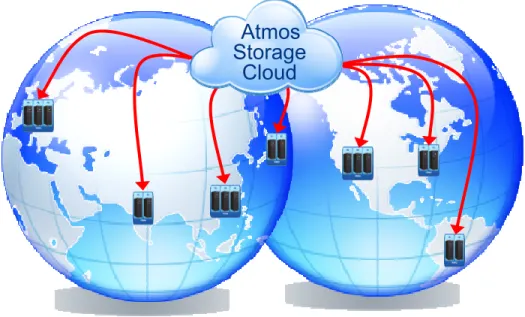
Atmos is a truly global scalable storage system that has the ease of adding petabytes of storage with very low administrative costs. As your user base grows with your web service offering, your IT group can add more storage very quickly and easily.
Atmos
Storage
Cloud
Figure 2. Atmos geographic scale
Atmos also has the ability to optimize object retrieval from an Atmos geographic location. For instance, let’s say an Atmos object is stored in the following three Atmos geographic locations: San Francisco, Hong Kong, and London. An application server based in Europe connected to a London Atmos node will retrieve the object located in London, whereas an application server based in the United States connected to a San Francisco Atmos node will retrieve the object located in San Francisco. Atmos provides a mechanism for the application to take advantage of this geographic read optimization in Atmos instead of placing the logic in the application layer.
• Policy-based management
With policy management built into its storage layer, Atmos can easily adapt to changes in your web services offering. For example, after running a web service for several months, you find a demand for a service level higher than the Gold level. The new service level, the Platinum level, will have an associated policy called the Platinum policy that provides additional replicas in more Atmos locations. With Atmos, you can easily create this new Platinum policy, thus providing a higher service offering with more replicas in more locations. Furthermore, by updating an object’s user metadata value from service_level=gold to service_level=platinum, and setting up a Platinum policy selector triggered by this user metadata change, the creation of additional replicas to match the Platinum policy will then be initiated. Since the policy mechanism is built into Atmos, this provides the application layer a savings on updates and testing to propagate any policy changes. As another example, say a trial user (users who have the Free service level associated with them) becomes a paying customer. With a simple metadata update, all their data may be replicated via the Gold policy versus the Free policy.
• Inherent data services
Atmos has several built-in data services such as data placement, replication, disaster recovery, versioning, and compression. Taking a look at a disaster recovery scenario, with multiple copies of an object, if the storage device housing one replica of the object becomes unavailable, there are other replicas in the system that can be retrieved without any disaster recovery procedures. The “Backup and disaster recovery” section on page 20 has more information.
• Low cost
Atmos utilizes open and standard hardware such as low-cost Gigabit Ethernet and standard low-cost SATA technology without RAID. With other storage methods, the costs are driven up by using specialized hardware. With Atmos, the total operational costs are kept low.
• Minimizes operational costs
With Atmos, the operational costs are minimized with the intelligence built in to the system along with the single pane of glass for administration. Please note the earlier example of administrative ease of adding additional capacity, updating policies when business decisions change, availability of objects, and lower cost of using standard and open hardware platforms.
• Multiple access mechanisms
• Atmos provides several access mechanisms such as file access with NFS and CIFS, and web standard interfaces such as SOAP and REST. With built-in APIs to web services, Atmos allows ease of integration for applications. Multiple access mechanisms also provide a transition path from legacy applications using file systems to a web services design. Files may be ingested via NFS or CIFS, and later accessed via web services. Atmos allows your organization to spend time on application development rather than on planning, administering, and deploying the storage system.
Best practice design
This section describes the best practice recommendations in deploying and implementing Atmos for a web services application as described in the “Business use case” section. More specifically, Atmos is the storage target for an image repository and retrieval web services application. Again, most images are written once, but may be read many times from anywhere making read optimization and global accessibility and distribution imperative.
Atmos deployment
Atmos configuration
The following prerequisites are needed in order for Atmos to handle web service requests:
• Configure access nodes for web services access and assign each to a tenant
• Create a UID
• Know the Shared Secret for the UID
Enable web service access nodes in the Management UI
An access node is a server within the Atmos system that provides an external source access to Atmos. For web services, the access node allows a web services application to connect with Atmos using the REST or SOAP protocol. Please note that certain security conditions must be met for the web services request to be granted. The “Security and signatures” section has more information.
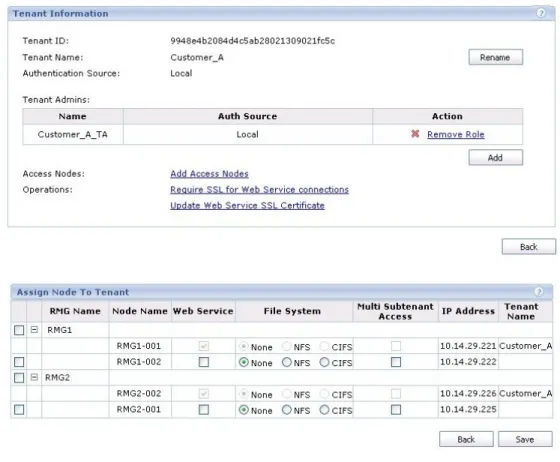
From the Atmos Management UI, enter the Tenant List and click on the desired tenant (top of Figure 3). Click the Add Access Nodes link, which brings up the Assign Node to Tenant screen. In this screen, add or confirm the nodes that will be providing the web services access for the specified tenant (bottom of Figure 3. For more details, please refer to the EMCAtmos Administrator's Guide.
Figure 3. Configuring a tenant with web services access nodes Creating a UID
Connect to the Atmos Tenant UI using the appropriate Tenant Admin account. In the Subtenant List, click the Edit link for the desired subtenant or add a new subtenant (see Figure 4).
Figure 4. Subtenant link
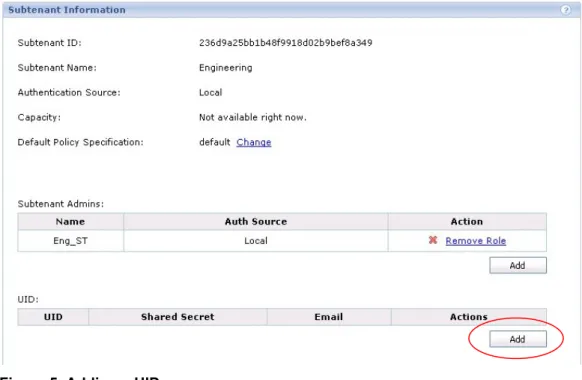
The Subtenant Information screen is displayed. In the UID section, click the Add button as illustrated in Figure 5.
Figure 5. Adding a UID
In the Add UID screen, enter the UID name and the associated e-mail address as illustrated in Figure 6. Once the information has been entered, click the Add button.
Figure 6. Entering the UID name
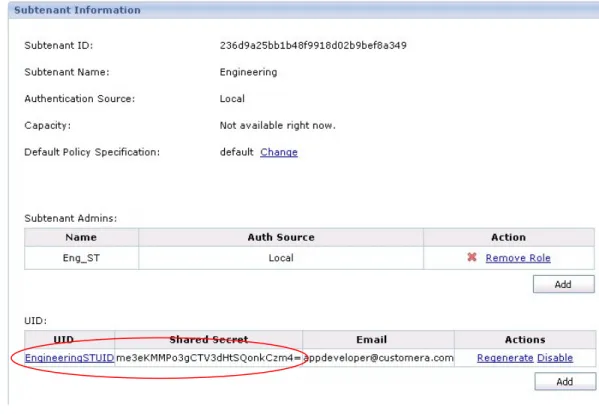
Upon completion, the Subtenant Information screen returns. In the UID section, please note the addition of the UID along with the UID’s Shared Secret (Figure 7). The Shared Secret will be used for validating the incoming web services requests.
Figure 7. UID and Shared Secret for a subtenant Shared Secret
Atmos uses the Shared Secret to authenticate each request. When the client application builds a web service request, the Shared Secret is used to create a signature entry as part of the request (see the “Web services API deployment” section next). Along with the signature entry, the web services request must also contain a valid Subtenant ID and UID. The Shared Secret must match the value for the Subtenant ID and UID created by Atmos (see “Creating a UID” previously). Atmos also computes the signature for the web services request and if it matches with the signature field, and is within the appropriate time window, the request will be honored.
Web services API deployment
NTP server
As part of Atmos security, the difference in time between the incoming web services request and Atmos must be within five minutes. An NTP server should be specified either during installation or configured later.
• NTP server configuration during installation
During installation, select Remote NTP Server from the NTP Server drop-down and then specify the IP address of the NTP server.
Figure 8. Specifying an NTP server at installation • NTP server configuration post-installation
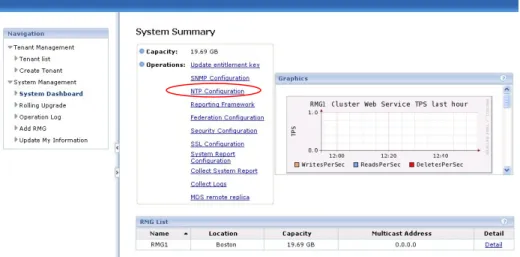
If a remote NTP server is not specified at installation time, it may be configured by the Atmos system administrator at any time. From the Atmos Management UI, select the NTP Configuration link and then specify the IP address of the NTP server.
API interfaces
Atmos provides a programmatic interface to create, read, update, and delete (CRUD) objects through its REST and SOAP APIs. For instance, the REST web services API uses standard HTTP methods such as PUT, GET, POST, and DELETE. In addition to the CRUD operations, the Atmos API also supports operations for metadata, ACLs, and others.
Atmos also provides two types of access methods – an object-based model or a namespace-based model. The object interface uses the /rest/objects URL endpoint and the namespace interface uses the
/rest/namespace URL endpoint. The following example shows a read object URL using REST with both, the object and namespace, interfaces:
• Object-based
/rest/objects/<ObjectID>, where <ObjectID> is an object ID returned from a previous create command.
• Namespace-based
/rest/namespace/<pathname>, where <pathname> is the path of the file, that is, “/directory1/fileA”. With the namespace interface, an application does not need to use a separate database to persist the object IDs. The object’s pathname is unique and becomes the object’s persistent identifier. Also, the namespace interface is a convenient way to convert any legacy applications to use web services. However, there is overhead associated with utilizing the namespace mapping layer of web services, as there is with traditional file system access. Utilizing this feature defaults those objects to using a traditional namespace, with its inherent limits, under the covers. It also adds overhead from a performance perspective, and introduces availability considerations in that the entire namespace must be resolved and different metadata services (MDSs, or metadata database instances) may own each directory and file in that namespace. There are different load-balancing implementations of the objects across metadata databases between namespace- and object-based access methods. With the object interface, there will be better balancing of the objects across all of the MDSs available in the Atmos system and a one-to-one ownership mapping of object to MDS (see “Object creation balancing”).
Please refer to the EMC Atmos Programmer’s Guide for more details and examples.
Security and signatures
Atmos web services requires the following information for connections:
• Subtenant ID
• UID
• Shared Secret
The Subtenant ID and the UID are specified in the x-emc-uid field for REST and cos:UID element within the soapenv:Header. The format of the field is “subtenantID/UID”. The following REST field shows an example:
x-emc-uid: 33115732f3b7455d9d2344ddd235f4b9/user1
In this example, the Subtenant ID is “33115732f3b7455d9d2344ddd235f4b9” and the UID is “user1”. The Shared Secret is provided as a human-readable base64 encoded array of bytes. This encoded string is received from the Atmos Tenant Administrator user as described in the “Atmos configuration” section on page 10. The Shared Secret is not transmitted through any API calls. Instead, the Shared Secret is used as a key to create a signature as part of the web service request. The signature is validated on the Atmos receiving end for each web service request and is a mandatory field for all web service requests to Atmos. For REST, the signature is entered in the x-emc-signature field and is the last field in the HTTP header. The SOAP web services uses the Web Services Security standard.
The signature is computed according to a specific algorithm and as described in detail in the EMCAtmos Programmer’s Guide. At a high level, the signature is defined as:
signature = Base64(HMACSHA1(HashString))
Base64 is the base64 encoding of the argument in order for the result to be transmitted as part of the HTTP header. The HMACSHA1 is the keyed hash of the argument. The Shared Secret is used for computing HMACSHA1 and should be base64 decoded before using it as an input to the HMACSHA1 algorithm. HashString is computed as follows:
HTTPRequestMethod + '\n' + ContentType + '\n' + Range + '\n' + Date + '\n' + Resource + '\n' + CanonicalizedEMCHeaders
where + is the concatenation operator. Components of HashString are described as follows: HTTPRequestMethod One of the five HTTP method types: GET, POST, PUT,
DELETE, or HEAD. Format must be uppercase.
Content-Type The content type, for example, the content-type header field. Only the value is used, not the header name, that is,
application/octet-stream. If a request does not include the content-type field, this is an empty string. Format must be in lowercase.
Range The range, for example, the range header field. Only the value is used, not the header name, that is, Bytes=10-18. If a request does not include the range field, this is an empty string. Format must be in lowercase.
Date The date that is the standard HTTP date header field in UTC format. Only the date value is used, not the header name. Resource Path portion of the HTTP request URI, in lowercase. For
instance, for a READ operation, the path would be
/rest/objects/499ad542a1a8bc200499ad5a6b05580499c316856 0a4.
CanonicalizedEMCHeaders See the following process. For canonicalization of the EMC headers:
1. Remove any white space before and after the colon and at the end of the metadata value. Multiple white spaces embedded within a metadata value are replaced by a single white space. For example:
Before canonicalization: x-emc-meta: title=Mountain Dew After canonicalization: x-emc-meta:title=Mountain Dew 2. Convert all header names to lowercase.
3. Sort the headers alphabetically.
4. For headers with values that span multiple lines, convert them into one line by removing any newline characters and extra embedded white spaces in the value.
5. Concatenate all headers together, using newlines (\n) to separate each header from the next one. There should be no terminating newline character at the end of the last header. REST example request
POST /rest/objects HTTP/1.1
x-emc-listable-meta: part4/part7/part8=quick x-emc-meta: part1=buy
accept: */*
x-emc-useracl: john=FULL_CONTROL,mary=WRITE date: Thu, 05 Jun 2008 16:38:19 GMT
content-type: application/octet-stream x-emc-date: Thu, 05 Jun 2008 16:38:19 GMT x-emc-groupacl: other=NONE
host: 10.5.115.118 content-length: 4286
x-emc-uid: 6039ac182f194e15b9261d73ce044939/user1 REST example HashString
POST application/octet-stream Thu, 05 Jun 2008 16:38:19 GMT /rest/objects x-emc-date:Thu, 05 Jun 2008 16:38:19 GMT x-emc-groupacl:other=NONE x-emc-listable-meta:part4/part7/part8=quick x-emc-meta:part1=buy x-emc-uid: 6039ac182f194e15b9261d73ce044939/user1 x-emc-useracl:john=FULL_CONTROL,mary=WRITE
Note that there is a blank line included in this example to account for the missing Range header field.
If you use the following key
LJLuryj6zs8ste6Y3jTGQp71xq0=
on the hash string above, you will generate the following signature: gk5BXkLISd0x5uXw5uIE80XzhVY=
Best practices and recommendations
Tenant management
Each tenant will have a dedicated set of nodes. If your use case requires more than one tenant, you will need to manage the nodes across your global Atmos environment, making sure each tenant has sufficient resources to handle the load and to provide redundancy. For instance, if there are two Atmos locations in San Francisco and London, then for redundancy you will need to have at least one node in San Francisco and one node in London assigned to the tenant.
As a best practice, we recommend creating a single tenant with multiple subtenants where each subtenant can be a customer, division, group, and so forth, depending upon your business needs. Each subtenant will have its own namespace and policies. Furthermore, each subtenant has its own logical partitioning. The logical partitioning can also be useful when creating reports for capacity purposes. The tenant can assign different policies to each subtenant. Policies may be applied to more than one subtenant. Each subtenant can also manage a separate set of UIDs.
For example, a single tenant called CompanyWebServices is created to provide web services for your company. Within the CompanyWebServices tenant, two subtenants called NDMA and WSBackup are created for your different web services; NDMA is the file sharing service described earlier, while WSBackup is a new online consumer backup application. The NDMA subtenant may have the Gold and Platinum policies associated with it, whereas the subtenant may offer all available policies: Free, Premium, and Gold.
Application pool layout
A web services application is commonly developed by the customer using a development platform such as Java or .Net. The Atmos Web Services API facilitates a quick development cycle with built-in REST and SOAP methods. Typically, a set of similar web service applications will reside in an application pool. The application pool typically consists of several application servers performing the functions of object
creation, object processing, retrieval, and so on. The application pools can be laid out and grouped by function and the service provided. For example, an application pool may be created for uploading pictures called a write pool. Another application pool can be created for reading or downloading the pictures called a read pool. Depending on the services that most users will invoke, there may be more nodes dedicated for this type of service. For instance, more users may be using the read pool, so therefore more nodes would be dedicated for the read service. The size of the computer cluster of each pool should be capable of handling the amount of anticipated traffic.
Application independence
Many applications today are file system or database bound that need frequent migration activities. For instance, when an application fills capacity on SAN storage this will typically require some migration activity. Service-oriented architecture applications with REST support help customers to build scalable applications that can leverage the flexibility of a cloud infrastructure. Customers building RESTful applications can also leverage external clouds. Atmos provides scalability in terms of users (adding more Atmos nodes to service more users), capacity (adding an additional Installation Segment), and performance (see the “Performance” section on page 19 for more details). This scalability creates an application that is disk, system, and/or location independent.
Load-balancer layout
As there are multiple application pools queuing up web service requests to the multiple Atmos nodes servicing the request, a load balancer should be deployed between the application pools and the Atmos nodes. The load balancer will distribute the web services requests to the Atmos nodes. Using a round robin algorithm ensures that the requests are evenly distributed to the Atmos web service nodes and in turn, ensures that the objects are distributed appropriately across Atmos. An even distribution of web service requests and object storage maximizes the Atmos system throughput and latency.
Additionally, the load balancer should have the following items configured to optimize its efficiency:
• Set a maximum connection value such that the Atmos nodes themselves will not be overloaded
• Use a round robin algorithm (or optimized algorithm that looks at queue depth and other factors to determine which IP to direct requests to) as described above
• Periodically, check the liveliness of the Atmos nodes in the round robin distribution list to guarantee that web service requests are delivered to the healthy nodes. One method to test the node liveliness is to use a ping command from a non-Atmos server. Another method is to request the /rest page from the Atmos node. For instance, from a web browser or from the web services application, send a request to http://<AtmosNode>/rest where <AtmosNode> can be the hostname or IP address of the Atmos node
Network and bandwidth considerations
The proper amount of network bandwidth needs to be provisioned to support Atmos storage activities. Bandwidth requirement should be calculated on the anticipated amount of object read and write activities as well as the amount of object replication traffic. For instance, the anticipated workload could be 80% Reads, 15% Write, and 5% Other (such as Deletes). Please note that for replication, the customer network is used to transport the data. Creates and updates will result in replication traffic across the network (depending on the policies in place).
Metadata server layout
An Atmos object consists of two parts – the metadata and the data. Atmos has separate drives for these parts. The configuration of the metadata drives occurs during Atmos installation and is dependent upon the customer usage.
Assign the Metadata Service (MDS) disk to Storage Service (SS) disk ratio according to the number of objects anticipated and the average size per object. If the Atmos system is designed for storing a large number of small objects, such as photos, then allocate a higher ratio for the number of MDS disks to SS
disks. However, if the Atmos system is designed for storing a small number of large objects, such as videos or movies, then allocate a smaller ratio for the number of MDS disks to SS disks. The EMC Atmos Administrator's Guide has more information and the available MDS to SS disk ratio values.
Performance
An object within Atmos can be retrieved from any node, thus allowing Atmos to have concurrent access from multiple nodes and multiple locations. With traditional storage solutions, adding concurrent access for a web services application typically involves multiple steps along multiple tiers. With Atmos, adding another access point is provided through the UI as seen in Figure 3 on page 11. Additionally, with traditional storage solutions, there is a consideration for disaster recovery. With policy management built in to Atmos, an Atmos administrator can simply create a policy that will provide a copy of the object in an external location.
Throughput performance scaling
To increase the system throughput performance, simply add an installation segment to the desired RMG location. This additional installation segment provides more nodes to handle web service requests. In general, Atmos performance scales fairly linearly as nodes are added to the system.
Geographic optimization
Read optimization
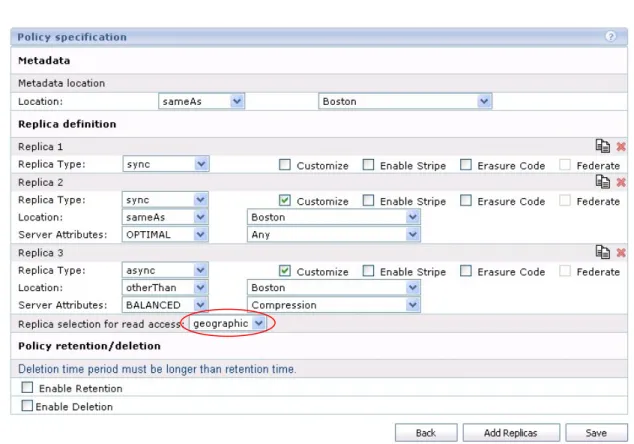
The policy specification within Atmos includes a read access parameter. To optimize read access across a global installation, select the “geographic” value for in the drop-down called Replica selection for read access (Figure 10). The geographic read policy ensures that a current replica in the same “location” (RMG) as the web service request is routed for a read request.
Policy
A policy in the Atmos system provides simplicity for an application to basically write and read an object to a data store without the application providing any logic such as failover, replication, DR, and so on. For more information on policies, please refer to the EMC Atmos Administrator's Guide.
The Atmos system supports both synchronous and asynchronous replicas. Asynchronous replication should be employed between locations that are long distances apart. This will minimize the write latency for the application. From the business use case above, we have three levels of service defined - Free, Premium, and Gold. The different services offer different degrees of availability (local and global), replication, and backup. The different levels can be defined as:
• Free – Two local synchronous replicas on compressed storage and an expiration period of 30 days. The Free level provides the minimum amount of service.
• Premium – Two local synchronous replicas and one remote asynchronous replica for location No. 1. The Premium level provides a higher level of service than the Free level. With one remote replica, an object is still available for read if one Atmos location goes down.
• Gold – Two local synchronous replicas, one remote asynchronous replica for location No. 1 and one remote asynchronous replica for location No. 2. Another possibility is to have two local synchronous replicas and two remote asynchronous replicas for those deployments with only two locations. The Gold level provides a higher level of service than the Premium level.
Especially for the Premium and Gold customers, a best practice is to create the two “local” synchronous replicas where the write comes in. Generally, this would be the Atmos location where the Write Application Pools are located and is set by the Location field of the Replica definition. For instance, the “$client” value will provide a dynamic location according to the specific Atmos location. As a best practice, a remote replica is written asynchronously and should be located in the Atmos locations of the Read Application Pool. As discussed above, the read policy should be set to “geographic” to optimize a read request. Together, the location of the replicas and the read access will provide the building blocks for a web services application to provide global content distribution without the heavy application development costs.
Another aspect of the policy is the retention and deletion fields. A retentionperiod is a period during which the data cannot be modified. A deletionperiod is a period after which the data is deleted. Perhaps for our customer with Free service level, the policy deletion field can be set. For instance, any objects created will be deleted after 30 days.
Lastly, other Atmos features such as compression, deduplication, and spin-down are implemented via policy at the replica level.
Backup and disaster recovery
By following a well-designed policy plan, such as the one described above, an Atmos system can be resilient to many outages including a down node or even a down network at one site. By creating at least two replicas in the same location, a write request will still be fulfilled if one of the nodes in that location is not available. Similarly, creating at least one replica in a remote location provides a level of disaster recovery for any network failure to an Atmos location. An added benefit of the remote replica is for distribution of data for geographic reads.
An object in Atmos consists of two parts, the data itself and the metadata. Atmos not only provides a level of availability with the object data, it also provides a level of availability for its metadata. If an Atmos system has two locations in San Jose and New York, then any metadata originating in the San Jose location will be replicated to the New York location. For example, let’s say an object with a Gold policy is created in the San Jose Atmos location. According to the Gold policy, two local synchronous replicas are created in San Jose and one remote asynchronous replica is created in New York. As the object is created, the metadata is created in San Jose and is also replicated in New York. By replicating the object’s metadata, this allows Atmos to access the object’s data in remote locations. However, if only the remote metadata copy remains available for access, the object data is read only. In our example, if the San Jose network was down and the New York metadata is accessed, then the object is provided as read-only. Additional objects
may be created, but existing objects owned by the San Jose site are read-only to avoid a split-brain scenario.
Data usage
Atmos provides the capability to retrieve utilization information at the tenant, subtenant, and UID levels. The capacity information can be used to provide data to a chargeback system for usage.
There are two methods to obtain the capacity information within Atmos – by CLI or the MauiDU API:
mauidu CLI
The mauidu CLI is available on the Atmos nodes with the following command options: mauidu [options]
options:
-h|--help show help text
-u|--user-id target user id. If no user is specified, then query all users in this subtenant
-s|--subtenant-id target subtenant id. If no subtenant is specified, then query all subtenants in this tenant
-t|--tenant-id target tenant id. If no tenant is specified, then use the default tenant in
/etc/mauifs/mauifs_cfg.xml
The mauidu command will return an XML string. The XML string contains the following fields: objCount The number of objects for the specified UID/subtenant/tenant size The size of all the objects. The default size for a directory is 4K realsize The size of all the objects * number of replicas
metadatasize The metadata size of all the objects totalSize realsize + metadatasize
For example, show the capacity usage of a subtenant (939ce665ccdc477f9152bdc099d131ef) within the tenant (a88107eba08441a6bf448d82a3344dcc).
mauidu -t a88107eba08441a6bf448d82a3344dcc -s 939ce665ccdc477f9152bdc099d131ef
Summary metrics :
<?xml version="1.0" encoding="UTF-8" standalone="no"?> <maui:DuMetrics xmlns:maui="http://www.emc.com/maui" xmlns:xsi="http://www.w3.org/2001/XMLSchema-instance" xsi:schemaLocation="http://www.emc.com/maui types.xsd"> <version>1</version> <objCount>6</objCount> <size>33624464</size> <realsize>134497856</realsize> <metadatasize>18928</metadatasize> <totalSize>134516784</totalSize> </maui:DuMetrics>
In the example above, there are six objects with a size of 33624464 and metadata size of 18928. All six objects have four replicas with a realsize of 134497856 (4*size). Finally, the totalSize is 134516784 = realsize + metadatasize.
Atmos Storage Consumption API
The Atmos Storage Consumption API provides a programmatic interface to retrieve different capacity information similar to the mauidu CLI. The API provides capacity information at the tenant, subtenant, or UID level. For example, there are two subtenants called WebServices and Archival. When you send a request for the WebServices subtenant, this will return only the capacity information for the WebServices subtenant. To retrieve the capacity information for the Archival subtenant, you will need to submit another request.
In order to make a request for the capacity information, the following items are required:
• The HTTP GET method
• The URI specifying the capacity level – tenant, subtenant, or UID as follows: Tenant Metrics /sysmgmt/tenants/<tenantName>/scMetrics
SubTenant Metrics /sysmgmt/tenants/<tenantName>/<subTenantName>/scMetrics
UID Metrics /sysmgmt/tenants/<tenantName>/<subTenantName>/<UID>/scMetrics
• Tenant authorization – the tenant name and password specified in the x-atmos-tenantadmin and x-atmos-tenantadminpassword fields, respectively
x‐atmos‐authtype is set to the string “password”
The following is an example of retrieving the capacity information for the tenant with the following credentials – Tenant Name is CompanyAdmin and the password is getcapacity.
• Request header for the tenant capacity metrics
GET /sysmgmt/tenants/Tenant1/scMetrics HTTP/1.1 accept: */*
date: Thu, 12 Nov 2009 10:04:11 GMT x-atmos-tenantadmin: CompanyAdmin x-atmos-tenantadminpassword: getcapacity x-atmos-authtype: password • Response header HTTP/1.1 200 OK Connection: close
Date: Thu, 12 Nov 2009 10:04:15 GMT
Set-Cookie: _gui_session_id=2e336848d437fdafd9704b3157aeaff3; path=/ Status: 200 OK x-atoms-sysmgnt-version: 1.0.0 Cache-Control: no-cache Server: Mongrel 1.1.3
Content-Type: application/xml; charset=utf-8 Content-Length: 203
• Response body containing the tenant capacity metrics
<?xml version='1.0' encoding='UTF-8'?> <scMetrics> <objCount>5</objCount> <size>9845</size> <realsize>3306</realsize> <metadatasize>10434</metadatasize> <totalSize>13740</totalSize> </scMetrics
In the example above, there are five objects with a size of 9845 and metadata size of 10434. All five objects have a realsize of 10434. Finally, the totalSize is 13740 = realsize + metadatasize.
Web services API
The following section provides some details and examples on certain key web service topics. For more information on web services, please refer to the EMC Atmos Programmer’s Guide.
Time synchronization
The Atmos web services requires that the time between the initiating requestor and the Atmos system has no more than 5 minutes of drift. Atmos will send back an error saying that the request timestamp was
outside the valid window. The recommendation is to always specify an external NTP server for Atmos as well as the application servers. See the “Web services API deployment” section on page 13.
Object creation balancing
Remember that there are two components for every object: metadata and data. When an object is created, Atmos will write the object data according to the policy placement for the object. The metadata selection is based on other algorithms and differs between namespace- and object-based access.
Using an object-based access model (/rest/objects) along with a load balancer with a round robin scheme will evenly balance the objects among all the Meta Data Servers (MDS) running on the Atmos nodes. In other words, a web service request to an Atmos node will generally have that node’s MDS own the object. By balancing the incoming web service requests with the load balancer, the objects are balanced across all the MDSs in the Atmos system.
When using the namespace access model (/rest/namespace), the ownership of the object defaults to the MDS that owns the parent directory, although there is some predictable amount of offload of objects to other MDSs in the system. Therefore, a web services request using namespace to an Atmos node will not have that node’s MDS as the object’s owner. Even when using a load balancer, an object using namespace may default to a different MDS than the incoming node.
Namespace directory
A directory in the namespace interface is a zero length object and is only stored as metadata. When creating a directory object, the directory name must end with a forward slash. In REST, the directory creation is specified as “/rest/namespace/directory/” where the last character is a forward slash. Furthermore, when creating a file with non-existent directories in the pathname, the directories will be automatically created by Atmos. In the object creation REST call,“/rest/namespace/topdir/subdir/fileA” the directories, “topdir” and “subdir”, will automatically be created as they do not exist.
User metadata tag-value pairs
User metadata is a collection of name-value or tag-value pairs. The tag-value pairs are text strings that follow the HTTP specification (see the next section) and are not validated by the Atmos system. The user metadata tags can either be listable (see the “Listable tags section) or non-listable. User metadata provides an application the ability to create custom tags for an Atmos object thus persisting application data along with the object. A user can persist up to 127 user metadata pairs. Atmos does not have a size limitation on the user metadata tag or name, but does limit the user metadata value to 1 KB.
Special characters
The Atmos REST API has limitations in the character set used for the metadata keys and values. Since the REST API uses HTTP headers to set and get metadata associated with an object, the characters that are allowed are restricted by the HTTP specification. For instance, Unicode will break the headers. Furthermore, if an object is written via the SOAP interface with a comma in the metadata value (for example, Colors=red,blue), followed by the object being read through the REST interface, then the header will be corrupted. As a rule, use only those characters that are allowed in an HTTP header.
Portal
Atmos also provides programmatic access to several system administration commands. For instance, an application can have the ability to create a policy through a web interface. By combining the Atmos web services with the Atmos System Administrative Interface, an application can create a portal to
automatically add new clients. For instance, the new client can be created as a new subtenant with a new UID. This resulting subtenant and UID can be used as inputs into the web service API to upload and read pictures. Refer to the EMC Atmos System Management API Guide for more details.
Persistent connections
A persistent connection is not enabled by default within Atmos and currently only allows a single request per connection. A keepalive mechanism can be configured to allow a connection to remain open to handle multiple requests. To allow persistent connections, you will need to open a case in order to make the following changes on a node:
• Change the EnableKeepAlive parameter from Off to On in the /etc/httpd/conf/httpd.conf file
• Restart the httpd service
Please note that for some HTTP 400 responses, Atmos will close the connection. Examples include sending an invalid signature or invalid parameters.
Listable tags
A listable tag is a way in which an object can be indexed in the Atmos system. For example, a user uploading photos can optionally assign listable tags to each photo. Then later, the user has the ability to list all photos with a specific listable tag. In a file system, the listable tags show up as directories containing symbolic links to the actual objects. The listable tags can be used in both the object and namespace interfaces.
As a best practice for performance, listable tags should be limited to 100,000 tags throughout the entire Atmos system. In addition, each tag should have a maximum of 100,000 objects associated with that tag. One method to extend the number of objects is to have the application use multiple tags in a round robin methodology as a single tag. Let's take the tag “SECURE” as an example. If the number of objects is expected to reach 400,000, then the application can create the four application tags — SECURE_1, SECURE_2, SECURE_3, and SECURE_4 — where each application tag would hold 100,000 objects. When the application creates an object, it will round robin the object to create the four application tags. By creating the objects in this manner, it will extend the total object count to the projected 400,000. In order to list all the objects with the virtual tag “SECURE”, the application will retrieve the four application tags from SECURE_1 to SECURE_4.
A listable tag can be added as part of the create or update command or added later through the metadata operation.
• Setting an object’s listable metadata with the REST create command POST /rest/objects HTTP/1.1
x-emc-listable-meta: china=vacation
x-emc-meta: customertype=free accept: */*
x-emc-useracl: john=FULL_CONTROL,mary=READ date: Wed, 18 Feb 2009 16:03:52 GMT
content-type: application/octet-stream x-emc-date: Wed, 18 Feb 2009 16:03:52 GMT x-emc-groupacl: other=NONE
host: 168.159.116.96 content-length: 211
x-emc-uid: 33115732f3b7455d9d2344ddd235f4b9/user1 x-emc-signature: KpT+3Ini1W+CS6YwJEAWYWvIlIs=
Please note the addition of the x-emc-listable-meta field in the operation.
• Setting or updating listable metadata with the REST metadata command
POST /rest/objects/499ad542a1a8bc200499ad5a6b05580499c3168560a4?metadata/user HTTP/1.1
x-emc-listable-meta: free=customertype
x-emc-meta: customertype=free accept: */*
date: Wed, 18 Feb 2009 16:27:24 GMT content-type: application/octet-stream x-emc-date: Wed, 18 Feb 2009 16:27:24 GMT host: 168.159.116.96
x-emc-uid: 33115732f3b7455d9d2344ddd235f4b9/user1 x-emc-signature: OLI2TcDNWQ29gZv+ONr1ufCKA9M=
Please note the addition of the x-emc-listable-meta field in the operation.
Once listable tags have been created, there are two associate operations that may be employed: GetListableTags and ListObjects. GetListableTags is a way to determine which Listable Tags within the system — it is executed system-wide, not against a particular object. ListObjects offers a way to return all the objects that have a particular listable tag associated with them.
Lastly, listable tags may be hierarchical, that is, x-emc-listable-meta:
2009photos/vacation/china=example. Note that with hierarchical taglinks, it is the entire tag that must be specified to retrieve objects with that tag.
• Retrieving listable tags
This operation will return back all tags under the specified input tag (with hierarchical taglinks). If no tags are specified, then all root-level tags will be returned. In the example below, two top-level tags (vacation and china), are returned.
Request
GET /rest/objects?listabletags HTTP/1.1 accept: */*
date: Wed, 18 Feb 2009 16:35:01 GMT content-type: application/octet-stream x-emc-date: Wed, 18 Feb 2009 16:35:01 GMT x-emc-tags: 2009photos host: 168.159.116.96 x-emc-uid: 33115732f3b7455d9d2344ddd235f4b9/user1 x-emc-signature: 1OoKOJo9xoheuY1TFhp0xOHlPks= Response HTTP/1.1 200 OK
Date: Wed, 18 Feb 2009 16:35:01 GMT Server: Apache
x-emc-listable-tags: vacation, china Content-Length: 0
Connection: close
Content-Type: text/plain; charset=UTF-8 x-emc-policy: _int
• Retrieving objects with listable metadata
When retrieving objects that contain listable metadata, please note that the command matches the listable tag and not the value. For instance, if an object has the following listable tag —
photo=vacation — and another object has the following listable tag — photo=summer. When you retrieve an object, you are not able to specify the values (vacation or summer). Instead, you specify the tag itself (photo) and all objects will be returned. In this case, the two objects will be sent back in the response. Therefore, when using listable tags, a best practice is to make the tag meaningful, rather than the value (or even to specify only the tag, a value is not required). As the listable tags are created in the UID’s namespace, only those objects associated with the UID are returned. In other words, only objects belonging to the requesting UID are returned.
Request
The x-emc-include-meta header, set to 0, indicates that only object IDs should be returned (not metadata).
GET /rest/objects HTTP/1.1 accept: */*
date: Wed, 18 Feb 2009 16:39:49 GMT content-type: application/octet-stream x-emc-date: Wed, 18 Feb 2009 16:39:49 GMT x-emc-tags: free host: 168.159.116.96 x-emc-uid: 33115732f3b7455d9d2344ddd235f4b9/user1 x-emc-signature: ZllFtIyYe6kvqibS9eqcIBpiQ7I= x-emc-include-meta: 0 Response
The response contains an XML payload listing the object IDs for this user. Object IDs are 44 characters long, and there is no limit to how many objects you can store; therefore, it is possible to reach the limit for data in the HTTP header. As a result, the web service returns the object IDs from a list — objects operation into the XML body, not the header.
HTTP/1.1 200 OK
Date: Wed, 18 Feb 2009 16:39:49 GMT Server: Apache Content-Length: 359 Connection: close Content-Type: text/xml x-emc-policy: _int <?xml version='1.0' encoding='UTF-8'?> <ListObjectsResponse xmlns='http://www.emc.com/cos/'> <Object> <ObjectID>499ad542a2a8bc200499ad5a7099940499b44f51e97d</ObjectID> </Object> <Object> <ObjectID>499ad542a1a8bc200499ad5a6b05580499b44f5aff04</ObjectID> </Object> <Object> <ObjectID>499ad542a2a8bc200499ad5a7099940499b44f779a54</ObjectID> </Object> </ListObjectsResponse>
• Variations in retrieving objects with listable tags.
Retrieving all metadata
By setting the x-emc-include-meta header to 1, all system and user metadata will be returned for each object.
Limiting the number of items returned (pagination)
By using the x-emc-limit along with the x-emc-token header fields, the application can retrieve the objects in stages rather than all at once. For instance, the x-emc-limit field can be set to 50 where each response will contain 50 objects. In each response back, a token field will be sent back. This token will be used in the next request to get the next 50 objects.
Retrieving only selected metadata
By using the x-emc-system-tags and the x-emc-user-tags fields, you can limit the metadata returned in the response. For instance, setting the x-emc-system-tags to “atime,size” and x-emc-user-taggs to “city” will only return the atime and size system metadata and the city user metadata in the response.
For more information regarding the listable tags, please refer to the EMC Atmos Programmer’s Guide.
ACLs
Atmos has two types of ACLs – group and user:
• The group ACL will set the access rights to this object for the specified user group(s). Only the other group is supported; this applies to everyone other than the object owner.
• The user ACL sets the access rights to this object for the specified UID(s). The UID must belong to the same subtenant to which the requesting UID belongs. A UID created under a different subtenant cannot access objects owned by the authenticating subtenant. Supported privileges are NONE, READ, WRITE, and FULL_CONTROL.
Business case implementation
Reference architecture
Figure 11 shows an Atmos implementation for the NextGen Digital Media Application (NDMA) as discussed in the “Business use case” section on page 5. The configuration below has been installed in two locations – New Jersey and France with New Jersey being the primary site. Additionally, the Atmos system has six racks at each location that consists of two Resource Management Groups (RMGs) – New Jersey and France. The six racks are designed to handle the load and throughput that are expected for this web services application. Furthermore, the average size of the objects, number of users, expected number of files, and number of replicas were also taken into consideration to size the MDS ratio as well as the total capacity of the system.
The entire web services application is also equipped with multiple application server pools that have been planned to handle the write and read traffic.
Let’s take a look at the flow of events for a user based in Boston who uploads a picture to the NDMA web service. Once the user starts the upload, the picture will be transferred from the user’s desktop to an application server running in New Jersey. From the application server, an Atmos REST create object command is sent to the load balancer, which selects an appropriate Atmos web services node. As the user has a Premium level account, along with the create object request, a metadata of account=premium is added. This create object request is then directed to the selected Atmos node to fulfill the request. The Atmos system has been configured for one tenant with a subtenant for the NDMA application with a UID associated with it for web services access The user’s specific NDMA application sign-on credentials are saved into a database by the application to access that person’s files from Atmos. Alternately, for services-based applications (such as storage as a service) each end user himself may be a subtenant within the Atmos system, rather than the application(s).
The Atmos policy for the Premium account specifies two synchronous local replicas and one asynchronous remote replica. Atmos will then write two local copies to the New Jersey Atmos RMG and return a successful acknowledgement back to the application. In the background, an asynchronous replica will be created on the France RMG. The application server will keep the Atmos OID for the uploaded picture in its internal database. The application then displays an appropriate web page for the user to identify that their picture was successfully uploaded.
The user then sends a request to their friend in Europe to view the picture. When the user in Europe views the picture, the initial read request will use an application server based in France. Eventually, an Atmos node based in the France RMG will receive this request. Since the read policy is geographic, the replica based on the Atmos France RMG will be returned back to the user to view.
As you can see, the Atmos configuration as specified in Figure 11 provides the best practices and recommendations in the sections above.
Figure 11. Atmos reference configuration
Conclusion
Rich digital media and unstructured business content have unique characteristics and storage requirements. Traditional storage systems do not directly address the unique challenges and requirements of today’s digital world. EMC’s Atmos is a web storage system that addresses the challenges of today’s digital world. Atmos delivers massive petabyte capacity scale across multiple geographies with a range of service levels at a low cost. Atmos fundamentally reduces the customer’s total cost of ownership by providing a hardware system comprised of open standards components. Advanced management capabilities support
self-configuration, self-management, and self-healing. With Atmos, EMC introduces the concept of Cloud Optimized Storage as the first policy-based storage system. COS policy-based storage can deliver a range of service levels via data placement and segmentation strategies. Atmos also delivers various access mechanisms (both file and object interfaces), and a unified approach to data and information management (data protection, disaster recovery, archiving, and content delivery).
References
• The Expanding Digital Universe: A Forecast of Worldwide Information Growth through 2010, IDC Research, March 2007
• EMC Atmos Administrator's Guide Revision1.3.0A
• EMC Atmos Programmer's Guide Revision1.3.0A