Parallels
Parallels Operations
Automation 2.9
Release Notes
Revision 4.10 (May 26, 2009)
© 1999-2009
C
H A P T E R1
Common Features
Support of New OSes and Platforms
CentOS 5 (x86 and x64) and RHEL 5 (x86 and x64) are now supported for:
Linux-based Management Node
Linux-based User Interface server
Linux-based DNS server
POA 2.9 Deployment Guide >> Installing Linux-based POA Management Node POA 2.9 Deployment Guide >> Deploying POA UI on Linux
POA 2.9 Deployment Guide >> Deploying Linux-based DNS Server POA 2.9 Deployment Guide >> Deploying POA UI on Linux
POA 2.9 Deployment Guide >> Deploying Linux-based DNS Server
High Availability for Management Node
POA 2.9 supports deploying of Windows- and Linux-based Management Node in Virtuozzo Failover Cluster.
POA 2.9 Deployment Guide >> Deploying POA Management Node in Virtuozzo Failover Cluster
Master-slave DNS
Since POA 2.9, an ability to specify the type of nameserver (Master/Slave) is added. POA 2.9 Provider's Guide >> Managing Domains > Administering Domain > Managing DNS > DNS Hosting in POA
Localizable News Messages and Notifications
Since POA 2.9, if POA UI is localized in several languages, provider and reseller can also localize the news messages and notifications that are sent to customers. Localization is available for the messages and for the news message categories/topics they belong to.
4 Parallels Operations Automation 2.9 Parallels
POA 2.9 Provider's Guide >> Marketing Operations > Publishing News Messages and Notifications
POA 2.9 Reseller's Guide >> Marketing Operations > Publishing News Messages and Notifications
Password Expiration Policies for Users
Since POA 2.9, it is possible to set up Password Expiration Policies – sets of rules which enhance the system security by forcing users to change passwords on a regular basis. It is possible to configure separate Password Expiration Policies for users belonging to each POA account type (provider, reseller or customer).
POA 2.9 Provider's Guide >> Managing Accounts > Configuring Your Account > Managing Passwords > Setting Password Expiration Policies
POA 2.9 Provider's Guide >> Managing Accounts > Configuring Your Account > Registering Staff Members > Setting Password Expiration Policy for Staff Member
POA 2.9 Reseller's Guide >> Managing Your Account > Managing Passwords > Setting Password Expiration Policies
POA 2.9 Reseller's Guide >> Managing Your Account > Registering Staff Members > Setting Password Expiration Policy for Staff Member
POA 2.9 Subscriber's Guide >> Getting Started > Managing Password Expiration Settings
Mail Gateway
In POA 2.9, the Mail Gateway functionality is introduced. It handles incoming and outgoing SMTP traffic for Linux Mail and Exchange 2007 Hosting Modules as well as provides Anti-Virus/Anti-Spam solution.
POA 2.9 Deployment Guide >> Deploying Mail Gateway
RTL Locales Support
Since POA 2.9, it is possible to localize POA interface into RTL (right-to-left) languages (such as, for example, Hebrew). The new option in each locale settings allows to invert POA UI, together with all the elements and interface messages, in right-to-left order. Skins 2.17 or higher are required for RTL Locales. It is recommended to use Skins 2.18.
POA 2.9 Provider's Guide >> Managing Accounts > Configuring Your Account > Managing Locales > Localizing POA in Right-to-Left Languages
New Migration Manager Module
The new Migration Manager 2.1 module is developed and shipped in POA 2.9 with the number of new features:
Migration of Subscriptions to PBA. Ability to map external Service Templates to PBA
Service Plans and migrate Subscriptions to PBA according to the defined mapping rules.
Migration of billing data for Subscription. Ability to migrate subscription prices, periods and
other specific data to PBA.
Migration of domain registration Subscriptions. Ability to migrate domain registration
subscriptions to PBA.
The support of previous POA Migration version 1.5 as well as its Migration Agents is no longer provided in POA 2.9, though it can still be used in earlier POA versions. The new Migration Manager 2.1 is used with Migration Agents, which are developed on the basis of the Migration SDK 2.1.
POA 2.9 Deployment Guide >> Installing Migration Manager Module. POA 2.9 Provider's Guide >> Migrating to POA Using Migration Manager. POA 2.9 Migration Workflow User's Guide.
POA 2.9 Migration Developer's Guide. POA 2.9 Migration Manager User's Guide.
6 Parallels Operations Automation 2.9 Parallels
Support of HMC 4.5
Since POA 2.9, the new version 4.5 of HMC is supported and upgrade from HMC 4.0 is available.
POA 2.9 Deployment Guide >> Deploying Windows Hosting Infrastructure > Deploying MPS Server
Windows Shared Hosting
New Limit Settings in Windows Shared Hosting Service Templates
It is now possible to limit bandwidth, CPU and memory consumption per webspace in Windows Shared Hosting Service Templates. Setting these limits allows to adequately share IIS web server resources between multiple webspaces. The CPU and Memory limits can be applied to Subscriptions containing exclusive application pools only; on shared application pools, these limits are not effective.For bandwidth limit, three parameters are set: the default bandwidth limit displayed to subscriber, and the upper/lower boundaries within which the default value can be
customized by subscriber. The CPU and memory consumption limits are not customizable at subscriber level.
POA 2.9 Provider's Guide >> IIS Web Hosting > Creating Service Template POA 2.9 Provider's Guide >> IIS Web Hosting > Creating "Physical Hosting (IIS)" Resource Type
POA 2.9 Reseller's Guide >> IIS Web Hosting > Creating Service Template
Parallels Virtuozzo Containers Support of Windows Shared Hosting
Services
POA 2.9 allows you to deploy the following Windows Shared Hosting Services using Parallels Virtuozzo Containers 4.0 for Windows:
IIS 6.0
Windows File Manager
MS SQL
AWStats Web Statistics
SQL Server Web Data Administrator
myLittleAdmin for MS SQL Server
Domain Parking
SSL Proxy
Windows SharePoint Services 3.0
ColdFusion 8
Windows Media Services
8 Parallels Operations Automation 2.9 Parallels
PA 2.9 Hardware Requirements
POA 2.9 Deployment Guide >> Deploying IIS Web Hosting
POA 2.9 Deployment Guide >> Deploying Windows SharePoint Services Hosting POA 2.9 Deployment Guide >> Deploying MS SQL Hosting
POA 2.9 Deployment Guide >> Deploying Windows Streaming Media Hosting POA 2.9 Deployment Guide >> Deploying ColdFusion Hosting
POA 2.9 Deployment Guide >> Deploying Plesk Sitebuilder for Windows POA 2.9 Deployment Guide >> Deploying Microsoft DNS Hosting
Support of Active-Active MS SQL Server 2005 Cluster
Since POA 2.9, it is possible to deploy MS SQL Server 2005 in the Active-Active cluster configuration.
POA 2.9 Deployment Guide >> Deploying MS SQL Hosting > Creating MS SQL Server 2005 Failover Cluster
Authorized Web Access Capability for Service Users
Since POA 2.9, subscribers can allow access to password protected websites to their users by granting the Authorized Web Access permission, if this is allowed in the subscription.
POA Provider's Guide >> IIS Web Hosting > Creating Service Template
POA Reseller's Guide >> IIS Web Hosting > Creating Service Template for Windows-based Shared Hosting > Creating Service Template
POA Subscriber's Guide >> Working with Domains > Website > Managing IIS Website > Managing Domain Security > Managing List of Web Users
POA Subscriber's Guide >> Managing Service Users > Creating New Service User > Creating New Service User (Authorized Web Access)
POA Subscriber's Guide >> Managing Service Users > Managing Service User's Access to Password Protected Websites
x64 Support for Windows Shared Hosting Services
POA 2.9 allows you to deploy the following Windows Shared Hosting Services on the x64 platform:
IIS 6.0 and 7.0
Windows File Manager
MS SQL Server 2005
AWStats Web Statistics
SQL Server Web Data Administrator
myLittleAdmin for MS SQL Server
Domain Parking
SSL Proxy
Windows SharePoint Services 3.0
ColdFusion 8
Windows Streaming Media
Helicon ISAPI_Rewrite 3.1
ActivePerl (only as FastCGI application)
ASP.NET (2.0 and higher versions)
FrontPage Server Extensions (only on WS2008/IIS7, should be limited to 0 in Service Templates for x64 Windows Server 2003)
POA 2.9 Hardware Requirements
POA 2.9 Deployment Guide >> Deploying IIS Web Hosting
POA 2.9 Deployment Guide >> Deploying Windows SharePoint Services Hosting POA 2.9 Deployment Guide >> Deploying MS SQL Hosting
POA 2.9 Deployment Guide >> Deploying ColdFusion Hosting
POA 2.9 Deployment Guide >> Deploying Windows Streaming Media Hosting
Improved MS SQL Database Management Features for Customers
POA 2.9 introduces the following MS SQL database management features:
Ability to set up trusted connection between customers' IIS websites and MS SQL databases.
Choosing type of authentication for database users: regular MS SQL authentication or Windows authentication. Database users with Windows authentication type are created in Active Directory and can be used for setting up trusted database connection.
10 Parallels Operations Automation 2.9 Parallels
POA Provider's Guide >> MS SQL Database Hosting > Creating Resource Type for MS SQL Service
POA Provider's Guide >> IIS Web Hosting > Creating Service Template > Setting Database Authentication Type for MS SQL Resource
POA Reseller's Guide >> IIS Web Hosting > Creating Service Template for Windows-based Shared Hosting > Setting Database Authentication Type for MS SQL Resource
POA Subscriber's Guide >> Working with Databases > Adding New Database User POA Subscriber's Guide >> Working with Databases > Setting Up Trusted Connection to MS SQL Databases
Linux Shared Hosting
New Limit Settings in Linux Shared Hosting Service Templates
Since POA 2.9, providers and resellers can limit bandwidth, CPU, memory consumption and the number of running child Apache web server processes per website in Linux Shared Hosting Service Templates. Setting these limits allows to adequately share Apache web server resources between multiple websites. These limits cannot be customized at subscriber level.
POA 2.9 Provider's Guide >> Shared Apache Web Hosting > Creating Service Template for Apache Web Hosting > Specifying Basic Service Template Parameters
POA 2.9 Reseller's Guide >> Shared Apache Web Hosting > Creating Service Template for Apache Web Hosting > Specifying Basic Service Template Parameters
Support of PHP 5 Module on Apache Webspaces
Since POA 2.9, it is possible to provision PHP 5 for Linux Shared Hosting as Apache module. Formerly, PHP 5 was available in CGI mode only.
POA 2.9 Provider's Guide >> Shared Apache Web Hosting > Configuring Apache Service > Tuning Apache Service Configuration
POA 2.9 Provider's Guide >> Shared Apache Web Hosting > Creating Service
Template for Apache Web Hosting > Setting Default PHP 4 and PHP 5 Operation Modes POA 2.9 Subscriber's Guide >> Working with Webspace > Configuring Common Settings for All Websites on Webspace > Configuring Available PHP Versions and Their Operation Modes on Apache Webspace
SSH Access to Apache Webspaces
Since POA 2.9, in addition to FTP and File Manager, customers can manage their website content via SSH, if this permission is included in their Subscription.
POA 2.9 Provider's Guide >> Shared Apache Web Hosting > Creating Service Template for Apache Web Hosting > Specifying Webspace Access Abilities
POA 2.9 Subscriber's Guide >> Working with Webspace > Configuring Common Settings for All Websites on Webspace > Managing SSH Access to Webspace
12 Parallels Operations Automation 2.9 Parallels
RHEL 5 (x64) and CentOS 5 (x64) Support for Linux Shared Hosting
Services
POA 2.9 allows you to deploy the following Linux Shared Hosting Services on RHEL 5 (x64) and CentOS 5 (x64):
Apache web server
ProFTPD
PHP5 (only as FastCGI application)
Webalizer
MySQL4
MySQL5
PostgreSQL
Web File Manager
osCommerce
Domain Parking
SSL Proxy
phpMyAdmin
Linux Mail Hosting
Secure Connection Support for Qmail SMTP
Since POA 2.9, Qmail supports configuration with TLS/SSL encryption of incoming/outgoing mail.
POA 2.9 Deployment Guide >> Deploying Linux Mail Hosting > Deploying Clustered Qmail Service > Installing Packages on Cluster Nodes
POA 2.9 Deployment Guide >> Deploying Linux Mail Hosting > Deployment guide > Deploying Linux Mail Hosting > Installing Packages on Host
POA 2.9 Provider's Guide >> Mail Hosting in POA > Using Secure Connection for Qmail SMTP
New Configuration Settings of IMP Webmail Client Package
In POA 2.9, three new properties of the IMP Webmail Client (Horde) package are introduced. Using these new properties, POA provider can:
Allow or disallow customers to create private preference-based Address books (allowed by default)
Allow or disallow customers to share non-private Address books with other customers provisioned on the same Qmail server/cluster (allowed by default)
If necessary, configure IMP Webmail Client for working with several standalone Qmail servers/clusters operating behind a gateway (disabled by default)
POA 2.9 Deployment Guide >> Deploying Linux Mail Hosting > Deploying Webmail Service > Installing IMP Webmail Client (Horde) > Installing webmail-config and imp Packages > Configuring and Installing webmail-config Package
Support of IMP Webmail Cluster
In POA 2.9, IMP Webmail Client can be deployed in clustered configuration.
POA 2.9 Deployment Guide >> Deploying Linux Mail Hosting > Deploying Webmail Service > Deploying Clustered IMP Webmail
14 Parallels Operations Automation 2.9 Parallels
Support of Internal Relay Domain Type on Exchange 2007 Server
Customers having Exchange 2007 Server in Subscriptions can use their mail domain in a relaying mode. It means they can share the SMTP address space between
Microsoft Exchange and a third-party e-mail system. A provider is able to allow or disallow the using of Internal Relay Domain for customers.
POA 2.9 Provider’s Guide >> POA Hosted Exchange > Providing Internal Relay Domain Type Support for Customers.
POA 2.9 Subscriber’s Guide >> Working With Mail (Hosted Exchange) > Using Exchange 2007 Mail Server in Relaying Mode.
Guard Space Limits for Mailboxes and Public Folders
Since POA 2.9 new configurable guard space limits are added to Hosted Exchange resources. Now a provider can specify the following limits:
For Exchange mailbox
Prohibit send
Prohibit send and receive
For public folders
Prohibit post
These limits determine the additional space (in percentage of or original mailbox/public folder size) a Subscriber can occupy after the mailbox/public folder limit is reached. When a mailbox/public folder is full, a Subscriber will still be able to receive messages until the guard space limit is reached.
POA Provider's guide >> POA Hosted Exchange > Hosted Exchange Activation Parameters.
Hosted Exchange Mailbox Templates
POA 2.9 allows a provider to create the so-called Exchange Mailbox Templates. Exchange Mailbox Template is a template with predefined mailbox parameters. Customers are able to create Exchange mailbox(es) on a basis of such template so that they will not need to specify mailbox parameters during a mailbox creation. Some mailbox parameters - such as size limits - are editable by customers within the margins set in the Mailbox Template.
POA 2.9 Provider's Guide >> POA Hosted Exchange > Hosted Exchange Manager > Managing Mailbox Templates
POA 2.9 Subscriber's Guide >> Working with Mail (Hosted Exchange) > Managing Mailbox > Creating Mailbox > Creating Mailbox Based on Hosted Exchange Mailbox Template
POA 2.9 Subscriber's Guide >> Working with Mail (Hosted Exchange) > Managing Mailbox > Configuring Mailbox Parameters > Configuring General Parameters of Mailboxes Based on Hosted Exchange Mailbox Templates
POA 2.9 Subscriber's Guide >> Working with Mail (Hosted Exchange) > Managing Mailbox > Configuring Mailbox Limits > Configuring Limits of Mailboxes Based on Hosted Exchange Mailbox Templates
Public Folder Replication
POA 2.9 allows providers to configure a replication for the public folder store. All public folders located on the configured store will be replicated to another public folder store. This functionality provides a high availability for the public folder store and security for the public folders' content.
POA 2.9 Provider's Guide >> POA Hosted Exchange > Hosted Exchange Manager > Managing Public Folder Store > Configuring Public Folder Store Replication
POA 2.9 Provider's Guide >> POA Hosted Exchange > Hosted Exchange Manager > Managing Public Folder Store > Deleting Public Folder Store Replication
Importing Child Public Folders Created in Outlook or OWA
Since POA 2.9, Hosted Exchange Subscribers can import the child public folders hierarchy created in Outlook or OWA client to the public folders list in POA Customer Control Panel.
POA 2.9 Subscriber's guide >> Working With Mail (Hosted Exchange) > Managing Public Folders > Synchronizing Child Public Folders Created in Outlook or OWA
Exchange 2007 Branding
Since POA 2.9, Provider and Reseller get the possibility to manually configure the brand for such Exchange services as OWA, IMAP, POP3, SMTP. The branding configuration assumes that end-users will use branded hostnames/URLs (for example, yourbrand.com) and will not see the provider’s or reseller's ones (for example, provider.com or reseller.com).
POA 2.9 Deployment Guide >> Deploying Hosted Exchange 2007 > Deploying Hosted Exchange 2007 > Exchange 2007 Branding
16 Parallels Operations Automation 2.9 Parallels
Since POA 2.9, the MessageLabs Email Security service (http://www.messagelabs.com/) is supported by Exchange 2003/2007.
MessageLabs Email Security service - is an integrated solution providing reliable and
confident e-mail security services. This service allows you to organize secure,
uninterrupted, legally compliant electronic communications to connect with customers, partners, suppliers and employees all over the world.
MessageLabs Email Security service is intended for preprocessing e-mails before they reach
the recipient’s mail server. The e-mail traffic is redirected to MessageLabs global data centers by modifying MX records in the DNS zone. Then e-mail traffic is processed and directed to the recipient’s mail servers.
POA 2.9 Deployment Guide >> Deploying Messaging Services > Deploying MessageLabs Email Security Service
POA 2.9 Provider's Guide >> POA Hosted Exchange > Managing Messaging Services > Managing MessageLabs Email Security Service
POA 2.9 Reseller's Guide >> POA Hosted Exchange > Managing Messaging Services > Managing MessageLabs Email Security in POA
POA 2.9 Subscriber's Guide >> Working with Mail (Hosted Exchange) > Managing Messaging Services > Managing MessageLabs Email Security Service
MX Logic Integration
POA 2.9 is able to integrate MX Logic Email Security service (http://www.mxlogic.com/) with Hosted Exchange 2003/2007. MX Logic Email Security service provides an effective and reliable protection from spam, viruses and other email threats. The e-mail traffic is
retargeted to MX Logic global data centers by modifying MX records in the DNS zone. Then e-mail is processed and directed to the recipient’s mail server.
POA 2.9 Deployment Guide >> Deploying Messaging Services > Deploying MX Logic Email Security Service
POA 2.9 Provider's Guide >> POA Hosted Exchange > Managing Messaging Services > Managing MX Logic Email Security Service
Global Relay Email Archiving Integration in Hosted Exchange 2007
Since POA 2.9, Hosted Exchange 2007 can be integrated with Global Relay Email Archiving (http://www.globalrelay.com/archiver.aspx). Global Relay Email Archiving is an external e-mail archiving and storage service, which captures, serializes, time-dates and indexescustomer's e-mail messages and stores them securely in the service provider's data centers.
POA 2.9 Deployment Guide > Deploying Messaging Services > Deploying Global Relay Email Archiving Service
POA 2.9 Provider's Guide > POA Hosted Exchange > Managing Messaging Services > Managing Global Relay Email Archiving Service
POA 2.9 Reseller's Guide > POA Hosted Exchange > Managing Messaging Services > Managing Global Relay Email Archiving Service
POA 2.9 Subscriber's Guide > Working with Mail (Hosted Exchange) > Managing Messaging Services > Managing Global Relay Email Archiving Service
Nested Public Folders
Since POA 2.9, a Subscriber is able to create the so-called child public folders or
subfolders. The child public folder is a folder created within already existing public folder. For parent public folders, the displayed used size is a sum of the parent folder's own size and the size of all nested subfolders.
POA 2.9 Subscriber's Guide > Working with Mail (Hosted Exchange) > Managing Public Folder > Creating Public Folder > Creating Child Public Folder
POA 2.9 Subscriber's Guide > Working with Mail (Hosted Exchange) > Managing Public Folder > Creating Public Folder > Deleting Child Public Folder
Relay Contacts
Since POA 2.9, a Subscriber is able to assign an e-mail address based on his/her e-mail domain to a contact. The messages sent to that e-mail address will be forwarded to the contact's external e-mail address.
Several e-mail addresses can be assigned to the contact and a Subscriber can set up the primary one.
POA 2.9 Subscriber's Guide > Working with Mail (Hosted Exchange) > Managing Contacts > Adding New Contact
POA 2.9 Subscriber's Guide > Working with Mail (Hosted Exchange) > Managing Contacts > Adding E-Mail Addresses to Contact
Sender Restrictions for Mail-Enabled Public Folders
Since POA 2.9, a Subscriber is able to configure who can post messages to the mail-enabled Public Folder:
18 Parallels Operations Automation 2.9 Parallels
Members of Subscriber’s Exchange organization only
POA 2.9 Subscriber's Guide > Working with Mail (Hosted Exchange) > Managing Public Folder > Creating Public Folder
POA 2.9 Subscriber's Guide > Working with Mail (Hosted Exchange) > Managing Public Folder > Configuring Public Folder
Mailbox Permissions Management in Hosted Exchange 2007
Now a Subscriber can grant the following mailbox permissions to the Exchange users:
Send Permissions:
Send On Behalf Of. Mailbox/Distribution List user is able to send messages on behalf
of another mailbox user.
Send As - Mailbox/Distribution List user is able to send e-mail messages as another
mailbox user. With the Send As permission, the recipients of a message cannot identify whether the message was sent by the mailbox owner or another user that has been granted the Send As permission.
Mailbox Permission:
Full Access permission - A user can log on to the mailbox of another user and gain
access to the entire mailbox content, read, move and delete messages. POA 2.9 Subscriber's Guide > Working with Mail (Hosted Exchange) > Managing Mailbox > Managing Mailbox Permissions
"Send As" Permission to Distribution Lists in Hosted Exchange 2007
Now a Subscriber can grant the Send Permissions to the Exchange mailbox/distribution list user, so the user can send messages on behalf of or as the Distribution List in which these permissions are configured.POA 2.9 Subscriber's Guide > Working with Mail (Hosted Exchange) > Managing Distribution Lists > Configuring Distribution List Permissions
"Send As" Permission to Mail-Enabled Public Folders in Hosted
Exchange 2007
Now a Subscriber can grant the Send Permissions to the Exchange mailbox/distribution list user, so the user can send messages on behalf of or as the Mail-Enabled Public Folder in which these permissions are configured.
POA 2.9 Subscriber's Guide > Working with Mail (Hosted Exchange) > Configuring Public Folder > Managing Public Folder Permissions > Configuring Send Permissions
Automated Configuration of Exchange 2007 Branding
Starting from POA 2.9, Provider and Resellers can configure a branding from POA Control Panel for the following Exchange 2007 Services:
Autodiscover
Protocols (OWA, Outlook, ActiveSync)
SMTP Authentication
SMTP
POA 2.9 Provider's Guide >> Marketing Operations > Branding in Parallels Operations Automation > Branding Exchange
POA 2.9 Reseller's Guide >> Marketing Operations > Branding in Parallels Operations Automation > Branding Exchange
POA 2.9 Deployment Guide >> Deploying Hosted Exchange 2007 > Exchange 2007 Branding
POA 2.9 Deployment Guide >> Deploying Hosted Exchange 2007 > POA-Related Installation Steps > Configuring Exchange 2007 Branding
Application Hosting
Open-Xchange Integration
Since POA 2.9, integration with Open-Xchange is supported. Open-Xchange is integrated with POA by means of the APS.
Important! Open-Xchange requires POA Qmail Hosting Module where the LDAP and WHOSON servers are mandatory. Thus, if POA Qmail Hosting Module without the LDAP and WHOSON servers is used, this module must be upgraded.
POA 2.9 Deployment Guide >> Deploying Application Hosting POA 2.9 Provider's Guide >> Application Hosting
POA 2.9 Reseller's Guide >> Application Hosting
POA 2.9 Deployment Guide >> Deploying Application Hosting > Deployment Scenarios > External Environment (Open-Xchange)
20 Parallels Operations Automation 2.9 Parallels
APS Catalog Support
Since POA 2.9, provider has a possibility to use external APS catalog
(http://apscatalog.com/) or organize a local one that would serve as a single repository for all APS-packaged Applications in POA User Interface. APS catalog provides convenient access to the available Applications sorted by categories and has the search capabilities.
POA Provider's Guide >> Application Hosting > Working With APS Catalog
Access URL Format for Hosted Applications Is Improved
Since 2.9, POA provides a natively branded format of customers' Access URLs to provisioned applications. The Access URLs are consolidated from the application name (customizable at provider/reseller level), the Company name of the subscribed customer, and the domain name under which the service is branded (chosen by provider/reseller) in the following format: http://crm.company.domain.com.
POA Provider's Guide >> Application Hosting > Creating Resource Type on Basis of "Application" Resource Class
POA Provider's Guide >> Application Hosting > Creating Service Template > Customizing Application Access URL Template Settings
Support of APS 1.1 for SiteApplications
Starting from POA 2.9, APS 1.1 is supported for SiteApplications (see the What's new in APS
v1.1 document at http://www.apsstandard.org/isv/documentation/ to obtain the information about the changes in APS 1.1).
POA Provider's Guide >> Application Hosting > Managing Applications POA Subscriber's Guide >> Working with Web Applications
VPS Hosting
Separated VPS Traffic Accounting
Besides the already existing Aggregated accounting method where VPS incoming and outgoing traffic was calculated jointly, the new Separated method is added since POA 2.9 allowing to calculate the incoming and outgoing traffic separately.
POA 2.9 Provider's Guide >> VPS Hosting in POA > Managing VPS > VPS Traffic Usage Accounting Methods
POA 2.9 Reseller's Guide >> VPS Hosting in POA > VPS Traffic Usage Accounting Methods
Windows Shared Hosting
Support of ActivePerl 5.8 and 5.10
Since POA 2.9, the 5.8 and 5.10 versions of the Active State's ActivePerl package are supported. For details on these versions, refer to the pages of the vendor's website devoted to the 5.8 (http://docs.activestate.com/activeperl/5.8/release.html) and 5.10 (http://docs.activestate.com/activeperl/5.10/release.html) releases.
Support of AWStats 6.8
Since POA 2.9, a new versions of the AWStats package is supported - AWStats 6.8. For details on this version, refer to the product webpage
(http://sourceforge.net/project/shownotes.php?release_id=614684).
Support of Perl as CGI
Since POA 2.9, ActivePerl can run on IIS websites in two modes:
as a CGI application
as an ISAPI extension
POA 2.9 Provider's Guide > IIS Web Hosting > Creating Service Template POA 2.9 Subscriber's Guide > Working with Domains > Managing IIS Website > Creating Microsoft IIS Website on New Webspace
POA 2.9 Subscriber's Guide > Working with Webspace > Configuring Common Settings for All Websites on Webspace> Configuring IIS Websites > Enabling/Disabling ActivePerl Support
Support of New Version of ODBC-PostgreSQL Driver
Since 2.9, POA supports ODBC-PostgreSQL driver version 08.03.0400 (x86).
C
H A P T E R2
Support of New PHP Version
Since POA 2.9, POA supports PHP version 5.2.6 for Windows Shared Hosting. For details on the changes available in the specified version of PHP, refer to the PHP website page devoted to the PHP 5.2.6 (http://www.php.net/releases/5_2_6.php) release.
Linux Shared Hosting
Support of Apache 2.2.11
Since POA 2.9, Apache version 2.2.11 is supported. For details on this version, refer to Apache website (http://httpd.apache.org/docs/2.2/new_features_2_2.html).
POA 2.9 Deployment Guide >> Deploying Apache Web Hosting > Installing Apache Web Server
POA 2.9 Deployment Guide >> Deploying Apache Web Hosting > Installing Web File Manager
POA 2.9 Deployment Guide >> Deploying Apache Web Hosting > Upgrading Apache Web Server from Apache 2.0 to Apache 2.2
Ability to Allow Creating Temporary Tables in MySQL Databases
Since POA 2.9, providers and resellers can allow creation of temporary MySQL database tables to customers (by default, this ability is disallowed). Without this permission,
customers may be unable to work with their MySQL databases using third-party applications.
POA 2.9 Provider's Guide >> Shared Apache Web Hosting > Allowing Creation of Temporary Tables in MySQL
POA 2.9 Reseller’s Guide >> Shared Apache Web Hosting > Allowing Creation of Temporary Tables in MySQL
Support of New Versions of Databases and Database Administration
Tools
Since 2.9, POA supports the new versions of the following database packages and database administration tools:
24 Parallels Operations Automation 2.9 Parallels
PostgreSQL - version 8.1.15. For details on this version, refer to PostgreSQL website (http://www.postgresql.org/docs/8.1/static/release.html#RELEASE-8-1-15).
MySQL - version 4.1.22 and 5.0.67. For details on this version, refer to MySQL website (http://dev.mysql.com/doc/refman/4.1/en/news-4-1-22.html).
phpMyAdmin - version 2.11.9.2.
Support of New PHP Versions
Since POA 2.9, POA supports the following PHP versions for Linux Shared Hosting:
PHP 4.4.9
PHP 5.2.6
For details on the changes available in the specified versions of PHP 4 and PHP 5, refer to the PHP website pages devoted to the PHP 4.4.9
(http://www.php.net/ChangeLog-4.php#4.4.9) and PHP 5.2.6 (http://www.php.net/releases/5_2_6.php) releases.
Support of New PHP Extensions
MCrypt and IMAP libraries are supported by PHP 5 (running as Apache module or in CGI mode) in Linux Shared Hosting Subscriptions. Formerly, these libraries were available under PHP 4 only.
The mhash module for PHP 5 is supported; it is installed as a part of the php5-cgi RPM package. Formerly, the mhash module was supported for PHP 4 only.
ionCube PHP Loader and SQLite2 for PHP4/PHP5 are supported in Linux Shared Hosting. POA 2.9 Deployment Guide >> Deploying Apache Web Hosting > Installing Apache Web Server.
Ability to Disable Legacy Web Applications Support in Linux Shared
Hosting Subscriptions
Since POA 2.9, it is possible to disable the support of the so-called legacy web
applications in POA. Legacy web applications are third-party applications still supported by POA, but not maintained (updated to newer versions, etc.) since POA 2.6.5.
By disabling support of these applications, you can make the /apps/ and
/applications/ directory names available for using on customers' websites. If legacy applications support is enabled (the default option), these directory names are reserved by POA for working with legacy applications.
After support is disabled, legacy applications will not operate on newly created websites, including those created under existing Subscriptions.
POA 2.9 Provider's Guide > Administering Applications > Managing Apache Application > Reserving Directory Names 'Apps' and 'Applications' for Customers' Usage
POA 2.9 Subscriber's Guide > Working with Web Applications > Using Web
Applications > Using 'Apps' and 'Applications' Directory Names for Custom Applications on Linux Webspaces
26 Parallels Operations Automation 2.9 Parallels
Support of Old Linux File Manager Is Dropped
In 2.9, obsolete Linux File Manager is not supported by POA. Web File Manager is to be used instead.
POA 2.9 Deployment Guide >> Deploying Apache Web Hosting > Legacy File Manager to Web File Manager Transition.
Linux Mail Hosting
Support of Horde 3.3 and Atmail 5.5
Since POA 2.9, the following new versions of the webmail packages used by POA are supported:
Horde 3.3 .For details on this version, refer to Horde website (http://lists.horde.org/archives/announce/2008/000447.html).
Atmail 5.5. For details on this version, refer to Atmail website
Support of SpamAssassin 3.2.5
Since POA 2.9, SpamAssassin 3.2.5 is supported. For details on this new version, refer to the product webpage (http://spamassassin.apache.org/).
Support of Courier-IMAP 4.4.1
Since POA 2.9, Courier-IMAP 4.4.1 is supported.
Support of Service Users for Linux Mail Hosting
Since POA 2.9, Service Users for Linux Mail Hosting are supported:
When a Customer creates an E-mail Address, a Service User is created.
Customer obtains an ability to add/remove E-mail Service for Service User.
Login and Password of a Service User are used for accessing a Mailbox.
The Service Users menu item appears in the Customer's Control Panel for the Accounts
having Linux Mail Hosting Subscriptions.
POA 2.9 Subscriber's Guide, Working with Mail (Qmail Hosting) > Creating E-mail Address
POA 2.9 Subscriber's Guide, Working with Mail (Qmail Hosting) > Managing E-mail Addresses > Editing E-mail Address General Settings
POA 2.9 Subscriber's Guide, Working with Mail (Qmail Hosting) > Managing E-mail Addresses > Managing Mailbox
Support of Custom SPF Records for QMail
Since POA 2.9, provider is able to customize SPF records in Qmail hosting for customer's domains instead of the default one.
POA 2.9 Provider's guide >> Mail Hosting in POA > Creating "CQMail Hosting" Resource Type.
LDAP Scheme Is Updated for Linux Mail Hosting
Since POA 2.9, LDAP scheme is updated for Linux Mail Hosting Module.
POA 2.9 Deployment Guide >> Deploying Linux Mail Hosting > Deploying Clustered Qmail Service > Installing LDAP Server > Creating Schema for Mailnames
28 Parallels Operations Automation 2.9 Parallels
Mail Throttling Procedure in Linux Mail Hosting Is Improved
Since POA 2.9, POA stores the statistics of users' mail throttling limit usage on the WHOSON server, instead of Qmail Shared Storage. Due to this re-organization, the process of limit usage analysis is considerably accelerated. When deploying Qmail, be aware of the RAM requirements for WHOSON server implied by the new mail throttling procedure.
POA Provider's Guide >> Mail Hosting in POA > Creating "CQMail Hosting" Resource Type
POA Provider's Guide >> Mail Hosting in POA > Creating Service Template for Mail Hosting > Specifying General Service Template Parameters
POA Reseller's Guide >> Mail Hosting in POA > Creating Service Template for Mail Hosting > Specifying General Service Template Parameters
Hosted Exchange
Default Domain Identifier Parameter Is No Longer Mandatory for
Branded Customers
The Default Domain's Identifier activation parameter is not mandatory for branded
customers now. If this activation parameter is skipped and customer is under a brand, the brand's domain is used as a 'Default Domain's Identifier'.
POA 2.9 Provider's guide >> POA Hosted Exchange > Hosted Exchange Activation Parameters.
Support of X500 Addresses
Now POA 2.9 does not modify existing e-mail addresses in X500 format on mailboxes (and other Exchange objects – distribution lists, contacts, mail-enabled public folders) during POA provisioning. It replaces only SMTP addresses in the list of e-mail addresses assigned to Exchange objects.
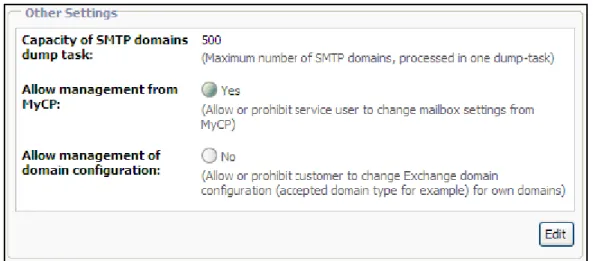
Ability to Enable/Disable Exchange Mailbox Management for MyCP
Users
Since POA 2.9 a provider is able to restrict Service Users to manage their Exchange mailboxes from My CP, that is editing properties, adding/deleting e-mail addresses and configuring forwarding.
30 Parallels Operations Automation 2.9 Parallels
This option is system-wide.
POA 2.9 Provider's guide > POA Hosted Exchange > Hosted Exchange Manager > Configuring Exchange Manager Settings.
Warning Size Limit for Exchange Mailbox and Public Folder Stores
In POA 2.9 a provider can specify the warning size limit of mailbox stores and public folder stores. At reaching this limit, a notification will be sent to the subscribed Stuff Member of the provider.POA 2.9 Provider's guide >> POA Hosted Exchange > Exchange Store Management > Configuring Store.
POA 2.9 Provider's guide >> POA Hosted Exchange > Hosted Exchange Manager > Managing Mailbox Stores.
POA 2.9 Provider's guide >> POA Hosted Exchange > Hosted Exchange Manager > Managing Mailbox Stores > Editing Mailbox Store Size Limit.
POA 2.9 Provider's guide >> POA Hosted Exchange > Hosted Exchange Manager > Managing Public Folder Store > Editing Public Folder Store Size Limit.
Ability to View Exchange Organizations Belonging to Account
Since POA 2.9, a provider can view the list of all Exchange organizations belonging to a single customer or reseller Account. The list is shown in PCC on the new subtab Exchange
organizations located at Top > Operations Director > Customer Manager (Reseller Manager) >
Customers (Resellers) > account name > Resources tab.
POA 2.9 Provider's Guide >> POA Hosted Exchange > Hosted Exchange Manager > Managing Organizations > Viewing Exchange Organizations Belonging to Account
Ability to View Mailboxes Belonging to Exchange Organization
Since POA 2.9, a provider or reseller can view the list of all mailboxes belonging to a single Exchange Organization. The list is shown in PCC/RCC in the Top > Service Director >
Hosted Exchange Manager > Organizations > Mailboxes tab.
POA Provider's guide (Reseller's guide) >> POA Hosted Exchange > Hosted Exchange Manager > Managing Organizations > Viewing Mailboxes Belonging to Exchange
Organization.
Starting from POA 2.9, BlackBerry™ Account information editing screen is divided by two screens:
Edit Owner Information
Edit Activation information
This change affects the following POA Account types: Customer, MyCP User. POA Subscriber's guide >> Working With Mail (Hosted Exchange) > Managing Wireless Services > Managing Blackberry™ Account.
POA MyCP User's guide >> Managing Exchange Mailbox > Managing Wireless Services > Managing Blackberry™ Account.
Support of New Options for BlackBerry™ and Good Mobile™ Devices
Since 2.9, POA supports the following additional options for the wipe device operation: Cancelling the wipe device operation
Repeating the wipe device operation in case of wipe failure
POA 2.9 Provider's Guide >> Managing BlackBerry™ and Good™ Mobile Messaging Systems > Managing Accounts > Wiping Device
POA 2.9 Reseller's Guide >> Managing BlackBerry™ and Good™ Mobile Messaging Systems > Managing Accounts > Wiping Device
POA 2.9 Subscriber's Guide >> Working with Mail (Hosted Exchange) > Managing Wireless Services > Managing BlackBerry™ Accounts > Wiping Device
POA 2.9 Subscriber's Guide >> Working with Mail (Hosted Exchange) > Managing Wireless Services > Managing Good™ Mobile Messaging Accounts > Wiping Device
Support of Outbound SMTP Servers for MX Logic
Since POA 2.9, provider can specify the list of outbound SMTP servers which
communicate with MXLogic. Mail sent to MXLogic from other IP addresses will be blocked as spam.
POA 2.9 Provider's guide >> POA Hosted Exchange > Managing Messaging Services > Managing MX Logic Email Security Service > Entering Outbound SMTP Servers for MXLogic.
Wizard for Setting Hosted Exchange Activation Parameters Is Improved
Since POA 2.9, the process of specifying Activation Parameters for Hosted Exchange Resource Type has been modified for more provider's convenience.32 Parallels Operations Automation 2.9 Parallels
POA Provider's Guide >> POA Hosted Exchange > Hosted Exchange Activation Parameters
Automated Login to Microsoft OWA from CCP Is Disabled
In POA 2.9, for security reasons, automated login to OWA from customer's Panel is
disabled. Upon clicking on the OWA link, customer is taken to the login screen. Automated login to OWA from customer's MyCP is preserved.
New User Privileges for Exchange Branding
Since POA 2.9, the following privileges can be applied to POA Staff Members using Exchange branding.
Change branding configuration of Exchange services - allows to edit Branding configuration of Exchange services.
View branding configuration of Exchange services - allows to view Branding configuration of Exchange services.
POA 2.9 Provider's guide > Marketing Operations > Branding In Parallels Operations Automation > Configuring Brand > Branding Exchange > Exchange Branding Privileges.
Ability to Provide Vendor's Outlook License for Customers
Since POA 2.9, provider enables Subscribers having the Outlook Access feature for their Exchange mailboxes the opportunity to choose either to use Vendor's Outlook client license or their own one.
For this purpose the Outlook License for Hosted Exchange Mailboxes Resource Type is developed.
After including this Resource Type in the Exchange Hosting Service Template and setting proper limit on it, the Customers will be able to turn on this functionality for their mailboxes by enabling the Vendor’s Outlook license option in the mailbox properties.
Using of this feature by Customers directly influence the way SPLA statistics is collected. If a Customer enables Vendor’s Outlook license option, such mailbox will be counted as
Standard Plus or Enterprise Plus SAL. If a Customer chooses to use own Outlook license and leaves the Vendor’s Outlook license option disabled, such mailbox will be counted as Standard or Enterprise SAL.
POA 2.9 Provider's guide >> POA Hosted Exchange > Creating Service Template for Hosted Exchange > Creating Outlook License for Hosted Exchange Mailboxes Resource Type
POA 2.9 Provider's guide >> POA Hosted Exchange > Hosted Exchange Manager > Managing Mailbox Templates > Creating Mailbox Template
34 Parallels Operations Automation 2.9 Parallels
POA 2.9 Reseller's guide >> POA Hosted Exchange > Creating Service Template for Hosted Exchange > Selecting Outlook License for Hosted Exchange Mailboxes Resource
POA Subscriber's guide >> Working with Mail (Hosted Exchange) > Managing Mailbox > Creating Mailbox
POA MyCP User's guide >> Managing Exchange Mailbox > Configuring Mailbox Access > Using Vendor's Outlook License
Application Hosting
Ability to Submit Information About Manually Installed Apache
Extensions to POA
Since POA 2.9, in case Apache extensions (such as Apache modules, PHP4/5 extensions, etc.) are installed on the Apache service host manually (bypassing POA), it is possible to submit information about these new extensions to POA database. This operation is called Synchronizing Extensions with Apache Service.
POA 2.9 Provider's Guide >> Shared Apache Web Hosting > Configuring Apache Service > Submitting Information about Manually Installed Apache Extensions to POA
Parallels Plesk Panel in VPS Hosting
Working With DNS Hosting for Parallels Plesk Panel Domains is
Improved
Earlier, Customer was enforced to switch the DNS Hosting Type of Domain prior to adding the Parallels Plesk Panel Hosting on Domain. Since POA 2.9, it is no longer required to perform this operation.
Additionally, the Slave DNS Hosting Resource Type is replaced by DNS Hosting Resource Type. Thus, the Slave DNS Hosting Resource Type is removed.
POA 2.9 Deployment Guide >> Deploying Parallels Plesk Panel in VPS Hosting POA 2.9 Provider’s Guide >> VPS Hosting in POA > Parallels Plesk Panel in VPS Hosting
POA 2.9 Reseller’s Guide >> Parallels Plesk Panel in VPS Hosting POA 2.9 Subscriber’s Guide >> Parallels Plesk Panel in VPS Hosting
Support of Parallels Plesk Panel 9.2.1
Since POA 2.9, a new version of Parallels Plesk Panel is supported - Parallels Plesk Panel 9.2.1 for Linux/Unix and Windows platforms. For details, refer to the product webpage (http://www.parallels.com/products/plesk/).
Dedicated Hosting
Support of Dedicated Hosting System Components for Windows-based
Management Node
Since POA 2.9, Dedicated Hosting system components can be installed on the Windows-based Management Node. The managed Dedicated Hosting services, such as Partimage, Acronis True Image, and DHCP still require a Linux-based host to be installed.
POA 2.9 Deployment Guide >> Deploying Dedicated Hosting > Installing POA Packages
36 Parallels Operations Automation 2.9 Parallels
Support of Detecting MAC Addresses Conflict is Introduced for
Dedicated Servers
Starting from POA 2.9, POA assignes the Conflict status to the Dedicated Servers having the duplicated MAC addresses. It allows provider to detect and resolve problems with the duplicated MAC addresses.
POA 2.9 Deployment Guide >> Deploying Dedicated Hosting > Registering Dedicated Servers in POA
Ability to Use Host With Any OS for OS Image Storage
Starting from POA 2.9, a provider is not required to install POA Agent on host intended for OS Image Storage, since it can have any suitable Operating System installed.
POA 2.9 Deployment Guide >> Deploying Dedicated Hosting > Acronis True Image Support
PA 2.9 Hardware Requirements >> Hardware Requirements > Dedicated Hosting Servers
POA 2.9 Provider's Guide >> Dedicated Hosting > Managing OS Image Storages
Miscellaneous Changes
New System Properties
Below is the list of new system properties added in POA 2.9.
Case-sensitive usernames System Property controls the support of case-sensitive login
names for Staff Members and Service Users.
The Use PBA 4.4 URLs for CP integration System Property is added. For the proper integration of PBA Control Panels with POA, this property should be enabled if PBA of version 4.4 or higher is used.
The Maximum limit for TTL System Property is added. It allows Provider or Reseller to define upper limit for TTL of DNS Records.
POA 2.9 Provider's Guide >> Managing Accounts > Configuring Your Account > Configuring System Properties
New Public API Methods
Below is the list of new Public API methods implemented in POA 2.9.
Note: To learn more about each of these methods, refer to POA 2.9 Public API Reference.
Management of Accounts and Account's Staff Members
pem.disableAccountMember
POA 2.9 Public API Reference >> Public API Reference > Management of Accounts and Account's Staff Members > pem.disableAccountMember
pem.enableAccountMember
POA 2.9 Public API Reference >> Public API Reference > Management of Accounts and Account's Staff Members > pem.enableAccountMember
Domains Management
pem.enableDNSRecord
POA 2.9 Public API Reference >> Public API Reference > Domains Management > pem.enableDNSRecord
pem.disableDNSRecord
POA 2.9 Public API Reference >> Public API Reference > Domains Management > pem.disableDNSRecord
Webspace Management
pem.apache.updateLimits
POA 2.9 Public API Reference >> Public API Reference > Webspace Management > pem.apache.updateLimits
pem.iis.updateLimits
POA 2.9 Public API Reference >> Public API Reference > Webspace Management > pem.iis.updateLimits
Exchange Management
pem.exchange.addBlackBerry
POA 2.9 Public API Reference >> Public API Reference > Exchange Management > Exchange Mailbox Management > pem.exchange.addBlackBerry
38 Parallels Operations Automation 2.9 Parallels
pem.exchange.addGoodlink
POA 2.9 Public API Reference >> Public API Reference > Exchange Management > Exchange Mailbox Management > pem.exchange.addGoodlink
pem.exchange.addDistributionList
POA 2.9 Public API Reference >> Public API Reference > Exchange Management > Exchange Distribution List Management > pem.exchange.addDistributionList
pem.exchange.addDistributionListMembers
POA 2.9 Public API Reference >> Public API Reference > Exchange Management > Exchange Distribution List Management > pem.exchange.addDistributionListMembers pem.exchange.removeDistributionListMembers
POA 2.9 Public API Reference >> Public API Reference > Exchange Management > Exchange Distribution List Management > pem.exchange.removeDistributionListMembers pem.exchange.removeDistributionList
POA 2.9 Public API Reference >> Public API Reference > Exchange Management > Exchange Distribution List Management > pem.exchange.removeDistributionList
pem.exchange.addPublicFolder
POA 2.9 Public API Reference >> Public API Reference > Exchange Management > Exchange Public Folder Management > pem.exchange.addPublicFolder
pem.exchange.mailEnablePublicFolder
POA 2.9 Public API Reference >> Public API Reference > Exchange Management > Exchange Public Folder Management > pem.exchange.mailEnablePublicFolder
pem.exchange.mailDisablePublicFolder
POA 2.9 Public API Reference >> Public API Reference > Exchange Management > Exchange Public Folder Management > pem.exchange.mailDisablePublicFolder
pem.exchange.getRootFolderName
POA 2.9 Public API Reference >> Public API Reference > Exchange Management > Exchange Public Folder Management > pem.exchange.getRootFolderName
pem.exchange.removePublicFolder
POA 2.9 Public API Reference >> Public API Reference > Exchange Management > Exchange Public Folder Management > pem.exchange.removePublicFolder
pem.exchange.addContact
POA 2.9 Public API Reference >> Public API Reference > Exchange Contact Management > pem.exchange.addContact
pem.exchange.removeContact
POA 2.9 Public API Reference >> Public API Reference > Exchange Contact Management > pem.exchange.removeContact
pem.exchange.getSMTPFilters
POA 2.9 Public API Reference >> Public API Reference > Exchange Management > Exchange Auxiliary Methods > pem.exchange.getSMTPFilters
pem.global_relay.createArchive
POA 2.9 Public API Reference >> Public API Reference > Exchange Management > Global Relay Archiving Management > pem.global_relay.createArchive
pem.global_relay.disableArchive
POA 2.9 Public API Reference >> Public API Reference > Exchange Management > Global Relay Archiving Management > pem.global_relay.disableArchive
pem.global_relay.disableArchiving
POA 2.9 Public API Reference >> Public API Reference > Exchange Management > Global Relay Archiving Management > pem.global_relay.disableArchiving
pem.global_relay.enableArchive
POA 2.9 Public API Reference >> Public API Reference > Exchange Management > Global Relay Archiving Management > pem.global_relay.enableArchive
pem.global_relay.enableArchiving
POA 2.9 Public API Reference >> Public API Reference > Exchange Management > Global Relay Archiving Management > pem.global_relay.enableArchiving
pem.global_relay.getArchive
POA 2.9 Public API Reference >> Public API Reference > Exchange Management > Global Relay Archiving Management > pem.global_relay.getArchive
pem.global_relay.getArchiveRecipients
POA 2.9 Public API Reference >> Public API Reference > Exchange Management > Global Relay Archiving Management > pem.global_relay.getArchiveRecipients
40 Parallels Operations Automation 2.9 Parallels
pem.global_relay.getArchiveRecipientsCandidates
POA 2.9 Public API Reference >> Public API Reference > Exchange Management > Global Relay Archiving Management > pem.global_relay.getArchiveRecipientsCandidates pem.global_relay.retryArchiveOperation
POA 2.9 Public API Reference >> Public API Reference > Exchange Management > Global Relay Archiving Management > pem.global_relay.retryArchiveOperation
pem.exchange.addMailboxWithTemplate
POA 2.9 Public API Reference >> Public API Reference > Exchange Management > Exchange Mailbox Management > pem.exchange.addMailboxWithTemplate
pem.exchange.changeMailboxTemplate
POA 2.9 Public API Reference >> Public API Reference > Exchange Management > Exchange Mailbox Management > pem.exchange.changeMailboxTemplate
pem.exchange.getMailboxTemplates
POA 2.9 Public API Reference >> Public API Reference > Exchange Management > Exchange Mailbox Management > pem.exchange.getMailboxTemplates
pem.exchange.forceMailboxTemplatesUsing
POA 2.9 Public API Reference >> Public API Reference > Exchange Management > Exchange Mailbox Management > pem.exchange.forceMailboxTemplatesUsing
pem.exchange.getOutlookLicense
POA 2.9 Public API Reference >> Public API Reference > Exchange Management > Exchange Mailbox Management > pem.exchange.getOutlookLicense
pem.exchange.disableOutlookLicense
POA 2.9 Public API Reference >> Public API Reference > Exchange Management > Exchange Mailbox Management > pem.exchange.disableOutlookLicense
pem.exchange.enableOutlookLicense
POA 2.9 Public API Reference >> Public API Reference > Exchange Management > Exchange Mailbox Management > pem.exchange.enableOutlookLicense
Database Management
POA 2.9 Public API Reference >> Public API Reference > Database Management > pem.mysql.applyMySQLActivationParams
IIS Management
pem.iis.grantAuthorizedWebAccess
POA 2.9 Public API Reference >> Public API Reference > IIS Management > IIS Website Users Management > pem.iis.grantAuthorizedWebAccess
pem.iis.revokeAuthorizedWebAccess
POA 2.9 Public API Reference >> Public API Reference > IIS Management > IIS Website Users Management > pem.iis.revokeAuthorizedWebAccess
pem.iis.getAuthorizedWebAccessDomainsForUser
POA 2.9 Public API Reference >> Public API Reference > IIS Management > IIS Website Users Management > pem.iis.getAuthorizedWebAccessDomainsForUser pem.iis.getAuthorizedWebAccessUsersForDomain
POA 2.9 Public API Reference >> Public API Reference > IIS Management > IIS Website Users Management > pem.iis.getAuthorizedWebAccessUsersForDomain
SharePoint Management
pem.sharepoint.createSharePointSite
POA 2.9 Public API Reference >> Public API Reference > SharePoint Management > pem.sharepoint.createSharePointSite
pem.sharepoint.deleteSharePointSite
POA 2.9 Public API Reference >> Public API Reference > SharePoint Management > pem.sharepoint.deleteSharePointSite
pem.sharepoint.getAvailableSharePointSiteTemplates
POA 2.9 Public API Reference >> Public API Reference > SharePoint Management > pem.sharepoint.getAvailableSharePointSiteTemplates
pem.sharepoint.addSharePointUser
POA 2.9 Public API Reference >> Public API Reference > SharePoint Management > pem.sharepoint.addSharePointUser
42 Parallels Operations Automation 2.9 Parallels
POA 2.9 Public API Reference >> Public API Reference > SharePoint Management > pem.sharepoint.removeSharePointUser
Application Management
pem.APS.getApplicationInstanceInfo
POA 2.9 Public API Reference >> Public API Reference > Application Management > pem.APS.getApplicationInstanceInfo
pem.APS.getApplicationInstanceURL
POA 2.9 Public API Reference >> Public API Reference > Application Management > pem.APS.getApplicationInstanceURL
pem.APS.getPackageInfo
POA 2.9 Public API Reference >> Public API Reference > Application Management > pem.APS.getPackageInfo
pem.APS.installApplicationInstance
POA 2.9 Public API Reference >> Public API Reference > Application Management > pem.APS.installApplicationInstance
pem.APS.installPackage
POA 2.9 Public API Reference >> Public API Reference > Application Management > pem.APS.installPackage
pem.APS.uninstallApplicationInstance
POA 2.9 Public API Reference >> Public API Reference > Application Management > pem.APS.uninstallApplicationInstance
pem.APS.uninstallPackage
POA 2.9 Public API Reference >> Public API Reference > Application Management > pem.APS.uninstallPackage
pem.APS.updateApplicationInstance
POA 2.9 Public API Reference >> Public API Reference > Application Management > pem.APS.updateApplicationInstance
External System Management
POA 2.9 Public API Reference >> Public API Reference > External System Management > pem.registerExternalSystem
pem.unregisterExternalSystem
POA 2.9 Public API Reference >> Public API Reference > External System Management > pem.unregisterExternalSystem
pem.getExternalSystemList
POA 2.9 Public API Reference >> Public API Reference > External System Management > pem.getExternalSystemList
pem.setExternalSystemConfig
POA 2.9 Public API Reference >> Public API Reference > External System Management > pem.setExternalSystemConfig
Changed Public API Methods
Below is the list of Public API methods changed in POA 2.9.
Note: To learn more about each of these methods, refer to POA 2.9 Public API Reference.
Management of Accounts and Account's Staff Members
pem.addAccountMember
POA 2.9 Public API Reference >> Public API Reference > Management of Accounts and Account's Staff Members > pem.addAccountMember
pem.promoteToReseller
POA 2.9 Public API Reference >> Public API Reference > Management of Accounts and Account's Staff Members > pem.promoteToReseller
Subscriptions Management
pem.activateSubscription
POA 2.9 Public API Reference >> Public API Reference > Subscriptions Management > pem.activateSubscription
Domains Management
44 Parallels Operations Automation 2.9 Parallels
POA 2.9 Public API Reference >> Public API Reference > Domains Management > pem.addDomain
pem.addSubdomain
POA 2.9 Public API Reference >> Public API Reference > Domains Management > pem.addSubdomain
pem.addDNSHosting
POA 2.9 Public API Reference >> Public API Reference > Domains Management > pem.addDNSHosting
Exchange Management
pem.exchange.changePrimaryEmailAddress
POA 2.9 Public API Reference >> Public API Reference > Exchange Management > Exchange Auxiliary Methods > pem.exchange.changePrimaryEmailAddress
pem.exchange.addEmailAddresses
POA 2.9 Public API Reference >> Public API Reference > Exchange Management > Exchange Auxiliary Methods > pem.exchange.addEmailAddresses
pem.exchange.removeEmailAddresses
POA 2.9 Public API Reference >> Public API Reference > Exchange Management > Exchange Auxiliary Methods > pem.exchange.removeEmailAddresses
pem.exchange.addMailbox
POA 2.9 Public API Reference >> Public API Reference > Exchange Management > Exchange Mailbox Management > pem.exchange.addMailbox
Branding Management
pem.brandDomain
POA 2.9 Public API Reference >> Public API Reference > Branding Management > pem.brandDomain
Support of Multiple AD Instance in Account Management AD Plug-in
Since POA 2.9, Account Management Active Directory Plug-in supports multiple Active Directory instances.Ability to View/Edit Underlying Resource Type Values in Service
Template
Since POA 2.9, it is possible to proceed from the Service Template management page directly to the settings of the underlying Resource Type. By clicking on the resource name on the Resources tab of the Service Template, you proceed to the resource management page where you can view or edit the Resource Type parameters. Changes applied to the Resource Type values do not affect the services already provisioned on the basis of the current Service Template.
POA 2.9 Provider's Guide >> Managing Service Templates > Editing Resources and Limits for Service Template
POA 2.9 Reseller's Guide >> POA-Related Steps in Creating Service Plan > Configuring Service Template > Editing Resources and Limits for Service Template
Help & Support Menu Is Available for MyCP Users
Since POA 2.9, MyCP users will be able to use Help & Support menu.
By clicking on the Help & Support link, a user will be moved to the screen with the following links:
Trouble Ticketing
Questions & Answers
46 Parallels Operations Automation 2.9 Parallels
These links are customizable at provider's level and will lead to the URLs specified at Top > System Director > Configuration Manager > System Properties > MyCP tab of the Provider Control Center.
POA 2.9 MyCP User's Guide >> Help & Support
POA 2.9 Provider's Guide >> Managing Accounts > Configuring Customer Control Panel > Configuring MyCP Settings.
New Activation Parameters to Regulate Automatic Provisioning of Plesk
Sitebuilder
Since POA 2.9, a new Activation Parameter is introduced in the User in Plesk Sitebuilder Resource Type, both for Linux and Windows Shared Hosting. Depending on the value of
the Provision Parallels Plesk Sitebuilder for Linux/Unix site automatically upon provisioning of
Apache website parameter (yes/no) or Provision Parallels Plesk Sitebuilder for Windows site
automatically upon provisioning of IIS website (yes/no), a Plesk Sitebuilder site is or is not
automatically created for each new domain added to a Subscription. Formerly, Plesk Sitebuilder sites were autoprovisioned as follows:
In Windows Shared Hosting Subscriptions – autoprovisioned for each new IIS website,
In Linux Shared Hosting Subscriptions – never provisioned automatically. POA 2.9 Provider's Guide >> Plesk Sitebuilder for Linux/Unix Hosting in POA > Providing Plesk Sitebuilder for Linux/Unix Hosting > Creating Resource Type
POA 2.9 Provider's Guide >> Plesk Sitebuilder for Windows Hosting in POA > Providing Plesk Sitebuilder for Windows Hosting > Creating Resource Type
POA 2.9 Reseller's Guide >> Plesk Sitebuilder for Linux/Unix Hosting in POA > Enabling/Disabling Automatic Creation of Plesk Sitebuilder Websites in Subscription
POA 2.9 Reseller's Guide >> Plesk Sitebuilder for Windows Hosting in POA > Enabling/Disabling Automatic Creation of Plesk Sitebuilder Websites in Subscription
New Activation Parameter for DNS Hosting Resource Type Is
Introduced
In POA 2.9, the new Auto host domain Activation Parameter for the DNS hosting Resource Type is introduced. When Auto host domain is set to Yes (the default value), POA
automatically provisions DNS hosting for domains in the following cases:
When a hosting service is added to a domain using the pem.bindServicesToDomain Open API method
During the Subscription upgrade or migration using the
pem.(upgrade/migrate)Subscription Open API method
When a domain together with a hosting service is added using the pem.addDomain Open API method
Note: All these methods may be called by PBA or any other billing solution during automatic service provisioning.
When the parameter is set to No, POA does not automatically provision DNS hosting in these cases.
POA Provider's Guide >> Managing Domains > Administering Domain > Managing DNS > DNS Hosting in POA > Creating Resource Type for DNS Hosting
POA Provider's Guide >> Managing Domains > Administering Domain > Managing DNS > DNS Hosting in POA > Creating Service Template for DNS Hosting