Univerzitna 1, 010 26 Žilina, Slovak Republic, e-mail: [email protected]
ABSTRACT
The article deals with the application of vision guided parallel robot FANUC M-1iA
for automated assembly process. Vision system is used for object identification and filtering the data about its position and orientation. Control system based on iR Vision system can process data collected from camera Sony XC-56 fixed to the frame and navigate the end-effector to grasp and move selected objects. Integration of vision
guided robot control into the high speed parallel robot can be highly productive. The functionality of vision guided robot system is demonstrated at automated assembly process of USB memory stick with variable positioning of its components.
Keywords: Vision guided robot, delta robot, vision system, FANUC M-1iA.
INTRODUCTION
Engineers and designers of automated assem-bly systems around the world are constantly forced to ensure high productivity and low manufactur-ing costs of their solutions. Because of the ever-increasing requirements on flexibility, complexity and variability of the assembly robotic cells, it is more difficult to provide the sufficiently robust so-lution. There are several options to fulfil these re-quirements, such as optimization through the suit-able CAx systems [10], simulation of robot motion (for example in ROS platform), application of the so-called collaborative robots [8, 13] and applica-tion of different type of advanced and intelligent sensors or other advanced mechatronic units [16].
Nowadays, it is going to be very advanta-geous to integrate the fast vision systems on high speed robots, especially with parallel kinematic structure, to maximize productivity of the whole system. It seems to be the best alternative to apply their commercially very successful type, called delta robots, for this kind of tasks.
A Vision Guided Robot (VGR) system is basi-cally any robot system equipped with one or more
cameras [1]. They can be used as auxiliary sen-sors to provide a feedback signals for robot con-trol unit. As the result can be obtained very precise motion to a variable target position. VGR systems enable robots to be highly adaptable and more eas-ily implemented on this kind of tasks, whether for material handling, automated assembly, food in-dustry applications, etc. They can reduce the costs and complexity of robotic cells at the same time.
On the other hand, the robots with parallel kinematic structure are interesting mainly due to their high dynamics, suitable stiffness as well as positioning accuracy compared to the serial ro-bots [7]. The basic idea behind the delta robot design is the useage of parallelograms and base-mounted actuators with low-mass and low inertia. It allows to achieve large acceleration of robots and its end-effector. It is well known that this type of robots can reach the acceleration up to 15 times gravity in industrial applications [3, 6].
The article deals with the application of vi-sion guided parallel robot FANUC M-1iA with integrated iR Vision system for automated assem-bly process of USB memory stick. There are de-scribed the steps of solution of defined problem. Received: 2018.02.23
TESTING WORKPLACE WITH DELTA
ROBOT AND VISION SYSTEM
Laboratory of parallel mechanisms were de-veloped at the Faculty of Mechanical Engineering at the University of Zilina during the last years. One of the key elements is a special robot workcell for testing such system functionality composed of: • delta robot FANUC M-1iA/0.5A with control
unit R-30iB and Teach pendant • and iR Vision system.
DELTA ROBOT FANUC M-1IA
There are currently three different sizes of FA-NUC delta robots available on the market, from
smallest to the biggest one: M-1iA, M-2iA and M-3iA. All can be delivered in some modifica-tions, like with 4 or 6 DOFs (degrees of freedom), with increased operational range or payload ca-pacity (Fig. 1). These robots are ideal to automate tasks which so far were too fast and too complex for standard serial robots. In addition, this new family of robot series offers the motion flexibility of a human wrist, fast cycle times, ultra-compact arm and precision. It is also possible to support intelligent functions using iR Vision [6].
For our application we decided for the small-est delta robot called M-1iA/0.5A with 6 DOFs. This robot has a cylindrical workspace with max-imum diameter 280 mm and height 100 mm. The maximum payload is limited to 0.5 kg included
Fig. 1. Three different sizes of FANUC delta robots – from smallest (left) to biggest one (right): a) M1-iA, b) M2-iA, c) M3-iA [7]
Fig. 2. Workplace with delta robot FANUC M-1iA (a) and decomposed USB stick – the object of automated assembly process (b): 1- holder with suction gripper, 2- fingers of assembly jig, 3- table, 4- two-fingers gripper,
algorithms can be used for quality control to check dimensions, angles, colour or surface struc-ture or for the recognition of an object as used in VGR systems [15, 12].
The vision system provides the data distribu-tion about shape and locadistribu-tion coordinates of com-ponents spread out randomly beneath the camera’s field of view to the robot controller. It enables to navigate the robot arm with attached end-effector (in our case suction gripper) to the selected com-ponent and grasp it from static pick-up position or belt conveyor. In case of picking-up parts from conveyor there are two options - with or with-out stopping of conveyor [9]. Suitable conveyor tracking system are used for synchronization of both, the robot and conveyor in the second case.
Hardware
Camera system was installed on our FANUC M-1iA robot, which will serve the robot guidance and creation of programs supported by iR Vision system. This configuration enables the implemen-tation of handling tasks with variable components location on designed workplace. Hardware part of iR Vision system is made up of camera Sony XC-56 (in Fig. 2, left - the black cylinder mounted in the middle of robot frame), the lens and connecting cable. The software tool is based on web server, which is running in personal computer connected to the robot control system with Ethernet cable.
The applied camera Sony XC-56 is connected to the robot control unit by special JRL6A port, which is located on the base panel. Before the first use of the camera in iRVision system is necessary to configure the hardware. Configuration is car-rying out by DIP switches that are located on the back side of the camera. Thanks to the configura-tion step the camera can be placed in a fixed point (static camera position) or it can be mounted on the robot arm. For our applications with robot M1-iA fixed camera location was chosen.
• installing of required controls tools.
VISION SETUP PROCEDURE
After the hardware configuration an applica-tion Vision Setup is started in WEB server envi-ronment. There can be shown any default setting as well as can be set and change any of system parameters. The iR Vision main menu contained set of basic tools is displayed on the left-hand side of the screen.
The configuration contains following tools or steps:
• Camera Setup Tools – basic settings and cam-era configuration.
• Camera Calibration Tools - camera calibra-tion for our scene, hardware configuracalibra-tion and conditions.
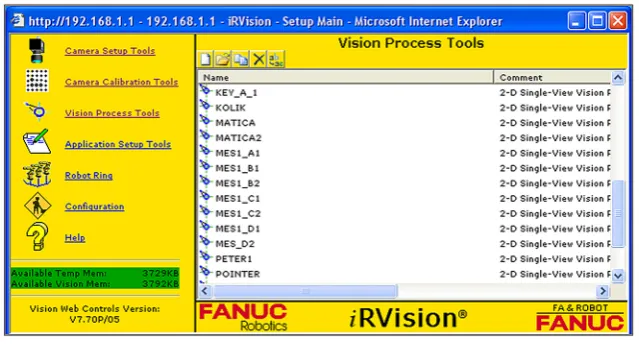
• Process Vision Tools – preparing of a special testing task.
Camera Setup Tools
At the beginning port number where the cam-era is connected was selected. Control system rec-ognizes the type and parameters of all connected cameras and it creates a list of them automatically. Then the user can simply select the one which will be used for the solved task. Already in this config-uration step (Camera Setup Tool) the user can see first camera image outputs thanks to the function Live Image or Snap. For any cases when the high-er image output quality is needed the optimum ex-posure settings can be set by parameter Exex-posure Time with respect to the lightning conditions.
Camera Calibration Tools
The next important configuration step is cam-era calibration. Calibration process allows vision systems to “understand” relation between cam-era and robot coordinate system and will return real-world coordinate data. The process usually involves a dot grid or checkerboard pattern, typi-cally called a calibration plate or calibration grid. It is necessary to have it calibrated with high ac-curacy for vision guided robot system.
Calibration is performed by using predefined models in a form of two-dimensional grid with different size - from 6.5×6.5 mm up to 30×30 mm in order to sizes of workspace. In our case we use the calibration plate with grid spacing of 20×20 mm (Fig. 3). Calibration is related to a specific User Frame, which can be selected directly in the
calibration window. The properties of used lens and scanned objects can be described by the type of calibration projections. This parameter may be either orthogonal or perspective.
Now we will choose the method for definition of coordination system (FANUC use the name User Frame). User Frame can be set by three point method, four point method or direct entry. We choose the three points method based on defi-nition of one orient origin point and one point for each axis (axis X and axis Y).
When we have finished the calibration pro-cedure, our robot knows the position and orien-tation of selected coordinate system. It means that the distance between coordinate system plane X-Y and the robot frame (it means the high in Z axis) is defined.
Fig. 3. Screen of Camera Calibration Tool (a) and calibration grid for alignment of camera and robot coordinate system during configuration of iRVision system (b)
Vision Process Tools
Designing and configuration of our visualiza-tion task by using Vision Process Tools is the last basic step of a preparation phase in the system iR Vision. There it is necessary to create an indi-vidual process tool for each object or component of assembly process. There were created 4 unique tools (Fig. 4): MES1_A1 for the first part (bot-tom half of body), MES1_B2 for the second part (electronic board), MES1_C2 for the third part (upper half of body) and finally the MES_D2 for the fourth part (cap).
Every single process tool has attribute as 2D-Single-View Vision Process Tool. Using these
vision process tools the objects can be detected by camera. The basic requirement is that for each object must exist the pattern stored in memory of control system. The first part (Vision Process Tool “MES1_A1”) is placed on a working table inside the range of camera.
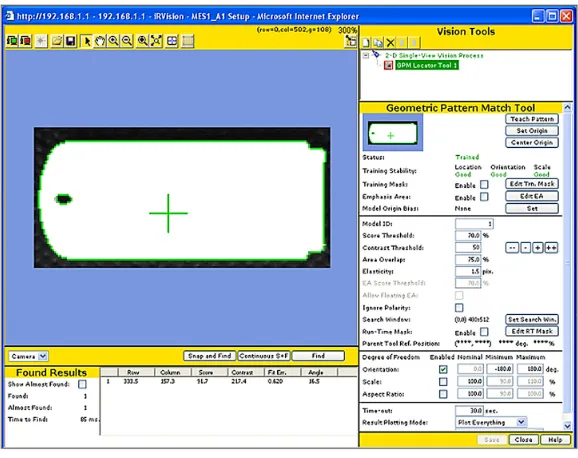
We are taken its photo and then pressing the button Teach Pattern, which activates a selection window for identification of part borders (high-lighted by green curve - see Figs. 5 and 6). Con-sequently we can set parameters collected in right-side panel. Such parameters as Set Origin point (gripping point shown as green cross) which will be aligned with gripping point on real part, Edit
Train-Fig. 5. Main window of Vision Process Tool “MES1_A1” for identification of the first part
ing Mask (for filtering of non-important elements of the part), Score Threshold, Contrast Threshold, Overlap, disable or enable and set some range for orientation, etc. can be edited. Gripping point can be freely moved anywhere on the subject.
The same method was applied for all other parts. The screenshots from finding process are
shown in Figure 7. You can adjust the contrast, exposure time, the percentage of compliance, method of sorting as well as the number of expo-sures and many others.
If parameter Orientation is not selected, iR Vision will ignore the angle of object. For assem-bly tasks where it is necessary to orient objects is
Fig. 7. Vision Process Tool “MES1_B2” (a) after Snap and Find and identification of the second part (green border line), “MES1_C2” (b) after identification of the third part and “MES_D2” (c) after identification of the
fourth part
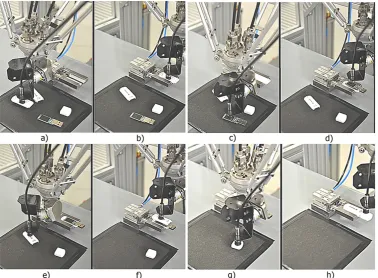
Fig. 8. Assembly process of USB memory stick: base part picking (a) and in assembly position (b); electronic board picking (c) and in assembly position (d); upper part picking (e) and in assembly position (f); cup picking
the absence of this setting inadmissible. In Figure 8 the real assembly process controlled by iR Vi-sion system is shown.
ALGORITHM AND THE MAIN PROGRAM
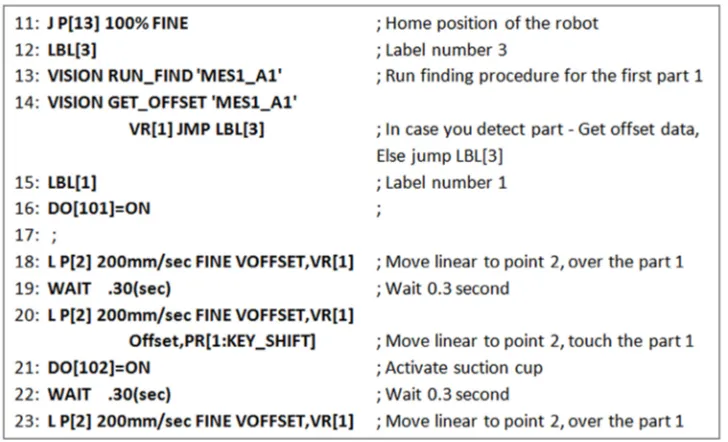
The definition of start (reference) point re-quires its physical touching by robot end-effector (the robot must be guided to this point manually). This point is stored the same way as any standard point P[n] by Teach Pendant panel. At this point the function offset by Vision register VR [n] can be applied. Then, any point of interest and any path (linear or joint motion) can be described with respect to the reference point by pure offset co-ordinates. List of available FANUC Vision
func-tions is shown in Fig. 9. An example of funcfunc-tions Vision Run_Find and Vision Get_Offset is shown in the below figure.
The basic vision functions applied in standard program for image processing are:
• VISION RUN_FIND ‘VisionTool’
• VISION GET_OFFSET ‘VisionTool’ VR[n] JMP LBL[n]
The function RUN_FIND opens a specific user-defined Vision Process Tool. GET_OFF-SET function extracts any position data from a particular vision process as well as it saves them into a Vision register VR[n]. In case the vision process was aborted (it doesn’t find the object), make a jump to label LBL [n]. When all Vision Process Tools are prepared, we can start to
de-Fig. 9. Vision functions available in FANUC iR Vision system
sign the main program (Fig. 10) according de-veloped algorithm.
CONCLUSIONS
Nowadays, there are some difficulties of inte-grated vision system to match the camera with the set expectations of the system. In most cases, this is caused by lack of knowledge on behalf of the in-tegrator or machine builder. Many vision systems can be applied successfully to virtualise any pro-duction activity, as long as the user knows exactly how to set up system parameters. The performance of such an assembly system is heavily dependent on the placement of the camera and light source, as well as proper algorithms and precise set-up.
This article presents an example of auto-mated assembly system based on application of high speed parallel robot FANUC M-1iA with in-tegrated iR Vision system. The effectiveness of the algorithms and set-up of whole system was illustrated on a typical small-scale mechanical as-sembly task – asas-sembly of USB memory stick. Nowadays, we can see that the number of appli-cations of robots guided by vision system is still growing. Therefore continuous development and intense improvement process is highly desirable. However, it may be concluded that VGR system can provide a low cost, accurate and efficient so-lution to the automated assembly problem.
ACKNOWLEDGEMENT
This article was supported by the project APVV-16-0283: Research and development of multi-criteria diagnosis of production machinery and equipment based on the implementation of artificial intelligence methods.
REFERENCES
1. Anadan, T.-M.: Advanced vision guided robotics: Technology & Trends Impacting VGR Prolifera
-tion. Robotics Industry Insights. Editor: Robotic Industries Association. Posted [04/02/2013]. Avail
-able on: http://www.robotics.org/content-detail. cfm?content_id=3992.
2. Bulej, V., et al.: Study of the workspace of hybrid
mechanism trivariant. Applied Mechanics and
Mate-rials., vol. 436, 2013.
3. Bulej, V. Innovative and non-standard applications of mechanisms with parallel kinematic structure. In:
Mechanization and automation equipment for
pro-cessing. Cluj-Napoca: Publishing House Alma Ma
-ter, 2015, 164-208.
4. Čuboňová, N., Císar, M.: Design of camera mount
and its application for monitoring machining
pro-cess. Advances in Science and Technology Research Journal, vol. 9, No. 26, 2015, 34-40.
5. Čuboňová, N., Kuric, I.: Data structures imple -mentation of the protocol STEP-NC at CNC
ma-chines programming. Communications - Scientific Letters of the University of Zilina, vol. 16, No. 3A, 2014, 176-183.
6. FANUC - Industrial robots made for higher pro
-ductivity / Range overview. Available on: http://
www.fanuc.eu/sk/en/robots/robot-range-page.
7. Krajčovič, M. et al.: Intelligent manufacturing sys -tems in concept of digital factory. Communications
- Scientific Letters of the University of Zilina. vol. 15, No. 2, 2013, 77-87.
8. Kumičáková, D.: Robotization of manufacturing pro -cesses, Mechanization and Automation Equipment
for Processing. Cluj-Napoca : Publishing House Alma Mater, 2015, 115-163.
9. Kumičáková, D. et al.: Specialised robotic hand de
-signing and Object Grasping Simulation. Applied Mechanics and Materials, vol. 282, 2013, 90-98.
10. Kuric, I., et al.: New methods and trends in product development and planning. Quality and Innovation in Engineering and Management, 2011, 453-456.
11. Kuric, I., Zajacko, I., Cisar, M.: Analytical intel -ligence tools for multicriterial diagnostics of CNC machines Advances in Science and Technology
Research Journal. Vol. 10, no. 32 (2016), 59-64. 12. Pecháč, P., Sága, M., et al.: Implementation of
memetic algorithms into structural optimization.
Communications - Scientific Letters of the Univer
-sity of Zilina, vol. 18, No. 1A, 2016, 64-69. 13. Rengevič, A., Kumičáková, D.: New possibilities
of robot arm motion simulation. Communications
- Scientific Letters of the University of Zilina, vol. 18, No. 1A, 2016, 81-83.
14. Rudawska, A., Reszka, M.,Warda, T., Miturska, I., Szabelski, J., Stančeková, D., Skoczylas, A.:
Milling as a method of surface treatment in ad-hesive bonding. Journal of Adhesion Science and
Technology. Vol. 30, iss. 23, (2016), 2619-2636.
15. Sága, M., Čuboňová, N., et al.: Optimisation al -gorithms in mechanical engineering applications.
First edition, Harlow: Pearson, 2016, pp. 291.
16. Uríček, J., et al.: The calculation of inverse kine
![Fig. 1. Three different sizes of FANUC delta robots – from smallest (left) to biggest one (right): a) M1-iA, b) M2-iA, c) M3-iA [7]](https://thumb-us.123doks.com/thumbv2/123dok_us/8806454.1774818/2.595.148.447.519.723/different-sizes-fanuc-delta-robots-smallest-biggest-right.webp)