Index
Page
0B
1. Introduction ... 3
1B
2. Safety and mounting ... 3
2B
3. Technical specification ... 4
3B
4. Using intrinsically safe barriers ... 8
4B
5. Control panel fascia... 9
5B
6. Connecting to the circuit board ... 10
6B
7. Software revision number ... 10
7B
8. Detection zone wiring ... 11
8B
9. Sounder circuit wiring ... 12
9B
10. Connection to remote control terminals ... 12
10B
11. Aux 24V DC supply ... 13
11B
12. Connection to relay contacts ... 13
12B
13. Connection to Repeater panels ... 13
13B
14. Connection to Ancillary boards ... 14
14B
15. Connection to 8 way Sounder boards ... 14
15B
16. Panel operation ... 15
16B
17. Configuration options ... 16
17B
18. Watchdog reset switch ... 19
18
19. Processor reset switch ... 19
19B
20. Internal indications – troubleshooting ... 19
39B 20.1 Mains fail ... 19 40B 20.2 Batt fail ... 19 41B 20.3 CPU fault ... 19 42B 20.4 Aux 24V fault ... 19 43B 20.5 Batt low ... 19 44B 20.6 Earth fault ... 19 45B
20.7 Sys fuse fault ... 20
46B
20.8 S1 fault and S2 fault ... 20
47B
20.9 Comms fault ... 20 21. Power supply ... 21 22. Maintenance ... 22
22B
23. Zone designation label ... 22
23B
0B
1. Introduction
The SIGMA CP range consists of a series of conventional fire alarm control panels designed in accordance with European standards EN54-2 and EN54-4 Fire Detection and Fire Alarm systems - Control and Indicating Equipment.
The range consists of 2, 4 and 8 zone control panels. All control panels are available in two versions:
Sigma K11 range in which detectors and call points are wired on separate circuits to sounders (two sounder circuits are provided).
Sigma T11 range in which detectors, call points and sounders are wired to the same pair of cables. This is what is commonly referred to as a two-wire system.
Wiring sounders to the detection circuits eliminates the need to install sounder circuit cables and also offers the ability to provide zoned or two stage sounder operation.
All control panels have an integral, mains powered battery charger and power supply designed in accordance with the requirements of EN54-4.
In addition to the requirements of EN54-2 the control panel has the following facilities:
………….Test condition to allow the automatic resetting of zones in alarm for testing purposes. EN54-2 Section 10 option with requirements.
………….Delay of the actioning of fire alarm devices (sounders) so that an alarm may be verified before a premises is evacuated. EN54-2 Section 7.11 option with requirements.
………….Fire alarm devices to enable an audible warning to be sounded throughout a premises upon the detection of a fire condition or the operation of a manual call point. EN54-2 Section 7.8 option with requirements.
In addition to the requirements of EN54-2, all control panels have voltage free relay contacts for fire and local fire which operate upon fire condition. These are to be used for local control and signalling.
1B
2. Safety and mounting
Suppliers of articles for use at work are required under section 6 of the Health and Safety at Work act 1974 to ensure as reasonably as is practical that the article will be safe and without risk to health when properly used.
An article is not regarded as properly used if it is used ‘without regard to any relevant information or advice’ relating to its use made available by the supplier.
This product should be installed, commissioned and maintained by trained service personnel in accordance with the following:
(i) IEE regulations for electrical equipment in buildings (ii) Codes of practice
(iii) Statutory requirements
(iv) Any instructions specifically advised by the manufacturer
According to the provisions of the Act you are therefore requested to take such steps as are necessary to ensure that you make any appropriate information about this product available to anyone concerned with its use.
This equipment is designed to be operated from 230V 50Hz mains supplies and is of class 1 construction. As such it must be connected to a protective earthing conductor in the fixed wiring of the installation and a readily accessible double pole disconnect device meeting the requirements of EN60950/IEC950 which disconnects live and neutral simultaneously shall be incorporated in the fixed wiring.
Switch disconnect devices such as MK Sentry 63A or similar are suitable for this.
Failure to ensure that all conductive accessible parts of this equipment are adequately bonded to the protective earth will render the equipment unsafe.
This control panel is designed for indoor use only and at temperatures between -50C (+/- 3) and +400C (+/-
2) and with a maximum relative humidity of 95%. The IP rating for the enclosure is IP30.
Mounting
The control panel should be mounted on a dry, flat surface, at eye height to the display and in a level position such that the enclosure is not distorted.
Screws or bolts of a minimum of 5mm diameter must be used to mount the enclosure in all three mounting positions.
It should be positioned in an accessible position as agreed with the end user.
Suitable fixings should be used at all fixing points such that the control panel is securely mounted and is not liable to move once fixed.
The control panel should not be mounted in another enclosure or near sources of excessive heat.
Cables should be connected using suitable cable glands fitted to the knockouts provided. If additional cable entry points are required, all swarf and debris caused by drilling of additional cable entries must be cleared before power is applied to the panel.
2B
3. Technical specification
Table 1 - Electrical specificationsMains supply 230V AC +10% - 15% (100 Watts maximum)
Mains supply fuse 1.6Amp (F1.6A L250V) Replace only with similar type
Power supply rating 3 Amps total including battery charge 28V +/ 2V Maximum ripple current 1.5 Volts
Output voltage 18.5 to 29V DC +/- 2%
Imax a 400 milliamps
Imax b 2.3 Amps
Imin 0.065A
Battery type (Yuasa NP) Two 12 Volt sealed lead acid (7Ah maximum)
Flame retardant UL94:V-0 See table 2 for capacities Battery charge voltage 27.6VDC nominal (temperature compensated) See table 3
Battery charge current 0.7A maximum
Battery lead fuse 20mm, 3.15A glass Replace only with the same type
Battery high impedance warning (Rimax)
1.35 ohms max Low battery voltage indication 21V +/- 2% Low battery shut off voltage 18.5V +/- 2%
Maximum current draw from batteries 3 Amps With main power source disconnected
R0V output Fused at with electronic fuse
Dedicated sounder outputs 24V Fused at 500mA with electronic fuse 1.6 Amp total load over UallU circuits Zonal sounder outputs 24V Fused at 500mA with electronic fuse 1.6 Amp total load over UallU circuits Fault relay contact rating 30VDC 1A Amp maximum for each Maximum ratings not to be exceeded
Fire relay contact rating 30VDC 1A Amp maximum for each Maximum ratings not to be exceeded
Local fire relay contact rating 30VDC 1A Amp maximum for each Maximum ratings not to be exceeded
Zone quiescent current 1.6mA maximum See table 4 for detector types
Terminal capacity 0.5mm2 to 2.5mm2 solid or stranded wire
Number of detectors per zone > 20 Dependent on type
Number of sounders per circuit Dependent on type and current consumption See table 6 for sounder types
Detection circuit end of line 6K8 5% ½ Watt resistor Supplied in terminals
Sounder circuit end of line 10K 5% ¼ Watt resistor Supplied in terminals
No. of detection circuits (see table 2 for number of zones for each model) Dependent on model
No. of sounder outputs 2 (plus one per zone on T models) SIL, AL, FLT, RST inputs Switched -ve, max resistance 100 Ohms
Zone normal threshold 8K ohm TO 1K ohm
Detector alarm threshold 999 ohms to 400 ohms Call point alarm threshold 399 ohms to 100 ohms Short circuit threshold 99 ohms to 0 ohms
Head removal condition 15.5 to 17.5 volts Zener clamp detector base to be used
Cabling FP200 or equivalent (maximum capacitance 1uF
maximum inductance 1 millihenry) Metal cable glands must be used
Table 2 - Standby battery capacity required for fully loaded system Panel model 24 hours
standby 48 hours standby 72 hours standby Standby current Max panel alarm current
K11020 (2 Zones) 3Ah 4.6Ah 6.2Ah 0.065 0.10A
K11040 (4 Zones) 3.3Ah 5.1Ah 6.9Ah 0.075 0.21A
K11080 (8 Zones) 3.75Ah 5.95Ah 8.2Ah 0.093A 0.55A
T11020 (2 Zones) 3Ah 4.6Ah 6.2Ah 0.065 0.15A
T11040 (4 Zones) 3.3Ah 5.1Ah 6.9Ah 0.075 0.30A
Table 3 - Battery charge voltage versus temperature
Temperature
0C Battery charge voltage
0 29.2
10 28.56
20 27.99
30 27.55
40 27.13
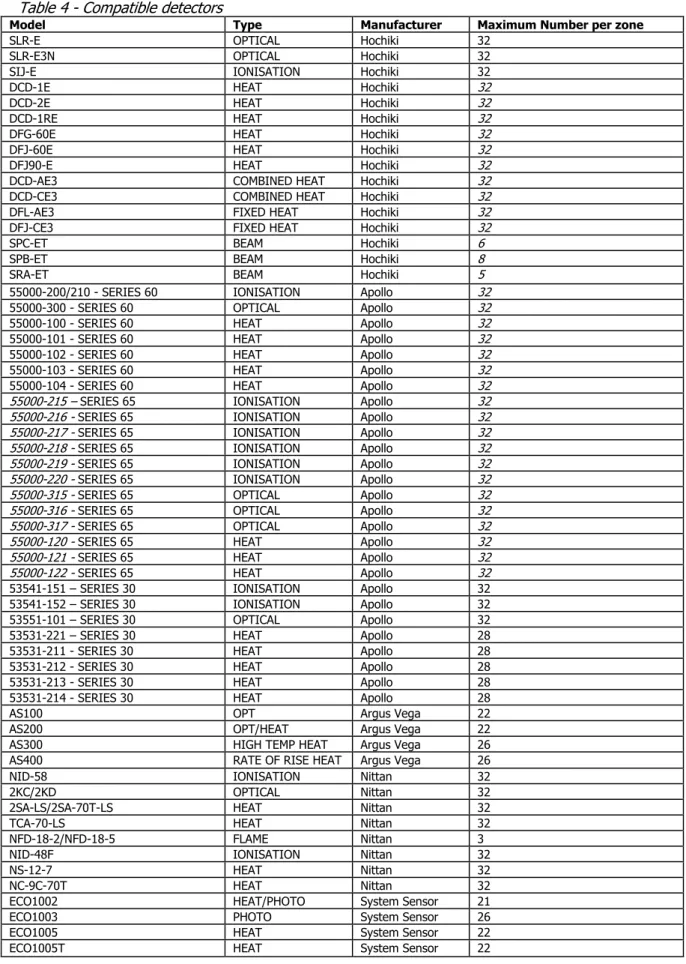
Table 4 - Compatible detectors
Model Type Manufacturer Maximum Number per zone
SLR-E OPTICAL Hochiki 32
SLR-E3N OPTICAL Hochiki 32
SIJ-E IONISATION Hochiki 32
DCD-1E HEAT Hochiki 32
DCD-2E HEAT Hochiki 32
DCD-1RE HEAT Hochiki 32
DFG-60E HEAT Hochiki 32
DFJ-60E HEAT Hochiki 32
DFJ90-E HEAT Hochiki 32
DCD-AE3 COMBINED HEAT Hochiki 32
DCD-CE3 COMBINED HEAT Hochiki 32
DFL-AE3 FIXED HEAT Hochiki 32
DFJ-CE3 FIXED HEAT Hochiki 32
SPC-ET BEAM Hochiki 6
SPB-ET BEAM Hochiki 8
SRA-ET BEAM Hochiki 5
55000-200/210 - SERIES 60 IONISATION Apollo 32
55000-300 - SERIES 60 OPTICAL Apollo 32
55000-100 - SERIES 60 HEAT Apollo 32
55000-101 - SERIES 60 HEAT Apollo 32
55000-102 - SERIES 60 HEAT Apollo 32
55000-103 - SERIES 60 HEAT Apollo 32
55000-104 - SERIES 60 HEAT Apollo 32
55000-215 – SERIES 65 IONISATION Apollo 32
55000-216 - SERIES 65 IONISATION Apollo 32
55000-217 - SERIES 65 IONISATION Apollo 32
55000-218 - SERIES 65 IONISATION Apollo 32
55000-219 - SERIES 65 IONISATION Apollo 32
55000-220 - SERIES 65 IONISATION Apollo 32
55000-315 - SERIES 65 OPTICAL Apollo 32
55000-316 - SERIES 65 OPTICAL Apollo 32
55000-317 - SERIES 65 OPTICAL Apollo 32
55000-120 - SERIES 65 HEAT Apollo 32
55000-121 - SERIES 65 HEAT Apollo 32
55000-122 - SERIES 65 HEAT Apollo 32
53541-151 – SERIES 30 IONISATION Apollo 32
53541-152 – SERIES 30 IONISATION Apollo 32
53551-101 – SERIES 30 OPTICAL Apollo 32
53531-221 – SERIES 30 HEAT Apollo 28
53531-211 - SERIES 30 HEAT Apollo 28
53531-212 - SERIES 30 HEAT Apollo 28
53531-213 - SERIES 30 HEAT Apollo 28
53531-214 - SERIES 30 HEAT Apollo 28
AS100 OPT Argus Vega 22
AS200 OPT/HEAT Argus Vega 22
AS300 HIGH TEMP HEAT Argus Vega 26
AS400 RATE OF RISE HEAT Argus Vega 26
NID-58 IONISATION Nittan 32
2KC/2KD OPTICAL Nittan 32
2SA-LS/2SA-70T-LS HEAT Nittan 32
TCA-70-LS HEAT Nittan 32
NFD-18-2/NFD-18-5 FLAME Nittan 3
NID-48F IONISATION Nittan 32
NS-12-7 HEAT Nittan 32
NC-9C-70T HEAT Nittan 32
ECO1002 HEAT/PHOTO System Sensor 21
ECO1003 PHOTO System Sensor 26
ECO1005 HEAT System Sensor 22
Although the current consumption of many detection devices would allow more than 32 to be connected to a zone, this number should be limited to 32 to ensure that a short or open circuit on the wiring does not prevent the indication of a fire alarm from more than 32 fire detectors and/or call points as required by European standard EN54-2.
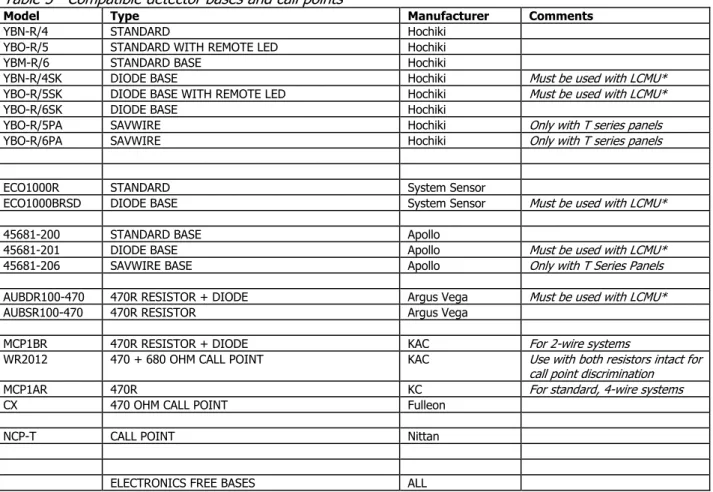
Table 5 - Compatible detector bases and call points
Model Type Manufacturer Comments
YBN-R/4 STANDARD Hochiki
YBO-R/5 STANDARD WITH REMOTE LED Hochiki
YBM-R/6 STANDARD BASE Hochiki
YBN-R/4SK DIODE BASE Hochiki Must be used with LCMU*
YBO-R/5SK DIODE BASE WITH REMOTE LED Hochiki Must be used with LCMU*
YBO-R/6SK DIODE BASE Hochiki
YBO-R/5PA SAVWIRE Hochiki Only with T series panels
YBO-R/6PA SAVWIRE Hochiki Only with T series panels
ECO1000R STANDARD System Sensor
ECO1000BRSD DIODE BASE System Sensor Must be used with LCMU*
45681-200 STANDARD BASE Apollo
45681-201 DIODE BASE Apollo Must be used with LCMU*
45681-206 SAVWIRE BASE Apollo Only with T Series Panels
AUBDR100-470 470R RESISTOR + DIODE Argus Vega Must be used with LCMU*
AUBSR100-470 470R RESISTOR Argus Vega
MCP1BR 470R RESISTOR + DIODE KAC For 2-wire systems
WR2012 470 + 680 OHM CALL POINT KAC Use with both resistors intact for
call point discrimination
MCP1AR 470R KC For standard, 4-wire systems
CX 470 OHM CALL POINT Fulleon
NCP-T CALL POINT Nittan
ELECTRONICS FREE BASES ALL
Note: LCMU (Line Continuity Monitoring Device) part number K1406 allows call points mounted downline of detectors that have been removed from diode bases to continue to operate.
*LCMU units are not compatible with 2 wire “T” series Sigma CP Panels.
Table 6 - Compatible sounders
Model Type Manufacturer Comments
BANSHEE ELECTRONIC VIMPEX
WAFER ELECTRONIC VIMPEX
FIRECRYER RANGE ELECTRONIC VOICE VIMPEX
KOBELL MOTORISED VIMPEX
ASKARI ELECTRONIC FULLEON Standard polarised type only
ROSHNI ELECTRONIC FULLEON Standard polarised type only
SQUASHNI ELECTRONIC FULLEON Standard polarised type only
SYMPHONI ELECTRONIC FULLEON Standard polarised type only
ELECTRONIC BELL ELECTRONIC FULLEON Standard polarised type only
CFB BELLS MOTORISED FULLEON Standard polarised type only
B6 AND B8 BELLS SOLENOID FULLEON Standard polarised type only
Table 7 - Compatible I.S. barriers
Model Type Manufac
turer
MTL5561 DETECTION ZONE GALVANIC ISOLATOR MTL
MTL7778ac SOUNDER CIRCUITS SI AND S2 ONLY MTL
3B
4. Using intrinsically safe barriers
SIGMA CP control panels support the use of I.S. barriers for connecting to equipment in hazardous areas.
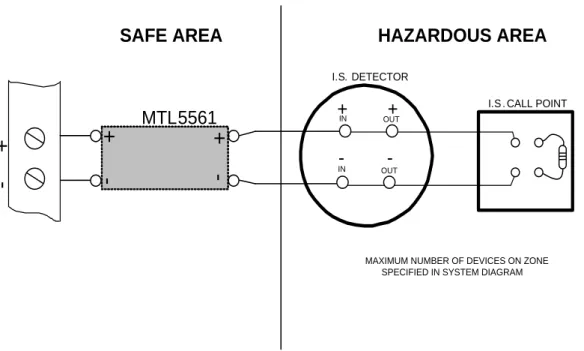
Only certified detectors, call points and sounders may be used in hazardous areas and these must be connected to the control panel via a compatible I.S. barrier as listed in table 7.
Connection of the I.S. barrier changes the characteristics of the detection circuit so zones that have I.S. barriers connected must be adjusted to work with them.
Programmable options C61 to C68 allow each zone to operate with I.S. barriers.
The amount of detectors and call points that can be connected to a zone is limited by the I.S. approval system diagram which should be supplied by the detector manufacturer. The power rating of the end of line resistor will be dependent upon the Zone classification rating (Gas class) this will be specified on the system diagram.
Figure 1. Detection zone wiring through an MTL5561 I.S .barrier
+
-S O U N D E R O U T P U T I.S . POLARISED SOUNDER
10K END OF LINE RESISTOR
MTL7778ac
MAXIMUM OF TWO SOUNDERS PER SOUNDER CIRCUIT
I.S . EARTH
POWER WILL DEPEND UPON I.S. ZONE CLASSIFICATION HAZARDOUS AREA SAFE AREA + IN OUT+ -IN OUT -I.S . POLARISED SOUNDER + IN OUT+ -IN OUT
-Figure 2. Sounder circuit wiring through an MTL7778ac I.S. barrier
+
-Z O N E+
IN OUT+
-IN OUT -I.S. DETECTORI.S . CALL POINT
MTL5561
6K8 END OF LINE RESISTOR+
-+
-SAFE AREA
HAZARDOUS AREA
POWER RATING WILL DEPEND UPON I.S. ZONE CLASSIFICATION NOTE: Active End of Line Devices (LCMU) must not be used in the Hazardous Area MAXIMUM NUMBER OF DEVICES ON ZONE
4B
5. Control panel fascia
In addition to the mandatory controls and indications required by the EN54-2 standard, two, seven segment, LED displays and MODE, SELECT and ENTER buttons are provided to allow easy entry and storage of codes to configure the control panel to suit the requirements of the installation.
Removing the fascia
Before the fascia can be removed it will be necessary to unplug the three way terminal block on the left hand side of the PCB.
The fascia of the control panel is held in place by countersunk screws. Undo the two screws and lift the fascia gently away from the box towards you.
With the fascia removed there is much more room inside the panel for making off and dressing cables. When cabling work is complete the fascia can be re-fitted with the two countersunk screws and the red, green/yellow and black wires re-connected to the three way terminal block.
It is most important that the polarity of the red and black wires is observed as wrong connection of these will damage the control panel.
5B
6. Connecting to the circuit board
All connections for field wiring are to a single row of terminals along the top of the circuit board.
The connections for the power cables are to a pluggable terminal block which may be pulled off of the board to remove the plate/PCB assembly. Remove this pluggable terminal only with mains power off.
Shielded fire alarm cable such as FP200 and metal cable glands must be used for all connections to the panel.
The resistance of any core of any cable must not exceed 25 ohms. The shield of the cable must be bonded securely to the enclosure via a metal gland.
Wiring should enter the enclosure at the top of the panel using the knockouts provided and be formed tidily to the appropriate terminals leaving only enough wire to ensure that there is no strain on the PCB.
Terminals are capable of accepting wires of up to 2.5mm2.
AUX 24V R0V SIL AL FLT RST RS485 S1 ZONE1 LOCAL FIRE + -FAULT RLY FIRE RLY + - + S2- + - ZONE 2 + - ZONE 3 + - ZONE 4 + - ZONE 5 + - ZONE 6 + - ZONE 7 + - ZONE 8 + -NC C NO NC C NO NC C NO REMOTE CONTROL Terminal designations
Wiring must not go across the front of the circuit board plate or between the plate and the circuit board. If cable entries need to be in positions other than at the knockouts provided, wiring must be fed behind and well away from the surface of the circuit board.
The space at the bottom of the enclosure is largely occupied by the standby batteries so this must be borne in mind when considering cable entries.
6B
7. Software revision number
New features may be added to Sigma CP fire control panels from time to time and when this is done the operating software of the unit is updated. The software revision can be located on the main processor by removing the plate holding the PCB from the enclosure and turning it over. The software version will have a number such as “Sig27.hex” and it is this number which will determine which features the panel has installed and its compatibility with Sigma CP ancillary board, sounders boards, repeaters etc. CORRECT INCORRECT INCORRECT SW1 SW2 SW4 SERIAL NUMBER + + + + + + + + + D 1008 ISSUE 06 C 1 R 1 R 2 R 3 R 5 R 6 R 7 R 8 R 9 C 3 0 C 3 1 R 1 1 R 12 R 13 R 1 4 R 1 5 R 1 7 R 1 8 R 1 9 R 2 1 R 5 1 R 5 2 R 53 R 5 4 R 5 5 R 5 6 R 57 R 58 R 6 0 R 6 1 R 6 2 R 63 R 6 4 R 6 5 R 66 R 6 7 R 6 9 R 7 1 R 7 2 R 7 3 R 7 4 R 78 R 8 0 R 8 1 R 85 R 86 R 87 R 8 8 R 9 0 R 9 8 R 9 9 R 1 0 2 R 1 0 3 R 104 R 1 0 9 R 1 1 0 R 11 1 R 1 1 2 C 2 C 3 C 4 C 5 C 7 C 1 9 C 20 C 21 C 22 C 23 C 27 C 3 7 C 3 8 C 3 9 C 4 0 C 4 3 C 4 4 C 5 5 C 60 C 61 R 1 1 3 R 1 14 R 1 1 6 R 11 7 C 9 6 C 33 R 1 2 8 C 73 C 74 C 75 C 7 6 C 34 C 35 C 36 R 130 R 131 R 132 R 133 R 134 R 135 R 1 3 7 R 129 C 4 2 C 41 R 8 9 R 1 0 7 C8 1 R 126 C 8 3 C 9 4 C 9 5 R 1 1 8 R 4 A R 4 B R 4 C R 4 D R 4 E R 4 F R 1 0 A R 1 0 B R 1 0 C R 1 0 D R 1 0 E R 1 0 F R 1 6 A R 1 6 B R 1 6 C R 1 6 D R 1 6 E R 1 6 F R 2 2 A C 9 2 C 93 C 97 C 9 8 C 9 9 C 1 0 0 C 1 0 1 C 1 0 2 C 10 3 R 15 5 R 15 6 R 15 7 C 10 4 C 1 0 5 R 1 5 8 C 106 C 107 C 1 0 8 C 1 0 9 D 1 D 2 D 3 D 4 D 9 D 10 D 11 D 12 D 13 D 14 D 15 D 16 D 22 D 23 Z 11 Z 14 D 30 F 1 F 2 F 4 F 9 F 10 F 11 T R 1 T R 2 T R 3 TR9 T R 2 6 TR 19 TR 24 TR 28 TR 25 IC 4 IC 5 IC 10 IC 1 IC 2 D 32 D 33 D 34 D 35 IC 6 REG1 J 1 C 24 C 25 C 65 C 66 C 67 C 68 C 56 C 82 D 41 D 2 0 F 1 2 C 51 RL 2 RL 3 RL 1 RL 10 RL 9 X T L 1 LED3 LED4
LED5 LED6 LED7
LED 17 LED 35 VR 1 TH 1 TR 23 L 1 T 3 R E G 3 F B 5 F B 6 F B 7 F B 8 F B 1 F B 2 F B 3 F B 4 F B 9 F B 1 0 R 70 R 75 R 76 X2 X1 C 45 VDR4 VDR3 V D R 2 VDR1 FB21 FB20 C128 C127 L E D 8 L E D 1 1 L E D 1 5 L E D 1 2 L E D 1 0 L E D 1 6 L E D 34 L E D 9 LE D 1 3 L E D 1 4 C6 F 3 R 16 8 TR47 R 1 6 7 R 1 6 6 Sig27. hex Jason
+
-Z O N E+
IN OUT+
-IN OUT -DETECTOR CALL POINT 6K8 END OF LINE RESISTOR+
-Z O N E+
IN OUT+
-IN OUT -DETECTOR CALL POINT 6K8 END OF LINE RESISTOR POLARISED SOUNDER IN OUT+
IN OUT+
_
_
NOTE: SOUNDER WIRED IN REVERSE POLARITY USE ONLY SA-WIRE BASES
ON “T” SERIES PANELS
Figure 4. – K Series detection zone wiring
Figure 5. - T series detection zone wiring
7B
8. Detection zone wiring
The detection zones provide a nominal 24V DC to power conventional detectors and call points as listed in the compatibility tables on pages 6 and 7.
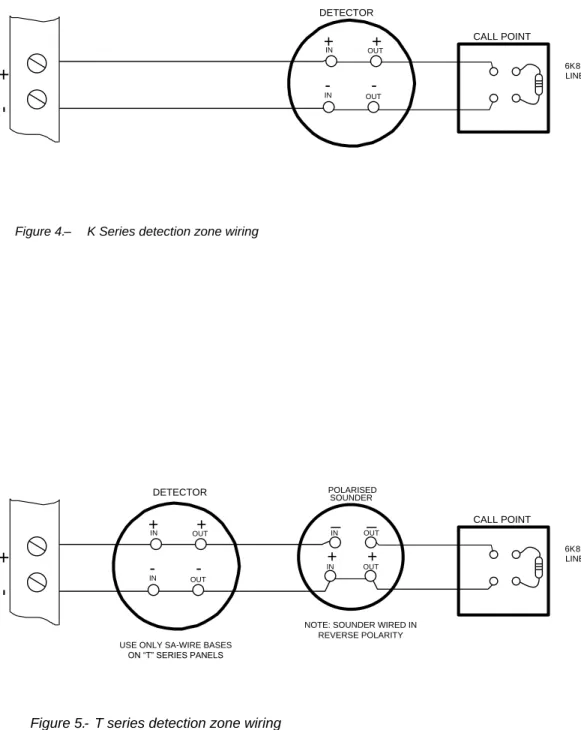
The wiring is monitored for open and short circuit fault conditions by removing the 6K8 end of line monitoring resistors that are supplied fitted to the control panels’ terminals and placing them across the last device that is wired to the zone circuit.
Detection zone circuits must be wired as a single, radial circuit with no spurs or T junctions to enable the monitoring circuit to work correctly.
On T series panels, polarised sounders must also be wired across the detection zone but in reverse polarity to that shown by the zone terminals (see figure 5 below). At least one sounder should be fitted to each detection zone. Each zone can be configured individually as a 2-wire type zone or a non 2-wire type zone using configuration options C1 to C8.
For non 2-wire systems that are required to comply with BS5839 Part 1: 2002 detector removal requirements, detector bases fitted with a Schottky diode should be used and the end of line resistor replaced with an LCMU active end of line monitoring device.
8B
9. Sounder circuit wiring
Whether using standard or T series control panels, all sounders must be of the polarised type. If non-polarised sounders are used the control panel will permanently show a fault condition. See table 6 on page 7 for a list of compatible sounder types.
Sounder circuits are monitored for open and short circuit faults by placing a 10K end of line monitoring resistor across the last device on the circuit.
Sounder circuits must be wired as a single, radial circuit with no spurs or T junctions to enable the monitoring circuit to work correctly.
A maximum of 1.6 Amps is available for powering sounders with a maximum load of 0.41 Amps on any one circuit.
9B
10. Connection to remote control terminals
Some functions of the control panel can be controlled externally from the panel if required. Operation of these inputs must be restricted by an access level 2 control as defined in EN54-2 These are abbreviated at the terminals block as follows:
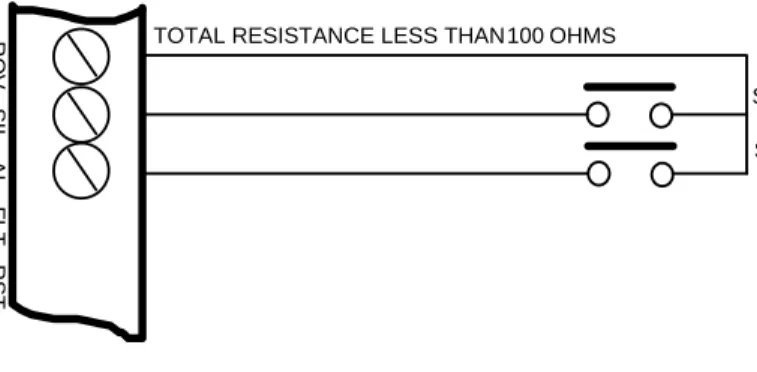
a) Remote 0 V supply - ROV b) Silence Alarm – SIL c) Sound Alarm – AL d) Fault – FLT e) Reset – RST
To activate these inputs, the remote 0 Volt (R0V) supply must be connected to the input via a normally open switch or contact and via a resistance of no greater than 100 ohms.
All of the remote control inputs are non-latching.
R O V S IL A L F L T R S T
TOTAL RESISTANCE LESS THAN 100 OHMS
SILENCE ALARM SWITCH
SOUND ALARM SWITCH
Figure 7 - Example connections to remote control inputs
+
-S 1Figure 6 . - Sounder circuit wiring
10K end of line resistor POLARISED SOUNDER IN OUT
+
IN+
OUT_
_
POLARISED SOUNDER IN OUT+
IN+
OUT_
_
10B
11. Aux 24V DC supply
An auxiliary 24V DC supply is provided to enable local signalling or control of ancillary systems such as door release controllers.
The terminals for the Aux 24V supply are labelled Aux 24V and ROV. The ROV terminal is the negative terminal and is the same terminal that should be used to switch the remote control terminals.
It is possible to make the ROV terminal pulsing so that by connecting it to the AL terminal via a remote, volt free contact, it can be used to pulse the dedicated sounder circuits in response to a signal from another system for example to give an alert. See programming code 24.
The supply is fitted with an electronic self resetting fuse to protect the control panel’s 24V supply in the event of a wiring fault.
Any standing load on the Aux 24V supply must be taken into account when calculating battery standby times as standby time will be significantly affected by even modest standing loads. It is recommended that the Aux24V output is not used to power standing loads and not used to supply loads of greater than 300 milliamps
Where the Aux 24V supply is used to power electromechanical devices such as relays or door retainers it is imperative that a suppression diode is fitted across the coil of the electromechanical device to prevent the generation of high voltage transients back to the control panels power supply.
The Aux 24V DC Supply is not suitable for powering Sigma CP sounder boards, a separate power supply should be used for these.
11B
12. Connection to relay contacts
Volt free changeover relay contacts are provided for local control and signalling if required. These contacts are rated for switching signalling circuits only and the maximum ratings listed in table 1 on page 5 should not be exceeded under any circumstances.
Fault relay
The fault relay is normally energised and will de-energise upon any fault condition including total loss of power.
Local fire relay
The local fire relay will energise upon activation of a fire condition on any of the zones or pressing of the sound alarm button on the front panel. The relay will remain activated until the alarm is silenced or the panel is reset. This relay will not operate upon activation of the remote AL input or when a fire condition is triggered on a zone that is in test mode.
Fire relay
The fire relay will energise upon activation of a fire condition on any of the zones. The relay will remain activated until the control panel is reset. This relay will NOT operate upon activation of the remote AL input. Individual zones can be configured not to operate the Fire relay by setting configuration options E1 to E8.
12B
13. Connection to Repeater panels
Repeater panels connect via a 2 core cable to the terminals marked RS485 + and – on the Sigma CP main control panel PCB. Up to 7 repeaters may be connected and each repeater has terminals for the incoming cables and outgoing cables. All except the last ancillary board, sounder board or repeater panel connected to the cable must have the jumper links J2 removed.
Set the repeater address using the DIP switch (SW7); ensure no two repeaters share the same address. Apply power to main panel first and then all repeater panels. Turn on the Enable Control keyswitch and set the Write Enable switch to on then briefly press the PROCESSOR RESET button on the main panel. Wait for a few seconds and the main panel will show the addresses of the repeaters that were found on the display for instance r1 indicates that a repeater at address 1 has been found.
Turn the write enable switch of, then on again and then press the ENTER button to accept each repeater that has been found. When all repeaters have been added, set the main panel Write Enable switch to off. Press the Watchdog reset switch on the main panel.
All repeaters are now configured and the main control panel will report a fault if any repeaters that have been accepted become faulty or go off line.
For full details of commissioning procedures for repeaters see the Sigma CP Repeater Operation and maintenance manual.
Please note that repeaters can only be fitted to panels containing boards labeled S4XXA or above. They will not work with panels containing boards without an alpha suffix.
For panels with software version Sigma242.hex or below, the Enable controls keyswitch and Write Enable switch must both be set to off.
13B
14. Connection to Ancillary boards
Ancillary boards connect via a 2 core cable to the terminals marked RS485 + and – on the Sigma CP main control panel PCB. Up to 7 Ancillary boards may be connected and each board has terminals for the incoming cables and outgoing cables. All except the last ancillary board, sounder board or repeater panel connected to the cable must have the jumper links J2 removed.
Set the ancillary board address using the DIP switch (SW2); ensure no two ancillary boards share the same address.
Apply power to main panel and all ancillary boards then turn on the enable keyswitch and set the write enable slide switch to on, briefly press the PROCESSOR RESET button on the main panel, wait for a few seconds and the main panel will show the addresses of the ancillary boards that were found on the display for instance o1 indicates that an ancillary board at address 1 has been found.
Press the ENTER button to accept each ancillary board that has been found.
The control panel will report a fault if any ancillary boards that have been accepted become faulty or go off line.
For full details of commissioning procedures for ancillary boards see the Sigma CP Ancillary board Operation and maintenance manual.
Please note that Ancillary boards can only be fitted to panels containing boards labelled S4XXA or above. They will not work with panels containing boards without an alpha suffix.
14B
15. Connection to 8 way Sounder boards
Sounder boards connect via a 2 core cable to the terminals marked RS485 + and – on the Sigma CP main control panel PCB. Up to 7 Sounder boards may be connected and each board has terminals for the incoming cables and outgoing cables. All except the last Ancillary board, Sounder board or Repeater connected to the cable must have the jumper links J2 removed. Sounder boards must be powered from a separate power supply which is suitably rated to supply the full sounder load that is connected. This can be up to 4 Amps if all circuits are fully loaded.
Set the Sounder board address using the DIP switch (SW2); ensure no two Sounder boards share the same address.
Apply power to main panel and all Sounder boards then turn on the enable keyswitch and set the write enable slide switch to on, briefly press the PROCESSOR RESET button on the main panel, wait for a few seconds and the main panel will show the addresses of the sounder boards that were found on the display for instanceb1 indicates that a sounder board at address 1 has been found.
Press the ENTER button to accept each Sounder board that has been found.
The control panel will report a sounder fault if any Sounder boards that have been accepted become faulty, have cable faults on their outputs or go off line.
For full details of commissioning procedures for Sounder boards see the Sigma CP Sounder board Operation and maintenance manual.
Please note that Sounder boards can only be fitted to panels containing software SIGMA242.HEX or later.
15B
16. Panel operation
24B
16.1 Normal condition
Under normal conditions, control panels will have only the green, Power On LED lit.
25B
16.2 Fire condition
Upon receipt of a fire condition by activation of a detector or call point, the Common Fire indicator will light and the zonal Fire indicators will flash at around 2Hz.
The fire and local fire relays will also operate and signal any systems to which they are connected.
Any sounders connected to the sounder circuits will operate in common, zonal or 2-stage mode as selected by configuration options 10 to 12 (see table 8).
26B
16.3 Silence/sound alarms
The Silence/Sound alarm button can only be operated at access level two which means that the Enable Control key must be inserted.
To silence the sounders, insert the Enable Control key and press the Silence/Sound alarm button. When the sounders have been silenced, the Zone Fire LEDs will change from flashing to a steady state. Pressing the Silence/Sound alarm whilst the control panel is in this silenced condition, will cause the sounders to operate again.
The sounders can be toggled on and off with the Silence/Sound alarm button as required.
27B
16.4 Reset
To reset the panel, insert the Enable key then press the Reset button.
28B
16.5 Zone fault
Removal of a detector from its base or a fault on any of the zone wiring will cause the Fault LED and Zone Fault LEDs to light indicating the zone in which the fault has occurred.
29B
16.6 Sounder fault
A fault on the wiring to sounder circuits will cause the Fault and Sounder Fault LEDs to light indicating a fault on the wiring to the sounder circuits.
30B
16.7 Power fault
Failure of the mains power, disconnection of the standby battery or high impedance in the charging circuit will cause the Fault and Power Fault LEDs to light indicating an abnormality in the power supply to the control panel.
31B
16.8 System fault
The System Fault LED will light if the configuration memory has not been set or has become corrupt.
32B
16.9 Lamp test
All LED indicators can be tested at any time by pressing the Lamp Test button. The Enable Control key does not need to be inserted to test the indicators.
The buzzer can be silenced at any time by pressing the Buzzer Silence button. The enable key does not need to be inserted to silence the buzzer.
33B
16.10 Disablements
It is possible to disable parts of the system. This may be required if there are works going on in a building which may cause the fire alarm system to operate in error.
34B
16.10.1 Disable zones
To disable zones, the Enable Control key should be inserted and the mode button pressed until “d” appears in the first of the two seven segment LED displays. The Select button should then be pressed to select the number of the zone which is to be disabled in the second of the two seven segment displays. Once the desired zone is displayed, the enter button should be pressed to confirm the disablement.
The Disable LED will light and the Zone Fault LED will light for each disabled zone.
A disabled zone is shown on the seven segment display as ‘dx.’ (where x is the zone number from 1-8). If the ‘x’ is flashing, it means that there are activated devices in that zone and re-enabling it will put the control panel into the fire condition.
Note: The flashing “dx” indicator will only appear on panels with software version sigma_CP 214.hex and higher produced after July 2012.
35B
16.10.2 Disable sounders
To disable sounder outputs, press the mode button to select “db” on the seven segment display. Pressing enter will disable all sounders and cause the Disable and Sounder Fault LEDs to light.
36B
16.10.3 Activate delays
To activate delays on zones as set in configuration options 31 to 48, press the mode button until Ad appears on the seven segment LED display. When the enter button is pressed any zones that are set as delayed will have their alarm outputs delayed by the time set in configuration options 00 to 09.
37B
16.10.4 Disable fault contact
The fault relay can be disabled by selecting configuration option 22.
38B
16.11 Test mode
Fire alarm systems must be tested regularly to ensure that they are functioning correctly. The Sigma CP range of panels enable the system to be tested single handed by using a test mode. When in test mode, activation of a fire alarm will be automatically reset after a few seconds to eliminate the need to return to the control panel to reset after every activation.
Test mode is entered in a similar way to disablements. With the Enable Control key inserted, press the Mode button until “t” appears in the first of the seven segment displays. Then press the Select button until the required zone number appears. Pressing the Enter button will cause the Test and Zone Fault LEDs to illuminate indicating the zones which are in test mode.
Disablements and zone tests are cleared by repeating the sequence that is used to select them, i.e. the "db" function (for example) toggles between sounders disabled and sounders enabled.
16B
17. Configuration options
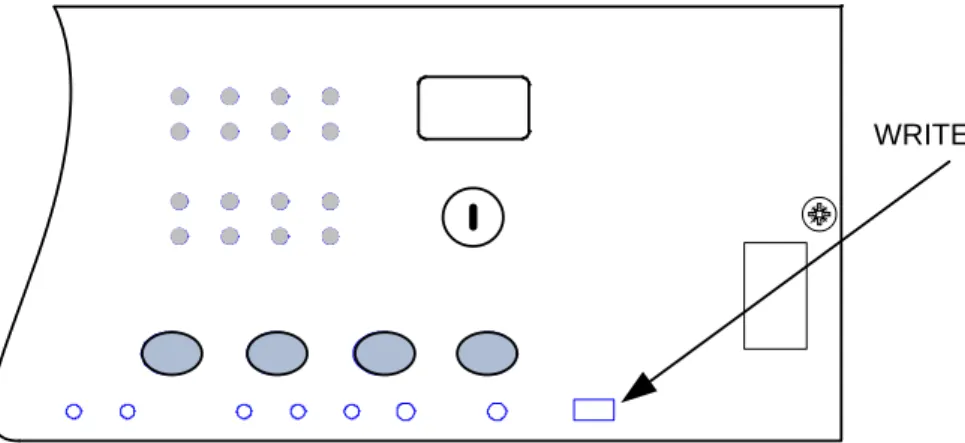
The Sigma CP range of control panels has many configuration options which can be set at the time of commissioning to suit the requirements of the installation. These options are normally set once and will rarely need to change. The configuration options are only available at access level 3. To access level 3, CAREFULLY slide the Write Enable switch (located behind the aperture in the panel plate) to the right position using a small screwdriver or similar. When the panel is at access level 3, the buzzer will “pip” three times every few seconds as an indication that it is at this access level.
Configuration options are simple to enter using the codes in table 8 below. When the control panel is at access level 3, the sub-text of the Mode and Select buttons is used to enter a number using tens (+10) and units (+1).
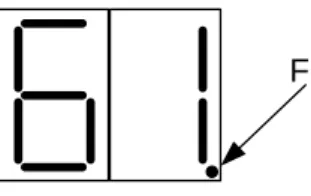
When the required code number is displayed, pressing the enter button will cause the dot on the units, seven segment display to flash. This indicates that a configuration option has been set.
To review which configuration options have been set previously, simply scroll through numbers 1 to 99, A1 to A8, C1 to C8 and E1 to E8 and those with a flashing dot indicate which options have been set.
Figure 8 – Access level 3 (Write enable) enable switch location
Table 8 – Configuration codes
CODE FUNCTION COMMENTS
00 SOUNDER DELAY TIME = 30 SECONDS Sets the time delay before sounders operate in combination with configuration codes 31 to 48 and access level 2 function AD. 01 SOUNDER DELAY TIME = 1 MINUTE
02 SOUNDER DELAY TIME = 2 MINUTES 03 SOUNDER DELAY TIME = 3 MINUTES 04 SOUNDER DELAY TIME = 4 MINUTES 05 SOUNDER DELAY TIME = 5 MINUTES 06 SOUNDER DELAY TIME = 6 MINUTES 07 SOUNDER DELAY TIME = 7 MINUTES 08 SOUNDER DELAY TIME = 8 MINUTES 09 SOUNDER DELAY TIME = 9 MINUTES
10 COMMON ALARM MODE (default) All sounders operate upon any fire condition
11 TWO-STAGE ALARM MODE Continuous sounders in activated zone, pulsing elsewhere
12 ZONED ALARM MODE Only sounders connected to zone in alarm operate
21* DISABLE FIRE BUZZER Buzzer will not operate on fire condition
22* DISABLE FAULT OUTPUT Fault relay will not operate except upon total power failure 23 DISABLE EARTH FAULT MONITORING Connection of fire alarm wiring will not announce a fault 24 PULSED REMOTE CONTROL OUTPUT Aux 24V supply pulses 1 sec on/1 sec off
25 ENABLE SOUNDERS ON DETECTION CIRCUITS Set as default if panel is two wire “T” series (detectors and call points on same cables)
26 DISABLE FIRE OUTPUT Fire relay will not operate upon any alarm
27 REMOVE AUX 24 UPON PANEL RESET 24V supply switches off for about 5 seconds when panel is reset 28 INDICATE CALL POINT ACTIVATION Activation of a call point with a 270R resistance fitted is
indicated by a flashing zone indicator and “Pu” on the 7 segment display. Activation of a detector will be indicated by a steady zone indicator and nothing on the 7 segment display. 29 DO NOT RE-SOUND ALARMS FROM ANOTHER ZONE Silenced sounders will not re-sound upon further zone
activations
2A TREAT CALL POINT ALARM AS DETECTOR ALARM When this option is active, the panel does not distinguish between detector alarms and call point alarms (v215 onward) 31 ZONE 1 ALARM FROM DETECTOR DELAYED Sounder outputs will be delayed by time set at options
0-9 when selected zone(s) triggered by detector only.
Note: Access level 2 function Ad must be set for this to take effect.
32 ZONE 2 ALARM FROM DETECTOR DELAYED 33 ZONE 3 ALARM FROM DETECTOR DELAYED 34 ZONE 4 ALARM FROM DETECTOR DELAYED 35 ZONE 5 ALARM FROM DETECTOR DELAYED 36 ZONE 6 ALARM FROM DETECTOR DELAYED 37 ZONE 7 ALARM FROM DETECTOR DELAYED 38 ZONE 8 ALARM FROM DETECTOR DELAYED
41 ZONE 1 ALARM FROM CALL POINT DELAYED Sounder outputs will be delayed by time set at options 0-9 when selected zone(s) triggered by call point only.
Note access level 2 function Ad must be set for this to take effect.
42 ZONE 2 ALARM FROM CALL POINT DELAYED 43 ZONE 3 ALARM FROM CALL POINT DELAYED 44 ZONE 4 ALARM FROM CALL POINT DELAYED 45 ZONE 5 ALARM FROM CALL POINT DELAYED 46 ZONE 6 ALARM FROM CALL POINT DELAYED 47 ZONE 7 ALARM FROM CALL POINT DELAYED 48 ZONE 8 ALARM FROM CALL POINT DELAYED
51 COINCIDENCE ZONE 1 Zone contributes to ancillary board coincidence O/P. Any number of zones can be selected to contribute.
52 COINCIDENCE ZONE 2 53 COINCIDENCE ZONE 3 54 COINCIDENCE ZONE 4 55 COINCIDENCE ZONE 5 56 COINCIDENCE ZONE 6 57 COINCIDENCE ZONE 7 58 COINCIDENCE ZONE 8 DOT FLASHING NO DOT
ZONE 1 I.S. BARRIER OPTION SET
ZONE 1 I.S. BARRIER OPTION NOT SET
61 CONFIGURE Z1 FOR I.S BARRIER Detection threshold changed for use with IS barrier 62 CONFIGURE Z2 FOR I.S BARRIER
63 CONFIGURE Z3 FOR I.S BARRIER 64 CONFIGURE Z4 FOR I.S BARRIER 65 CONFIGURE Z5 FOR I.S BARRIER 66 CONFIGURE Z6 FOR I.S BARRIER 67 CONFIGURE Z7 FOR I.S BARRIER 68 CONFIGURE Z8 FOR I.S BARRIER
CODE FUNCTION COMMENTS
71* ZONE 1 SHORT CIRCUIT INDICATES ALARM Changes the trigger threshold of the zone so that the control panel can be used on older systems that had no short circuit monitoring.
72* ZONE 2 SHORT CIRCUIT INDICATES ALARM 73* ZONE 3 SHORT CIRCUIT INDICATES ALARM 74* ZONE 4 SHORT CIRCUIT INDICATES ALARM 75* ZONE 5 SHORT CIRCUIT INDICATES ALARM 76* ZONE 6 SHORT CIRCUIT INDICATES ALARM 77* ZONE 7 SHORT CIRCUIT INDICATES ALARM 78* ZONE 8 SHORT CIRCUIT INDICATES ALARM
81* ZONE 1 NON-LATCHING Renders the zone self-resetting so that
it can be used to receive signals from other systems and will reset when the input is removed.
Note: It can take up to 20 seconds for zone to reset itself when sounders are operating
82* ZONE 2 NON-LATCHING 83* ZONE 3 NON-LATCHING 84* ZONE 4 NON-LATCHING 85* ZONE 5 NON-LATCHING 86* ZONE 6 NON-LATCHING 87* ZONE 7 NON-LATCHING 88* ZONE 8 NON-LATCHING
91 ZONE 1 DOES NOT SOUND ALARMS Prevents the zone from operating the two common sounder outputs.
92 ZONE 2 DOES NOT SOUND ALARMS 93 ZONE 3 DOES NOT SOUND ALARMS 94 ZONE 4 DOES NOT SOUND ALARMS 95 ZONE 5 DOES NOT SOUND ALARMS 96 ZONE 6 DOES NOT SOUND ALARMS 97 ZONE 7 DOES NOT SOUND ALARMS 98 ZONE 8 DOES NOT SOUND ALARMS
A1* ZONE 1 ANY ALARM DELAYED Zone needs to be triggered for 30 seconds continuously before an alarm is generated.
A2* ZONE 2 ANY ALARM DELAYED A3* ZONE 3 ANY ALARM DELAYED A4* ZONE 4 ANY ALARM DELAYED A5* ZONE 5 ANY ALARM DELAYED A6* ZONE 6 ANY ALARM DELAYED A7* ZONE 7 ANY ALARM DELAYED A8* ZONE 8 ANY ALARM DELAYED
C1 ZONE 1 SOUNDERS INHIBITED Enables individual zones to be configured not to operate zonal sounders.
On 2 wire “T” series panels this enables individual zones to be configured for use with conventional (non 2-wire) detector bases.
SOFTWARE VERSIONS SIGMA242.HEX and above only C2 ZONE 2 SOUNDERS INHIBITED
C3 ZONE 3 SOUNDERS INHIBITED C4 ZONE 4 SOUNDERS INHIBITED C5 ZONE 5 SOUNDERS INHIBITED C6 ZONE 6 SOUNDERS INHIBITED C7 ZONE 7 SOUNDERS INHIBITED C8 ZONE 8 SOUNDERS INHIBITED
E1* ZONE 1 WILL NOT OPERTATE FIRE RELAY Enables individual zones to be selected to not operate the fire relay. This is sometimes combined with the non-latching function to prevent ring around on interconnected panels.
SOFTWARE VERSIONS SIGMA242.HEX and above only E2* ZONE 2 WILL NOT OPERTATE FIRE RELAY
E3* ZONE 3 WILL NOT OPERTATE FIRE RELAY E4* ZONE 4 WILL NOT OPERTATE FIRE RELAY E5* ZONE 5 WILL NOT OPERTATE FIRE RELAY E6* ZONE 6 WILL NOT OPERTATE FIRE RELAY E7* ZONE 7 WILL NOT OPERTATE FIRE RELAY E8* ZONE 8 WILL NOT OPERTATE FIRE RELAY
Once the required configuration options have been set, the Write enable switch must be returned to its normal position to the right. The General fault indicator will remain lit if the Write enable switch is not turned off.
17B
18. Watchdog reset switch
If for any reason the microprocessor in the control panel fails to carry out its operation correctly it will attempt to restart itself. This process is called a “watchdog” and the control panel must record and indicate these events.
If a watchdog event occurs, the control panel will show the FAULT and SYSTEM FAULT LEDs on the front panel, the CPU fault LED inside the panel.
This fault can only be cleared by pressing the WATCHDOG RESET button on the PCB inside the control panel. The control panel buzzer can not be silenced and will continue to sound until the watchdog activation is reset.
18
19. Processor reset switch
Once started, the microprocessor controlling the panel should continue to run continuously without interruption. If the microprocessor fails to run correctly it can be reset by pressing the PROCESSOR RESET button on the PCB inside the control panel.
This should not normally be necessary but should be done as a matter of course if the system is behaving abnormally. The system should resume normal operation within a couple of seconds of pressing the processor reset button.
19B
20. Internal indications – troubleshooting
To assist in identifying fault conditions which are not detailed on the front of the control panel, a number of internal indicators are visible with the front cover removed as follows:
39B
20.1 Mains fail
Indicates that the 230V AC supply is not present and the system is running on standby batteries. If there is not a power cut, check the panels mains fuse.
40B
20.2 Batt fail
Indicates that the standby battery has become disconnected or that the charging circuit of the control panel has a high resistance or has failed. Check that both batteries are connected and linked together. Test battery. Disconnect battery and ensure that 28 Volts can be measured on battery charger leads.
41B
20.3 CPU fault
Indicates that the central processor unit has failed to correctly execute code and has been re-started by the system watchdog. The watchdog reset switch must be pressed to clear the CPU fault condition.
Press watchdog reset. If system does not return to normal then the panel is probably damaged and needs the circuit board replacing. (See maintenance section).
42B
20.4 Aux 24V fault
The Aux 24V and R0V terminals provide a 500 milliamp, 24V DC power supply for power fire alarm ancillary equipment. This LED indicates that fuse protecting the R0V output has operated and the rating of this output has been exceeded. The fuse is a self resetting type and the supply will resume when the fault condition is removed.
43B
20.5 Batt low
Illuminates when the system is running on batteries and the battery voltage is lower than 21V +/-2% (the minimum battery voltage).
44B
20.6 Earth fault
Indicates that part of the system wiring is connected to earth. Remove all system wiring and re-connect cables one at a time until the earth fault returns. This will indicate which cable the earth fault is present on.
45B
20.7 Sys fuse fault
Indicates that the total power rating of the power supply has been exceeded and that the system fuse has come into operation. Remove and review all loads and re-connect one at a time until over rated circuit trips fuse to identify troublesome circuit.
46B
20.8 S1 fault and S2 fault
Indicates a short or open circuit on sounder outputs. Remove wiring and refit end of line resistors. Check sounder circuit wiring.
47B
20.9 Comms fault
Indicates that communication has been lost with a repeater panel or Ancillary board. Check for comms fault at all repeaters and ancillary boards to identify the source of the problem.
21. Power supply
The control panel requires a 230V (+10%/-15%), 50/60Hz, AC mains power supply which connects to the fused terminal block labelled “230V”.
The fused terminal block contains a 20mm, F1.6A L250V fuse which should only be replaced with a similar type.
The output voltage of the power supply is 28V DC +/- 2V and the total current rating including a maximum 0.7A for battery charging is 3 Amps. Fuse F12 mounted on the circuit board is a self-resetting electronic fuse rated at 4 Amps.
The incoming mains cable should be routed well away from other lower voltage wiring by a distance of at least 50mm.
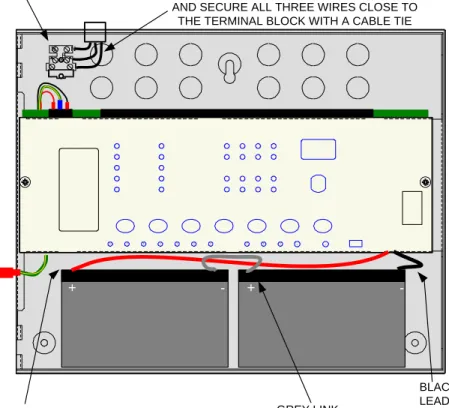
Mains wiring should include an earth conductor which is securely bonded to the building earth and should enter the enclosure as close as possible to the mains terminal block. Mains wires should be kept very short inside the enclosure and secured together close to the mains terminal block with a cable tie.
The control panel can accept sealed lead acid rechargeable batteries of up to 7Ah maximum capacity (see table 2 for battery size required for each model).
The maximum current drawn from the batteries when the main power source is disconnected is 3 Amps. Battery leads are supplied wired to the PCB along with a link to connect the two batteries in series. The PCB is fitted with a 20mm, 3.15A T1 glass fuse (F13) in the battery charging circuit which must only be replaced with one of the same type.
It is most important that the polarity of the batteries is carefully observed when connecting.
When the batteries are discharged to a level at which a low battery indication is given, the BATT FAIL indicator will also be lit.
Wrongly connected batteries could cause damage to the control panel.
Caution: RISK OF EXPLOSION IF BATTERY IS REPLACED BY AN INCORRECT TYPE. DISPOSE OF USED BATTERIES ACCORDING TO THE INSTRUCTIONS.
Figure 9 – Mains and battery connections
1B N N L L E + - + -GREY LINK BLACK BATTERY LEAD TO - TERMINAL RED BATTERY LEAD TO + TERMINAL MAINS
TERMINAL KEEP MAINS WIRES AS SHORT AS POSSIBLE
AND SECURE ALL THREE WIRES CLOSE TO THE TERMINAL BLOCK WITH A CABLE TIE
22. Maintenance
Sigma CP control panels do not require any specific maintenance but should the control panel become dirty it can be wiped over with a damp cloth and should then be dried with a dry, lint free cloth. Detergents or solvents should not be used to clean the panel and care must be taken that water does not enter the enclosure.
The control panel contains sealed lead acid batteries to provide standby power in the event of a mains failure.
These batteries have a life expectancy of around 4 years. It is recommended that these batteries be tested in accordance with the battery manufacturer’s recommendations annually to determine their suitability for continued standby applications.
Routine testing of the fire alarm system in accordance with BS5839: Part 1: 2002 will identify any malfunction of the control panel and any malfunction should be reported to the fire alarm maintenance company immediately.
Should the control panel become faulty the complete electronic assembly can be replaced.
To do this, any configured options should be noted then both mains and battery power should be removed before the work is started.
The field wiring should be carefully labelled and removed from the terminals.
The PCB can now be taken out of the panel by removing the 2 holding the plate in position. Fitting the new PCB is the reverse of the procedure for removing the board.
22B
23. Zone designation label
All Sigma CP control panels are supplied with a zone designation label onto which zone designations can be written.
This enables each zone to be given a text description allowing easier identification of any zones showing an abnormal condition.
23B
24. Record of Configuration
Use the table below to record the configuration codes that have been set on the control panel for future reference. Place a tick in the grey band for any configuration options that are set.
It is recommended that a copy of this table is left with the control panel under the supervision of the person responsible for the fire detection system.
CODE FUNCTION COMMENTS SET
00 SOUNDER DELAY TIME = 30 SECONDS Sets the time delay before sounders operate in combination with configuration codes 31 to 48 and access level 2 function AD. 01 SOUNDER DELAY TIME = 1 MINUTE
02 SOUNDER DELAY TIME = 2 MINUTES 03 SOUNDER DELAY TIME = 3 MINUTES 04 SOUNDER DELAY TIME = 4 MINUTES 05 SOUNDER DELAY TIME = 5 MINUTES 06 SOUNDER DELAY TIME = 6 MINUTES 07 SOUNDER DELAY TIME = 7 MINUTES 08 SOUNDER DELAY TIME = 8 MINUTES 09 SOUNDER DELAY TIME = 9 MINUTES
10 COMMON ALARM MODE All sounders operate upon any fire condition
11 TWO-STAGE ALARM MODE Continuous sounders in activated zone, pulsing elsewhere
12 ZONED ALARM MODE Only sounders connected to zone in alarm operate
21* DISABLE FIRE BUZZER Buzzer will not operate on fire condition
22* DISABLE FAULT OUTPUT Fault relay will not operate except upon total power failure 23 DISABLE EARTH FAULT MONITORING Connection of fire alarm wiring will not announce a fault 24 PULSED REMOTE CONTROL OUTPUT Aux 24V supply pulses 1 sec on/1 sec off
25 ENABLE SOUNDERS ON DETECTION CIRCUITS Set as default if panel is two wire “T” series (detectors and call points on same cables)
26 DISABLE FIRE OUTPUT Fire relay will not operate upon any alarm
27 REMOVE AUX 24 UPON PANEL RESET 24V supply switches off for about 5 seconds when panel is reset 28 INDICATE CALL POINT ACTIVATION Activation of a call point with a 270R resistance fitted is indicated
by a flashing zone indicator and “Pu” on the 7 segment display. Activation of a detector will be indicated by a steady zone indicator and nothing on the 7 segment display
29 DO NOT RE-SOUND ALARMS FROM ANOTHER ZONE
Silenced sounders will not re-sound upon further zone activations 2A TREAT CALL POINT ALARM AS DETECTOR ALARM When this option is active, the panel does not distinguish
between detector alarms and call point alarms (v215 onward) 31 ZONE 1 ALARM FROM DETECTOR DELAYED Sounder outputs will be delayed by time set at options
0-9 when selected zone(s) triggered by detector only.
Note access level 2 function Ad must be set for this to take effect.
32 ZONE 2 ALARM FROM DETECTOR DELAYED 33 ZONE 3 ALARM FROM DETECTOR DELAYED 34 ZONE 4 ALARM FROM DETECTOR DELAYED 35 ZONE 5 ALARM FROM DETECTOR DELAYED 36 ZONE 6 ALARM FROM DETECTOR DELAYED 37 ZONE 7 ALARM FROM DETECTOR DELAYED 38 ZONE 8 ALARM FROM DETECTOR DELAYED
41 ZONE 1 ALARM FROM CALL POINT DELAYED Sounder outputs will be delayed by time set at options 0-9 when selected zone(s) triggered by call point only.
Note access level 2 function Ad must be set for this to take effect.
42 ZONE 2 ALARM FROM CALL POINT DELAYED 43 ZONE 3 ALARM FROM CALL POINT DELAYED 44 ZONE 4 ALARM FROM CALL POINT DELAYED 45 ZONE 5 ALARM FROM CALL POINT DELAYED 46 ZONE 6 ALARM FROM CALL POINT DELAYED 47 ZONE 7 ALARM FROM CALL POINT DELAYED 48 ZONE 8 ALARM FROM CALL POINT DELAYED
51 COINCIDENCE ZONE 1 Zone contributes to ancillary board coincidence O/P. Any number of zones can be selected to contribute.
52 COINCIDENCE ZONE 2 53 COINCIDENCE ZONE 3 54 COINCIDENCE ZONE 4 55 COINCIDENCE ZONE 5 56 COINCIDENCE ZONE 6 57 COINCIDENCE ZONE 7 58 COINCIDENCE ZONE 8
61 CONFIGURE Z1 FOR I.S BARRIER Detection threshold changed for use with IS barrier 62 CONFIGURE Z2 FOR I.S BARRIER
63 CONFIGURE Z3 FOR I.S BARRIER 64 CONFIGURE Z4 FOR I.S BARRIER 65 CONFIGURE Z5 FOR I.S BARRIER 66 CONFIGURE Z6 FOR I.S BARRIER 67 CONFIGURE Z7 FOR I.S BARRIER 68 CONFIGURE Z8 FOR I.S BARRIER
CODE FUNCTION COMMENTS SET 71* ZONE 1 SHORT CIRCUIT INDICATES ALARM Changes the trigger threshold of the
zone so that the control panel can be used on older systems that had no short circuit monitoring.
72* ZONE 2 SHORT CIRCUIT INDICATES ALARM 73* ZONE 3 SHORT CIRCUIT INDICATES ALARM 74* ZONE 4 SHORT CIRCUIT INDICATES ALARM 75* ZONE 5 SHORT CIRCUIT INDICATES ALARM 76* ZONE 6 SHORT CIRCUIT INDICATES ALARM 77* ZONE 7 SHORT CIRCUIT INDICATES ALARM 78* ZONE 8 SHORT CIRCUIT INDICATES ALARM
81* ZONE 1 NON-LATCHING Renders the zone self-resetting so that it can be used to receive signals from other systems and will reset when the input is removed.
Note: It can take up to 20 seconds for zone to reset itself when sounders are operating
82* ZONE 2 NON-LATCHING 83* ZONE 3 NON-LATCHING 84* ZONE 4 NON-LATCHING 85* ZONE 5 NON-LATCHING 86* ZONE 6 NON-LATCHING 87* ZONE 7 NON-LATCHING 88* ZONE 8 NON-LATCHING
91 ZONE 1 DOES NOT SOUND ALARMS Prevents the zone from operating the two common sounder outputs
92 ZONE 2 DOES NOT SOUND ALARMS 93 ZONE 3 DOES NOT SOUND ALARMS 94 ZONE 4 DOES NOT SOUND ALARMS 95 ZONE 5 DOES NOT SOUND ALARMS 96 ZONE 6 DOES NOT SOUND ALARMS 97 ZONE 7 DOES NOT SOUND ALARMS 98 ZONE 8 DOES NOT SOUND ALARMS 99
A1* ZONE 1 ANY ALARM DELAYED Zone needs to be triggered for 30 seconds continuously before an alarm is generated.
A2* ZONE 2 ANY ALARM DELAYED A3* ZONE 3 ANY ALARM DELAYED A4* ZONE 4 ANY ALARM DELAYED A5* ZONE 5 ANY ALARM DELAYED A6* ZONE 6 ANY ALARM DELAYED A7* ZONE 7 ANY ALARM DELAYED A8* ZONE 8 ANY ALARM DELAYED
C1 ZONE 1 SOUNDERS INHIBITED Enables individual zones to be configured not to operate zonal sounders.
On 2 wire “T” series panels this enables individual zones to be configured for use with conventional (non-savwire) detector bases.
SOFTWARE VERSIONS SIGMA242.HEX hex and above only C2 ZONE 2 SOUNDERS INHIBITED
C3 ZONE 3 SOUNDERS INHIBITED C4 ZONE 4 SOUNDERS INHIBITED C5 ZONE 5 SOUNDERS INHIBITED C6 ZONE 6 SOUNDERS INHIBITED C7 ZONE 7 SOUNDERS INHIBITED C8 ZONE 8 SOUNDERS INHIBITED
E1* ZONE 1 WILL NOT OPERATE FIRE RELAY Enables individual zones to be selected to not operate the fire relay. This is sometimes combined with the non-latching function to prevent ring around on interconnected panels.
SOFTWARE VERSIONS SIGMA242.HEX hex and above only E2* ZONE 2 WILL NOT OPERATE FIRE RELAY
E3* ZONE 3 WILL NOT OPERATE FIRE RELAY E4* ZONE 4 WILL NOT OPERATE FIRE RELAY E5* ZONE 5 WILL NOT OPERATE FIRE RELAY E6* ZONE 6 WILL NOT OPERATE FIRE RELAY E7* ZONE 7 WILL NOT OPERATE FIRE RELAY E8* ZONE 8 WILL NOT OPERATE FIRE RELAY