Predictive Human Performance Modeling Made Easy
Bonnie E. John
HCI Institute
Carnegie Mellon Univ.
Pittsburgh, PA 15213
[email protected]
Konstantine Prevas
HCI Institute
Carnegie Mellon Univ.
Pittsburgh, PA 15213
[email protected]
Dario D. Salvucci
Computer Science
Drexel University
Philadelphia, PA 19104
[email protected]
Ken Koedinger
HCI Institute
Carnegie Mellon Univ.
Pittsburgh, PA 15213
[email protected]
ABSTRACTAlthough engineering models of user behavior have enjoyed a rich history in HCI, they have yet to have a widespread impact due to the complexities of the modeling process. In this paper we describe a development system in which designers generate predictive cognitive models of user behavior simply by demonstrating tasks on HTML mock-ups of new interfaces. Keystroke-Level Models are produced automatically using new rules for placing mental operators, then implemented in the ACT-R cognitive architecture. They interact with the mock-up through integrated perceptual and motor modules, generating behavior that is automatically quantified and easily examined. Using a query-entry user interface as an example [19], we demonstrate that this new system enables more rapid development of predictive models, with more accurate results, than previously published models of these tasks. Author Keywords
Cognitive modeling, GOMS, KLM. ACM Classification Keywords
H.1.2. Human information processing. H5.m. Information interfaces and presentation (e.g., HCI): Miscellaneous. INTRODUCTION
Predictive human performance modeling has one of the longest research histories in HCI. Starting with Card, Moran, and Newell in the 1980s [6,7], the prediction of skilled performance time has enjoyed a constant stream of validation and expansion into many areas of user interaction with computers. Over one hundred research papers have been published about GOMS and the Keystroke-Level Model (KLM) (see the GOMS bibliography, http://www.gomsmodel.org/gomsbib.html). Applications in the real world have been reported (e.g., [9,14]). Many general HCI textbooks contain summaries of and references to GOMS and KLM (e.g., [8,20,21,23]). Given its validity and predictive value, it is surprising that modeling has not
become widespread as a tool for design in the UI community. Our belief is that cost of learning and constructing correct models, even ones as simple as the KLM, is perceived to be too high to justify the benefits of estimating skilled performance times [12]. This paper introduces a suite of new tools that allow a UI designer to mock up an interface as an HTML storyboard, demonstrate a task on that storyboard, and automatically produce a consistent, correct KLM of that task that runs in the ACT-R cognitive architecture [1] to produce predictions of skilled performance time.
Other modeling tools have been proposed in the past. For example, Baumeister, et. al. [2] reviewed three GOMS tools: QGOMS [3], CAT-HCI [24], and NGOMSL [16]. One problem with these tools for HCI design is that none can be easily hooked up to a mock-up of the system,1 so if a change is made to the design, the analyst must hunt down the effects of that change in the model by hand. This makes the exploration of alternative design solutions prohibitively effortful. Byrne et. al. [5] integrated GOMS into a model-based interface design environment, but that paradigm of interface construction has not become common practice. Hudson et. al. [10] built a tool, CRITIQUE, that automatically produced KLM models from demonstration with an interface mock-up implemented in subArctic [11]. However, subArctic, a research tool that is not in common use, requires UI designers to learn another programming language.
Our experience with these, and other, cognitive modeling tools has led us to several principles for designing a useful tool for UI designers: (1) exploit tools already in widespread use by the UI design and cognitive modeling communities, (2) connect interface mock-ups to cognitive models so changes in the mock-ups are automatically reflected in the models’ predictions, (3) avoid the need for learning new programming languages by using WYSIWYG drag-and-drop to construct mock-ups and demonstration to construct models.
1GLEAN3 has the capability of connecting to a system or mock-up implemented in C++. But this connection requires extensive programming experience, and we do not consider it “easy” for UI designers.
Permission to make digital or hard copies of all or part of this work for personal or classroom use is granted without fee provided that copies are not made or distributed for profit or commercial advantage and that copies bear this notice and the full citation on the first page. To copy otherwise, or republish, to post on servers or to redistribute to lists, requires prior specific permission and/or a fee.
CHI 2004, April 24–29, 2004, Vienna, Austria. Copyright 2004 ACM 1-58113-702-8/04/0004…$5.00.
John, B.E., Prevas, K., Salvucci, D.D., & Koedinger, K. (2004). Predictive human performance modeling made easy. To appear in Human Factors in Computing Systems: CHI 2004 Conference Proceedings. New York: ACM Press.
TOOLS FOR EASY PREDICTIVE MODELING
Given our design principles, we have collected a suite of tools that act in concert to produce more accurate KLMs more quickly than ever before. In this section, we introduce the tools and how they reflect our design principles. We then detail their operation. In the next section, we demonstrate their use on a previously published task. UI designers often use HTML to mock up their interfaces for presentation to others on the development team, management, or clients, making HTML a reasonable choice for constructing mock-ups. We chose to use Macromedia Dreamweaver as the tool to instrument and/or build mock-ups because it is WYSIWYG (principle 3), familiar to UI designers (or so similar to other commercially-available tools that its selection satisfies principle 1), and easily extensible, so customizing it to our mock-up and modeling use is possible for an academic research group.
ACT-R is a computational cognitive architecture widely used in the cognitive modeling community to simulate human behavior and performance [1]. ACT-R 5.0, which is publicly available on the ACT-R web site (http://act-r.psy.cmu.edu/), incorporates a set of perceptual-motor modules that allow models to interact with external simulation environments — for instance, seeing objects on-screen, pressing buttons, or typing keys [4]. ACT-R’s relationship to the KLM modeling framework, so familiar to and validated in the HCI community, has been recently explored with the ACT-Simple compiler for ACT-R [22]. At this writing, mental operators, (M in KLM, think in ACT-Simple) compile into ACT-R productions that simply take time in ACT-R’s cognitive processor corresponding to the duration of KLM’s M operators. They do not manipulate information, decompose into more atomic operations (e.g., memory retrieval), or learn. Since KLM models only skilled performance, it is not necessary to use the full capability of ACT-R’s cognitive theory of problem solving or learning to produce accurate predictions. However, ACT-Simple commands such as press-key and look-at compile into ACT-R production rules that do make use of ACT-R mechanisms. The behavior resulting from these rules reflects ACT-R’s intricate interplay between perception, cognition, and motor operations and inherits ACT-R’s validity in this regard. For example, ACT-R’s motor processor produces horizontal movements obeying Fitts’s Law, but also incorporates a theory of preparation separate from execution so repeated presses of the same button (which need no new preparation) are faster than the first press. This combination of capability, availability, and validity makes ACT-R and ACT-Simple good choices for the modeling engine for this endeavor, satisfying our principles 1 and 2.
The Netscape web browser allows external systems to access the objects and their layout on the pages it displays and operate those widgets through LiveConnect. Thus, it can be connected to ACT-R so that changes in the mock-up
can be automatically reflected in the behavior of the model, satisfying principle 2.
Finally, we have added a special software application called the Behavior Recorder [17] which can observe a UI designer’s demonstration of a mock-up in Netscape, generate the corresponding ACT-Simple commands, and thus produce the resulting ACT-R code automatically. The Behavior Recorder also mediates between ACT-R and Netscape when the ACT-R model operates the mock-up in simulation.
Dreamweaver Extensions and HTML Mock-ups
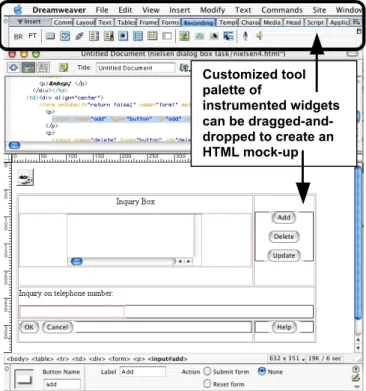
There are two ways to produce an instrumented HTML mock-up using our extensions to Dreamweaver. First, a customized tool palette, labeled Recording, provides instrumented widgets that can be placed on a page (see Figure 1). Second, any previously constructed webpage can be instrumented through a simple procedure.
The leftmost icon in Figure 1, BR, represents a header that must be placed at the top of each page in the mock-up, whether it was created with our tool palette or instrumented after construction. This header contains Javascript that allows the pages to communicate a designer’s actions to the Behavior Recorder as he or she demonstrates the use of the mock-up in Netscape. This header also contains an embedded Java applet that listens for messages from the Behavior Recorder, allowing actions produced by ACT-R to be communicated to the mock-up. All of this communication is enabled simply by clicking on the BR
Customized tool palette of instrumented widgets can be dragged-and-dropped to create an HTML mock-up
Figure 1. Customized tool palette in Dreamweaver provides widgets from which to create an
icon which places the header at the beginning of an HTML file; a UI designer need not write Javascript or Java applets. An HTML mock-up can be constructed using the widgets we provide in the Recording tool palette: buttons, check boxes, text fields, pull-down lists, links, etc. If a mock-up requires a more custom interface, the designer can insert an image of the design and populate it with hotspots that link to other pages. This technique allows an infinite variety of designs to be mocked up using HTML.
Several special widgets are currently included in the Recording palette to allow UI designers to mock up a wide variety of interfaces. The rollover image mocks up an interface that changes based on mouse movement rather than on mouse-click. For example, it can be used to mock up a CAD system that changes the cursor when the user moves vertically or horizontally. The menu widgets allow the designer to mock up pull-down menus and cascading menus. The Audio Input widget (the microphone icon in the rightmost portion of the Recording palette) is a specialized text field; text entered into this field emulates voice input to the mocked-up system. That is, when a UI designer types text into this field in the mock-up, it is a stand-in for a user using voice input to the system, and it is modeled by ACT-R’s speech module. Likewise, the Audio Output widget (the speaker icon) is a text field where speech output from the mocked up system appears; when the mock-up places text in this field, it is a stand-in for the system speaking to the user, and it is modeled using ACT-R’s auditory module. As an alternative to creating a mock-up with our tool palette, an existing webpage can be instrumented to work with the Behavior Recorder. To do this, the user can open the page in Dreamweaver, click on the BR tool on the Recording palette to insert the necessary header, then select the Instrument All Widgets item in the Command menu. Thus, HTML mock-ups constructed for other purposes need not be redone to allow modeling.
Modeling by Demonstration with the Behavior Recorder Once the instrumented web pages are created in Dreamweaver, tasks can be demonstrated on these pages by opening the Behavior Recorder, opening the first HTML page in Netscape, and demonstrating the task with mouse movement, clicks, and typing. The web pages use HTML event handlers to send messages to the Behavior Recorder via the LiveConnect feature supported by Netscape.
The Behavior Recorder creates a state-transition diagram, where the state of the webpage is a node and the demonstrated actions are the transitions between nodes.2 Once a correct procedure for a task is demonstrated, the designer uses the Export item in the File menu to create a
2The Behavior Recorder can be used to record alternative correct procedures for a task and also erroneous actions, to create a cognitive tutor for this task, but that functionality is beyond the scope of this paper. See [17] for details.
file containing ACT-Simple code. The designer has the option of declaring that the mock-up is of a computer-based system where mouse pointing and clicking is a valid interaction technique, or of a physical system where mouse operations are a stand-in for actual physical operations on real buttons (e.g., the HTML represents a cell phone, flight management system, or automobile navigation system). The Export function creates appropriate ACT-Simple code given the choice of this option, e.g., it includes mouse clicks if the mock-up is of a computer-based system, but does not include them for a mock-up of a physical device or touch-screen system.
In addition to producing ACT-Simple code of the physical operators corresponding to the common KLM operators (K=keypress or mouse-click, 1/2K=mouse button press or release, P=point with a mouse, H=homing between the keyboard and mouse), the Behavior Recorder’s Export function also automatically places KLM mental operators (M). As the rules for placing Ms are the main contribution of this work, we describe them fully in a separate section, below.
Translating ACT-Simple Code into ACT-R
The KLM operators generated above map almost one-to-one to a sequence of commands in the ACT-Simple framework [22]. For instance, K maps to the press-key command, H to the move-hand command, P to move-mouse command, etc. The one exception arises for the M mental operator. In the original definition of M in Card, Moran, and Newell [6,7], the mental operator was an approximation to the amalgam of a variety of unobservable processes, including remembering commands and arguments, visually locating elements on a page or screen, comparing elements, etc. However, the ACT-Simple operator think is intended only to represent cognitive processes, while there is a separate operator look-at for shifting visual attention to a new object. Look-at is also required to locate the spatial location of objects so that the motor modules can move to these locations. Card, Moran and Newell estimate their M to be 1350 ms. Since ACT-Simple’s look-at operator takes approximately 150 ms when run in ACT-R, and most Ms logically include a look-at to an object in a GUI, we set the time for a think operator to 1200 ms.
After mapping the KLM operators to a sequence of ACT-Simple commands, the ACT-ACT-Simple compiler translates this sequence into ACT-R production rules. Like any set of ACT-R production rules, the final model has the capability of interacting with an external environment through its perceptual and motor modules [4]. In this way, the final model can interact with the interface mock-up through the Behavior Recorder, accessing information from the mock-up through visual and aural attention, and delivering information to the mock-up through simulated voice, hand movements, and key and button presses.
To bring the performance of the resulting ACT-R model closer to the parameters of KLM, we made one change to
the ACT-Simple compiler. Salvucci and Lee’s compiler [22] had totally serialized the motor commands, making the preparation of the next motor movement wait for the completion of the previous motor movement. However, this produced mouse-click times twice as long as CMN estimated. We changed the ACT-Simple compiler to produce click productions that could prepare the click movement during the preceding mouse movement. This is a legal action in hand-generated ACT-R code and in line with CMN’s notion of fully anticipated, as well as producing click times more in line with the 200 ms given by CMN. One bug in ACT-R’s motor module was also uncovered in this endeavor. The times for homing between the mouse and the keyboard in ACT-R were about 800 ms, twice the time observed by CMN. In consultation with Mike Byrne, we discovered that the homing time was calculated using Fitts’s Law, but that the size of the mouse and the home row had been set to the size of a single key. When more realistic sizes were entered, the homing time reduced to about 600 msec. We are still investigating the disparity between CMN’s data and ACT-R’s prediction.
RULES FOR PLACING MENTAL OPERATORS
As mentioned above, the rules for placing Ms are an interpretation of the rules that Card, Moran, and Newell (CMN) proposed and validated in the early 1980s [6,7]. Rather than explicitly following CMN’s procedure by adding Ms before most physical operators and then removing many of them, the Behavior Recorder’s Export function simply inserts Ms wherever they would be inserted by, and not subsequently removed by, CMN’s rules. Since the Behavior Recorder records demonstrated actions at the widget level, it is able to make inferences about mental operators that would not be possible by examining the individual physical operators alone. Similar inferences were used to place mental operators in CRITIQUE [10].
Consider mouse-operated widgets like buttons, check boxes, radio buttons, and links. The user points to the widget and clicks on it, which generates physical operators P and K. The decision to place an M before the PK is determined by whether the object pointed to is a command or an argument, a distinction made by CMN. In most modern GUIs, these widgets are commands, so the Behavior Recorder puts an M before the PK. CMN’s Rule 0 puts an M between the P and the K, but the M is removed by Rule 1 because it is fully anticipated in the P; the Behavior Recorder therefore does not insert this second M between the P and K. If the right hand is on the keyboard before this action, the Behavior Recorder also inserts the homing operator, exporting a total sequence of HMPK. For menus, Lane et. al. [18] showed that the Ms placed by CMN’s rules between the actions to operate hierarchical menus were not evident in empirical data. Evidently, skilled use of hierarchical menus are a cognitive unit, and CMN’s Rule 2 applies to remove them. We apply this result to automatically place only a single M at the beginning of the
series of PKs that select an item in a pull-down menu or cascading menu widget.
In some cases, successive mouse clicks occur without Ps preceding them. Either the action is a double-click on a widget, or a widget has appeared underneath the mouse cursor as the result of a screen change. The Export function examines the previous action to determine whether an M should precede the click. If the widget is the same for both clicks, the action is a double-click and no M is inserted as the double-click is a cognitive unit and CMN’s Rule 2 would have applied. If the widget is different for the second click, we assume that the second action cannot be fully anticipated and an M is inserted before the click. Although not yet implemented, a similar procedure could be used to implement CMN’s Rule 3 that removes Ms between redundant terminators. Thus, if two successive widgets were named “OK”, “Done”, or another terminating command, the Behavior Recorder could decide not to insert an M between the clicks.
For actions on a text field, we assume that the mouse action that sets the focus in the text field is the equivalent of a command to change the contents of that field; therefore, an M is placed before that action. If the keyboard entry involves keys on the right hand, the Behavior Recorder inserts a homing operator (H) before the first right-hand keypress to bring the hand from the mouse to the keyboard. In most modern GUI interfaces, text entry actions are specifying arguments, not commands, so CMN’s rules place no Ms before or into the typing, but do place an M before the terminator of that typing. Thus, the Behavior Recorder places an M before the action that changes the focus out of the text field.
The M placement rules described above assume that all mouse actions are commands and all text entry actions are arguments, which we believe to be generally true for GUI-based tasks. However, in keyboard-GUI-based tasks like the Bravo editing tasks studied by Card, Moran and Newell [7], the opposite is true. For modeling keyboard-based tasks, we have provided an option in the Behavior Recorder’s Export dialog box that will switch these rules, so that Ms are placed before text entry (corresponding to keyboard commands) but not before mouse actions (which select arguments).
EXAMPLE USE OF OUR TOOLS
As an example of using these tools, we use the tasks and interfaces examined by Nielsen and Phillips [19], and subsequently modeled by John [12], and Salvucci and Lee [22]. The tasks were to look up one telephone number (1-query) or two telephone numbers (2-queries) in a database. The interfaces were called Design A – Dialog box and Design B – Pop-up menu.
We quote from Nielsen and Phillips [19] for the description of the tasks and interfaces, as follows.
“To use this interface, the user first pulls down a menu from the menubar at the top of the screen. This menu contains the names of the databases and the user positions the mouse cursor over the name of the relevant database in this list. The user pushes down the mouse button and drags the mouse to the right to get a hierarchical submenu with the legal queries for the chosen database. This submenu contains an average of four alternatives, and the user moves the mouse until it highlights the option “query on telephone number.” The user then releases the mouse button.
“This causes a standard sized dialog box to appear in the middle of the screen as shown in Figure 1. The large field at the top is initially empty. This field will eventually list the telephone numbers to be submitted to the database as a query. The dialog box does not overlap the window with the list of telephone numbers. The user clicks in the input field (the one-line field below the prompt “Inquiry on telephone number”) and types the telephone number. The user clicks on the “Add” button to add the number to the query. The figure shows the state of the dialog box after the user’s click on “Add.” If the query is for a single telephone number, the user then clicks on the “OK” button to submit the query.
“If the query is for two telephone numbers, the user instead clicks in the input field and selects the previously typed telephone number by dragging the mouse cursor over the existing text in the input field. The user then types in the second number (thus replacing the previous selection in the input field) and clicks on the “Add” button. Finally, the user clicks on the “OK button to submit both queries at once. In a similar manner, the user can issue queries for larger number of telephone numbers in a single dialogue.
“Design B: Pop-Up Menu
“As previously mentioned, it can be assumed that the telephone number(s) in question is/are already on the screen. “To query for one number, the user moves the mouse cursor to the telephone number on the screen and presses down the mouse button. This causes a pop-up menu to appear over the number with one element for each database for which queries can be performed with telephone numbers as keys.
“The user moves the mouse until the desired database is highlighted in the pop-up menu. The user then lets go of the mouse button. (The system knows which number to search on because the user pointed to it when calling up the menu). “To query for two numbers, the user repeats this entire interaction sequence for the second number. The second number was normally about five lines below the first number in the window. It is possible to submit the second query before seeing the result of the first one, and the result of the first query can be assumed to appear such that it does not overlap the telephone number needed for the second query. [19, pp. 215-216.]
We created an HTML mock-up of these two interfaces using our Dreamweaver extensions. The cascading menus were mocked up using our menu widgets. The buttons in the dialog box were HTML buttons arranged in a table. The fields where telephone numbers appeared in the dialog box, both typed by the user and displayed by the system, were HTML text fields. (Figure 1). We asked two people to create models by demonstrating both tasks on each interface using Netscape and the Behavior Recorder to export to
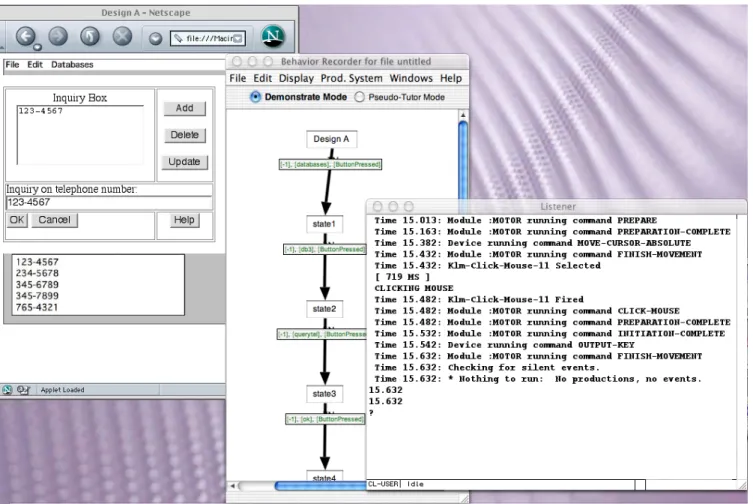
ACT-Simple. We then asked them to run the automatically generated ACT-Simple models in ACT-R to produce execution time predictions for all four tasks (see Figure 2).
One of our users was an author of this paper, an expert in both modeling and use of our tools. The other user was an expert computer user, but had no experience with cognitive modeling in general, or these tools in particular.
Table 1 compares the times observed by Nielsen and Phillips [19] to the predictions in previous publications and to the predictions of our two users. Where available, the time for the users to model the tasks appears in the last column. The results of modeling using our tools are in bold, both for a novice modeler and an expert modeler. Our novice modeler had over a decade of experience in the computer industry in the help center of major applications companies, in quality assurance, and as a UI and web developer in dot.com start-ups and as an independent consultant. She had no prior knowledge of cognitive modeling. Although a sophisticated computer user, she was the least trained in cognitive modeling of all the novice modelers reported in the literature (Nielsen and Phillips [19] used undergraduates who had received lectures on GOMS and had done one homework assignment prior to this exercise; Salvucci and Lee’s [22] novice was an undergraduate who had a 10-week course in cognitive modeling prior to this exercise).
Table 1 shows that our models are more accurate than previously published models. The novice model is exactly the same as the expert model, because the model is produced automatically from demonstration. As long as both parties understand the task in the same way and demonstrate it correctly, the accuracy of the models is not affected by the expertise of the modeler.
The models are also more accurate, on average, than previous expert models, especially those reported by John [12]. That model used Card, Moran and Newell’s KLM procedure and rules for placing Ms [6,7], which are also the basis for the automatic placement of Ms by the Behavior Recorder. In fact, the models produced by the Behavior Recorder map exactly to the expert KLMs reported in [12]. The new models are more accurate numerically because they are using ACT-R’s more powerful modeling engine, with its motor and perceptual modules, interacting with the HTML mock-up to produce performance time estimates. For example, John [12] used the 1.1 second estimate for the Point parameter, whereas ACT-R’s motor module uses Fitts’s Law to calculate pointing times from a knowledge of where the cursor was left by the last action and the distance to and size of the next target in the HTML storyboard. The automatically generated models are as good as or better than the models generated by hand, except for Design B - 1 number. This model must be examined together with the models for the 2-number task on the same interface, because the type of interface greatly influences the modeling results. For both the expert and novice modelers
Figure 2. The task is demonstrated in Netscape on the HTML mockup (left), exported from the Behavior Recorder (center) into ACT-Simple, then loaded into ACT-R and run in a Lisp environment (right).
N Task Time
(sec) Error (sec) Error% Task Time
(sec) Error (sec) Error% Task Time
(sec) Error (sec) Error% Task Time
(sec) Error (sec) Error% User data N&P 93 20 15.4 25.5 4.3 6.5
N&P 93 19 16.6 1.2 8% 22.6 -2.9 -11% 5.8 1.5 35% 11.2 4.7 72% 2.6 32% 108(a) John 94 19 14.7 -0.7 -5% 22.6 -2.9 -11% 4.6 0.3 7% 8.7 2.2 34% 1.5 14% -- S&L 03 1 25.0 9.6 62% 41.9 16.4 64% 4.9 0.6 13% 9.4 2.9 44% 7.4 46% 44(b) This paper 1 15.6 0.2 2% 25.6 0.1 0% 3.5 -0.8 -19% 6.2 -0.3 -5% 0.4 6% 25(c) John 94 1 16.8 1.4 9% 27.0 1.5 6% 4.5 0.2 5% 8.6 2.1 33% 1.3 13% -- S&L 03 1 15.6 0.2 1% 24.4 -1.1 -4% 3.8 -0.5 -12% 7.2 0.7 11% 0.6 7% 28(d)
This paper 1 15.6 0.2 2% 25.6 0.1 0% 3.5 -0.8 -19% 6.2 -0.3 -5% 0.4 6% 3(e)
Design A-2numbers (3.0 sd) (5.0 sd) Avg Abs Error (sec) Avg Abs % Error Time to Model (min) (1.0 sd) (0.9 sd)
Design A-1number Design B-1number Design B-2numbers
Novice Modeler
Expert Modeler
Table 1. Comparison of user data to predictive models of execution time. All modelers used Card, Moran and Newell’s KLM rules as a guide for placing Ms either by hand or automatically, except Salvucci and Lee (S&L03), where the modelers were told only that “It's common practice to put a mental operator, i.e. (think), before a logical grouping of actions." Furthermore, the Time to Model includes different aspects of the task for each set of modelers. None of the times include the time to make task materials, either in a paper document or an HTML storyboard. Nielsen and Phillips estimated their time to make a paper document of the task description to be 2 hours. Our time to make the HTML storyboard was of that order. (a) This time includes the time to understand the task, build the models and produce numeric predictions. It does not include the several hours of lecture on modeling and the previous homework assignment done by these modelers. (b) This time includes constructing a text file of the models, but not the time of instruction in cognitive modeling (a 10 week course), instruction in ACT-Simple, understanding the task, or running the models to produce numeric predictions. (c) This time includes everything: instruction in cognitive modeling, instruction in how to use the tools, understanding the task, construction of the models, and running the model to produce numeric predictions. (d) This time includes constructing the models but not understanding the task or running the models to produce numeric predictions. (e) This time includes constructing the models and running them to produce numeric predictions.
in John [12], and the novice in Salvucci and Lee [22], the models show the same pattern: a small overprediction for the 1-number task and a much larger overprediction for the 2-number task, that averages to worse performance than that of the automatically-generated models. This interaction is dominated by pointing: two points for the 1-number task and four points for the 2-number task. John [12] used the generic 1.1 second estimate for P, which is far longer than Fitts’s Law predicts for the small movements to large targets in this interface, producing a small overprediction for the 1-number task, but a much larger overprediction for the 2-number task. Examining the details of the novice models shows that there were many more Ms (or think operators) than in the expert models, indicating that the novices did not know the data about hierarchical menus [18]. The average of Salvucci and Lee’s expert and the automatically generated models is about the same, at 12% off of the data, with Salvucci and Lee’s expert underpredicting the 1-number task and overpredicting the 2-number task, and the automatically generated models underpredicting both. The details of the ACT-Simple models reveal that these models are the same, but Salvucci and Lee’s models did not interact with a mock-up and therefore did not have Fitts’s Law calculations. Their movement times were uniformly longer, giving this pattern of results. The fact that the automatically generated models underpredict these very short pointing tasks is an indication that more is going on in those short tasks than is being modeled, and data at a finer grain size needs to be collected to tell us what the differences might be.
CONCLUSIONS AND FUTURE WORK
This collection of tools that allow cognitive models to be constructed automatically through demonstration on HTML storyboards, and then run to produce numeric predictions, promises to dramatically improve the accuracy of models constructed by novices and decrease the time it takes both novice and expert modelers to make their predictions. However, there is still work to be done before these tools can become commonplace in the UI design world.
Cognitive Modeling Work to be Done
CMN’s KLM parameters and rules were written more than two decades ago [6,7], primarily for command-line interfaces, and mapping them to modern GUI interfaces introduces uncertainty as to whether they are still valid. Our implementation of the parameters and rules produce relatively good models for the tasks examined here. However, further validation on modern interface widgets is called for. Our tools are constructed so that M-placement rules or mental parameters can easily be changed to accommodate the findings of new empirical investigations. Skilled typing is not approximated well in the current implementation of ACT-R, and therefore our tools also cannot approximate typing in a straightforward way. ACT-R currently moves its finger back to the home row after each keypress, resulting in much longer typing time than
skilled typists normally achieve. 3 A tractable fix would be to implement a theory of typing like TYPIST [13] in the motor module of ACT-R.
Although it is not strictly necessary for usefulness of this process and the Keystroke-Level Models it produces, further work understanding how the M operator (or think, in ACT-Simple) is comprised of plausible cognitive operators in ACT-R would benefit HCI in the long term. Such understanding would open up the possibility of using modeling by demonstration in the areas of learning and problem-solving as well as skilled execution time.
Tool Usability Work to be Done
At this writing, we have research versions of these tools running, which demonstrate the concept and the potential value, but have known usability problems. For example, simply having four independent systems that must be used in concert (Dreamweaver, Netscape, the Behavior Recorder and ACT-R running in a Lisp environment) is an unnecessary complication. In addition some of our procedures for mocking up widgets in HTML (e.g., cascading menus) are known to be cumbersome, but creating Dreamweaver extensions that hide the difficulty from the UI designer needs only time to build as opposed to conceptual breakthroughs.
Tool Usefulness Work to be Done
Keystroke-level models take a set of benchmark tasks, a particular sequence of physical operators that perform those tasks, and produce a quantitative estimate of performance time for skilled users on those tasks. The quantitative estimates themselves have proved useful for many design problems [14]. However, cognitive modeling advocates have always argued that the process of constructing the models was of value in addition to the quantitative results because it made the analyst think hard about what the user needed to know and do. This new process may be so simple that it does not deliver value of this type. It is possible that different ways to visualize the results of the running ACT-R model, as opposed to the common text trace, might help focus attention on difficult aspects of the interface design. How examination of a computational model’s trace can inform design is an open research question.
Finally, usability and usefulness in context must be established. How does this tool fit with how UI designers’ work? Are our Dreamweaver tools expressive enough for real work? When would performance estimates be valued, assuming the cost of learning to do them, and doing them, were dramatically reduced as this paper promises? All of these questions are in the process of being answered.
3To model the typing of telephone numbers in the Nielsen and Phillips task [19], we substituted letters on the home row for some numbers, to get the same number of movements up to the number row and back as would be observed with skilled typists. Thus 123-4567 became 1sd-fg6j in our demonstrations.
ACKNOWLEDGMENTS
All authors were supported by grants from the Office of Naval Research: Bonnie John under N00014-03-1-0086, Konstantine Prevas and Ken Koedinger under N00014-03-1-0220, and Dario Salvucci under N00014-03-1-0036. Salvucci was also supported by Ford Motor Company. The views and conclusions contained in this document are those of the authors and should not be interpreted as representing the official policies, either expressed or implied, of the Ford Motor Company, the Office of Naval Research or the U. S. Government.
REFERENCES
1. Anderson, J. R., and Lebiere, C. The Atomic Components of Thought. Lawrence Erlbaum Associates, Hillsdale, NJ, USA, 1998.
2. Baumeister, L., John, B. E. and Byrne, M. A Comparison of Tools for Building GOMS Models. CHI 2000, ACM Conference on Human Factors in Computing Systems, CHI Letters 2(1), 502-509.
3. Beard, David V., Smith, Dana K. and Denelsbeck, Kevin M. Quick and Dirty GOMS: A Case Study of Computed Tomography, Human-Computer Interaction 11, 2 (1996), 157-180.
4. Byrne, M. D. ACT-R/PM and menu selection: Applying a cognitive architecture to HCI. International Journal of Human-Computer Studies, 55 (2001), 41-84.
5. Byrne, M. D., Wood, S. D., Sukaviriya, P. N., Foley, J. D. and Kieras, D. Automating Interface Evaluation, Proceedings of CHI 1994, ACM Press (1994), 232-237. 6. Card, S. K., Moran, T.P. and Newell, A. The
keystroke-level model for user performance time with interactive systems. Communications of the ACM 23, 7 (1980), 396-410.
7. Card, S. K., Moran, T.P. and Newell, A. The Psychology of Human-Computer Interaction. Lawrence Erlbaum Associates, Hillsdale, NJ, USA (1983).
8. Dix, A., Finlay, J., Abowd, G., and Beale, R. Human-Computer Interaction (2nd ed.) Prentice Hall Europe, London, UK, 1998.
9. Gray, W. D., John, B. E., and Atwood, M. E. Project Ernestine: A validation of GOMS for prediction and explanation of real-world task performance. Human-Computer Interaction, 8 (1993), 237-309.
10.Hudson, S. E., John, B. E., Knudsen, K., and Byrne, M. D. A tool for creating predictive performance models from user interface demonstrations. UIST'99: Proceedings of the ACM Symposium on User Interface Software and Technology, CHI Letters 1(1), 93-102. 11.Hudson, S., and Stasko, J. Animation Support in User
Interface Toolkits: Flexible, Robust, and Reusable Abstractions. Proceedings of the ACM Symposium on User Interface Software and Technology, ACM Press (1995), 57-67.
12.John, B. E. Toward a deeper comparison of methods: A reaction to Nielsen and Phillips and new data. Proceedings Companion of CHI 1994, ACM Press (1994), 285-286.
13.John, B. E. TYPIST: A Theory of Performance In Skilled Typing. Human-Computer Interaction 11, 4 (1996), 321-355.
14.John, B. E., and Kieras, D. E. Using GOMS for user interface design and evaluation: Which technique? ACM Transactions on Computer-Human Interaction 3, 4 (1996), 287-319.
15.John, B., Vera, A., Matessa, M., Freed, M., and Remington, R. Automating CPM-GOMS. CHI 2002, ACM Conference on Human Factors in Computing Systems, CHI Letters 4(1), 147-154.
16.Kieras, D. E., Wood, S. D., Abotel, K., and Hornof, A. GLEAN: A Computer-Based Tool for Rapid GOMS Model Usability Evaluation of User Interface. Proceedings of the ACM Symposium on User Interface Software and Technology, ACM Press (1995), 91-100 17.Koedinger, K. R., Aleven, V., and Heffernan, N.
Toward a rapid development environment for Cognitive Tutors. Artificial Intelligence in Education: Shaping the Future of Learning through Intelligent Technologies, Proceedings of AI-ED 2003, IOS Press (2003), 455-457. 18.Lane, D. M., Napier, H. A., Batsell, R. R. and Naman, J.
Predicting the skilled use of hierarchical menus with the keystroke-level model. Human-Computer Interaction 8, 2 (1993), 185-192.
19.Nielsen, J., and Phillips, V. A. Estimating the relative usability of two interfaces: heuristic, formal, and empirical methods compared. Proceedings of CHI 1993, ACM Press (1993), 214-221.
20.Preece, J., Rogers, Y., Sharp, H., Benyon, D., Holland, S., and Carey, T. Human-Computer Interaction. Addison Wesley, Wonkingham, UK, 1994.
21.Raskin, J. The Humane Interface. Addison Wesley, Boston, MA, USA, 2000
22.Salvucci, D. D., and Lee, F. J. Simple cognitive modeling in a complex cognitive architecture. CHI 2003, ACM Conference on Human Factors in Computing Systems, CHI Letters 5(1), 265-272.
23.Shneiderman, B. Designing the User Interface (3rd ed.). Addison Wesley, Reading, MA, USA, 1998.
24.Williams, K. E. Automating the cognitive task modeling process: An extension to GOMS for HCI. Proceedings of the Fifth International Conference on Human-Computer Interaction Poster Sessions: Abridged Proceedings, 3 (1993), 182.