Chapter 7
Working with numbers
7.1
Fitting arithmetic into Racket syntax
The syntax rule we’ve used most heavily thus far is Rule 2: to use a function, type ( function-name argument ...)
Racket’s built-in arithmetic operations use the exact same rule, which may make arith-metic expressions in Racket look a little unfamiliar, but has the advantage that all func-tions, whether they involve pictures, numbers, strings, etc. use the same syntax rule.
Most of Racket’s built-in arithmetic and mathematical functions have exactly the name you would expect: + for addition, − for subtraction, ∗ for multiplication, / for division,sinfor sine,etc..
Worked Exercise 7.1.1 Write a Racket expressionto represent the standard arith-metic expression3 + 4.
Solution: The operation we need to perform is +, so (as always in Racket) it goes after a left-parenthesis,beforethe things it’s supposed to operate on:
(+ 3 4)
Of course, we know the answer should be 7, so we might even write (+ 3 4) "should be 7"
or
(check-expect (+ 3 4) 7)
Testthis (e.g.by typing it into the Interactions pane and hitting ENTER) and confirm that the answer actually is 7.
Exercise 7.1.2 Write a Racket expression to represent the standard arithmetic ex-pression5·3. As always,testto make sure the answer is what you expect.
Hint: Racket, like most programming languages, uses an asterisk (*) to represent multiplication.
Exercise 7.1.3 Write a Racket expression to represent the standard arithmetic ex-pression7−4.
(Did you get the arguments in the right order? The value should be 3, not -3.)
Exercise 7.1.4 Write a Racket expression to represent the standard arithmetic ex-pression3 + (5·2).
Hint: Remember thatboth operations have to follow Syntax Rule 2: they each go after a left-parenthesis,beforewhatever they’re supposed to work on. If you get wrong answers, use the Stepper to watch what’s going on inside the expression, step by step.
Exercise 7.1.5 Write a Racket expression to represent the standard arithmetic ex-pression(1 + 2)·(3 + 4).
Exercise 7.1.6 Write a Racket expression to represent the standard arithmetic ex-pression√4 + 5.
Hint: Since you can’t type the√ symbol into DrRacket, the square-root function is spelled sqrt.
The operations of “adding one” and “subtracting one” are so common in programming that Racket provides built-in functionsadd1andsub1for them.
Practice Exercise 7.1.7 Write some expressions using add1 andsub1. Write equiva-lent expressions using+,−, and1.
Exercise 7.1.8 Make up some more arithmetic expressions and convert them to Racket. Figure out the right answers, type the expressions into DrRacket, and see whether Dr-Racket agrees. If not, use the Stepper to figure out what went wrong.
7.2
Variables and numbers
You already know how to define a variable to hold a picture, using Syntax Rule 4, and refer to variables using Syntax Rule 3. You can define variables to hold numbers, and use them in subsequent expressions, in exactly the same way:
(define age 20)
(define eggs-per-carton 12) (check-expect (+ age 1) 21)
(check-expect (* 3 eggs-per-carton) 36)
Worked Exercise 7.2.1 Define a variablenamedbignumwith the value 1234567890.
Compute the value of bignum2.
Solution: The definition is simply (define bignum 1234657890) The expression bignum2
really means two copies of bignum multiplied together, so we would write
(* bignum bignum)
Note that these can both be in the Definitions pane, with the definition first, or both can be in the Interactions pane, with the definition first, or the definition can be in the Definitions pane and the formula in the Interactions pane. Try each of these possibilities.
7.2. VARIABLES AND NUMBERS 111
Exercise 7.2.2 Define (in the Definitions pane) a variable named x with the value 4. Thenwrite an expression (in the Definitions pane) to represent the “standard” alge-braic expression
3x+ 2
What “should” the answer be? Try it and see whether it worked as you expect.
Changethe value ofxto 5 in the Definitions pane and predict what the answer should be now. Try it and see whether you were right.
Hint: Remember that 3xin “standard” arithmetic really means 3 times x.
Exercise 7.2.3 Write an expression in the definitions pane to represent the “stan-dard” algebraic expression
fnord+snark/boojum
Testyour expression by defining the variablefnord to be 5,snarkto be 12, andboojum
to be -4. What should the right answer be?
Testyour expression again by defining the variables with different values, and predicting what the right answer should be.
Exercise 7.2.4 Define (in the Definitions pane) two variables distance and time to represent how long you spent on a trip, and how far you travelled. Then write an expression (again in the Definitions pane) for your average speed (i.e.distance divided by time); hit “Run” and make sure the answer comes out the way you expected.
Changethe values oftimeanddistance, but don’t change the expression. Hit “Run” and make sure the answer is correct for the new time and distance.
SIDEBAR:
Time and distance, of course, are measured inunits,e.g.hours and kilometers respec-tively. But a Racket numeric variable holdsonly a number; you have to remember what unit is associated with which variable.
Exercise 7.2.5 Make up some more algebraic expressions and convert them to Racket. Figure out the right answers, type them into DrRacket, and see whether DrRacket agrees.
If you’re comfortable with all of those, here’s a trickier one:
Exercise 7.2.6 Write an expression in the definitions pane to represent the “stan-dard” algebraic expression
(−b) +p(b2)−4ac 2a
Testyour expression by defining ato be 1,b to be -2, andcto be -3; the answer should be 3.
Testyour expression again by defining the variables with different values, and predicting what the right answer should be.
Exercise 7.2.7 Developa function namedsimpler-bullseye1
that’s like thebullseye
program of exercise 5.3.5, but taking in only one number, representing the radius of the outer ring. The radius of the inner disk should be half as large.
Hint: The only new challenge is computing “half the radius”, which you didn’t know how to do before.
1
This function is namedsimpler-bullseyebecause it’s simpler touse — not necessarily simpler to
7.3
Why prefix notation is your friend
Racket’s convention, putting the operation alwaysbefore whatever it works on, is called
prefix notation2. By contrast, the arithmetic notation you learned in grade school has a few “prefix operators” (e.g.negation, sin, cos, √. . .) that go before their arguments, together with “infix operators” (e.g.+,−,·,/) that go between their arguments.
An advantage of Racket’s notation (aside from consistency) is that operations like +, ∗, etc. can easily take more than two parameters. For example, consider the infix expression
1 + 2 + 3 + 4 + 5
Wecould convert this to Racket as (+ 1 (+ 2 ( + 3 (+ 4 5)))) or
(+ (+ (+ (+ 1 2) 3) 4) 5)
or various other ways, but since + can take more than two parameters, we could write it more simply as
(+ 1 2 3 4 5)
which is actually shorter than its infix form because we don’t have to keep repeating the + sign.
Exercise 7.3.1 Write a Racket expression, as simple as possible, to represent the standard arithmetic expression 3·5·2
Exercise 7.3.2 Write a Racket expression, as simple as possible, to represent the standard arithmetic expression (2·3·4) + 5 + (7−4)
Worked Exercise 7.3.3 Write a Racket expressionto represent the standard arith-metic expression3 + 4·5.
Solution: To solve this, you first need to be sure what the “standard” arithmetic ex-pression means. There are actually two possible ways to read this: “add 3 and 4, then multiply by 5,” or “add 3 to the result of multiplying 4 by 5,” and these two interpre-tations lead to different answers: 35 and 23 respectively. This is called an ambiguous expression. Which interpretation is right?
By convention, “standard” arithmetic uses precedence rules (or “order of operations” rules) to resolve this: parentheses, exponentiation, multiplication and division, addition and subtraction (PEMDAS; you may have heard the mnemonic “Please Excuse My Dear Aunt Sally”). According to these rules, multiplication happens before addition, so the second reading is correct, and the right answer should be 23, not 35.
Now that we’ve agreed that the original expression means 3 + (4∗5), or (in English) “add 3 to the result of multiplying 4 by 5,” writing it in Racket is straightforward:
(+ 3 (* 4 5))
But what if we had meant the other interpretation,e.g. if the original expression had been (3 + 4)·5? The Racket expression would be
2
or sometimes Polish notation, because it was invented by a Polish mathematician named Jan Lukasiewicz.
7.4. A RECIPE FOR CONVERTING FROM INFIX TO PREFIX 113
(* (+ 3 4) 5)
Notice that this expression lookscompletely different; it cannot possibly be confused with (+ 3 (* 4 5)) ! An arithmetic expression in prefix notation doesn’t need precedence rules; it has no ambiguity, hence no need to resolve the ambiguity.
In other words, if you had learned Racket in elementary school instead of “standard” arithmetic notation, you would never have heard of My Dear Aunt Sally.
Worked Exercise 7.3.4 Write a Racket expressionto represent the standard arith-metic expression3· −4.
Solution: The “negation” operator follows the same syntax rule as everything else in Racket: it goes after a left parenthesis, before whatever it applies to. So we could write
(* 3 (- 4))
However, negative numbers are so common that Racket allows you to type them directly: if you put the − sign immediately before the number (with no space in between), the number is treated as negative. So a shorter way of writing the expression would be
(* 3 -4)
7.4
A recipe for converting from infix to prefix
If you did the problems in the previous sections with no difficulty, you can probably skip this section. If not, here’s a step-by-step technique that may help in translating an expression in “standard” infix algebraic notation into Racket’s prefix notation:
1. Expand all the abbreviations and special mathematical symbols. For example, 3x really stands for3 * x;x2really stands forx * x; and√3xuses a symbol that we don’t have on the computer keyboard, so we’ll write it assqrt(3 * x).
2. Fully parenthesize everything, using the usual order-of-operations rules (PEMDAS: parentheses, exponents, multiplication, division, addition, subtraction). By the end of this step, the number of operators, the number of left parentheses, and the number of right parentheses should all be the same. Furthermore, each pair of parentheses should be associated with exactly one operator and its operands; if I point at any operator, you can point to its left-parenthesis and its right-parenthesis.
3. Move each operator to just after its left-parenthesis, leaving everything else in the same order it was in before.
This may be clearer with some examples:
Worked Exercise 7.4.1 Write a Racket expressionto represent the standard arith-metic expression3 +x.
Solution: There’s nothing to do in Step 1. Step 2 adds parentheses to get (3 +x).
In Step 3, the + sign moves to just after its left-parenthesis:
Worked Exercise 7.4.2 Write a Racket expressionto represent the standard arith-metic expression3·4 + 5.
Solution: In step 1, we replace the·with*.
Step 2 tells us to “fully parenthesize, using order of operations”; since multiplication comes before addition, we rewrite the expression as(3 + (4 * 5)). Note that there are two operators (+and*), two left parentheses, and two right parentheses; the+is directly inside the outer pair of parentheses, while the*is directly inside the pair enclosing 4 and 5.
In step 3, we move each operator to just after its own left parenthesis:
The left parenthesis belonging to + is the one at the beginning, so and the left parenthesis belonging to ∗ is the one before 4, so we get (+ 3 (* 4 5)), which is a correct Racket expression.
Worked Exercise 7.4.3 Write a Racket expressionto represent the standard arith-metic expression5−6−2.
Solution: In Step 1, there’s nothing to do.
In Step 2, we could parenthesize it as ((5−6)−2, or as (5−(6−2)). These two interpretations give different answers: the first produces−3, while the second produces 1. In other words, this expression too is ambiguous. By convention, “standard” arithmetic says that the−operator is applied from left to right, as though it were parenthesized as ((5−6)−2). Note that the first−sign is associated with the inner pair of parentheses, and the second is associated with the outer pair.
Step 3 then moves each−sign to just after its own left parenthesis: (- (- 5 6) 2)
This is a perfectly good, correct expression, but as we’ve already seen, Racket allows arithmetic operators to work on more than one operand, so we could rewrite it shorter as
(- 5 6 2)
Worked Exercise 7.4.4 Write a Racket expressionto represent the standard arith-metic expressionsinx.
Solution: There’s nothing to do in step 1. As for step 2, in “standard” algebraic notation, named functions like sin are customarily placed in front of their arguments, often with the arguments surrounded by parentheses. So the “standard” way to write this, completing step 2, would besin(x).
In step 3, we move the sin to just after its left parenthesis (which it is currently
outside): (sin x).
Exercise 7.4.5 Write a Racket expression to represent the standard arithmetic ex-pression√3x.
7.5. KINDS OF NUMBERS 115
Worked Exercise 7.4.6 Write a Racket expressionto represent the standard arith-metic expression7x−3+x
y+2.
Solution: Step 1 expands the 7xto 7∗x.
Step 2 adds parentheses around 3+x, and aroundy+2, and around the whole fraction, and around 7∗x, and around the whole expression, to get
((7∗x)−((3 +x)/(y+ 2)))
Step 3 moves each of the five operators to just after its own left parenthesis:
Finally, we can just read this from left to right and get (- (* 7 x) (/ (+ 3 x) (+ y 2))).
Now try the exercises from the previous sections again, using this technique.
7.5
Kinds of numbers
7.5.1
Integers
All the examples so far deal withintegers: the counting numbers 0, 1, 2, 3, . . . and their negatives. Racket is very good at dealing with integers: consider
(* 1234567890 1234567890 1234567890)
which should come out 1881676371789154860897069000. SIDEBAR:
If you multiplied three copies of 1234567890 in Java, you would get a negative number! This is because Java, C, C++, and most other programming languages use limited-rangeintegers, and once the answers get much beyond two billion, they are no longer guaranteed to be correct. In fact, if you tried it in C or C++, you could get different answers on different computers! In Racket, if you do a computation resulting in a 500-digit integer, every one of those digits will be correct. On the other hand, we pay a price for correctness: arithmetic in Racket is slightly slower than in Java, C, or C++.
7.5.2
Fractions
But many calculations in the real world go beyond the integers, using fractions, irra-tional numbers, complex numbers, etc.. Consider the expression (/ 4 11). In Racket, the answer will print out either in fractional form 4/11 or as a repeating decimal 0.36¯ depending on how DrRacket is set up. (If you’d like to experiment with this, go to “Lan-guage”, “Choose Lan“Lan-guage”, “Show Details”, and find the radio buttons labelled “Mixed fractions” and “Repeating decimals”.)
Racket does arithmetic on fractions the way you learned in grade-school, complete with reduction to lowest terms: for example,(+ (/ 2 3) (/ 1 4))comes out as11/12 or 0.91¯6, and(- (/ 2 3) (/ 1 6))comes out as1/2or 0.5.
Again, fractions are so common that Racket allows you to type them directly, without the parentheses: if you type two integers separated by a “/”, with no spaces in between, it will treat the whole thing as one fraction; thus the two preceding examples could be written more briefly as(+ 2/3 1/4) and(- 2/3 1/6)respectively.
7.5.3
Inexact numbers
Some numbers cannot be represented even by fractions,e.g.√2. Try the expression(sqrt 2) and you’ll get the answer#i1.4142135623730951. The “#i” at the beginning tells you that this is an “inexact” number, only an approximation to the true square root of 2. You can see this first-hand by multiplying(sqrt 2)by itself; you should get something very close, but not quite equal, to 2. Likewise, most expressions involving trigonometric functions (sin,cos, tan,etc.) produce inexact answers.
This poses a problem for writing test cases. Thecheck-expectfunction expects the answer to beexactly what you said it would be, so
(check-expect (* (sqrt 2) (sqrt 2)) 2)
will fail. When we’re working with inexact numbers, we instead use a built-in function namedcheck-within, which takes inthreenumbers: the actual answer, the right answer, and “how close” the answer needs to be in order to pass the test. Thus
(check-within (* (sqrt 2) (sqrt 2)) 2 0.0001)
tests whether(* (sqrt 2) (sqrt 2))is within 0.0001 of the “right answer”, 2, and it should pass.
SIDEBAR:
In most programming languages, division on integers does one of two peculiar things. Either it produces an inexact number, so for example 49∗(1/49) is almost but not quite equal to 1, or it does “integer division”, rounding down to make the answer an integer, so 5/3 is 1 “with a remainder of 2”, and 3∗(5/3) is 3 rather than 5. The latter can be useful sometimes, and Racket allows you to do it using thequotientand remainderfunctions, but the plain-old division operator produces fractions which are exactly correct if its arguments were exactly correct.
Exercise 7.5.1 Write a Racket expression to represent the standard arithmetic ex-pressionp
4 + (2·3). Be sure to write a test case!
Hint: The answer should come out close to 3.162. SIDEBAR:
Mathematicians also talk about something calledcomplex numbers, a system in which negative numbers do have square roots. Racket supports complex numbers, which are written like 3+4i, again with no spaces in between. However, we won’t need complex numbers in this book.
7.6
Contracts for built-in arithmetic functions
We’ve seen that to really know how to use a function, you need to know its contract,
i.e.how many arguments of what types in what order it accepts, and what type of answer it returns.
7.7. WRITING NUMERIC FUNCTIONS 117
Worked Exercise 7.6.1 Write the contractfor the built-in +operator.
Solution: It works on two or more numbers and returns a number, so we can write ; + : number number ...-> number
Exercise 7.6.2 Write the contractsfor the built-in −,∗,/, andsqrt functions.
7.7
Writing numeric functions
You can define functions to do numeric computations in the same way that you defined functions producing pictures in Chapter 4. As always, you should still use the design recipe of Chapter 5. In fact, it’ll be a bit easier because for the “right answers”, you can just compute the right answer in your head or on a calculator and type in the number, rather than coming up with a Racket expression that builds the correct picture.
Worked Exercise 7.7.1 Develop a function that takes in a number and returns its cube, i.e.three copies of it multiplied together.
Solution: Contract: The obvious name for the function iscube. It takes in a number and returns a number, so the contract looks like
; cube : number -> number
The function’s purpose is obvious from its name, so we’ll skip the purpose statement.
Examples: Any number should work. Let’s start with really easy numbers, for which we know the right answers, and work up to harder ones for which we may only be able toestimate the right answers. For example, 203= 8000, so 193 must be a little less.
(check-expect (cube 0) 0) (check-expect (cube 2) 8) (check-expect (cube -3) -27) (check-expect (cube 2/3) 8/27)
(check-within (cube (sqrt 2)) 2.828 0.01) (cube 19) "should be a little under 8000" (cube bignum) "should be 28-29 digits long" ; assuming bignum is defined to be 1234657890
Note that we’ve picked several things that might be “special cases”: 0, both positive and negative numbers, a fraction, etc. If the function works correctly on all of these, we can reasonably expect it to work onall inputs.
Note also that we’ve used check-expect where we know the exact right answer, check-withinwhere the answer is inexact but we know a good approximation to it, and "should be"where we only know a rough criterion for “is this a reasonable answer?”
Skeleton: The contract gives us much of the information, but we still need to choose a name for the parameter. It’s a number, and doesn’t necessarily “mean” anything more specific, so I’ll choosenum. The skeleton then looks like
(define (cube num) ...)
Inventory: We have only one parameter, so we’ll add it in a comment: (define (cube num)
; num number
...)
Body: We know that the body will be an expression involvingnum. To get its cube, we simply need to multiply together three copies of num:
(define (cube num) ; num number
(* num num num)
)
Was it obvious to you that the right expression was(* num num num)? Perhaps, but not all functions are this simple; we can’t rely on “seeing” what the right expression must be. So what would we do if we got to this point anddidn’t “see” the answer? Remember theInventory with Valuestechnique in Chapter 5: add a line to the inventory labelled “should be”, pick a not-too-simple example, and write down next to each inventory item its value for this example. Let’s suppose we picked the fourth example,(cube 2/3). Our inventory-with-values would look like
(define (cube num)
; num number 2/3
; should be number 8/27 ...)
Now, look at the “should be” value and try to figure out how to get it from the values above. The simplest way to get 8/27 from 2/3 is to multiply together three copies of 2/3, which is the value of the variablenum, so we would come up with the body expression(* num num num), exactly as before.
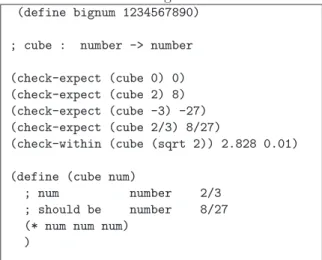
The Definitions pane should now look like Figure 7.1.
Figure 7.1: Definition of the cube function (define bignum 1234567890)
; cube : number -> number (check-expect (cube 0) 0) (check-expect (cube 2) 8) (check-expect (cube -3) -27) (check-expect (cube 2/3) 8/27)
(check-within (cube (sqrt 2)) 2.828 0.01) (define (cube num)
; num number 2/3 ; should be number 8/27 (* num num num)
)
(cube 19) "should be a little under 8000" (cube bignum) "should be 28-29 digits long"
7.7. WRITING NUMERIC FUNCTIONS 119
Note that the check-expect and check-within test cases can appear either before the function definition or after it; “should be”-style test cases must appear after the definition, or DrRacket will complain that you’re calling a function you haven’t defined yet.
Testing: Hit “Run” and look at the results. If any of the actual results doesn’t match what they “should be”, something is wrong.
Exercise 7.7.2 Develop a function named rect-perimeter that takes in the width and height of a rectangle, and returns its perimeter.
Exercise 7.7.3 Develop a functionnamedcircle-perimeterthat takes in the radius of a circle, and returns its perimeter.
Hint: The formula for the perimeter of a circle is approximately 3.14·2·r, whereris the radius. Since the 3.14 and 2 are “always the same”, they shouldn’t be parameters to the function.
Exercise 7.7.4 Develop a function named area-of-circle that takes in the radius of a circle and computes its area.
Hint: The formula for the area of a circle is approximately 3.14·r2, whereris the radius.
Worked Exercise 7.7.5 Consider the colored rings
and .
Design a functionnamed area-of-ringwhich computes the area of such a ring.
Solution:
Contract: The assignment doesn’t actually say what the function should take in, so we need to figure that out. The area clearly doesn’t depend on the color or location of the ring, butdoes depend on the size of both the inner and outer circles. How do we usually specify the size of a circle? Most often with itsradius. So this function needs to take in
two numbers: the inner radius and the outer radius. It doesn’t make sense for the inner radius to be larger than the outer radius, so let’s point that out.
; area-of-ring : number (inner-radius)
; number (outer-radius) -> number ; assumes inner-radius ≤ outer-radius
Examples: As usual, we’ll start with really easy ones that we can solve in our heads, then build up to more complicated ones. We’ll also throw in some “special cases”: one or both of the radii are zero, the two radii are equal,etc.
Before we can write down what the answers “should be”, we need to know how to find the right answers ourselves. So let’s imagine we were cutting out a “ring” in paper.
We would probably start by cutting a circle with the outer radius, then marking another circle with the inner radius and the same center, cutting that out, and throwing away the inner part. So the area of what we have left is the area of a circle with the outer radius,
minus the area of a circle with the inner radius. (check-expect (area-of-ring 0 0) 0) (check-expect (area-of-ring 2 2) 0)
(check-within (area-of-ring 0 1) 3.14 0.01) (check-within (area-of-ring 0 2) 12.56 0.01) (check-within (area-of-ring 1 2) 9.42 0.01)
; 4*3.14 for the outer circle, minus 3.14 for the inner circle (check-within (area-of-ring 2 5) 65.94 0.01)
; 25*3.14 for the outer circle, minus 4*3.14 for the inner circle
Skeleton: The contract already tells us the name of the function and of its two parameters, so we can immediately write
(define (area-of-ring inner-radius outer-radius) ...)
Inventory: There are two parameters, both of typenumber, and we know the “magic number” 3.14 is involved, so. . .
(define (area-of-ring inner-radius outer-radius)
; inner-radius number ; outer-radius number
; 3.14 magic number
...)
Body: If you already see what to do next, great. But for practice (or if you don’t
already see what to do next), let’s add a “should be” line and some values to this inventory. We need a “not too simple” example, which rules out those with a zero in them, and those with inner and outer radius the same. Let’s try the example(area-of-ring 1 2).
(define (area-of-ring inner-radius outer-radius) ; inner-radius number 1
; outer-radius number 2
; 3.14 magic number 3.14
; should be number 9.42
...)
Now how could you get the “right answer” 9.42 from the values above it? Obviously, the value that most resembles it is 3.14; the right answer in this case is exactly 3·3.14. Where did the 3 come from? The most obvious way is from 1 + 2, so we might guess that the expression is(* 3.14 (+ inner-radius outer-radius)). This seems a bit too simple, since it doesn’t use the area formula from before. Still, we can type this in and test it, and find that although it works for this test case, itfailstwo of the six test cases.
We’ve been led astray by pickingtoo simplea test case. If we had picked(area-of-ring 2 5) instead, we would have had a “right answer” of 65.94, which is 21 times 3.14. It may not be obvious where the 21 came from, but it’s certainly not (+ inner-radius outer-radius)! And we could reasonably figure out that the 21 comes from 52
−22 = 25−4, which would lead us to the correct formula
7.7. WRITING NUMERIC FUNCTIONS 121
(* 3.14 (- (* outer-radius outer-radius) (* inner-radius inner-radius))) If we type this in as the function body, it passes all the tests.
Another way to approach the problem would be to remember that the area of the ring is the area of the larger circle minus the area of the smaller circle; we can use the formula for the area of a circle twice to get
(- (* 3.14 outer-radius outer-radius) (* 3.14 inner-radius inner-radius)) which is equivalent to the answer above.
But once we’ve recognized that we need to compute the areas of circles, why notre-use
thearea-of-circlefunction we already wrote to do this job? (define (area-of-ring inner-radius outer-radius)
; inner-radius number ; outer-radius number
(- (area-of-circle outer-radius) (area-of-circle inner-radius))
)
This is much shorter and clearer.
Testing: Assuming you’ve typed all of this into the Definitions pane, you should be able to hit “Run” and check the results.
Improving the program: In fact, a more accurate formula for the area of a circle isπ·r2, whereπis a special number, approximately 3.141592653589793. In fact, πis so special that it comes predefined in Racket: there’s a variable namedpiwith this value. We can use this to make area-of-circle more accurate, by replacing the 3.14 in its body withpi. This built-in variablepiis inexact, so you’ll need to write your test cases usingcheck-within.
Practice Exercise 7.7.6 Replace the 3.14 in area-of-circle with pi, and change the test cases for botharea-of-circleandarea-of-ringappropriately. Make sure both functions still pass all their test cases.
Recall that we definedarea-of-ring byre-using area-of-circle. Since we’ve just madearea-of-circlemore accurate,area-of-ringis nowautomaticallymore accurate too, without changing anything in its definition! This is one of the powerful benefits of re-using one function in writing another.
Exercise 7.7.7 Develop a function named hours->minutes that takes in a number of hours, and returns how many minutes are in that many hours.
Hint: You can name the parameter anything you wish, but it’s best to give it a name that tells what it means. In this case, the input represents a number of hours, sohours would be a good name.
Exercise 7.7.8 Develop a function named days->hours that takes in a number of days, and returns how many hours are in that many days.
Exercise 7.7.9 Develop a functionnameddays->minutesthat takes in a number of days, and returns how many minutes are in that many hours.
Hint: By re-using previously-written functions, you should be able to write this function withno numbers in the definition (although you’ll need numbers in the examples).
Exercise 7.7.10 Develop a functionnamed dhm->minutesthat takes in three num-bers: how many days, how many hours, and how many minutes, in that order, and returns the total number of minutes.
Hint: Again, you should be able to write this with no numbers in the definition.
Exercise 7.7.11 Develop a functionnamedfeet->inches that takes in a number of feet, and returns the number of inches in that many feet.
Exercise 7.7.12 Develop a function named total-inches that takes in a length in
feet and inches(e.g. 5 feet, 2 inches) and returns the number of inches in that length (in this example, 62).
Hint: Look for opportunities tore-use functions you’ve already written.
Practice Exercise 7.7.13 Try the sin function on various values, including 0, 1,pi,
(/ pi 2),(/ pi 3),(/ pi 6),etc.
Comparethe results of
(sin (sqrt something))
with
(sqrt (sin something))
by plugging in various numbers for something.
Exercise 7.7.14 Develop a functionat-most-10 that takes in a number and returns either that number or 10, whichever is less.
Hint: Use the built-in functionmin(read about it in the Help Desk). While you’re at it, also look up themaxandabsfunctions.
Exercise 7.7.15 Develop a function named celsius->kelvin that takes in a tem-perature measurement in Celsius, and returns the corresponding temtem-perature in Kelvin.
Hint: A degree Kelvin is the same size as a degree Celsius, but 0◦K is approximately
−273.15◦C. This gives you at least one example:
(check-within (celsius->kelvin -273.15) 0 0.01)
Come up with at least two more examples of your own, and use the “inventory with values” technique to figure out the right algebraic expression.
Exercise 7.7.16 Develop a function named fahrenheit->celsius that takes in a temperature measurement in Fahrenheit, and returns the corresponding temperature in Celsius.
Hint: The conversion formula is C= (F−32)·5/9.
Exercise 7.7.17 Develop a functionnamedfahrenheit->kelvinthat takes in a tem-perature measurement in Fahrenheit, and returns the corresponding temtem-perature in Kelvin.
Hint: You should be able to write this with no numbers or arithmetic operators in the body of the function, by re-using previously-written functions.
7.7. WRITING NUMERIC FUNCTIONS 123
Exercise 7.7.18 Develop a functionnamedconvert-3-digitsthat takes in the “hun-dreds”, “tens”, and “ones” digits of a number, in that order, and returns the number itself. For example,
(convert-3-digits 5 2 8) "should be" 528
Exercise 7.7.19 Develop a function named convert-3-reversed that takes in the “ones”, “tens”, and “hundreds” digits of a number, in that order, and returns the number itself. For example,
(convert-3-reversed 7 0 1) "should be" 107
Hint: By re-using a previously-defined function, you should be able to write this in a line or two, with no numbers and only one arithmetic operator.
Exercise 7.7.20 Develop a function named top-half that takes in an image and returns the top half of it.
Hint: See Section 3.5 for functions you’ll need.
Exercise 7.7.21 (Thanks to Leon LaSpina for this problem)
Develop a functionnamedsplice-picturesthat takes in two images and combines them by splicing the left half of the first together with the right half of the second.
Hint: This will work best if you pick pictures of approximately the same height. Try the faces of two famous people . . .
Exercise 7.7.22 Develop a functionnamedprogress-barthat takes in three numbers (width, height, and progress) and a string (color) and produces a horizontal progress bar as in this example, in which the leftmost progress pixels are solid and the rest are outlined. You may assume that width,height, and progress are all positive integers, and that progress is no larger than width.
Exercise 7.7.23 Develop a functionbar-graphthat takes in four numbers and pro-duces a bar-graph with four vertical bars (red, blue, green, and yellow respectively) of those heights.
Exercise 7.7.24 Develop a functionframe-picthat takes in an image, a color name, and a positive number, and produces that picture surrounded by a “frame” of the specified color and thickness. For example,
> (frame-pic calendar "blue" 10)
Exercise 7.7.25 My wife wanted to change the background image on her Web page to a repeating image. But she didn’t want the image to repeat in a monotonous checkerboard pattern; she wanted each row to be offset from the previous one. Unfortunately, there’s no HTML command to do that, so I had to build an image which, when repeated horizontally and vertically,looks like alternating rows offset from one another.
Develop a function offset-tile which takes in an image and produces an image twice as tall: the top row is the original image, and the bottom row is the image split in half and put back together in reverse order.
Hint: This is trickier than it seems at first. Be sure to test it on both even-width and odd-width images, and try putting several copies of the result side by side to make sure you haven’t created “jaggies”.
This exercise may be easier if you first define two “helper functions”left-halfand right-half. We’ll learn more about helper functions in Chapter 11.
7.8. MANIPULATING COLORS IN IMAGES 125
7.8
Manipulating colors in images
7.8.1
Images, pixels, and colors
Images on a television or computer screen are actually made up of millions of tiny colored dots, called pixels (short for “picture elements”). Look at such a screen up close with a magnifying glass, and you may be able to see them. In many computer systems, including Racket, the color of each dot is represented in RGB (or RGBA) form: three (or four) numbers representing the amounts of red, green, blue, and perhaps opacity in the dot (the red, green, blue, and alpha components of the color). Each of these numbers is conventionally restricted to the integers from 0 to 255. So for example a color with 0 red, 0 green, and 0 blue is black; 255 red, 255 green, and 255 blue is white; 255 red, 0 green, and 0 blue is pure red; the combination of 100 red, 160 green, and 220 blue is a sort of light denim-blue; etc.
7.8.2
Building images pixel by pixel
The picturing-programs teachpack includes a function named build3-image which builds an image pixel by pixel based on where in the picture you are. Its contract is
; build3-image : number(width) number(height)
; function(red-function)
; function(green-function)
; function(blue-function)
; -> image
It takes in the width and height of the desired image, and three functions. Each of the three functions takes in the x and y coordinates of a pixel; one computes the red component, one the green component, and one the blue component.
Worked Exercise 7.8.1
Build a rectangle 50 by 50 which shades smoothly from black at the left edge to red (specifically 250 red, 0 green, 0 blue) at the right edge.
Solution: The only way we know to do this is using build3-image. Obviously the width and height are both 50, but we’ll need three functions to give it. For now, let’s name themred-function,green-function, andblue-function(we may come up with better names later).
Each of the three functionsmust have the contract ; whatever : number(x) number(y) -> number
Now we need some examples forred-function. It doesn’t care about theycoordinate given to it, but it should be 0 when thexcoordinate is 0, and 250 when thexcoordinate is 50. So
(check-expect (red-function 0 53) 0) (check-expect (red-function 50 17) 250)
What formula would give us this? Well, there are many ways to do it, but the simplest isred= 5x. Let’s add another test case in between:
The skeleton and inventory are straightforward: (define (red-function x y) ; x a number ; y a number ... )
And the formula is easy to translate into Racket: (define (red-function x y)
; x a number ; y a number
(* 5 x)
)
Test this, and it should work.
Now let’s try the green component. We already have the contract. The examples are easy: no matter whatxandy coordinates we plug in, the answer should be 0.
(check-expect (green-function 7 45) 0) (check-expect (green-function 118 -3) 0)
The skeleton and inventory are exactly the same as for red-function, except for renaming the function, and the body is even easier:
(define (green-function x y) ; x a number
; y a number
0
)
Test this, and it should work.
The blue function does exactly the same thing; we don’t even need to write and test another function for it (although we could if we wished).
We can now build the desired picture as follows:
(build3-image 50 50 red-function green-function green-function)
Try thisand see what comes out.
Note that I’ve usedgreen-functionas both the green function and the blue function. This is sorta confusing; it might be better to rename it to say what it does, instead of how we intend to use it in this problem.
(define ( always-zero x y) ; x a number
; y a number 0
)
(build3-image 50 50 red-function always-zero always-zero)
For that matter, we could renamered-function to better indicate what it does: let’s call it5x, because it returns 5 times thexcoordinate.
7.8. MANIPULATING COLORS IN IMAGES 127 (define ( 5x x y) ; x a number ; y a number (* 5 x) )
(build3-image 50 50 5x always-zero always-zero)
Exercise 7.8.2 Build a rectangle, 50 x 50, which shades smoothly from black at the top-left corner to purple (i.e. red plus blue) in the bottom-right corner. The top-right corner should be blue, and the bottom-left corner red.
Hint: You can re-use some previously-defined functions, and you’ll need to write a new one.
7.8.3
Error-proofing
What happens if you make the image larger than 50 x 50 in the above exercises? 51 is OK, 52 is OK, but 53 produces an error message because one of the color components is outside the range from 0 to 255.
SIDEBAR:
You may be wondering why 52 is OK, since 52·5 = 260. The reason is that the pixel positions are numbered from 0 up toone less thanthe width or height, so the largest number ever actually given to5xis 51.
One way to solve this problem is to not allow the numbers to get too big, using min: ; safe-5x : number(x) number(y) -> number (no more than 255)
(check-expect (safe-5x 0 17) 0) (check-expect (safe-5x 50 27) 250) (check-expect (safe-5x 51 7) 255) (check-expect (safe-5x 89 53) 255) (define (safe-5x x y) ; x a number ; y a number (min 255 (* 5 x)))
This way if 5x≤ 255, the answer will be 5x, but if 5xis too large, the function will return 255. Try thison an image of, say, 100 wide by 75 high. Do you like the result?
Another approach is to multiply by something smaller than 5, e.g. if you wanted a 100x75 image that shades smoothly from black to red, you might want to multiply by 2.55 instead of 5. This also produces error messages, however, because the components of a color are supposed to beintegers. Fortunately, there’s a function real->intthat does what it sounds like: it takes in a real number and produces the closest integer to it. For example,
; safe-2.55x : number(x) number(y) -> number (check-expect (safe-2.55x 0 17) 0) (check-expect (safe-2.55x 45 27) 115) (check-expect (safe-2.55x 100 7) 255) (check-expect (safe-2.55x 189 53) 255) (define (safe-2.55x x y) ; x a number ; y a number (min 255 (real->int (* 2.55 x))))
Note that thisreal->inttrick is only necessary if you’re multiplying coordinates by something other than an integer, since an integer times an integer is always an integer.
Exercise 7.8.3 Is it always clear what “the closest integer” is? Can you think of a kind of number for which there are two different “closest integers”? Experiment with
real->intto find what it does in this case. Do you have any guesses as to why it works this way?
Exercise 7.8.4
Build a rectangle, 100 x 100, which shades smoothly from red at the left edge to green at the right edge.
Exercise 7.8.5
Build a rectangle, 100 x 100, which shades smoothly from black at the top-left corner to yellow (i.e. red plus green) at the bottom-right corner. Every point along the diagonal from top-bottom-right to bottom-left should be the same color.
Hint: The formula needs to treatxand y the same, so that increasing either of them will increase the amount of color. The red and green functions will be the same.
Exercise 7.8.6
Build a rectangle, 100 x 100, which is yellow (i.e. red plus green) in the top-right and bottom-left corners, and black along the diagonal from top-left to bottom-right.
7.8. MANIPULATING COLORS IN IMAGES 129
Hint: Use the absfunction.
Exercise 7.8.7 Experimentwith colors based on
• the square of the xory coordinate,
• the square root of thexor y coordinate,
• the sine of the xory coordinate,
• the sum, difference, or product of the xandy coordinates
In all these cases, consider the largest and smallest possible values of the formula, and scale it and convert to integer so the color values are integers between 0 and 255. It may also be easier to see what’s happening if you divide the x or y coordinate by something like 10 or 20 before taking the sine of it.
7.8.4
Building images from other images
There’s also a built-in functionmap3-imagewhich is similar tobuild3-image, but builds a new imagefrom an existing image. Its contract is
; map3-image : function(red-function) ; function(green-function) ; function(blue-function) ; image -> image
That is, it takes in three functions and an image, and produces a new image. Each of the three functionsmust have the contract
; whatever : number(x) number(y)
; number(red) number(green) number(blue) -> number
The first two parameters are thexandy coordinates, as before. The third, fourth, and fifth are the red, green, and blue components of the pixel at that location in the original picture.
Worked Exercise 7.8.8 Choose an interesting picture (preferably a photograph) and build a version of it with all the red removed, leaving only the green and blue components.
Solution: Obviously, we’ll need to callmap3-image, which means we need three functions to give it. Let’s call themred-function,green-function, andblue-functionfor now. All three have the contract
; whatever : number(x) number(y)
The red function is easy: no matter what x,y, or the old color are, it should return 0:
(check-expect (red-function 10 20 30 40 50) 0) (check-expect (red-function 1000 100 250 125 0) 0) (define (red-function x y red green blue)
; x a number ; y a number ; red a number ; green a number ; blue a number 0)
The green function simply returns the same amount of green as before: (check-expect (green-function 10 20 30 40 50) 40)
(check-expect (green-function 1000 100 250 125 0) 125) (define (green-function x y red green blue)
; x a number ; y a number ; red a number ; green a number ; blue a number green)
and the blue function is similar, but returns the same amount of blue as before (left as an exercise).
Once all three of these are tested, we can simply say
(map3-image red-function green-function blue-function my-picture) to get the desired result.
Exercise 7.8.9 Define a functionremove-redthat takes in an image and returns the same image with all the red removed.
Hint: For this exercise, and most of the exercises in this section, there is no easy way to build “the right answer” other than the function itself. So I suggest describing the right answer in English, rather than using check-expect. You still need to write test cases, you just need to check them by eye rather than relying oncheck-expect.
Exercise 7.8.10 Define a functionswap-red-bluethat takes in an image and returns the same image with the red and blue components reversed: wherever there was a lot of red, there should be a lot of blue, and vice versa.
Exercise 7.8.11 Define a functionconvert-to-graythat takes in an image and re-turns the same image in gray-scale. That is, every pixel should have red, green, and blue components equal to one another. However, the totalamount of color at each pixel should be roughly the same as the total amount of color at that point in the original picture.
Exercise 7.8.12 Define a functionapply-blue-gradientthat takes in an image and returns an image with the same red and green components, but with the blue component equal to the y coordinate (so none at the top and the most at the bottom).
7.9. RANDOMNESS 131
Hint: Test your program with images of a variety of sizes, including some that are more than 255 pixels high. (It would be nice to have this function always reach full blue just at the bottom of the image, regardless of image height, but that requires some techniques you don’t know yet; we’ll see how in Chapters 27 and 28.)
Exercise 7.8.13 Make up some other cool tricks to do with images and their pixels. Go wild.
7.8.5
A sneak preview
It’s sort of inconvenient having to write three separate functions for the red, green, and blue components of the resulting picture (either for build3-image or for map3-image). There’s a function named build-image: where build3-image takes in three functions that return the red, green, and blue components of a pixel, build-image takes in one
function that returns a wholecolor (withmake-color).
Exercise 7.8.14 Re-write some of exercises 7.8.1 through 7.8.7 using build-image
instead ofbuild3-image.
There’s also a functionmap-imagewhich takes in onlyonefunction rather than three. But that function in turn takes in acolor rather than three numbers, so you can’t really use it until you’ve learned in Chapter 20 how to take colors apart.
7.8.6
A problem with bit-maps
Thebuild3-image and map3-image functions produce an image in a form called a bit-map (or, more precisely, a pixel-map). Such images display very nicely “as is”, but if you try to enlarge them or rotate them, the results often don’t look very good. For ex-ample, suppose my-picture was a picture you had created in one of these ways. Then rotate 15 my-picture, or scale 5 my-picture, may well have “jaggies” — visibly jagged, “stairstep” edges that wouldn’t happen if you just scaled or rotated a pure geo-metric shape like a triangle.
Exercise 7.8.15 Develop a function bitmapize that takes in a picture and, using
map3-image, returns an image with exactly the same colors. Compare the results of
(bitmapize (scale 5 (triangle 10 "solid" "blue"))) (scale 5 (bitmapize (triangle 10 "solid" "blue")))
Which one looks smoother? Why?
The moral of the story is that if you’re going to do bitmap operations (such as map3-image), they should be ideally doneafter scaling.
7.9
Randomness
If you were writing a video game, you probably wouldn’t want things to always play out the same way; you’d want to give the game a certain amount ofunpredictability. Likewise, people doing computer simulations of complex systems like traffic patterns, economics, aerodynamics, and drug interactions may want to include some unpredictable events in their simulations.
In Racket, as in most programming languages, this is done with the help of a built-in function called a random number generator.3 There’s a Racket function named
random that takes in a positive integer and returns a “randomly” chosen integer, at least zero and less than the given integer. Here’s a sample interaction:
> (random 10) 6 > (random 10) 4 > (random 10) 0 > (random 10) 3 > (random 10) 7 > (random 10) 4 > (random 10) 2
The answers can be anything from 0, 1, . . . 9 (10 choices). In general, the number of possible answers is equal to the argument of random. Trythe random function several times each, on several different arguments.
7.9.1
Testing random functions
Sincerandom produces an unpredictable result, it’s difficult to write test cases for func-tions that use it. If we write something like
(check-expect (random 10) 4)
it will fail 90% of the time. For that matter, if we write (check-expect (random 10) (random 10))
it willstill fail 90% of the time. (Why?)
One answer is to use "should be" and an English-language description of what’s a “reasonable” answer,e.g. "should be an integer from 0 through 9". Since random-valued functions may return different answers each time you call them on the same input, make sure totest them several times interactively: if you expect different answers each time, but you actually get the same answer each time, or if you expect several equally-likely answers but in fact one answer is much more common than another, something may be wrong.
Another way is to use one of check-expect’s cousins, check-member-of and check-range. check-member-of takes three or more arguments, and checks whether the first matchesany of the remaining ones:
(check-member-of (random 6) 0 1 2 3 4 5)
If you’re callingrandom with a large argument, you probably don’t want to type in all the possible answers, socheck-rangetakes in three numbers and checks that the first is between the second and third (inclusively — that is, it’s allowed to beexactly the second or the third):
3
Most “random number generators” don’t producereally random numbers, but rather a predictable sequence of numbers thatlookrandom unless you know the formula that is used to produce them.
7.9. RANDOMNESS 133
(check-range (random 1000) 0 999)
The check-member-ofand check-range functions are more convenient to use than “should be”, because you don’t have to look at the answers yourself. However, they don’t help you spot the kind of mistake described above, where a function that’s supposed to be random actually produces the same answer every time, or produces answers with the wrong probabilities. So even if you decide to usecheck-member-oforcheck-range, you should still have a few “should be”-style tests so you can see whether you’re actually getting different answers.
Even with check-member-of and check-range, it’s harder to test a function with random behavior than one that’s predictable. So as a general strategy, it’s best to make
as much as possible of the program predictable. If a program involves a random number, but thissame random number is used in several places, it’s a good idea to generate the random number once, then pass it to a predictable “helper” function that does all the non-random work. You can test this “helper” function just as you usually would, because it doesn’t have any randomness in it.
7.9.2
Exercises on randomness
Exercise 7.9.1 Develop a function namedrandom-digit that returns one of the in-tegers 0, 1, . . . 9, chosen at random.
Hint: This function doesn’t depend on a parameter, but DrRacket’s Beginner Lan-guage won’t let you write a function without a parameter, so have your function take in something and ignore it.
Exercise 7.9.2 Develop a functionnamedroll-diethat returns an integer randomly chosen from 1 to 6 inclusive — no zeroes, no 7’s.
Hint: As before, the function should take a dummy parameter. There are 6 possible answers; how do you make sure that the function never returns 0, but does return 6 some of the time?
Exercise 7.9.3 Develop a functionnamedtwo-dicethat acts like rolling two 6-sided dice and counting the total number of dots.
Hint: As before, give it a dummy parameter. Note that the possible answers are 2 through 12, but they’re not equally likely: 7 should come up much more often than 2 or 12. How can you test this?
Exercise 7.9.4 Develop a functionnamedrandom-picturethat takes in a width and a height, and produces a rectangle that size and shape, in which each pixel is a random color (that is, for each pixel, the red, green, and blue components are each chosen ran-domly). Note: I’m not asking you to pick a random color, then make a rectangle of that color; I want each pixelto be chosen at random separately.
7.10
Review of important words and concepts
Racket provides all the usual arithmetic operators: +, -, *, /,sqrt, etc. They obey the same syntax rule as everything else in Racket:
( function-name argument ...)
In other words, they areprefixoperators: we write thembeforewhatever they’re supposed to work on. This may feel unnatural for people accustomed to the infix operators we learned in grade school, but in many ways Racket’s syntax is simpler, more consistent, and more flexible; for example, there is no need to memorize precedence rules like PEMDAS, because everything is parenthesized.
Racket distinguishes among different kinds of numbers: integers, fractions, inex-act numbers and complex numbers. When testing a function with inexact results, use check-withinrather thancheck-expect.
Variables and functions can have numeric values, just as they can have image values. The process of defining them is almost exactly as before, except that it’s usually easier to construct “right answers” to function examples. There are a few predefined variables in Racket, notablypiand e, to stand for special numeric values.
Racket, like most programming languages, provides arandom number generator, which produces (mostly-)unpredictable numbers in a specified range. Since random-valued func-tions are unpredictable, you can’t test them usingcheck-expect, but you can specify in English what the allowable values are, or you can usecheck-member-oforcheck-range. Be sure to test such functions several times, both with checking functions and with “should be”.
7.11
Reference: Built-in functions on numbers
In this chapter we’ve introduced a number of functions, many of which you’ve been using for years:
• +, which takestwo or more parameters • −, which takesone or more parameters • ∗, which takestwo or more parameters • / • add1 • sub1 • sqrt • min • max • abs • sin • quotient • remainder
7.11. REFERENCE 135
• random
• pi, which is actually a built-in variable, not a function. • check-member-of
• check-range • build3-image • build-image • map3-image