AN991/D
Rev. 1, 1/2002
Using the Serial Peripheral
Interface to Communicate
Between Multiple
Microcomputers
Application Note
General Description
As the complexity of user applications increases, many designers find
themselves needing multiple microprocessors to provide necessary
functionality in a circuit. Communication between multiple processors can often
be difficult, especially when differing processors are used. A possible solution
to this problem is usage of the serial peripheral interface (SPI), an interface
intended for communication between integrated circuits on the same printed
wire board. The MC68HC05C4 is one of the first single-chip microcomputers to
incorporate SPI into hardware. One advantage of the SPI is that it can be
provided in software, allowing communication between two microcomputers
where one has SPI hardware and one does not. Special interfacing is
necessary when using the hardware SPI to communicate with a microcomputer
that does not include SPI hardware. This interface can be illustrated with a
circuit used to display either temperature or time, that incorporates both a
MC68HC05C4 and a MC68705R3. The MC68HC05C4 monitors inputs from a
keypad and controls the SPI data exchange, while the MC68705R3 determines
temperature by performing an analog-to-digital conversion on inputs from a
temperature sensor and controls the LED display. Communication between the
microcomputers is handled via SPI, with the MC68HC05C4 handling
exchanges in hardware, and the MC68705R3 handling them in software.
Usage of software SPI can be expanded to include circuits where the
single-chip implementing the SPI in software controls the data exchange, and those
in which neither single-chip has hardware SPI capability. Minor modifications to
the SPI code are necessary when data exchanges are controlled by software.
Debugging designs including multiple processors can often be confusing.
Some of the confusion can be alleviated by careful planning of both the physical
debugging environment and the order in which software is checked.
F
re
e
sc
a
le
S
e
m
ic
o
n
d
u
c
to
r,
I
n
c
.
..
Freescale Semiconductor
Serial Peripheral Interface
Communication between the two processors is handled via the serial
peripheral interface (SPI). Every SPI system consists of one master and one or
more slaves, where a master is defined as the microcomputer that provides the
SPI clock, and a slave is any integrated circuit that receives the SPI clock from
the master. It is possible to have a system where more than one IC can be
master, but there can only be one master at any given time. In this design, the
MC68HC05C4 is the master and the MC68705R3 is the slave. Four basic
signals, master-out/slave-in (MOSI), master-in/slave-out (MISO), serial clock
(SCK), and slave select (SS), are needed for an SPI. These four signals are
provided on the MC68HC05C4 on port D, pins 2–5.
Signals
The MOSI pin is configured as a data output on the master and a data input on
the slave. This pin is used to transfer data serially from the master to a slave,
in this case the MC68HC05C4 to the MC68705R3. Data is transferred most
significant bit first.
Data transfer from slave to master is carried out across the MISO,
master-in/slave-out, line. The MISO pin is configured as an input on the master
device and an output on the slave device. As with data transfers across the
MOSI line, data is transmitted most significant bit first.
All data transfers are synchronized by the serial clock. One bit of data is
transferred every clock pulse, and one byte can be exchanged in eight clock
cycles. Since the serial clock is generated by the master, it is an input on the
slave. The serial clock is derived from the master’s internal processor clock,
and clock rate is selected by setting bits 0 and 1 of the serial peripheral control
register to choose one of the four divide-by values. Values for the MCUs crystal
oscillators and the SPI divide-by must be chosen so that the SPI clock is no
faster than the internal processor clock on the slave.
The last of the four SPI signals is the slave select (SS). Slave select is an active
low signal, and the SS pin is a fixed input which is used to enable a slave to
receive data. A master will become a slave when it detects a low level on its SS
line. In this design, the MC68HC05C4 is always the master, so its SS line is tied
to V
DDthrough a pull-up resistor.
F
re
e
sc
a
le
S
e
m
ic
o
n
d
u
c
to
r,
I
n
c
.
..
AN991/D Serial Peripheral Interface
Registers
Three registers unique to the serial peripheral interface provide control, status,
and data storage.
The Serial Peripheral Control Register (SPCR), shown in
Figure 1
, provides
control for the SPI.
SPIE — Serial Peripheral Interrupt Enable
0 = SPIF interrupts disabled
1 = SPI interrupt if SPIF = 1
SPE — Serial Peripheral System Enable
0 = SPI system off
1 = SPI system on
MSTR — Master Mode Select
0 = Slave mode
1 = Master mode
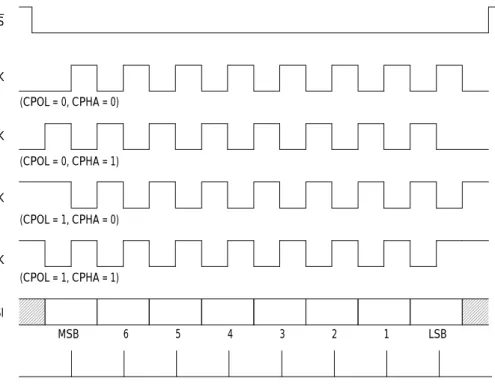
CPOL — Clock Polarity
When the clock polarity bit is cleared and data is not being transferred, a
steady state low value is produced at the SCK pin on the master device.
Conversely, if this bit is set, the SCK pin will idle high. This bit is also used
in conjunction with the clock phase control bit to produce the desired
clock-data relationship between master and salve. See
Figure 2
.
CPHA — Clock Phase
The clock phase bit, in conjunction with the CPOL bit, controls the clock-data
relationship between master and slave. The CPOL bit can be thought of as
simply inserting an inverter in series with the SCK line. The CPHA bit selects
one of two fundamentally different clocking protocols. When CPHA = 0, the
shift clock is the OR of SCK with SS. As soon as SS goes low the transaction
begins and the first edge of SCK involves the first data sample. When
CPHA = 1, the SS pin may be thought of as a simple output enable control.
Refer to
Figure 2
.
Address: $000A
Bit 7 6 5 4 3 2 1 Bit 0
SPIE SPE — MSTR CPOL CPHA SPR1 SPR0
Reset: 0 0 0 0 0 1 U U
U = Unaffected
Figure 1. Serial Peripheral Control Register (SPCR)
F
re
e
sc
a
le
S
e
m
ic
o
n
d
u
c
to
r,
I
n
c
.
..
Figure 2. Data Clock Timing
SPR1 and SPR0 — SPI Clock Rate Selects
These two serial peripheral rate bits select one of four baud rates (
Table 1
)
to be used as SCK if the device is a master; however, they have no effect in
the slave mode.
Data for the SPI is transmitted and received via the Serial Peripheral Data
Register (SPDR). A data transfer is initiated by the master writing to its SPDR.
If the master is sending data to a slave, it first loads the data into the SPDR and
then transfers it to the slave. When reading data, the data bits are gathered in
the SPDR and then the complete byte can be accessed by reading the SPDR.
Table 1. Serial Peripheral Rate Selection
SPR1 SPR0 Internal Processor Clock Divide By 0 0 2 0 1 4 1 0 16 1 1 32
INTERNAL STROBE FOR DATA CAPTURE (ALL MODES)
MSB 6 5 4 3 2 1 LSB SS SCK SCK SCK SCK MISO/MOSI (CPOL = 0, CPHA = 0) (CPOL = 0, CPHA = 1) (CPOL = 1, CPHA = 0) (CPOL = 1, CPHA = 1)
F
re
e
sc
a
le
S
e
m
ic
o
n
d
u
c
to
r,
I
n
c
.
..
AN991/D Demonstration Board Description
Demonstration Board Description
A keypad input from the user is used to choose the output display function. The
MC68HC05C4 monitors the keypad, decodes any valid inputs, and sends the
data to the MC68705R3. If the user has requested a temperature display, the
MC68705R3 sends a binary value of temperature in degrees farenheit to the
MC68HC05C4, where the value is converted to a celcius binary coded decimal
value and returned to the MC68705R3 to be displayed. The LEDs are common
anode display and are driven directly off of port B of the MC68705R3. If the user
desires the circuit to function as a real-time clock, a starting time must be
entered and transmitted from the MC68HC05C4 to the MC68705R3. Once the
clock has been initialized, the MC68705R3 updates the clock every minute.
Clock values are stored in memory, and when the circuit is functioning as a
thermometer, the values in memory are updated as required to maintain clock
accuracy.
Using the A/D Converter to Monitor Temperature
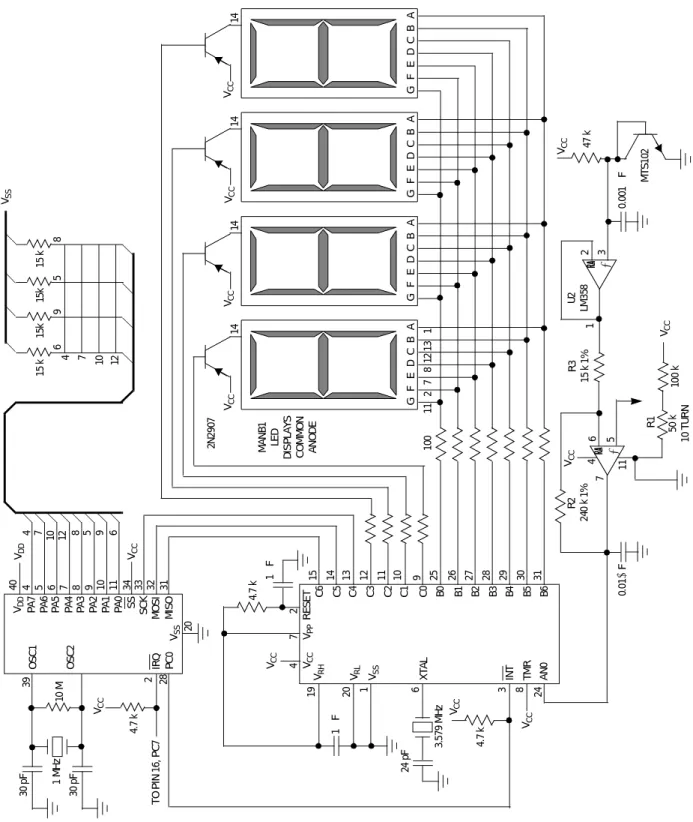
Temperature monitoring is performed by the Freescale MTS102 silicon
temperature sensor and the LM358 Dual Low-Power Operational Amplifier, as
shown in the schematic in
Figure 3
. Variations in the base-emitter voltage of
the Freescale MTS102 silicon temperature sensor are monitored by the
MC68705R3, which converts these analog inputs to equivalent digital values in
degrees farenheit. The sensor voltage is buffered, inverted, and amplified by a
dual differential amplifier before entering the A/D converter. An amplifier gain
of 16 is used, resulting in 20-millivolt steps per degree farenheit. Using a V
CCof 5 volts, the maximum differential amplifier output is 3.8 volts, resulting in a
temperature sensing range of –40 degrees to +140 degrees farenheit.
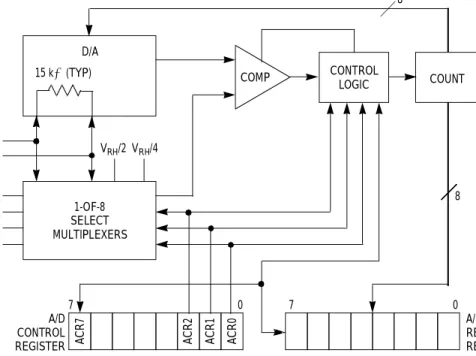
The output from the differential amplifier is connected to the A/D converter on
the MC68705R3. A block diagram of the successive approximation A/D
converter is shown in
Figure 4
. Provision is made for four separate external
inputs and four internal analog channels.
Two different registers associated with the converter control channel selection,
initiate a conversion, and store the result of a completed conversion. Both the
external and the internal input channels are chosen by setting the lower 3 bits
of the A/D Control Register (ACR). The internal input channels are connected
to the V
RH/V
RLresistor chain and may be used for calibration purposes.
The converter operates continuously, requiring 30 machine cycles per
conversion. Upon completion of a conversion, the digital value of the analog
input is placed in the A/D result register (ARR) and the conversion complete
flag, bit 7 of the ACR is set. Another sample of the selected input is taken, and
a new conversion is started.
F
re
e
sc
a
le
S
e
m
ic
o
n
d
u
c
to
r,
I
n
c
.
..
Figur
e
3
.
S
e
ria
l P
e
ri
phe
ra
l
Int
e
rf
a
c
e
De
m
ons
tra
tion S
c
he
m
a
ti
c
– + GF E D C B A 14 GF E D C B A 14 GF E D C B A 14 GF E D C BA 14 11 2 7 8 12 13 1 VCC VCC VCC VCC MA NB 1 LE D D IS PL AYS CO MM O N AN OD E 2N 290 7 10 0 15 14 13 12 11 10 9 25 26 27 28 29 30 31 C6 C5 C4 C3 C2 C1 C0 B0 B1 B2 B3 B4 B5 B6 VCC VPP R ESE T VRH VRL VSS XT A L IN T TMR AN 0 19 20 1 6 3 8 24 47 2 VCC VCC 4. 7 k 24 pF 1 µ F 1 µ F – + VCC 0. 0 1 µ F R2 24 0 k 1% 4 7 6 5 11 R1 50 k 10 T U R N 100 k VCC U2 LM 3 58 1 2 3 VCC 47 k MTS 1 02 0. 00 1 µ F R3 15 k 1% VCC 4. 7 k M C 68H C 05C 4 OSC 1 OSC 2 IR Q PC 0 VSS 30 pF 1 M H z 10 M T O PI N 16, PC 7 30 pF VCC 4. 7 k 28 2 39 20 40 4 5 6 7 8 9 10 11 34 33 32 31 VDD PA 7 PA 6 PA 5 PA 4 PA 3 PA 2 PA 1 PA 0 SC K SS MO S I MI S O VDD 15 k 15k 15k 69 5 8 4 7 10 12 15 k VSS VCC 3. 579 M H z 4 7 10 12 8 5 9 6F
re
e
sc
a
le
S
e
m
ic
o
n
d
u
c
to
r,
I
n
c
.
..
AN991/D Using the A/D Converter to Monitor Temperature
Figure 4. A/D Block Diagram
Conversions are performed internally in hardware by a simple bisection
algorithm. The D/A converter (DAC) is initially set to $80, the midpoint of the
available conversion range. This value is compared with the input value and, if
the input value is larger, $80 becomes the new minimum conversion value and
the DAC is once again set to the midpoint of the conversion range, which is now
$C0. If the input value is less than $80, $80 becomes the maximum conversion
value and the DAC is set to the midpoint of the new conversion range, in this
case $40. This process is repeated until all eight bits of the conversion are
determined.
Quantizing errors are reduced to +1/2 LSB, rather than +0, –1 LSB, through
usage of a built-in 1/2 LSB offset. Ignoring errors, the transition between 00 and
01 will occur at 1/2 LSB above the voltage reference low, and the transition
between $FE and $FF will occur 1-1/2 LSBs below voltage reference high.
The A/D converter returns a value of $30 when given an input of zero degrees
farenheit, so $30 must be subtracted from the result before converting to
celcius. This offset must also be considered when calibrating the sensor.
Calibration of the temperature sensor can be performed by adjusting the
variable resistor to produce a display of $00 after a piece of ice has been placed
on the temperature sensor for approximately one minute. A 00 display results
from a value of $50 in the ARR, so the variable resistor should be adjusted until
this value is reached.
8 A CR7 ACR2 ACR1 ACR0 A/D CONTROL REGISTER A/D RESULT REGISTER 7 0 7 0 1-OF-8 SELECT MULTIPLEXERS PD0/AN0 PD1/AN1 PD2/AN2 PD3/AN3 VRH VRL VRH/2 VRH/4 15 kΩ (TYP) D/A COMP CONTROL LOGIC COUNT 8
F
re
e
sc
a
le
S
e
m
ic
o
n
d
u
c
to
r,
I
n
c
.
..
Communication Considerations
In this application, an SPI read or write is initiated via an interrupt from the MCU
desiring to write data. When any of the three function keys, display
temperature, set time, or display time, are pressed, the MC68HC05C4, as
master, sends the MC68705R3 an interrupt on the MC68705R3’s INT pin. The
MC68HC05C4 writes the key value to its serial peripheral data register, thereby
initiating the SPI. It then waits for the SPIF bit to go high and returns to scanning
the keypad.
At the same time the MC68HC05C4 is writing to its SPDR, the MC68705R3
sets a bit counter to eight and waits for the first SCK from the MC68HC05C4.
After each clock pulse, the MC68705R3 checks the status of the data bit, sets
the carry bit equal to the data bit, and rotates the carry bit left into a result
register. The bit counter is decremented, compared to zero, and if not zero, the
MC68705R3 waits for the next clock pulse and repeats the cycle.
To ensure proper data transfers, the internal processor clock of the
MC68705R3 must be sufficiently faster than the SPI clock of the MC68HC05C4
to allow the MC68705R3 time to complete this routine before the
MC68HC05C4 can send another bit. This requires the user to first write the
code to handle the software SPI, count machine cycles, and then choose MCU
oscillator values that allow the additional machine cycles required in a software
SPI to be completed before the master can send another clock pulse to the
slave.
For example, consider the following piece of code for the MC68705R3, a slave
receiving data from the master.
DATA IN PORTC pin 5
SCK PORTC pin 4
Cycles Instruction
2 LDA #$08
5 STA BITCT Set bit counter
10 NXT BRSET 4,PORTC,* Wait for clock transition 10 BRSET 5,PORTC,STR Check data status
6 STR ROL RESULT Store in result
6 DEC BITCT Check for end of byte
4 BNE NXT Get next bit
43
Execution of this code requires 43 machine cycles. The maximum oscillator
speed for an MC68705R3 is 1 MHz, requiring an SPI clock no greater than
1/43 MHz. One way of obtaining this rate for the SPI clock is to run the
MC68HC05C4 at 0.5 MHz and choose a divide-by 32 to generate the SPI clock.
F
re
e
sc
a
le
S
e
m
ic
o
n
d
u
c
to
r,
I
n
c
.
..
AN991/D Additional Uses of SPI
If the user has selected a temperature display, it is necessary for the
MC68705R3, as a slave, to send data to the MC68HC05C4 master. When the
MC68705R3 is ready to send data, it interrupts the MC68HC05C4 via the
MC68HC05C4’s IRQ line. The MC68HC05C4 then writes to its serial peripheral
data register to initiate the transfer and shifts in data bits sent from the
MC68705R3 until the SPIF bit goes high. While the MC68HC05C4 is writing to
its SPDR, the MC68705R3 program is setting a bit counter to 8. When it detects
a clock pulse on the SCK pin, the data register is rotated left one bit, placing
the MSB in the carry. The MOSI pin is then set equal to the carry bit, the bit
counter is decremented and, if it is greater than zero, the process is repeated.
Additional Uses of SPI
Many variations of this usage of the SPI are possible. The three possibilities
are:
• Hardware SPI at both master and slave
• Software SPI at the master and hardware at the slave
• Software SPI at both master and slave
Table 1
shows the various MCUs that have SPI implemented in hardware.
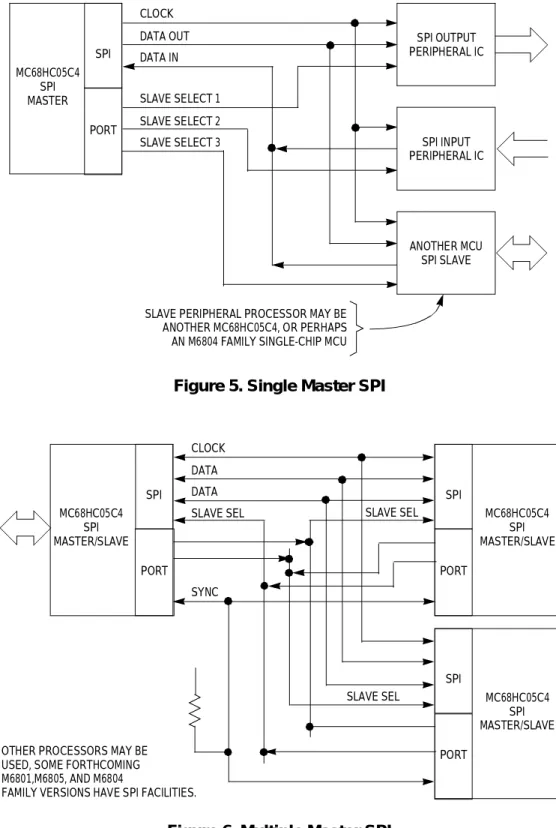
SPI is fairly straightforward in a circuit where both master and slave have
hardware SPI capability. In this case, the MCUs are connected as shown in
Figure 5
and
Figure 6
.
Figure 5
illustrates a single master system, and
Figure 6
shows a system where either MCU can be system master. When both
master and slave have SPI capability in hardware, data transfers can be
handled full duplex. For a single master system, both master and slave write
the data to be transferred to their respective serial peripheral data registers. A
data transfer is initiated when the master writes to its serial peripheral data
register. A slave device can shift data at a maximum rate equal to the CPU
clock, so clock values must be chosen that allow the slave to transfer data at a
rate equal to the master’s transfer rate. In a multiple master system, the master
must pull the slave’s SS line low prior to writing to its serial peripheral data
register and initiating the transfer.
Programming a
Master for Software
SPI
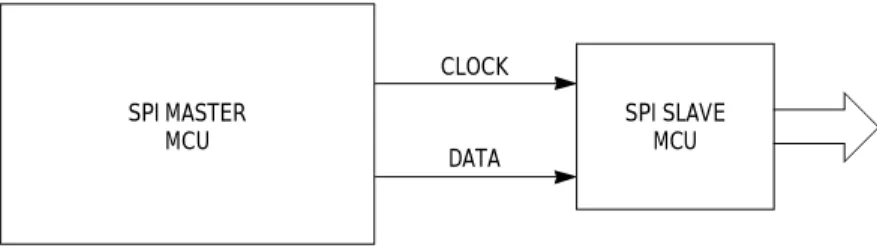
When the master in an SPI system does not have hardware SPI capabilities,
the resulting system is quite different. An SPI system with a master providing
the SPI in software is shown in
Figure 7
. This system only requires two lines
between the microcomputers; data and clock. A slave select line can be added
for use with multiple slaves. If operated with one data line, the SPI will function
half-duplex only. Data is stored in a register, rotated left one bit at a time, and
a port pin is set equal to the data bit. The master then provides the serial clock
by toggling a different port pin. A bit counter must also be used to count the
eight bits in the byte.
F
re
e
sc
a
le
S
e
m
ic
o
n
d
u
c
to
r,
I
n
c
.
..
Figure 5. Single Master SPI
Figure 6. Multiple Master SPI
SPI INPUT PERIPHERAL IC ANOTHER MCU SPI SLAVE SPI OUTPUT PERIPHERAL IC SPI PORT MC68HC05C4 SPI MASTER CLOCK DATA OUT DATA IN SLAVE SELECT 1 SLAVE SELECT 2 SLAVE SELECT 3
SLAVE PERIPHERAL PROCESSOR MAY BE ANOTHER MC68HC05C4, OR PERHAPS AN M6804 FAMILY SINGLE-CHIP MCU
SPI PORT MC68HC05C4 SPI MASTER/SLAVE CLOCK DATA DATA SLAVE SEL SYNC SPI PORT MC68HC05C4 SPI MASTER/SLAVE SPI PORT MC68HC05C4 SPI MASTER/SLAVE SLAVE SEL SLAVE SEL
OTHER PROCESSORS MAY BE USED, SOME FORTHCOMING M6801,M6805, AND M6804
FAMILY VERSIONS HAVE SPI FACILITIES.
F
re
e
sc
a
le
S
e
m
ic
o
n
d
u
c
to
r,
I
n
c
.
..
AN991/D Additional Uses of SPI
Figure 7. Software SPI
Bit manipulation instructions are very useful for implementing SPI in software.
One possible software implementation for a write from the master to the slave
is shown below.
DATA OUT PORTC pin 0 SCK PORTC pin 1
LDX #$08 Bit counter
LDA DATA Put data in register A RPT ROLA Shift a data bit into carry
BCS SET Check for a 1
BCLR 0,PORTC Set data out line to 0 CLK BSET 1,PORTC
BCLR 1,PORTC Toggle clock pin DECX Check for end of byte BNE RPT It not, repeat
SET BSET 0,PORTC Set data out line to 1 BRA CLK Go to clock
Full-duplex operation requires a second data line. One port pin is then devoted
to data-out and one to data-in. Data transfer from slave to master is
accomplished immediately before the SCK pin is toggled. The state of the
data-in pdata-in is tested, and the carry is then set equal to the data-data-in pdata-in. This value is
then rotated into a result register. The modified code is shown below.
DATA OUT PORTC pin 0 SCK PORTC pin 1 DATA IN PORTC pin 2
LDX #$08 Bit counter
LDA DATA Put data in register A BCLR 1,PORTC Clear clock pin
RPT ROLA Shift a data bit into carry BCS SET Check for a 1
BCLR 0,PORTC Set data out line to 0 BSET 1,PORTC Set clock pin
DIN BRCLR3,PORTC,CLK Check state of data CLK ROL DATAIN Rotate input data one bit
DECX Check for end of byte BNE RPT If not, repeat
SET BSET 0,PORTC Set data out line to 1 BRA DIN Go to data input
SPI SLAVE MCU CLOCK DATA SPI MASTER MCU
F
re
e
sc
a
le
S
e
m
ic
o
n
d
u
c
to
r,
I
n
c
.
..
Programming a
Slave for Software
SPI
If the slave in the system is a MCU with hardware SPI capability, the data
transfer will happen automatically, one bit per clock pulse. If the slave is a MCU
that does not have SPI implemented in hardware, a read requires the following
actions. A bit counter is set to eight, the slave polls its SCK pin waiting for a
clock transition, once it perceives a clock it checks its data-in pin, sets the carry
equal to the data and rotates the carry into a results register. One possible code
implementation is shown in the previous timing example.
Converting this to full duplex operation requires the addition of a write from
slave to master. The slave rolls a data register to place the data bit to be sent
into the carry, and the data-out pin is set equal to the carry. These actions occur
prior to the read of data from the master. With these modifications, the code
looks as shown below.
DATA OUT PORTC pin 6 DATA IN PORTC pin 5 SCK PORTC pin 4 LDA #$08
STA BITCT Set bit counter AGN BRSET 4,PORTC,* Wait for clock
ROL RES1 Shift data to send BCS SET1 Check data status BCLR 6,PORTC If 0, clear data out BRCLR 4,PORTC,* Wait for clock transition BRSET 5,PORTC,STR Check input data status STR ROL RESULT Store in result
DEC BITCT Check for end of byte BNE AGN
Debugging Tips
Debugging a circuit containing two microcomputers presents various problems
not evident when working with a single microcomputer circuit. The first problem
is simultaneously providing emulation for both microcomputers. Once
emulation capability is arranged, the designer needs to keep track of the
progress of each single-chip, and monitor how the actions of one affects the
actions of the other.
One of the easiest methods to debug a circuit of this type is to use two emulator
stations, complete with separate terminals. Any emulators can be used, but
user confusion is reduced if the emulators have similar commands and syntax.
Physical separation also helps reduce confusion.It is somewhat easier to keep
track of the concurrent operations if one side of the prototype board is devoted
to each single-chip and the majority of peripherals they each must interface
with, and the emulator for that microcomputer is placed to that side of the
printed circuit board.
F
re
e
sc
a
le
S
e
m
ic
o
n
d
u
c
to
r,
I
n
c
.
..
AN991/D Conclusion
Before starting simultaneous debugging, it is best to individually debug the
code for each microcomputer wherever possible. Once it becomes necessary
for the microcomputers to communicate with one another, halt one of the
microcomputers anytime they are not actually talking and work with the
remaining microcomputer. As the debugging progresses, keep in mind that an
error in the function of one single-chip does not necessarily indicate an error in
the corresponding code for that single-chip, but rather, the error may have been
caused by an incorrect or unintended transmission from the other single-chip.
Although the aforementioned suggestions reduce debugging problems, some
will remain. Long periods of debug can result in an obscuring of the separation
of the functions of the two programs. It helps to take periodic breaks to get away
from the system and clear the thought processes. Expect to occasionally be
confused, be willing to retrace sections of code multiple numbers of times, and
the debugging will proceed fairly smoothly.
Conclusion
The Serial Peripheral Interface can be used as a tool to interconnect to MCU
with various other MCUs or peripherals, and can be used with any
microcomputer. A special case occurs when one, or more, of the MCUs in a
circuit do not have SPI capability in hardware. In this case, a simple software
routine can be written to perform the SPI. Used in this manner, the SPI
eliminates the need for costly, inconvenient parallel expansion buses and
Universal ‘Asynchronous Receiver/Transmitters (UARTs) and simplifies the
design effort.
F
re
e
sc
a
le
S
e
m
ic
o
n
d
u
c
to
r,
I
n
c
.
..
Code Listings
0001
0002 nam spicnt
0003
0004 ************ REGISTER ADDRESS DEFINITION ************ 0005 0006 0000 porta equ 0 0007 0002 portc equ 2 0008 0003 portd equ 3 0009 0004 ddra equ 4 0010 0006 ddrc equ 6
0011 000A spcr equ $0a
0012 000B spsr equ $0b 0013 000C spdr equ $0c 0014 0012 tcr equ $12 0015 0016 0017 00B0 org $b0 0018 0019 00B0 rwno rmb 1 0020 00B1 tmpa rmb 1 0021 00B2 dctr rmb 1 0022 00B3 ct1 rmb 1 0023 00B4 base rmb 4 0024 00B8 lsb rmb 1 0025 00B9 msb rmb 1 0026 0027 0020 org $20 0028
0029 ************ KEYPAD LOOUP TABLE ************ 0030 0031 0020 kypd equ * 0032 0033 0020 07 fcb $07 0034 0021 04 fcb $04 0035 0022 01 fcb $01 0036 0023 00 fcb $00 0037 0024 08 fcb $08 0038 0025 05 fcb $05 0039 0026 02 fcb $02
0040 0027 0A fcb $0a disp. temp.
0041 0028 09 fcb $09
0042 0029 06 fcb $06
0043 002A 03 fcb $03
0044 002B 0E fcb $0e set time
0045 002C 0D fcb $0d am
0046 002D 0C fcb $0c pm
0047 002E 0F fcb $0f disp. time
0048 002F 0B fcb $0b blank
0049
0050 0100 org $100 program start
0051
0052 0100 9C start rsp
0053 0101 3F 12 clr tcr mask timer interrupts
0054 0103 AE 7B ldx #$7b
F
re
e
sc
a
le
S
e
m
ic
o
n
d
u
c
to
r,
I
n
c
.
..
AN991/D Code Listings
0056 0107 AE 7F ldx #$7f
0057 0109 BF 0A stx spcr set spi cont. reg.
0058 010B BF 06 stx ddrc set c0 as output
0059 010D 3F 00 clr porta clear keypad inputs
0060 010F A6 F0 lda #$f0 set up port a
0061 0111 B7 04 sta ddra a7-a4 out., a0-a3 in
0062 0113 9B sei
0063
0064 ** check keypad **
0065
0066 0114 CD 01 67 key jsr keypad
0067 0117 A1 0A cmp #$0a check for disp. temp
0068 0119 27 0E beq dtmp
0069 011B A1 0E cmp #$0e check for set time
0070 011D 27 2B beq sttm
0071 011F A1 0F cmp #$0f check for disp. time
0072 0121 27 06 beq dtmp
0073 0123 A1 0B cmp #$0b check for disp. sec
0074 0125 27 02 beq dtmp
0075 0127 20 EB bra key wait for next input
0076
0077 ** display temp **
0078
0079 0129 11 02 dtmp bclr 0,portc send interruptfor spi 0080 012B CD 01 59 jsr spiwr send byte
0081 012E A1 0A cmp #$0a check for disp. temp.
0082 0130 27 02 beq cir 0083 0132 20 E0 bra key 0084 0085 0134 9A cir cli 0086 0135 20 DD bra key 0087 0088 ** set time ** 0089 0137 CD 01 67 nudig jsr keypad 0090 013A A1 0A cmp #$0a 0091 013C 27 F9 beq nudig 0092 013E A1 0B cmp #$0b
0093 0140 27 F5 beq nudig look for valid digit
0094 0142 A1 0E cmp #$0e
0095 0144 27 F1 beq nudig
0096 0146 A1 0F cmp #$0f
0097 0148 27 ED beq nudig
0098 014A 11 02 sttm bclr 0,portc send int. for spi 0099 014C CD 01 59 jsr spiwr send value
0100 014F A1 0C cmp #$0c check for pm
0101 0151 27 C1 beq key yes, wait for next input
0102 0153 A1 0D cmp #$0d check for am
0103 0155 27 BD beq key yes, wait for next input 0104 0157 20 DE bra nudig get next time digit 0105
0106 ** spi write subroutine **
0107
0108 0159 spiwr equ *
0109 0159 B7 0C sta spdr put data in data reg. 0110 015B 0F 0B FD brclr 7,spsr,* wait for end of byte
0111 015E 10 02 bset 0,portc
0112 0160 81 spiflg rts done 0113
F
re
e
sc
a
le
S
e
m
ic
o
n
d
u
c
to
r,
I
n
c
.
..
0114 ** spi read subroutine ** 0015
0016 0161 spird equ *
0017 0161 BF 0C stx spdr initiate transfer
0118 0163 0F 0B FD brclr 7,spsr,* wait for end of byte 0119 0166 81 rdend rts
0120
0121 ** keypad scanning routine ** 0122
0123 0167 keypad equ *
0124
0125 ** 32 msec delay **
0126
0127 0167 A6 20 wtlp lda #$20 set up outer loop
0128 0169 B7 B3 sta ct1 counter
0129 016B A6 32 otlp lda #$32 set up inner loop
0130 016D 4A inlp deca dec. inner loop
0131 016E 26 FD bne inlp when 0,
0132 0170 3A B3 dec ct1 decrement outer loop
0133 0172 26 F7 bne otlp
0134 0174 5F clrx set up row counter
0135 0175 A6 80 lda #$80 check first row
0136 0177 B7 00 sta porta
0137 0179 B6 00 nxtr lda porta check for key
0138 0178 A4 0F and #$0f mask upper nibble
0139 017D A1 00 cmp #$00 look for zero
0140 017F 26 09 bne debnc branch if have a key
0141 0181 37 00 asr porta try next row
0142 0183 5C incx decrement row counter
0143 0184 A3 03 cpx #$03 check for zero
0144 0186 23 F1 bls nxtr test next row
0145 0188 20 DD inval bra wtlp no key pressed 0146
0147 ** debounce key input **
0148
0149 018A B7 B1 debnc sta tmpa save value
0150 018C BF B0 stx rwno save row number
0151 018E A6 FF lda #$ff set up delay
0152 0190 4A loop deca
0153 0191 26 FD bne loop wait
0154 0193 B6 00 lda porta check row again
0155 0195 A4 0F and #$0f mask upper nibble
0156 0197 B1 B1 cmp tmpa check for same key
0157 0199 26 CC bne wtlp return if invalid
0158
0159 ** wait for key release **
0160
0161 019B B6 00 wtr lda porta check value
0162 019D A4 0F and #$0f mask upper nibble
0163 019F A1 00 cmp #$00 look for zero
0164 01A1 26 F8 bne wtr wait for release
0165
0166 ** decode key value **
0167
0168 01A3 B6 B1 lda tmpa restore value
0169 01A5 5F clrx set up column ctr.
0170 01A6 44 nxtc lsra shift columns
0171 01A7 25 03 bcs col branch if have column
0172 01A9 5C incx
0173 01AA 20 FA bra nxtc try next column
F
re
e
sc
a
le
S
e
m
ic
o
n
d
u
c
to
r,
I
n
c
.
..
AN991/D Code Listings
0175 01AD 58 lslx x=4*col. no.
0176 01AE 9F txa place x in a
0177 01AF BB B0 add rwno key value =4*col + row
0178 01B1 97 tax place a in x
0179 01B2 E6 20 lda kypd,x convert to decimal
0180 01B4 B7 B1 sta tmpa
0181 01B6 81 rts
0182
0183 ****** temperature conversion routine ******
0184 *
0185 * farenheit value is received from 705r3 via 0186 * spi and received in the a register. the value 0187 * is converted to celcius and the leftmost
0188 * led is blanked.
0189
0190 01B7 r3int equ *
0191 01B7 CD 01 61 jsr spird read value
0192 01BA B6 0C lda spdr transfer value to register
0193 01BC A0 20 sub #$20 subtract 32
0194 01BE 24 05 bhs conv if pos. convert
0195 01C0 40 nega negate
0196 01C1 AE 0A ldx #$0a
0197 01C3 BF B6 stx base+2 ‘-’ pattern
0198
0199 *** temperature conversion ***
0200 ** a 16-bit multiply by 5 is performed on the 0201 ** value received from the r3. this number
0202 ** is then divided by 9.
0203
0204 01C5 3F B9 conv clr msb clear counters
0205 01C7 3F B8 clr lsb
0206 01C9 B7 B8 sta lsb
0207 01CB 48 lsla multiply by 2
0208 01CC 39 B9 rol msb load overflow into msb
0209 01CE 48 lsla multiply by 2
0210 01CF 39 B9 rol msb load overflow into msb
0211 01D1 BB B8 add lsb a contains value x5
0212 01D3 24 02 bcc div
0213 01D5 3C B9 inc msb if overflow, inc msb
0214 01D7 3F B2 div clr dctr 0215 01D9 B7 B8 sta lsb 0216 01DB 98 clc 0217 01DC 3C B2 nxt9 inc dctr 0218 01DE B7 B8 sta lsb 0219 01E0 B6 B9 lda msb
0220 01E2 A2 00 sbc #$00 subtract borrow from msb
0221 01E4 B7 B9 sta msb
0222 01E6 B6 B8 lda lsb count factors of 9
0223 01E8 A0 09 sub #$09
0224 01EA 24 F0 bcc nxt9 if no borrow, repeat 0225 01EC 3D B9 tst msb if borrow, check for end
0226 01EE 26 EC bne nxt9 repeat if not end
0227 0228
0229 *** end of divide, add last 9 back in and 0230 *** check remainder for rounding
0231
0232 01F0 AB 09 add #$09 find remainder
0233 01F2 A1 04 cmp #$04 if greater
0234 01F4 22 02 bhl done then 4, round up
0235 01F6 3A B2 dec dctr
F
re
e
sc
a
le
S
e
m
ic
o
n
d
u
c
to
r,
I
n
c
.
..
0236 01FB B6 B2 done lda dctr 0237
0238 01FA AE 0B pos ldx #$0b blank pattern
0239 01FC BF B7 stx base+3 blank most sig. digit 0240
0241 *** convert binary value to bcd value ***
0242 *
0243 * the x registers begins with the binary value 0244 * and exits with zero. each digit, units, tens 0245 * and hundreds, is stored separately and checked
0246 * for a value equal to 10.
0247
0248 01FE 97 tax place a into x
0249 01FF 4F clra
0250 0200 3F B5 clr base+1 clear values
0251 0202 3F B6 clr base+2
0252 0204 5D st tstx check for end
0253 0205 27 17 beq send if complete, send to r3
0254 0207 5A decx decrement hex number
0255 0208 4C inca increment decimal number
0256 0209 A1 DA cmp #$0a equal to 10?
0257 020B 26 F7 bne st no, keep going
0258 020D 3C B5 inc base+1 increment tens
0259 020F B6 B5 lda base+1 test for 10
0260 0211 A1 0A cmp #$0a
0261 0213 27 03 beq hund if equal, set hundreds
0262 0215 4F zero clra clear ones
0263 0216 20 EC bra st count next 10
0264 0218 3F B5 hund clr base+1 clear tens
0265 021A 3C B6 inc base+2 increment hundreds
0266 021C 20 F7 bra zero
0267
0268 * send all digits to 70r3 via spi 0269 * start by interrupting r3 and then 0270 * sequentially sending four values 0271
0272 021E B7 B4 send sta base store ones
0273 0220 B6 B6 lda base+2
0274 0222 27 0B beq blk
0275 0224 E6 B4 nxtdg lda base,x start at base 0276 0226 CD 01 59 jsr spiwr send to r3
0277 0229 5C incx
0278 022A A3 03 cpx #$03 look for end
0279 022C 26 F6 bne nxtdg if no, next digit
0280 022E 80 rtl 0281 022F A6 0B blk lda #$06 0282 0231 B7 B6 sta base+2 0283 0233 2D EF bra nxtdg 0284 0285
0286 *** initialize interrupt vectors *** 0287 0288 1FF4 org #1ff4 0289 0290 1FF4 01 00 spivec fdb start 0291 1FF6 01 00 scivec fdb start 0292 1FF8 01 00 tmrvec fdb start 0293 1FFA 01 B7 irqvec fdb r3int 0294 1FFC 01 00 swivec fdb start 0295 1FFE 01 00 reset fdb start
F
re
e
sc
a
le
S
e
m
ic
o
n
d
u
c
to
r,
I
n
c
.
..
AN991/D Code Listings 0001 0002 nam r3disp 0003 0004 ************ REGISTER DEFINITION ************ 0005 0006 0001 portb equ 1 0007 0002 portc equ 2 0008 0005 ddrb equ 5 0009 0006 ddrc equ 6 0010 0008 tdr equ 8 0011 0009 tcr equ 9
0012 000E acr equ 14
0013 000F arr equ 15 0014 0015 0016 0040 org $40 0017 0018 0019 0040 wrdat rmb 1 0020 0041 timtmp rmb 1 0021 0042 ct rmb 1 0022 0043 ct1 rmb 1 0023 0044 result rmb 1 0024 0045 res1 rmb 1 0025 0046 bitct rmb 1 0026 0047 sec rmb 1 0027 0048 segmnt rmb 1 0028 0049 pm rmb 1 0029 004A base rmb 4 0030 0031 0080 org $80 0032
0033 *** display look-up table *** 0034 0035 0080 segtab equ * 0036 0080 01 fcb %00000001 0 0037 0081 4F fcb %01001111 1 0038 0082 12 fcb %00010010 2 0039 0083 06 fcb %00000110 3 0040 0084 4C fcb %01001100 4 0041 0085 24 fcb %00100100 5 0042 0086 20 fcb %00100000 6 0043 0087 0F fcb %00001111 7 0044 0088 00 fcb %00000000 8 0045 0089 0C fcb %00001100 9 0046 008A 7E fcb %01111110 -0047 008B 7F fcb %01111111 blank 0048 008C 7F fcb %01111111 pm 0049 008D 18 fcb %00011000 p 0050
0051 0090 org $90 program start
0052
F
re
e
sc
a
le
S
e
m
ic
o
n
d
u
c
to
r,
I
n
c
.
..
0053 *** initialize variables *** 0054
0055 0090 start equ *
0056 0090 A6 07 lda #$07
0057 0092 C7 0F 38 sta $f38 set MOR
0058 0095 A6 FF lda #$ff
0059 0097 B7 05 sta ddrb set up port b as output
0060 0099 B7 08 sta tdr set timer for prescale of 128
0061 009B B7 4A sta base
0062 009D B7 4B sta base+1 blank time display
0063 009F B7 4C sta base+2
0064 00A1 B7 4D sta base+3
0065 00A3 A6 EF lda #$ef
0066 00A5 B7 02 sta portc set portc to choose msd
0067 00A7 B7 48 sta segmnt
0068 00A9 A6 CF lda #$cf
0069 00AB B7 06 sta ddrc set up c0-3, c6, c7 as outputs
0070 00AD A6 0F lda #$0f
0071 00AF B7 09 sta tcr unmask timer interrupt
0072 00B1 3F 41 clr timtmp start with time disp.
0073 00B3 3F 47 clr sec set seconds to zero
0074 00B5 3F 49 clr pm start with am
0075 00B7 A6 3B lda #$3b
0076 00B9 B7 42 sta ct set up timing loops
0077 00BB A6 08 lda #$08 0078 00BD B7 43 sta ctl 0079 00BF 9A cli 0080 0081 * delay for 0082 0083 00C0 AE FF dlay ldx #$ff 0084 00C2 A6 FF lda #$ff 0085 00C4 4A deca 0086 00C5 26 FD bne dlay+4 0087 00C7 5A decx 0088 00C8 26 F8 bne dlay+2 0089 0090 * temperature measurement * 0091
0092 00CA 3F 0E clr acr clear conv. complete flag
0093 00CC B6 0E lda acr
0094 00CE 2A FC bpl *-2
0095 00D0 B6 0F lda arr get result
0096 00D2 A2 30 sbc #$30 adjust so 0 deg =$30
0097 00D4 B7 45 sta res1 store in spi data register
0098 00D6 B6 41 lda timtmp
0099 00D8 A1 07 cmp #$07 check for temp. update
0100 00DA 26 E4 bne dlay
0101
F
re
e
sc
a
le
S
e
m
ic
o
n
d
u
c
to
r,
I
n
c
.
..
AN991/D Code Listings
0102 *** send temperature value to hc05c4 for 0103 * conversion into celcius. start by
0104 * interrupting the hc05c4 and then transmit
0105 * data via the spi.
0106
0107 00DC 9B sei
0108 00DD 1F 02 bclr 7,portc interrupt hc05c4
0109 00DF CD 01 18 jsr spiwr write data to hc05c4
0110 00E2 AE 04 ldx #$04
0111
0112 * wait for return data ~ 140 cycles * 0113
0114 00E4 A6 0B lda #$0b
0115 00E6 B7 51 sta base+7
0116 00E8 A6 0E lda #$0e
0117 00EA 4A timlp deca
0118 00EB 26 FD bne timlp
0119
0120 * get decimal values in celcius from
0121 * hc05c4
0122
0123 00ED CD 01 01 nxtdg jsr spird
0124 00F0 B6 44 lda result get value
0125 00F2 E7 4A sta base,x store
0126 00F4 5C incx
0127 00F5 A3 07 cpx #$07 check for end
0128 00F7 26 F4 bne nxtdg
0129 00F9 9A cli
0130 00FA 20 C4 bra dlay
0131
0132 ** select temperature display ** 0133
0134 00FC A6 07 temp lda #$07
0135 00FE B7 41 sta timtmp choose temp. display
0136 0100 80 rti
0137 0138
0139 **** spi routines ****
0140 * the three pins used for the spi are
0141 * miso bit 6, portc
0142 * mosi bit 5, portc
0143 * sck bit 4, portc
0144 * the r3 waits for a high-to-low 0145 * transition on he spi clock, which 0146 * is provided by the hc05c4 and sent 0147 * on portc pin 4. a bit of data is 0148 * transferred on each high-to-low
0149 * transition of the clock.
0150
0151 * spi read *
0152
0153 0101 spird equ *
0154 0101 A6 08 lda #$08
0155 0103 B7 46 sta bitct set bit counter
F
re
e
sc
a
le
S
e
m
ic
o
n
d
u
c
to
r,
I
n
c
.
..
0156 0105 08 02 FD nxt brset 4,portc,* wait for clock transition 0157 0108 0A 02 00 brset 5,portc,str check data status
0158 *
0159 * note: the brset command automatically 0160 * sets the carry bit to be equal to the
0161 * bit under test
0162 *
0163 010B 39 44 str rol result store in result
0164 010D A6 02 lda #$02 delay loop
0165 010F 4A stall deca
0166 0110 26 FD bne stall
0167 0112 9D nop
0168 0113 3A 46 dec bitct check for end of byte
0169 0115 26 EE bne nxt get next bit
0170 0117 81 rts
0171
0172 * spi write *
0173 * data to be sent is in result at
0174 * start of write
0175
0176 0118 spiwr equ *
0177 0118 A6 08 lda #$08
0178 011A B7 46 sta bitct set bit counter
0179 011C 39 45 agn rol res1 shift data
0180 011E 25 12 bcs set1 check data status
0181 0120 1D 02 bclr 6,portc if 0, clear miso
0182 0122 1E 02 bset 7,portc clear interrupt
0183 0124 19 02 bclr 4,portc
0184 0126 9D nop
0185 0127 9D nop timing delay.
0186 0128 08 02 FD tst brset 4,portc,* wait for clock trans.
0187 012B 3A 46 dec bitct check for end of byte
0188 012D 26 ED bne agn
0189 012F 1E 02 bset 7,portc clear interrupt
0190 0131 81 rts
0191
0192 0132 1C 02 set1 bset 6,portc if 1, set miso
0193 0134 1E 02 bset 7,portc clear interrupt
0194 0136 18 02 bset 4,portc
0195 0138 20 EE bra tst
0196
0197 ** initialization of data read via spi **
0198 *
0199 * a data read is initiated via an interrupt 0200 * from the hc05c4. the value received is 0201 * tested to determine which function is 0202 * requested and the processor jumps to the
0203 * proper routine.
0204 *
0205
0206 013A CD 01 01 c4int jsr spird get value
0207 013D A6 03 lda #$03
0208 013F B7 41 sta timtmp choose time
0209 0141 B6 44 lda result
F
re
e
sc
a
le
S
e
m
ic
o
n
d
u
c
to
r,
I
n
c
.
..
AN991/D Code Listings
0211 0145 27 B5 beq temp
0212 0147 A1 0F cmp #$0f check for display time
0213 0149 27 3C beq rtry
0214 014B A1 0E cmp #$0e check for set time
0215 014D 27 39 beq clrtm
0216 014F A1 0D cmp #$0d check for am
0217 0151 27 0C beq am
0218 0153 A1 0B cmp #$0b check for secs
0219 0155 27 6A beq dsec
0220 0157 A1 0C cmp #$0c check for pm
0221 0159 26 39 bne dig no, set digit
0222 015B A6 FF lda #$ff set pm address
0223 015D B7 49 sta pm
0224
0225 ** check for valid input ** 0226
0227 015F B6 4D am lda base+3 check tens of hours
0228 0161 27 08 beq blhr if zero, blank digit
0229 0163 A1 01 cmp #$01
0230 0165 27 46 beq twoc
0231 0167 A1 0B cmp #$0b look for blank
0232 0169 26 48 bne blank if not, blank display
0233 016B A6 0B blhr lda #$0b
0234 016D B7 4D sta base+3 blank tens of hours
0235 016F B6 4B mtn lda base+1 check tens of minutes
0236 0171 A1 05 cmp #$05 check against 5
0237 0173 22 3E bhi blank if greater, blank display
0238
0239 * valid input, set timer counter * 0240
0241 0175 A6 0F lda #$0f
0242 0177 B7 09 sta tcr unmask timer interrupt
0243 0179 A6 43 lda #$43
0244 017B B7 42 sta ct load inner loop counter
0245 017D A6 06 lda #$06
0246 017F B7 43 sta ct1 load outer loop counter
0247 0181 3F 47 clr sec 0248 0183 3F 52 clr base+8 0249 0185 3F 53 clr base+9 0250 0187 80 rtry rti 0251 0252 * clear displays * 0253 0254 0188 A6 0B clrtm lda #$0b
0255 018A B7 4A sta base
0256 018C B7 4B sta base+1
0257 018E B7 4C sta base+2
0258 0190 B7 4D sta base+3 0259 0192 20 F3 bra rtry 0260 0261 0262 * input digit * 0263
F
re
e
sc
a
le
S
e
m
ic
o
n
d
u
c
to
r,
I
n
c
.
..
0264 *** time setting routine *** 0265 * time is inputted left to right 0266 * and the end of input is indicated 0267 * by pressing either the am or pm 0268 * button. pm is denoted on the 0269 * display by lighting the decimal 0270 * point. counters are set to zero out
0271 * after each second.
0272 * 0273 0274 0275 0194 9A dig cli 0276 0195 B6 4C lda base+2 0277 0197 B7 4D sta base+3
0278 0199 B6 4B lda base+1 shift data left one
0279 019B B7 4C sta base+2 digit
0280 019D B6 4A lda base
0281 019F B7 4B sta base+1
0282 01A1 B6 44 lda result enter digit 1
0283 01A3 B7 4A sta base
0284 01A5 A1 09 cmp #$09 check for valid digit
0285 01A7 22 DE bhi rtry
0286 01A9 B7 4A sta base
0287 01AB 20 DA bra rtry get next number
0288
0289 * check if time less than 12 o’clock
0290 * blank display if not
0291
0292 01AD B6 4C twoc lda base+2 check hours units
0293 01AF A1 02 cmp #$02
0294 01B1 23 BC bls mtn okay, check tens of min.
0295 01B3 3F 4D blank clr base+3
0296 01B5 3F 4C clr base+2
0297 01B7 A6 0D lda #$0d
0298 01B9 B7 4B sta base+1 send error message
0299 01BB A6 05 lda #$05
0300 01BD B7 A4 sta base
0301 01BF 20 C6 bra rtry
0302
0303 **** seconds display ****
0304 * blank first two leds
0305 *
0306 01C1 B7 41 dsec sta timtmp set timtmp to $0b
0307 01C3 B7 55 sta base+$b blank 1st two leds
0308 01C5 B7 54 sta base+$a 0309 01C7 80 rti 0310 0311 0312 **** display routine **** 0313 *
0314 * displays are refreshed every msec 0315 * when a timer interrupt occurs. the 0316 * most significant digit is displayed 0317 * first. at the conclusion of each 0318 * minute, the time is updated
F
re
e
sc
a
le
S
e
m
ic
o
n
d
u
c
to
r,
I
n
c
.
..
AN991/D Code Listings 0320 0321 01C8 tmrint equ * 0322 0323 01C8 99 sec
0324 01C9 BE 41 ldx timtmp choose time or temp
0325 01CB A6 FF lda #$ff blank displays
0326 01CD B7 01 sta portb send to leds
0327 01CF 36 48 ror segmnt select display
0328 01D1 25 04 bcs min2 look for restart
0329 0330
0331 01D3 A6 F7 lds #$f7 restart with msd
0332 01D5 B7 48 sta segmnt
0333 01D7 E6 4A min2 lda base,x load a with minutes
0334 01D9 5A decx point to next digit
0335 01DA 02 48 02 brset 1,segment,hrs1 check hours units
0336 01DD E6 4A lda base,x load a with tens of min.
0337 01DF 5A hrs1 decx point to next digit
0338 01E0 04 48 02 brset 2,segment,hrs2 check tens of hrs.
0339 01E3 E6 4A lda base,x load a with hours units
0340 01E5 5A hrs2 decx point to next digit
0341 01E6 06 48 02 brset 3,segment,disp display value
0342 01E9 E6 4A lda base,x load a with tens of hrs
0343 01EB A4 0F disp and #$0f mask upper nibble
0344 01ED 97 tax set x equal to a
0345 01EE EE 80 ldx segtab,x display value table
0346 01F0 BF 01 stx portb enable display drivers
0347 01F2 B6 48 lda segmnt
0348 01F4 B7 02 sta portc enable display
0349
0350 ** count display refreshes. 402 refreshes 0351 * equals one second. after 402 refreshes,
0352 * update clock
0353 *
0354
0355 01F6 A6 10 lda #$10 set timer to interrupt
0356 01F8 B7 08 sta tdr after 2048 cycles
0357 01FA A6 0F lda #$0f
0358 01FC B7 09 sta tcr reset timer interrupt flag
0359 01FE 3A 42 dec ct decrement inner loop
0360 0200 26 08 bne ret
0361 0202 A6 3B lda #$3b reset inner loop
0362 0204 B7 42 sta ct
0363 0206 3A 43 dec ct1 decrement outer loop
0364 0208 27 01 beq tmchg if one sec., to time change
0365 020A 80 ret rti
0366
0367 ***** time change routine ***** 0368 * when 60 seconds are counted, 0369 * increase minutes by one, if
0370 * necessary, blank minutes and increase 0371 * hours. change am/pm if needed.
0372 * 0373
F
re
e
sc
a
le
S
e
m
ic
o
n
d
u
c
to
r,
I
n
c
.
..
0374 020B tmchg equ *
0375 020B 3C 47 inc sec increase seconds
0376 020D 3C 52 inc base+8 inc. secs. units
0377 020F B6 52 lda base+8
0378 0211 A1 0A cmp #$0a look for ten
0379 0213 27 38 beq tens if yes, inc. tens
0380 0215 A6 3C minck lda #$3c look for a minute
0381 0217 B1 47 cmp sec
0382 0219 26 54 bne ret1 wait for next second
0383 021B 3F 47 clr sec
0384 021D 3F 53 clr base+9 zero display
0385 021F B6 4A lda base check min. units
0386 0221 A1 09 cmp #$09 less than 9?
0387 0223 26 20 bne inm1 increase
0388 0225 3F 4A clr base min. units = 0
0389 0227 B6 4B lda base+1 check tens of min.
0390 0229 A1 05 cmp #$05 less than 5?
0391 022B 26 1C bne inm2 increase
0392 022D 3F 4B clr base+1 tens of min =0
0393 022F B6 4D lda base+3 check tens of hrs.
0394 0231 A1 0B cmp #$0b look for blank
0395 0233 27 1E beq hrck less than 10:00
0396 0235 B6 4C lda base+2 check hrs. units
0397 0237 A1 02 cmp #$02 less than 2?
0398 0239 26 2A bne inhr1a increase
0399 023B A6 0B lda #$0b
0400 023D B7 4D sta base+3 set time to 1:00
0401 023F A6 01 lda #$01
0402 0241 B7 4C sta base+2
0403 0243 20 2A bra ret1 done
0404 0245 3C 4A inm1 inc base increase min. units
0405 0247 20 26 bra ret1 done
0406 0249 3C 4B inm2 inc base+1 increase tens of min.
0407 024B 20 22 bra ret1
0408
0409 024D 3F 52 tens clr base+8 zero sec. units
0410 024F 3C 53 inc base+9 inc sec. tens
0411 0251 20 C2 bra minck
0412
0413 * increase hours *
0414
0415 0253 B6 4C hrck lda base+2 check hours units
0416 0255 A1 09 cmp #$09 less than 9?
0417 0257 26 08 bne inhr1 increase
0418 0259 3F 4C clr base+2 hours units =0
0419 025B 3F 4D clr base+3
0420 025D 3C 4D inc base+3 tens of hours =1
0421 025F 20 0E bra ret1 done
0422 0261 3C 4C inhr1 inc base+2 increase hours units
0423 0263 20 0A bra ret1 done
0424 0265 3C 4C inhr1a inc base+2 increase hours units
0425 0267 B6 4C lda base+2 check value
0426 0269 A1 02 cmp #$02 for 12:00
F
re
e
sc
a
le
S
e
m
ic
o
n
d
u
c
to
r,
I
n
c
.
..
AN991/D Code Listings
0427 026B 26 9D bne ret no, done
0428 026D 33 49 com pm switch pm indicator
0429 026F A6 3B ret1 lda #$3b
0430 0271 B7 42 sta ct reset inner loop counter
0431 0273 A6 08 lda #$08
0432 0275 B7 43 sta ct1 reset outer loop counter
0433 0277 80 rti
0434 0435
0436 *** initialize interrupt vectors *** 0437
0438 0FF8 org $ff8
0439
0440 0FF8 01 C8 tmrvec fdb tmrint 0441 0FFA 01 3A intveq fdb c4int 0442 0FFC 00 90 swiveq fdb start 0443 0FFE 00 90 reset fdb start
F
re
e
sc
a
le
S
e
m
ic
o
n
d
u
c
to
r,
I
n
c
.
..
F
re
e
sc
a
le
S
e
m
ic
o
n
d
u
c
to
r,
I
n
c
.
..
Information in this document is provided solely to enable system and software implementers to use Freescale Semiconductor products. There are no express or implied copyright licenses granted hereunder to design or fabricate any integrated circuits or integrated circuits based on the information in this document.
Freescale Semiconductor reserves the right to make changes without further notice to any products herein. Freescale Semiconductor makes no warranty, representation or guarantee regarding the suitability of its products for any particular purpose, nor does Freescale Semiconductor assume any liability arising out of the application or use of any product or circuit, and specifically disclaims any and all liability, including without limitation consequential or incidental damages. “Typical” parameters which may be provided in Freescale Semiconductor data sheets and/or specifications can and do vary in different applications and actual performance may vary over time. All operating parameters, including “Typicals” must be validated for each customer application by customer’s technical experts. Freescale Semiconductor does not convey any license under its patent rights nor the rights of others. Freescale Semiconductor products are not designed, intended, or authorized for use as components in systems intended for surgical implant into the body, or other applications intended to support or sustain life, or for any other application in which the failure of the Freescale Semiconductor product could create a situation where personal injury or death may occur. Should Buyer purchase or use Freescale Semiconductor products for any such unintended or unauthorized application, Buyer shall indemnify and hold Freescale Semiconductor and its officers, employees, subsidiaries, affiliates, and distributors harmless against all claims, costs, damages, and expenses, and reasonable attorney fees arising out of, directly or indirectly, any claim of personal injury or death associated with such unintended or unauthorized use, even if such claim alleges that Freescale Semiconductor was negligent regarding the design or manufacture of the part.
How to Reach Us:
Home Page:
www.freescale.com
E-mail:
USA/Europe or Locations Not Listed:
Freescale Semiconductor
Technical Information Center, CH370 1300 N. Alma School Road
Chandler, Arizona 85224
+1-800-521-6274 or +1-480-768-2130 [email protected]
Europe, Middle East, and Africa:
Freescale Halbleiter Deutschland GmbH Technical Information Center
Schatzbogen 7 81829 Muenchen, Germany +44 1296 380 456 (English) +46 8 52200080 (English) +49 89 92103 559 (German) +33 1 69 35 48 48 (French) [email protected] Japan:
Freescale Semiconductor Japan Ltd. Headquarters ARCO Tower 15F 1-8-1, Shimo-Meguro, Meguro-ku, Tokyo 153-0064 Japan 0120 191014 or +81 3 5437 9125 [email protected] Asia/Pacific:
Freescale Semiconductor Hong Kong Ltd. Technical Information Center
2 Dai King Street Tai Po Industrial Estate Tai Po, N.T., Hong Kong +800 2666 8080
For Literature Requests Only:
Freescale Semiconductor Literature Distribution Center P.O. Box 5405
Denver, Colorado 80217 1-800-441-2447 or 303-675-2140 Fax: 303-675-2150